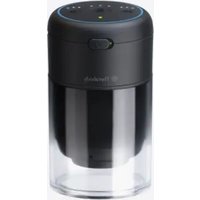
TheraCup - Massage device THERABODY - Free user manual and instructions
Find the device manual for free TheraCup THERABODY in PDF.


| Product Type | Cupping massage device |
| Brand | Therabody |
| Model | TheraCup |
| Usage | Dynamic cupping body massage |
| Dimensions (approx.) | 12 x 10 x 8 cm (main unit) |
| Weight | 0.4 kg |
| Power source | Rechargeable lithium-ion battery |
| Battery life | Up to 2 hours of continuous use |
| Charging time | Approximately 2 hours |
| Material | ABS plastic and medical silicone |
| Intensities | 3 adjustable suction levels |
| Massage modes | Continuous, pulsed, and gliding suction |
| Number of cups | 4 different sizes |
| Cup diameters | 3, 5, 7, and 9 cm |
| Smart features | Bluetooth connectivity with Therabody app |
| Noise level | < 40 dB |
| Warranty | 2 years |
| Included accessories | 4 cups, USB-C charging cable, user manual |
| Care and cleaning | Clean with a soft cloth and non-abrasive disinfectant |
| Safety | Automatic shut-off after 15 minutes of inactivity |
| App compatibility | iOS and Android |
| Protection rating | IPX4 (splash resistant) |
| Country of origin | China |
Frequently Asked Questions - TheraCup THERABODY
User questions about TheraCup THERABODY
0 question about this device. Answer the ones you know or ask your own.
Ask a new question about this device
Download the instructions for your Massage device in PDF format for free! Find your manual TheraCup - THERABODY and take your electronic device back in hand. On this page are published all the documents necessary for the use of your device. TheraCup by THERABODY.
USER MANUAL TheraCup THERABODY
Powered by ThermaVibration Technology™
Table of contents
EN 3-9
ES 10-16
FR 17-23
IT 24-30
DE 31-37
SC 38-44
FRCA 45-51
Product overview
TheraCup
Advanced Cupping Therapy Made Easy.
From the creators of Theragun® comes TheraCup™, a digitized cupping therapy leveraging science-backed technology for a more controlled, effective, and safe solution. TheraCup™ combines cupping with vibration and heat for a more efficient and easy-to-use recovery solution. Advanced, effective, and portable, TheraCup's™ innovative technology can be used by professionals or for at-home use.
Intended Use
TheraCup™ innovates on the traditional method of cupping therapy. TheraCup™ is intended to help relieve muscle tension and tightness and reduce pain and soreness. This device is intended to stimulate the natural healing process by increasing blood flow to the treated area to help reduce pain and soreness and enhance mobility. TheraCup™ combines vibration and heat together to provide an automated, effective, pressure-controlled method to perform cupping therapy.

Getting started
Step 1 - Use cupping technology
- Select the cup size (small, medium, large) best suited for the area you want to use TheraCup™. See below for more information on how to select the appropriate cup size. Ensure contact between the cup and the black ring on the device for sealing.
- Once comfortable, turn ON TheraCup™ by dragging the MasterSwitch slider to the right. The battery status LED shows that the device is ON.
- Short press the suction (middle) button to begin cupping. Short press the suction button to toggle through the pressure settings (low, medium, high). Turning on the suction also turns on the first level of heat and vibration.
- Place the cup on your forearm to adjust settings accordingly before use, or place directly on the intended area, such as your back, arms, and legs and begin use. Once placed, push the cup into the skin for strong suction. Once suctioned, you can release your grip during the treatment.
- Short press the vibration button to toggle through the speed settings. A long press turns off the treatment.
- Short press the heat button to toggle through the three temperatures. A long press turns off the treatment.
- After three minutes, you will hear a short beep, indicating that TheraCup™ treatment is complete. Five seconds after the beep, the suction will stop. If you want to discontinue treatment at any point, long press the suction (middle) button or drag the MasterSwitch slider to the left (off).
- To turn OFF TheraCup™, drag the MasterSwitch slider to the left.
Step 2 - Discover Pro Mode treatment
- Select the cup size (small, medium, large) best suited for the area you want to use TheraCup™. See below for more information on how to select the appropriate cup size. Ensure contact between the cup and the black ring on the device for sealing.
- Once comfortable, turn ON TheraCup™ by dragging the MasterSwitch slider to the right. The battery status LED shows that the device is ON.
- There are two ways to use Pro Mode: Flash Cupping and Gliding Cupping.
- Long press the vibration and heat buttons simultaneously for approximately five seconds to reach Pro Mode. Two white lights will illuminate when Pro Mode is on, and the device will begin to suction. Suction levels are not adjustable in Pro Mode. The default setting in Pro Mode is Gliding Cupping. To access Flash Cupping, press the suction (center button). Three white lights will illuminate to indicate that Flash Cupping mode is on.
- Short press the vibration button to turn ON the vibration. Short press the vibration button to toggle through the speed settings. A long press turns off the treatment.
- Short press the heat button to turn ON the heat treatment. Short press the heat button to toggle through the three temperatures. A long press stops the treatment.
- Gliding mode: Apply a massage medium, such as an oil or lotion, to the intended treatment area. Place the cup on the intended area, such as IT bands, quads, and calves. Once the cup has full suction, lightly lift the cup up and away from the skin, slowly gliding over the treatment area.
- Flash cupping mode: Place the cup on the intended area, such as IT bands, quads, and calves. Allow the pressure to build up for 2-5 seconds, and then pull to release the cup. When using the smaller cup, release after about two seconds. When using the larger cup, release after about five seconds.
- After five minutes, you will hear a short beep, indicating that TheraCup™ treatment is complete. Five seconds after the beep, the suction will stop.
- To turn OFF TheraCup™ during or after treatment, drag the MasterSwitch slider to the left.
EN
Getting started
Step 3 - Feel the difference. ™ Every day.
Whether used to improve soreness and tightness, post-workout, or general wellness,TheraCup™ will help keep you feeling your best.
General usage notes:
- Cup Sizes Overview
a. Small: (35mm) recommended for smaller muscles, e.g., levator scapulae (back of the neck), traps, knees, calves.
b. Medium: (45mm) recommended for medium muscles, e.g., deltoids, triceps, forearms, traps.
c. Large: (55mm) cup) recommended for larger muscles, e.g., traps, back, lower back, hamstrings, quadriceps, calves.
- As with cupping generally, bruising will occur after use of TheraCup™.
See Warnings insert for important safety instructions
Getting to know your cupping device
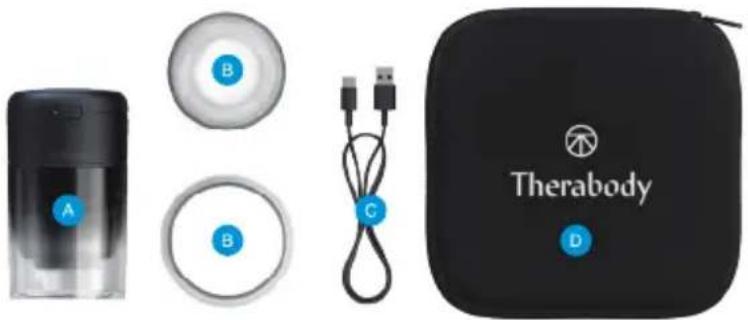
Figure 1.

Suction device

Three Interchangeable
Transparent Cups:
35mm, 45mm, 55mm

USB-C Cable

Neoprene Pouch cover
Suction Intensity Settings Overview
Level 1 = Low Intensity
Level 2 = Medium Intensity
Level 3 = High Intensity
Vibration Settings Overview
Level 1 = Vibration Therapy Level Low
Level 2 = Vibration Therapy Level High
Level 3 = Vibration Therapy Level Wave
Heat Settings Overview
Level 1 = Low Heat
Level 2 = Medium Heat
Level 3 = High Heat
Getting to know your cupping device
Charging
- TheraCup™ is USB-C enabled.
- TheraCup™ includes a USB-C to USB-A cable.
- You can plug the device into any standard USB adapter.
- The USB port is located opposite of the MasterSwitch.
- The battery level is indicated in the LED indicator of the battery:
- Orange: low charge, blue: mid charge, green: fully charged.
- When charging, the LED will flash to indicate it is properly connected and will turn solid green when complete.
- You can always check the battery level by inserting the battery level by dragging the switch to the right while the device is on. The battery LED switches off while the device is turned off.
Note: If using a charger from a third party, ensure that it is from a certified manufacturer and has not suffered any structural damage. Do not try to use the device while charging.
Cleaning Instructions:
- Toggle the MasterSwitch to the left to turn OFF TheraCup TM . Ensure that the battery status LED is OFF.
- Use disinfectant wipes for sanitizing the cups and heating element.
- Clean TheraCup ™ with a lightly dampened cloth or an alcohol-based solution if it comes in contact with anything that may cause stains or other damage, like: dirt or sand, makeup, ink, soap, detergent, acids or acidic foods, or with liquids other than fresh water, including those that may lead to skin irritation such as: sweat, salt water, soapy water, pool water, perfume, insect repellent, lotions, sunscreen, oil, adhesive remover, hair dye, or solvents.
- Dry TheraCup TM with a non-abrasive, lint-free cloth.
- TheraCup TM comes with replaceable filters to prevent foreign substances from damaging the device. To replace the filter, remove the small rubber cap located at the top of the heated pad. Replace the filter once every six months.
Figura 1.

Pour commencer
Figure 1.


Appareil de succion
Trois ventouses transparentes interchangeables : 35 mm, 45 mm, 55 mm

Câble USB-C
Per iniziare
IT
Figura 1.
Erste Schritte
DE
Abbildung 1.

Schröpfgerät
使用方法
第 1 步 - 使用拔罐技术
图1.

抽吸装置
FR CA
Prise en main
Figure 1.
Born in Los Angeles, CA.
Designed for everybody.


@Therabody

- PRODUCT OVERVIEW
- THERACUP
- INTENDED USE
- GETTING STARTED
- STEP 1 - USE CUPPING TECHNOLOGY
- STEP 2 - DISCOVER PRO MODE TREATMENT
- STEP 3 - FEEL THE DIFFERENCE. ™ EVERY DAY
- GENERAL USAGE NOTES
- GETTING TO KNOW YOUR CUPPING DEVICE
- SUCTION INTENSITY SETTINGS OVERVIEW
- VIBRATION SETTINGS OVERVIEW
- HEAT SETTINGS OVERVIEW
- CHARGING
- CLEANING INSTRUCTIONS
- POUR COMMENCER
- PER INIZIARE
- ERSTE SCHRITTE
- 使用方法
- 第 1 步 - 使用拔罐技术
- PRISE EN MAIN
Brand : THERABODY
Model : TheraCup
Category : Massage device