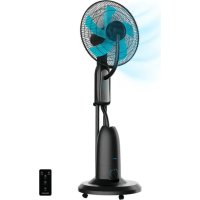
EnergySilence 490 Freshessence - Nebulizer CECOTEC - Free user manual and instructions
Find the device manual for free EnergySilence 490 Freshessence CECOTEC in PDF.


| Product Type | Misting fan with nebulization function |
| Brand | Cecotec |
| Model | EnergySilence 490 Freshessence |
| Power | 90 W |
| Voltage | 220-240 V ~ 50 Hz |
| Maximum Airflow | 44.98 m³/min |
| Noise Level | 59.68 dB(A) |
| Maximum Air Speed | 3.08 m/s |
| Standby Consumption | 0.26 W |
| Number of Speeds | 3 (Low, Medium, High) |
| Ventilation Modes | Normal, Natural (natural breeze), Sleep (gentle breeze) |
| Timer | 0.5 to 7.5 hours in 0.5 h increments |
| Oscillation | Yes, left-right |
| Water Tank Capacity | Not specified (removable tank) |
| Misting Function | Yes, adjustable (mist selector) |
| Remote Control Battery Type | CR2025 (included) |
| Recommended Use | Domestic only, in a large space |
| Tank Cleaning | Every 3 days with hot water |
| Descaling | At least once a month with descaling product |
| Safety | Programmable automatic shut-off, moisture protection, use by children 8 years and older under supervision |
| Reference | 08195 |
| Origin | Made in China, designed in Spain |
Frequently Asked Questions - EnergySilence 490 Freshessence CECOTEC
User questions about EnergySilence 490 Freshessence CECOTEC
0 question about this device. Answer the ones you know or ask your own.
Ask a new question about this device
Download the instructions for your Nebulizer in PDF format for free! Find your manual EnergySilence 490 Freshessence - CECOTEC and take your electronic device back in hand. On this page are published all the documents necessary for the use of your device. EnergySilence 490 Freshessence by CECOTEC.
USER MANUAL EnergySilence 490 Freshessence CECOTEC
natural_image
Modern outdoor fan with a blue fan blade and black body, mounted on a stand against a solid teal background (no text or symbols visible)Manual de instruccione 5
Instruction manual
Safety instructions 8
-
Parts and components 50
-
Before use 51
-
Assembly 52
-
Operation 52
-
Cleaning and maintenance 54
-
Troubleshooting 56
-
Technical specifications 57
-
Disposal of old electrical and electronic appliances 58
-
Technical support and warranty 58
-
Copyright 58
SOMMAIRE
Read these instructions thoroughly before using the device. Keep this instruction manual for future reference or new users.
- All safety instructions must be closely followed when using the appliance
- This device is designed for domestic use only and is not intended for bars, restaurants, farmhouses, hotels, motels, and offices.
- This appliance can be used by children aged 8 years and above and people with reduced physical, sensory, or mental capabilities or lack of experience and knowledge if they have been given supervision or instruction concerning use of the appliance in a safe way and understand the hazards involved. Children must not play with the appliance. Cleaning and user maintenance should not be carried out by unsupervised children.
- Children shall not play with the appliance. Close supervision is necessary when the appliance is being used by or near children.
- If the power cable is damaged, it must be replaced by the official Cecotec Technical Support Service or similar qualified personnel to avoid risks.
- This symbol means: clean the tank every 3 days.
- Please note that high humidity levels may encourage the growth of biological organisms in the environment.
- Do not allow the area around the mist fan to become damp. If humidity occurs, turn down the output volume of the mist fan. If the output volume of the mist fan cannot be reduced, use it intermittently. Do not allow absorbent materials such as carpets, curtains, or tablecloths to become wet.
-
Unplug the appliance during filling and cleaning.
-
Never leave water in the tank when the appliance is not in use.
- Empty and clean the mist fan before storage. Clean the mist fan before next use.
- Warning: microorganisms that may be present in the water or in the environment where the appliance is used or stored, can grow in the water tank, and be expelled into the air causing very serious health risks when the water is not renewed, and the tank is not properly cleaned every 3 days.
- Make sure that the mains voltage matches the voltage stated on the appliance marking and that the wall outlet is earthed.
- Do not immerse the cable, plug, or any other non-removable part of the appliance in water or any other liquid. Do not expose the electrical connections to water. Make sure your hands are dry before handling the plug or switching on the device.
- Do not carry or pull the appliance from the power cable. Do not use the power cable as handle. Do not push the cable against corners or sharp edges. Do not crush the power cable with the full weight of the appliance. Keep the cable away from hot surfaces.
- Do not use the appliance if its cord, plug, or housing are damaged, nor after it malfunctions or has been dropped or damaged in any way.
- Do not use the appliance in confined spaces with explosive or flammable vapours.
- Keep the fan away from heat sources.
- Keep hair, clothes, fingers, and other body parts away from openings and moving parts of the product.
- Do not leave the appliance unattended while in use. Unplug it from the mains supply when you finish using it or when you leave the room.
- Do not try to repair the product by yourself. Contact the
official Cecotec Technical Support Service.
- Always turn off and unplug the appliance when not in use, before moving it to a new location, and before assembling or disassembling it. To avoid tripping hazards, wind the cable safely.
- Make sure the fan is not placed near drapes, curtains, or any object that may be drawn into the fan.
- Do not place the cable under any carpet or cover it, place it in an unobstructed space where it cannot be tripped over.
- Operate the fan in a well-ventilated area. A distance of no less than 20 cm should be kept from walls and corners to ensure proper air ventilation during operation.
Battery instructions
- Non-rechargeable batteries must not be recharged.
- Do not allow children to replace the battery without adult supervision.
- Do not disassemble, open, or damage the battery.
- Keep the battery out of the reach of children. In case of battery ingestion, please seek medical attention immediately.
- Do not expose the battery to heat or fire. Avoid storage in direct sunlight.
- Do not short-circuit an element or a battery. Do not store batteries in an untidy manner, in a box, or drawer where they can short-circuit each other or be short-circuited by other metal objects.
- Do not subject the battery to mechanical shock.
- Leaks from the batteries can occur under extreme conditions. In the event of a battery leak, keep your skin and eyes away from the liquid. If the liquid gets into contact with skin, wash immediately with soap and water. If the liquid gets into the eyes, wash them immediately with clean water for
a minimum of 10 minutes and seek medical attention. Wear gloves to handle the battery and dispose of it immediately in accordance with local regulations.
- Pay attention to the positive (+) and negative (-) marks and ensure they are used correctly.
- Do not use any batteries that are not designed for use with the appliance.
- Do not use the appliance if powered with batteries that differ in capacity, size, or type.
- The use of the battery by children must be supervised.
- In case of battery ingestion, please seek medical attention immediately.
- Keep the battery clean and dry.
- Wipe the battery terminals with a clean, dry cloth if they become dirty.
- Keep the original instruction manual for future reference.
- Use the battery only for its intended purpose.
- Remove the battery from the device when not in use whenever possible.
- Dispose of the battery properly.
INSTRUCTIONS DE SÉCURITÉ
Instructions relatives aux piles
- Steam diffuser
- Front grille
- Fan-blade fixing cap
- Blades
- Rear grille
- Grille ring
- Grille clamping piece
- Motor cover
-
Back housing
-
Nut
-
Control panel
-
Buttons
-
Mist tube
-
Top cover
-
Water tank
-
Water tank bracket
-
Knob
-
Base
-
Rubber bracket
-
Wheels
-
Screws
-
Washers
-
Support tube
Control panel. Fig. 2
24. Timer indicator light:
- Half an hour:
- One hour:
- Two hours:
- Four hours:
25. Speed indicator light:
- Low: ●○○
- Medium: ●●○
- High:
26. Mode indicator light:
- Natural: ≈ - Normal:
- Sleep:
- Oscillation indicator light
- Mist function indicator light
- Power indicator light
A. ON/OFF: power button
B. SPEED: speed button
D. TIMER: timer button
E. OSC: oscillation button
F. MIST: mist function button
G. MIST: mist function knob
Remote control. Fig. 3
A. ON/OFF: power button
B. SPEED: speed button
C. MODE: mode button
D. TIMER: timer button
E. OSC: oscillation button
F. MIST: mist function button
NOTE:
The graphics in this manual are schematic representations and may not exactly match the device.
2. BEFORE USE
- This appliance is packaged in a way as to protect it during transport. Take the device out of its box and remove all packaging materials. You can keep the original box and other packaging elements in a safe place. This will help you prevent damage to the device when transporting it in the future. In case the original packaging is disposed of, make sure all packaging materials are recycled accordingly.
- Make sure all parts and components are included and in good conditions. If there is any piece missing or in bad conditions, contact the official Cecotec Technical Support Service immediately.
Box content
- Mist fan
- Remote control
- CR2025 battery
- Instruction manual
ENGLISH
3. ASSEMBLY
- Place the wheels (20) on the rubber bracket (19) and secure them with the screws (21) and washers (22). Insert the support tube (23) into the base (18).
- Place the main unit on its bracket and secure it with a nut (10).
- Fit the rear grille (5) on the motor shaft. Fix it on the motor cover (8) with the fixing piece (7).
- Put the blades (4) on the motor shaft and fix them using the fixing cap (3).
- Place the steam diffuser (1) into the front grille (2). Fix it using the screws.
- Attach the front grille (2) to the rear grille using the ring (6). Fix them with the clamping piece (7).
- Connect the mist tube (13) to the top cover and the top cover to the steam diffuser (1).
4. OPERATION
ATTENTION:
- Make sure that the product is disconnected from the mains before filling or refilling the water tank.
- Only put water in the water tank. Do not add any chemicals, oils, or other substances.
- Put only cold or lukewarm water in the water tank. Water used must not be above 40 °C.
Fig. 4 key:
- Valve cover
- Water tank
Filling the water tank
- Remove the water tank and turn it upside down.
- Unscrew the valve cap to open the tank by turning it counterclockwise. Fig. 4
- Fill the tank with cold, clean water, making sure not to overfill. To close the tank, screw the valve cap back on by turning it clockwise.
- Turn the tank upside down and place it back into the designated space at the back of the main fan unit. Fig. 5
A. ON/OFF: power button
- Press the POWER button to switch on the fan. The power indicator light (29) will light up on the control panel.
- By pressing the POWER button when the fan is on, the fan will be switched off.
B. SPEED: speed button
- To start the fan, press the ON/OFF button (A) and the SPEED button (B) once. The fan will start running at low speed and the corresponding speed indicator light (25) will light up on the control panel.
- Press the SPEED button again to select medium speed: the corresponding speed indicator light (25) will light up on the control panel.
- Press the SPEED button again to select high speed: the corresponding speed indicator light (25) will light up on the control panel.
- By pressing the SPEED button again, it will return to the low speed.
C. MODE: mode button
- By pressing the POWER button once, the fan operates in Normal mode.
- Press the MODE button once to switch the fan to Natural mode, which simulates a natural breeze. The corresponding mode indicator light (26) will light up on the control panel.
- Press the MODE button again to switch the fan to Sleep mode, which simulates a gentle breeze, suitable for night use. The corresponding mode indicator light (26) will light up on the control panel.
- Press the MODE button again to return the fan to Normal mode.
D. TIMER: timer button
- When the fan is running, you can set the timer to switch off automatically after the set time has elapsed.
- Press the TIMER button repeatedly to select the desired time period in half-hour increments: 0.5 h, 1 h, 1.5 h ... 7.5 h. The corresponding timer indicator light (24) will light up on the control panel.
- If all timer indicator lights (24) are off, it means that the timer is not set, so the fan will not stop until you switch it off manually.
E. OSC: oscillation button
- Press the OSC button to activate the oscillation mode (from right to left). The corresponding oscillation indicator light (27) will light up on the control panel.
- Press the OSC button again to deactivate automatic oscillation. The oscillation indicator light (27) will switch off.
F. MIST: mist function button
- Before activating this function, you must make sure that the water tank (15) is full.
- Press the MIST button to activate this function and press it again to deactivate it.
- When the mist function is on, the mist function indicator light on the knob (28) will light up blue.
ENGLISH
- If the water tank (15) is empty, the indicator light will turn red.
- To adjust the mist level, turn the knob (G) according to your needs.
Note: the mist and speed functions can operate independently or together.
Remote control
- To activate and configure the functions, you can use either the remote control or the control panel.
- The remote control is powered by a CR2025 battery. Before using the appliance for the first time, remove the transparent film covering the battery.
-
If you notice that the battery is depleted or you do not plan to use the product for an extended period of time, we recommend that you follow the steps described on the back of the remote control.
-
Locate the battery-compartment cover on the back of the remote control and open it.
- Remove the used battery carefully, paying attention to its orientation and polarity.
- Insert the new CR2025 battery, making sure to insert it in the correct direction.
- Close the battery-compartment cover.
- Test the remote control to make sure that it works properly with the new battery.
5. CLEANING AND MAINTENANCE
Note:
Before cleaning the appliance, make sure that it is switched off and disconnected from the mains.
- Do not immerse the device in water or splash it with any other liquid.
- Do not use solvents or any other chemical products for cleaning. When the fan is not in use, clean it and store it in a dry place.
Cleaning the exterior
- Before carrying out any cleaning work, be sure to switch off and disconnect the fan from the power supply to avoid any accidents.
- Carefully clean the outside surface of the fan with a soft cloth slightly dampened with soapy water. Avoid using aggressive or abrasive cleaning agents, as they may damage the housing.
- Make sure to dry the device completely with a dry cloth before reconnecting it to the power supply.
Blades maintenance
- Switch off and disconnect the fan before performing any maintenance on the blades.
- Use a soft damp cloth to clean the blades. Avoid handling them with sharp or abrasive objects that may damage their surface.
- Make sure they are completely dry before using the device again.
Cleaning the water tank
Remove the water tank and clean it with lukewarm water after each use.
Before replacing the water tank on the appliance, make sure that it is completely dry.
Cleaning mineral deposits
- To prevent minerals from building up or reduce them, follow the recommendations below.
- Use demineralised or distilled water.
-
Follow this procedure at least once a month:
-
Make sure the appliance is unplugged and cooled down.
- Use specific descaling liquid for cleaning electrical appliances and follow the instructions.
- Rinse with plenty of demineralised or distilled water, making sure that there are no traces of descaling liquid left.
- Make sure that the inside of the tank is clean and dry before putting it back on the appliance.
- Re-install the water tank.
Storage
- If the fan is not to be used for an extended period of time:
- Clean and dry the fan properly before storing it.
- Store the device in a cool, dry place away from direct sunlight.
- If possible, store the fan in its original packaging for extra protection against dust and damage.
6. TROUBLESHOOTING
| Problem Possible | cause Possible solution | |
| It does not mist | The water tank is empty | Fill the water tank with clean water and make sure it is correctly positioned. |
| The mist ring is clogged or dirty. | Clean it with a soft, wet cloth. Check for obstructions in the tube. | |
| Abnormal noise | Fan is unbalanced or damaged | Switch off the fan, unplug it and check if the blades are in good condition. If the problem persists, contact the official Cecotec Technical Support Service. |
| Defective motor or dama-ged bearings | Contact the official Cecotec Technical Support Service. | |
| Water leaks | Leakage in tank or tubes | Check for cracks or damage to the tank and tubes and contact the official Cecotec Techni-cal Support Service. |
| Loose or poorly fitted connections | Make sure that all connections are tight and secure. | |
| Remote control buttons do not work | Battery depleted in remo-te control | Replace the battery. |
| Faulty electrical connec-tion | Check if the power cable is connected correctly and if there are problems with the power supply. | |
| Insufficient misting | Water is too hot | Use cold or room temperature water for best misting. |
| The mist ring is clogged or dirty. | Clean it with a soft, wet cloth. Check for obstructions in the tube. | |
| Low mist level adjust-ment | Check fan and mist settings, adjust as nec-essary. |
If none of these situations match your problem, do not attempt to disassemble, or repair the appliance yourself. Repairs carried out by unqualified persons may result in injury or serious malfunctions. Contact the official Cecotec Technical Support Service. The repair must be carried out by an authorised technician, and you must use only original spare parts.
Unauthorised self-maintenance or maintenance will affect the safe use of the product and the application of the warranty policy.
7. TECHNICAL SPECIFICATIONS
Product reference: 08195
Product: Energy Silence 490 Freshessence
Power: 90 W
Voltage: 220-240 V
Frequency: 50 Hz
| Description Symbol Value Unit | |||
| Fan maximum flow F 44.98 m | ^3 /min | ||
| Fan power consumption P 39.60 W | |||
| Service value SV 1.14 (m | ^3 /min)/W | ||
| Energy consumption in off mode | P_OFF | 0.26 W | |
| Fan sound power level | L_WA | 59.68 dB (A) | |
| Maximum air speed | C 3.08 | m/seg | |
| Service value measurement standard | IEC 60879 | ||
| Contact details to obtain more information | Cecotec Innovaciones S.L.Av. Reyes Católicos n°60, 46910, Alfajar (Valencia, Spain) | ||
Technical specifications may change without prior notification to improve product quality. Made in China | Designed in Spain
8. DISPOSAL OF OLD ELECTRICAL AND ELECTRONIC APPLIANCES
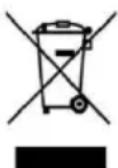
This symbol indicates that, according to the applicable regulations, the product and/or batteries must be disposed of separately from household waste. When this product reaches the end of its shelf life, you should dispose of the cells/batteries/accumulators and take them to a collection point designated by the local authorities.
Consumers must contact their local authorities or retailer for information
concerning the correct disposal of old appliances and/or their batteries.
Compliance with the above guidelines will help protecting the environment.
ENGLISH
9. TECHNICAL SUPPORT AND WARRANTY
Cecotec shall be liable to the end user or consumer for any lack of conformity that exists at the time of delivery of the product under the terms, conditions, and deadlines established by the applicable regulations.
It is recommended that repairs be carried out by qualified personnel.
If at any moment you detect any problem with your product or have any doubt, do not hesitate to contact the official Cecotec Technical Support Service at +34 96 321 07 28.
10. COPYRIGHT
The intellectual property rights over the texts in this manual belong to CECOTEC INNOVACIONES, S.L. All rights reserved. The contents of this publication may not, in whole or in part, be reproduced, stored in a retrieval system, transmitted, or distributed by any means (electronic, mechanical, photocopying, recording or similar) without the prior authorization of CECOTEC INNOVACIONES, S.L.
1. PIÈCES ET COMPOSANTS
Img. 1
6. PROBLEEMOPLOSSING
natural_image
Line drawing of a cleaning or dust removal machine with a hand operating the top part (no text or symbols)Fig./Img./Abb./Afb./Rys.5
www.cecotec.es