Horst - Portable radio Soundmaster - Free user manual and instructions
Find the device manual for free Horst Soundmaster in PDF.


User questions about Horst Soundmaster
0 question about this device. Answer the ones you know or ask your own.
Ask a new question about this device
Download the instructions for your Portable radio in PDF format for free! Find your manual Horst - Soundmaster and take your electronic device back in hand. On this page are published all the documents necessary for the use of your device. Horst by Soundmaster.
USER MANUAL Horst Soundmaster
natural_image
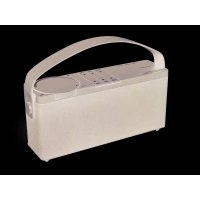
Black soundmaster portable radio with adjustable handle and control buttons (no visible text or symbols on device body)DEUTSCH
ENGLISH
FRANÇAIS
NEDERLANDS
ITALIANO
SLOVENSKÝ
ČEŠTINA
text_image
17 soundmaster® 18LIEFERUMFANG
Do not dispose of this product with the normal household waste at the end of its life cycle. Return it to a collection point for the recycling of electrical and electronic devices. This is indicated by the symbol on the product, user manual or packaging
The materials are recyclable according to their labeling. By reusing materials or other forms of recycling old devices and packaging, you are making an important contribution to protecting our environment. If necessary, remove batteries and personal data before disposal free of charge and ask your local authority about the responsible disposal point.

WARNING
Risk of electric shock Do not open!

Caution: To reduce the risk of electric shock, do not remove the cover (or back). There are no user serviceable parts inside. Refer servicing to qualified service personnel.

This symbol indicates the presence of dangerous voltage inside the enclosure, sufficient enough to cause electric shock.
This symbol indicates the presence of important operating and maintenance instructions for the device
Used batteries are hazardous waste and NOT to be disposed of with the household waste! As a consumer you are legally obligated to return all batteries for environmentally responsible recycling – no matter whether or not the batteries contain harmful substances*)
Return batteries free of charge to public collection points in your community or shops selling batteries of the respective kind.
Only return fully discharged batteries ^* ) marked Cd = cadmium, Hg = mercury, Pb = lead
- Only use mercury and cadmium-free batteries.
- Used batteries are hazardous waste and NOT to be disposed of with the household waste!!!
- Keep batteries away from children. Children might swallow batteries.
- Contact a physician immediately if a battery was swallowed.
- Check your batteries regularly to avoid battery leakage.
- Batteries shall not be exposed to excessive heat such as sunshine, fire or the like.
- CAUTION: Danger of explosion if battery is incorrectly replaced
- Replace only with the same or equivalent type

WARNING
DO NOT INGEST BATTERY, CHEMICAL BURN HAZARD
This product contains a coin/button cell battery. If the coin/button cell battery is swallowed, it can cause severe internal burns in just 2 hours and can lead to death.
Keep new and used batteries away from children. If the battery compartment does not close securely, stop using the product and keep it away from children.
If you think batteries might have been swallowed or placed inside any part of the body, seek immediate medical attention.

To prevent possible hearing damage, do not listen at high volume levels for long periods
Safety, Environmental and Setup Instructions
- Use the device in dry indoor environments only.
- Protect the device from humidity.
- This apparatus is for moderate climates areas use, not suitable for use in tropical climates countries.
- No objects filled with liquids, such as vases, shall be placed on the apparatus.
- The mains plug or an appliance coupler is used as the disconnect device, the disconnect devices shall remain readily operable.
- Connect this device to a properly installed and earthed wall outlet only. Make sure the mains voltage corresponds with the specifications on the rating plate.
- Make sure the mains cable stays dry during operation. Do not pinch or damage the mains cable in any way.
- A damaged mains cable or plug must immediately be replaced by an authorized service center.
- In case of lightning, immediately disconnect the device from the mains supply.
- Children should be supervised by parents when using the device.
- Clean the device with a dry cloth only.
- Do NOT use CLEANING AGENTS or ABRASIVE CLOTHS!
- Do not expose the device to direct sunlight or other heat sources.
• Install the device at a location with sufficient ventilation in order to prevent heat accumulation. - Do not cover the ventilation openings!
- Install the device at a safe and vibration-free location.
- Install the device as far away as possible from computers and microwave units; otherwise radio reception may be disturbed.
- Do not open or repair the enclosure. It is not safe to do so and will void your warranty. Repairs only by authorized service/ customer center.
- No naked flame sources, such as lighted candles, should be placed on the unit.
- When you are necessary to ship the unit store it in its original package. Save the package for this purpose.
- In case of malfunction due to electrostatic discharge or fast transient (burst), remove and reconnect the power supply.
- If the unit is not using for a long period of time, disconnect it from the power supply by unplugging the power plug. This is to avoid the risk of fire.
- The device is equipped with a "Class 1 Laser". Avoid exposure to the laser beam as this could cause eye injuries.
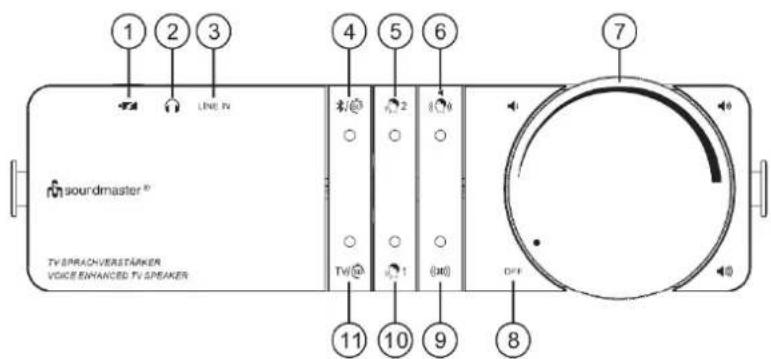
LOCATION OF CONTROLS
1 USB-C charging port
2 Headphone output
3 Line input
4 Bluetooth mode Sleep timer Bluetooth pairing
5 Clear2Voice 2 on/off
6 L/P swap on/off
7 ON/OFF / Volume control
8 Power off position
9 (34 sound effect on/off
10 = Clear Voice 1 on/off
11 TV/ Mode / Sleep timer
12 USB-C charging input
13 Pairing button wireless connection to speaker
14 Line input
15 Optical input
16 HDMI-ARC input
17 Charging LED
18 Signal LED
text_image
1 2 3 LINE PV 4 5 6 7 soundmaster® TV SPRACHVERSTÄRKER VOICE ENHANCED TV SPEAKER TW 1 (O) OFF 11 10 9 8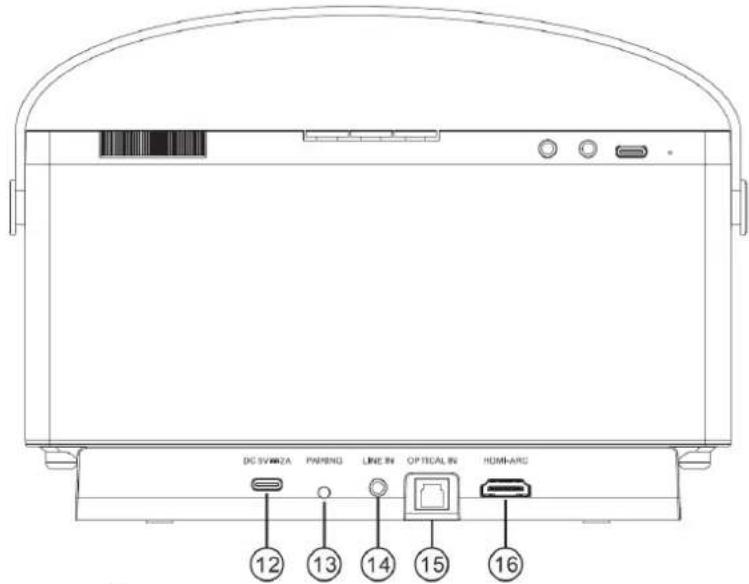
text_image
DC SWR2A PMPENG LINE IN OPTICAL IN HDMI-ARC 12 13 14 15 16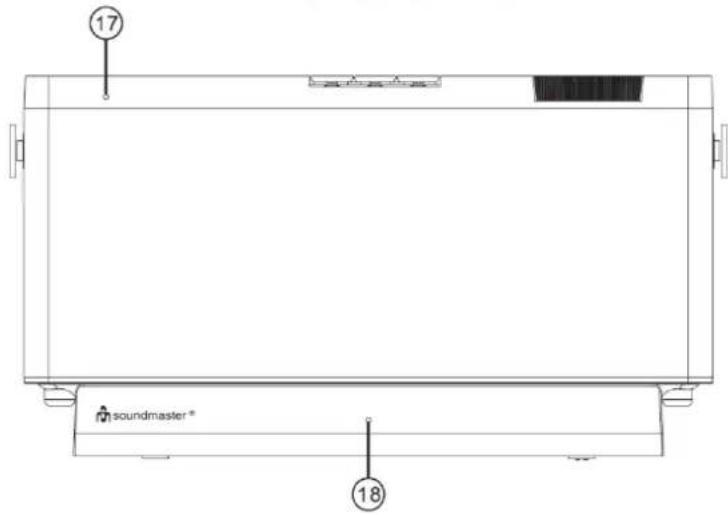
text_image
17 soundmaster * 18CONTENT OF DELIVERY
▶ Speaker unit
Power supply with USB-C cable
▶ Optical cable
Base unit
3.5 mm line cable
Instruction manual
INSTALLATION
POWER SUPPLY AND CHARGING
- Connect the USB power cable to the DC IN 5V connection (12) on the base station.
- Then plug the power adapter into the wall socket.
- Place the speaker on the base for 4+ hours before first use. During charging, the low battery/charge red LED indicator (17) lights. When the Speaker is fully charged, the red LED (17) disappear. A fully charged battery will provide you about 18 hours of listening time at moderate volume. When the speaker is not in use or when the low battery indicator (17) blinks, place the speaker on the base for recharging.
- The speaker may be switched off during the charging process.
SETTING UP THE PRODUCT
Place the base station on a flat, stable surface close to your TV. You can use either the HDMI cable (not included), optical audio cable or the 3.5 mm audio cable to connect the device. For better sound quality, we recommend you use the HDMI cable or optical audio cable. Use the 3.5 mm audio cable if your TV does not have an HDMI/optical digital audio connection. If you connect all cables, the base station automatically selects the HDMI cable.
CONNECTING VIA THE OPTICAL AUDIO CABLE
- Remove the protective covers from both ends of the optical cable.
- Connect the optical audio cable to the optical in socket (15) and the TV optical out. Firmly plug in the connector until it locks in place.

CONNECTING VIA THE HDMI AUDIO CABLE (cable not included)
Connect HDMI cable from the HDMI-ARC out on your TV to the HDMI input (16) on the back of the charging base.
REMARK: While operation with optical cable or HDMI, set the digital audio setting of your TV to PCM output. If you do not set the audio to "PCM", you might not hear any sound or only hear a noise. For additional information on setting the digital audio output to PCM, please read the operating manual for your TV. The setting options you can may find under audio / sound settings as: digital audio output, PCM, SPDIF, linear PCM, uncompressed audio, stereo, RAW....
CONNECTING VIA THE 3.5 MM AUDIO CABLE
Connect the 3.5 mm audio cable to the AUX IN input (14) on the base station and to the audio output (headphone connection) on your TV.

Usually, no sound comes out of the TV if you connect a cable to the TV headphone connection.
To change this, you must change the settings on your TV.
You can find more details in the operating manual for your TV.
PAIRING TO BASE UNIT
Your TV speaker has already been paired and ready to go right out of the box. In case that a re-pairing or re-connection between the speaker and the base is needed or you need to pair additional Speakers please follow the steps described below:
- Turn on the TV Speaker.
- Short press PAIRING (13) on the back of the charging base
- As soon as pairing is successful both the speaker TV LED (11) and transmitter LED (18) will become solid on and the audio sounds will start playing.
- Repeat the steps again if pairing was not successful.
BASIC OPERATIONS
LISTENING TO TV AUDIO
- To turn TV speaker on, rotate the "ON/OFF VOLUME" knob (7) clockwise until you hear a click and adjust the desired volume. Press TV button 11) to switch on the TV-mode.
- To turn TV Speaker off, rotate the "ON/OFF VOLUME" knob (7) anticlockwise until you hear a click.
The connection indicator (18) on the base station flashes. - The TV speaker volume control works independently from your TV speakers. it is recommended to adjust your TV speakers to low or off.
- On some TV's, you may need to use your remote to go into the TV menu to achieve an optimal audio/speaker setting. Please refer to your TV user manual for details.
Note: To save energy, the base station and TV speaker switch to standby mode after about 15 minutes if the TV is switched off or if TV speaker does not receive an audio signal. The connection indicator (18) disappears after few minutes.
The speaker will not turn itself back on automatically after auto power off.
To turn the speaker on after auto power off, rotate "ON/OFF VOLUME" knob (7) to the off position and turn the speaker on again.
CLEAR VOICE FEATURE TV SPEAKER
Uses unique technology to improve your understanding of dialogue. You hear human voices more clearly, while disruptive ambient noises are minimised.
- When you press 🔊 1 or 🔊 2 (button 10 or 5) the system switches into a different dialogue clarifying mode, the associated status LED illuminate.
- To turn off dialogue clarification, press 1 or 2 (button 10 or 5) again the status LED expires.
- The TV loudspeaker was developed to make the inadequate speech transmission of flat screens, which is further worsened by acoustic effects, understandable and comfortable again.
- For people with hearing impairments, it is also recommended for use.
- The general perception of sound changes when using speech amplification.
SPEAKER IN FRONT OR BEHIND ADJUSTMENT
When speaker placed behind the seat, press 🎨 (button 6) to switch left and right channel swap, the white LED stays on.
Press 🎨 (button 6) again to deactivate the LR swap effect. The default setting is NORMAL and the LED will remain off.
ADJUST 3D SOUND
Press ((3D)) (button 9) to activate the 3D sound effect, the white LED will stay on.
Press ((3D)) (button 9) to deactivate the 3D effect.
BLUETOOTH®
The first time you connect your Bluetooth device to this player, you need to pair your device to this player.
- During ON mode, press ⌘/60 (button 4) to select Bluetooth mode.
- Activate your Bluetooth device and select the search mode. "HORST" will appear on your Bluetooth device list.
- If you cannot find the unit, double press ⌘/⑥0 (button 4) to enable searchable. The blue LED will become flashing.
- Select "HORST" in the pairing list. After successful pairing, the blue LED stays solid.
- Play music from the connected Bluetooth device.
NOTE:
- The operational range between this player and a Bluetooth device is approximately 8 meters.
- Before you connect a Bluetooth device to this unit, ensure you know the device's capabilities.
- Compatibility with all Bluetooth devices is not guaranteed.
– Any obstacle between this unit and a Bluetooth device can reduce the operational range. - If the signal strength is weak, your Bluetooth receiver may disconnect, but it will re-enter pairing mode automatically.
To disconnect the Bluetooth function, you can:
– Switch to TV mode on the TV speaker.
- Disable the function from your Bluetooth device.
TIPS:
- Enter "0000" for the password if necessary on your mobile device.
- If no other Bluetooth device pairs with this player within two minutes, the player will recover its previous connection.
- The player will also be disconnected when your device is moved beyond the operational range. If you want to reconnect your device to this player, place it within the operational range.
- If the device is moved beyond the operational range, when it is brought back, please check if the device is still connected to the player.
- If the connection is lost, follow the instructions above to pair your device to the player again.
SLEEP TIMER
The TV Speaker is designed with a built-in, one-hour sleep timer to gently reduce the speaker volume gradually over 1 hour to allow you to fall asleep and will automatically power off after 1 hour.
To turn on the 1-hour Timer:
- Press and hold */60 or TV/60 (button 4 or 11) to start the timer. The LED light will start flash.
- At certain timer intervals, the speaker volume will be gradually reduced to help you fall asleep.
- The TV Speaker will turn off when timer has expired after 1-hour.
- To enable the TV Speaker sound again after the timer has expired, turn the volume knob all the way to off, and then back on again.
- The TV Speaker will re-connect with the Base, and audio sound will be played.
To turn off 1-hour Timer after it has started:
Press and hold */60 button 4 or 11) to turn off the timer. The light will stop flashing.
HEADPHONES
Plug in your headphone to the headphone jack (2) on the back of the TV speaker. No sound will be emitted from the TV speaker while the headphone jack is plugged in.
Adjust the headphone volume by rotating the Volume knob on the TV speaker.
You can still use the clear voice feature when you use headphones.
Constantly listening at high volume can damage your hearing. Set the volume lower when using headphones.
LINE-IN
Connect 3.5 mm audio cable to the LINE IN input (3) on the speaker unit for direct audio playing.
DIRECT USB CHARGING
Using any 5V USB AC adapter and plug it into the TV speaker type-C socket (1).
This way, you can place and keep the TV Speaker at the same location without the need to return it to the Base for recharging.
PROTECTION DE L'ENVIRONNEMENT

text_image
17 soundmaster® 18CONTENU DE L'ENVOI
CONFIGURATION DU PRODUIT
text_image
17 soundmaster * 18LEVERINGSOMVANG
text_image
17 soundmaster * 18INSTALLAZIONE
text_image
17 soundmaster * 18OBSAH DODÁVKY
text_image
17 soundmaster* 18Cadolzburg, www.soundmaster.de
D 90556 Cadolzburg, Germany
Hereby, Wörlein GmbH declares that this device is in compliance with the essential requirements and other relevant provisions of Directive 2014/53/EU.
A copy of the declaration of conformity can be obtained from the above address.