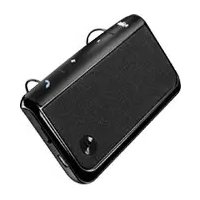
TX500 - Built-in kit MOTOROLA - Free user manual and instructions
Find the device manual for free TX500 MOTOROLA in PDF.



| Product Type | Bluetooth Car Handsfree Kit (In-Car Installation) |
| Brand | Motorola |
| Model | TX500 |
| Connectivity | Bluetooth |
| Bluetooth Range | 10 meters (typical) |
| Power Source | Rechargeable lithium-ion battery, charges via micro-USB |
| Talk Time | Approximately 20 hours |
| Charging Time | Approximately 2 hours |
| Main Features | Handsfree, simultaneous pairing of two phones, voice prompts (English), mute microphone, voice dialing, call reject, last number redial |
| LED Indicator | Connection status, battery, calls (blue, purple, red) |
| Microphone | Built-in |
| Speaker | Built-in |
| Dimensions (L x W x H) | 120 x 60 x 20 mm (estimated) |
| Weight | 80 g (estimated) |
| Mounting | Sun visor clip |
| Operating Temperature | -10°C to 60°C (storage/operation); charge above 0°C |
| Certifications | R&TTE Directive 1999/5/EC |
| Included Accessories | Micro-USB cable, sun visor clip |
| Care and Cleaning | Do not wet; avoid prolonged exposure to sun; clean with a dry cloth |
| Safety | Handsfree use recommended while driving; comply with local laws; risk of explosion if exposed to fire; mandatory recycling |
| Spare Parts and Repairability | Battery not user-replaceable; only authorized recycling centers can extract battery; contact Motorola support |
Frequently Asked Questions - TX500 MOTOROLA
User questions about TX500 MOTOROLA
0 question about this device. Answer the ones you know or ask your own.
Ask a new question about this device
Download the instructions for your Built-in kit in PDF format for free! Find your manual TX500 - MOTOROLA and take your electronic device back in hand. On this page are published all the documents necessary for the use of your device. TX500 by MOTOROLA.
USER MANUAL TX500 MOTOROLA
Motorola Mobility, Inc. and the Stylized M Logo are trademarks or registered trademarks of Motorola Mobility, Inc. Trademark Holdings, LLC. All other product or service names are the property of their respective owners. The Bluetooth trademark and logos are owned by the Bluetooth SIG, Inc. and any use of such marks by Motorola Mobility, Inc. is under license. © 2011 Motorola Mobility, Inc. All rights reserved.
68014301075
MOTOROLA TX500
LIFE. POWERED.

natural_image
Empty white image with four corner markers (no text or symbols)Figure 1
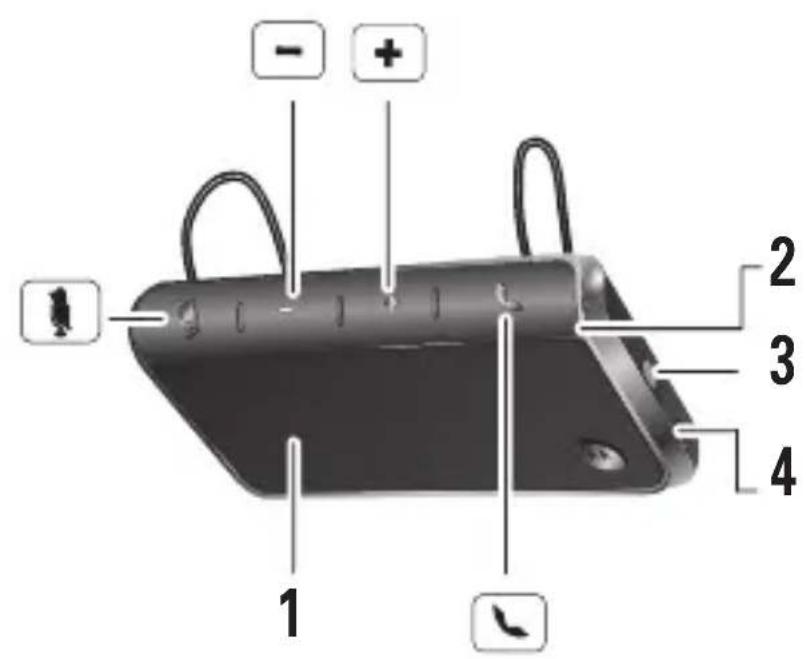
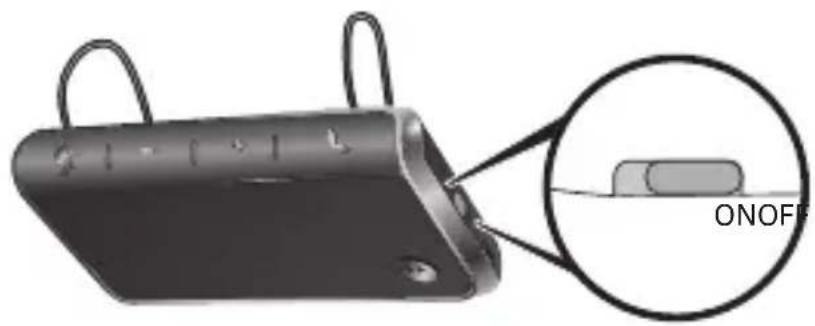
Figure 2
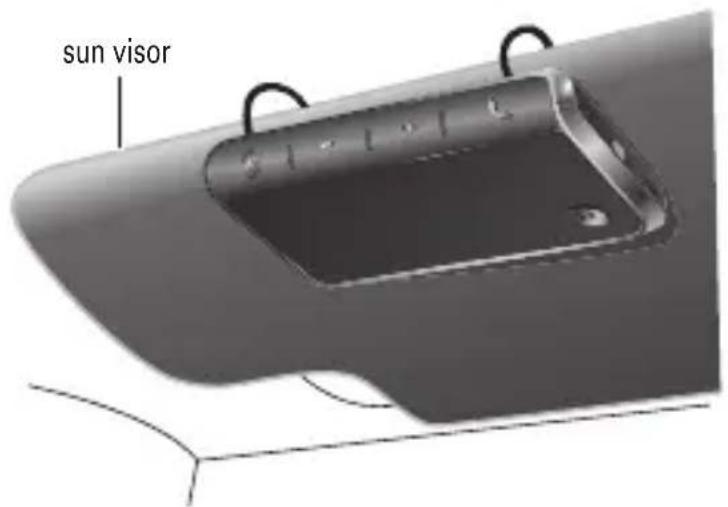
Figure 3
natural_image
Illustration of a black electronic device with a USB cable inserted into a plug (no text or symbols visible)English
Congratulations
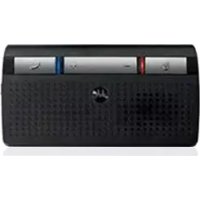
The MOTOROLA TX500 car speakerphone delivers hands-free conversation in a sleek design. The speakerphone is perfect for receiving and making calls wirelessly via Bluetooth ^® from your phone.
- Drive safely with wireless control of phone calls
- Simultaneously connect with two phones
- Hear voice prompts for calls, battery level, and other functions
The voice prompts are only in English.
Your speakerphone
See figure 1 on page 1.
Take a moment to familiarize yourself with your new hands-free speakerphone.

Mute button

Volume up

Volume down

Call button/Status light
1 Speaker
2 Microphone
3 Power switch
4 Micro-USB charging connector
A few essentials to know
Turn it on & off
See figure 1 on page 1.
Install it
See figure 2 on page 2.
Change settings
Turn voice prompts on & off
With the speakerphone turned on and not on a call, press and hold either Volume button and the Call button until you hear "voice instructions on" or "voice instructions off".
Note: The voice prompts are only in English.
Reset
Caution: This action erases all pairing information stored in your speakerphone.
With your speakerphone turned on, press and hold buttons until the mute and status lights begin flashing.


1 Press and hold 📄, , and buttons until the lights turn off.
2 Slide Power switch to OFF then ON to restart your speakerphone.
English
Check battery level
Press both Volume buttons while not on a call.
Status light Voice prompts
Red "battery is low"
purple "battery is medium"
blue "battery is high"
To save battery power, turn off the speakerphone when not using it for an extended time.
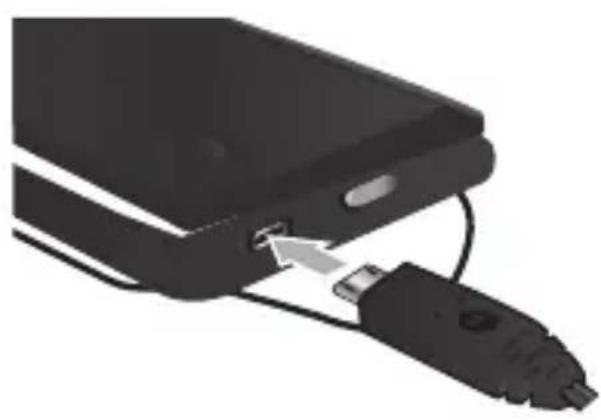
Charge it
See figure 3 on page 2.
You can use your speakerphone while unplugged or plugged into the charger.
Battery Charge Status
Red, Purple = charging
Blue= fully charged
Note: Your battery is designed to last the life of your product. It should only be removed by a recycling facility. Any attempt to remove or replace your battery will damage your speakerphone.
Pair & connect
Note: The voice prompts are only in English.
Pair & connect with your phone
1 Turn off any Bluetooth devices previously paired with your speakerphone.
2 Turn on the Bluetooth feature on your phone.
3 Turn on your speakerphone
The status light becomes steady blue to indicate the speakerphone is in discoverable mode and you hear "ready to pair".
4 Follow the voice prompts to connect your phone to your speakerphone.
Note: If prompted for the passkey, enter 0000.
When your speakerphone successfully pairs with your phone, the status light flashes in blue and purple and you hear "phone 1 connected".
For daily use, make sure your speakerphone is turned on, and your phone's Bluetooth feature is on. Your speakerphone and phone will connect automatically.
English
Pair & connect a second phone
1 Turn off the first phone and any other Bluetooth devices previously paired with your speakerphone.
2 Turn your speakerphone off.
3 Turn on the Bluetooth feature on your phone.
4 Turn on your speakerphone.
The status light becomes steady in blue and you hear "ready to pair".
5 Follow the voice prompts to connect your phone to your speakerphone.
Note: If prompted for the passkey, enter 0000.
When your speakerphone successfully pairs with your phone, the status light flashes in blue and purple and you hear "phone 2 connected".
To connect both phones, turn them on and then turn your speakerphone off and on. When you hear "phone 1 connected", and "phone 2 connected", your speakerphone is ready to go.
Test your connection
Slide the speakerphone onto your visor and make a call from your phone. You will hear ringing on the speakerphone.
Calls
Note: Some features are phone/network dependent.
| Function | Action |
| Answer call Press | . |
| Ignore call Press and hold hear a tone. | + or until you |
| End a call Press | . If a call is on hold, it is resumed. |
| Redial last call Press and hold and follow prompts. | until you hear a tone |
| Mute or un-mute a call Press "mute off". The mute light is solid red while muted. | and you hear "mute on" or |
| Answer second incoming call Press | . Current call is placed on hold. |
| Reject second incoming call Press | + or - |
| Make a voice dial call Press | and follow prompts. |
English
Status light
Status light Status
3 blue flashes Powering on
Steady blue In pairing/connect mode
Rapid blue/purple flashes Connected to your phone
Quick blue flash Receiving a call on phone 1, or making a call on either phone
Quick purple flash Receiving a call on phone 2
Slow blue pulse On a call
Slow blue flash In standby (not on a call—connected to one phone)
Slow purple flash In standby (not on a call—connected to two phones)
Slow red flash Idle (not connected to a phone)
Steady red (status light) Trying to connect to your phone
Steady red (mute light) Muted
Slow red pulse In a low battery state
Note: The status light stops flashing to conserve power after 20 minutes on a call or of inactivity, but the speakerphone remains on.
Problems?
My speakerphone will not enter pairing mode
Make sure that any devices previously paired with the speakerphone are turned off. If the status light is not steady in blue, first turn off the other device, then turn the speakerphone off and on. The status light becomes steady in blue and you hear "ready to pair".
My phone doesn't find my speakerphone when searching
Make sure the status light on your speakerphone is steady in blue when your phone is searching for devices. If not, reset the speakerphone to factory condition. The speakerphone resets and you hear "ready to pair" and see the status light steady in blue.
My speakerphone worked before but now it's not working
Make sure your phone is on and the Bluetooth feature is turned on in your phone. If the Bluetooth feature was turned off or was turned on only temporarily, you may need to restart the Bluetooth feature and pair your phone and speakerphone again.
If you have any additional questions, please call your hotline number (0870-9010-555) or visit us at www.hellomoto.com.
English
European Union Directives Conformance Statement

Hereby, Motorola Mobility Inc., declares that this product is in compliance with the essential requirements and other relevant provisions of Directive 1999/5/EC.
You can view your product's Declaration of Conformity (DoC) to Directive 1999/5/EC (the R&TTE Directive) at www.motorola.com/rtte.
Caring for the Environment by Recycling
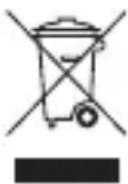
When you see this symbol on a Motorola product, do not dispose of the product with household waste.
Recycling Mobile Phones and Accessories
Do not dispose of mobile phones or electrical accessories, such as chargers or headsets, with your household waste. In some countries or regions, collection systems are set up to handle electrical and electronic waste items. Contact your regional authorities for more details. If collection systems aren't available, return unwanted mobile phones or electrical accessories to any Motorola Approved Service Centre in your region.
FCC Notice to Users
FCC Notice The following statement applies to all products that have received FCC approval. Applicable products bear the FCC logo, and/or an FCC ID in the format FCC-ID:xxxxxx on the product label.
Motorola has not approved any changes or modifications to this device by the user. Any changes or modifications could void the user's authority to operate the equipment. See 47 CFR Sec. 15.21.
This device complies with part 15 of the FCC Rules. Operation is subject to the following two conditions: (1) This device may not cause harmful interference, and (2) this device must accept any interference received, including interference that may cause undesired operation. See 47 CFR Sec. 15.19(3).
English
This equipment has been tested and found to comply with the limits for a Class B digital device, pursuant to part 15 of the FCC Rules. These limits are designed to provide reasonable protection against harmful interference in a residential installation. This equipment generates, uses and can radiate radio frequency energy and, if not installed and used in accordance with the instructions, may cause harmful interference to radio communications. However, there is no guarantee that interference will not occur in a particular installation. If this equipment does cause harmful interference to radio or television reception, which can be determined by turning the equipment off and on, the user is encouraged to try to correct the interference by one or more of the following measures:
- Reorient or relocate the receiving antenna.
- Increase the separation between the equipment and the receiver.
- Connect the equipment to an outlet on a circuit different from that to which the receiver is connected.
- Consult the dealer or an experienced radio/TV technician for help.
Approved Accessories
Use of accessories not approved by Motorola, including but not limited to batteries, antennas, and convertible covers, may cause your mobile device to exceed RF energy exposure guidelines and may void your mobile device's warranty.
Motorola recommends that you always use Motorola-branded chargers. Motorola devices are designed to work with Motorola chargers.
For approved Motorola accessories, visit our Web site at: www.motorola.com
Use & safety for battery-powered accessories
Your battery is designed to last the life of the product. It should only be removed by a recycling facility. ANY ATTEMPT TO REMOVE OR REPLACE YOUR BATTERY WILL DAMAGE THE PRODUCT.
- Battery life may temporarily shorten in low-temperature conditions (-10°C for storage/use below 0°C for recharge) or permanently reduce in high temperature conditions (above 60°C for storage/use or above 45°C for recharge).
English
- Do not let your mobile device get wet.
- Do not store your accessory in a parked car or direct sunlight.

WARNING: MAY EXPLODE IF DISPOSED OF IN FIRE.
Driving Precautions
Check and obey the laws and regulations on the use of mobile devices in the area where you drive. The use of wireless devices and their accessories in your area may be prohibited or restricted. The use of wireless phones while driving may cause distraction. Discontinue a call if you can't concentrate on driving. When using your mobile device while driving, please:
- Give full attention to driving and to the road.
- Use your hands-free solution to perform hands-free calls.
- Pull off the road and park before making or answering a call if driving conditions so require.
Caution about high volume usage
Warning: Exposure to loud noise from any source for extended periods of time may temporarily or permanently affect your hearing. The louder the volume sound level, the less time is required before your hearing could be affected. Hearing damage from loud noise is sometimes undetectable at first and can have a cumulative effect. To protect your hearing:
- Start your volume control at a low setting and use as low a volume as possible.
- Limit the amount of time you use headsets or headphones at high volume.
- Where possible, use your headset in a quiet environment with low background noise.
- Avoid turning up the volume to block out noisy surrounding.
- Turn the volume down if you can't hear people speaking near you.
If you experience hearing discomfort, including the sensation of pressure or fullness in your ears, ringing in your ears, or muffled speech, you should stop listening to the device through your headset or headphones and have your hearing checked by your doctor.
Félicitations
Voir figure 3, page 2.
Rot "battery is low"
Violett "battery is medium"
Blau "battery is high"
Rosso "battery is low"
Viola "battery is medium"
Blu "battery is high"
Roja "battery is low"
Lila "battery is medium"
Azul "battery is high"
Kókkivo "battery is low"
Moβ "battery is medium"
Μπλε "battery is high"
."phone 2 connected"
“phone 2 connected”و “connected
اخtbير اتصالك
."phone 1 connected"
"battery is low" أحمر
"battery is medium" أرجوانى
"battery is high" أزرق
mor "battery is medium"
mavi "battery is high"
.1999/5/EC 1999/5/EC
.הכלההוּרָהוּרָהוּרָהוּרָהוּרָהוּרָהוּרָהוּרָהוּרָהוּרָהוּרָהוּרָהוּרָהוּרָהוּרָה
הכלהה
. בַרְשָׁה אַרְשָׁה
- +
הכלהה
.(בַרְׁהָהוֹת) "ready to pair"
.(הכלה 1 의 Housing) "phone 2 connected"
.(בַרְהָרִי) "ready to pair"
4
.(הכלה 1 의 Housing) "phone 1 connected"
"voice instructions on"
.(אַלְרָהוֹת אַעִי) "voice instructions off" אַע (אַלְרָהוֹת אַע)
natural_image
Blank white image with no visible content, text, or symbols
- MOTOROLA TX500
- English
- Congratulations
- Your speakerphone
- See figure 1 on page 1.
- A few essentials to know
- Turn it on & off
- Install it
- Change settings
- Reset
- Check battery level
- Status light Voice prompts
- Charge it
- See figure 3 on page 2.
- Battery Charge Status
- Pair & connect
- Pair & connect with your phone
- Pair & connect a second phone
- Test your connection
- Calls
- Status light
- Status light Status
- Problems?
- My speakerphone will not enter pairing mode
- My phone doesn't find my speakerphone when searching
- My speakerphone worked before but now it's not working
- European Union Directives Conformance Statement
- Caring for the Environment by Recycling
- Recycling Mobile Phones and Accessories
- FCC Notice to Users
- Approved Accessories
- Use & safety for battery-powered accessories
- WARNING: MAY EXPLODE IF DISPOSED OF IN FIRE.
- Driving Precautions
- Caution about high volume usage
- Félicitations
- Voir figure 3, page 2.
- اخtbير اتصالك
- הכלהה
Brand : MOTOROLA
Model : TX500
Category : Built-in kit