
Bravia KD84X9000 - Projector SONY - Free user manual and instructions
Find the device manual for free Bravia KD84X9000 SONY in PDF.
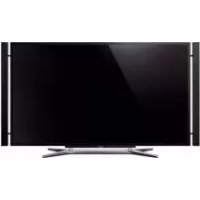



| Product Type | 4K LED LCD TV |
| Brand | Sony |
| Model | Bravia KD84X9000 |
| Screen Size (Diagonal) | 213.5 cm (84 inches) |
| Display Resolution | 3840 x 2160 pixels (4K) |
| Dimensions with Floor Stand (W x H x D) | 2137 x 1511 x 567 mm |
| Dimensions without Stand (W x H x D) | 2137 x 1136 x 90 mm |
| Weight with Floor Stand | 97.9 kg |
| Weight without Stand | 80.0 kg |
| Power Supply | 110-240 V AC, 50/60 Hz (except Hong Kong); 220-240 V AC, 50 Hz (Hong Kong) |
| Power Consumption | Indicated on the back of the TV (varies by model) |
| TV Standards | Analog: B/G, I, D/K, M, L; Digital: DVB-T2, DVB-T (except HK), DTMB (HK) |
| Audio Output | 4 x 12.5 W (total 50 W) |
| HDMI Connectivity | 4 HDMI inputs (HDMI 2 and 3 support 4K) |
| Other Video Inputs | Composite, Component, PC IN (VGA) |
| USB Ports | 2 USB ports |
| Network Connectivity | LAN (Ethernet 10/100), Built-in Wi-Fi |
| 3D Function | Yes, with included 3D glasses |
| Included Accessories | Remote control, batteries, power cables, 3D glasses (2 pairs), cases, table stand, screws |
| Operating Temperature | 0 °C to 40 °C |
| Operating Humidity | 10% to 80% RH (non-condensing) |
| Maintenance and Cleaning | Unplug before cleaning; use a soft dry or slightly damp cloth; do not spray liquid directly |
| Safety | Wall mounting recommended by a professional; do not block ventilation openings; keep away from children |
| Repairability | Spare parts available through Sony authorized center; optional wall mount bracket (SU-WL500) |
Frequently Asked Questions - Bravia KD84X9000 SONY
User questions about Bravia KD84X9000 SONY
0 question about this device. Answer the ones you know or ask your own.
Ask a new question about this device
Download the instructions for your Projector in PDF format for free! Find your manual Bravia KD84X9000 - SONY and take your electronic device back in hand. On this page are published all the documents necessary for the use of your device. Bravia KD84X9000 by SONY.
USER MANUAL Bravia KD84X9000 SONY
Instructions about "Installing Wall Mount Bracket" are included within this TV's instructions manual.
Instructions for "Wall Mount Bracket Installation" are included in this instruction manual.
Customer Support:
http://www.sony-asia.com/support
http://www.sony.net/
© 2012 Sony Corporation Printed in Japan
SONY.
4-437-553-12(1)
LCD TV
Operating Instructions GB
使用说明书
CS
操作手册

BRAVIA
KD-84X9000
Introduction
Thank you for choosing this Sony product. Before operating the TV, please read this manual thoroughly and retain it for future reference.
- Instructions about "Installing Wall Mount Bracket" are included within this TV's instructions manual. The illustrations used in this manual are of the KD-84X9000 series unless otherwise stated. The illustrations of the remote used in this manual are of the RM-GD025 unless otherwise stated. Before operating the TV, please read page 33 (Safety Information). Retain this manual for future reference.
Trademark information
The terms HDMI and HDMI High-Definition Multimedia Interface, and the HDMI Logo are trademarks or registered trademarks of HDMI Licensing LLC in the United States and other countries.
DLNA®, the DLNA Logo and DLNA CERTIFIED® are trademarks, service marks, or certification marks of the Digital Living Network Alliance.
Manufactured under license from Dolby Laboratories. Dolby and the double-D symbol are trademarks of Dolby Laboratories.
"BRAVIA" and BRAVIA trademarks of Sony Corporation.
TrackID is a trademark or registered trademark of Sony Mobile Communications AB.
Music and video recognition technology and related data are provided by Gracenote. Gracenote is the industry standard in music recognition technology and related content delivery. For more information, please visit www.gracenote.com.
CD, DVD, Blu-ray Disc, and music and video-related data from Gracenote, Inc., copyright © 2000-present Gracenote. Gracenote Software, copyright © 2000-present Gracenote. One or more patents owned by Gracenote apply to this product and service. See the Gracenote website for a nonexhaustive list of applicable Gracenote patents. Gracenote, CDDB, MusicID,
MediaVOCS, the Gracenote logo and logotype, and the "Powered by Gracenote" logo are either registered trademarks or trademarks of Gracenote in the United States and/or other countries.
Opera® Browser from Opera Software ASA. Copyright 1995-2012 Opera Software ASA. All rights reserved. Wi-Fi Direct is a mark of the Wi-Fi Alliance.
"Blu-ray Disc", "Blu-ray" and "Blu-ray Disc" logo are trademarks of Blu-ray Disc Association.
"Sony Entertainment Network logo" and "Sony Entertainment Network" are trademarks of Sony Corporation.
and "SinuView"
are trademarks of Sony Computer Entertainment Inc.
(except Hong Kong)
DVB is a registered trademark of the DVB Project.





OPERASoftware
Notes for Australia and New Zealand model
This product is ENERGY RATING qualified in the "Home" mode. ENERGY RATING is a program designed to promote energy efficient products and practices.
- When the TV is initially set up, it is designed to meet ENERGY RATING requirements while maintaining optimum picture quality. Changes to certain features, settings, and functionalities of this TV (e.g. TV Guide, Picture/Sound, Eco-Setting) can slightly change the power consumption.
Depending upon such changed settings (e.g. "Shop" mode), the power consumption may vary which possibly could exceed the stated energy rating.
To reset the TV to ENERGY RATING qualified settings, select "Home" mode from the initial set-up procedure in "Factory Settings" under the "Set-up" menu.
IMPORTANT INFORMATION
If a television is not positioned in a sufficiently stable location, it can be potentially hazardous due to falling. Many injuries, particularly to children, can be avoided by taking simple precautions such as:
- Using cabinets or stands recommended by the manufacturer of the television.
- Only using furniture that can safely support the television.
- Ensuring the television is not overhanging the edge of the supporting furniture.
- Not placing the television on tall furniture (for example, cupboards or bookcases) without anchoring both the furniture and the television to a suitable support.
- Not standing the televisions on cloth or other materials placed between the television and supporting furniture.
- Educating children about the dangers of climbing on furniture to reach the television or its controls.
Notice for customers in Thailand
This telecommunication equipment conforms to NTC technical requirement.
Notice for customers in Singapore
Complies with IDA Standards DB00353
Notice for customers in Jordan
All models covered by this Instruction Manual contain wireless module DWM-W046 with approval number TRC/SS/2010/135.
This television is designed for use in Hong Kong and is intended for use in Hong Kong only.
Location of the identification label
Labels for Model No. and Power Supply rating (in accordance with applicable safety regulations) are located on the rear of the TV.
About this manual (Operating Instructions)
This manual explains how to set up your TV. For more information on how to use BRAVIA TV, refer to the "Electronic manual".
Operating Instructions
Explains how to set up your TV such as connections, initial set-up, and basic operations.

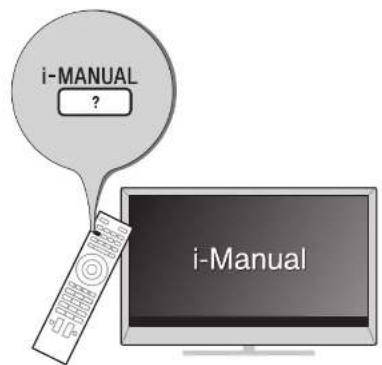
For more information, press the i-MANUAL button

Electronic manual (i-Manual)
Explains how to use all the features. See page 25 on how to use the i-Manual.
Images and illustrations used in this manual may differ from the actual screen.
Table of Contents
Getting Started
Checking the accessories. 6 Inserting batteries into the remote. 6
1: Assembling the Table-Top Stand. 7 2: Adjusting the Speakers angle 10 3: Connections 11 4: Preventing the TV from toppling over 15 5: Connecting the AC power cord. 16 6: Bundling the cables 16 7: Connecting the TV to the Internet 17 8: Performing the initial set-up. 18
Using Your BRAVIA TV
Watching TV 20
Selecting various functions and settings (Home Menu) 22
Watching Internet Video 24
Looking for Instructions
Looking for instructions in the electronic manual
(i-Manual) 25
Additional Information
Troubleshooting 27
Specifications 28
Installing the Accessories (Wall-Mount Bracket) 30
Safety Information 33
Precautions 34
Checking the accessories
AC Power Cord (1)*1
AC Power Cord (6)*2
Cable holder (5)
Remote (1)
Size AAA batteries (R03 type) (2)
Short Neck (2)
Short Neck Cover (2)
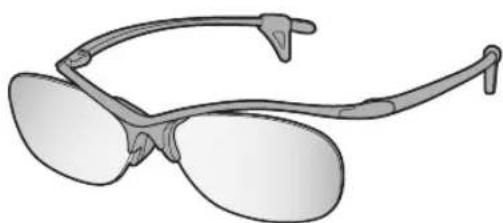
3D Glasses (2)
Pouch for 3D Glasses (2)
Operating Instructions (this manual) and other documents
*1 Hong Kong, New Zealand and Australia only *2 except Hong Kong, New Zealand and Australia
Inserting batteries into the remote
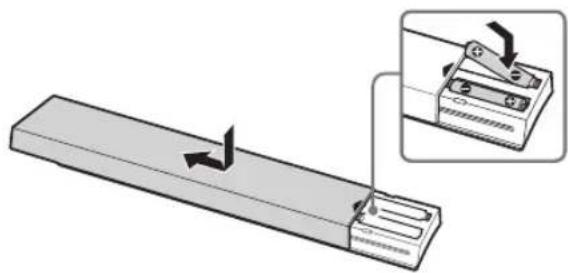
1 Remove the protection sheet. 2 Push and slide the cover to open.
1: Assembling the Table-Top Stand

Read and follow the instructions below when assembling the Table-Top Stand in order to avoid any risk of damaging the TV set.
Refer to the instructions below on how to change the Floor Stand to Table-Top Stand.
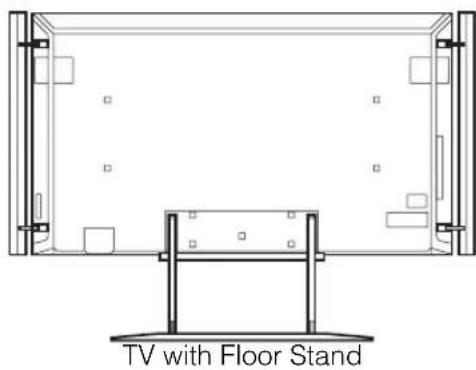
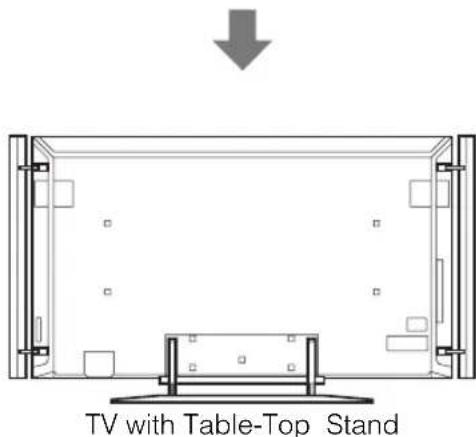
Before detaching the Floor Stand, perform the following steps.
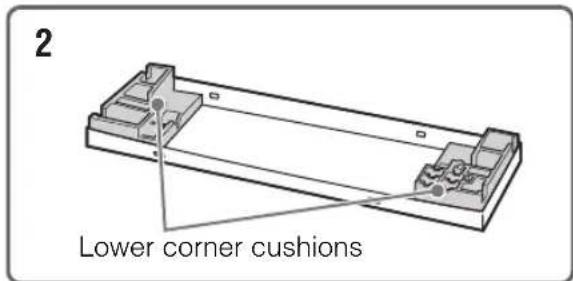
Place the carton lid on the floor.
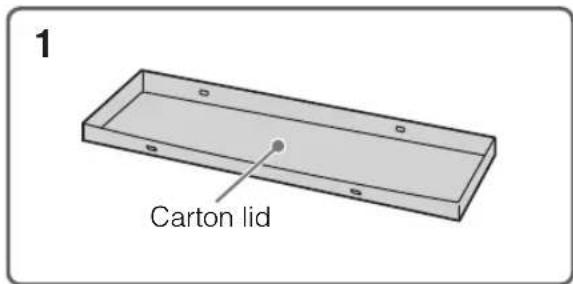
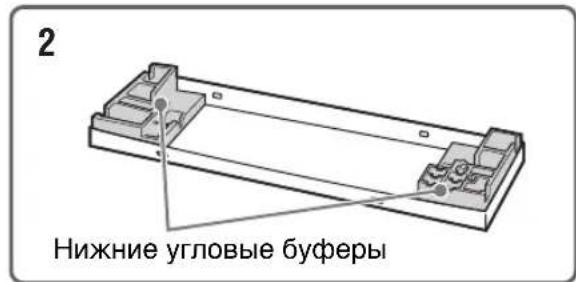
Place both lower corner cushions onto the carton lid.
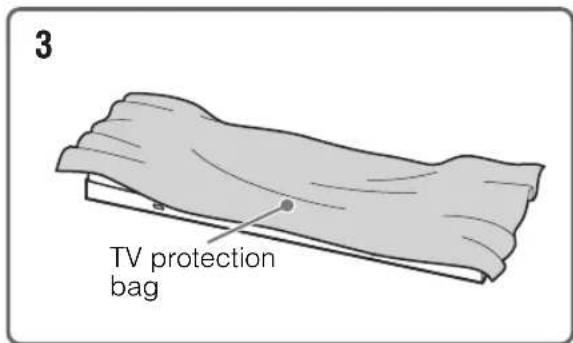
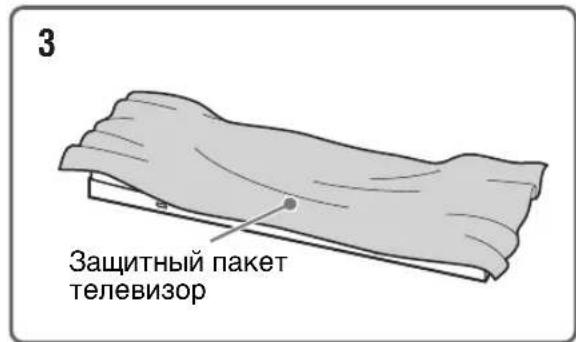
Place the TV protection bag on top of the cushions.
Detaching the Floor Stand from the TV
- Do not remove the Floor Stand for any reason other than to attach the Table-Top Stand or to install corresponding accessories on the TV.
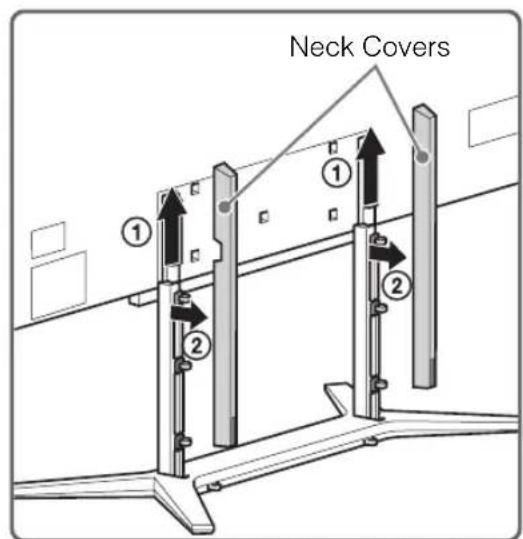
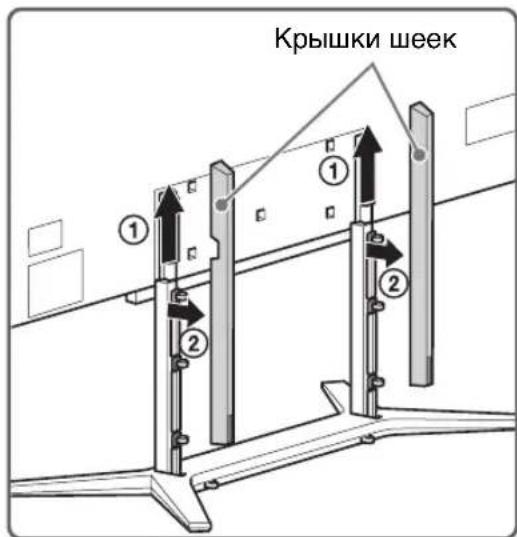
1 Slide the Neck Covers upward to remove them from the Floor Stand.
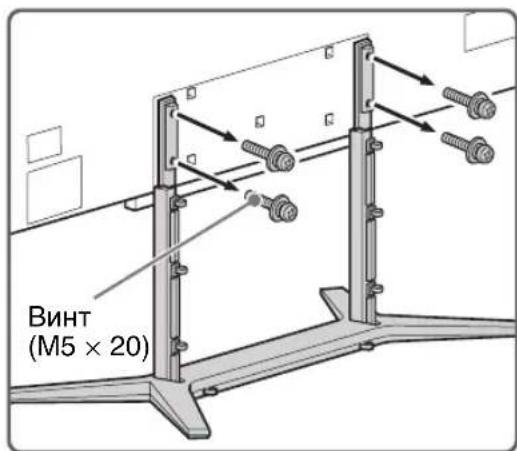
2 Remove the screws that attach the Floor Stand to the TV.
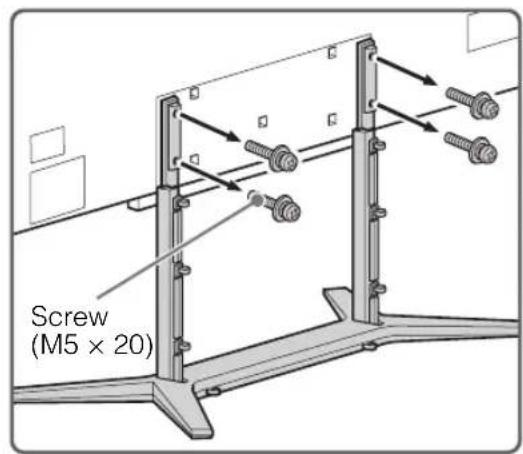
- Be sure to store the removed screws in a safe place. Reuse the screws when attaching the Table-Top Stand.
3 Detach the TV set from the Floor Stand, and place it in the carton lid. Support the TV set when changing the Necks to prevent it from toppling over.
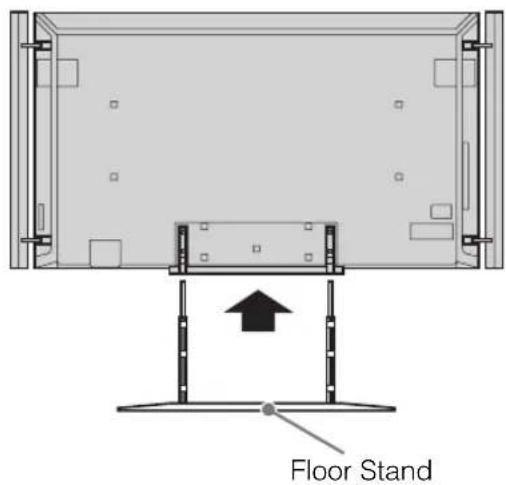
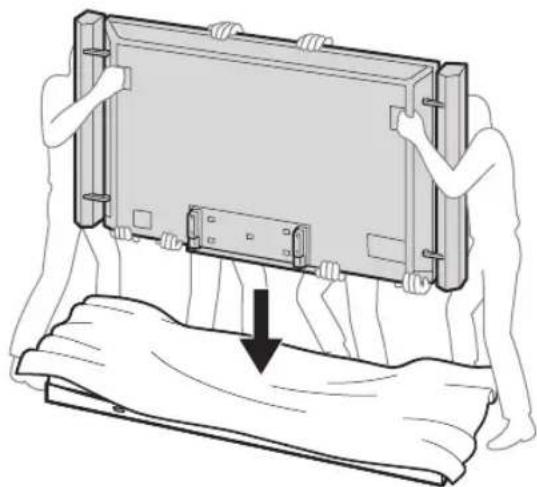
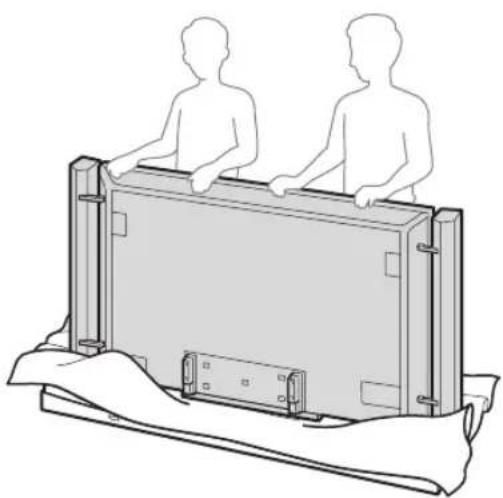
Attaching the Table-Top Stand
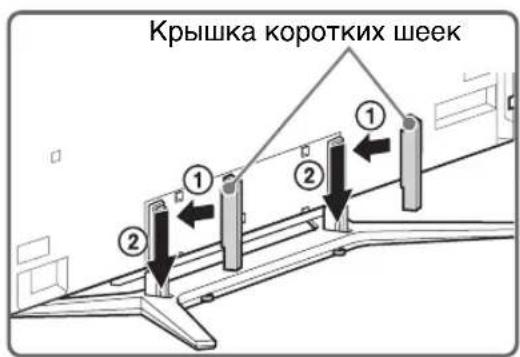
1 Remove the screws from the bottom of the Floor Stand and detach the Long Necks from the Base.
Bottom view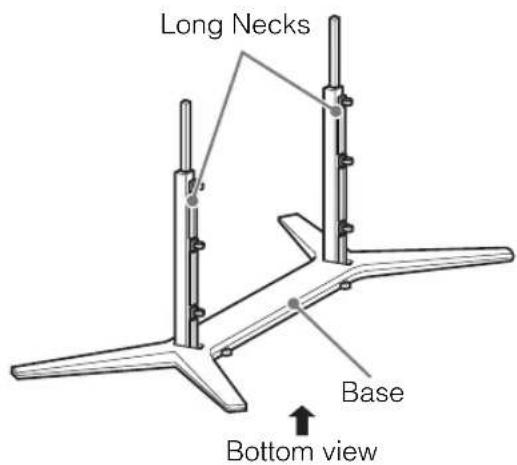
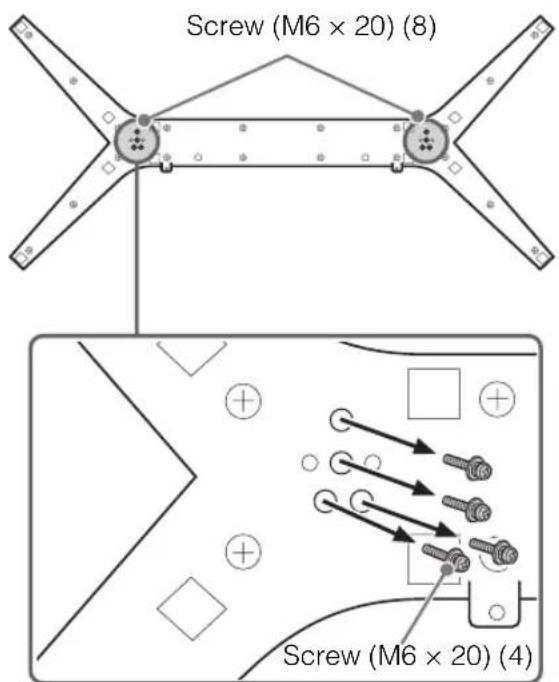
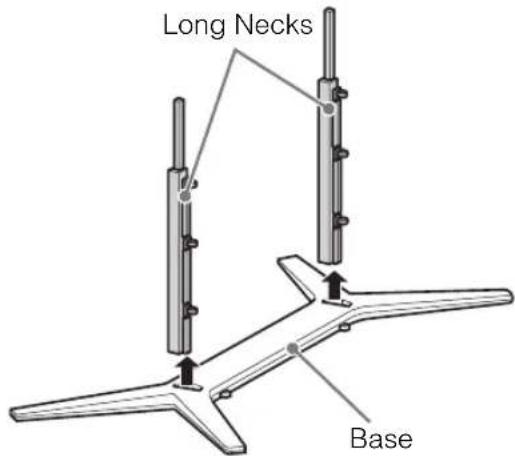
2 Attach the Short Necks to the Base using the screws removed in step 1 of "Attaching the Table-Top Stand" (page 9).
Bottom view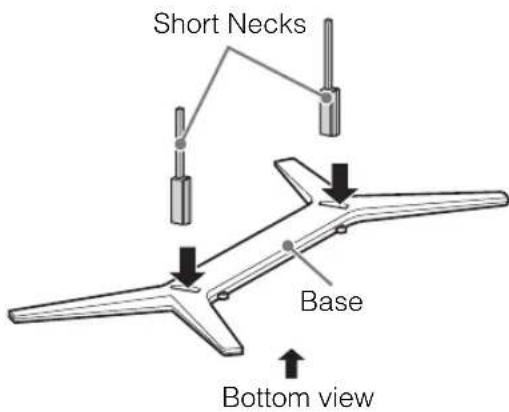
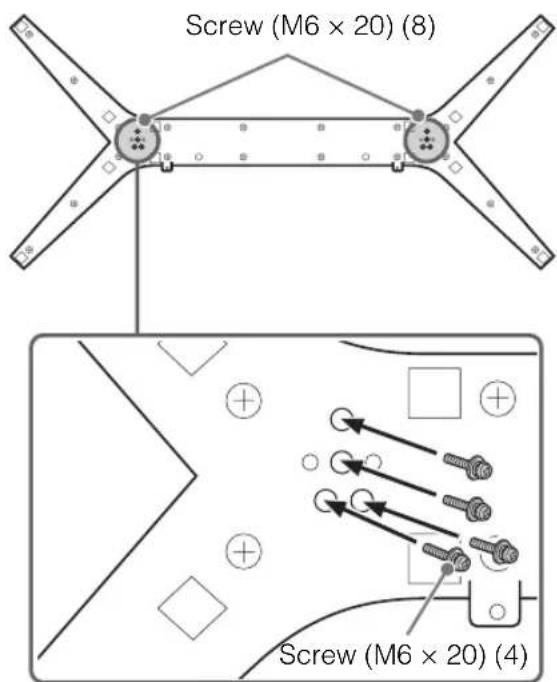
3 Place the TV set on the Table-Top Stand.
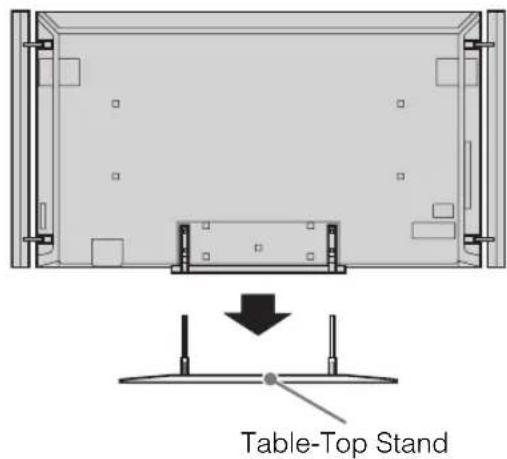
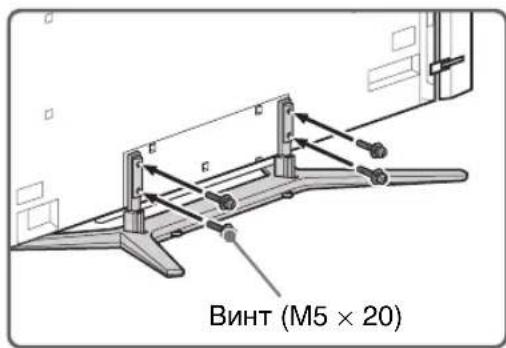
4 Attach the Table-Top Stand using the screws previously removed in step 2 of Detaching the Floor Stand from the TV (page 8).
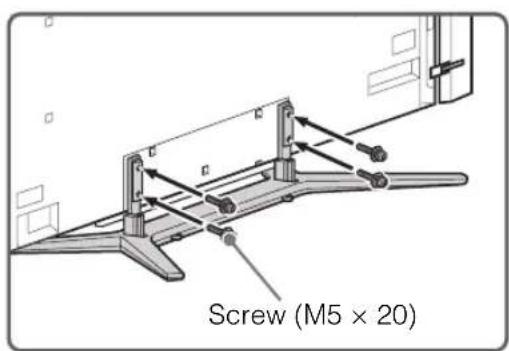
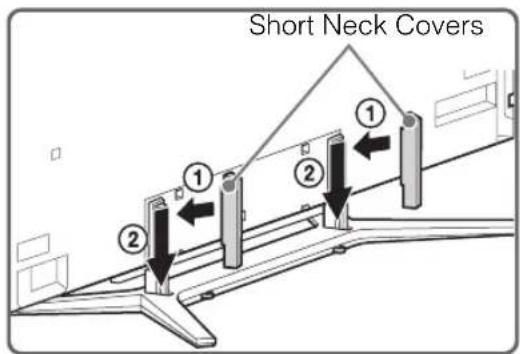
5 Attach the Short Neck Covers to the Table-Top Stand.
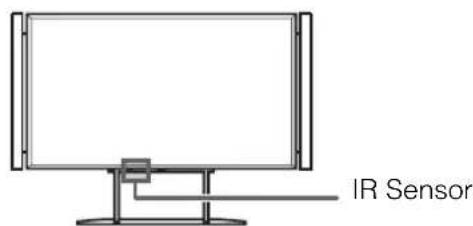
Ensure that there are no objects in front of the TV.
2: Adjusting the Speakers angle
To access the terminals on the rear of the TV when it is mounted to a wall, adjust the Speakers angle by loosening the screw as indicated in the illustration.
* Make sure the screw is tightened back after adjusting the Speakers to the original angle.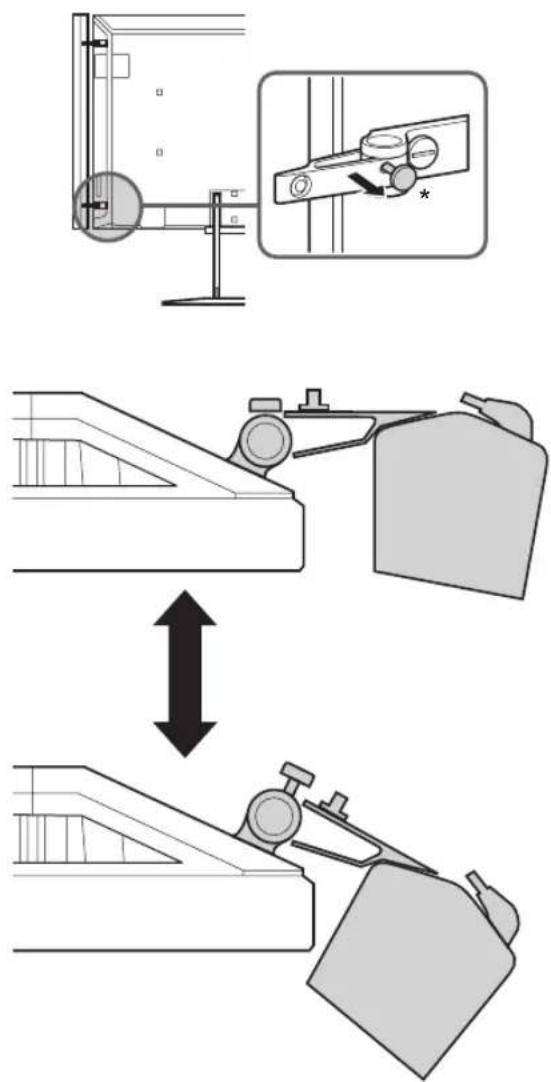
Detaching the Speakers from the TV
The Speakers can be detached from the TV if you wish to use a separate audio system (e.g. Home Theatre System). Refer to the instructions below on how to detach the Speakers.

1 Disconnect the Speaker cable. 2 Remove the screw from the lower Speaker Joint. 3 Remove the screw from the upper Speaker Joint. 4 Pull the Speaker out horizontally to detach the Speaker. Repeat steps 1 to 4 to remove the other Speaker.
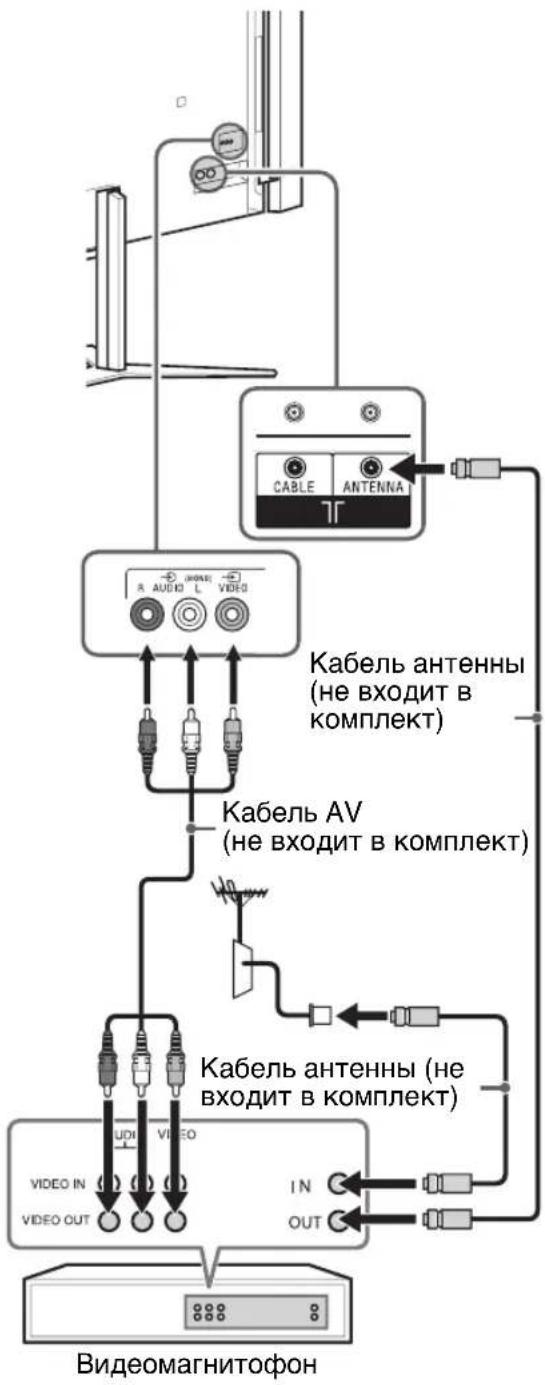
3: Connections
- Use an antenna cable connector no greater than 14 mm in thickness.
- Use an HDMI cable connector within 12 mm (thickness) x 21 mm (width).
- Use Sony HDMI cable with "High Speed" indication for HDMI connection.
Connecting an antenna/cable/VCR
To connect an antenna/cable except Hong Kong
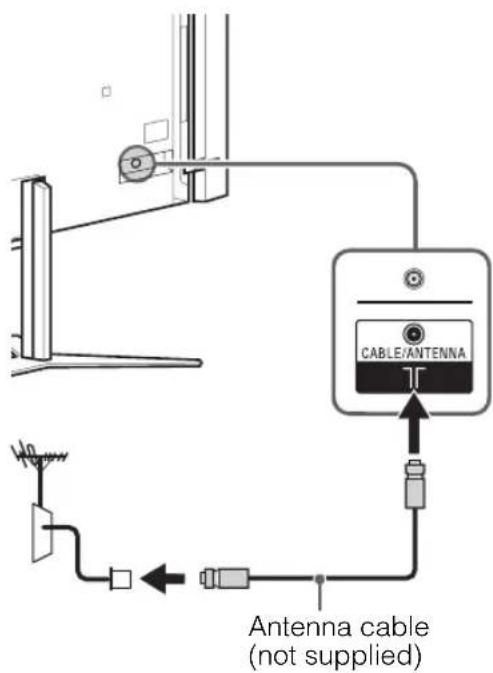
Hong Kong only To connect a Set Top Box/ recorder
(e.g. DVD recorder) with HDMI except Hong Kong
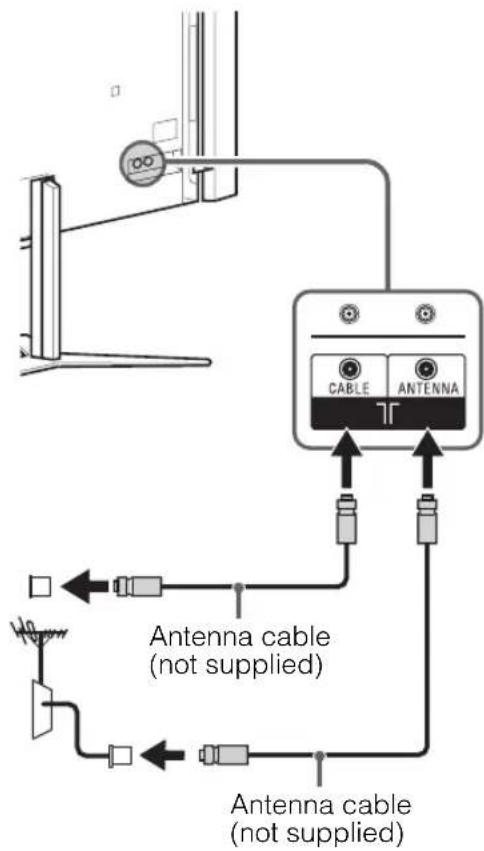
Set Top Box/ recorder (e.g. DVD recorder)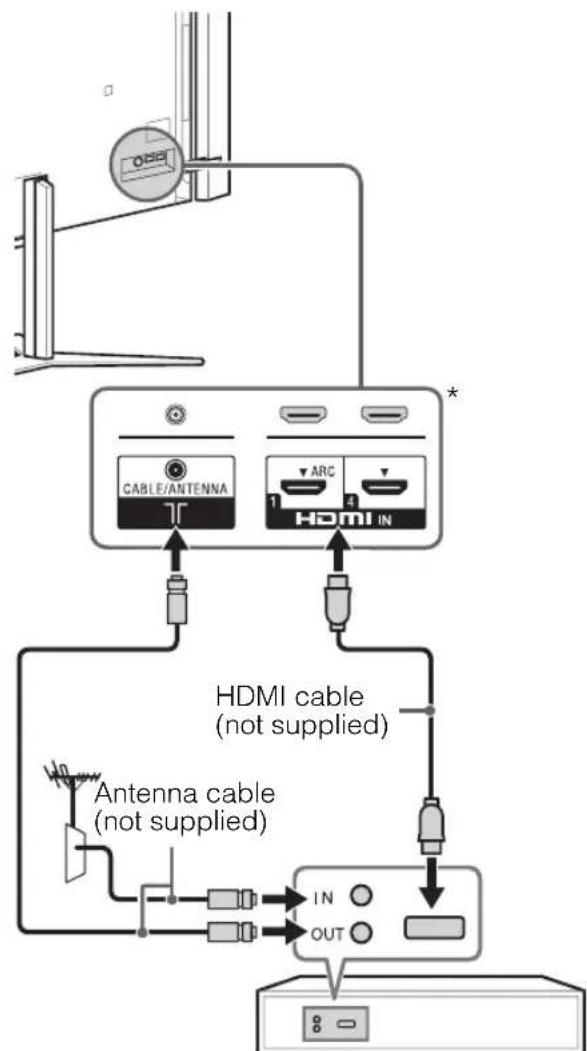
- Only HDMI 2 and HDMI 3 support 4K resolution (located at the side of the TV).
Hong Kong only
Set Top Box/recorder (e.g. DVD recorder) * Only HDMI 2 and HDMI 3 support 4K resolution (located at the side of the TV).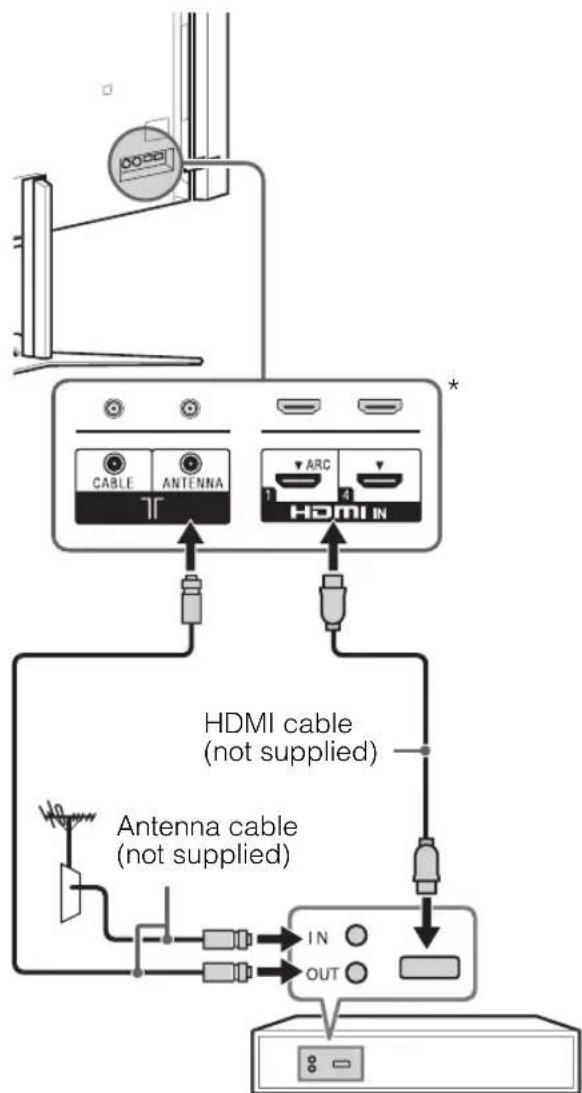
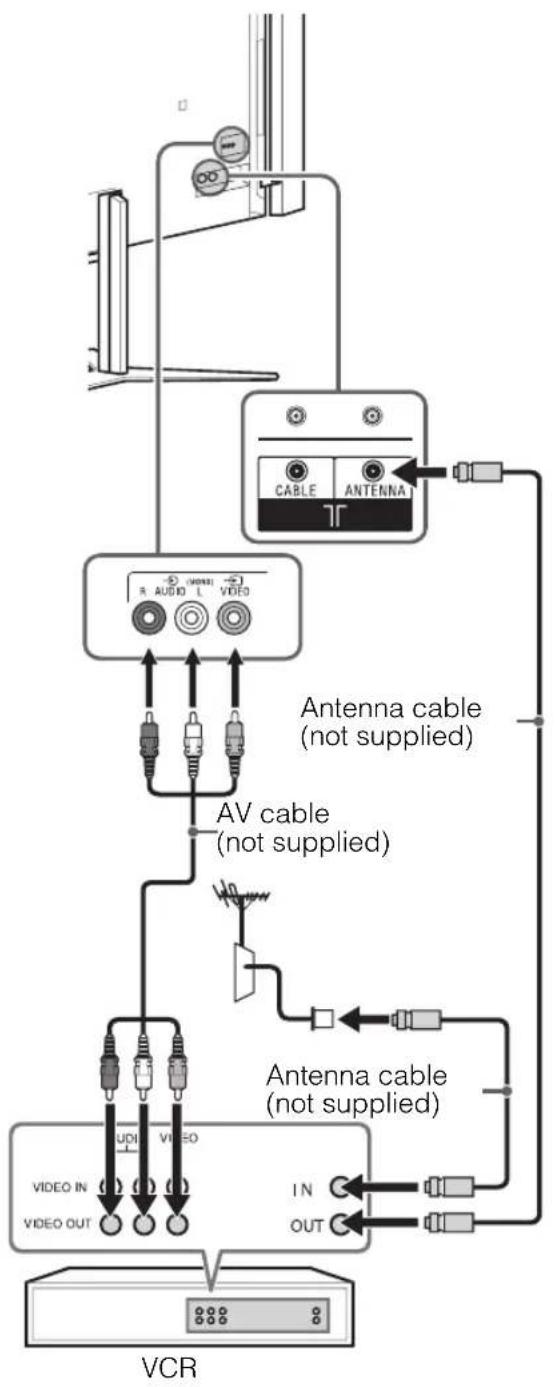
Connecting an antenna/cable and VCR
except Hong Kong
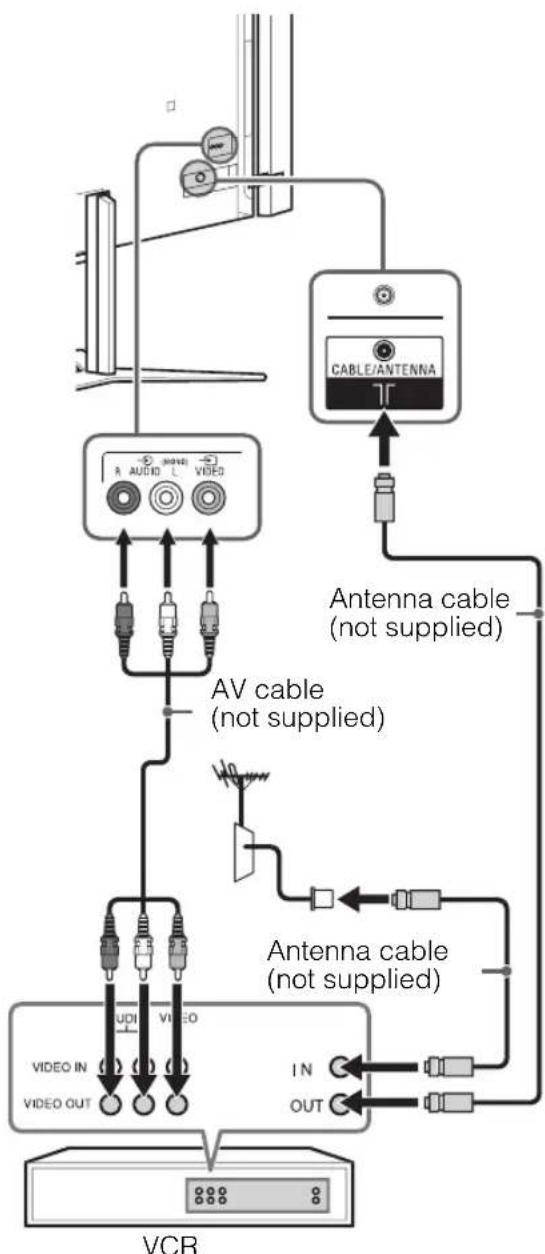
GB
Hong Kong only
Connecting audio/video devices
except Hong Kong
DVD recorder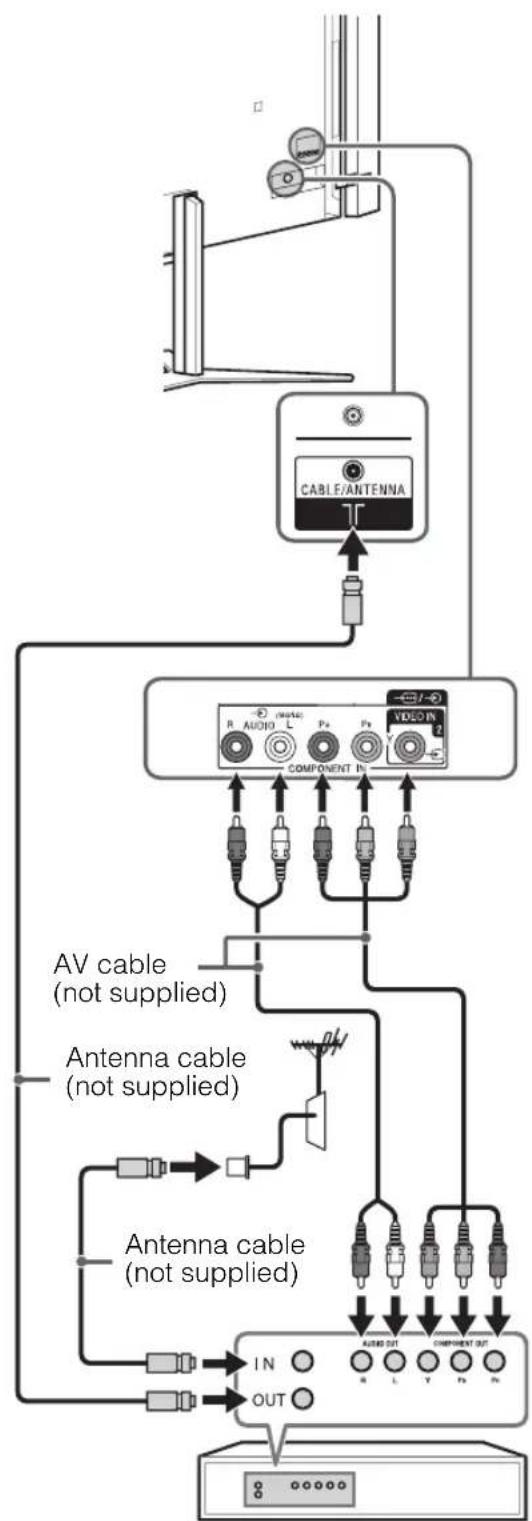
Hong Kong only
DVD recorder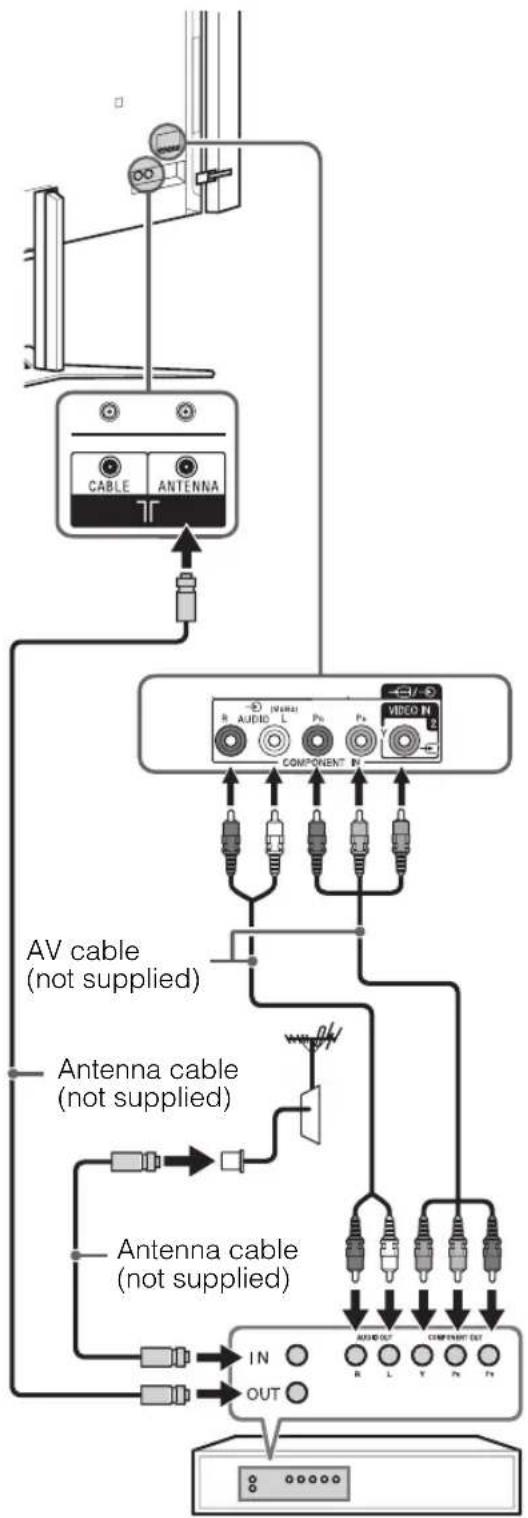
4: Preventing the TV from toppling over
OR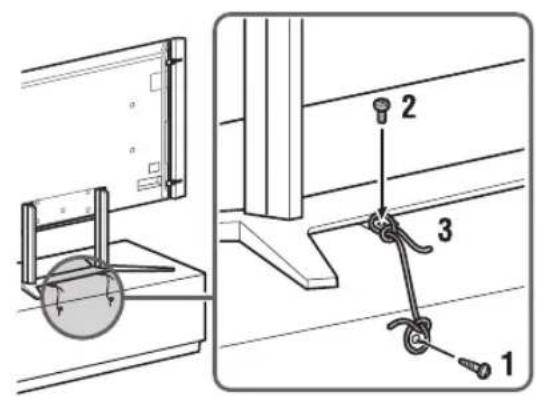
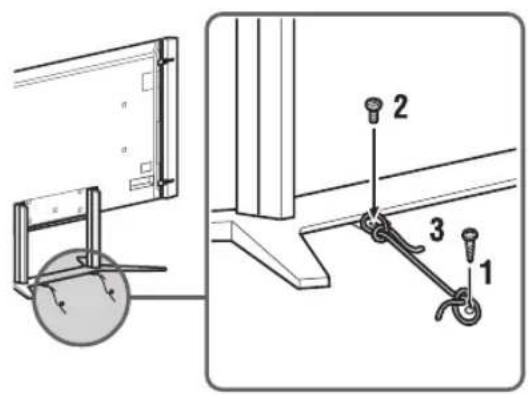
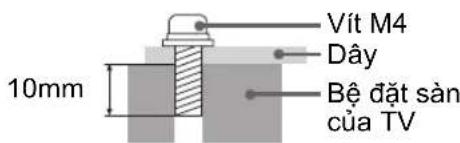
1 Install a wood screw (3.8 mm in diameter, not supplied) to the floor or TV stand. 2 Install a machine screw (M4, not supplied) into the screw hole of the Base. 3 Tie the wood screw and the machine screw with a strong cord (not supplied).
The length of the M4 machine screw differs depending on the cord diameter. Please see below illustration.
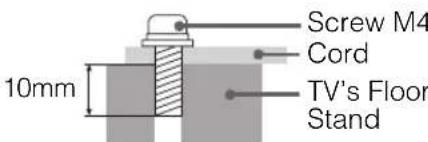
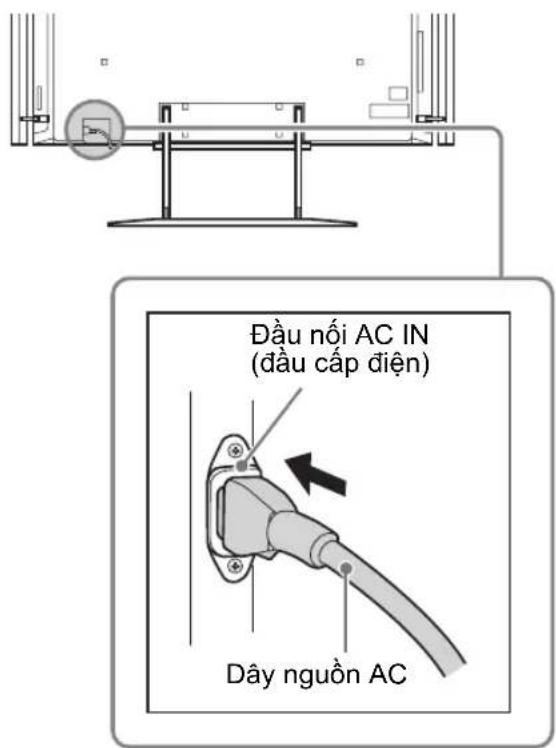
5: Connecting the AC power cord
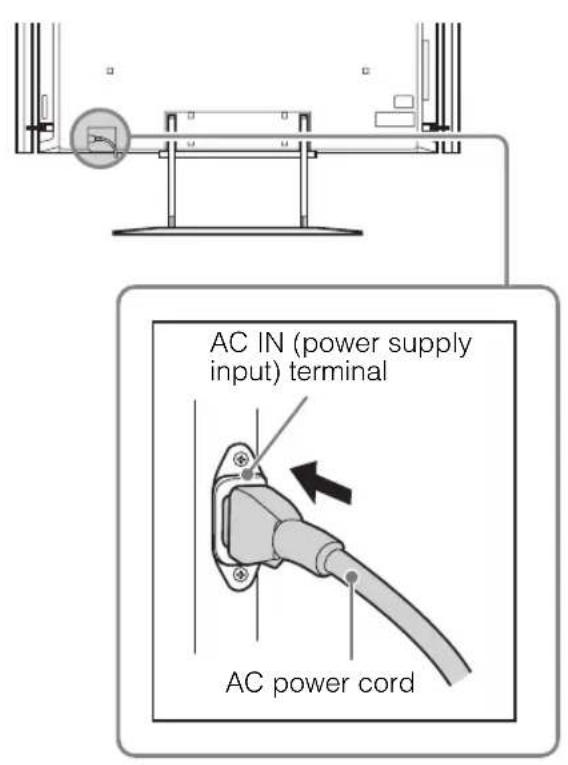
Make sure that the AC power cord is fully inserted into the AC IN terminal.
6: Bundling the cables
Do not bundle the AC power cord together with other cables.
Floor Stand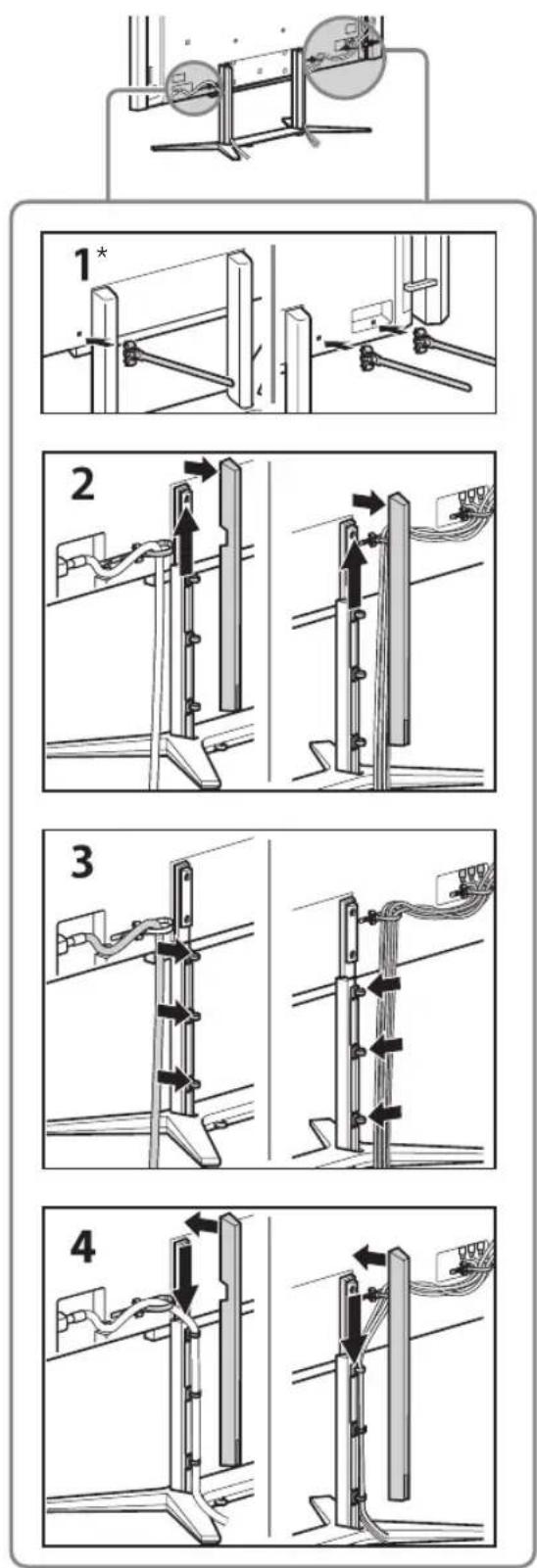
Table-Top Stand
Use 1,2,3,4,5*
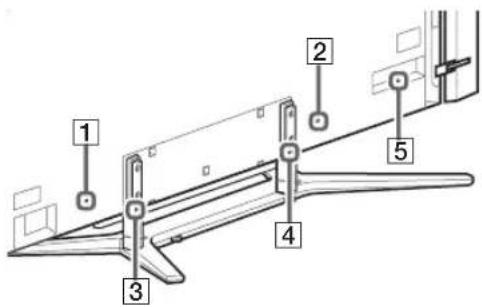
- When installing on the wall, attach the cable holder under the terminals.
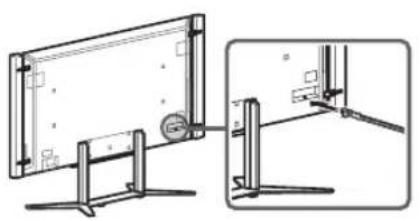
7: Connecting the TV to the Internet
When you connect this TV to the Internet, you can enjoy multiple functions. For details on the functions, refer to the i-Manual.
#
- You will need to contract with an Internet service provider to connect to the Internet.
Preparing a wired network
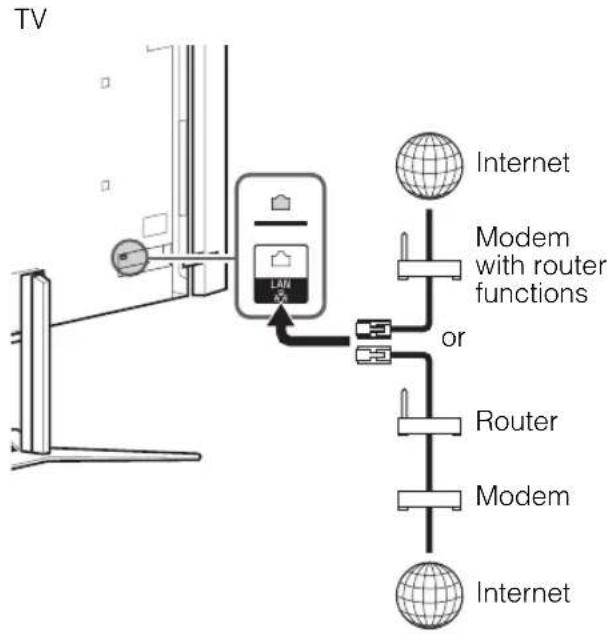
#
- For LAN connections, use a Category 7 cable (not supplied).
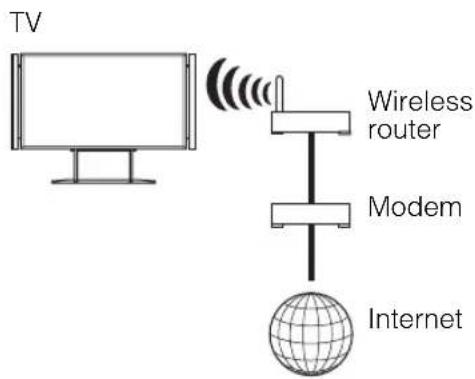
Preparing a wireless LAN
The built-in wireless LAN device allows you to access the Internet and your home network. With this feature, you can connect to a wireless LAN and enjoy the benefits of networking in a cable-free environment. Before setting up the wireless LAN function of the TV, be sure to set up a wireless LAN router.
8: Performing the initial set-up
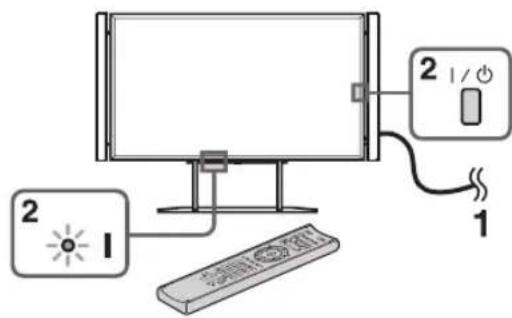
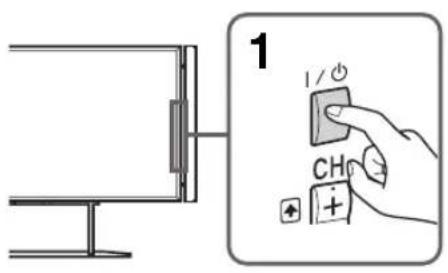
1 Connect the TV to your AC power outlet (mains socket).
2 Press on the TV. The (power) indicator will light up in green. When you switch on the TV for the first time, the Language menu appears on the screen.

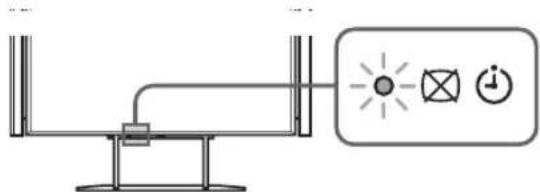
- When you turn on the TV for the first time, the TV requires some internal processing for optimisation before you can perform the initial setup. There will be no picture and sound, and the timer indicator on the front of the TV blinks orange for about 40 seconds. Do not turn off the TV during this process. This process has been completed at the factory for some TVs.
3 Press the arrow buttons to select an item, then press the confirm button. Follow the instructions on the screen.
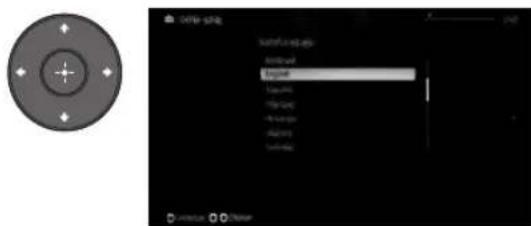
Programme Sorting: Changes the order of analogue channels stored in the TV.
Press to select the channel you want to move to a new position, then press the confirm button. Press the arrow buttons to select the new position for the channel, then press the confirm button.

- You can also tune channels manually.
Network Set-up: Sets up the Internet settings. Select "Auto" to connect to the network automatically. Select "Custom" to connect manually. If you do not access the Internet, or to set up later, select "Skip".

- If you use WEP security, select "Custom" then "Wireless Set-up" then "Scan". Then, select the network name (SSID) you want to connect. If you cannot find the required network name, select "[Manual Entry]" and press the confirm button to enter the network name.
- Use the optional USB Wireless LAN Adapter to connect with your wireless router (or access point) at 5GHz. Insert the USB Wireless LAN Adapter and set "Standby for Wi-Fi Direct" to "Off". Press HOME, then select "Settings" then "Network" then "Standby for Wi-Fi Direct" then "Off".
- To set "Network Set-up" later, press HOME, then select "Settings" then "Network" then "Network Set-up".
Watching TV
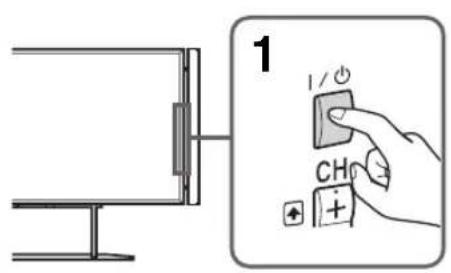
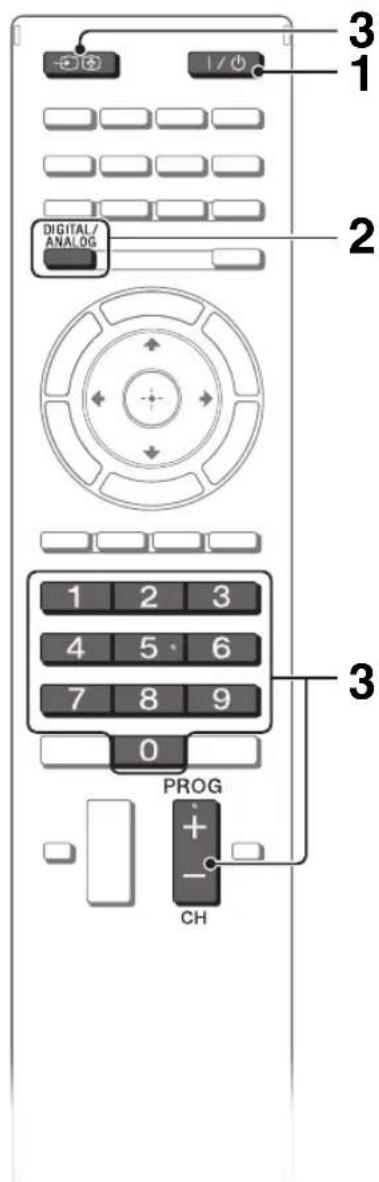
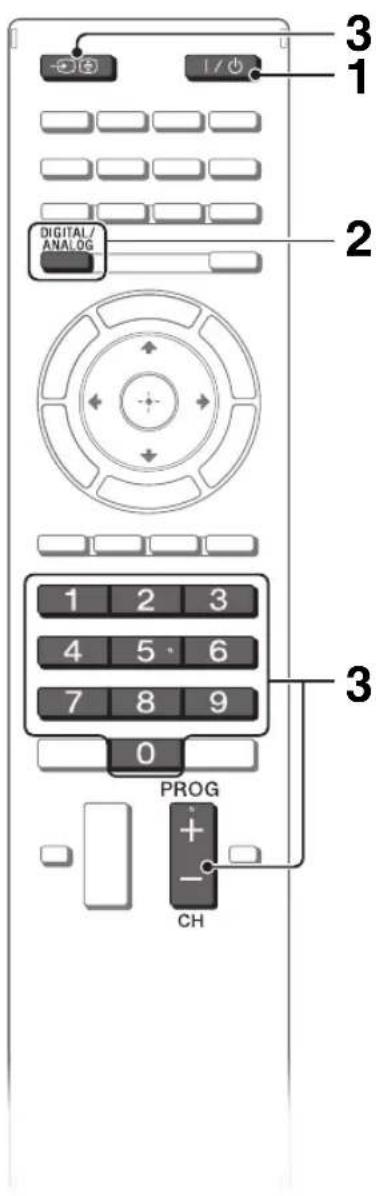
1 Turn on the TV.
Press I/O on the TV or remote to turn on the TV.
2 Select a mode.

3 Select a TV channel or select an input.
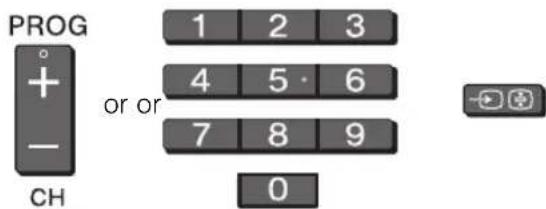
To select digital channels
Use 0-9. For channel numbers 10 and above, press the next digit quickly.
Watching 3D contents
This feature lets you experience powerful 3D entertainment, such as stereoscopic 3D games and 3D Blu-ray Disc. Refer to the i-Manual on how to set the 3D settings or watch the 3D contents.
GB
Frequently used buttons
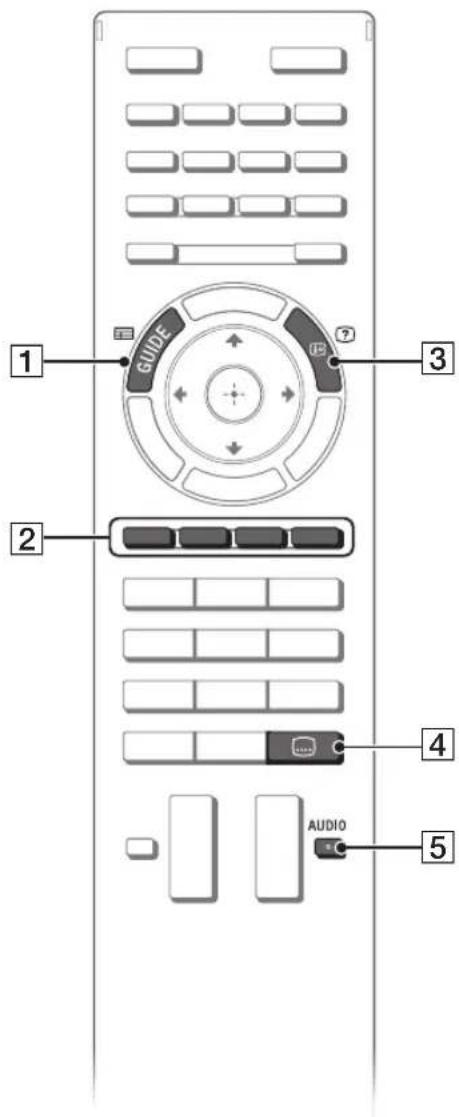
GUIDE
Displays the digital programme guide. (only available for EPG supported countries/ regions).
2Colour buttons
When the colour buttons are available, an operation guide appears on the screen.
3/InfoText reveal
Displays channel number, details of programmes, and the clock.
4 Subtitle setting
You can turn subtitle on/off while watching digital broadcasting.
5 AUDIO
You can select the sub sound or secondary language while watching multiplex broadcasts (digital broadcasts only).
Selecting various functions and settings (Home Menu)
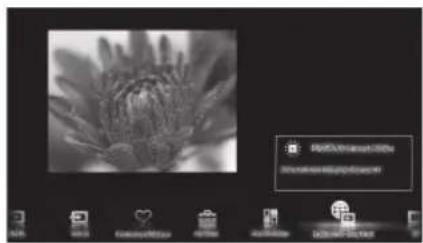
You can select the features of your TV from the Home menu.
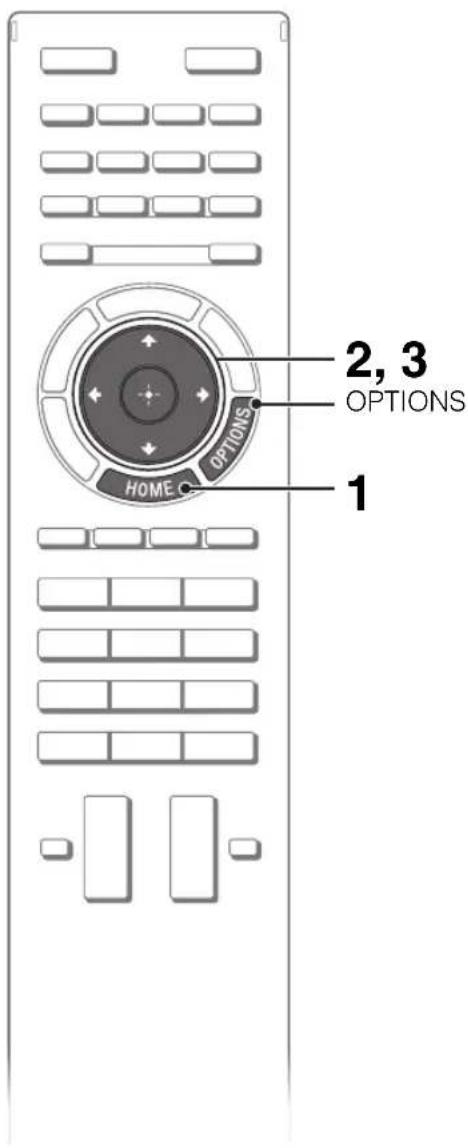
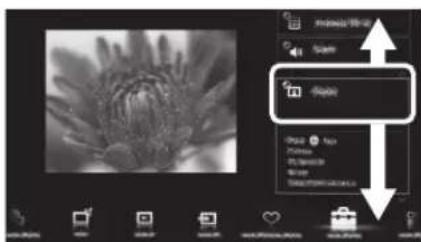
Here is an example on how to select an item and modify the TV settings.
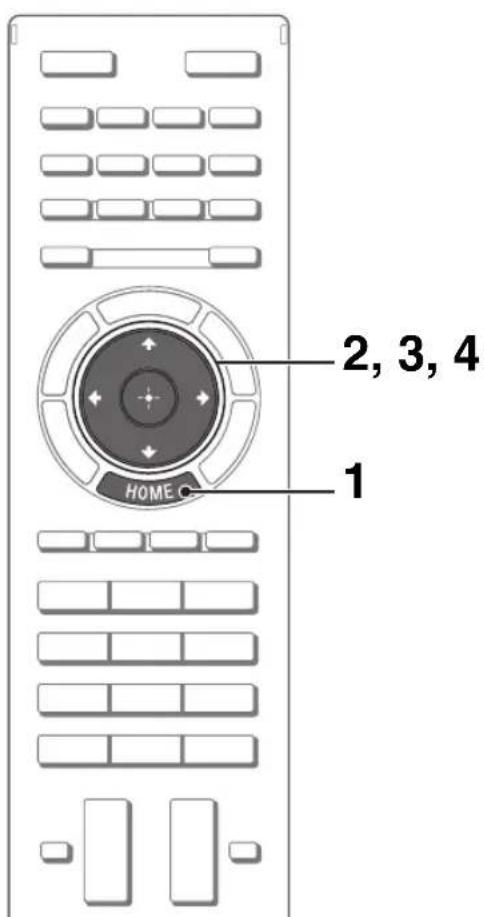
1 Press HOME.

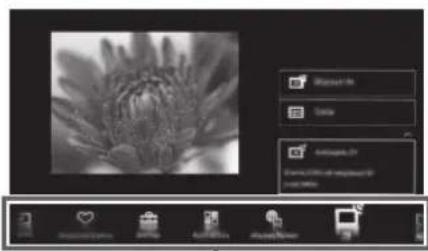
2 Press ⇔ to select (Settings) category.
The contents of "Settings" are displayed on the right.

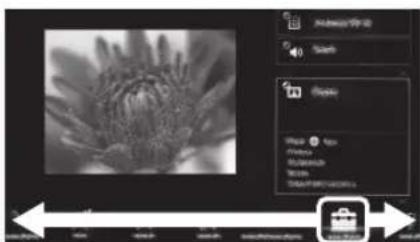
See page 23 (Category list) for all categories.
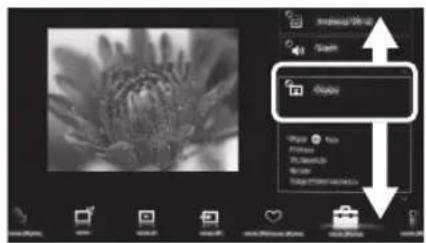
3 Press 口 /口 to select "Display", then press

4 Modify the settings.
To exit the Home menu Press HOME.
To select using the OPTIONS button, press OPTIONS.
A list of convenient functions and menu shortcuts is displayed. The menu items vary based on the current input and/or content.
Category list
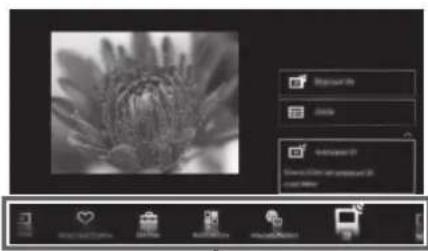

The categories are available depending on your region and country.
| Settings | Provides settings (e.g. picture settings, sound settings, key tone setting) that allow you to customise your TV. |
| Widgets | Enables access to Widgets. |
| Applications | Launches applications that require an Internet connection. |
| Sony Entertainment Network | Enables selection of content from the online service "SEN" (Sony Entertainment Network). |
| Internet Content | Enables access to Internet services for TV. |
| TV | Allows you to select a list of TV channels, or a programme guide. |
| Media | Enables selection of media files (photo, music, video) to play in a connected USB storage device or your home network. |
| Inputs | Enables selection of devices connected to the TV. |
| Favourites/History | Displays items in Favourites and recently viewed items. |
GB
Watching Internet Video
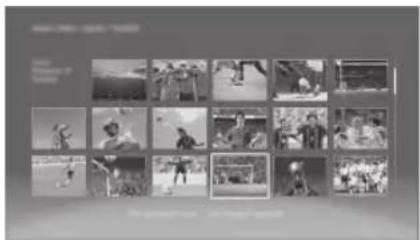
This feature serves as a gateway to Internet content, delivering a variety of on-demand entertainment straight to your TV. You can enjoy video content, including movies and cartoons. You will need to make a broadband Internet connection. For details, see page 17 (7: Connecting the TV to the Internet).
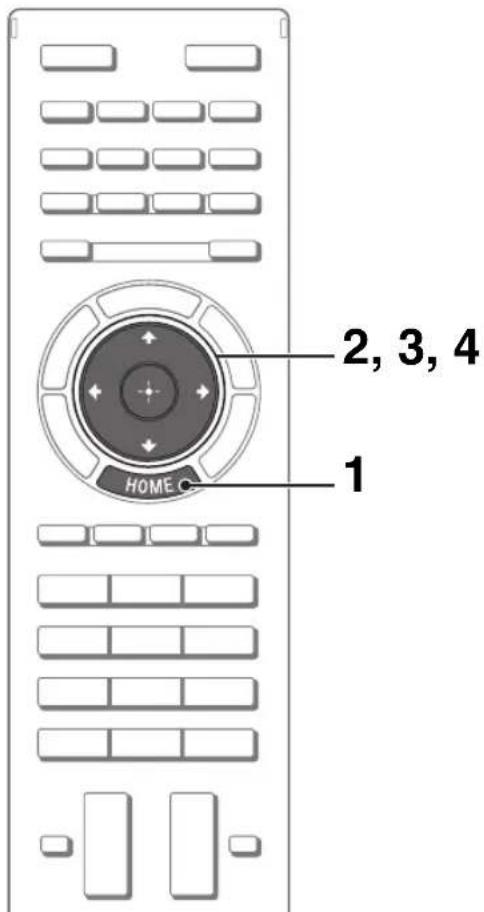
1 Press HOME.
2 Press \leftrightarrow to select (Internet Content) category. 3 Press \vdash to select "Internet Video", then press

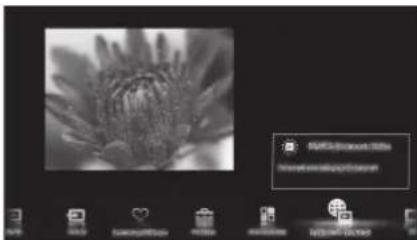
4 Press \updownarrow / \downarrow / \downarrow / \downarrow to highlight the desired content, then press

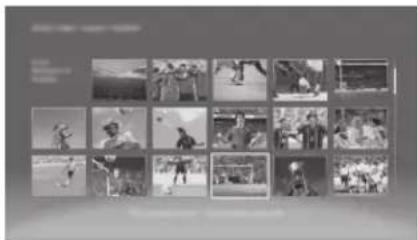

- If you experience difficulties with this feature, check that the Internet connection is set up properly.
- The interface to Internet content depends on the Internet content providers.
- Services block video content based on the "Parental Lock" setting of the TV. Some service providers do not support this function.
- To update Internet Video content services, press HOME, then select "Settings" → "Network" → "Refresh Internet Content".
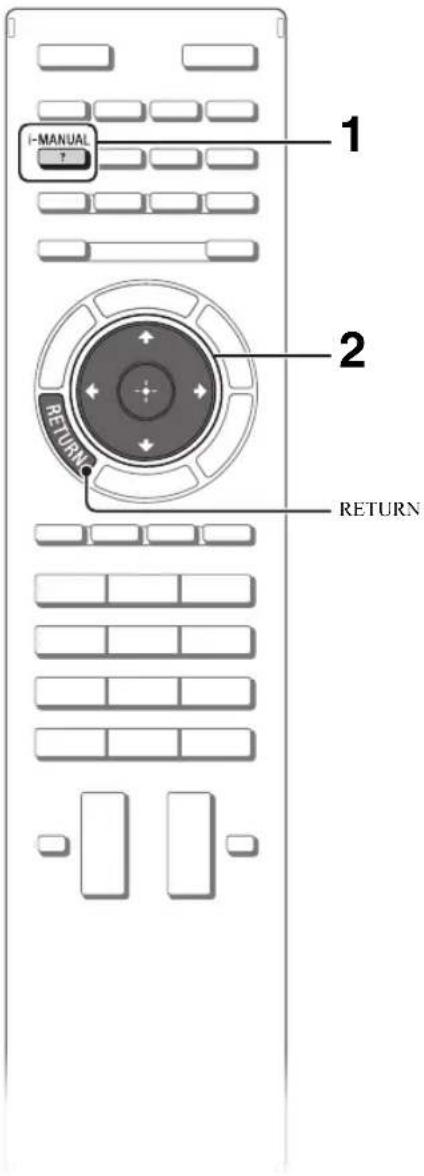
Looking for instructions in the electronic manual (i-Manual)
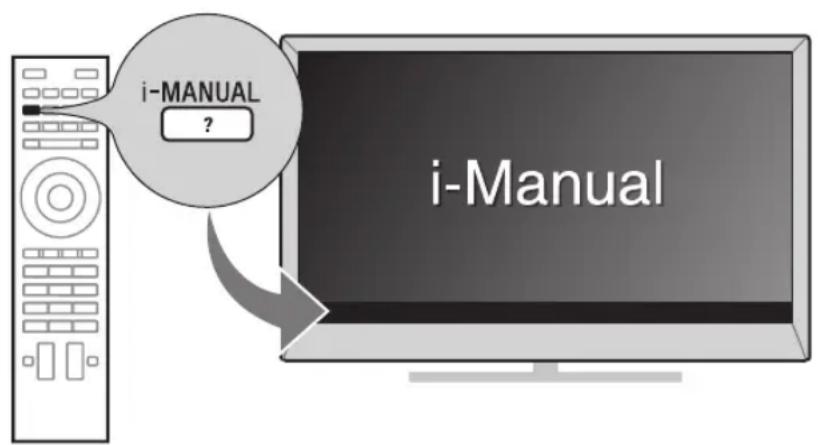
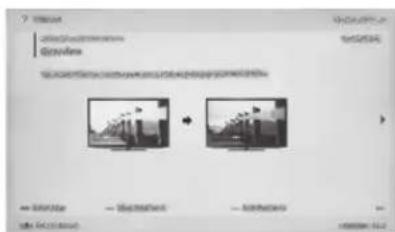
Operating instructions are built into your BRAVIA TV and can be displayed on the screen. To learn more about your TV features, access your i-Manual with the touch of a button.
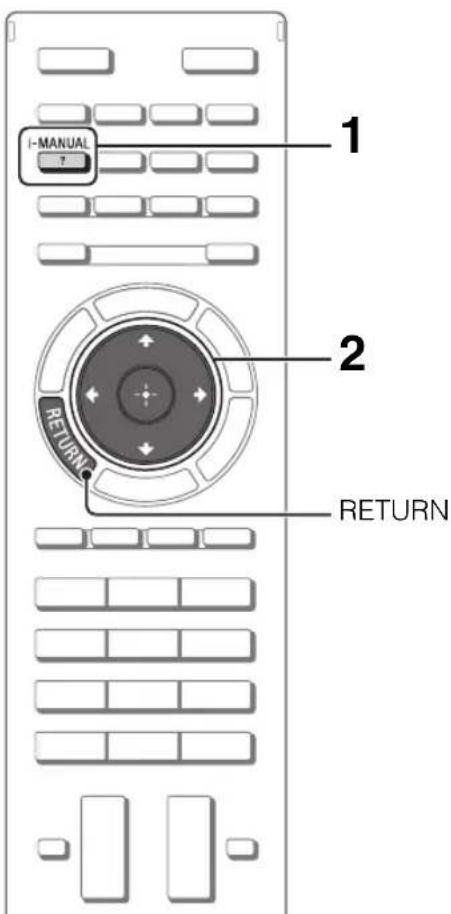
1 Press i-MANUAL.

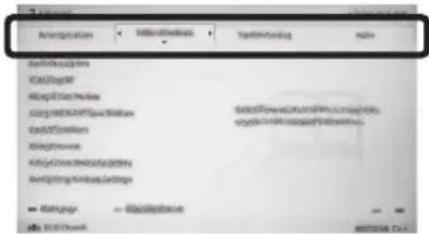
2 Select an item.
Press the left/right arrow keys to select an item.

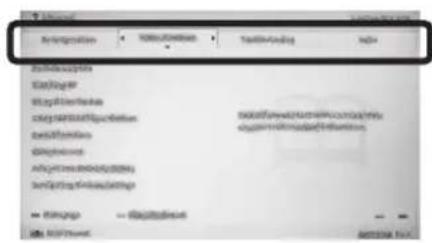
Press the up/down arrow keys to select an item, then press Enter.

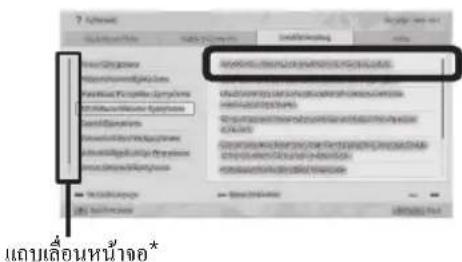
scroll bar*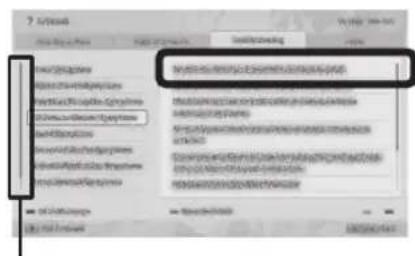
- If a scroll bar appears, press the up/down arrow keys repeatedly to display more items.
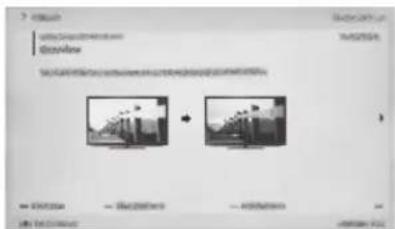
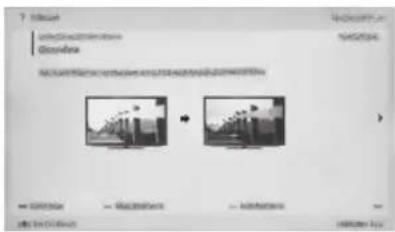
The page of the selected item appears.
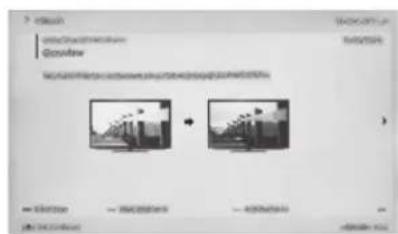

- You can step through pages using the left/right arrow keys. Press RETURN to return to the previous page.
Saving frequently viewed pages (Bookmark)
You can save frequently viewed pages for easy access anytime.
To save a page
In the page to bookmark, press the yellow button on the remote.
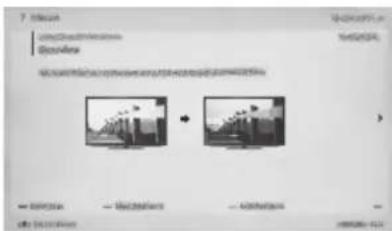
To access the bookmarked page
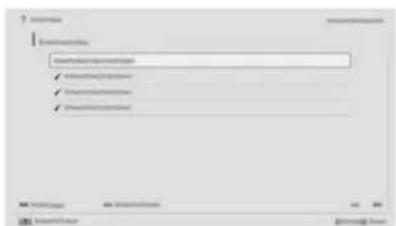
When displaying the i-Manual, press the green button on the remote to display the bookmark list.
Press the arrow buttons to select the desired item, then press Enter.
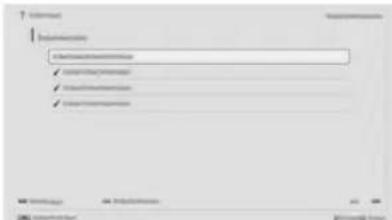
To return to the previous page, press the Back button.
To remove a bookmark
When the bookmarked page is displayed, press the yellow button on the remote.
Displaying the page again while operating the TV
You can switch between the i-Manual screen and the TV screen. This feature allows you to refer to the instructions in the i-Manual while using your BRAVIA TV. Press i-MANUAL to switch between the i-Manual screen previously displayed and the TV screen.
i-Manual screen previously displayed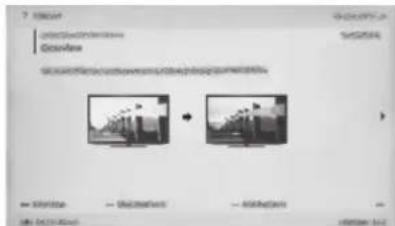

BRAVIA TV screen
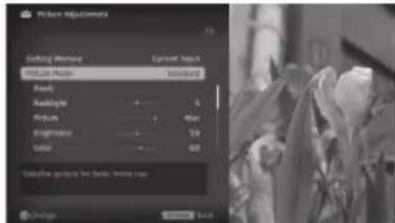
- To jump to the top page of i-Manual, press the red button on the remote. You can also press HOME, then select "Settings" → "i-Manual" to jump to the top page of i-Manual.
- Once you turn off the TV or the TV goes to standby mode, the i-Manual will be displayed from the top page when you select "i-Manual".
Troubleshooting
When the standby indicator is flashing, count how many times it flashes (interval time is three seconds).
Press I/O on the TV to turn it off, disconnect the AC power cord, and inform your dealer or Sony service centre of how the indicator flashes (number of flashes).
When the (standby) indicator is not flashing, check the items in the tables as follows.
Also refer to "Troubleshooting" in the i-Manual. If the problem persists, have your TV serviced by qualified service personnel.
Condition Explanation/Solution
| There is no picture (screen is dark) and no sound. | ·Check the antenna/cable connection. ·Connect the TV to the AC power, and press I/O on the TV. ·If the O (standby) indicator lights up in red, press I/O on the remote. |
| Tiny black points and/or bright points appear on the screen. | ·The screen is composed of pixels. Tiny black points and/or bright points (pixels) on the screen do not indicate a malfunction. |
| Some programmes cannot be tuned. | ·Check the antenna or dish. |
| The TV turns off automatically (the TV enters standby mode). | ·Check if the “Sleep Timer” is activated, or confirm the “Duration” setting of “On Timer”. ·Check if the “Idle TV Standby” is activated. |
| The remote does not function. | ·Replace the batteries. ·Your TV may be in SYNC mode. Press SYNC MENU, select “TV Control” and then select “Home (Menu)” or “Options” to control the TV. |
| The “Parental Lock” password has been forgotten. | ·Enter 9999 for the PIN code. (PIN code 9999 is always accepted.) |
| The TV surrounds become warm. | ·When the TV is used for an extended period, the TV surrounds become warm. You may feel hot when touching there by the hand. |

When viewing photo files in 4K resolution:
- The menu screen, operation guide or messages may not appear when displaying photos. To finish playback of photos, press RETURN, or switch the input by pressing
| System | |
| Panel system | LCD (Liquid Crystal Display) Panel |
| TV system | Analogue: B/G, I, D/K, M, L Digital: DVB-T2 (Depending on country/area selection except Hong Kong), DVB-T (except Hong Kong) DTMB (Hong Kong only) |
| Colour/video system | Analogue: PAL, SECAM, NTSC3.58, NTSC4.43 Digital: MPEG-2 MP@HL/H14L/ML, AVC BP@L3/MP@L4/HP@L4 (30Mbps max, limited tool), MPEG-4 Visual SP@L6/ASP@L5/ACEP@L4 |
| Channel coverage | Analogue: UHF/VHF/Cable, Depending on your country/area selection. Digital: UHF/VHF/Cable, Depending on your country/area selection. |
| Sound output | 12.5W+12.5W+12.5W+12.5W |
| Input/Output jacks | |
| Antenna (aerial)/cable | 75 ohm external terminal for VHF/UHF |
| C O M P VIDEO IN 2 | YBaPr (Component Video): 1080p (50, 60Hz), 1080i (50, 60Hz), 720p (50, 60Hz), 576p, 576i, 480p, Audio input (phono jacks) Video input (common phono pin with Y input) |
| HDMI IN1, 2, 3, 4 (Only HDMI 2 and HDMI 3 support 4K resolution) | Video(2D): HDMI 1, 4: 1080p (30, 50, 60Hz), 1080/24p, 1080i (50, 60 Hz), 720p (30, 50, 60 Hz), 720/24p, 576p, 576i, 480p, 480i, PC Formats HDMI 2, 3: 3840 x 2160p (24, 25, 30 Hz), 4096 x 2160p (24Hz), 1080p (30, 50, 60 Hz), 1080/24p, 1080i (50, 60 Hz), 720p (30, 50, 60 Hz), 720/24p, 576p, 576i, 480p, 480i, PC Formats Video(3D): Frame Packing 1080p (30Hz), 1080/24p, 1080i (50, 60Hz), 720p (30, 50, 60Hz), 720/24p Side-by-Side 1080p (50, 60Hz), 1080/24p, 1080i (50, 60Hz), 720p (50, 60Hz) Over-Under 1080p (30, 50, 60Hz), 1080/24p, 1080i (50, 60Hz), 720p (50, 60Hz) Audio: Two channel linear PCM: 32, 44.1 and 48 kHz, 16, 20 and 24 bits, Dolby Digital Analogue audio input (stereo minijack) (HDMI IN 3 only, common with PC IN) ARC (Audio Return Channel) (HDMI IN 1 only) |
| VIDEO IN 1 | Video/Audio input (phono jacks) |
| DIGITAL AUDIO OUT (OPTICAL) | Digital optical jack (Two channel linear PCM, Dolby Digital) |
| AUDIO OUT/Ω | Audio output (stereo minijack) Headphones jack |
| PC IN PC/HDMI 3 AUDIO IN | Analogue RGB (Mini D-sub 15-pin) Audio input (stereo minijack) (common with HDMI IN 3) |
| ψ1, ψ2 | USB port |
| LAN | 10BASE-T/100BASE-TX connector (Depending on the operating environment of the network, connection speed may differ. 10BASE-T/100BASE-TX communication rate and communication quality are not guaranteed for this TV.) |
| Model name KD- 84X9000 | |
| Power and others | |
| Power requirements | 110 V - 240 V AC, 50/60 Hz220 V - 240 V AC, 50Hz (Hong Kong only) |
| Screen size(measured diagonally) | Approx. 213.5 cm/84 inches |
| Display resolution | 3,840 dots (horizontal) × 2,160 lines (vertical) |
| Power consumption | Indicated on the rear of the TV |
| Dimensions (Approx.) (w × h × d) | |
| TV with Floor Stand (mm) | 2137 × 1511 × 567 |
| TV with Table-Top Stand (mm) | 2137 × 1209 × 567 |
| TV without Floor Stand/Table-Top Stand (mm) | 2137 × 1136 × 90 |
| Monitor with Floor Stand (mm) | 1926 × 1511 × 567 |
| Monitor with Table-Top Stand (mm) | 1926 × 1209 × 567 |
| Monitor without Floor Stand/Table-Top Stand (mm) | 1926 × 1136 × 79 |
| Mass (Approx.) | |
| TV with Floor Stand (kg) | 97.9 |
| TV with Table-Top Stand (kg) | 95.2 |
| TV without Floor Stand/Table-Top Stand (kg) | 80.0 |
| Monitor with Floor Stand (kg) | 90.5 |
| Monitor with Table-Top Stand (kg) | 87.8 |
| Monitor without Floor Stand/Table-Top Stand (kg) | 72.7 |
| Supplied accessories | See page 6 (Checking the accessories). |
| Optional accessories | Wall-Mount Bracket: SU-WL500USB Wireless LAN Adapter: UWA-BR100Camera and Microphone Unit: CMU-BR100 |
| Operating temperature | 0 °C – 40 °C |
| Operating humidity | 10 % – 80 % RH (non-condensing) |
Optional accessories availability depends on countries/region/TV model/stock. Design and specifications are subject to change without notice.
Installing the Accessories (Wall-Mount Bracket)
To Customers:
For product protection and safety reasons, Sony strongly recommends that installing of your TV be performed by Sony dealers or licensed contractors. Do not attempt to install it yourself.
To Sony Dealers and Contractors:
Provide full attention to safety during the installation, periodic maintenance and examination of this product.
Your TV can be installed using the SU-WL500 (page 31) Wall-Mount Bracket (sold separately).
Refer to the Instructions supplied with the Wall-Mount Bracket to properly carry out the installation. See page 8 (Detaching the Floor Stand from the TV).
Sufficient expertise is required for installing this product, especially to determine the strength of the wall for withstanding the TV's weight. Be sure to entrust the attachment of this product to the wall to Sony dealers or licensed contractors and pay adequate attention to safety during the installation. Sony is not liable for any damage or injury caused by mishandling or improper installation.
SU-WL500
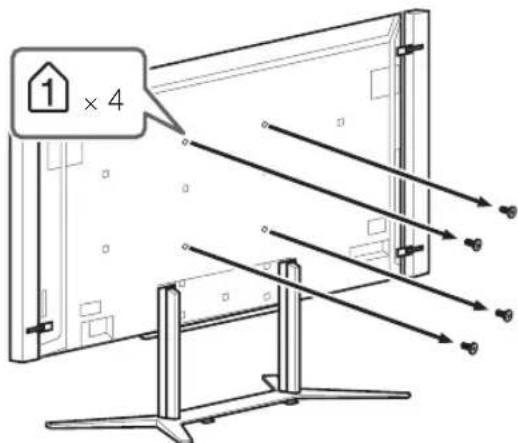
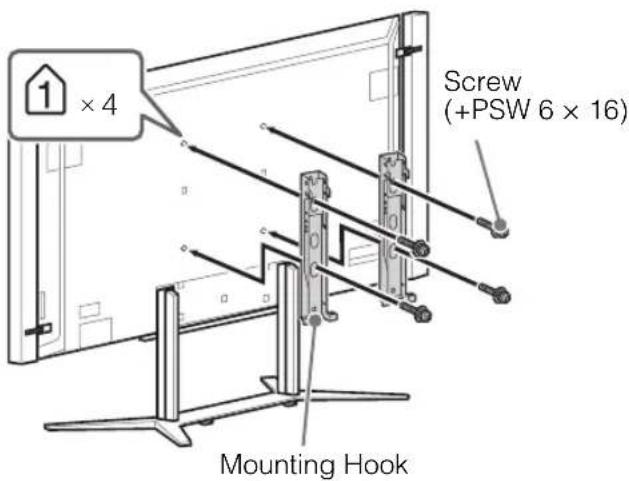
When installing the TV on the wall, remove the screws from the rear of the TV. (They are fastened in the screw holes for wall mounting.) Be sure to store the removed screws in a safe place, keeping them away from children.
GB

- Attach the Mounting Hook using the four screws supplied with the Wall-Mount Bracket.
- When attaching the Table-Top Stand again, be sure to fasten the screws (previously removed) to the original holes on the rear of the TV.
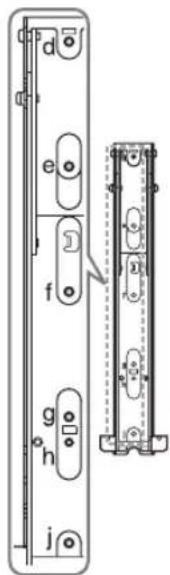
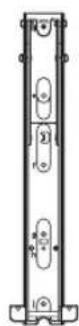
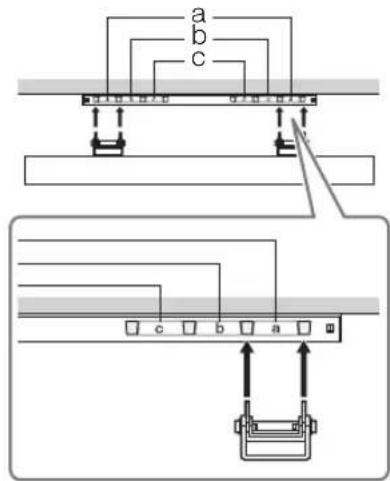
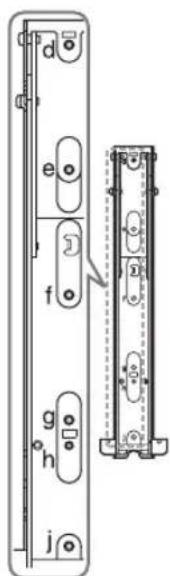
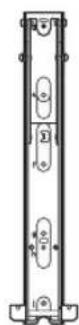
Screw and Hook locations diagram/table
| Model Name KD- | Screw location Hook location | |
| SU-WL500 SU-WL500 | ||
| 84X9000 | d, ja | |
SU-WL500
Screw location
When installing the Mounting Hook on the TV.
Hook location
When installing the TV onto the Base Bracket.
TV installation dimensions table
SU-WL500
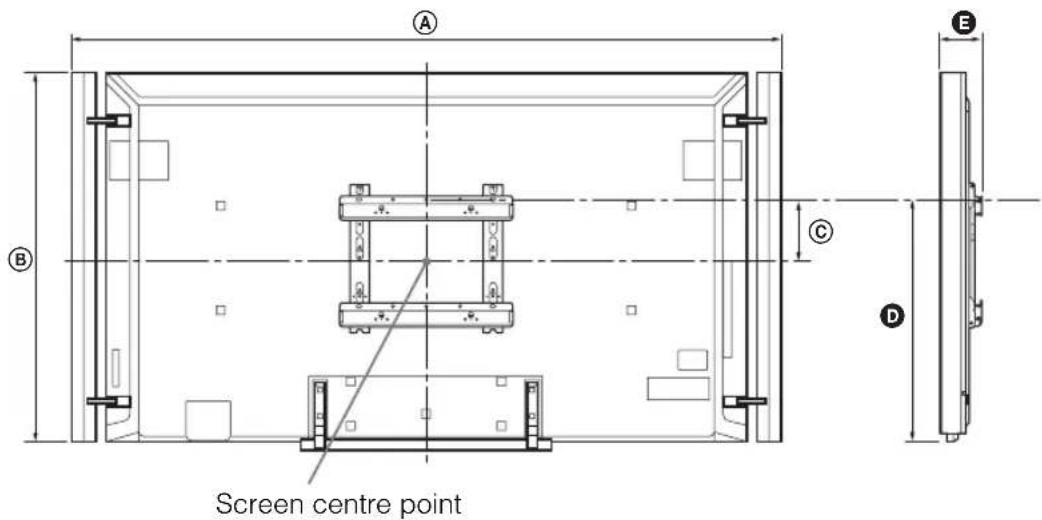
Unit: mm
| Model Name KD- | Display dimensions | Screen centre dimension | Length for each mounting angle | ||
| Angle (0°)* | |||||
| A B C D E | |||||
| SU-WL500 | |||||
| 84X9000 | 2137 1136 171 751 130 | ||||
- Only applicable for 0° for this TV model. Figures in the table may differ slightly depending on the installation.
WARNING
The wall that the TV will be installed on should be capable of supporting a weight of at least four times that of the TV. See page 28-29 (Specifications) for its weight.
Safety Information
WARNING
Batteries must not be exposed to excessive heat such as sunshine, fire or the like.
Installation/Set-up
Install and use the TV set in accordance with the instructions below in order to avoid any risk of fire, electrical shock or damage and/or injuries.
Installation
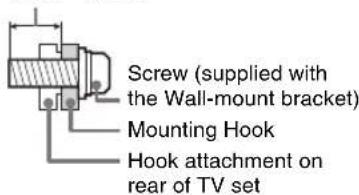
The TV set should be installed near an easily accessible AC power outlet. - Place the TV set on a stable, level surface to avoid it from falling down and cause personal injury or damage to the TV. Only qualified service personnel should carry out wall installations. - For safety reasons, it is strongly recommended that you use Sony accessories, including: - Wall Mount Bracket; - SU-WL500 - Be sure to use the screws supplied with the Wall-mount bracket when attaching the mounting hooks to the TV set. The supplied screws are designed so that they are 8 mm to 12 mm in length when measured from the attaching surface of the mounting hook.
The diameter and length of the screws differ depending on the Wall-mount bracket model. Use of screws other than those supplied may result in internal damage to the TV set or cause it to fall, etc.
8mm-12mm
Transporting
- Before transporting the TV set, disconnect all cables.
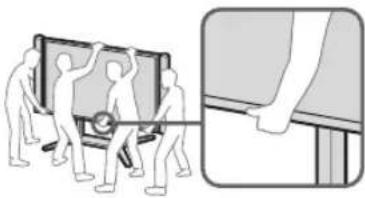
- Four or more people are needed to transport a large TV set.
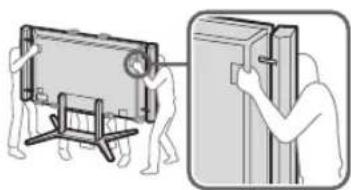
- When transporting the TV set by hand, hold it as shown below. Do not put stress on the LCD panel and the frame around the screen.
- When lifting or moving the TV set, hold it firmly from the bottom.
Front
Rear
- When transporting the TV set, do not subject it to jolts or excessive vibration.
- When transporting the TV set for repairs or when moving, pack it using the original carton and packing material.
Ventilation
- Never cover the ventilation holes or insert anything in the cabinet.
- Leave space around the TV set as shown below.
- It is strongly recommended that you use a Sony wall-mount bracket in order to provide adequate air-circulation.
Installed on the wall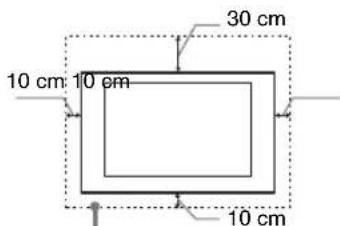
Leave at least this space around the set.
Installed with stand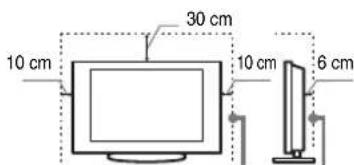
Leave at least this space around the set.
To ensure proper ventilation and prevent the collection of dirt or dust: - Do not lay the TV set flat, install upside down, backwards, or sideways. - Do not place the TV set on a shelf, rug, bed or in a closet.
- Do not cover the TV set with a cloth, such as curtains, or items such as newspapers, etc.
- Do not install the TV set as shown below.
Air circulation is blocked.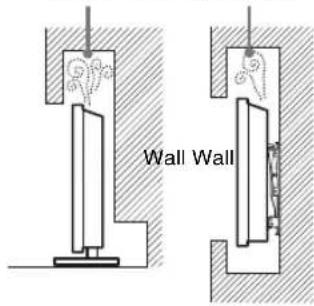
AC power cord
Handle the AC power cord and outlet as follows in order to avoid any risk of fire, electrical shock or damage and/or injuries:
- Use only Sony supplied AC power cords, not those of other brands.
- Insert the plug fully into the AC power outlet.
- Operate the TV set on a 110 - 240 V (except Hong Kong), 220 - 240 V (Hong Kong only) AC supply only.
- When wiring cables, be sure to unplug the AC power cord for your safety and take care not to catch your feet on the cables.
- Disconnect the AC power cord from the AC power outlet before working on or moving the TV set.
- Keep the AC power cord away from heat sources.
- Unplug the AC power plug and clean it regularly. If the plug is covered with dust and it picks up moisture, its insulation may deteriorate, which could result in a fire.
Notes
- Do not use the supplied AC power cord on any other equipment.
- Do not pinch, bend, or twist the AC power cord excessively. The core conductors may be exposed or broken.
- Do not modify the AC power cord.
- Do not put anything heavy on the AC power cord.
- Do not pull on the AC power cord itself when disconnecting the AC power cord.
- Do not connect too many appliances to the same AC power outlet.
- Do not use a poor fitting AC power outlet.
Prohibited Usage
Do not install/use the TV set in locations, environments or situations such as those listed below, or the TV set may malfunction and cause a fire, electrical shock, damage and/or injuries.
Location:
- Outdoors (in direct sunlight), at the seashore, on a ship or other vessel, inside a vehicle, in medical institutions, unstable locations, near water, rain, moisture or smoke. If the TV is placed in the changing room of a public bath or hot spring, the TV may be damaged by airborne sulfur, etc.
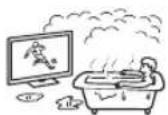
- For best picture quality, do not expose the screen to direct illumination or sunlight.
- Avoid moving the TV from a cold area to a warm area. Sudden room temperature changes may cause moisture condensation. This may cause the TV to show poor picture and/or poor colour. Should this occur, allow moisture to evaporate completely before powering the TV on.
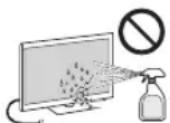
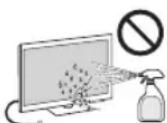
- Never spray water or detergent directly on the TV set. It may drip to the bottom of the screen or exterior parts and enter the TV set, and may cause damage to the TV set.
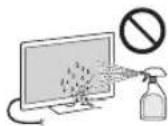
Environment:
- Places that are hot, humid, or excessively dusty; where insects may enter; where it might be exposed to mechanical vibration, near flammable objects (candles, etc). The TV set shall not be exposed to dripping or splashing and no objects filled with liquids, such as vases, shall be placed on the TV.
- Do not place the TV in a humid or dusty space, or in a room with oily smoke or steam (near cooking tables or humidifiers). Fire, electric shock, or warping may result.
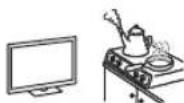
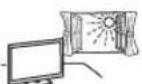
- Do not install the TV in places subject to extreme temperature, such as in direct sunlight, near a radiator or a heating vent. The TV may overheat in such conditions which can cause deformation of the enclosure and/or TV malfunction.

Situation:
- Do not use when your hands are wet, with the cabinet removed, or with attachments not recommended by the manufacturer. Disconnect the TV set from AC power outlet and antenna during lightning storms.
- Do not install the TV so that it sticks out into an open space. Injury or damage from a person or object bumping into the TV may result.
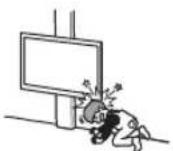
Broken pieces:
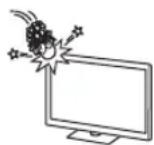
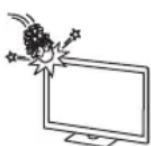
- Do not throw anything at the TV set. The screen glass may break by the impact and cause serious injury.
- If the surface of the TV set cracks, do not touch it until you have unplugged the AC power cord. Otherwise electric shock may result.
When not in use
- If you will not be using the TV set for several days, the TV set should be disconnected from the AC power for environmental and safety reasons.
- As the TV set is not disconnected from the AC power when the TV set is just turned off, pull the plug from the AC power outlet to disconnect the TV set completely. However, some TV sets may have features that require the TV set to be left in standby to work correctly.
For children
Do not allow children to climb on the TV set. - Keep small accessories out of the reach of children, so that they are not mistakenly swallowed.
If the following problems occur...
Turn off the TV set and unplug the AC power cord immediately if any of the following problems occur.
Ask your dealer or Sony service centre to have it checked by qualified service personnel.
When:
- AC power cord is damaged. Poor fitting of AC power outlet.
- TV set is damaged by being dropped, hit or having something thrown at it.
- Any liquid or solid object falls through openings in the cabinet.
About LCD Monitor Temperature
When the LCD Monitor is used for an extended period, the panel surrounds become warm.
You may feel hot when touching there by the hand.
Precautions
Viewing the TV
Some people may experience discomfort (such as eye strain, fatigue, or nausea) while watching 3D video images or playing stereoscopic 3D games. Sony recommends that all viewers take regular breaks while watching 3D video images or playing stereoscopic 3D games. The length and frequency of necessary breaks will vary from person to person. You must decide what works best. If you experience any discomfort, you should stop watching the 3D video images or playing stereoscopic 3D games until the discomfort ends; consult a doctor if you believe necessary. You should also review (i) the instruction manual of any other device or media used with this television and (ii) our website (http://www.sony-asia.com/support) for the latest information. The vision of young children (especially those under six years old) is still under development. Consult your doctor (such as a pediatrician or eye doctor) before allowing young children to watch 3D video images or play stereoscopic 3D games. Adults should supervise young children to ensure they follow the recommendations listed above.
- Do not use, store, or leave the 3D Glasses or battery near a fire, or in places with a high temperature, e.g., in direct sunlight, or in sun-heated cars.
- When using the simulated 3D function, please note that the displayed image is modified from the original due to the conversion done by this television. View the TV in moderate light, as viewing the TV in poor light or during long period of time, strains your eyes.
- When using headphones, adjust the volume so as to avoid excessive levels, as hearing damage may result.
LCD Screen
- Although the LCD screen is made with high-precision technology and 99.99% or more of the pixels are effective, black dots may appear or bright points of light (red, blue, or green) may appear constantly on the LCD screen. This is a structural property of the LCD screen and is not a malfunction.
- Do not push or scratch the front filter, or place objects on top of this TV set. The image may be uneven or the LCD screen may be damaged.
- If this TV set is used in a cold place, a smear may occur in the picture or the picture may become dark. This does not indicate a failure. These phenomena disappear as the temperature rises.
- Ghosting may occur when still pictures are displayed continuously. It may disappear after a few moments.
- The screen and cabinet get warm when this TV set is in use. This is not a malfunction.
- The LCD screen contains a small amount of liquid crystal. Follow your local ordinances and regulations for disposal.
- Do not subject the LCD screen to any strong impact or shock. The screen glass may crack or shatter and cause injury.
Handling and cleaning the screen surface/cabinet of the TV set
Be sure to unplug the AC power cord connected to the TV set from AC power outlet before cleaning.
To avoid material degradation or screen coating degradation, observe the following precautions.
- To remove dust from the screen surface/cabinet, wipe gently with a soft cloth. If dust is persistent, wipe with a soft cloth slightly moistened with a diluted mild detergent solution.
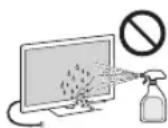
- Never spray water or detergent directly on the TV set. It may drip to the bottom of the screen or exterior parts and enter the TV set, and may cause damage to the TV set.
- Never use any type of abrasive pad, alkaline/acid cleaner, scouring powder, or volatile solvent, such as alcohol, benzene, thinner or insecticide. Using such materials or maintaining prolonged contact with rubber or vinyl materials may result in damage to the screen surface and cabinet material. Periodic vacuuming of the ventilation openings is recommended to ensure to proper ventilation.
- When adjusting the angle of the TV set, move it slowly so as to prevent the TV set from moving or slipping off from its table stand.
Optional Equipment
Keep optional components or any equipment emitting electromagnetic radiation away from the TV set. Otherwise picture distortion and/or noisy sound may occur.
Wireless Function of the unit
- Do not operate this unit near medical equipment (pacemaker, etc.), as malfunction of the medical equipment may result.
- Although this unit transmits/receives scrambled signals, be careful of unauthorised interception. We cannot be responsible for any trouble as a result.
(Caution about handling the remote control) Notes
- Observe the correct polarity when inserting batteries.
- Do not use different types of batteries together or mix old and new batteries.
- Dispose of batteries in an environmentally friendly way. Certain regions may regulate the disposal of batteries. Please consult your local authority.
- Handle the remote with care. Do not drop or step on it, or spill liquid of any kind onto it.
- Do not place the remote in a location near a heat source, a place subject to direct sunlight, or a damp room.
Disposal of the TV set
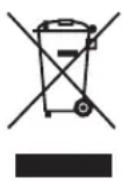
Disposal of Old Electrical & Electronic Equipment (Applicable in the European Union and other
European countries with separate collection systems)
This symbol is on the remote control.
Disposal of the TV set
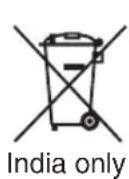
Disposal of Old Electrical & Electronic Equipment (Applicable in Republic of India)
This symbol indicates that this product shall not be treated as household waste and may not be dropped in garbage bins. Product owners are advised to deposit their product at the nearest collection point for the recycling of electrical and electronic equipment. Your co-operation shall facilitate proper disposal & help prevent potential negative consequences/hazards to the environment and human health, which could otherwise be caused by inappropriate waste disposal including improper handling, accidental breakage, damage and/or improper recycling of e-waste. The recycling of materials will help to conserve natural resources. For more detailed information about recycling of this product, please contact your local civic office, your household waste disposal service provider or the store where you made the purchase. You may contact our company's toll free number in India for assistance.
Introduction
Opera® Browser from Opera Software ASA. Copyright 1995-2012 Opera Software ASA. All rights reserved.
DVB is a registered trademark of the DVB Project.





Location of the identification label
The typefaces used on the screen display are solely developed by DynaComware.
TrackID is a trademark or registered trademark of Sony Mobile Communication AB.
Opera® Browser from Opera Software ASA. Copyright 1995-2012 Opera Software ASA. All rights reserved.
Wi-Fi Direct is a trademark of the Wi-Fi Alliance.
The length of the M4 screw varies depending on the diameter of the cable. Please refer to the illustration below.
5: Connect the AC power cord
Opera® Browser from Opera Software ASA. Copyright 1995-2012 Opera Software ASA. All rights reserved.
WEP HON "HON"→ "nun" nunon (SSID) USB Adapter
USB Adapter
USB Adapter 5GHz USB Adapter
USB Adapter
Wi-Fi Direct" "HOME → "Wi-Fi" → "Wi-Fi" nH"“nH"HOH"H"HOH"HOH"HOH"HOH"HOH"HOH"HOH"HOH"HOH"HOH"HOH"HOH"HOH"HOH"HOH"HOH"HOH"HOH"HOH"HOH"HOH"HOH"HOH"HOH"HOH"HOH"HOH"HOH"HOH"HOH"HOH"HOH"HOH"HOH"HO
1
23 (100000000000000000000000000000000000000000000000000000000000
3 nnae"
4
mnnnnn
nHOme
■lunrulanlON OPTIONS
na OPTIONS
y

1 nHOme
2 nna 1 3 nnae"
4 nA/1/1WauHuaonnnaa

#
- uonoeauonenoneononeononeononeononeononeonone
- 1 HUNSHINHINHINHINHINHINHINHINHINHINHINHINHINHINHINHINHINHINHINHINHINHINHINHINHINHINHINHINHINHINHINHINHINHINHINHINHINHINHINHINHINHINHINHINHINHINHINHINHINHINHIN
nnae nnae nee nee nee nee nee nee nee (i-Manual)
1 no i-MANUAL
2
1 na

2 nA/√/51 10000000000000000000
nannnnnnaaennnnnng n 7n nnannnnnne
#
- nwnnnaannnnnnaa nnnnnae
nunnnn nnuuuaa (naun)
nannnnnnnnnnnnnnnnnnnnnnnnnnnnnnnnnnnnnnnnnnnnnnnnnnnnnnnnnnnnnnnnnnnnnnnnnnnnnnnnnnnnnnnnnnnnnnnnnnnnnnnnnnnnnnnnnnnnnnnn
#
wnuununununnnaaannnn
n
i-Manual nuiuun uouanunnnnna
#
Hnnnnaaahghnniounnnna
nnaa
monunumun ngnnaaann
nnaaannnnnnaeaaee
i-Manual


BRAVIA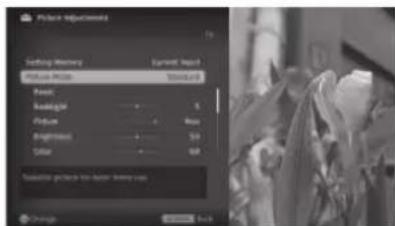
#
| CHINA TRANSMITTER | |
| KD-84X9000 | |
| 110 V - 240 V AC, 50/60 Hz 220 V - 240 V AC, 50Hz (unrated) | |
| 132mm x 213.5 mm/84 mm | |
| 3,840 Ω (W) (U) (W) x 2,160 Ω (W) | |
| 10% - 80% RH (unrated) | |
:
Sony
Sony
1
- W18(0000000000000000)
| KD- | what you like | what you like best | what you like best | |||
| you (0°)* | ||||||
| ABCDE | ||||||
| SU-WL500 | ||||||
| 84X9000 | 2137 1136 17 | 751 130 | ||||
7
28-29 (yoyu)
2nnaaunnae
nna
Hnnnne nnnnnnnnnnnnnnnnnnnnnnnnnnnnnnnnnnnnnnnnnnnnnnnnnnnnnnnnnnnnnnnnnnnnnnnnnnnnnnnnnnnnnnnnnnnnnnnnnnnnnnnnnnnnnnnnnnnnnnnnnnnnnnn
7
www.sony-asia.com/support)
aannnnn nnnnnnnnnnnnnnne (nnnnnnnnnnnnnnnn)
nauuunnnnnnnaaannn 3 n
Jnnnssnnnneennnnnnnnnnnnnnnnnnnnnnnnnnnnnnnnnnnnnnnnnnnnnnnnnnnnnnnnnnnnnnnnnnnnnnnnnnnnnnnnnnnnnnnnnnnnnnnnnnnnnnnnnn
- mnnnne nnnnnnnnnnnnnnnnnnnnnnnnnnnnnnnnnnnnnnnnnnnnnnnnnnnnnnnnnnnnnnnnnnnnnnnnnnnnnnnnnnnnnnnnnnnnnnnnnnnnnnnnnnnnnnnnnnnnn
- 3D mnnn nnnnnnnnnnnnnnnnnnnnnnnnnnnnnnnnnnnnnnnnnnnnnnnnnnnnnnnnnnnnnnnnnnnnnnnnnnnnnnnnnnnnnnnnnnnnnnnnnnnnnnnnnnnnnnn
- yuanyuanwenyueyueyue Wouwuaanwuewhwnn a 1
nLCD
CD 99.99% 100 LCD 000000000000000000 aannnnnnaeaeaeaeaeaeaeaeaeaeaeaeaeaeaeaeaeaeaeaeaeaeaeaeaeaeaeaeaeaeaeaeaeaeaeaeaeaeaeaeaeaeaeaeaeaeaeaeaeaeaeaeaeaeaeae aannnnnnaanennnnnne nnnnnnnae mnnnne nnnnne nnnnnnne nnnnnnne nnnnnnne nnnnnnne nnnnnnne nnnnnnne nnnnnnne nnnnnnne nnnnnnne nnnnnnne nnnnnnne nnnnnnne nnnnnnne nnnnnnne nnnnnnne nnnnnnne nnnnnnne nnnnnnne nnnnnnne nnnnnnne nannnnnne nannnnnne nannnnnne nannnnnne nannnnnne nannnnnne nannnnnne nannnnnne nannnnnne nannnnnne nannnnnne nannnnnne nannnnnne nannnnnne nannnnnne nannnnnne nannnnnne nannnnnne nannnnnne nannnnnne nennnnnne nannnnnne nannnnnne nannnnnne nannnnnne nannnnnne nannnnnne nannnnnne nannnnnne nannnnnne nannnnnne nannnnnne nannnnnne nannnnnne nannnnnne nannnnnne nannnnnne nannnnnne nannnnnne nannnnnne namm aannnnnnaeennnnne aen nnnnnnne
- LCD

Thank you for choosing this Sony television. Before turning on the TV, please read this instruction manual carefully and keep it for future reference.
- The instruction manual "Installation of the Wall-Mount Bracket" is included in this instruction manual for the TV. The illustrations used in this manual show the KD-84X9000 model unless otherwise stated. The illustrations used in this manual show the RM-GD025 remote control unless otherwise stated. Before turning on the TV, read "Safety Information" on page 33. Keep this manual for future reference.
Trademark Information
The terms HDMI, HDMI High-Definition Multimedia Interface, and the HDMI Logo are trademarks or registered trademarks of HDMI Licensing LLC in the United States and other countries.
DLNA, the DLNA Logo and DLNA CERTIFIED are trademarks, service marks, or certification marks of Digital Living Network Alliance.
Manufactured under license from Dolby Laboratories. Dolby and the double-D symbol are trademarks of Dolby Laboratories.
"BRAVIA" and its logo are trademarks of Sony Corporation.
TrackID is a trademark or registered trademark of Sony Mobile Communications AB.
Music and video recognition technology and related data provided by Gracenote.
Gracenote is the industry standard in music recognition technology.
Recognition of music and provision of related content, for more information
visit www.gracenote.com.
CD, DVD, Blu-ray Disc, and also
Music and video recognition services and related data are provided by Gracenote, Inc. Copyright © 2000 to present Gracenote.
Gracenote, the Gracenote logo and logotype, and the "Powered by Gracenote" logo are either
registered trademarks or trademarks of
Gracenote in the United States and/or other countries.
Opera® Browser from Opera Software ASA. Copyright 1995-2012 Opera Software ASA. All rights reserved.
Wi-Fi Direct is a trademark of the Wi-Fi Alliance.
The "Blu-ray Disc", "Blu-ray", and "Blu-ray Disc" logos are trademarks of the Blu-ray Disc Association.
"Sony Entertainment Network logo" and "Sony Entertainment Network"
are trademarks of Sony Corporation.
"ViSiruView" and "PlayStation 3" are
trademarks of Sony Computer Entertainment Inc.
(except for the logo)
DVB is a registered trademark of the DVB Project.

HIGH-DEFINITION MULTIMEDIA INTERFACE

DIGITAL PLUS
PULSE

dlna
CERTIFIED

gracenote.

OPERAT
software
Location of the identification label
The label with the model number and power supply characteristics (in accordance with the accepted safety regulations) is located on the rear panel of the TV.
About this manual (operating instructions)
This manual contains information on preparing the TV for operation. For additional information on using the BRAVIA TV, see the "Electronic Manual".
Troubleshooting 27
Specifications 28
Installing the accessories
(except for the wall-mount bracket) 30
(Wall-mounted unit) 30
Safety. 33
Precautions. 35
Place the stand on its four corners on the cardboard cover.
Place the protective bag over the TV on top of the stand.
Disconnecting the floor stand from the TV
#
Disconnect the floor stand from the TV only when you need to install the tabletop stand for the corresponding model.
1 Lift the covers of the neck up to remove them from the floor stand.
2 Unscrew the screws with which the floor stand is attached to the TV.
#
Keep the removed screws in a safe place. These screws will be used for the tabletop stand.
3 Separate the TV from the floor stand and place it on the cardboard cover. Support the TV during the replacement of the stand so that it does not tip over.
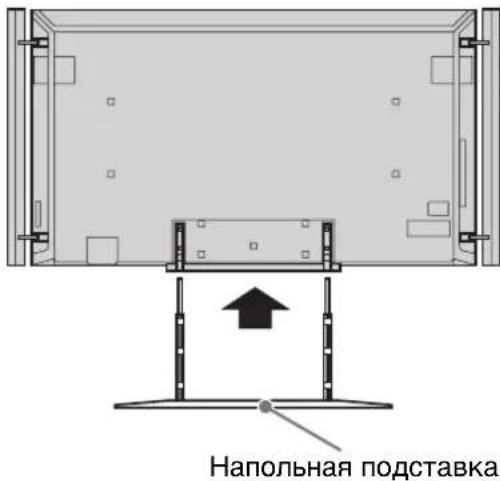
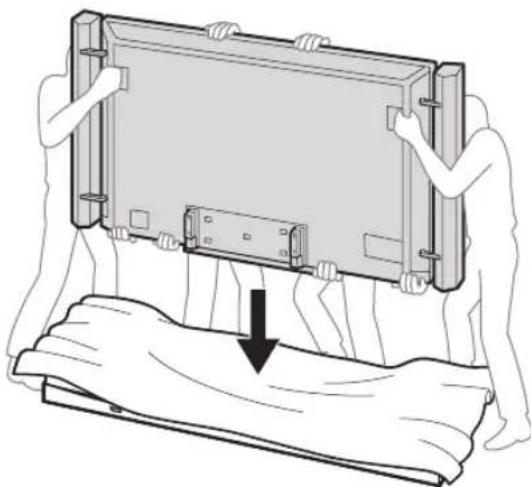
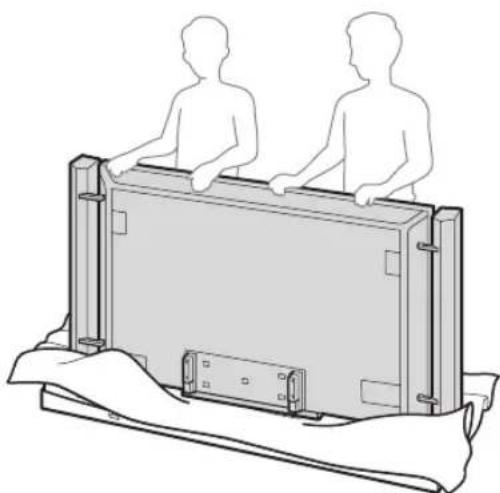
Assembling the tabletop stand
1 Unscrew the screws from the bottom of the floor stand and disconnect the neck from the base.
from the bottom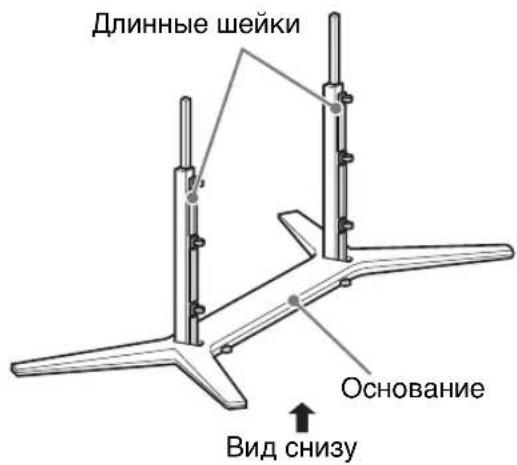
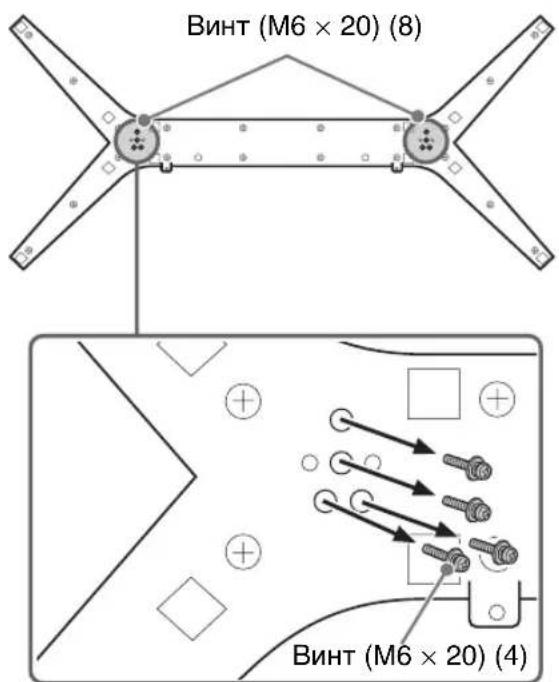
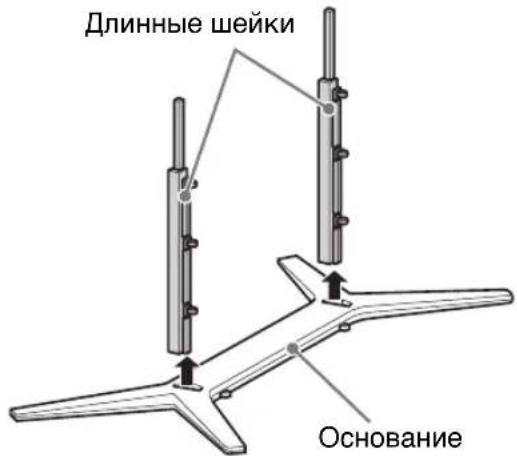
2 Attach the short neck to the base of the TV, which were unscrewed when performing step 1, "Table-Top Stand Assembly" (p.9).
Bottom view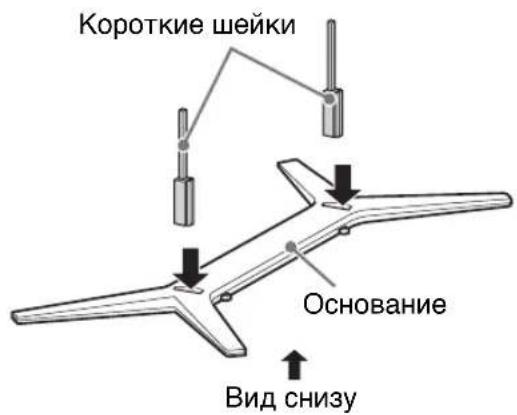
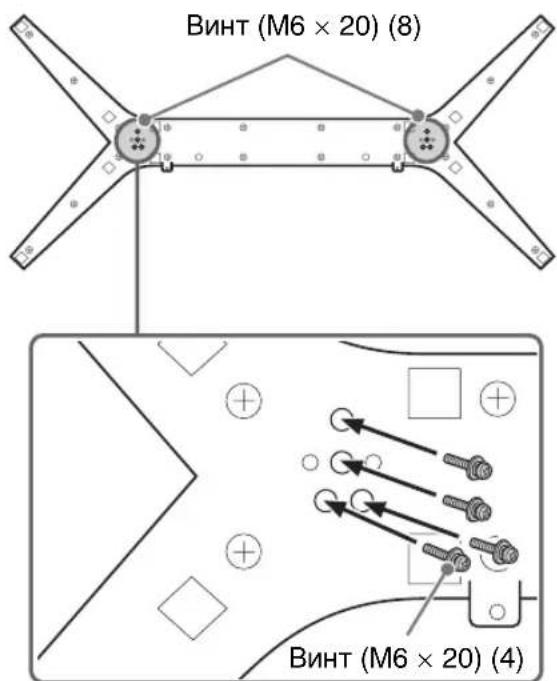
3 Place the TV on the table-top stand.
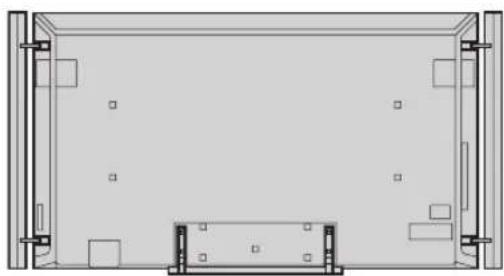
Table-top stand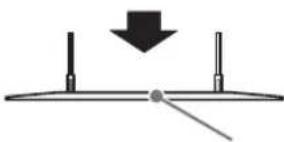

- Make sure there are no objects in front of the TV.
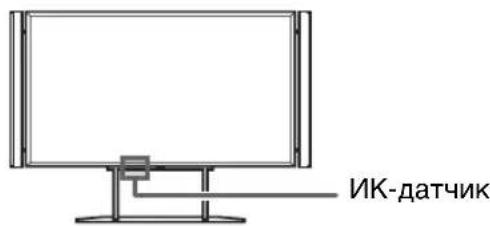
4 Secure the table-top stand with the screws that were previously removed when performing step 2, Detaching the Table-Top Stand from the TV (p.8).
5 Attach the covers of the short neck of the table-top stand.
Detaching the speakers from the TV
The speakers can be detached from the TV if you want to use a separate audio system (for example, a home theater system). Below are instructions for removing the speakers.
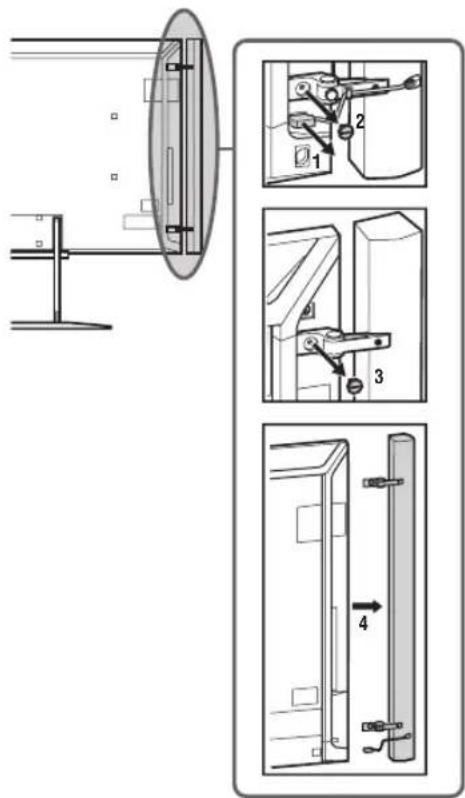
1 Disconnect the speaker cable. 2 Unscrew the screw from the bottom side of the speaker attachment. 3 Unscrew the screw from the top side of the speaker attachment. 4 Pull the speaker horizontally to detach it. Repeat steps 1 to 4 to remove the second speaker.
3: Connections
#
- Use the antenna cable connector with a thickness of no more than 14 mm. - Use the HDMI cable connector with a thickness of no more than 12 mm (thickness) x 21 mm (width). For HDMI connection, use an HDMI cable produced by Sony with the label "High Speed".
Connecting the antenna/cable for the video game console
Connecting the antenna/cable other than the thin one
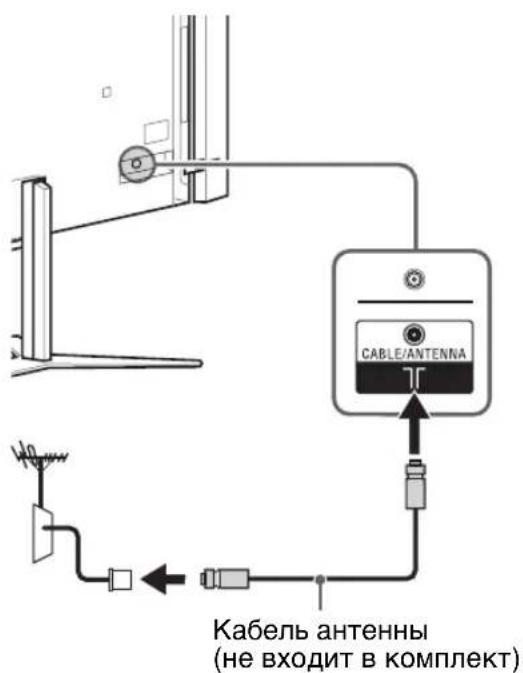
Only for the set-top box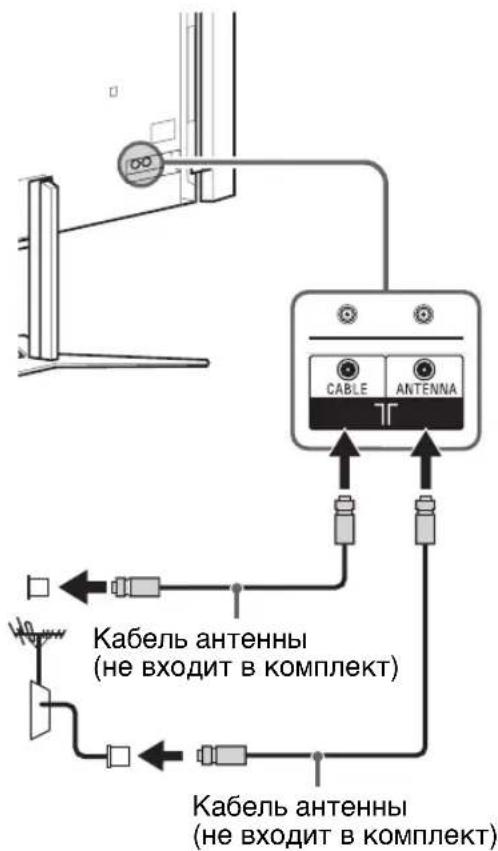
Connecting the set-top box / video recording device (e.g., DVD recorder) using the HDMI port
Except for the set-top box / video recording device (e.g., DVD recorder) *Only HDMI 2 and HDMI 3 support 4K resolution (located on the side of the TV).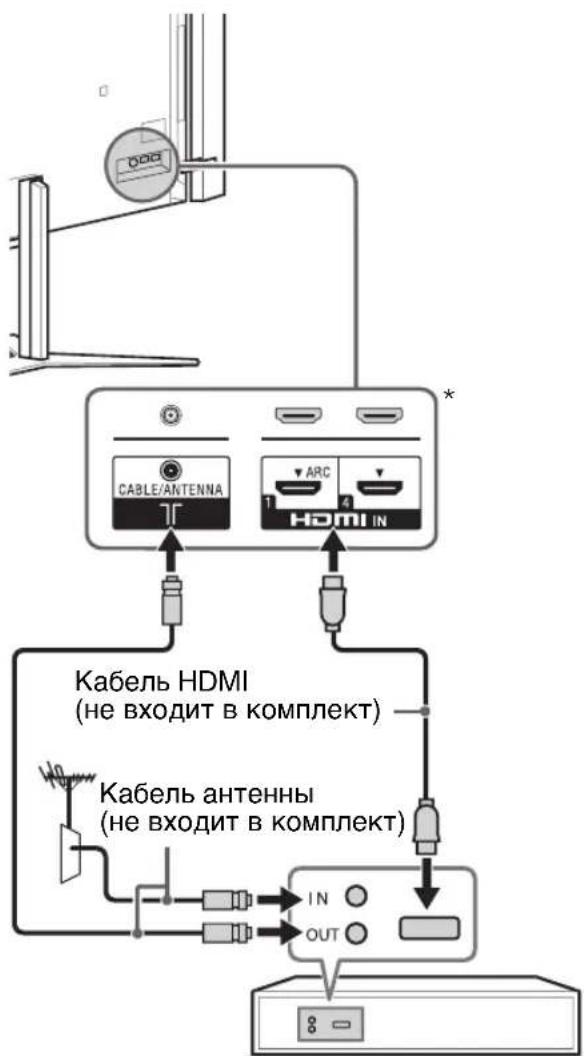
Only for the set-top box / video recording device (e.g., DVD recorder) *Only HDMI 2 and HDMI 3 support 4K resolution (located on the side of the TV).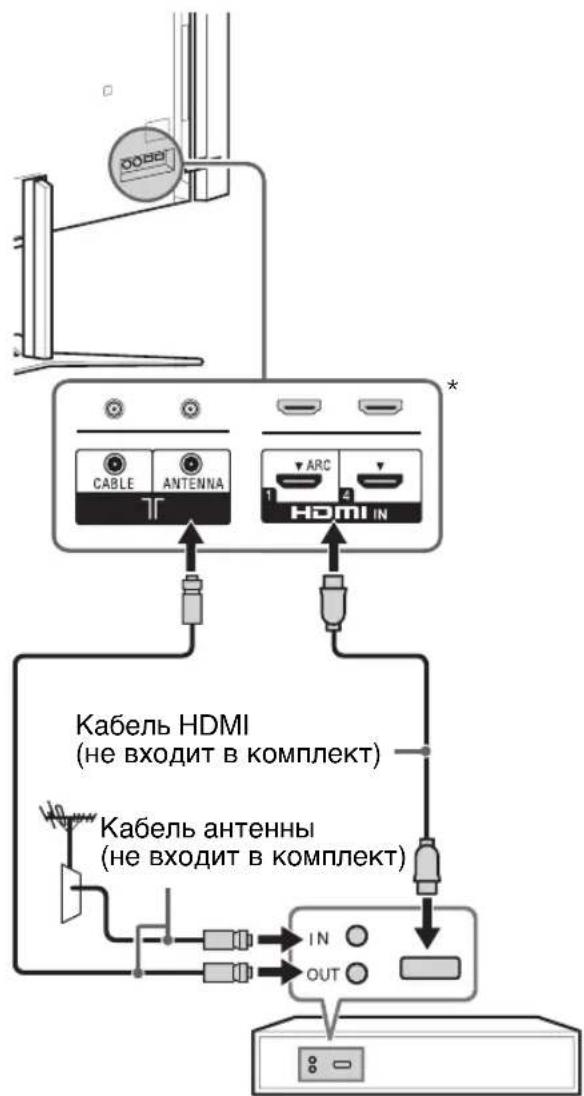
Connecting the antenna/cable to the video player
Except for the set-top box
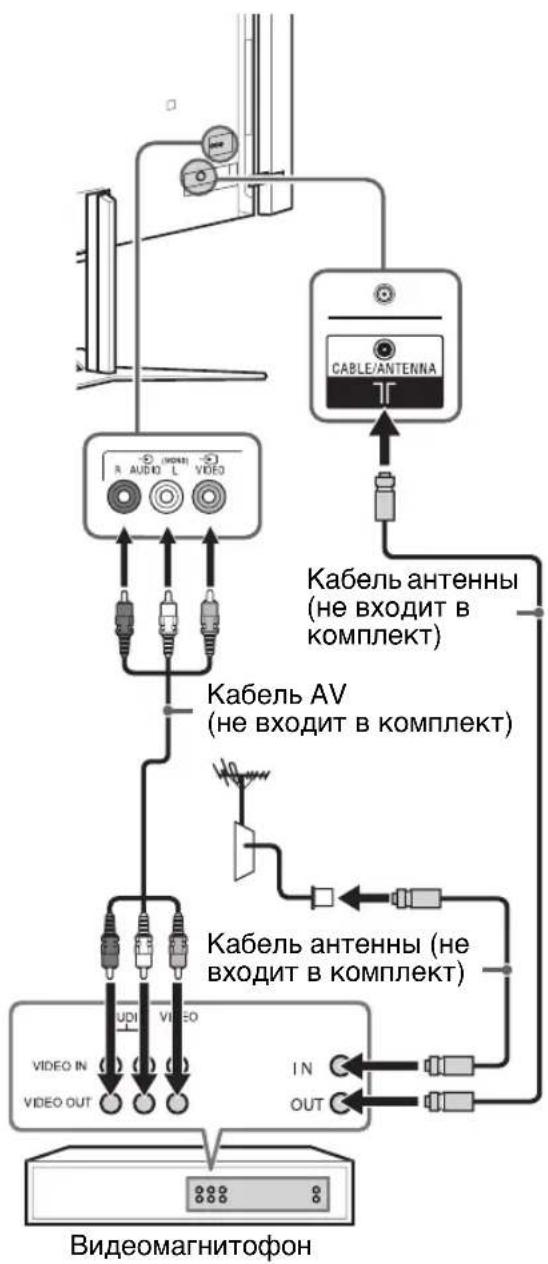
Only for the set-top box
Connecting audio/video components
Except for the set-top box DVD recorder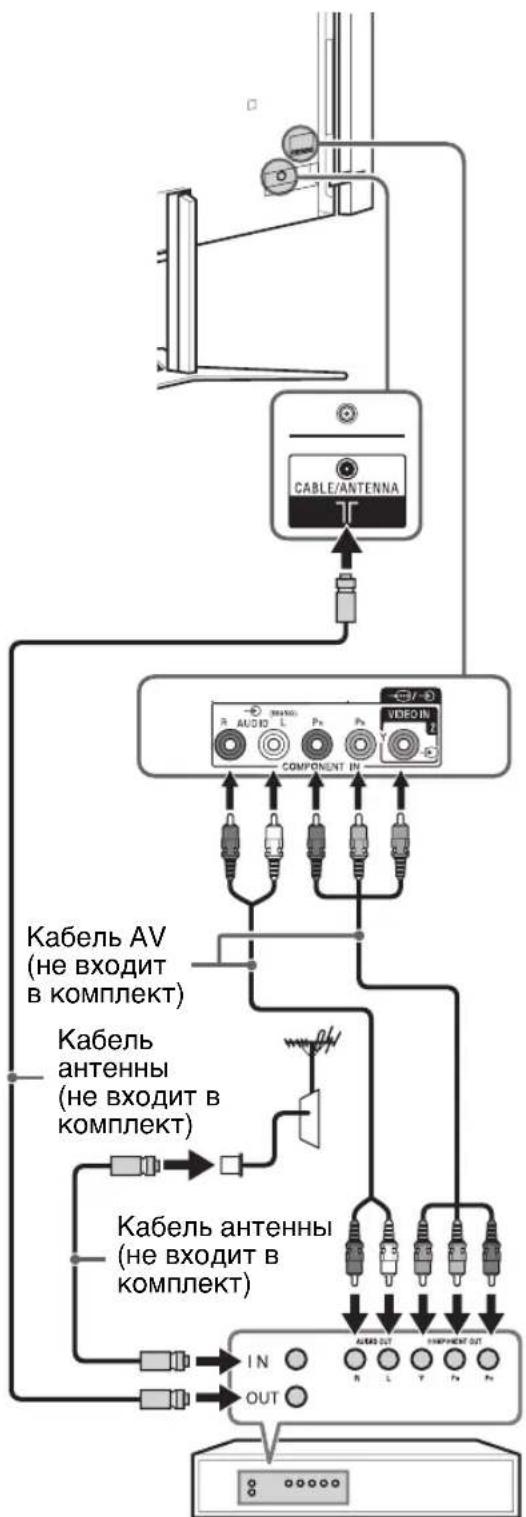
Only for the set-top box DVD recorder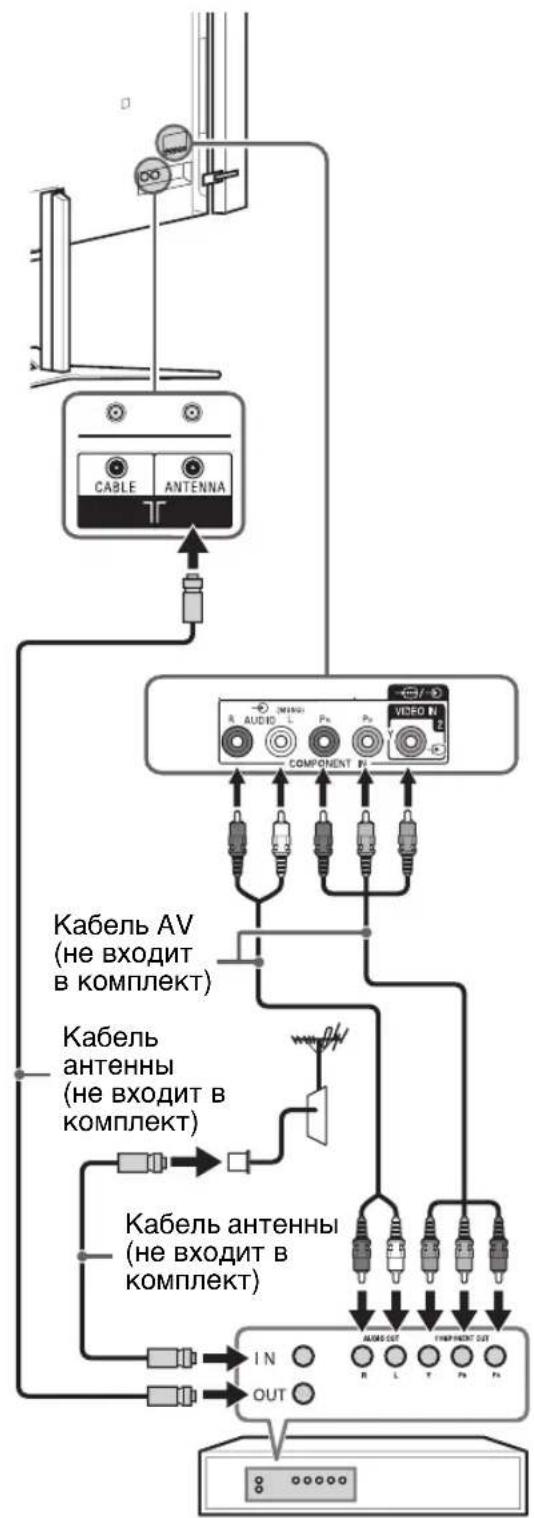
4: Stable installation of the TV
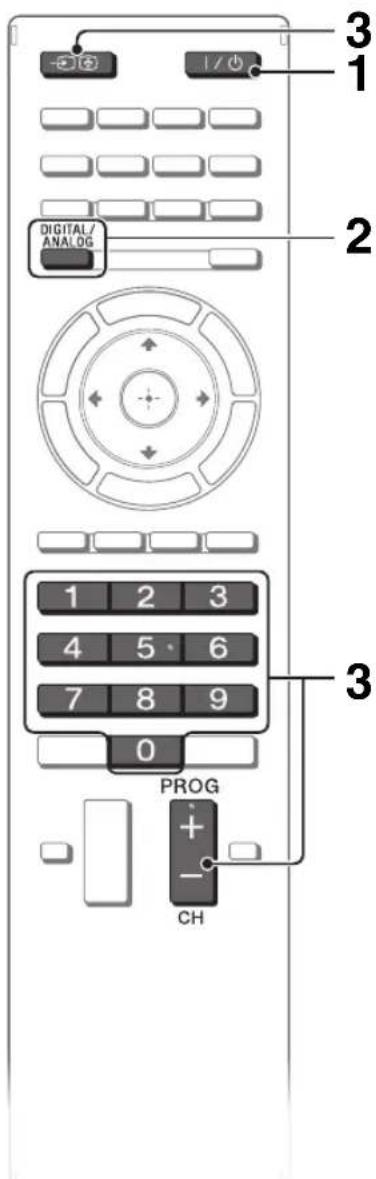
1 Turn on the TV.
To turn on the TV, press the I/0 button on the TV or on the remote control.
2 Select the mode.

3 Select the TV channel or input source.
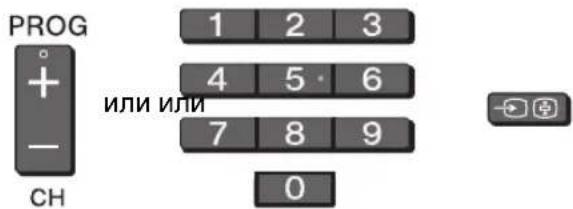
Selection of digital channels
Use 0-9. When selecting channels with numbers 10 and above, you must enter the following sequence quickly enough.
Information/Display text
Displays the channel number and the programmed time.
Adjusting subtitles
You can turn subtitles on or off directly while watching digital broadcasts.
5 AUDIO
You can adjust the low-frequency sound dynamics in the native language during the viewing of multi-channel (digital only) broadcasts.
Selecting different installation functions (Home menu)
Access to bookmarks
To display the list of bookmarks, when using the i-Manual press the green button on the remote control.
Press the selection button for the desired element, then press
#
- To return to the previous page, press
Deleting a bookmark
To add a page to the bookmark list, press the yellow button on the remote control.
When installing the wall mount bracket.
Iopokhencko6
When installing the TV on the stand.
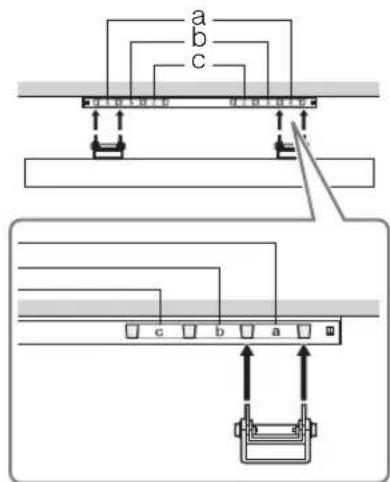
Table of sizes for TV installation
SU-WL500
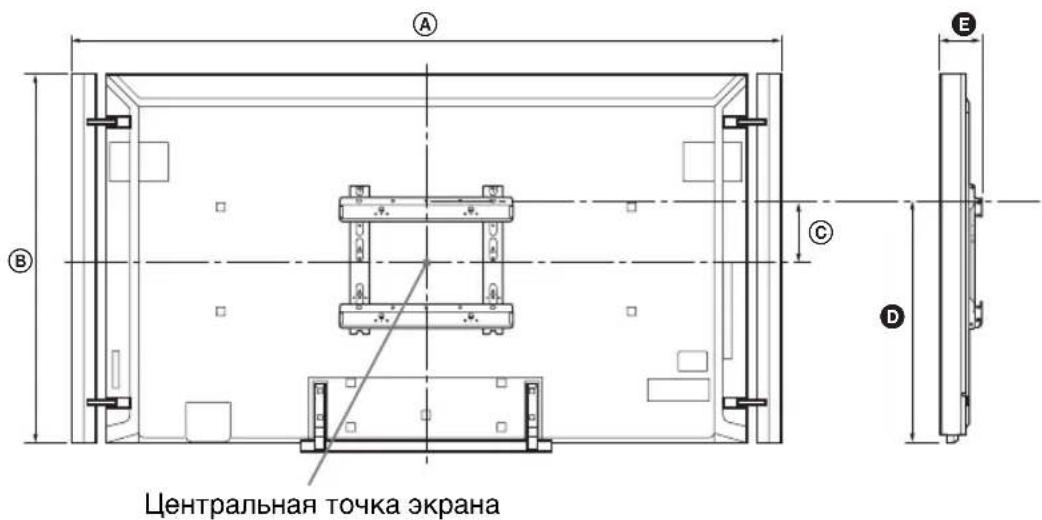
Unit of measurement: mm
Precautions regarding children
Do not allow children to climb on the TV. Keep small parts out of reach of children to prevent them from accidentally swallowing them.
If the following occurs
Malfunctions...
Immediately turn off the TV and unplug the AC power cord from the AC outlet in the following cases.
Contact your dealer or Sony service center so that qualified service personnel can perform a check on the TV.
In the case of:
-Damage to the AC power cord. -Poor contact of the AC outlet. -The TV has been damaged by a fall, impact, or being hit by an object thrown at it. -Liquid or any object has entered the TV through the openings.
During use, the monitor's surface heats up.
Install the monitor on a stable surface.
Safety precautions
Viewing 3D images
- When viewing 3D images or playing 3D stereoscopic games, some people may experience discomfort (such as eye strain, fatigue, or nausea). Sony recommends that all viewers take regular breaks while viewing 3D images or playing 3D stereoscopic games. The duration and frequency of breaks depend on individual needs. You should choose the most suitable option. If discomfort occurs, stop viewing 3D images or playing 3D stereoscopic games until the discomfort subsides; if necessary, consult a doctor. You should also refer to (i) the operating instructions for any other device or media used with the TV, and (ii) the latest information on our website (http://www.sony-asia.com/support). The vision of young children (especially those under six years old) is not yet fully developed. Before allowing children to view 3D images or play 3D stereoscopic games, consult a doctor (such as a pediatrician or ophthalmologist). Children should be under adult supervision to ensure they follow the above recommendations.
Do not use, store, or leave the 3D glasses or batteries in direct sunlight or in places with high temperatures, such as in a car parked in the sun. When using the 3D effect simulation function, remember that the displayed image is simulated by the TV through conversion of the original image.
Watch the TV in adequate lighting; viewing in poor lighting or for excessively long periods of time will tire your eyes. When using headphones, do not set the volume too high to avoid damaging your hearing.
LCD screen
The number of effective pixels of the LCD panel reaches 99.99% and above. Flickering or dark colored (red, blue, or green) dots may constantly appear on the screen. This is a structural property of the LCD panel and is not a sign of malfunction. Do not press on the protective filter, do not scratch it, and do not place any objects on the TV. This may cause unevenness of the image or damage to the LCD panel. If the TV operates in a cold place, the image may appear blurry or too dark. This is not a sign of malfunction. These phenomena will disappear as the temperature rises. - During prolonged display of a still image, residual images may appear. After a few seconds, they may disappear. During TV operation, the screen and the cabinet heat up. This is not a sign of malfunction. The LCD panel contains a small amount of liquid crystals. For disposal, follow applicable local regulations. Do not subject the LCD panel to strong physical impact or shocks. From impact, the screen glass may crack or break and cause injury.
Cleaning the screen surface and the TV cabinet
Before cleaning the TV or unplugging the cable, disconnect the cable from the power outlet.
To ensure the safety of the structural materials and the screen coating of the TV, follow the precautions below.
To remove dust from the screen/cabinet surface, gently wipe it with a soft cloth. If dust does not come off completely, wipe the screen with a soft cloth slightly moistened with a weak solution of mild detergent. Never spray water or mild detergent directly onto the TV. Accumulation of liquid on the screen surface or on the external surfaces and penetration inside the TV may lead to TV failure.
In no case use any abrasive materials, alcohol/acidic cleaners, chemical solvents, or volatile solvents such as alcohol, benzene, thinner, or insecticides. The use of these substances or prolonged contact with rubber/vinyl products may damage the cabinet coating or the screen surface. To ensure proper ventilation, it is recommended to periodically clean the ventilation openings with a vacuum cleaner. - When adjusting the tilt angle of the TV, change its position slowly and carefully to avoid the TV slipping off the stand.
SOFTWARE USED IN THIS
TELEVISION
NOTICE AND LICENSE FOR SOFTWARE USED IN THIS TV
IN THIS TV
Statements and licenses for the software used in this TV
Notices and licenses for the software used in this TV
Please read the notices and licenses for the software used in this television.
They are all provided in the original language.
END USER LICENSE AGREEMENT FOR CERTAIN SOFTWARE AND SERVICE TO BE USED WITH YOUR SONY PRODUCT
IMPORTANT - READ THIS AGREEMENT BEFORE USING YOUR SONY PRODUCT. USING YOUR PRODUCT INDICATES YOUR ACCEPTANCE OF THIS AGREEMENT.
This End User License Agreement ("EULA") is a legal agreement between you and Sony Corporation ("Sony"), the licensor of the software (other than the software which is governed by other licenses as indicated below, the "Excluded Software") included in this Sony Product and related materials which shall be collectively referred to as the "Sony Software." This EULA covers the worldwide market (except for the United States of America, Canada and Japan) as a territory, and also covers the Sony Software and that of Sony's third party licensors ("Third Party Licensors") and accompanying printed or online documentation. The Sony Software includes software in your Sony Product, other software, including updates or modified software, provided to you by Sony, whether stored on media or downloaded to the Sony Product via any method.
This Sony Product also includes Sony Entertainment Network feature which provides access to selected content services ("Services") from third party content providers including Sony entities other than Sony Corporation ("Third Party Providers") as a courtesy to you. The Sony Entertainment Network feature also provides you access to selected Sony content services ("Sony Content Services"), which services and related content ("Sony Content") shall both be considered Sony Software under this EULA. The Sony Entertainment Network feature requires an Internet connection. Your ability to access the Services, and the quality of the Services presented, are subject to your Internet provider's service and terms as well as the broadband Internet connection speed you use. Video quality and picture size varies and is dependent upon the speed of your broadband service from your Internet provider and delivery by the Third Party Providers. The content, including but not limited to data, music, sound, audio, photographs, images, graphics, likenesses, software, text, video, messages, tags, or other materials, provided by Third Party Providers ("Content") and the availability of the Services are at the sole discretion and under the control of the Third Party Providers. The Content and Services of each Third Party Provider are provided pursuant to the terms and conditions of that Third Party Provider. Premium Content may require additional fees and/or registration with the Third Party Provider through a computer. The Services and the Content may only be used for your own personal, private viewing, and shall not be used for non-theatrical exhibition, or any viewing or exhibition for which (or in a venue in which) an admission, access, or viewing fee is charged, or for any public exhibition or viewing. The Services and/or Content may be changed at any time and may be unavailable from time to time.
THE SONY SOFTWARE AND THE SERVICES MAY ALLOW SONY, THE THIRD PARTY PROVIDERS, AND/OR OTHER THIRD PARTIES TO COLLECT DATA FROM, CONTROL, AND/OR MONITOR THE SONY PRODUCT AND OTHER DEVICES RUNNING OR INTERACTING WITH THE SONY SOFTWARE. YOU HEREBY CONSENT TO SUCH ACTIVITIES. YOU ALSO AGREE TO SONY'S CURRENT PRIVACY POLICY THAT IS AVAILABLE AT SONY'S WEBSITE. YOU MAY BE ABLE TO REACH THE WEBSITE FOR YOUR COUNTRY THROUGH http://www.sony.net/electronics/. PLEASE CONSULT THE ABOVEMENTIONED LINK FOR ANY UPDATES TO THE POLICY. PLEASE CONTACT APPLICABLE THIRD PARTY PROVIDER OR OTHER THIRD PARTIES FOR PRIVACY POLICIES RELATED TO THEIR SERVICES. BY USING YOUR SONY PRODUCT, YOU AGREE TO BE BOUND BY THE TERMS OF THIS EULA AND SONY'S PRIVACY POLICY.
If you do not agree to the terms of this EULA or Sony's privacy policy, as amended from time to time by Sony in its discretion, Sony is unwilling to license the Sony Software to you and unwilling to allow you to access the Services, and you should promptly contact Sony for instructions on the return of the entire Sony Product and included Sony Software for a refund of the purchase price of the Sony Product.
SOFTWARE LICENCE
You cannot use the Sony Software except as specified herein. The Sony Software is licensed, not sold. Sony and its Third Party Licensors grant you a limited licence to use the Sony Software only on the Sony Product. The Sony Software may create data files automatically for use with the Sony Software, and you agree that any such data files are deemed to be a part of the Sony Software. The Sony Software is licensed as a single product, and you may not separate its component parts for use on more than one device unless expressly authorized by Sony. You may not use the Sony Software separately from the Sony Product. Except as such prohibition is restricted by the applicable law, you agree to be prohibited from modifying, reverse engineering, decompiling or disassembling the Sony Software in whole or in part for any purpose other than allowed under this EULA. In addition, you may not rent, lease, sublicense, or sell the Sony Software, but you may transfer all of your rights under this EULA only as part of a sale or transfer of the Sony Product provided you retain no copies, transfer all of the Sony Software (including all copies, component parts, any media, printed materials, all versions and any upgrades of the Sony Software, and this EULA), and the recipient agrees to the terms of this EULA. Sony and its Third Party Licensors retain all rights that this EULA does not expressly grant to you. You shall not (a) bypass, modify, defeat, or circumvent any of the functions or protections of the Sony Software or any mechanisms operatively linked to the Sony Software; or (b) remove, alter, cover, or deface any trademarks or notices on the Sony Software. You understand, acknowledge, and agree that the software, network services, or other products other than the Sony Software upon which the Sony Software's performance may depend might be interrupted or discontinued at the discretion of the suppliers (software suppliers, service providers, Third Party Providers, etc.) or Sony.
USER ACCOUNT
As part of the agreement to allow you to access, browse, or use the Services and the Content, Third Party Providers and/or other third parties may require that you establish a user account ("Account") for which you must provide them with true, accurate, current, and complete information about yourself and maintain/promptly update such information. You are responsible for maintaining the confidentiality of any and all of your passwords associated with any such Account.
SONY'S RIGHTS TO USER'S MATERIAL
If you send any communications or materials to Sony by electronic mail or otherwise ("Materials"), including any selections, comments, data, questions, suggestions, or the like, all such Materials are, and will be treated as, non-confidential and non-proprietary. Thus, to the maximum extent as permitted under the applicable law, you give up any claim that use of such Materials violates any of your rights including moral rights, privacy rights, proprietary or other property rights, rights of publicity, rights to credit for material or ideas, or any other right, including the right to approve the way Sony uses such Materials. Any Material may be adapted, broadcast, changed, copied, disclosed, licensed, performed, posted, published, sold, transmitted, or used by Sony anywhere in the world, in any medium, for the period in which the above-mentioned rights given up by you exist and without attribution or compensation to you. Furthermore, you hereby assign all right, title, and interest in, and Sony is free to use, without any compensation to you, any ideas, know-how, concepts, techniques, or other intellectual property rights contained in the Materials, whether or not patentable, for any purpose whatsoever, including but not limited to developing, manufacturing, having manufactured, licensing, marketing, and selling products using such Materials. However, you agree and understand that Sony is not obligated to use any such ideas, know-how, concepts, or techniques or Materials, and you have no right to compel such use.
TRANSMITTED MATERIAL
Internet transmissions are never completely private or secure. You understand that any message or information you send to Sony may be read or intercepted by others, unless there is a special notice that a particular message (for example, credit card information) is encrypted (sent in code). Sending a message to Sony does not cause Sony to have any special responsibility to you.
DIGITAL RIGHTS MANAGEMENT
Content owners use Windows Media digital rights management technology ("WMDRM") to protect their intellectual property, including copyrights. This Sony Product uses WMDRM software to access WMDRM-protected Content. If the WMDRM software fails to protect the Content, Content owners may ask Microsoft Corporation ("Microsoft") to revoke the Service's ability to use WMDRM to play or copy protected Content. Revocation does not affect unprotected Content. If you download licences for protected Content, you agree that Microsoft may include a revocation list with the licences. Content owners may require you to upgrade WMDRM to access their Content. If you decline an upgrade, you will not be able to access Content that requires the upgrade.
ADVERTISEMENTS, SERVICE COMMUNICATIONS
Inclusion of the Service of a Third Party Provider does not mean that Sony approves of, or endorses, or recommends that Third Party Provider or its Content. You understand and agree that the Services and/or Content may include advertisements ("Advertisements"), and that these Advertisements are necessary in order for the Services to be provided. You also understand and agree that the use of the Sony Entertainment Network feature may include certain communications from Sony or Third Party Providers such as service announcements, administrative messages, newsletters, and the like ("Service Communications"), and that you will not be able to opt out of receiving such Service Communications. SONY, ITS AFFILIATES, AND ITS THIRD PARTY PROVIDERS DISCLAIM ALL WARRANTY, EXPRESS OR IMPLIED, AS TO THE ACCURACY, LEGALITY, RELIABILITY, OR VALIDITY OF ANY ADVERTISEMENT, SERVICE COMMUNICATIONS, OR CONTENT, AS WELL AS ANY LIABILITY ARISING UNDER ANY THEORY OF LAW FOR THE ADVERTISEMENTS, SERVICE COMMUNICATIONS, AND CONTENT.
Some jurisdictions do not allow the exclusion of implied warranties, so the above exclusion may not apply to you.
OBJECTIONABLE CONTENT AND RULES FOR MINORS
EXCLUSION OF WARRANTY
YOU UNDERSTAND, ACKNOWLEDGE, AND AGREE THAT THE CONTENT AND SERVICES ARE PROVIDED BY THIRD PARTY PROVIDERS AND/OR SOFTWARE IS PROVIDED BY THIRD PARTIES OVER WHICH SONY HAS NO CONTROL. THE SELECTION, PROVISION, QUALITY, PICTURE SIZE, AND AVAILABILITY OF SUCH CONTENT AND/OR SOFTWARE ARE THE SOLE RESPONSIBILITY OF SUCH THIRD PARTY PROVIDER OR OTHER THIRD PARTY. YOU AGREE TO COMPLY WITH ANY AND ALL TERMS AND CONDITIONS THAT THE THIRD PARTY PROVIDERS MAY SET FOR ITS SERVICE, CONTENT AND/OR SOFTWARE. YOU FURTHER UNDERSTAND, ACKNOWLEDGE, AND AGREE THAT ACCESS, BROWSING, AND USE OF THE SERVICES REQUIRES INTERNET SERVICE PROVIDED BY YOU, AND FOR WHICH YOU ARE SOLELY RESPONSIBLE, INCLUDING BUT NOT LIMITED TO THE PAYMENT OF ANY THIRD PARTY FEES (SUCH AS INTERNET SERVICE PROVIDER OR AIRTIME CHARGES) FOR SUCH ACCESS AND FOR DISPLAY OR DELIVERY OF ADVERTISEMENTS INCLUDED WITH THE SERVICES. OPERATION OF THE SONY ENTERTAINMENT NETWORK FEATURE AND THE SERVICE MAY BE LIMITED OR RESTRICTED DEPENDING ON THE CAPABILITIES, BANDWIDTH OR TECHNICAL LIMITATIONS OF YOUR INTERNET SERVICE. SONY, ITS AFFILIATES, AND ITS THIRD PARTY PROVIDER SHALL HAVE NO RESPONSIBILITY FOR THE TIMELINESS, DELETION, MIS-DELIVERY, OR FAILURE TO STORE ANY USER COMMUNICATIONS OR PERSONALIZED SETTINGS.
THE SONY SOFTWARE AND ACCOMPANYING DOCUMENTATION, THE SERVICES, AND THE CONTENT ARE FURNISHED TO YOU "AS IS" AND WITHOUT WARRANTY OR CONDITIONS, STATUTORY OR OTHERWISE, OF ANY KIND. SONY, ITS AFFILIATES, ITS THIRD PARTY LICENSORS, AND ITS THIRD PARTY PROVIDERS EXPRESSLY DISCLAIM ALL WARRANTY AND CONDITIONS, EXPRESS OR IMPLIED, INCLUDING BUT NOT LIMITED TO THE IMPLIED WARRANTY OF NON-INFRINGEMENT, TITLE, MERCHANTABILITY, AND FITNESS FOR A PARTICULAR PURPOSE. SONY, ITS AFFILIATES, ITS THIRD PARTY LICENSORS, AND ITS THIRD PARTY PROVIDERS DO NOT WARRANTY THAT THE SONY SOFTWARE OR ACCOMPANYING DOCUMENTATION, THE SERVICES, OR THE CONTENT WILL MEET YOUR REQUIREMENTS OR THAT THE OPERATION OF THE SONY SOFTWARE, THE SERVICES, OR THE CONTENT WILL BE UNINTERRUPTED OR ERROR FREE. FURTHERMORE, SONY, ITS AFFILIATES, ITS THIRD PARTY LICENSORS, AND ITS THIRD PARTY PROVIDERS DO NOT WARRANTY OR MAKE ANY REPRESENTATIONS OR CONDITIONS REGARDING THE USE OR THE RESULTS OF THE USE OF THE SONY SOFTWARE, THE SERVICES OR THE CONTENT IN TERMS OF ITS CORRECTNESS, ACCURACY, RELIABILITY OR OTHERWISE. NO ORAL OR WRITTEN INFORMATION OR ADVICE GIVEN BY SONY, ITS AFFILIATES, OR A SONY AUTHORIZED REPRESENTATIVE SHALL CREATE A WARRANTY OR CONDITION, OR IN ANY WAY CHANGE THIS EXCLUSION OF WARRANTY AND CONDITION. SHOULD THE SOFTWARE, MEDIA ON WHICH THE SOFTWARE IS FURNISHED, DOCUMENTATION, THE SERVICES, OR THE CONTENT PROVE DEFECTIVE, YOU (AND NOT SONY OR A SONY AUTHORIZED REPRESENTATIVE) ASSUME THE ENTIRE COST OF ALL NECESSARY SERVICING, REPAIR, OR CORRECTION.
Some jurisdictions do not allow the exclusion of implied warranties, so the above exclusion may not apply to you.
LIMITATION OF LIABILITY
IN NO EVENT WILL SONY (INCLUDING BUT NOT LIMITED TO ANY NEGLIGENCE ISSUES RELATED TO THIRD PARTY LICENSORS OR THIRD PARTY PROVIDERS), ITS AFFILIATES, ITS THIRD PARTY LICENSORS OR ITS THIRD PARTY PROVIDERS BE LIABLE TO YOU FOR ANY SPECIAL, INDIRECT, INCIDENTAL, PUNITIVE, EXEMPLARY, OR CONSEQUENTIAL DAMAGES OF ANY KIND, INCLUDING BUT NOT LIMITED TO COMPENSATION, REIMBURSEMENT OR DAMAGES IN CONNECTION WITH, ARISING OUT OF OR RELATING TO THIS EULA, ON ACCOUNT OF THE LOSS OF USE OF THE SONY PRODUCT, DOCUMENTATION, THE SERVICES, THE CONTENT, DOWN TIME AND YOUR TIME, LOSS OF PRESENT OR PROSPECTIVE PROFITS, LOSS OF DATA, INFORMATION OF ANY KIND, BUSINESS PROFITS, OR OTHER COMMERCIAL LOSS, OR FOR ANY OTHER REASON WHATSOEVER, EVEN IF SONY, ITS AFFILIATES, ITS THIRD PARTY LICENSORS, OR ITS THIRD PARTY PROVIDERS HAVE BEEN ADVISED OF THE POSSIBILITY OF SUCH DAMAGES. THE SONY SOFTWARE AND ACCOMPANYING DOCUMENTATION, THE SERVICES, AND THE CONTENT ARE FURNISHED TO YOU FOR USE AT YOUR OWN RISK. SONY, ITS AFFILIATES, ITS THIRD PARTY LICENSORS, AND ITS THIRD PARTY PROVIDERS WILL NOT BE LIABLE FOR DAMAGES FOR BREACH OF ANY EXPRESS OR IMPLIED WARRANTY OR CONDITION, BREACH OF CONTRACT, NEGLIGENCE, STRICT LIABILITY OR ANY OTHER LEGAL THEORY RELATED TO THE SONY SOFTWARE, THE CONTENT, OR THIS EULA.
Some jurisdictions may not allow exclusions or limitations of incidental or consequential damages, exclusions or limitations of implied warranties or conditions, or allow limitations on how long an implied warranty lasts, so the above limitations or exclusions may not apply to you.
LIMITED WARRANTY ON MEDIA
In situations where the Sony Software or any part thereof is furnished on media, Sony warrants that for a period of ninety (90) days from the date of original purchase by you, the media on which the Sony Software is furnished to you will be free from defects in materials and workmanship under normal use. This limited warranty extends only to you as the original licensee. Sony's entire liability and your exclusive remedy will be replacement of the media not meeting Sony's limited warranty. ANY IMPLIED WARRANTY OR CONDITIONS ON THE MEDIA, INCLUDING THE IMPLIED WARRANTY AND CONDITIONS OF MERCHANTABILITY, TITLE, NONINFRINGEMENT, AND/OR FITNESS FOR A PARTICULAR PURPOSE, ARE LIMITED IN DURATION TO NINETY (90) DAYS FROM THE DATE OF ORIGINAL PURCHASE BY YOU. SOME JURISDICTIONS DO NOT ALLOW LIMITATIONS ON HOW LONG AN IMPLIED WARRANTY OR CONDITION LASTS, SO THESE LIMITATIONS MAY NOT APPLY TO YOU. THIS WARRANTY GIVES YOU SPECIFIC LEGAL RIGHTS, AND YOU MAY ALSO HAVE OTHER RIGHTS WHICH VARY FROM JURISDICTION TO JURISDICTION.
FEES
Sony and its Third Party Providers reserve the right at any time to charge fees for access to new Content or new Services or to portions of the existing Content or Services, or the Services as a whole. In addition, Third Party Providers may charge fees for access to their Content. In no event will you be charged for access to any portion or all of the Content and/or the Services unless Sony and/or a Third Party Provider obtain your prior agreement to pay such charges. If you do not consent to such charges, however, you may not have access to paid Content or Services for which such charges apply.
INTELLECTUAL PROPERTY / NOTICE FOR CLAIMS OF INTELLECTUAL PROPERTY VIOLATIONS AND AGENT FOR NOTICE
Sony respects the intellectual property rights of others, and we ask you to do the same. It is Sony's policy, at its discretion as appropriate, (a) to terminate and/or disable the Content of Third Party Providers or users of the Services who may infringe or repeatedly infringe the copyrights or other intellectual property rights of Sony, its Third Party Providers or others; and/or (b) to forward reports of intellectual property rights violations to Third Party Providers and others for review and action per the terms of such Third Party Provider's procedures for protection of intellectual property rights. The Sony Software and Content are protected by copyright laws and international copyright treaties, as well as other intellectual property laws and treaties. There may be proprietary logos, service marks, trademarks, likenesses, and trade names found in the Sony Software, the Content, or on the Services. By making the Sony Software and Content available on the Services, Sony and the Third Party Providers are not granting you any licence to utilize those proprietary logos, service marks, trademarks, likenesses, or trade names. Any unauthorized use of the Sony Software, the Services, or the Content may violate copyright laws, trademark laws, the laws of privacy and publicity, and civil and criminal statutes. All right, title, and interest in and to the Sony Software and the Content, and any and all copies or portions thereof, are owned by Sony, its licensors, Third Party Licensors, suppliers and/or Third Party Providers. All rights not specifically granted under this EULA are reserved by Sony, its licensors, Third Party Licensors, suppliers and/or Third Party Providers.
You are responsible for all your activities hereunder, including all legal liability incurred from access, browsing, or use of the Services by you or by others who use the Services via your Sony Product or Account (as defined in the User Account section). You may use the Sony Software, the Services, and the Content for lawful purposes only. You may not distribute, exchange, modify, sell, or transmit anything you may copy from the Sony Software, the Services, or the Content, including but not limited to any data, text, software, likenesses, photographs, images, graphics, audio, music, sound, video, messages, and tags, for any business, commercial, or public purpose. As long as you comply with the terms of this EULA, Sony grants you a nonexclusive, nontransferable, limited right to use the Sony Entertainment Network feature to access the Services and the Content as set forth in this EULA. You further agree not to interrupt/disrupt or attempt to interrupt/disrupt the operation of the Sony Software, the Service or the Content in any way.
If you believe your work has been copied in a way that constitutes copyright infringement, or that your intellectual property rights have otherwise been violated, please first contact the Third Party Provider for the particular Service. If you are unable to contact such Third Party Provider, or the content at issue is Sony's, you may contact Sony (the contact point of which is described in the documents accompanying with Sony Product) with the following information in a written notice: (a) an electronic or physical signature of the person authorized to act on behalf of the copyright or other intellectual property interest; (b) a description of the copyrighted work or other intellectual property that you claim has been infringed; (c) a description of the particular Service and where the material that you claim is infringing is located on such Service, with enough detail that we may find the material; (d) your address, telephone number, and e-mail address; (e) a statement by you that you have a good faith belief that the disputed use is not authorized by the copyright or intellectual property owner, its agent, or the law; and (f) a statement by you, made under penalty of perjury, that the above information in your notice is accurate and that you are the copyright or intellectual property owner or authorized to act on the copyright or intellectual property owner's behalf.
INDEMNIFICATION
To the maximum extent permitted by applicable law, you agree to indemnify, defend, and hold harmless Sony and all of its agents, directors, officers, employees, information providers, licensors and licensees, affiliates, content providers, and direct and indirect parent(s) (collectively, "Indemnified Parties") from and against any and all liability and costs (including, without limitation, attorneys' fees and costs) incurred by the Indemnified Parties in connection with any claim arising out of (i) any breach or alleged breach by you of this EULA in any manner, (ii) any information you submit to Sony hereunder, (iii) any breach or alleged breach by you of a third party's rights, (iv) any damage caused by or alleged to have been caused by you to the Sony Software, the Services, or the Content. To the maximum extent permitted by applicable law, counsel you select for defense or settlement of a claim must be consented to by Sony and/or Indemnified Party(s) prior to counsel being engaged to represent you and Sony and/or Indemnified Party(s). You and your counsel will cooperate as fully as reasonably required by the Indemnified Party(s) in defense or settlement of any claim. Sony and/or Indemnified Party(s) reserve the right, at its own expense, to assume the exclusive defense or settlement, and control of any matter otherwise subject to indemnification by you. You shall not in any event consent to any judgment, settlement, attachment, or lien, or any other act adverse to the interest of Sony or any Indemnified Party without the prior written consent of Sony and/or Indemnified Party(s).
AUTOMATIC UPDATE FEATURE / MODIFICATION OF EULA AS TO SERVICES
From time to time, Sony or third parties may automatically update or otherwise modify the Sony Software, for example, but not limited to, for purposes of error correction, improvement of features, and enhancement of security features. Such updates or modifications may change or delete the nature of features or other aspects of the Sony Software, including features you may rely upon. You hereby agree that such activities may occur at Sony's sole discretion and that Sony may condition continued use of the Sony Software upon your complete installation or acceptance of such update or modifications. Sony may add to, change, or remove any part, term, or condition of the EULA as it applies to the Sony Software, the Services, and/or the Content at any time without prior notice to you. Any such additions, changes, or removals or any terms posted in the Sony Entertainment Network feature shall apply as soon as they are posted. By continuing to access the Services, the Sony Content Services, the Content, and/or the Sony Content after so posted, you are indicating your acceptance thereto. SONY MAY ADD, CHANGE, DISCONTINUE, REMOVE, OR SUSPEND ANY OF THE SERVICES OR THE SONY CONTENT SERVICES, TEMPORARILY OR PERMANENTLY, AT ANY TIME, WITHOUT NOTICE AND WITHOUT LIABILITY. WITHOUT PREJUDICE TO ANY OTHER RIGHTS, SONY MAY SUSPEND OR TERMINATE THIS EULA AS TO THE SERVICES, THE SONY CONTENT SERVICES, THE CONTENT, AND/OR THE SONY CONTENT IMMEDIATELY UPON NOTICE IF YOU FAIL TO COMPLY WITH THE TERMS AND CONDITIONS OF THIS EULA. Sony may take any legal and technical remedies to prevent violation of and/or to enforce this EULA, including, without limitation, immediate termination of your access to the Services, if Sony believes in its discretion that you are violating this EULA.
HIGH RISK ACTIVITIES
The Sony Software is not fault-tolerant and is not designed, manufactured or intended for use or resale as on-line control equipment in hazardous environments requiring fail-safe performance, such as in the operation of nuclear facilities, aircraft navigation or communication systems, air traffic control, direct life support machines, or weapons systems, in which the failure of the Sony Software could lead to death, personal injury, or severe physical or environmental damage ("High Risk Activities"). SONY, EACH OF THE THIRD PARTY LICENSORS, AND EACH OF THEIR RESPECTIVE AFFILIATES SPECIFICALLY DISCLAIM ANY EXPRESS OR IMPLIED WARRANTY OR CONDITION OF FITNESS FOR HIGH RISK ACTIVITIES.
RESTRICTIONS ON EXPORT OF ENCRYPTION TECHNOLOGY
The Sony Software and the Content may contain encryption technology. You acknowledge that any export of Sony Software or the Content containing encryption technology from your residence or subsequent re-export of such software by a person located outside of your residence might require a licence or other authorization from any governmental authority. By accepting this licence agreement, you agree to abide by all applicable export laws and regulations in the purchase and use of the Sony product being acquired, including but not limited to those regulations relating to the export control of cryptographic items and not to transfer, or authorize the transfer, of the Sony Software or the Content to a prohibited country or otherwise in violation of any such restrictions or regulations.
JURY TRIAL WAIVER
EVEN IF TRIAL BY JURY MAY BE ADOPTED UNDER THE APPLICABLE LAW, THE PARTIES HERETO WAIVE TRIAL BY JURY WITH RESPECT TO ANY MATTERS ASING UNDER OR RELATING TO THIS EULA TO THE MAXIMUM EXTENT AS PERMITTED UNDER THE APPLICABLE LAW. Any cause of action you may have with respect to the Services must be commenced within one (1) year after the claim or cause of action arises to the maximum extent as permitted under the applicable law. Some jurisdictions do not allow limitations on the time for commencement of actions (or prescribe a longer period), so this limitation may not apply to you.
ENTIRE AGREEMENT, NOTICE, WAIVER, SEVERABILITY AND JURISDICTION
This EULA, the limited warranty accompanying the Sony Product, Sony's then-current privacy policy, and any additional terms and conditions posted on the Services, together constitute the entire agreement between you and Sony with respect to the Sony Product, the Sony Software, the Services, and the Content. Any notice by Sony hereunder may be made by letter, e-mail, or posting on the Services. The failure of Sony to exercise or enforce any right or provision of this EULA shall not constitute a waiver of such right or provision. If any part of this EULA is held invalid, illegal, or unenforcable, that provision shall be enforced to the maximum extent permissible so as to maintain the intent of this EULA, and the other parts will remain in full force and effect. To the extent permissible by law, this agreement shall be governed by and construed in accordance with the laws of Japan.
THIRD PARTY BENEFICIARIES
Each Third Party Licensee and each Third Party Provider is an express intended third-party beneficiary of, and shall have the right to enforce, each provision of this EULA with respect to the software, service, and content, as applicable, of such party.
EXCLUDED SOFTWARE
TERM
This EULA is effective until terminated. Sony may terminate this EULA immediately if you fail to comply with its terms by giving you notice. In such event, you must destroy the Sony Software and accompanying documentation, and all copies you have made of them. In addition, upon termination you will have no recourse against Sony, its affiliates, its Third Party Licensors, or its Third Party Providers for your inability to use the Sony Software or the accompanying documentation, the Services, or the Content.
The following GPL executables and LGPL libraries are used in this product and are subject to the GPL/LGPL License Agreements included as part of this documentation:
Package list:
linux-kernel
gcc-for-dev
alsa-lib
busybox
directfb
dosfstools
fuse
glib
glibc-for-dev
iptables
libmicrohttpd
pump-autoip
libjs
exceptionmonitor
cryptography
cairo
pango
WebCore
JavaScriptCore
Linux UVC
Video for Linux Two (V4L2)
iconv
Webkit
0t
Source code for these executables and libraries, as well as other executables and libraries, can be obtained using the following link: http://www.sony.net/Products/Linux/
GNU GENERAL PUBLIC LICENSE
Version 2, June 1991
Copyright (C) 1989, 1991 Free Software Foundation, Inc., 51 Franklin Street, Fifth Floor, Boston, MA 02110-1301, USA. Everyone is permitted to copy and distribute verbatim copies of this license document, but changing it is not allowed.
Preamble
The licenses for most software are designed to take away your freedom to share and change it. By contrast, the GNU General Public License is intended to guarantee your freedom to share and change free software--to make sure the software is free for all its users. This General Public License applies to most of the Free Software Foundation's software and to any other program whose authors commit to using it. (Some other Free Software Foundation software is covered by the GNU Library General Public License instead.) You can apply it to your programs, too.
When we speak of free software, we are referring to freedom, not price. Our General Public Licenses are designed to make sure that you have the freedom to distribute copies of free software (and charge for this service if you wish), that you receive source code or can get it if you want it, that you can change the software or use pieces of it in new free programs; and that you know you can do these things.
To protect your rights, we need to make restrictions that forbid anyone to deny you these rights or to ask you to surrender the rights. These restrictions translate to certain responsibilities for you if you distribute copies of the software, or if you modify it.
For example, if you distribute copies of such a program, whether gratis or for a fee, you must give the recipients all the rights that you have. You must make sure that they, too, receive or can get the source code. And you must show them these terms so they know their rights.
We protect your rights with two steps: (1) copyright the software, and (2) offer you this license which gives you legal permission to copy, distribute and/or modify the software.
Also, for each author's protection and ours, we want to make certain that everyone understands that there is no warranty for this free software. If the software is modified by someone else and passed on, we want its recipients to know that what they have is not the original, so that any problems introduced by others will not reflect on the original authors' reputations.
Finally, any free program is threatened constantly by software patents. We wish to avoid the danger that redistributors of a free program will individually obtain patent licenses, in effect making the program proprietary. To prevent this, we have made it clear that any patent must be licensed for everyone's free use or not licensed at all.
The precise terms and conditions for copying, distribution and modification follow.
TERMS AND CONDITIONS FOR COPYING, DISTRIBUTION AND MODIFICATION
- This License applies to any program or other work which contains a notice placed by the copyright holder saying it may be distributed under the terms of this General Public License. The "Program", below, refers to any such program or work, and a "work based on the Program" means either the Program or any derivative work under copyright law: that is to say, a work containing the Program or a portion of it, either verbatim or with modifications and/or translated into another language. (Hereinafter, translation is included without limitation in the term "modification".) Each licensee is addressed as "you".
Activities other than copying, distribution and modification are not covered by this License; they are outside its scope. The act of running the Program is not restricted, and the output from the Program is covered only if its contents constitute a work based on the Program (independent of having been made by running the Program). Whether that is true depends on what the Program does.
- You may copy and distribute verbatim copies of the Program's source code as you receive it, in any medium, provided that you conspicuously and appropriately publish on each copy an appropriate copyright notice and disclaimer of warranty; keep intact all the notices that refer to this License and to the absence of any warranty; and give any other recipients of the Program a copy of this License along with the Program.
You may charge a fee for the physical act of transferring a copy, and you may at your option offer warranty protection in exchange for a fee.
- You may modify your copy or copies of the Program or any portion of it, thus forming a work based on the Program, and copy and distribute such modifications or work under the terms of Section 1 above, provided that you also meet all of these conditions:
a) You must cause the modified files to carry prominent notices stating that you changed the files and the date of any change.
b) You must cause any work that you distribute or publish, that in whole or in part contains or is derived from the Program or any part thereof, to be licensed as a whole at no charge to all third parties under the terms of this License.
c) If the modified program normally reads commands interactively when run, you must cause it, when started running for such interactive use in the most ordinary way, to print or display an announcement including an appropriate copyright notice and a notice that there is no warranty (or else, saying that you provide a warranty) and that users may redistribute the program under these conditions, and telling the user how to view a copy of this License. (Exception: if the Program itself is interactive but does not normally print such an announcement, your work based on the Program is not required to print an announcement.)
These requirements apply to the modified work as a whole. If identifiable sections of that work are not derived from the Program, and can be reasonably considered independent and separate works in themselves, then this License, and its terms, do not apply to those sections when you distribute them as separate works. But when you distribute the same sections as part of a whole which is a work based on the Program, the distribution of the whole must be on the terms of this License, whose permissions for other licensees extend to the entire whole, and thus to each and every part regardless of who wrote it.
Thus, it is not the intent of this section to claim rights or contest your rights to work written entirely by you; rather, the intent is to exercise the right to control the distribution of derivative or collective works based on the Program.
In addition, mere aggregation of another work not based on the Program with the Program (or with a work based on the Program) on a volume of a storage or distribution medium does not bring the other work under the scope of this License.
- You may copy and distribute the Program (or a work based on it, under Section 2) in object code or executable form under the terms of Sections 1 and 2 above provided that you also do one of the following:
a) Accompany it with the complete corresponding machine-readable source code, which must be distributed under the terms of Sections 1 and 2 above on a medium customarily used for software interchange; or, b) Accompany it with a written offer, valid for at least three years, to give any third party, for a charge no more than your cost of physically performing source distribution, a complete machine-readable copy of the corresponding source code, to be distributed under the terms of Sections 1 and 2 above on a medium customarily used for software interchange; or, c) Accompany it with the information you received as to the offer to distribute corresponding source code. (This alternative is allowed only for noncommercial distribution and only if you received the program in object code or executable form with such an offer, in accord with Subsection b above.)
The source code for a work means the preferred form of the work for making modifications to it. For an executable work, complete source code means all the source code for all modules it contains, plus any associated interface definition files, plus the scripts used to control compilation and installation of the executable. However, as a special exception, the source code distributed need not include anything that is normally distributed (in either source or binary form) with the major components (compiler, kernel, and so on) of the operating system on which the executable runs, unless that component itself accompanies the executable.
If distribution of executable or object code is made by offering access to copy from a designated place, then offering equivalent access to copy the source code from the same place counts as distribution of the source code, even though third parties are not compelled to copy the source along with the object code.
- You may not copy, modify, sublicense, or distribute the Program except as expressly provided under this License. Any attempt otherwise to copy, modify, sublicense or distribute the Program is void, and will automatically terminate your rights under this License. However, parties who have received copies, or rights, from you under this License will not have their licenses terminated so long as such parties remain in full compliance.
- You are not required to accept this License, since you have not signed it. However, nothing else grants you permission to modify or distribute the Program or its derivative works. These actions are prohibited by law if you do not accept this License. Therefore, by modifying or distributing the Program (or any work based on the Program), you indicate your acceptance of this License to do so, and all its terms and conditions for copying, distributing or modifying the Program or works based on it.
- Each time you redistribute the Program (or any work based on the Program), the recipient automatically receives a license from the original licensor to copy, distribute or modify the Program subject to these terms and conditions. You may not impose any further restrictions on the recipients' exercise of the rights granted herein. You are not responsible for enforcing compliance by third parties to this License.
- If, as a consequence of a court judgment or allegation of patent infringement or for any other reason (not limited to patent issues), conditions are imposed on you (whether by court order, agreement or otherwise) that contradict the conditions of this License, they do not excuse you from the conditions of this License. If you cannot distribute so as to satisfy simultaneously your obligations under this License and any other pertinent obligations, then as a consequence you may not distribute the Program at all. For example, if a patent license would not permit royalty-free redistribution of the Program by all those who receive copies directly or indirectly through you, then the only way you could satisfy both it and this License would be to refrain entirely from distribution of the Program. If any portion of this section is held invalid or unenforceable under any particular circumstance, the balance of the section is intended to apply and the section as a whole is intended to apply in other circumstances. It is not the purpose of this section to induce you to infringe any patents or other property right claims or to contest validity of any such claims; this section has the sole purpose of protecting the integrity of the free software distribution system, which is implemented by public license practices. Many people have made generous contributions to the wide range of software distributed through that system in reliance on consistent application of that system; it is up to the author/donor to decide if he or she is willing to distribute software through any other system and a licensee cannot impose that choice. This section is intended to make thoroughly clear what is believed to be a consequence of the rest of this License.
- If the distribution and/or use of the Program is restricted in certain countries either by patents or by copyrighted interfaces, the original copyright holder who places the Program under this License may add an explicit geographical distribution limitation excluding those countries, so that distribution is permitted only in or among countries not thus excluded. In such case, this License incorporates the limitation as if written in the body of this License.
- The Free Software Foundation may publish revised and/or new versions of the General Public License from time to time. Such new versions will be similar in spirit to the present version, but may differ in detail to address new problems or concerns. Each version is given a distinguishing version number. If the Program specifies a version number of this License which applies to it and "any later version", you have the option of following the terms and conditions either of that version or of any later version published by the Free Software Foundation. If the Program does not specify a version number of this License, you may choose any version ever published by the Free Software Foundation.
- If you wish to incorporate parts of the Program into other free programs whose distribution conditions are different, write to the author to ask for permission. For software which is copyrighted by the Free Software Foundation, write to the Free Software Foundation; we sometimes make exceptions for this. Our decision will be guided by the two goals of preserving the free status of all derivatives of our free software and of promoting the sharing and reuse of software generally.
NO WARRANTY
BECAUSE THE PROGRAM IS LICENSED FREE OF CHARGE, THERE IS NO WARRANTY FOR THE PROGRAM, TO THE EXTENT PERMITTED BY APPLICABLE LAW. EXCEPT WHEN OTHERWISE STATED IN WRITING THE COPYRIGHT HOLDERS AND/OR OTHER PARTIES PROVIDE THE PROGRAM "AS IS" WITHOUT WARRANTY OF ANY KIND, EITHER EXPRESSED OR IMPLIED, INCLUDING, BUT NOT LIMITED TO, THE IMPLIED WARRANTY OF MERCHANTABILITY AND FITNESS FOR A PARTICULAR PURPOSE. THE ENTIRE RISK AS TO THE QUALITY AND PERFORMANCE OF THE PROGRAM IS WITH YOU. SHOULD THE PROGRAM PROVE DEFECTIVE, YOU ASSUME THE COST OF ALL NECESSARY SERVICING, REPAIR OR CORRECTION. IN NO EVENT UNLESS REQUIRED BY APPLICABLE LAW OR AGREED TO IN WRITING WILL ANY COPYRIGHT HOLDER, OR ANY OTHER PARTY WHO MAY MODIFY AND/OR REDISTRIBUTE THE PROGRAM AS PERMITTED ABOVE, BE LIABLE TO YOU FOR DAMAGES, INCLUDING ANY GENERAL, SPECIAL, INCIDENTAL OR CONSEQUENTIAL DAMAGES ARISING OUT OF THE USE OR INABILITY TO USE THE PROGRAM (INCLUDING BUT NOT LIMITED TO LOSS OF DATA OR DATA BEING RENDERED INACCURATE OR LOSSES SUSTAINED BY YOU OR THIRD PARTIES OR A FAILURE OF THE PROGRAM TO OPERATE WITH ANY OTHER PROGRAMS), EVEN IF SUCH HOLDER OR OTHER PARTY HAS BEEN ADVISED OF THE POSSIBILITY OF SUCH DAMAGES.
END OF TERMS AND CONDITIONS
How to Apply These Terms to Your New Programs
If you develop a new program, and you want it to be of the greatest possible use to the public, the best way to achieve this is to make it free software which everyone can redistribute and change under these terms.
To do so, attach the following notices to the program. It is safest to attach them to the start of each source file to most effectively convey the exclusion of warranty; and each file should have at least the "copyright" line and a pointer to where the full notice is found.
Copyright (C)
This program is free software; you can redistribute it and/or modify it under the terms of the GNU General Public License as published by the Free Software Foundation; either version 2 of the License, or (at your option) any later version.
This program is distributed in the hope that it will be useful, but WITHOUT ANY WARRANTY; without even the implied warranty of MERCHANTABILITY or FITNESS FOR A PARTICULAR PURPOSE. See the GNU General Public License for more details.
You should have received a copy of the GNU General Public License along with this program; if not, write to the Free Software Foundation, Inc., 51 Franklin Street, Fifth Floor, Boston, MA 02110-1301, USA.
Also add information on how to contact you by electronic and paper mail.
If the program is interactive, make it output a short notice like this when it starts in an interactive mode:
Gnomovision version 69, Copyright (C) year name of author Gnomovision comes with ABSOLUTELY NO WARRANTY; for details type 'show w'.
This is free software, and you are welcome to redistribute it under certain conditions; type 'show c' for details.
The hypothetical commands 'show w' and 'show c' should show the appropriate parts of the General Public License. Of course, the commands you use may be called something other than 'show w' and 'show c'; they could even be mouse-clicks or menu items--whatever suits your program.
You should also get your employer (if you work as a programmer) or your school, if any, to sign a "copyright disclaimer" for the program, if necessary. Here is a sample; alter the names:
Yoyodyne, Inc., hereby disclaims all copyright interest in the program 'Gnomovision' (which makes passes at compilers) written by James Hacker. , 1 April 1989
Ty Coon, President of Vice
This General Public License does not permit incorporating your program into proprietary programs. If your program is a subroutine library, you may consider it more useful to permit linking proprietary applications with the library. If this is what you want to do, use the GNU Library General Public License instead of this License.
GNU LESSER GENERAL PUBLIC LICENSE
Version 2.1, February 1999
Copyright (C) 1991, 1999 Free Software Foundation, Inc. 51 Franklin Street, Fifth Floor, Boston, MA 02110-1301, USA. Everyone is permitted to copy and distribute verbatim copies of this license document, but changing it is not allowed.
[This is the first released version of the Lesser GPL. It also counts as the successor of the GNU Library Public License, version 2, hence the version number 2.1.]
Preamble
The licenses for most software are designed to take away your freedom to share and change it. By contrast, the GNU General Public Licenses are intended to guarantee your freedom to share and change free software-to make sure the software is free for all its users.
This license, the Lesser General Public License, applies to some specially designated software packages - typically libraries of the Free Software Foundation and other authors who decide to use it. You can use it too, but we suggest you first think carefully about whether this license or the ordinary General Public License is the better strategy to use in any particular case, based on the explanations below.
When we speak of free software, we are referring to freedom of use, not price. Our General Public Licenses are designed to make sure that you have the freedom to distribute copies of free software (and charge for this service if you wish); that you receive source code or can get it if you want it; that you can change the software and use pieces of it in new free programs; and that you are informed that you can do these things.
To protect your rights, we need to make restrictions that forbid distributors to deny you these rights or to ask you to surrender these rights. These restrictions translate to certain responsibilities for you if you distribute copies of the library or if you modify it.
For example, if you distribute copies of the library, whether gratis or for a fee, you must give the recipients all the rights that we gave you. You must make sure that they, too, receive or can get the source code. If you link other code with the library, you must provide complete object files to the recipients, so that they can relink them with the library after making changes to the library and recomposing it. And you must show them these terms so they know their rights.
We protect your rights with a two-step method: (1) we copyright the library, and (2) we offer you this license, which gives you legal permission to copy, distribute and/or modify the library.
To protect each distributor, we want to make it very clear that there is no warranty for the free library. Also, if the library is modified by someone else and passed on, the recipients should know that what they have is not the original version, so that the original author's reputation will not be affected by problems that might be introduced by others.
Finally, software patents pose a constant threat to the existence of any free program. We wish to make sure that a company cannot effectively restrict the users of a free program by obtaining a restrictive license from a patent holder. Therefore, we insist that any patent license obtained for a version of the library must be consistent with the full freedom of use specified in this license.
Most GNU software, including some libraries, is covered by the ordinary GNU General Public License. This license, the GNU Lesser General Public License, applies to certain designated libraries, and is quite different from the ordinary General Public License. We use this license for certain libraries in order to permit linking those libraries into non-free programs.
When a program is linked with a library, whether statically or using a shared library, the combination of the two is legally speaking a combined work, a derivative of the original library. The ordinary General Public License therefore permits such linking only if the entire combination fits its criteria of freedom. The Lesser General Public License permits more lax criteria for linking other code with the library.
We call this license the "Lesser" General Public License because it does Less to protect the user's freedom than the ordinary General Public License. It also provides other free software developers Less of an advantage over competing non-free programs. These disadvantages are the reason we use the ordinary General Public License for many libraries. However, the Lesser license provides advantages in certain special circumstances.
For example, on rare occasions, there may be a special need to encourage the widest possible use of a certain library, so that it becomes a de-facto standard. To achieve this, non-free programs must be allowed to use the library. A more frequent case is that a free library does the same job as widely used non-free libraries. In this case, there is little to gain by limiting the free library to free software only, so we use the Lesser General Public License.
In other cases, permission to use a particular library in non-free programs enables a greater number of people to use a large body of free software. For example, permission to use the GNU C Library in non-free programs enables many more people to use the whole GNU operating system, as well as its variant, the GNU/Linux operating system.
Although the Lesser General Public License is Less protective of the users' freedom, it does ensure that the user of a program that is linked with the Library has the freedom and the wherewithal to run that program using a modified version of the Library.
The precise terms and conditions for copying, distribution and modification follow. Pay close attention to the difference between a "work based on the library" and a "work that uses the library". The former contains code derived from the library, whereas the latter must be combined with the library in order to run.
TERMS AND CONDITIONS FOR COPYING, DISTRIBUTION AND MODIFICATION
- This License Agreement applies to any software library or other program which contains a notice placed by the copyright holder or other authorized party saying it may be distributed under the terms of this Lesser General Public License (also called "this License"). Each licensee is addressed as "you".
A "library" means a collection of software functions and/or data prepared so as to be conveniently linked with application programs (which use some of those functions and data) to form executables.
The "Library", below, refers to any such software library or work which has been distributed under these terms. A "work based on the Library" means either the Library or any derivative work under copyright law: that is to say, a work containing the Library or a portion of it, either verbatim or with modifications and/or translated straightforwardly into another language. (Hereinafter, translation is included without limitation in the term "modification".)
Source code for a work means the preferred form of the work for making modifications to it. For a library, complete source code means all the source code for all modules it contains, plus any associated interface definition files, plus the scripts used to control compilation and installation of the library.
Activities other than copying, distribution and modification are not covered by this License; they are outside its scope. The act of running a program using the Library is not restricted, and output from such a program is covered only if its contents constitute a work based on the Library (independent of the use of the Library in a tool for writing it). Whether that is true depends on what the Library does and what the program that uses the Library does.
- You may copy and distribute verbatim copies of the Library's complete source code as you receive it, in any medium, provided that you conspicuously and appropriately publish on each copy an appropriate copyright notice and disclaimer of warranty; keep intact all the notices that refer to this License and to the absence of any warranty; and distribute a copy of this License along with the Library.
You may charge a fee for the physical act of transferring a copy, and you may at your option offer warranty protection in exchange for a fee.
- You may modify your copy or copies of the Library or any portion of it, thus forming a work based on the Library, and copy and distribute such modifications or work under the terms of Section 1 above, provided that you also meet all of these conditions:
a) The modified work must itself be a software library. b) You must cause the files modified to carry prominent notices stating that you changed the files and the date of any change. c) You must cause the whole of the work to be licensed at no charge to all third parties under the terms of this License. d) If a facility in the modified Library refers to a function or a table of data to be supplied by an application program that uses the facility, other than as an argument passed when the facility is invoked, then you must make a good faith effort to ensure that, in the event an application does not supply such function or table, the facility still operates, and performs whatever part of its purpose remains meaningful.
(For example, a function in a library to compute square roots has a purpose that is entirely well-defined independent of the application. Therefore, Subsection 2d requires that any application-supplied function or table used by this function must be optional: if the application does not supply it, the square root function must still compute square roots.)
These requirements apply to the modified work as a whole. If identifiable sections of that work are not derived from the Library, and can be reasonably considered independent and separate works in themselves, then this License, and its terms, do not apply to those sections when you distribute them as separate works. But when you distribute the same sections as part of a whole which is a work based on the Library, the distribution of the whole must be on the terms of this License, whose permissions for other licensees extend to the entire whole, and thus to each and every part regardless of who wrote it.
Thus, it is not the intent of this section to claim rights or contest your rights to work written entirely by you; rather, the intent is to exercise the right to control the distribution of derivative or collective works based on the Library.
In addition, mere aggregation of another work not based on the Library with the Library (or with a work based on the Library) on a volume of a storage or distribution medium does not bring the other work under the scope of this License.
- You may opt to apply the terms of the ordinary GNU General Public License instead of this License to a given copy of the Library. To do this, you must alter all the notices that refer to this License, so that they refer to the ordinary GNU General Public License, version 2, instead of to this License. (If a newer version than version 2 of the ordinary GNU General Public License has appeared, then you can specify that version instead if you wish.) Do not make any other change in these notices.
Once this change is made in a given copy, it is irreversible for that copy, so the ordinary GNU General Public License applies to all subsequent copies and derivative works made from that copy. This option is useful when you wish to copy part of the code of the Library into a program that is not a library.
- You may copy and distribute the Library (or a portion or derivative of it, under Section 2) in object code or executable form under the terms of Sections 1 and 2 above provided that you accompany it with the complete corresponding machine-readable source code, which must be distributed under the terms of Sections 1 and 2 above on a medium customarily used for software interchange.
If distribution of object code is made by offering access to copy from a designated place, then offering equivalent access to copy the source code from the same place satisfies the requirement to distribute the source code, even though third parties are not compelled to copy the source along with the object code.
- A program that contains no derivative of any portion of the Library, but is designed to work with the Library by being compiled or linked with it, is called a "work that uses the Library". Such a work, in isolation, is not a derivative work of the Library, and therefore falls outside the scope of this License.
However, linking a "work that uses the Library" with the Library creates an executable that is a derivative of the Library (because it contains portions of the Library), rather than a "work that uses the library". The executable is therefore covered by this License. Section 6 states terms for distribution of such executables.
When a "work that uses the Library" uses material from a header file that is part of the Library, the object code for the work may be a derivative work of the Library even though the source code is not. Whether this is true is especially significant if the work can be linked without the Library, or if the work is itself a library. The threshold for this to be true is not precisely defined by law.
If such an object file uses only numerical parameters, data structure layouts and accessors, and small macros and small inline functions (ten lines or less in length), then the use of the object file is unrestricted, regardless of whether it is legally a derivative work. (Executables containing this object code plus portions of the Library will still fall under Section 6.)
Otherwise, if the work is a derivative of the Library, you may distribute the object code for the work under the terms of Section 6. Any executables containing that work also fall under Section 6, whether or not they are linked directly with the Library itself.
- As an exception to the Sections above, you may also combine or link a "work that uses the Library" with the Library to produce a work containing portions of the Library, and distribute that work under terms of your choice, provided that the terms permit modification of the work for the customer's own use and reverse engineering for debugging such modifications.
You must give prominent notice with each copy of the work that the Library is used in it and that the Library and its use are covered by this License. You must supply a copy of this License. If the work during execution displays copyright notices, you must include the copyright notice for the Library among them, as well as a reference directing the user to the copy of this License. Also, you must do one of these things:
a) Accompany the work with the complete corresponding machine-readable source code for the Library including whatever changes were used in the work (which must be distributed under Sections 1 and 2 above); and, if the work is an executable linked with the Library, with the complete machine-readable "work that uses the Library", as object code and/or source code, so that the user can modify the Library and then relink to produce a modified executable containing the modified Library. (It is understood that the user who changes the contents of definitions files in the Library will not necessarily be able to recompile the application to use the modified definitions.) b) Use a suitable shared library mechanism for linking with the Library. A suitable mechanism is one that (1) uses at run time a copy of the library already present on the user's computer system, rather than copying library functions into the executable, and (2) will operate properly with a modified version of the library, if the user installs one, as long as the modified version is interface-compatible with the version that the work was made with. c) Provide the same materials as specified in subsection (a) above, but only in the form of a copy of the source code, if the work is a library itself. d) If distribution of the work is made by offering access to copy from a designated place, offer equivalent access to copy the above specified materials from the same place. e) Verify that the user has already received a copy of these materials or that you have already sent this user a copy.
For an executable, the required form of the "work that uses the Library" must include any data and utility programs needed for reproducing the executable from it. However, as a special exception, the materials to be distributed need not include anything that is normally distributed (in either source or binary form) with the major components (compiler, kernel, and so on) of the operating system on which the executable runs, unless that component itself accompanies the executable.
It may happen that this requirement contradicts the license restrictions of other proprietary libraries that do not normally accompany the operating system. Such a contradiction means you cannot use both them and the Library together in an executable that you distribute.
- You may place library facilities that are a work based on the Library side-by-side in a single library together with other library facilities not covered by this License, and distribute such a combined library, provided that the separate distribution of the work based on the Library and of the other library facilities is otherwise permitted, and provided that you do these two things: a) Accompany the combined library with a copy of the same work based on the Library, uncombined with any other library facilities. This must be distributed under the terms of the Sections above. b) Give prominent notice with the combined library of the fact that part of it is a work based on the Library, and explaining where to find the accompanying uncombined form of the same work.
- You may not copy, modify, sublicense, link with, or distribute the Library except as expressly provided under this License. Any attempt otherwise to copy, modify, sublicense, link with, or distribute the Library is void, and will automatically terminate your rights under this License. However, parties who have received copies, or rights, from you under this License will not have their licenses terminated so long as such parties remain in full compliance.
- You are not required to accept this License, since you have not signed it. However, nothing else grants you permission to modify or distribute the Library or its derivative works. These actions are prohibited by law if you do not accept this License. Therefore, by modifying or distributing the Library (or any work based on the Library), you indicate your acceptance of this License to do so, and all its terms and conditions for copying, distributing or modifying the Library or works based on it.
- Each time you redistribute the Library (or any work based on the Library), the recipient automatically receives a license from the original licensor to copy, distribute, link with or modify the Library subject to these terms and conditions. You may not impose any further restrictions on the recipients' exercise of the rights granted herein. You are not responsible for enforcing compliance by third parties with this License.
- If, as a consequence of a court judgment or allegation of patent infringement or for any other reason (not limited to patent issues), conditions are imposed on you (whether by court order, agreement or otherwise) that contradict the conditions of this License, they do not excuse you from the conditions of this License. If you cannot distribute so as to satisfy simultaneously your obligations under this License and any other pertinent obligations, then as a consequence you may not distribute the Library at all. For example, if a patent license would not permit royalty-free redistribution of the Library by all those who receive copies directly or indirectly through you, then the only way you could satisfy both it and this License would be to refrain entirely from distribution of the Library.
If any portion of this section is held invalid or unenforceable under any particular circumstance, the balance of the section is intended to apply, and the section as a whole is intended to apply in other circumstances.
It is not the purpose of this section to induce you to infringe any patents or other property right claims or to contest validity of any such claims; this section has the sole purpose of protecting the integrity of the free software distribution system which is implemented by public license practices. Many people have made generous contributions to the wide range of software distributed through that system in reliance on consistent application of that system; it is up to the author/donor to decide if he or she is willing to distribute software through any other system and a licensee cannot impose that choice.
This section is intended to make thoroughly clear what is believed to be a consequence of the rest of this License.
- If the distribution and/or use of the Library is restricted in certain countries either by patents or by copyrighted interfaces, the original copyright holder who places the Library under this License may add an explicit geographical distribution limitation excluding those countries, so that distribution is permitted only in or among countries not thus excluded. In such case, this License incorporates the limitation as if written in the body of this License.
- The Free Software Foundation may publish revised and/or new versions of the Lesser General Public License from time to time. Such new versions will be similar in spirit to the present version, but may differ in detail to address new problems or concerns. Each version is given a distinguishing version number. If the Library specifies a version number of this License which applies to it and "any later version", you have the option of following the terms and conditions either of that version or of any later version published by the Free Software Foundation. If the Library does not specify a license version number, you may choose any version ever published by the Free Software Foundation.
- If you wish to incorporate parts of the Library into other free programs whose distribution conditions are incompatible with these, write to the author to ask for permission. For software which is copyrighted by the Free Software Foundation, write to the Free Software Foundation; we sometimes make exceptions for this. Our decision will be guided by the two goals of preserving the free status of all derivatives of our free software and of promoting the sharing and reuse of software generally.
NO WARRANTY
- BECAUSE THE LIBRARY IS LICENSED FREE OF CHARGE, THERE IS NO WARRANTY FOR THE LIBRARY, TO THE EXTENT PERMITTED BY APPLICABLE LAW. EXCEPT WHEN OTHERWISE STATED IN WRITING THE COPYRIGHT HOLDERS AND/OR OTHER PARTIES PROVIDE THE LIBRARY "AS IS" WITHOUT WARRANTY OF ANY KIND, EITHER EXPRESSED OR IMPLIED, INCLUDING, BUT NOT LIMITED TO, THE IMPLIED WARRANTIES OF MERCHANTABILITY AND FITNESS FOR A PARTICULAR PURPOSE. THE ENTIRE RISK AS TO THE QUALITY AND PERFORMANCE OF THE LIBRARY IS WITH YOU. SHOULD THE LIBRARY PROVE DEFECTIVE, YOU ASSUME THE COST OF ALL NECESSARY SERVICING, REPAIR OR CORRECTION.
- IN NO EVENT UNLESS REQUIRED BY APPLICABLE LAW OR AGREED TO IN WRITING WILL ANY COPYRIGHT HOLDER, OR ANY OTHER PARTY WHO MAY MODIFY AND/OR REDISTRIBUTE THE LIBRARY AS PERMITTED ABOVE, BE LIABLE TO YOU FOR DAMAGES, INCLUDING ANY GENERAL, SPECIAL, INCIDENTAL OR CONSEQUENTIAL DAMAGES ARISING OUT OF THE USE OR INABILITY TO USE THE LIBRARY (INCLUDING BUT NOT LIMITED TO LOSS OF DATA OR DATA BEING RENDERED INACCURATE OR LOSSES SUSTAINED BY YOU OR THIRD PARTIES OR A FAILURE OF THE LIBRARY TO OPERATE WITH ANY OTHER SOFTWARE), EVEN IF SUCH HOLDER OR OTHER PARTY HAS BEEN ADVISED OF THE POSSIBILITY OF SUCH DAMAGES.
END OF TERMS AND CONDITIONS
How to Apply These Terms to Your New Libraries
If you develop a new library, and you want it to be of the greatest possible use to the public, we recommend making it free software that everyone can redistribute and change. You can do so by permitting redistribution under these terms (or, alternatively, under the terms of the ordinary General Public License).
To apply these terms, attach the following notices to the library. It is safest to attach them to the start of each source file to most effectively convey the exclusion of warranty; and each file should have at least the "copyright" line and a pointer to where the full notice is found.
Copyright (C)
This library is free software; you can redistribute it and/or modify it under the terms of the GNU Lesser General Public License as published by the Free Software Foundation; either version 2.1 of the License, or (at your option) any later version.
This library is distributed in the hope that it will be useful, but WITHOUT ANY WARRANTY; without even the implied warranty of MERCHANTABILITY or FITNESS FOR A PARTICULAR PURPOSE. See the GNU Lesser General Public License for more details.
You should have received a copy of the GNU Lesser General Public License along with this library; if not, write to the Free Software Foundation, Inc., 51 Franklin Street, Fifth Floor, Boston, MA 02110-1301, USA.
Also add information on how to contact you by electronic and paper mail.
You should also get your employer (if you work as a programmer) or your school, if any, to sign a "copyright disclaimer" for the library, if necessary. Here is a sample; alter the names:
Yoyodyne, Inc., hereby disclaims all copyright interest in the library 'frob' (a library for tweaking knobs) written by James Random Hacker.
, 1 April 1990
Copyright (c) 1994-2004 The NetBSD Foundation, Inc. All rights reserved.
Redistribution and use in source and binary forms, with or without modification, are permitted provided that the following conditions are met:
- Redistributions of source code must retain the above copyright notice, this list of conditions and the following disclaimer.
- Redistributions in binary form must reproduce the above copyright notice, this list of conditions and the following disclaimer in the documentation and/or other materials provided with the distribution.
- All advertising materials mentioning features or use of this software must display the following acknowledgement: This product includes software developed by the NetBSD Foundation, Inc. and its contributors.
- Neither the name of The NetBSD Foundation nor the names of its contributors may be used to endorse or promote products derived from this software without specific prior written permission.
THIS SOFTWARE IS PROVIDED BY THE REGENTS AND CONTRIBUTORS "AS IS" AND ANY EXPRESS OR IMPLIED WARRANTIES, INCLUDING, BUT NOT LIMITED TO, THE IMPLIED WARRANTIES OF MERCHANTABILITY AND FITNESS FOR A PARTICULAR PURPOSE ARE DISCLAIMED. IN NO EVENT SHALL THE REGENTS OR CONTRIBUTORS BE LIABLE FOR ANY DIRECT, INDIRECT, INCIDENTAL, SPECIAL, EXEMPLARY, OR CONSEQUENTIAL DAMAGES (INCLUDING, BUT NOT LIMITED TO, PROCUREMENT OF SUBSTITUTE GOODS OR SERVICES; LOSS OF USE, DATA, OR PROFITS; OR BUSINESS INTERRUPTION) HOWEVER CAUSED AND ON ANY THEORY OF LIABILITY, WHETHER IN CONTRACT, STRICT LIABILITY, OR TORT (INCLUDING NEGLIGENCE OR OTHERWISE) ARISING IN ANY WAY OUT OF THE USE OF THIS SOFTWARE, EVEN IF ADVISED OF THE POSSIBILITY OF SUCH DAMAGE.
The following notices are required to satisfy the license terms of the software that we have mentioned in this document:
This product includes software developed by the NetBSD Foundation, Inc. and its contributors.
This product includes software developed by the University of California, Berkeley and its contributors.
This product includes software developed by John Polstra.
This product includes software developed for the NetBSD Project. See http://www.NetBSD.org/ for information about NetBSD.
This product includes software developed by Winning Strategies, Inc.
This product includes software developed by Michael Graff.
This product includes software developed by Christos Zoulas.
This product includes software developed by Jonathan Stone for the NetBSD Project.
This product includes software developed by Christopher G. Demetriou for the NetBSD Project.
This product includes software developed by Niels Provos.
This product includes software developed by TooLs GmbH.
This product includes software developed by the University of California, Lawrence Berkeley Laboratory.
This product includes software developed by WIDE Project and its contributors.
INDEPENDENT JPEG GROUP SOFTWARE
This software is based in part on the work of the Independent JPEG Group.
SOFTWARE DEVELOPED BY THE OPENSSL PROJECT FOR USE IN THE SSL TOOLKIT
Copyright (c) 1998-2008 The OpenSSL Project. All rights reserved. Redistribution and use in source and binary forms, with or without modification, are permitted provided that the following conditions are met:
- Redistributions of source code must retain the above copyright notice, this list of conditions and the following disclaimer.
- Redistributions in binary form must reproduce the above copyright notice, this list of conditions and the following disclaimer in the documentation and/or other materials provided with the distribution.
- All advertising materials mentioning features or use of this software must display the following acknowledgment: "This product includes software developed by the OpenSSL Project for use in the OpenSSL Toolkit. (http://www.openssl.org/)"
- The names "OpenSSL Toolkit" and "OpenSSL Project" must not be used to endorse or promote products derived from this software without prior written permission. For written permission, please contact openssl-core@openssl.org.
- Products derived from this software may not be called "OpenSSL" nor may "OpenSSL" appear in their names without prior written permission of the OpenSSL Project.
- Redistributions of any form whatsoever must retain the following acknowledgment: "This product includes software developed by the OpenSSL Project for use in the OpenSSL Toolkit (http://www.openssl.org/)"
THIS SOFTWARE IS PROVIDED BY THE OpenSSL PROJECT "AS IS" AND ANY EXPRESSED OR IMPLIED WARRANTIES, INCLUDING, BUT NOT LIMITED TO, THE IMPLIED WARRANTIES OF MERCHANTABILITY AND FITNESS FOR A PARTICULAR PURPOSE ARE DISCLAIMED. IN NO EVENT SHALL THE OpenSSL PROJECT OR ITS CONTRIBUTORS BE LIABLE FOR ANY DIRECT, INDIRECT, INCIDENTAL, SPECIAL, EXEMPLARY, OR CONSEQUENTIAL DAMAGES (INCLUDING, BUT NOT LIMITED TO, PROCUREMENT OF SUBSTITUTE GOODS OR SERVICES; LOSS OF USE, DATA, OR PROFITS; OR BUSINESS INTERRUPTION) HOWEVER CAUSED AND ON ANY THEORY OF LIABILITY, WHETHER IN CONTRACT, STRICT LIABILITY, OR TORT (INCLUDING NEGLIGENCE OR OTHERWISE) ARISING IN ANY WAY OUT OF THE USE OF THIS SOFTWARE, EVEN IF ADVISED OF THE POSSIBILITY OF SUCH DAMAGE.
This product includes cryptographic software written by Eric Young (eay@cryptsoft.com). This product includes software written by Tim Hudson (tjh@cryptsoft.com).
Original SSLeay License
Copyright (C) 1995-1998 Eric Young (eay@cryptsoft.com) All rights reserved. This package is an SSL implementation written by Eric Young (eay@cryptsoft.com).
The implementation was written so as to conform with Netscape's SSL.
This library is free for commercial and non-commercial use as long as the following conditions are adhered to. The following conditions apply to all code found in this distribution, be it the RC4, RSA, lhash, DES, etc., code; not just the SSL code. The SSL documentation included with this distribution is covered by the same copyright terms except that the holder is Tim Hudson (tjh@cryptsoft.com).
Copyright remains Eric Young's, and as such any Copyright notices in the code are not to be removed. If this package is used in a product, Eric Young should be given attribution as the author of the parts of the library used. This can be in the form of a textual message at program startup or in documentation (online or textual) provided with the package.
Redistribution and use in source and binary forms, with or without modification, are permitted provided that the following conditions are met:
- Redistributions of source code must retain the copyright notice, this list of conditions and the following disclaimer.
- Redistributions in binary form must reproduce the above copyright notice, this list of conditions and the following disclaimer in the documentation and/or other materials provided with the distribution.
- All advertising materials mentioning features or use of this software must display the following acknowledgement: "This product includes cryptographic software written by Eric Young (eay@cryptsoft.com)". The word 'cryptographic' can be left out if the routines from the library being used are not cryptographic related.
- If you include any Windows specific code (or a derivative thereof) from the apps directory (application code) you must include an acknowledgement: "This product includes software written by Tim Hudson (tjh@cryptsoft.com)".
THIS SOFTWARE IS PROVIDED BY ERIC YOUNG "AS IS" AND ANY EXPRESS OR IMPLIED WARRANTIES, INCLUDING, BUT NOT LIMITED TO, THE IMPLIED WARRANTIES OF MERCHANTABILITY AND FITNESS FOR A PARTICULAR PURPOSE ARE DISCLAIMED. IN NO EVENT SHALL THE AUTHOR OR CONTRIBUTORS BE LIABLE FOR ANY DIRECT, INDIRECT, INCIDENTAL, SPECIAL, EXEMPLARY, OR CONSEQUENTIAL DAMAGES (INCLUDING, BUT NOT LIMITED TO, PROCUREMENT OF SUBSTITUTE GOODS OR SERVICES; LOSS OF USE, DATA, OR PROFITS; OR BUSINESS INTERRUPTION) HOWEVER CAUSED AND ON ANY THEORY OF LIABILITY, WHETHER IN CONTRACT, STRICT LIABILITY, OR TORT (INCLUDING NEGLIGENCE OR OTHERWISE) ARISING IN ANY WAY OUT OF THE USE OF THIS SOFTWARE, EVEN IF ADVISED OF THE POSSIBILITY OF SUCH DAMAGE.
The license and distribution terms for any publically available version or derivative of this code cannot be changed. i.e. this code cannot simply be copied and put under another distribution license [including the GNU Public License.]
FREETYPE/FREETYPE2 SOFTWARE
The software is based in part of the work of the FreeType Team.
Notification of Morisawa font.
The Morisawa-Shingo R font used on the screen display is solely developed by Morisawa Inc.
Notification of Tiresias Font
RNIB Tiresias Screen Font is developed by RNIB.
Notification of MIT
EXPAT
Copyright (c) 1998, 1999, 2000 Thai Open Source Software Center Ltd and Clark Cooper Copyright (c) 2001, 2002, 2003, 2004, 2005, 2006 Expat maintainers.
Mongo Copyright(c) 2010 Sergey Lyubka cJSON Copyright(c) 2009 Dave Gamble
Permission is hereby granted, free of charge, to any person obtaining a copy of this software and associated documentation files (the "Software"), to deal in the Software without restriction, including without limitation the rights to use, copy, modify, merge, publish, distribute, sublicense, and/or sell copies of the Software, and to permit persons to whom the Software is furnished to do so, subject to the following conditions:
The above copyright notice and this permission notice shall be included in all copies or substantial portions of the Software.
THE SOFTWARE IS PROVIDED "AS IS", WITHOUT WARRANTY OF ANY KIND, EXPRESS OR IMPLIED, INCLUDING BUT NOT LIMITED TO THE WARRANTIES OF MERCHANTABILITY, FITNESS FOR A PARTICULAR PURPOSE AND NONINFRINGEMENT. IN NO EVENT SHALL THE AUTHORS OR COPYRIGHT HOLDERS BE LIABLE FOR ANY CLAIM, DAMAGES OR OTHER LIABILITY, WHETHER IN AN ACTION OF CONTRACT, TORT OR OTHERWISE, ARISING FROM, OUT OF OR IN CONNECTION WITH THE SOFTWARE OR THE USE OR OTHER DEALINGS IN THE SOFTWARE.
CURL SOFTWARE
COPYRIGHT AND PERMISSION NOTICE. Copyright (c) 1996 - 2009, Daniel Stenberg, daniel@haxx.se. All rights reserved. Permission to use, copy, modify, and distribute this software for any purpose with or without fee is hereby granted, provided that the above copyright notice and this permission notice appear in all copies. THE SOFTWARE IS PROVIDED "AS IS", WITHOUT WARRANTY OF ANY KIND, EXPRESS OR IMPLIED, INCLUDING BUT NOT LIMITED TO THE WARRANTIES OF MERCHANTABILITY, FITNESS FOR A PARTICULAR PURPOSE AND NONINFRINGEMENT OF THIRD PARTY RIGHTS. IN NO EVENT SHALL THE AUTHORS OR COPYRIGHT HOLDERS BE LIABLE FOR ANY CLAIM, DAMAGES OR OTHER LIABILITY, WHETHER IN AN ACTION OF CONTRACT, TORT OR OTHERWISE, ARISING FROM, OUT OF OR IN CONNECTION WITH THE SOFTWARE OR THE USE OR OTHER DEALINGS IN THE SOFTWARE. Except as contained in this notice, the name of a copyright holder shall not be used in advertising or otherwise to promote the sale, use or other dealings in this Software without prior written authorization of the copyright holder.
LIBPIXMAN
libpixregion
Copyright 1987, 1998 The Open Group. Permission to use, copy, modify, distribute, and sell this software and its documentation for any purpose is hereby granted without fee, provided that the above copyright notice appear in all copies and that both that copyright notice and this permission notice appear in supporting documentation. The above copyright notice and this permission notice shall be included in all copies or substantial portions of the Software. THE SOFTWARE IS PROVIDED "AS IS", WITHOUT WARRANTY OF ANY KIND, EXPRESS OR IMPLIED, INCLUDING BUT NOT LIMITED TO THE WARRANTIES OF MERCHANTABILITY, FITNESS FOR A PARTICULAR PURPOSE AND NONINFRINGEMENT. IN NO EVENT SHALL THE OPEN GROUP BE LIABLE FOR ANY CLAIM, DAMAGES OR OTHER LIABILITY, WHETHER IN AN ACTION OF CONTRACT, TORT OR OTHERWISE, ARISING FROM, OUT OF OR IN CONNECTION WITH THE SOFTWARE OR THE USE OR OTHER DEALINGS IN THE SOFTWARE. Except as contained in this notice, the name of The Open Group shall not be used in advertising or otherwise to promote the sale, use or other dealings in this Software without prior written authorization from The Open Group.
Copyright 1987 by Digital Equipment Corporation, Maynard, Massachusetts. All Rights Reserved. Permission to use, copy, modify, and distribute this software and its documentation for any purpose and without fee is hereby granted, provided that the above copyright notice appear in all copies and that both that copyright notice and this permission notice appear in supporting documentation, and that the name of Digital not be used in advertising or publicity pertaining to distribution of the software without specific, written prior permission. DIGITAL DISCLAIMS ALL WARRANTY WITH REGARD TO THIS SOFTWARE, INCLUDING ALL IMPLIED WARRANTY OF MERCHANTABILITY AND FITNESS, IN NO EVENT SHALL DIGITAL BE LIABLE FOR ANY SPECIAL, INDIRECT OR CONSEQUENTIAL DAMAGES OR ANY DAMAGES WHATSOEVER RESULTING FROM LOSS OF USE, DATA OR PROFITS, WHETHER IN AN ACTION OF CONTRACT, NEGLIGENCE OR OTHER TORTIOUS ACTION, ARISING OUT OF OR IN CONNECTION WITH THE USE OR PERFORMANCE OF THIS SOFTWARE.
Copyright © 2001 Keith Packard.
Permission to use, copy, modify, distribute, and sell this software and its documentation for any purpose is hereby granted without fee, provided that the above copyright notice appear in all copies and that both that copyright notice and this permission notice appear in supporting documentation, and that the name of Keith Packard not be used in advertising or publicity pertaining to distribution of the software without specific, written prior permission. Keith Packard makes no representations about the suitability of this software for any purpose. It is provided "as is" without express or implied warranty.
KEITH PACKARD DISCLAIMS ALL WARRANTIES WITH REGARD TO THIS SOFTWARE, INCLUDING ALL IMPLIED WARRANTIES OF MERCHANTABILITY AND FITNESS, IN NO EVENT SHALL KEITH PACKARD BE LIABLE FOR ANY SPECIAL, INDIRECT OR CONSEQUENTIAL DAMAGES OR ANY DAMAGES WHATSOEVER RESULTING FROM LOSS OF USE, DATA OR PROFITS, WHETHER IN AN ACTION OF CONTRACT, NEGLIGENCE OR OTHER TORTIOUS ACTION, ARISING OUT OF OR IN CONNECTION WITH THE USE OR PERFORMANCE OF THIS SOFTWARE.
slim is Copyright © 2003 Richard Henderson
Permission to use, copy, modify, distribute, and sell this software and its documentation for any purpose is hereby granted without fee, provided that the above copyright notice appear in all copies and that both that copyright notice and this permission notice appear in supporting documentation, and that the name of Richard Henderson not be used in advertising or publicity pertaining to distribution of the software without specific, written prior permission. Richard Henderson makes no representations about the suitability of this software for any purpose. It is provided "as is" without express or implied warranty.
RICHARD HENDERSON DISCLAIMS ALL WARRANTIES WITH REGARD TO THIS SOFTWARE, INCLUDING ALL IMPLIED WARRANTIES OF MERCHANTABILITY AND FITNESS. IN NO EVENT SHALL RICHARD HENDERSON BE LIABLE FOR ANY SPECIAL, INDIRECT OR CONSEQUENTIAL DAMAGES OR ANY DAMAGES WHATSOEVER RESULTING FROM LOSS OF USE, DATA OR PROFITS, WHETHER IN AN ACTION OF CONTRACT, NEGLIGENCE OR OTHER TORTIOUS ACTION, ARISING OUT OF OR IN CONNECTION WITH THE USE OR PERFORMANCE OF THIS SOFTWARE.
GIFLIB SOFTWARE
The GIFLIB software is provided as is. The above copyright notice and this permission notice shall be included in all copies or substantial portions of the Software.
THE SOFTWARE IS PROVIDED "AS IS", WITHOUT WARRANTY OF ANY KIND, EXPRESS OR IMPLIED, INCLUDING BUT NOT LIMITED TO THE WARRANTIES OF MERCHANTABILITY, FITNESS FOR A PARTICULAR PURPOSE AND NONINFRINGEMENT. IN NO EVENT SHALL THE AUTHORS OR COPYRIGHT HOLDERS BE LIABLE FOR ANY CLAIM, DAMAGES OR OTHER LIABILITY, WHETHER IN AN ACTION OF CONTRACT, TORT OR OTHERWISE, ARISING FROM, OUT OF OR IN CONNECTION WITH THE SOFTWARE OR THE USE OR OTHER DEALINGS IN THE SOFTWARE.
802.11 WLAN DRIVER SOFTWARE
Copyright (c) 2010, Atheros Communications Inc.
Permission to use, copy, modify, and/or distribute this software for any purpose with or without fee is hereby granted, provided that the above copyright notice and this permission notice appear in all copies.
THE SOFTWARE IS PROVIDED "AS IS" AND THE AUTHOR DISCLAIMS ALL WARRANTIES WITH REGARD TO THIS SOFTWARE INCLUDING ALL IMPLIED WARRANTIES OF MERCHANTABILITY AND FITNESS. IN NO EVENT SHALL THE AUTHOR BE LIABLE FOR ANY SPECIAL, DIRECT, INDIRECT, OR CONSEQUENTIAL DAMAGES OR ANY DAMAGES WHATSOEVER RESULTING FROM LOSS OF USE, DATA OR PROFITS, WHETHER IN AN ACTION OF CONTRACT, NEGLIGENCE OR OTHER TORTIOUS ACTION, ARISING OUT OF OR IN CONNECTION WITH THE USE OR PERFORMANCE OF THIS SOFTWARE.
WLAN DRIVER CCMP SW ENCRYPTION/DECRYPTION
Host AP crypt: host-based CCMP encryption implementation for Host AP driver
Copyright (c) 2003-2004, Jouni Malinen jkmaline@cc.hut.fi
This program is free software; you can redistribute it and/or modify it under the terms of the GNU General Public License version 2 as published by the Free Software Foundation. See README and COPYING for more details.
Alternatively, this software may be distributed under the terms of BSD license.
WLAN DRIVER USB RELATING FILES
Copyright (c) 2008-2010, Atheros Communications Inc.
This program is under the ISC permissive license which is GPL-Compatible. You can redistribute it and/or modify it under the terms of the GNU General Public License version 2 as published by the Free Software Foundation.
Permission to use, copy, modify, and/or distribute this software for any purpose with or without fee is hereby granted, provided that the above copyright notice and this permission notice appear in all copies.
THE SOFTWARE IS PROVIDED "AS IS" AND THE AUTHOR DISCLAIMS ALL WARRANTIES WITH REGARD TO THIS SOFTWARE INCLUDING ALL IMPLIED WARRANTIES OF MERCHANTABILITY AND FITNESS. IN NO EVENT SHALL THE AUTHOR BE LIABLE FOR ANY SPECIAL, DIRECT, INDIRECT, OR CONSEQUENTIAL DAMAGES OR ANY DAMAGES WHATSOEVER RESULTING FROM LOSS OF USE, DATA OR PROFITS, WHETHER IN AN ACTION OF CONTRACT, NEGLIGENCE OR OTHER TORTIOUS ACTION, ARISING OUT OF OR IN CONNECTION WITH THE USE OR PERFORMANCE OF THIS SOFTWARE.
WPA Supplicant and hostapd
Copyright (c) 2002-2011, Jouni Malinen j@w1.fi and contributors All Rights Reserved.
Redistribution and use in source and binary forms, with or without modification, are permitted provided that the following conditions are met:
- Redistributions of source code must retain the above copyright notice, this list of conditions and the following disclaimer.
- Redistributions in binary form must reproduce the above copyright notice, this list of conditions and the following disclaimer in the documentation and/or other materials provided with the distribution.
- Neither the name(s) of the above-listed copyright holder(s) nor the names of its contributors may be used to endorse or promote products derived from this software without specific prior written permission.
THIS SOFTWARE IS PROVIDED BY THE COPYRIGHT HOLDERS AND CONTRIBUTORS "AS IS" AND ANY EXPRESS OR IMPLIED WARRANTIES, INCLUDING, BUT NOT LIMITED TO, THE IMPLIED WARRANTY OF MERCHANTABILITY AND FITNESS FOR A PARTICULAR PURPOSE ARE DISCLAIMED. IN NO EVENT SHALL THE COPYRIGHT OWNER OR CONTRIBUTORS BE LIABLE FOR ANY DIRECT, INDIRECT, INCIDENTAL, SPECIAL, EXEMPLARY, OR CONSEQUENTIAL DAMAGES (INCLUDING, BUT NOT LIMITED TO, PROCUREMENT OF SUBSTITUTE GOODS OR SERVICES; LOSS OF USE, DATA, OR PROFITS; OR BUSINESS INTERRUPTION) HOWEVER CAUSED AND ON ANY THEORY OF LIABILITY, WHETHER IN CONTRACT, STRICT LIABILITY, OR TORT (INCLUDING NEGLIGENCE OR OTHERWISE) ARISING IN ANY WAY OUT OF THE USE OF THIS SOFTWARE, EVEN IF ADVISED OF THE POSSIBILITY OF SUCH DAMAGE.
LIBXML2 SOFTWARE
Except where otherwise noted in the source code (e.g. the files hash.c, list.c and the trio files, which are covered by a similar licence but with different Copyright notices) all the files are:
Copyright (C) 1998-2003 Daniel Veillard. All Rights Reserved.
Permission is hereby granted, free of charge, to any person obtaining a copy of this software and associated documentation files (the "Software"), to deal in the Software without restriction, including without limitation the rights to use, copy, modify, merge, publish, distribute, sublicense, and/or sell copies of the Software, and to permit persons to whom the Software is furnished to do so, subject to the following conditions:
The above copyright notice and this permission notice shall be included in all copies or substantial portions of the Software.
THE SOFTWARE IS PROVIDED "AS IS", WITHOUT WARRANTY OF ANY KIND, EXPRESS OR IMPLIED, INCLUDING BUT NOT LIMITED TO THE WARRANTIES OF MERCHANTABILITY, FITNESS FOR A PARTICULAR PURPOSE AND NONINFRINGEMENT. IN NO EVENT SHALL THE DANIEL, VEILLARD BE LIABLE FOR ANY CLAIM, DAMAGES OR OTHER LIABILITY, WHETHER IN AN ACTION OF CONTRACT, TORT OR OTHERWISE, ARISING FROM, OUT OF OR IN CONNECTION WITH THE SOFTWARE OR THE USE OR OTHER DEALINGS IN THE SOFTWARE.
Except as contained in this notice, the name of Daniel Veillard shall not be used in advertising or otherwise to promote the sale, use or other dealings in this Software without prior written authorization from him.
LIBMNG SOFTWARE
Copyright (c) 2000-2007 Gerard Juyn
[You may insert additional notices after this sentence if you modify this source]
For the purposes of this copyright and license, "Contributing Authors" is defined as the following set of individuals:
Gerard Juyn - guyn:at:users.sourceforge.net
Glenn Randers-Pehrson - glennrp:at: users.sourceforge.net
Raphael Assenat - raph :at: raphnet.net
John Stiles
The MNG Library is supplied "AS IS". The Contributing Authors disclaim all warranties, expressed or implied, including, without limitation, the warranties of merchantability and of fitness for any purpose. The Contributing Authors assume no liability for direct, indirect, incidental, special, exemplary, or consequential damages, which may result from the use of the MNG Library, even if advised of the possibility of such damage.
Permission is hereby granted to use, copy, modify, and distribute this source code, or portions thereof, for any purpose, without fee, subject to the following restrictions:
- The origin of this source code must not be misrepresented; you must not claim that you wrote the original software.
- Altered versions must be plainly marked as such and must not be misrepresented as being the original source.
- This copyright notice may not be removed or altered from any source or altered source distribution.
The Contributing Authors specifically permit, without fee, and encourage the use of this source code as a component to supporting the MNG and JNG file format in commercial products. If you use this source code in a product, acknowledgment would be highly appreciated.
Parts of this software have been adapted from the libpng package.
Although this library supports all features from the PNG specification (as MNG descends from it) it does not require the libpng package.
It does require the zlib library and optionally the IJG jpeg library, and/or the "little-cms" library by Marti Maria (depending on the inclusion of support for JNG and FullColor-Management respectively).
This library's function is primarily to read and display MNG animations. It is not meant as a full-featured image-editing component! It does however offer creation and editing functionality at the chunk level.
(future modifications may include some more support for creation and or editing)
FONTCONFIG SOFTWARE
fontconfig/Fontconfig/Fontconfig.h
Copyright (c) 2001 Keith Packard
Permission to use, copy, modify, distribute, and sell this software and its documentation for any purpose is hereby granted without fee, provided that the above copyright notice appear in all copies and that both that copyright notice and this permission notice appear in supporting documentation, and that the name of Keith Packard not be used in advertising or publicity pertaining to distribution of the software without specific, written prior permission. Keith Packard makes no representations about the suitability of this software for any purpose. It is provided "as is" without express or implied warranty.
THE AUTHOR(S) DISCLAIMS ALL WARRANTIES WITH REGARD TO THIS SOFTWARE, INCLUDING ALL IMPLIED WARRANTIES OF MERCHANTABILITY AND FITNESS. IN NO EVENT SHALL THE AUTHOR(S) BE LIABLE FOR ANY SPECIAL, INDIRECT OR CONSEQUENTIAL DAMAGES OR ANY DAMAGES WHATSOEVER RESULTING FROM LOSS OF USE, DATA OR PROFITS, WHETHER IN AN ACTION OF CONTRACT, NEGLIGENCE OR OTHER TORTIOUS ACTION, ARISING OUT OF OR IN CONNECTION WITH THE USE OR PERFORMANCE OF THIS SOFTWARE.
C-ARES SOFTWARE
Copyright 1998 by the Massachusetts Institute of Technology.
Copyright (C) 2007-2008 by Daniel Stenberg
Permission to use, copy, modify, and distribute this software and its documentation for any purpose and without fee is hereby granted, provided that the above copyright notice appear in all copies and that both that copyright notice and this permission notice appear in supporting documentation, and that the name of M.I.T. not be used in advertising or publicity pertaining to distribution of the software without specific, written prior permission.
M.I.T. makes no representations about the suitability of this software for any purpose. It is provided "as is" without express or implied warranty.
Notification of PlayReady™
This product is protected by certain intellectual property rights of Microsoft Corporation. Use or distribution of such technology outside of this product is prohibited without a license from Microsoft or an authorized Microsoft subsidiary.
Content owners use Microsoft PlayReady™ content access technology to protect their intellectual property, including copyrighted content. This device uses PlayReady technology to access PlayReady-protected content and/or WMDRM-protected content. If the device fails to properly enforce restrictions on content usage, content owners may require Microsoft to revoke the device's ability to consume PlayReady-protected content. Revocation should not affect unprotected content or content protected by other content access technologies. Content owners may require you to upgrade PlayReady to access their content. If you decline an upgrade, you will not be able to access content that requires the upgrade.
Notification of Windows Media
Windows Media™ is either a registered trademark or trademark of Microsoft Corporation in the United States and/or other countries.
Notification of Smooth Streaming
This product is protected by certain intellectual property rights of Microsoft. Use or distribution of such technology outside of this product is prohibited without a license from Microsoft.
Notification of MPEG-4 Visual
THIS PRODUCT IS LICENSED UNDER THE MPEG-4 VISUAL PATENT PORTFOLIO LICENSE FOR THE PERSONAL AND NON-COMMERCIAL USE OF A CONSUMER FOR
(i) ENCODING VIDEO IN COMPLIANCE WITH THE MPEG-4 VISUAL STANDARD ("MPEG-4 VIDEO") AND/OR
(ii) DECODING MPEG-4 VIDEO THAT WAS ENCODED BY A CONSUMER ENGAGED IN A PERSONAL AND NON-COMMERCIAL ACTIVITY AND/OR WAS OBTAINED FROM A VIDEO PROVIDER LICENSED BY MPEG LA TO PROVIDE MPEG-4 VIDEO.
NO LICENSE IS GRANTED OR SHALL BE IMPLIED FOR ANY OTHER USE. ADDITIONAL INFORMATION INCLUDING THAT RELATING TO PROMOTIONAL, INTERNAL AND COMMERCIAL USES AND LICENSING MAY BE OBTAINED FROM MPEG LA, LLC. SEE HTTP://WWW.MPEGLA.COM
Notification of MPEG-4 AVC
THIS PRODUCT IS LICENSED UNDER THE AVC PATENT PORTFOLIO LICENSE FOR THE PERSONAL AND NON-COMMERCIAL USE OF A CONSUMER TO
(i) ENCODE VIDEO IN COMPLIANCE WITH THE AVC STANDARD ("AVC VIDEO") AND/OR
(ii) DECODE AVC VIDEO THAT WAS ENCODED BY A CONSUMER ENGAGED IN A PERSONAL AND
NON-COMMERCIAL ACTIVITY AND/OR WAS OBTAINED FROM A VIDEO PROVIDER LICENSED TO PROVIDE AVC VIDEO. NO LICENSE IS GRANTED OR SHALL BE IMPLIED FOR ANY OTHER USE. ADDITIONAL INFORMATION MAY BE OBTAINED FROM MPEG LA, L.L.C. SEE HTTP://WWW.MPEGLA.COM
Notification of VC-1
THIS PRODUCT IS LICENSED UNDER THE VC-1 PATENT PORTFOLIO LICENSE FOR THE PERSONAL AND NON-COMMERCIAL USE OF A CONSUMER TO
(i) ENCODE VIDEO IN COMPLIANCE WITH THE VC-1 STANDARD ("VC-1 VIDEO") AND/OR
(ii) DECODE VC-1 VIDEO THAT WAS ENCODED BY A CONSUMER ENGAGED IN A PERSONAL AND NON-COMMERCIAL ACTIVITY AND/OR WAS OBTAINED FROM A VIDEO PROVIDER LICENSED TO PROVIDE VC-1 VIDEO.
NO LICENSE IS GRANTED OR SHALL BE IMPLIED FOR ANY OTHER USE. ADDITIONAL INFORMATION MAY BE OBTAINED FROM MPEG LA, L.L.C. SEE HTTP://WWW.MPEGLA.COM
"MPEG Layer 3 audio coding technology and patents licensed from Fraunhofer IIS and Thomson"
Opera® Browser
This software is being provided on an "as is" basis.
Opera and its suppliers disclaim all warranties regarding the software, either express or implied, statutory or otherwise, including without limitation warranties of functionality, fitness for a particular purpose or non-infringement.
(a) restrict use of Opera Browser in Object Code embedded on this Product for personal use only;
(b) prohibit, to the extent permitted by applicable law; the duplication, reverse engineering, disassembly or decompilation of any portion of Opera Browser;
(c) disclaim or limit, to the extent permitted by applicable law, Opera's liability for any direct, indirect, consequential and similar damages, costs or expenses of any kind;
(d) disclaim or limit, to the extent permitted by applicable law any warranties in relation to or by Opera and/or Opera Browser, including without limitation warranties of functionality, fitness for a particular purpose or non-infringement;
Opera Browser from Opera Software ASA. Copyright 1995-2012 Opera Software ASA. All rights reserved.
The Opera Browser uses the following third party code:
- This product includes software developed by the OpenSSL Project for use in the OpenSSL Toolkit. This product includes cryptographic software written by Eric Young. Eberhard Mattes. Doug Lea. David M. Gay.
- Portions of this software are copyright © 1996-2004 The FreeType Project. All rights reserved.
- The OpenSSL Toolkit is covered by the OpenSSL licenses: Number-to-string and string-to-number conversions are covered by the following license:
The author of this software is David M. Gay.
Copyright © 1991, 1996, 2000, 2001 by Lucent Technologies.
Permission to use, copy, modify, and distribute this software for any purpose without fee is hereby granted, provided that this entire notice is included in all copies of any software which is or includes a copy or modification of this software and in all copies of the supporting documentation for such software.
THIS SOFTWARE IS BEING PROVIDED "AS IS", WITHOUT ANY EXPRESS OR IMPLIED WARRANTY. IN PARTICULAR, NEITHER THE AUTHOR NOR LUCENT MAKES ANY REPRESENTATION OR WARRANTY OF ANY KIND CONCERNING THE MERCHANTABILITY OF THIS SOFTWARE OR ITS FITNESS FOR ANY PARTICULAR PURPOSE.
dtoa and strtod
David Gay's binary/decimal conversion code (dtoa and strtod)
The author of this software is David M. Gay.
Copyright (c) 1991, 2000, 2001 by Lucent Technologies.
Permission to use, copy, modify, and distribute this software for any purpose without fee is hereby granted, provided that this entire notice is included in all copies of any software which is or includes a copy or modification of this software and in all copies of the supporting documentation for such software.
THIS SOFTWARE IS BEING PROVIDED "AS IS", WITHOUT ANY EXPRESS OR IMPLIED WARRANTY. IN PARTICULAR, NEITHER THE AUTHOR NOR LUCENT MAKES ANY REPRESENTATION OR WARRANTY OF ANY KIND CONCERNING THE MERCHANTABILITY OF THIS SOFTWARE OR ITS FITNESS FOR ANY PARTICULAR PURPOSE.
Gracenote® End User License Agreement
This application or device contains software from Gracenote, Inc. of Emeryville, California ("Gracenote"). The software from Gracenote (the "Gracenote Software") enables this application to perform disc and/or file identification and obtain music-related information, including name, artist, track, and title information ("Gracenote Data") from online servers or embedded databases (collectively, "Gracenote Servers") and to perform other functions. You may use Gracenote Data only by means of the intended End-User functions of this application or device.
You agree that you will use Gracenote Data, the Gracenote Software, and Gracenote Servers for your own personal non-commercial use only. You agree not to assign, copy, transfer or transmit the Gracenote Software or any Gracenote Data to any third party. YOU AGREE NOT TO USE OR EXPLOIT GRACENOTE DATA, THE GRACENOTE SOFTWARE, OR GRACENOTE SERVERS, EXCEPT AS EXPRESSLY PERMITTED HEREIN.
You agree that your non-exclusive license to use the Gracenote Data, the Gracenote Software, and Gracenote Servers will terminate if you violate these restrictions. If your license terminates, you agree to cease any and all use of the Gracenote Data, the Gracenote Software, and Gracenote Servers.
Gracenote reserves all rights in Gracenote Data, the Gracenote Software, and the Gracenote Servers, including all ownership rights. Under no circumstances will Gracenote become liable for any payment to you for any information that you provide. You agree that Gracenote, Inc. may enforce its rights under this Agreement against you directly in its own name.
The Gracenote service uses a unique identifier to track queries for statistical purposes. The purpose of a randomly assigned numeric identifier is to allow the Gracenote service to count queries without knowing anything about who you are. For more information, see the web page for the Gracenote Privacy Policy for the Gracenote service.
The Gracenote Software and each item of Gracenote Data are licensed to you "AS IS." Gracenote makes no representations or warranties, express or implied, regarding the accuracy of any Gracenote Data from the Gracenote Servers. Gracenote reserves the right to delete data from the Gracenote Servers or to change data categories for any cause that Gracenote deems sufficient. No warranty is made that the Gracenote Software or Gracenote Servers are error-free or that functioning of Gracenote Software or Gracenote Servers will be uninterrupted. Gracenote is not obligated to provide you with new enhanced or additional data types or categories that Gracenote may provide in the future and is free to discontinue its services at any time.
GRACENOTE DISCLAIMS ALL WARRANTIES EXPRESS OR IMPLIED, INCLUDING, BUT NOT LIMITED TO, IMPLIED WARRANTIES OF MERCHANTABILITY, FITNESS FOR A PARTICULAR PURPOSE, TITLE, AND NON-INFRINGEMENT. GRACENOTE DOES NOT WARRANT THE RESULTS THAT WILL BE OBTAINED BY YOUR USE OF THE GRACENOTE SOFTWARE OR ANY GRACENOTE SERVER. IN NO CASE WILL GRACENOTE BE LIABLE FOR ANY CONSEQUENTIAL OR INCIDENTAL DAMAGES OR FOR ANY LOST PROFITS OR LOST REVENUES.
Big5 Font (DynaComware)
The typefaces used on the screen display are solely developed by DynaComware.
SkypeKit
This product includes SkypeKit Version 3
Copyright 2003-2010, Skype Limited
Patents Pending
Skype, associated trade marks and logos and the "S" symbol are trade marks of Skype Limited.
( 9,00,01,j) 12 j ≤ 5 即 1 ≤ j < 5 且 b ≤ 0
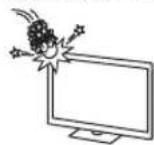
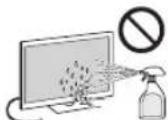
0 1
yolge jolalai oalal
J 100
e 1
.
4gj juaa Cg 4gge gglg l0g
10g 400g Cuaio
aai 1jgglgol dss sylg
jg jolal j1 1000 C5p aasrj gblj
aL 15i0s Jaoai jao (i) u
Loo (ii) 1000s
http://www.sony-asia.com/support)
∴ ( x - 2x) ( y - 2y) = 0
(i)ain)202-52+10-08-202
ii.
Therefore, m = 3/11
1.15
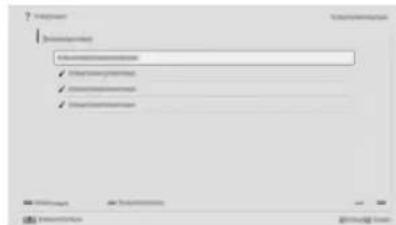

(i-Manual)
i-Manual 4dss 5g jyjgl yjgl jyjgl jyjgl
i-Manual 1
2
1
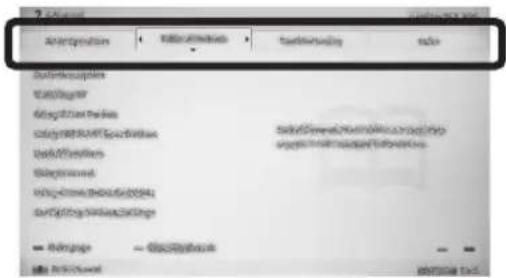

2
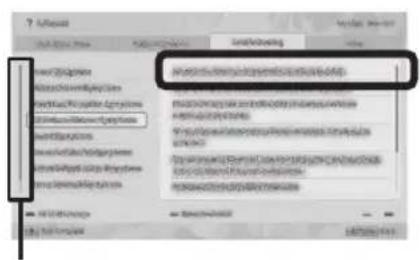

00j j 1
.5j1s jijj1sglg20 4j1j1sglg20 b
aaii i 1
chai jia jia gao jia





Sony Entertainment
aai,la (sogdsdo
iiinnnns nnnnns nooos
Juaa Cglao Uyoo y/g (s0g)
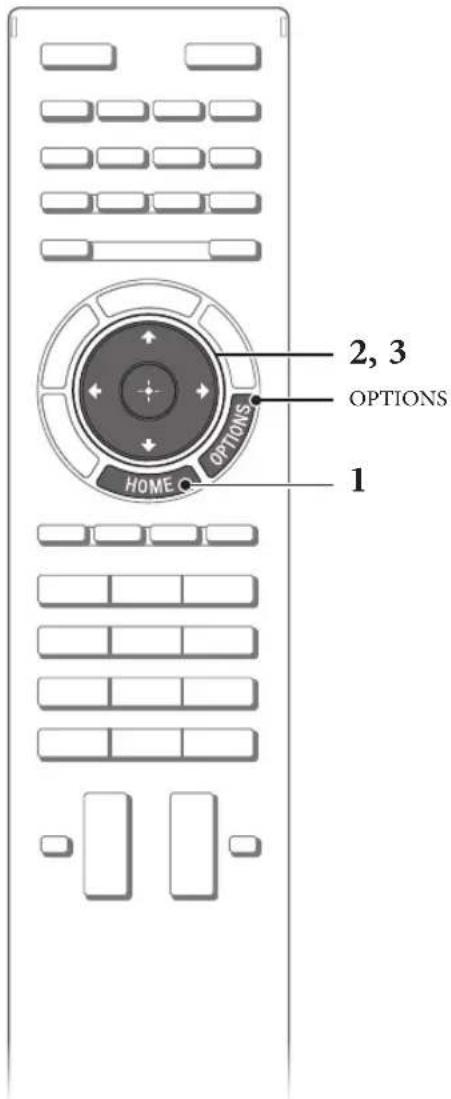
J5oJUaJIg.1 1000000000000000000000000000000000000000000000000000000000000000
"paaa"←"laai" aolal WEP cai j 1 10g (ssID) 45
[1] 151111111111111111
psu w y uulai s ly s jyLAN USB 1 USB 3 USB. 5 5 (jwss dbs) SiJ "Wi-Fi Direct s ly ool" g0sS JyL LAN
"ds"←"clabis"gosdJHOME.5pbs"sgolb" .sbl 1"ogols"←"Wi-Fi Direct sby ool"← "g0dsJHOME.0oil J"ds"pbs"psj
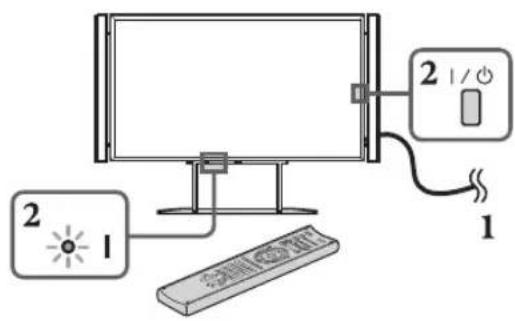
1
2 0
a 1 a 1 1 1 1 1 1 1 1 1 1 1 1 1 1 1 1 1 1 1 1 1 1 1 1 1 1 1 1 1 1 1 1 1 1 1 1 1 1 1 1 1 1 1 1 1 1 1 1
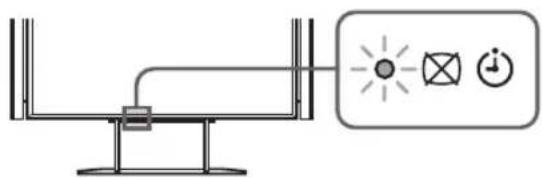
3 1
(1)
|
与
4
》
.
1
Therefore, m = 3/11.
1
1 ( ) 2
Sau
Therefore, m = 3/11.
Therefore, m = 3/11.
Therefore, m = 3/11.
a_4^3 = 7^3 * 2^4
(1 + u)/7 = 8
310
Therefore, m = 3/11.
omega = y
Therefore, a and b = 1.
Therefore, 3^x = -2 + 2*sqrt(2).
.
(4)
91
1
- 10.2.2023 1:54
Therefore, the area of triangle OBC equals the area of triangle COD plus the area of triangle BOC.
U5 Uo1 d00 g0 1g0
7
1 1 1 1 1 1 1 1 1 1 1 1 1 1 1 1 1 1 1 1 1 1 1 1 1 1 1 1 1 1 1 1 1 1 1 1 1 1
40
J 5
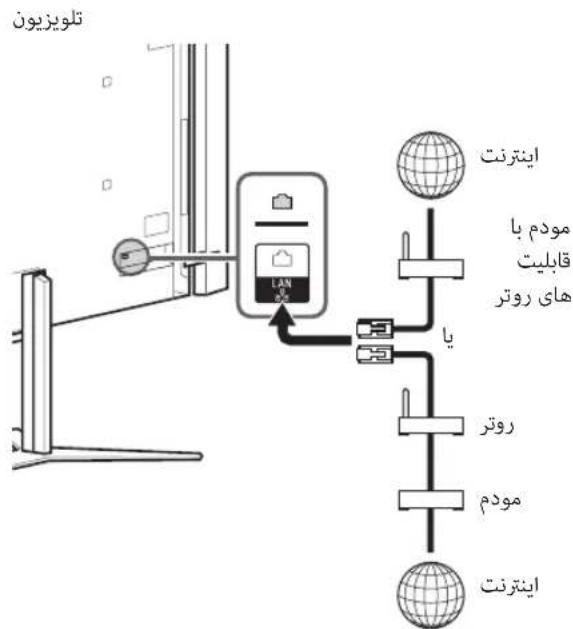
42
pww w 100 45w 5y gjdlol
45 45 45 45 45 45 45 45 45 45 45 45 45 45 45 45 45 45 45 45 45 45 45 45 45 45 45 45 45 45 45 45 45 45 12345678900000000000000000000000000000000000000000000000000000000000000000000000000000000000
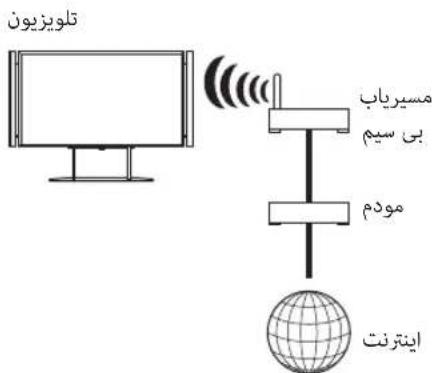
Sj0g jU 54321
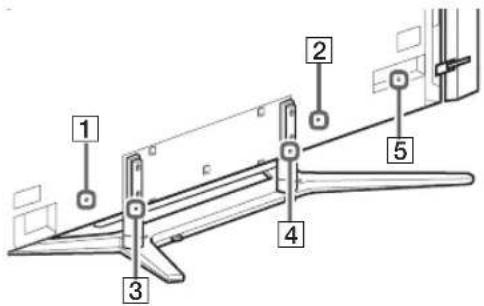
15 150 150 150 150 150 150
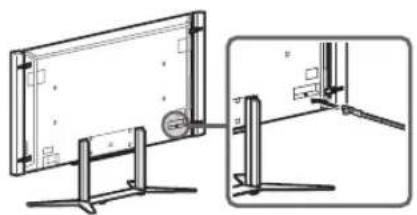
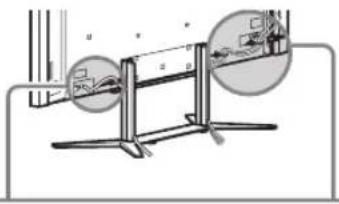
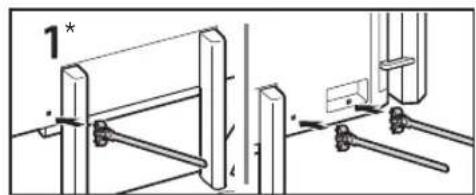
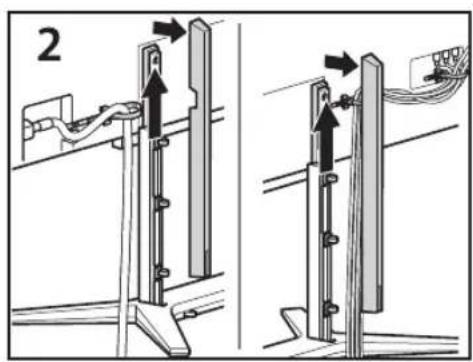
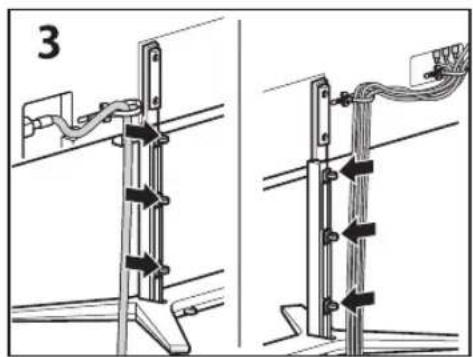
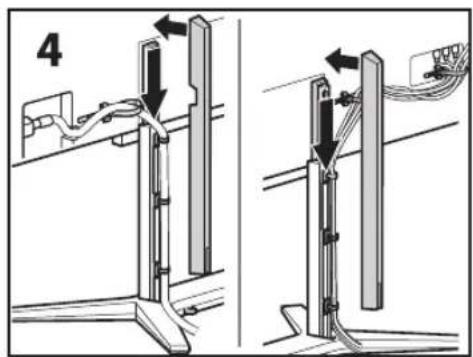
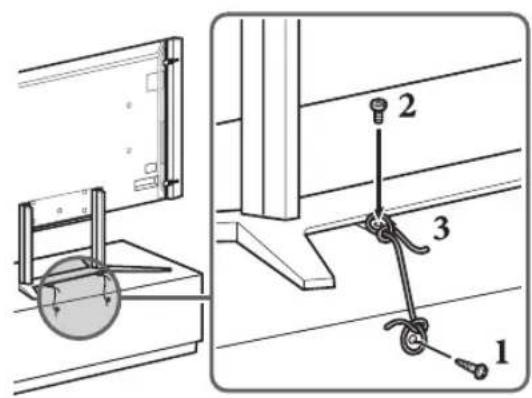
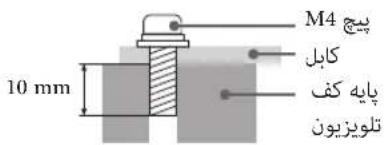
DVD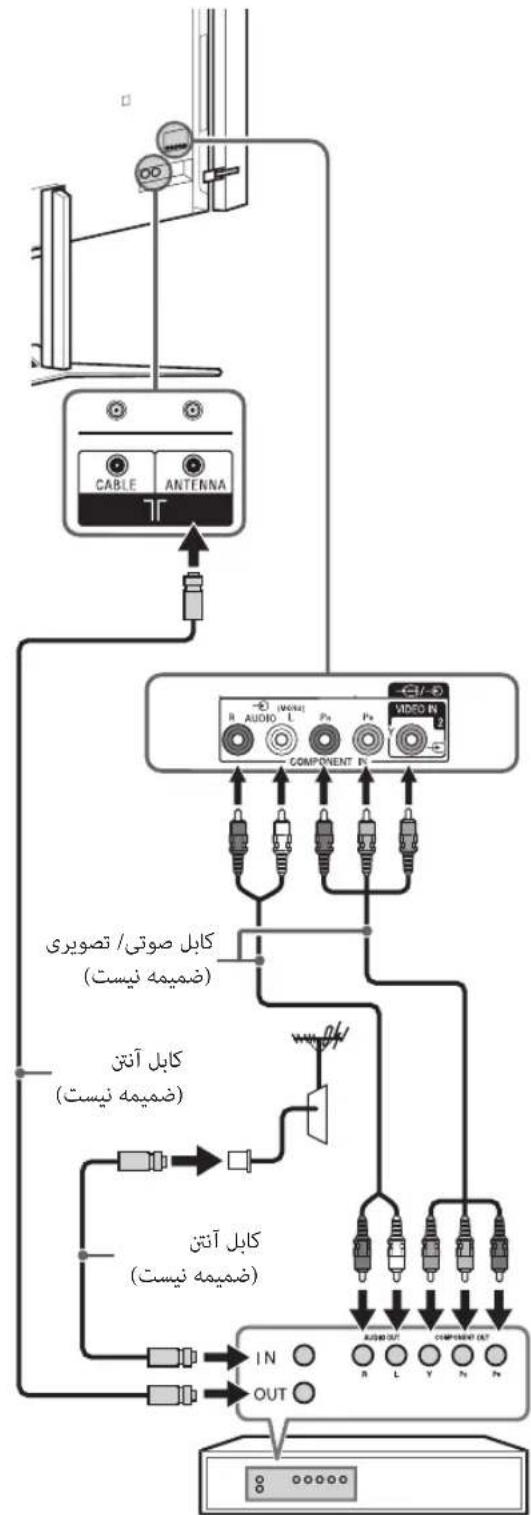
DVD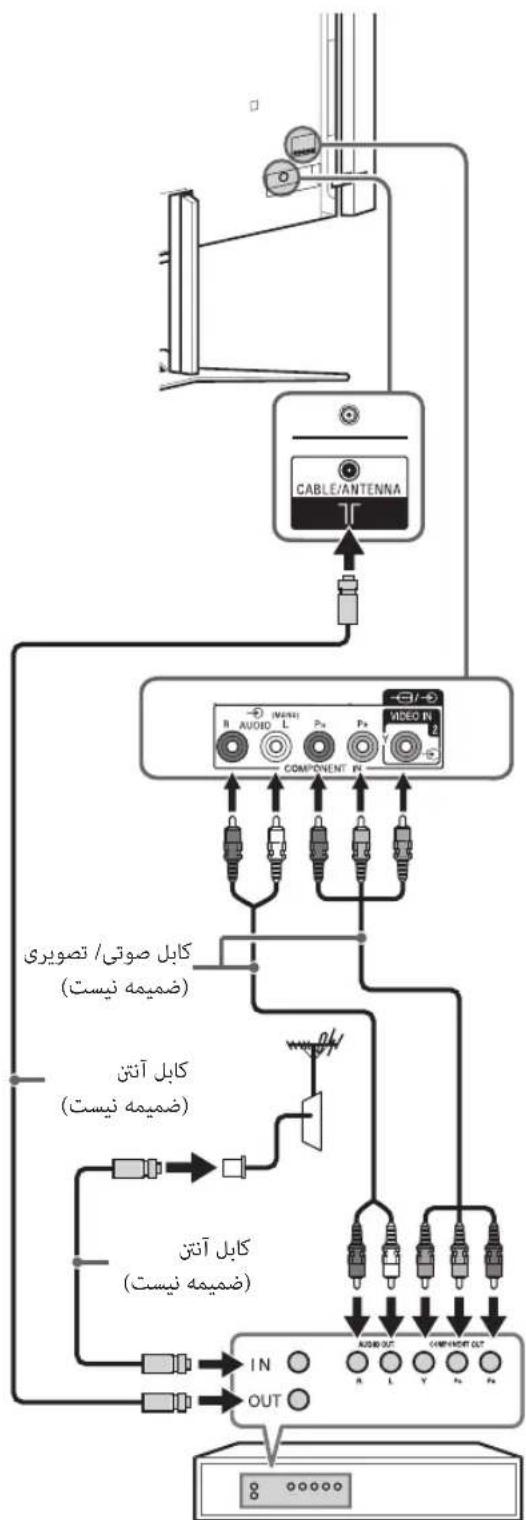
VCR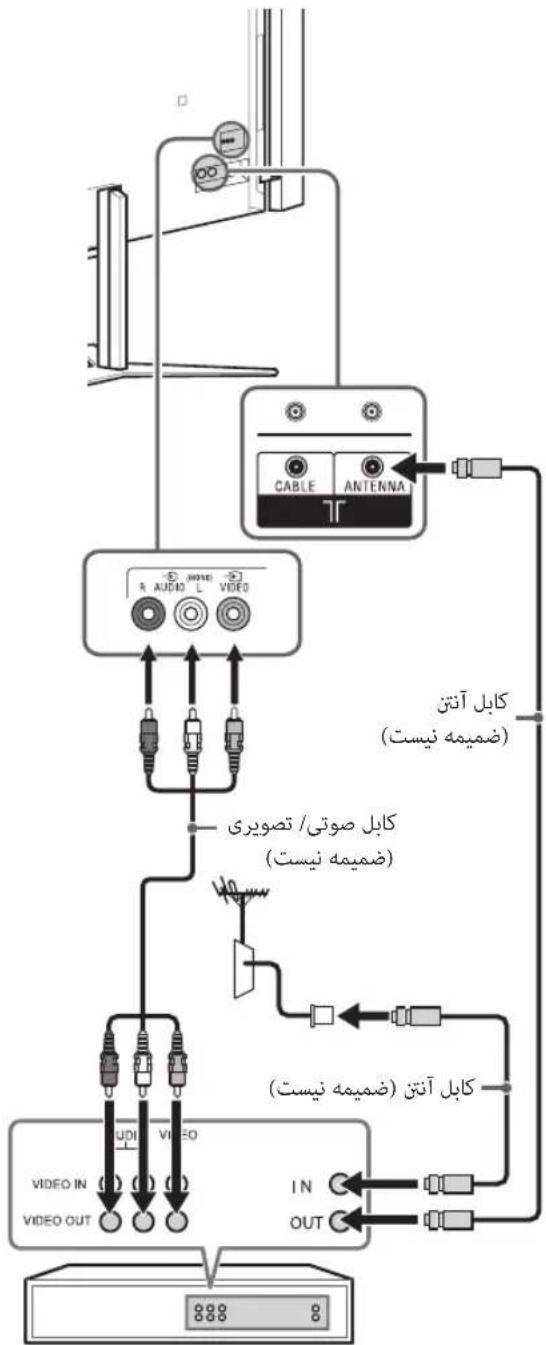
VCR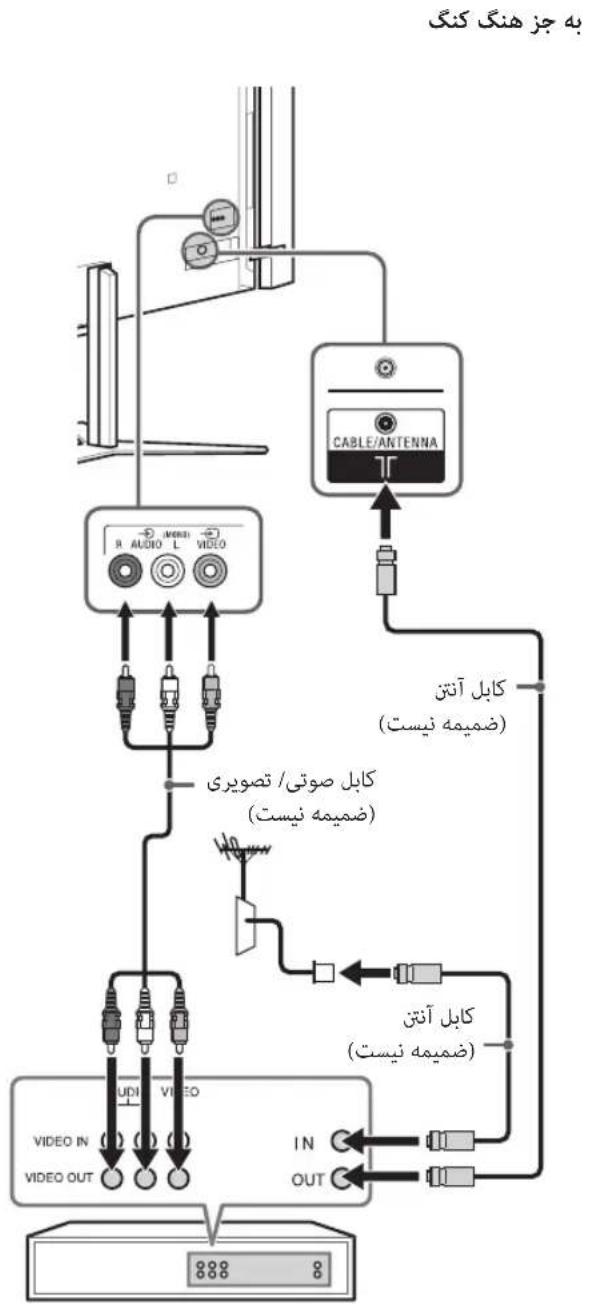
bio / Set Top Box (DVD Lw o 5w w J 4K gHDMI 3gHDMI 2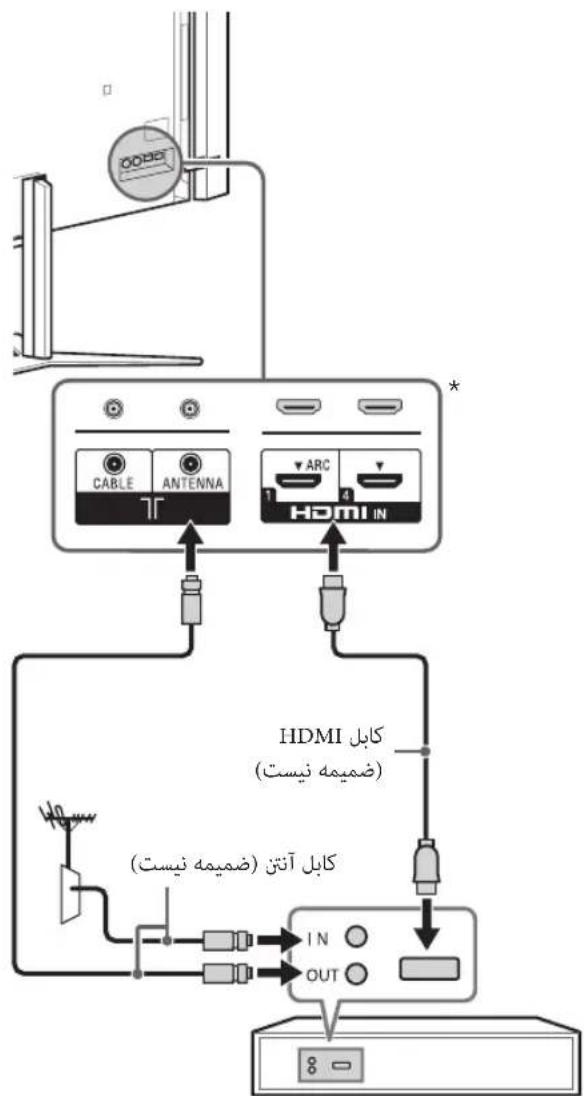
olcs/Set Top Box 1 (DVD
S.SsJoo
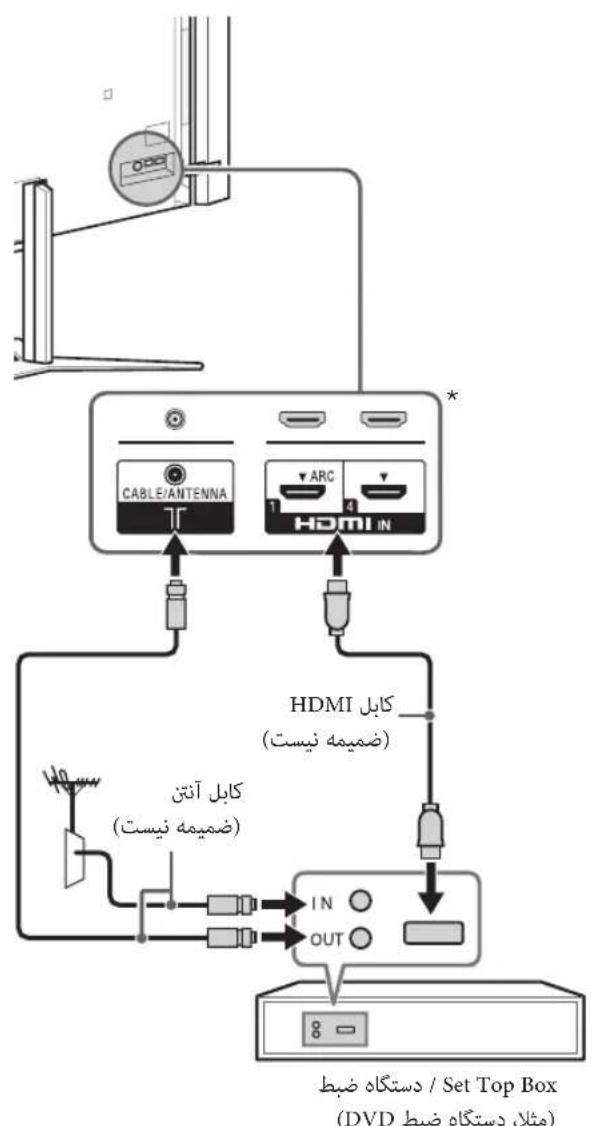
1J 4KgHDMI3HDMI2
Sus j0 b
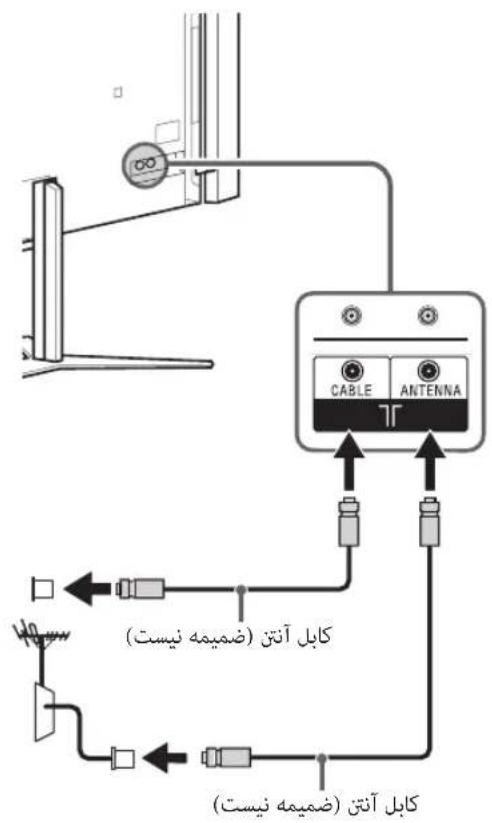
yol:3
0dla 14 j Caleo LjS J 21x (Caleo) 12 HDMI oD J HDMI J Sony HDMI J
PR
VCR/15/
J5/1
S5 Sio j4
()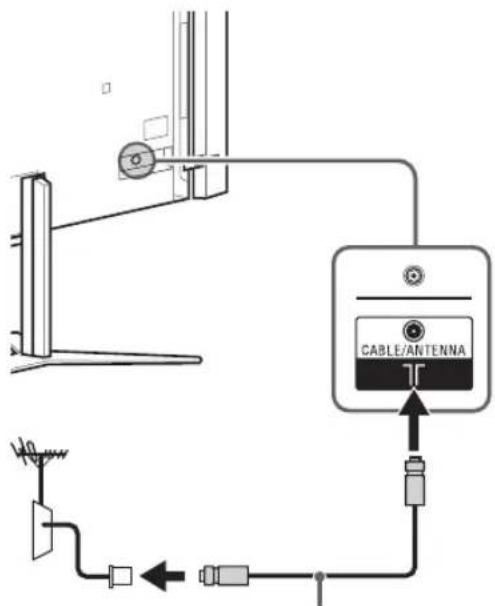
j1 105u
j 1 j 1 j 1 j 1 j 1 j 1 j 1 j 1 j 1 j 1 j 1 j 1 j 1 j 1 j 1 j 1 j 1 j 1 j 1 j 1 j 1 j 1 j 1 j 1 j 1 j 1 j 1 j 1 j 1 j 1 j 1 j 1 j 1 j 1 j
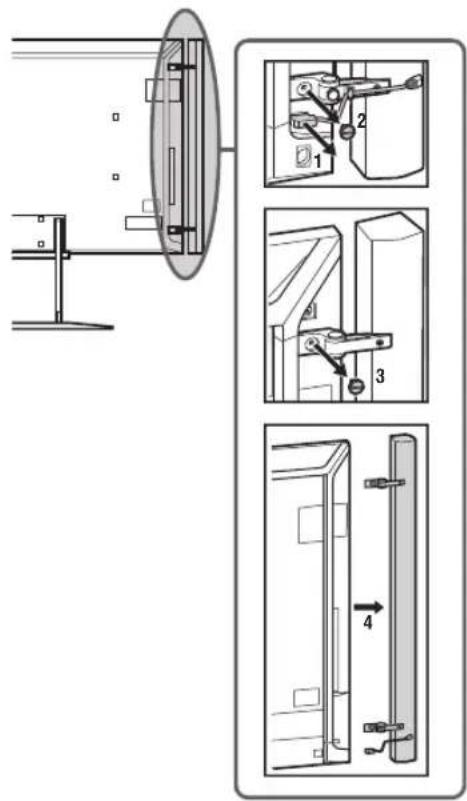
1
2
3
1 1 1 1 1 1 1 1 1 1 1 1 1
gulj 2
1000 1000
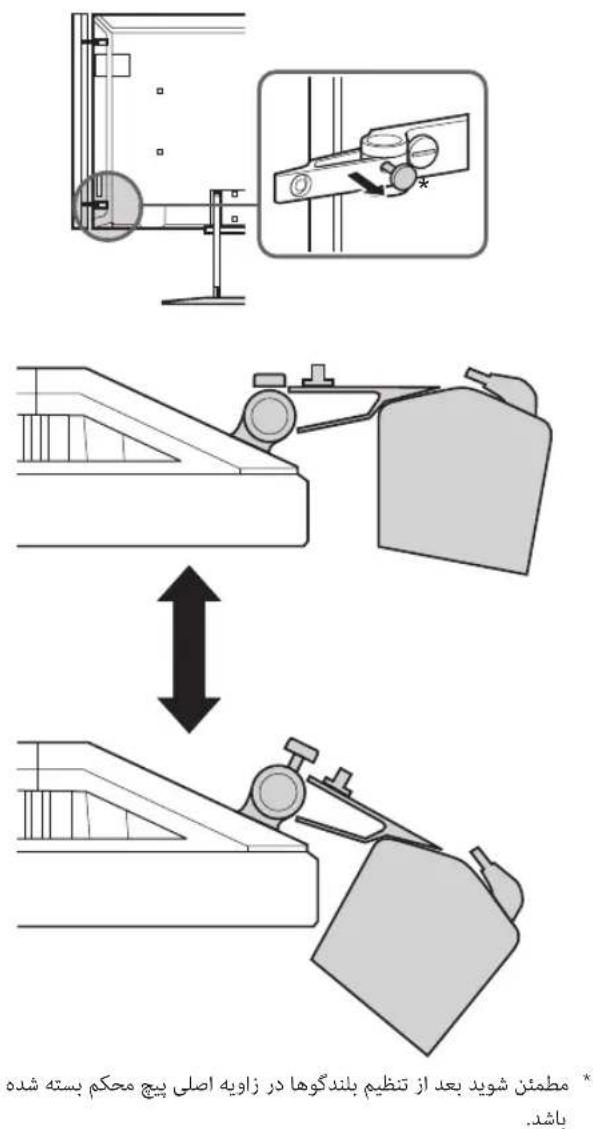
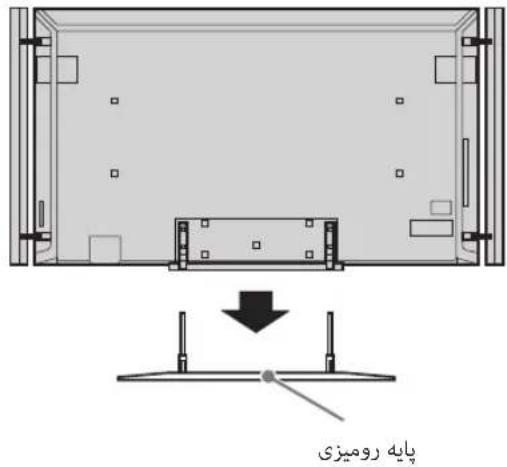
j 2 2 2000000000000000000000000000000000000000000000000
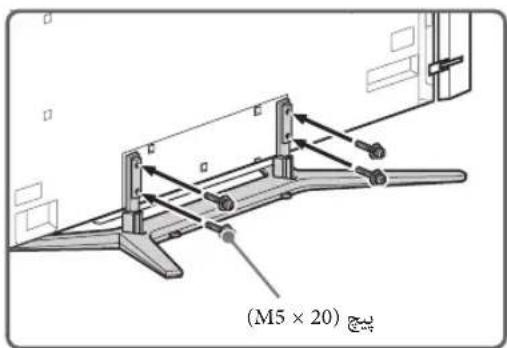
5
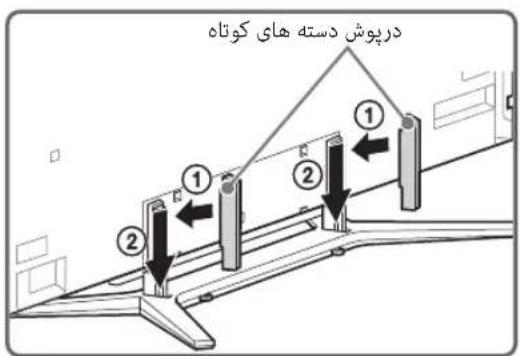
1
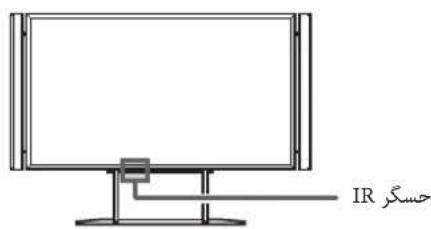
2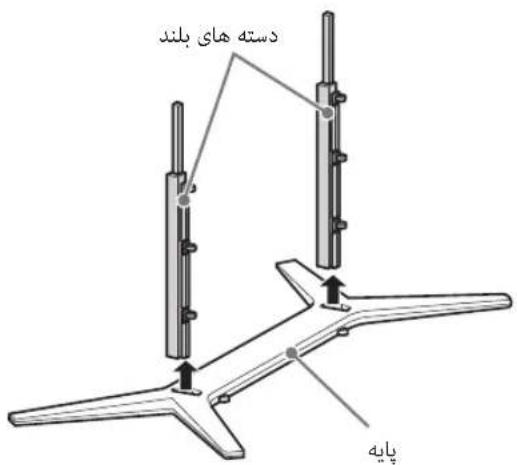
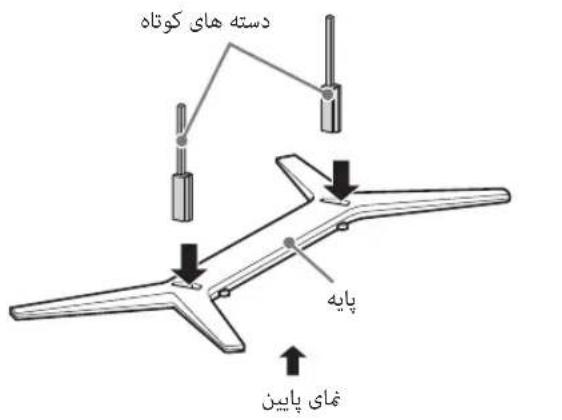
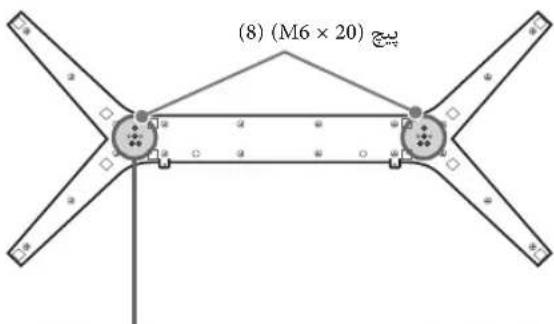
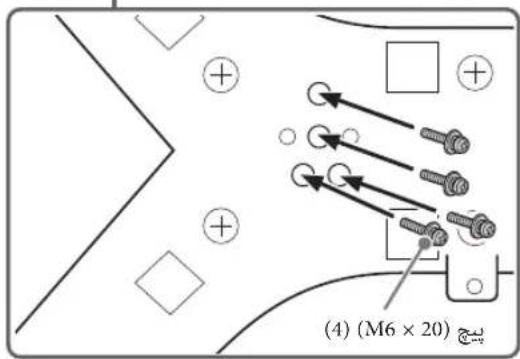
sJ0g 4u J0S
1 11111111111111111111 sL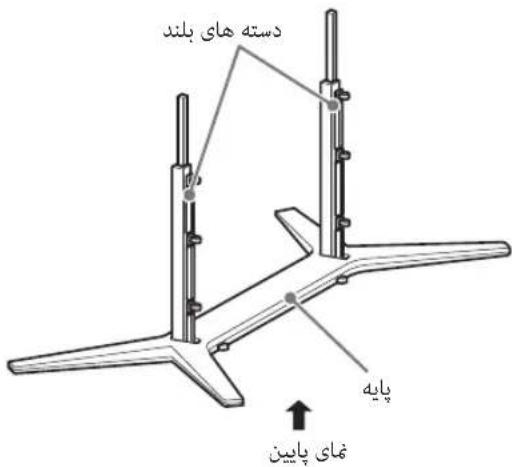
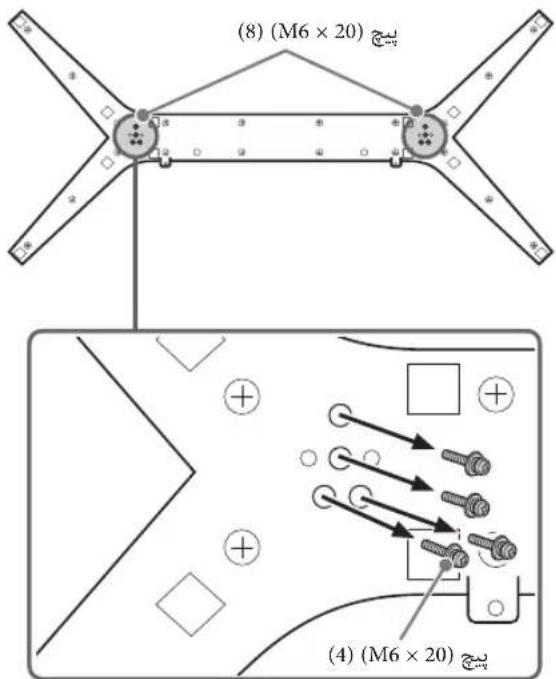
1 15 1 15 1 15 1 15 1 15 1 15 1 15 1 15 1 15 1 15 1 15 1 15
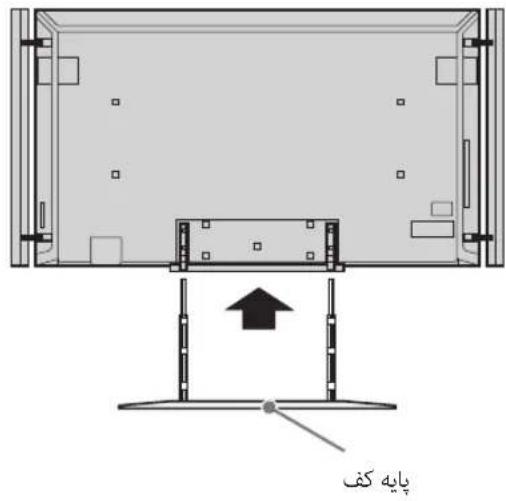
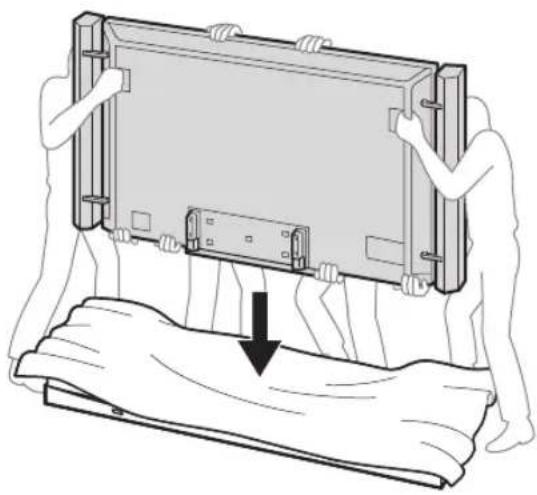
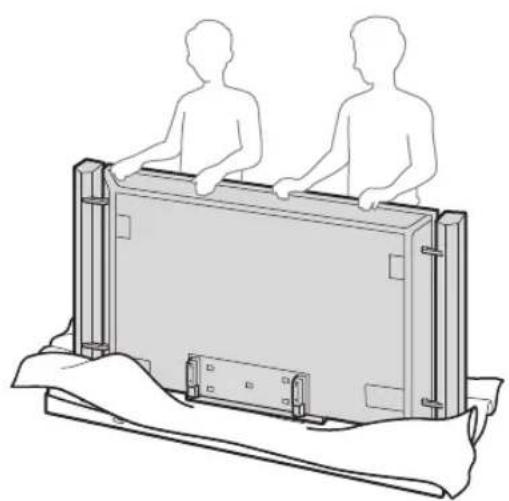
3
j 450
1
1
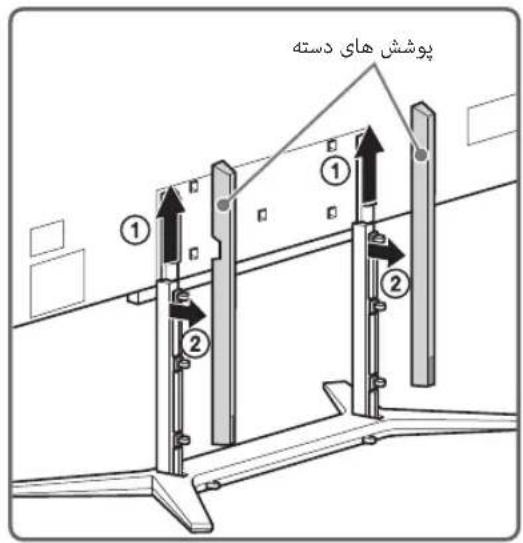
2
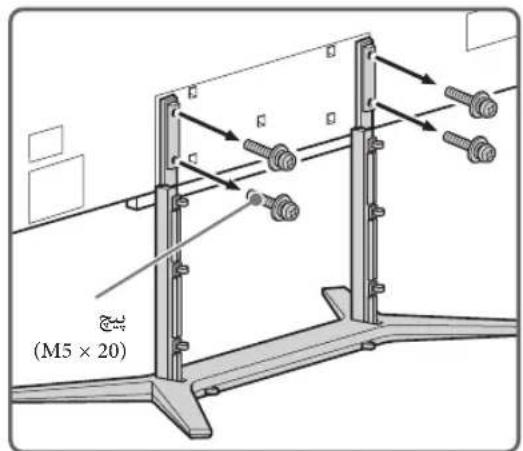
1
- 10.
Aa 15
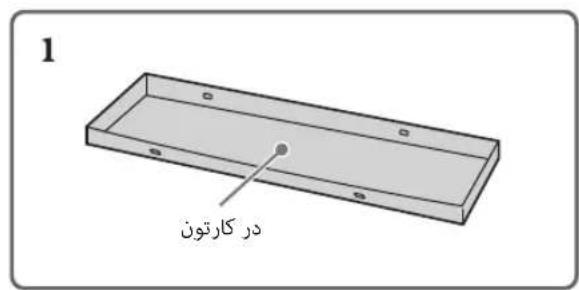
.0000 451j glouoo sloo

i-MANUAL 05d

(i-Manual)
4i-Manual j0oJoo oJoo.ooJoo Joo
Therefore, the area of triangle ADB equals the area of triangle COD plus the area of triangle BDO.
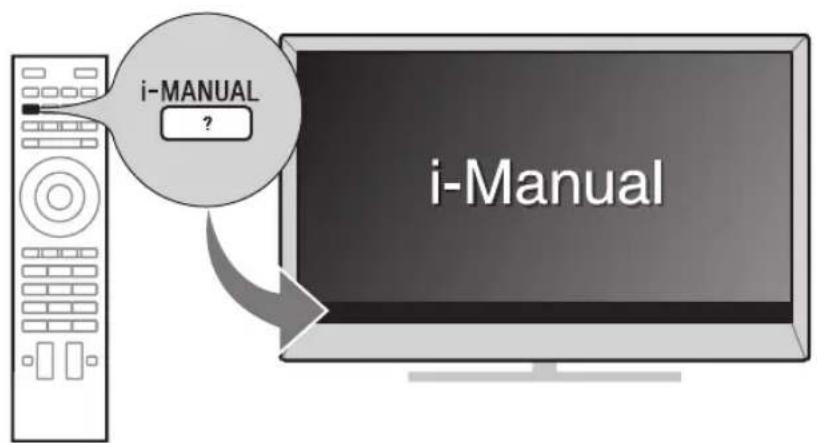
gdofo 1 joo laol d jod oosolo slk g yglao
aaiydi

DOLBY. DIGITAL PLUS PULSE

dlna CERTIFIED

gracenote.

OPERAS software
L 100
gjoo cooie ooe b
HDMI sOJ HDMI High-Definition Multimedia Interface
LgS gH HDMI Licensing LLC
DLNA CERTIFIED DLNA .DLNA Digital Living yLs y Lnd Network Alliance
TrackID and Gracenote are trademarks of Gracenote. The Gracenote logo and logotype are trademarks of Gracenote, Inc. For more information, visit www.gracenote.com. Copyright 2000-present Gracenote, Inc.
Opera® Browser from Opera Software ASA. Copyright 1995-2012 Opera Software ASA. All rights reserved.
__SUPPIMER__
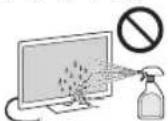
(II) j0 S (I)
∴ SΔAOB = SΔCOD + SΔBDO

LCD
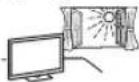

:

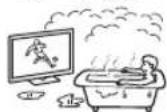
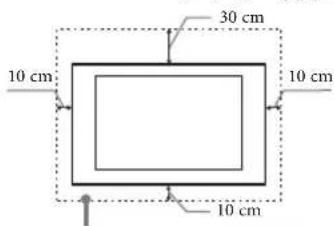
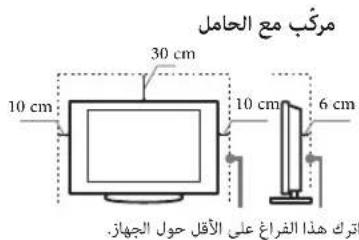
__SUPPIMER__
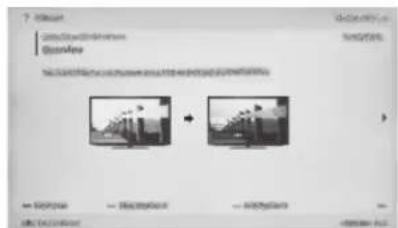
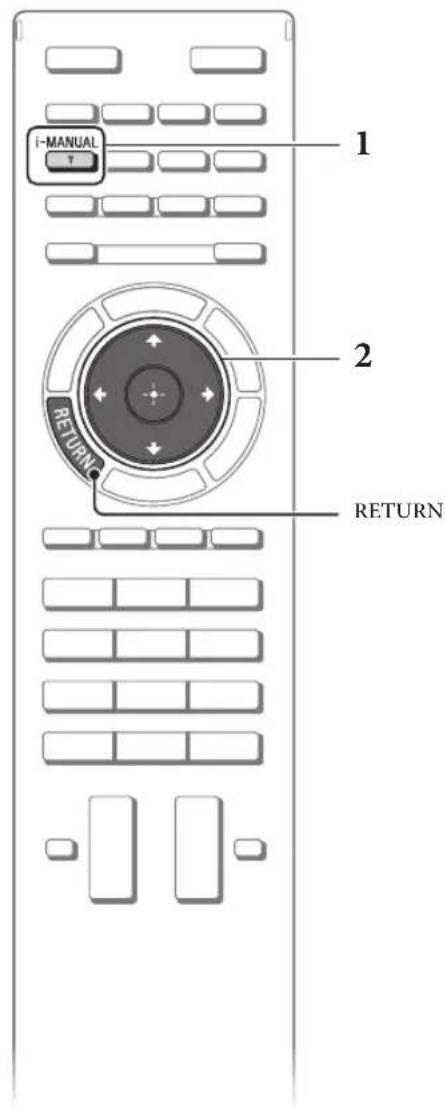
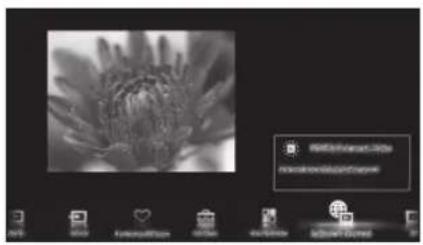

4

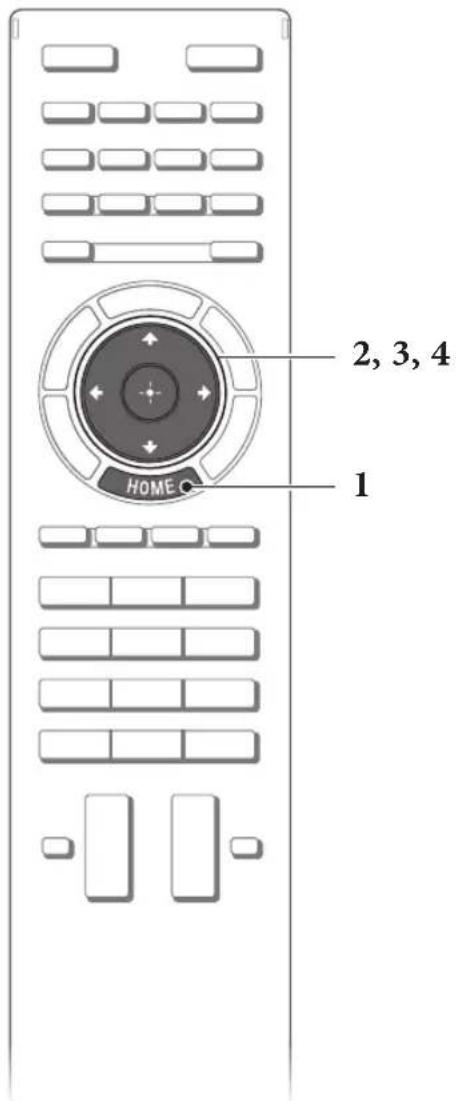
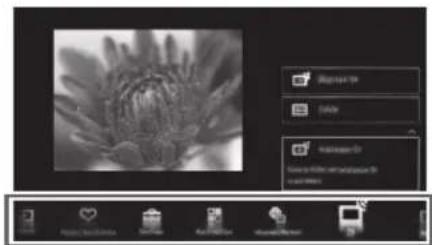

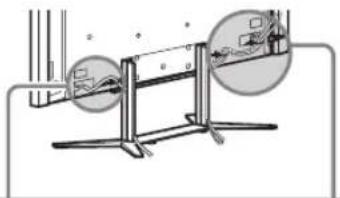
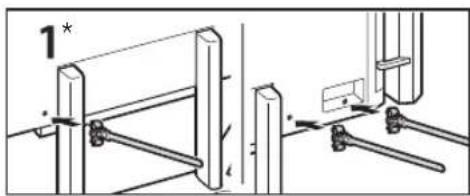
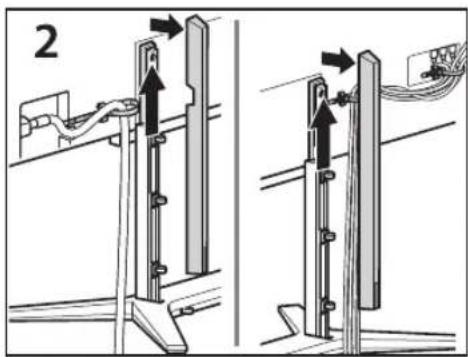
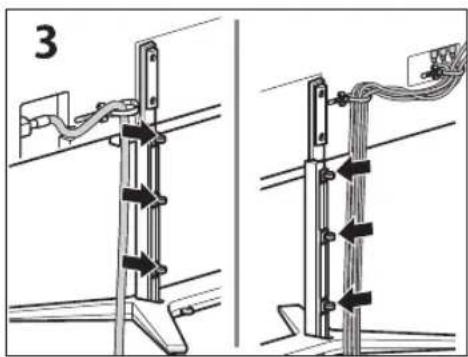
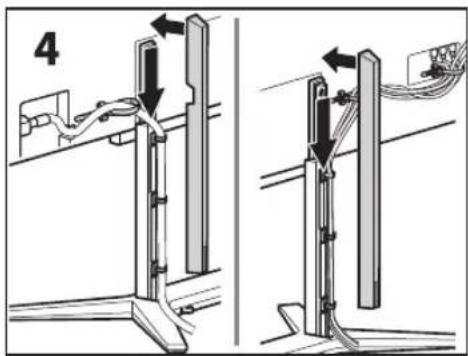
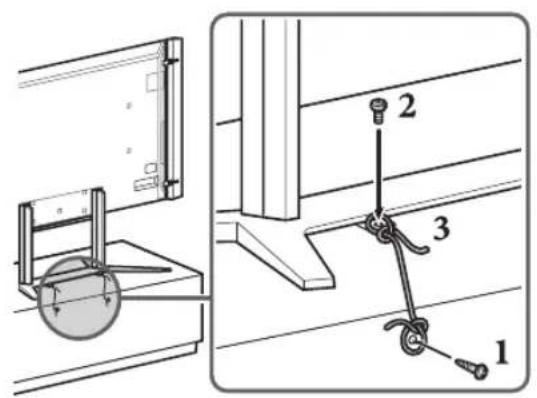
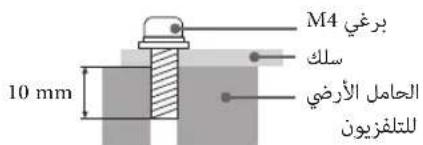
DVD 1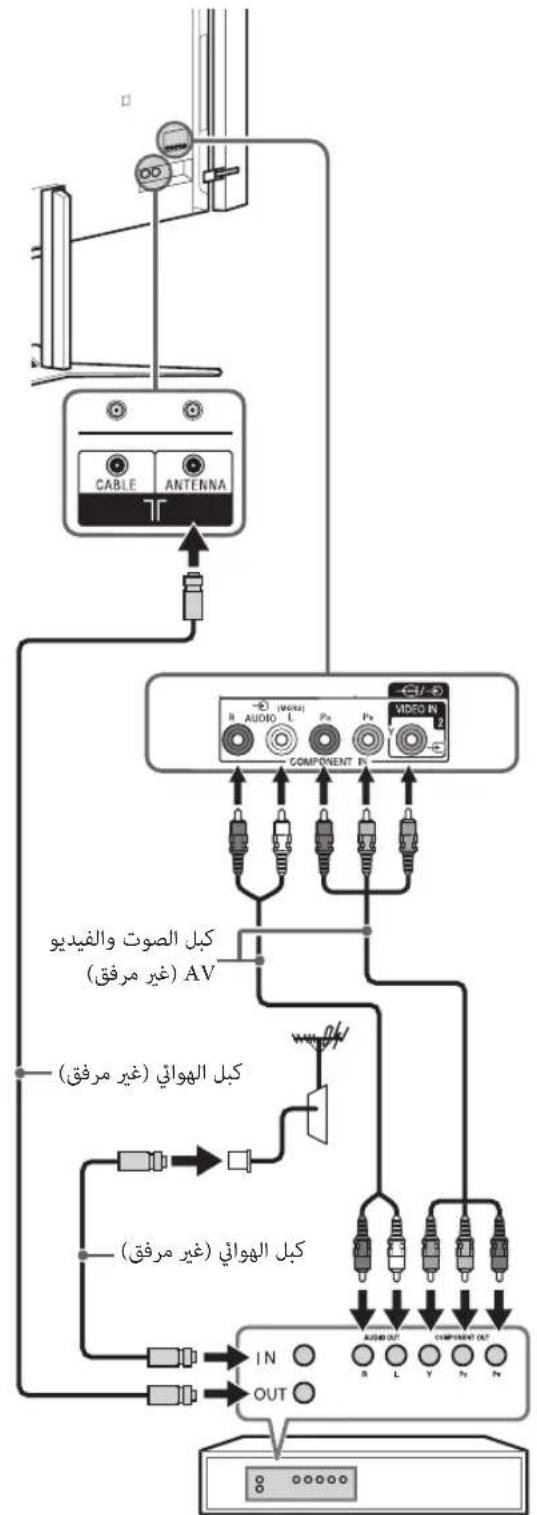
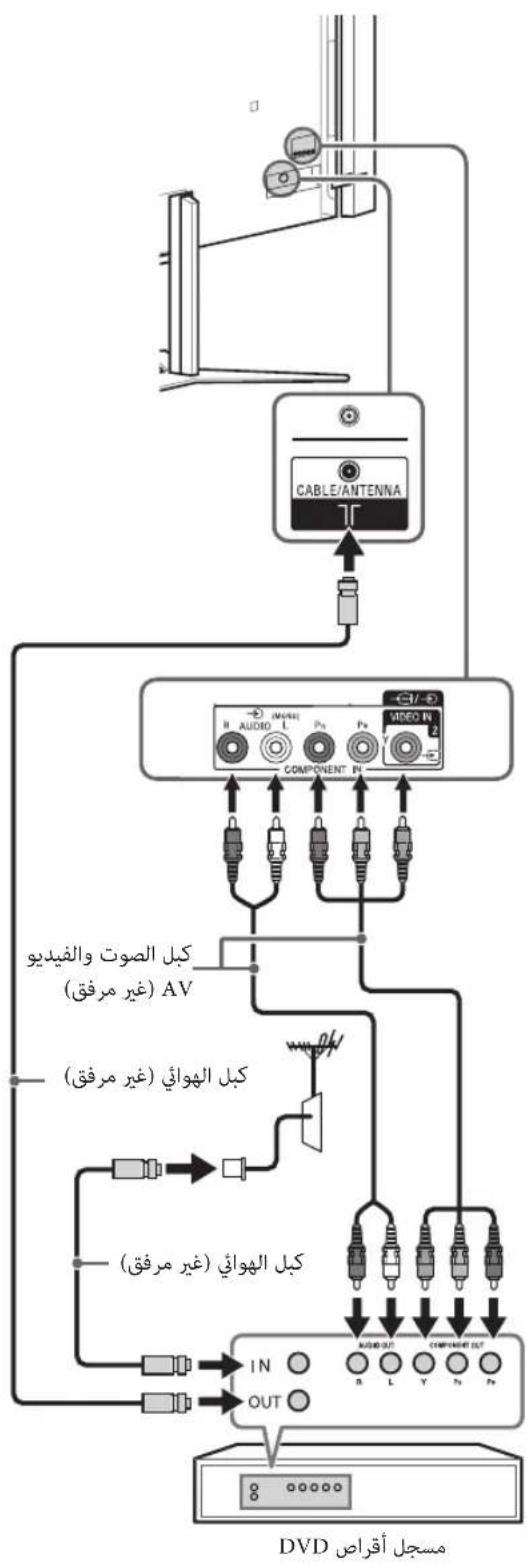
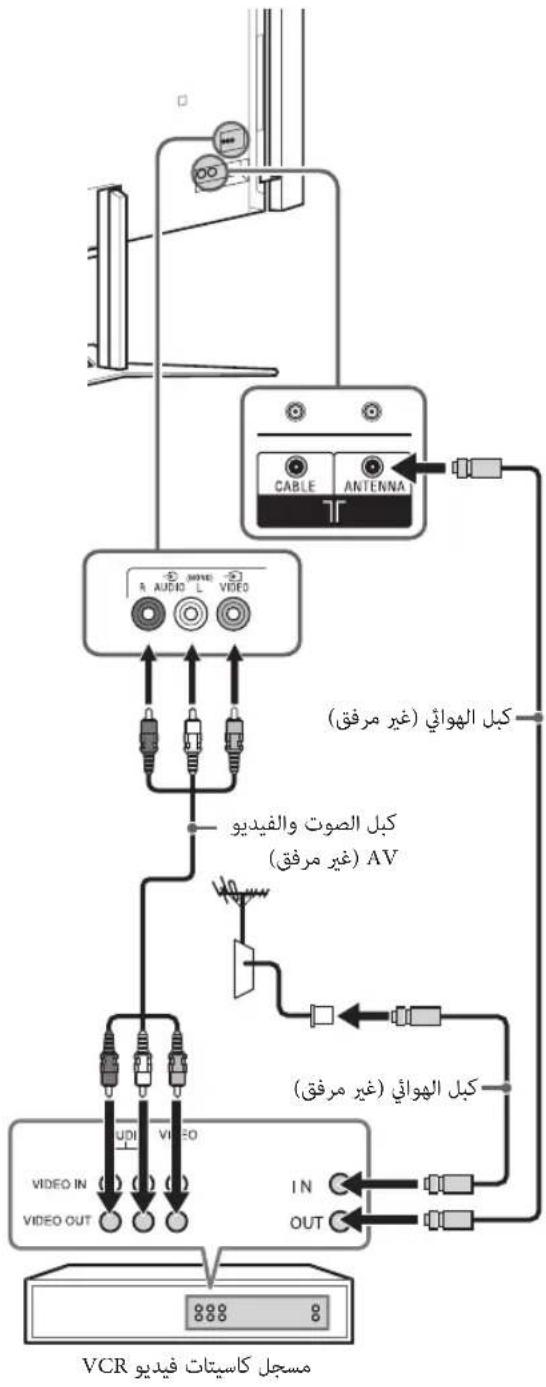
VCR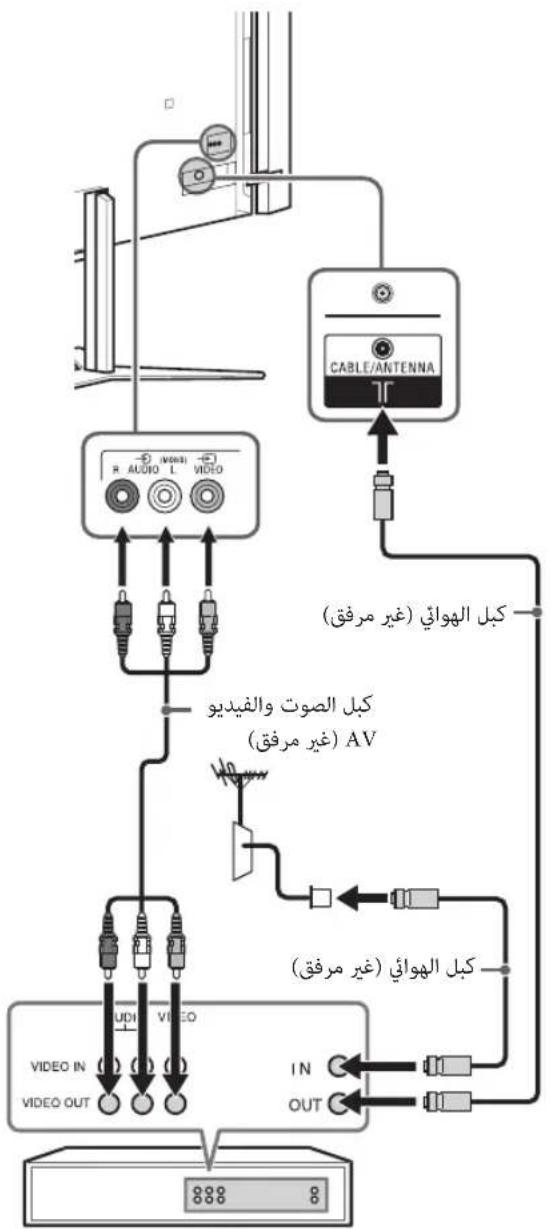
()4KHDM13HDM12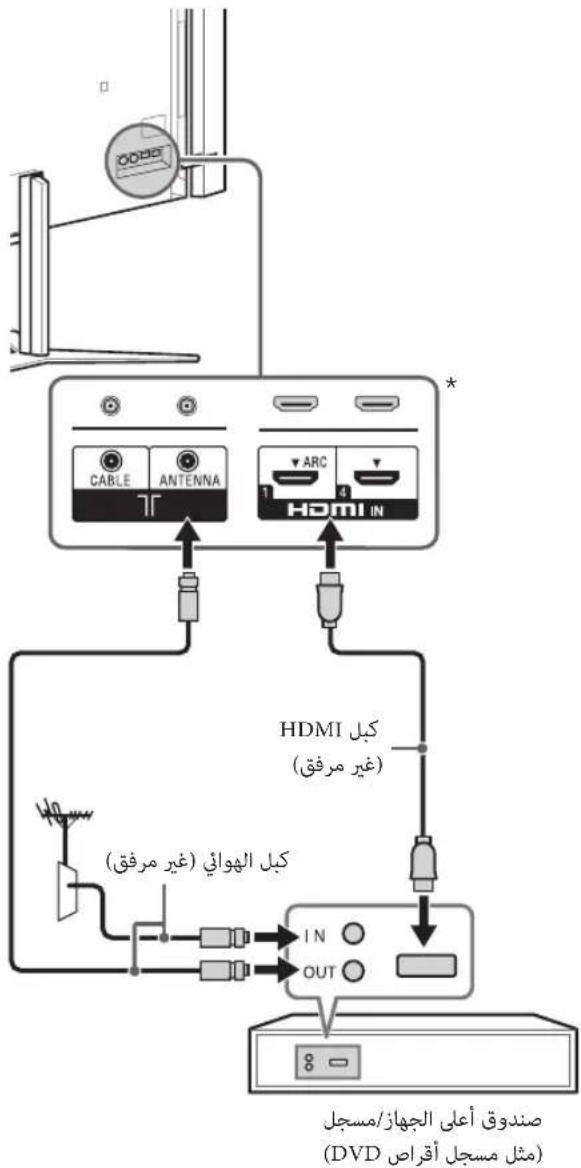
HDMI (DVD
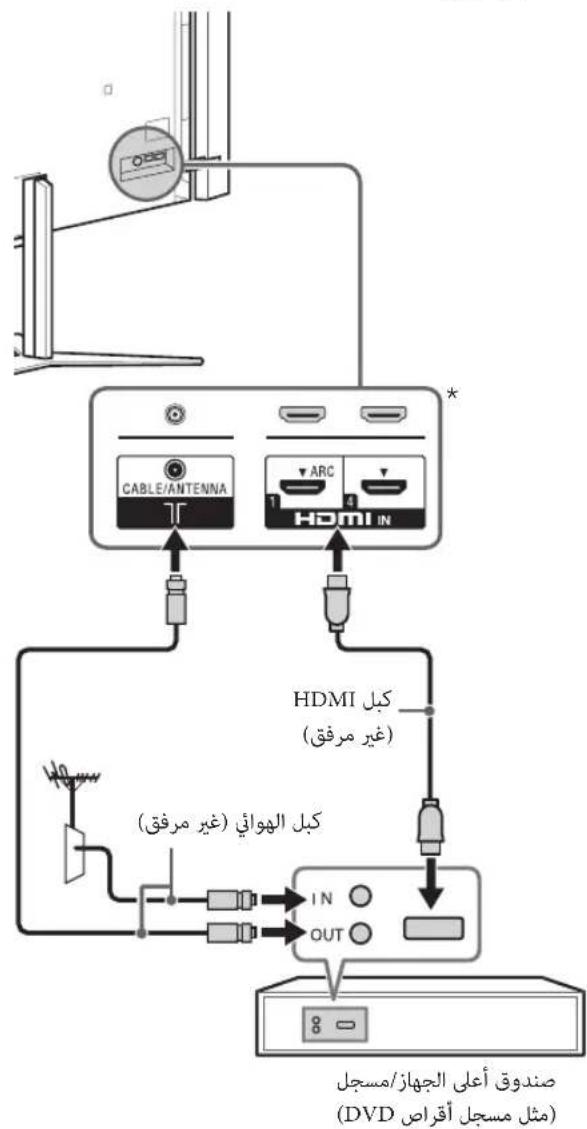
(1jyjzdl jg jg)4KddHDM3HDM2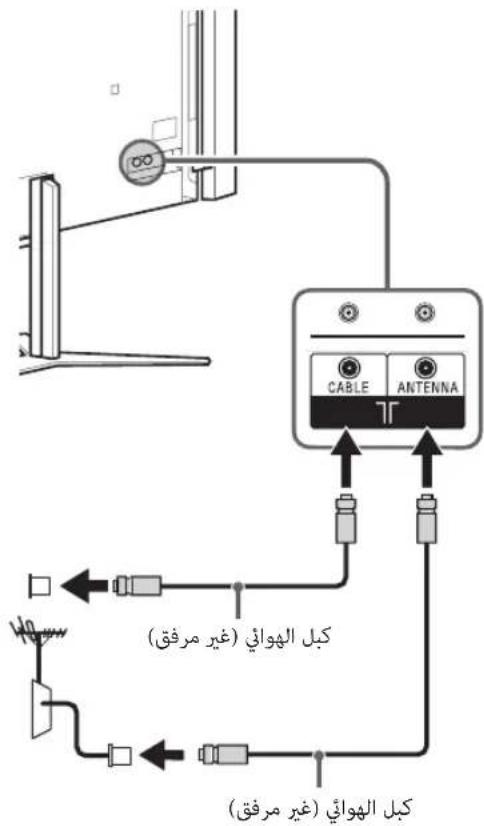
3
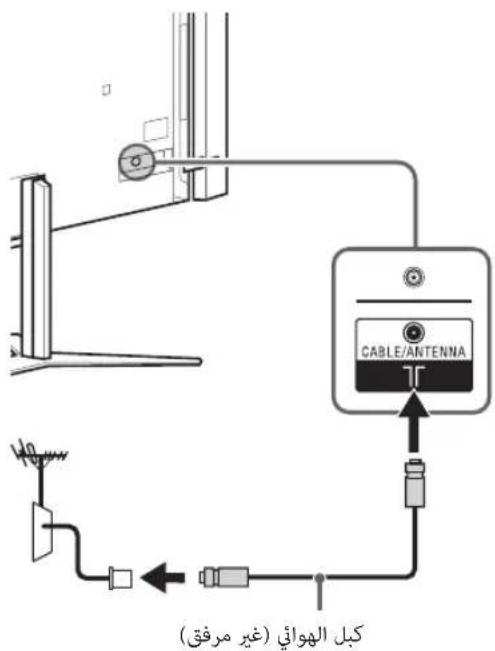
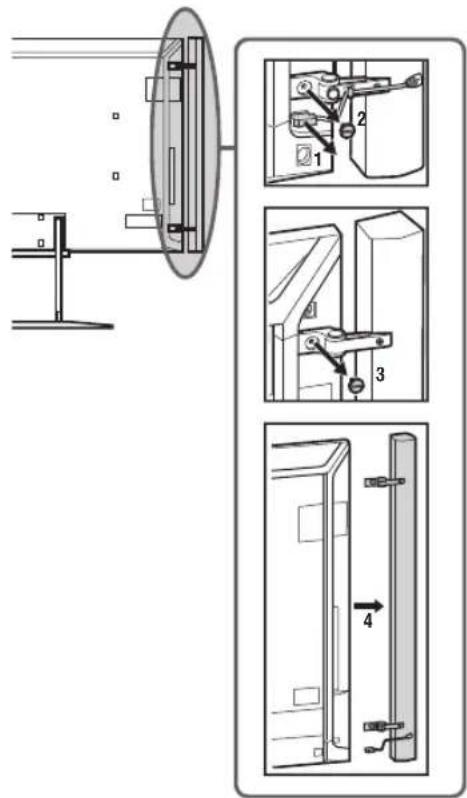
2
3
4 4
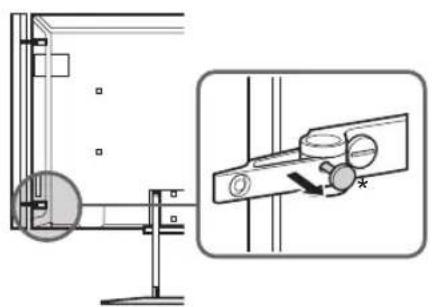
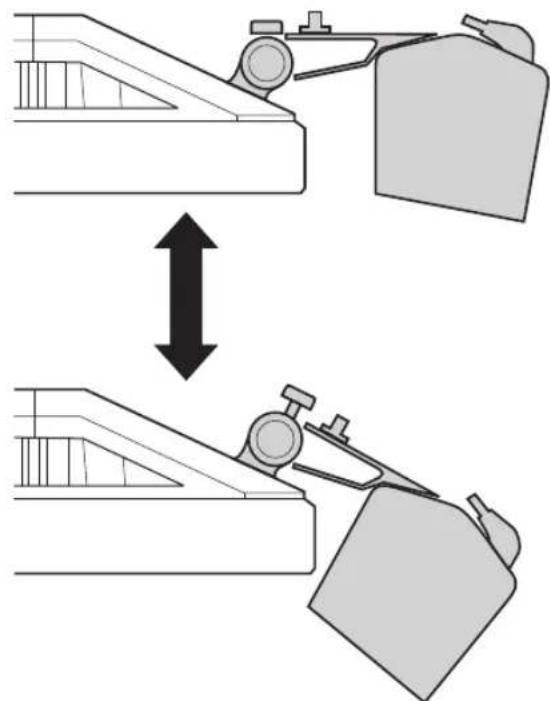
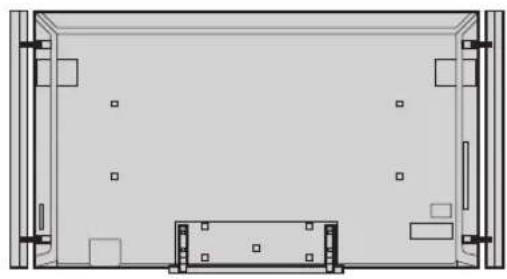
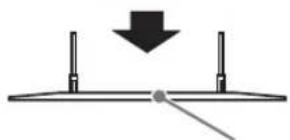
a ball
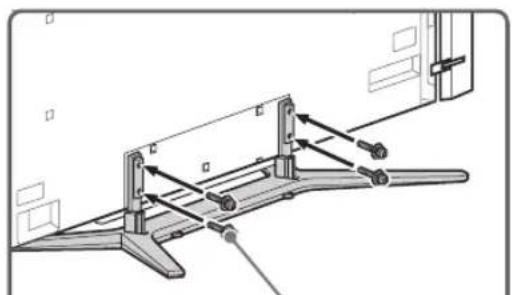
(M5×20)
5
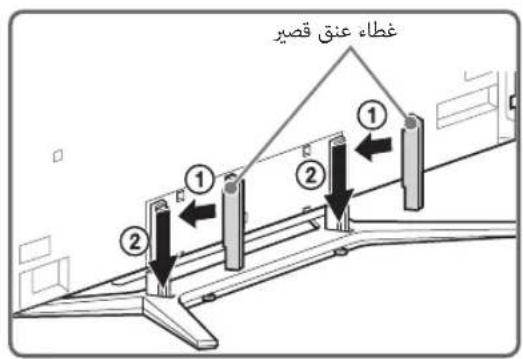
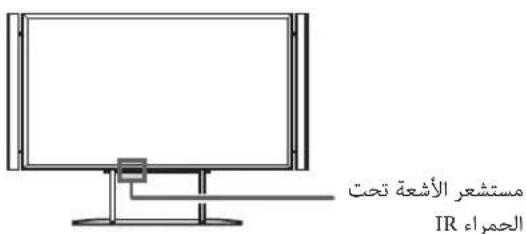
1 2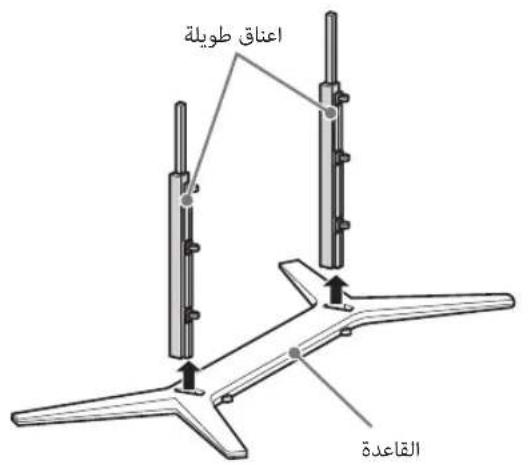
jiaobio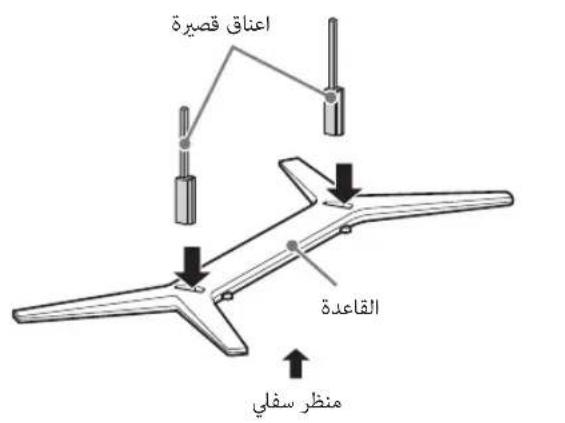
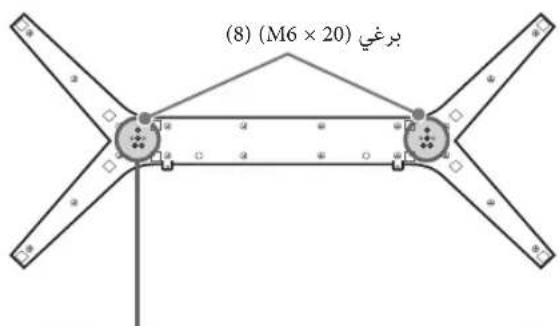
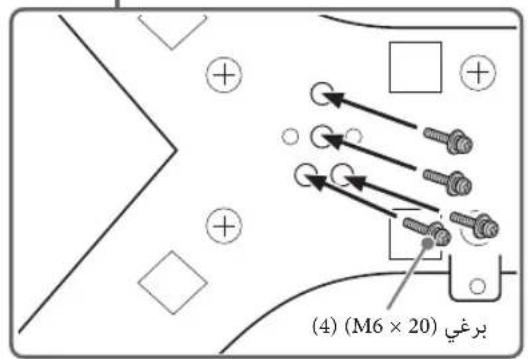
Jglal Jolc
1
yldawjbio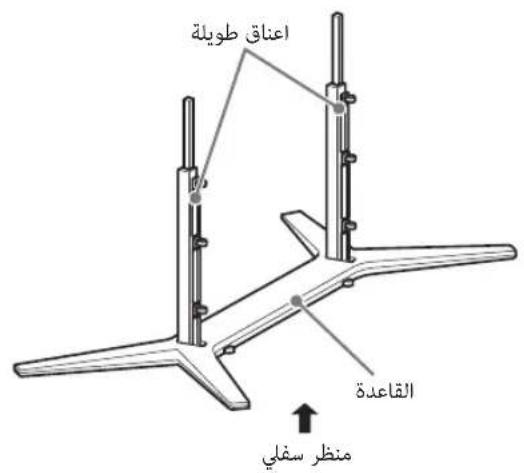
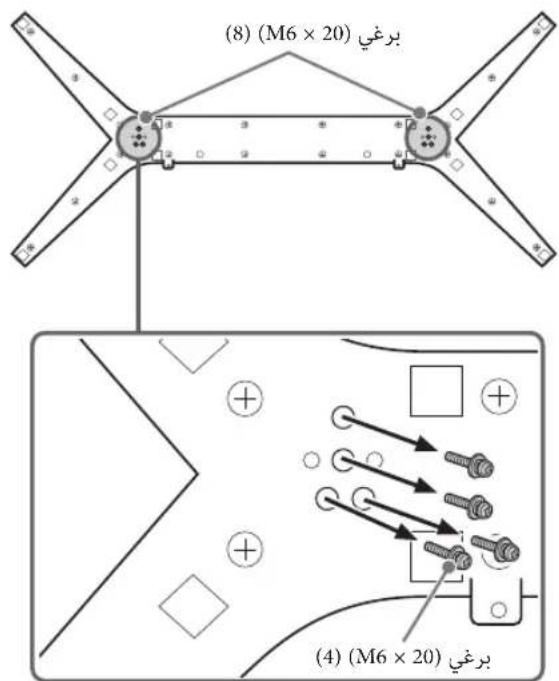
. 10000000000000000000000000000000000000000000000000000
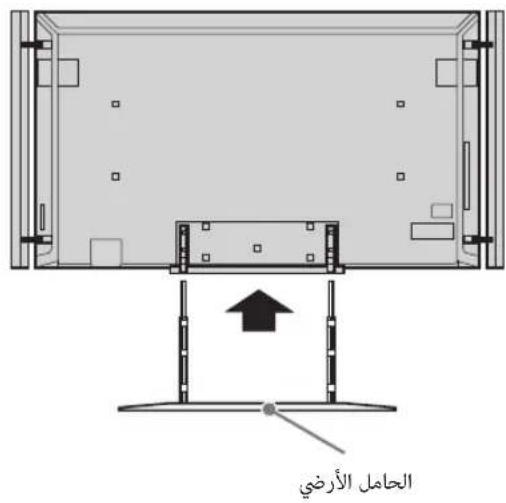
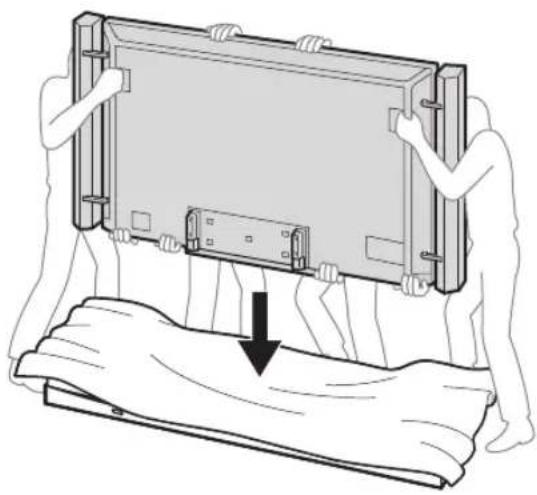
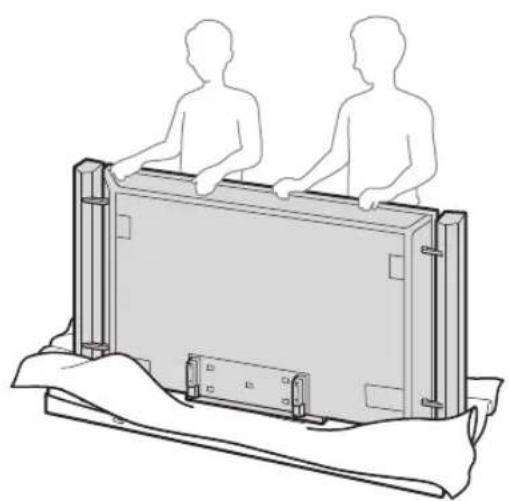
j00000000000000000000000000000
1
1
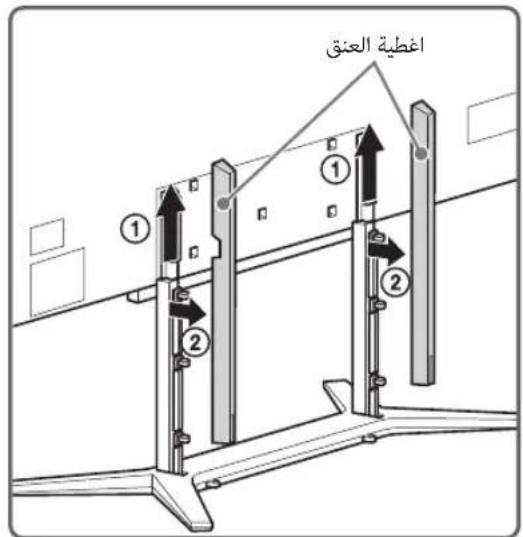
2
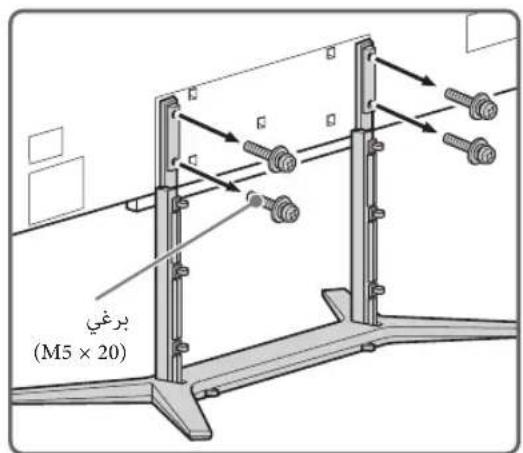
1 1
A. all 110
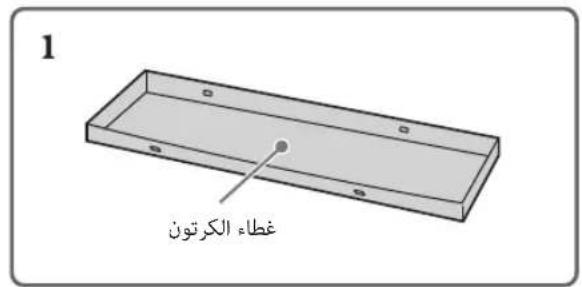
gjSJI.ubie jde aagjjglslgX

Lolgljde jgjallaa
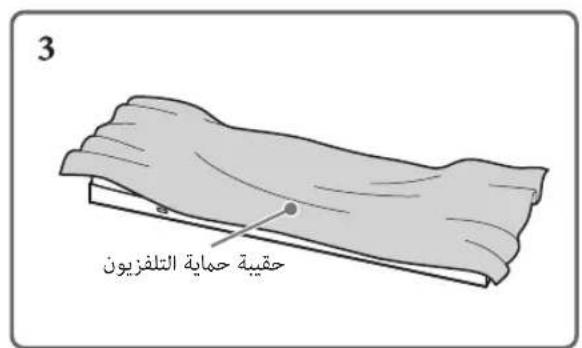
Jgljolg:1

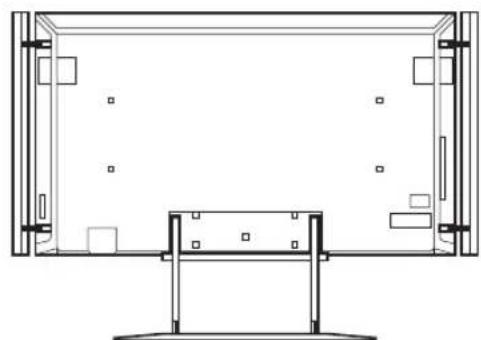

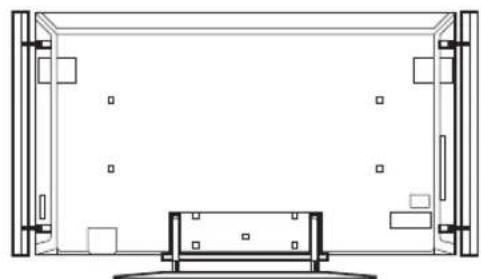
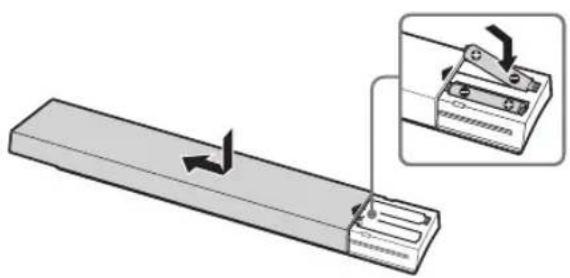
1
2
*1(1)02j61 jlllUu
*2(6) 100
(5)
(1) (joc aSoll 80g) c9y
(2) (R03 j1b) AAA
(2)
(2) y = a + b/ac 164
(2)
(2) i=1n aij bij cij dij
BRAVIA
25 (i-Manual)
BRAVIA
Gracenote 50 Media VOCS Powered by Gracenote Gracenote 24
Opera Browser from Opera Software ASA. Copyright 1995-2012 Opera Software ASA. All rights reserved.
Wi-Fi Alliance, Wi-Fi Direct, "Blu-ray Disc", "Blu-ray", "Blu-ray Disc Association", "Sony Entertainment Network logo", "Sony Entertainment Network" are trademarks of Sony Corporation.
"SimulView"
Sony Computer Entertainment Inc.
DVB project


- SONY
- LCD TV
- BRAVIA
- INTRODUCTION
- TRADEMARK INFORMATION
- (EXCEPT HONG KONG)
- NOTES FOR AUSTRALIA AND NEW ZEALAND MODEL
- IMPORTANT INFORMATION
- NOTICE FOR CUSTOMERS IN THAILAND
- NOTICE FOR CUSTOMERS IN SINGAPORE
- NOTICE FOR CUSTOMERS IN JORDAN
- LOCATION OF THE IDENTIFICATION LABEL
- ABOUT THIS MANUAL (OPERATING INSTRUCTIONS)
- OPERATING INSTRUCTIONS
- ELECTRONIC MANUAL (I-MANUAL)
- TABLE OF CONTENTS
- GETTING STARTED
- USING YOUR BRAVIA TV
- WATCHING TV
- LOOKING FOR INSTRUCTIONS
- LOOKING FOR INSTRUCTIONS IN THE ELECTRONIC MANUAL
- ADDITIONAL INFORMATION
- CHECKING THE ACCESSORIES
- INSERTING BATTERIES INTO THE REMOTE
- ASSEMBLING THE TABLE-TOP STAND
- DETACHING THE FLOOR STAND FROM THE TV
- ATTACHING THE TABLE-TOP STAND
- ADJUSTING THE SPEAKERS ANGLE
- DETACHING THE SPEAKERS FROM THE TV
- CONNECTIONS
- CONNECTING AN ANTENNA/CABLE/VCR
- HONG KONG ONLY TO CONNECT A SET TOP BOX/ RECORDER
- (E.G. DVD RECORDER) WITH HDMI EXCEPT HONG KONG
- HONG KONG ONLY
- CONNECTING AN ANTENNA/CABLE AND VCR
- EXCEPT HONG KONG
- CONNECTING AUDIO/VIDEO DEVICES
- PREVENTING THE TV FROM TOPPLING OVER
- CONNECTING THE AC POWER CORD
- BUNDLING THE CABLES
- TABLE-TOP STAND
- CONNECTING THE TV TO THE INTERNET
- PREPARING A WIRED NETWORK
- PREPARING A WIRELESS LAN
- PERFORMING THE INITIAL SET-UP
- TURN ON THE TV
- SELECT A MODE
- SELECT A TV CHANNEL OR SELECT AN INPUT
- TO SELECT DIGITAL CHANNELS
- WATCHING 3D CONTENTS
- FREQUENTLY USED BUTTONS
- GUIDE
- COLOUR BUTTONS
- INFOTEXT REVEAL
- SUBTITLE SETTING
- AUDIO
- SELECTING VARIOUS FUNCTIONS AND SETTINGS (HOME MENU)
- PRESS HOME
- PRESS ⇔ TO SELECT (SETTINGS) CATEGORY
- PRESS 口 /口 TO SELECT "DISPLAY", THEN PRESS
- MODIFY THE SETTINGS
- TO EXIT THE HOME MENU PRESS HOME
- TO SELECT USING THE OPTIONS BUTTON, PRESS OPTIONS
- CATEGORY LIST
- WATCHING INTERNET VIDEO
- LOOKING FOR INSTRUCTIONS IN THE ELECTRONIC MANUAL (I-MANUAL)
- PRESS I-MANUAL
- SELECT AN ITEM
- SAVING FREQUENTLY VIEWED PAGES (BOOKMARK)
- TO SAVE A PAGE
- TO ACCESS THE BOOKMARKED PAGE
- TO REMOVE A BOOKMARK
- DISPLAYING THE PAGE AGAIN WHILE OPERATING THE TV
- TROUBLESHOOTING
- CONDITION EXPLANATION/SOLUTION
- INSTALLING THE ACCESSORIES (WALL-MOUNT BRACKET)
- TO CUSTOMERS
- TO SONY DEALERS AND CONTRACTORS
- SU-WL
- SCREW AND HOOK LOCATIONS DIAGRAM/TABLE
- SCREW LOCATION
- HOOK LOCATION
- TV INSTALLATION DIMENSIONS TABLE
- WARNING
- SAFETY INFORMATION
- INSTALLATION/SET-UP
- INSTALLATION
- TRANSPORTING
- VENTILATION
- AC POWER CORD
- NOTES
- PROHIBITED USAGE
- LOCATION
- ENVIRONMENT
- SITUATION
- BROKEN PIECES
- WHEN NOT IN USE
- FOR CHILDREN
- IF THE FOLLOWING PROBLEMS OCCUR
- WHEN
- ABOUT LCD MONITOR TEMPERATURE
- PRECAUTIONS
- VIEWING THE TV
- LCD SCREEN
- HANDLING AND CLEANING THE SCREEN SURFACE/CABINET OF THE TV SET
- OPTIONAL EQUIPMENT
- WIRELESS FUNCTION OF THE UNIT
- (CAUTION ABOUT HANDLING THE REMOTE CONTROL) NOTES
- DISPOSAL OF THE TV SET
- EUROPEAN COUNTRIES WITH SEPARATE COLLECTION SYSTEMS)
- CONNECT THE AC POWER CORD
- USB ADAPTER
- NNAE NNAE NEE NEE NEE NEE NEE NEE NEE (I-MANUAL)
- NO I-MANUAL
- NUNNNN NNUUUAA (NAUN)
- N
- NNAA
- NNAAANNNNNNAEAAEE
- NNAAUNNAE
- NNA
- NLCD
- (EXCEPT FOR THE LOGO)
- THIS MANUAL CONTAINS INFORMATION ON PREPARING THE TV FOR OPERATION. FOR ADDITIONAL INFORMATION ON USING THE BRAVIA TV, SEE THE "ELECTRONIC MANUAL
- DISCONNECTING THE FLOOR STAND FROM THE TV
- ASSEMBLING THE TABLETOP STAND
- CONNECTING THE ANTENNA/CABLE TO THE VIDEO PLAYER
- EXCEPT FOR THE SET-TOP BOX
- ONLY FOR THE SET-TOP BOX
- CONNECTING AUDIO/VIDEO COMPONENTS
- STABLE INSTALLATION OF THE TV
- SELECT THE MODE
- SELECT THE TV CHANNEL OR INPUT SOURCE
- SELECTION OF DIGITAL CHANNELS
- INFORMATION/DISPLAY TEXT
- ADJUSTING SUBTITLES
- SELECTING DIFFERENT INSTALLATION FUNCTIONS (HOME MENU)
- ACCESS TO BOOKMARKS
- DELETING A BOOKMARK
- IOPOKHENCKO
- TABLE OF SIZES FOR TV INSTALLATION
- PRECAUTIONS REGARDING CHILDREN
- IF THE FOLLOWING OCCURS
- MALFUNCTIONS
- IN THE CASE OF
- SAFETY PRECAUTIONS
- VIEWING 3D IMAGES
- CLEANING THE SCREEN SURFACE AND THE TV CABINET
- END USER LICENSE AGREEMENT FOR CERTAIN SOFTWARE AND SERVICE TO BE USED WITH YOUR SONY PRODUCT
- IMPORTANT - READ THIS AGREEMENT BEFORE USING YOUR SONY PRODUCT. USING YOUR PRODUCT INDICATES YOUR ACCEPTANCE OF THIS AGREEMENT
- THE SONY SOFTWARE AND THE SERVICES MAY ALLOW SONY, THE THIRD PARTY PROVIDERS, AND/OR OTHER THIRD PARTIES TO COLLECT DATA FROM, CONTROL, AND/OR MONITOR THE SONY PRODUCT AND OTHER DEVICES RUNNING OR INTERACTING WITH THE SONY SOFTWARE. YOU HEREBY CONSENT TO SUCH ACTIVITIES. YOU ALSO AGREE TO SONY'S CURRENT PRIVACY POLICY THAT IS AVAILABLE AT SONY'S WEBSITE. YOU MAY BE ABLE TO REACH THE WEBSITE FOR YOUR COUNTRY THROUGH HTTP://WWW.SONY.NET/ELECTRONICS/. PLEASE CONSULT THE ABOVEMENTIONED LINK FOR ANY UPDATES TO THE POLICY. PLEASE CONTACT APPLICABLE THIRD PARTY PROVIDER OR OTHER THIRD PARTIES FOR PRIVACY POLICIES RELATED TO THEIR SERVICES. BY USING YOUR SONY PRODUCT, YOU AGREE TO BE BOUND BY THE TERMS OF THIS EULA AND SONY'S PRIVACY POLICY
- SOFTWARE LICENCE
- USER ACCOUNT
- SONY'S RIGHTS TO USER'S MATERIAL
- TRANSMITTED MATERIAL
- DIGITAL RIGHTS MANAGEMENT
- ADVERTISEMENTS, SERVICE COMMUNICATIONS
- OBJECTIONABLE CONTENT AND RULES FOR MINORS
- EXCLUSION OF WARRANTY
- LIMITATION OF LIABILITY
- LIMITED WARRANTY ON MEDIA
- FEES
- INTELLECTUAL PROPERTY / NOTICE FOR CLAIMS OF INTELLECTUAL PROPERTY VIOLATIONS AND AGENT FOR NOTICE
- INDEMNIFICATION
- AUTOMATIC UPDATE FEATURE / MODIFICATION OF EULA AS TO SERVICES
- HIGH RISK ACTIVITIES
- RESTRICTIONS ON EXPORT OF ENCRYPTION TECHNOLOGY
- JURY TRIAL WAIVER
- ENTIRE AGREEMENT, NOTICE, WAIVER, SEVERABILITY AND JURISDICTION
- THIRD PARTY BENEFICIARIES
- EXCLUDED SOFTWARE
- TERM
- PACKAGE LIST
- GNU GENERAL PUBLIC LICENSE
- VERSION 2, JUNE
- PREAMBLE
- TERMS AND CONDITIONS FOR COPYING, DISTRIBUTION AND MODIFICATION
- NO WARRANTY
- END OF TERMS AND CONDITIONS
- HOW TO APPLY THESE TERMS TO YOUR NEW PROGRAMS
- GNU LESSER GENERAL PUBLIC LICENSE
- VERSION 2.1, FEBRUARY
- HOW TO APPLY THESE TERMS TO YOUR NEW LIBRARIES
- INDEPENDENT JPEG GROUP SOFTWARE
- SOFTWARE DEVELOPED BY THE OPENSSL PROJECT FOR USE IN THE SSL TOOLKIT
- FREETYPE/FREETYPE2 SOFTWARE
- NOTIFICATION OF MORISAWA FONT
- NOTIFICATION OF TIRESIAS FONT
- NOTIFICATION OF MIT
- EXPAT
- CURL SOFTWARE
- LIBPIXMAN
- LIBPIXREGION
- GIFLIB SOFTWARE
- WLAN DRIVER SOFTWARE
- WLAN DRIVER CCMP SW ENCRYPTION/DECRYPTION
- WLAN DRIVER USB RELATING FILES
- WPA SUPPLICANT AND HOSTAPD
- LIBXML2 SOFTWARE
- LIBMNG SOFTWARE
- FONTCONFIG SOFTWARE
- C-ARES SOFTWARE
- NOTIFICATION OF PLAYREADY™
- NOTIFICATION OF WINDOWS MEDIA
- NOTIFICATION OF SMOOTH STREAMING
- NOTIFICATION OF MPEG-4 VISUAL
- NOTIFICATION OF MPEG-4 AVC
- NOTIFICATION OF VC
- OPERA® BROWSER
- DTOA AND STRTOD
- GRACENOTE® END USER LICENSE AGREEMENT
- BIG5 FONT (DYNACOMWARE)
- SKYPEKIT
- ( 9,00,01,J) 12 J ≤ 5 即 1 ≤ J < 5 且 B ≤
- (I-MANUAL)
- I-MANUAL
- J
- PWW W 100 45W 5Y GJDLOL
- YOL
- PR
- VCR
- J1 105U
- GULJ
- DOLBY. DIGITAL PLUS PULSE
- DLNA CERTIFIED
- GRACENOTE
- OPERAS SOFTWARE
- GJOO COOIE OOE B
- J0 S (I)
- ∴ SΔAOB = SΔCOD + SΔBDO
- LCD
- SUPPIMER
- JGLJOLG
Brand : SONY
Model : Bravia KD84X9000
Category : Projector