
SmartHome TemperatureHumidity Sensor TS101 - Smart Home ASUS - Free user manual and instructions
Find the device manual for free SmartHome TemperatureHumidity Sensor TS101 ASUS in PDF.
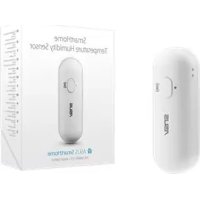



| Product Type | Temperature and Humidity Sensor |
| Brand | ASUS |
| Model | TS101 |
| Dimensions | 76 x 25 x 21 mm |
| Weight | 18 g |
| Power Supply | CR123A Battery (3V) |
| Battery Life | Approximately 1 year |
| Wireless Technology | ZigBee PRO |
| Range | Up to 50 m (without obstructions) |
| Temperature Range | -10 to 55 °C |
| Humidity Range | 0 to 95% |
| User Interface | ZigBee Button and LED Indicator |
| LED Indicator | Blue (status) |
| Companion App | ASUS SmartHome (iOS/Android) |
| System Requirements | Smartphone, Wi-Fi router, ASUS SmartHome gateway |
| Usage | Indoor only |
| Cleaning | Soft, dry cloth, no water or chemicals |
| Safety | Observe battery polarity, do not repair yourself |
| Mounting | Adhesive on flat surface |
| Data Update | Every minute |
| Certification | Compliant with Industry Canada (RSS) and RF standards |
Frequently Asked Questions - SmartHome TemperatureHumidity Sensor TS101 ASUS
User questions about SmartHome TemperatureHumidity Sensor TS101 ASUS
0 question about this device. Answer the ones you know or ask your own.
Ask a new question about this device
Download the instructions for your Smart Home in PDF format for free! Find your manual SmartHome TemperatureHumidity Sensor TS101 - ASUS and take your electronic device back in hand. On this page are published all the documents necessary for the use of your device. SmartHome TemperatureHumidity Sensor TS101 by ASUS.
USER MANUAL SmartHome TemperatureHumidity Sensor TS101 ASUS
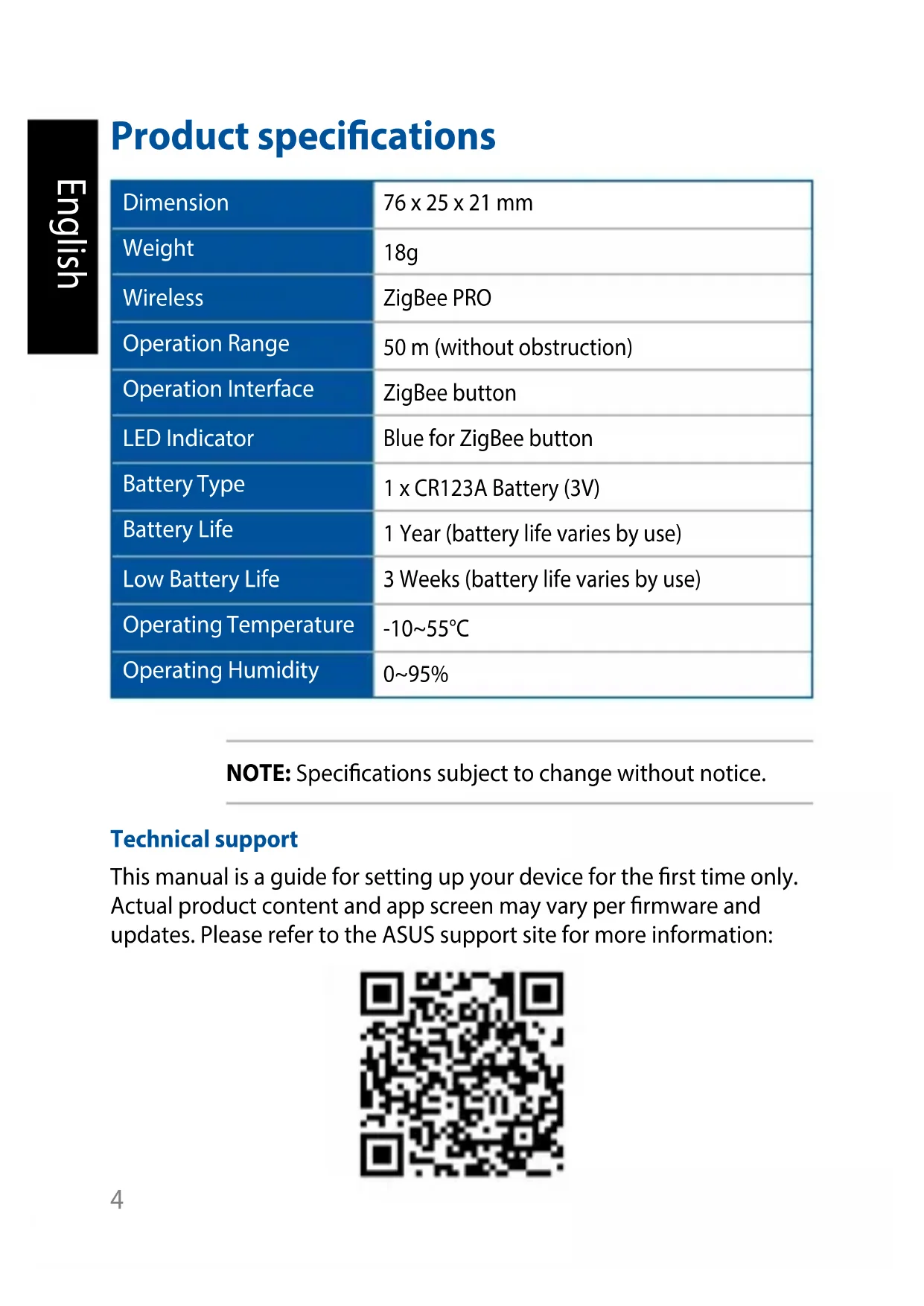
Product specifications
| Dimension | 76 x 25 x 21 mm |
| Weight | 18g |
| Wireless | ZigBee PRO |
| Operation Range | 50 m (without obstruction) |
| Operation Interface | ZigBee button |
| LED Indicator | Blue for ZigBee button |
| Battery Type | 1 x CR123A Battery (3V) |
| Battery Life | 1 Year (battery life varies by use) |
| Low Battery Life | 3 Weeks (battery life varies by use) |
| Operating Temperature | -10~55°C |
| Operating Humidity | 0~95% |
NOTE: Specifications subject to change without notice.
Technical support
This manual is a guide for setting up your device for the first time only. Actual product content and app screen may vary per firmware and updates. Please refer to the ASUS support site for more information:

Product overview
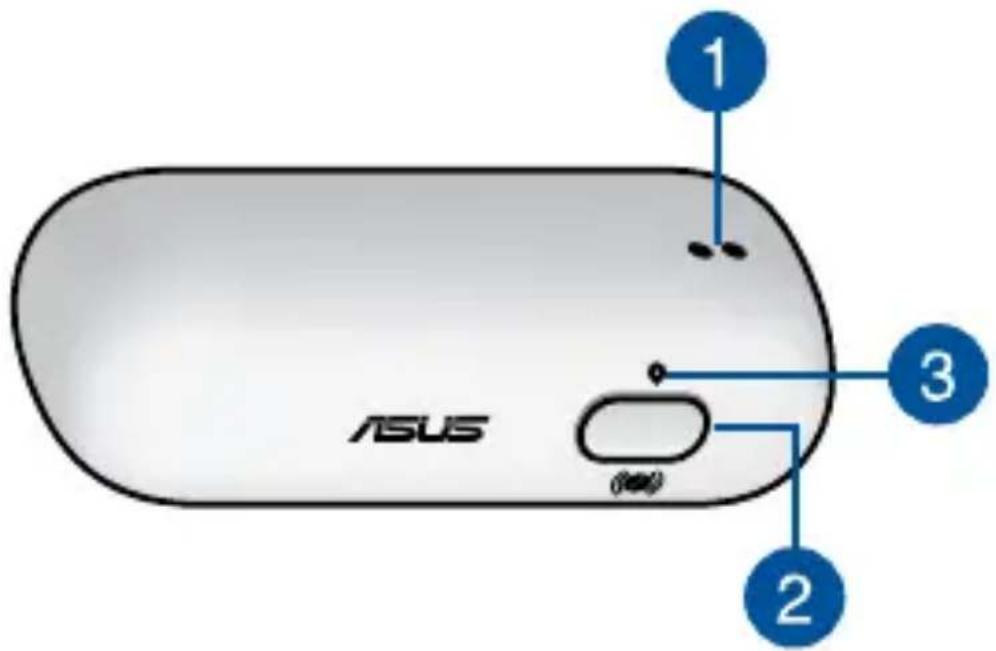

Temperature and Humidity sensor
Measures indoor temperature (-10 to 55°C) and humidity (0 to 95%).

ZigBee button
Press to connect with home gateway. Press and hold for 5 seconds to reset the device.
NOTE: Ensure to reset your ASUS Smart Home device and delete the device from the companion app to remove it completely.

ZigBee LED indicator
Refer to the following table for details on the LED status indicator:
| Color Status Description | ||
| Solid Blue | Device powering on Lights up for 1 second | |
| Disconnecting with home gateway | Press and hold the ZigBee button for 5 seconds | |
| Identifying device Lights up for 5 seconds | ||
| Blinking Blue | Connecting with home gateway | Press the ZigBee button to connect with home gateway |
System requirements
- iOS or Android smartphone. Wi-Fi router with Internet access.
- Asus SmartHome gateway and SmartHome user account.
Safety tips
- This device is not water resistant and is for indoor use only.
- Insert the battery according to the correct polarity.
- DO NOT attempt to repair the product yourself.
- Minimize exposure to moisture, including wet hands and direct contact with liquids.
- Use a soft, dry cloth to clean and avoid cleaning with water, alcohol, or other chemicals.
Installing the ASUS SmartHome app
- This device can be set up and operated through the companion app. Search for ASUS SmartHome and download the companion app from the Apple App Store or Google Play.
- Ensure you have an Internet connection before downloading.
- Ensure your smartphone is connected to your router before setting up.


Refer to a qualified vendor or the ASUS website for the minimum system requirements.
Getting started
Connecting to your HG 100
- Launch the ASUS SmartHome app.
- Tap + on the main page of Home Control to add devices to the home gateway.
- Tap Add Device to join your ASUS SmartHome device to the SmartHome Gateway.
- Press the ZigBee button on your ASUS SmartHome device to add the device.
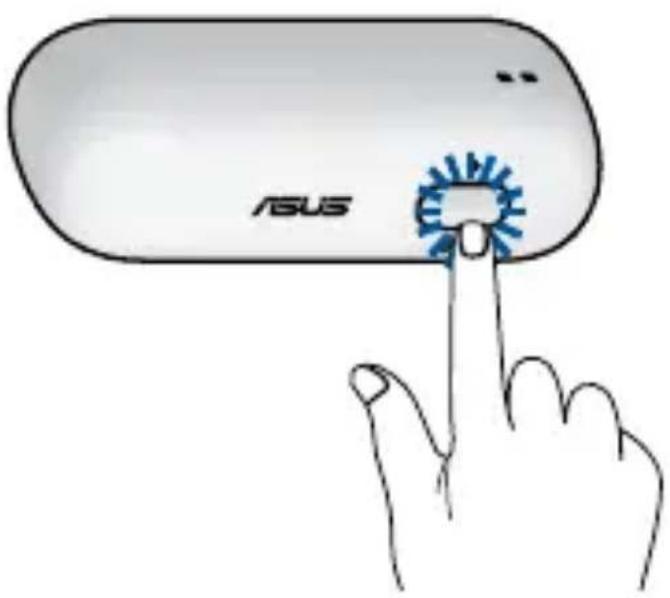
NOTE: After tapping Add Device, you can press the
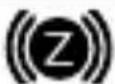
ZigBee button on all your ASUS SmartHome devices to add them all at once.
- Tap Done once all the devices are added to complete.
NOTE:
- Ensure that the battery is installed before connecting. Refer to the LED indicator to check the status of your device.
- Ensure that your device is within 50 meters of your ASUS SmartHome Gateway, and there are no obstructions such as thick solid walls or other electronic devices that may cause interference.
- The LED status indicator on your ASUS SmartHome Gateway will blink blue for sixty (60) seconds to indicate that devices can be added.
- Ensure to reset your ASUS SmartHome device and delete the device from the companion app to remove it completely.
Additional information
- This device is for indoor use only.
- Use an adhesive to position the device onto a flat surface (such as a window pane or wall).
- This device will update data to the Home Gateway every minute. You can view the data through the companion app.
- When this device loses power, the companion app will display a gray icon and cannot be configured. The status will be updated every minute.
Product Specifications
Install the ASUS SmartHome app
3
Federal Communications Commission Interference Statement
This equipment has been tested and found to comply with the limits for a Class B digital device, pursuant to part 15 of the FCC Rules. These limits are designed to provide reasonable protection against harmful interference in a residential installation. This equipment generates, uses and can radiate radio frequency energy and, if not installed and used in accordance with the instructions, may cause harmful interference to radio communications. However, there is no guarantee that interference will not occur in a particular installation. If this equipment does cause harmful interference to radio or television reception, which can be determined by turning the equipment off and on, the user is encouraged to try to correct the interference by one or more of the following measures:
- Reorient or relocate the receiving antenna. - Increase the separation between the equipment and receiver. - Connect the equipment into an outlet on a circuit different from that to which the receiver is connected. - Consult the dealer or an experienced radio/TV technician for help.
CAUTION! Any changes or modifications not expressly approved by the grantee of this device could void the user's authority to operate the equipment.
This device complies with Part 15 of the FCC Rules. Operation is subject to the following two conditions: (1) this device may not cause harmful interference, and (2) this device must accept any interference received, including interference that may cause undesired operation.
RF exposure warning
This equipment must be installed and operated in accordance with provided instructions and the antenna(s) used for this transmitter must be installed to provide a separation distance of at least 20 cm from all persons and must not be co-located or operating in conjunction with any other antenna or transmitter. End-users and installers must be provided with antenna installation instructions and transmitter operating conditions for satisfying RF exposure compliance.
Canada, Industry Canada (IC) Notices
This device complies with Canada licence-exempt RSS standard(s).
Operation is subject to the following two conditions: (1) this device may not cause interference, and (2) this device must accept any interference, including interference that may cause undesired operation of the device.
Canada, Industry Canada (IC) Notices
ASUS recycling and takeback programs come from our commitment to the highest standards for protecting our environment. We believe in providing solutions for you to be able to responsibly recycle our products, batteries, other components as well as the packaging materials. Please go to http://csr.asus.com/english/Takeback.htm for detailed recycling information in different regions.
Radio Frequency (RF) Exposure Information
The radiated output power of the Wireless Device is below the Industry Canada (IC) radio frequency exposure limits. The Wireless Device should be used in such a manner such that the potential for human contact during normal operation is minimized.
This device has also been evaluated and shown compliant with the IC RF Exposure limits under mobile exposure conditions. (antennas are greater than 20cm from a person's body).
Do not throw your ASUS TS101 in municipal waste. This product has been designed to enable proper reuse of parts and recycling. The symbol of the crossed out wheeled bin indicates that the product (electrical, electronic equipment and mercury-containing button cell battery) should not be placed in municipal waste. Check local regulations for disposal of electronic products.
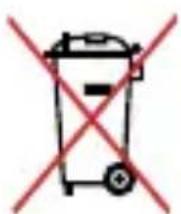
Do not throw the battery in municipal waste. The symbol of the crossed out wheeled bin indicates that the battery should not be placed in municipal waste.

English AsusTek Inc. hereby declares that this device is in compliance with the essential requirements and other relevant provisions of CE Directives. Please see the CE Declaration of Conformity for more details.
EU Declaration of Conformity
We, the undersigned,
| Manufacturer: | ASUSTeK COMPUTER INC. |
| Address: | 4F, No. 150, LI-TE Rd., PEITOU, TAPEI 112, TAIWAN |
| Authorized representative in Europe: | ASUS TECHNOLOGY HOLLAND B.V. |
| Address, City: | FULTONBAAN 12, 3439 NE, NIEUWEGEIN |
| Country: | THE NETHERLANDS |
declare the following apparatus:
| Product name : | Temp Humidity Sensor |
| Model name : TS101 |
conform with the essential requirements of the following directives:
2004/108/EC-EMC Directive
| EN 55022:2010+AC:2011 | EN 55024:2010 |
| EN 61000-3-2:2006+A2:2009 | EN 61000-3-3:2008 |
| EN 55013:2001+A1:2003+A2:2006 | EN 55020:2007+A11:2011 |
1999/5/EC-R&TTE Directive
| EN 300 328 V1.8.1(2012-06) | EN 301 489-1 V1.9.2(2011-09) |
| EN 300 440-1 V1.6.1(2010-08) | EN 301 489-3 V1.6.1(2013-12) |
| EN 300 440-2 V1.4.1(2010-08) | EN 301 489-4 V2.1.1(2013-12) |
| EN 301 511 V9.0.2(2003-03) | EN 301 489-7 V1.3.1(2005-11) |
| EN 301 908-1 V6.2.1(2013-04) | EN 301 489-9 V1.4.1(2007-11) |
| EN 301 908-2 V6.2.1(2013-10) | EN 301 489-17 V2.2.1(2012-09) |
| EN 301 908-13 V6.2.1(2014-02) | EN 301 489-24 V1.5.1(2010-09) |
| EN 301 893 V1.7.1(2012-06) | EN 301 357-2 V1.4.1(2008-11) |
| EN 300 330-2 V1.5.1(2010-02) | EN 302 291-2 V1.1.1(2005-07) |
| EN 50360:2001/A1:2012 | EN 302 623 V1.1.1(2009-01) |
| EN 62479:2010 | EN 50566:2013/AC:2014 |
| EN 62311:2008 | EN 50385:2002 |
2014/35/EU-LVD Directive
| EN 60950-1: 2006 / A12: 2011 EN 60950-1: 2006 / A2: 2013 | EN 60065:2002 / A12: 2011 |
2009/125/EC-ErP Directive
| Regulation (EC) No. 1275/2008 Regulation (EC) No. 642/2009 | Regulation (EC) No. 278/2009 Regulation (EU) No. 617/2013 |
2011/65/EU-RoHS Directive
CE marking
Equipment Class 1
Ver. 151216

(EU conformity marking)
Signature
Taipei, Taiwan
Place of issue
Jerry Shen
Printed Name
4/1/2016
Date of issue
CEO
Position
2015
Year CE marking was first affiliated

2006/95/EC-LVD Directive
| EN 60950-1: 2000 / A12: 2011 EN 60950-1: 2006 / A2: 2013 | EN 60065:2002 / A12: 2011 |
| 2009/125/EC-ErP Direita | |
| Regulon (EC) No. 1476/2008 | Regulon (EC) No. 278/2008 |
| Regulon (EC) No. 642/2009 | Regulon (EU) No. 617/2013 |
| 2011/65/EU/RoHS Direclva | Ver. 151216 |
| Marca de CE | |
| Equipimento de Glasea-1 |

Signature
Directive 2006/95/EC-LVD
| EN 60950-1:2006 / A12:2011 EN 60950-1:2006 / A2:2013 | EN 60065:2002 / A12:2011 |
| Directiva 2009/125/EC-ErP | |
| Regulation (EC) No. 1275/2008 Regulation (EC) No. 642/2009 | Regulation (EC) No. 278/2009 Regulation (EU) No. 617/2013 |
Position
| EU Uygunluk Beyani IN SEARCH OF INDEPENDENT | ||
| Biz, bu imza allindakiler | ||
| Urelic: | ASUSTAK COMPUTER INC. | ASUSTAK COMPUTER INC. |
| Adres: Şehir: | 4F, No. 150, LI-TE Rd., PEITOU, TIAPET 112, TAIWAN | 4F, No. 150, LI-TE Rd., PEITOU, TIAPET 112, TAIWAN |
| Avrupa daki Yetkili: | ASUS TECHNOLOGY HOLLAND B.V. | ASUS TECHNOLOGY HOLLAND B.V. |
| Adres: Şehir: | FULTONBAAN 12, 3439 NE, NIEUWEGIN | FULTONBAAN 12, 3439 NE, NIEUWEGIN |
| Üre: | HOLLANDA | OLANDA |
| Asagidaki ürünün: | ||
| Oran adi: | Temp Humidity Sensor | Temp Humidity Sensor |
| Model adi: TS101: | TS101 | |
| Asagidaki direktiflerin gereksinimlerine uyduşgün deklare ederiz: | ||
| 2004/108/EC-EMC Direktif | EN 55024:2010 EN 61000-3-2006+A2:2009 EN 55020:2007+A11:2011 | EN 55024:2010 EN 61000-3-2006+A2:2009 EN 55020:2007+A11:2011 |
| 1999/5/EC-R&TTE Direktif | ||
| EN 300 328 V1.8.1 (2012-08) | EN 301 489-1 V1.9.2 (2011-09) | EN 301 328 V1.8.1 (2012-08) |
| EN 300 440-1 V1.6.1 (2010-08) | EN 301 489-3 V1.6.1 (2013-12) | EN 301 489-3 V1.6.1 (2013-12) |
| EN 300 440-2 V1.4.1 (2010-08) | EN 301 489-4 V2.1.1 (2013-12) | EN 301 489-4 V2.1.1 (2013-12) |
| EN 301 511 V9.0.2 (2003-03) | EN 301 489-7 V1.3.1 (2005-11) | EN 301 511 V9.0.2 (2003-03) |
| EN 301 908-1 V6.2.1 (2013-04) | EN 301 489-9 V1.4.1 (2007-11) | EN 301 908-1 V6.2.1 (2013-04) |
| EN 301 908-2 V6.2.1 (2013-10) | EN 301 489-17 V2.2.1 (2012-09) | EN 301 908-2 V6.2.1 (2013-10) |
| EN 301 908-13 V6.2.1 (2014-02) | EN 301 489-24 V1.5.1 (2010-09) | EN 301 908-13 V6.2.1 (2014-02) |
| EN 301 893 V1.7.1 (2012-06) | EN 301 357-2 V1.4.1 (2008-11) | EN 301 893 V1.7.1 (2012-06) |
| EN 301 330-2 V1.5.1 (2010-02) | EN 302 291-2 V1.1.1 (2005-07) | EN 301 330-2 V1.5.1 (2010-02) |
| EN 50360:2001/A1:2012 | EN 302 623 V1.1.1 (2009-01) | EN 50360:2001/A1:2012 |
| EN 62479:2010 | EN 50566:2013/AC:2014 | EN 62479:2010 |
| EN 62311:2008 | EN 50365:2002 | EN 62311:2008 |
| 2008/95/EC-LVU Direktif | ||
| EN 60950-1: 2006 / A12: 2011 EN 60950-1: 2006 / A2: 2013 | EN 60065:2002? A12: 2011 EN 60950-1: 2006 / A2: 2013 | EN 60065:2002 / A12: 2011 EN 60950-1: 2006 / A2: 2013 |
| 2009/125/EC-ErP Direktif | ||
| Regulation (EC) No. 64258098 | Regulation (EG) No. 37998998 | Regulation (EG) No. 64258098 |
| 2011/65/EU-RoHS Direktif CE isareti Explain Sinufi 1 | Ver. 151216 | |
| CE (EL u yugunl isareti) | ||
| Imza | Taipei, Taiwan | Taipei, Taiwan |
| Sūrum yeri | Sūrum yeri | |
| Jerry Shen | 4/1/2016 | Jerry Shen |
| Basil Ad | Sūrum tanhi | Nume imprimat |
| CEO | 2015 | CEO |
| Pozisyon | CE isaretinin ilk eklendigi yil | Poziljia |
| Manufacturer ASUSTek COMPUTER INC. | |
| Address 4F No. 150, LI-TE RD., PEITOU, TAPEI 112, TAIWAN | |
| Authorized Representative in Europe | ASUS COMPUTER GmbH |
| Address HARKORT STR. 21-23, 40880 RATINGEN, GERMANY | |

- PRODUCT SPECIFICATIONS
- TECHNICAL SUPPORT
- PRODUCT OVERVIEW
- TEMPERATURE AND HUMIDITY SENSOR
- ZIGBEE BUTTON
- ZIGBEE LED INDICATOR
- SYSTEM REQUIREMENTS
- SAFETY TIPS
- INSTALLING THE ASUS SMARTHOME APP
- GETTING STARTED
- CONNECTING TO YOUR HG
- NOTE
- ADDITIONAL INFORMATION
- INSTALL THE ASUS SMARTHOME APP
- FEDERAL COMMUNICATIONS COMMISSION INTERFERENCE STATEMENT
- RF EXPOSURE WARNING
- CANADA, INDUSTRY CANADA (IC) NOTICES
- RADIO FREQUENCY (RF) EXPOSURE INFORMATION
- EU DECLARATION OF CONFORMITY
- EC-EMC DIRECTIVE
- EC-R&TTE DIRECTIVE
- EU-LVD DIRECTIVE
- EC-ERP DIRECTIVE
- EU-ROHS DIRECTIVE
- CE MARKING
- EQUIPMENT CLASS
- TAIPEI, TAIWAN
- JERRY SHEN
- CEO
Brand : ASUS
Model : SmartHome TemperatureHumidity Sensor TS101
Category : Smart Home