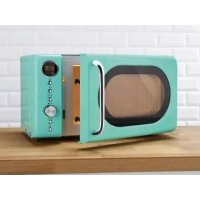
SMWC 700 A2 - Microwave SILVERCREST - Free user manual and instructions
Find the device manual for free SMWC 700 A2 SILVERCREST in PDF.


| Product type | Microwave |
| Brand | SilverCrest |
| Model | SMWC 700 A2 |
| Rated voltage | 230 V ~ 50 Hz |
| Power consumption | 1050 W |
| Microwave output power | 700 W |
| Microwave frequency | 2450 MHz |
| Capacity | Approximately 17 liters |
| Turntable diameter | Approximately 25.5 cm |
| Dimensions (W × H × D) | 5.7 × 36.3 cm (depth not exactly specified, approx. 35-40 cm) |
| Weight | Approximately 10 kg |
| Power levels | 5 levels: 700 W, 560 W, 350 W, 210 W, 70 W |
| Automatic programs | 8 programs (reheat, vegetables, fish, meat, pasta, potatoes, pizza, soup) |
| Defrost function | By weight (100-2000 g) or by time |
| Timer function | Yes, up to 95 minutes |
| Child lock | Yes |
| Display | Digital display |
| Tray material | Glass |
| Cleaning | Glass tray dishwasher safe; interior cleaned with a damp cloth |
| Warranty | 3 years |
| Delivery contents | Microwave, glass tray, tray ring, tray shaft, instruction manual, quick start guide |
Frequently Asked Questions - SMWC 700 A2 SILVERCREST
User questions about SMWC 700 A2 SILVERCREST
0 question about this device. Answer the ones you know or ask your own.
Ask a new question about this device
Download the instructions for your Microwave in PDF format for free! Find your manual SMWC 700 A2 - SILVERCREST and take your electronic device back in hand. On this page are published all the documents necessary for the use of your device. SMWC 700 A2 by SILVERCREST.
USER MANUAL SMWC 700 A2 SILVERCREST
Operation and safety notes
NL BE
MAGNETRON
GB/IEOperation and safety notesPage 21
List of pictograms used
Introduction
Intended use
Parts description.. Page 23
Scope of delivery.. Page 23
Technical data.. Page 23
Safety notes.. Page 23
Initial use
Choosing an installation site.. Page 27
Preparing the product.. Page 27
Configuring default settings.. Page 28
Use
Quick start.. Page 28
Cooking programme.. Page 28
Defrost programme.. Page 29
Using multiple programmes.. Page 29
Automatic programme.. Page 30
Stopping the programme . Page 31
Display screen. Page 31
Setting the timer.. Page 31
End of programme.. Page 31
Cleaning, maintenance and storage
Troubleshooting
Disposal
Warranty
Conditions of warranty.. Page 32
Warranty period and legal claims for defects.. Page 33
Scope of warranty
Processing of warranty claims.. Page 33
Service
Supplier/Producer/Importer
Conformity information
| List of pictograms used | |||
| i | Read the instructions! Automatic programme A-6 potato | ||
| Observe the warnings and safety notes! Automatic programme A-7 pizza | |||
| Warning! Danger of electric shock! Automatic programme A-8 soup | |||
| Caution! Risk of burns due to hot surfaces! | g | Defrost programme dEF1 - Defrost by weight | |
| Fire hazard! | Defrost programme dEF2 - Defrost by time | ||
| ~ | Alternating voltage For your safety | ||
| FOOD SAFE! This product has no adverse effect on taste or smell. | Warnings Instructions for use | ||
| Automatic programme A-1 heat up | Never leave children unattended with the packaging material or the product. | ||
| Automatic programme A-2 vegetables | The product is only suitable for use indoors, in dry and enclosed spaces. | ||
| Automatic programme A-3 fish Dishwasher safe | |||
| Automatic programme A-4 meat Use pot holders or oven gloves! | |||
| Automatic programme A-5 pasta | PAP | Dispose of the packaging and product in an environmentally-friendly manner. | |
Microwave SMWC 700 B3
Introduction
We congratulate you on the purchase of your new product. You have chosen a high quality product. The instructions for
use are part of the product. They contain important
information concerning safety, use and disposal. Before using the product, please familiarise yourself with all of the safety information and instructions for use. Only use the product as described and for the specified applications. If you pass the product on to anyone else, please ensure that you also pass on all the documentation with it.
Intended use
This product is suitable for defrosting, heating up and cooking foods and is only intended for use indoors. The product may only be used to heat up suitable foods in suitable containers and dishes. The product is exclusively intended for private, non-commercial use. Only use the product for the intended purpose. Any use other than previously mentioned or product modification is prohibited and can result in injuries and / or product damage. The manufacturer assumes no liability for damage arising from improper use.

This product is only suitable for use indoors, in dry and enclosed spaces.
- Parts description
Microwave
Mica cover
2 Display
3 Control panel
4 Glass plate
5 Turntable ring
6 Turntable shaft
7 Doorlocking mechanism
Door handle
9 Door
Control panel
10 Defrost button
11 Timer/Clock
button
12 Start button
13 Rotary control
14 Stop button
15 Microwave button
- Scope of delivery
Verify that the contents are complete and that the product is in perfect condition immediately after unpacking.
1 Microwave
1 Turntable shaft
1 Glass plate
1 Set of instructions for use
1 Turntable ring
1 Quick start guide
Technical data
Model no.: SMWC 700 B3
Rated voltage: 230V 50Hz
Power input: 1050W
Power output: 700W
Microwave frequency: 2450 MHz
Capacity: approx. 17 litres
Diameter of glass plate: approx. 25.5cm
Microwave dimensions: approx. 44 × 25.7 ×
36.3 cm (W × H × D)
Microwave weight: approx. 10kg

Safety notes
PLEASE READ THE OPERATING INSTRUCTIONS PRIOR TO USE! PLEASE KEEP THE OPERATING INSTRUCTIONS IN A SAFE PLACE! IF PASSING THIS PRODUCT ON TO A THIRD PARTY, INCLUDE ALL DOCUMENTS!
WARNING
DANGER TO LIFE AND
RISK OF ACCIDENTS FOR INFANTS AND CHILDREN!
Never leave children unsupervised with the packaging material. There is a danger of suffocation.
This product may be used by children aged 8 years and up, as well as by persons with reduced physical, sensory or mental capacities or lacking experience and knowledge, so long as they are
supervised or instructed in the safe use of the product and understand the associated risks. Do not allow children to play with the product. Children should not clean or perform user maintenance unsupervised.
Check the product for damage before each use. Never use the product if it is damaged in any way.
Product repairs may only be carried out by the manufacturer or a technician appointed by the manufacturer or a similarly qualified person.
The product is not intended for operation with an external timer switch or a separate remote control system.
Never operate the product when empty!
The product must not be operated when the door 9 is open.
WARNING! If the door 9, the door seals or the door locking mechanism 7 are damaged the product may not be used until it has been repaired by a qualified professional.
- Never remove the light beige Mica cover 1 which is installed to protect the magnetron in the cooking chamber of the product.
WARNING! It is dangerous for any persons other than qualified professionals to perform any maintenance or repair works which require the removal of the cover which ensures protection against radiation exposure caused by microwave energy.
The light inside the product should only be replaced by a qualified professional.
WARNING! Liquids or other foodstuffs must not be heated up inside sealed containers as they can easily explode.
Heating up liquids in the product can result in a so-called boiling delay, i.e. the liquid has already reached boiling point but the usual steam bubbles do not occur. In the event of vibrations, e.g. such as when it is removed from the microwave, the liquid may then suddenly boil. The liquid may abruptly spurt out.
The contents of baby bottles and jars containing baby food must always be stirred or shaken. Always check the temperature before consumption in order to avoid burns.
- Eggs with shells or whole, hard-boiled eggs must not be heated up in the product as they may
explode, even if the heating process is finished off in the microwave.
- Do not stand directly in front of the product when opening the door. Escaping steam can cause burns.
This product is intended for household use and use in similar application areas, such as for example: - in staff kitchens in shops, offices and other commercial areas;
- on agricultural estates;
- by customers at hotels, motels and other residential environments;
- in bed and breakfasts.
The product must be cleaned regularly and food residues must be removed.
If the product is not kept clean, this can lead to wear and tear which compromises the service life of the product and leads to dangerous situations.
Clean the door and the door locking mechanism regularly.
The product must not be cleaned using a steam cleaner. - Do not expose the product to extreme conditions.
- Avoid:
-
high humidity levels or wet conditions,
-
extremely high or low temperatures,
direct sunlight, - open flames.
Do not store food or other objects in the product.

Caution! Avoid the risk of fatal injury from electric shock!
Only plug the product into a professionally installed mains socket. Make sure that the mains voltage corresponds to that of the product (see "Technical data").
If the mains cable for this product becomes damaged, it must be replaced by the manufacturer, its service agent or a similarly qualified person, in order to avoid hazards.
Ensure that the mains cable cannot become damaged by sharp edges or hot surfaces.
The product and the mains cable must never be immersed in water or other liquids.
Always unplug the mains plug from the mains socket before cleaning or if the product will not be used for extended periods.
Fully unwind the mains cable.
- Do not kink or squash the mains cable.
- Protect the product against dripping water and splashing water. Avoid contact with water or other liquids. Keep the product, the mains cable and the mains plug away from washing basins, sinks or similar. If any liquid gets inside the product, immediately unplug the mains plug from the earthed plug socket. Have the product checked over by a qualified professional.
- Never touch the product or the mains cable with wet hands.
PREVENTFIRE HAZARDS!
- Do not operate the product near devices which emit heat themselves, e.g. ovens or stoves.
Only use the product in a freestanding capacity. - Do not install the product inside a cupboard.
The minimum installation height is 85cm
Position the back of the product against a wall.
Observe the required minimum distance (in cm) between the product and other objects (see Fig. C).
Never cover up the product's ventilation openings.
As soon as you notice sparks, flashes or even fire, immediately press the stop button [14] and unplug the mains plug.
Never leave the product unattended. Always supervise the cooking or defrosting process.
Only use utensils which are suitable for use in microwave devices.
Remove metallic packaging elements from foods before heating them up.
- Never use metal containers for food or drinks.
Do not heat up fat or oil.
The product is intended for heating up foods and drinks. Drying foods or clothing and heating up heating pads, slippers, sponges, damp cleaning cloths or similar can cause injuries, ignition or fire.

CAUTION! RISK OF BURNS DUE TO HOT SURFACES!
Please note that the door and the outer surfaces can become hot during operation. Allow these to cool down or use pot holders or oven gloves.
Any utensils used can become very hot when heating up foods. Use pot holders or oven gloves.

For your safety
We recommend that you use round / oval dishes rather than square / oblong dishes, as foods in the corner areas can easily overcook.
Use the following utensils to heat up foods:
- Browning dishes
- Plates and dishes
- Glass containers without lids
- Oven glassware
- Oven cooking bags
- Paper plates and cups (for short warming times only)
- Paper towels (to cover foods and soak up fat only)
- Microwaveable plastic containers
-M icrowaveable plastic packaging
- Microwaveable thermometers
- Wax paper (to cover foods only) Always observe the manufactures instructions.
Position the foods carefully before cooking. The thickest sections are close to the edges.
Use a suitable cover if possible. This prevents splashing and ensures that the foods are cooked evenly.
Pay attention to the cooking time. Choose the shortest specified cooking time and extend this as required. Foods that have been heated up for too long can catch fire.
FOOD SAFE! This product has no adverse effect on taste or smell.
- Initial use
Remove all packaging materials as well as protective films and check that all parts are complete and undamaged. Never remove the light beige Mica cover 1 in the cooking chamber of the product. This is not a packaging material - its purpose is to protect the magnetron. If the product is incomplete or damaged upon delivery, please contact the manufacturer.
- Choosing an installation site
Choose a level surface which ensures sufficient free space for the aeration and ventilation of the product (see Fig. C).
Make sure that the mains plug is easily accessible so that it can be easily reached and unplugged in case of danger.
Install the product as far away from radios and televisions as possible. Operating the product can cause disruptions in radio or television reception.
Preparing the product
e Open the door 9 by pulling on the door handle8.
Before first use, clean the product's cooking chamber with a cloth and some lukewarm wate. Make sure that no residue is left when removing all protective and adhesive films.
Place the turntable shaft 6 in the hole in the base of the cooking chamber. Make sure to insert the turntable shaft 6 into the hole as far as it will go.
Place the turntable ring 5 into the well inside the cooking chamber.
WARNING! Do not operate the product without a properly inserted glass plate 4.
Place the glass plate 4 on the turntable ring 5 and the turntable shaft 6. In doing so, the three glass points on the underside of the glass plate 4 must engage in the grooves on the turntable shaft 6.
- Close the door by pushing it shut. Make sure that the door locking mechanism clicks into place.
Plug the mains plug into a professionally installed mains socket. Make sure that the mains voltage corresponds to that of the product (see "Technical data").
- Configuring default settings
Setting the time
When the product is operated for the first time or if the electricity supply is interrupted, the display 2 shows "0:00" and the time (24-hour display) must be set.
Press the timer / clock button 11 twice. The hour display will start to flash.
Turn the rotary control 13 to set the desired hour.
Then press the timer / clock button again.
Turn the rotary control 13 to set the desired minutes.
Then press the timer / clock button again. The time is now set.
Setting the child safety lock
You can activate a child safety lock by pressing and holding the stop button 14 for approx. 3 seconds. A signal tone sounds and appears in the display 2. The product's buttons now have no function. After approx. 3 seconds, the time is displayed again, provided that it has been set.
You can deactivate the child safety lock by pressing and holding the stop button again for 3 seconds. A signal tone sounds and all functions are available again.
Use
WARNING! Never operate the product when empty!
Open the door 9 by pulling on the door handle 8.
Place the food that you want to heat up in a suitable container in the middle of the glass plate.
Close the door 9 by pushing it shut. Make sure that the door locking mechanism 7 clicks into place.
Quickstart
When you press the start button 12 without first setting a power level, the cooking programme will start on the highest energy level (700 Watts). This function is not available for automatic programmes or for the defrost programme by weight.
Press the start button multiple times until the desired cooking time appears in the display (every press of the button increases the cooking time by 30 seconds). The cooking process starts immediately.
Whilst the cooking process is underway, you can lengthen the cooking time by 30 seconds with each press of the start button 12.
Note: The longest cooking time is 95 minutes.
Cookingprogramme
Press the microwave button 15 once and turn the rotary control 13 to set the energy level.
Alternatively you can press the microwave button ≈ once or multiple times in order to select an energy level according to the following table:
| Button ≈ 15 | Display screen | Output in Watts |
| Press once P1 | 00 700 | |
| Press twice P80 | 560 | |
| Press 3 times P50 | 350 | |
| Press 4 times P30 | 210 | |
| Press 5 times P10 | 70 |
Press the defrost button twice to start the defrost process by time. "dEF2" appears in the display 2.
Turn the rotary control 13 to set the desired defrost time in minutes and seconds (0:00).
Note: The longest defrost time is 95 minutes.
In the following list you can find the approximate defrosting time needed for different weights:
Confirm the desired energy level by pressing the start button 12.
Turn the rotary control 13 to set the desired cooking time in minutes and seconds (0:00).
Note: The longest cooking time is 95 minutes
Press the start button 12 to start the programme.
-Defrostprogramme
Defrost by weight
You can set the defrost programme according to the weight of the food. Weights from 100g to 2000g can be set.
Press the defrost button 10 to start the defrost process by weight. "dEF1" appears in the display 2.
Turn the rotary control 13 to set the weight of the food to be cooked.
Press the start button 12 to start the programme.
If necessary, open the door after around half of the elapsed time. Turn the food over or stir it in order to guarantee that it defrosts evenly.
- Close the door again. The programme will automatically continue.
If the food has still not defrosted after the elapsed time, start the process again. To do this, use the power level P30 for a few minutes in order to fully defrost the food.
Defrost by time
You can set a desired duration for the defrost programme.
| Weight | Time |
| 200g | approx. 9 minutes 48 seconds |
| 400g | approx. 19 minutes 56 seconds |
| 600g | approx. 30 minutes 04 seconds |
| 800g | approx. 40 minutes 12 seconds |
| 1000g | approx. 50 minutes 20 seconds |
Press the start button 12 to start the programme.
If necessary, open the door after around half of the elapsed time. Turn the food over or stir it in order to guarantee that it defrosts evenly.
- Close the door again. The programme will automatically continue.
If the food has still not defrosted after the elapsed time, start the process again. To do this, use the power level P30 for a few minutes in order to fully defrost the food.
Using multiple programmes
The product can perform multiple programmes in succession. It is possible to choose 2 programmes which will automatically run.
Set the programmes, and after you have set the final programme, press the start button 12.
Example:
You want to defrost food using a defrost programme and then start the cooking programme P50.
Set the defrost programme as described in the chapter "Defrost programme", but do not press the start button 12 to complete.
Set the programme P50 as described in the chapter "Cooking programme".
Finally, press the start button 12 to start the programmes. Both programmes run in succession.
Automaticprogramme
For automatic programmes, it is not necessary to set the cooking time or the energy level. The product
automatically determines the values depending on the entered food and weight.
Turn the rotary control 13 clockwise. A programme number appears in the display 2 (e.g. "A-1" for automatic programme 1).
Choose an automatic programme from 1 to 8. The corresponding symbol will flash in the display 2.
Press the start button 12 to confirm the selection.
Now select the desired weight. To do this, turn the rotary control 13 until the desired portion size is shown. The weight / the quantity will be shown in the display 2.
The quantities can be set according to the following table:
| Programme Weight Display Power | |||
| A-1 heat up | 200g 200 | 700W | |
| 400g 400 | |||
| 600g 600 | |||
| A-2 vegetables | 200g 200 | 700W | |
| 300g 300 | |||
| 400g 400 | |||
| A-3 fish | 250g 250 | 560W | |
| 350g 350 | |||
| 450g 450 | |||
| A-4 meat | 250g 250 | 700W | |
| 350g 350 | |||
| 450g 450 | |||
| A-5 pasta | 50g(+ 450 ml water) | 50 | 560W |
| 100g(+ 800 ml water) | 100 | ||
| A-6 potato | 200g 200 | 700W | |
| 400g 400 | |||
| 600g 600 | |||
| A-7 pizza | 200 g 200 | 700W | |
| 400 g 400 | |||
| A-8 soup | 200 ml 200 | 560W | |
| 400 ml 400 | |||
Finally, press the start button 12 to start the programme.
If the chosen food is not properly cooked though, cook it again for a few minutes using the cooking programme.
- Stopping the programme
To turn or stir the food after half of the cooking time, for example, it is often necessary to interrupt the current programme.
- Open the door 9 or press the stop button 14 to interrupt the programme. The remaining time will continue to be shown in the display 2.
□ After you have closed the door again, press the start button 12 to continue the selected programme.
Press the stop button twice to completely stop the selected programme early.
- Display screen
Press the microwave button ≈ 15 whilst a programme is running. The current microwave power appears in the display 2 for approx. 3 seconds.
Press the timer/clock button 11 whilst a programme is running. The current time appears in the display 2 for approx. 3 seconds.
- Setting the timer
The product can be set to emit a signal tone after a specific time has elapsed. This function can be used e.g. as an egg timer. The timer function is not available whilst a programme is running.
Press the timer/clock button 11. The display 2 shows "00:00".
Turn the rotary control 13 to set the desired time interval.
Note: The maximum time that can be set is 95 minutes.
Confirm your entry using the start button 12.
End of programme
At the end of every programme, 5 signal tones are emitted to signal that the selected process is complete.
- Open the door 9 by pulling on the door handle 8.
- Carefully remove the food from the cooking chamber.
- Cleaning, maintenance and storage
If the product is not kept clean, this can lead to wear and tear which compromises the service life of the product and leads to dangerous situations.
Clean the door 9 and the door locking mechanism 7 regularly.
The product must not be cleaned using a steam cleaner.
Remove any food residues regularly.
- Do not use harsh cleaning agents or scouring agents.
Unplug the mains plug from the mains socket if you are not using the product for a long period of time.
Make sure that all parts are completely dry before you use the product.
Clean the product using a soft sponge and some soapy water.
The glass plate 4 is dishwasher-safe.
- Troubleshooting
| Problem Cause Solution | ||
| The product won't start. | The mains plug is not firmly plugged in. | Unplug the mains plug and plug it back in after 10 seconds. |
| The fuse has burnt through or the switch-disconnector has triggered. | Contact the service centre. | |
| Problems with the plug socket Check the socket with other electrical devices. | ||
| The product will not start the cooking process. | The door 9 is not closed properly. Close the door 9. | |
| The light in the product's cooking chamber is not working. | The light bulb may be defective. Contact the service centre. | |
Disposal
Packaging:
The packaging is made of environmentally friendly materials, which may be disposed of through your local recycling facilities.
Observe the marking of the packaging materials for waste separation, which are marked with abbreviations (a) and
numbers (b) with following meaning: 1-7: plastics / 20-22: paper and fibreboard / 80-98: composite materials.
Product:

Contact your municipality for information on how to dispose of your worn-out product.
The adjacent symbol of a crossed out dustbin on wheels indicates this product is subject to directive 2012/19/EU. This
directive states at the end of the life this product must not be disposed of through regular household refuse but must be returned to special collection sites, recycling depots or waste management companies.
This disposal is free of charge to you.
Protect the environment and dispose of properly.
The product is recyclable, subject to extended manufacturer responsibility, and collected separately.
Warranty
Dear customer,
The warranty on this product is 3 years from the date of purchase. In the event of defects in this product, you have legal rights against the product vendor. These legal rights are in no way limited by the warranty described below.
- Conditions of warranty
The warranty period begins on the date of purchase. Please take care to keep the original purchase receipt. This document will serve as a proof of purchase.
If, within three years of the date of purchase of this product, any defect in material or manufacture should become evident, the product will - as we choose - be repaired free of charge or replaced. This warranty is subject to presentation, within the three-year term, of the defective product and the proof of purchase (receipt) and a brief, written description of what constitutes the defect and when it became evident.
If the defect is covered by our warranty, you will receive back the repaired product or a new replacement. Repair or exchange of the product does not lead to a renewed warranty period.
Warranty period and legal claims for defects
The warranty period is not prolonged by the above fulfilment. This also applies for replaced and repaired parts. Any damage or defects present at the time of purchase must be notified immediately after unpacking. Repairs that are carried out after the expiration of the warranty period are subject to a charge.
- Scope of warranty
The product is manufactured in accordance with strict quality guidelines and thoroughly tested before dispatch.
The warranty applies for defects in materials or manufacture. This warranty does not extend to product parts that are subject to normal wear and can therefore be regarded as wearing parts or to damage to fragile parts, e.g. switches, batteries or parts made of glass.
This warranty is void if the product has been damaged or not properly used or serviced. For proper use of the product, exact compliance with all instructions listed in the user manual is required. It is essential to avoid procedures and use for purposes against which the user manual advises or warns.
The product is intended for private use only and not for industrial / commercial use. Improper handling and usage not in accordance with the intended purpose, use of force and any interventions that are not carried out by our authorised service centre will render the warranty null and void.
- Processing of warranty claims
For speedy processing of your request, please observe the following instructions:
For all enquiries, please keep the receipt and the article number (IAN339198_1910/339203_1910/339206_1910) to hand as proof of purchase.
The article number is to be found on the type plate, an engraving, on the title page of your instructions (bottom left) or on an adhesive label on the rear or underside.
If functional or other defects occur, first contact the service department named below by telephone or via our contact form.
Service
At www.lidl-service.com, you can download this and many other handbooks, product videos and software.
Service United Kingdom
Hotline
+ 4 4 2 0 3 4 8 1 1 6 0 2
Mon - Fri : 0 9: 0 0 - 1 7: 0 0
Please use the contact form at www.mlap.info/contact
Service Ireland
Hotline
+ 3 5 3 1 6 5 3 3 8 5 9
Mon - Fri : 0 9: 0 0 - 1 7: 0 0
Please use the contact form at www.mlap.info/contact
IAN 3 3 9 1 9 8 _ - 1 9 1 0
IAN 3 3 9 2 0 3_ 1 9 1 0
IAN 3 3 9 2 0 6 _ 1 9 1 0
- Supplier/Producer/Importer
Please note that you cannot use the address below for returns. Please contact the Service Centre mentioned above.
MLAP GmbH
Meitnerstr. 9
70563 Stuttgart
GERMANY
Conformity information (C)
MLAP GmbH hereby declares that the "Microwave SMWC 700 B3" complies with the following European requirements:
EMC Directive 2014/30/EU Low Voltage Directive 2014/35/EU Ecodesign Directive 2009/125/EC RoHS Directive 2011/65/EU

Directive RoHS 2011/65/UE

UTRATY ZYCIA I WYPADKU
- Zohrievaci program
Jedenkrát stlacte tlaicidlo Mikrovn 15 a otocte otochny regulator 13,aby ste nastavili energeticky stupen.
Alternativne mozete stlaicit laciaidlo Mikrovlnka ≈ 15raz alebo viackrat,aby ste zvolili energeticky stupen podla nasledovnej tablky:
| Tlacidlo ≈ 15 | Zobrazenie na displeji | Vykon vo Watt |
| 1 x stlacit' P100 700 | ||
| 2 x stlacit' P80 560 | ||
| 3 x stlacit' P50 350 | ||
| 4 x stlacit' P30 210 | ||
| 5 x stlacit' P10 70 |
Potvr'de zvoleny energeticky stupen stlačenim tlacidla Štart 12.
Otočte otočné regula, aby ste nastavili Želanycas zohrievania v minútach a sekundách (0:00).


- MAGNETRON
- List of pictograms used
- Introduction
- Safety notes.. Page 23
- Initial use
- Use
- Cleaning, maintenance and storage
- Troubleshooting
- Disposal
- Warranty
- Service
- Conformity information
- Microwave SMWC 700 B3
- Intended use
- - Parts description
- Microwave
- Control panel
- - Scope of delivery
- Technical data
- Safety notes
- WARNING
- DANGER TO LIFE AND
- Caution! Avoid the risk of fatal injury from electric shock!
- PREVENTFIRE HAZARDS!
- CAUTION! RISK OF BURNS DUE TO HOT SURFACES!
- For your safety
- - Initial use
- - Choosing an installation site
- Preparing the product
- - Configuring default settings
- Setting the time
- Setting the child safety lock
- Quickstart
- Cookingprogramme
- -Defrostprogramme
- Defrost by weight
- Defrost by time
- Using multiple programmes
- Example:
- Automaticprogramme
- - Stopping the programme
- - Display screen
- - Setting the timer
- End of programme
- - Cleaning, maintenance and storage
- - Troubleshooting
- Packaging:
- Product:
- This disposal is free of charge to you.
- - Conditions of warranty
- Warranty period and legal claims for defects
- - Scope of warranty
- - Processing of warranty claims
- For speedy processing of your request, please observe the following instructions:
- Service United Kingdom
- Service Ireland
- - Supplier/Producer/Importer
- Conformity information (C)
- UTRATY ZYCIA I WYPADKU
- - Zohrievaci program
Brand : SILVERCREST
Model : SMWC 700 A2
Category : Microwave