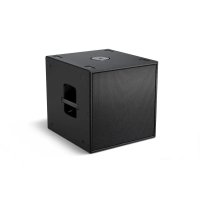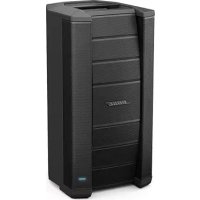
F1 Model 812 - Speakers BOSE - Free user manual and instructions
Find the device manual for free F1 Model 812 BOSE in PDF.


| Product Type | Portable Powered Flexible Array Loudspeaker |
| Brand | Bose |
| Model | F1 Model 812 |
| Dimensions (loudspeaker) | 665 x 334 x 373 mm (H x W x D) |
| Weight (loudspeaker) | 20.18 kg |
| Dimensions (subwoofer) | 688 x 410 x 449 mm (H x W x D) |
| Weight (subwoofer) | 24.95 kg |
| Power (loudspeaker) | 100-240 V, 2.3-1.2 A, 50/60 Hz |
| Power (subwoofer) | 100-240 V, 2.3-1.2 A, 50/60 Hz |
| Rated Power | 1000 W (per unit) |
| Coverage Patterns | Straight, C, J, Inverted J (4 patterns) |
| Equalizer | Automatic adjustment according to pattern |
| Drivers | 8 x mid/high frequency + 1 x 12" powered subwoofer |
| Input Connectors | 2 x XLR/Combo Jack (INPUT 1), 2 x RCA (INPUT 2), 1/4" Jack (INPUT 2) |
| Output Connectors | 1 x Balanced XLR (LINE OUTPUT) |
| Features | Integrated pole mount on subwoofer, M8 inserts for suspension, tripod mount (35 mm pole) |
| Cleaning | Soft dry cloth, vacuum for grille |
| Safety | Grounding, do not expose to water, indoor use only, altitude <2000 m |
| Repairability | Refer all servicing to qualified personnel |
| Available Accessories | Wall/ceiling brackets, transport bags, covers |
| Warranty | Limited warranty, registration at pro.Bose.com |
| Regulatory Information | Compliant with EU directives, FCC Class A, ICES-003 Canada |
| Operating Conditions | Indoor only, ambient temperature |
Frequently Asked Questions - F1 Model 812 BOSE
User questions about F1 Model 812 BOSE
0 question about this device. Answer the ones you know or ask your own.
Ask a new question about this device
Download the instructions for your Speakers in PDF format for free! Find your manual F1 Model 812 - BOSE and take your electronic device back in hand. On this page are published all the documents necessary for the use of your device. F1 Model 812 by BOSE.
USER MANUAL F1 Model 812 BOSE
F1 Flexible Array Loudspeaker System
F1 Model 812 and F1 Subwoofer
Owner's Guide
Brugervejledning
Bedienungsanleitung
Guía del usuario
Please read this owner's guide carefully and save it for future reference.
WARNING:
- To reduce the risk of fire or electrical shock, do not expose the product to rain or moisture.
- Do not expose this apparatus to dripping or splashing, and do not place objects filled with liquids, such as vases, on or near the apparatus. As with any electronic products, use care not to spill liquids into any part of the system. Liquids can cause a failure and/or a fire hazard.
- Do not place any naked flame sources, such as lighted candles, on or near the apparatus.

The lightning flash with arrowhead symbol within an equilateral triangle alerts the user to the presence of uninsulated dangerous voltage within the system enclosure that may be of sufficient magnitude to constitute a risk of electrical shock.

The exclamation point within an equilateral triangle, as marked on the system, is intended to alert the user to the presence of important operating and maintenance instructions in this owner's guide.

This product contains magnetic material. Please contact your physician if you have any questions on whether this might affect the operation of your implantable medical device.

Contains small parts which may be a choking hazard. Not suitable for children under age 3.
CAUTIONS:
- This product shall be connected to a mains socket outlet with a protective earthing connection.
- Do not make unauthorized alterations to the product; doing so may compromise safety, regulatory compliance, system performance, and may void the warranty.
Notes:
- Where the mains plug or appliance coupler is used as the disconnect device, such disconnect device shall remain readily operable.
- The product must be used indoors. It is neither designed nor tested for use outdoors, in recreational vehicles, or on boats.

This product conforms to all applicable EU directive requirements. The complete Declaration of Conformity can be found at www.Bose.com/compliance.

This product conforms to all applicable Electromagnetic Compatibility Regulations 2016 and all other applicable UK regulations. The complete declaration of conformity can be found at: www.Bose.com/compliance

This symbol means the product must not be discarded as household waste, and should be delivered to an appropriate collection facility for recycling. Proper disposal and recycling helps protect natural resources, human health and the environment. For more information on disposal and recycling of this product, Contact your local municipality, disposal service, or the shop where you bought this product.
NOTE: This equipment has been tested and found to comply with the limits for a Class A digital device, pursuant to part 15 of the FCC Rules. These limits are designed to provide reasonable protection against harmful interference when the equipment is operated in a commercial environment. This equipment generates, uses, and can radiate radio frequency energy and, if not installed and used in accordance with the instruction manual, may cause harmful interference to radio communications. Operation of this equipment in a residential area is likely to cause harmful interference in which case the user will be required to correct the interference at their own expense.
This Class A digital apparatus complies with Canadian ICES-003. Changes or modifications not expressly approved by Bose Corporation could void the user's authority to operate this equipment.
- Read these instructions.
- Keep these instructions.
- Heed all warnings.
- Follow all instructions.
- Do not use this apparatus near water.
- Clean only with a dry cloth.
- Do not block any ventilation openings. Install in accordance with the manufacturer's instructions.
- Do not install near any heat sources, such as radiators, heat registers, stoves or other apparatus (including amplifiers) that produce heat.
- Do not defeat the safety purpose of the polarized or grounding-type plug. A polarized plug has two blades with one wider than the other. A grounding type plug has two blades and a third grounding prong. The wide blade or the third prong are provided for your safety. If the provided plug does not fit into your outlet, consult an electrician for replacement of the obsolete outlet.
- Protect the power cord from being walked on or pinched, particularly at plugs, convenience receptacles, and the point where they exit from the apparatus.
- Only use attachments/accessories specified by the manufacturer.
- Use supply with the cart, stand, tripod, bracket, or table specified by the manufacturer, or sold with the apparatus. When a cart is used, use caution when moving the cart/apparatus combination to avoid injury from tip-over.
- Unplug this apparatus during lightning storms or when unused for long periods of time.
- Refer all servicing to qualified service personnel. Servicing is required when the apparatus has been damaged in any way: such as power supply cord or plug is damaged; liquid has been spilled or objects have fallen into the apparatus; the apparatus has been exposed to rain or moisture, does not operate normally, or has been dropped.
For Japan only:
Provide an earth connection before the main plug is connected to the mains.
For Finland, Norway, and Sweden:
CAUTION: Only suitable for use at areas with altitude less than 2000m.
China Importer: Bose Electronics (Shanghai) Company Limited, Level 6, Tower D, No. 2337 Gudai Rd. Minhang District, Shanghai 201100
EU Importer: Bose Products B.V., Gorslaan 60, 1441 RG Purmerend, The Netherlands
Mexico Importer: Bose de Mexico, S. de R.L. de C.V., Paseo de las Palmas 405-204, Lomas de Chapultepec, 11000 Mexico, D.F.
For importer & service information: +5255 (5202) 3545
Taiwan Importer: Bose Taiwan Branch, 9F-A1, No. 10, Section 3, Minsheng East Road Taipei City 104, Taiwan. Phone Number: +886-2-2514 7676
UK Importer: Bose Limited, Bose House, Quayside Chatham Maritime, Chatham, Kent, ME4 4QZ, United Kingdom
Please complete and retain for your records
Now is a good time to record the serial numbers of your product. Serial numbers can be found on the rear panel. You can register your product online at www.Bose.com/register or by calling 877-335-2673. Failure to do so will not affect your warranty rights.
F1 Model 812 Loudspeaker
F1 Subwoofer

Introduction
Product Description 4
Features and Benefits 4
Carton Contents 4
F1 Model 812 Flexible Array Loudspeaker. 5
F1 Subwoofer 5
Using the Flexible Array 6
Adjusting the array 6
Four coverage patterns 6
Applications 7
Setting Up the System
Using the F1 Model 812 with the F1 Subwoofer. 8
Using the F1 Model 812 on a Tripod Stand. 9
Operation
F1 Model 812 Control Panel. 10
F1 Subwoofer Control Panel 11
Power On/Off Sequence 12
Setting EQ selector switches 12
Connecting Sources 12
Setting Up INPUT 1 with a Microphone 12
Setting Up INPUT 1 with a Source 12
Setting Up INPUT 2 with a Source 12
Connection Scenarios 13
Full band, mixing console stereo output to L/R F1 Model 812 Loudspeakers 13
Full band with mixing console, one F1 Subwoofer and two F1 Model 812 Loudspeakers 13
Mixing console stereo output to F1 Subwoofer and left/right F1 Model 812 Loudspeakers 14
Full band with mixing console stereo output to two F1 Subwoofer and two F1 Model 812 Loudspeakers. 15
Stereo input to Left/right F1 Subwoofer and F1 Model 812 Loudspeakers 15
Mic to F1 Model 812 Loudspeaker INPUT 1 16
Mobile device to single F1 Model 812 Loudspeaker 16
Mobile device to F1 Model 812 Loudspeaker and F1 Subwoofer. 17
DJ Console to two F1 Subwooers and two F1 Model 812 Loudspeakers 17
Care and Maintenance
Caring for Your Product 18
Cleaning 18
Getting Service 18
Troubleshooting 18
LED Indicators 19
Limited Warranty and Registration 19
Accessories 19
Technical Information 20
Physical 20
Electrical 20
Input/Output Connector Wiring Reference 20
Product Description
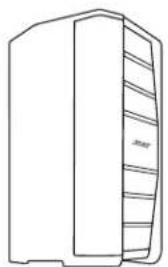
The Bose® F1 Model 812 Flexible Array Loudspeaker is the first powered portable loudspeaker that lets you control its vertical coverage pattern. Simply push or pull the array into position to create "Straight," "C," "J" or "Reverse J" coverage patterns. And once set, the system automatically changes the EQ to maintain optimum tonal balance for each coverage pattern. So whether you're playing at floor level, on a stage, or facing raked seats or bleachers, you can now adapt your PA to match the room.
Engineered with an array of eight high-output mid/high drivers, a high-powered 12" woofer and a lower crossover point, the loudspeaker delivers high SPL performance while maintaining vocal and midrange clarity that's dramatically better than conventional loudspeakers.
For extended bass response, the Bose F1 Subwoofer packs all the power of a larger bass box into a more compact design that's easier to carry and fits in a car. A mounting stand for the loudspeaker is integrated right into the body of the subwoofer, so you always know where it is, making setup fast and easy. The stand even includes cable channels to neatly hide the wires.
The loudspeaker and subwoofer each have 1,000 watts of power, so you can fill nearly any venue with sound.
And now getting there is easier, too. The loudspeaker and subwoofer feature light weight, high impact composite materials and strategically placed handles for easy transport.
For the first time, the F1 Model 812 Loudspeaker allows you to focus sound where it's needed. So no matter where you perform, your PA has you covered.
Features and Benefits
The flexible, eight-loadspeak ar of the F1 Model 812 allows you to select one of four coverage patterns to direct sound to where the audience is located resulting in better overall clarity throughout the venue.
- The vertical orientation of the eight-driver loudspeaker array helps deliver wide, consistent sound coverage, providing better clarity and tonal balance for speech, music, and instruments.
- F1 Subwoofer provides a unique built-in speaker stand for the F1 Model 812, eliminating the need for a conventional pole mount.
- Attractive design creates a unique system with a rugged but professional look.
- The bi-amplified design includes powerful, lightweight amplifiers that provide consistent output over long durations with extended dynamic range and lower operating temperatures.
Carton Contents
Each loudspeaker is packaged separately with the items indicated below.
F1 Model 812 Flexible Array Loudspeaker F1 Subwoofer
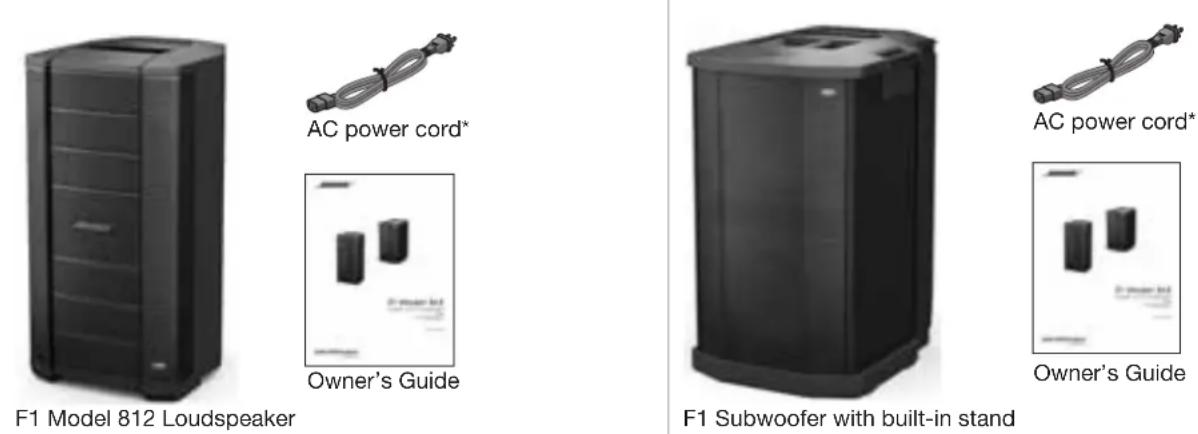
*The appropriate power cord(s) for your region is included.
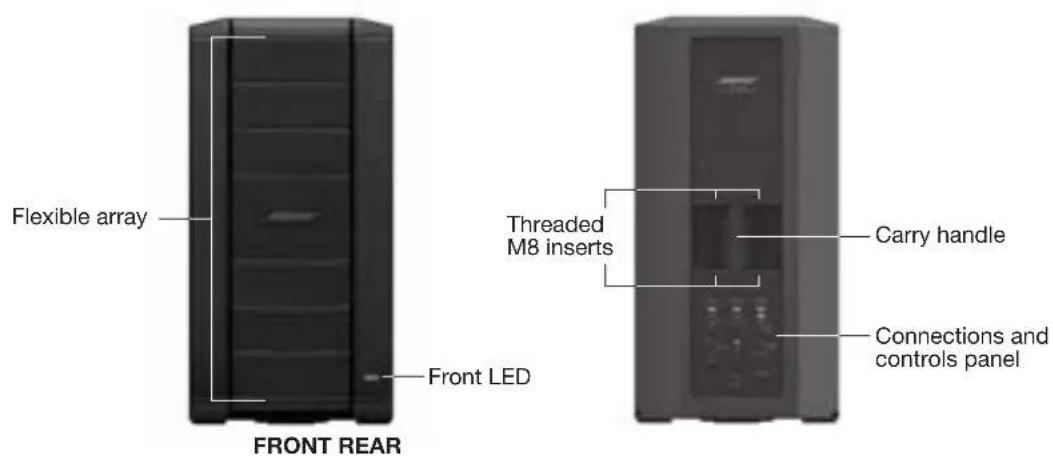
F1 Model 812 Flexible Array Loudspeaker
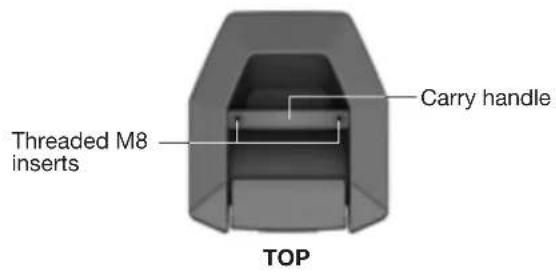
Note: The F1 Model 812 comes with threaded M8 inserts for rigging or attaching accessory brackets.
CAUTION: Only professional installers with the knowledge of proper hardware and safe mounting techniques should attempt to install any loudspeaker overhead.
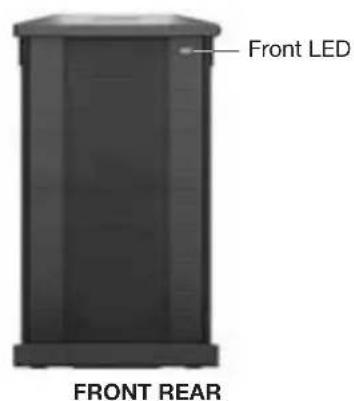
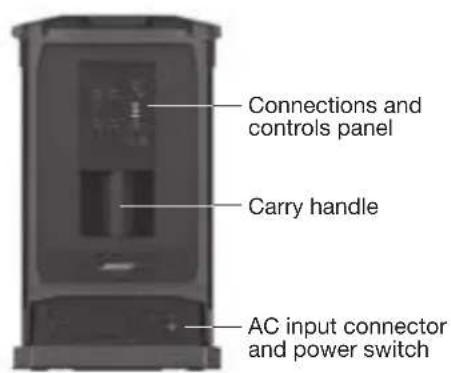
F1 Subwoofer
Using the Flexible Array
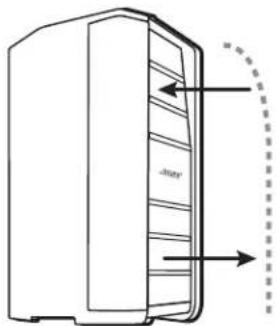
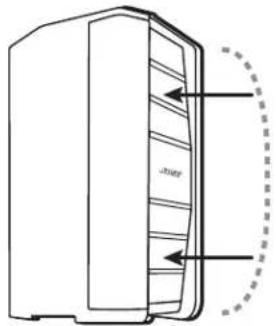
You can shape the coverage pattern by moving the position of the top and bottom array. The array position is held in place by magnets that trigger internal sensors that adjust EQ according to array shape.
Adjusting the array
Pushing the array in Pulling the array out
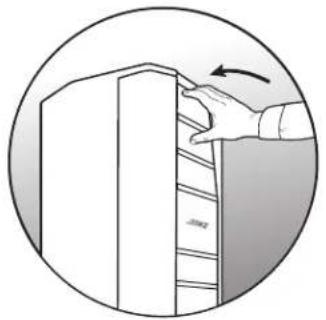
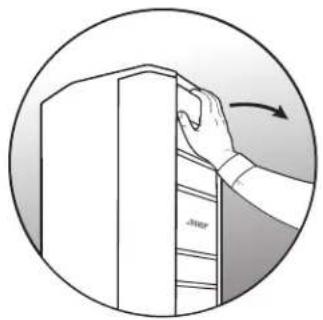
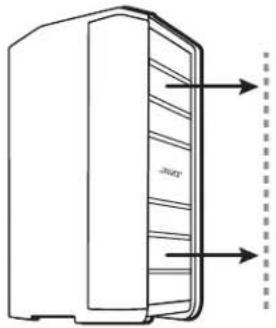
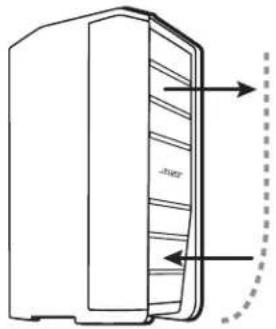
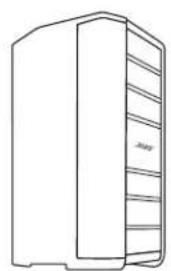
Four coverage patterns
Straight pattern
Pull top and bottom array out
J pattern
Pull top array out, push bottom array in.
C pattern
Reverse-J pattern
Push top array in, pull bottom array out.
Push top and bottom array in.
Applications
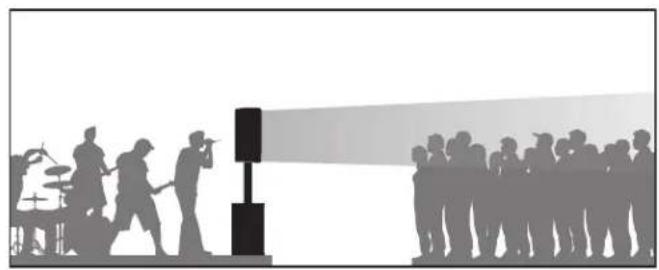
Straight pattern
Use the straight pattern when the audience is standing and their heads are approximately at the same height as the loudspeaker.

Reverse-J pattern
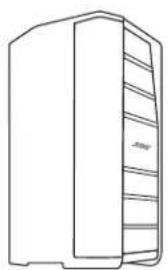
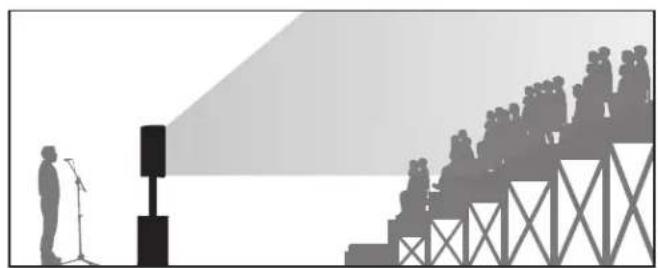
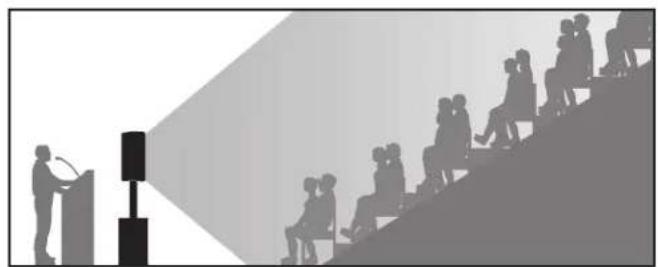
The reverse-J pattern is good for an audience in raked seating that starts at loudspeaker height and extends above the top of the loudspeaker.

J pattern
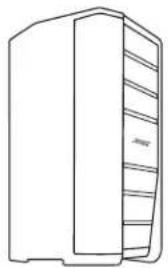
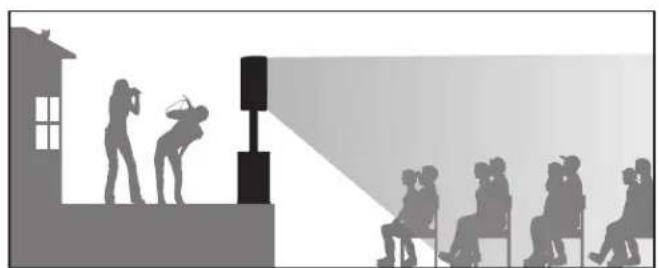
The J pattern works well when the loudspeaker is up on a raised stage and the audience is seated below on the floor.

C pattern
Use the C pattern for raked seating in an auditorium when the first row is on the floor with the loudspeaker.

Using the F1 Model 812 with the F1 Subwoofer
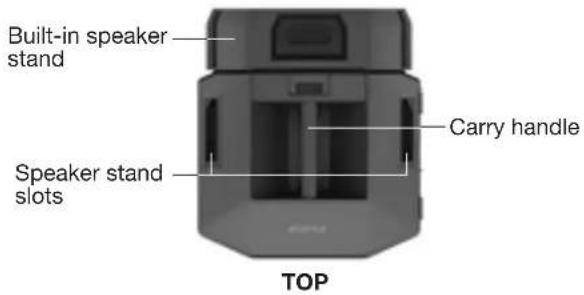
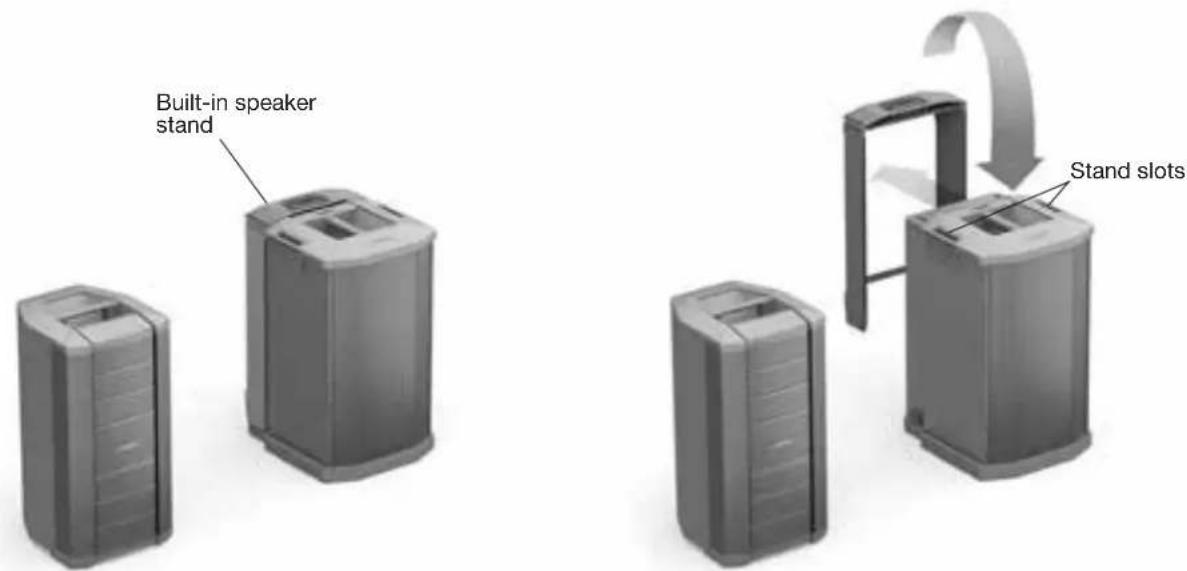
The built-in loudspeaker stand is stored in the rear of the subwoofer. Setting up the F1 Model 812 Loudspeaker with the F1 Subwoofer is easy:
- Remove the built-in speaker stand from the back of the F1 Subwoofer and insert it into the stand slots.
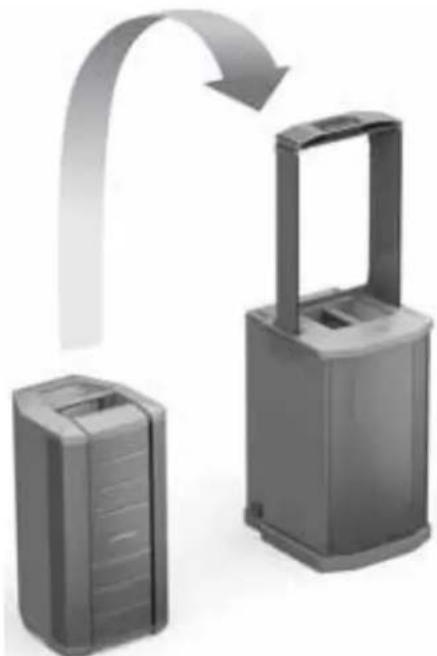
- Lift the F1 Model 812 Loudspeaker and place it on the stand.
- Plug in your audio cables. Feed the cables from the F1 Model 812 through the channels in the speaker stand to help keep them organized.
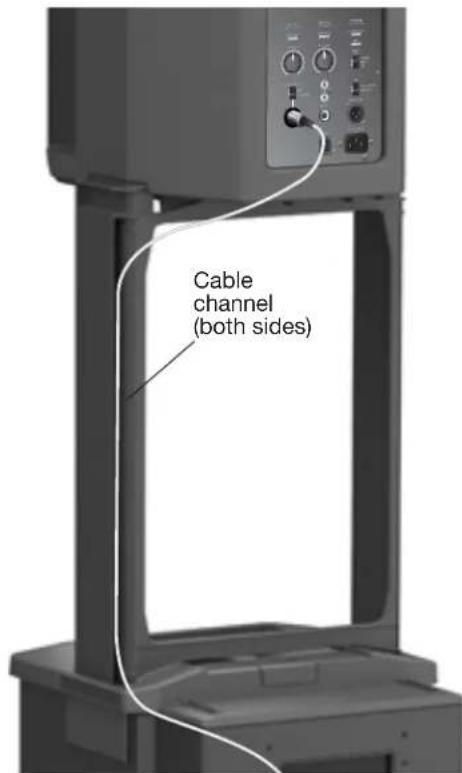
Using the F1 Model 812 on a Tripod Stand
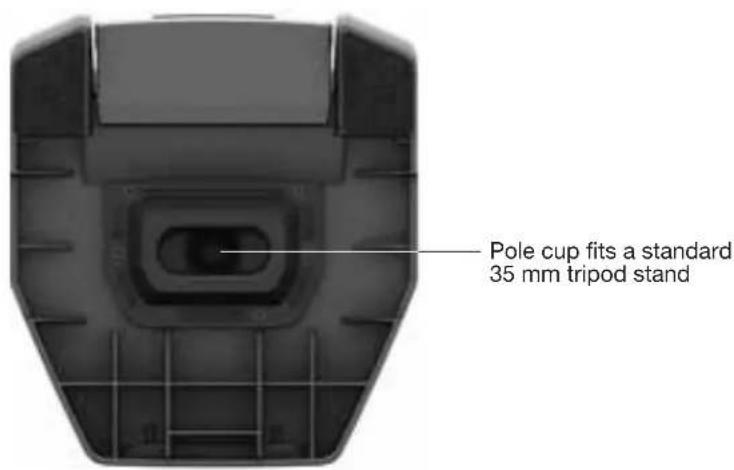
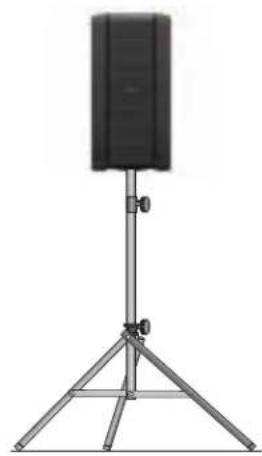
The bottom of the F1 Model 812 Loudspeaker includes pole cup for mounting the loudspeaker on a tripod speaker stand. The pole cup fits a standard 35mm post.
WARNING: Do not use the F1 Model 812 Loudspeaker with a tripod stand that is unstable. The loudspeaker is only designed for use on a 35mm pole, and the tripod stand must be capable of supporting a loudspeaker with a minimum weight of 44.5 lb (20.2 Kg) lbs and an overall size of 26.1" H x 13.1" W x 14.6" D (665 mm H x 334 mm W x 373 mm D) inches (mm). Using a tripod stand that is not designed to support the size and mass of the F1 Model 812 Loudspeaker may lead to an unstable and hazardous condition that could result in injury.
F1 Model 812 Control Panel
Note: For a complete list of LED indications and behaviors, see "LED Indicators" on page 19.
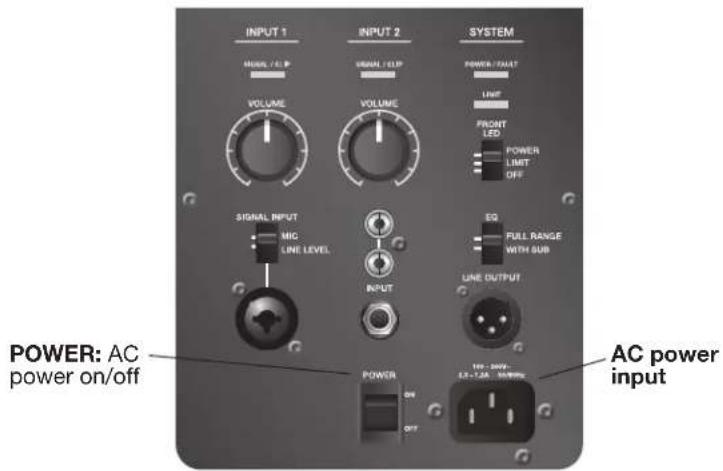
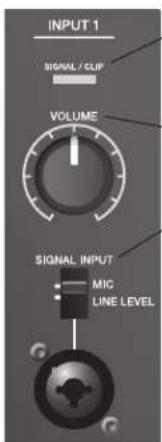
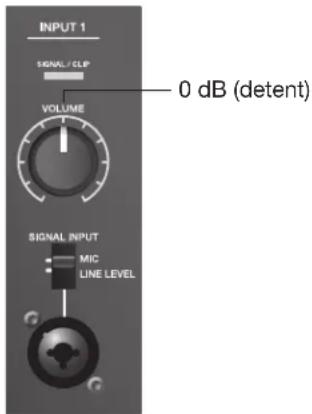
SIGNAL/CLIP: Displays the input signal status in color.
- Green = signal present.
- Red = signal clipping, input signal too high
VOLUME: Adjusts channel volume.
SIGNAL INPUT: Selector switch sets input sensitivity for input type. Combo connector accepts XLR mic connector or 1/4 phone plug (TRS balanced or TS unbalanced cables).
- MIC selects sensitivity for microphone inputs (dynamic or self-powered mics only) - use only when a mic is connected directly to the input.
LINE selects sensitivity for line-level inputs, for example, from a mixing console or DJ controller.
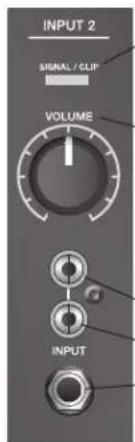
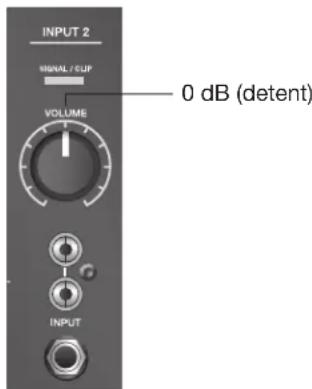
SIGNAL/CLIP: Displays the input signal status in color.
- Green = signal present.
- Red = signal clipping, input signal too high.
VOLUME: Adjusts channel volume.
RCA connectors: Analog stereo input for audio sources such as DJ controllers and other line-level sources. Left and right are summed, producing a mono audio output and mono signal to LINE OUTPUT (XLR).
- Left (White)
Right (Red)
14" phone connector: Provides analog input for guitars and other instruments. Accepts TRS balanced or TS unbalanced cables.
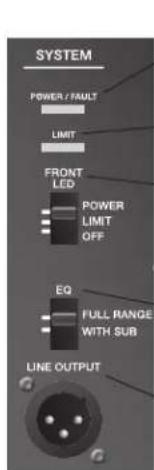
POWER/FAULT:
- Blue = power on.
Red = fault condition.
LIMIT:
- Amber = system limiting (protection mode).
FRONTLED:
- POWER enables front LED to indicate power status.
- LIMIT engages a limiting display on the front LED.
OFF turns off the front LED.
EQ: (See "Setting EQ selector switches" on page 12.)
- FULL RANGE allows the loudspeaker to function without high-pass filtering.
- WITH SUB engages a high-pass filter (100 Hz) when using the loudspeaker with the F1 subwoofer. Recommended when using with F1 Subwoofer.
LINE OUTPUT:
- Balanced XLR line output provides a mix of input 1 and 2, post input volume control. Can be used to daisy chain speakers together.
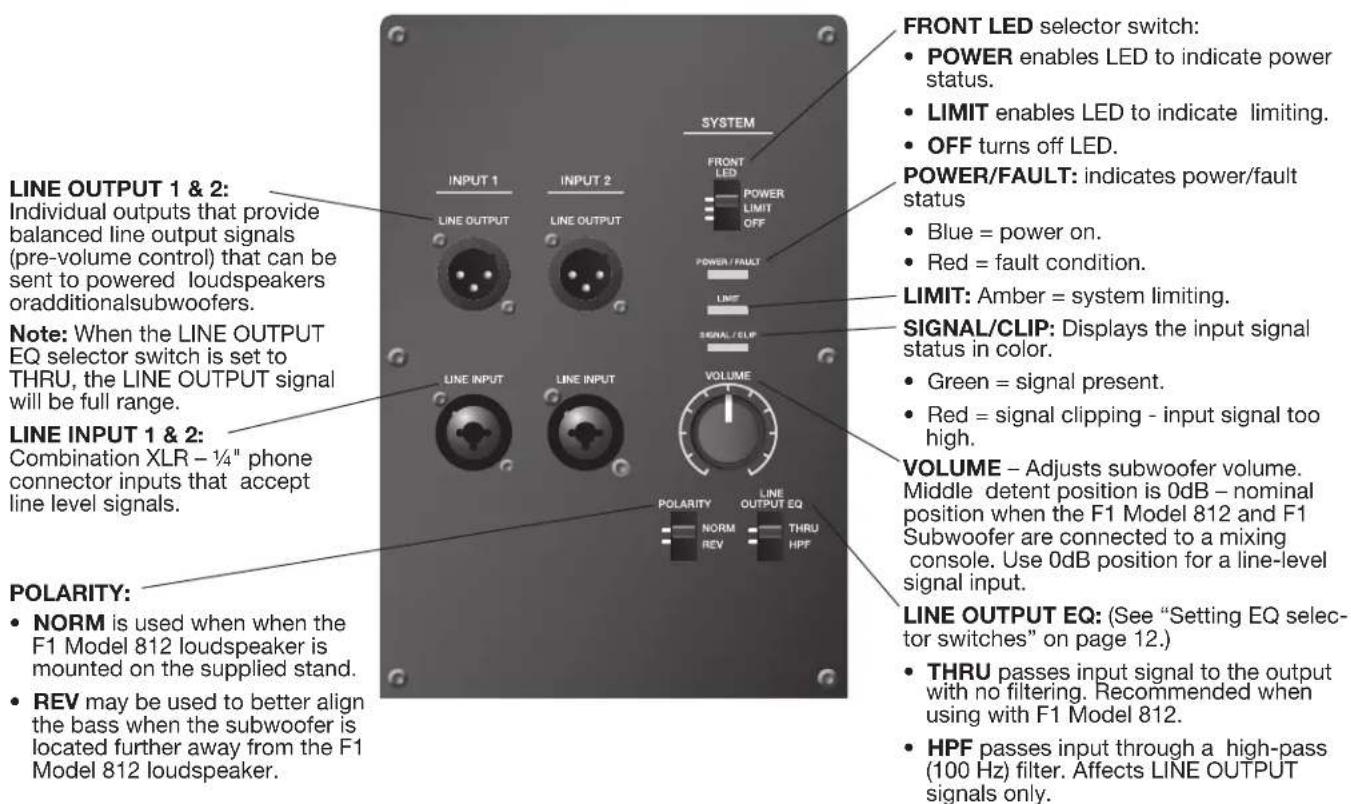
F1 Subwoofer Control Panel
Note: For a complete list of LED indications and behaviors, see "LED Indicators" on page 19.
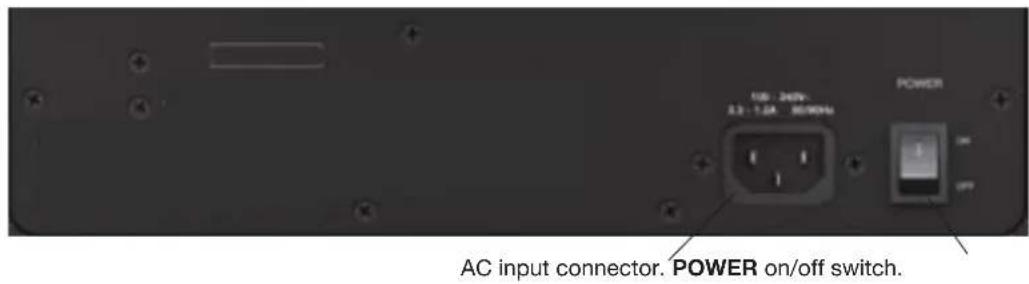
Power On/Off Sequence
When turning the system on, turn on input sources and mixing consoles first and then turn on the F1 Model 812 Loudspeaker and the F1 Subwoofer. When turning the system off, turn off the F1 Model 812 and F1 Subwoofer first followed by input sources and mixing consoles.
Setting EQ selector switches
Recommended settings for the EQ selector switches on the F1 Model 812 Loudspeaker and the F1 Subwoofer are describe in the following table.
| System Setup | F1 Model 812 EQ Switch | F1 Subwoofer LINE OUTPUT EQ Switch |
| F1 Model 812 Loudspeaker used without F1 Subwoofer FULL RANGE Not applicable | ||
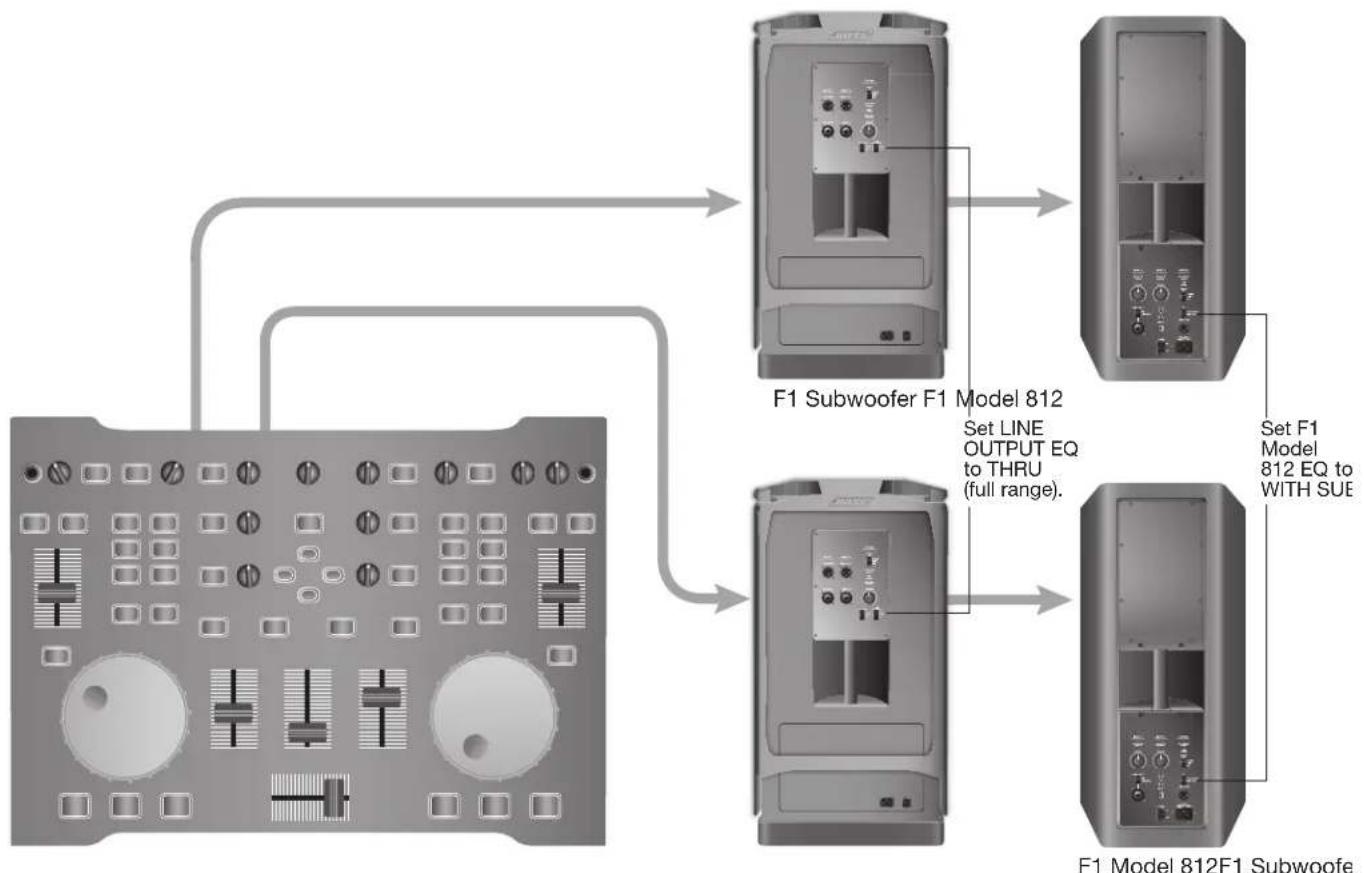
| Signal input to F1 Subwoofer, F1 Subwoofer output to F1 Model 812 Loudspeaker WITH SUB THRU | ||
| Signal input to F1 Model 812 Loudspeaker, F1 Model 812 output to F1 Subwoofer FULL RANGE or WITH SUB* | No affect |
*Provides more bass extension.
Connecting Sources
Before plugging in a sound source, turn the VOLUME control of the channel fully counter-clockwise.
The two independent inputs provide a combination of input connectors that can accommodate microphone and line-levelsources.
Note: Only dynamic or self-powered microphones can be used for INPUT 1.
Setting Up INPUT 1 with a Microphone
- Turn the INPUT 1 VOLUME fully counter-clockwise.
- Set the SIGNAL INPUT switch to MIC.
- Plug the mic cable into the INPUT 1 connector.
- Adjust the VOLUME to your desired level.
Setting Up INPUT 1 with a Source
- Turn the INPUT 1 VOLUME fully counter-clockwise.
- Set the SIGNAL INPUT switch to LINE LEVEL.
- Plug the source cable into the INPUT 1 connector.
- Adjust the VOLUME to your desired level.
Setting Up INPUT 2 with a Source
- Turn the INPUT 2 VOLUME fully counter-clockwise.
- Plug the source cable into an INPUT 2 connector.
- Adjust the VOLUME to your desired level.
Connection Scenarios

Full band, mixing console stereo output to L/R F1 Model 812 Loudspeakers
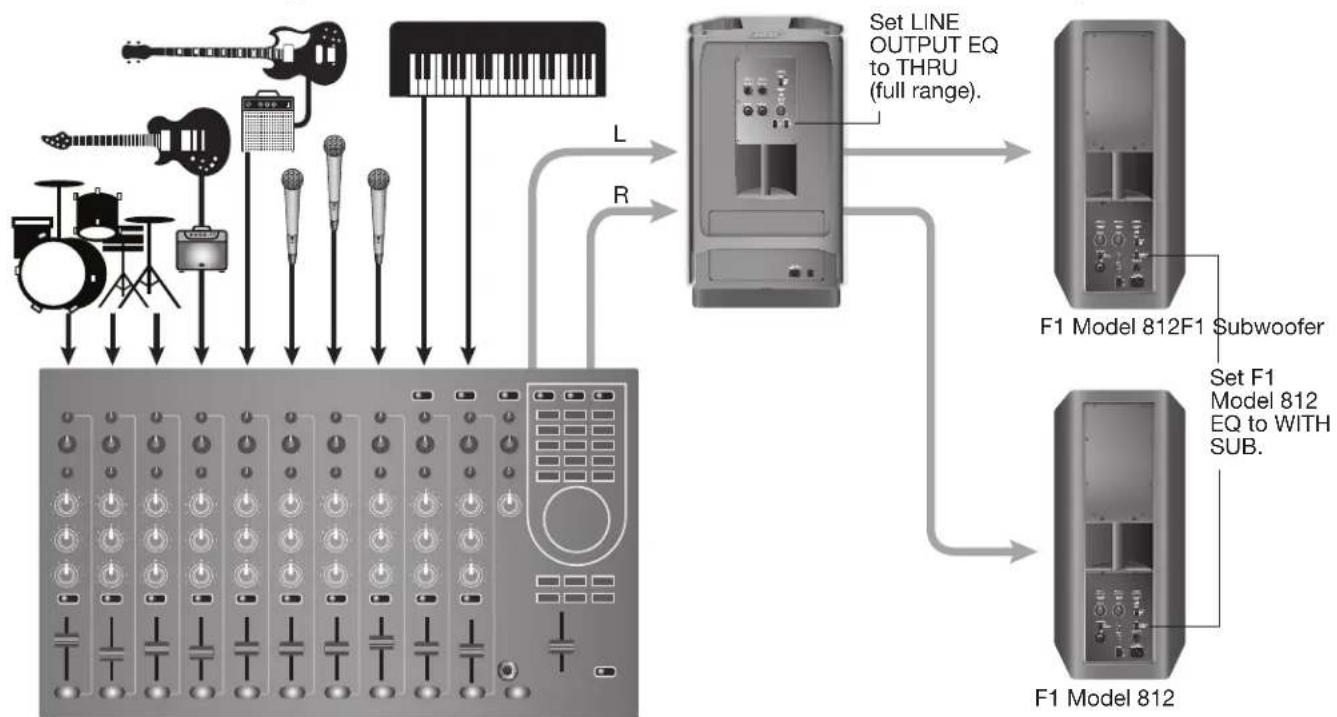
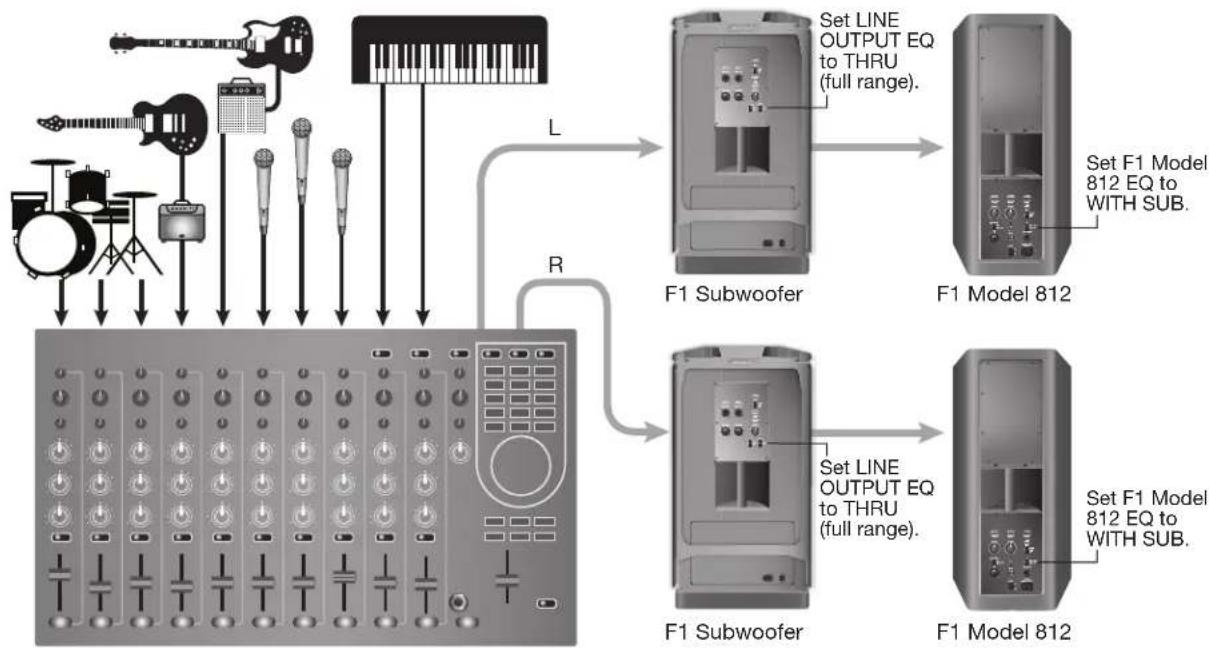
Full band with mixing console, one F1 Subwoofer and two F1 Model 812 Loudspeakers
Mixing console stereo output to F1 Subwoofer and left/right F1 Model 812 Loudspeakers
Note: The recommend EQ settings are provided under the heading, "Setting EQ selector switches" on page 12. However, for maximum bass response, set the EQ selector switch on both F1 Model 812 Loudspeakers to FULL RANGE and set the EQ selector switch on the F1 Subwoofer to THRU.
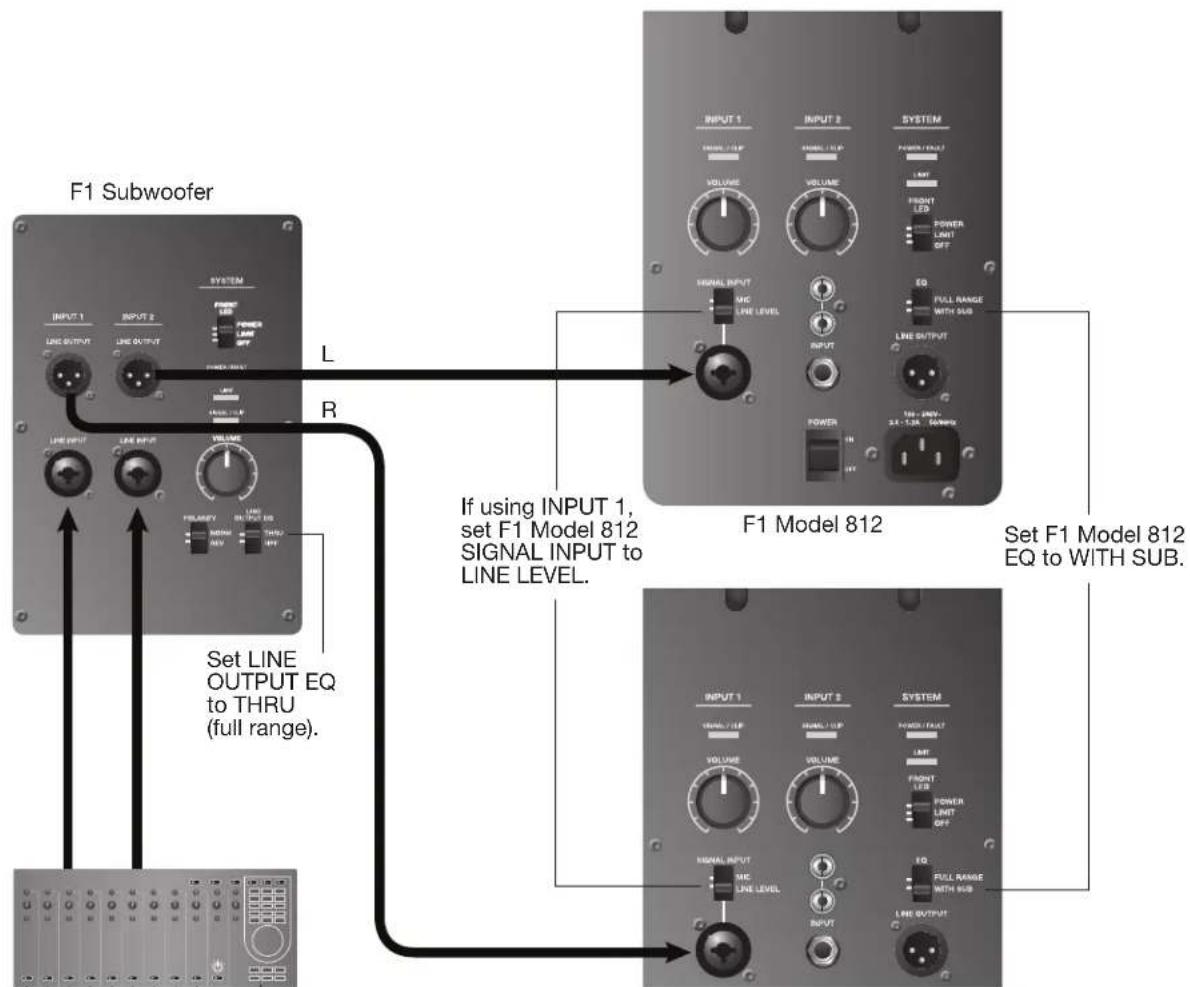
F1 Model 812
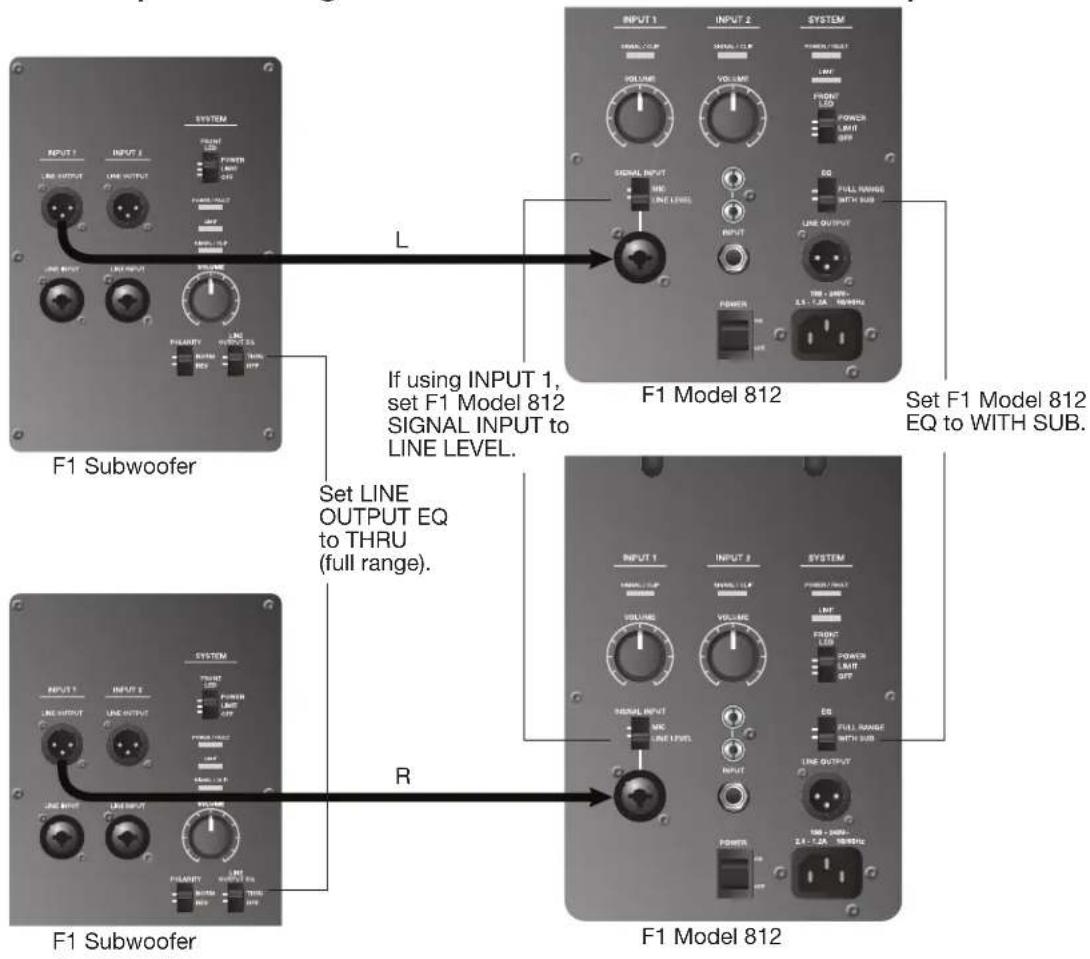
Full band with mixing console stereo output to two F1 Subwoofer and two F1 Model 812 Loudspeakers
Stereo input to Left/right F1 Subwoofer and F1 Model 812 Loudspeakers
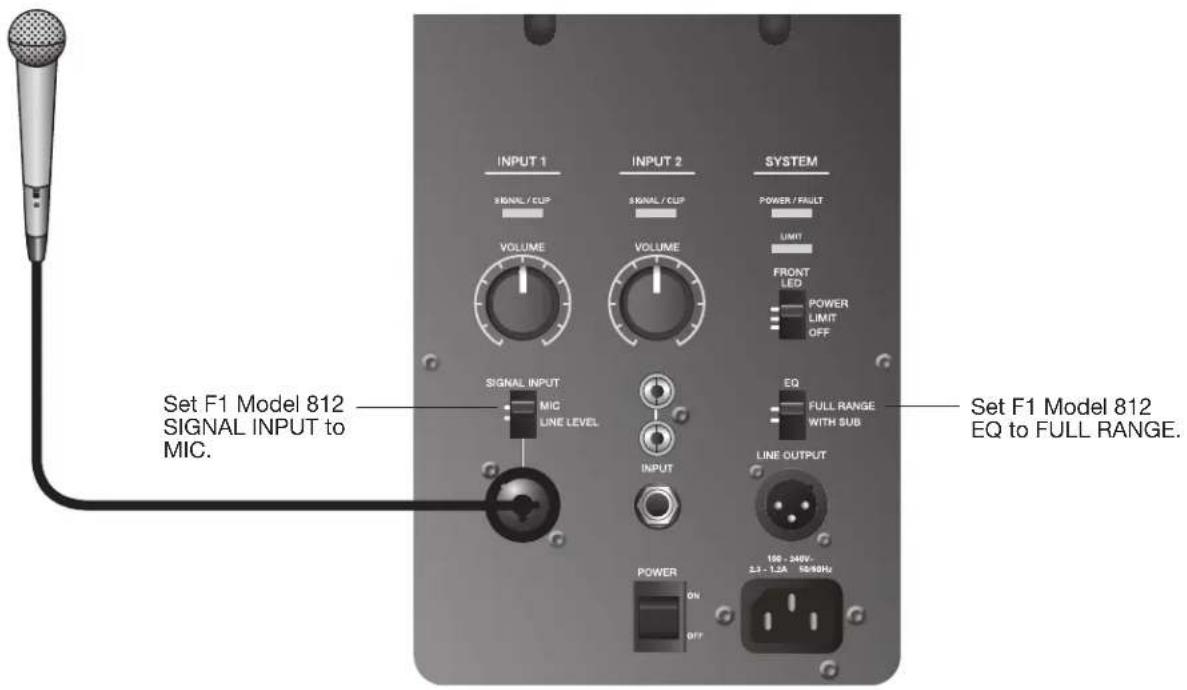
Mic to F1 Model 812 Loudspeaker INPUT 1
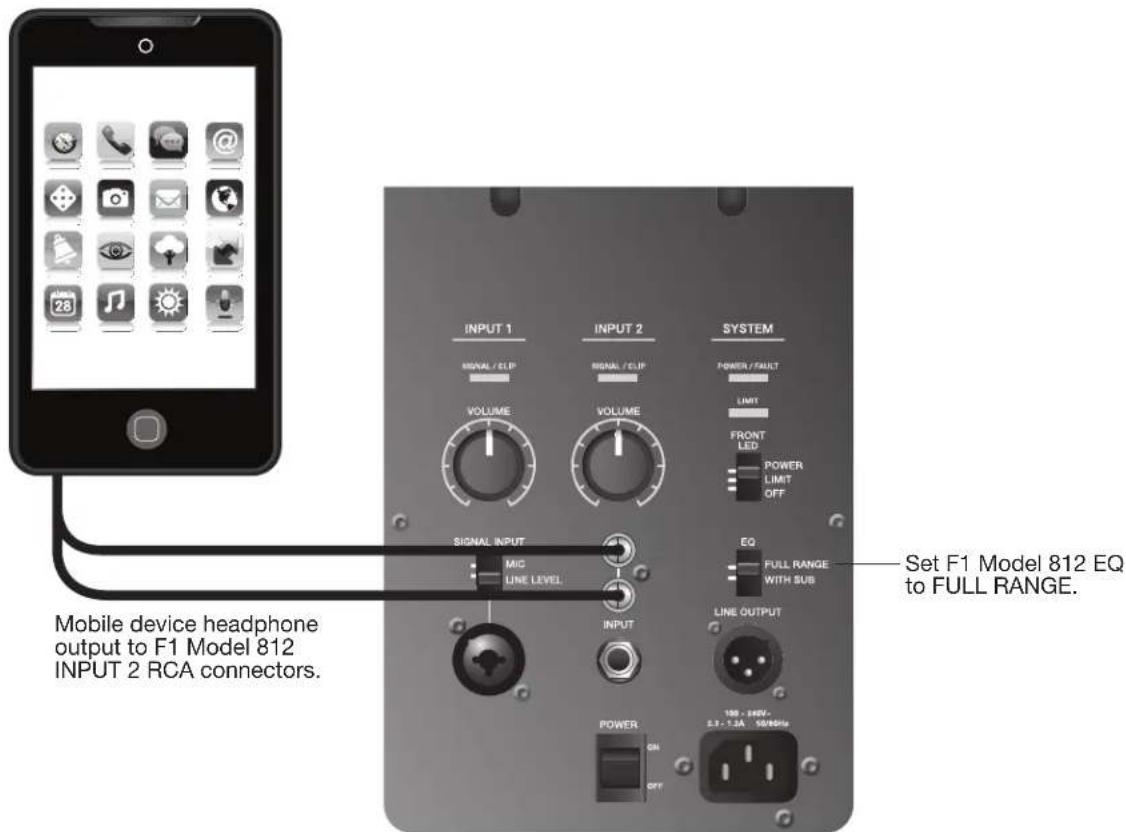
Mobile device to single F1 Model 812 Loudspeaker
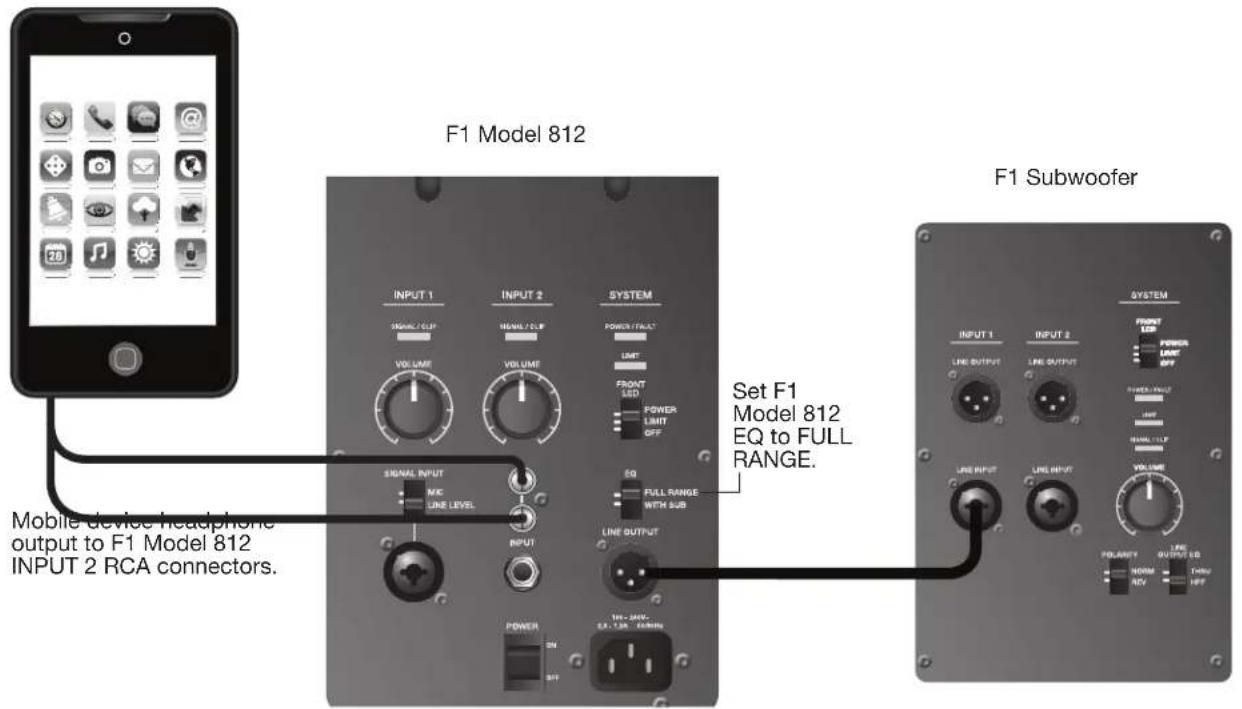
Mobile device to F1 Model 812 Loudspeaker and F1 Subwoofer
DJ Console to two F1 Subwoofer and two F1 Model 812 Loudspeakers
Caring for Your Product
Cleaning
- Clean the product enclosures using only a soft, dry cloth.
- Do not use any solvents, chemicals, or cleaning solutions containing alcohol, ammonia, or abrasives.
- Do not use any sprays near the product or allow liquids to spill into any openings.
- If necessary, you may carefully vacuum the grille of the loudspeaker array.
Getting Service
For additional help in solving problems, contact the Bose Professional Sound Division at (877) 335-2673 or visit our support area online at www.Bose.com/livesound.
Troubleshooting
If you experience problems while using this product, try the following solutions. The recommended troubleshooting tools include a spare AC power cord and extra XLR and 1/4" phone plug cables.
| Problem What to do | |
| Loudspeaker is plugged in, power switch is on, but power LED is off. | ·Make sure the power cord is fully engaged into both the F1 Model 812 Loudspeaker and the AC outlet. ·Make sure you have power at the AC outlet. Try operating a lamp or other equipment from the same AC outlet. ·Try a different power cord. |
| Power LED is on (green),but no sound. | ·Make sure the VOLUME control is turned up. ·Make sure volume control is turned up on your instrument. ·Make sure your instrument or audio source is plugged into the appropriate input connector. ·If the F1 Model 812 Loudspeaker is receiving input from the F1 Subwoofer, make sure the subwoofer is turned on. |
| Instrument or audio source sounds distorted. | ·Lower the volume of the connected audio source. ·If you are connected to an external mixing console, make sure input gain to the mixing console input channel is not clipping. ·Reduce the output of the mixing console. |
| Microphone is encountering feedback. | ·Reduce the input gain on the mixing console. ·Try positioning the microphone so it nearly touches your lips. ·Try a different microphone. ·Use the tone controls on the mixing console to reduce the offending frequencies. ·Increase the distance from the loudspeaker to the microphone. ·If using a vocal effects processor, make sure it is not contributing to the feedback. |
| Poor Bass Response | ·If using the F1 Model 812 Loudspeaker without the F1 Subwoofer, make sure the EQ switch is set to FULL RANGE. ·If using the F1 Model 812 Loudspeaker with the F1 Subwoofer, check to see if the POLARITY switch is in NORMAL mode. If there is a fair amount distance between the F1 Subwoofer and the F1 Model 812 Loudspeaker, setting the POLARITY switch to REV may improve bass. ·If using two F1 Subwoofer, make sure that the POLARITY switch is in the same position on each subwoofer. |
Problem What to do
Excessive Noise or System Hum
- When connecting a microphone to the F1 Model 812 Loudspeaker, make sure the INPUT 1, SIGNAL INPUT switch is set to MIC.
- Check to make sure that all system connections are secure. Lines that are not completely connected could create noise.
- If using a mixing console, external source or receiving input from the F1 Subwoofer, make sure the INPUT 1 SIGNAL INPUT switch on the F1 Model 812 Loudspeaker is set to LINE.
- For best results, use balanced (XLR) connections on the system inputs.
- Keep all signal-carrying cables away from AC power cords.
- Light dimmers can cause hum in loudspeaker systems. To avoid this, plug the system into a circuit that is not controlling lights or dimmer packs.
- Plug the audio system components into power outlets that share a common ground.
- Check cables at mixing console inputs by muting channels. If the hum goes away, replace the cable at that mixing console channel.
LED Indicators
The following table describes LED behavior on both the F1 Model 812 Loudspeaker and F1 Subwoofer.
| Type Location Color Behavior Indication Required Action | |||||
| Front LED (Power) | Front Grille Blue | Steady state Loudspeaker is on | None | ||
| Blue Pulsing | Limiter is active, amplifier protection engaged | Reduce volume or source input level | |||
| SIGNAL/CLIP | INPUT 1/2 | Green (nominal) | Flicker/Steady state | Input signal present | Adjust to desired level |
| Red | Flicker/Steady state | Input signal too high | Reduce volume or source input level | ||
| POWER/FAULT | Rear panel | Blue | Steady state | Loudspeaker is on | None |
| Red | Steady state Amplifier | thermal shutdown active | Turn loudspeaker off | ||
| LIMIT | Rear panel | Amber | Pulsing/Steady state | Limiter is active, amplifier protection engaged | Reduce volume or source input level |
Limited Warranty and Registration
Your product is covered by a limited warranty. Visit pro.Bose.com for warranty details.
Register your products online at www.Bose.com/register or call (877) 335-2673. Failure to do so will not affect your warranty rights.
Accessories
A variety of wall/ceiling brackets, carry bags and covers are available for these products. Contact Bose to place an order. See the contact information inside the rear cover of this guide.
Technical Information
Physical
Dimensions Weight
| F1 Model 812 Loudspeaker 26.1" H x 13.1" W x 14.6" D (665 mm H x 334 mm W x 373 mm D) 44.5 lb (20.18 Kg) |
| F1 Subwoofer 27.0" H x 16.1" W x 17.6" D (688 mm H x 410 mm W x 449 mm D) 55.0 lb (24.95 Kg) |
| F1 system stack 73.5" H x 16.1" W x 17.6" D (1868 mm H x 410 mm W x 449 mm D) 99.5 lb (45.13 Kg) |
Electrical
AC power rating Peak inrush current
| F1 Model 812 Loudspeaker | 100-240V~2.3-1.2A 50/60Hz | 120 V RMS: 6.3A RMS 230 V RMS: 4.6A RMS |
| F1 Subwoofer | 100-240V~2.3-1.2A 50/60Hz | 120 V RMS: 6.3A RMS 230 V RMS: 4.6A RMS |
Input/Output Connector Wiring Reference
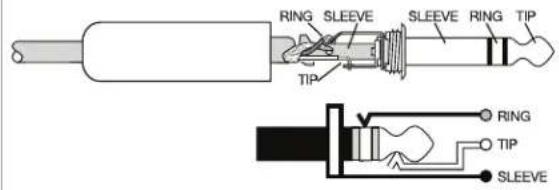
TRS balanced TS unbalanced
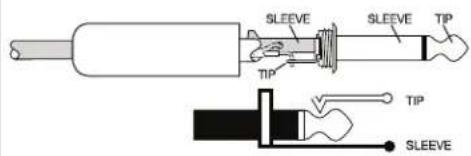
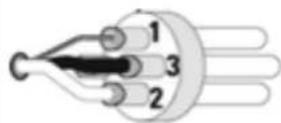
XLR balanced
1 - Shield (ground)
3-Minus(-)
2-Plus (+)
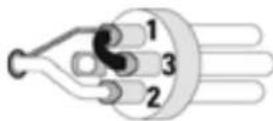
XLR unbalanced
1 - Shield (ground)
3-Minus(-)
2-Plus (+)
Visit us on the web at pro.Bose.com.
Americas
(USA, Canada, Mexico, Central America, South America)
Bose Corporation
The Mountain
Framingham, MA 01701 USA
Corporate Center: 508-879-7330
Americas Professional Systems,
Technical Support: 800-994-2673
Australia
Bose Pty Limited
Unit 3/2 Holker Street
Newington NSW Australia
61287379999
Belgium
Bose N.V. / S.A
Limesweg 2,03700
Tongeren, Belgium
012-390800
China
Bose Electronics (Shanghai) Co Ltd
25F, L'Avenue
99 Xianxia Road
Shanghai, P.R.C. 200051 China
862160103800
France
Bose S.A.S
12 rue de Temara
78100 St. Germain en Laye, France
01-30-61-63-63
Germany
Bose GmbH
Max-Planck Strasse 36D 61381
1 Matheson Street, Causeway Bay, Hong Kong
852 2123 9000
India
Bose Corporation India Private Limited
Salcon Aurum, 3rd Floor
Plot No. 4, Jasola District Centre
New Delhi-110025,India
91 11 43080200
Italy
Bose SpA
Centro Leoni A - Via G. Spadolini
5 20122 Milano, Italy
39-02-36704500
Japan
Bose Kabushiki Kaisha
Sumitomo Fudosan Shibuya Garden Tower 5F
16-17, Nanpeidai-cho
Shibuya-Ku, Tokyo, 150-0036, Japan
TEL 81-3-5489-0955
www.bose.co.jp
The Netherlands
Bose BV
1 Ambley Green, Gillingham Business Park
KENT ME8 ONJ
Gillingham, England
0870-741-4500
See website for other countries
Dette produit并不代表 the views of the authors. The contents may not be used in any way without written permission.

Importor i Kina: Bose Electronics (Shanghai) Company Limited, Level 6, Tower D, No. 2337 Gudai Rd. Minhang District, Shanghai 201100
Importer i EU: Bose Products B.V., Gorslaan 60, 1441 RG Purmerend, Holland
Importar i Mexico: Bose de Mexico, S. de R.L. de C.V., Paseo de las Palmas 405-204, Lomas de Chapultepec, 11000 Mexico, D.F. Ring til +5255 (5202) 3545 for oplysninger on service else importar
Importor i Taiwan: Bose Taiwan Branch, 9F-A1, No.10, Section 3, Minsheng East Road, Taipei City 104, Taiwan. Telefonummer: +886-2-2514 7676
Importar UK: Bose Limited, Bose House, Quayside Chatham Maritime, Chatham, Kent, ME4 4QZ, Storbritannien
Americas Professional Systems,
Teknisk support: 800-994-2673
Australien
Bose Pty Limited
Unit 3/2 Holker Street
Newington NSW Australia
61287379999
Belgien
Bose N.V./S.A
Limesweg 2,03700
Tongeren, Belgien
012-390800
Kina
Bose Electronics (Shanghai) Co Ltd
25F, L'Avenue
99 Xianxia Road
Shanghai, P.R.C. 200051 China
86 21 6010 3800
Frankrig
Bose S.A.S
12 rue de Temara
78100 St. Germain en Laye, France
01-30-61-63-63
Tyskland
Bose GmbH
Max-Planck Strasse 36D 61381
1 Matheson Street, Causeway Bay, Hong Kong
852 2123 9000
Indien
Bose Corporation India Private Limited
Salcon Aurum, 3rd Floor
Plot No. 4, Jasola District Centre
New Delhi-110025,India
91 11 43080200
Italian
Bose SpA
Centro Leoni A - Via G. Spadolini
5 20122 Milano, Italy
39-02-36704500
Japan
Bose Kabushiki Kaisha
Sumitomo Fudosan Shibuya Garden Tower 5F
16-17, Nanpeidai-cho
Shibuya-Ku, Tokyo, 150-0036, Japan
TEL 81-3-5489-0955
www.bose.co.jp
Holland
Bose BV
1 Ambley Green, Gillingham Business Park
KENT ME8 ONJ
Gillingham, England
0870-741-4500
China-Import: Bose Electronics (Shanghai) Company Limited, Level 6, Tower D, No. 2337 Gudai Rd. Minhang District, Shanghai 201100
Americas Professional Systems,
Unit 3/2 Holker Street
Newington NSW Australia
61287379999
Belgien
Bose N.V. / S.A
Limesweg 2,03700
Tongeren, Belgium
012-390800
China
Bose Electronics (Shanghai) Co Ltd
25F, L'Avenue
99 Xianxia Road
Shanghai, P.R.C. 200051 China
86 21 6010 3800
Frankreich
Bose S.A.S
12 rue de Temara
78100 St. Germain en Laye, France
01-30-61-63-63
Deutschland
Bose GmbH
Max-Planck Strasse 36D 61381
1 Matheson Street, Causeway Bay, Hong Kong
852 2123 9000
Indien
Bose Corporation India Private Limited
Salcon Aurum, 3rd Floor
Plot No. 4, Jasola District Centre
New Delhi-110025,India
91 11 43080200
Italian
Bose SpA
Centro Leoni A - Via G. Spadolini
5 20122 Milano, Italy
39-02-36704500
Japan
Bose Kabushiki Kaisha
Sumitomo Fudosan Shibuya Garden Tower 5F
16-17, Nanpeidai-cho
Shibuya-Ku, Tokyo, 150-0036, Japan
TEL 81-3-5489-0955
www.bose.co.jp
Niederlande
Bose BV
1 Ambley Green, Gillingham Business Park
KENT ME8 ONJ
Gillingham, England
0870-741-4500
Importador en China: Bose Electronics (Shanghai) Company Limited, Level 6, Tower D, No.2337 Gudai Rd.Minhang District, Shanghai 201100, China
Importador para la UE: Bose Products B.V., Gorslaan 60, 1441 RG Purmerend, Paises Bajos
Americas Professional Systems,
Soporte technique: 800-994-2673
Australia
Bose Pty Limited
Unit 3/2 Holker Street
Newington NSW Australia
61287379999
Bélgica
Bose N.V./S.A
Limesweg 2,03700
Tongeren, Bélgica
012-390800
China
Bose Electronics (Shanghai) Co Ltd
25F, L'Avenue
99 Xianxia Road
Shanghai, P.R.C. 200051 China
86 21 6010 3800
Francia
Bose S.A.S
12 rue de Temara
78100 St. Germain en Laye, Francia
01-30-61-63-63
Alemania
Bose GmbH
Max-Planck Strasse 36D 61381
1 Matheson Street, Causeway Bay, Hong Kong
852 2123 9000
India
Bose Corporation India Private Limited
Salcon Aurum, 3rd Floor
Plot No. 4, Jasola District Centre
Nueva Delhi - 110025, India
91 11 43080200
Italia
Bose SpA
Centro Leoni A - Via G. Spadolini
5 20122 Milan, Italia
39-02-36704500
Japon
Bose Kabushiki Kaisha
Sumitomo Fudosan Shibuya Garden Tower 5F
16-17, Nanpeidai-cho
Shibuya-Ku, Tokio, 150-0036, Japon
TEL 81-3-5489-0955
www.bose.co.jp
PaiSES Bajos
Bose BV
1 Ambley Green, Gillingham Business Park
KENT ME8 ONJ
Gillingham, Inglaterra
0870-741-4500
Unit 3/2 Holker Street
Newington NSW Australie
61287379999
Belgique
Bose N.V. / S.A
Limesweg 2,03700
Tongeren, Belgique
012-390800
Chine
Bose Electronics (Shanghai) Co Ltd
25F, L'Avenue
99 Xianxia Road
Shanghai, R.P.C. 200051 Chine
86 21 6010 3800
France
Bose S.A.S
12 rue de Temara
78100 Saint-Germain-en-Laye, France
0130616363
Allemagne
Bose GmbH
Max-Planck Strasse 36D 61381
1 Matheson Street, Causeway Bay, Hong Kong
852 2123 9000
Inde
Bose Corporation India Private Limited
Salcon Aurum, 3rd Floor
Plot No. 4, Jasola District Centre
New Delhi-110025,Inde
91 11 43080200
Italie
Bose SpA
Centro Leoni A - Via G. Spadolini
Sumitomo Fudosan Shibuya Garden Tower 5F
16-17, Nanpeidai-cho
Shibuya-Ku, Tokyo, 150-0036, Japon
Tél. 81-3-5489-0955
www.bose.co.jp
Pays-Bas
Bose BV
1 Ambley Green, Gillingham Business Park
KENT ME8 ONJ
Gillingham, Angleterre
0870-741-4500
Importatore per la Cina: Bose Electronics (Shanghai) Company Limited, Level 6, Tower D, No.2337 Gudai Rd. Minhang District, Shanghai 201100
Importatore per l'UE: Bose Products B.V., Gorslaan 60, 1441 RG Purmerend, Paesi Bassi
Americas Professional Systems,
Unit 3/2 Holker Street
Newington NSW Australia
61287379999
Belgio
Bose N.V. / S.A
Limesweg 2,03700
Tongeren, Belgio
012-390800
Cina
Bose Electronics (Shanghai) Co Ltd
25F, L'Avenue
99 Xianxia Road
1 Matheson Street, Causeway Bay, Hong Kong
852 2123 9000
India
Bose Corporation India Private Limited
Salcon Aurum, 3rd Floor
Plot No. 4, Jasola District Centre
New Delhi-110025,India
91 11 43080200
Italia
Bose SpA
Centro Leoni A - Via G. Spadolini
Sumitomo Fudosan Shibuya Garden Tower 5F
16-17, Nanpeidai-cho
1 Ambley Green, Gillingham Business Park
KENT ME8 ONJ
Importeur in China: Bose Electronics (Shanghai) Company Limited, Level 6, Tower D, No. 2337 Gudai Rd. Minhang District, Shanghai 201100
Importeur in de EU: Bose Products B.V., Gorslaan 60, 1441 RG Purmerend, Nederland
Importeur in Mexico: Bose de Mexico, S. de R.L. de C.V., Paseo de las Palmas 405-204, Lomas de Chapultepec, 11000 Mexico, D.F.
Gegevens importeur en service-informatie: +52 55 52 02 35 45
Importeur in Taiwan: Bose Taiwan Branch, 9F-A1, No.10, Section 3, Minsheng East Road, Taipei City 104, Taiwan. Telefonnummer: +886 2 25 14 76 76
Importeur in het VK: Bose Limited, Bose House, Quayside Chatham Maritime, Chatham, Kent, ME4 4QZ, United Kingdom
- Blauw = ingeschakeld.
- Rood = storing.
LIMIT:
- Blauw = ingeschakeld.
- Rood = storing.
Americas Professional Systems,
Technische ondersteuning: 800-994-2673
Australie
Bose Pty Limited
Unit 3/2 Holker Street
Newington NSW Australie
61287379999
België
Bose N.V. / S.A
Limesweg 2,03700
Tongeren, Belgie
012-390800
China
Bose Electronics (Shanghai) Co Ltd
25F, L'Avenue
99 Xianxia Road
Shanghai, P.R.C. 200051 China
86 21 6010 3800
Frankrijk
Bose S.A.S
12 rue de Temara
1 Matheson Street, Causeway Bay, Hongkong
852 2123 9000
India
Bose Corporation India Private Limited
Salcon Aurum, 3rd Floor
Plot No. 4, Jasola District Centre
New Delhi-110025,India
91 11 43080200
Italie
Bose SpA
Centro Leoni A - Via G. Spadolini
5 20122 Milaan, Italiè
39-02-36704500
Japan
Bose Kabushiki Kaisha
Sumitomo Fudosan Shibuya Garden Tower 5F
16-17, Nanpeidai-cho
Shibuya-Ku, Tokio, 150-0036, Japan
TEL 81-3-5489-0955
www.bose.co.jp
Nederland
Bose BV
1 Ambley Green, Gillingham Business Park
KENT ME8 ONJ
Gillingham, England
0870-741-4500
Kinainportor: Bose Electronics (Shanghai) Company Limited, Level 6, Tower D, No.2337 Gudai Rd.Minhang District, Shanghai 201100
EU-importor: Bose Products B.V., Gorslaan 60, 1441 RG Purmerend, The Netherlands
Importo i Mexico: Bose de Mexico, S. de R.L. de C.V. Paseo de las Palmas 405-204, Lomas de Chapultepec, 11000 Mexico, D.F. Ring +5255 (5202) 3545 for service-eller importo information.
Importor i Taiwan: Bose Taiwan Branch, 9F-A1, No. 10, Section 3, Minsheng East Road, Taipei City 104, Taiwan. Telefonummer: +886-2-2514 7676
UK-importor: Bose Limited, Bose House, Quayside Chatham Maritime, Chatham, Kent, ME4 4QZ, United Kingdom
Americas Professional Systems,
Teknisk support: 800-994-2673
Australien
Bose Pty Limited
Unit 3/2 Holker Street
Newington NSW Australien
61287379999
Belgien
Bose N.V./S.A
Limesweg 2, 03700
Tongeren, Belgien
012-390800
Kina
Bose Electronics (Shanghai) Co Ltd
25F, L'Avenue
99 Xianxia Road
Shanghai, Folkrepubliken Kina 200051 Kina
86 21 6010 3800
Frankrike
Bose S.A.S
12 rue de Temara
78100 St. Germain en Laye, Frankrike
01-30-61-63-63
Tyskland
Bose GmbH
Max-Planck Strasse 36D 61381
Friedrichsdorf, Tyskland
06172-7104-0
Hong Kong
Bose Limited
Suites 2101-2105, Tower One, Times Square
1 Matheson Street, Causeway Bay, Hong Kong
852 2123 9000
Indien
Bose Corporation India Private Limited
Salcon Aurum, 3rd Floor
Plot No. 4, Jasola District Centre
New Delhi-110025,Indien
91 11 43080200
Italian
Bose SpA
Centro Leoni A - Via G. Spadolini
5 20122 Milano, Italien
39-02-36704500
Japan
Bose Kabushiki Kaisha
Sumitomo Fudosan Shibuya Garden Tower 5F
16-17, Nanpeidai-cho
Shibuya-Ku, Tokyo, 150-0036, Japan
TEL 81-3-5489-0955
www.bose.co.jp
Holland
Bose BV
1 Ambley Green, Gillingham Business Park
KENT ME8 ONJ
Gillingham, England
0870-741-4500