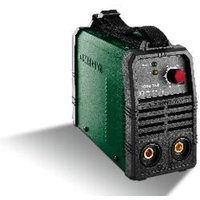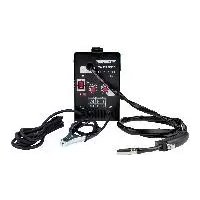
PARKSIDE PFDS 120 A2 - Welding machine

PFDS 120 A2 - Welding machine PARKSIDE - Free user manual and instructions

Find the device manual for free PFDS 120 A2 PARKSIDE in PDF.

📄 157 pages English EN 💬 AI Question
Notice PARKSIDE PFDS 120 A2 - page 28
Manual assistant
Powered by ChatGPT
Waiting for your message
Product information

Brand : PARKSIDE

Model : PFDS 120 A2

Category : Welding machine

Download the instructions for your Welding machine in PDF format for free! Find your manual PFDS 120 A2 - PARKSIDE and take your electronic device back in hand. On this page are published all the documents necessary for the use of your device. PFDS 120 A2 by PARKSIDE.

USER MANUAL PFDS 120 A2 PARKSIDE

Assembly, operating and safety instructions Translation of the original instructions

Before reading, unfold the page containing the illustrations and familiarise yourself with all functions of the device.

Suitable for welding under increased electrical hazard. Welding sparks may cause explosion or fire. Single-phase transformer. Arc welding may damage the eyes and injure the skin. HInsulation class. Electromagnetic fields can disrupt the function of cardiac pacemakers.

Standardized operating voltage. Attention, possible dangers!I 1max Greatest rated value of the mains current. X %Duty cycle.I 1eff Effective value of the grea- test mains current.

Rated value of the welding current. Earth terminal. Wire feed drive.Made of recycling material.29 GB / IE Introduction

FLUX CORED WIRE WELDER

PFDS 120 A2 z Introduction Congratulations! You have purchased one of our high-quality devices. Familiarize yourself with the product before using it for the first time. Please read the following operating instructions and safety instructions carefully. Only trained persons may set up this tool. KEEP OUT OF THE REACH OF CHIL- DREN! z Intended use The device is suitable for self-shielded flux-core welding using an appropriate wire. No additional gas is required. The protective gas is contained in powder form in the wire itself. Thus, it is fed directly into the arc. This means the device is not susceptible to wind and can be used outside. Only suitable wire electrodes may be used for the device. Inten- ded use also involves compliance with the safety instructions and assembly instructions and the operating notes in the operating instructions. The applicable accident prevention provi- sions must be strictly observed. The device must not be used: – in rooms with insufficient ventilation, – in explosive atmospheres, – for the purpose of thawing pipes, – in the vicinity of people with cardiac pacemakers and – in the vicinity of easily inflammable mate- rials. Use the product only as described and only for the specific applications as stated. Keep these instructions in a safe place. En- sure you hand over all documentation when passing the product on to anyone else. Any use that differs to the intended use as stated above is prohibited and potentially dange- rous. Damage caused by disregarding these instructions or by misuse is not covered by the warranty or any liability on the part of the manufacturer. Residual risk Even if you operate the device as intended, there will be residual risks. The following ris- ks can occur in the context of the design and construction of this flux-core welding device: – eye injuries caused by glare – touching hot parts of the device or the workpiece (burn injuries), – in the case of insufficient protection, risk of accidents and burns due to flying sparks or slag, – harmful emissions of smoke and gases cau- sed by lack of air or insufficient extraction in closed rooms. Reduce the residual risk by carefully using the device as intended and observing all instruction. z Delivery contents 1 flux cored wire welder PFDS 120 A2 1 torch nozzle (pre-assembled) 4 welding nozzles (1x 0.9 mm pre-assem- bled; 1x 0.8 mm; 1x 0.6 mm; 1x 1.0 mm) 1 chipping hammer with wire brush 1 flux-core wire Ø 0.9 mm / 450 g 1 welding mask 1 carrying strap 1 set of operating instructions z Parts description

Cover wire feed unit

Rotary switch for welding current setting

Setting wheel for wire feed

Hose package with direct connection

Welding nozzle (0.6 mm)

Welding nozzle (0.9 mm)

Chipping hammer with wire brush

Welding mask after assembly

Protective glass catch

Storage compartment for welding nozzles

Torch neck z Technical specifications Power supply: 230 V~ / 50 Hz (alternating current) Welding current I

: 25 – 120 A Duty cycle X: 10% at 120 A Welding current, 60% at 49 A Welding current Open circuit voltage U

: 31 V Greatest rated value of the mains current: I 1 max.

Effective value of the greatest rated current: I 1eff

Welding wire reel max.: approx. 1000 g Welding wire diameter max.: 1.0 mm Fuse: 16 A Weight: 13.5 kg Technical and visual changes may be made in further development without notifying the customer. All dimensions, notices and specifications in the operating instructions are therefore subject to change. Thus, legal claims made as a result of the operating instructions cannot be claimed. z Safety notes Please read the usage instructions with care and observe the notes des- cribed. Familiarize yourself with the device, its proper use and the safety notes based on these operating instructions. The rating plate contains all technical data of this welding device; please learn about the technical features of this device. This device can be used by children 16 years and older and also by persons with re- duced physical, sensory or mental capacities or a lack of experience and knowled- ge if they are supervised or they have been instructed with regard to the safe use of the device and they understand the dangers it presents. Do not allow children to play with the Introduction / Safety notes31 GB / IE product. Cleaning and user maintenance must not be per- formed by children without su- pervision. Have repairs and/or mainte- nance work only conducted by qualified electricians. Only use the welding ca- bles (PFDS 120 A2 H01N2- D1x10 mm²) included in the scope of delivery. The device should not be pla- ced directly against the wall in operation; it should not be covered or caught between other devices, so that there will always be enough air flowing in through the ventilation slits. Ensure that the device has been properly connected to the mains voltage. Avoid any tension on the mains line. Pull the mains plug from the socket before setting up the device in a different location. Always switch the device off by the ON/OFF switch when it is not in operation. Put down the electrode holder on an in- sulated support and only take the electrode from the holder after 15 minutes time to cool off. Take note of the condition of the welding cables, the elec- trode holder and the ground terminals. Wear of the insula- tion and the current-conducting parts may cause danger and reduce the welding quality. Light-arc welding produces sparks, melted metal parts and smoke. Therefore, note: All flammable substances and/ or materials must be removed from the workplace and its di- rect vicinity. Ensure that the workplace is ventilated. Do not weld on containers, vessels or tubes that contain or have contained flammable liquids or gases. Avoid any direct contact with the welding current circuit. The idle voltage between the electrode pliers and the ground terminal may be dangerous; there is the danger of electric shock. Do not store the device in a moist or wet environment or in rain. The protection provisions IP21S apply to this. Protect your eyes with the in- tended safety glasses (DIN degree 9-10), which are to be attached to the enclosed wel- ding screen. Use gloves and dry safety clothing that is free Safety notes32 GB / IE of oil and grease to protect your skin from ultraviolet radia- tion from the light arc. Do not use the welding current source to unfreeze pipes. Note: The light arc radiation may damage the eyes and burn the skin. Light arc welding produces sparks and drips of melted me- tal; the welded workpiece will start to glow and remain hot for a relatively long time. The- refore, do not touch the wor- kpiece with your uncovered hands. Light-arc welding releases va- pors that are hazardous to health. Make sure that you do not inhale these if possible. Protect yourself from the harm- ful effects of the light arc and keep any persons not involved in the work at a distance of at least 2m from the light arc. ATTENTION! During operation of the wel- ding unit, the voltage supply to other consumers may be impaired, depending on the mains conditions at the con- nection point. In doubt, contact your power supply company. There may be function pro- blems with other devices du- ring operation of the welding unit, e.g. hearing aids, car- diac pacemakers, etc. z Danger sources from lightarc welding There are a number of danger sources from light-arc welding. Therefore, it is particularly im- portant that the welder observe the following rules in order not to endanger himself and others and to avoid damage to persons and the device. Have work on the mains-volta- ge side, e.g. on cables, plugs, etc. only performed by an electrician according to the na- tional and local provisions. Disconnect the welding unit from the mains voltage at once in case of accidents. If there are any electrical con- tact voltages, switch off the de- vice at once and have it chec- ked by an electrician. Always observe good electri- cal contacts on the welding current side. Always wear insulating glo- Safety notes33 GB / IE ves on both hands when wel- ding. They protect from electric shock (idle voltage of the wel- ding current circuit), harmful radiation (heat and UV radia- tion) and from glowing metal and splashes. Wear firm, insulating shoes. The shoes should be insulating even when wet. Low-cut shoes are not suitable, since falling, glowing metal drops may cau- se burns. Wear suitable protective clo- thing; do not wear any synthe- tic clothes. Never look into the light arc with unprotected eyes; only use a welders' welding screen with the required protective glass according to DIN. The li- ght arc emits light and heat ra- diation that will cause blinding or burns, as well as UV-radia- tion. This invisible ultraviolet radiation will cause conjunc- tivitis, which is very painful but will only become apparent after a few hours, if sufficient protection is used. UV radiation also causes burns similar to sunburn on unprotec- ted parts of the body. Persons and helpers near the light arc must be informed of the dangers as well and pro- tected as necessary. If neces- sary, set up protective walls. When welding, in particular in small rooms, ensure sufficient fresh air supply, since smoke and harmful gases will deve- lop. No welding is permitted on containers that are or have been used to store gases, fuels, mineral oils and similar - even if they have been emp- tied a long time ago -, since re- sidues may cause explosion. Special provisions apply in fire-hazardous and potentially explosive rooms. Welds subject to high stress and required to meet cer- tain safety requirements must only be produced by specia- lly trained and tested welders. Examples of these are pressure tanks, running rails, trailer cou- plings, etc. ATTENTION! Always connect the ground terminal as close as possible to the welding point so that the welding current can take the shortest possible path from the electrode to the ground terminal. Never connect the ground terminal to the hou- Safety notes34 GB / IE sing of the welding unit! Never connect the ground terminal to any earthed parts that are far away from the workpiece, such as a water pipe in a different corner of the room. This may cause damage to the protective ground system of the room in which you are welding. Do not use the welding unit in rain. Only put down the welding unit in a level location. The output is calculated for an ambiance temperature of 20°C. The welding time may be reduced at higher tempera- tures. Danger from electrical shock: Electrical shock from a welding electrode may be fatal. Never weld in rain or snow. Wear dry insulating gloves. Never touch the electrode with your unprotec- ted hand. Never wear any wet or damaged gloves. Protect yourself from electric shock by insulation against the workpiece. Do not open the device's housing. Danger from welding smoke: Inhaling welding smoke may en- danger health. Do not hold your head into the smoke. Use facili- ties in open areas. Use the vent to discharge the smoke. Danger from welding sparks: Welding sparks may cause ex- plosion or fire. Keep flammable substances away when welding. Do not weld next to flammable substances. Welding sparks may cause fires. Keep a fire extingui- sher at hand and an observer who can use it at once nearby. Do not weld on drums or any closed containers. Dangers from arc welding: Arc welding may damage the eyes and injure the skin. Wear hat and goggles. Wear hearing protection and a high shirt collar. Wear welding protection helmet and use the proper filter size. Wear complete body protection. Danger from electromagne- tic fields: Welding current produces electro- magnetic fields. Never use toge- ther with medical implants. Never wind the welding lines around your body. Combine welding lines. Safety notes35 GB / IE z Welding-screen-specific safety notes

Use a bright light source (e.g. lighter) to convince yourself of the proper function of the wel- ding screen every time before starting welding. Welding splashes may dama- ge the protective screen. Ex- change damaged or scratched protective screens at once. Replace damaged or badly contaminated or splashed com- ponents without delay. The device must only be ope- rated by persons who are at least 16 years old. Familiarize yourself with the safety provisions for welding. For this, also observe the safe- ty notes of your welding unit. Always put on the welding screen when welding. Non- use may cause severe injury to your retina. Always wear protect ive clo- thing when welding. Never use t he welding screen without the protective glass, since the visual unit may otherwise be damaged. The- re is a risk of damage to the eyes! Exchange t he protective glass in time for a good view and non-fatiguing work. z Environments with in- creased electrical risks When using welding devices in environments with increased elec- trical risks, observe the following safety notes. Environments with increased elec- trical risks include: Workplaces with confined spaces, so that the welder is working in a confined posture (e.g. kneeling, sitting, lying) and touches electrically con- ductive parts; In workplaces that are who- lly or partially surrounded by electrically conductive ma- terials, and where there is a high risk from avoidable or ac- cidental contact by the welder; In wet, moist or hot workplaces, where humi- dity or sweat will considerably reduce the resistance of human skin and the insulating pro- perties of the protective equip- ment. Safety notes36 GB / IE Metal ladders or scaffolding may also create an environment with an increased electrical risk. When working such an environ- ment, insulating supports and interim layers must be used, as well as long gloves and heat co- verings made of leather or other insulating materials, in order to insulate your body against the ground. The welding current source must be located outside of the work area or the electrically conductive areas, and outside of the welder's reach. Additional protection from elec- trical shock from the mains cu- rrent in case of a fault may be provided by the use of a residual current circuit breaker operated with a discharge current not ex- ceeding 30 mA and supplying all mains-operated devices nearby. The residual current circuit breaker must be suitable for any current type. Means for quick electrical dis- connection of the welding current source or the welding circuit (e.g. emergency off device) must be easily accessible. When using welding units subject to electrically hazardous condi- tions, the output voltages of the welding device in no-load ope- ration must not be higher than 48 Volts (effective value). This welding unit may be used in such cases based on its output voltage. z Welding in confined spa- ces Welding in confined spaces may lead to a danger from toxic gases (danger of suffo- cation). Welding is only permitted in narrow spaces when instructed persons are in the direct vicini- ty so that they can take steps if necessary. Before starting welding, an ex- pert must conduct an assessment to determine the steps necessary to ensure safe work, and which precautions should be taken whi- le actually welding. z Adding up of open-circuit voltages If more than one welding current source is in operation at the same time, their open-circuit voltages may add up and case an increa- sed electrical risk. Welding cu- rrent sources must be connected to minimize this risk. The indivi- dual welding current sources with Safety notes37 GB / IE their separate controls and con- nections must be clearly marked to show what belongs to which welding circuit. z Use of shoulder slings Welding is not permitted while the welding current source or wire feed unit are carried, e.g. with a shoulder sling. This is to prevent: The risk of losing one's balan- ce when connected lines or ho- ses are pulled The increased risk of electrical shock since the welder tou- ches the ground when using a welding current source of ca- tegory I with a housing that is earthed through its protective earth. z Protective clothing

The welder's entire body must be protected from radiation and burns with the correspon- ding clothing and facial protec- tion during work. The following steps should be oserved: – Put on protective clothing before welding. –Wear gloves. – Open windows to ensure air supply. – Wear protective goggles. Wear long gloves of a suita- ble material (leather) on both hands. They must be in an im- peccable condition. Wear suitable aprons to pro- tect your clothes from sparks and burns. If the type of work, such as overhead welding, requires, safety garments and, if necessary, head protection must be worn. z Protection from radiation and burns

Put up a sign "Caution! Do not look into the flames!" at the workplace to draw attention to the danger to the eyes. The workplaces must be shielded so that any persons nearby are protected as far as possible. Unauthorized persons must be kept away from the welding work. The walls in direct proximi- ty of stationary workplaces should not be of a light color or glossy. Windows must be secured against letting through Safety notes38 GB / IE or reflecting radiation at least up to head height, e.g. by a suitable coating. z EMC device classification As per the standard IEC 60974- 10, this welding device is a welding unit with class A electro- magnetic compatibility. Thus, it complies with the corresponding requirements for industrial and domestic use. In residential areas, it can be connected to the public low-voltage supply systems. Even if the flux cored wire wel- der complies with the emission limit values of the standard, arc welding devices can still result in electromagnetic interferences in sensitive systems and devices. The user will be held responsible for any interference caused by the electric arc during welding and must also take appropriate safety measures. In doing so, the user must observe the following: – network, control, signal and telecommunication lines – computers and other micropro- cessor-controlled devices – TVs, radios and other playback devices – electronic and electrical safety equipment – people with cardiac pace- makers or hearing aids – measurement and calibration devices – interference immunity of other equipment nearby – the time at which the welding work is carried out. The following is recommended to reduced possible interference radiation: – equip the mains connection with a mains filter – regularly maintain the flux cored wire welder and keep it in a good condition – welding cables should be completely uncoiled and run as close to parallel with the floor as possible – devices and systems that are compromised by the interferen- ce radiation must be removed from the welding area or shiel- ded. z Before use Take all parts from the packaging and check whether the flux cored wire welder or parts show any damage. If this is the case, do not use the flux-core wire wel- ding device. Contact the manufacturer via the indicated service address. Remove all protective films and other transport packaging. Safety notes / Before use39 GB / IE Check that the delivery is complete. The welding nozzles can be stowed away in the storage compartment for welding nozzles

z Assembly z Assembling the welding mask Place the dark welding glass

into the mask with the writing on the top

(see Fig. C). The writing on the dark welding glass

must now be visible from the front of the welding mask. Push the handle

from the inside into the corresponding notch of the mask, un- til it snaps into place (see Fig. D). z Inserting the flux-cored wire Always unplug the mains plug from the mains socket prior to each maintenance task or preparatory work in order to prevent the risk of an electric shock, injury or damage. Note: Different welding wires will be nee- ded depending on the application. Welding wires with a diameter of 0.6 – 1.0 mm can be used with this device. Feed roll, welding nozzle and wire cross section must be compatible with one another. The device is suitable for wire reels weighing up to maximum 1000 g. Unlock and open the cover of the wire feed unit

by raising the threaded rod along the elongated hole. Unlock the roller unit by turning the roller mount

off the shaft (see Fig. F). Note: Make sure that the end of the wire does not come loose and cause the roll to roll out on its own. The end of the wire may not be released until during assembly. Completely unpack the flux-cored wire welding reel

, so that it can unrolled without difficulty. Do not release the wire end yet (see Fig. G). Place the wire reel on the shaft. Make sure that the roll unwinds on the side of the

back on and lock it by pressing and turning it clockwise (see Fig. G). Undo the adjustment screw

and swing it upwards (see Fig. H). Turn the thrust roller unit

to the side (see Fig. I). Loosen the feed roll holder

by turning it anti-clockwise and pull it upwards and off (see Fig. J). On the top of the feed roll

, check whether the appropriate wire thickness is indicated. If necessary, the feed roll has to be turned over or replaced. The supplied welding wire (Ø 0.9 mm) must be used in the feed roll

with the spe- cified wire thickness of Ø 0.9 mm. The wire must be positioned in the upper groove! Put on the feed roll holder

again and screw clockwise direction. Remove the torch nozzle

by pulling it and turning it clockwise (see Fig. K). Unscrew the welding nozzle

away from the welding device as straight as possi- ble (place it on the floor). Take the wire end out of the edge of the spool (see Fig L). Trim the wire end with wire scissors or a diagonal cutter in order to remove the da- maged, bent ends of the wire (see Fig. L). Note: The wire must be kept under ten- sion the entire time in order to avoid re- Before use / Assembly40 GB / IE leasing and rolling out! Therefore, it is recommended to carry out the work with an additional person. Push the flux-cored wire through the wire feed guide

(see Fig.. M) Guide the wire along the feed roll

and push it into the hose package holder

towards the feed roll

(see Fig. O). Mount the adjustment screw

(see Fig. O). Set the counter pressure with the adjust- ment screw. The welding wire must be firmly positioned between the thrust roller and feed roll

in the upper guide wi- thout being crushed (see Fig. O). Switch on the welding device on the main

switch. Press the torch button

Now the wire feed system pushes the welding wire through the cable assembly

As soon as 1 – 2 cm of the wire protru- des from the torch neck

, release the torch button

again (see Fig. P). Switch off the welding device on the main switch. Screw the welding nozzle

back on. Make sure that the welding nozzle

matches the diameter of the welding wire used (see Fig. Q). When using the delivered welding wire (Ø 0.9 mm), the welding nozzle

with the labeling 0.9 mm must be used. Push the torch nozzle

back on to the torch neck with a turn to the right

(see Fig. R). Always unplug the mains plug from the power socket prior to each maintenance task or preparatory work in order to prevent the risk of an electric shock, injury or damage. z Commissioning z Switching the device on and off Switch on the welding device on and off the main switch

. If you do not intend to use the welding device for an exten- ded period, remove the plug from the power socket. This is the only way to completely de-energize the device. z Setting the welding current The rotary switch for the welding current set- ting

on the front of the welding device can be used to set the desired welding currents. The corresponding settings can be found in the following table. Voltage (V) Wire feed Welding current A2 – 425 – 75 B3 – 555 – 85 C3 – 660 – 100 D4 – 865 – 105 E5 – 975 – 110 F5 – 1080 – 115 G5 – 1085 – 120 The necessary welding current depends on the welding wire diameter used, the material thickness and the desired penetration depth. z Setting the wire feed In order to generate a constant arc, the set- ting wheel for the wire feed

can be used to fine-tune the wire feed. It is recommended to use a setting in the middle range to start with, and then reduce or increase the speed Assembly / Commissioning41 GB / IE as required. The necessary welding current depends on the welding wire diameter used, the material thickness and the desired penetration depth. Similarly, the gaps to be bridged between the workpieces to be welded must be obser- ved. Overload protection The welding device is protected against over- heating by means of an automatic protection device (thermostat with automatic restart). The protective device interrupts the overload of the current circuit and the yellow overload protection control lamp

illuminates. Allow the device to cool down (approx. 15 minutes) after activation of the protec- tion device. As soon as the yellow over- load protection control lamp

goes out, the device is ready for operation again. Welding mask HEALTH HAZARD! If you do not use the welding mask, harmful UV radiation and heat emitted by the electric arc could damage your eyes. Always use the welding mask for welding work. z Welding RISK OF BURNS! Welded workpieces are very hot and can cause burns. Always use pliers to remove welded, hot workpieces. Please proceed as follows once you have electrically connected the welding device: Connect the earth cable to the workpie- ce that is to be welded using the earth terminal
. Ensure that there is good electrical contact. The area to be welded on the workpiece must be free of rust and paint. Choose the desired welding current and wire feed depending on the welding wire diameter, material thickness and desired penetration depth. Switch the device on. Hold the welding mask

in front of your face and guide the torch nozzle

to the position on the workpiece that is to be welded. Press the torch button

, in order to ge- nerate an arc. Once the electric arc is burning, the device feeds wire into the weld pool. If the welding lens is big enough, the torch

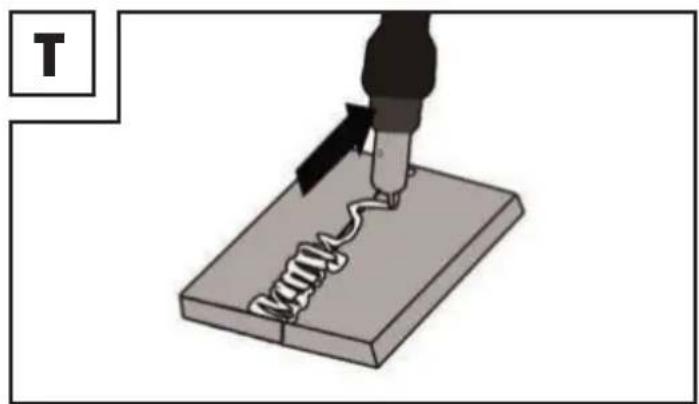
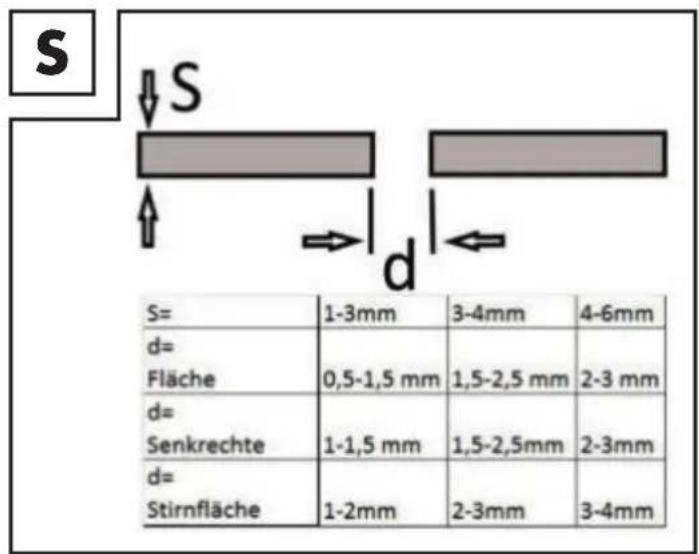
is slowly guided along the desi- red edge. The distance between the torch nozzle and workpiece should be as small as possible (it must not be greater than 10 mm). If necessary, oscillate a little to increase the size of the weld pool. For inexperien- ced welders, it is often difficult initially to create a decent electric arc. To do so, the welding current and wire feed rate must be set correctly. You can work out the ideal settings for the welding current and the wire feed rate by carrying out trial welds on a test piece. A properly set electric arc has a mild, uniform buzzing sound. The penetration depth (corresponds to the depth of the weld in the material) should be as deep as possible without allowing the welding pool to fall through the workpiece. Reduce the wire feed rate in case of a rough or hard rattle or switch to a higher power level (increase welding current). If the wire feed rate is too high and/or the welding current too low, the welding wire will not melt properly. Consequently, the welding wire repeatedly dips in the welding pool as far as the workpiece. A quiet, muffled sound with a flickering electric arc indicates the wire feed is too low. Increase the wire feed rate or switch to ... / Commissioning42 GB / IE a lower welding current. If the welding current is too high, the wire will melt before it even reaches the weld pool. This results in droplet formation on the welding wire as well as splash and an irregular electric arc. The slag must only be removed from the weld after cooling off. To continue wel- ding on an interrupted weld: First remove the slag at the starting point. The electric arc is ignited in the weld groove, guided to the continuation point, melted properly and finally the weld is continued. CAUTION! Note that the torch always must be put down on an insulating support after welding. Always switch off the welding device af- ter completing welding work and during breaks and pull the plug from the mains socket. z Creating a weld Forehand welding Push the torch forwards. Result: The penetration depth is lower, broader weld width, flatter weld bead (visi- ble surface of the weld) and greater fusion error tolerance (defect in material fusion). Backhand welding The torch is dragged from the weld. Result: Greater penetration depth, narrower weld width, higher weld bead and lower fusion error tolerance. Welded joints There are two-basic types of joints in wel- ding: Butt welds (outer edge) and fillet welds (inner edge and overlapping). Butt welds With butt welds of up to 2 mm, the weld edges are completely brought together. For greater thicknesses, please proceed as per the following table:

Flat butt welds Welds should be made without interruption and with a sufficient penetration depth. The- refore, it is extremely important to prepare them well. The factors that influence the qua- lity of the weld result are: the amperage, the distance between weld edges, the inclination of the torch and the corresponding diameter of the welding wire. The steeper you hold the torch against the workpiece, the higher the penetration depth and vice versa.

To forestall or reduce deformations that can happen during the material hardening pro- cess, it is good to fix the workpiece with a device. Avoid stiffening the welded structure to prevent cracks in the weld. These pro- blems can be avoided if there is a possibility of turning the workpiece so that the weld can be carried out in two passes running in opposite directions. Commissioning43 GB / IE

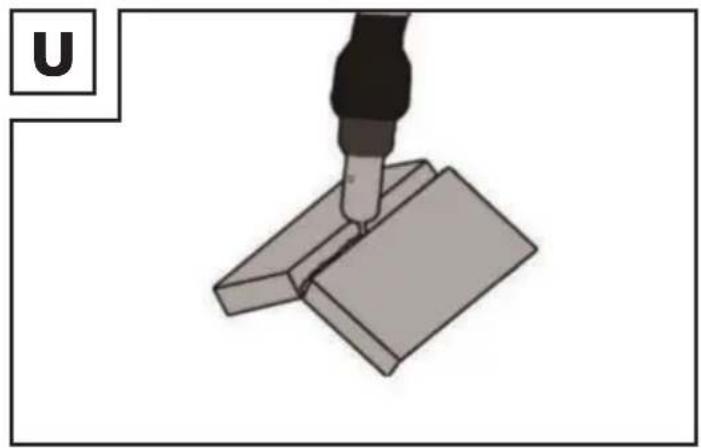
Welds on the outer edge The preparation for this is very simple.

However, it is no longer expedient for thicker materials. In this case, it is better to prepare a joint as shown below, in which the edge of the plate is angled.

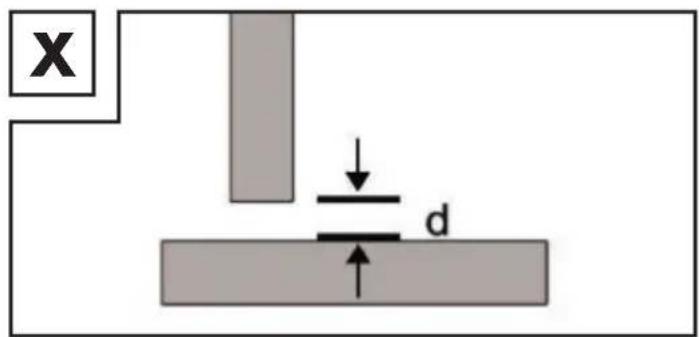
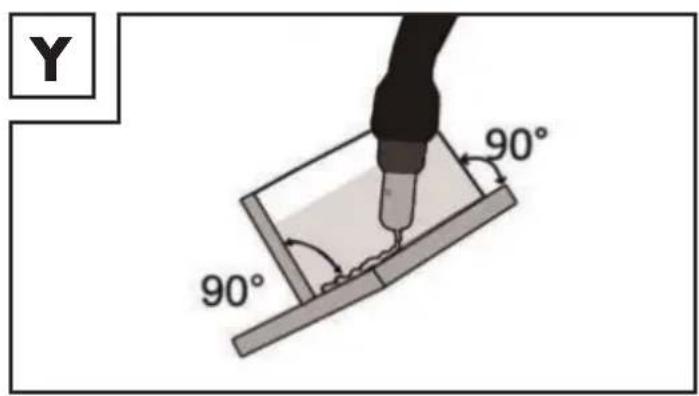
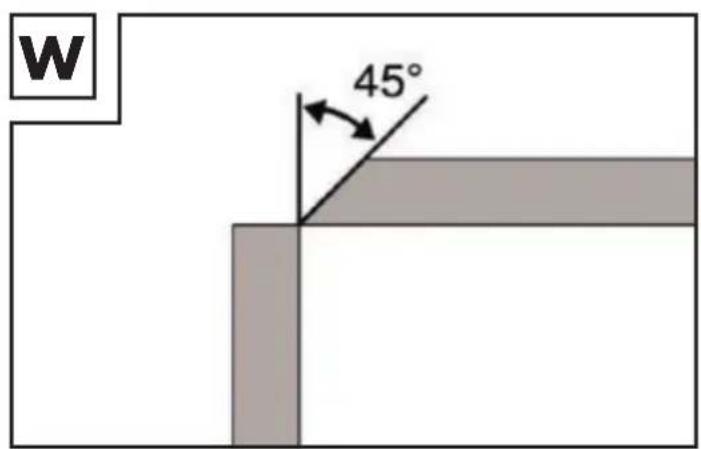
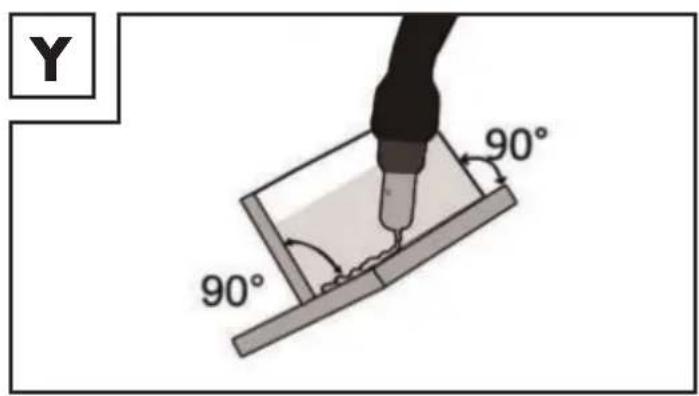
Fillet weld connections A fillet weld is created if the workpieces are perpendicular to each other. The weld should be shaped like a triangle with sides of equal length and a slight fillet. Welds on an inner corner The preparation for this weld joint is very simply and is carried out for thicknesses of 5 mm.The dimension “d” needs to be reduced to a minimum and should always be less than 2 mm.

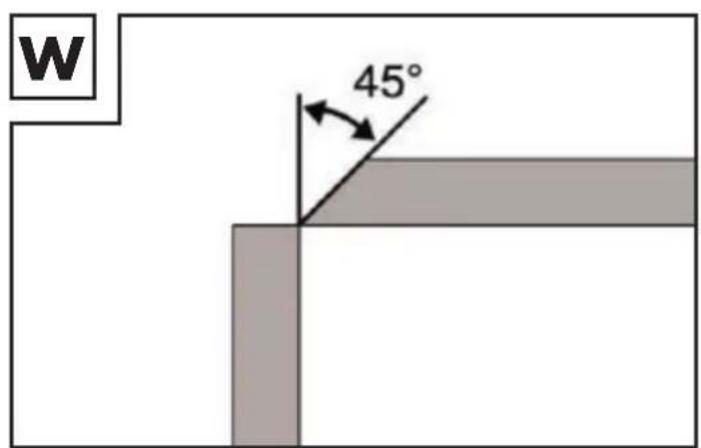
However, it is no longer expedient for thicker materials. In this case, it is better to prepare a joint as shown in Figure W, in which the edge of the plate is angled.

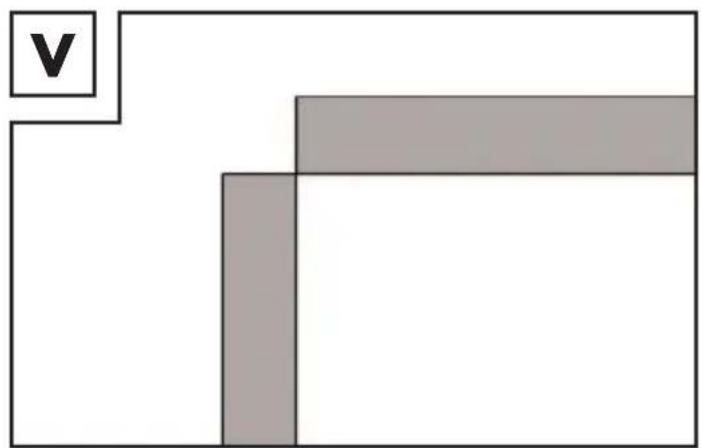
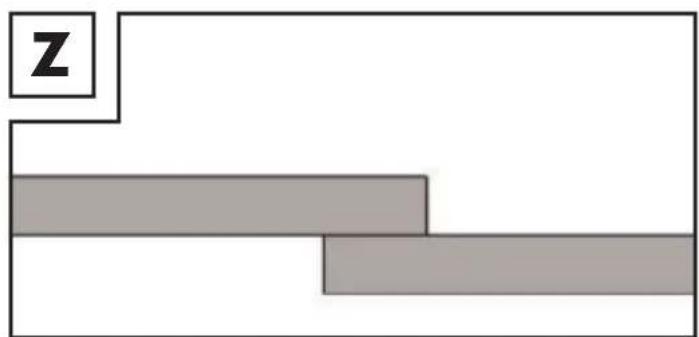
Overlap welds The most common preparation is that with the straight weld edges. The weld can be released using a standard angle weld. Both workpieces must be brought as close to each other as possible.

Commissioning44 GB / IE z Maintenance and cleaning Note: The welding device must be regularly serviced and overhauled for proper function and for compliance with the safety require- ments. Improper and wrong operation may cause failures and damage to the device. Have repairs only conducted by qualified electricians. Switch off the main power supply and the main switch of the device off prior to performing any maintenance or repair work on the welding device. Clean the interior and exterior of the wel- ding device regularly. Use compressed air, cotton waste or a brush to remove dirt and dust on the inside. In case of a defect or a necessary repla- cement of equipment parts, please con- tact the appropriate qualified personnel. z Information about recycling and disposal Don’t waste, recycle! Always recycle the device, acces- sories and packaging in an environmentally-friendly manner. Do not dispose of the welding devi- ce in household waste, in fire or in water. Devices which are no longer functional should be recycled whenever possible. Ask your local dealer for help. z EU Declaration of Conformity We, C. M. C. GmbH Documentation officer: Dr. Christian Weyler Katharina-Loth-Str. 15 DE-66386 St. Ingbert GERMANY declare in our sole responsibility the product Flux cored wire welder Article number: 2301 Year of manufacture: 2021 / 04 IAN: 345149_2004 Model: PFDS 120 A2 meets the basic safety requirements of Euro- pean Directives EC low-voltage directive 2014/35/EU EU directive on electromagnetic com- patibility 2014/30/EU RoHS directive 2011/65/EU + 2015 / 863 / EU and their amendments. The manufacturer bears sole responsibility for compiling the declaration of conformity. The object of the declaration described above meets the requirements of Directive 2011/65/EU of the European Parliament and Council dated June 8th, 2011, restric- ting the use of certain hazardous substances in electrical appliances. The conformity assessment is based on the following harmonized standards: EN 60974-1:2012 EN 60974-10:2014/A1:2015 St. Ingbert, June 1st, 2020 by proxy (i. A.) Dr. Christian Weyler - Quality assurance - Maintenance and cleaning / Warranty and service information / EU Declaration...45 GB / IE z Warranty and service infor- mation Creative Marketing & Consulting GmbH warranty Dear customer, we offer 3 years of warranty from the date of purchase for this device. In the event of defects in this product, you have legal rights against the seller of the product. These legal rights are not limited by our warranty described below. z Warranty conditions The warranty period begins with the date of purchase. Please retain the original sales receipt. This document is required as proof of purchase. Should this product have a material or manufacturing error within three years of the purchase date, the product will be repaired or replaced – dependent on our choice – by us at no cost to you. This warranty service requires that you retain proof of purchase (sales receipt) for the defective device for the three-year period and that you briefly explain in writing what the fault entails and when it occurred. If the defect is covered by our warranty, you will receive the repaired or a new product back. A repair or exchange of the device does not start a new warranty period. z Warranty period and statu- tory warranty claims The warranty period is not extended by the warranty. This also applies to replaced and repaired parts. Any damage or defects already present at the time of purchase must be reported immediately after unpacking. Repairs after the warranty period have expired are subject to a charge. z Extent of warranty The device has been manufactured accor- ding to strict quality guidelines and meticu- lously examined before delivery. The warranty applies to material or manufac- turing defects. This warranty does not extend to product parts which are subject to normal wear and tear and can thus be regarded as consumable parts, or for damages to fragile parts, e.g. switches, rechargeable batteries, or parts made from glass. This warranty is void if the product has been damaged, improperly used or serviced. For proper use of the product, all of the instruc- tions given in the operating instructions must be followed precisely. Uses and acts that the operating instructions advise or warn against are to be avoided without question. The product is intended only for private and not for commercial use. The warranty beco- mes void in the event of misuse and impro- per use, use of force, and any interference not carried out by our authorized service branch. z Processing of warranty claims Please follow the instructions below to ensure quick processing of your claim: Please retain proof of purchase and the article number (e.g., IAN) for all inquiries. The product number can be found on the type plate, an engraving, the cover page of your instructions (bottom left), or the sticker on the back or bottom. If any malfunctions or other defects occur, please first contact the service department named below by telephone or e-mail. You Warranty and service information / Service46 GB / IE can then forward a product recognized as defective with a proof of purchase (sales receipt) and a statement indicating what the fault entails and when it occurred to the service address, which will be given at no cost to you for postage. Note: You can download this handbook and many more, as well as product videos and software at www.lidl-ser- vice.com. This QR code takes you directly to the Lidl service page (www.lidl-service.com) and you can open your operating instructions by entering the article number (IAN) 345149. z Service How to contact us: GB / IE Name: C. M. C. GmbH Internet address: www.cmc-creative.de E-mail: service.gb@cmc-creative.