USER MANUAL Nespresso Atelier XN8908 KRUPS

My machine
WORKSHOP
MY MACHINE*
KRUPS
NESPRESSO®
| EN Instruction manual | FR Guide de l'utilisateur | 2 |
| DE Bedienungsanleitung | IT Istruzioni per l'uso | 36 |
| ES Manual de instrucciones | PT Manual de Instruções | 70 |
| NL Gebruikershandleiding | GR Еүхειρίδιο Оδηγιών | 104 |
| RU Руководство по эксплуатации | 139 |
Specifications
| ~ | 220-240V~1250-1500 W | Frequency (Hz): 50-60 HzProtection class: Class I |
| Pmax | Max 19 bar |
| ~ 4.5 kg |
| 1.0 L |
| 11.9 cm | 27.9 cm | 48.4 cm |
Table of Contents
Unplug the damaged power cord.

Caution: hot surface.

CAUTION: when this symbol appears, please consult the safety instructions to prevent any hazard and potential damage.

INFORMATION: when this symbol appears, please acquaint yourself with the advice for using your machine in an appropriate, safe manner.

CAUTION: these safety instructions are an integral part of the machine. Read them carefully before using your new machine for the first time. Keep them in an easy-to-find place where you can refer to them at a later stage.
- This machine is designed to prepare drinks according to these instructions. Only use the machine for its intended purposes.
- This machine was only designed for indoor use, under non-extreme temperature conditions.
- Protect your machine from direct sunlight, water splashes and humidity.
- This machine is intended for household use only. It is not designed for use in staff kitchens of shops, offices, and other work environments, nor on farms, nor for use by guests of hotels, motels, and other residential-type environments.
- This machine may be used by children aged 8 years and above under adult supervision, provided they have received instructions on safe use and are fully aware of the risks involved. Cleaning and maintenance must not be performed by children unless under adult supervision.
- Ensure that children under 8 years of age do not have access to the machine or its power cord.
- This machine can be used by persons with reduced physical, sensory, or mental abilities, or lack of experience and knowledge,
provided they are supervised or have been instructed on safe use and fully understand the hazards involved.
- This device is not intended for use by persons (including children) with reduced physical, sensory, or mental capabilities, or lack of experience and knowledge, unless they have been given supervision or prior instruction concerning use of the machine by a person responsible for their safety.
- Ensure that children do not play with the machine. Children should be supervised to ensure that they do not play with the
machine.
In the event of commercial use, inappropriate usage, or mishandling, the manufacturer disclaims all liability and the warranty will not apply, as well as for damage resulting from unsuitable use, improper use, repairs performed by untrained individuals, or failure to observe the instructions.
Avoid risks of fatal electric shock and fire.
- In the event of an emergency: immediately unplug the machine from the electrical outlet.
- Only plug the machine into suitable outlets that
are easily accessible and earthed. When using an adaptor, ensure that it provides a properly earthed connection. Ensure that the voltage of the power supply matches that indicated on the rating plate. Any use of an unsuitable electrical connection will lead to cancellation of the warranty.
The machine must only be plugged in once it is set up.
- Do not pull the power cord over sharp edges, and be sure to attach it or to let it hang freely.
- Keep the power cord away from all sources of heat and humidity.
- If the power cord or outlet are damaged, they must be replaced by the manufacturer, the service agent or individuals who have identical qualifications, in order to prevent any risk.
- Do not operate the machine if the cord or outlet are damaged. Return the
machine to Nespresso or to an authorised Nespresso retailer.
- Where the use of an extension cord is required, only use an earthed power cord, whose conductor has a cross-section of at least 1.5 mm 2 or matching input power.
- To prevent all hazards, never place the machine on or near hot surfaces such as radiators, cooking plates, ovens, gas burners, open flame or all other similar heat sources.
- Always place the machine on a stable, level and flat surface. The surface must be resistant to heat and liquids such as water, coffee, descaling product or any other similar liquid.
- During use, never place the machine in a piece of furniture.
- In the event of a prolonged period of non-use, unplug the machine from the electrical outlet.
- Unplug the machine by pulling on the plug rather than the power cord to prevent damage to the cord.
- Prior to cleaning and maintaining your machine, unplug it from the electrical outlet and let it cool.
- To unplug the machine, cancel the preparation, then remove the plug from the electrical outlet.
- Never touch the power cord with wet hands.
- Never immerse the machine, in whole or in part, in water or in any other liquids.
- Never wash the machine or its components in a dishwasher, except for the milk frother and the capsule container.
- The simultaneous presence of electricity and water is dangerous and may cause fatal electrical shocks.
- Do not open the machine. Dangerous voltage contained inside the machine!
- Never place anything other than a coffee capsule in the opening intended for this purpose. To do so would risk causing a fire or fatal electrical shocks!
- The use of accessories not recommended by the
manufacturer may cause a fire, electrical shock or injury.
Prevent damage that may be caused by the machine's use.
- Never leave your machine unsupervised while it is in operation.
- Do not use the machine if it is damaged, if it has fallen or if it does not work perfectly. Immediately unplug it from the electrical outlet. Contact Nespresso or an authorised Nespresso retailer to repair or adjust your machine.
- Damaged machine may cause electrical shocks, burns and fires.
- Always fully close the lever and never lift it while the machine is in operation. Burns may occur.
- Do not put your fingers under the coffee outlet or the milk frother connection; this can pose a burn hazard.
- Do not put your fingers in the capsule compartment or in the capsule container. This poses an injury hazard.
- Do not touch the surfaces that become hot during or after a preparation or descaling: the coffee outlet, the milk frother and the milk frother connection.
- To prevent injury, do not use the milk frother without a glass. • To prevent injury, do not touch the milk frother while it is spinning.
- When a capsule has not been perforated by the blades, water may flow around a capsule and damage the machine.
- Never use a used, damaged or misshapen capsule.
- If a capsule is blocked in the capsule compartment, turn off the machine and unplug it prior to performing any operation. Call Nespresso or an authorised Nespresso retailer. • Always fill the water tank with cold, drinking water.
- Empty the water tank if the machine is not used for an extended period (holidays, etc.).
- Replace the water in the water tank when the machine is not used for a week-end or a similar length of time.
- Do not use the machine without the drip tray and drip grid to prevent liquid from spilling onto surrounding surfaces.
- Never clean your machine using a cleaning product or solvent. Use a soft, non-abrasive, damp cloth and a gentle detergent to clean the surface of your machine.
- To clean the machine, only use clean material.
- This machine is designed for Nespresso coffee capsules exclusively available via Nespresso or your authorised Nespresso retailer.
- All Nespresso machines are subject to strict controls. Reliability tests, performed under real usage conditions, are conducted at random on selected units. Some machines may therefore present signs of prior use.
- Nespresso reserves the right to modify this user manual without prior notice.
Descaling
- When used correctly, the Nespresso descaling product will ensure the proper operation of your machine throughout its service life and an optimal tasting experience, cup after cup.
- The Nespresso descaling product is specially designed for Nespresso machines; the use of any other unsuitable product would risk damaging the machine's components or provide insufficient descaling.
- Your Nespresso machine determines the moment when descaling is required, based on the quantity of water used and your water's hardness level. This level is defined during the first use by means of the water hardness test stick. Consider performing a new water hardness test if you are using your machine in another region or country.
- Descale your machine as soon as it indicates that this is required. If you perform the operation too late, descaling may not be completely effective.
- Descaling is mandatory when the machine indicates that this is required (blinking "Descaling" alert indicator light). To protect your machine's internal components, if descaling is not performed, after a few cycles, the "Descaling" alert indicator light lights up steadily and the machine locks itself until the descaling is performed. • Perform descaling according to the instructions. Send them to any new user of the machine. This user manual is available in PDF format on nespresso.com
KEEP THESE
INSTRUCTIONS
Tasting Box of Nespresso Capsules
Water Hardness Test Stick, in the User Manual
Milk frother and descaling information
With the Nespresso Original system, you're invited to enjoy the essence of an espresso, with or without milk. Inspired by the Italian coffee tradition, it's a timeless experience at the touch of a button. The Nespresso Original machines and capsules offer an array of aromas to fit all coffee tastes. Espresso or lungo, black or in a recipe, always layered with a soft crema or an indulgent foam. This is only made possible thanks to the 19-bar pressure in every machine. It extracts the optimal flavours from each capsule, to reveal them in your cup.
Nespresso Original, classic in its own way.
THE EXPERIENCE OF A CLASSIC ESPRESSO
CAUTION: when this symbol appears, please consult the safety instructions to prevent any potential hazard and damage.

INFORMATION: when this symbol appears, please acquaint yourself with the advice provided to ensure safe, compliant use of your machine.

First, read the safety instructions to prevent hazards of fatal electrical shock and fire.
- Only plug the machine into suitable outlets that are easily accessible and earthed. When using an adaptor, ensure that it provides a connection that is properly earthed. Ensure that the voltage of the power supply is the same as the one indicated on the rating plate. The use of an unsuitable electrical connection voids the warranty.
- Where the use of an extension cord is required, only use an earthed power cord, whose conductor has a cross-section of at least 1.5 mm².

As long as the machine has not completed the priming, it will not produce any coffee.
Descaling is mandatory when the machine indicates that this is required (blinking "Descaling" alert indicator light). If descaling is not performed, after 30 cycles, the "Descaling" alert indicator light lights up steadily and the machine locks itself until the descaling is performed.

When unpacking the machine, place it on a horizontal, stable, uncluttered work surface. Remove the water tank, drip tray, drip base and capsule container. Remove the milk frother from its storage.
② Position the cord to the right or left of the machine (according to your preference) by using the housing intended for this purpose under the machine.
3 Plug the machine into the mains.
First use or after a long period of non-use /
5 Place the water tank on its base, then insert the capsule container and the drip tray. Place the milk frother.
Refer to the "Assembly/Disassembly of the milk frother" paragraph.
6 Turn on the machine by pressing one of the 9 keys for 1 second.
7 The 9 recipe keys blink. The machine is in startup mode. If only 3 keys are blinking, check that the milk frother is properly inserted.
8 Place a container (600 ml) under the head.
9 Lift the lever and leave it in an open position.
⑪ Priming is completed. Lower the lever.
Light will blink while the machine is heating up. Steady light indicates the machine is ready for rinsing.
This step consists of defining the water hardness (i.e. the limestone level) so that the machine personalises how frequently descaling is performed. The water hardness level can be tested with the water hardness stick available on the first page of the user manual. The water hardness is set at 4 by factory default.
Wet it in the water that you will be using. Analyse the water hardness level using the water hardness table.
① Turn on the machine by pressing one of the 9 keys for 1 second.
② Simultaneously press the Cold Foam + Mocha keys for 3 seconds: the "Descaling" and "Clean" alert indicator lights light up and the Lungo, Hot Foam, Cold Foam, Espresso and Latte Macchiato keys blink.
3 Press the key that matches the hardness measured. The key blinks 3 times to confirm the new selected value.
④ The machine automatically exits from the Water Hardness Setting Menu mode.
NOTE: the Water Hardness Setting Menu mode deactivates after 15 seconds of inactivity.
Never lift the lever during operation and refer to the important safeguards to avoid possible harm when operating the appliance.

① Turn on the machine by pressing one of the coffee keys (Ristretto, Espresso, Lungo)
2 Lift the lever completely and insert a capsule.
4 Adjust the position of the drip tray according to your cup. Make sure the drip tray is properly placed.
5 Press the Ristretto, Espresso or Lungo key. The selected key blinks while the coffee is flowing and lights up steadily once the recipe is done. The preparation will stop automatically. To stop the coffee flow at any time, press the selected recipe key again.
To top up your coffee, press the selected recipe again.
6 Once preparation done, take the cup. Lift and close the lever to eject the capsule.
NOTE: while the machine turns on, you may press any coffee key. The coffee will automatically flow as soon as the machine is ready.
For perfect foam, use refrigerated UHT or pasteurized milk skimmed or semi-skimmed (approximately 4°C).
You can use soy, almond or oat drink for your milk preparations.
The volume of milk foam depends on the nature of the milk used, its temperature, the cup and the position of the milk frother in the mug.
It is required to clean the milk frother after each recipe. Refer to the "Daily Maintenance" paragraph.
For the recipes using ice cubes, pieces of chocolates, ensure that they do not impede the milk frother's motion during the preparation of the recipe.
When positioning the milk frother in your mug, ensure that it is not in contact with the sides or bottom of your mug.
To prevent any overflow, it is strongly recommended to respect the following instructions.
For perfect results when making your milk-based recipe, it is recommended to use the Nespresso View Mug (270 ml) found in the box and available in your Nespresso boutique.
① Lift up the head using the handle and place the milk frother.
Refer to the "Assembly/Disassembly of the milk frother" paragraph.
2 Put the ingredients and the milk according to the recipe you want to prepare in your VIEW mug (see the recipes page). Place it under the head and lower the head until the milk frother is immersed.
3 Only when preparing a milk recipe with coffee, completely lift the lever and insert a capsule. Close the lever.
4 Press the recipe key. The milk frothing starts automatically. The selected recipe key blinks slowly while it is being prepared.
5 Only when preparing a recipe with coffee: once the milk frothing is done, the coffee will automatically flow.
The Espresso key lights up at the end of the preparation for top up your coffee.
6 Once the preparation is completed, the "Clean" indicator light lights up orange. Lift up the head, remove the milk frother by means of its grip area. The "Clean" indicator light turns off. Clean the milk frother by diswashing or hand washing. Put the milk frother back in its housing.
i Be sure to wait for the end of the preparation and the "Clean" indicator light to light up before handling the milk frother. It is important to take the milk frother by its grip area intended for this purpose because the milk frother may be hot after completion of preparation.
⑦ Take the cup. Lift and close the lever to eject the capsule when preparing a recipe with coffee.
![graph LR A["Cappuccino Latte macchiato"] --> B["Blends with liquid"] B --> C["Printer"] C --> D["Donut with coffee cup icon"] C --> E["Donut with coffee cup icon"]](/content/2026/03/484067/images/7fb0a7d4c7e7da8a7f9212fb436c7257170828ec71bcae8e8186522db7ec7b5b.jpg)
![graph LR A["Mocha"] --> B["Step 1: Round-over cup with coffee cup"] B --> C["Step 2: Round-over cup with coffee cup"] C --> D["Step 3: Round-over cup with coffee cup"] D --> E["Final Product: Round-over cup with coffee cup"]](/content/2026/03/484067/images/539f36660a41c95bb06fcea9cd2387dbc0fa1c6dc891bf665a24848ad1ec20ca.jpg)
![graph LR A["Iced frappé"] --> B["Drain"] B --> C["Recovery into machine"] C --> D["Ordering"] D --> E["Product with coffee cup icon"]](/content/2026/03/484067/images/f01d2db7925635c3b35ea08de8bee84e91cb174784e8ac452cbdec1f5151f341.jpg)
For perfect foam, use refrigerated UHT or pasteurized milk skimmed or semi-skimmed (approximately 4°C).
You can use soy, almond or oat drink for your milk preparations.
The volume of milk foam depends on the nature of the milk used, its temperature, the cup and the position of the milk frother in the cup.
It is required to clean the milk frother after each recipe. Refer to the "Daily Maintenance" paragraph.
For the recipes using ice cubes, pieces of chocolates, ensure that they do not impede the milk frother's motion during the preparation of the recipe.
When positioning the milk frother in your cup, ensure that it is not in contact with the sides or bottom of your cup.
To prevent any overflow, it is strongly recommended to respect the following instructions.
① Lift the head of the machine and place the milk frother.
Refer to the "Assembly/Disassembly of the milk frother" paragraph.
3 Put in your cup the ingredients and the milk according to the recipe that you want to prepare, place it under the head of the machine and lower it.
② Put the drip tray on the high position. If your mug is too tall to fit under the head of the machine, place the drip tray in the low position or remove the drip tray.
5 Only when preparing a milk recipe with coffee, completely lift the lever and insert a capsule. Close the lever.
6 Press the recipe key. The milk frothing starts automatically. The selected recipe key blinks slowly while it is being prepared.
8 Once the preparation is complete, the "Clean" indicator light lights up orange. Lift up the head, remove the milk frother by means of its grip area. The "Clean" indicator light turns off. Clean the milk frother. Be sure to wait for the end of the preparation and the "Clean" indicator light to light up before handling the milk frother. It is important to take the milk frother by its grip area intended for this purpose because the milk frother may be hot after completion of a preparation.
① Turn on the machine by pressing one of the coffee keys (Ristretto, Espresso, Lungo).
② Lift the lever completely and insert a capsule.
③ Close the lever and place a cup under the coffee outlet.
4 Press and hold the Ristretto, Espresso or Lungo key. Release the key as soon as the desired volume is reached.
5 The programmed key blinks rapidly 3 times to confirm the new setting. The coffee volume level is now stored.
NOTE: We recommend that you maintain the factory settings for Ristretto, Espresso and Lungo to ensure the best results in your cup for all our black coffees.
① Turn on the machine by pressing one of the coffee keys (Ristretto, Espresso, Lungo).
② Simultaneously press the Lungo and Mocha keys for 3 seconds to activate the Factory Settings Menu. The Lungo and Mocha keys blink 3 times.
3 The factory settings are restored. The machine automatically exits from the Factory Settings Menu mode.
① Turn on the machine by pressing one of the coffee keys (Ristretto, Espresso, Lungo)
4 The programmed key blinks 3 times to confirm the new selected value.
3 Press one of the Hot Foam, Latte Macchiato and Cappuccino keys to select the desired automatic power off time. You have 15 seconds to program the desired value by pressing the corresponding key.
5 The machine automatically exits from the Automatic Power Saving Setting Menu mode.
NOTE: the Automatic Power Saving Setting Menu mode deactivates after 15 seconds of inactivity.
① Lift and close the lever to eject the capsule. Remove the milk frother.
② Gently pull on the drip tray to remove the drip base and the capsule container at the same time. Empty them, rinse them using drinking water, dry them using a clean, damp cloth, then put them back in place.
3 Remove the water tank, fill it with fresh drinking water. Place a container under the coffee outlet (600 ml), press the Lungo key to rinse the machine.
Descaling is mandatory when the machine indicates that this is required (steady "Descaling" alert indicator light). The machine locks itself until the descaling is performed.
Refer to the safety instructions

- To ensure the proper operation of your machine throughout its service life and to maintain a coffee experience as perfect as on its first day, we recommend the following instructions. Descaling is mandatory when the machine indicates that this is required (blinking "Descaling" alert indicator light). To protect your machine's internal components, if descaling is not performed, after 30 cycles, the "Descaling" alert indicator light lights up steadily and the machine locks itself until the descaling is performed.
- Your Nespresso machine determines the moment when descaling is required, based on the quantity of water used and your water's hardness level. This level is defined during the first use by means of the water hardness test stick. (Refer to "Water Hardness Setting").

The descaling process lasts approximately 25 minutes, including a 20-minute descaling cycle and a 5-minute rinse cycle.
During the descaling cycle, your presence is required, as you will be asked to perform several operations.

② Lift and close the lever to eject the capsule.
③ Empty the drip tray, drip base, and capsule container. Fill the water tank with 500 ml of fresh drinking water. Pour 1 pouch of Nespresso liquid descaling agent into the water tank.
6 To enter the descaling mode, simultaneously press the Lungo + Ristretto keys for 3 seconds. Both keys blink. To start the descaling program, press the same keys again. The "Descaling" alert indicator light stays lit orange during the entire descaling process. Once in descaling mode, the procedure below must be fully performed so that the machine may return to normal mode. Any interruption (stoppage of the machine, power outage, etc.) will return the machine to the start of the descaling phase.
⑨ Rinse the water tank and completely fill it with fresh drinking water.
10 Press the Lungo + Ristretto keys again. Rinsing continues via the coffee outlet and the milk frother. The Lungo + Ristretto keys blink.
Once rinsing is done, the machine goes back to ready mode and the "Descaling" alert indicator light shuts off. Remove and store the milk frother in its housing. Fill the water tank with fresh drinking water.
② Clean the machine using a damp cloth. You have completed the machine's descaling.
Priming, after emptying or unpriming /
3 Place a container (600 ml) under the head of the machine. Place a container (600 ml) under the head of the machine.
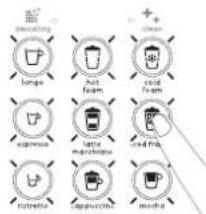
① Insert the milk frother. Turn on the machine by pressing one of the 9 keys for 1 second. The milk frother must be inserted before starting the procedure.
2 Remove the water tank. Lift the lever to eject the capsule. Leave the lever open. Place a container (600 ml) under the head.
③ Simultaneously press the Cold Foam + Ristretto keys for 3 seconds: both keys blink.
4 Simultaneously press the Cold Foam + Ristretto keys again. Some steam may come out of the coffee outlet and milk frother during emptying.
6 Once emptying is done, both keys blink 3 times and the machine turns off automatically.
5 The keys blink softly and emptying is underway.
⑦ Close the lever. Remove the container, milk frother, drip tray, capsule container and drip base. Clean them.
Videos are available via the Nespresso Mobile Application and on www.nespresso.com – Consult the "Services" section.
| No light on the keys and indicator lights. - Check the outlet, plug, voltage and fuse. |
| - Turn on the machine by pressing one of the 9 keys for 1 second.- If the problem persists, call Nespresso. |
| The "Descaling" alert blinks orange and the milk-based drinks keys work. | - Descaling is required: a few cycles remain before your machine locks itself. Descale the machine. |
| When you press the recipe key, it does not start and the "Descaling" alert, Lungo and Ristretto keys blink. | - The machine is in safety mode against scale; use is blocked. Descale the machine; refer to the "Descaling" paragraph. |
| During descaling, the Lungo + Ristretto keys blink and the "Descaling" indicator light remains lit. | - Your water tank is empty, but the descaling cycle is not completed. Rinse the water tank and completely fill it with fresh drinking water. Press the Lungo + Ristretto keys to resume the cycle. |
| The 9 keys blink quickly non-stop. | - The water tank is empty. Several recipes in a row were launched with no water in the water tank; the priming mode will be launched after pressing any key. Pour water in the water tank. Place the milk frother and a container under the head. Some water may come out of it after pressing a key. |
| The recipe key blinks rapidly during preparation. - The water tank is empty. Fill the water tank. |
| The milk foam is insufficient. - | Use refrigerated skimmed or semi-skimmed milk (approximately 4°C).- Rinse the milk frother after each preparation.- Descale the machine (see the "Descaling" paragraph).- Refer to the paragraph "Milk recipe preparations".- Correctly center the cup relative to the machine.- Clean the milk frother connection. |
Milk-based recipes keys do not light up. - Set up the milk frother so that all keys light up.
| Milk overflows from the mug during preparation. - Refer to "Milk recipe preparations" paragraph prior to making milk-based preparations to adjust the quantity of milk or to choose a more suitable mug. |
| The "Clean" alert is a steady orange light. - Remove the milk frother. Rinse it. |
| The lever does not fully close. | - Empty the capsule container. Ensure that there are no capsules blocked in the capsule container. |
| Leakage around the capsule (water present in the capsule container). | - Properly insert the capsules. In the event of a leak, call Nespresso. |
| No coffee, no water. - The water tank is empty: fill it. | - Descale if necessary, see the "Descaling" paragraph. |
| The coffee flows very slowly. - The flow rate depends on the capsule type. | - Descale if necessary, see the "Descaling" paragraph. |
| No coffee, only water is flowing (despite having inserted a capsule). | - Call Nespresso. |
| The coffee is not hot enough. - Preheat the cup. | - Perform a rinse of the machine.- Descale if necessary, see the "Descaling" paragraph. |
| Cannot go to the Menu Mode (e.g. "Descaling" "Automatic Power Saving Setting"). | - Tum on the machine.- Ensure that you simultaneously press the keys for 3 seconds.- Plug/unplug the machine.- If the problem persists, call Nespresso. |
| Irregular blinking. | - Send the machine to the repair center or call Nespresso. |
| The 9 keys blink simultaneously for 10 seconds and the machine turns off. | - Breakdown Alarm: Arrange to have the machine repaired or call Nespresso. |
Troubleshooting


Your machine contains precious materials that may be recovered or recycled. The separation of the remaining waste into various categories, makes it easier to recycle the precious raw materials. For more information on waste disposal, contact local authorities.

For more information, in the event of a problem or to simply ask for advice, call the Nespresso Club. Nespresso Club contact information is presented in the "Welcome to Nespresso" holder in your machine's box or via www.nespresso.com
Krups guarantees this product against all material and manufacturing defects over a period of two years starting from the purchase date or delivery date. A proof or purchase is required to validate this guarantee. During this period, Krups will, at its discretion, repair or replace any defective product at no additional cost to its owner. The replacement products or repaired parts will be exclusively guaranteed for the non-expired portion of the initial guarantee or for six months, the actual duration being the longer of the two. This limited guarantee shall not apply to any defect resulting from an accident, inappropriate use of the machine, improper maintenance or normal wear and tear nor commercial use. Unless set out in current legislation, the conditions of this limited guarantee shall not exclude, restrict or modify the statutory legal rights pertaining to your purchase. For full details of the terms and conditions of this guarantee please visit: www.krups.com
If you consider your product to be defective, contact Nespresso for details regarding the address where it should be sent or brought for repairs. Please consult our website, www.nespresso.com, to learn more about Nespresso.
![graph LR A["Cappuccino Latte macchiato"] --> B["Chassis with liquid"] B --> C["Blender with teapot icon"] C --> D["White coffee bean with coffee cup icon"] C --> E["White coffee bean with coffee cup icon"]](/content/2026/03/484067/images/00ba8ea7571b812706788c8f3b525fc068b8a1b883ed6b146c6c39fd47f79d10.jpg)
![graph LR A["Mocha"] --> B["Teapot with teapot and cup"] B --> C["Boiler with steamer and cup"] C --> D["Coffee cup with coffee cup icon"]](/content/2026/03/484067/images/59b02430ae568e6b52f3acd676409cf6e6a84708a528b5f07e99c9d1bc0269ce.jpg)
![graph LR A["Iced frappé"] --> B["Drain"] B --> C["Recovery into machine"] C --> D["Ordering"] D --> E["Product with coffee cup icon"]](/content/2026/03/484067/images/05e1df6627a4c8da47c0fc2ed07ffdef16d04521bf5973ee0c3db8b337aed099.jpg)
⑧ Place a container (600 ml) under the head.
① Remove the water tank.
Remove the water tank.
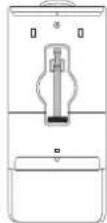
② Remove the milk frother from its compartment at the back of the coffee machine.
Remove the cappuccino accessory from the compartment at the back of the machine.
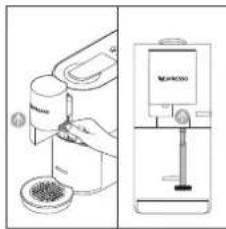
5 Lift the head, remove the milk frother by holding it by the grip area, and the "Clean" indicator will turn off. Clean the milk frother in the dishwasher or by hand with a non-aggressive/mild detergent. Put the milk frother back in its compartment.
Lift the extraction head, remove the cappuccino accessory by the handle and the "Cleaning" indicator light turns off. Clean the cappuccino accessory in the dishwasher or by hand with a mild/delicate detergent. Put the cappuccino accessory back in its compartment.
![graph LR A["«Iced frappé»"] --> B["Drain"] B --> C["Recovery into machine"] C --> D["Ordering"] D --> E["Product with coffee cup icon"]](/content/2026/03/484067/images/e99fef25bfc9ddaa8dc9d8624d9eb3acdf1ce01d7f27f7e5a3fd5d2983763e7c.jpg)
![graph LR A["Cappuccino Latte macchiato"] --> B["Preparation Machine"] B --> C["Coffee Maker"] C --> D["Two coffee bean icons"]](/content/2026/03/484067/images/9b1cc1feedb1d4ec7b1a007bec49795eae8248306187e30b1d00c984a0c56959.jpg)
![graph LR A["Mocha"] --> B["Adder"] B --> C["Adder with lid"] C --> D["Adder with coffee cup"] D --> E["Adder with coffee cup and coffee maker"]](/content/2026/03/484067/images/eba7b73d28e7410947151a861fc8eb31275462d2263256d78e6a07ca36212c3a.jpg)
![graph LR A["Iced frappé"] --> B["Topiram"] B --> C["Reactor with lid"] C --> D["Shaker with lid"] D --> E["Product with coffee cup icon"]](/content/2026/03/484067/images/acda3e26448ef5224634f3e0bea04089240ea113433b37445bb937c6ebe99779.jpg)
Gently pull the drip tray to remove the drip tray base and the capsule container at the same time. Empty and rinse them with tap water, then wipe them dry with a clean, damp cloth and place them back in the appliance.
② The 9 recipe keys blink continuously.
① Remove the water tank.
![graph LR A["Cappuccino Latte Macchiato"] --> B["Chassis with liquid"] B --> C["Blende with lid"] C --> D["White cup with teapot icon"] C --> E["White cup with teapot icon"]](/content/2026/03/484067/images/8114961be522bb80e89335073256901871bf87fd193b61bd4a9d192c263df72e.jpg)
![graph LR A["Mocha"] --> B["Adder"] B --> C["Boiler"] C --> D["Coffee Maker"] D --> E["Product"]](/content/2026/03/484067/images/b7cfdc111bc3458d537ec8eb08549fabee1e585c0b129f388c13a87e8e882979.jpg)
![graph LR A["Iced Frappé"] --> B["Teapot with cups"] B --> C["Add liquid into cup"] C --> D["Add steamer with lid"] D --> E["Coffee maker with coffee cup"] E --> F["Product with coffee cup icon"]](/content/2026/03/484067/images/ab17749c9f0046c4730a02e74ffe29ad70056fc075634211650616e5327ddeb9.jpg)