DSC-QX10 - Camera SONY - Free user manual and instructions
Find the device manual for free DSC-QX10 SONY in PDF.



User questions about DSC-QX10 SONY
0 question about this device. Answer the ones you know or ask your own.
Ask a new question about this device
Download the instructions for your Camera in PDF format for free! Find your manual DSC-QX10 - SONY and take your electronic device back in hand. On this page are published all the documents necessary for the use of your device. DSC-QX10 by SONY.
USER MANUAL DSC-QX10 SONY
text_image
Barcode image with black and white vertical bars, no visible text or symbols4480203110
AR
©2013 Sony Corporation
Printed in China
Cyber-shot
DSC-QX10/QX100
DSC-QX10/QX100
SONY®
4-480-203-11(1)
Digital Still Camera
natural_image
Empty rectangular frame with thin black lines on both sides (no text or symbols)Cyber-shot

MEMORY STICK TM
LITHIUM ION


DSC-QX10/QX100

PlayMemories
Home
You can download the image management software "PlayMemories Home" from the following URL.
http://www.sony.net/pm/
Owner's Record
The model and serial numbers are located on the back. Record the serial number in the space provided below. Refer to these numbers whenever you call your Sony dealer regarding this product.
Model No. DSC-QX10/DSC-QX100
Serial No.
WARNING
GB
To reduce fire or shock hazard, do not expose the unit to rain or moisture.
CAUTION
Battery pack
If the battery pack is mishandled, the battery pack can burst, cause a fire or even chemical burns. Observe the following cautions.
- Do not disassemble.
- Do not crush and do not expose the battery pack to any shock or force such as hammering, dropping or stepping on it.
-
Do not short circuit and do not allow metal objects to come into contact with the battery terminals.
-
Do not expose to high temperature above 60^ (140°F) such as in direct sunlight or in a car parked in the sun.
- Do not incinerate or dispose of in fire.
- Do not handle damaged or leaking lithium ion batteries.
- Be sure to charge the battery pack using a genuine Sony battery charger or a device that can charge the battery pack.
- Keep the battery pack out of the reach of small children.
- Keep the battery pack dry.
- Replace only with the same or equivalent type recommended by Sony.
- Dispose of used battery packs promptly as described in the instructions.
AC Adaptor
Use the nearby wall outlet (wall socket) when using the AC Adaptor.
Disconnect the AC Adaptor from the wall outlet (wall socket) immediately if any malfunction occurs while using the apparatus.
CE
Hereby, Sony Corporation, declares that this DSC-QX10/QX100 Digital Still Camera is in compliance with the essential requirements and other relevant provisions of Directive 1999/5/EC. For details, please access the following URL: http://www.compliance.sony.de/
Notice for the customers in the countries applying EU Directives
Manufacturer: Sony Corporation, 1-7-1 Konan Minato-ku Tokyo, 108-0075 Japan For EU product compliance: Sony Deutschland GmbH, Hedelfinger Strasse 61, 70327 Stuttgart, Germany
Notice
If static electricity or electromagnetism causes data transfer to discontinue midway (fail), restart the application or disconnect and connect the communication cable (USB, etc.) again.
This product has been tested and found compliant with the limits set out in the EMC regulation for using connection cables shorter than 3 meters (9.8 feet).
The electromagnetic fields at the specific frequencies may influence the picture and sound of this unit.
Disposal of Old Electrical & Electronic Equipment (Applicable in the European Union and other European countries with separate collection systems)

natural_image
Symbol of a trash bin crossed out by two diagonal lines (no text or numbers present)
This symbol on the product or on its packaging indicates that this product shall not be treated as household waste. Instead it shall be handed over to the applicable collection point for the recycling of electrical and electronic equipment. By ensuring this product is disposed of correctly, you will help prevent potential negative consequences for the environment and human health, which could otherwise be caused by inappropriate waste handling of this product. The recycling of materials will help to conserve natural resources. For more detailed information about recycling of this product, please contact your local Civic Office, your household waste disposal service or the shop where you purchased the product.
Disposal of waste batteries (applicable in the European Union and other European countries with separate collection systems)

natural_image
Symbol of a trash bin crossed out by two diagonal lines (no text or numbers present)This symbol on the battery or on the packaging indicates that the battery provided with this product shall not be treated as household waste.
On certain batteries this symbol might be used in combination with a chemical symbol. The chemical symbols for mercury (Hg)
or lead (Pb) are added if the battery contains more than 0.0005% mercury or 0.004% lead.
By ensuring these batteries are disposed of correctly, you will help prevent potentially negative consequences for the environment and human health which could otherwise be caused by inappropriate waste handling of the battery. The recycling of the materials will help to conserve natural resources. In case of products that for safety, performance or data integrity reasons require a permanent connection with an incorporated battery, this battery should be replaced by qualified service staff only.
To ensure that the battery will be treated properly, hand over the product at end-of-life to the applicable collection point for the recycling of electrical and electronic equipment.
For all other batteries, please view the section on how to remove the battery from the product safely. Hand the battery over to the applicable collection point for the recycling of waste batteries.
For more detailed information about recycling of this product or battery, please contact your local Civic Office, your household waste disposal service or the shop where you purchased the product.
For Customers in Singapore
Complies with IDA Standards DB00353
About the camera
The camera is designed to be connected to a smartphone via Wi-Fi. You can transfer images to a smartphone on the spot just after shooting.
Check the supplied items
- Rechargeable battery pack NP-BN (1)
- Micro USB cable (1)
- Wrist strap (1)
- Smartphone attachment (1)
- Instruction Manual (this manual) (1)
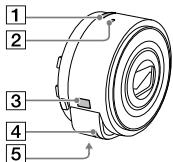
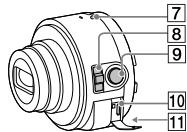
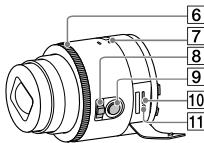
Name of main parts
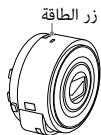
1 Power button
② Microphone
③ Display panel
: Indicates memory card not inserted
: Indicates remaining battery capacity
4 Hook for strap
5 Tripod socket
6 Control ring (DSC-QX100)
⑦ Power/Charge/Movie lamp
Green: Power ON
Orange: Charging
Red: Recording a movie
8 Zoom lever
9 Shutter button
10 Multi terminal
11 RESET button
text_image
1 2 3 4 5DSC-QX10
text_image
7 8 9 10 11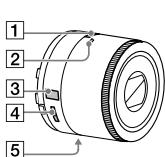
text_image
1 2 3 4 5DSC-QX100
text_image
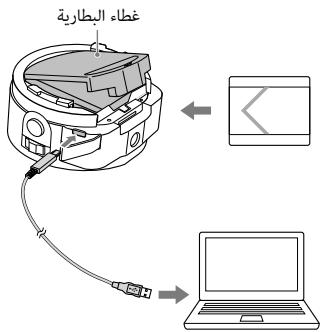
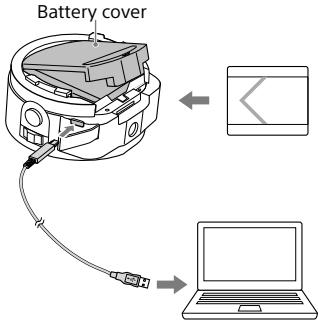
6 7 8 9 10 11Charging the battery
Charge the battery before using the camera. To charge, use the micro USB cable (supplied) to connect the camera to a computer.
- Turn off the power when the battery is being charged.
- If you do not have a computer, use the AC adaptor AC-UD10 or AC-UD11 (both sold separately). The AC-UD11 (sold separately) may not be available in some countries/regions.
text_image
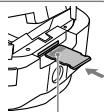
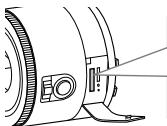
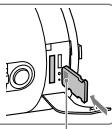
Battery cover ← →Inserting a memory card
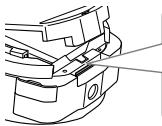
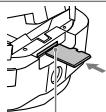
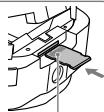
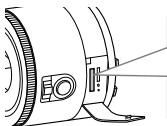
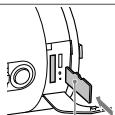
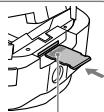
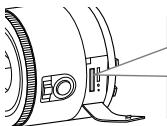
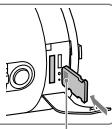
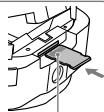
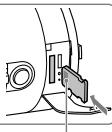
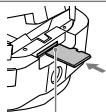
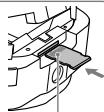
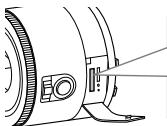
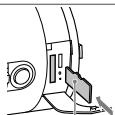
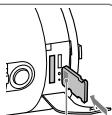
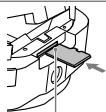
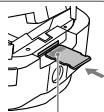
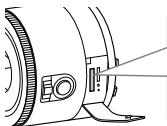
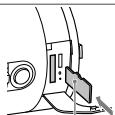
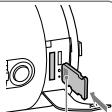
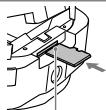
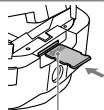
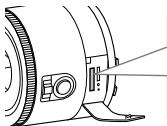
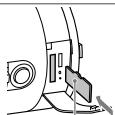
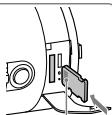
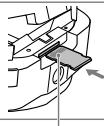
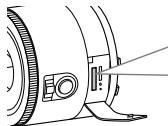
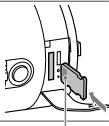
Insert a microSD memory card or "Memory Stick Micro" (M2) media before shooting.
natural_image
Technical line drawing of a mechanical component with no visible text or symbolsDSC-QX10
microSD memory card
natural_image
Mechanical assembly diagram showing a hand holding a component with an arrow indicating direction (no text or symbols present)Printed side
"Memory Stick Micro" media
natural_image
Mechanical component diagram showing a lever and handle assembly (no text or symbols)Terminal side
natural_image
Technical line drawing of a camera lens assembly (no text or symbols)DSC-QX100
microSD memory card
natural_image
Diagram of a mechanical component with a highlighted section and a tool, no visible text or symbolsPrinted side
"Memory Stick Micro" media
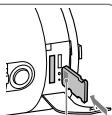
natural_image
Mechanical component diagram showing a lever and bracket assembly (no text or symbols)Terminal side
Installing "PlayMemories Mobile"
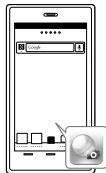
Install "PlayMemories Mobile" to the smartphone before using the camera. If "PlayMemories Mobile" is already installed, update it to the latest version.

PlayMemories
Mobile
For details on
"PlayMemories Mobile",
refer to the support
website
http://www.sony.net/
pmm/

text_image
QR code image containing encoded data, no visible human-readable text■ Android
Search for "PlayMemories Mobile" from Google Play and install it.

ANDROID APP ON
Google play
iPhone
Search for "PlayMemories Mobile" from App Store and install it.

Available on the iPhone
App Store
Connecting the camera and a smartphone via Wi-Fi
The connection method varies depending on the type of smartphone. Confirm your smartphone type and connect via Wi-Fi.
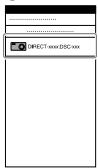
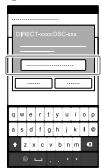
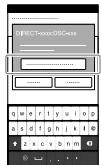
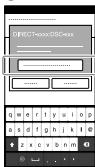
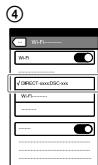
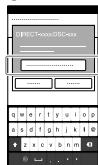
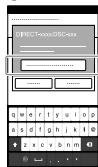
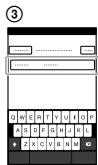
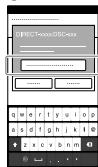
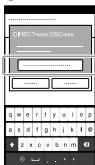
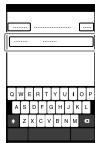
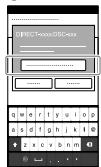
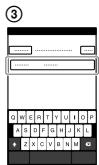
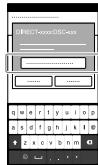
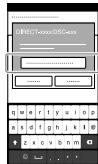
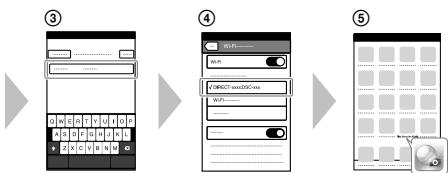
④ Input the password, as printed on the same label (first time only).
Android
① Turn on the power of the camera.
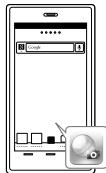
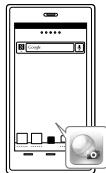
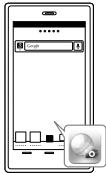
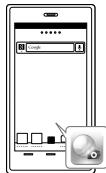
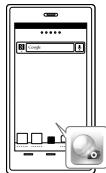
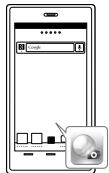
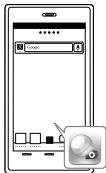
② Start "PlayMemories Mobile" on the smartphone.
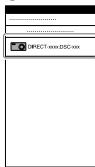
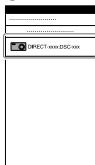
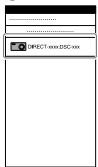
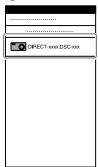
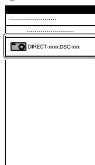
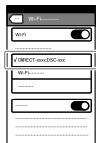
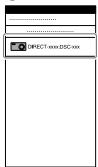
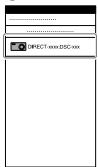
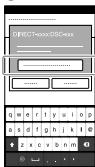
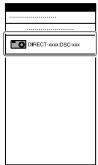
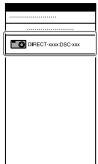
③ Select the SSID, as printed on the inside of the camera's battery cover or on the cover of this manual.
①
Power button
natural_image
Technical line drawing of a mechanical component with concentric rings and mounting holes (no text or symbols)②
text_image
Screenshot of a mobile app interface showing a Google search bar and a close-up of a button labeled 'Close' with an icon.③
text_image
DIRECT.xxx.DSC.xxx④
text_image
DIRECT=xxxxDSC=xx ---------------- ---------------- ---------------- ---------------- ---------------- ---------------- ---------------- ---------------- ---------------- ---------------- ---------------- ---------------- ---------------- ---------------- ---------------- ---------------- ---------------- ---------------- ---------------- ---------------- ---------------- ---------------- ---------------- ---------------- ---------------- ---------------- ---------------- ---------------- ---------------- ---------------- ---------------- ---------------- ---------------- ---------------- ---------------- ---------------- ---------------- ---------------- ---------------- ---------------- ---------------- ---------------- ---------------- ---------------- ---------------- ---------------- ---------------- ---------------- ---------------- ---------------- | | | | | | | | | | | | | | | | | | | | | | | | | | | | | | | | | | | | | | | | | | | | | | | | | | |Android (NFC-compatible)
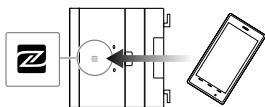
① Touch the N (N mark) of the smartphone against the N Mark of the camera.
Powered on: Continue to touch (1-2 seconds) without moving until "PlayMemories Mobile" starts up.
Powered off: Keep the camera and a smartphone touching until the lens of the camera extends.
flowchart
graph LR
    A["Device"] --> B["Processing Unit"]
    B --> C["Smartphone"]
iPhone
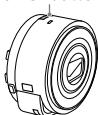
① Turn on the power of the camera.
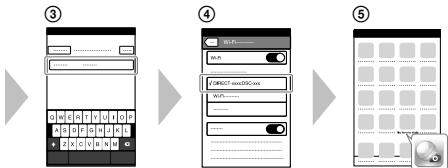
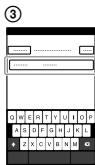
② On the smartphone, select [Settings], then select [Wi-Fi].
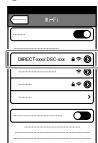
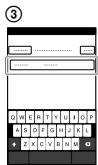
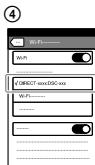
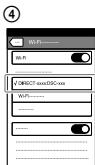
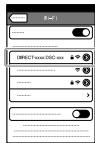
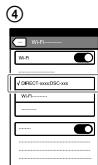
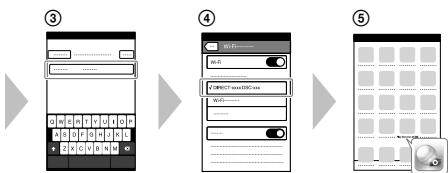
③ Select the SSID, as printed on the inside of the camera's battery cover or on the cover of this manual.
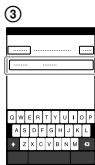
④ Input the password, as printed on the same label (first time only).
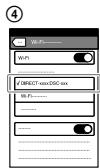
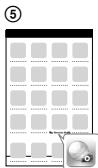
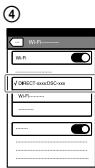
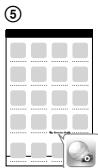
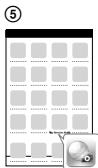
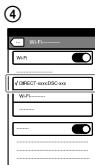
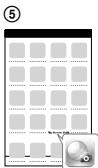
⑤ Confirm the connection to the SSID of the camera.
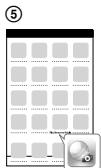
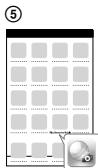
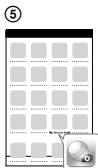
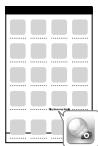
⑥ Go back to the Home screen, then start "PlayMemories Mobile".
①
Power button
natural_image
Technical line drawing of a mechanical component with concentric rings and mounting holes (no text or symbols)②
text_image
DIRECT-xxx DSC-xx
Attaching the camera to a smartphone
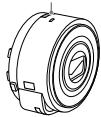
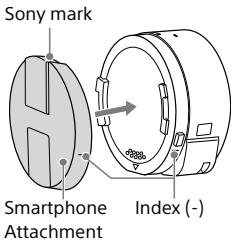
Attach a smartphone after fixing the camera to the smartphone attachment (supplied).
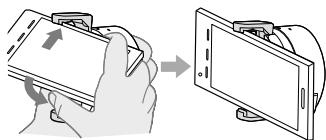
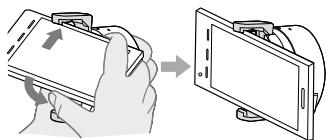
① Fix the camera to the attachment. Put the camera into the slot of the attachment, aligning the index, then rotate the attachment until it clicks.
①
text_image
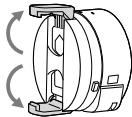
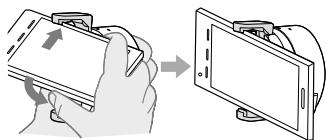
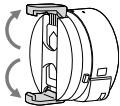
Sony mark Smartphone Attachment Index (-)② Open the clamps of the attachment.
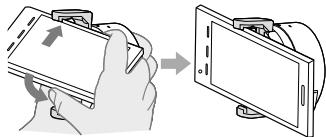
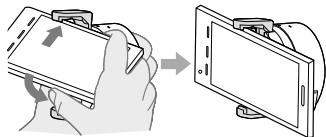
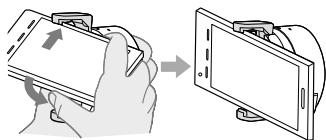
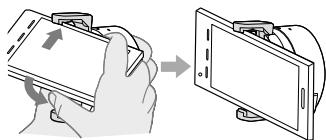
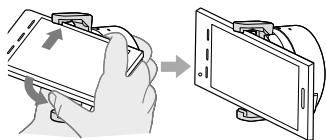
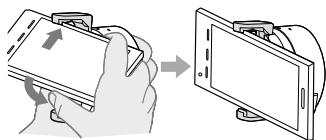
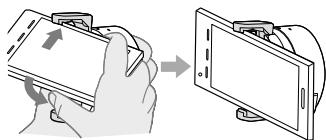
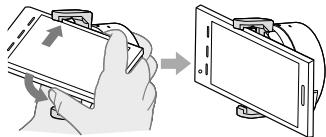
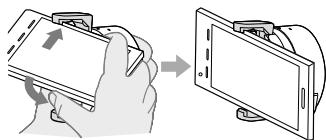
③ Extend the clamps and attach a smartphone.
- Do not swing the camera around with a smartphone attached to it, as the smartphone may slip out of the attachment.
- Make sure no buttons are caught when the smartphone is attached.
②
natural_image
Mechanical component diagram showing rotational motion with no text or symbols③
natural_image
Illustration of a hand holding a tablet device with an arrow indicating rotation (no text or symbols present)Removing the smartphone attachment
Slide the removal lever to the lens side and rotate the attachment.
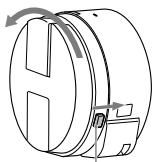
natural_image
Technical line drawing of a mechanical component with directional arrows indicating motion (no text or symbols)Removal lever
Shooting images
① Start "PlayMemories Mobile" on the smartphone.
② Shoot images with the shutter button of the camera or "PlayMemories Mobile". The shutter button of the camera is not available while shooting movies.
[2M] images are transmitted automatically to the smartphone. [18M] images are saved into the memory card of the camera (default setting).
Screen of "PlayMemories Mobile"\*
① Switching exposure modes
② Settings
③ Shutter/movie button
④ Switching between still image/movie
5 Zoom
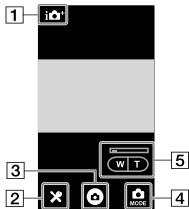
text_image
1 3 2 5 W T BACKS 4Terminating
① End "PlayMemories Mobile" to return to the Home screen.
② Turn off the power of the camera.
- If you turn off the power of the camera before ending "PlayMemories Mobile", an error message will be displayed. This is not a malfunction.
* The display screen for the application is subject to change without notice by future upgrades.
Refer to the Help Guide
The Help Guide is an online manual. Refer to the Help Guide when you would like to know further details, settings and operations of "PlayMemories Mobile", and precautions.
natural_image
Simple line drawing of a smartphone with buttons at the bottom (no text or symbols)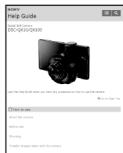
text_image
SOMY Help Guide Single Film Camera DIS-0430/0430 View the help guide when you have any application can have used this software. On your right page Options to use Show the new camera Show the other Drawing To select images taken with the camerahttp://www.sony.net/SonyInfo/Support/

text_image
QR code image containing encoded data, no visible human-readable text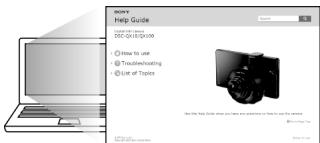
text_image
RCHY Help Guide • How to use • Transl冲洗ing • Use of Topics Use the Help Guide when you have questions on help to use this website. © 2017-03-04Why doesn't the camera charge?
- Turn the power off.
Why the power lamp flashing red?
- Memory card is not inserted correctly. Insert it in the correct direction.
How can I correct the date/time?
- When Wi-Fi connection between the camera and the smartphone is made, the date/time on the camera is automatically set to that of the smartphone.
How can I return to the default setting?
- Turn on the power of the camera, then press the RESET button.
How can I change a setup of image size, etc.?
- You can make changes on the settings screen of "PlayMemories Mobile".
How can I see the number of images or information about the camera?
- Refer to the "Specifications" of this manual or the "Help Guide (HTML)".
Why has the power of the camera turned on unexpectedly?
- If an NFC-enabled smartphone is close to the camera, the power may turn on accidentally. This is not a malfunction.
Why does an image not transfer to my smartphone after shooting?
- Movies are recorded on a memory card, but are not transferred automatically.
I've forgotten the password. Where can I find out what it is?
- The password and SSID are printed on the inside of the battery cover or on the cover of this manual.
Specifications
GB
Dimensions (CIPA compliant):
DSC-QX100: 62.5 mm × 62.5 mm × 55.5 mm (2 1/2 inches ×
2 1/2 inches × 2 1/4 inches) (W/H/D)
DSC-QX10: 62.4 mm × 61.8 mm × 33.3 mm (2 1/2 inches ×
2 1/2 inches × 1 5/16 inches) (W/H/D)
Mass (CIPA compliant) (including NP-BN battery pack, "Memory Stick Micro" media):
DSC-QX100: Approx. 179 g (6.3 oz)
DSC-QX10: Approx. 105 g (3.7 oz)
Power: Rechargeable battery pack NP-BN, 3.6 V
Power consumption (during shooting): 1.1 W
Battery life and number of images that can be recorded
| Battery life | Number of images | |
| Shooting (still images) | Approx. 110 min. | Approx. 220 images |
| Actual shooting (movies) | Approx. 25 min. | - |
| Continuous shooting (movies) | Approx. 55 min.(DSC-QX100)Approx. 65 min.(DSC-QX10) | - |
- The number is based on the CIPA standard.
(CIPA: Camera & Imaging Products Association) - The above number varies depending on the type of smartphone and how it is used.
Trademarks
GB
- The following marks are trademarks of Sony Corporation.
Cyber-shot, "Cyber-shot", "Memory Stick", MEMORY STICK™, "Memory Stick Micro", MEMORY STICK MICRO, "PlayMemories Home".
- microSDXC logo is a trademark of SD-3C, LLC.
- Android, Google Play are trademarks or registered trademarks of Google Inc.
- Wi-Fi, the Wi-Fi logo, Wi-Fi PROTECTED SET-UP are trademarks or registered trademarks of the Wi-Fi Alliance.
- The N Mark is a trademark or registered trademark of NFC Forum, Inc. in the United States and in other countries.
- In addition, system and product names used in this manual are, in general, trademarks or registered trademarks of their respective developers or manufacturers. However, the ^TM or ^® marks are not used in all cases in this manual.
Notes on using the camera
Notes on using the camera
When you attach a smartphone attachment to the camera, be careful not to pinch a finger.
On camera's temperature
Your camera and battery may get hot due to continuous use, but it is not a malfunction.
On the overheat protection
Depending on the camera and battery temperature, you may be unable to record movies or the power may turn off automatically to protect the camera. In this case, leave the power off and wait until the camera and battery temperature goes down. If you turn on the power without letting the camera and battery cool enough, the power may turn off again or you may be unable to record movies.
On use and care
Avoid rough handling, disassembling, modifying, physical shock, or impact such as hammering, dropping, or stepping on the product. Be particularly careful of the lens.
Additional information on this product and answers to frequently asked questions can be found at our Customer Support Website.
http://www.sony.net/

PlayMemories
Home
natural_image
Symbol of a trash bin crossed out by two diagonal lines (no text or numbers present)
natural_image
Symbol of a trash bin crossed out by two diagonal lines (no text or numbers present)⑦ Témoin Alimentation/Charge/Film
Vert : sous tension
natural_image
Technical line drawing of a mechanical component with no visible text or symbolsDSC-QX10
natural_image
Mechanical assembly diagram showing a clamping mechanism with a component inserted (no text or symbols visible)Face imprimée
natural_image
Mechanical component diagram showing a lever and handle assembly (no text or symbols)natural_image
Technical line drawing of a camera lens assembly (no text or symbols)DSC-QX100
natural_image
Pure mechanical component diagram without any text, numbers, or symbolsFace imprimée
natural_image
Mechanical component diagram showing a lever and pivot mechanism (no text or symbols)text_image
QR code image containing encoded data, no visible human-readable text■ Android
Available on the iPhone
App Store
natural_image
Technical line drawing of a mechanical component with concentric rings and mounting holes (no text or symbols)②
text_image
Screenshot of a mobile app interface showing a Google search bar and a close-up of a button labeled 'Close' with a magnifying glass icon.③

text_image
DIRECT.xxx.DSC.xxx④
text_image
DIRECTxxxxDSC4xx ---------------- ---------------- ---------------- ---------------- ---------------- ---------------- ---------------- ---------------- ---------------- ---------------- ---------------- ---------------- ---------------- ---------------- ---------------- ---------------- ---------------- ---------------- ---------------- ---------------- ---------------- ---------------- ---------------- ---------------- ---------------- ---------------- ---------------- ---------------- ---------------- ---------------- ---------------- ---------------- ---------------- ---------------- ---------------- ---------------- ---------------- ---------------- ---------------- ---------------- ---------------- ---------------- ---------------- ---------------- ---------------- ---------------- ---------------- ---------------- ---------------- ---------------- | x x y u i o p | s d f g h i k l @ | z x c v b n m qAndroid (compatible NFC)
natural_image
Technical line drawing of a mechanical component with concentric circular features and mounting holes (no text or symbols)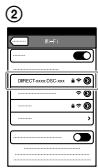
text_image
② DIRECT EXX: DISC EXX
text_image
③ Q W E R T Y U I O P A S D F G H J K L + Z X C V B N M
text_image
Wi-Fi Wi-FiDIRECT-xxx-DSC-xx
Wi-Fi -----
text_image
⑤natural_image
Mechanical component diagram showing rotational motion with no text or symbols③
natural_image
Illustration of a hand holding a smartphone with an arrow indicating the next screen (no text or symbols present)natural_image
Technical line drawing of a mechanical component with directional arrows indicating motion (no text or symbols)Levier de retrait
Prises de vues
text_image
QR code image containing encoded data, no visible human-readable text
natural_image
Simple line drawing of a smartphone with buttons at the bottom (no text or symbols)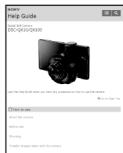
text_image
SOMY Help Guide Single Dot Camera DIS-0430/0430 Start the Sony Guide when you have any additional use to drive this camera. On the right page Drive to new Show the new camera Show the other Drawing To select images taken with the camera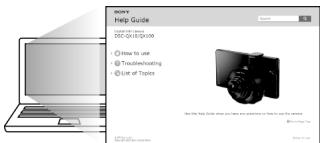
text_image
SOMY Help Guide • How to use • Trackovercoating • List of Topics Use the Help Guide when you have questions or help to use the topic.natural_image
Symbol of a trash bin crossed out by two diagonal lines (no text or numbers present)
natural_image
Symbol of a trash bin crossed out by two diagonal lines (no text or numbers present)text_image
QR code image containing encoded data, no visible human-readable text■ Android
Available on the iPhone
App Store
natural_image
Technical line drawing of a mechanical component with concentric circular features and mounting holes (no text or symbols)②
text_image
Diagram of a smartphone interface showing a Google login dialog and a close-up of the app with a mouse icon.③
text_image
DIRECT.xxx.DSC.xxx④
text_image
DIRECT=xxxxDSC=xx ------------------------Android (NFC-kompatibel)
natural_image
Technical line drawing of a mechanical component with concentric rings and mounting holes (no text or symbols)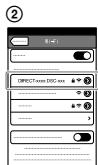
text_image
② DIRECT-axer DISC-axx
text_image
③ Q W E R T Y U I O P A S D F G H J K L ↑ Z X C V B N M
text_image
W-Fi DIRECT-xxxDSC-xxx Wi-Fi
text_image
⑤natural_image
Mechanical component diagram showing rotational motion with no text or symbols③
natural_image
Illustration of a hand holding a tablet device with an arrow indicating rotation (no text or symbols present)natural_image
Technical line drawing of a mechanical component with directional arrows indicating motion (no text or symbols)Lösehebel
text_image
QR code image containing encoded data, no visible human-readable text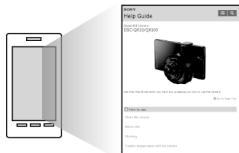
text_image
HELP GUIDE Copyright: 05-06-2019/2019 Search the help guide, which is a device to use a device to access your own. Click to use: What's this service Before use Helping To check any help with your own.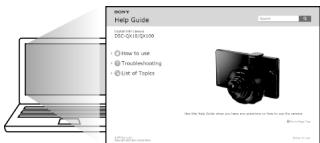
text_image
SOMY Help Guide Add to SOMY-01/01/01/09 How to use Trade-in/Rebuilding Use or Topics Use the Help Guide when you have an update in how to use this option.Cyber-shot, "Cyber-shot", "Memory Stick", MEMORY STICK™, "Memory Stick Micro", MEMORY STICK MICRO, "PlayMemories Home".
natural_image
Symbol of a trash bin crossed out by two diagonal lines (no text or numbers present)
natural_image
Symbol of a trash bin crossed out by two diagonal lines (no text or numbers present)natural_image
Technical line drawing of a mechanical component with no visible text or symbolsDSC-QX10
natural_image
Mechanical assembly diagram showing a clamping mechanism with a bracket and arrow indicator (no text or symbols)Lado impreso
"Memory Stick Micro"
natural_image
Mechanical component diagram showing a lever and handle assembly (no text or symbols)Lado del terminal
natural_image
Technical line drawing of a camera lens assembly (no text or symbols)DSC-QX100
natural_image
Pure mechanical component diagram without any text, numbers, or symbolsLado impreso
"Memory Stick Micro"
natural_image
Mechanical component diagram showing a lever and pivot mechanism (no text or symbols)Lado del terminal
text_image
QR code image containing encoded data, no visible human-readable text■ Android
Busque "PlayMemories Mobile" en Google Play e instálelo.

ANDROID APP ON
Google play
iPhone
Busque "PlayMemories Mobile" en App Store e instálelo.

Available on the iPhone
App Store
natural_image
Technical line drawing of a mechanical component with concentric circular features and mounting holes (no text or symbols)②
text_image
Screenshot of a mobile app interface showing a 'Google' input field and a control panel with buttons, alongside a close-up of the app's screen.③
text_image
DIRECT.xx.DSC.xx④
text_image
DIRECT=xxx:DSC=xx ------------------------natural_image
Technical line drawing of a mechanical component with concentric rings and mounting holes (no text or symbols)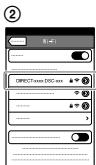
text_image
② DIRECT/xxx DISC-xxx
text_image
③ G W E R T Y U I O P A S D F G H J K L + Z X C V B N M
text_image
W-Fi W-Fi DIRECT-xxxDSC-xxx Wi-Fi W-Fi
text_image
⑤natural_image
Mechanical component diagram showing rotational motion with arrows indicating direction (no text or symbols)③
natural_image
Illustration of a hand holding a tablet device next to a mounted screen (no text or symbols visible)natural_image
Technical line drawing of a mechanical component with directional arrows indicating motion (no text or symbols)natural_image
Simple line drawing of a smartphone with no text or symbols
text_image
SOMY Help Guide Single Film Camera DIS-0430/0430 Show the help guide when you have any application can have used this software. On your right page Options to use Show the new camera Show the other Drawing To select images taken with the camerahttp://www.sony.net/SonyInfo/Support/

text_image
QR code image containing encoded data, no visible human-readable text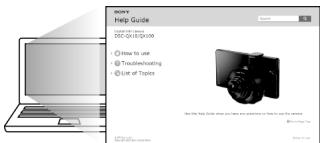
text_image
MOMY Help Guide • How to use • Transmit-heating • Use of Topics Use the Help Guide when you have questions or help to use this option.Cyber-shot, "Cyber-shot", "Memory Stick", MEMORY STICK™, "Memory Stick Micro", MEMORY STICK MICRO, "PlayMemories Home".
natural_image
Symbol of a trash bin crossed out by two diagonal lines (no text or numbers present)
natural_image
Symbol of a trash bin crossed out by two diagonal lines (no text or numbers present)natural_image
Technical line drawing of a mechanical component with no visible text or symbolsDSC-QX10
natural_image
Mechanical assembly diagram showing a clamping mechanism with a component inserted (no text or symbols visible)Lato stampato
"Memory Stick Micro"
natural_image
Mechanical component diagram showing a lever and handle assembly (no text or symbols)Lato del terminale
natural_image
Technical line drawing of a camera lens assembly (no text or symbols)DSC-QX100
natural_image
Pure mechanical component diagram without any text, numbers, or symbolsLato stampato
"Memory Stick Micro"
natural_image
Mechanical component diagram showing a lever and pin assembly (no text or symbols)Lato del terminale
text_image
QR code image containing encoded data, no visible human-readable text■ Android
Available on the iPhone
App Store
natural_image
Technical line drawing of a mechanical component with concentric rings and mounting holes (no text or symbols)②
text_image
Screenshot of a mobile app interface showing a Google search bar and a close-up of a button labeled 'Close' with icons.③
text_image
DIRECT.xxx.DSC.xxx④
text_image
DIRECT=xxx:DSC=xx ------------------------text_image
② Wi-Fi DIRECTXXX.DSC.xx
text_image
③ G W E R T Y U I O P A S D F G H J K L ↑ Z X C V B N M
text_image
WiFi WiFi DIRECT-xxxDSG-xxa WiFi --------
text_image
⑤natural_image
Mechanical component diagram showing rotational motion with arrows indicating rotation (no text or symbols)③
natural_image
Illustration of a hand holding a tablet device with an arrow indicating the next step (no text or symbols present)natural_image
Technical line drawing of a mechanical component with directional arrows indicating motion (no text or symbols)Leva di rimozione
Ripresa di immagini
text_image
HELP GUIDE Copyright: 05-06-2019/2019 Search the help guide, which is a device to use the next user's app. Click to use: What is your About your Helping To change your help with your app.http://www.sony.net/SonyInfo/Support/

text_image
QR code image containing encoded data, no visible human-readable text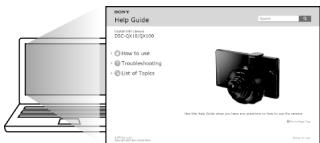
text_image
SOMY Help Guide • Use your own • DSC-01-02-03-09 • How to use • Translubsheating • Use of Topics Get the Help Guide when you have questions or help us this topic. © 2017-04-06DSC-QX100: circa 179 g
DSC-QX10: circa 105 g
Cyber-shot, "Cyber-shot", "Memory Stick", MEMORY STICK™, "Memory Stick Micro", MEMORY STICK MICRO, "PlayMemories Home".
natural_image
Symbol of a trash bin crossed out by two diagonal lines (no text or numbers present)
natural_image
Symbol of a trash bin crossed out by two diagonal lines (no text or numbers present)text_image
QR code image containing encoded data, no visible human-readable text■ Android
Available on the iPhone
App Store
text_image
Screenshot of a mobile app interface showing a Google search bar and a close-up of a button labeled 'Close' with icons.③
text_image
DIRECT.xxx.DSC.xxx④
text_image
DIRECT=xxx:DSC=xx ------------------------text_image
③ G W E R T Y U I O P A S D F G H J K L ↑ Z X C V B N M
text_image
WiFi WiFi ✓ DIRECT-xxx-DSC-xxa WiFi ......
text_image
⑤natural_image
Technical line drawing of a mechanical component with no visible text or symbolsSmartphone-
bevestigingsstuk
Index (-)
natural_image
Mechanical component diagram showing rotational motion with arrows indicating direction (no text or symbols)③
natural_image
Illustration of a hand holding a tablet device with an arrow indicating the next step (no text or symbols present)natural_image
Technical line drawing of a mechanical component with directional arrows indicating motion (no text or symbols)Verwijderhendel
Beelden opnemen
text_image
QR code image containing encoded data, no visible human-readable text
natural_image
Simple line drawing of a smartphone with buttons at the bottom (no text or symbols)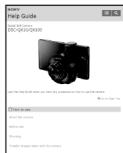
text_image
SOMY Help Guide Single Film Camera DIS-0430/0430 Show the help guide when you have any application can have used this software. On your right page Options to use Show the new camera Show the other Drawing To select images taken with the camera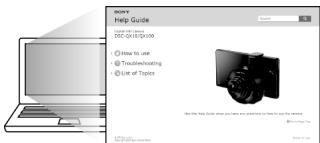
text_image
RCHY Help Guide • How to use • Transl冲洗ing • Use of Topics Use the Help Guide when you have questions or help us your website. © 2017-03-04Veelgestelde vragen
Cyber-shot, "Cyber-shot", "Memory Stick", MEMORY STICK™, "Memory Stick Micro", MEMORY STICK MICRO, "PlayMemories Home".
natural_image
Symbol of a trash bin crossed out by two diagonal lines (no text or numbers present)
natural_image
Symbol of a trash bin crossed out by two diagonal lines (no text or numbers present)natural_image
Technical line drawing of a mechanical component with no visible text or symbolsDSC-QX10
natural_image
Mechanical assembly diagram showing a clamping mechanism with a bracket and arrow indicator (no text or symbols)Lado impresso
"Memory Stick Micro"
natural_image
Mechanical component diagram showing a lever and handle assembly (no text or symbols)Lado do terminal
natural_image
Technical line drawing of a camera lens assembly (no text or symbols)DSC-QX100
natural_image
Pure mechanical component diagram without any text, numbers, or symbolsLado impresso
"Memory Stick Micro"
natural_image
Mechanical component diagram showing a lever and pivot mechanism (no text or symbols)Lado do terminal
Instalar o "PlayMemories Mobile"
text_image
QR code image containing encoded data, no visible human-readable text■ Android
Procure o "PlayMemories Mobile" no Google Play e instale-o.

ANDROID APP ON
Google play
iPhone
Procure o "PlayMemories Mobile" na App Store e instale-o.

Available on the iPhone
App Store
natural_image
Technical line drawing of a mechanical component with concentric circular features and mounting holes (no text or symbols)②
text_image
Screenshot of a mobile app interface showing a 'Google' input field and a control panel with buttons, alongside a close-up of the app's screen.③
text_image
DIRECT.xx.DSC.xx④
text_image
DIRECT=xxxxDSC=xxx ---------------- ---------------- ---------------- ---------------- ---------------- ---------------- ---------------- ---------------- ---------------- ---------------- ---------------- ---------------- ---------------- ---------------- ---------------- ---------------- ---------------- ---------------- ---------------- ---------------- ---------------- ---------------- ---------------- ---------------- ---------------- ---------------- ---------------- ---------------- ---------------- ---------------- ---------------- ---------------- ---------------- ---------------- ---------------- ---------------- ---------------- ---------------- ---------------- ---------------- ---------------- ---------------- ---------------- ---------------- ---------------- ---------------- ---------------- ---------------- ---------------- ---------------- | | | | | | | | | | | | | | | | | | | | | | | | | | | | | | | | | | | | | | | | | | | | | | | | | | |natural_image
Technical line drawing of a mechanical component with concentric rings and mounting holes (no text or symbols)②
text_image
DIRECT+xxx DISC-xx③
text_image
Screenshot of a digital keyboard interface with standard input fields and a highlighted section showing letter 'P'④
text_image
Wi-Fi Wi-Fi DIRECT-xx/DSC-xx Wi-Fi ----⑤
text_image
Image showing a grid of placeholder icons with an inset magnified view of a helmet icon.natural_image
Mechanical component diagram showing rotational motion with no text or symbols③
natural_image
Illustration of a hand holding a tablet device with an arrow indicating rotation (no text or symbols present)natural_image
Technical line drawing of a mechanical component with directional arrows indicating motion (no text or symbols)Patilha de remoção
Fotografar imagens
text_image
HELP GUIDE Copyright: 05-06-2019/2019 Search the help guide, which is a device to use a device to access your own. Click to use: What's this service Before use Helping To check any help with your own.http://www.sony.net/SonyInfo/Support/

text_image
QR code image containing encoded data, no visible human-readable text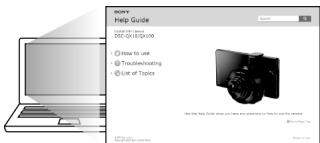
text_image
SOMY Help Guide • How to use • Downloading • Use of Topics Use the Help Guide when you have your questions or help to use this topic. © 2017-03-09Cyber-shot, "Cyber-shot", "Memory Stick", MEMORY STICK™, "Memory Stick Micro", MEMORY STICK MICRO, "PlayMemories Home".
natural_image
Symbol of a trash bin crossed out by two diagonal lines (no text or numbers present)
natural_image
Symbol of a trash bin crossed out by two diagonal lines (no text or numbers present)natural_image
Technical line drawing of a mechanical component with no visible text or symbolsDSC-QX10
microSD-minneskort
natural_image
Mechanical assembly diagram showing a hand holding a component with an arrow indicating direction (no text or symbols present)Sida med etikett
"Memory Stick Micro"
natural_image
Mechanical component diagram showing a lever and handle assembly (no text or symbols)Sida med kontakt
natural_image
Technical line drawing of a camera lens assembly (no text or symbols)DSC-QX100
microSD- minneskort
natural_image
Pure mechanical component diagram without any text, numbers, or symbolsSida med etikett
"Memory Stick Micro"
natural_image
Mechanical component diagram showing a lever and bracket assembly (no text or symbols)Sida med kontakt
Installera "PlayMemories Mobile"
text_image
QR code image containing encoded data, no visible human-readable text■ Android
Available on the iPhone
App Store
natural_image
Technical line drawing of a mechanical component with concentric rings and mounting holes (no text or symbols)②
text_image
Diagram of a mobile app interface showing a 'Google' input field and a control panel with buttons, alongside an icon of a computer mouse.③
text_image
DIRECT.xxx.DSC.xxx④
text_image
DIRECTxxxxDSCxxxx ---------------- ---------------- ---------------- ---------------- ---------------- ---------------- ---------------- ---------------- ---------------- ---------------- ---------------- ---------------- ---------------- ---------------- ---------------- ---------------- ---------------- ---------------- ---------------- ---------------- ---------------- ---------------- ---------------- ---------------- ---------------- ---------------- ---------------- ---------------- ---------------- ---------------- ---------------- ---------------- ---------------- ---------------- ---------------- ---------------- ---------------- ---------------- ---------------- ---------------- ---------------- ---------------- ---------------- ---------------- ---------------- ---------------- ---------------- ---------------- ---------------- ---------------- | x x y u i o p | s d f g h i k l ① | z x c v b n m ②Android (NFC-kompatibel)
flowchart
graph TD
    A["Start"] --> B["Central Circle"]
    B --> C["Right Arrow"]
    C --> D["Right Phone Icon"]
    style A fill:#f9f,stroke:#333
    style D fill:#bbf,stroke:#333
    note right of D: Fortsättning
iPhone
text_image
③ G W E R T Y U I O P A S D F G H J K L ↑ Z X C V B N M
text_image
④ WIFI WIFI DIRECT-xxx/DSG-xxs WIFI ----
text_image
⑤natural_image
Mechanical component diagram showing rotational motion with arrows indicating direction (no text or symbols)③
natural_image
Illustration of a hand holding a tablet device next to a mounted screen (no text or symbols visible)natural_image
Technical line drawing of a mechanical component with directional arrows indicating motion (no text or symbols)Lossningsspak
Fotografera
text_image
QR code image containing encoded data, no visible human-readable text
natural_image
Simple line drawing of a smartphone with buttons at the bottom (no text or symbols)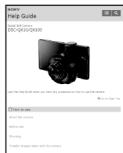
text_image
SOMY Help Guide Single Film Camera DIS-0430/0430 Show the help guide when you have any application can have used this software. On your right page Options to use Show the new camera Show the other Drawing To select images taken with the camera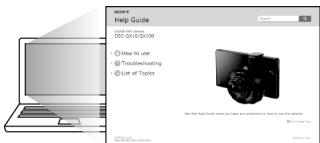
text_image
SOMY Help Guide How to use Trade-in-hoating Use at Topics Use the Help Guide when you have positive or negative values for your items.Cyber-shot, "Cyber-shot", "Memory Stick", MEMORY STICK™, "Memory Stick Micro", MEMORY STICK MICRO, "PlayMemories Home".
natural_image
Symbol of a trash bin crossed out by two diagonal lines (no text or numbers present)
natural_image
Symbol of a trash bin crossed out by two diagonal lines (no text or numbers present)text_image
Diagram showing connection between a device and a laptop, with labeled components and directional arrowsnatural_image
Technical line drawing of a mechanical component with no visible text or symbolsDSC-QX10
natural_image
Technical line drawing of a mechanical component with no visible text or symbolsnatural_image
Pure mechanical diagram showing a component with a spring and arrow, no text or symbols presentnatural_image
Technical line drawing of a camera lens assembly (no text or symbols)DSC-QX100
natural_image
Diagram of a mechanical component with a highlighted section and a tool, no visible text or symbolsnatural_image
Pure mechanical component diagram without any text, numbers, or symbolstext_image
QR code image containing encoded data, no visible human-readable text■ Android
Available on the iPhone
App Store
natural_image
Technical line drawing of a mechanical component with concentric circular features and mounting holes (no text or symbols)③
text_image
DIRECT.xxx.DSC.xxx②
text_image
Diagram of a smartphone screen showing a Google login interface with a mouse cursor pointing to it, alongside a close-up of the mouse.④
text_image
DIRECT=xxxxDSC=xx ------------------------text_image
② DIRECTxxxx.DSC-xxx
text_image
③ G W E R T Y U I O P A S D F G H J K L ↑ Z X C V B N M
text_image
W-Fi W-Fi DIRECT-xxxDSC-xxx Wi-Fi W-Fi
text_image
⑤natural_image
Mechanical diagram showing a rotating component with no text or symbols③
natural_image
Illustration of a hand holding a smartphone with an arrow indicating the next screen (no text or symbols present)natural_image
Technical line drawing of a mechanical component with rotational arrows indicating motion (no text or symbols)text_image
QR code image containing encoded data, no visible human-readable text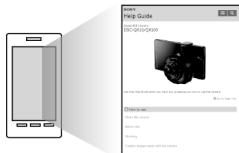
text_image
HELP GUIDE Copyright: 05-06-2019/2019 Search the help guide, which is a device to use a device to access your own. Click to use: What's this service Before use Helping To check any help with your own.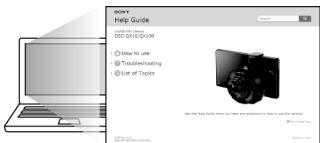
text_image
SOMY Help Guide How to use Trade-in-hoating Use at Topics Use the Help Guide when you have positive or negative values for your items.Вопросы и ответы
(CIPA: Camera & Imaging Products Association)
natural_image
Technical line drawing of a mechanical component with no visible text or symbolsDSC-QX10
microSD 메모리 카드
natural_image
Mechanical assembly diagram showing a hand holding a component with an arrow indicating direction (no text or symbols present)인쇄된 쪽
"Memory Stick Micro"
natural_image
Pure mechanical diagram showing a component with a spring and arrow, no text or symbols present단자 쪽
natural_image
Technical line drawing of a camera lens assembly (no text or symbols)DSC-QX100
microSD 메모리 카드
natural_image
Pure mechanical component diagram without any text, numbers, or symbols인쇄된 쪽
"Memory Stick Micro"
natural_image
Mechanical component diagram showing a lever and bracket assembly (no text or symbols)단자 쪽
"PlayMemories Mobile"설치
text_image
QR code image containing encoded data, no visible human-readable text■ Android
Available on the iPhone
App Store
text_image
Diagram showing a smartphone interface with a login panel and a play button, labeled with number ②③
text_image
DIRECT-xxx DSC-xxx④
text_image
DIRECT=xxxxDSC=xxx ---------------- ---------------- ---------------- ---------------- ---------------- ---------------- ---------------- ---------------- ---------------- ---------------- ---------------- ---------------- ---------------- ---------------- ---------------- ---------------- ---------------- ---------------- ---------------- ---------------- ---------------- ---------------- ---------------- ---------------- ---------------- ---------------- ---------------- ---------------- ---------------- ---------------- ---------------- ---------------- ---------------- ---------------- ---------------- ---------------- ---------------- ---------------- ---------------- ---------------- ---------------- ---------------- ---------------- ---------------- ---------------- ---------------- ---------------- ---------------- ---------------- ---------------- | x x y z i o p | s d f g h j k l e | z x v b n mAndroid (NFC 호환)
①스마트폰의 N (N 마크)를
카메라의 N 마크에 터치합니다.
전원이 켜졌을 때:
"PlayMemories Mobile"
text_image
DIRECT-xxxx.DSC-exx
natural_image
Mechanical component diagram showing rotational motion with arrows indicating direction (no text or symbols)③
natural_image
Illustration of a hand holding a tablet device with an arrow indicating the next step (no text or symbols present)스마트폰 부착물 제거
natural_image
Technical line drawing of a mechanical component with directional arrows indicating motion (no text or symbols)제거 레버
natural_image
Simple line drawing of a smartphone with buttons at the bottom (no text or symbols)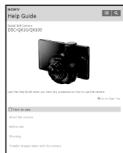
text_image
SOMY Help Guide Single Film Camera DIS-0430/0430 View the help guide when you have any application can have used this software. On your right page Options to use Show the new camera Show the other Drawing To select images taken with the camerahttp://www.sony.net/SonyInfo/Support/

text_image
QR code image containing encoded data, no visible human-readable text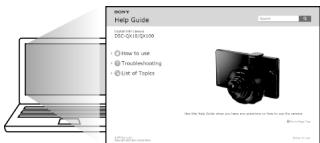
text_image
SINCHY Help Guide • How to use • Transl冲洗ing • Use of Topics See the Help Guide when you have questions or help us your website. © 2017-03-2018DSC-QX100: 62.5 mm × 62.5 mm × 55.5 mm (W/H/D)
DSC-QX10: 62.4 mm × 61.8 mm × 33.3 mm (W/H/D)
(CIPA: Camera & Imaging Products Association)
Cyber-shot, "Cyber-shot", "Memory Stick", MEMORY STICK™, "Memory Stick Micro", MEMORY STICK MICRO, "PlayMemories Home".
natural_image
Technical line drawing of a mechanical component with no visible text or symbolsDSC-QX10
microSD 記憶卡
natural_image
Mechanical assembly diagram showing a clamping mechanism with no visible text or symbols列印面
"Memory Stick Micro"
natural_image
Pure mechanical diagram showing a component with a spring and arrow, no text or symbols present端子面
natural_image
Technical line drawing of a mechanical component with no visible text or symbolsDSC-QX100
microSD 記憶卡
natural_image
Pure mechanical component diagram without any text, numbers, or symbols列印面
"Memory Stick Micro"
natural_image
Pure mechanical component diagram without any text, numbers, or symbols端子面
安裝 “PlayMemories Mobile”
text_image
QR code image containing encoded data, no visible human-readable text■ Android
Available on the iPhone
App Store
透過Wi-Fi將相機和智慧型手機連線
text_image
Diagram of a smartphone screen with a login interface and control buttons, labeled with number ②③
text_image
DIRECT-xx:08C-xx④
text_image
DIRECT=xxxx:DSC=xx _______________________________ _______________________________ _______________________________ ___________________________ ___________________________ q w e r t y u i o p a s d f g h j k l + z x c v b n mAndroid(相容於NFC)
text_image
② DIRECTV-xxx DISC-xxx
將相機連接到智慧型手機
natural_image
Mechanical component diagram showing rotational motion with no text or symbols③
natural_image
Illustration of a hand holding a tablet device with an arrow indicating rotation (no text or symbols present)移除智慧型手機附件
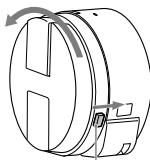
將移除桿向鏡頭側滑動,然後旋轉附件。
natural_image
Technical line drawing of a mechanical component with rotational arrows indicating motion (no text or symbols)移除桿
拍攝影像
text_image
QR code image containing encoded data, no visible human-readable text
natural_image
Simple line drawing of a smartphone with no text or symbols
text_image
SOMY Help Guide Single Dot Camera DIS-0430/0430 Start the Sony Guide when you have any additional use to drive this camera. On the right page Drive to new Show the new camera Show the other Drawing To select images taken with the camera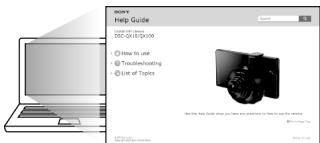
text_image
SOMY Help Guide • How to use • Trackhousecoating • List of Topics Use the Help Guide when you have questions or help to use the topic. © 2017-03-04常見問題集
為什麼相機無法充電?
- 請關閉電源。
為什麼電源指示燈閃爍紅色?
Cyber-shot, “Cyber-shot”, “Memory Stick”, MEMORY STICK™, “Memory Stick Micro”, MEMORY STICK MICRO, “PlayMemories Home”.
, MEMORY STICK™,"Memory Stick","Cyber-shot", Cyber-shot
."PlayMemories Home", MEMORY STICK MICRO, "Memory Stick Micro"
(CIPA: Camera & Imaging Products Association)
natural_image
Simple line drawing of a smartphone with buttons at the bottom (no text or symbols)
text_image
SOMY Help Guide Sonic Bit Camera DIS-Q133/QM333 Show the Sony will rather you have any questions as soon as your camera. © On Page 7.04 Option to save Show the new camera Show your Drawing Create images like with the camera
natural_image
Illustration of a laptop computer with blank screen and keyboard (no text or symbols)
text_image
SOMY Help Guide C:\Users\013\Camera SSC-0133\01330 How to use Troubleshooting List of Topics See the help Guide what you have any questions on how to use the camera. @in your home.text_image
QR code image containing encoded data, no visible human-readable text"PlayMemories Mobile"
natural_image
Technical line drawing of a mechanical component with rotational arrows indicating motion (no text or symbols)ذراع الفصل
②
natural_image
Mechanical component diagram showing rotational motion with curved arrows (no text or symbols)③
natural_image
Illustration of a hand holding a tablet device with an arrow indicating rotation (no text or symbols present)② افتح مشابك الملك.
text_image
Keyboard layout diagram showing a numeric keypad with lettered keys and a highlighted position
iPhone
text_image
DIRECT-xxx:DSG-xx ③①
text_image
DIRECT-xxx DSC-xxxtext_image
Diagram showing a smartphone interface with a login panel and a close-up of a device with a logo, labeled with number ②.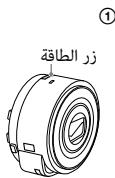
Available on the iPhone
App Store
"PlayMemories Mobile" ثبت على
text_image
QR code image containing encoded data, no visible human-readable textnatural_image
Technical line drawing of a mechanical component with no visible text or symbolsDSC-QX10
natural_image
Mechanical assembly diagram showing a clamping mechanism with no visible text or symbolsالجانب المطبوع
Memory" "Stick Micro
natural_image
Pure mechanical diagram showing a lever mechanism with no text or symbolsجانب الطرق
natural_image
Technical line drawing of a camera lens assembly (no text or symbols)DSC-QX100
natural_image
Diagram of a mechanical component with a highlighted section and directional arrow (no text or symbols)الجانب المطبوع
Memory" "Stick Micro
natural_image
Mechanical component diagram showing a lever and pivot mechanism (no text or symbols)جانب الطرق