
Alpha ILCE-7K - Camera SONY - Free user manual and instructions
Find the device manual for free Alpha ILCE-7K SONY in PDF.
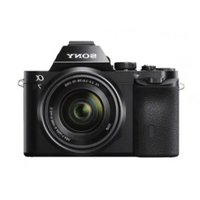


| Product type | Interchangeable lens camera (E-mount) |
| Dimensions (W × H × D) | 126.9 × 94.4 × 48.2 mm (without protrusions) |
| Weight (with battery and memory card) | Approx. 474 g (ILCE-7) |
| Weight (body only) | Approx. 416 g (ILCE-7) |
| Power supply | Rechargeable battery NP-FW50 (7.2 V, 1080 mAh); AC adapter AC-UB10C/UB10D |
| Image sensor | 35 mm full-frame CMOS (35.8 × 23.9 mm), 24.7 total megapixels / 24.3 effective megapixels (ILCE-7) |
| ISO sensitivity | ISO 50 – 25,600 (still images), 200 – 25,600 (movies) |
| Viewfinder | Electronic, 2,359,296 dots, 100% coverage, 0.71× magnification |
| LCD screen | 7.5 cm (3.0 in.) TFT, 921,600 dots, tilting |
| Shutter | Focal-plane, 1/8000 s to 30 s, bulb; flash sync 1/250 s |
| Recording formats | JPEG (DCF 2.0, Exif 2.3), RAW (ARW 2.3); movies AVCHD (MPEG-4 AVC/H.264) and MP4 |
| Storage media | Memory Stick PRO Duo, SD/SDHC/SDXC (Class 4 or higher) |
| Connectivity | Wi-Fi 802.11 b/g/n, NFC, micro-USB 2.0, micro-HDMI (type D), microphone jack (3.5 mm), headphone jack (3.5 mm) |
| Main features | Hybrid autofocus (phase/contrast detection on ILCE-7), lens stabilization (OSS on supplied lens), modes P/A/S/M, Sweep Panorama, video recording 1080p up to 60p/50p, remote control via smartphone |
| Care and cleaning | Clean the exterior with a soft dry cloth; for the sensor, use the built-in cleaning function (ultrasonic vibration) or contact an authorized service center |
| Safety | Do not expose to rain or moisture; use only genuine Sony batteries and chargers; follow temperature instructions (0 °C to 40 °C) |
| Spare parts and repairability | Repairs must be carried out by a Sony authorized service center; parts available via the Sony network |
| General information | Model ILCE-7K (with FE 28-70 mm F3.5-5.6 OSS lens); manual available in 679 pages in French |
Frequently Asked Questions - Alpha ILCE-7K SONY
User questions about Alpha ILCE-7K SONY
0 question about this device. Answer the ones you know or ask your own.
Ask a new question about this device
Download the instructions for your Camera in PDF format for free! Find your manual Alpha ILCE-7K - SONY and take your electronic device back in hand. On this page are published all the documents necessary for the use of your device. Alpha ILCE-7K by SONY.
USER MANUAL Alpha ILCE-7K SONY
http://www.sony.net/SonyInfo/Support/
SONY®
4-478-729-41(2)
α7 α7R
α 7 α 7R
E-mount
Interchangeable Lens Digital Camera/Instruction Manual GB
The model and serial numbers are located on the bottom. Record the serial number in the space provided below. Refer to these numbers whenever you call your Sony dealer regarding this product.
Model No. WW328261 (ILCE-7R)/ WW328262 (ILCE-7)
Serial No.
Model No. AC-UB10C/AC-UB10D
Serial No.
ILCE-7R Model No. WW328261
ILCE-7 Model No. WW328262
WARNING
To reduce fire or shock hazard, do not expose the unit to rain or moisture.
IMPORTANT SAFETY INSTRUCTIONS - SAVE THESE INSTRUCTIONS DANGER TO REDUCE THE RISK OF FIRE OR ELECTRIC SHOCK, CAREFULLY FOLLOW THESE INSTRUCTIONS
If the shape of the plug does not fit the power outlet, use an attachment plug adaptor of the proper configuration for the power outlet.
CAUTION
Battery pack
If the battery pack is mishandled, the battery pack can burst, cause a fire or even chemical burns. Observe the following cautions.
- Do not disassemble.
- Do not crush and do not expose the battery pack to any shock or force such as hammering, dropping or stepping on it.
- Do not short circuit and do not allow metal objects to come into contact with the battery terminals.
- Do not expose to high temperature above 60°C (140°F) such as in direct sunlight or in a car parked in the sun.
- Do not incinerate or dispose of in fire.
- Do not handle damaged or leaking lithium ion batteries.
- Be sure to charge the battery pack using a genuine Sony battery charger or a device that can charge the battery pack.
- Keep the battery pack out of the reach of small children.
- Keep the battery pack dry.
- Replace only with the same or equivalent type recommended by Sony.
- Dispose of used battery packs promptly as described in the instructions.
AC Adaptor
Use the nearby wall outlet (wall socket) when using the AC Adaptor. Disconnect the AC Adaptor from the wall outlet (wall socket) immediately if any malfunction occurs while using the apparatus.
The power cord (mains lead), if supplied, is designed specifically for use with this camera only, and should not be used with other electrical equipment.
For Customers in the U.S.A. and Canada
RECYCLING LITHIUM-ION BATTERIES
Lithium-Ion batteries are recyclable. You can help preserve our environment by returning your used rechargeable batteries to the collection and recycling location nearest you.

For more information regarding recycling of rechargeable batteries, call toll free 1-800-822-8837, or visit http://www.call2recycle.org/
Caution: Do not handle damaged or leaking Lithium-Ion batteries.
Battery pack and lens (if lens supplied)
This device complies with Part 15 of the FCC Rules. Operation is subject to the following two conditions: (1) This device may not cause harmful interference, and (2) this device must accept any interference received, including interference that may cause undesired operation.
This equipment complies with FCC/IC radiation exposure limits set forth for an uncontrolled environment and meets the FCC radio frequency (RF) Exposure Guidelines in Supplement C to OET65 and RSS-102 of the IC radio frequency (RF) Exposure rules. This equipment has very low levels of RF energy that are deemed to comply without testing of specific absorption radio (SAR).
For Customers in the U.S.A.
UL is an internationally recognized safety organization.
The UL Mark on the product means it has been UL Listed.
If you have any questions about this product, you may call:
Sony Customer Information Center 1-800-222-SONY (7669).
The number below is for the FCC related matters only.
Regulatory Information
Declaration of Conformity
Trade Name: SONY
Model No.: WW328261
Responsible Party: Sony Electronics Inc.
Address: 16530 Via Esprillo, San Diego, CA 92127 U.S.A.
Telephone No.: 858-942-2230
This device complies with Part15 of the FCC Rules. Operation is subject to the following two conditions: (1) This device may not cause harmful interference, and (2) this device must accept any interference received, including interference that may cause undesired operation.
Declaration of Conformity
Trade Name: SONY
Model No.: WW328262
Responsible Party: Sony Electronics Inc.
Address: 16530 Via Esprillo,
San Diego, CA 92127
U.S.A.
Telephone No.: 858-942-2230
This device complies with Part 15 of the FCC Rules. Operation is subject to the following two conditions: (1) This device may not cause harmful interference, and (2) this device must accept any interference received, including interference that may cause undesired operation.
This equipment must not be co-located or operated in conjunction with any other antenna or transmitter.
CAUTION
You are cautioned that any changes or modifications not expressly approved in this manual could void your authority to operate this equipment.
Note:
This equipment has been tested and found to comply with the limits for a Class B digital device, pursuant to Part 15 of the FCC Rules.
These limits are designed to provide reasonable protection against harmful interference in a residential installation. This equipment generates, uses, and can radiate radio frequency energy and, if not installed and used in accordance with the instructions, may cause harmful interference to radio communications. However, there is no guarantee that interference will not occur in a particular installation. If this equipment does cause harmful interference to radio or television reception, which can be determined by turning the equipment off and on, the user is encouraged to try to correct the interference by one or more of the following measures:
– Reorient or relocate the receiving antenna. - Increase the separation between the equipment and receiver. - Connect the equipment into an outlet on a circuit different from that to which the receiver is connected. - Consult the dealer or an experienced radio/TV technician for help.
The supplied interface cable must be used with the equipment in order to comply with the limits for a digital device pursuant to Subpart B of Part 15 of FCC Rules.
For Customers in Canada
This device complies with Industry Canada licence-exempt RSS standard(s).
Operation is subject to the following two conditions: (1) this device may not cause interference, and (2) this device must accept any interference, including interference that may cause undesired operation of the device.
For Customers in Europe
Notice for the customers in the countries applying EU Directives
Manufacturer: Sony Corporation, 1-7-1
Konan Minato-ku Tokyo, 108-0075 Japan.
For EU product compliance: Sony
Deutschland GmbH, Hedelfinger Strasse 61, 70327 Stuttgart, Germany

Hereby, Sony Corporation, declares that this WW328261/WW328262
Interchangeable Lens Digital Camera is in compliance with the essential requirements and other relevant provisions of Directive 1999/5/EC. For details, please access the following URL:
http://www.compliance.sony.de/
Notice
If static electricity or electromagnetism causes data transfer to discontinue midway (fail), restart the application or disconnect and connect the communication cable (USB, etc.) again.
This product has been tested and found compliant with the limits set out in the EMC regulation for using connection cables shorter than 3 meters (9.8 feet).
The electromagnetic fields at the specific frequencies may influence the picture and sound of this unit.
Disposal of Old Electrical & Electronic Equipment (Applicable in the European Union and other European countries with separate collection systems)


This symbol on the product or on its packaging indicates that this product shall not be treated as household waste. Instead it shall be handed over to the applicable collection point for the recycling of
electrical and electronic equipment. By ensuring this product is disposed of correctly, you will help prevent potential negative consequences for the environment and human health, which could otherwise be caused by inappropriate waste handling of this product. The recycling of materials will help to conserve natural resources. For more detailed information about recycling of this product, please contact your local Civic Office, your household waste disposal service or the shop where you purchased the product.
Disposal of waste batteries (applicable in the European Union and other European countries with separate collection systems)

This symbol on the battery or on the packaging indicates that the battery provided with this product shall not be treated as household waste.
On certain batteries this symbol might be used in combination with a chemical symbol. The chemical symbols for mercury (Hg) or lead (Pb) are added if the battery contains more than 0.0005% mercury or 0.004% lead.
By ensuring these batteries are disposed of correctly, you will help prevent potentially negative consequences for the environment and human health which could otherwise be caused by inappropriate waste handling of the battery. The recycling of the materials will help to conserve natural resources.
In case of products that for safety, performance or data integrity reasons require a permanent connection with an incorporated battery, this battery should be replaced by qualified service staff only. To ensure that the battery will be treated properly, hand over the product at end-of-life to the applicable collection point for the recycling of electrical and electronic equipment.
For all other batteries, please view the section on how to remove the battery from the product safely.
Hand the battery over to the applicable collection point for the recycling of waste batteries.
For more detailed information about recycling of this product or battery, please contact your local Civic Office, your household waste disposal service or the shop where you purchased the product.
For Customers in Singapore
Complies with IDA Standards DB00353
For customers who purchased their camera from a store in Japan that caters to tourists
Note
Some certification marks for standards supported by the camera can be confirmed on the screen of the camera.
Select MENU → (Setup) 6 →
[Certification Logo].
If display is not possible due to problems such as camera failure, contact your Sony dealer or local authorized Sony service facility.
For details on Wi-Fi functions, see the flyer “Wi-Fi Connection/One-touch (NFC) Guide.”
This manual covers several models.
The available model varies depending on the countries/regions.
| Model name Lens | |
| ILCE-7 Not supplied | |
| ILCE-7K Supplied | |
| ILCE-7R Not supplied |
Notes on using your camera
Screen language
You can select the language displayed on the screen using the menu.
Shooting procedure
This camera has 2 modes for monitoring subjects: the LCD screen mode using the LCD screen, and the viewfinder mode using the viewfinder.
Functions built into this camera
- This manual describes 1080 60i-compatible devices and 1080 50i-compatible devices. To check whether your camera is a 1080 60i-compatible device or 1080 50i-compatible device, check for the following marks on the bottom of the camera. 1080 60i-compatible device: 60i 1080 50i-compatible device: 50i
- This camera is compatible with 1080 60p or 50p-format movies. Unlike standard recording modes up to now, which record in an interlacing method, this camera records using a progressive method. This increases the resolution, and provides a smoother, more realistic image.
Creating an image database file
If you insert a memory card that does not contain an image database file into the camera and turn on the power, the camera automatically creates an image database file using some of the memory card's capacity.
The process may take a long time and you cannot operate the camera until the process is completed. If a database file error occurs, export all images to your computer using "PlayMemories Home," and then format the memory card using the camera.
Shooting with an E-mount lens compatible with APS-C size
This camera is equipped with a 35 mm full-frame CMOS sensor. However, the image size is automatically set to that of the APS-C size setting and the image size is smaller when an E-mount lens compatible with APS-C size is used (default settings).
No compensation for damaged content or recording failure
Sony cannot compensate for failure to record or loss or damage of recorded content due to a malfunction of the camera or recording media, etc.
Back up recommendation
To avoid data loss, always copy (back up) data to other media.
Notes on the LCD screen, electronic viewfinder, lens, and image sensor
- The LCD screen and electronic viewfinder are manufactured using extremely high-precision technology so over 99.99% of the pixels are operational for effective use. However, there may be some tiny black points and/or bright points (white, red, blue or green in color) that constantly appear on the LCD screen and electronic viewfinder. These points are normal in the manufacturing process and do not affect the images in any way.
- Do not hold the camera by the LCD screen.
- When using the power zoom lens, be careful not to get your fingers or any other objects caught in the lens.
- Do not expose the camera to sunlight or shoot sunward for a long time. The internal mechanism may be damaged. If sunlight is focused on a nearby object, it may cause a fire.
- Images may trail across on the screen in a cold location. This is not a malfunction. When turning on the camera in a cold location, the screen may become temporarily dark. When the camera warms up, the screen will function normally.
- The recorded image may be different from the image you monitored before recording.
Notes on recording for long periods of time
- Depending on the camera and battery temperature, you may be unable to record movies or the power may turn off automatically to protect the camera. A message will be displayed on the screen before the power turns off or you can no longer record movies. In this case, leave the power off and wait until the camera and battery temperature goes down. If you turn on the power without letting the camera and battery cool enough, the power may turn off again or you may be unable to record movies.
- Under high ambient temperatures, the temperature of the camera rises quickly.
- When the temperature of the camera rises, the image quality may deteriorate. It is recommended that you wait until the temperature of the camera drops before continuing to shoot.
- The surface of the camera may get warm. This is not a malfunction.
Notes on importing AVCHD movies to a computer
When importing AVCHD movies to a computer, download and use the software “PlayMemories Home” from the following website: http://www.sony.net/pm/
Notes when playing movies on other devices
- This camera uses MPEG-4 AVC/H.264 High Profile for AVCHD format recording. Movies recorded in AVCHD format with this camera cannot be played with the following devices.
- Other devices compatible with AVCHD format that do not support High Profile
- Devices incompatible with the AVCHD format This camera also uses MPEG-4 AVC/H.264 Main Profile for MP4 format recording. For this reason, movies recorded in MP4 format with this camera cannot be played on devices other than those that support MPEG-4 AVC/H.264.
- Discs recorded with HD (high definition) image quality can be played back only on AVCHD format-compatible devices. DVD-based players or recorders cannot play back HD image quality discs, as they are incompatible with the AVCHD format. Also, DVD-based players or recorders may fail to eject HD image quality discs.
- Movies recorded in 1080 60p/1080 50p format can be played back only on 1080 60p/1080 50p-supported devices.
Warning on copyright
Television programs, films, videotapes, and other materials may be copyrighted. Unauthorized recording of such materials may be contrary to the provisions of the copyright laws.
The pictures used in this manual
The photographs used as examples of pictures in this manual are reproduced images, and are not actual images shot using this camera.
On the data specifications described in this manual
The data on performance and specifications are defined under the following conditions, except as described in this manual: at an ordinary ambient temperature of 25°C (77°F), and using a battery pack that has been fully charged until the charge lamp has turned off.
Notes on shooting with the viewfinder
This camera is equipped with an Organic Electro-Luminescence viewfinder with high resolution and high contrast. This viewfinder achieves a wide viewing angle and a long eye relief. This camera is designed to provide an easily viewable viewfinder by appropriately balancing various elements.
- The image may be slightly distorted near the corners of the viewfinder. This is not a malfunction. When you want to check every detail of the entire composition, you can also use the LCD screen.
How to turn off wireless network functions (Wi-Fi and NFC, etc.) temporarily
When you board an airplane, etc., you can turn off all wireless network functions temporarily.
Select MENU → [Wireless] → [Airplane Mode] → [On].
If you set [Airplane Mode] to [On], an (airplane) mark will be displayed on the screen.
Notes on wireless LAN
If your camera is lost or stolen, Sony bears no responsibility for the loss or damage caused by illegal access or use of the registered access point on the camera.
Checking the supplied items
The number in parentheses indicates the number of pieces.
- Camera (1)
- AC Adaptor AC-UB10C/UB10D (1)
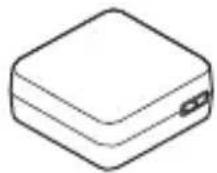
- Power cord (mains lead) (1)* (not supplied in the U.S.A. and Canada)
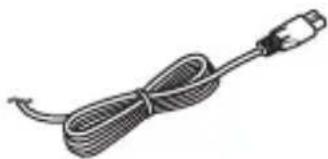
* Multiple power cords may be supplied with your camera. Use the appropriate one that matches your country/region.
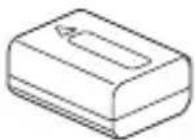
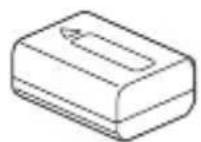
- Rechargeable battery pack NP-FW50 (1)
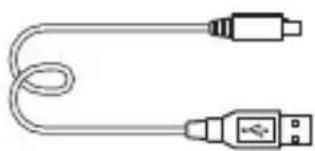
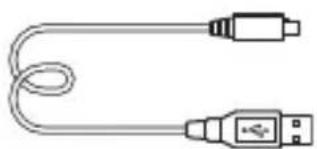
- Micro USB cable (1)
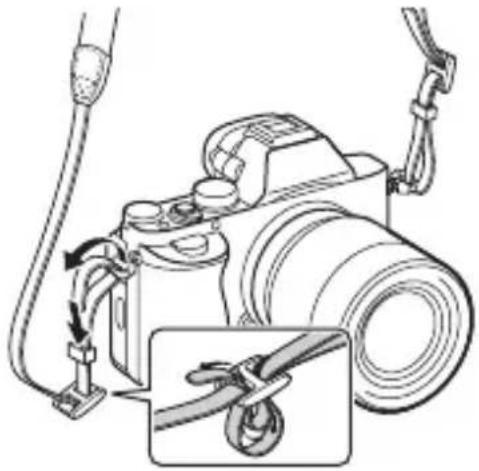
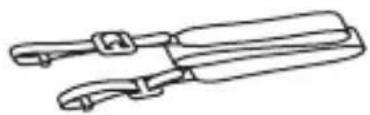
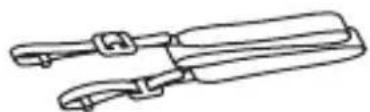
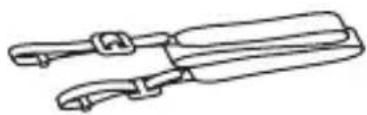
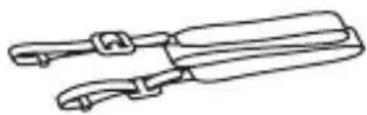
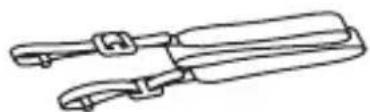
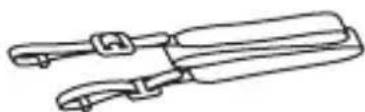
- Shoulder strap (1)
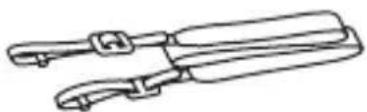
For how to attach the shoulder strap to the camera, refer to page 15.
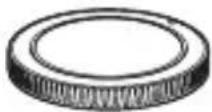
• Body cap (1) (Attached on the camera)
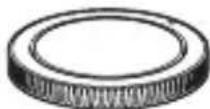
- Shoe cap (1) (Attached on the camera)
- Eyepiece Cup (1) (Attached on the camera)
- Instruction Manual (1) (this manual)
ILCE-7K:
- Zoom lens FE 28-70 mm F3.5-5.6 OSS (1)/Front lens cap (1)/Rear lens cap (1)/Lens hood (1)
Identifying parts
See the pages in parentheses for details on operation for the parts.
Front side
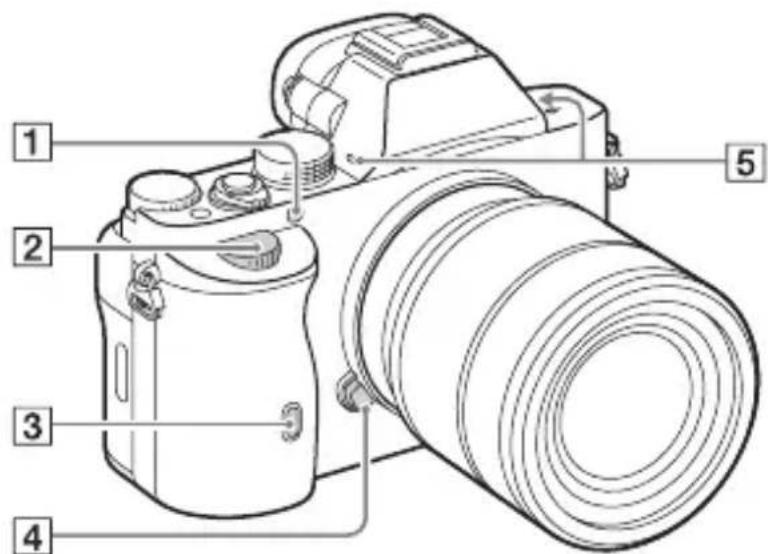
When the lens is removed
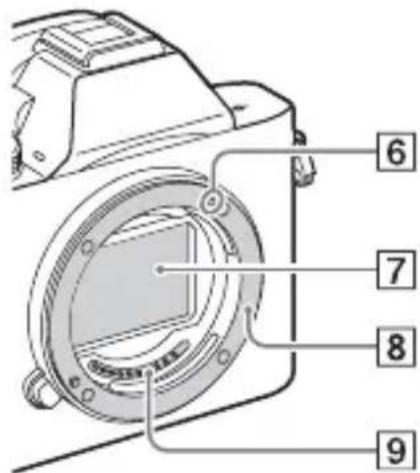
7Image sensor* 2 8Mount 9 Contacts* 2
*1 Do not cover this part during movie recording.
Doing so may cause noise or lower the volume.
*2 Do not directly touch these parts.
1 AF illuminator/Self-timer lamp 2Front dial 3 Remote sensor 4 Lens release button ⑤Built-in microphone* 6 Mount index
Rear side
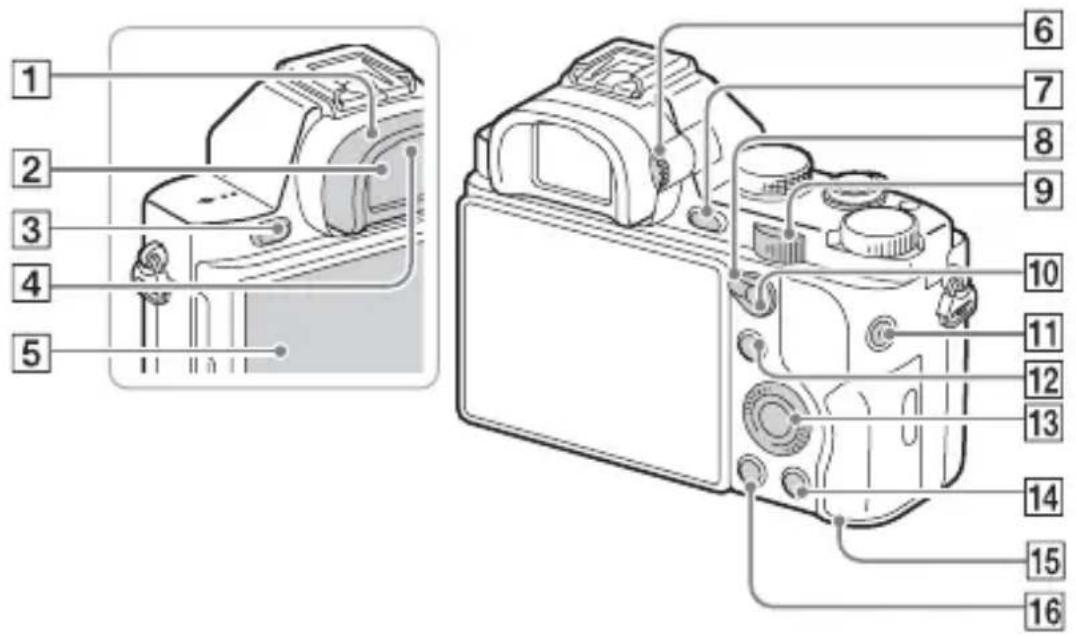
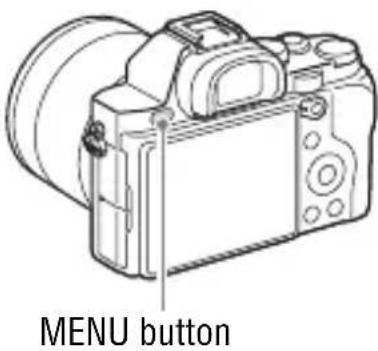
①Eyepiece cup ② Viewfinder ③MENU button (25) ④Eyepiece sensors 5LCD screen
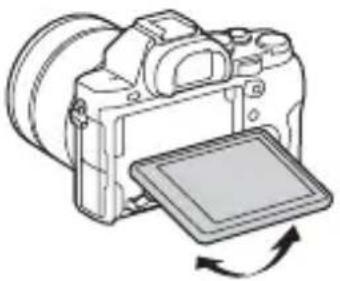
- You can adjust the LCD screen to an easily viewable angle and shoot from any position.
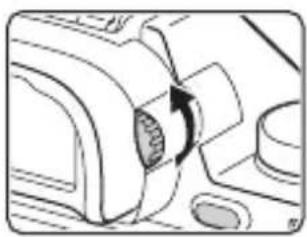
⑥ Diopter-adjustment dial
- Adjust the diopter-adjustment dial to your eyesight until the display appears clearly in the viewfinder.
⑦For shooting: C2 (Custom2) button
For viewing: Ⓕ(Enlarge) button
8AF/MF/AEL switch lever 9 Rear dial
10 For shooting: AF/MF (Auto focus/manual focus) button/AEL button For viewing: (Image index) button
11MOVIE button (41) 12 For shooting: Fn button (24) For viewing: (Send to Smartphone) button 13Control wheel 14 For shooting: C3 (Custom3) button For viewing: Delete button (43) 15 Access lamp 16 (Playback) button
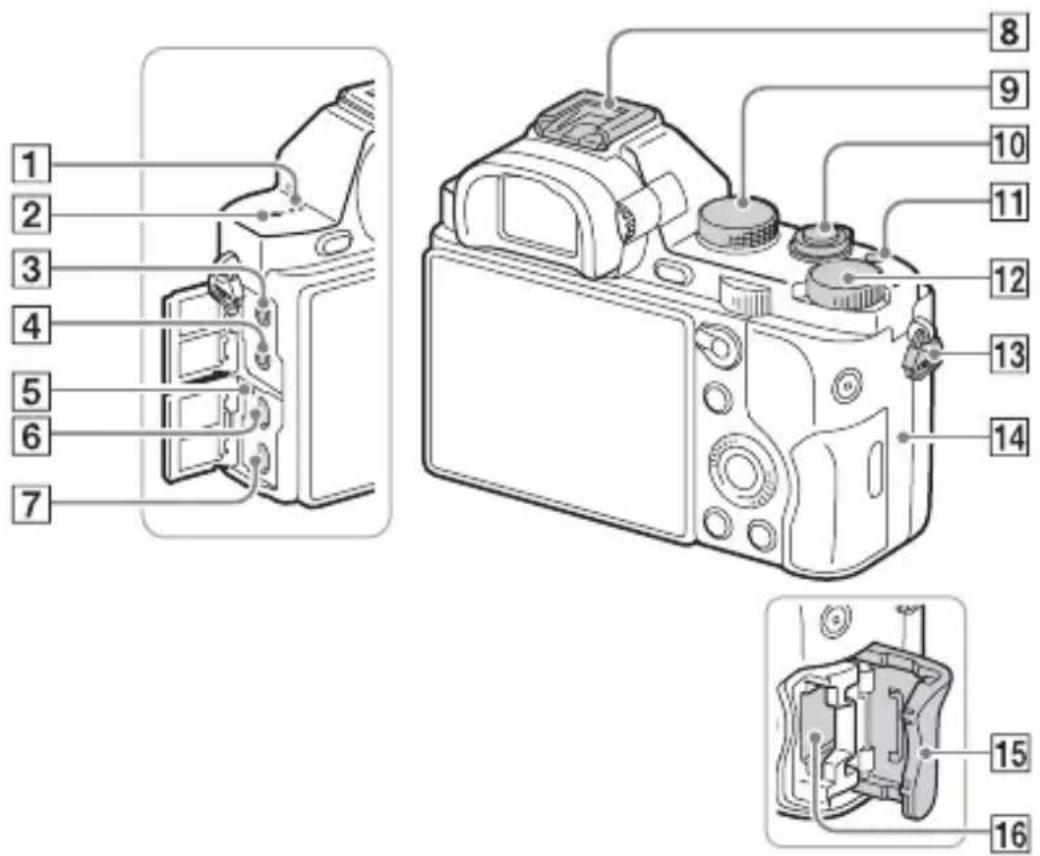
Top side/Side view
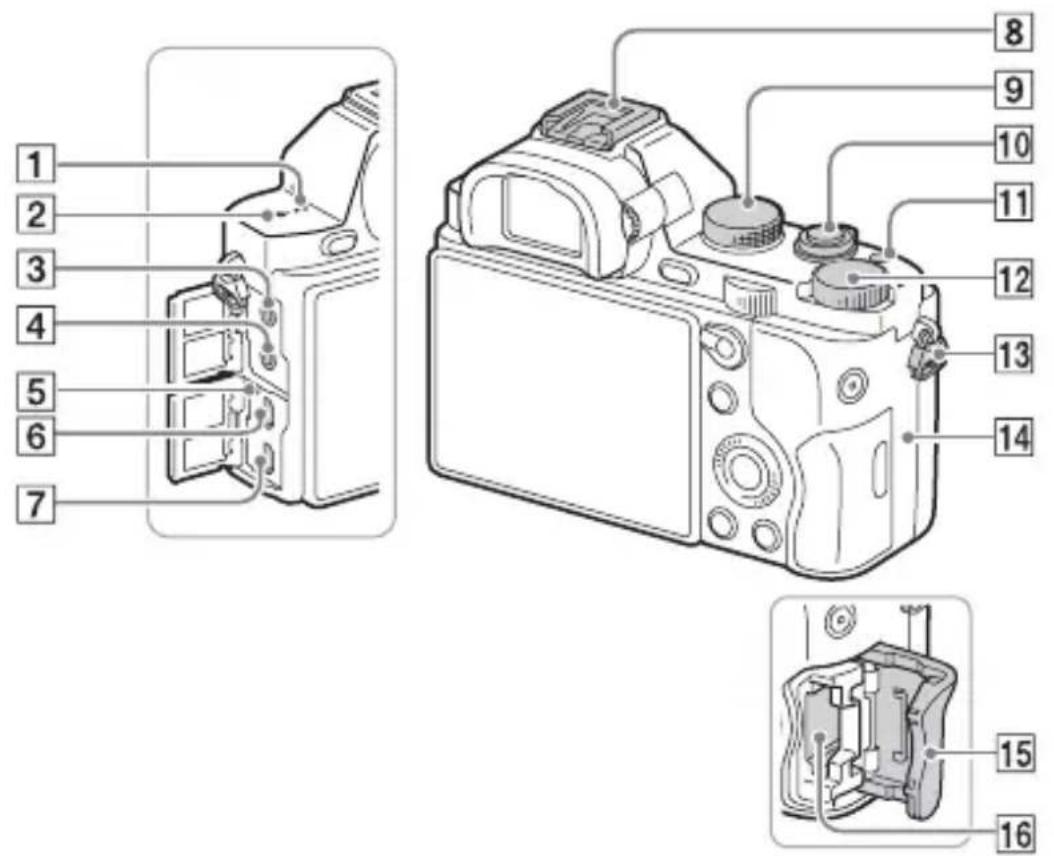
①Speaker ② Image sensor position mark ③ (Microphone) jack
- When an external microphone is connected, the microphone is turned on automatically. If the external microphone is a plug-in-power type, the power of the microphone is supplied by the camera.
④(Headphones) jack 5 Charge lamp
6Multi terminal • Supports Micro USB compatible device. ⑦HDMI micro jack 8Multi interface shoe* - Some of the accessories may not be inserted fully and protrude backward from the Multi interface shoe. However, when the accessory reaches the front end of the shoe, the connection is completed. 9Mode dial (44) 10 Power switch/Shutter button 11C1 (Custom 1) button
12 Exposure compensation dial
13 Hooks for shoulder strap
- Attach both ends of the strap onto the camera.
14 (N mark)
- This mark indicates the touch point for connecting the camera and an NFC-enabled Smartphone. For details on the location of the N mark on your Smartphone, refer to the operating instructions of the Smartphone.
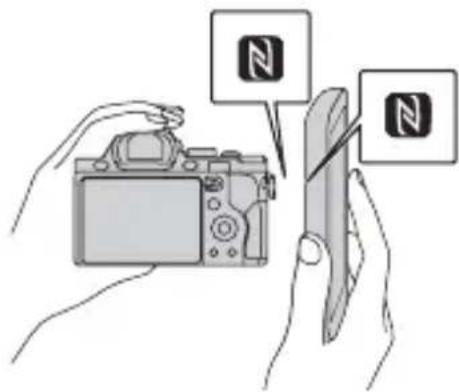
- NFC (Near Field Communication) is an international standard of short-range wireless communication technology.
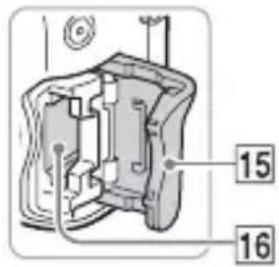
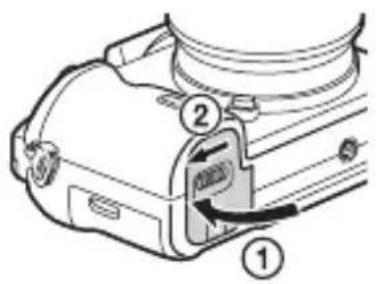
15 Memory card cover
16 Memory card slot
* For details on compatible accessories of the Multi Interface Shoe, visit the Sony web site in your area, or consult your Sony dealer or local authorized Sony service facility.
Accessories for the Accessory Shoe can also be used.
Operations with other manufacturers' accessories are not guaranteed.
Multi Interface Shoe
Accessory Shoe
Bottom view
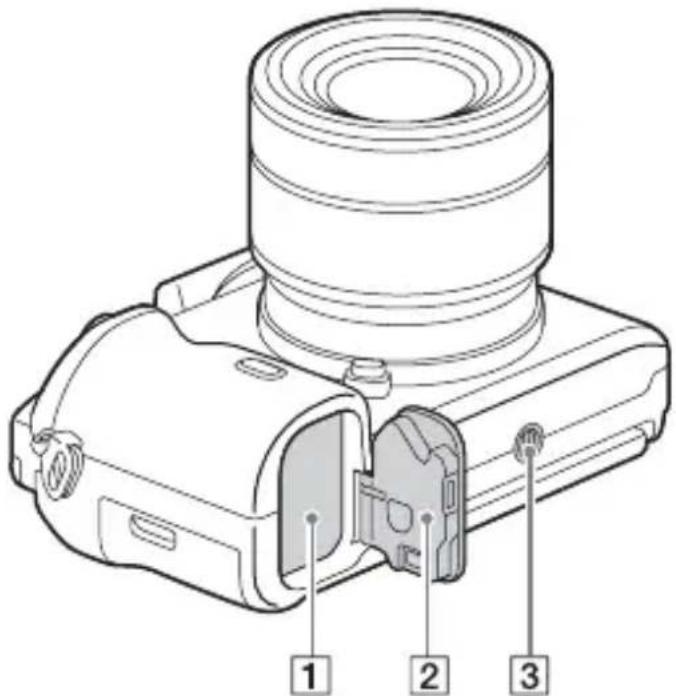
1 Battery insertion slot (27) ② Battery cover (27) ③ Tripod socket hole
- Use a tripod with a screw less than 5.5 mm (7/32 inches) long. Otherwise, you cannot firmly secure the camera, and damage to the camera may occur.
Connection plate cover
Use this when using an AC-PW20 AC Adaptor (sold separately). Insert the connection plate into the battery compartment, and then pass the cord through the connection plate cover as shown below.
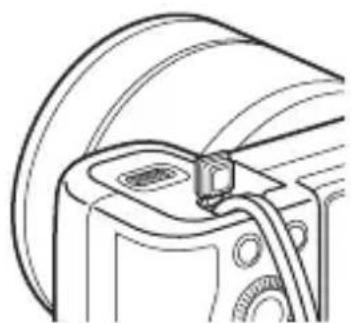
• Make sure that the cord is not pinched when you close the cover.
Lens FE 28-70 mm F3.5-5.6 OSS (Supplied with ILCE-7K)
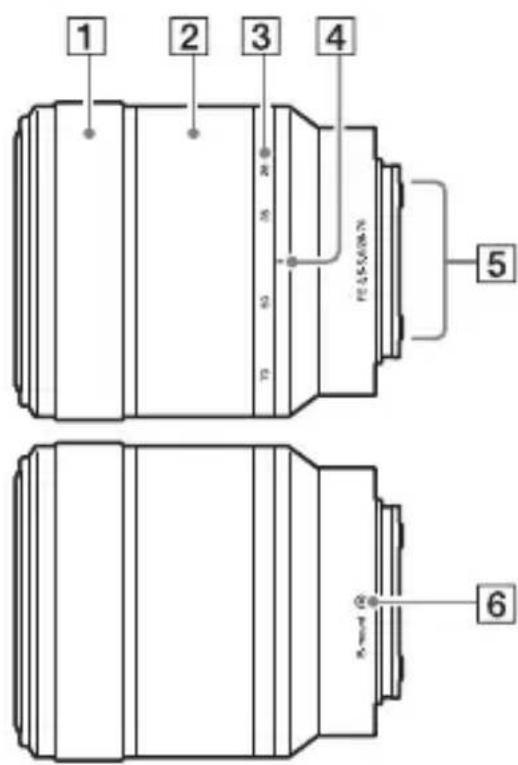
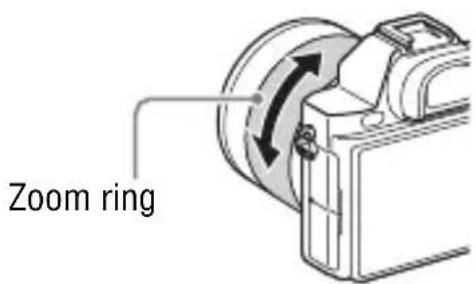
① Focusing ring ② Zoom ring ③ Focal-length scale ④ Focal-length index ⑤ Lens contacts* ⑥ Mount index * Do not touch this part directly.
List of icons on the screen
The status of the LCD screen is set to [Display All Info.] in the default settings.
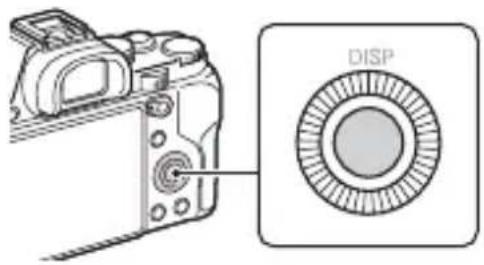
When you change [DISP Button] setting, and then if you press DISP on the control wheel, the screen status will change to “For viewfinder” mode. You can also display the histogram by pressing DISP.
For the LCD screen mode For playback (Basic information display)![1 P 100 24M FINE 60p +100% 2 AF [+] Lock-on AF 1/250 F3.5 ±0.0 ISO 400 3 2 +2.0 AFT OFF](/content/2026/04/724206/images/fbe6142161ea8ffa3dbee37bfae9f42af4f3e73e9e473c9bcc8815080727b282.jpg)
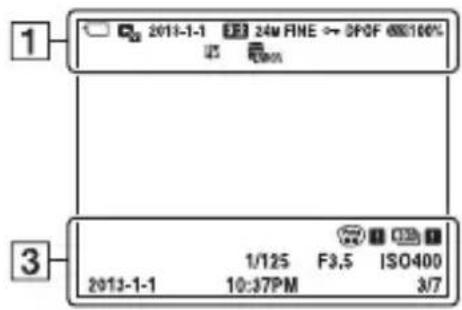
For the viewfinder mode
In Auto Mode or Scene Selection mode P/A/S/M/Sweep Panorama mode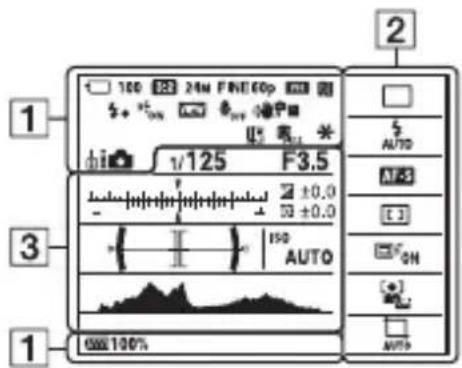
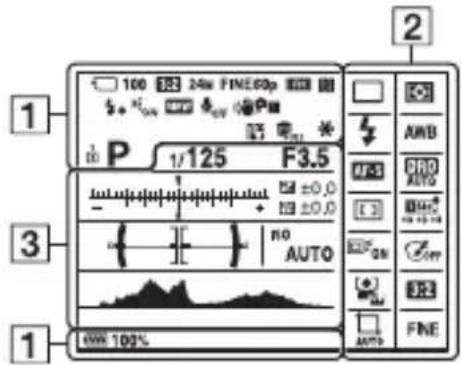
1
| Display Indication | |
| iPP*ASM | Shooting mode (44) |
| 12 | Register number (44) |
| Scene Recognition icons | |
| Memory card (32)/Upload | |
| 100 Remaining number of recordable images | |
| 3:2 Aspect ratio of still images | |
| 24M 10M6.0M 20M8.7M 5.1M10M 6.0M2.6M 8.7M5.1M 2.2MWIDESTD | ILCE-7:Image size of still images (55) |
| 36M 15M9.0M 30M13M 7.6M15M 9.0M3.8M 13M7.6M 3.2MWIDESTD | ILCE-7R:Image size of still images (55) |
| Display Indication | |
| RAWRAW+JX.FINEFINESTD | Image quality of still images |
| 60p 60i 24p50p 50i 25p | Frame rate of movies |
| FX: FH:PS: 1080:VGA: | Image size of movies |
| Remaining battery (31) | |
| Remaining battery warning | |
| Flash charge in progress | |
| APS-C Size Capture | |
| VIEW | Setting Effect OFF |
| ON | AF Illuminator |
| NFC is activated | |
| Airplane Mode | |
| No audio recording of movies | |
| Wind Noise Reduction | |
| Shot/Camera shake warning | |
| Overheating warning | |
| Database file full/Database file error | |
| Smart Zoom/Clear Image Zoom/Digital Zoom | |
| Spot metering area | |
| Digital level gauge | |
| Audio level | |
GB
| Display Indication | |
| View Mode | |
| 100-0003 Folder - file number | |
| Protect | |
| AVCHDMP4 | Recording mode of movies |
| DPOF DPOF set | |
| Auto Object Framing | |
2
| Display Indication | |
| Drive mode | |
| Flash mode/Red-eye reduction | |
| Flash compensation | |
| Focus mode | |
| AF area | |
| Face Detection/Smile Shutter | |
| Metering mode | |
| AWB7500K A5 G5 | White balance (Auto, Preset, Custom, Color temperature, Color filter) |
| Display Indication | |
| D-R DRO OFF AUTO HDR AUTO | D-Range Optimizer/Auto HDR |
| Std. Void Ntrt Clear Drop Light Port. Lard Semi Night Airer BW Sips +3 +3 +3 | Creative Style/Contrast, Saturation, Sharpness |
| ON OFF | Lock-on AF |
| Picture Effect | |
| Smile detection sensitivity indicator | |
3
| Display Indication | |
| ● Lock on AF | Lock on AF guide |
| -3.2.1.4.1.2.4.4 | EV scale |
| Exposure compensation/Metered Manual | |
| REC 0:12 Recording time of the movie (m:s) | |
| ● (○) (○) | Focus |
| 1/250 Shutter speed | |
| F3.5 | Aperture Value |
| ISO400ISO AUTO | ISO sensitivity |
| * | AE lock |
| Shutter speed indicator | |
| Aperture indicator | |
| Histogram | |
| Auto HDR image warning | |
| Picture Effect error | |
| 2013-1-110:37PM | Date of recording |
| 3/7 File number/Number of images in the view mode | |
GB
Operating the camera
How to use the control wheel
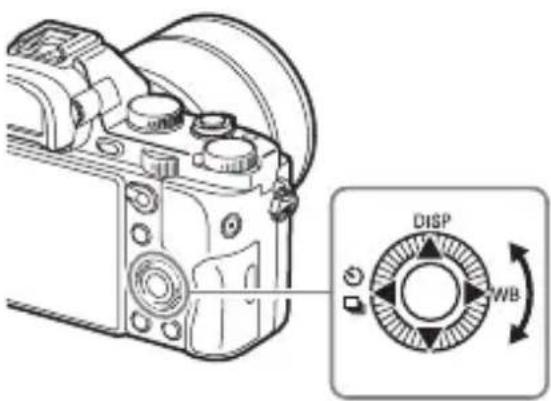
- You can turn the control wheel or press up/down/left/right on the control wheel to move the selection frame. Press the center button (●) to set the selected item. In this manual, pressing the up/down/left/right side of the control wheel is indicated by ▲/▼/◄/►.
- The following functions are assigned to ▲/◄/► on the control wheel. You can also change the ISO sensitivity immediately by turning the control wheel.
| ▲DISP Changes the screen display. | |
| ►WB White Balance | |
| ◄/ Drive Mode | Cont. Shooting/BracketSelf-timer |
- You can assign a desired function to the ▼/◄/►/● buttons and to the control wheel turning position in shooting mode.
- When you turn the control wheel or press ◀/▶ on the control wheel in playback mode, you can display the previous or next image.
How to use the front dial/rear dial
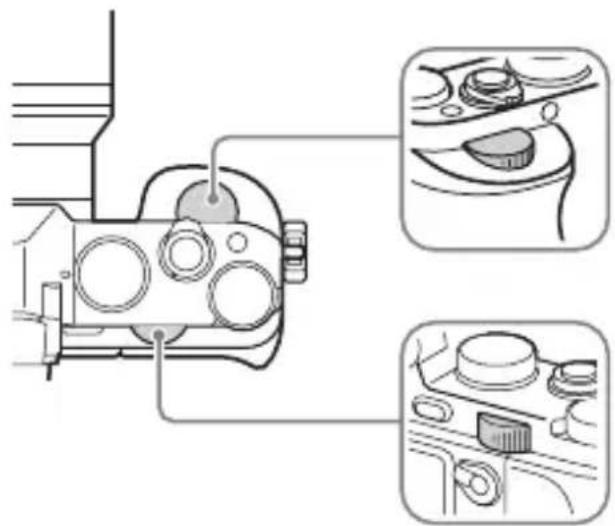
You can turn the front dial or rear dial to change the settings required for each shooting mode with immediate effect.
Selecting a function using the Fn (Function) button
This button is used for setting up or executing functions used frequently in shooting, except for functions from the Quick Navi screen.
1 Press the DISP on the control wheel to set the screen mode to other than [For viewfinder].
2 Press the Fn button.
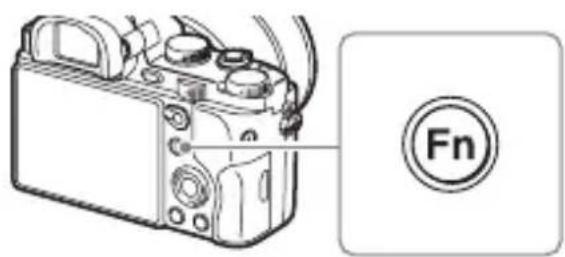
3 Select the desired item using ▲/▼/◄/► on the control wheel.
The setting screen appears.
4 Select the desired setting by turning the front dial, then press ● on the control wheel.
- Some setting values can be finely adjusted by turning the rear dial.
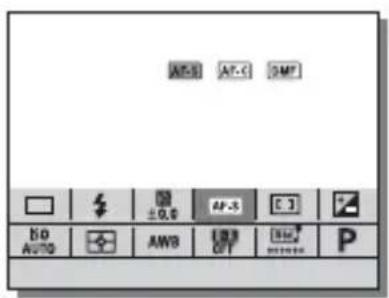
To set the individual settings in the dedicated screen
In step 3, select a setting item and press ● on the control wheel to switch to the dedicated screen for the setting item. Set the items according to the Operation guide.
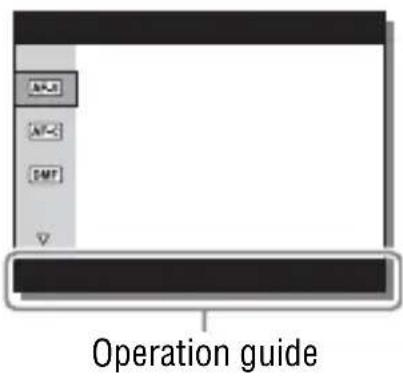
Functions that can be selected using the MENU button
You can set up the basic settings for the camera as a whole, or execute functions such as shooting, playback, or other operations.
1 Press the MENU button to display the menu screen. 2 Select the desired setting item using ▲/▼/◄/► on the control wheel or by turning the control wheel, and then press ● on the center of the control wheel.
- Select an icon at the top of the screen and press the ◀/▶ on the control wheel to move to another MENU item.
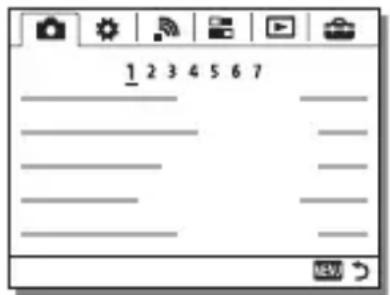
3 Select the setting value, then press ● to confirm.
To display the Tile Menu
Allows you to select whether to always display the first screen of the menu when you press the MENU button.
MENU → 📋 (Setup) 2 → [Tile Menu] → [On]
Using the In-Camera Guide
You can use [Custom Key Settings] to assign In-Camera Guide to the desired button.
The In-Camera Guide displays explanations for the currently selected menu function or setting.
1 Select MENU button → ⚙️ (Custom Settings) 6 → [Custom Key Settings] → desired functions assigned to the button → [In-Camera Guide].
Press the MENU button and use the control wheel to select a MENU item whose explanation you want to read, and then press the button to which [In-Camera Guide] is assigned.
Charging the battery pack
When using the camera for the first time, be sure to charge the NP-FW50 battery pack (supplied).
The “InfoLITHIUM” battery pack can be charged even when it has not been fully depleted.
It can also be used when it has not been fully charged.
The charged battery pack is discharged little by little, even when you do not use it. To avoid missing an opportunity to shoot, charge the battery pack again before you shoot.
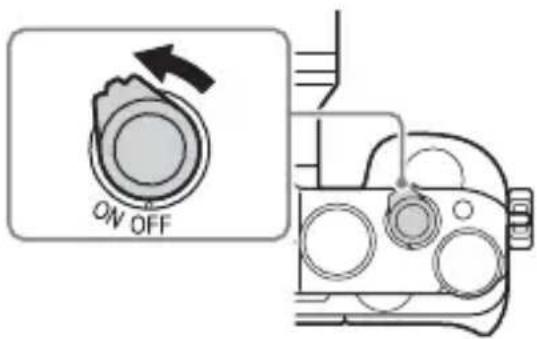
1 Set the ON/OFF (Power) switch to OFF.
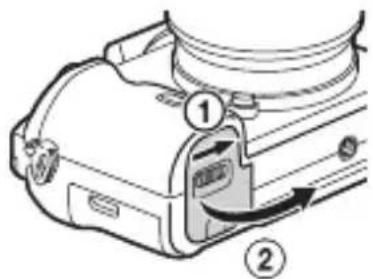
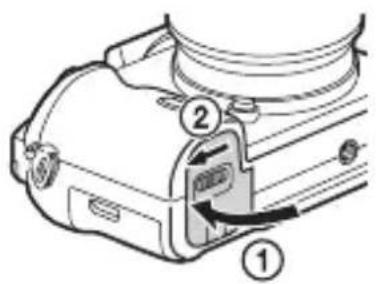
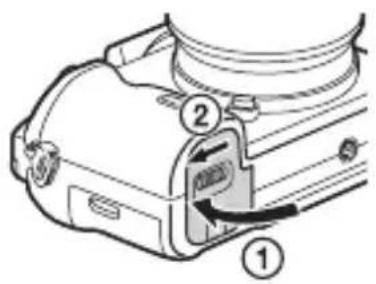
2 Slide the lever to open the cover.
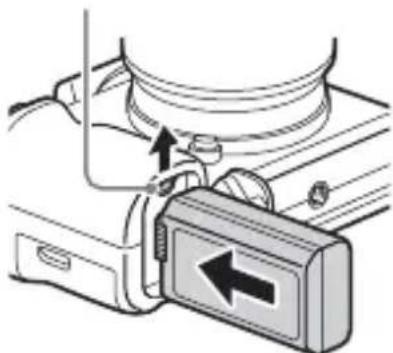
3 Insert the battery pack completely, using the tip of the battery to press the lock lever.
Lock lever
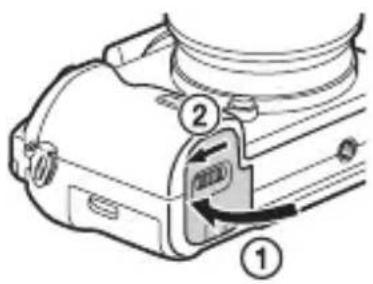
4 Close the cover.
5 Connect the camera to the AC Adaptor (supplied) using the micro USB cable (supplied), and connect the AC Adaptor to the wall outlet (wall socket).
For customers in the USA and Canada
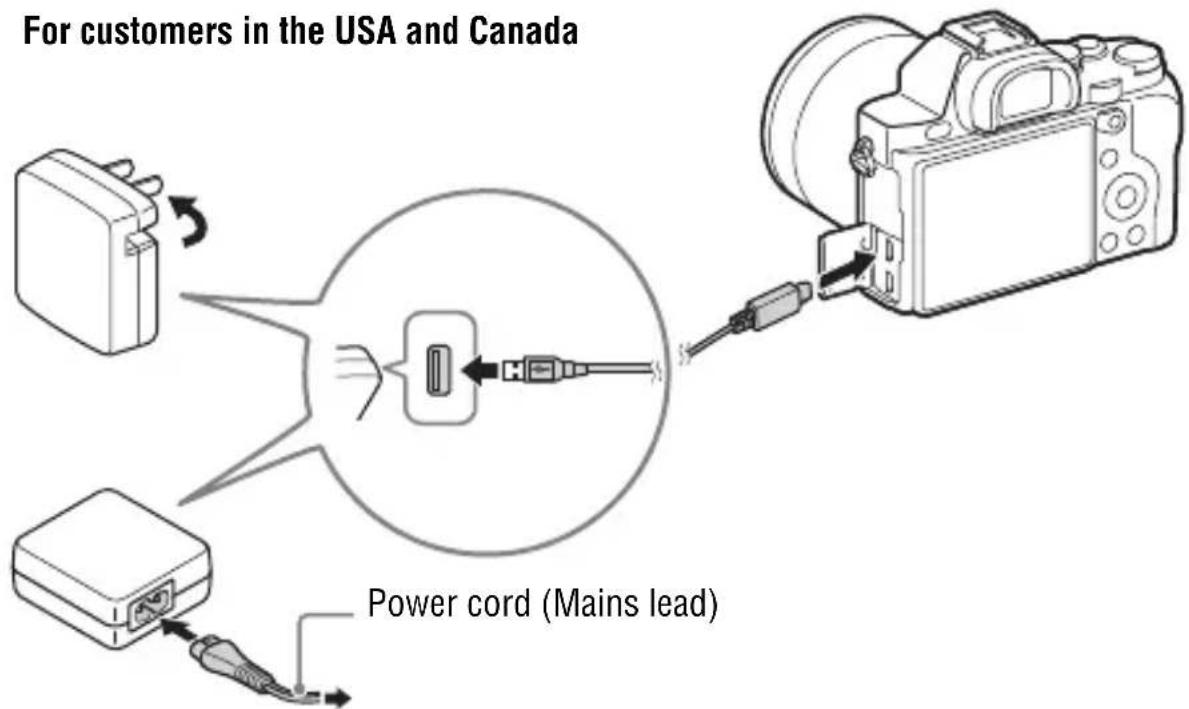
For customers in countries/regions other than the USA and Canada
The charge lamp lights orange, and charging starts.
- Turn off the camera while charging the battery.
- When the charge lamp flashes and charging is not finished, remove and re-insert the battery pack.
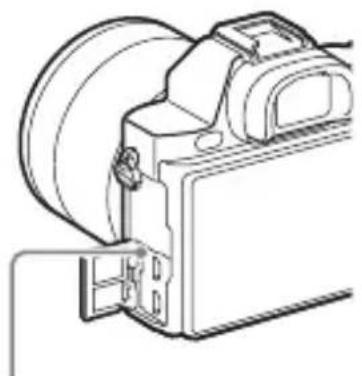
Charge lamp
Lit: Charging
Off: Charging finished
Flashing:
Charging error or charging paused temporarily because the camera is not within the proper temperature range
GB
Notes
- If the charge lamp on the camera flashes when the AC Adaptor is connected to the wall outlet (wall socket), this indicates that charging is temporarily stopped because the temperature is outside the recommended range. When the temperature gets back within the appropriate range, the charging resumes. We recommend charging the battery pack in an ambient temperature of between 10°C to 30°C (50°F to 86°F).
- Connect the AC Adaptor (supplied) to the nearest wall outlet (wall socket). If malfunctions occur while using the AC Adaptor, disconnect the plug from the wall outlet (wall socket) immediately to disconnect from the power source.
- When the camera is being used for the first time or when you use a battery pack that has not been used for a long time, the charge lamp may flash quickly when the battery is charged for the first time. If that happens, remove the battery pack from the camera and then re-insert it to recharge.
- Do not continuously or repeatedly charge the battery without using it if it is already fully charged or close to fully charged. Doing so may cause a deterioration in battery performance.
- When charging is finished, disconnect the AC Adaptor from the wall outlet (wall socket).
- Be sure to use only genuine Sony brand battery packs, micro USB cable (supplied), and AC Adaptor (supplied).
Charging time (Full charge)
The charging time is approximately 310 min. using the AC Adaptor (supplied).
Notes
- The above charging time applies when charging a fully depleted battery pack at a temperature of 25°C (77°F). Charging may take longer depending on conditions of use and circumstances.
Charging by connecting to a computer
The battery pack can be charged by connecting the camera to a computer using a micro USB cable.
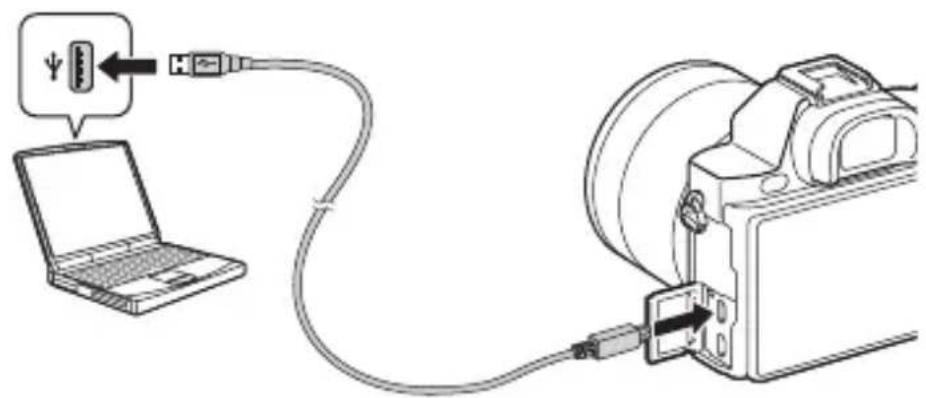
Notes
- Note the following points when charging via a computer:
- If the camera is connected to a laptop computer that is not connected to a power source, the laptop battery level decreases. Do not charge for an extended period of time.
- Do not turn on/off or restart the computer, or wake the computer to resume from sleep mode when a USB connection has been established between the computer and the camera. The camera may cause a malfunction. Before turning on/off, or restarting the computer or waking the computer from sleep mode, disconnect the camera and the computer.
- No guarantees are made for charging using a custom-built computer or a modified computer.
Checking the remaining battery charge
A remaining charge indicator appears on the screen.

Notes
- The remaining charge indicator may not be correct under certain circumstances.
To remove the battery pack
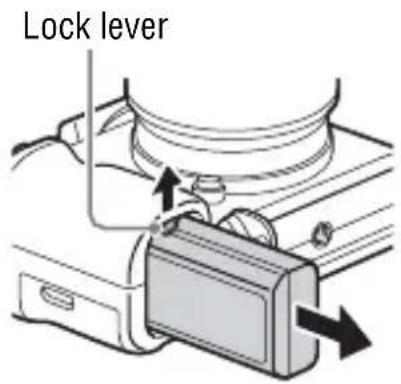
Turn off the camera. Slide the lock lever after confirming that the access lamp (page 12) is off, and remove the battery pack.
Be sure not to drop the battery pack.
Inserting a memory card (sold separately)
1 Slide the lever to open the cover.
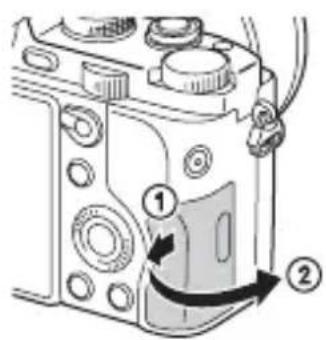
2 Insert the memory card (sold separately).
- With the notched corner facing as illustrated, insert the memory card until it clicks into place.
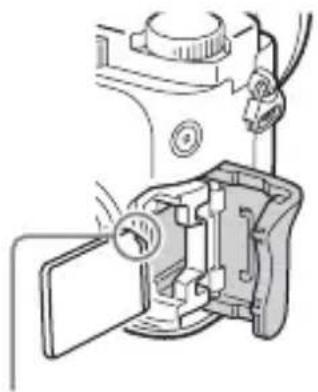
Ensure the notched corner faces correctly.
3 Close the cover.
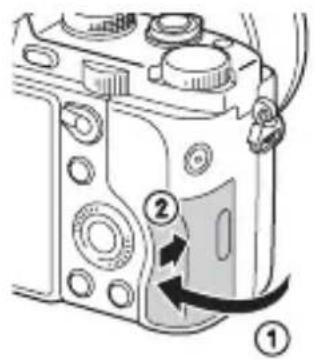
To remove the memory card
Make sure that the access lamp (page 12) is not lit, then push the memory card in once.
Memory cards that can be used
You can use the following types of memory cards with this camera. However, proper operation cannot be guaranteed for all types of memory cards.
| Memory card For still images For movies | ||
| A | Memory Stick PRO Duo (Mark2 only)√ | √ |
| Memory Stick PRO-HG Duo | √ | |
| Memory Stick XC-HG Duo | √ | |
| B | SD memory card (Class 4 or faster) √ | √ |
| SDHC memory card (Class 4 or faster)√ | √ | |
| SDXC memory card (Class 4 or faster)√ | √ |
- In this manual, the products in the table are collectively referred to as follows:
A: “Memory Stick PRO Duo” media
B: SD card
Notes
- Images recorded on a “Memory Stick XC-HG Duo” media or an SDXC memory card cannot be imported to or played on computers or AV devices that are not compatible with exFAT*. Make sure that the device is compatible with exFAT before connecting it to the camera. If you connect your camera to an incompatible device, you may be prompted to format the card. Never format the card in response to this prompt, as doing so will erase all data on the card. * exFAT is the file system used on “Memory Stick XC-HG Duo” media and SDXC memory cards.
Attaching a lens
Set the power switch of the camera to OFF before you attach or remove the lens.
1 Remove the body cap from the camera and the rear lens cap from the rear of the lens.
- When changing the lens, quickly change the lens away from dusty locations to keep dust or debris from getting inside the camera.
- When shooting, remove the front lens cap from the front of the lens.
Front lens cap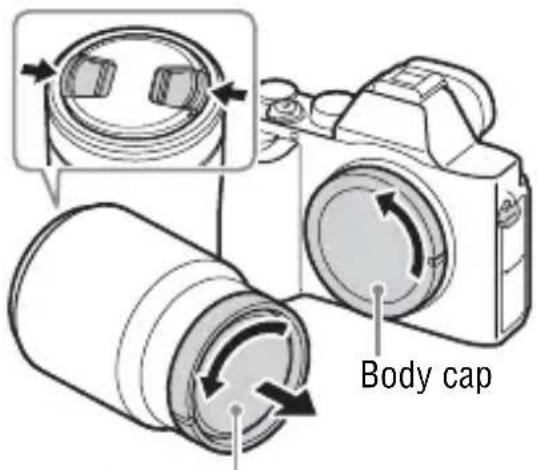
Rear lens cap
2 Mount the lens by aligning the white index marks (mounting indexes) on the lens and camera.
- Hold the camera with the lens facing down to prevent dust from entering into the camera.
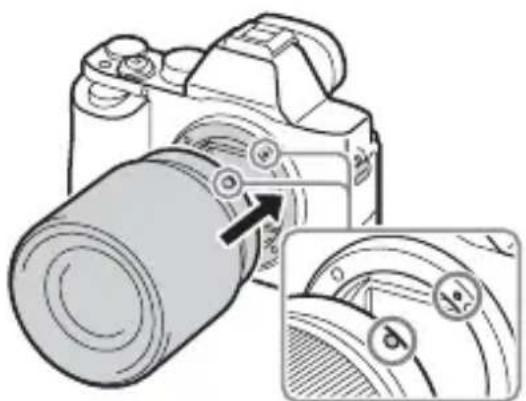
White index marks
3 While pushing the lens lightly toward the camera, turn the lens clockwise until it clicks into the locked position.
- Be sure to put the lens on straight.
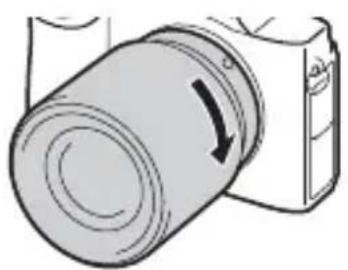
Notes
- When attaching a lens, do not press the lens release button.
- Do not use force when attaching a lens.
- The Mount Adaptor (sold separately) is required to use an A-mount lens (sold separately). To use the Mount Adaptor, refer to the operating manual supplied with the Mount Adaptor.
- When you want to shoot full-frame images, use a lens designed for a full-frame camera.
- When carrying the camera with a lens attached, hold both the camera and the lens firmly.
- Do not hold the part of the lens that is extended for the zoom or focus adjustment.
To remove the lens
1 Press the lens release button all the way in and turn the lens counterclockwise until it stops.
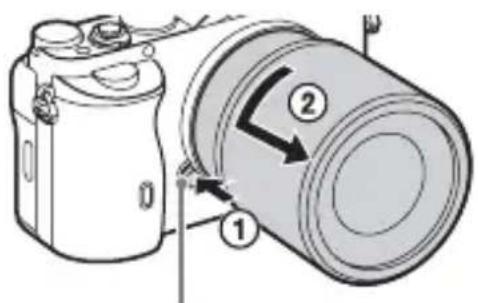
Lens release button
2 Attach the caps to the front and rear of the lens and the body cap to the camera.
- Before you attach them, remove any dust from them.
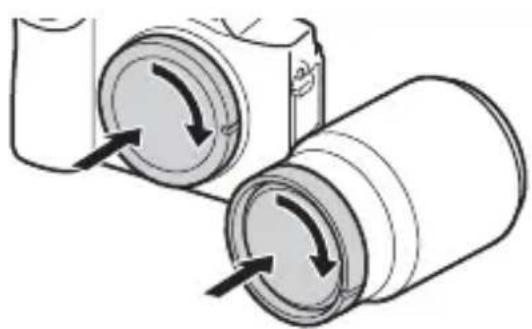
Notes on changing the lens
When changing the lens, if dust or debris gets inside the camera and adheres to the surface of the image sensor (the part that converts the light to an electric signal), it may appear as dark spots on the image, depending on the shooting environment.
The camera is equipped with an anti-dust function to prevent dust from landing on the image sensor. However, always make sure to quickly change the lens away from dusty locations when attaching/removing a lens.
Setting the date and time
When you turn on the camera for the first time or after you initialize the functions, the screen to set the date and time appears.
1 Set the power switch to ON to turn on the camera.
The screen to set the date and time appears.
• To turn the camera off, set the power switch to OFF.
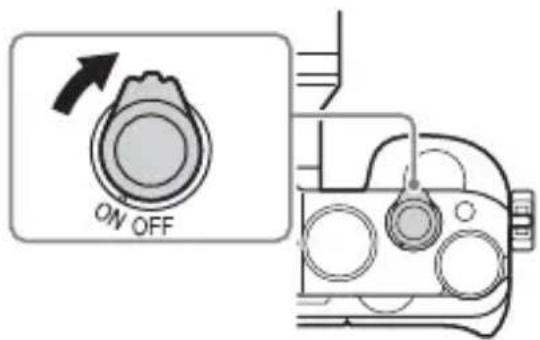
2 Check that [Enter] is selected on the screen, then press ● on the control wheel.
3 Select a desired geographic location, then press ●.
4 Press ▲/▼ on the control wheel, or select a setting item by turning the control wheel, then press ●.
5 Press ▲/▼/◄/►, or select a desired setting by turning the control wheel, then press ●.
6 Repeat steps 4 and 5 to set other items, then select [Enter] and press ● on the control wheel.
To cancel the date and time setting operation
Press the MENU button.
Setting the date/time and area again
The date and time setup screen appears automatically when the power is turned on for the first time or when the internal rechargeable backup battery has been discharged. To reset the date and time, use the menu.
MENU button → (Setup) 4 → [Date/Time Setup] or [Area Setting]
Maintaining the date and time setting
This camera has an internal rechargeable battery for maintaining the date and time and other settings regardless of whether the power is on or off, or the battery is installed or not.
Shooting still images
In auto mode, the camera analyzes the subject and allows you to shoot with the appropriate settings.
1 Set the power switch to ON to turn on the camera.
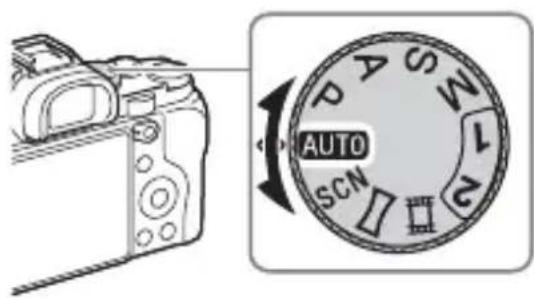
2 Set the mode dial to (ATIO Mode).
3 Look into the viewfinder and hold the camera.
4 Determine the size of a subject.
When using a lens with a zoom lever: Move the zoom lever.
When using a lens with a zoom ring: Turn the zoom ring.
- The optical zoom is not available when a fixed focal length lens is mounted.
- If the zoom range of the optical zoom is exceeded when a Power zoom lens is mounted, the camera automatically switches over to the camera side zoom.
5 Press the shutter button halfway down to focus.
- When the image is in focus, a beep sounds and the ● or 📷 indicator lights.
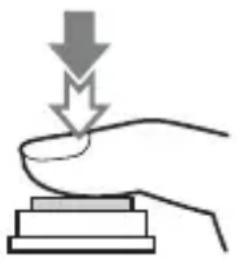
6 Press the shutter button fully down to shoot an image.
- If [Auto Obj. Framing] is set to [Auto], when shooting faces, close-up (macro) subjects, or subjects tracked by [Lock-on AF], the camera analyzes the scene and automatically trims the captured image into a suitable composition. Both the original and the trimmed images will be saved.
Recording movies
1 Press the MOVIE button to start recording.
- Since the [MOVIE Button] is set to [Always] in the default setting, movie recording can be started from any shooting mode.
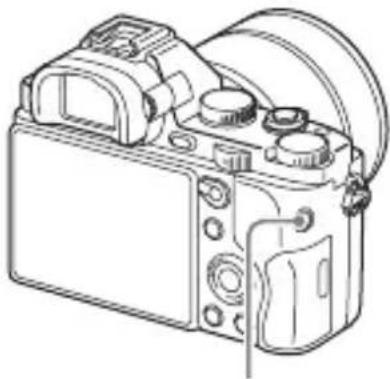
MOVIE button
GB
2 Press the MOVIE button again to stop recording.
Notes
- The sound of the camera in operation may be recorded while recording a movie. You can disable the sound recording by setting [Audio Recording] to [Off].
- To prevent the operating sound of the zoom ring from being recorded during movie recording when a Power zoom lens is used, we recommend recording movies using the zoom lever. When you move the zoom lever, place your finger lightly on the lever and operate it without flicking.
- The continuous recording time of a movie depends on the ambient temperature or the condition of the camera. See “Notes on continuous movie recording” (page 59).
- When the icon appears, the temperature of the camera is too high. Turn the camera off and wait until the temperature of the camera decreases.
- When you are recording continuously for a long time, you may feel that the camera is warm. This is normal. Also, “Internal temp. high. Allow it to cool.” may appear. In such cases, turn the camera off and wait until the camera is ready to shoot again.
Playing back images
1 Press the button.
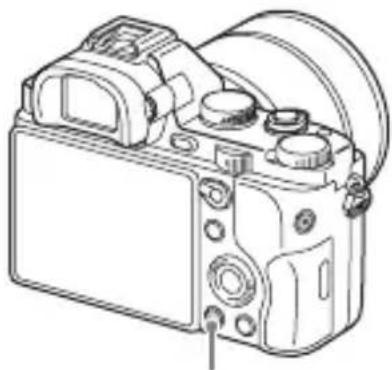
button
2 Select an image by pressing the ◀/▶ on the control wheel.
• To play back movies, press ● on the control wheel.
- If you press ▼ on the control wheel while playing back a movie, the control panel will be displayed.
| Control panel Action during movie playback | |
| ▶Playback | |
| ■Pause | |
| ▶▶Fast forward | |
| ◀◀Fast rewind | |
| ▶▶Forward slow playback | |
| ◀◀Rewind slow playback | |
| ▶▶▶Next movie | |
| ◀◀Previous movie | |
| ■◀Frame advance | |
| ◀◀Frame rewind | |
| ◀◀ | Volume settings |
| ⊃ | Closes the control panel |
Notes
• Movies recorded using other devices may not play back on this camera.
Deleting images
Once you have deleted an image, you cannot restore it. Be sure that you want to delete the image before proceeding.
1 While displaying the image you want to delete, press the ☑ (Delete) button.
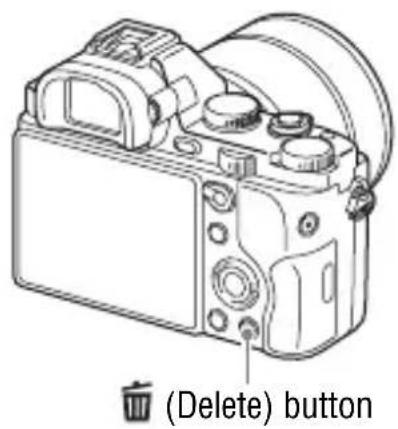
2 Select [Delete] with ▲/▼ on the control wheel, then press ●.
- To delete several images at a time, select MENU button → ▶ (Playback) 1 → [Delete].
Notes
- Protected images cannot be deleted.
Selecting a shooting mode
Turn the mode dial and set to the desired shooting mode.
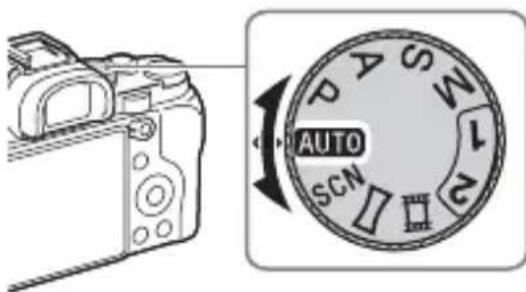
The following shooting modes are available.
| AUTO (Auto Mode) | Allows you to shoot still images with the settings adjusted automatically. |
| P (Program Auto) | Allows you to shoot with the exposure (the shutter speed and the aperture value) adjusted automatically. The other settings can be adjusted manually. |
| A (Aperture Priority) | Shoots by adjusting the aperture and changing the focus range, or by defocus the background. |
| S (Shutter Priority) | Adjusts the shutter speed to show the movement of the subject. |
| M (Manual Exposure) | Allows you to shoot after manually adjusting the exposure (the shutter speed and the aperture value) using the front or rear dial. |
| 1/2 (Memory recall) | Calls up settings pre-registered in [Memory] in the (Camera Settings). |
| SCN (Scene Selection) | Allows you to shoot with preset settings according to the scene. |
| (Sweep Panorama) | Allows you to shoot panoramic images by combining multiple images. |
| (Movie) Allows you to change shooting settings and shoot a movie. | |
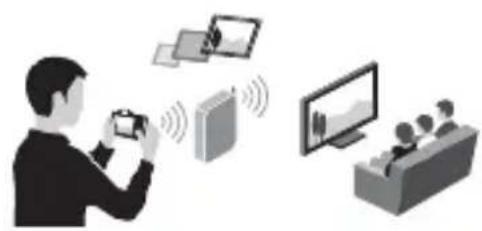
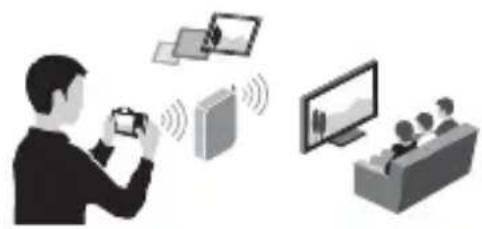
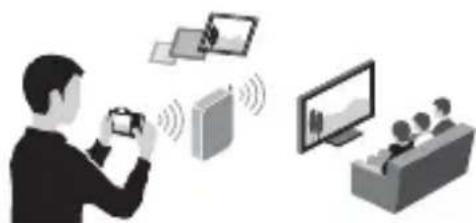
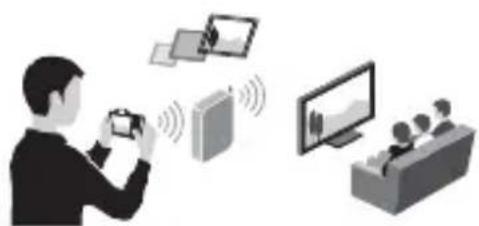
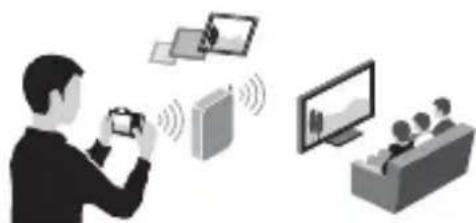
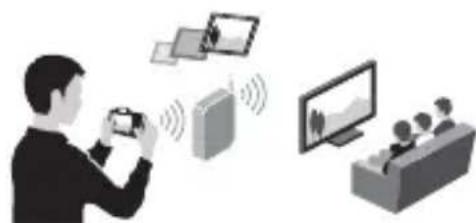
Using the Wi-Fi and NFC one-touch functions
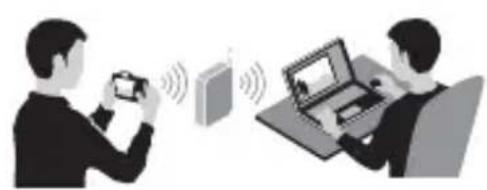
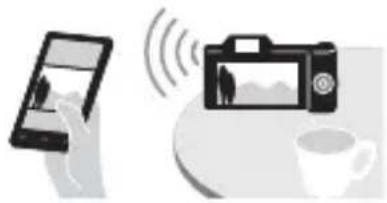
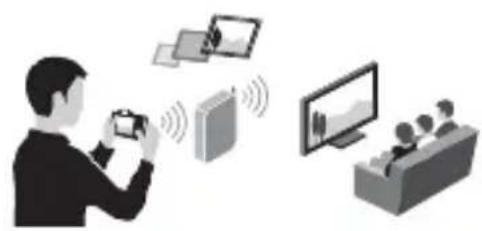
You can perform the following operations using the camera's Wi-Fi and NFC One-touch functions.
Saving images to a computer.
Transferring images from the camera to a smartphone.
Using the smartphone as a remote control for the camera.
Viewing still images on a TV.
GB
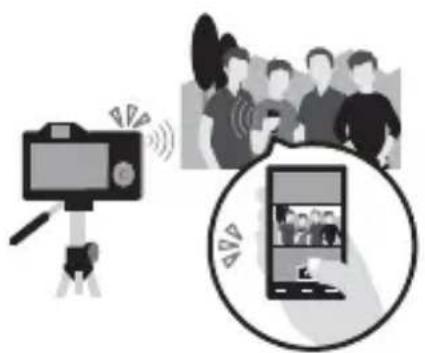
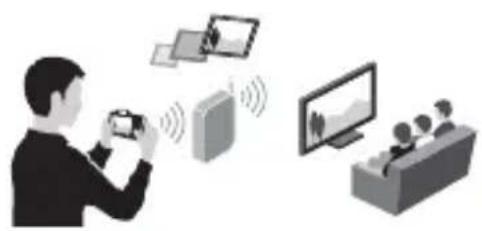
For details on the Wi-Fi and NFC One-touch functions, refer to the attached document “Wi-Fi Connection/One-touch (NFC) Guide” or to the Help Guide (page 54).
Connecting the camera to a wireless access point
Connect the camera to your wireless access point. Before starting the procedure, make sure you have the SSID (name of the access point) and password of your wireless access point with you.
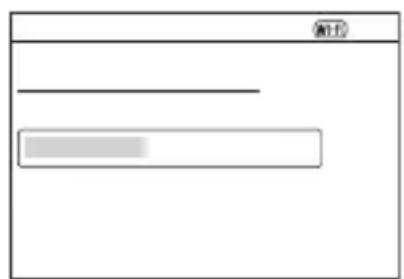
1 MENU → 📋 (Wireless) 2 → [Access Point Set.].
2 Use ▲/▼ on the control wheel to select the access point you want to connect to. Press ● in the center of the control wheel and enter the password if a key icon is displayed with a wireless access point, then select [OK].
![graph LR A["State 1"] --> B["State 2"] B --> C["State 3"] style A fill:#f9f,stroke:#333 style B fill:#ccf,stroke:#333 style C fill:#cfc,stroke:#333](/content/2026/04/724206/images/c334c435c43d0f4f1c5ed8a3253d1fc1d31ef4b4eac03600cb33ab1895f38742.jpg)
Notes
- If a connection is not established, see the wireless access point operating instructions or contact the administrator of the access point.
- To save images to a computer, install the following dedicated software on your computer.
When using Windows: PlayMemories Home www.sony.net/pm/
When using Mac: Wireless Auto Import http://www.sony.co.jp/imsoft/Mac/
Adding applications to the camera (Application downloading)
You can add the desired functions to your camera by connecting to the application downloading website (PlayMemories Camera Apps) via the Internet. For example, the following functions are available:
- You can use various effects for shooting images.
- You can upload images to network services directly from the camera.
Downloading applications
1 Access the application downloading website.
http://www.sony.net/pmca
GB
2 Follow the instructions on the screen and acquire a service account.
- If you have an account, sign in to the application download site.
3 Select the desired application and download the application to the camera following the instructions on the screen.
- To connect the camera to a Mac computer, perform the following setting on the camera. MENU → (Setup) 4 → [USB Connection] → [MTP]
① To a USB terminal of the computer
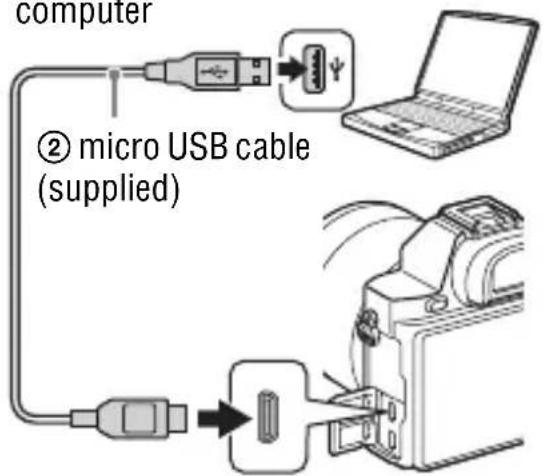
③ Multi Terminal
Notes
- The application downloading function may not be available in some countries and regions. For details, refer to the application downloading website above.

How to download applications directly using the Wi-Fi function of the camera
You can download applications using the Wi-Fi function without connecting to a computer.
Select MENU → 📁 (Application) → [Application List] → 📄
(PlayMemories Camera Apps), then follow the instructions on the screen to download applications.
Acquire a service account in advance.
Select MENU → 📋 (Wireless) 2 → [Access Point Set.] → access point to be connected → change [IP Address Setting] to [Auto] if it is set to [Manual].
Using the software
Use the following applications to optimize use of the images shot with your camera.
- "Image Data Converter"
- "PlayMemories Home"
- "Remote Camera Control"
For details on installation, see pages 51 to 53.
Recommended computer environment (Windows)
The following computer environments are recommended when using the software and importing images via a USB connection.
| OS (pre-installed) Windows Vista* SP2/Windows 7 SP1/Windows 8 | |
| “PlayMemories Home” | CPU: Intel Pentium III 800 MHz or faster(For playing/editing the High Definition movies: Intel Core Duo 1.66 GHz or faster/Intel Core 2 Duo 1.66 GHz or faster, Intel Core 2 Duo 2.26 GHz or faster (AVC HD (FX/FH)), Intel Core 2 Duo 2.40 GHz or faster (AVC HD (PS)))Memory: 1 GB or moreHard Disk: Disk space required for installation—approximately 600 MBDisplay: Screen resolution—1024 × 768 dots or more |
| “Image Data Converter Ver.4”/ “Remote Camera Control Ver.3” | CPU/Memory: Pentium 4 or faster/1 GB or moreDisplay: 1024 × 768 dots or more |
* Starter (Edition) is not supported.
Recommended computer environment (Mac)
The following computer environments are recommended when using the software and importing images via a USB connection.
| OS (pre-installed) Mac | OS X v10.6 – v10.8 |
| “PlayMemories Home” | CPU: Intel processors (Intel Core Solo/Core Duo/Core 2 Duo, etc.)Hard Disk: Disk space required for installation—approximately 100 MBDisplay: Screen resolution—1024 × 768 dots or more |
| “Image Data Converter Ver.4”/ “Remote Camera Control Ver.3” | CPU: Intel Core Solo/Core Duo/Core 2 Duo or faster Memory: 1 GB or more is recommended. Display: 1024 × 768 dots or more |
Notes
- Operation cannot be assured in an environment that is based on an upgrade of the operating systems described above or in a multi-boot environment.
- If you connect 2 or more USB devices to a single computer at the same time, some devices, including the camera, may not operate, depending on the types of USB devices you are using.
- Connecting the camera using a USB interface that is compatible with Hi-Speed USB (USB 2.0 compliant) allows advanced transfer (high speed transfer), as the camera is compatible with Hi-Speed USB (USB 2.0 compliant).
- When your computer resumes activity from suspend or sleep mode, communication between the camera and your computer may not recover at the same time.
Using "Image Data Converter"
With "Image Data Converter", you can do the following:
- You can play back and edit images recorded in RAW format with various corrections, such as tone curve and sharpness.
- You can adjust images with white balance, exposure, and [Creative Style], etc.
- You can save the images displayed and edited on a computer. You can either save the image as RAW format or save it in a general file format.
- You can display and compare the RAW images and JPEG images recorded by this camera.
- You can rank images in 5 grades.
- You can apply color labels.
To use "Image Data Converter," refer to Help.
Click [Start] → [All Programs] → [Image Data Converter] → [Help] → [Image Data Converter Ver.4].
"Image Data Converter" support page (English only)
Installing "Image Data Converter"
1 Download the software from the following URL and install it on your computer.
Windows:
http://www.sony.co.jp/imsoft/Win/
Mac:
- Log on as Administrator.
GB
Using "PlayMemories Home"
The software “PlayMemories Home” allows you to import still images and movies to your computer and use them. “PlayMemories Home” is required for importing AVCHD movies to your computer.
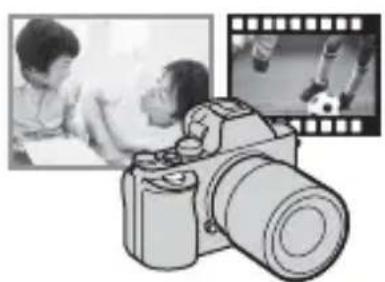

Importing images from your camera
For Windows, the following functions are also available.
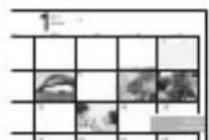
Viewing images on Calendar
Creating movie discs

YouTube
Uploading images to network services
Playing back imported images
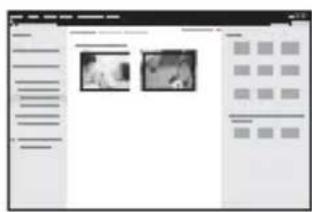
Sharing images on "PlayMemories Online"

PlayMemories Online
Notes
- An Internet connection is required to install “PlayMemories Home”.
- An Internet connection is required to use “PlayMemories Online” or other network services. “PlayMemories Online” or other network services may not be available in some countries or regions.
- Refer to the following URL for Mac software: http://www.sony.co.jp/imsoft/Mac/
- If the software “PMB (Picture Motion Browser),” supplied with models released before 2011, has already been installed on your computer, it will be overwritten by “PlayMemories Home” during the installation. Use “PlayMemories Home,” the successor software of “PMB.”
- Movies recorded using the [60p 28M(PS)]/[50p 28M(PS)], [60i 24M(FX)]/[50i 24M(FX)] or [24p 24M(FX)]/[25p 24M(FX)] setting in [Record Setting] are converted by “PlayMemories Home” to create an AVCHD recording disc. This conversion can take a long time. Also, you cannot create a disc with the original image quality. If you want to keep the original image quality, store your movies on a Blu-ray Disc.
Installing "PlayMemories Home"
1 Using the Internet browser on your computer, go to the following URL, then click [Install] → [Run].
www.sony.net/pm/
2 Follow the instructions on the screen to complete the installation.
Using "Remote Camera Control"
Connect the camera to your computer. With “Remote Camera Control” you can:
- Set up the camera or record an image from the computer.
- Record an image directly to the computer.
- Perform an Interval Timer Shooting.
Set up the following before use: MENU → 📄 (Setup) 4 → [USB Connection] → [PC Remote]
Installing "Remote Camera Control"
1 Using the Internet browser on your computer, go to the following URL.
Windows:
http://www.sony.co.jp/imsoft/Win/
Mac:
2 Follow the instructions on the screen to download and install "Remote Camera Control."
GB
Notes
- An Internet connection is required to install "Remote Camera Control."
Learning more about the camera ("Help Guide")
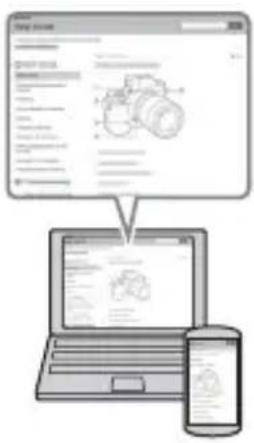
"Help Guide" is an on-line manual. Refer to it for in-depth instructions on the many functions of the camera.
1 Access the Sony support page.
http://www.sony.net/SonyInfo/Support/
2 Select your country or region.
3 Search for the model name of your camera within the support page.
- Check the model name on the bottom of your camera.
Checking the number of images and recordable time of movies
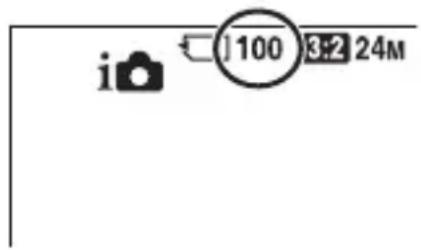
When you insert a memory card into the camera and set the power switch to ON, the number of images that can be recorded (should you continue to shoot using the current settings) is displayed on the screen.
Notes
- When “0” (the number of recordable images) flashes in yellow, the memory card is full. Replace the memory card with another one, or delete images from the current memory card (page 43).
- When “NO CARD” (the number of recordable images) flashes in yellow, it means no memory card has been inserted. Insert a memory card.
The number of images that can be recorded on a memory card
The table below shows the approximate number of images that can be recorded on a memory card formatted with this camera. The values are defined using Sony standard memory cards for testing. The values may vary depending on the shooting conditions and the type of memory card used.
ILCE-7:
Image Size: L: 24M
Aspect Ratio: 3:2*
Memory card formatted with this camera (Units: Images)
| Size\Capacity | 2 GB | 4 GB | 8 GB | 16 GB | 32 GB | 64 GB | |
| Standard 280 560 1 | 100 2250 | 4600 | 9200 | ||||
| Fine 195 395 800 1 | 600 3200 | 6400 | |||||
| Extra fine 105 215 | 435 870 | 1700 | 3450 | ||||
| RAW & JPEG | 54 | 105 215 | 435 870 | 1750 | |||
| RAW | 74 | 145 295 | 600 1200 | 2400 |
ILCE-7R:
Image Size: L: 36M
Aspect Ratio: 3:2*
Memory card formatted with this camera (Units: Images)
| Size\Capacity | 2 GB | 4 GB | 8 GB | 16 GB | 32 GB | 64 GB | |
| Standard 215 440 8 | 90 1750 35 | 50 7000 | |||||
| Fine 145 295 600 1 | 200 2400 4 | 800 | |||||
| Extra fine | 78 | 150 310 630 | 1250 2500 | ||||
| RAW & JPEG | 37 | 75 | 150 300 | 610 1200 | |||
| RAW | 50 | 99 | 200 405 | 810 1600 | |||
* When [Aspect Ratio] is set to [16:9], you can record more images than the numbers shown in the table above (except when [RAW] is selected).
The number of images that can be recorded using a battery pack
Note that the actual numbers may differ depending on the conditions of use.
ILCE-7:
| Battery life Number of images | |
| Shooting (still images) Approx. | 135 min. Approx. 270 images |
| Actual shooting (movies) Approx. | 60 min. — |
| Continuous shooting (movies) | Approx. 100 min. — |
| Viewing (still images) Approx. | 280 min. Approx. 5600 images |
GB
ILCE-7R:
| Battery life Number of images | |
| Shooting (still images) Approx. | 135 min. Approx. 270 images |
| Actual shooting (movies) Approx. | 60 min. — |
| Continuous shooting (movies) Approx. | 90 min. — |
| Viewing (still images) Approx. | 280 min. Approx. 5600 images |
Notes
- The above number of images applies when the battery pack is fully charged. The number of images may decrease depending on the conditions of use.
- The number of images that can be recorded is for shooting under the following conditions:
- The battery pack is used at an ambient temperature of 25°C (77°F).
- Using the lens FE 28-70 mm F3.5-5.6 OSS
- Using Sony "Memory Stick PRO Duo" (Mark2) media (sold separately)
- [Viewfinder Bright.] is set to [Manual] [±0].
- [Monitor Brightness] is set to [Manual] [±0].
- [Display Quality] is set to [Standard] (ILCE-7)/[High] (ILCE-7R).
- The number for “Shooting (still images)” is based on the CIPA standard, and is for shooting under the following conditions:
(CIPA: Camera & Imaging Products Association)
- [Focus Mode] is set to [Single-shot AF].
- Shooting once every 30 seconds.
- The power turns on and off once every ten times.
- The number of minutes for movie shooting is based on the CIPA standard, and are for shooting under the following conditions:
- [Record Setting] is set to [60i 17M(FH)]/[50i 17M(FH)].
- Typical movie shooting: Battery life based on repeatedly shooting, zooming, shooting stand-by, turning on/off, etc.
- Continuous movie shooting: Battery life based on non-stop shooting until the limit (29 minutes) has been reached, and then continued by pressing the MOVIE button again. Other functions, such as zooming, are not operated.
Available recording time for a movie
The table below shows the approximate total recording times using a memory card formatted with this camera.
Memory card formatted with this camera (h (hour), m (minute))
| CapacityRecordSetting | 2 GB | 4 GB | 8 GB | 16 GB | 32 GB | 64 GB | |
| 60i 24M(FX)/50i24M(FX) | 10 m 20 | m 40 m 1 | h 30 m 3 h | 6 h | |||
| 60i 17M(FH)/50i17M(FH) | 10 m 30 | m 1 h 2 h | 4 h 5 m 8 h | 15 m | |||
| 60p 28M(PS)/50p28M(PS) | 9 m 15 | m 35 m 1 h | 15 m 2 h | 30 m 5 h | 5 m | ||
| 24p 24M(FX)/25p24M(FX) | 10 m 20 | m 40 m 1 | h 30 m 3 h | 6 h | |||
| 24p 17M(FH)/25p17M(FH) | 10 m 30 | m 1 h | 2 h 4 h | 8 h | |||
| 1440×1080 12M | 20 m | 40 m | 1 h 20 m | 2 h 45 m | 5 h 30 m | 11 h | |
| VGA 3M | 1 h 10 m | 2 h 25 m | 4 h 55 m | 10 h | 20 h | 40 h | |
- Continuous shooting is possible for approximately 29 minutes (a product specification limit). The maximum continuous recording time of an MP4 (12M) format movie is about 20 minutes (limited by the 2 GB file size restriction).
Notes
- The recordable time of movies varies because the camera is equipped with VBR (Variable Bit Rate), which automatically adjusts image quality depending on the shooting scene. When you record a fast-moving subject, the image is clearer but the recordable time is shorter because more memory is required for recording. The recordable time also varies depending on the shooting conditions, the subject, or the image quality/size settings.
- The values shown are not for continuous recording time.
- The recording time may differ depending on shooting conditions and the memory card used.
- When [is] is indicated, stop recording the movie. The temperature inside the camera has increased to an unacceptable level.
- For details on movie playback, see page 42.
GB
Notes on continuous movie recording
- It requires a lot of power to perform high quality movie recording or continuous shooting using the image sensor. Therefore, if you continue to shoot, the temperature inside the camera will rise, especially that of the image sensor. In such cases, the camera turns off automatically since higher temperatures affect the quality of the images or affect the internal mechanism of the camera.
- The duration of time available for movie recording varies with the temperature or condition of the camera before you start recording. If you frequently recompose or shoot images after the power is turned on, the temperature inside the camera will rise and the recording time available will be shorter.
- If the camera stops recording due to the temperature, leave it for several minutes with the power turned off. Start recording after the temperature inside the camera drops fully.
- If you observe the following points, the recording time will be longer.
- Keep the camera out of direct sunlight.
- Turn the camera off when it is not being used.
- The maximum size of a movie file is about 2 GB. When the file size is about 2 GB, recording stops automatically when [File Format] is set to [MP4], and a new movie file is created automatically when [File Format] is set to [AVCHD].
- The maximum continuous recording time is 29 minutes.
Specifications
Camera
[System]
Camera Type: Interchangeable Lens Digital Camera
Lens: E-mount lens
[Image sensor]
Image format:
ILCE-7: 35mm full size
(35.8 mm × 23.9 mm), CMOS
image sensor
ILCE-7R: 35mm full size
(35.9 mm × 24.0 mm), CMOS
image sensor
Total pixel number of camera:
ILCE-7:
Approx. 24.7 Megapixels
ILCE-7R
Approx. 36.8 Megapixels
Effective pixel number of camera:
ILCE-7:
Approx. 24.3 Megapixels
ILCE-7R
Approx. 36.4 Megapixels
[Anti-Dust]
System: Charge protection coating on
Optical Filter and ultrasonic vibration mechanism
[Auto focus system]
System:
ILCE-7:
Phase detection system/Contrast
detection system
ILCE-7R:
Contrast detection system
Sensitivity Range: 0 EV to 20 EV (at ISO 100 equivalent with F2.8 lens)
[Electronic viewfinder]
Type: Electronic viewfinder
Total number of dots: 2,359,296 dots
Frame coverage: 100%
Magnification: 0.71x with 50 mm lens at infinity, -1 m^-1 (diopter)
Eye Point: Approximately 27 mm from the eyepiece, 22 mm from the eyepiece frame at -1 m^-1
Diopter Adjustment: -4.0 m^-1 to +3.0 m^-1 (diopter)
[LCD screen]
LCD panel: 7.5 cm (3.0 type) TFT drive
Total number of dots: 921,600 dots
[Exposure control]
Metering method: 1,200-zone evaluative metering by the image sensor
Metering range: 0 EV to 20 EV (at ISO 100 equivalent with F2.8 lens)
ISO sensitivity (Recommended exposure index):
Still images: [ISO AUTO], ISO
50 to 25,600 (1/3 EV step)
Movies: [ISO AUTO], ISO 200 to 25,600 (1/3 EV step)
Multi frame noise reduction: [ISO
AUTO]/ISO 100 to 51,200 (1 EV step)
Exposure compensation: ±5.0 EV (switchable between 1/3 and 1/2 EV steps)
[Shutter]
Type: Electronically-controlled, vertical-traverse, focal-plane type
Speed range:
Still images: 1/8,000 second to 30 seconds, bulb
Movies: 1/8000 second to 1/4 second (1/3 step)
1080 60i-compatible device up to 1/60 second in AUTO mode (up to 1/30 second in Auto slow shutter mode)
1080 50i-compatible device up to 1/50 second in AUTO mode (up to 1/25 second in Auto slow shutter mode)
Flash sync speed:
ILCE-7: 1/250 second
ILCE-7R: 1/160 second
[Recording format]
File format: JPEG (DCF Ver. 2.0, Exif Ver. 2.3, MPF Baseline) compliant, RAW (Sony ARW 2.3 format)
Movie (AVCHD format): AVCHD format Ver. 2.0 compatible Video: MPEG-4 AVC/H.264
Audio: Dolby Digital 2ch, equipped with Dolby Digital Stereo Creator
- Manufactured under license from Dolby Laboratories. Movie (MP4 format): Video: MPEG-4 AVC/H.264 Audio: MPEG-4 AAC-LC 2ch
[Recording media]
"Memory Stick PRO Duo" media, SD card
[Input/output terminals]
Multi Terminal*: Hi-Speed USB (USB 2.0)
HDMI: HDMI type D microjack
![SONY Alpha ILCE-7K - [Input/output terminals] - 1](/content/2026/04/724206/images/c737f531a312795b8052834f8c9d27c6d0e710df3efd37737cdee4f489df0429.jpg)
(Microphone) Terminal:
∅ 3.5 mm Stereo minijack
![SONY Alpha ILCE-7K - [Input/output terminals] - 2](/content/2026/04/724206/images/c5e53bf97f5e7f399351400aae4a38c2da2d4a09f1e0f00e721b65c1452ac366.jpg)
(Headphones) Terminal:
∅ 3.5 mm Stereo minijack
* Supports Micro USB compatible devices.
[Power, general]
Used battery pack: Rechargeable battery pack NP-FW50
[Power consumption]
When using an FE 28-70 mm F3.5-5.6 OSS*
ILCE-7:
When using the viewfinder:
Approx. 3.5 W
When using the LCD screen:
Approx. 2.7 W
ILCE-7R:
When using the viewfinder:
Approx. 3.5 W
When using the LCD screen:
Approx. 2.7 W
* Supplied with ILCE-7K
[Others]
Exif Print: Compatible
PRINT Image Matching III: Compatible
DPOF: Compatible
Dimensions: Approx. 126.9 mm × 94.4 mm × 48.2 mm (Approx. 5 inches × 3 7/10 inches × 1 9/10 inches) (W/H/D, excluding protrusions)
Mass:
ILCE-7:
Approx. 474 g (1 lb 0.7 oz) (with battery and “Memory Stick PRO Duo” media)
Approx. 416 g (14.7 oz) (body only)
ILCE-7R:
Approx. 465 g (1 lb 0.4 oz) (with battery and “Memory Stick PRO Duo” media)
Approx. 407 g (14.4 oz) (body only)
Operating temperature: 0°C to 40°C (32°F to 104°F)
[Wireless LAN]
Supported format: IEEE 802.11 b/g/n
Frequency band: 2.4 GHz bandwidth
Security: WEP/WPA-PSK/WPA2-PSK
Connection method: WPS (Wi-Fi Protected Setup)/Manual
Access method: Infrastructure mode
NFC: NFC Forum Type 3 Tag compliant
AC Adaptor AC-UB10C/UB10D
Power requirements: AC 100 V to 240 V, 50 Hz/60 Hz, 70 mA
Output voltage: DC 5 V, 0.5 A
Operating temperature: 0 °C to 40 °C (32 °F to 104 °F)
Storage temperature: -20 °C to +60 °C (-4 °F to +140 °F)
Dimensions (Approx.): 50 mm × 22 mm × 54 mm (2 inches × 7/8 inches × 2 1/4 inches) (W/H/D)
Rechargeable battery pack NP-FW50
Used battery: Lithium-ion battery
Maximum voltage: DC 8.4 V
Nominal voltage: DC 7.2 V
Maximum charge voltage: DC 8.4 V
Maximum charge current: 1.02 A
Capacity: Typical 7.7 Wh (1 080 mAh)
Minimum: 7.3 Wh (1 020 mAh)
Maximum dimensions:
Approx. 31.8 mm × 18.5 mm × 45 mm (1 5/16 inches × 3/4
inches × 1 13/16 inches) (W/H/D)
Lens FE 28-70 mm F3.5-5.6 OSS (Supplied with ILCE-7K)
Focal length: 28 mm – 70 mm
Lens groups—elements: 8–9
Angle of view: 75° - 34°
Minimum focus*: 0.3 m - 0.45 m (0.99 ft. -1.48 ft.)
Maximum magnification: 0.19×
Minimum f-stop: f/22 - f/36
Filter diameter: 55 mm
Dimensions (max. diameter × height): Approx. 72.5 mm × 83 mm (Approx. 2 7/8 inches × 3 3/8 inches)
Mass: Approx. 295 g (Approx. 10.5 oz.)
SteadyShot: Available
*Minimum focus is the shortest distance from the image sensor to the subject.
Design and specifications are subject to change without notice.
On image data compatibility
- This camera conforms with DCF (Design rule for Camera File system) universal standard established by JEITA (Japan Electronics and Information Technology Industries Association).
- Playback of images recorded with your camera on other equipment and playback of images recorded or edited with other equipment on your camera are not guaranteed.
Trademarks
• The following marks are trademarks of Sony Corporation. α, “Memory Stick,” “Memory Stick PRO,” MEMORY STICK PRO “Memory Stick Duo,” MEMORY STICK DUO "Memory Stick PRO Duo," MEMORY STICK PRO DUO "Memory Stick PRO-HG Duo," MEMORY STICK PRO-HG Duo "Memory Stick XC-HG Duo," MEMORY STICK XC-HG Duo "MagicGate," MAGICGATE, "BRAVIA," "InfoLITHIUM," PlayMemories Camera Apps, "PlayMemories Home," "PlayMemories Online," "PlayMemories Mobile"
- “AVCHD Progressive” and “AVCHD Progressive” logotype are trademarks of Panasonic Corporation and Sony Corporation. • Dolby and the double-D symbol are trademarks of Dolby Laboratories.
- Microsoft, Windows and Windows Vista are registered trademarks of Microsoft Corporation in the United States and/or other countries.
- The terms HDMI and HDMI High-Definition Multimedia Interface, and the HDMI Logo are trademarks or registered trademarks of HDMI Licensing LLC in the United States and other countries. • Mac, Mac OS are registered trademarks of Apple Inc.
- iOS is a registered trademark or trademark of Cisco Systems, Inc. and/or its affiliates in the United States and certain other countries.
- iPhone and iPad are trademarks of Apple Inc., registered in the U.S. and other countries.
- Intel, Intel Core, and Pentium are trademarks or registered trademarks of Intel Corporation.
- SDXC logo is a trademark of SD-3C, LLC.
- Android, Google Play are trademarks of Google Inc. • Wi-Fi, the Wi-Fi logo, Wi-Fi PROTECTED SET-UP are registered trademarks of the Wi-Fi Alliance.
- The N Mark is a trademark or registered trademark of NFC Forum, Inc. in the United States and in other countries. • DLNA and DLNA CERTIFIED are trademarks of Digital Living Network Alliance.
- “” and “PlayStation” are registered trademarks of Sony Computer Entertainment Inc.
- Facebook and the “f” logo are trademarks or registered trademarks of Facebook, Inc.
- YouTube and the YouTube logo are trademarks or registered trademarks of Google Inc.
- Eye-Fi is a trademark of Eye-Fi, Inc.
- In addition, system and product names used in this manual are, in general, trademarks or registered trademarks of their respective developers or manufacturers. However, the ™ or ® marks are not used in all cases in this manual.

Works with PlayStation 3
- Add further enjoyment with your PlayStation 3 by downloading the application for PlayStation 3 from PlayStation Store (where available.)
- The application for PlayStation 3 requires PlayStation Network account and application download. Accessible in areas where the PlayStation Store is available.

InfoLITHIUM


MEMORY STICK


Progressive

Additional information on this product and answers to frequently asked questions can be found at our Customer Support Website.
http://www.sony.net/
Français
E-mount
Aide-mémoire
ILCE-7R Model No. WW328261
ILCE-7 Model No. WW328262
WARNING
Responsible party: Sony Electronics Inc.
Address: 16530 Via Esprillo, San Diego, CA 92127 USA
Responsible party: Sony Electronics Inc.
Address: 16530 Via Esprillo, San Diego, CA 92127 USA
Complies with IDA Standards DB00353
- Rechargeable battery NP-FW50 (1)
- Micro USB cable (1)
- Shoulder strap (1)
EN
16 ▶ (Playback) button
Top/Side
EN
14 (N mark)
EN
Operation Guide
Charge indicator
Lit: Charging
Notes
White marks
Notes
MENU button
EN
EN
MOVIE button
Button

(CIPA: Camera & Imaging Products Association)
Rechargeable battery NP-FW50
Works with PlayStation@3
ILCE-7R Model No. WW328261
ILCE-7 Model No. WW328262
WARNING
• Shoulder strap (1)
14 (N mark)
Charge lamp
Lit: Charging
EN
Notes
Notes
EN
MOVIE button
Button

(CIPA: Camera & Imaging Products Association)
(35.9 mm × 24.0 mm), CMOS-
Image sensor
Connection method: WPS (Wi-Fi Protected Setup)/Manual
ILCE-7R Model No. WW328261 ILCE-7 Model No. WW328262
WARNING
• Shoulder strap (1)
14 (N mark)
4 Close the cover.
Charge lamp
Lit: Charging
Off: Charging finished
Flashing:
ES
Notes
A: "Memory Stick PRO Duo"
B: SD card
Notes
Notes
ES
MENU button
ES
MOVIE button
Button
- "Image Data Converter"
- "PlayMemories Home"
- "Remote Camera Control"

(CIPA: Camera & Imaging Products Association)
Dimensions (Approx.): 50 mm × 22 mm × 54 mm (W/H/D)
ILCE-7R Model No. WW328261
ILCE-7 Model No. WW328262
WARNING

- Shoulder strap (1)
14 (N mark)
Charge lamp
Lit: Charging
Off: Charging finished
Flashing:
IT
Notes
A: "Memory Stick PRO Duo"
B: SD card
Notes
Notes
MENU button
MOVIE button
Button

IT
Note
- "Image Data Converter"
- "PlayMemories Home"
- "Remote Camera Control"

(CIPA: Camera & Imaging Products Association)
Approximately 24.3 megapixels
ILCE-7R
Approximately 36.4 megapixels
[Anti-dust]
Minimum f-stop: f/22 - f/36
Filter diameter: 55 mm
"Memory Stick PRO-HG Duo",
MEMORY STICK PRO-HG Duo "Memory Stick XC-HG Duo",
MEMORYSTICK XC-HG Duo
"MagicGate", MAGICGATE,
"BRAVIA", "InfoLITHIUM",
"PlayMemories Camera Apps",
"PlayMemories Home",
"PlayMemories Online",
"PlayMemories Mobile"
ILCE-7R Model No. WW328261
ILCE-7 Model No. WW328262
WARNING
6 Diopter adjustment dial
14 (N mark)
4 Close the cover.
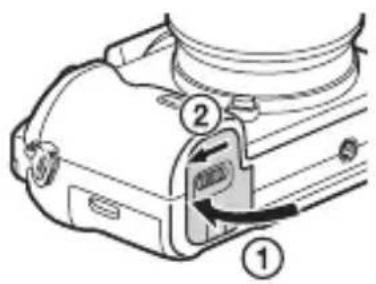
5 Connect the camera to the AC Adapter (supplied) using the micro USB cable (supplied), and connect the AC Adapter to the wall outlet.
Charging light
On: Charging
PT
Notes
2 Insert the memory card (sold separately).
A: "Memory Stick PRO Duo"
B: SD card
Notes
Notes
MENU button
PT
Recording movies
MOVIE button
Button
- "Image Data Converter"
- "PlayMemories Home"
- "Remote Camera Control"
Notes
Install "PlayMemories Home"
Install "Remote Camera Control"
(CIPA: Camera & Imaging Products Association)
35 mm (35.9 mm × 24.0 mm),
Audio: MPEG-4 AAC-LC
2 channels
[Recording medium]
"Memory Stick PRO Duo", SD card
ILCE-7R Model No. WW328261
ILCE-7 Model No. WW328262
WARNING
• Shoulder strap (1)
6 Diopter adjustment wheel
11C1 (Custom 1) button
14 (N mark)
4 Close the cover.
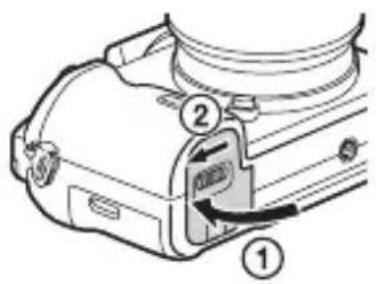
Charge lamp
Lit: charging
Off: charging complete
Blinks:
Notes
NL
A: "Memory Stick PRO Duo" media
B: SD card
Notes
Notes
Lens release button
MOVIE button
button
- "Image Data Converter"
- "PlayMemories Home"
- "Remote Camera Control"
(CIPA: Camera & Imaging Products Association)
Approx. 24.7 megapixels
ILCE-7R
Approx. 36.8 megapixels
Approx. 24.3 megapixels
ILCE-7R
Approx. 36.4 megapixels
[Dust prevention]
System: Anti-static coating on optical filter and ultrasonic vibration mechanism
Connection method: WPS (Wi-Fi Protected Setup)/manual
"Memory Stick PRO-HG Duo",
MEMORY STICK PRO-HG Duo "Memory Stick XC-HG Duo",
MEMORY STICK XC-HG DUO "MagicGate", MAGICGATE, "BRAVIA",
"InfoLITHIUM", PlayMemories Camera Apps", "PlayMemories Home", "PlayMemories Online", "PlayMemories Mobile"
Works with PlayStation3
ILCE-7R Model No. WW328261
ILCE-7 Model No. WW328262
Warning

14 (mark N)
4 Close the cover.
PL
Notes
Notes
PL
Recording movies
MOVIE button
Button


Notes
Notes
(CIPA: Camera & Imaging Products Association)
ILCE-7R Model No. WW328261
ILCE-7 Model No. WW328262
WARNING
- Neck strap (1)
• Body cap (1) (attached to the camera)
- Shoe cap (1) (attached to the camera)
- Eyepiece cup (1) (attached to the camera)
MENU → 📁 (Setup) 2 → [Menu] → [On]
4 Close the cover.
Charge lamp
Charge: Upload
Note
SE
A: "Memory Stick PRO Duo"
B: SD card
Note
White index marks
SE
Note
MENU button
- "Image Data Converter"
- "PlayMemories Home"
- "Remote Camera Control"

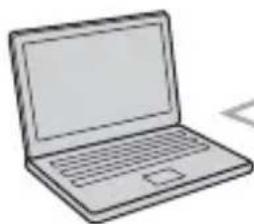
ILCE-7R Model No. WW328261
ILCE-7 Model No. WW328262
WARNING
- Shoulder strap (1)

4 Close the cover.
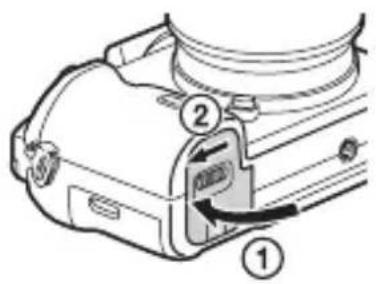
Charge lamp
Notes
FI
Notes
MENU button
- "Image Data Converter"
- "PlayMemories Home"
- "Remote Camera Control"
Sharing images
"PlayMemories
Online" service

PlayMemories
ILCE-7R Model No. WW328261
ILCE-7 Model No. WW328262
WARNING!
- Shoulder strap (1)

- Camera body cap (1) (attached to the camera)
- Accessory shoe cap (1) (attached to the camera)
- Eyepiece cup (1) (attached to the camera body)
- Instruction manual (1) (this manual)
ILCE-7K:
- Zoom lens FE 28-70 mm F3.5-5.6 OSS (1)/front lens cap (1)/rear lens cap (1)/lens hood (1)
4 Close the cover.
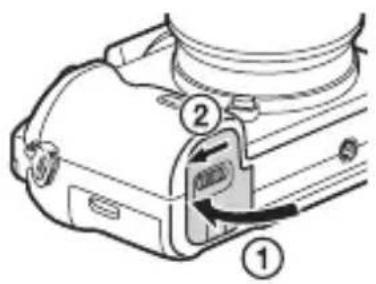
Charge lamp
Lit: Charging
Notes
NO
Remove the memory card.
A: "Memory Stick PRO Duo"
B: SD card
Notes
- Images stored on a "Memory Stick XC-HG Duo" or SDXC memory card cannot be imported to or played back on computers or AV devices that are not compatible with exFAT*. Make sure that the device is compatible with exFAT before connecting it to the camera. If you connect the camera to an incompatible device, you may be prompted to format the card. Do not format the card in response to this prompt, as it will erase all data on the card.
White index marks
Notes
Lens release button
2 Attach the front and rear lens caps and the camera body cap to the camera.
- "Image Data Converter"
- "PlayMemories Home"
- "Remote Camera Control"
Notes
ILCE-7R Model No. WW328261
ILCE-7 Model No. WW328262
WARNING

- Shoulder strap (1)
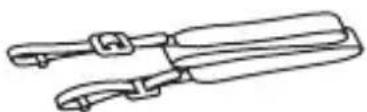
DK
4 Close the cover.
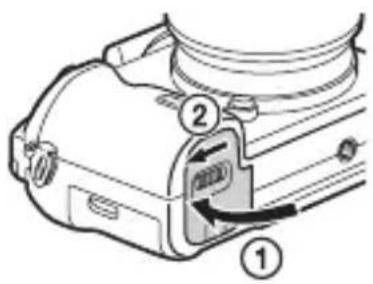
Charge lamp
On: Charging
Notes
A: "Memory Stick PRO Duo"
B: SD card
Notes
White index marks
Notes
DK
- "Image Data Converter"
- "PlayMemories Home"
- "Remote Camera Control"
Notes

- SONY®
- WARNING
- CAUTION
- BATTERY PACK
- AC ADAPTOR
- FOR CUSTOMERS IN THE U.S.A. AND CANADA
- RECYCLING LITHIUM-ION BATTERIES
- BATTERY PACK AND LENS (IF LENS SUPPLIED)
- FOR CUSTOMERS IN THE U.S.A
- REGULATORY INFORMATION
- DECLARATION OF CONFORMITY
- NOTE
- FOR CUSTOMERS IN CANADA
- FOR CUSTOMERS IN EUROPE
- NOTICE FOR THE CUSTOMERS IN THE COUNTRIES APPLYING EU DIRECTIVES
- NOTICE
- DISPOSAL OF OLD ELECTRICAL & ELECTRONIC EQUIPMENT (APPLICABLE IN THE EUROPEAN UNION AND OTHER EUROPEAN COUNTRIES WITH SEPARATE COLLECTION SYSTEMS)
- DISPOSAL OF WASTE BATTERIES (APPLICABLE IN THE EUROPEAN UNION AND OTHER EUROPEAN COUNTRIES WITH SEPARATE COLLECTION SYSTEMS)
- FOR CUSTOMERS IN SINGAPORE
- FOR CUSTOMERS WHO PURCHASED THEIR CAMERA FROM A STORE IN JAPAN THAT CATERS TO TOURISTS
- NOTES ON USING YOUR CAMERA
- SCREEN LANGUAGE
- SHOOTING PROCEDURE
- FUNCTIONS BUILT INTO THIS CAMERA
- CREATING AN IMAGE DATABASE FILE
- SHOOTING WITH AN E-MOUNT LENS COMPATIBLE WITH APS-C SIZE
- NO COMPENSATION FOR DAMAGED CONTENT OR RECORDING FAILURE
- BACK UP RECOMMENDATION
- NOTES ON THE LCD SCREEN, ELECTRONIC VIEWFINDER, LENS, AND IMAGE SENSOR
- NOTES ON RECORDING FOR LONG PERIODS OF TIME
- NOTES ON IMPORTING AVCHD MOVIES TO A COMPUTER
- NOTES WHEN PLAYING MOVIES ON OTHER DEVICES
- WARNING ON COPYRIGHT
- THE PICTURES USED IN THIS MANUAL
- ON THE DATA SPECIFICATIONS DESCRIBED IN THIS MANUAL
- NOTES ON SHOOTING WITH THE VIEWFINDER
- HOW TO TURN OFF WIRELESS NETWORK FUNCTIONS (WI-FI AND NFC, ETC.) TEMPORARILY
- NOTES ON WIRELESS LAN
- CHECKING THE SUPPLIED ITEMS
- ILCE-7K
- IDENTIFYING PARTS
- FRONT SIDE
- REAR SIDE
- TOP SIDE/SIDE VIEW
- BOTTOM VIEW
- CONNECTION PLATE COVER
- LENS FE 28-70 MM F3.5-5.6 OSS (SUPPLIED WITH ILCE-7K)
- LIST OF ICONS ON THE SCREEN
- FOR THE VIEWFINDER MODE
- OPERATING THE CAMERA
- HOW TO USE THE CONTROL WHEEL
- HOW TO USE THE FRONT DIAL/REAR DIAL
- SELECTING A FUNCTION USING THE FN (FUNCTION) BUTTON
- TO SET THE INDIVIDUAL SETTINGS IN THE DEDICATED SCREEN
- FUNCTIONS THAT CAN BE SELECTED USING THE MENU BUTTON
- TO DISPLAY THE TILE MENU
- USING THE IN-CAMERA GUIDE
- SELECT MENU BUTTON → ⚙️ (CUSTOM SETTINGS) 6 → [CUSTOM KEY SETTINGS] → DESIRED FUNCTIONS ASSIGNED TO THE BUTTON → [IN-CAMERA GUIDE]
- CHARGING THE BATTERY PACK
- CLOSE THE COVER
- CONNECT THE CAMERA TO THE AC ADAPTOR (SUPPLIED) USING THE MICRO USB CABLE (SUPPLIED), AND CONNECT THE AC ADAPTOR TO THE WALL OUTLET (WALL SOCKET)
- NOTES
- CHARGING TIME (FULL CHARGE)
- CHARGING BY CONNECTING TO A COMPUTER
- CHECKING THE REMAINING BATTERY CHARGE
- TO REMOVE THE BATTERY PACK
- INSERTING A MEMORY CARD (SOLD SEPARATELY)
- TO REMOVE THE MEMORY CARD
- MEMORY CARDS THAT CAN BE USED
- ATTACHING A LENS
- REMOVE THE BODY CAP FROM THE CAMERA AND THE REAR LENS CAP FROM THE REAR OF THE LENS
- MOUNT THE LENS BY ALIGNING THE WHITE INDEX MARKS (MOUNTING INDEXES) ON THE LENS AND CAMERA
- WHILE PUSHING THE LENS LIGHTLY TOWARD THE CAMERA, TURN THE LENS CLOCKWISE UNTIL IT CLICKS INTO THE LOCKED POSITION
- TO REMOVE THE LENS
- NOTES ON CHANGING THE LENS
- SETTING THE DATE AND TIME
- SET THE POWER SWITCH TO ON TO TURN ON THE CAMERA
- CHECK THAT [ENTER] IS SELECTED ON THE SCREEN, THEN PRESS ● ON THE CONTROL WHEEL
- SELECT A DESIRED GEOGRAPHIC LOCATION, THEN PRESS ●
- PRESS ▲/▼ ON THE CONTROL WHEEL, OR SELECT A SETTING ITEM BY TURNING THE CONTROL WHEEL, THEN PRESS ●
- PRESS ▲/▼/◄/►, OR SELECT A DESIRED SETTING BY TURNING THE CONTROL WHEEL, THEN PRESS ●
- REPEAT STEPS 4 AND 5 TO SET OTHER ITEMS, THEN SELECT [ENTER] AND PRESS ● ON THE CONTROL WHEEL
- SETTING THE DATE/TIME AND AREA AGAIN
- MAINTAINING THE DATE AND TIME SETTING
- SHOOTING STILL IMAGES
- PRESS THE SHUTTER BUTTON FULLY DOWN TO SHOOT AN IMAGE
- RECORDING MOVIES
- PRESS THE MOVIE BUTTON TO START RECORDING
- PRESS THE MOVIE BUTTON AGAIN TO STOP RECORDING
- PLAYING BACK IMAGES
- PRESS THE BUTTON
- SELECT AN IMAGE BY PRESSING THE ◀/▶ ON THE CONTROL WHEEL
- DELETING IMAGES
- SELECTING A SHOOTING MODE
- USING THE WI-FI AND NFC ONE-TOUCH FUNCTIONS
- CONNECTING THE CAMERA TO A WIRELESS ACCESS POINT
- USE ▲/▼ ON THE CONTROL WHEEL TO SELECT THE ACCESS POINT YOU WANT TO CONNECT TO. PRESS ● IN THE CENTER OF THE CONTROL WHEEL AND ENTER THE PASSWORD IF A KEY ICON IS DISPLAYED WITH A WIRELESS ACCESS POINT, THEN SELECT [OK]
- ADDING APPLICATIONS TO THE CAMERA (APPLICATION DOWNLOADING)
- DOWNLOADING APPLICATIONS
- ACCESS THE APPLICATION DOWNLOADING WEBSITE
- FOLLOW THE INSTRUCTIONS ON THE SCREEN AND ACQUIRE A SERVICE ACCOUNT
- SELECT THE DESIRED APPLICATION AND DOWNLOAD THE APPLICATION TO THE CAMERA FOLLOWING THE INSTRUCTIONS ON THE SCREEN
- HOW TO DOWNLOAD APPLICATIONS DIRECTLY USING THE WI-FI FUNCTION OF THE CAMERA
- USING THE SOFTWARE
- RECOMMENDED COMPUTER ENVIRONMENT (WINDOWS)
- RECOMMENDED COMPUTER ENVIRONMENT (MAC)
- USING "IMAGE DATA CONVERTER
- INSTALLING "IMAGE DATA CONVERTER
- DOWNLOAD THE SOFTWARE FROM THE FOLLOWING URL AND INSTALL IT ON YOUR COMPUTER
- USING "PLAYMEMORIES HOME
- INSTALLING "PLAYMEMORIES HOME
- USING "REMOTE CAMERA CONTROL
- INSTALLING "REMOTE CAMERA CONTROL
- LEARNING MORE ABOUT THE CAMERA ("HELP GUIDE")
- CHECKING THE NUMBER OF IMAGES AND RECORDABLE TIME OF MOVIES
- THE NUMBER OF IMAGES THAT CAN BE RECORDED ON A MEMORY CARD
- ILCE
- ILCE-7R
- THE NUMBER OF IMAGES THAT CAN BE RECORDED USING A BATTERY PACK
- AVAILABLE RECORDING TIME FOR A MOVIE
- NOTES ON CONTINUOUS MOVIE RECORDING
- SPECIFICATIONS
- CAMERA
- [SYSTEM]
- [IMAGE SENSOR]
- [ANTI-DUST]
- [AUTO FOCUS SYSTEM]
- [ELECTRONIC VIEWFINDER]
- [LCD SCREEN]
- [EXPOSURE CONTROL]
- [SHUTTER]
- [RECORDING FORMAT]
- [RECORDING MEDIA]
- [INPUT/OUTPUT TERMINALS]
- [POWER, GENERAL]
- [POWER CONSUMPTION]
- [OTHERS]
- [WIRELESS LAN]
- AC ADAPTOR AC-UB10C/UB10D
- RECHARGEABLE BATTERY PACK NP-FW
- ON IMAGE DATA COMPATIBILITY
- TRADEMARKS
- FRANÇAIS
- E-MOUNT
- AIDE-MÉMOIRE
- TOP/SIDE
- RECHARGEABLE BATTERY NP-FW
- CONNECT THE CAMERA TO THE AC ADAPTER (SUPPLIED) USING THE MICRO USB CABLE (SUPPLIED), AND CONNECT THE AC ADAPTER TO THE WALL OUTLET
- INSTALL "PLAYMEMORIES HOME
- INSTALL "REMOTE CAMERA CONTROL
- [RECORDING MEDIUM]
- [DUST PREVENTION]
- REMOVE THE MEMORY CARD
Brand : SONY
Model : Alpha ILCE-7K
Category : Camera