
CYBER-SHOT DSC-T110 - Camera SONY - Free user manual and instructions
Find the device manual for free CYBER-SHOT DSC-T110 SONY in PDF.


User questions about CYBER-SHOT DSC-T110 SONY
0 question about this device. Answer the ones you know or ask your own.
Ask a new question about this device
Download the instructions for your Camera in PDF format for free! Find your manual CYBER-SHOT DSC-T110 - SONY and take your electronic device back in hand. On this page are published all the documents necessary for the use of your device. CYBER-SHOT DSC-T110 by SONY.
USER MANUAL CYBER-SHOT DSC-T110 SONY
The model and serial numbers are located on the bottom. Record the serial number in the space provided below. Refer to these numbers whenever you call your Sony dealer regarding this product.
Model No. DSC-T110/T110D
Serial No.
WARNING
To reduce fire or shock hazard, do not expose the unit to rain or moisture.
IMPORTANT SAFETY INSTRUCTIONS
-SAVE THESE INSTRUCTIONS
DANGER
TO REDUCE THE RISK OF FIRE OR ELECTRIC SHOCK, CAREFULLY FOLLOW THESE INSTRUCTIONS
If the shape of the plug does not fit the power outlet, use an attachment plug adaptor of the proper configuration for the power outlet.
CAUTION
Battery pack
If the battery pack is mishandled, the battery pack can burst, cause a fire or even chemical burns. Observe the following cautions.
- Do not disassemble.
- Do not crush and do not expose the battery pack to any shock or force such as hammering, dropping or stepping on it.
-
Do not short circuit and do not allow metal objects to come into contact with the battery terminals.
-
Do not expose to high temperature above 60^ (140^) such as in direct sunlight or in a car parked in the sun.
- Do not incinerate or dispose of in fire.
- Do not handle damaged or leaking lithium ion batteries.
- Be sure to charge the battery pack using a genuine Sony battery charger or a device that can charge the battery pack.
- Keep the battery pack out of the reach of small children.
- Keep the battery pack dry.
- Replace only with the same or equivalent type recommended by Sony.
- Dispose of used battery packs promptly as described in the instructions.
Battery charger
Even if the CHARGE lamp is not lit, the battery charger is not disconnected from the AC power source (mains) as long as it is connected to the wall outlet (wall socket). If some trouble occurs while using the battery charger, immediately shut off the power by disconnecting the plug from the wall outlet (wall socket).
The power cord (mains lead), if supplied, is designed specifically for use with this camera only, and should not be used with other electrical equipment.
For Customers in Europe
I Notice for the customers in the countries applying EU Directives
The manufacturer of this product is Sony Corporation, 1-7-1 Konan Minato-ku Tokyo, 108-0075 Japan. The Authorized Representative for EMC and product safety is Sony Deutschland GmbH, Hedelfinger Strasse 61, 70327 Stuttgart, Germany. For any service or guarantee matters please refer to the addresses given in separate service or guarantee documents.
This product has been tested and found compliant with the limits set out in the EMC Directive for using connection cables shorter than 3 meters (9.8 feet).
Attention
The electromagnetic fields at the specific frequencies may influence the picture and sound of this unit.
Notice
If static electricity or electromagnetism causes data transfer to discontinue midway (fail), restart the application or disconnect and connect the communication cable (USB, etc.) again.
Disposal of Old Electrical & Electronic Equipment (Applicable in the European Union and other European countries with separate collection systems)


This symbol on the product or on its packaging indicates that this product shall not be treated as household waste. Instead it shall be handed over to the applicable collection point for the recycling of electrical and electronic equipment. By ensuring this product is disposed of correctly, you will help prevent potential negative consequences for the environment and human health, which could otherwise be caused by inappropriate waste handling of this product. The recycling of materials will help to conserve natural resources. For more detailed information about recycling of this product,
please contact your local Civic Office, your household waste disposal service or the shop where you purchased the product.
Disposal of waste batteries (applicable in the European Union and other European countries with separate collection systems)

This symbol on the battery or on the packaging indicates that the battery provided with this product shall not be treated as household waste. On certain batteries this symbol might be used in combination with a chemical symbol. The chemical symbols for mercury (Hg) or lead (Pb) are added if the battery contains more than 0.0005% mercury or 0.004% lead. By ensuring these batteries are disposed of correctly, you will help prevent
potentially negative consequences for the environment and human health which could otherwise be caused by inappropriate waste handling of the battery. The recycling of the materials will help to conserve natural resources.
In case of products that for safety, performance or data integrity reasons require a permanent connection with an incorporated battery, this battery should be replaced by qualified service staff only. To ensure that the battery will be treated properly, hand over the product at end-of-life to the applicable collection point for the recycling of electrical and electronic equipment.
For all other batteries, please view the section on how to remove the battery from the product safely.
Hand the battery over to the applicable collection point for the recycling of waste batteries. For more detailed information about recycling of this product or battery, please contact your local Civic Office, your household waste disposal service or the shop where you purchased the product.
Notice for customers in the United Kingdom
A moulded plug complying with BS 1363 is fitted to this equipment for your safety and convenience.
Should the fuse in the plug supplied need to be replaced, a fuse of the same rating as the supplied one and approved by ASTA or BSI to BS 1362, (i.e., marked with an or mark) must be used.
If the plug supplied with this equipment has a detachable fuse cover, be sure to attach the fuse cover after you change the fuse. Never use the plug without the fuse cover. If you should lose the fuse cover, please contact your nearest Sony service station.
Refer to "Cyber-shot Handbook" (PDF) on supplied CD-ROM
For details on advanced operations, please read "Cybershot Handbook" (PDF) on the CD-ROM (supplied) using a computer.
Refer to "Cyber-shot Handbook" for in-depth instructions on shooting or viewing images and connecting the camera to your computer, printer or TV (page 21).

Checking the accessories supplied
- Battery charger BC-CSN/BC-CSNB (1)
- Power cord (mains lead) (not supplied in the USA and Canada) (1)
- Rechargeable battery pack NP-BN1 (1)
- Paint pen (1)
- USB, A/V cable for multi-use terminal (1)
-
Wrist strap (1)
CD-ROM (1) -
Cyber-shot application software
"Cyber-shot Handbook" -
Instruction Manual (this manual) (1)
Notes on using the camera
Changing the language setting
The screen language can be changed if necessary.
To change the language setting, touch [MENU], then select (Settings) [Main Settings] [Language Setting].
Internal memory and memory card back up
Do not turn off the camera, remove the battery pack, or remove the memory card while the access lamp is lit. Otherwise, the internal memory data or the memory card may be damaged. Be sure to make a backup copy to protect your data.
Functions built into this camera
This manual describes each of the functions of TransferJet-compatible/ incompatible devices.
To check if your camera supports the TransferJet function, check for the following mark on the bottom of the camera.
TransferJet-compatible device: (TransferJet)
On database files
When you insert a memory card without a database file into the camera and turn on the power, part of the memory card capacity is used to automatically create a database file. It may take some time until you can perform the next operation.
Notes on recording/playback
- To ensure stable operations of the memory card, we recommend that you use this camera to format any memory card being used with this camera for the first time. Note that formatting will erase all data recorded on the memory card. This data cannot be restored. Be sure to backup any important data to a PC or other storage location.
- Before you start recording, make a trial recording to make sure that the camera is working correctly.
- The camera is neither dust-proof, nor splash-proof, nor water-proof.
- Avoid exposing the camera to water. If water enters inside the camera, a malfunction may occur. In some cases, the camera cannot be repaired.
- Do not aim the camera at the sun or other bright light. It may cause the malfunction of the camera.
- Do not use the camera near a location that generates strong radio waves or emits radiation. Otherwise, the camera may not properly record or play back images.
- Using the camera in sandy or dusty locations may cause malfunctions.
- If moisture condensation occurs, remove it before using the camera.
- Do not shake or strike the camera. It may cause a malfunction and you may not be able to record images. Furthermore, the recording media may become unusable or image data may be damaged.
- Clean the flash surface before use. The heat of flash emission may cause dirt on the flash surface to become discolored or to stick to the flash surface, resulting in insufficient light emission.
Notes on the LCD screen
-
The LCD screen is manufactured using extremely high-precision technology so over 99.99% of the pixels are operational for effective use. However, some tiny black and/or bright dots (white, red, blue or green) may appear on the LCD screen. These dots are a normal result of the manufacturing process, and do not affect the recording.
-
If water droplets or other liquids splash on the LCD screen and make it wet, immediately wipe off the screen with a soft cloth. Leaving liquids on the LCD screen surface can harm the quality and cause a malfunction.
- Do not press against the LCD screen. The screen may be discolored and that may cause a malfunction.
Please use Sony genuine accessories
If you use accessories manufactured by companies other than Sony, this could cause a camera trouble.
- Using other manufacturers' camera cases with magnets could cause a power supply trouble.
On camera's temperature
Your camera and battery may get hot due to continuous use, but it is not a malfunction.
On the overheat protection
Depending on the camera and battery temperature, you may be unable to record movies or the power may turn off automatically to protect the camera. A message will be displayed on the LCD screen before the power turns off or you can no longer record movies. In such a case, wait until the camera and battery completely cool down, with the power turned off. If you turn the power on before they completely cool down, the power may turn off again or you may be unable to record movies.
On battery charging
In rare cases, a battery that has not been used for a long time may not be charged optimally. This is due to characteristics of the battery and not a malfunction. Charge the battery again.
On image data compatibility
- The camera conforms with DCF (Design rule for Camera File system) universal standard established by JEITA (Japan Electronics and Information Technology Industries Association).
- Sony does not guarantee that the camera will play back images recorded or edited with other equipment, or that other equipment will play back images recorded with the camera.
Warning on copyright
Television programs, films, videotapes, and other materials may be copyrighted. Unauthorized recording of such materials may be contrary to the provisions of the copyright laws.
No compensation for damaged content or recording failure
Sony cannot compensate for failure to record or loss or damage of recorded content due to a malfunction of the camera or recording media, etc.
Identifying parts
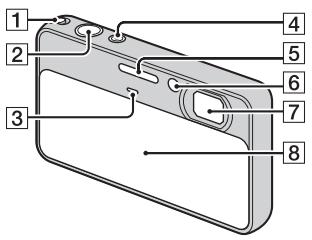
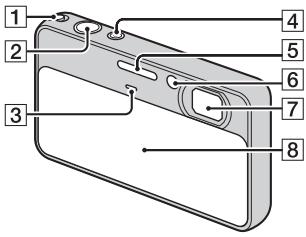
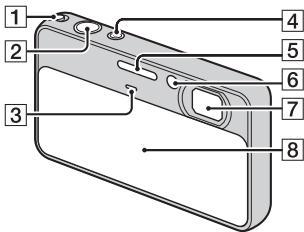
1 Zoom (W/T) lever
2 Shutter button
3 Microphone
ON/OFF (Power) button/ Power lamp
5 Flash
6 Self-timer lamp/Smile Shutter lamp/AF illuminator
7 Lens
8 Lens cover
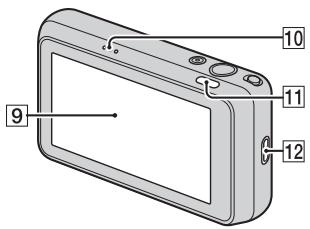
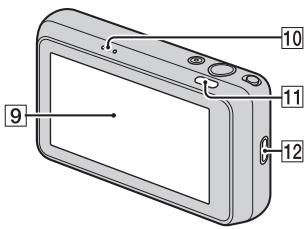
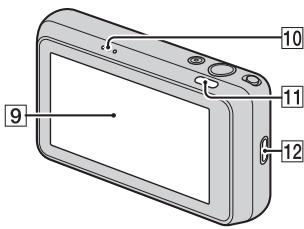
9 LCD screen/Touch panel
10 Speaker
11 Playback) button
12 Hook for wrist strap
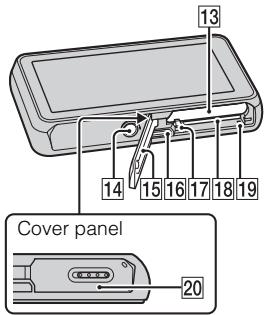
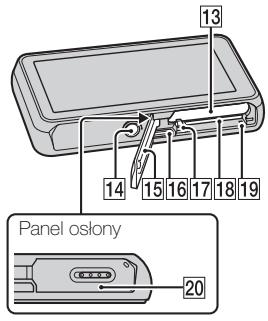
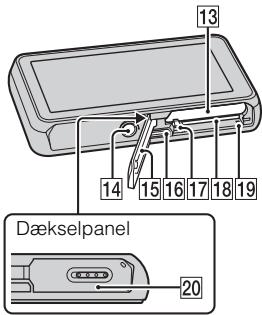
13 Battery insertion slot
14 Tripod receptacle
- Use a tripod with a screw less than 5.5mm (7/32 inches) long. Otherwise, you cannot firmly secure the camera, and damage to the camera may occur.
15 Battery/Memory card cover
16 Multi-connector (Type3a)
17 Battery eject lever
18 Memory card slot
19 Access lamp
20 ^V (TransferJetTM) mark
Battery charging and the number of images/time that can be recorded
GB
1 Insert the battery pack into the battery charger.
- You can charge the battery even when it is partially charged.
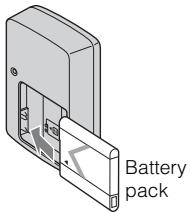
2 Connect the battery charger to the wall outlet (wall socket).
If you continue charging the battery pack for about one more hour after the CHARGE lamp turns off, the charge will last slightly longer (full charge).
CHARGE lamp
Lit: Charging
Off: Charging finished (normal charge)
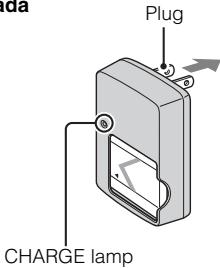
For customers in the USA and Canada
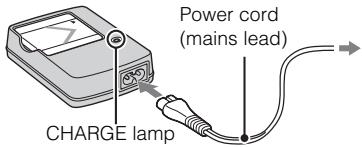
For customers in countries/regions other than the USA and Canada
3 When charging is finished, disconnect the battery charger.
Charging time
| Full charge time | Normal charge time |
| Approx. 245 min. | Approx. 185 min. |
Notes
- The table above shows the time required to charge a fully depleted battery pack at a temperature of 25^ ( 77^ ). Charging may take longer depending on conditions of use and circumstances.
- Connect the battery charger to the nearest wall outlet (wall socket).
- When charging is finished, disconnect the power cord (mains lead) and the battery charger from the wall outlet (wall socket), and remove the battery pack from the battery charger.
- Be sure to use the battery pack or the battery charger of the genuine Sony brand.
Battery life and number of images you can record/ view
| Battery life (min.) | No. of Images | |
| Shooting still images | Approx. 115 | Approx. 230 |
| Viewing still images | Approx. 250 | Approx. 5000 |
| Shooting movies | Approx. 90 | — |
Notes
- The number of images that can be recorded is an approximate number when shooting with a fully charged battery pack. The number may be less depending on the circumstances.
-
The number of images that can be recorded is when shooting under the following conditions:
-
Using Sony "Memory Stick PRO Duo" (Mark2) media (sold separately).
-
When a fully charged battery pack (supplied) is used at an ambient temperature of 25^ (77^) .
-
The number of still images that can be recorded is based on the CIPA standard, and is for shooting under the following conditions.
(CIPA: Camera & Imaging Products Association)
- [LCD Brightness] is set to [Normal].
- Shooting once every 30 seconds.
- The zoom is switched alternately between the W and T ends.
- The flash strobes once every two times.
-
The power turns on and off once every ten times.
-
The battery life for movies is when shooting under the following conditions:
-
Recording mode: 720 FINE
- When continuous shooting ends because of set limits, press the shutter button down again and continue shooting. Shooting functions such as the zoom do not operate.

Using the camera abroad
You can use the camera and the battery charger (supplied) in any country or region where the power supply is within 100V to 240V AC, 50Hz/60Hz .
An electronic voltage transformer is unnecessary and its use may cause a malfunction.
Inserting the battery pack/a memory card (sold separately)
1 Open the cover.
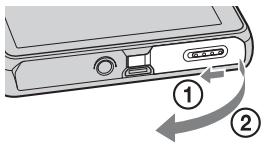
2 Insert a memory card (sold separately).
With the notched corner facing as illustrated, insert the memory card until it clicks into place.
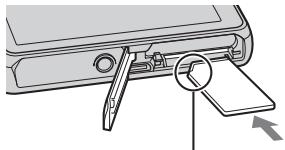
Note the notched corner facing the correct direction.
3 Insert the battery pack.
Align the battery pack with the guide arrow inside the battery insertion slot. Then, insert the battery pack until the battery eject lever locks into place.
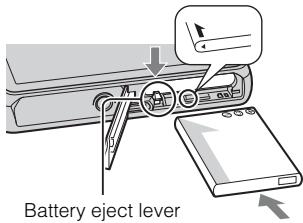
4 Close the cover.
Closing the cover with the battery inserted incorrectly may damage the camera.
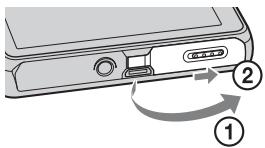
Memory card that you can use
The following memory cards are compatible with this camera: "Memory Stick PRO Duo" media, "Memory Stick PRO-HG Duo" media, "Memory Stick Duo" media, SD memory card, SDHC memory card and SDXC memory card. However, all memory cards are not guaranteed to work with this camera. MultiMediaCard cannot be used.
- In this manual, the term "Memory Stick Duo" media is used to refer to "Memory Stick PRO Duo" media, "Memory Stick PRO-HG Duo" media and "Memory Stick Duo" media, and the term "SD card" is used to refer to SD memory card, SDHC memory card and SDXC memory card.
- When recording movies, it is recommended that you use the following memory cards:
-MEMORYSTICKPRO DUO (Mark2) ("Memory Stick PRO Duo" (Mark2) media)
-MEMORYSTICKPRO-HGDuo ("Memory Stick PRO-HGDuo"media)
- SD memory card, SDHC memory card or SDXC memory card (Class 4 or faster)
Note
- Images recorded on an SDXC memory card cannot be transferred or played back on computers or AV devices that are not exFAT-compatible, even when the camera is connected to the computer or AV device using a USB cable. Before connecting, make sure that the device is exFAT-compatible. If connected to a device that is not exFAT-compatible, a format drive request may appear. Do not format the drive, or all data will be lost. (exFAT is the file system used by SDXC memory cards.)
To remove the memory card
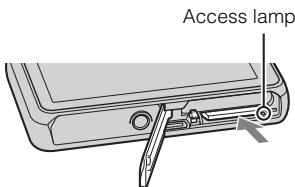
Make sure that the access lamp is not lit, then push the memory card in once.
Note
- Never remove the memory card/the battery pack when the access lamp is lit. This may cause damage to data or the memory card.
When there is no memory card inserted
Images are stored in the camera's internal memory (approximately 23 MB). To copy images from the internal memory to a memory card, insert a memory card in the camera, then touch (Settings) Card Tool [Copy] .
To remove the battery pack
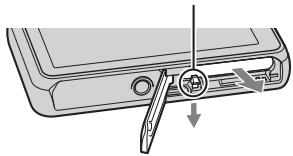
Battery eject lever
Slide the battery eject lever. Be sure not to drop the battery pack.
Checking the remaining battery charge
A remaining charge indicator appears on the LCD screen.
High


Low
Notes
- It takes about one minute until the correct remaining charge indicator appears.
- The remaining charge indicator may not be correct under certain circumstances.
- When [Power Save] is set to [Standard] or [Stamina], if you do not operate the camera for a certain period of time while the power is on, the LCD screen becomes dark, then the camera turns off automatically (Auto power-off function).
- To keep clean battery pack terminal and prevent short-circuiting, place the battery pack in a plastic bag, etc. when carrying and storing to isolate it from other metal objects, etc.
Setting the date and time/display color
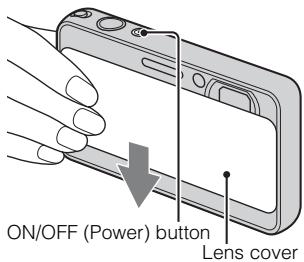
1 Lower the lens cover.
The camera is turned on. The power lamp lights up only when the camera starts up.
- You can also turn on the camera by pressing the ON/OFF (Power) button.
- It may take time for the power to turn on and allow operation.
GB
2 Select the desired date display format, then touch [OK].
3 Select Daylight Savings [On]/[Off], then touch [OK].
4 Select the item to be set, then set the value with / and touch [OK].
- Midnight is indicated as 12:00 AM, and noon as 12:00 PM.
5 Select your desired area with / , then touch [OK] [OK].
6 Follow the instructions on the screen to select a desired display color and display resolution mode.
7 When the introductory message for the In-Camera Guide appears, touch [OK].
Superimposing the date on the images
The camera does not have a feature for superimposing dates on images. By using "PMB" in the CD-ROM (supplied), you can print or save images with the date. For details, see the "PMB Help".
Setting the date and time again
The date and time setup screen appears automatically only when the power is turned on the first time. To reset the date and time, display the date and time setup screen by touching (Settings) (Clock Settings) [Date & Time Setting].
Shooting still images
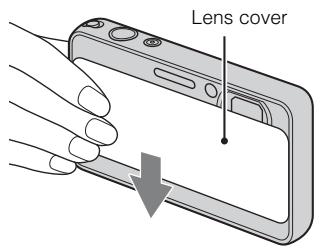
1 Lower the lens cover.
GB
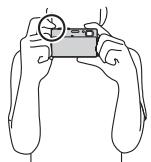
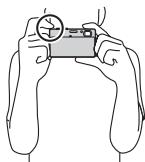
2 Hold the camera steady as illustrated.
- Slide the zoom (W/T) lever to the T side to zoom.
Slide to the W side to return.
3 Press the shutter button halfway down to focus.
When the image is in focus, a beep sounds and the indicator lights.
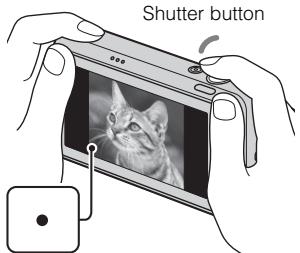
AE/AF lock
4 Press the shutter button fully down.
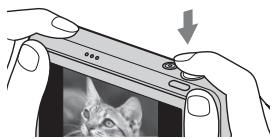
Shooting movies
1 Lower the lens cover, then touch (REC Mode) (Movie Mode).
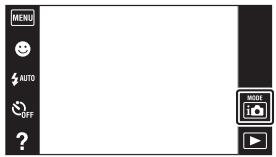
2 Press the shutter button to start recording.
- You can zoom by sliding the zoom (W/T) lever.
3 Press the shutter button again to stop recording.
1 Press the (Playback) button.
- When you play back images on a memory card that were recorded on other cameras, the database file registration screen appears.
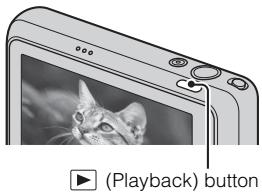
GB
Selecting next/previous image
Touch (Next)/ (Previous) on the screen.
To play back movies, touch Playback) in the center of the LCD screen.
- To zoom in, touch the image being played back.
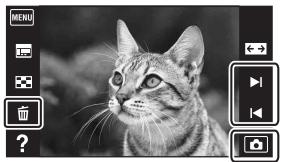
- Deleting an image
Touch (Delete) [This Image].
Returning to shooting images
Touch on the LCD screen.
- You can also return to shooting mode by pressing the shutter button halfway down.
Turning off the camera
Close the lens cover.
- You can also turn off the camera by pressing the ON/OFF (Power) button.
In-Camera Guide
This camera contains an internal function guide. This allows you to search the camera's functions according to your needs.
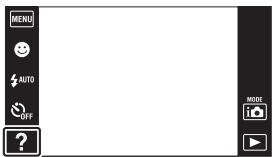
1 Touch ? (In-Camera Guide).
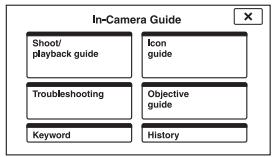
2 Select a search method.
Shoot/playback guide: Search for various operation functions in shooting/viewing mode.
Icon guide: Search the function and meaning of displayed icons.
Troubleshooting: Search common problems and their solution.
Objective guide: Search functions according to your needs.
Keyword: Search functions by key words.
History: Display the last 10 items displayed in the In-Camera Guide.
Learning more about the camera ("Cyber-shot Handbook")
"Cyber-shot Handbook", which explains how to use the camera in detail, is included on the CD-ROM (supplied). Refer to it for in-depth instructions on the many functions of the camera.
For Windows users
1 Turn on your computer, and insert the CD-ROM (supplied) into the CD-ROM drive.
2 Click [Handbook].
3 Click [Install].
4 Start "Cyber-shot Handbook" from the shortcut on the desktop.
For Macintosh users
1 Turn on your computer, and insert the CD-ROM (supplied) into the CD-ROM drive.
2 Select the [Handbook] folder and copy "Handbook.pdf" stored in the [GB] folder to your computer.
3 After copying is complete, double-click "Handbook.pdf".
GB
Specifications
Camera
[System]
Image device: 7.75mm (1/2.3 type) color CCD, Primary color filter
Total pixel number of camera: Approx. 16.4 Megapixels
Effective pixel number of camera: Approx. 16.1 Megapixels
Lens: Carl Zeiss Vario-Tessar 4× zoom lens f = 4.43mm - 17.7mm (25 mm- 100 mm (35 mm film equivalent)) F3.5 W)-F4.6 T) While shooting movies (16:9): 27mm - 108mm While shooting movies (4:3): 33mm - 132mm
Steady Shot: Optical
Exposure control: DSC-T110: Automatic exposure, Scene Selection (13 modes) DSC-T110D: Automatic exposure, Scene Selection (12 modes)
White balance: Auto, Daylight, Cloudy, Fluorescent 1/2/3, Incandescent, Flash, One push
Underwater White Balance (DSC-T110 only): Auto, Underwater 1/2, One push
Recording interval for Burst mode: Approx. 1.0 second
File format:
Still images: JPEG (DCF Ver. 2.0, Exif Ver. 2.3, MPF Baseline)
compliant, DPOF compatible
Movies: MPEG-4 Visual
Recording media: Internal Memory (approx. 23 MB), "Memory Stick Duo" media, SD card
Flash: Flash range (ISO sensitivity (Recommended exposure Index) set to Auto): Approx. 0.08m to 2.8m 31/4 inches to 9 ft 2 1/4 inches)W)/ approx. 0.5m to 2.3m 1 ft 7 3/4 inches to 7 ft 6 5/8 inches)T
[Input and Output connectors]
Multi-connector: Type3a (AV-out (SD/ HD Component)/USB/DC-in): Video output Audio output (Stereo) USB communication
USB communication: Hi-Speed USB (USB 2.0)
[LCD screen]
LCD panel: Wide (16:9), 7.5 cm (3 type) TFT drive
Total number of dots: 230 400 (960 × 240) dots
[Power, general]
Power: Rechargeable battery pack NP-BN1, 3.6 V AC-LS5 AC Adaptor (sold separately), 4.2 V
Power consumption (during shooting): 1.0 W
Operating temperature: 0^ to 40^ (32^ to 104^)
Storage temperature: -20^ to +60^ (-4^ to +140^)
Dimensions (CIPA compliant): DSC-T110: 93.0mm× 55.6mm× 16.8mm 3 3/4 inches × 2 1/4 inches × 11/16 inches) DSC-T110D: 93.0mm× 55.6mm × 17.1mm 3 3/4 inches × 2 1/4 inches × 11/16 inches) (W/H/D)
Mass (CIPA compliant) (including NP-BN1 battery pack and "Memory Stick Duo" media): DSC-T110: Approx. 121 g (4.3 oz) DSC-T110D: Approx. 124 g (4.4 oz)
Microphone: Monaural
Speaker: Monaural
Exif Print: Compatible
PRINT Image Matching Compatible
BC-CSN/BC-CSNB battery charger
Power requirements: AC 100 V to 240V 50Hz / 60Hz 2 W
Output voltage: DC 4.2 V, 0.25 A
Operating temperature: 0^ to 40^ (32^ to 104^)
Storage temperature: -20^ to +60^ (-4^ to +140^)
Dimensions: Approx. 55mm× 24mm × 83mm (21/4 inches × 31/32 inches × 33/8 inches) (W/H/D)
Mass: Approx. 55g (1.9 oz)
Rechargeable battery pack NP-BN1
Used battery: Lithium-ion battery
Maximum voltage: DC 4.2 V
Nominal voltage: DC 3.6 V
Maximum charge voltage: DC 4.2 V
Maximum charge current: 0.9 A
Capacity: typical:2.3 Wh (630 mAh) minimum: 2.2 Wh (600 mAh)
Design and specifications are subject to change without notice.
Trademarks
- The following marks are trademarks of Sony Corporation.
Cyber-shot, "Cyber-shot," "Memory Stick," 1MemoryStick, "Memory Stick PRO, "Memory Stick Duo,"
MEMORY STICK DUO, "Memory Stick PRO DUO,"
MEMORY STICK PRO DUO, "Memory Stick PRO-HG Duo,"
MEMORY STICK PRO-HG DUO, "Memory Stick Micro," "MagicGate,"
MAGICGATE, TransferJet and the TransferJet logo
- Microsoft, Windows, DirectX and Windows Vista are either registered trademarks or trademarks of Microsoft Corporation in the United States and/or other countries.
- Macintosh and Mac OS are trademarks or registered trademarks of Apple Inc.
Intel, Pentium and Intel Core are trademarks or registered trademarks of Intel Corporation. - SDXC logo is a trademark of SD-3C, LLC.
- MultiMediaCard is a trademark of the MultiMediaCard Association.
- Adobe and Reader are either trademarks or registered trademarks of Adobe Systems Incorporated in the United States and/or other countries.
- The OBEX word mark and logo are registered trademarks and are owned by Infrared Data Association (IrDA®).
-
Eye-Fi is a trademark of Eye-Fi, Inc.
-
In addition, system and product names used in this manual are, in general, trademarks or registered trademarks of their respective developers or manufacturers. However, the TM or ® marks are not used in all cases in this manual.
Additional information on this product and answers to frequently asked questions can be found at our Customer Support Website.
http://www.sony.net/
Printed on 70% or more recycled paper using VOC (Volatile Organic Compound)-free vegetable oil based ink.
Français
Aide-memoire
(CIPA: Camera & Imaging Products Association)
Batterie rechargeable NP-BN1
(CIPA: Camera & Imaging Products Association)
Cyber-shot, "Cyber-shot",
"Memory Stick", "Memory Stick"
Stick PRO", MEMORY STICK PRO,
"Memory Stick Duo",
MEMORY STICK DUO, "Memory Stick PRO Duo",
MEMORY STICK PRO DUO, "Memory
Stick PRO-HG Duo",
MEMORY STICK PRO-HG DUO, "Memory
Stick Micro", "MagicGate",
MAGICGATE, TransferJet, loghi di TransferJet
Cyber-shot, "Cyber-shot",
"Memory Stick", "Memory Stick"
"Stick PRO", MEMORY STICK PRO,
"Memory Stick Duo",
MEMORY STICK DUO, "Memory Stick PRO Duo",
MEMORY STICK PRO DUO, "Memory Stick PRO-HG Duo",
MEMORY STICK PRO-HG DUO, "Memory Stick Micro", "MagicGate",
MAGICGATE, TransferJet, logotipos de TransferJet
(CIPA: Camera & Imaging Products Association)
Cyber-shot, "Cyber-shot",
"Memory Stick", Memory Stick
"Stick PRO", MEMORY STICK PRO,
"Memory Stick Duo",
MEMORY STICK DUO, "Memory Stick PRO Duo",
MEMORY STICK PRO DUO, "Memory Stick PRO-HG Duo",
MEMORYSTICK PRO-HG DUO, "Memory Stick Micro", "MagicGate",
MAGICGATE, TransferJet, logotipo TransferJet
--Cyber-shot Handbuch
MEMORY STICK PRO-HG DUO,Memory
Stick Micro", MagicGate",
Elementary apparatus
MAGICGATE, TransferJet i TransferJet logo
(CIPA: Camera & Imaging Products Association)
Alkalmazott akkumulator: Litiium-ion akkumulator
(CIPA: Camera & Imaging Products Association)
- [LCD Brightness] je nastavené na [Normal].
-Snimanie kaźdych 30 sekund. -
Zoom sa striedavo prepína medzi koncovymi hodnotami W a T.
Blesk blysne pri kaźdom druhom zábere.
-Napajanie sa vypina a zapina po kaźdom desiatom zábere. -
Výdrž akumulátora platí pri snímaní videozáznámov za nasledujúcích podmienok:
-
Režim snímania: 720 FINE
-V pripe, ze sa nepretrzite snimanie ukonci kvoli nastavenym obmedzeniam, znovu stlachte tlacidlo spuste aPokraucjte v snimani.
Cyber-shot, "Cyber-shot", "Memory Stick", "Memory
"Stick PRO", "Memory Stick PRO", "Memory Stick Duo",
MEMORY STICK DUO, "Memory Stick PRO Duo",
MEMORY STICK PRO DUO, "Memory Stick PRO-HG Duo",
MEMORY STICK PRO-HG DUO, "Memory Stick Micro", "MagicGate",
MAGICGATE, TransferJet, TransferJet-logotyperna
Cyber-shot, "Cyber-shot",
"Memory Stick", "Memory Stick", "Memory Stick", "Memory Stick", "Memory Stick", "Memory Stick", "Memory Stick", "Memory Stick", "Memory Stick", "Memory Stick", "Memory Stick", "Memory Stick", "Memory Stick", "Memory Stick", "Memory Stick", "Memory Stick", "Memory Stick", "Memory Stick", "Memory Stick", "Memory Stick", "Memory Stick", "Memory Stick", "Memory Stick", "Memory Stick", "Memory Stick", "Memory Stick",
"Stick PRO", MEMORY STICK PRO,
"Memory Stick Duo",
MEMORY STICK DUO, "Memory Stick PRO Duo",
MEMORY STICK PRO DUO, "Memory Stick PRO-HG Duo",
MEMORY STICK PRO-HG DUO, "Memory Stick Micro", "MagicGate",
MAGICGATE, TransferJet, TransferJet-logot
- Microsoft, Windows, DirectX ja
Windows Vista ovat Microsoft
- MultiMediaCard on MultiMediaCard
1 Beror ? (Kameraveiviser).
2 Velg en sreekemetode.
Cyber-shot, "Cyber-shot",
"Memory Stick", "Memory Stick", "Memory
"Stick PRO", MEMORY STICK PRO,
"Memory Stick Duo",
MEMORY STICK DUO, "Memory Stick PRO Duo",
MEMORY STICK PRO DUO, "Memory Stick PRO-HG Duo",
MEMORY STICK PRO-HG DUO, "Memory Stick Micro", "MagicGate",
MAGICGATE, TransferJet, TransferJet-logoer
Identification of kameraets dele
- Skub zoomknappen (W/T) over mod T-siden for at zoome.
Skub den mod W-siden for at vende tilbage.
Cyber-shot, "Cyber-shot",
"Memory Stick", "Memory Stick", "Memory Stick", "Memory Stick", "Memory Stick", "Memory Stick", "Memory Stick", "Memory Stick", "Memory Stick", "Memory Stick", "Memory Stick", "Memory Stick", "Memory Stick", "Memory Stick", "Memory Stick", "Memory Stick", "Memory Stick", "Memory Stick", "Memory Stick", "Memory Stick", "Memory Stick", "Memory Stick", "Memory Stick", "Memory Stick", "Memory Stick", "Memory Stick",
Stick PRO", MEMORY STICK PRO,
"Memory Stick Duo",
MEMORY STICK DUO, "Memory Stick PRO Duo",
MEMORY STICK PRO DUO, "Memory Stick PRO-HG Duo",
MEMORY STICK PRO-HG DUO, "Memory Stick Micro", "MagicGate",
MAGICGATE, TransferJet, TransferJet-logoer
- Microsoft, Windows, DirectX og Windows Vista er enten registreede varemærker eller varemærker tilhorende Microsoft Corporation i USA og/eller andre lande.
- Macintosh og Mac OS er varemærker
elleregistrede varemærker
tilhørende Apple Inc.
Intel, Pentium og Intel Core er varemaerker eller registerede varemaerker tilhorende Intel Corporation. - SDXC-logoet er et varemärke tilhörende SD-3C, LLC.
- MultiMediaCard er et varemærke tilhorende MultiMediaCard Association.
- Adobe og Reader er enten varemarker eller registrerede varemarker tilhorende Adobe Systems Incorporated i USA og/eller andre lande.
- OBEX-ordmaretket oglogoer registrerede varemeker tilhorende Infrared Data Association (IrDA®).
VAŽNE SIGURNOSNE UPUTE
-SACUVAJTE OVE UPUTE
OPASNOST
POZORNO SLIJEDITE OVE UPUTE KAKO BISTESMANJILI OPASNOST OD POZARA ILI STRUJNOG UDARA
Ako se utikač nemöze izravno utaknuti u mrežnu uticnicu, prikljucite ga preko adaptera za utikač Čija konfiguracija odgovara mrežnoj uticnici.
POZOR
Baterijska Jedinica
Baterjska jegina kojom se neispravno rukuje moze se rasprsnuti, prouzroci t pozar pa ck i kemijske opekline. DrZite se sljedecih mjera opreza.
Nemojte rastavljati bateriju.
Nemojte razbijati bateriju niti je izlagati udarcima ili primjeni sile kao npr. udarcima Čekićem, bacanju ili gaženju.
Bateriju nemojte katko spajati i pazite da metalni predmeti ne dodu u dodir s prikljucima baterije.
- Ne izlažite bateriju temperaturama iznad 60^ npr. na mjestima izloženim izravnoj suncevoj svjetosti ili vozilima parkiranim na suncu.
Bateriju nemojte spaljivati ni bacati u vatr.
- Ne dirajte osteocene ni curee litij-ionske baterije.
- Baterjsku jeginicu obvezno punite originalnim Sonyjevim punjačom baterije ili drugim uredajem kojim se moze puniti baterija.
- Držite baterijsku jedinicu izvan dosegamale djece.
Baterijsku jeginicu drzite na suhom mjestu.
- Zamijenite samo s baterijomiste vrste ili ekvivalentnom baterijom po preparuci Tvrtke Sony.
- Istrošene baterijske jedinice zbrinite na način opisan u uputama.
Punjac baterije
Čak i kad ne gori CHARGE svjetlo, dovod elektricne struje u punjać baterije.nije prekinut sve dok je prikljucen u zidnu utičnicu. U sluceju problema dok punjać baterije radi, odmah prekinite dovod struje isklučivanjem utičaž iz zidne utičnice.
Kabel napajanja, aka se isporuceje, dizajniran je posebno za koriistenje samo s ovm fotoaparatom, te se ne bi trebao koristiti's drugom elektrichnom opremom.
Zakorisnike u Europa
Potrosnja snage (pri snimanju): 1,0 W
Radna temperatura okruženja: 0^ do 40^
Temperatura skladistenja: -20^ do +60^
Dimenzije (sukladno normi CIPA): DSC-T110: 93,0 mm × 55,6 mm × 16,8 mm DSC-T110D: 93,0 mm × 55,6 mm × 17,1 mm (S/V/D)
Masa (sukladno normi CIPA)
(ukljucujuci NP-BN1 baterijsku
jedinici u i 'Memory Stick Duo«):
DSC-T110: oko 121 g
DSC-T110D: oko 124 g
Mikrofon: Mono
Zvucnik: Mono
Exif Print: kompatibilan
PRINT Image Matching III: kompatibilan
BC-CSN/BC-CSNB punjac baterije
Potrebna snaga: 100V do 240V izmjenično, 50Hz / 60Hz,2W
Izlazni napon: 4,2 V istosmjerno, 0,25 A
Radna temperatura okruzenja: 0^ do 40^
Temperatura skladistenja: -20^ do +60^
Dimenzije: Oko 55mm× 24mm× 83 mm (S/V/D)
Masa:oko 55g
Punjiva baterijska jedinica NP-BN1
(DCF Ver. 2.0, Exif Ver. 2.3,
(SD/HD Component)/USB/
DC-giris):
Video qikisi
Ses cikisi (Stereo)
USB iletisimi
USB iletisimi: Hi-Speed USB
(USB 2.0)
[LCD ekran]
LCD panel: Genis (16:9), 7,5 cm
(3 tipi) TFT sürüçü
1-7-1 Konan, Minato-ku, Tokyo, 108-0075 Japan
Türkiye İrtibat Numaralari:
Tel: 0216-633 98 00
Faks: 0216-632 70 30
e-mail: bilgi@eu.sony.com
SONY YETKILI SERVISLERI
ADANA CENGIZ ELEKTRONIK (322) 2251587/ADIYAMAN STAR ELEKTRONIK
(416) 2165383/ANKARA (Anittepe) BILGILI ELEKTRONIK (312) 2308382,
(Mamak) FILIZ ELEKTRONIK (312) 3689834, (Aydinlikevler) DUZOLLAR
ELEKTRONIK (312) 3169852/ANTALYA NECMI ELK.SAN.TIC.LTD. STI. (242)
3451374, EKEN ELEKTRONIK (242) 3124242, OLCAY ELEKTRONIK (242)
7467603, (Alanya) ERTUNC ELEKTRONIK (242) 5136314/BURSA UFO ELKT.
MUH. TIC. LTD. STI. (224) 2341192/BOLU ARDA ELEKTRONIK (374) 2155748/
CANAKKALE GUVEN ELEKTRONIK (286) 2173618/DENIZLI MAVI ELK. LTD.
STI. (258) 2421749/DIYARBAKIR TELEVIZYON HASTANESI (412) 2236869/
ESKISEHIR GÖRGÜN ELEKTRONIK (222) 2265626/ERZURUM ELEKTRONAL
TIC. (442) 2130528/GIRESUN ÖZENE ELEKTRONIK (454) 2168161/GAZIANTEP
IBRAHIM SERIN (342) 2153545/HATAY ZEKI ELEKTRONIK (326) 2210597/ICEL
SEDAFON ELK.S.T.LTD. STI. (324) 3227655/ISTANBUL (Moda) SENTEZ
ELK.S.T.LTD. STI. (216) 4145250, (Kadikoy) ENDER ELEK.LTD. (216)
3468024, (Suadiye) MERCOM ELK.LTD.STI. (216) 3612858, (Göztepe) ITEM
LTD. STI. (216) 5664888, (Uskudar) BURCU ELEKTRONIK (216) 5536929,
(Maslak) MODVI ELK.SAN.TIC.LTD. (212) 2862270, (Sisli) VEBE
ELK.SN.TC.LT.STI. (212) 2336778, (1.Levent) AVE ELEKTRONIK (212)
2823469, (Maçaka) MEKEL ELEKTRONIK (212) 2604677, (Fatih) CIHAN ELK.
SAN. TIC. LTD. STI. (212) 5317001, (Bakirkoy) VIP VIDEO ELK. TIC. LTD. STI.
(212) 5705868, (Bakirköy) MEST ELK.SAN.TIC.LTD (212) 5438242,
(Besiktas) P.M. ELEKTRONIK LTD.STI. (212) 2275247, (Florya) AVC ELK. LTD.
STI. (212) 5740426/IZMIR BULENT EROL (232) 4221225, (Hatay) ASIL2
ELK.SR.T.LTD. STI. (232) 2288310, (Karshiya) TEKNIK TV.ELK.LTD. STI.
(232) 3696175, (Güzelyali) APEX ELEKTRONIK (232) 2464044/KARS SAHIN
ELEKTRONIK (474) 2238732/KAYSERI CAGDAS ELEKTRONIK (352) 2222627,
KÜRKCUOGLU (352) 2210634/KOCAELI TEKNIK TV. (262) 3223368/KONYA
DENIZ ELEKTRONIK (332) 3501735, OZEL ELEKTRONIK (332) 3514425/
MALATYA GURBUZ ELEKTRONIK (422) 3250460/MARDIN (Nusaybin)
CIFTSUREN ELK. PAZ. LTD. (482) 4153592/MUGLA (Marmaris) MTM
SERVICE (252) 4126217/RIZE METE ELEKTRONIK (464) 2120078/SAKARYA
ISMAIL SENOGLU (264) 2714704/SAMSUN YALIM ELEKTRONIK (362)
2334883/SIIRT ISMET ELEKTRONIK (484) 2245724/SIVAS CAN ELEKTRONIK
(346) 2230015/TRABZON LIDER ELEKTRONIK (462) 3232641/ZONGULDAK
OZDEMIRLER TV. (372) 3167044
ITHALATCI FIRMA
SONY®
SONY EURASIA PAZARLAMA AS.
PPOEIANOIOIHsH
Tia va anotpees tov kivduvo npkayiac n aeKtponnxiac, mnv ekTeTE t oukeun e poxn uypoaia.
HMANTIKE OAHIGE IATN A ΦAΛEIA -ΦYΛA TE AYTE TIZ OAHIGE KINΔYNO
ΓIA NA MEIΩΣΕTE TON KINΔYNO ΠYPKΑΓΙAΣ ḌH HAEKTPONΛΗΙΑΣ, AKOΑΟΥΘΗΣΤΕ ΠPOΣEXTΙΚA AYTEΣ TΙΣ ODΗΓΙΕΣ
Av to ojma tou bvoaos dev taqalee ie tvn nextoian qica, xonoiomoinote 9ooaaoyea bvoaotaxaalnnls dataeys tynlextoian poia.
PPO2OXH
Mnatapia
Av nataagia vnootei xaoietaeaiou, mtooge iva exqayei, va pooxaaleoi
phiia anoama xnaomuaevaxuvaata.AaBeteTIG axolovoeicpoofovalaeis.
Myn nvaaoovvagoloyeiT.
Mnyoae xu mye taege me duvaun tn mtataogia,mytnxwnnoetme ophioui,mytnolqte xawu mynynyntnnaoote.
MnV nVBoauxovwovte xu unv aHVE tetaliaavntkeiEvva eoyovta 0eEanf me ta tegauata nT5 pataioias.
MnV exEETe TNe Vmuatagia e vunlqes geouoxoaiies avw Tov 60C, yia paoedya, exteheym aqueo oTo foos Tov nIoU, n eoe autoxivnto 0aouevvo axto ato Tov nIo.
Mv aite tn ataia, oute va tyn etate otn
MvXoamooiTeIe MAtaagcNov Eoxuv XataoTQaei n Taoovoiacov 8aogon Iaiou.
- Na φοθιζετε την ματαρία εύνο με ἀνγγιδο φοθιστή ματαρίων Sony ἡ μα συσχενή πουμασείν α φοθιζει την ματαρία.
Koatae Tny maataia jaxoa aio ta juxa naid.
- Atnpeite tyn pataqia oteyvi.
- Avtxataohtote mfoe iio avtiotoxo tio nov ovviotataa ano T Sony.
AiooggiyTe Tc pntaagic aoeo, oos πegyopaetot otis odnyies.
Φopriotic μnatapia
Aoxa xau av n lyvvi CHARGE dev eiva avaumiev, o oogotnig mtatagov dev aooovdeetatao tyn tpofoobooia evaaloooeuv ovguato, eoov eiva ouvdebeveoc oqevatodot. Eav naovoiatei ooiodnoiteofoaama xata thxohon to opoitni mataoiv, diaowte aeowtyn aoqoyeovatoc, aoovdeovctao biogaa oto gevatodotn.
To nExtoio xaldbio, av npexetai, eiva oxeduaouevo edixia yxiono me avti Tnv xaepa mvo xai dev qetievaonouotoeirat me allo nExtoio 50anuo.
Tia Touc nEaTeC oTnv Eupwnn
Napatnpnoεic yia tn xpion nnc kaepac
Alambda nrcpuoounc yawaaac
Mnoogeiv a alaaet e n ydoo o tny oovn, av anaateitai.
Tia va aalaaeTe tn ovooouon yawooosac, ayiyTe to [MENuXaai aatoiv 2nlae (Pv0muoei) (Kvogic ov0muoi) [Language Setting].
Eeepiko avtiypao TNC eowtepiKc mnuunc kai TNC kaPacu mnuuuc
Mny aeneveyonoie tny xaeqa ote va aphioe tny mataagia n tyxagta mvngo 00n ylvvna noofoaonc eivauvaumevn.
Aiaphiogetix, ta deooueva otnv eoootequnm vnu n n otnv xaoita mvngu
muogei va xataotqaoov. Qoovtiote va pfuaetee eva eedgio
avtyapo yia va qnootatevoe ta deooyoa oac.
Aetoupyie nou unapxouv evomegaatweve c e autiy tyn kaepa
Avto to eeyieidio neiygaaei k0e iia aio tis leitovoyies oovvovn oiv oubetaes/aouubatee me TransferJet.
Tua va eLeyeTe av n xupeo aos vtootnqiei th aeitovoyia
Cyber-shot, "Cyber-shot",
"Memory Stick", "Memory Stick", "Memory
Stick PRO", MEMORY STICK PRO,
"Memory Stick Duo",
MEMORY STICK DUO, "Memory
Stick PRO Duo",
MEMORY STICK PRO DUO, "Memory
Stick PRO-HG Duo",
MEMORY STICK PRO-HG DUO, "Memory
Stick Micro", "MagicGate",
MAGICGATE, TransferJet, to
TransferJet
Tα Microsoft,Windows,DirectX xata Windows Vista ειαι Μηματα Ματατεδντα ἡ εμιούσα Μηματα της Microsoft Corporation σις Hνωμενες Πολιτείς της ΜΑμεύσης ἡ/και σε ὄλλες χωρες.
Ta Macintosh xu Mac OS evuae uotae a nmaata nmaata xataatc0vta tnc Apple Inc.
Ta Intel, Pentium, xia Intel Core iiva eutovxa onma ta onmaata xataeEvta tng Intel Corporation.
To loyotuo SDXC eivau taSD-3C,LLC.
To MultiMediaCard ειναεμογικό σημα τηςMultiMediaCard Association.
H eovvua Adobe xa Reader evata eupoxia onmuata nmuata xataeovta tns Adobe Systems Incorporated otic HvouveS Ioiuteie ts Aueoivn / oAe alesxwos.