SONY Alpha NEX-5RK - Camera

Alpha NEX-5RK - Camera SONY - Free user manual and instructions

Find the device manual for free Alpha NEX-5RK SONY in PDF.

📄 267 pages English EN Download 💬 AI Question 10 questions ⚙️ Specs
Notice SONY Alpha NEX-5RK - page 16
View the manual : English EN Suomi FI
Pick your language and provide your email: we'll send you a specifically translated version.
Product Type Mirrorless Camera
Model Alpha NEX-5RK (Sony E-mount)
Sensor APS-C (23.5 x 15.6 mm), 16.1 MP Exmor HD CMOS
Image Processor BIONZ
ISO Range 100 – 25600 (expandable)
Shutter Speed 1/4000 to 30 sec, Bulb
Continuous Shooting Up to 10 fps
Video Recording Full HD 1080p at 60i/24p (AVCHD/MP4)
Focus System Hybrid AF (phase-detection + contrast-detection), 99 points
Display 3.0-inch Xtra Fine LCD (921k dots), tiltable (180° up)
Viewfinder Optional external EVF
Connectivity Wi-Fi (802.11n), HDMI Micro, USB 2.0, multi-interface shoe
Power Source Rechargeable battery NP-FW50, 7.2V / 1080mAh
Dimensions (body only) Approx. 110.8 x 58.8 x 38.9 mm (4.4 x 2.3 x 1.5 in)
Weight (body only) Approx. 269 g (9.5 oz)
Lens Mount Sony E-mount
Storage Media Memory Stick PRO Duo / PRO-HG Duo, SD/SDHC/SDXC, microSD via adapter
Maintenance & Cleaning Use a blower for lens/sensor; clean body with dry cloth. Avoid liquids.
Safety Precautions Do not disassemble; avoid moisture and high temperatures. Keep batteries away from fire.
Spare Parts & Repairability Battery, charger, body cap, eyepiece cup available. Repairs by authorized service centers.
General Information Designed for interchangeable lenses, features in-camera effects, and remote control via smartphone.

Frequently Asked Questions - Alpha NEX-5RK SONY

How do I charge the battery for Sony Alpha NEX-5RK?
Use the supplied AC adapter BC-VW1 to charge the NP-FW50 battery. Connect the adapter to a wall outlet and insert the battery into the charger. The charging time is approximately 310 minutes.
How can I transfer photos from the camera to my computer?
You can transfer photos via USB cable or wirelessly using the built-in Wi-Fi. For USB, connect the camera to your computer with the USB cable (micro-USB to USB), then turn on the camera to enter mass storage mode. For Wi-Fi, use the PlayMemories Home or Imaging Edge Mobile app.
Can I use SD cards in the NEX-5RK?
Yes, the camera supports SD, SDHC, and SDXC memory cards. It also supports Memory Stick PRO Duo media.
How do I clean the sensor?
Use the sensor cleaning function in the menu: Setup -> Cleaning Mode. This will raise the mirror (if any) and activate the anti-static coating. Use a blower to remove dust. Do not use compressed air or brushes.
Is the Sony Alpha NEX-5RK compatible with other lenses?
It uses the Sony E-mount. You can use native E-mount lenses or adapters for A-mount (with LA-EA series) or other brands via manual adapters.
How do I reset the camera to factory settings?
Go to the Setup menu (gear icon) and select 'Initialize'. Choose 'Reset Default' to restore all settings to factory defaults.
What is the maximum video recording time?
Continuous recording is limited to 29 minutes due to file system limitations (FAT32). For AVCHD format, clips are split into 2GB files, but total recording can continue beyond 29 minutes by pressing record again manually.
Can I use the camera while charging?
No, the camera cannot be powered directly via USB during operation. You must use a fully charged battery. However, you can charge the battery while the camera is off.
How do I enable Wi-Fi connectivity?
Press the MENU button, go to the Wireless menu, and select 'Wi-Fi Settings'. Choose your network, enter password, and then use the PlayMemories Home or Imaging Edge Mobile app on your smartphone to connect.
What do I do if the camera does not turn on?
Check that a charged battery is inserted correctly. Try a different battery if available. If still fails, remove the battery and wait a few minutes, then reinsert. If problem persists, contact Sony support.

User questions about Alpha NEX-5RK SONY

0 question about this device. Answer the ones you know or ask your own.

Ask a new question about this device

The email remains private: it is only used to notify you if someone responds to your question.

No questions yet. Be the first to ask one.

Download the instructions for your Camera in PDF format for free! Find your manual Alpha NEX-5RK - SONY and take your electronic device back in hand. On this page are published all the documents necessary for the use of your device. Alpha NEX-5RK by SONY.

USER MANUAL Alpha NEX-5RK SONY
Person running on a paved area with colorful huts in the background under a clear sky (no text or symbols visible)

Water cascading down a rocky cliff with green foliage in the background (no text or symbols visible)

Nighttime cityscape with illuminated skyscrapers reflected in water (no visible text or signage)

Portrait of a smiling child wearing a yellow T-shirt with 'FREELY' text (no additional signage or text)

White windmill on a grassy hill under a blue sky with scattered clouds (no text or symbols visible)

Tietoja NEX-5T-kamerasta

DIRECT-xxxx NEX-xxx —— —— —— q w e r t y u i o p a s d f g h l k l + z x c v b n m

Screenshot of a mobile keyboard layout showing standard input fields and a highlighted section with Chinese characters.

Huomautuksia

Huomautuksia

AEL-painike (vain NEX-6) 63

When the camera detects a smile, the shutter is released automatically.

1 MENU → [Camera] → [Smile Shutter] → [On].
2 To set the sensitivity to detect a smile, OPTION → desired setting.
3. Wait for a smile to be detected. When the smile level encodes the ▲ point on the indiaster, the camera records images automatically. If you press the shutter button during [Smile Stutter] shooting, the camera shoots the image, and then returns to [Smile Stutter] mode.
4 To exit [Smile Shutter] mode, MENU → [Camera] → [Smile Shutter] → [Off].

OFF (Off)Does not use the Static Shutter.
(On)Use the Static Shutter.

You can set the sensitivity to detect a smile with OPTION.

○ (On: Big Smile)Detects a big smile.
○ (On: Normal Smile)Detects a normal smile.
⊕ (On: Slight Smile)Detects even a slight smile.

Notes

  • Yes cannot use (funds Shares) with the following functions
  • [Hand-held Twilight], [Anti Motion Dhar] in [Scene Selection]
  • [Sweep Framework]
  • [Manual Poota]
  • If you set [Smile Shamut] to [On] while the [Zoom] feature of the camera is being used, the [Zoom] feature of the camera is canceled.
  • Seniors may not be detected currently depending on the conditions.
    • The [Drive Mode] must to [Single Screening] automatically.

Table of contents

Sample photo

N

Index

91

Continued

Ihmisten kuvaaminen

Portrait of a smiling boy wearing a blue striped shirt, outdoors with blurred greenery background (no text or symbols visible)

Child holding a small cup of milk with bokeh background (no text or symbols visible)

Group photo of children gathered around a table with food and balloons (no visible text or symbols)

A young boy lying on a reflective surface, wearing a striped shirt and dark pants, with no visible text or symbols.

4

45 40 35

Close-up of two silver ring rings with a small diamond-shaped Gemstone resting on a textured white surface (no text or symbols visible)

Close-up of sliced citrus fruits in a white bowl (no text or symbols visible)

Landscape photo of a green field with a tree and snow-capped mountains in the background (no text or symbols)

Scenic view of a coastal bridge spanning over turquoise water with small islands and blue sky (no text or symbols visible)

Panoraamakuvat (70)

Scenic landscape with a lake, forested hills, and a cloudy sky (no text or symbols visible)

Nighttime fireworks display with green and red hues against a dark sky (no text or symbols visible)

Sunset over a beach with silhouetted trees and a small boat silhouette (no text or symbols)

Taustan sumentaminen (43)

Nighttime cityscape with illuminated buildings reflected in calm water (no visible text or signage)

Red locomotive pulling a train through mountainous terrain (no visible text or symbols)

NEX-5R
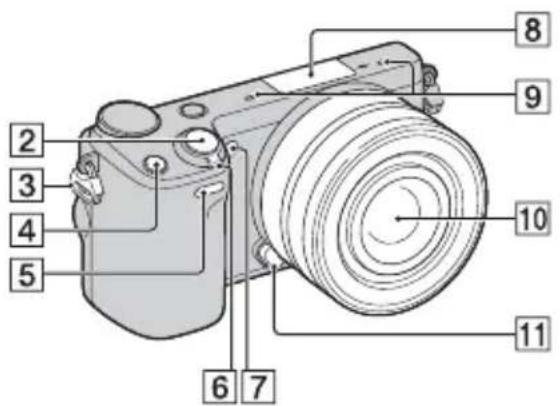
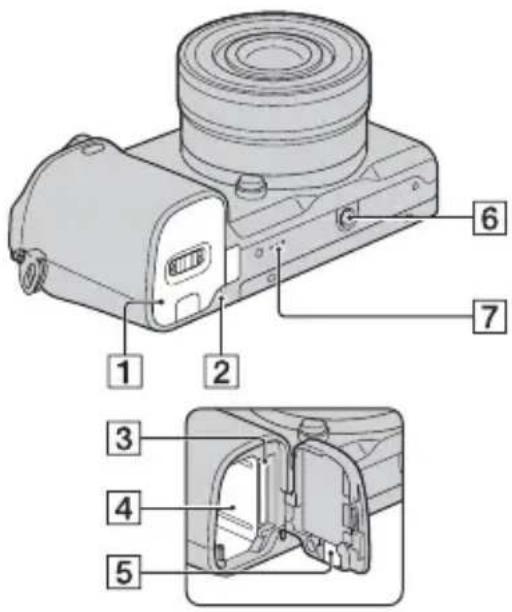
Labeled diagram of a camera with numbered parts for identification

Auto-lock Accessory Shoe

NEX-5R
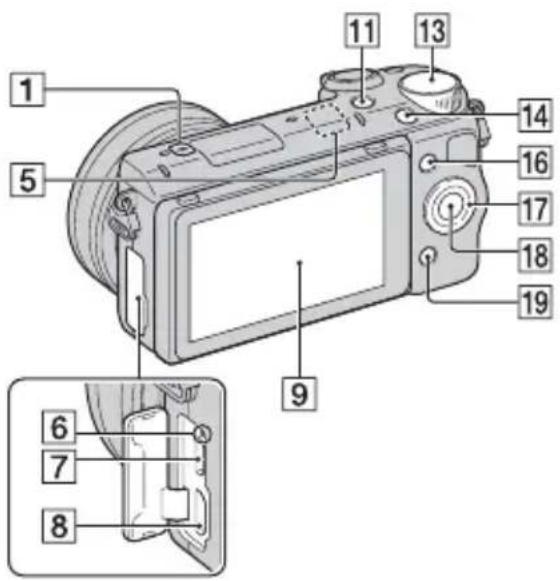
Labeled diagram of a digital camera with numbered parts for identification and assembly reference.

Diagram of a DSLR camera with an arrow indicating rotation or movement (no text or symbols present)

Diagram of a camera with an open screen and arrow indicating rotation (no text or symbols)

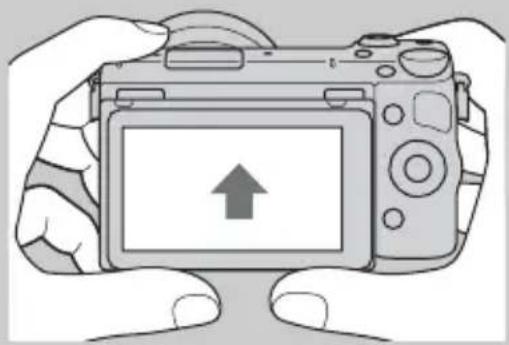
Illustration of hands holding a DSLR camera with an upward arrow on the screen (no text or symbols)

NEX-6

Technical diagram of a camera module with numbered parts for identification and assembly reference.

NEX-5R

Technical diagram of a mechanical device with numbered parts for identification

NEX-5R:

SONY Alpha NEX-5RK - NEX-5R: - 1
(Suurenna kuva)

Huomautuksia

Oikea valotus

Close-up of sliced oranges in a white bowl, with blurred background showing green vegetables (no text or symbols visible)

Suuri ISO-herkkyys

AEL-painike (vain NEX-6)

Opastuspalkki

Huomautuksia

§ (salaman ponnautus) -painike

NEX-5R:

Kohdekehys

NEX-5R:

1 MENU → [Kamera] → [Autom. muot. rajaus] → haluttu tila.

Vakio Leveä

DRO/Autom. HDR

DIRECT-xxxx-NEX-xxx ---------------- ---------------- ---------------- ---------------- ---------------- ---------------- ---------------- ---------------- ---------------- ---------------- ---------------- ---------------- ---------------- ---------------- ---------------- ---------------- --------…

Diaesityksen asetus

1 MENU → [Toisto] → [Käännä].

FINDER/LCD-asetus

Kehys videota varten

AEL-painike (vain NEX-6)
Technical line drawing of a DSLR camera with labeled parts (no text or symbols beyond 'MENU' and arrows)

Soft key B-painike

Huomautuksia

Huomautuksia

"Image Data Converter"

"PlayMemories Home"

"PlayMemories Home Help Guide"

Huomautuksia

Kuvakeluettelo

(CIPA: Camera & Imaging Products Association)

Tekniset tiedot

Kamera

[Järjestelmä]

±2,0 EV (1/3 EV:n portain)

[WLAN]

Tuettu muoto: IEEE 802.11 b/g/n

Salama HVL-F7S (vain NEX-5R)

±2,0 EV (1/3 EV:n portain)

Manual assistant
Powered by Anthropic
Waiting for your message
Product information

Brand : SONY

Model : Alpha NEX-5RK

Category : Camera