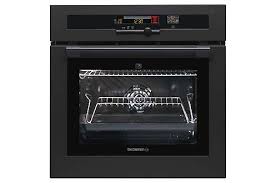
DOP 450 - Built-in oven DE DIETRICH - Free user manual and instructions
Find the device manual for free DOP 450 DE DIETRICH in PDF.



| Brand | DE DIETRICH |
| Model | DOP 450 |
| Product type | Built-in oven |
| Power supply | 220-240 V ~ 50 Hz, single phase, 16 A, 3-conductor cable 1.5 mm² |
| Cooking modes | Fan-forced, Conventional, Conventional ECO, Turbo grill, Double grill, Single grill, Low temperature cooking, Keep warm, Defrost |
| Cleaning | Pyrolysis with 3 durations (1h30, 1h45, 2h) and manual cleaning |
| Child safety | Control lock via long press on STOP |
| Door lock | Automatic during pyrolysis |
| Lighting | Halogen bulb 25 W, 220-240 V, 300°C, G9 |
| Timer/programmer | Electronic with clock, timer, delayed start, immediate cooking |
| Included accessories | Anti-tip safety grid, dripping pan, rotisserie, non-stick baking tray, low temperature cooking dish |
| Number of levels | 3 (indicated in the manual) |
| Recommended cooking types | Meats, poultry, fish, pastries, grills, yogurts |
| Timer function | Independent, up to 59 min 59 s |
| Automatic time reset | After power cut < 36 h |
| Indicators | Temperature, temperature rise, timer, lock, pyrolysis |
Frequently Asked Questions - DOP 450 DE DIETRICH
User questions about DOP 450 DE DIETRICH
0 question about this device. Answer the ones you know or ask your own.
Ask a new question about this device
Download the instructions for your Built-in oven in PDF format for free! Find your manual DOP 450 - DE DIETRICH and take your electronic device back in hand. On this page are published all the documents necessary for the use of your device. DOP 450 by DE DIETRICH.
USER MANUAL DOP 450 DE DIETRICH
Plat multi usages (lèchefrite)
What does your oven look like?
Description of the appliance P.26
Accessories P.27-28
Safety recommendations P.28
How do you install your oven?
Electrical connection P.29
Changing the power cable P.30
Useful dimensions for installing your oven P.31
How does your oven work?
Close-up of your analogue programmer P.32
How do you set the clock on the oven? P.33
How do you program for immediate cooking? P.34
How do you set a cooking programme? P.35
How do you use the timer? P.36
How do you program an Economical cooking cycle? P.37
How do you set a "Low Temperature" cooking programme? P.38
How do you customise the cooking temperature? P.39
How do you put your display in standby mode? P.39
How do you lock the controls (child safety device)? P.39
Oven cooking modes P.40-41
How do you clean the cavity of your oven?
What is pyrolysis? P.42
In what situations should pyrolysis be used? P.42
How do you begin a pyrolysis cycle? P.42-43
How do you change the bulb? P.44
What to do in case of operating malfunctions P.44
Introduction
Dear Customer,
You have just acquired a DE DIETRICH oven and we would like to thank you.
Our research teams have created a new generation of appliances for you. Their quality, design and technological advances make them exceptional products and reveal our unique know-how.
With modern, refined lines, your new DE DIETRICH oven blends harmoniously into your kitchen and perfectly combines technological expertise, cooking performance and aesthetic luxury.
In the line of DE DIETRICH products, you will also find a wide range of hobs, ventilation hoods, dishwashers, microwave ovens and refrigerators, all of which can be built in and all of which can be coordinated with your new DE DIETRICH oven.
Thanks to these "New Items of Value" that serve as guideposts in our everyday lives, DE DIETRICH, the reference of excellence, is truly an invitation to a new art of living.
The DE DIETRICH brand.

What does your oven look like?
DESCRIPTION OF THE APPLIANCE
1 Stop/cancel
5 Contact for open door detector
2 Temperature setting
6Hole for rotisserie
3 Adjust cooking times/cooking end time and clock settings
7 Shelf support indicator
4 Function selector
(8)Light
Accessories
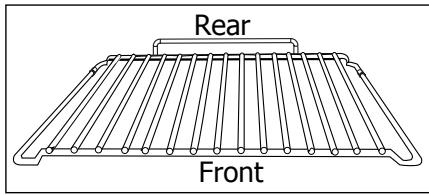
Curved anti-tipping safety grid
Its shape was designed to allow you to position your dish between two shelf support levels.
GB
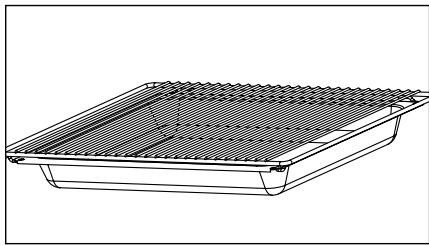
Dish + grid (drip tray)
Inserted under the grid, it catches barbecue juices and grease. It can also be used half-full of water for double-boiler cooling methods. Avoid placing roasts or meats directly in the dish because you are certain to have major spattering on the oven walls
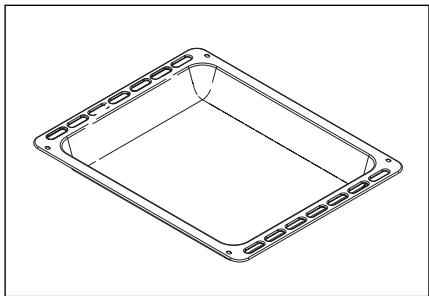
Multi-purpose dish (drip tray)
It is used to collect juices and grease from cooking with the high grill or the pulsed grill. It can be used as a cooking dish when suitable for the size of the item to be cooked (e.g. whole poultry surrounded with vegetables, at moderate temperature). Inserted under the grid, it catches barbecue juices and grease. It can also be used half-full of water for double-boiler cooking methods.
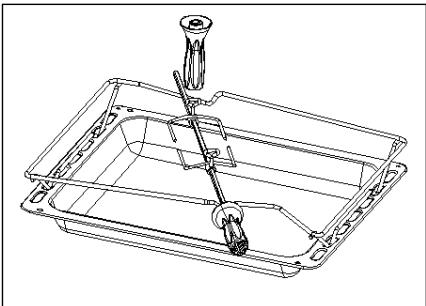
Rotisserie
-
Position the spit support in the notches of the drip tray dish (see drawing).
-
Place the assembly in the oven on the second wire shelf support (from the bottom). After placing the piece of meat to be roasted on the rotisserie, place the spit on the support piece, sliding the whole until the tip of the spit is inside the motor located at the back of the oven. Remove the handle by unscrewing it. After cooking, remove the entire assembly. At the end of the handle, a grip allows you to unscrew the forks.
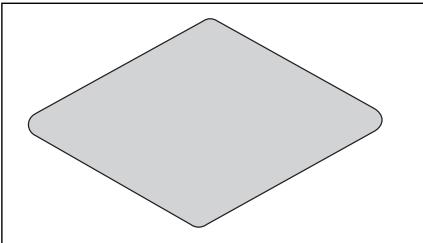
Non-stick baking tray
(to be placed on a grid)
Placed on the dish support grid, it can be used for cooking pastries, pies and pizza.
Its non-stick coating ensures easy removal of baked items.
Wear oven mitts to protect your hands when removing it from the oven. Let it cool before washing it by
ap. Avoid using scouring sponges.
hand in the kitchen sink with dish soap. Avoid using scouring sponges.
WARNING: Do not cut on it with a knife or a metallic pizza cutter; use plastic or silicone utensils instead.
Do not use the tray at temperatures above 250^ or during the PYROLYSIS mode.
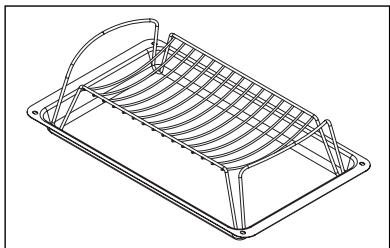
Pan reserved exclusively for low temperature cooking.
Place meat (except for poultry) directly on the grid with the enamelled dish underneath. Place yoghurt containers directly in the dish.
Safety Recommendations
Please become familiar with these recommendations before installing and using your oven. This oven was designed for household use only. It is intended solely for cooking foodstuffs. This oven does not contain any asbestos-based components.
FIRSTUSE:
Before using your oven for the first time, heat it up while empty with the door closed for approximately 15 minutes using the maximum setting in order to "cure" the appliance. The rock wool that surrounds the oven cavity may initially release a particular odour caused by its composition. Similarly, you may notice the release of some smoke. All of this is normal.
SUBSEQUENT USES:
-
Ensure that the door of your oven is completely closed so that the seal can properly do its job.
-
Do not let anyone lean against or sit on the oven door when it is open.
-
When using the grill with the door semi-open, exposed parts and surfaces may become hot. Keep small children away.
-
When in use, the appliance becomes hot. Be careful not to touch the heating elements located inside the oven.
-
After cooking, do not use bare hands to touch the dishes or accessories (grid, rotisserie, drip tray, rotisserie support, etc.); use a potholder or heat-resistant material.
-
Do not use a steam cleaner or high-pressure cleaner
-
Do not line your oven with sheets of aluminium. Otherwise, the result could be an accumulation of heat that could have an undesirable effect on cooking and roasting results and could damage the enamel.
-
The oven must be turned off for all attempts to clean the cavity.
-
During pyrolysis, the exposed surfaces become hotter than during normal use. It is advisable to keep small children at bay.
-
Before beginning a pyrolysis cycle, remove all grids and trays.
-
If the appliance has an electrical outlet, it must remain accessible after the appliance has been built in.
FOR AUSTRALIA ONLY (LEGAL INSTRUCTION)
- Young children should be supervised to ensure that they do not play with the appliance.
- The appliance is not intended for use by young children or infirm person without supervision.
- If the supply cord is damaged, it must be replaced by the manufacturer or its service agent or a similarly qualified person in order to avoid hazard.
- During use the appliance becomes hot. Care should be taken to avoid touching heating elements inside the oven.
WARNING : Ensure the appliance is switched off before replacing the lamp to avoid the possibility of electric shock.
WARNING : Accessible parts may become hot when the grill is used. Children should be kept away. - For service issues, telephone number : 1300
- Do not install the product if you see any damage on it.
How do you install your oven?
Electrical connection
GB

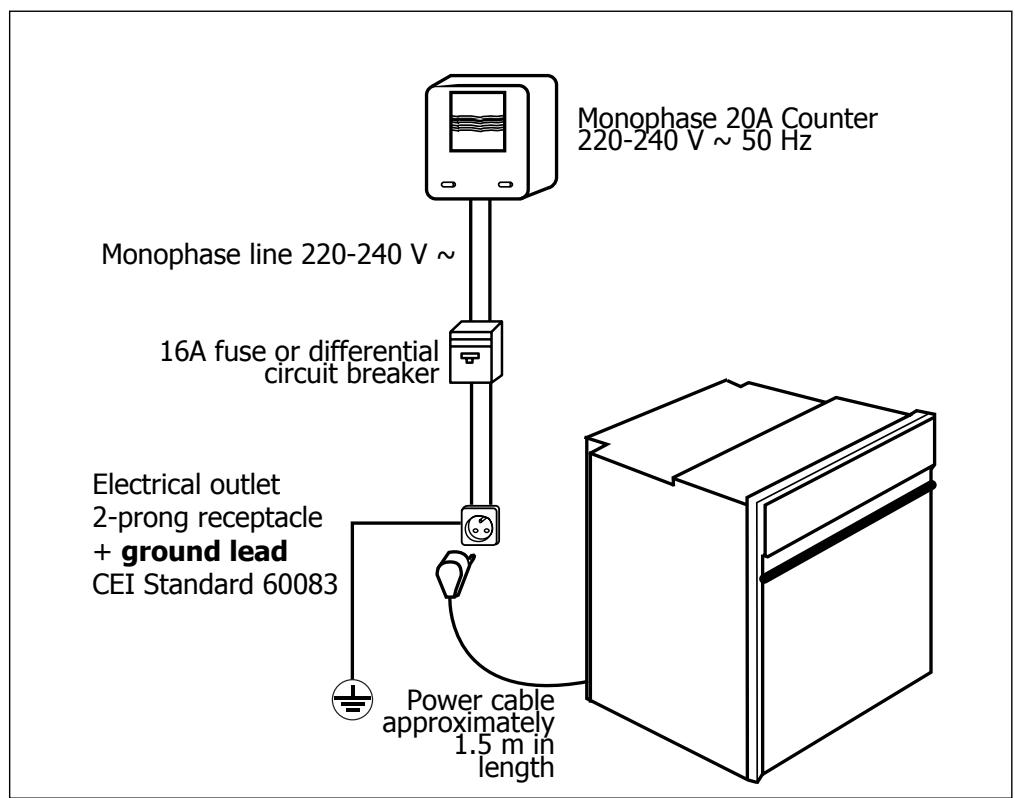
Before making the connection, ensure that the wires in your electrical installation have enough cross-sectional area to properly supply electricity to the appliance.
The fuse in your set-up must be 16 amperes.
The electrical connection should be performed before the appliance is installed in the cabinet.
- The oven must be connected with a power cable (standardised) with three 1.5 ~mm^2 conductors ( 1 ph + 1 ~N + ground) that must be connected to a monophase 220-240 V network via a CEI 60083 standardised receptacle ( 1 ph + 1 ~N + ground lead) or in accordance with installation rules. The safety wire (green-yellow) is connected to the appliance's terminal 1 和 and must be connected to the ground lead of the electrical set-up.
- In the case of connections with an electric receptacle, it must remain accessible after installation of the appliance.
- The oven's neutral conductor (blue wire) must be connected to the network's neutral conductor.
How do you install your oven
Changing the power cable
- The power cable (H05 RR-F, H05 RN-F or H05 VV-F) must be of sufficient length to be connected to the build-in oven while it sits on the floor in front of the cabinet.
To do this the appliance must be disconnected from the electrical network: - Open the inspection flap located at the lower right of the back cover by unscrewing the two screws, then pivot the inspection flap.
- Strip 12 mm along each wire of the new power cable.
- Carefully twist together the strands.
- Loosen the screws from the terminal board and remove the power cord to be replaced.
- Introduce the power cable through the side of the cover in the cable clip located to the right of the terminal board.
- Connect the power cord wires in accordance with the written markings on the terminal board.
- All the strands of the electricity wires must be captured under the screws.
- The phase wire on the L terminal.
- The green-yellow coloured ground wire should be connected to the termina
- The neutral conductor (blue) on the N terminal.
- Screw down tightly the screws on the terminal board and check the connection by pulling on each wire.
- Attach the cable with the cable clip located to the right of the terminal board.
- Close the inspection flap using the two screws.

We cannot be held responsible for any accident resulting from an non-existent, defective or incorrect ground lead.
Useful dimensions for installing your oven
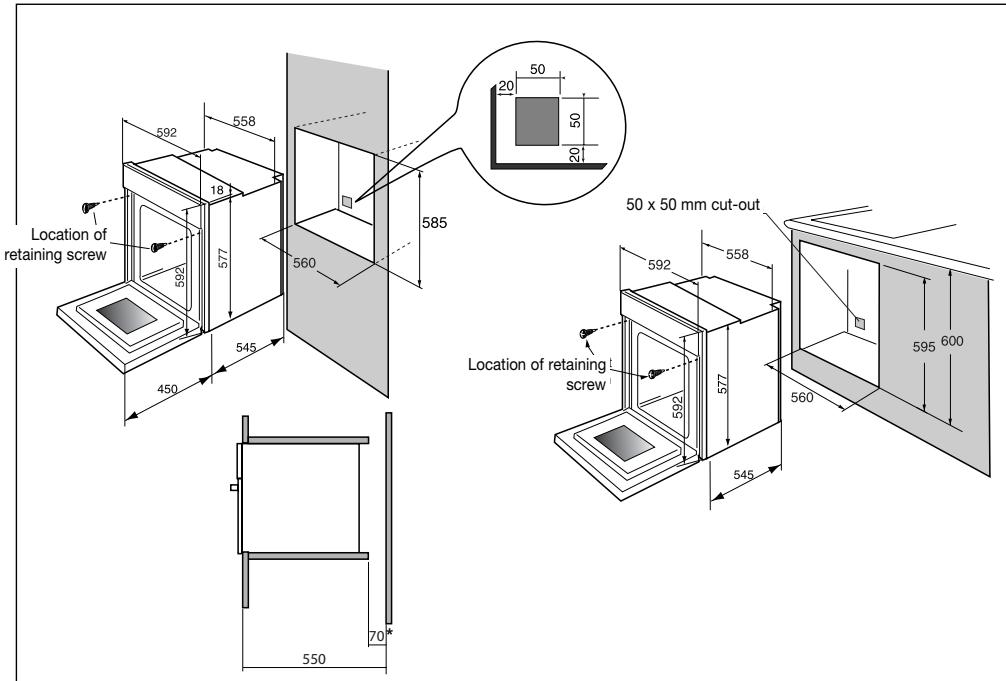
The oven can be installed under a work top or in a column of cabinetry (open* or closed) having the appropriate dimensions for built-in installation (see adjacent diagram).
Your oven has optimised air circulation that allows it to achieve remarkable cooking and cleaning results if the following guidelines are respected:
- Centre the oven in the cabinet so as to guarantee a minimum distance of 5mm between the appliance and the neighbouring cabinet.
- The material of the built-in cabinetry must be heat resistant (or be covered with such a material).
- For greater stability, attach the oven in the cabinet with two screws through the holes provided for this purpose on either side of the front inner panel (see diagram).
To do this:
1) Remove the rubber screw covers to access the mounting holes.
2) Drill a 0.3mm hole in the cabinet panel to avoid splitting the wood.
3) Attach the oven with the two screws.
4) Replace the rubber screw covers (they also serve to absorb the shock caused by closing the oven door).
(*) If the cabinet is open, its opening must be 70 mm (maximum).

To be certain that you have properly installed your appliance, do not hesitate to call on a household appliance specialist.
How do you use your oven?
1. Close-up of your programmer
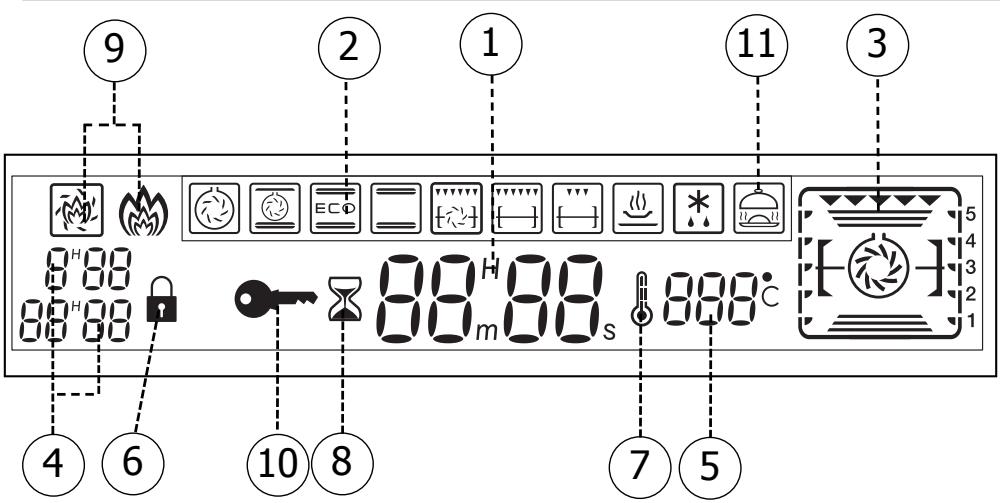
1 Clock or timer display
2 Cooking mode display
3 Shelf support indicator and selected cooking mode indicator
4 Display of various time adjustment programmes (cooking times and end times)
5 Oven temperature display
6 Locked door indicator (during pyrolysis)
7 Rising temperature indicator
8 Timer indicator
9 Pyrolysis indicator
10 Control lock indicator (child safety device)
11 "Low Temperature Cooking" indicator
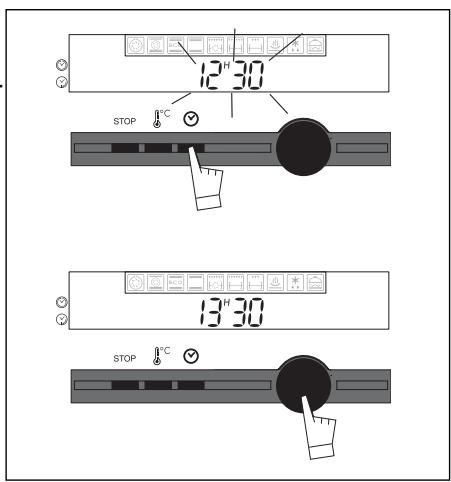
2. How do you set the clock on the oven?
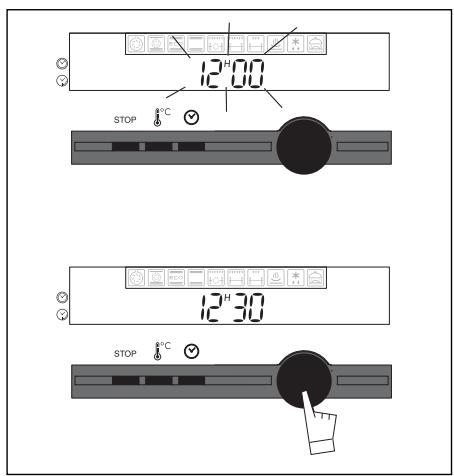
a) When supplied with electricity
- The displays flashes 12:00.
- Program the time by turning the setting button toward + or - (the speed with which the button is turned varies the speed with which the time changes)
Example: 12:30.
Enter the programme by pressing the selector button.
-
The display stops flashing
GB
b) Resetting the clock time
Press down the button for a few seconds.
The time display flashes, indicating that it is now possible to adjust the time.
To set the time, turn the button toward + or - so as to advance or turn back the displayed time.
After entering the time of your choice, enter it by pushing the button -> the display stops flashing.
The time cannot be set if the oven is in delayed cooking mode
In the event of a power outage lasting less than 35 hours, when electricity is restored, a message indicates that your oven will automatically readjust the time displayed.
3. How do you program for immediate cooking?
The analogue programmer should display only the time; it should not be flashing.
- Press and turn the button toward the right to select the cooking mode.
The selection function flashes. - Enter the time by pressing the setting button.
The cooking mode indicator stops flashing and the recommended temperature begins flashing. When the pre-selected temperature appears, the shelf support indicator and the heating elements in use also light up. The oven begins heating.
Place your dish in the oven based on the suggestion indicated in the display and the recommendations provided in the cooking guide.
Example: -> Shelf support 2 or 3 ecommended.
As long as the 0^ C symbol is flashing, you can make changes by turning the temperature selector button.
Enter the time by pressing the button.
Your oven recommends the optimal temperature for the chosen dish. It is, however, possible to adjust
the temperature at any time by using the ^ C touch control located under the display.
Example " adjusted to 210^
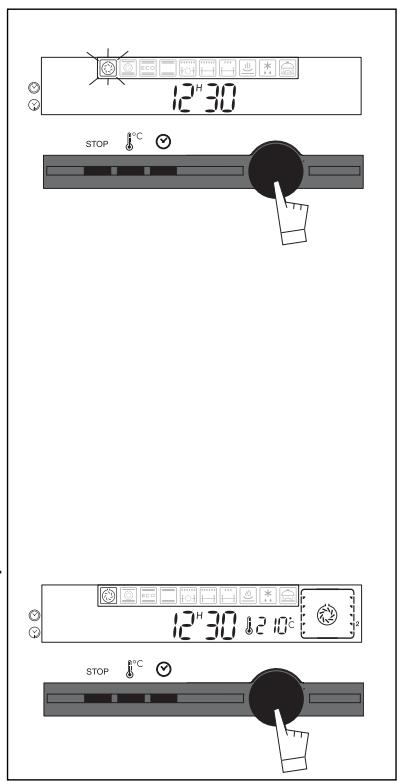
After these three steps, the oven heats up:
- These rising temperature indicator symbols indicate the incremental temperature increase inside the oven.
- A series of beeps will indicate that the oven has reached the selected temperature.
To stop cooking, press and hold the STOP touch control for a few seconds.
After a cooking cycle, the circulating fan continues to function for a period in order to cool the oven.
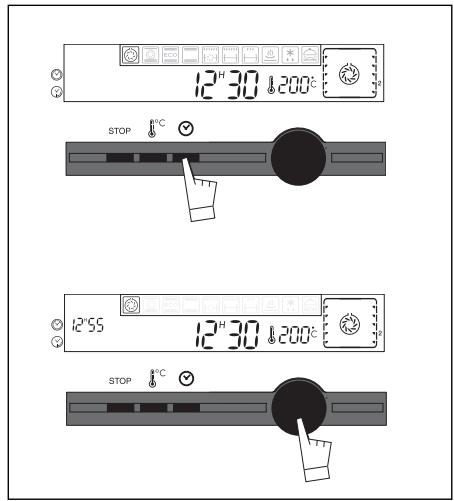
4. How do you set a cooking programme?
a) With immediate start
Proceed as described in the "Immediate Cooking" section.
GB
Press the button.
The cooking time flashes 0:00 to indicate that it is now possible to set it.
Turn the button to set the desired time.
Example: 25 min cooking time.
Enter by pressing the button.
The cooking time starts counting down as soon as the time has been entered. You can cancel the function at any time by setting the displayed value to 0 (after having pressed the touch control).
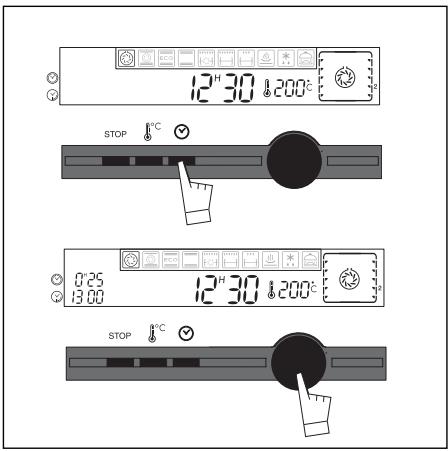
b) With delayed start (choose end time)
Proceed as with programmed cooking.
After setting the cooking time, press two times so that the end time begins flashing.
Turn the selector button toward + or - to set the desired end of cooking time.
Enter the time by pressing the button.
After these steps, the oven heating is delayed so that cooking ends at 13:00.
When your cooking programme is finished, a three-beep pattern will be emitted for a few minutes. The beeps will stop automatically.
How does your oven work?
5. How do you use the timer?
Your oven is equipped with an electronic timer that is independent of the oven functions, making it possible to measure times.
In this case, the timer display takes priority over the time of day display.
Press the touch control three times.
The hourglass appears and 00^M00^s flashes.
Turn the button until you obtain the desired length of time (max 59 minutes and 59 seconds)
Enter the time by pressing the button.
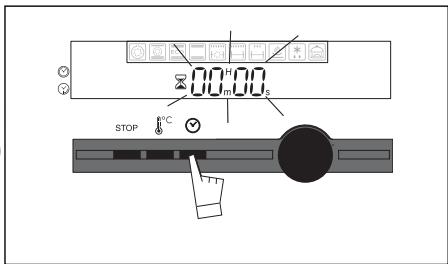
The display stops flashing and the timer starts working, counting down the time in seconds. When the cooking time is finished, the timer starts beeping to alert you and the hourglass begins flashing.
6. How do you program for energy-saving cooking?*
The analogue programmer should display only the time; it should not be flashing.
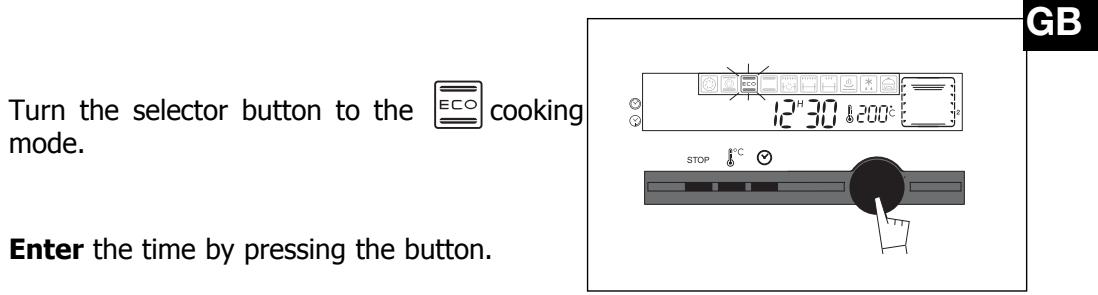
- Place your dish in the oven based on the recommendation indicated in the display.
- Your oven recommends the optimal temperature for the chosen cooking mode: 200^ .
It is, however, possible to adjust the temperature by using the button located under the display.
Example: "ECO Cooking" position adjusted to 190^
After these three steps, the oven heats up:
The temperature rise indicator is activated and signals the incremental temperature increase in the oven.
Three beeps will indicate to you that the set temperature has been reached.
To optimise the ECO cooking mode, do not pre-heat and do not open the door during cooking.
*This position makes it possible to save up to 20% energy while still offering identical cooking results.
The ECO position is used for the energy label performance.

After a cooking cycle, the circulating fan continues to function for a period to ensure the heating elements are properly cooled down.
How does your oven work?
7. How do you set a low temperature cooking programme?

- Press the selector button. You will see the " ” symbol
-
Press again to choose the cooking option from the following list by turning the selector button (to make this selection, refer to the attached cooking guide):
-
Roast veal
Roast beef - Pork roast
- Leg of lamb
- Poultry
- Yoghurt
Enter your selection by pressing the button. The following are now displayed:
- Recommended shelf support level
- Cooking time (non-adjustable)
Veal -> 4:30
Beef -> 3:00
Pork -> 4:30
Leg of lamb -> 3:00
Poultry -> 6:00
Yoghurt -> 3:00
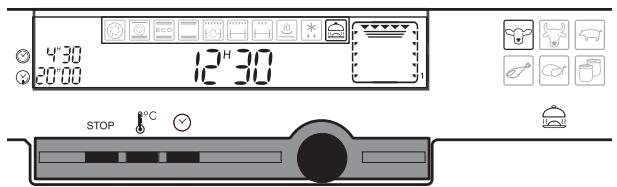
- End of cooking time flashes (the one closest to the next natural meal time)
You can adjust it by turning the selector button until the desired time is displayed. - Enter the time by pressing the button.
At the end of the cooking programme, 0:00 flashes.
For meats, there is automatic low temperature stabilisation (duration: one hour)
For yoghurts, there is a "rapid cooling down" phase (duration: one hour). The light and animation stop during this phase.
For additional information on this cooking mode, refer to the attached recipe book.
How does your oven work?
8. Customising the recommended temperature
Select the cooking function:
If you wish to customise the recommended temperature:
- Press the " _0^ C " touch control until the temperature display begins flashing.
- Turn the + or - button until the desired temperature appears.
- Press to enter.
9. Adjusting brightness
You can adjust the brightness of your display. To do this:
- Set the time of your programmer to 12:10.
- Depress the " ^ C " button while rotating it (+ or -) in order to obtain the desired level of brightness.
- After having adjusted the brightness to your liking, return your programmer to the current time of day.
10. Control panel locking (child safety device)
You have the option of preventing access to the oven controls by taking the following steps:
When the oven is off, hold down the STOP touch control for a few seconds; a "key" will then be displayed on the screen -> access to the oven controls is now blocked.
To unlock access, hold down the STOP touch control for a few seconds.
The oven controls are once again accessible.
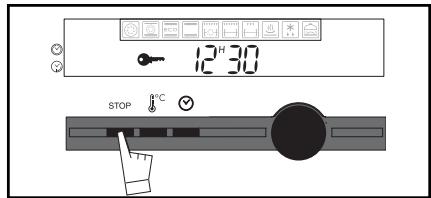

You cannot lock the oven if you have programmed a cooking cycle.
6. Oven cooking modes
Symbol Name of cooking mode Description of cooking mode
| * | Circular heating Cooking controlled by the heating element located at the back of the oven and by the fan. | Quick temperature increase. Some dishes can be placed in the oven while it is still cold. |
| Combined cooking Cooking controlled by the upper and lower heating elements at the back of the oven and by the fan. | Three combined sources of heat: a lot of heat from the bottom, a little circulating heat and a bit from the grill. | |
| * | Traditional ECO Cooking controlled by the upper and lower heating elements with no fan. | This position allows for energy savings while preserving the quality of the cooking. The ECO position is used for the energy label performance. |
| Traditional Cooking controlled by the upper and lower heating elements with no fan. | Requires preheating before placing the dish in the oven. | |
| Turbo grill Cooking controlled, alternately, by the upper element and by the fan. | This mode combines the effects of the fan and the grill; the grill pulses the food with infrared and the air movement generated by the fan attenuates the effect. | |
| Double grill Cooking controlled by the upper element | The double grill covers the entire grid surface. As for the simple grill, it is equally effective for small-er quantities. | |
| Simple grill Cooking controlled by the upper element. | ||
| Hold warm function Heat dosages from the element at the back of the oven combined with fan. | Stabilisation at low temperatures. | |
| Defrosting | ||
| Low temperature | Thanks to a specific programme, meat is cooked gently and evenly over an extended period. You can make old-fashioned natural yoghurts the way your grandmother used to. |
- Programme(s) used to obtain the results indicated on the energy label in compliance with
e
Recommendations
Oven cooking modes
Recomm. Temp.
| Recommended for preserving tender-ness in white meats, fish, vegetablesFor cooking multiple items on up to three levels. | Min. 35 | Recomm. 180 | Max. 235 |
| Recommended for quiches, potpies and juicy fruit tarts. | Min. 35 | Recomm. 205 | Max. 275 |
| Note: All cooking is done without pre-heating. | Min. 35 | Recomm. 200 | Max. 275 |
| Recommended for slow, gentle cooking: tender game meat, etc.Sealing red meatsTo simmer in a covered stew pan dishes that were begun on the hob (coq au vin, stew, etc.) | Min. 35 | Recomm. 240 | Max. 275 |
| Recommended for sealing and thoroughly cooking red and white meat.To slowly cook poultry weighing up to 2 kg. | Min. 180 | Recomm. 200 | Max. 230 |
| Recommended for grilling chops,sausages, toast, prawns placed on the grid. | Min. 1 180 | Recomm. 4 200 | Max. 4 230 |
| Min. 1 | Recomm. 2 | Max. 4 | |
| Recommended for letting dough rise for bread, buns, cakes, etc. without exceeding 40°C (plate warming,defrosting). | Min. 35 | Recomm. 80 | Max. 100 |
| Min. 30 | Recomm. 30 | Max. 50 |
When cooking roast and legs of lamb, use
the special grid; for poultry, use the rotat
- ing spit; for yoghurts, place the containers directly in the enamelled dish.
ith European standard EN 50304 and in accordance with European Directive 2002/40/CE.
How do you clean the cavity of your oven ?
1. What is pyrolysis?
-Pyrolysis is a cycle during which the oven cavity is heated to a very high temperature in order to eliminate soiling from splattering and spills. The smoke and odours released are destroyed as they move through a catalyser.
- Pyrolysis is not necessary after each cooking cycle, but simply when the dirtiness warrants it.
- As a safety measure, the cleaning operation only begins after the door has automatically locked. As soon as the internal temperature of the oven exceeds cooking temperatures, it is impossible to unlock the door--even if the "function selector" knob is turned to 0.
2. In what situations should pyrolysis be used?
If your oven emits smoke during preheating or releases large volumes of smoke during cooking. If your oven releases an unpleasant odour when cooled after various cooking applications (lamb, fish, barbecue, etc.).
| RELATIVELY CLEAN COOKING APPLICATIONS | Biscuits, vegetables, pastry, quiches, soufflés | Splatter-free cooking pyrolysis is not warranted |
| DIRTY COOKING APPLICATIONS | Meats, fish, (in a dish) stuffed vegetables | Pyrolysis is warranted after three cooking cycles |
| VERY DIRTY COOKING APPLICATIONS | Large cuts of meat on the spit | pyrolysis can be performed after one cooking application of this kind if there is a lot of splattering |

You should not wait until the oven is coated in grease to initiate a cleaning cycle.
3. How do you use the pyrolysis function?
Programming for immediate pyrolysis
a) Remove the grids and trays from the oven and clean any major spill residue.
b) Ensure that the programmer is displaying the time of day and that it is not flashing
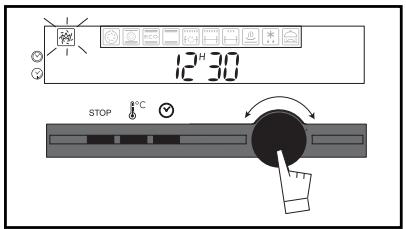
c) Press the selector button, then turn the selector button to the left to the position
How do you clean the cavity of your oven ?
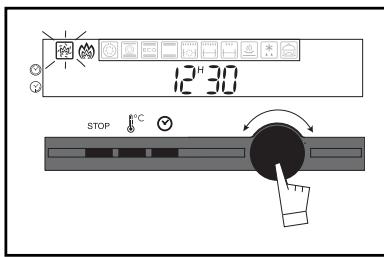
Your oven displays the three pyrolysis symbols corresponding to a two-hours pyrolysis cycle (non-adjustable)
You can select two other pyrolysis cycle lengths (M)
1:45, 1:30) that are non-adjustable by
turning the selector button.
The oven cannot be used for 2:00, 2:15 or 2:30.
This time includes the cooling time until the door can be unlocked.
GB
d) Enter the programme by pressing the selector button.
The door locks during the pyrolysis cycle (after approximately two minutes).
You can check the time at which the pyrolysis cycle should end by pressing the
touch control. At the end of the pyrolysis cycle, the symbol id displayed until the door is unlocked
e) Turn off the oven by pressing the selector button.
f) When the oven is cool, use a damp cloth to remove the white ashes.
The oven is clean and once again ready for the cooking application of your choice.
Notes: The cleaning temperature cannot be adjusted. During the pyrolysis cycle, the oven lighting is off. If your oven is not clean after a pyrolysis cycle, you waited too long to launch the cleaning cycle. Repeat the cycle.
2) How do you program for delayed pyrolysis?
Follow the instructions described in the
"Programming for immediate pyrolysis" section, then
a) Press the touch control,
the pyrolysis end time flashes to indicate that it
is now possible to set it.
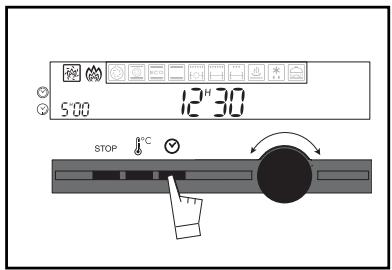
b) Adjust the pyrolysis end time by turning the selector button.
Example: Pyrolysis ends at 5:00.
When the pyrolysis cycle is finished, press the selector button.
How do you change the bulb?
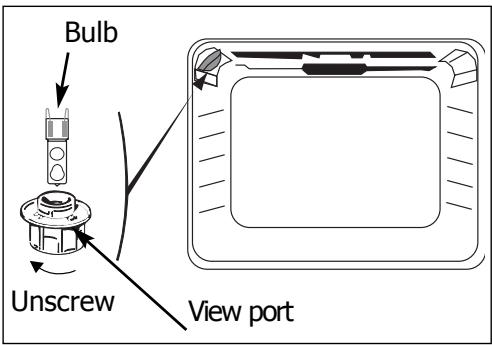
- The bulb is located on the ceiling of your oven's cavity.
! Disconnect your oven before performing any task on the bulb to avoid the risk of electric shock and, if necessary, let the appliance cool down.
a) Unscrew the view port (see adjacent diagram).
b) Remove the bulb.
Bulb specifications:
- 25 W
- 220-240 V
-300°C
-G9
c) Replace the bulb then reposition the view port and reconnect your oven.
What do you do in case of operating malfunctions?
If you have a doubt about the functioning of your oven, this does not necessarily mean that there is a malfunction. In any event, check the following items:
You notice that...
The oven is not heating.
Possible causes
The oven is not connected.
- The fuse in your electrical set-up is not working.
- The selected temperature is too low.
- Problem with the door's lockinmechanism.
The temperature indicator is flashing.
The oven light is not working.
The light is out of order.
- The oven is not connected or the fuse is not working.
The pyrolysis cleaning cycle does not begin.
- The door is not properly closed.
The locking system is defective.
Your oven starts beeping.
During cooking.
- At the end of a cooking programme.
Your oven displays
- When the touch controls are pressed.
Controls are locked for child safety.
What should you do?
- Connect the oven.
- Replace the fuse in your electrical set-up and check its capacity (16A).
-
Increase the selected temperature.
-
Call the After Sales Service Department.
-
Replace the light.
-
Connect the oven or replace the fuse.
-
Verify that the door is locked.
- Call the After Sales Service Department.
The recommended temperature of your choice has been reached.
- Your programmed cooking cycle is finished.
- Working normally.
- To cancel the lock, hold down the
Stop touch control until the symbol disappears.
99633803_ML_A.qxd 06/06/05 10:07 Page 45
Inhalt
Vorwort S.47
O forn o emite bips.
- Introduction
- DESCRIPTION OF THE APPLIANCE
- Accessories
- Curved anti-tipping safety grid
- Rotisserie
- Non-stick baking tray
- Pan reserved exclusively for low temperature cooking.
- Safety Recommendations
- FIRSTUSE:
- SUBSEQUENT USES:
- FOR AUSTRALIA ONLY (LEGAL INSTRUCTION)
- How do you install your oven?
- Electrical connection
- How do you install your oven
- Changing the power cable
- How do you use your oven?
- Close-up of your programmer
- How do you set the clock on the oven?
- a) When supplied with electricity
- Enter the programme by pressing the selector button.
- b) Resetting the clock time
- How do you program for immediate cooking?
- How do you set a cooking programme?
- How do you use the timer?
- How do you program for energy-saving cooking?*
- How do you set a low temperature cooking programme?
- Customising the recommended temperature
- Adjusting brightness
- Control panel locking (child safety device)
- Oven cooking modes
- Symbol Name of cooking mode Description of cooking mode
- Recommendations
- How do you clean the cavity of your oven ?
- What is pyrolysis?
- In what situations should pyrolysis be used?
- How do you use the pyrolysis function?
- Programming for immediate pyrolysis
- 2) How do you program for delayed pyrolysis?
- How do you change the bulb?
- ! Disconnect your oven before performing any task on the bulb to avoid the risk of electric shock and, if necessary, let the appliance cool down.
- What do you do in case of operating malfunctions?
- You notice that...
- Possible causes
- What should you do?
- Inhalt
Brand : DE DIETRICH
Model : DOP 450
Category : Built-in oven