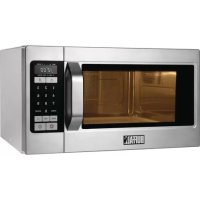
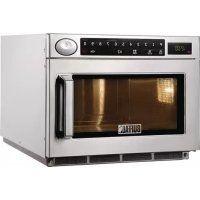
GK642E - Microwave Oven BUFFALO - Free user manual and instructions
Find the device manual for free GK642E BUFFALO in PDF.



| Product type | Microwave oven |
| Brand | Buffalo |
| Model | GK642E |
| Power supply | 230 V - 50 Hz |
| Power consumption (microwave) | 1600 W, 7 A |
| Output power | 1050 W (IEC-705) |
| Operating frequency | 2450 MHz |
| Capacity | 28 liters |
| External dimensions (W x H x D) | 517 x 297 x 412 mm |
| Internal dimensions (W x H x D) | 338 x 225 x 343 mm |
| Net weight | 17.5 kg |
| Gross weight | 19.0 kg |
| Power levels | High (100% / 1050 W), Medium (70% / 735 W), Low (50% / 525 W), Defrost (30% / 315 W) |
| Main functions | Cooking/Reheating, Automatic defrost, Memory programming (20 programs), Multi-stage cooking, +30s button, Double Quantity button, Program check, Cycle counter |
| Safety | Door safety lock, automatic stop if door opened, microwave protection, instructions to avoid burns and fires |
| Maintenance and cleaning | Clean interior/exterior surfaces, seals and turntable regularly; use a soft cloth and soapy water; do not use abrasive products or steam cleaner |
| Included accessories | Ceramic turntable, guide ring |
| After-sales service | Contact Buffalo customer service: 0845 148 2887 (UK) or the nearest centre |
Frequently Asked Questions - GK642E BUFFALO
User questions about GK642E BUFFALO
0 question about this device. Answer the ones you know or ask your own.
Ask a new question about this device
Download the instructions for your Microwave Oven in PDF format for free! Find your manual GK642E - BUFFALO and take your electronic device back in hand. On this page are published all the documents necessary for the use of your device. GK642E by BUFFALO.
USER MANUAL GK642E BUFFALO
NENONNNNNNNNEHHOIS 10
Deutsch - 9

SALSESESESESESESESESESESESE

Deutsch-17

ENONNNNNEENNSINNOO 10
AeVxu is chsi aissance apnree 2
Hemorrhagic hemorrhage: no
USO DEI TASTI AVVIO E +30S
| +30s | Last hot goredt in do even stean. |
| Druk saen of mear keren up +30s voor dieke 90 seconden extra die u will tevooogan. |
Nederlands - 11

- DISPLAY
- VERMOGENSTOETS
3.CUFERTOETSEN - CONTROLLETOETS
5.PROGRAMMATOETS - TOETS STOPPEN/ANNULEREN
7.CNTDOOTOETS
8. CELUDSTOETS
9. DUBELE HOEVEELHEID
10. TOETS+30s
11. START
debrilk van de oven
CONTROLEREN OF DE OVEN GOED WERKT
BEREIDING IN MEERDERE FASEN
∴ m = 3/11
Commercial Microwave Oven
Instruction Manual
Planet First
100% Recycled Paper
This manual is made with 100% recycled paper.
contents
Safety information 2
Quick look-up guide
Oven features 12
Owen 12
(Continued)
Cnrrnnr
Checking that your oven is operating correctly 13
Cooking/renealing 13
Using the start and +30s button 13
Using the stop/cancel button 14
Setting cooking time and power level 14
Power levels 14
Using defrost button 15
Memory programming 15
Using the check button 16
1
1
Goe 18
Cooking guide 19
Troubleshooting 21
Troubleshooting 21
Technical specifications 22
safety information
USING THIS INSTRUCTION BOOKLET
You have just purchased a Buffalo microwave oven. Your Owner's
oven:
- Safety precautions
- Suitable accessories and cookware
Useful cooking tips - Coding:
- Safety precautions
- Suitable accessories and cookware
Useful cooking tips - Coding:
.
Suitable accessories and co
.
Cooking time
LEGEND FOR SYMBOLS AND ICONS

Hazardre or unsafe practccos that may result in severe personal injury or death.

Hazards or unsafe practices that may result in minor personal injury or property damage.

Warning: Fire hazard Warning: Not surface

Warning: Electricity Warning: Exposive material

Do NOT attempt.Do NOT tou

Do NOT disassemble. Follow directions explicitly.

Unplug the power plug from the wall socket.

Call the service center for

Important

STY INFORMATION
R THIS INSTRUCTION BOOKLET
We just purchased a Buffalo microwave oven
tons contains valuable information on cook
safety precautions
suitable accessories and cookware
sulfoal cooking tips
Cooking tips
AND FOR SYMBOLS AND ICONS
Hazards or unsafe practices that m personal injury or death.
Hazards or unsafe practices that m personal injury or property damage.
Warning: Fire hazard Warning; Aot surface.
Warning: Electricity Warning; Exaosive m Do NOT attempt. Do NOT tour.
Do NOT disassemble. Follow actions ex. Unplug the power plug from the wall socket. Make ground shock. Call the service center for help. Note.
Important
3
THIS INSTRUCTION BOOKLET
Instructions contains valuable information on cooking with your microwave
ou have just purchased a Buffalo microwave oven. Your Owner's
u
Instru
AND FOR SYMBOLS AND ICONS
WARNING
Hazards or unsafe practices that may result in severe
personal injury or death.
CAUTION
Hazards or unsafe practices that may result in minor
personal injury or property damage.
Warning: Fire hazard Warning: Air surface
Warning: Electricity Warning; Explosive material
Do NOT attempt. Do NOT touch
Do NOT disassemble. Follow directions explicitly.
Unplug the power plug
from the wall socket.
Call the service center for
Important
F
1
N
have just purchased a Buffalo microwave oven. Your Owner's
oven:
∴ m = 3/11
E

WARNING
/
Warning; Fire hazard Warning; Air surface
Warning: Electricity Warning; Explosive material
Do NOT attempt. Do NOT loud
Do NOT disassemble. Follow directions explicitly.
Unplug the power plug
from the wall socket.
Call the service center for
1
Important
FROM THE BANK OF CREDIT
1
5
Important
∴ m = 3/11
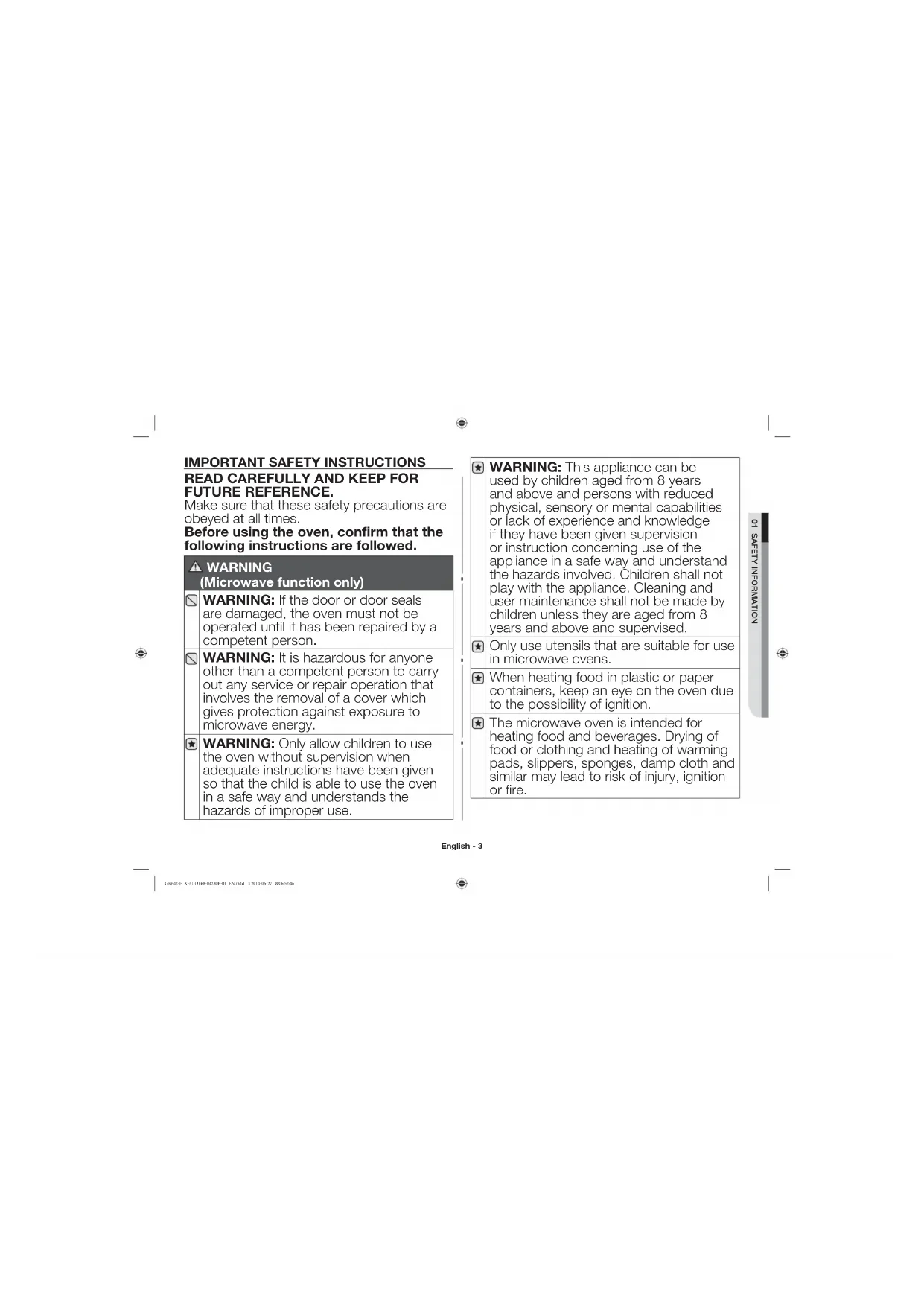
IMPORTANT SAFETY INSTRUCTIONS READ CAREFULLY AND KEEP FOR FUTURE REFERENCE.
Make sure that these safety precautions are obeyed at all times.
Before using the oven, confirm that the following instructions are followed.
WARNING
(Microwave function only)
WARNING: If the door or door seals are damaged, the oven must not be operated until it has been repaired by a competent person.
WARNING: It is hazardous for anyone other than a competent person to carry out any service or repair operation that involves the removal of a cover which gives protection against exposure to microwave energy.
WARNING: Only allow children to use the oven without supervision when adequate instructions have been given so that the child is able to use the oven in a safe way and understands the hazards of improper use.
WARNING: This appliance can be used by children aged from 8 years and above and persons with reduced physical, sensory or mental capabilities or lack of experience and knowledge if they have been given supervision or instruction concerning use of the appliance in a safe way and understand the hazards involved. Children shall not play with the appliance. Cleaning and user maintenance shall not be made by children unless they are aged from 8 years and above and supervised.
Only use utensils that are suitable for use in microwave ovens.
When heating food in plastic or paper containers, keep an eye on the oven due to the possibility of ignition.
The microwave oven is intended for heating food and beverages. Drying of food or clothing and heating of warming pads, slippers, sponges, damp cloth and similar may lead to risk of injury, ignition or fire.
If smoke is emitted, switch off or unplug the appliance and keep the door closed in order to stifle any flames.
WARNING: Microwave heating of beverages can result in delayed eruptive boiling, therefore care must be taken when handling the container.
WARNING: The contents of feeding bottles and baby food jars shall be stirred or shaken and the temperature checked before consumption, in order to avoid burns.
Eggs in their shell and whole hard-boiled eggs should not be heated in microwave ovens since they may explode, even after microwave heating has ended.
The oven should be cleaned regularly and any food deposits removed.
Failure to maintain the oven in a clean condition could lead to deterioration of the surface that could adversely affect the life of the appliance and possibly result in a hazardous situation.
The appliance is not intended for installing in road vehicles, caravans and similar vehicles etc.
This appliance is not intended for use by persons (including children) with reduced physical, sensory or mental capabilities, or lack of experience and knowledge, unless they have been given supervision or instruction concerning use of the appliance by a person responsible for their safety.
Children should be supervised to ensure that they do not play with the appliance.
If the supply cord is damaged, it must be replaced by the manufacturer, its service agent or similarly qualified persons in order to avoid a hazard.
WARNING: Liquids and other foods must not be heated in sealed containers since they are liable to explode;
The appliance should not be cleaned with a water jet.
This oven should be positioned proper direction and height permitting easy access to cavity and control area.
Before using the your oven first time, oven should be operated with the water during 10 minute and then used.
English - 4
If the oven generates a strange noise, a burning smell, or smoke is emitted, unplug the power plug immediately and contact your nearest service center.
The microwave oven has to be positioned so that plug is accessible.
The microwave oven is intended to be used on the counter or counter top use only, the microwave oven shall not be placed in a cabinet.
WARNING
(Oven function only)-Optional
WARNING: When the appliance is operated in the combination mode, children should only use the oven under adult supervision due to the temperatures generated.
During use the appliance becomes hot. Care should be taken to avoid touching heating elements inside the oven.
WARNING: Accessible parts may become hot during use. Young children should be kept away.
A steam cleaner is not to be used.
WARNING: Ensure that the appliance is switched off before replacing the lamp to avoid the possibility of electric shock.
WARNING: The appliance and its accessible parts become hot during use. Care should be taken to avoid touching heating elements.
Children less than 8 years of age shall be kept away unless continuously supervised.
The temperature of accessible surfaces may be high when the appliance is operating.
The door or the outer surface may get hot when the appliance is operating.
Keep the appliance and its cord out of reach of children less than 8 years.
This appliance can be used by children aged from 8 years and above and persons with reduced physical, sensory or mental capabilities or lack of experience and knowledge if they have been given supervision or instruction concerning use of the appliance in a safe way and understand the hazards involved. Children shall not play with the appliance. Cleaning and user maintenance shall not be made by children without supervision.
Do not use harsh abrasive cleaners or sharp metal scrapers to clean the oven door glass since they can scratch the surface, which may result in shattering of the glass.
Appliances are not intended to be operated by means of an external timer or separate remote-control system.
This product is a Group 2 Class A ISM equipment. The definition of group 2 which contains all ISM equipment in which radiofrequency energy is intentionally generated and/or used in the form of electromagnetic radiation for the treatment of material, and EDM and arc welding equipment. For Class
A equipment is equipment suitable for use in all establishments other than domestic and those directly connected to a low voltage power supply network which supplies buildings used for domestic purposes.
Warning: Class A equipment is intended for use in an industrial environment. There may be potential difficulties in ensuring
electromagnetic compatibility in other environments, due to conducted as well as radiated disturbances.
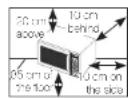
Place the oven on a flat level surface 85 cm above the floor. The surface should be strong enough to safety bear the weight of the oven.
- When you install your oven, make sure there is adequate ventilation for your oven by leaving at least 10cm (4 inch of space behind and, on the oven and 20 cm 8 inches) of
2.Remove all packing materials inside the oven.
3. Install the roller ring and turntable. Check that the turntable rotates freely. (Turntable type model only)
English - 6
- This microwave oven has to be positioned so that plug is accessible.
If the supply cord is damaged, it must be replaced by the manufacturer, its service agent or similarly qualified persons in order to avoid a hazard. For your personal safety, plug the cable into a proper AC earthed socket.
Do not install the microwave oven in hot or damp surroundings like next to a traditional oven or radiator. The power supply specifications of the oven must be respected and any extension cable used must be of the same standard as the power cable supplied with the oven. Wipe the interior and the door seal with a damp cloth before using your microwave oven for the first time.
The following parts of your microwave oven should be cleaned regularly to prevent grease and food particles from building up:
- Inside and outside surfaces
- Door and door seals
- Turntable and Roller rings (Turntable type model only)
ALWAYS ensure that the door seals are clean and the door closes properly.
Failure to maintain the oven in a clean condition could lead to deterioration of the surface that could adversely affect the life of the appliance and possibly result in a hazardous situation.
1.Clean the outside surfaces with a soft cloth and warm, soapy water. Rinse and dry.
2. Remove any splashes or stains on the inside surfaces of oven with a soapy cloth. Rinse and dry.
3. To loosen hardened food particles and remove smells, place a cup of diluted lemon juice in the oven and heat for ten minutes at maximum power.
4. Wash the dishwasher-safe plate whenever necessary.
DO NOT spill water in the vents. NEVER use any abrasive products or chemical solvents. Take particular care when cleaning the door seals to ensure that no particles:
English - 7

- Accumulate
- Prevent the door from closing correctly
Clean the microwave oven cavity right after each use with a mild detergent solution, but let the microwave oven cool down before cleaning in order to avoid injury.
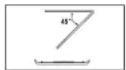
When cleaning the upper part inside the cavity, it will be convenient to turn heater downward by 45° and clean it. (Swing heater model only)
STORING AND REPAIRING YOUR MICROWAVE OVEN
A few simple precautions should be taken when storing or having your microwave oven serviced.
The oven must not be used if the door or door seals are damaged:
- Broken hinge
Deteriorated seals
Distorted or bent oven casing
Only a qualified microwave service technician should perform repair
NEVER remove the outer casing from the oven. If the oven is faulty and needs servicing or you are in doubt about its condition:
- Unplug it from the wall socket
- Contact the nearest after-sales service centre
If you wish to store your oven away temporarily, choose a dry, dustfree place. Reason: Dust and damp may adversely affect the working parts in the oven.
The Light bulb should not be replaced in person for safety reasons. Please contact nearest authorised Buffalo customer Care centre to arrange for a qualified engineer to replace the bulb.
| WARNING | A | A | A | A |
| Only qualified staff should be allowed to modify or repair the appliance. | ✓ | ✓ | ✓ | ✓ |
| Do not heat liquids and other food in sealed containers for microwave function. | ✓ | ✓ | ✓ | ✓ |
| For your safety, do not use high-pressure water cleaners or steam jet cleaners. | ✓ | ✓ | ✓ | ✓ |
| Do not install this appliance; near heater, inflammable material; in a humid, oily or dusty location, in a location exposed to direct sunlight and water or where gas may leak; on un level ground. | ✓ | ✓ | ✓ | ✓ |
English - 8
| This appliance must be properly grounded in accordance with local and national codes. | ✓ | ✓ | ✓ | ✓ |
| Remove all foreign substances such as dust or water from the power plug terminals and contact points using a dry cloth on a regular basis. | ✓ | ✓ | ✓ | ✓ |
| Do not pull or excessively bond or place heavy objecton the power cord. | ✓ | ✓ | ✓ | ✓ |
| In the event of a gas leak (such as propane gas, LP2 gas, etc.), ventilate immediately without touching the power plug. | ✓ | ✓ | ✓ | ✓ |
| Do not touch the power plug with wet hands. | ✓ | ✓ | ✓ | ✓ |
| Do not turn the appliance off by unplugging the power plug while an operation is in progress. | ✓ | ✓ | ✓ | ✓ |
| Do not insert fingers or foreign substances, if any foreign substance such as water has entered the appliance, unplug the power plug and contact your nearest service centre. | ✓ | ✓ | ✓ | ✓ |
| Do not apply excessive pressure or impact to the appliance. | ✓ | ✓ | ✓ | ✓ |
| Do not place the oven over a fragile object such as a sink or glass object. | ✓ | ✓ | ||
| Do not use bonzone, thinner, alcohol, steam cleaner or high pressure cleaner to clean the appliance. | ✓ | ✓ | ✓ | ✓ |
| Ensure that the power voltage, frequency and current are the same as those of the product specifications. | ✓ | ✓ | ✓ | |
| Plug the power plug into the wall socket firmly. Do not use a multiple plug adapter, an extension cord or an electric transformer. | ✓ | ✓ | ✓ | |
| Do not hook the power cord on a metal object, insert the power cord between the objects or behind the oven. | ✓ | ✓ | ✓ |
| Do not use a damaged power plug, damaged power cord or loose wall socket. When the power plug or power cord is damaged, contact your nearest service centre. | ✓ | ✓ | ✓ | ✓ |
| Do not pour or directly spray water onto the oven. | ✓ | ✓ | ||
| Do not place objects on the oven, inside or on the door of the oven. | ✓ | ✓ | ✓ | |
| Do not spray volatile material such as insecticide onto the surface of the oven. | ✓ | ✓ | ||
| Do not store flammable materials in the oven. Take special care when heating dishes or drinks that contain alcohol as alcohol vapours may contact a hot part of the oven. | ✓ | ✓ | ✓ | |
| Keep children away from the door when opening or closing it as they may bump themselves on the door or catch their fingers in the door. | ✓ | ✓ | ✓ | ✓ |
| WARNING: Microwave heating of beverages can result in delayed eruptive boiling, therefore care must be taken when handling the container; To prevent this situation ALWAYS allow a standing time of at least 20 seconds after the oven has been switched off so that the temperature can equalize. Strd during heating, if necessary, and ALWAYS stir after heating. In the event of scalding, follow those FIRST AID instructions: • Immerse the scalded area in cold water for at least 10 minutes. • Cover with a clean, dry dressing. • Do not apply any creams, oils or lotions. | ✓ | |||
| Do not put the tray or rack in water shortly after cooking because it may cause breakage or damage of the tray or rack. | ✓ |
01 SAFETY INFORMATION

English - 9
| Do not operate the microwave oven for deep fat frying because the oil temperature cannot be controlled. This could result in a sudden boil over of the hot liquid. | √ | √ |
| CAUTION | A | A | A | A | |
| Only use utensils that are suitable for use in microwave ovens; DO NOT use any metallic containers, Dinnerware with gold or silver trimmings, Skewers, forks, etc. Remove wire twist ties from paper or plastic bags. Reason: Electric arcing or sparking may occur and may damage the oven. | |||||
| Do not use your microwave oven to dry papers or clothes. | |||||
| Use shorter times for smaller amounts of food to prevent overheating and burning food. | |||||
| Do not immerse the power cable or power plug in water and keep the power cable away from heat. | |||||
| Eggs in their shell and whole hard-boiled eggs should not be heated in microwave ovens since they may explode, even after microwave heating has ended; Also do not heat airtight or vacuum-sealed bottles, jars, containers, nuts insholls, tomatoes etc. | |||||
| Do not cover the ventilation slots with cloth or paper. They may catch fire as hot air escapes from the oven. The oven may also overheat and switch itself off automatically, and will remain off until it cools sufficiently. | |||||
| Always use oven mitts when removing a dish from the oven to avoid unintentional burns. | |||||
| Stir liquids halfway during heating or after heating ends and allow the liquid stand at least 20 seconds after heating to prevent eruptive boiling. | |||||
| Stand at arms length from the oven when opening the door to avoid getting scalded by escaping hot air or steam. | |||
| Do not operate the microwave oven when it is empty. The microwave oven will automatically shut down for 30 minutes for safety purposes. We recommend placing a glass of water inside the oven at all times to absorb microwave energy in case the microwave oven is started accidentally. | ✓ | ||
| Install the oven in compliance with the clearances stated in this manual. (See installing your microwave oven.) | ✓ | ✓ | |
| Take care when connecting other electrical appliances to sockets near the oven. | ✓ | ✓ |
PRECAUTIONS TO AVOID POSSIBLE EXPOSURE TO EXCESSIVE MICROWAVE ENERGY.(MICROWAVE FUNCTION ONLY)
Failure to observe the following safety precautions may result in harmful exposure to microwave energy.
(a) Under no circumstances should any attempt be made to operate the oven with the door open or to tamper with the safety interlocks (door latches) or to insert anything into the safety interlock holes.
(c) Do NOT place any object between the oven door and front face or allow food or cleaner residues to accumulate on sealing surfaces. Ensure that the door and door sealing surfaces are kept clean by wiping after use first with a damp cloth and then with a soft dry cloth.
(c) Do NOT operate the oven if it is damaged until it has been repaired by a qualified microwave service technician trained by the manufacturer. It is particularly important that the oven door closes properly and that there is no damage to the:
(1) door (cent)
(2) door hinges (broken or loose)
(d) The oven should not be adjusted or repaired by anyone other than a properly qualified microwave service technician trained by the manufacturer.
English - 10
Bullaf will charge a repair fee for replacing an accessory or repairing a cosmetic defect if the damage to the unit and/or damage to or loss of the accessory was caused by the customer. Items this stipulation covers include: (a) A Dened, Scratched, or Broken Door, Handle, Cut Panel, or Control Panel; (b) A Broken or missing Tray, Cuddle Roller, Coupler, or Wire Pack.
Use this appliance only for its intended purpose as described in this instruction manual. Warnings and Important Safety Instructions in this manual do not cover all possible conditions and situations that may occur. It is your responsibility to use common sense, caution, and card when installing, maintaining, and operating your appliance.
- Because these following operating instructions cover various models, the characteristics of your microwave oven may differ slightly from those described in this manual and not all warning signs may be applicable. If you have any questions or concerns, contact your nearest service centre.
- This microwave oven is supposed for heating food. It is intended for domestic home-use only. Do not heat any type of textiles or cushions fitted with grains, which could cause burns and fire. The manufacturer cannot be held liable for damage caused by improper or incorrect use of the appliance
- Failure to maintain the oven in a clean condition could lead to deterioration of the surface that could adversely affect the life of the appliance and possible result in a hazardous situation.

CORRECT DISPOSAL OF THIS PRODUCT (WASTE ELECTRICAL & ELECTRONIC EQUIPMENT)
(Applicable in countries with separate collection systems)
This marking on the product, accessories or literature indicates that the product and its electronic accessories (e.g. charger, header, USB cable) should not be disposed of with other household wastes all the end of their working life. To prevent possible harm to the environment or human health from uncontrollable waste disposal, please separate these items from other types of waste and recycle them responsibly to promote the sustainable reuse of material resources.
Household users should contact either the retailer where they purchased his product, or their local government office, for details of where and how they can take these items for environmentally safe recycling.
Business users should contact their supplier and check the terms and conditions of the purchase contract. This product and its electronic accessories should not be mixed with other commercial wastes for disposal.
quick look-up guide
If you want to cook some food.
| 1. Place the food in the oven. Select the power level by pressing the Power Level button once or more time. | |
| 2. Select the cooking time by pressing the Number buttons as required (Max:30min). | |
| 3. Press the Start button. Result: Cooking starts. The oven beeps four times when cooking is over. |
If you want to defrost some food.
| 1. Place the frozen food in the oven. Press the Defrost button. | |
| 2. Select the cooking time by pressing the Number buttons as required [Max:30min]. | |
| 3. Press the Start button. Result: Cooking starts. The oven ceops four times when cooking is over. |
If you want to adjust the cooking time.
| +30s | Leave the food in the oven Press the +30s once or more times for each extra 30 seconds. |
oven features
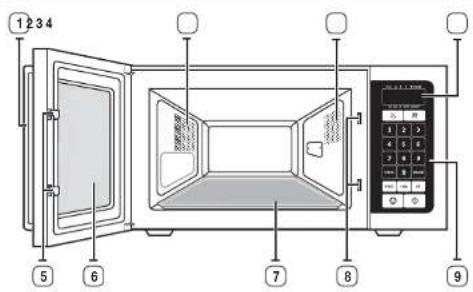
OVEN
- HANDLE
- VENTILATION HOLES
3.CYEN LAMP
4.DISPLAY - DOOR LATCIES
6.DOOB
7. CERAMIC PLATE
8.SAFETYINTERLOCKHOLES
9. CONTROL PANEL
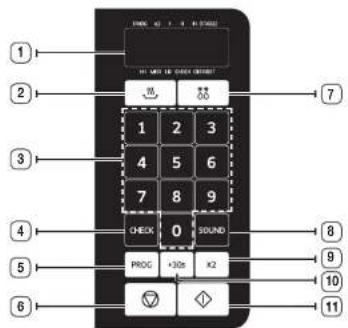
CONTROL PANEL
- DISPLAY
- POWER LEVEL BUTTON
- NUMBER BUTTONS
- CHECK BUTTON
5.PROGRAMME BUTTON - STOP/CANCEL BUTTON
7.DEFFOSTBUTTIN
8.SOUND BUTTON
9.DOUBLE QUANTITY BUTTON
11. START BUTTON
Open use
CHECKING THAT YOUR OVEN IS OPERATING CORRECTLY
The following simple procedure enables you to check that your oven is working correctly at all times.
First, place a bowl of water on the ceramic plate. Then, close the door.
| 1. Select the power level by pressing the Power Level button once or more time. | |
| 2. Select the cooking time by pressing the Number buttons as required (Max: 30 min). Press the Start button. Result: The oven heats the water for 4 or 5 minutes. The water should then be boiling. |
The oven must be plugged into an appropriate wall socket. The ceramic plate must be in position on the oven, if a power level other than the maximum is used, the water lakes longer to boil.
Auto energy saving function. if you do not select any function when appliance is in the middle of setting or operating with temporary stop condition, function is canceled and the dispay will be turned off after 10 minutes. Oven Lamp will be turned off after 5 minutes with door open condition.
COOKING/REHEATING
The following procedure explains how to cook or reheat food. ALWAYS check your cooking settings before leaving the oven unattended. First, place the food in the centre of the ceramic plate. Then, close the door.
| 1. Select the power level by pressing the Power Level button once or more time. | |
| 2. Select the cooking time by pressing the Number buttons as required [Max:30min]. Result: The oven light comes on. | |
| 3. Press the Start button. Result: Cooking stars. The oven keeps four times when cooking is over. |
Never switch the microwave oven on when it is empty.
USING THE START AND +30S BUTTON
This button offers a convenient way to heat food in 30 seconds increments at the Hgin power level.
| 1. Press the +30s button once for each 30 sec. Press the Start button. For example, press +30s button twice for one minute. The time will display, and press Start button. | |
| +30s | 2. Add Seconds to a program in progress by pressing the +30s button for each 30 sec. you want to add. |
03 OVEN FEATURES
English - 13
USING THE STOP/CANCEL BUTTON
The Stop/Cancel button allows you to clear instructions you have entered. It also allows you to pause the oven's cooking cycle, so that you can check the food.
| 1. To pause the oven during cooking, press Stop/Cancel button once. | |
| 2. To restart, press the Start button. |
To correct a mistake you have just entered, press Stop/Cancel button once, then re-enter the instructions.
To cancel cooking setting during cooking, press Stop/Cancel button twice.
SETTING COOKING TIME AND POWER LEVEL
ONE STAGE COOKING.
You can stop bonking at any time to check the food.
| 1 Press the Power Level button to select the power. By pressing the Power Level button repeatedly, you can select the power level - HI, MED, or LO. |
| 2. Use the Number buttons to enter the cooking time. You can set a time from one second to 30 minutes. To set a time over one minute, enter the second as well. For example, to set 10 minutes, enter 1, 0, 0, 0. |
| 3. Press the Start button to begin cooking. |
The maximum allowable cooking time is 30min . If the time exceeds 30min , the display will show "EST", then press Stop/Cancel button and repeat the steps.

MULTI-STAGE COOKING
You can stop cooking at any time to check the food.
| 1. Press the Power Level button to select the power. By pressing the Power Level button repeatedly, you can select the power level - HI, MED, or LO. | |
| 2. Use the Number buttons to enter the cooking time. You can set a time from one second to 30 minutes. To set a time over one minute, enter the second as well. For example, to set 10 minutes, enter 1, 0, 0, 0 | |
| 3. Repeat step 1 and 2 for 10 or 15 stage cooking. | |
| 4. Press the Start button to begin cooking. |
POWER LEVELS
You can choose among the answer levels below:
| Power level Percentage Output | ||
| HIGH (HI) 100 % 1050 W | ||
| MEDIUM (MED) 70 % 735 W | ||
| LOW (LO) 50 % 525 W | ||
| DEFROST 30 % 315 W |
If you select higher power level, the cooking time must be decreased.
If you select lower power level, the cooking time must be increased.
The maximum allowable cooking time is 30 min. If the time exceeds 30 min, the display will show "E3" then press Stop/Cancel button and repeat the steps.

English - 14

USINGDEFROSTBUTTON
The deficit time and power level are set automatically. You simply select the programme and the weight.
Use only dishes that are microwave safe.
First, place the frozen food in the centre of the ceramic plate and close the door.
| 1. Press the Defrost button. | |
| 2. Press the Number buttons to set the defrosting time. You can set a time from one second to 30 minutes. | |
| 3. Press the Start button. |
The maximum allowable cooking time is 30min . If the time exceeds 30min , the display will show "EST", then press Stop/Cancel button and repeat the steps.

MEMORY PROGRAMMING
ONE STAGE COOKING
| PROG | 1. Upon pressing the PROG button, the oven will enter Program mode. The dispay will be cleaned. |
| 2. Using the Number buttons, enter the program number from 1 to 20. | |
| 3. Then, press the Power Level button to select power. By pressing the Power Level button repeatedly, you can select the power level - HIL, MED, or LOW. | |
| 4. Use the Number buttons to enter the cooking time. You can set a time from one second to 30 minutes. To set a time over one minute, enter the seconds as well. For example, to set 10 minutes, enter 1, 0, 0, 0 | |
| PROG | 5. Press the PROG button to complete setting the memory. The display will show "0". |
ESN NAO 00
The maximum allowable cooking time is 30 min. If the time exceeds 50 min, the display will show "E3" then press Stop/Cancel button and repeat the steps.

English - 15
MULTI-STAGE COOKING.
| PROG | 1. Upon pressing the PROG button, the oven will enter Program mode. The display will be cleared. : |
| 4 5 6 7 8 9 : : 1 | 2. Using the Number buttons, enter the program number from 1 to 20. : : 1 |
| 3. Then, press the Power Level button to select power. By pressing the Power Level button repeatedly, you can select the power level - HI, MED, or LOW. | |
| 1 2 9 4 5 6 7 8 9 : : 1 | 4. Use the Number buttons to enter the cooking time. You can set a time from one second to 30 minutes. To set a time, over one minute, enter the seconds as well. For example, to set '10 minutes, enter 1, 0, 0, 0. |
| 5. Repeat step 3 and 4 for II or III stage memory programming. | |
| PROG | 6. Press the PROG button to complete setting the memory. The display will show '0'. |
USING MEMORY PROGRAMMING.
Press the Number buttons to select user-programmed memory functions (please refer to memory programming from 1 to 20). Press the Start button.
If the DEFROST function is included in STAGE COOKING, it works at first.
If you want to change program, just reset MEMORY PROGRAMMING.
USING THE CHECK BUTTON
Confirming the cooking time and Power Level in each memory program.
| CHECK | 1. Clear all operations by pressing the Stop/Cancel button. Press the Check button to enter Check mode. |
| 1 2 3 4 5 6 7 8 9 = 0 = = | 2. Using the Number buttons, enter the program number from 1 to 20. For example, suppose you press '5', for the Memory Program 5 which is HI Power Level, I Stage cooking with a time of 6 minutes and 30 seconds, 8:30. First, '5' will be displayed, but will change to show the 5:30 |
| 1 2 3 4 5 6 7 9 1 = 0 = = | 3. After one second, the display will clear automatically. If you want to check other Memory Programs, just enter the Memory Program numbers. |
| 4. Press the Stop/Cancel button to exit the Check mode. |
Reading each Memory Program's Cycle Counter
| CHECK | 1. Clear all operations by pressing the Stop/Cancel button. Press the Check button to enter Check mode. |
| 1 2 3 4 5 6 7 8 9 - - - - - | 2. Press the Start button, and then press any Number button from 1 to 20, and the number of cycles for that particular Memory Program will be displayed. The cycle count is displayed in units of 10. For example, if Memory Program 5 has been used 100 times, the display will show '10'. |
| 1 2 3 4 5 6 7 8 9 - - - - - | 3. After one second, the display will clear automatically. If you want to check other Memory Programs, just enter the Memory Program numbers. |
| 4. Press the Stop/Cancel button to exit the Checking mode. |
As the disolysis uses units of 10, the cycle counts are approximated. The cycle count displayed increases every ten cycles.
For example, if the cycle count were 90-99, "9" would be displayed. The "9" would change to "10" on the 100th cycle. The cycle counter function has a limit of 89,990 cycles. Once that number is exceeded, the cycle counter will automatically clear and start again from "0".
RESETTING THE MEMORY PROGRAM CYCLE COUNTER
| 1. Clear all operations by pressing the Stop/Cancel button. The display will show "0". | |
| 2. Hold the Number "0" and then press Defrost button. The microwave will emit a Beep sound confirming the reset operation. Clearing all numbers on the display using the Stop/Cancel button will show "0" as below. | |
| 3. Press the Stop/Cancel button to exit the Roasting mode. |
SETTING THE SOUND
| Sound | 1. Press the Sound button to adjust sound volume. The basic sound volume is "LO" and when you press the Sound button repeatedly, the sound volume changes in the following order-MED,Hi,OFF,LO one by one. | |
| 2. Press the Start button to exit Sound mode. The display will show "O". | ||
| Indicator Sound | ||
| Hi Loud | ||
| MED Middle | ||
| LO Low | ||
| Blank CH | ||
English - 17
USING THE DOUBLE QUANTITY BUTTON
| x2 | 1. Press the Double Quantity button. |
| 1 2 3 4 5 6 7 8 9 *** 0 *** | 2. By using the Number buttons, enter the Memory Program number from 1 to 20. For example, suppose you press '5' button, for Memory Program 5 which is a Hill Power Level, I Stage cooking with a time of 6 minutes and 30 seconds, 6:30. S |
| 3. Press the Start button. The Memory Program then operates for double the user-programmed time, which in this case makes 13 minutes. 13:00 (6.30 x 2 = 13) |
The maximum allowable cooking time is 30 min. If doubling the programmed time exceeds the maximum allowable cooking time, the display will show "E3", then press Stop/Cancel button.

Coolware guide
To cook food in the microwave oven, the microwaves must be able to penetrate the food, without being reflected or absorbed by the dish used.
Care must: therefore be taken when choosing the cookware. If the cookware is marked microwave safe, you do not need to worry.
The following table lists various types of cookware and indicates whether and how they should be used in a microwave oven.
| Cookware | Microwave- safe | Comments |
| Aluminum foil | ✓x | Can be used in small quantities to protect areas against overcooking. Arcing can occur if the foil is too close to the oven wall or if too much foil is used. |
| China and earthenware | ✓ | Porcelain, pottery, glazed earthware and bone china are usually suitable, unless deco- rated with a metal trim. |
| Disposable polyester cardboard dishes | ✓ | Some frozen foods are packaged in these dishes. |
| Fast-food packaging | ||
| • Polystyrene cups containers | ✓ | Can be used to warm food. Overheating may cause the polystyrene to melt. |
| • Paper bags or newspaper | x | May catch fire. |
| • Recycled paper or metal trims | x | May cause arcing. |
English - 18
| Cookware | Microwave-safe | Comments |
| Glassware | ||
| • Oven-to-tableware | ✓ | Can be used. Unless decorated with a metal trim. |
| • Oven-to-tableware | ✓ | Can be used to warm foods or liquids. Delicious glass may break or crack if heated suddenly. |
| • Glass jars | ✓ | Must remove the lid. Suitable for warning only. |
| Metal | ||
| • Dishes | ✗ | May cause arcing or fire. |
| • Frozen bag twist ties | ✗ | |
| Paper | ||
| • Plates, cups, napkins and Kitchen paper | ✓ | For short cooking times and warming. Also to absorb excess moisture. |
| • Recycled paper | ✗ | May cause arcing. |
| Plastic | ||
| • Containers | ✓ | Particularly if hot-resistant thermoplastic. Some other plastics may warp or discolour at high temperatures. Do not use M-alanine plastic. |
| • Cling film | ✓ | Can be used to retain moisture. Should not touch the food. Take care when removing the film as hot steam will escape. |
| • Frozen bags | ✓✗ | Only if cold/cold or oven-proof. Should not be alight. Pick with a fork, if necessary. |
| Wax or grease-proof paper | ✓ | Can be used to retain moisture and prevent spattering. |
:Recommended
√X :UseCaution
X :Unsafe
cooking guide
Reheating Dish Entrees
Use the power levels and times in this table as a guide lines for reheating.
| Food Serving Size Power Time(min.) | ||
| Plated Meal (Chilled) | 350 g MEDIUM 61/2-7 | |
| Instructions Plate a meal of 2-3 chilled components on a ceramic dish. Reheata coverad. Stand for 3 minutes. | ||
| Chicken Curry & Rice (Chilled) | 300 g MEDIUM 41%-51% | |
| Instructions Plate a meal of 2 chilled components on a ceramic dish (e.g. rhea and curry). Reheata coverad. Stand for 3 minutes. | ||
| Pasta with Sauce (Chilled) | 350 g HIGH 4-5 | |
| Instructions Put pasta (e.g. spaghetti or egg noodles) into a deep ceramic paste. Rerehat covered. Stir during reheating. Stand for 3 minutes. | ||
| Filled Pasta in Sauce (Chilled) | 350 g MEDIUM 41%-51% | |
| Instructions Put fildd pasta (e.g. ravioli, tortellini) in a deep ceramic plate. Rerehat covered. Stir occasionally during reheating. Stand for 3 minutes. | ||
| Lasagne (Chilled) | 400 g HIGH 41%-51% | |
| Instructions Put the chilled lasagne (pre-cooked product) widthways in the centre of table. Rerehat covered. Stand for 3 minutes. | ||
| Bechamel Potatoes (Chilled) | 400 g MEDIUM 51%-61% | |
| Instructions Put cochamol potatoes (pr-cooked product) widthways in the centre of table. Rerehat covered. Stand for 3 minutes. | ||
| Baked Potatoes (Ready Cooked and Chilled) | 500 g (2 x 250 g) HIGH 15-8 | |
| Instructions Pierce film and put potatoes on a flat ceramic plate. Stand for 2-3 minutes. | ||
ENNNNNOO 8

English - 19

Reheating Soup and Stew
Use the power levels and times in this table as a guide lines for reheating
Cooking Breakfast
| Food Serving Size Power Time (min.) | |||
| Soup (Chilled) | 250 g HIGH 3%-3% | ||
| InstructionsPour into a deep ceramic plate, Reheat covered.Sit during reneating. Stand for 2-3 minutes. | |||
| Stew (Chilled) | 250 g500 g | MEDIUM | 4-4%51/6 |
| InstructionsPour into a deep ceramic plate or bowl, Reheat covered.Sit during reneating. Stand for 2-3 minutes. | |||
| Bean Stew(Canned) | 350 g MEDIUM 3%-4 | ||
| InstructionsPour into a deep ceramic plate or bowl, Reheat covered.Sit during reheating. Stand for 2-3 minutes. | |||
| Soup (Frozen) | 1000 g HIGH 20-22 | ||
| InstructionsPour into a glass pyrex dish with lid, Reheat covered.Sit during reneating. Stand for 2-3 minutes. | |||
Use the power levels and times in this table as a guide lines for cooking.
| Food Serving Size Power Time (min.) | ||
| Bacon (Chilled) | 2 slices (20 g) HIGI 1/4 pa. 1% | |
| Instructions Put bacon slices on kitchen paper on a flat ceramic plate. Stand for 1 minutes. | ||
| Scrambled Eggs | 2 eggs LO ca. 2% | |
| Instructions Best eggs, add salt and 2 tsp. milk. Put in a deep ceramic plate. Stir several times during cooking. Stand for 1 minutes. | ||
| Baked Beans (Canned) | 250 g MEDIUM 2½-3% | |
| Instructions Put the beans in a deep ceramic plate. Repeat covered, Stir during reheating. Stand for 1-2 minutes. | ||
Reheating Snacks
Use the power levels and times in this table as a guide lines for reheating.
| Food Serving Size Power Time (min.) | ||
| Cheesebur Ger (Chilled) | 150 g;1 pc; HIGH 1-1/2 | |
| Instructions Put burger on kitchen paper on a ceramic plate. Stand for 2-3 minutes. | ||
| Cheesebur Ger (Frozen) | 150 g;1 pc; LO 4-3/2 | |
| Instructions Put burger on kitchen paper on a ceramic plate. Stand for 2-3 minutes. | ||
| Hot Dog (Chilled) | 125 g;1 pc; MEDIUM 1/2 | |
| Instructions Put hot dog on kitchen paper on a ceramic plate. Stand for 2-3 minutes. | ||
| Pizza Slice (Chilled) | 100 g | LO 1/2-2 |
| Instructions Put the pizza slice on a kitchen paper on ceramic plate. Stand for 1-2 minutes. | ||
| Meat & Vegetable Wrap (Chilled) | 200 g MEDIUM 2-2/2 | |
| Instructions Put the chilled wrap (filled pastry roll) on kitchen paper on a ceramic plate. Stand for 1-2 minutes. | ||
| Qulche/Pie (Chilled) | 150 g MEDIUM 2-2/2 | |
| Instructions Put quiche on kitchen paper on a ceramic plate. Stand for 2-3 minutes. | ||
| Croissants | 60 g (2 pcs) | MEDIUM 1/2-1 |
| Instructions Put the croissants on kitchen paper on a ceramic plate. Serve croissants directly after warming. | ||
English - 20

Defrosting and Cooking Desserts
Use the power levels and times in this table as a guide lines for cooking.
Defrosting Bread and Cake
| Food Serving Size Power Time(min.) | ||
| Berries in Sauce | 250 g MEDIUM 16.6% | |
| InstructionsPut frozen fruits in a glass pyrex bowl with lid. Peheat covered.Slit once during standing time. Stand for 2-3 minutes. | ||
| Yeast Dumplings with Jam Filling | 300 g (2 pcs) MEDIUM 41%-5 | |
| InstructionsPut frozen yeast dumplings (pro-cooked) side by side in a glasspyrex bowl with lid. Most the top of them with cold water. Cookcovered. Stand for 2-3 minutes. | ||
Use the power levels and times in this table as a guide lines for cocking.
| Food Serving Size Power Time (min.) | ||
| Baguettes | 150 g (1 pc) DEFROST ca. 1/2 | |
| InstructionsPut the baguette widthways on kitchen paper in the oven. Stand for 3-5 minutes. | ||
| Bread Rolls | 50 g (4 pcs) DEFROST ca. 3 | |
| InstructionsPut the rolls side by side on kitchen paper in the oven. Stand for 3-5 minutes. | ||
| Fruit Cake | 120 g (1 pc) DEFROST 3-3% | |
| InstructionsPut the piece of cake on a ceramic plate. Stand for 5-10 minutes. | ||
| Cream Cake Roll | 100 g (1 pc) DEFROST ca. 1 | |
| InstructionsPut the piece of cake on a ceramic plate. Place plate in the centre of table. Let stand until cream is totally defrosted. Stand for 10-20 minutes. | ||
troubleshooting
TROUBLESHOOTING
If you have any of the problems listed below try the solutions given.
This is normal.
- Condensation inside the oven.
Air flow around the door and outer casing.
Light reflection around the door and outer casing. - Steam escaping from around the door or vents.
The oven does not start when you press the START/+30s button.
Is the door completely closed?
The food is not cooked at all.
Have you set the timer correctly and/or pressed the START/+30s button?
Is the door closed?
Have you overfaced the electric circuit and caused a fuse to blow or a breaker to be triggered?
The food is either overcooked or undercooked.
Was the appropriate cooking length set for the type of food?
Was an appropriate power level chosen?
The light bulb is not working.
- The Light bulb should not be replaced in person for safety reasons. Please contact nearest authorized Buffalo customer care, to arrange for a qualified engineer to replace the bulb.
The oven causes interference with radios or televisions.
- Slight Interference may be observed on televisions or radios when the oven is operating. This is normal. To solve this problem, install the oven away from televisions, radios and aerials.
- If interference is detected by the oven's microprocessor, the display may be roset. To solve this problem, disconnect the power plug and reconnect it. Reset the time.
Sparking and cracking occur inside the oven (arcing).
Have you used a dish with metal trimmings?
Have you left a fork or other metal utensils inside the oven?
Is aluminum foil too close to the inside walls?
Smoke and bad smell when initial operating.
It's a temporary condition by new component heating. Smoke and smell will disappear completely after 10 minutes operation. To remove small more quickly, please operate microwave oven with putting lemon formation or lemon juice in the cabinet.
Door opening stars automatic operation of fan for 5 minutes. When placing or removing food items, as soon as the door is opened the lamp and fan will start automatically. The automatic starting of the fan is intended, so no service call is required. The fan will automatically upon closing the door after 5 minutes.
If the above guidelines do not enable you to solve the problem, contact your local doaer or Buffalo after-sales service.
If you have any questions or comments relating to Buffalo products, please contact the Buffalo customer care center. Buffalo.Fourth Way AvonmouthBrisolBS11BTBThe United Kingdom Tel:08451662887
Technical specifications
Bureau strives to improve its products at all times. Both the design specifications and these user instructions are thus subject to change without notice.
| Model GK642-E | |
| Power source | 230 V ~ 50 Hz |
| Power consumption Microwave 1600 W, 7 A | |
| Output power | 230 V : 1000 W (IEC-705) (4 power levels including defrost) |
| Operating frequency 2/50 MHz | |
| Cooling method Cooling fan motor | |
| Dimensions (W x H x D) | |
| Outside | 517 x 297 x 412 mm |
| Oven cavity | 336 x 225 x 349 mm |
| Volume 26 liter | |
| Weight | |
| Net | 17.5 kg |
| Gross | 19.0 kg |
English - 22
MEMO MEMO
07 TECHNICAL SPECIFICATIONS
100000000000000000000000000000000000000000000000000
If you have any problems with your machine please contact Buffalo Support Center
QUESTIONS OR COMMENTS
| COUNTRY CALL ADDRESS | ||
| The United Kingdom 0845 146 2887 | Buffalo, Fourth Way, Avonmouth, Bristol, BS11 8TB, The United Kingdom. | |
| Nederland 040 262 | 8080 | - |
| Germany 0800 186 | 0806 | |
| Belgium 050 600006 | ||
| France 0820 300116 | ||
| Spain 901 100133 | ||
DE68-04280B-01
- NENONNNNNNNNEHHOIS 10
- HEMORRHAGIC HEMORRHAGE: NO
- USO DEI TASTI AVVIO E +30S
- DEBRILK VAN DE OVEN
- CONTROLEREN OF DE OVEN GOED WERKT
- COMMERCIAL MICROWAVE OVEN
- CONTENTS
- SAFETY INFORMATION
- USING THIS INSTRUCTION BOOKLET
- LEGEND FOR SYMBOLS AND ICONS
- IMPORTANT SAFETY INSTRUCTIONS READ CAREFULLY AND KEEP FOR FUTURE REFERENCE
- BEFORE USING THE OVEN, CONFIRM THAT THE FOLLOWING INSTRUCTIONS ARE FOLLOWED
- WARNING
- (MICROWAVE FUNCTION ONLY)
- (OVEN FUNCTION ONLY)-OPTIONAL
- STORING AND REPAIRING YOUR MICROWAVE OVEN
- PRECAUTIONS TO AVOID POSSIBLE EXPOSURE TO EXCESSIVE MICROWAVE ENERGY.(MICROWAVE FUNCTION ONLY)
- CORRECT DISPOSAL OF THIS PRODUCT (WASTE ELECTRICAL & ELECTRONIC EQUIPMENT)
- (APPLICABLE IN COUNTRIES WITH SEPARATE COLLECTION SYSTEMS)
- QUICK LOOK-UP GUIDE
- IF YOU WANT TO COOK SOME FOOD
- IF YOU WANT TO DEFROST SOME FOOD
- IF YOU WANT TO ADJUST THE COOKING TIME
- OVEN FEATURES
- OPEN USE
- CHECKING THAT YOUR OVEN IS OPERATING CORRECTLY
- COOKING/REHEATING
- USING THE START AND +30S BUTTON
- USING THE STOP/CANCEL BUTTON
- SETTING COOKING TIME AND POWER LEVEL
- MULTI-STAGE COOKING
- POWER LEVELS
- USINGDEFROSTBUTTON
- MEMORY PROGRAMMING
- ONE STAGE COOKING
- USING MEMORY PROGRAMMING
- USING THE CHECK BUTTON
- RESETTING THE MEMORY PROGRAM CYCLE COUNTER
- SETTING THE SOUND
- USING THE DOUBLE QUANTITY BUTTON
- COOLWARE GUIDE
- COOKING GUIDE
- TROUBLESHOOTING
- THE FOOD IS NOT COOKED AT ALL
- THE OVEN CAUSES INTERFERENCE WITH RADIOS OR TELEVISIONS
- SPARKING AND CRACKING OCCUR INSIDE THE OVEN (ARCING)
- SMOKE AND BAD SMELL WHEN INITIAL OPERATING
- TECHNICAL SPECIFICATIONS
Brand : BUFFALO
Model : GK642E
Category : Microwave Oven