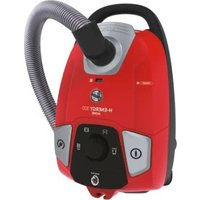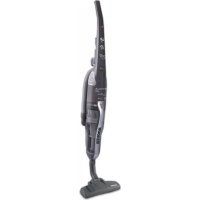
SY71 SY01011 - Vacuum Cleaner HOOVER - Free user manual and instructions
Find the device manual for free SY71 SY01011 HOOVER in PDF.



| Feature | Details |
|---|---|
| Vacuum type | Canister vacuum |
| Power | 700 W |
| Bag capacity | 2.5 L |
| Filtration | HEPA filter |
| Weight | 4.5 kg |
| Cord length | 5 m |
| Included accessories | Main brush, furniture brush, narrow nozzle |
| Noise level | 79 dB |
| Usage | Suitable for hard floors and carpets |
| Maintenance | Change bag when full, clean filter regularly |
| Safety | Overheat protection |
| Warranty | 2 years |
Frequently Asked Questions - SY71 SY01011 HOOVER
User questions about SY71 SY01011 HOOVER
0 question about this device. Answer the ones you know or ask your own.
Ask a new question about this device
Download the instructions for your Vacuum Cleaner in PDF format for free! Find your manual SY71 SY01011 - HOOVER and take your electronic device back in hand. On this page are published all the documents necessary for the use of your device. SY71 SY01011 by HOOVER.
USER MANUAL SY71 SY01011 HOOVER
text_image
HOOVER HOOVER HOOVER HOOVER HOOVER HOOVER HOOVER HOOVER HOOVER HOOVER HOOVER HOOVER HOOVER HOOVER HOOVER HOOVER HOOVER HOOVER HOOVER HOOVER HOOVER HOOVER HOOVER HOOVER HOOVER HOOVER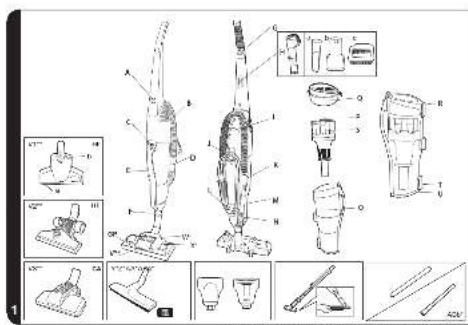
text_image
Technical diagram of a vacuum cleaner with labeled parts and exploded views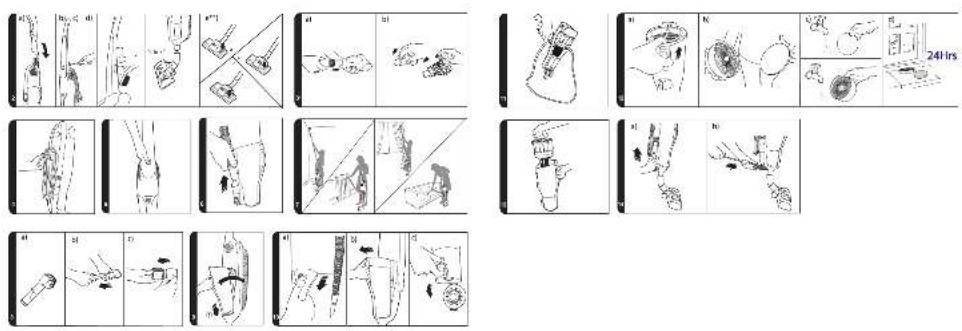
INSTRUCTIONS FOR SAFE USE
This appliance should only be used for domestic cleaning, as described in this user guide. Please ensure that this guide is fully understood before operating the appliance.
Do not leave the appliance plugged in. Always switch off and remove the plug from the socket after use, or before cleaning the appliance or any maintenance task.
This appliance can be used by children aged from 8 years and above and persons with reduced physical, sensory or mental capabilities or lack of experience and knowledge if they have been given supervision or instruction concerning use of the appliance in a safe way and understand the hazards involved. Children shall not play with the appliance. Cleaning and user maintenance shall not be made by children without supervision.
If the power cord is damaged stop using the appliance immediately. To avoid a safety hazard, an authorised HOOVER service engineer must replace the power cord.
Keep hands, feet, loose clothing and hair away from rotating brushes.
Use only attachments, consumables or spares recommended or supplied by HOOVER.
Static electricity: Some carpets can cause a small build up of static electricity. Any static discharge is not hazardous to health.
Do not use your appliance out of doors or on any wet surface or for wet pick up.
Do not pick up hard or sharp objects, matches, hot ashes, cigarette ends or other similar items.
Do not spray with or pick up flammable liquids, cleaning fluids, aerosols or their vapours.
Do not run over the power cord when using your appliance or remove the plug by pulling on the power cord.
Do not continue to use your appliance if it appears faulty.
HOOVER service: To ensure the continued safe and efficient operation of this appliance we recommend that any servicing or repairs are only carried out by an authorised HOOVER service engineer.
Do not stand on or wrap the cord around arms or legs when using your appliance.
Do not use the appliance to clean animals or people.
Do not position the appliance above you when cleaning the stairs.
The Environment
The symbol on this appliance indicates that this appliance may not be treated as household waste. Instead it must be handed over to the applicable collection point for the recycling of electrical and electronic equipment. Disposal must be carried out in accordance with local environmental regulations for waste disposal. For more detailed information about treatment, recovery and recycling of this appliance, please contact your local city office, your household and waste disposal service or the shop where you purchased the appliance.

This appliance complies with the European Directives 2014/35/EU, 2014/30/EU and 2011/65/EU.
CANDY HOOVER GROUP S.r.l. Via Privata Eden Fumagalli, 20861 Brugherio (MB) Italy K
GETTING TO KNOW YOUR CLEANER
A. On / Off Button
B. Stretch flexi tube
C. Bin release button
D. Bin inlet
E. Bin handle
F. Product neck
G. Cord grip
H. 3in1 tool:
Ha. Crevice Tool
Hb. Furniture Nozzle
Hc. Dusting Brush
I. Carry handle
J. Upper cord hook
K. Flexi tube handle
L. Lower cord hook
M. Flexi tube handle location
N. Blockage inspection hose
O. Dust bin
P. Airvolution unit handle
Q. Filter pack
R. Filter release latch
- Airvolution system
T. Bin emptying latch
V. Carpet and Floor Nozzle (GP)**
V1. Hard Floor Nozzle (HF) ^**
V1a. Furniture Protector
V2b. Locking Pedal
V2. Hard Floor Nozzle (HF)**
V3. Carpet Nozzle (CA)**
W. Carpet and Floor Nozzle Slider*
X. Floor Type Selector Pedal*
Y. Parquet Nozzle*
Z. Mini-Turbo Nozzle*
AA. Multi-Function Tool*
ABa: Rigid Extension Tube
ABb: Long Crevice Tool
*Certain Models Only ** Certain models only, nozzles may vary according to model
PREPARING YOUR CLEANER
- Remove the accessories from the main packaging. You should find the following:
- Cleaner body
- Cleaner handle
- 3 in1 tool
- Extension tube
- Long crevice tool
• Carpet & Floor Nozzle
- Hard Floor Nozzle**
- Parquet nozzle*
- Carpet Nozzle**
- Mini-turbo nozzle ^x
- Multi-function tool*
-
Assemble the cleaner handle (Fig. 2a) and fix in position with the supplied screw. (Fig. 2b)
-
Secure the 3 in 1 tool to the rear of the cleaner handle. (Fig. 2c)
-
Secure the nozzle to the product. (Fig. 2d)
For models equipped with mini-turbo nozzle:\*
-
The mini-turbo nozzle can be connected directly to the flexi tube handle. (Fig. 3a)
-
If any blockages are encountered, please open the inspection cover. (Fig. 3b)
-
Ideal to clean soft furnishings and for the pet hairs removal.
For models equipped with Multi-function tool:
The Multi-function tool can be inserted directly onto the flexible house.
Cord storage:
To store the cord after cleaning:
Wrap the cord around the two cord hooks. (Fig. 4)
NOTE: During cleaning, the cord can be clipped in the cord grip on the rear of the handle to avoid any interference while cleaning.
USING YOUR CLEANER
Power switch:
To switch the cleaner on, and off press the power button in the centre of the cleaner. (Fig. 5)
Carpet & Floor Nozzle\*\*: [2e]
- Hard floor Cleaning: Press the pedal on the nozzle on Hard Floor mode and adjust the slider on the nozzle on ALL FLOORS. In this position brushes, wheels and wiper blade are lowered to protect hard floors. [2ea]
- Standard Carpet & Rugs Cleaning: Press the pedal on the nozzle on Carpet mode and adjust the slider on the nozzle on ALL FLOORS. In this position brushes and wiper blade are raised while wheels are lowered to allow a perfect ease of movement on such surfaces. [2eb]
- Deep Carpet Cleaning: Press the pedal on the nozzle on Carpet mode and adjust the slider on the nozzle on DEEP CARPET CLEANING. In this position brushes, wheels and wiper blade are raised for a deeper cleaning of your carpet. [2ec]
WARNING: It is recommended to avoid potential scratching of wooden floors that the pedal is not set on hard floor mode and the slider on deep carpet cleaning
Using the flexi tube:
Remove the flexi tube from the handle location in the cleaner. (Fig. 6)
You are immediately ready to use it alone or combined with the accessories, as desired:
• 3 in1 tool (stored on board)
- Extension tube ^®
- Mini-turbo nozzle*
- Long crevice tool
- Multi-function tool*
The flexi tube gives you the maximum flexibility of usage. (Fig. 7)
IMPORTANT - When using cleaning tools, the cleaner must be kept in the upright position, and held.
Using your 3 in1 tool:
The 3 in1 tool (Fig.8) is composed of:
- Crevice tool to clean corners and hard to reach areas
Furniture nozzle to clean curtains and soft furnishings
- Dusting brush attachment (with bristles) to clean delicate surfaces
The 3 in1 tool can be used directly on the flexi tube or combined with the additional extension tube.
Assembly the dust bin (Fig. 9):
- Dust bin to be put in the location
• To rotate the dust bin and lock into main body
CLEANER MAINTENANCE
Emptying the Dust Container (Fig. 10)
- Slide the bin release button downward and remove the dust bin from the cleaner.
- Hold the container using the bin handle and pull the bin emptying latch. The dust container door will automatically open.
- Once empty, gently tap or shake the container to release any excess dust.
IMPORTANT - Do not fill above the max level mark shown on the bin.
Allergy and asthma sufferers:
When emptying any vacuum cleaner It is difficult to avoid exposure to dust. To minimize this risk, please follow these instructions:
- Wrap the lower bin in a plastic bag and close the bag tightly around the dust container before emptying.
- Pull the bin emptying latch to empty the dust into the plastic bag. Close the bag quickly and dispose of it immediately. (Fig. 11)
*Certain Models Only ** Certain models only, nozzles may vary according to model
Cleaning the washable filters (Fig. 12)
- Slide the bin release button downward and remove the dust bin from the cleaner.
- Remove the filter pack by releasing the tab at the rear.
- Separate the GREY foam filter from the DARK GREY EPA filter pack using the tab provided. Gently tap both filters against the side of a bin to release excess dust.
- Wash the GREY foam filter thoroughly under hand warm water until the water runs clean. Remove excess water by shaking and leave to dry for 24 hours. DO NOT USE HOT WATER OR DETERGENTS.
- Wash the DARK GREY EPA filter thoroughly from the inside under hand warm water until the water runs clean. Remove excess water by shaking and leave to dry for 24 hours. When completely dry reassemble and refit filters to cleaner. DO NOT USE HOT WATER OR DETERGENTS.
IMPORTANT - For optimum performance, shake off excess dust from the filters regularly. We recommend that the GREY foam filter and the DARK GREY EPA filter are washed every 3 MONTHS.
NOTE: Do not use the cleaner without filters assembled.
Cleaning the dust bin / separation unit
- Place the bin on a flat surface and remove the filters.
- Remove the Airvolution system by lifting the Airvolution unit handle. (Fig. 13)
- Use a cloth or the dusting brush to remove excessive dust from the Airvolution unit surface.
- Refit the Airvolution unit into the dust bin and refit the filters.
- Refit the dust bin to the cleaner.
NOTE: For stubborn dirt the Airvolution system can be washed, but care must be taken that it is completely dry before refitting to the cleaner.
IMPORTANT - For optimum performance, we recommend that Airvolution system is inspected after each empty.
Removing a blockage
- check if the dust container is full. If so refer to "emptying the dust container".
- If the dust container is empty but suction is still low:
A. If cleaning tools were in use check the cleaning tool. (The mini-turbo* nozzle can be checked by unlocking the clip and lifting the cover to remove any blockage) (Fig. 3b)
B. check the flexi tube by removing it from the hose handle location, stretching it to full length.
C. Check the bin inlet by removing the bin and checking inside the bin inlet.
D. Remove the nozzle and check the nozzle connection.
E. Remove the blockage inspection hose and check from both sides. (Fig. 14)
IMPORTANT - Switch the cleaner off and remove the plug from the electricity supply before checking cleaner.
ACCESSORIES AND NOZZLES
To obtain the best performance and efficiency it is recommended that the correct nozzles are used for the main cleaning operations. These nozzles are indicated in the diagrams by the letters GP, HF or CA.
A nozzle type GP can be used to clean both carpet and hard floor.
A nozzle type HF is suitable for use only on hard floor.
A nozzle of type CA is suitable for use only on carpet.
The other nozzles are accessories for specialist cleaning tasks and are recommended for occasional use only.
USER CHECKLIST
Should you have a problem with the product, complete this simple user checklist before calling your local HOOVER service.
- Is there a working electricity supply to the cleaner? Check with another electrical product.
- Is the dust bin full or choked with fine dust? To empty the dustbin see 'Emptying the dust container'.
- Is the hose blocked? To clear a blockage see 'Removing a blockage'.
- Is there a blockage in the cleaner? To clear a blockage see 'Removing a blockage'.
- Are the filters blocked? To clean filters, see 'cleaning the wasable filters'.
IMPORTANT INFORMATION
HOOVER Service
Should you require service at any time, please contact your local HOOVER Service Office.
Quality
HOOVER's factories have been independently assessed for quality. Our products are made using a quality system which meets the requirements of ISO 9001.
Your Guarantee
The guarantee conditions for this appliance are as defined by our representative in the country in which it is sold. Details regarding these conditions can be obtained from the dealer from whom the appliance was purchased. The bill of sale or receipt must be produced when making any claim under the terms of this guarantee.
Subject to change without notice.
INSTRUCTIONS DE SÉCURITÉ D'UTILISATION
ACCESSORI E SPAZZOLE
H. 3-in-1 instrument
Ha. Klerenmondstuk
Hb. Meubelmondstuk
Hc. Stofborstel
I. Draaggreep
J. Bovenste snoerhaak
K. Hendel van flexibele buis