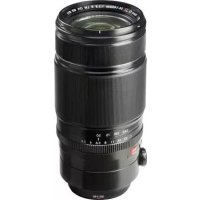
Fujinon XF 50140mm f2.8 R LM OIS WR - Lens FUJIFILM - Free user manual and instructions
Find the device manual for free Fujinon XF 50140mm f2.8 R LM OIS WR FUJIFILM in PDF.



| Brand | FUJIFILM |
| Model | Fujinon XF 50-140mm f/2.8 R LM OIS WR |
| Product type | Autofocus zoom lens for FUJIFILM X cameras |
| Focal length | 50-140mm (35mm equivalent: 76-213mm) |
| Maximum aperture | f/2.8 |
| Minimum aperture | f/22 |
| Optical construction | 23 elements in 16 groups (including 5 ED elements and 1 Super ED) |
| Angle of view | 31.7° - 11.6° |
| Focusing range | Normal: 1m - ∞; Macro: 1m - 3m |
| Maximum magnification | 0.12× (at 140mm) |
| Image stabilization | Yes, optical (OIS) with O.I.S. switch |
| Filter diameter | 72mm |
| Dimensions (Diameter × Length) | ø82.9 × 175.9mm |
| Weight (without accessories) | 995g |
| Included accessories | Front lens cap, rear lens cap, lens hood, protective case, tripod collar foot |
| Maintenance and cleaning | Dust blower, soft cloth with optical cleaner, no organic solvents |
| Safety instructions | Do not look at the sun through the lens; avoid water and moisture; do not disassemble; store away from sunlight and heat |
| Tripod collar foot | Removable, with locking screw for landscape/portrait rotation |
| Mount | FUJIFILM X (not compatible with other systems' X mount) |
| Weather sealing | Yes, dust and moisture resistant seals |
Frequently Asked Questions - Fujinon XF 50140mm f2.8 R LM OIS WR FUJIFILM
User questions about Fujinon XF 50140mm f2.8 R LM OIS WR FUJIFILM
0 question about this device. Answer the ones you know or ask your own.
Ask a new question about this device
Download the instructions for your Lens in PDF format for free! Find your manual Fujinon XF 50140mm f2.8 R LM OIS WR - FUJIFILM and take your electronic device back in hand. On this page are published all the documents necessary for the use of your device. Fujinon XF 50140mm f2.8 R LM OIS WR by FUJIFILM.
USER MANUAL Fujinon XF 50140mm f2.8 R LM OIS WR FUJIFILM
XF50-140mmF2.8 R LM OIS WR
OWNER'S MANUAL
日本語
ENGLISH
FRANÇAIS
DEUTSCH
ESPANOL
NEDERLANDS
SVENSKA
NORSK
SUOMI
PYCCKH
ITALIANO
DANSK
POLSKI
中文简
中文繁體
中国

你取得极好的注意<了>
此使用前必必书请<下
安全上ご注意
Be sure to read these notes before use
Safety Notes
Thank you for your purchase of this product. For repair, inspection, and internal testing, contact your FUJIFILM dealer.
Make sure that you use the lens correctly. Read these safety notes and the camera Owner's Manual carefully before use.
After reading these safety notes, store them in a safe place.
About the icons
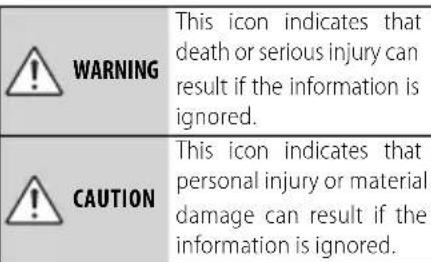
The icons shown below are used in this document to indicate the severity of the injury or damage that can result if the formation indicated by the icon is ignored and the product is used incorrectly as a result.
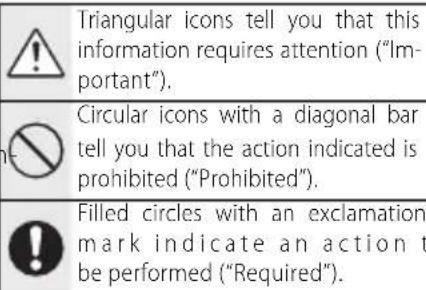
The icons shown below are used to indicate the nature of the instructions which are to be observed.
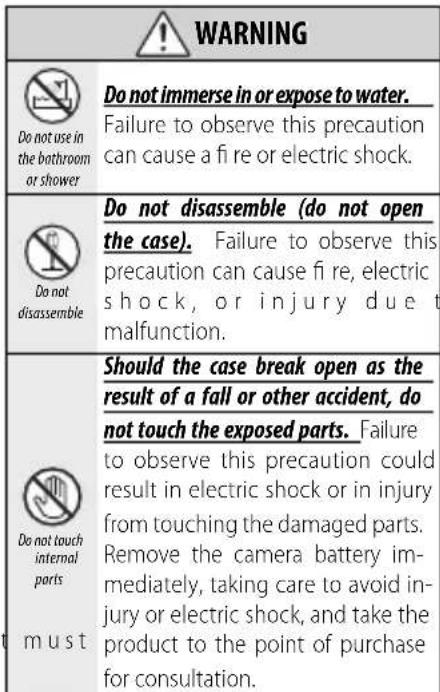
WARNING

Do not place on unstable surfaces. The product may fall, causing injury.

Do not view the sun through the lens or camera viewfnders. Failure observe this precaution can cause permanent visual impairment.
CAUTION

Do not use or store in locations that are exposed to steam, or smoke or are very humid or extremely dusty. Failure to observe this precaution can cause fire or electric shock.

Do not leave in direct sunlight or in locations subject to very high temperatures, such as in a closed vehicle on a sunny day. Failure to observe this precaution can cause fire.

Keep out of the reach of small children. This product could cause injury in the hands of a child.

Do not handle with wet hands. Failure to observe this precaution can cause electric shock.
CAUTION

Keep the sun out of the frame when shooting backlit subjects. Sunlight focused into the camera when the sun is in or close to the frame can cause fire or burns.

When the product is not in use, replace the lens caps and store out of direct sunlight. Sunlight focused by the lens can cause fire or burns.

Do not carry the camera or lens while they are attached to a tripod. The product can fall or strike other objects, causing injury.

Do not rapidly rotate the camera while holding the grip. Your hand could strike the tripod or tripod collar foot, causing injury.

Before handling the camera, fully tighten or loosen the tripod collar lock screw according to whether the camera will be used in a fixed orientation or rotated. If the screw is only partially tightened, the camera may move unexpectedly, causing injury.
For Customers in the U.S.A.
Tested To Comply With FCC Standards FOR HOME OR OFFICE USE
FCC Statement: This device complies with Part 15 of the FCC Rules. Operation is subject to the following two conditions: (1) This device may not cause harmful interference, and (2) this device must accept any interference received, including interference that may cause undesired operation.
CAUTION: This equipment has been tested and found to comply with the limits for a Class B digital device, pursuant to Part 15 of the FCC Rules. These limits are designed to provide reasonable protection against harmful interference in a residential installation. This equipment generates, uses, and can radiate radio frequency energy and, if not installed and used in accordance with the instructions, may cause harmful interference to radio communications. However, there is no guarantee that interference will not occur in a particular installation. If this equipment does cause harmful interference to radio or television reception, which can be determined by turning the equipment off and on, the user is encouraged to try to correct the interference by one or more of the following measures:
Reorient or relocate the receiving antenna.
- Increase the separation between the equipment and receiver.

EN-2
ENGLISH
- Connect the equipment into an outlet on a circuit different from that to which the receiver is connected.
- Consult the dealer or an experienced radio/TV technician for help.
- You are cautioned that any changes or modifications not expressly approved in this manual could void the user's authority to operate the equipment.
Notes on the Grant: To comply with Part 15 of the FCC Rules, this product must be used with a Fujii Im-specific ed ferrite-core A/V cable, USB cable, and DC supply cord.
For Customers in Canada
CANICES-3(B)/NMB-3(B)
CAUTION: This Class B digital apparatus complies with Canadian ICES-003.
IMPORTANT SAFETY INSTRUCTIONS
- Read these instructions.
- Keep these instructions.
Heed all warnings.
Follow all instructions. - Do not use this apparatus near water (excluding waterproof products).
Clean only with a dry cloth. - Do not block any ventilation openings. Install in accordance with the manufacturer's instructions.
- Do not install near any heat sources such as ra
diators, heat registers, stoves, or other apparatus (including amplifiers) that produce heat.
- Protect the power cord from being walked on or pinched particularly at plugs, convenience receptacles, and the point where they exit from the apparatus.
Only use attachments/accessories specified by the manufacturer. - Unplug this apparatus during lightning storms or when unused for long periods of time.
Refer all servicing to qualified service personal. Servicing is required when the apparatus has been damaged in any way, such as power supply cord or plug is damaged, liquid has been spilled or objects have fallen into the apparatus, the apparatus has been exposed to rain or moisture, does not operate normally, or has been dropped.
Disposal of Electrical and Electronic Equipment in Private Households
In the European Union, Norway, Iceland and Liechtenstein: This symbol on the product, or in the manual and in the warranty, and/or on its packaging indicates that this product shall not be treated as household waste. Instead it should be taken to an applicable collection point for the recycling of electrical and electronic equipment.

By ensuring this product is disposed of correctly, you will help prevent potential negative consequences to the environment and human health, which could otherwise be caused by inappropriate waste handling of this product.
The recycling of materials will help to conserve natural resources. For more detailed information about recycling this product, please contact your local city office, your household waste disposal service or the shop where you purchased the product.
In Countries Outside the European Union, Norway, Iceland and Liechtenstein: If you wish to discard this product, including the batteries or accumulators, please contact your local authorities and ask for the correct way of disposal.
Australian RCM

Before Using This Product
Some lens features are not available with older versions of the camera firmware. Be sure to update the camera firmware to the latest version. Instructions on viewing the camera firmware version and updating camera firmware are available from the following website:
http://www.fujifilm.com/support/digital Cameras/software/#firmware
If you do not have access to a computer, support is available from the local distributor listed in the "FUJIFILM Worldwide Network" material provided with your camera.
Product Care
- When using a lens hood, do not pick up or hold the camera using only the hood.
- Keep the lens signal contacts clean.
- Use a blower to remove dust and lint from the glass surfaces of the lens or fi Iter. To remove
smudges and fingernprints, apply a small amount of lens cleaner to a soft, clean cotton cloth or lens-cleaning tissue and clean from the center outwards using a circular motion, taking care not to leave smears or touch the glass with your fingers.
- Never use organic solvents such as paint thinner or benzene to clean the lens.
- Attach the front and rear caps when the lens is not in use.
- Store the lens and fi Iter in cool, dry locations to prevent mold and rust. Do not store in direct sunlight or with naphtha or cam moth balls.
- Keep the lens dry. Rusting can cause irreparable damage. Wipe off rain and water droplets.
- Leaving the lens in extremely hot locations could cause damage or warping.
- Note that depending on the positions of the camera and tripod, the hand holding the camera grip may contact the tripod or tripod collar foot when the camera is rotated.
Parts of the Lens
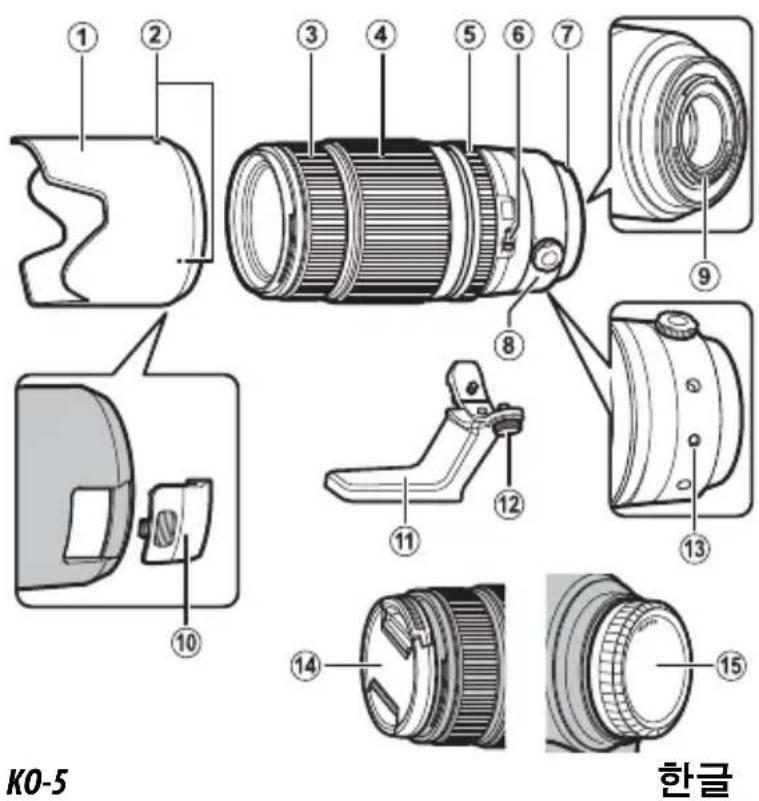
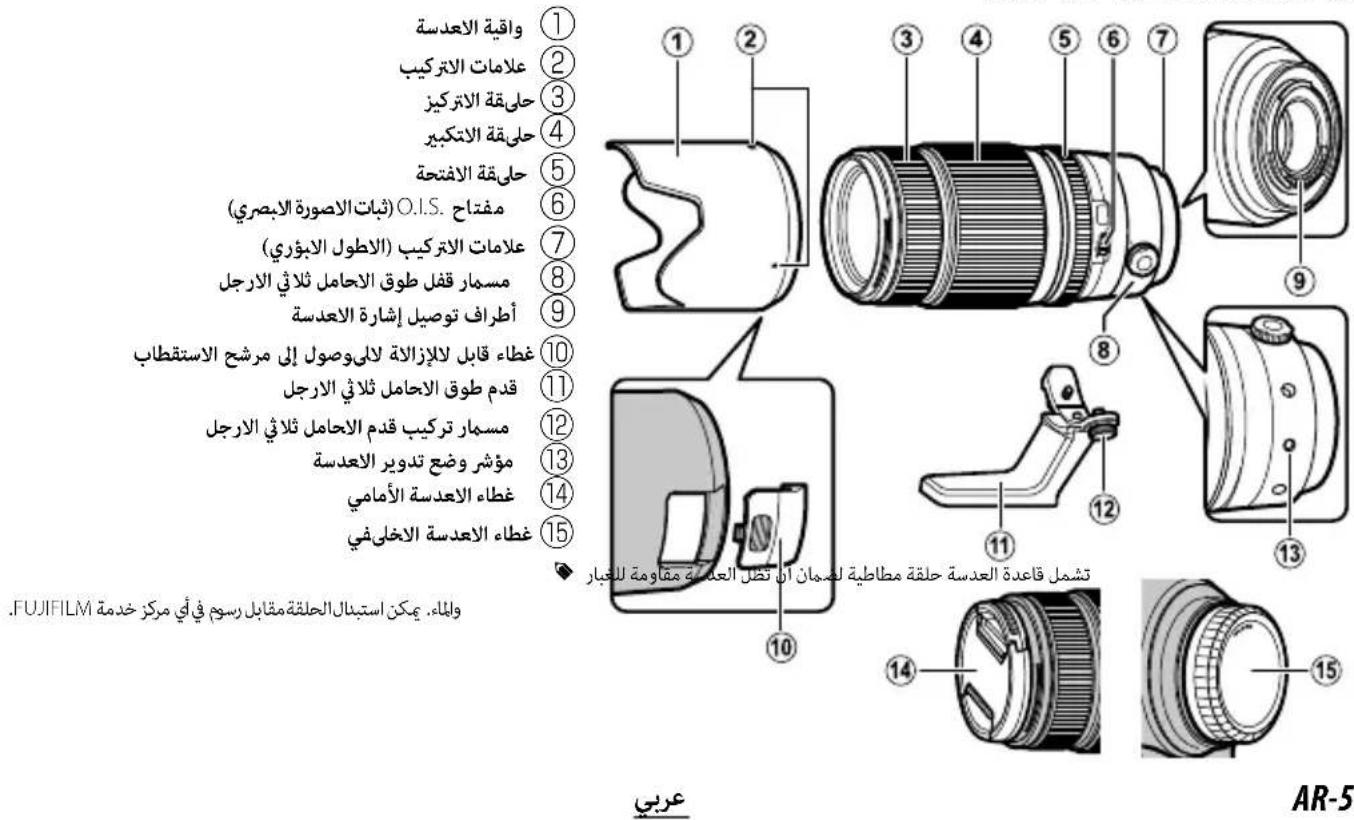
XF50-140 mm F2.8 R LM OIS WR
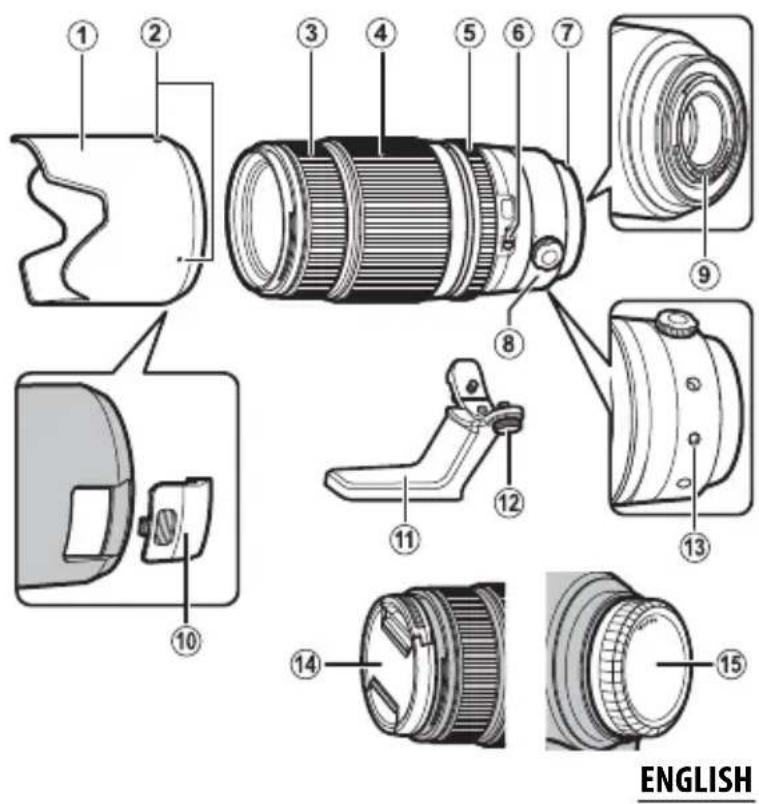
① Lens hood
② Mounting marks
③ Focus ring
④ Zoom ring
⑤ Aperture ring
⑥ O.I.S. switch
⑦ Mounting marks (focal length)
⑧ Tripod collar lock screw
Lens signal contacts
Removable cover for access to polarizing filter
⑪ Tripod collar foot
⑫ Tripod foot mounting screw
Lens rotating position index
14 Front lens cap
15 Rear lens cap
The lens mount includes a rubber ring to ensure that the lens remains dust- and splash-proof. The ring can be replaced for a fee at any FUJIFILM service center.
EN-5
Attaching the Lens
See the camera manual for information on attaching and removing lenses. Note that this product is not compatible with X mount fi lm cameras.
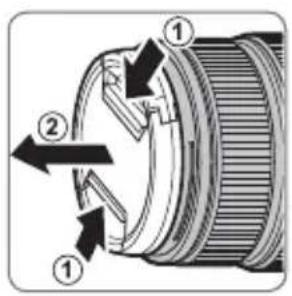
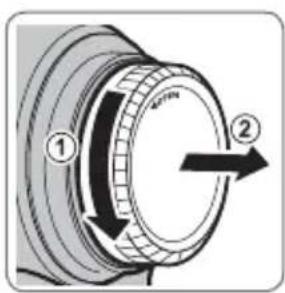
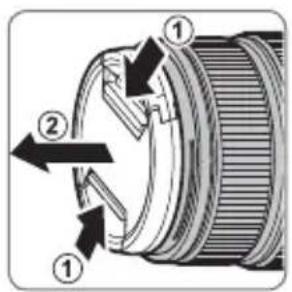
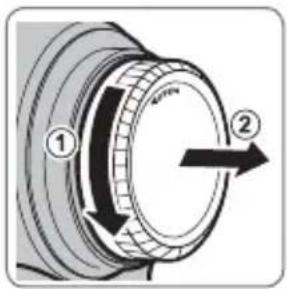
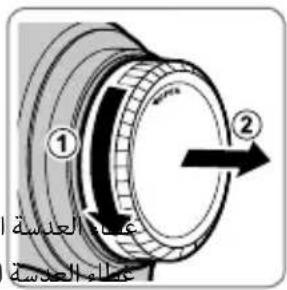
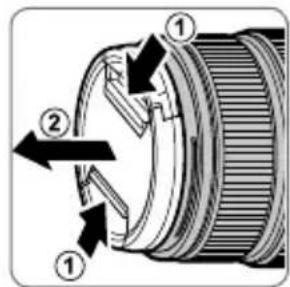
Removing the Caps
Remove the caps as shown.
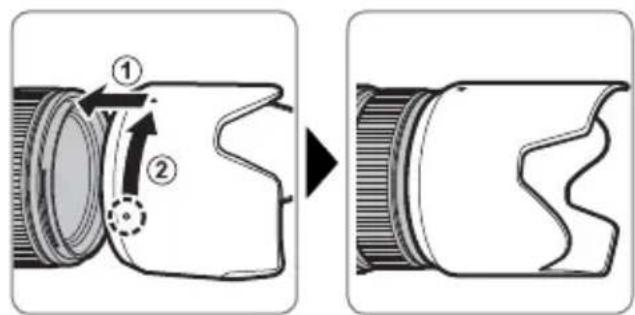
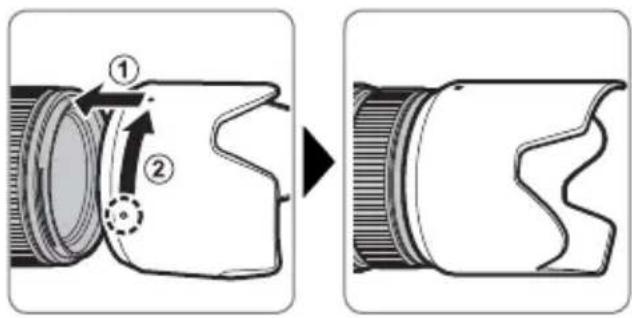
Attaching the Hood
When attached, lens hoods reduce glare and protect the front lens element.
Supplied Accessories
- Front lens cap
Rear lens cap - Lens hood
- Cloth wrapping
- Tripod collar foot
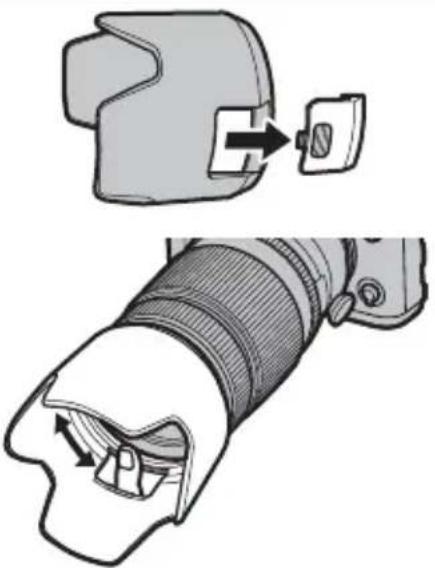
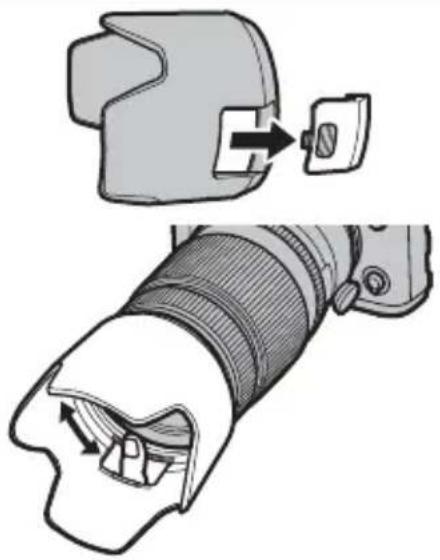
The Polarizing Filter
To access the polarizing filter, detach the removable cover before attaching the lens hood.
The fi ler can be rotated by inserting a finger through the hole.
EN-7ENGLI
The Tripod Collar Foot
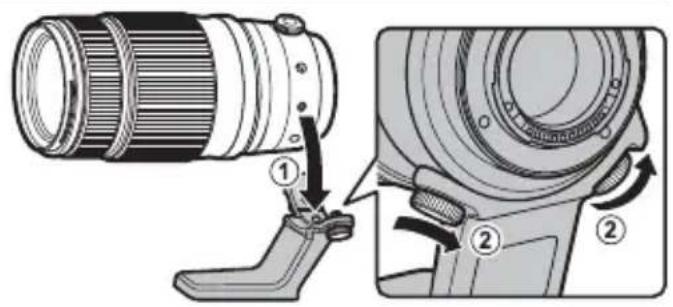
To attach the tripod collar foot, align the mounting mark on the foot with the lens rotating position index and tighten the tripod foot mounting screw.
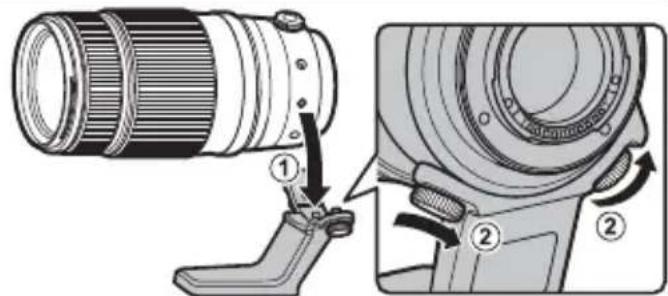
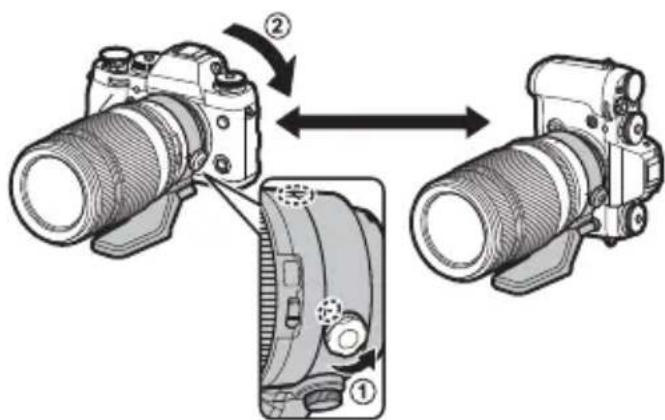
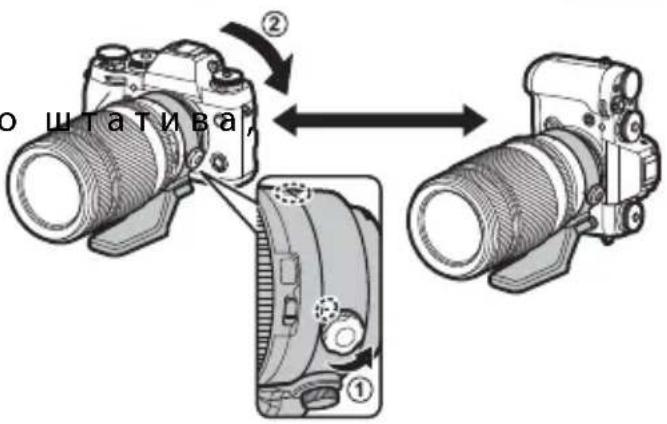
To rotate the camera from landscape to portrait orientation or back again without taking it off the tripod, loosen the tripod collar lock screw.
① Tighten the screw securely to prevent the camera rotating unexpectedly.
EN-8 ENGLISH
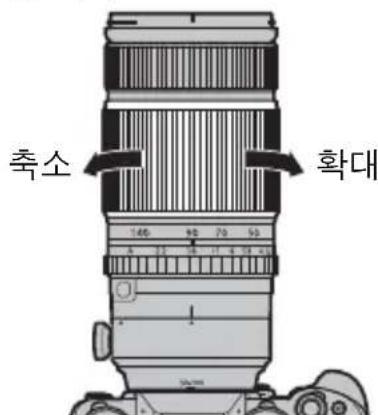
Zoom
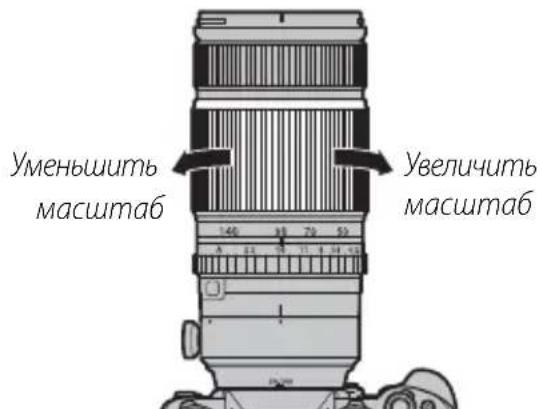
Rotate the zoom ring left to zoom o ducing magnifi cation and increasing the area visible in the frame. Rotate the ring right to zoom in, increasing magnifi cation so that the subject occupies more of the frame.
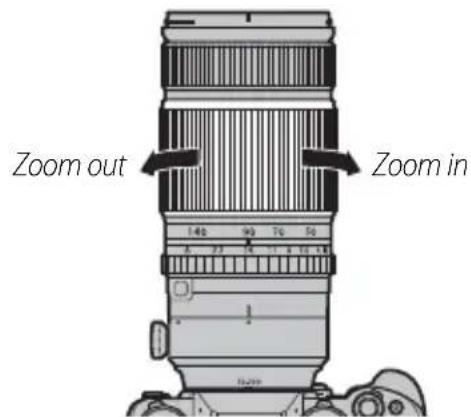
Using the zoom ring while the lens is wet makes it easier for water to find its way inside the lens. Wipe any water from the lens before using the zoom ring.
Optical Image Stabilization (OIS)
to use optical image stabilization, slide the O.I.S. switch to ON.
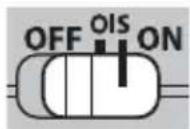
The Aperture Ring
At settings other than A, you can adjust aperture by rotating the lens aperture ring (exposure modes A and M).
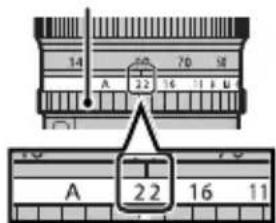
Aperture ring
| Specifi cations | |
| Type XF50-140 mm F2.8 R LM OIS WR | |
| Lens construction | 23 elements in 16 gro ups (includes 5 extra- low dispersion elements and 1 super extra- low dispersion element) |
| Focal length (35 mm format equivalent) | f=50-140mm (76-213 mm) |
| Angle of view 31.7°-11.6° | |
| Max. aperture f/2.8 | |
| Min. aperture f/22 | |
| Aperture control | |
| Number of blades | 7 (rounded diaphragm opening) |
| Stop size | \( \frac{1}{3}\mathrm{{EV}}\left( {{19}\text{ stops }}\right) \) |
| Focus range Normal: 1 m-infi nity | Macro: 1 m-3 m |
| Max. magnification T : \( {0.12} \times \) | |
| External dimensions: Diameter \( \times \) Length * (approx.) | \( \phi \) 82.9 × 175.9 mm |
| * Distance from camera lens mount flange | |
| Weight * (approx.) | 995 g |
| * Excluding caps, hoods, and tripod collar feet | |
| Filter size | \( \phi \) 72 mm |
| ① Improvements may result in unannounced changes to specifications and appearance. | |
| ① Owing to how this lens is constructed, the "Distance indicator" displayed by the camera may in some cases differ from the actual focus distance. Use the "Distance indicator" as a guide only. | |
Pour vous sécurité
http://www.fujifilm.com/support/digital Cameras/software/#firmware
http://www.fujifilm.com/support/digital Cameras/software/#firmware
http://www.fujifilm.com/support/digital Cameras/software/#firmware
http://www.fujifilm.com/support/digital Cameras/software/#firmware
Optical Image Stabilization (OIS)
http://www.fujifilm.com/support/digital Cameras/software/#firmware
Om du inte har tillgang till en dator, kan du fahos den lokala aterforsljare som listedi FUJIFILM Worldwide Network-materialialet, vilket medfoljer kameran.
Produktvard
http://www.fujifilm.com/support/digital Cameras/software/#firmware
http://www.fujifilm.com/support/digital Cameras/software/#firmware
http://www.fujifilm.com/support/digital Cameras/software/#firmware
B cnyuae, ecn y Bac HeT doctyna K KOMnbIoTepy, o6paTntecb 3a noDpeKkoN K MeCTHOMy IInCTpN6bIoTpOy N3 cnUcKa «FUJIFILM Worldwide Network», noctabJeHHoro c Bauei foToKamepoI.
yXoJ3a n3dennem
- Pn nCnoJb3ObaHn 6JeHbI o6BeKtNbA He 6epntecb 3a foTOKaMepu Hne DePKeHTe ee ToIbKO 3a 6NeHdy.
He onyckaTe 3arpa3HeHnCnHaNbHbIX KOHTaKTOB o6bekTnBa.
-Пиьзутесь рушей дя удаленя nbiin n nyxa co cTeклгньхпobерхнocтей объektиBa nIn φиньтpa. Дя удаленя пяtenи OTneчakOB пальсев hahecute He60nbwoe konuyectBO xNdkOCTn Дя чсTKО obseKtNBOB Ha mRkyU,ЧNTyU XlonuaTo6bMyaxkHyIO TkaHb
HnCaΦeTKyIaYnCTKNoBIO npOTpnte ObeKTIB OT cHTpa K KpaM KpyTOBbIMN DnBXKeHNr M,Co6JIoJaOCTOpOXHOCTb,He OCTaJIa pa3BOIOB N He KaCaeCb CTeKla NaIbCuAM.
- Hukorda He nCnoJb3yIe dJa YnCTKn O6BeKTnBa opraHnueckne pactBOpuTeN, TaKne KaK pa36aBnteJb dJa Kpackn nn 6eH3nH.
3aKpoTe KpbIuKy 06BeKTnBa u KpbIuKy 6aNoHeTa o6BeKTnBa, KOrDa 06BeKTnB He nCNoJIb3yeTcra.
XpaHnTe o6bekTnB nHbTp B npoxlaHbIX, cyxnx Me-ctax, yTo6bl npeoTbpaTb o6pa3OBaHne nIeceHN Koppo3nn. He xpaHnTe B MeCTax, rDe Ha Hero nonaAet npraMoJ coJIHeHbI CBET, IIN pRdOM cHaΦTaIIHO-BbIMN IIN KaMΦOpHbIM N apuKamN OT MOIN. - Bepernte obkeTb OT Bnarn. Koppo3na MoXeT haHeCTn HEnonpaBmbl yUep6. Pn nonaHnn DoJxDeBbIX KaneIb nn 6pb13r BoDbl nx CneJeYET BbItepeTb.
- Ecnn OBeKtNB OCTaBnTb B MecTx, NOBepraIOxNcB03JeICTBnIO BbICOKnx TemnepaTyP, TO 3TO MOKeT NOBpeiNb IIN DeoOpMnpObaTb erO.
- ImeIte B BVny, yTO B 3aBcIMOCTN OT NOJIOKeHNI FOtOKaMEpbI N WtATnBa, pyKa, yIepKNaBauOuaR pyKoRTKy FOtOKaMEpbI, MOKeT COpNKaCaTbCra CO WtATnBOM INI NaKoN KOJIbUa WtATnBa npN IOBOpTe FOtOKaMEpbI.
Yactn o6bekTnBa
XF50-140 mm F2.8 RLM OIS WR
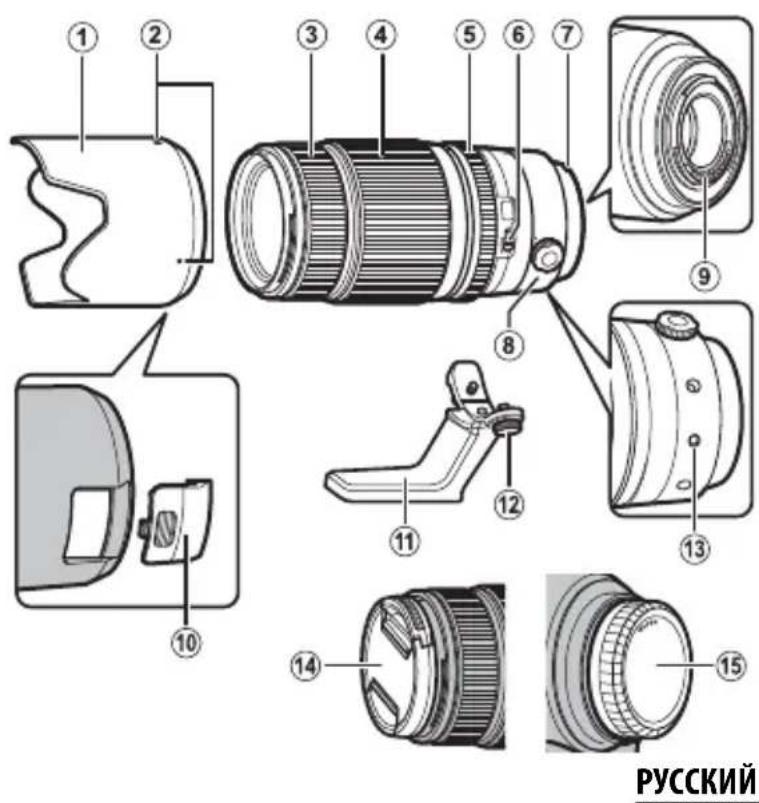
(1) bneHda obekmuBa
② Memku dnycmaHOeKu
③ ΦokycupoobouHoe konbuo
(4) Kōnbuo Macuuma6upo8aHua
⑤ KoiIbO duoopaMbi
(6) Npeeknoyamenb O.l.S.
⑦ Memku dny ycmaho8ku (fokychoe paccmonHue)
(8)ФukcypuouuBuHm nanku konbuawmamuba
(9) CuaHnBHeKoHmakmbiobekmuBa
CbeMHa KpbuKa dna docmya KnonpaUauOHOMy
(1) Kanka konbua wamubu
12 Kpenexhbu buhm lanku konbua wamumba
13 NndeknnoJoxeHuaBpaueHuaObekmuBa
(4) Kpbiuoka obekmuBa
15 Kpbuka 6aohema o6bekmu8a
KpenneHne 06bekTnBa nmeet pe3HHOBoe KObIcO, KOTopoe oBecneuBaet 3aunTy 06bekTnBa OT bInN 6pb3r. KoIbIO MoXHO 3aMeHHTB IIO6OM cepBnCHOM UENTpe FUJIFLM 3a otJeNbHy nlaty.
RU-5
yctahOBka 06beKTHBa
Cm.pykoBODCTBO NOIb3OBaTeJIaΦOTOKaMepoI dI IOnyueHn HOpMauN O6yCTaHOBeKTHBa.IMeIe B BVdy, YTO DaHHoe N3dEJIne HeCOBMeCTUMO CΦOTOKaMepAMc 6aNoHeTOM X.
Chartne Kpbliwek
Chnmte KpbIuK, KaK NOKa3aHo Ha pu-cyHke.
yTaHOBka 6IeHbI
Pn noDcoeHHeHn 6JeHdbI oBbeKTHBa yMeHbShaOT 6nKn n 3aunuAOT nepeHIO JINH3y.
PpunaeraemblepnHaadnexKnoctn
Kpbiuka oBekTnBa
KpbIiKa 6aHHeTa o6BeKTnBa
-Бленьда обьектува
TkaHeBa ynaKOBKa
Jaika KOJIbua WITaTnBa
PonpaunHbIy
ДяdoctураКполяриЗацноHOMуФильтуснMuTe cbeMHyIO KpbIшkyпeped yctaHOBkoJ 6JIeHdbI obbEKTINBa.
ФиьтpoMOxHObOPaUHBaTb, BCTaBnB najeB OВВерстп.
RU-7PYCCKI
Janka Koblua wTaTnBa
YTo6bI yCTaHOBnTb IaNk Ky KOnbua WtTaTnBa, COBMecHTe MeTKy KpePJIeHnHa IaNKe C INHeKCOM NIOJXeHn BpaUeHn OBeEKTuBa I 3aTAHnTe KpeJeXhBn BVHT IaNKn KOJIbca WtTaTnBa.
YTo6bl NOBepHyTb 0TOkAmepy n3 rOpn-3OHTaJIbHO B BepTKKaIbHyIO opNeHTaCNIu nn O6paTHo, He cHmaj ee Cocna6bTe fHKcnpUoiN BNHT IaIKN KOJIb-za WtTaTNa.
Hadejxo 3aTAHHT BnHT, YTO6bI npeD0TbpATNTb BHe3aHoe Bpa-
MacuTa6npoBaHne
IobepHnte Kobluo MacuTa6npoBaHna BneBO dny yMeHbWeHHaMacuTa6a, COKpaueHHnp6nHexHHyBvElnueHHaBNDIMoOBnactN KaDpa. IobepHnte Kobluo MacuTa6npoBaHna BnpaBO dny yBeInueHHa MacuTa6a NycnJeHHa np6nHexHHa, CTem YTO6bl OBeKTe 3aHmam 6OJbWyo qAcTb KaDpa.
EcnncnBbKaTbKoBcOMacuTaOpOBaHnHaBnXHOM 06BeKTNB,TOBO3HNKaETOnaCHOCTbIpOHNKHOBEHnBODbI BHytpbObeKtNa. IpexKeYemNCNoB3OBaTBKoBcOMacuTaOpOBaHn,BbITpTe ObeKtNB Hacyxo.
http://www.fujifilm.com/support/digital Cameras/software/#firmware
http://www.fujifilm.com/support/digital Cameras/software/#firmware
http://www.fujifilm.com/support/digital Cameras/software/#firmware
http://www.fujifilm.com/support/digital Cameras/ software/#firmware
http://www.fujifilm.com/support/digital Cameras/ software/#firmware
An instant chagoharh
http://www.fujifilm.com/support/digital Cameras/ software/#firmware
Coupter等人用数,KAPLALI.
译音
- RENs Hua He Ta Hua He Ta Hua He Ta Hua He Ta Hua He Ta Hua He Ta Hua He Ta Hua He Ta Hua He Ta Hua He Ta Hua He Ta Hua He Ta Hua He Ta Hua He Ta Hua He Ta Hua He Ta Hua He Ta Hua He Ta Hua He Ta Hua He Ta Hua He Ta Hua He Ta Hua He Ta Hua He Ta Hua He Ta Hua HeTa Hua He Ta Hua He Ta Hua He Ta Hua He Ta Hua He Ta Hua He Ta Hua He Ta Hua He Ta Hua He Ta Hua He Ta Hua He Ta Hua He Ta Hua He Ta Hua He Ta Hua He Ta Hua He Ta Hua He Ta Hua He Ta Hua He Ta Hua He Ta Hua He Ta Hua He Ta Hua He Ta Hua He Ta Hua He Tae
·廷兹神社の試証を発状の状態に限む状態の
·落羅號者,次用者,列之在日的,用之。
鸯。如:尔默到南,然之,以为
- 裁大 用法:使用时,按住鼠标右键不放,即可在屏幕上显示。
- Rienz to use it.
·:国月云目,默云目,默云目,默云目,默云目,默云目,默云目,默云目,默云目,默云目,默云目,默云目,默云目,默云目,默云目,默云目,默云目,默云目,默云目,默云目,默云目,默云目,默云目,默云目,默云目,默云目, - Rienzhi jin.
·LenztoeMwUfgeGnOgEeTneFmNtNnIaNtIeLIM 1 - kāme拉与 saikda 的 witeh f 140 kāmera to hioi.
Lan
XF50-140 mm F2.8 R LM OIS WR
艷藻藻藻藻藻藻藻藻藻藻藻藻藻藻藻藻藻藻藻藻藻藻藻藻藻藻藻藻藻藻藻藻藻藻藻藻藻藻藻藻藻藻藻藻藻藻藻藻藻藻藻藻藻藻藻藻藻藻藻藻藻藻藻藻藻藻藻藻藻藻藻藻藻藻藻藻藻藻藻藻藻藻藻藻藻藻藻藻藻藻藻藻藻藻藻藻藻藻
① LefTsJaJfJiJFJFJFJFJFJFJFJFJFJFJFJFJFJFJFJFJFJFJFJFJFJFJFJFJFJFJFJFJFJFJFJFJFJFJFJFJFJFJFJFJFJFJFJFJFJFJFJFJFJFJ
20 25
a. 4.5d. 6.5e.7. 8. 9
· = 0
J 1

XF50-140 mm F2.8 R LM OIS WR
afo 1yolll ciaagg jolalld. jdlalld aedell
aocli aibc gaoa bgl aedell ciaio no yol 1jda
j5rbl n ao aedell ciaig aoe ciai jdai aiaig
sab gl ciaob jp oolill go ayir jds kcrjg jn
. dlaowj y
Iuipuusy
. aedell aiais
15 g lali g 1 1 1 1 1 1 1 1 1 1 1 1 1 1 1 1 1 1 1
alb1g jbb1 cI, b3 cmoI. do xla!
1gog
J 1 J 1 J 1 J 1 J 1 J 1 J 1 J 1 J 1 J 1 J 1 J 1 J 1 J 1
cuii1iie puiuaiui
pIaJn aEe dll Jd0y I 0gio 0aLl y Jo aee
oJIe Jd0iI pIaI cui oJ 51.10kU JcIe I Jd0iI
pIaI Jd0! oJcIaIe I Jd0! JI1.10kU
Jolul Jolll Jusuill plbi cuiu g Jolul Jolll Jusuill Ug jolll uauo uo sgsccu:Jull i jy jy jy jy
http://www.fujifilm.com/support/digital Cameras/
soware/#firmware 1Jgss 15g, 1000000000000000000000000000000000000000000000000000000000
"
10 : 0 S| 2020 aabb
gai 3 aill 0j blaa aall
zibly 2.1xyl
1.2015年JL 1.2015年JL
.
-

gogjol lio y jia aaiy g oaiy g gaiy g gaiy 10000000000000000000000000000000000000000000000000000000000000000000
aagablaalglalgallge aelauuagablll lao gaaalal alallln 15
yulzjus yjuyy jyolalal aygss yg jyayy ayg yjay
Jogclogttao yjdt aygblal yggt gagblll ae plalldg yg sela
clalalno yalalgld yolalgld kdyj yag bslg y
J 1000000000000000000000000000000000000000000000000
| ### | |
| ### | |
| ### | |
| ### | |
| ### |

- OWNER'S MANUAL
- 你取得极好的注意<了>
- 此使用前必必书请<下
- 安全上ご注意
- Be sure to read these notes before use
- Safety Notes
- About the icons
- WARNING
- CAUTION
- Tested To Comply With FCC Standards FOR HOME OR OFFICE USE
- For Customers in Canada
- CANICES-3(B)/NMB-3(B)
- IMPORTANT SAFETY INSTRUCTIONS
- Disposal of Electrical and Electronic Equipment in Private Households
- Australian RCM
- Before Using This Product
- Product Care
- Parts of the Lens
- Attaching the Lens
- Removing the Caps
- Attaching the Hood
- Supplied Accessories
- The Polarizing Filter
- The Tripod Collar Foot
- EN-8 ENGLISH
- Zoom
- Optical Image Stabilization (OIS)
- The Aperture Ring
- Pour vous sécurité
- Produktvard
- yXoJ3a n3dennem
- Yactn o6bekTnBa
- yctahOBka 06beKTHBa
- Chartne Kpbliwek
- yTaHOBka 6IeHbI
- PpunaeraemblepnHaadnexKnoctn
- PonpaunHbIy
- Janka Koblua wTaTnBa
- MacuTa6npoBaHne
- An instant chagoharh
- 译音
- Lan
- cuii1iie puiuaiui
- zibly 2.1xyl
Brand : FUJIFILM
Model : Fujinon XF 50140mm f2.8 R LM OIS WR
Category : Lens