
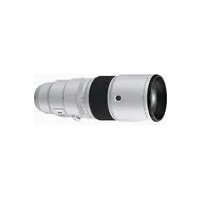
FUJINON XF 16mm F1.4 R WR - Lens FUJIFILM - Free user manual and instructions
Find the device manual for free FUJINON XF 16mm F1.4 R WR FUJIFILM in PDF.


| Product Type | Wide-angle large aperture lens |
| Brand | Fujifilm |
| Model | FUJINON XF 16mm F1.4 R WR |
| Mount | Fujifilm X (APS-C) |
| Focal Length | 16 mm (equivalent 24 mm in 35mm format) |
| Maximum Aperture | f/1.4 |
| Minimum Aperture | f/16 |
| Optical Construction | 13 elements in 11 groups (2 aspherical, 2 ED) |
| Angle of View | 83.2° |
| Image Stabilization | No |
| Autofocus | Stepping motor |
| Minimum Focusing Distance | 15 cm |
| Filter Diameter | 67 mm |
| Dimensions (Diameter × Length) | 73.4 mm × 73 mm |
| Weight | 375 g (approx.) |
| Weather Resistance | Yes (seals, WR) |
| Coating | Nano GI (anti-reflective) |
| Aperture Ring | Yes, with click stops |
| Accessories Included | Lens hood, front and rear caps |
| Care and Cleaning | Clean with a soft, dry cloth. Avoid solvents. |
| Safety | Do not subject to shocks, excessive humidity, or extreme temperatures. |
| Spare Parts and Repairability | Parts available through Fujifilm after-sales service. Repair by an authorized technician. |
| General Information | Lens designed for Fujifilm X mirrorless cameras. Compatible with adapter rings. |
Frequently Asked Questions - FUJINON XF 16mm F1.4 R WR FUJIFILM
User questions about FUJINON XF 16mm F1.4 R WR FUJIFILM
0 question about this device. Answer the ones you know or ask your own.
Ask a new question about this device
Download the instructions for your Lens in PDF format for free! Find your manual FUJINON XF 16mm F1.4 R WR - FUJIFILM and take your electronic device back in hand. On this page are published all the documents necessary for the use of your device. FUJINON XF 16mm F1.4 R WR by FUJIFILM.
USER MANUAL FUJINON XF 16mm F1.4 R WR FUJIFILM

| ! |
| ∅ |
| ! |
| ! |
| ∅ |
http://fujifilm.jp/support/digitalcamera/download/
XF14mmF2.8 R XF16mmF1.4 R WR XF23mmF1.4 R

XF16mmF1.4 R WR

AF

MF
XF14mmF2.8 R
AF
MF
| XF14mmF2.8 R XF16mmF1.4 R WR XF23mmF1.4 R | ||||
| 7 1023 | 11 132 | 8 111 | ||
| f=14 mm35 mm 21 mm | f=16 mm35 mm 24 mm | f=23 mm35 mm 35 mm | ||
| 90.8 | 83.2 | 63.4 | ||
| F2.8 F1.4 F1.4 | ||||
| F22 F16 F16 | ||||
| 71/3 19 | 91/3 22 | 71/3 22 | ||
| 30 cm18 cm | 15 cm15 cm | 0.6 m28 cm | ||
| 0.12 | 0.21 | 0.1 | ||
| 65.0 mm 58.4 mm | 73.4 mm 73.0 mm | 72.0 mm 63.0 mm | ||
| 235 g 375 g 300 g | ||||
| 58 mm | 67 mm | 62 mm | ||
For Your Safety
Be sure to read these notes before use
Safety Notes
Thank you for your purchase of this product. For repair, inspection, and internal testing, contact your FUJIFILM dealer.
• Make sure that you use the lens correctly. Read these safety notes and the camera Owner's Manual carefully before use.
• After reading these safety notes, store them in a safe place.
About the Icons
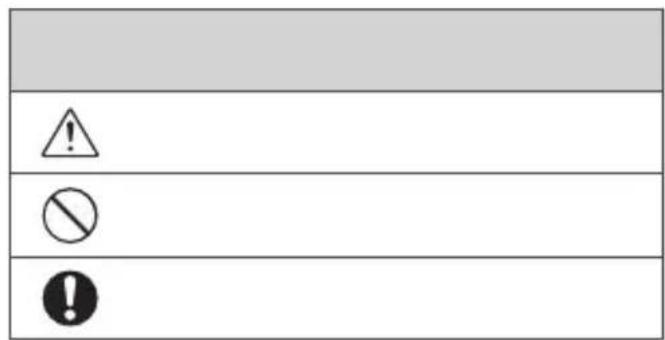
The icons shown below are used in this document to indicate the severity of the injury or damage that can result if the formation indicated by the icon is ignored and the product is used incorrectly as a result.
| WARNING | This icon indicates that death or serious injury can result if the information is ignored. |
| CAUTION | This icon indicates that personal injury or material damage can result if the information is ignored. |
The icons shown below are used to indicate the nature of the instructions which are to be observed.
| Triangular icons tell you that this information requires attention ("Important"). | |
| Circular icons with a diagonal bar tell you that the action indicated is prohibited ("Prohibited"). | |
| Filled circles with an exclamation mark indicate an action to be performed ("Required"). |
| WARNING | |
| Do not immerse in or expose to water.Failure to observe this precaution can cause a fi re or electric shock. | |
| Do not disassemble (do not open the case).Failure to observe this precaution can cause fi re, electric shock, or injury due to product malfunction. | |
| Should the case break open as the result of a fall or other accident, do not touch the exposed parts.Failure to observe this precaution could result in electric shock or in injury from touching the damaged parts. Remove the camera battery immediately, taking care to avoid injury or electric shock, and take the product to the point of purchase for consultation. | |
 | |
| Do not place on unstable surfaces. The product may fall, causing injury. | |
| Do not view the sun through the lens or camera view fi ndFailure to observe this precaution can cause permanent visual impairment. | |
 | |
| Do not use or store in locations that are exposed to steam, or smoke or are very humid or extremely dusty. Failure to observe this precaution can cause fi re or electric shock. | |
| Do not leave in direct sunlight or in locations subject to very high temperatures, such as in a closed vehicle on a sunny day.Failure to observe this precaution can cause fi re. |
| CAUTION | |
| Keep out of the reach of small children. This product could cause injury in the hands of a child. | |
| Do not handle with wet hands.Failure to observe this precaution can cause electric shock. | |
| Keep the sun out of the frame when shooting backlit subjects.Sunlight focused into the camera when the sun is in or close to the frame can cause fire or burns. | |
| When the product is not in use, replace the lens caps and store out of direct sunlight. Sunlight focused by the lens can cause fire or burns. | |
| Do not carry the camera or lens while they are attached to a tripod. The product can fall or strike other objects, causing injury. |
| CAUTION | |
| Keep out of the reach of small children. This product could cause injury in the hands of a child. | |
| Do not handle with wet hands.Failure to observe this precaution can cause electric shock. | |
| Keep the sun out of the frame when shooting backlit subjects.Sunlight focused into the camera when the sun is in or close to the frame can cause fire or burns. | |
| When the product is not in use, replace the lens caps and store out of direct sunlight. Sunlight focused by the lens can cause fire or burns. | |
| Do not carry the camera or lens while they are attached to a tripod. The product can fall or strike other objects, causing injury. |
For Customers in the U.S.A. For Customers in the U.S.A.
Tested To Comply With FCC Standards FOR HOME OR OFFICE USE
FCC Statement: This device complies with Part 15 of the FCC Rules. Operation is subject to the following two conditions: (1) This device may not cause harmful interference, and (2) this device must accept any interference received, including interference that may cause undesired operation.
CAUTION: This equipment has been tested and found to comply with the limits for a Class B digital device, pursuant to Part 15 of the FCC Rules. These limits are designed to provide reasonable protection against harmful interference in a residential installation. This equipment generates, uses, and can radiate radio frequency energy and, if not installed and used in accordance with the instructions, may cause harmful interference to radio communications. However, there is no guarantee that interference will not occur in a particular installation. If this equipment does cause harmful interference to radio or television reception, which can be determined by turning the equipment off and on, the user is encouraged to try to correct the interference by one or more of the following measures:
- Reorient or relocate the receiving antenna.
- Increase the separation between the equipment and receiver.

- Connect the equipment into an outlet on a circuit different from that to which the receiver is connected.
- Consult the dealer or an experienced radio/TV technician for help.
- You are cautioned that any changes or modifications not expressly approved in this manual could void the user's authority to operate the equipment.
Notes on the Grant: To comply with Part 15 of the FCC Rules, this product must be used with a Fujifi Im-specific ed ferrite-core A/V cable, USB cable, and DC supply cord.
For Customers in Canada
CAN ICES-3 (B)/NMB-3(B)
CAUTION: This Class B digital apparatus complies with Canadian ICES-003.
IMPORTANT SAFETY INSTRUCTIONS
- Read these instructions.
- Keep these instructions.
- Heed all warnings.
- Follow all instructions.
- Do not use this apparatus near water (excluding waterproof products).
- Clean only with a dry cloth.
-
Do not block any ventilation openings. Install in accordance with the manufacturer's instructions.
-
Do not install near any heat sources such as radiators, heat registers, stoves, or other apparatus (including amplifiers) that produce heat.
- Protect the power cord from being walked on or pinched particularly at plugs, convenience receptacles, and the point where they exit from the apparatus.
- Only use attachments/accessories specified by the manufacturer.
- Unplug this apparatus during lightning storms or when unused for long periods of time.
- Refer all servicing to qualified service personal. Servicing is required when the apparatus has been damaged in any way, such as power supply cord or plug is damaged, liquid has been spilled or objects have fallen into the apparatus, the apparatus has been exposed to rain or moisture, does not operate normally, or has been dropped.
Disposal of Electrical and Electronic Equipment in Private Households Private Households
In the European Union, Norway, Iceland and Liechtenstein: This symbol on the product, or in the manual and in the warranty, and/or on its packaging indicates that this product shall not be treated as household waste. Instead it should be taken to an applicable collection point for the recycling of electrical and electronic equipment.

By ensuring this product is disposed of correctly, you will help prevent potential negative consequences to the environment and human health, which could otherwise be caused by inappropriate waste handling of this product.
The recycling of materials will help to conserve natural resources. For more detailed information about recycling this product, please contact your local city office, your household waste disposal service or the shop where you purchased the product.
In Countries Outside the European Union, Norway, Iceland and Liechtenstein: If you wish to discard this product, including the batteries or accumulators, please contact your local authorities and ask for the correct way of disposal.
Australian RCM

ENGLISH
EN-3
Before Using This Product
Some lens features are not available with older versions of the camera fi rmware. Be sure to update the camera fi rmware to the latest version. Instructions on viewing the camera fi rmware version and updating camera fi rmware are available from the following website:
http://www.fujifilm.com/support/digital_cameras/software/#firmware
If you do not have access to a computer, support is available from the local distributor listed in the "FUJIFILM Worldwide Network" material provided with your camera.
Product Care
- When using a lens hood, do not pick up or hold the camera using only the hood.
-
Keep the lens signal contacts clean.
-
Use a blower to remove dust and lint from the glass surfaces of the lens or fi lter. To remove smudges and fi ingerprints, apply a small amount of lens cleaner to a soft, clean cotton cloth or lens-cleaning tissue and clean from the center outwards using a circular motion, taking care not to leave smears or touch the glass with your fi ngers.
- Never use organic solvents such as paint thinner or benzene to clean the lens.
- Attach the front and rear caps when the lens is not in use.
- Store the lens and filter in cool, dry locations to prevent mold and rust. Do not store in direct sunlight or with naphtha or camphc moth balls.
- Keep the lens dry. Rusting can cause irreparable damage. Wipe off rain and water droplets.
• Leaving the lens in extremely hot locations could cause damage or warping.
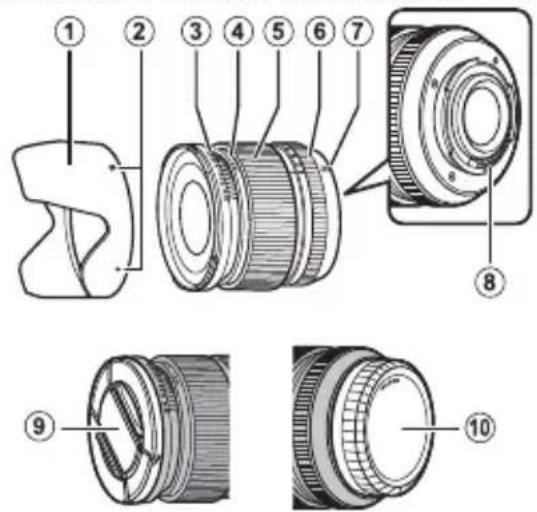
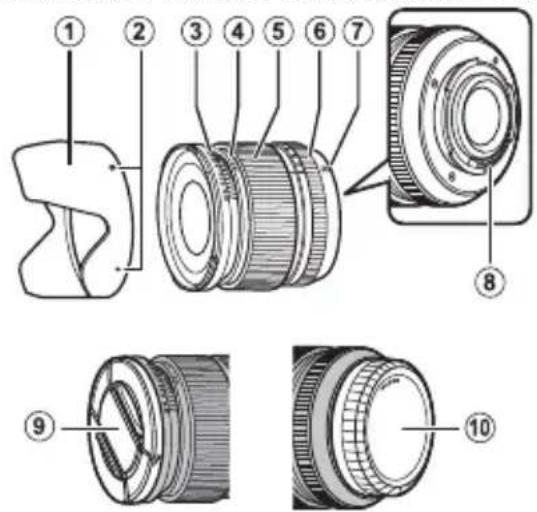
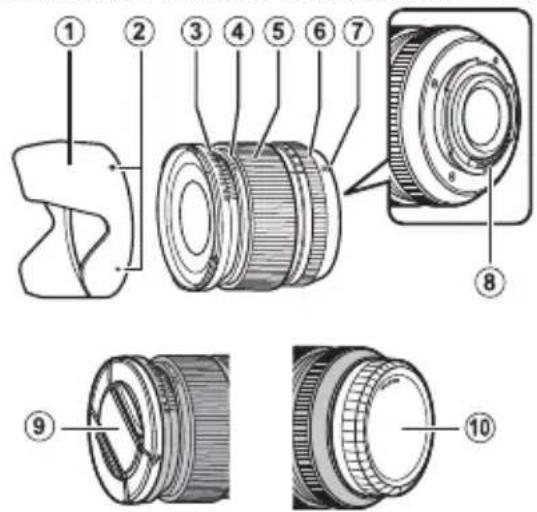
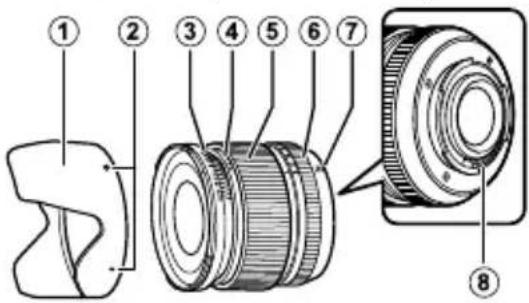
Parts of the Lens
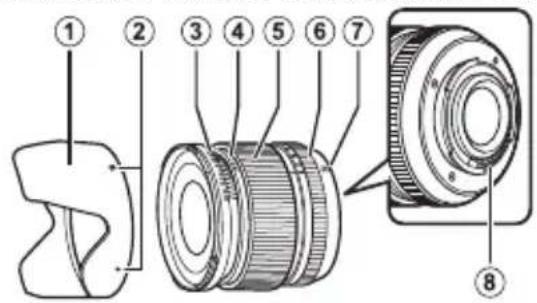
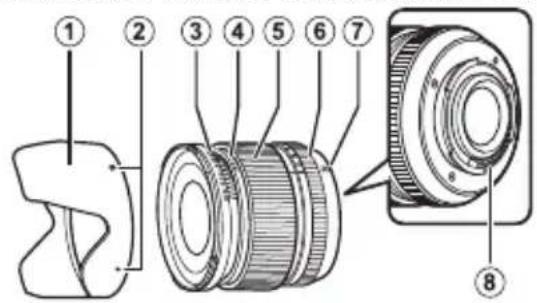
XF14mmF2.8 R/XF16mmF1.4 R WR/XF23mmF1.4 R
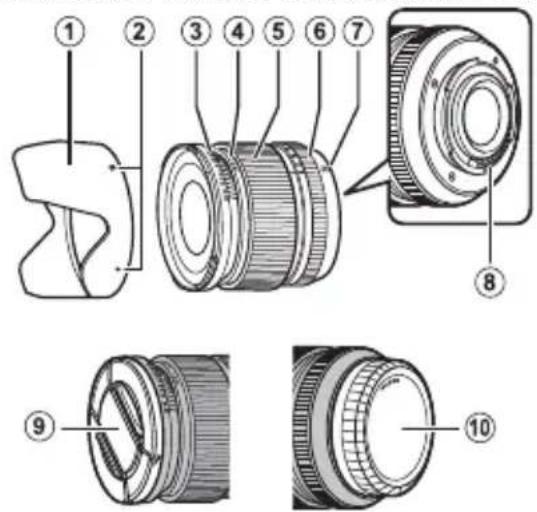
① Lens hood
② Mounting marks
③ Depth-of-fi eld indicator
④ Distance indicator
⑤ Focus ring
⑥ Aperture ring
⑦ Mounting marks (focal length)
⑧ Lens signal contacts
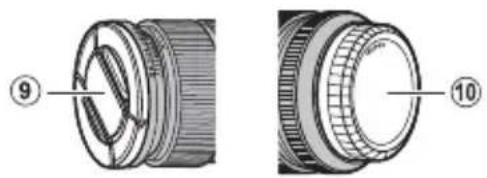
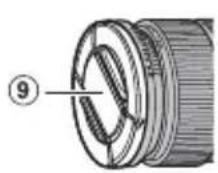
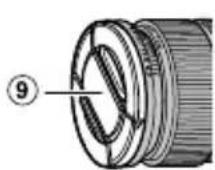
⑨ Front lens cap
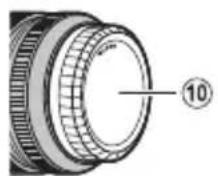
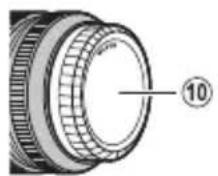
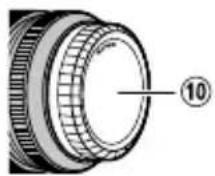
⑩ Rear lens cap
① The lens mount includes a rubber ring to ensure that the lens remains dust- and splash-proof. The ring can be replaced for a fee at any FUJIFILM service center (XF16mmF1.4 R WR only).
Supplied Accessories
- Front lens cap
-
Rear lens cap
-
Lens hood
- Cloth wrapping
ENGLISH
EN-5
Attaching the Lens
See the camera manual for information on attaching and removing lenses. Note that this product is not compatible with X mount fi lm cameras.
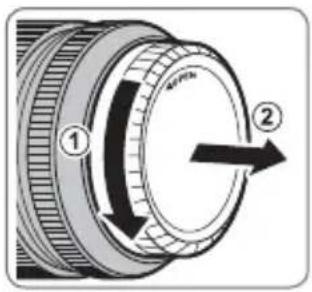
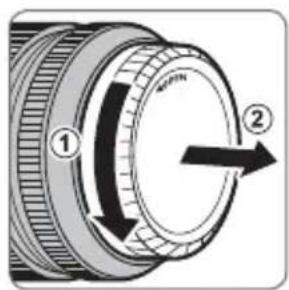
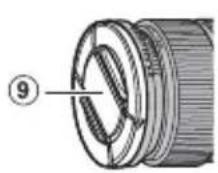
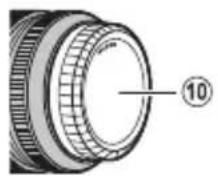
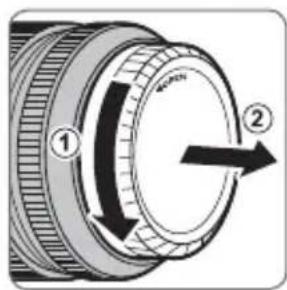
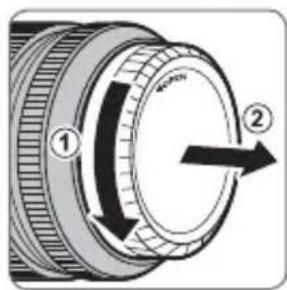
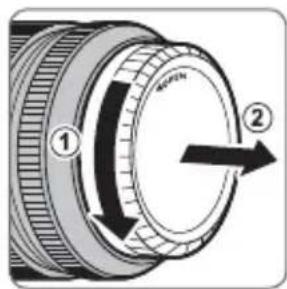
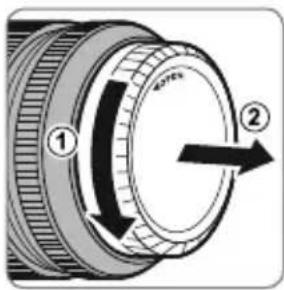
Removing the Caps
Remove the caps as shown.

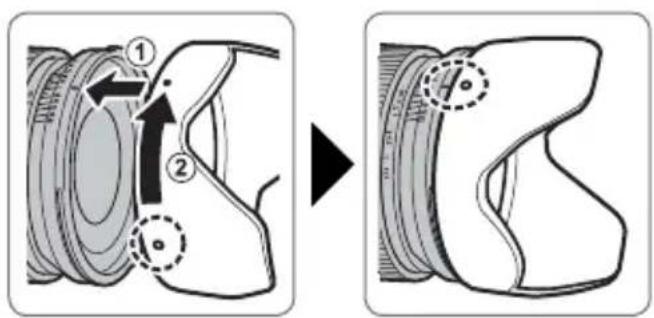
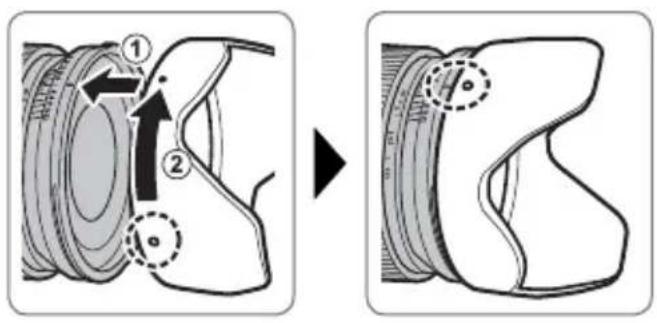
Attaching the Hood
When attached, lens hoods reduce glare and protect the front lens element.
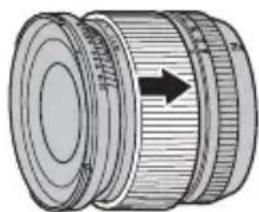
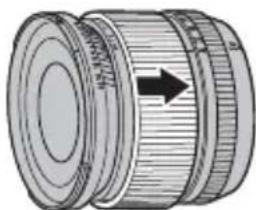
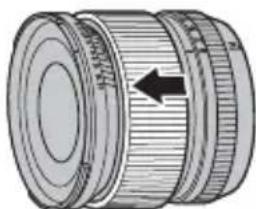
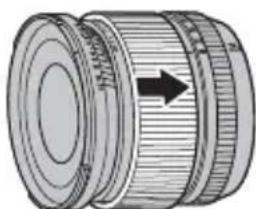
The Focus Ring
- Slide the focus ring to the front for autofocus.
- Slide the focus ring to the back for manual focus.


To adjust focus, rotate the focus ring while viewing the effects in the camera display. The focus distance and depth-of-fi eld indicators can be used to assist manual focus.
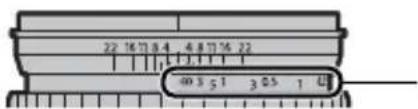
The Depth-of-Field Indicator
The depth-of-fi eld indicator shows the approximate depth of fi eld (the distance in front of and behind the focus point that appears to be in focus).

The illustration shows the XF14mmF2.8 R.
Regardless of the focus mode selected with the camera, manual focus can not be used when the focus ring is set for autofocus.
Specifications
| Type XF14mmF2.8 R XF16mmF1.4 R WR XF23mmF1.4 R | |||
| Lens construction 10 elements in 7 groups | (includes 2 aspherical and 3 extra low dispersion elements) | 13 elements in 11 groups (includes 2 aspherical and 2 extra low dispersion elements) | 11 elements in 8 groups (includes 1 aspherical elements) |
| Focal length (35 mm format equivalent) | f=14 mm (21 mm) | f=16 mm (24 mm) | f=23 mm (35 mm) |
| Angle of view 90.8° 83.2° 63.4° | |||
| Max. aperture f/2.8 f/1.4 | f/1.4 | ||
| Min. aperture f/22 f/16 | f/16 | ||
| Aperture controlNumber of bladesStop size | 7 (rounded diaphragm opening)1⁄3 EV (19 stops) | 9 (rounded diaphragm opening)1⁄3 EV (22 stops) | 7 (rounded diaphragm opening)1⁄3 EV (22 stops) |
| Focus range | Normal: 30 cm-infinityMacro: 18 cm-infinity | Normal: 15 cm-infinityMacro: 15 cm-infinity | Normal: 0.6 m-infinityMacro: 28 cm-infinity |
| Max. magnification | 0.12× | 0.21× | 0.1× |
| External dimensions: Diameter × Length* (approx.)* distance from camera lens mount flange | ∅65.0×58.4 mm | ∅73.4×73.0 mm | ∅72.0×63.0 mm |
| Weight* (approx.) * excluding caps and hoods | 235 g | 375 g | 300 g |
| Filter size | ∅58 mm | ∅67 mm | ∅62 mm |
① Improvements may result in unannounced changes to specifications and appearance.
① Owing to how this lens is constructed, the "Distance indicator" displayed by the camera may in some cases differ from the actual focus distance. Use the "Distance indicator" as a guide only.
EN-8 ENGLISH
Pour votre sécurité
http://www.fujifilm.com/support/digital_cameras/software/#firmware
XF14mmF2.8 R/XF16mmF1.4 R WR/XF23mmF1.4 R
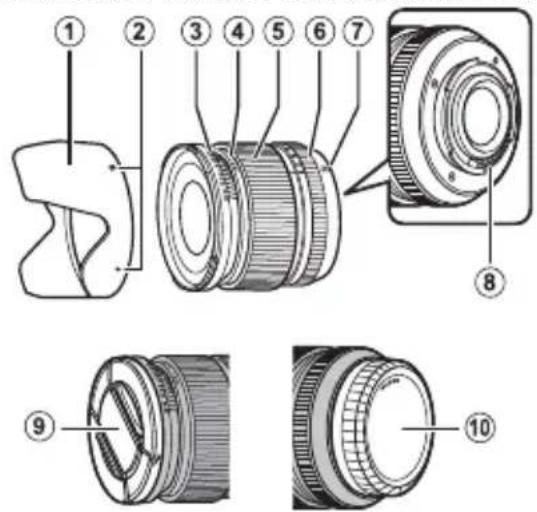

http://www.fujifilm.com/support/digital_cameras/software/#firmware
XF14mmF2.8 R/XF16mmF1.4 R WR/XF23mmF1.4 R


DE-6 DEUTSCH
Der Fokusring
http://www.fujifilm.com/support/digital_cameras/software/#firmware
XF14mmF2.8 R/XF16mmF1.4 R WR/XF23mmF1.4 R

ES-6 ESPAÑOL
http://www.fujifilm.com/support/digital_cameras/software/#firmware
XF14mmF2.8 R/XF16mmF1.4 R WR/XF23mmF1.4 R


De zonnekap bevestigen
NL-6 NEDERLANDS
De scherpstelring

http://www.fujifilm.com/support/digital_cameras/software/#firmware
XF14mmF2.8 R/XF16mmF1.4 R WR/XF23mmF1.4 R


① Motljusskydd
② Monteringsmarkeringar
③ Indikator för skärpedjup
④ Avständsindikator
⑤ Fokusring
⑥ Bländarring
⑦ Monteringsmarkeringar (brännvidd)
⑧ Objektivsignalkontakter
⑨ Främre objektivlock
⑩ Bakre objektivlock

Fokusringen
http://www.fujifilm.com/support/digital_cameras/software/#firmware
XF14mmF2.8 R/XF16mmF1.4 R WR/XF23mmF1.4 R


① Solblender
② Monteringsmerker
③ Dybdeskarphetsindikator
④ Avstandsindikator
⑤ Fokusring
⑥ Blenderring
⑦ Monteringsmerker (brennvidde)
⑧ Objektivets signalkontakter
⑨ Fremre objektivdeksel
⑩ Bakre objektivdeksel
① Objektivfestet har en gummiring som sikrer at objektivet holder seg støv- og sprutsikkert. Ringen kan byttes ut mot en avgift på ethvert FUJIFILM servicesenter (kun XF16mmF1.4 R WR).

Fokusringen
• Skyv fokusringen forover for automatisk fokusering.
• Skyv fokusringen bakover for manuell fokusering.

http://www.fujifilm.com/support/digital_cameras/software/#firmware
XF14mmF2.8 R/XF16mmF1.4 R WR/XF23mmF1.4 R

Tarkennusrengas
http://www.fujifilm.com/support/digital_cameras/software/#firmware
XF14mmF2.8 R/XF16mmF1.4 R WR/XF23mmF1.4 R
Установка бленды
RU-6 РУССКИЙ
http://www.fujifilm.com/support/digital_cameras/software/#firmware
XF14mmF2.8 R/XF16mmF1.4 R WR/XF23mmF1.4 R


Montaggio paraluce
IT-6 ITALIANO
http://www.fujifilm.com/support/digital_cameras/software/#firmware
XF14mmF2.8 R/XF16mmF1.4 R WR/XF23mmF1.4 R


Fokusringen
- Skub fokusringen mod forsiden for autofokus.

- Skub fokusringen mod bagsiden for manuelt fokus.

For at justere fokus skal du dreje fokusringen, mens du får vist eff ekterne i kameravisningen. Indikatorerne for fokusafstand og dybdeskarphed kan anvendes til at støtte manuelt fokus.
Indikator for dybdeskarphed
http://www.fujifilm.com/support/digital_cameras/software/#firmware
XF14mmF2.8 R/XF16mmF1.4 R WR/XF23mmF1.4 R

PL-6 POLSKI
Krąg Ostrości
http://www.fujifilm.com/support/digital_cameras/software/#firmware
XF14mmF2.8 R/XF16mmF1.4 R WR/XF23mmF1.4 R


安装遮光罩
对焦环
- 将对焦环滑至前端可进行自动对焦。

- 将对焦环滑至后端可进行手动对焦。

http://www.fujifilm.com/support/digital_cameras/software/#firmware
XF14mmF2.8 R/XF16mmF1.4 R WR/XF23mmF1.4 R



安裝遮光罩
對焦環
- 將對焦環滑至前端可進行自動對焦。

- 將對焦環滑至後端可進行手動對焦。

http://www.fujifilm.com/support/digital_cameras/software/#firmware
XF14mmF2.8 R/XF16mmF1.4 R WR/XF23mmF1.4 R



후드부착
초점링
تركيب الاددسة
أgzاء الاعدسة
① واقية الابعسة
② علامات التركيب
③ ypoشر عمق المجال
④ ypoشر المسافة
⑤ حلیقة الاتركیز
⑥ حليقة الافتحة
⑩⑩ covering aheadside aux Guinea في
XF23mmF1.4 R/XF16mmF1.4 R WR/XF14mmF2.8 R
الإكسوارات المرفقة


- FOR YOUR SAFETY
- BE SURE TO READ THESE NOTES BEFORE USE
- SAFETY NOTES
- ABOUT THE ICONS
- TESTED TO COMPLY WITH FCC STANDARDS FOR HOME OR OFFICE USE
- FOR CUSTOMERS IN CANADA
- CAN ICES-3 (B)/NMB-3(B)
- IMPORTANT SAFETY INSTRUCTIONS
- DISPOSAL OF ELECTRICAL AND ELECTRONIC EQUIPMENT IN PRIVATE HOUSEHOLDS PRIVATE HOUSEHOLDS
- AUSTRALIAN RCM
- BEFORE USING THIS PRODUCT
- PRODUCT CARE
- PARTS OF THE LENS
- SUPPLIED ACCESSORIES
- ATTACHING THE LENS
- REMOVING THE CAPS
- ATTACHING THE HOOD
- THE FOCUS RING
- THE DEPTH-OF-FIELD INDICATOR
- POUR VOTRE SÉCURITÉ
- DER FOKUSRING
- DE ZONNEKAP BEVESTIGEN
- DE SCHERPSTELRING
- FOKUSRINGEN
- TARKENNUSRENGAS
- УСТАНОВКА БЛЕНДЫ
- MONTAGGIO PARALUCE
- INDIKATOR FOR DYBDESKARPHED
- KRĄG OSTROŚCI
- 安装遮光罩
- 对焦环
- 安裝遮光罩
- 對焦環
- 후드부착
- 초점링
- تركيب الاددسة
Brand : FUJIFILM
Model : FUJINON XF 16mm F1.4 R WR
Category : Lens