
Fujinon XF 23mm f/2 R WR - Lens FUJIFILM - Free user manual and instructions
Find the device manual for free Fujinon XF 23mm f/2 R WR FUJIFILM in PDF.


| Product Type | Camera Lens |
| Brand | Fujifilm |
| Model | Fujinon XF 23mm f/2 R WR |
| Lens Mount | Fujifilm X Mount |
| Focal Length | 23mm (35mm equivalent: 35mm) |
| Maximum Aperture | f/2 |
| Minimum Aperture | f/16 |
| Lens Construction | 10 elements in 6 groups (2 aspherical elements) |
| Angle of View | 63.4° |
| Aperture Blades | 9 (rounded diaphragm) |
| Minimum Focus Distance | 22 cm (8.7 in) |
| Maximum Magnification | 0.13x |
| Filter Size | 43 mm |
| Dimensions (Diameter x Length) | 60.0 mm × 51.9 mm (2.4 in × 2.0 in) |
| Weight | 180 g (6.3 oz) |
| Weather Resistance | Yes (WR - Weather Resistant) |
| Focus Motor | Stepping motor (Internal focus) |
| Image Stabilization | No (relies on camera body) |
| Maintenance | Clean with lens cloth; store in dry place |
| Safety | Do not expose to extreme temperatures |
| Spare Parts / Reparability | Contact Fujifilm service center |
Frequently Asked Questions - Fujinon XF 23mm f/2 R WR FUJIFILM
User questions about Fujinon XF 23mm f/2 R WR FUJIFILM
0 question about this device. Answer the ones you know or ask your own.
Ask a new question about this device
Download the instructions for your Lens in PDF format for free! Find your manual Fujinon XF 23mm f/2 R WR - FUJIFILM and take your electronic device back in hand. On this page are published all the documents necessary for the use of your device. Fujinon XF 23mm f/2 R WR by FUJIFILM.
USER MANUAL Fujinon XF 23mm f/2 R WR FUJIFILM
Be sure to read these notes before use
Safety Notes
Thank you for your purchase of this product. For repair, inspection, and internal testing, contact your FUJIFILM dealer.
• Make sure that you use the lens correctly. Read these safety notes and the camera Owner's Manual carefully before use.
• After reading these safety notes, store them in a safe place.
About the Icons
The icons shown below are used in this document to indicate the severity of the injury or damage that can result if the information indicated by the icon is ignored and the product is used incorrectly as a result.
| WARNING | This icon indicates that death or serious injury can result if the information is ignored. | |
| CAUTION | This icon indicates that personal injury or material damage can result if the information is ignored. |
The icons shown below are used to indicate the nature of the instructions which are to be observed.
| Triangular icons tell you that this information requires attention ("Important"). | |
| Circular icons with a diagonal bar tell you that the action indicated is prohibited ("Prohibited"). | |
| Filled circles with an exclamation mark indicate an action that must be performed ("Required"). |
| WARNING | |
| Do not immerse in or expose to water. Failure to observe this precaution can cause a fire or electric shock. | |
| Do not disassemble (do not open the case). Failure to observe this precaution can cause fire, electric shock, or injury due to product malfunction. | |
| Should the case break open as the result of a fall or other accident, do not touch the exposed parts. Failure to observe this precaution could result in electric shock or in injury from touching the damaged parts. Remove the camera battery immediately, taking care to avoid injury or electric shock, and take the product to the point of purchase for consultation. | |
| [6723] WARNING | |
| Do not place on unstable surfaces. The product may fall, causing injury. | |
| Do not view the sun through the lens or camera viewfinders.Failure to observe this precaution can cause permanent visual impairment. | |
| ! CAUTION | |
| Do not use or store in locations that are exposed to steam, or smoke or are very humid or extremely dusty. Failure to observe this precaution can cause fire or electric shock. | |
| Do not leave in direct sunlight or in locations subject to very high temperatures, such as in a closed vehicle on a sunny day.Failure to observe this precaution can cause fire. |

For Customers in the U.S.A.
Tested To Comply With FCC Standards FOR HOME OR OFFICE USE
FCC Statement: This device complies with Part 15 of the FCC Rules. Operation is subject to the following two conditions: (1) This device may not cause harmful interference, and (2) this device must accept any interference received, including interference that may cause undesired operation.
CAUTION: This equipment has been tested and found to comply with the limits for a Class B digital device, pursuant to Part 15 of the FCC Rules. These limits are designed to provide reasonable protection against harmful interference in a residential installation. This equipment generates, uses, and can radiate radio frequency energy and, if not installed and used in accordance with the instructions, may cause harmful interference to radio communications. However, there is no guarantee that interference will not occur in a particular installation. If this equipment does cause harmful interference to radio or television reception, which can be determined by turning the equipment off and on, the user is encouraged to try to correct the interference by one or more of the following measures:
- Reorient or relocate the receiving antenna.
- Increase the separation between the equipment and receiver.

EN-2
ENGLISH
- Connect the equipment into an outlet on a circuit different from that to which the receiver is connected.
- Consult the dealer or an experienced radio/TV technician for help.
- You are cautioned that any changes or modifications not expressly approved in this manual could void the user's authority to operate the equipment.
Notes on the Grant: To comply with Part 15 of the FCC Rules, this product must be used with a Fujifilm-specified ferrite-core A/V cable, USB cable, and DC supply cord.
For Customers in Canada
CAN ICES-3 (B)/NMB-3(B)
CAUTION: This Class B digital apparatus complies with Canadian ICES-003.
IMPORTANT SAFETY INSTRUCTIONS
- Read these instructions.
- Keep these instructions.
- Heed all warnings.
- Follow all instructions.
- Do not use this apparatus near water (excluding waterproof products).
- Clean only with a dry cloth.
- Do not block any ventilation openings. Install in accordance with the manufacturer's instructions.
- Do not install near any heat sources such as ra-
diators, heat registers, stoves, or other apparatus (including amplifiers) that produce heat.
- Protect the power cord from being walked on or pinched particularly at plugs, convenience receptacles, and the point where they exit from the apparatus.
- Only use attachments/accessories specified by the manufacturer.
- Unplug this apparatus during lightning storms or when unused for long periods of time.
- Refer all servicing to qualified service personal. Servicing is required when the apparatus has been damaged in any way, such as power supply cord or plug is damaged, liquid has been spilled or objects have fallen into the apparatus, the apparatus has been exposed to rain or moisture, does not operate normally, or has been dropped.
Disposal of Electrical and Electronic Equipment in Private Households
In the European Union, Norway, Iceland and Liechtenstein: This symbol on the product, or in the manual and in the warranty, and/or on its packaging indicates that this product shall not be treated as household waste. Instead it should be taken to an applicable collection point for the recycling of electrical and electronic equipment.

By ensuring this product is disposed of correctly, you will help prevent potential negative consequences to the environment and human health, which could otherwise be caused by inappropriate waste handling of this product.
The recycling of materials will help to conserve natural resources. For more detailed information about recycling this product, please contact your local city office, your household waste disposal service or the shop where you purchased the product.
In Countries Outside the European Union, Norway, Iceland and Liechtenstein: If you wish to discard this product, including the batteries or accumulators, please contact your local authorities and ask for the correct way of disposal.
Australian RCM

ENGLISH
EN-3

Before Using This Product
Some lens features are not available with older versions of the camera firmware. Be sure to update the camera firmware to the latest version. Instructions on viewing the camera firmware version and updating camera firmware are available from the following website:
http://www.fujifilm.com/support/digital_cameras/software/#firmware
If you do not have access to a computer, support is available from the local distributor listed in the "FUJIFILM Worldwide Network" material provided with your camera.
Product Care
- When using a lens hood, do not pick up or hold the camera using only the hood.
-
Keep the lens signal contacts clean.
-
Use a blower to remove dust and lint from the glass surfaces of the lens or filter. To remove smudges and fingerprints, apply a small amount of lens cleaner to a soft, clean cotton cloth or lens-cleaning tissue and clean from the center outwards using a circular motion, taking care not to leave smears or touch the glass with your fingers.
- Never use organic solvents such as paint thinner or benzene to clean the lens.
- Attach the front and rear caps when the lens is not in use.
- Store the lens and filter in cool, dry locations to prevent mold and rust. Do not store in direct sunlight or with naphtha or camphor moth balls.
- Keep the lens dry. Rusting can cause irreparable damage. Wipe off rain and water droplets.
• Leaving the lens in extremely hot locations could cause damage or warping.
Parts of the Lens
XF35mmF2 R WR/XF23mmF2 R WR

① Lens hood (XF35mmF2 R WR)
② Lens hood (XF23mmF2 R WR)
③ Focus ring
④ Aperture ring
⑤ Mounting marks (focal length)
⑥ Lens signal contacts
⑦ Front lens cap
⑧ Rear lens cap
① The lens mount includes a rubber ring to ensure that the lens remains dust- and splash-proof. The ring can be replaced for a fee at any FUJIFILM service center.
Supplied Accessories
- Front lens cap
-
Rear lens cap
-
Lens hood
- Cloth wrapping
ENGLISH
EN-5
Attaching the Lens
See the camera manual for information on attaching and removing lenses. Note that this product is not compatible with X mount film cameras.
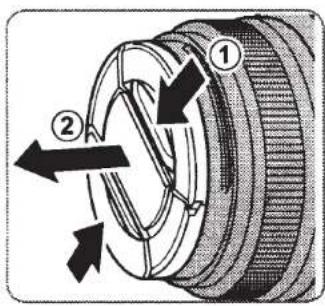
Removing the Caps
Remove the caps as shown.

Aperture ring
At settings other than A, you can adjust aperture by rotating the lens aperture ring (exposure modes A and M).

Attaching the Hood
When attached, lens hoods reduce glare and protect the front lens element.
XF35mmF2 R WR

Warning
If you attach the hood too tightly after attaching a filter to the lens, the filter may remain stuck to the hood when the hood is removed. Do not attempt to forcibly separate the hood and filter, as the filter threads could injure your hands. Cover both the hood and filter with silicone jar openers or the like and unscrew them using the palms of your hands.
XF23mmF2 R WR
The lens cap attaches to the hood when the hood is in place.

① You may not be able to attach the hood over thick lens filters. Thin filters are recommended.
ENGLISH
EN-7
Specifications
| Type | XF35mmF2 R WR | XF23mmF2 R WR |
| Lens construction | 9 elements in 6 groups (includes 2 aspherical elements) | 10 elements in 6 groups (includes 2 aspherical elements) |
| Focal length (35 mm format equivalent) | f=35 mm (53 mm) | f=23 mm (35 mm) |
| Angle of view | 44.2° | 63.4° |
| Max. aperture | f/2 | f/2 |
| Min. aperture | f/16 | f/16 |
| Aperture control | ||
| Number of blades | 9 (rounded diaphragm opening) | 9 (rounded diaphragm opening) |
| Stop size | 1/3 EV (19 stops) | 1/3 EV (19 stops) |
| Focus range | 35 cm – infinity | 22 cm – infinity |
| Max. magnification | 0.135 × | 0.13 × |
| External dimensions: Diameter × Length* (approx.) * distance from camera lens mount flange | ∅60×45.9 mm | ∅60×51.9 mm |
| Weight* (approx.) * excluding caps and hoods | 170 g | 180 g |
| Filter size | ∅43 mm | ∅43 mm |
① Improvements may result in unannounced changes to specifications and appearance.
① Owing to how this lens is constructed, the "Distance indicator" displayed by the camera may in some cases differ from the actual focus distance. Use the "Distance indicator" as a guide only.
EN-8
ENGLISH
富士フイルム株式会社
Contact your local distributor (see list below) for technical support (S) or repairs (R). Please present the warranty and purchase receipt when requesting repairs; refer to the warranty card for the conditions of the warranty. Technical support may not be available for models not handled by the local distributor. The following information is subject to change without notice.
NORTH AMERICA
| Canada | FUJIFILM North America Corporation | S | TEL 1-800-263-5018 fcandigitalcameras@fujifilm.com |
| R | TEL 1-800-263-5018 fcanrepair@fujifilm.com | ||
| U.S.A. | FUJIFILM North America Corporation | S | TEL 800-800-3854 digitalinfo@fujifilm.com |
| R | TEL 800-659-3854 | ||
| Mexico | Fujifilm de Mexico, S.A. de C.V. | S | TEL +52 (55) 5263 5500 soporte@fujifilm.com.mx |
| R | TEL +52 (55) 5366 5150 camaras@fujifilm.com.mx |
CENTRAL AND SOUTH AMERICA
| Argentina | Imagen e informacion S.A. | S/R TEL 54-11-4737-1030 servtec@imageneinformacion.com.ar |
| Bolivia | Reifschneider Bolivia Ltda. | S/R TEL +591 33 441129 info@reifschneider.com.bo |
| Brazil | FUJIFILM do Brasil Ltda. | S/R TEL 0800 7706627 camarasdigitais@fujifilm.com.br |
| Chile | Reifschneider SA | S/R TEL 56-2-6781111 adobson@reifschneider.cl orserviciotecnico@reifschneider.cl |
| Colombia | FUJIFILM Colombia S.A.S. | S/R TEL 018000963768 ffco.callcenter@fujifilm.com |
| Ecuador | Importaciones Espacri Cia. Ltda. | S/R TEL +593 72 835 526 dtecnico@fujifilm.com.ec |
| Paraguay | Magobe S.A. | S/R TEL +595-21-281948 larson@rieder.net.py |
| Peru | Procesos de Color S.A. | S/R TEL +51 14 338000 serviciotecnico@fujifilm.com.pe |
| Uruguay | Service y Proyectos | S/R TEL (05982) 901 0852 serviceproyecto@adinet.com.uy |
| Kiel S.A. | S/R TEL (05982) 419 4542 kiel@fujifilm.com.uy | |
| Venezuela | C. Hellmund & Cia Sa | S/R TEL 58-212-2022300 helimund@hellmund.com orinfoventas@hellmund.com |
EUROPE
| Austria | FUJIFILM Recording Media GmbH AUSTRIA | S/R | TEL 00800 38543854service@fujifilm-digital.com |
| Belgium | FUJIFILM BELGIUM NV | S/R | TEL 3237788220 info_feb@fujifilm.eu |
| Croatia | I&I d.o.o. | S/R | TEL +385 1 2316-228 info@fujifilm.hr |
| Cyprus | PMS Imaging Distributors Ltd | S | TEL +35722460056 info@fujifilm.com.cy |
| R | TEL +35722314719 dorosn@logosnet.cy.net | ||
| Czech Republic | Support and warranty servis | S | TEL 00420 234 703 431 dcservice@fujifilm.cz |
| After warranty servis | R | TEL 00420 222 721 525 awh@awh.cz | |
| Denmark | Fujifilm Nordic Danmark | S | TEL 0045 7877 5872 support@fujifilmnordic.com |
| R | TEL 0045 7877 5872 service@fujifilmnordic.com | ||
| Estonia | Infotech Service OÜ | S/R | TEL +372 633 0044 info@infotech.ee |
| Finland | FUJIFILM Nordic AB | S | TEL +358 9 4270 5835 support@fujifilmnordic.com |
| R | TEL +358 9 4270 5835 service@fujifilmnordic.com | ||
| France | FUJIFILM France | S/R | TEL +33 1 30 68 67 66 pm2s@pm2s.fr |
| Germany | FUJIFILM Electronic Imaging Europe GmbH | S/R | TEL 00800 38543854 service@fujifilm-digital.com |
| Greece | FUJIFILM HELLAS S.A. | S/R | TEL 0030 210 9404100 fujifilm@fujifilm.gr |
| Hungary | Fujifilm Hungary Ltd. | S | TEL +3619202800 fujifilm.hu |
| R | TEL +3613633777 info@foto-paradicsom.hu | ||
| Iceland | Icephoto (Ljosmyndavorur) | S/R | TEL +354 568 0450 framkollun@fujifilm.is |
| Ireland | Fujifilm Ireland | S/R | TEL +353 1 8820200 info@fujifilm.ie |
| Italy | FujiFilm Italia S.p.a. | S/R | TEL +39 02 33490345 fujifilm@livolsi.it |
| Latvia | Baltexfilm SIA | S/R | TEL +371 67844660 service@fujifilm.lv |
| Lithuania | Fujifilm Lithuania | S/R | TEL +370 52395909 service@fujifilm.lt |
| Malta | Ciancio (1913) Co.Ltd. | S/R | TEL +356 21 480500 info@fujifilm.com.mt |
| Norway | FUJIFILM Nordic AB | S | TEL +47 22 33 24 02 support@fujifilmnordic.com |
| R | TEL +47 55 39 38 80 service@fujifilmnordic.com | ||
| Poland | FUJIFILM Europe GmbH (Sp. z o.o.) Oddział w Polsce | S | TEL +48 225781112 serwis@fujifilm.pl |
| R | TEL +48 225781114-15 serwis@fujifilm.pl | ||
| Portugal | FUJIFILM Europe GmbH, Sucursal em Portugal | S | TEL +351 22 619 42 00 sac@fujifilm.pt |
| R | TEL +351 22 906 98 40 assist.camaras@pm2s.pt | ||
| Romania | CTS-Cardinal Top Systems Ltd | S/R | TEL +40 212300982 or +40 212302683service@fujifilmservice.ro |
| Russia | ZAO "FUJIFILM-RU" | S/R | TEL 8-495-545-38-54 (По Москве)8-800-700-38-54 (Для звонков из России)http://www.fujifilm.eu/ru/podderzhka/cifrovye-kamery-rossija/ |
| Slovakia | Fujifilm Europe GmbH - organizačná zložka | S/R | TEL +421 2 33 595 119servis@fujifilm.sk |
| Slovenia | Infocona d.o.o. | S/R | TEL +386-41-737-337 info@infocona.si |
| Spain | FUJIFILM Europe GmbH, Sucursal en España | S/R | TEL 902012535tallersat@fujifilm.es |
| Sweden | FUJIFILM Nordic AB | S | TEL +46 8 503 864 99 support@fujifilmnordic.com |
| R | TEL +46 8 503 864 80 service@fujifilmnordic.com | ||
| Switzerland / Lichtenstein | Fujifilm (Switzerland) AG | S/R | TEL +41 44 855 51 85RepairCenter@fujifilm.ch |
| The Netherlands | FUJIFILM Electronic Imaging Nederland | S/R | TEL 00800 38543854 helpdesk@fujifilm-digital.nl |
| Turkey | FUJIFILM Dis Ticaret A.S. | S/R | TEL +90 850 333 33 34 servis@fujifilm.com.tr |
| U.K. | FUJIFILM UK Ltd. | S | TEL +44 (0)844 553 2322 fujitec@fuji.co.uk |
| R | TEL +44 (0)844 553 2323 fujitec@fuji.co.uk |
EUROPE
| Ukraine | FUJIFILM Ukraine LLC | S | TEL +38 (044) 390 5929 ffua_info@fujifilm.eu |
| R | TEL +38 (0)-800-504-504 http://krok-ttc.com/ | ||
| Uzbekistan/Kazakhstan/Kyrgyzstan | JEL Corporation | S/R | TEL +7 727 264 2222 kamol@jelcorp.com |
MIDDLE EAST
| Bahrain | Abu Issa Brother Trading | S/R TEL 00 973 1758 0455 sateesh.kumar@abuissa.com |
| Iran | Tehran Fuka Co. | S/R TEL (+98-21) 22254810 fuka@neda.net |
| Israel | Shimone Group Ltd. | S TEL (+) 972 3 9250666digital@fujifilm.co.il or lior@shimone.com |
| R TEL (+) 972 3 9250683khaim@shimone.com or haimy@shimone.com | ||
| Jordan | Grand Stores | S/R TEL 009626-5829157 Digital@grandstoresyo.com |
| Kuwait | Boushahri Group W.L.L. | S/R TEL +965 18855 photo@boushahrigroup.com |
| Lebanon | Fototek S.A.R.L. | S/R TEL +961 1 252474 fototek@antakiholding.com |
| Qatar | Techno Blue | S TEL +974 4466175 prabu@techno-blue.com |
| R TEL +974 44327061 cameratech@techno-blue.com | ||
| Saudi Arabia | Emam Distribution Co. Ltd. | S TEL 0096626978756 khaled@fujifilm.com.sa |
| R TEL 0096626978756 service@fujifilm.com.sa | ||
| Syria | I am syria | S/R TEL +963 11 21 444 90 omar@iamsyria.com |
| U.A.E. | Grand Stores | S TEL +971-4-2823700 photography@granastores.ae |
| R TEL 009714-2213700 repair@grandstores.ce | ||
| Yemen | Al-Haidary Trading | S TEL 00967-1-503980 haidary@y.net.ye |
| R TEL 00967-1-503977 haidary@y.net.ye |
AFRICA
| Algeria | EURL ALKAFILM | S/R TEL +213 2160 59 86 direction@alkafilm.com |
| D R Congo | FIS-FUJI IMAGE SERVICE | S TEL +243 818138001 girish@fujifilm.cd |
| Egypt | Foto Express Egypt | S/R TEL +20 2 37762062 m.farag@fotoexpress.com.eg |
| Kenya | Fuji Kenya Ltd | R TEL (254-20)4446265-8 info@fujifilm.co.ke |
| Libya | DataTech/(Taqniyat Al-Bayanat) | S TEL 00218217200227 fujifilm@datatech.ly |
| R TEL 00218926555922 | ||
| Madagascar | Photorama | S/R TEL 261-320729835 photorama@blueline.mg |
| Mauritius | HAREL MALLAC BUREAUTIQUE LTD | S/R TEL +230-2073200 christian.mamotte@hmbureautique.mu |
| Morocco | ARPHOT - MAROC. | S/R TEL +212 5 22 23 45 67 fujifilm@arphot.rma |
| South Africa | Cameratek CC. | S/R TEL +27 11 251 2400 www.cameratek.co.za |
| Tanzania | Anisuma Service Centre | S TEL +255 22 2183905 service_tanzania@anisuma.com |
| Tunisia | SAWARBY-FUJIFILM Tunisia. | S/R TEL +216 71 230 530 sawarby@planet.tn |
| Uganda | Anisuma Service Centre | S TEL +256 414 232527 service@anisuma.com |
OCEANIA
| Australia | FUJIFILM Australia Pty Ltd | S/R TEL 1800 226 355 digital@fujifilm.com.au |
| Fiji | Brijlal & Co. Ltd | S/R TEL (679)3304133 kapadia@connect.com.tj |
| New Caledonia | Phocidis SARL | S/R TEL (00 687) 25-46-35 phocidis@phocidis.nc |
| New Zealand | Fujifilm NZ Ltd | S/R TEL +64-9-4140400 glenn.beaumont@fujifilm.co.nz |
| Papua New Guinea | Oceania PNG Limited | S TEL +675 3256411 oceania@daltron.com.pg |
ASIA
| Bangladesh | Graphic Machinery & Equipment Ltd. | S/R | TEL +880(2)985 4417 or +880(2)985 4418info@camera.com.bd |
| Hong Kong | Fuji Photo Products Co., Ltd. | S/R | TEL (852)2406 3287 rsd@chinahkphoto.com.hk |
| India | FUJIFILM INDIA PRIVATE LIMITED | S/R | TEL +91-124-4325500 Tollfree 18002000608contact@fujifilmindia.com |
| Indonesia | PT. FUJIFILM INDONESIA | S/R | TEL +62 21 5724069 ffid.support@fujifilm.com |
| Malaysia | FUJIFILM (Malaysia) Sdn. Bhd. | S/R | TEL +603-55698388 camera.service@fujifilm.com |
| Mongol | Tavan Bogd Group, Mongolia | S/R | TEL +976-99052517 or +976-91118833batkhuyag@tavanbogd.com or gantsolmon@tavanbogd.com |
| Pakistan | Fujifilm Pakistan Pvt Ltd. | S | TEL 92-423-7358996 finepix@fujifilm.com.pk |
| R | TEL 92-42-7237704-6 abid@fujifilm.com.pk | ||
| Philippines | FUJIFILM Philippines Inc. | S/R | TEL +632-550-2420 local 803camera.services.ph@fujifilm.com |
| Singapore | FUJIFILM ASIA PACIFIC PTE LTD | S/R | TEL +65-63805540 fsin.camera-service@fujifilm.com |
| South Korea | FUJIFILM ELECTRONIC IMAGINGKOREA Co.,LTD. | S/R | TEL +82-1577-4793feik.cs@fujifilm.com |
| Sri Lanka | Hayleys Consumer Products Ltd. | S | TEL +94 777 390 805 siraj.perera@consumer.hayleys.com |
| R | TEL +94 11 2555 530 cafe.pixel@consumer.hayleys.com | ||
| Taiwan | Hung Chong Corp. | S/R | TEL 886-2-6602-8988 service@mail.hungchong.com.tw |
| Thailand | FUJIFILM (Thailand) Ltd. | S | TEL +662-2706000 ext. 752, 725preecha.worawathanachai@fujifilm.com oryaowaluck.salangsing@fujifilm.com |
| R | TEL +662-2706000 ext.761,762natthapuch.sornprasit@fujifilm.com | ||
| Vietnam | FUJIFILM VIETNAM Co.Ltd | S/R | TEL +84-8-3939-0845 ext, 106 ffvn.service@iujifilm.com |
| 日本 | 富士フイルム Finepixサポートセンター | S | TEL +81-50-3786-1060 |
| R | TEL +81-50-3786-1040 |
中国
富士胶片(中国)投资有限公司
http://www.fujifilm.com.cn/support/digital_cameras/digital_cameras.html


- BE SURE TO READ THESE NOTES BEFORE USE
- SAFETY NOTES
- ABOUT THE ICONS
- FOR CUSTOMERS IN THE U.S.A
- TESTED TO COMPLY WITH FCC STANDARDS FOR HOME OR OFFICE USE
- FOR CUSTOMERS IN CANADA
- CAN ICES-3 (B)/NMB-3(B)
- IMPORTANT SAFETY INSTRUCTIONS
- DISPOSAL OF ELECTRICAL AND ELECTRONIC EQUIPMENT IN PRIVATE HOUSEHOLDS
- AUSTRALIAN RCM
- BEFORE USING THIS PRODUCT
- PRODUCT CARE
- PARTS OF THE LENS
- SUPPLIED ACCESSORIES
- ATTACHING THE LENS
- REMOVING THE CAPS
- APERTURE RING
- ATTACHING THE HOOD
- XF35MMF2 R WR
- WARNING
- XF23MMF2 R WR
Brand : FUJIFILM
Model : Fujinon XF 23mm f/2 R WR
Category : Lens