BF 950 - Scale BEURER - Free user manual and instructions
Find the device manual for free BF 950 BEURER in PDF.



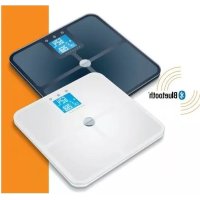
| Product type | Diagnostic impedance meter scale |
| Brand | Beurer |
| Model | BF 950 |
| Dimensions | 320 x 320 x 24 mm |
| Power supply | 4 AAA 1.5 V batteries |
| Maximum capacity | 180 kg (396 lb / 28 st) |
| Accuracy | Division 0.1 kg; repeatability ±0.4 kg; absolute ±1% +0.1 kg |
| Weight units | kg / lb / st |
| Measurement functions | Weight, BMI, body fat, body water, muscle mass, bone mass, BMR, AMR |
| Number of users | Up to 8 with individual memory |
| Internal memory | 30 measurements per user |
| Connectivity | Bluetooth Low Energy (2.4 GHz, range ~10 m) |
| Compatible app | beurer HealthManager Pro (iOS / Android) |
| LED motivator | Visual indicator of progress toward target weight (green/yellow/red) |
| Special functions | Pregnancy mode, tare function for infants, automatic user recognition |
| Display | LCD screen with initials, date, time, temperature |
| Material | ITO electrodes, tempered glass surface |
| Maintenance | Clean with a damp cloth and mild dish soap; do not immerse |
| Safety | Do not use with medical implants; avoid wet surfaces; do not exceed 180 kg |
| Included accessories | 4 AAA batteries, carpet feet, user manual, quick-start guides |
| Warranty | Refer to the included warranty card |
Frequently Asked Questions - BF 950 BEURER
User questions about BF 950 BEURER
0 question about this device. Answer the ones you know or ask your own.
Ask a new question about this device
Download the instructions for your Scale in PDF format for free! Find your manual BF 950 - BEURER and take your electronic device back in hand. On this page are published all the documents necessary for the use of your device. BF 950 by BEURER.
USER MANUAL BF 950 BEURER
EN Diagnostic bathroom scale
Instructions for use 18
FR Pese-personne impedancemetre
Mode d'emploi 31
ES Báscula diagnóstica
www.beurer.com/web/we-landingpages/de/cedeclarationofconformity.php.
14. GARANTIE
Read these instructions for use carefully. Observe the warnings and safety notes. Keep these instructions for use for future reference. Make the instructions for use accessible to other users. If the device is passed on, provide the instructions for use to the next user as well.
INCLUDED IN DELIVERY
1 x BF 950 diagnostic bathroom scale
1 x 4 x 1.5 V AAA batteries
1 x Feet for carpet
1 x These instructions for use
2 x Quick guide
Contents
- IMPORTANT SAFETY NOTES 19
2.SIGNS AND SYMBOLS 19
3.DEVICE DESCRIPTION 21 - INFORMATION 21
- INITIAL USE OF THE SCALE WITH THE APP 22
- INITIAL USE OF THE SCALE WITHOUT THE APP 23
- TAKING MEASUREMENTS 24
- EVALUATING THE RESULTS 25
- ADDITIONAL INFORMATION 28
- CLEANING AND MAINTENANCE 28
11.DISPOSAL 28 - WHAT IF THERE ARE PROBLEMS? 29
- TECHNICAL SPECIFICATIONS 30
- WARRANTY 30
1. !IMPORTANT SAFETY NOTES
WARNING
- The device is only intended for weighing humans and for recording your personal fitness data. The device is only intended for private use and not for medical or commercial purposes. The device must only be used for the purpose for which it was designed and in the manner specified in the instructions for use.
- Danger of suffocation! Keep packaging materials away from children.
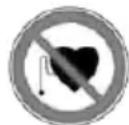
- The scale may not be used by people with medical implants (e.g. pacemakers), as this may affect their functionality.
- When pregnant, only use the scale in pregnancy mode (see the "Pregnancy mode" chapter).
- Danger of tipping! Never place the scale on an uneven surface. Never step onto the outer edge of the scale on just one side (see Figure B).
- Danger of slipping! Do not step onto the scale with wet feet (see Figure ). Do not step onto the scale when the surface is wet. Do not step onto the scale wearing socks.

Safety notes on handling batteries
- Always insert the batteries correctly, taking into account the polarity (+/ -). Keep batteries clean and dry and away from water. Always select the correct battery type.
- Never short-circuit batteries and battery compartment contacts.
- Never charge, forcibly discharge, heat, disassemble, deform, encapsulate or modify batteries.
- Never weld or solder on batteries.
- Never mix batteries of different manufacturers, capacities (new and used), size and type within a device.
- Risk of explosion! Failure to comply with the points mentioned above can result in personal injury, overheating, leakage, venting, breakage, explosion or fire.
- If a battery has leaked, put on protective gloves and clean the battery compartment with a dry cloth.
- If your skin or eyes come into contact with battery fluid, rinse the affected areas with water and seek medical assistance.
- Choking hazard! Keep batteries out of the reach of children. Seek medical attention immediately if swallowed.
- Never allow children to replace batteries without adult supervision.
- Store batteries away from metal objects in a well-ventilated, dry and cool place.
- Never expose batteries to direct sunlight or rain.
- Remove batteries from the device if it is not going to be used for a long period of time.
- Dispose of discharged batteries immediately and properly. Never dispose of batteries in fire.
- When disposing of batteries, keep batteries with different electrochemical systems separate.
2. SIGNS AND SYMBOLS
The following symbols are used on the device, in these instructions for use, on the packaging and on the type plate for the device:
| Warning Warning instruction indicating a risk of injury or damage to health | ||
| Important Safety note indicating possible damage to the device/accessory | ||
| Product information Note on important information | ||
| Read the instructions | ||
| Disposal in accordance with the Waste Electrical and Electronic Equipment EC Directive - WEEE | ||
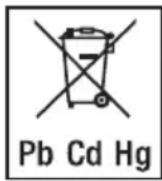
| Do not dispose of batteries containing hazardous substances with household waste | ||
| Separate the packaging elements and dispose of them in accordance with local regulations. | ||
| Marking to identify the packaging material. A = Material code, B = Material number: 1-7 = Plastics, 20-22 = Paper and cardboard | ||
| CE labelling This product satisfies the requirements of the applicable European and national directives. | ||
| UK CA | United Kingdom Conformity Assessed Mark | |
| EAC | The products demonstrably meet the requirements of the Technical Regulations of the EAEU. | |
| The device may not be used by people with medical implants (e.g. pacemakers), as this may affect their functionality. | ||
| Manufacturer | ||
| Separate the product and packaging elements and dispose of them in accordance with local regulations. | ||
| Importer symbol | ||
| 180 kg | Do not load the scale beyond 180 kg/396 lb/28 st. | Danger of slipping: do not step on the scale with wet feet. |
| Danger of tipping: position yourself in the centre of the weighing surface. | Place the scale on an even surface. No carpet. | |
3. DEVICE DESCRIPTION
1 Down button
2 SET button
3Up button
4 Electrodes (ITO)
5 LED motivator:
6 Display
Unit/Delete/Reset button
8 Battery compartment
9 Bluetooth® symbol, height in cm/ft, weight in kg/lb/st
10 BMI = Interpretation of weight
BF = Body fat in %
≈ = Body water in %
= Muscle percentage in %
= Bone mineral percentage in %
BMR = Basal metabolic rate in kcal
AMR = Active metabolic rate in kcal
^^ = Temperature in ^ / ^
11 Initials of the user
12 Tare function

= Pregnancy mode

= Female

= Male
13 Date (Y/M/D)
Time (12/24 h)
4. INFORMATION
The measurement principle
This scale works on the principle of B.I.A. (bioelectrical impedance analysis). This involves the calculation of body content in a matter seconds, using a current that cannot be felt, is completely harmless and does not pose any risk.
When this measurement of the electrical resistance (impedance) is considered alongside constants and/or individual values (age, height, gender, activity level), the body fat percentage and other variables in the body can be calculated. Muscle tissue and water conduct electricity well and therefore have a lower resistance. In contrast, bones and fat tissue have low conductivity as the fat cells and bones are barely able to conduct the current due to very high levels of resistance.
Please note that the values calculated by the diagnostic bathroom scale only represent an approximation of the actual medical analytical values for the body. Only a specialist doctor can precisely establish the body fat, body water, muscle percentage and bone structure using medical methods (e.g. computer tomography).
General tips
- As far as possible, weigh yourself at the same time everyday (ideally in the morning), after having been to the toilet, on an empty stomach and without clothing, in order to obtain results which can be compared.
- Important point regarding the measurement: the calculation of body fat may only be made when barefoot; the soles of the feet may be lightly dampened where appropriate.
- There must be no skin contact between your feet, legs, calves or thighs. Otherwise, the measurement cannot be taken correctly.
- Stand up straight and still during measurement.
- Wait a few hours after any physical exertion to which your body is unaccustomed.
- Wait approx. 15 minutes after getting up so that the water stored in your body can disperse.
- Remember that only the long-term trend is important. Short-term changes in weight within a few days are normally caused by loss of fluids; however, body water plays an important role in terms of well-being.
- The total of all analytical values comes to more than 100% because body water must not be added; body water is already included in the other analytical values (e.g. body fat, muscle percentage).
Limitations
When calculating body fat and the other values, unusual and implausible results may occur in the case of:
Children under approx. 5 years of age
Performance athletes and bodybuilders
- Persons with a fever, persons undergoing dialysis, persons with oedema symptoms and persons suffering from osteoporosis
- Persons taking cardiovascular medication (affecting the heart and vascular system)
- Persons taking vasodilative or vasoconstrictive medication
- Persons with significant anatomical abnormalities in their legs compared with their overall body height (leg length significantly shorter or longer)
5. INITIAL USE OF THE SCALE WITH THE APP
To calculate your body fat percentage and additional body values, you must save the personal user data on the scale.
The scale has 8 user memory spaces which allows, for example, you and your family members to save personal settings.
It is also possible to activate users via other mobile end devices on which the "beurer HealthManager Pro" app has been installed or by changing the user profile in the app.
Keep the smartphone close to the scale in order to maintain an active Bluetooth® connection during initial use.
- Activate Bluetooth® in your smartphone's settings.
- Insert the batteries and place the scale on a solid surface ("USE APP" will flash on the scale's LCD).
- Download the free "beurer HealthManager Pro" app from the Apple App Store (iOS) or from Google Play (Android).
- Start the app and follow the instructions.
- Enter the BF950-related data.
The following settings must be set or entered in the "beurer HealthManager Pro" app:
| User data Set values | |
| Gender | Male (♂); female (♀) If user is female: pregnant (♂) yes/no |
| Initials Max. 3-digit | git (A-Z, 0-9) |
| Height 40 to 250 | cm (1' 3.7" to 8' 2.4") |
| Date of birth | Year, month, day If user <2 years old: Tare function ♂) yes/no |
| Activity level | The medium-term and long-term perspective is decisive when selecting the activity level: |
| Physical activity | |
| 1 None. | |
| 2 Low: little and light physical exertion (e.g. going for walks, light gardening, simple gymnastics). | |
| 3 Medium: physical exertion, at least 2 to 4 times a week for 30 minutes each. | |
| 4 High: physical exertion, at least 4 to 6 times a week for 30 minutes each. | |
| 5 Very high: intensive physical exertion, intensive training or hard physical work for at least 1 hour every day. | |
| Target weight | 5-180 kg or no target. If "pregnant" has been selected under gender, no target weight can be specified. |
The app assigns the next free scale user memory (P01 - P08) to you.
6. Carrying out the initial measurement
For automatic personal recognition, the first measurement must be assigned to your personal user data. The app will prompt you to do this. Step onto the scale, ideally with bare feet, and ensure that you are standing still with equal weight distribution and with both feet on the electrodes. If you have selected the tare function, you must carry out weighing twice, once with and once without the child.
7. Now continue with chapter "Taking measurements".
6. INITIAL USE OF THE SCALE WITHOUT THE APP
We recommend using the app for the initial use and implementing all settings. See chapter 6. "Initial use of the scale with the app". Alternatively, you can configure settings (time, date, creating a user) on the scale itself.
Setting the time and date
- Remove the batteries from the protective packaging and insert the batteries into the scale, ensuring that the battery polarity is correct. "USE APP" flashes on the scale LCD.
- Place the scale on an even, hard surface; a hard surface is crucial for accurate measurements.
- Press the "SET" button.
- Use the “ ” buttons to set the date (year/month/day) and time (hour/minute) and confirm with the “SET” button.
- To change the weight unit (kg/lb/st), briefly press the Unit/Delete/Reset button when the scale is switched on.
Creating a user
- Briefly apply pressure to the scale twice until "0.0" is displayed.
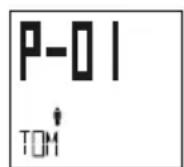
- Press the "SET" button. "P-01" is displayed.
- Use the buttons to select the user memory space you wish to use (P-01 to P-08). Confirm using the "SET" button.
- Use the to configure your user data and confirm with the "SET" button. You can find a detailed description of all the user data to be configured in the table in chapter "Initial use of the scale with the app".
- A PIN will be displayed at the end of your settings. This will be required for logging into the app later (see "Logging into the app at a later time" below); otherwise, it is not needed. "0.0" with initials then appears.
- For automatic personal recognition, the first measurement must be assigned to your personal user data. Step onto the scale, ideally with bare feet, and ensure that you are standing still with equal weight distribution and with both feet on the electrodes.
Logging into the app at a later time
If you have carried out the initial use of the scale without using the app, you can transfer or create your user on the app as follows.
- Download the free "beurer HealthManager Pro" app from the Apple App Store (iOS) or from Google Play (Android).
- Start the app and follow the instructions.
- Select the existing scale user within the BF950 settings in the app and enter the PIN shown on the scale display. Briefly apply pressure to the scale twice until "0.0" is displayed. Press the "SET" button and select your user with the "SET" button.
7. TAKING MEASUREMENTS
Diagnostic functions
Step onto the scale with bare feet and ensure that you are standing still with equal weight distribution and with both legs on the electrodes.
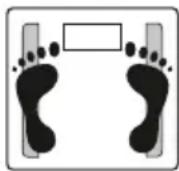
Note: The measurement result will be incorrect if the measurement is taken with socks on.
The time and temperature are shown first for 3 seconds, then the weight.
If a user has been assigned, their initials are displayed. During the BIA analysis, "0000" is displayed. All of the following values are displayed and stored. All values are displayed and saved consecutively.
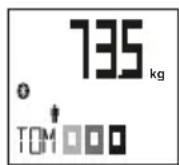
Note: If the user is not recognised, then the user assignment (initials) is missing and only the weight can be displayed. The measured values will not be saved. This happens if your measured weight differs from the previous measurement by +/- 3kg or if another user has similar values (+/- 3kg) to yours.
In this case, repeat the measurement by turning on the scale and pressing the “^” button to select your user memory (P01 - P08). Repeat the measurement.
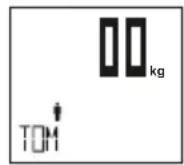
Weight
Step onto the scale wearing shoes and ensure that you are standing still with equal weight distribution and with both legs on the scale.
The time and temperature are shown first for 3 seconds, then the weight.
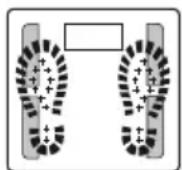
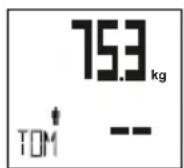
If a user was assigned, your initials will be displayed and the weight will be saved. "--" will briefly be displayed on the LCD. A BIA analysis is not possible.
Tare function
The tare function provides an easy method of weighing small children (under 2 years old) using tare weighing. To do this, you must create a user with user data for the infant in the "beurer HealthManager Pro" app. Alternatively, you can create a user with user data on the scale itself (see "Creating a user").
In the tare function, automatic user assignment for this user is switched off. To use the tare function, proceed as follows for each measurement:
- Briefly apply pressure to the scale.
- Use the “ ” button to select the user memory for the infant and wait 3 seconds. The bare function symbol appears on the display.
- Now step on the scale. You can choose whether to hold the infant in your arms on the first or second measurement.
- After the first measurement, the first weight is briefly displayed. Step off the scale; "0.0" appears and the scale is ready for the second measurement. Both values appear on the display first; the display then switches to the difference in weight, which is also saved.
Pregnancy mode
Pregnancy mode allows pregnant women to monitor and compare their weight in the app with greater precision during this special time.
To do so, the pregnant woman must create a user in the "beurer HealthManager Pro" app and select "pregnant" in the user data. If you select "pregnant" in the user data, you cannot select a target weight.
Alternatively, you can create a user with user data on the scale itself (see "Creating a user").
When pregnancy mode is activated, no current flows through the body during weighing and no analytical values can be determined. Only the weight with initials is displayed and the pregnancy symbol flashes.
To use pregnancy mode, proceed as follows:
- Briefly apply pressure to the scale.
- Use the “ ” button to select the user memory for the pregnant woman. The pregnancy symbol appears on the display.
- Step onto the scale. The weight appears on the display and the pregnancy symbol flashes briefly.
8. EVALUATING THE RESULTS
Target weight LED motivator
The "target weight" function must be activated in the app settings (or using the buttons on the scale) and a corresponding target weight must have been stored in the respective user data. If "pregnant" has been specified in the user data, no target weight can be stored.
The LED motivator provides coloured LED feedback after weighing to indicate whether the target weight has been achieved.
There are various scenarios:
| Weight maintained: The target weight is less than +/- 1 kg different to the start value. · All 9 LEDs light up in green if the next measurements are within +/-1 kg of the start value. · The first LED lights up in red if the measurements are outside this range. | |
| Weight changed (lost or gained): | The target weight is more than +/- 1 kg different to the start value. · If the current measurement is closer to the target weight, this is indicated in green. The more LEDs light up green, the closer you are to your target weight (linear distribution). When there are 9 green LEDs, you have achieved your target. · If the current measurement is within +/- 0.2 kg respectively of the start value (moving away from the target value), the first LED lights up in yellow. · If the current measurement is more than 0.2 kg from the start value (moving away from the target value), the first LED lights up in red. |
Body mass index
The body mass index (BMI) is a figure that is commonly used to evaluate body weight. The figure is calculated from body weight and height. The formula is: body mass index = body weight ÷ height². The measurement unit for BMI is [kg / m^2] . According to the BMI, weight is classified for adults (20 years and over) using the following values:
| Category BMI | ||
| Underweight Severely underweight | <16 | |
| Moderately underweight 16-16.9 | ||
| Slightly underweight 17-18.4 | ||
| Normal weight 18.5-24.9 | ||
| Overweight Pre-obese 25-29.9 | ||
| Obese (overweight) Class I obesity | 30-34.9 | |
| Class II obesity 35-39.9 | ||
| Class III obesity ≥40 | ||
Body fat percentage
Values will often be lower for fitness enthusiasts. Depending on the sporting activities performed, the training intensity and the physical constitution, the results may still be below the stated standard values. Please note, however, that there may be a risk to health in the case of extremely low values.
The subsequent body fat percentages serve as a guideline (for further information ask your doctor).
Male Female
| Age Low | Normal | High | Very high | |
| 10-14 | <11 % | 11-16 % | 16,1-21 % | <21 % |
| 15-19 | <12 % | 12-17 % | 17,1-22 % | <22 % |
| 20-29 | <13 % | 13-18 % | 18,1-23 % | <23 % |
| 30-39 | <14 % | 14-19 % | 19,1-24 % | <24 % |
| 40-49 | <15 % | 15-20 % | 20,1-25 % | <25 % |
| 50-59 | <16 % | 16-21 % | 21,1-26 % | <26 % |
| 60-69 | <17 % | 17-22 % | 22,1-27 % | <27 % |
| 70-100 | <18 % | 18-23 % | 23,1-28 % | <28 % |
| Age | Low | Normal | High | Very high |
| 10-14 | <16 % | 16-21 % | 21,1-26 % | <26 % |
| 15-19 | <17 % | 17-22 % | 22,1-27 % | <27 % |
| 20-29 | <18 % | 18-23 % | 23,1-28 % | <28 % |
| 30-39 | <19 % | 19-24 % | 24,1-29 % | <29 % |
| 40-49 | <20 % | 20-25 % | 25,1-30 % | <30 % |
| 50-59 | <21 % | 21-26 % | 26,1-31 % | <31 % |
| 60-69 | <22 % | 22-27 % | 27,1-32 % | <32 % |
| 70-100 | <23 % | 23-28 % | 28,1-33 % | <33 % |
Body water content
The body water content in % is normally within the following ranges:
Male
| Age | Poor | Good | Very good |
| 10-100 | <50 % | 50-65 % | <65 % |
Female
| Age | Poor | Good | Very good |
| 10-100 | <45 % | 45-60 % | <60 % |
Body fat contains relatively little water, therefore body water content may be below the standard values in persons with a high body fat percentage. On the other hand, endurance athletes may exceed the standard values due to having low levels of fat and a high muscle percentage.
The body water calculation performed using this scale is not suitable for drawing medical conclusions, for example in the case of age-related water retention. Consult your doctor where necessary. Body water must not be added to the other values, as this is already included in the other analytical values (e.g. body fat, muscle percentage).
Muscle percentage
The muscle percentage measurement measures the skeletal muscle mass. No organ muscles are taken into account. The muscle percentage is normally within the following ranges:
Male Female
| Age Low Normal High Age Low Normal High | |||
| 10-14 <44 % | 44-47 % >5 | 7 % 10-14 <36 | % 36-43 % |
| 15-19 <43 % | 43-56 % >5 | 6 % 15-19 <35 | % 35-41 % |
| 20-29 <42 % | 42-54 % >5 | 4 % 20-29 <34 | % 34-39 % |
| 30-39 <41 % | 41-52 % >5 | 2 % 30-39 <33 | % 33-38 % |
| 40-49 <40 % | 40-50 % >5 | 0 % 40-49 <31 | % 31-36 % |
| 50-59 <39 % | 39-48 % >4 | 8 % 50-59 <29 | % 29-34 % |
| 60-69 <38 % | 38-47 % >4 | 7 % 60-69 <28 | % 28-33 % |
| 70-100 <37 % | 37-46 % >4 | 46 % 70-100 <27 | % 27-32 |
| 43 % | |||
| 41 % | |||
| 39 % | |||
| 38 % | |||
| 36 % | |||
| 34 % | |||
| 33 % | |||
| >32 % |
Bone mass
Like the rest of our body, our bones are subject to natural growth, deterioration and ageing processes. Bone mass increases rapidly during childhood and reaches its maximum value between the ages of 30 and 40. As we age, our bone mass then gradually reduces. A healthy diet (particularly one rich in calcium and vitamin D) and regular exercise can slow down this process. The stability of the skeletal structure can also be boosted by targeted muscle build-up.
Please note that this scale shows the mineral content of bone and not any organic substances such as proteins or cells. It is virtually impossible to influence bone mass; yet there may be distinct fluctuations due to certain influential factors (such as weight, height, age, gender). There are no recognised guidelines or recommendations.
BMR
The basal metabolic rate (BMR) is the amount of energy required by the body at complete rest in order to maintain its basic functions (e.g. when lying in bed 24 hours a day). This value is primarily dependent on weight, height and age.
This is the amount of energy that is required by your body under all circumstances and must be re-supplied to the body in the form of food. If your energy intake is below this level in the longer term, this can result in damage to health.
AMR
The active metabolic rate (AMR) is the amount of energy that the active body consumes each day. An individual's energy requirement increases when the level of physical activity increases; the diagnostic bathroom scale calculates this by means of the activity level (1-5) that has been entered.
If less energy is taken in than is used over a long period of time, the body primarily takes the difference from the fat stores with resulting weight loss. However, if the amount of energy taken in exceeds the calculated active metabolic rate (AMR) for a longer period, the body cannot burn off the excess energy. The excess is stored in the body as fat, leading to weight gain.
Temporal context of the results
Note: Please note that only the long-term trend is important. Brief deviations in weight within a few days are normally caused by loss of fluids.
9. ADDITIONAL INFORMATION
User assignment
It is possible to assign up to 8 scale users for a weight-only measurement (with shoes) and for a diagnosis measurement (bare feet). User assignment is not possible with the tare function.
For a new measurement, the scale assigns the measurement to the user whose most recently saved measurement falls within +/- 3kg of this.
Storing the assigned measurements on the scale and transferring them to the app.
If the app is not open, the newly assigned measurements are saved on the scale. A total of 30 measurements per user can be saved on the scale. The saved measurements are transferred automatically to the app when you open the app within the Bluetooth range.
Deleting scale data
- Delete all
Briefly apply pressure to the scale; the time and temperature are displayed. Hold down the U nit/Delete/ Reset button on the rear of the scale for approx. 6 seconds. "CLr" will appear on the display for several seconds.
Note: All saved values and settings are deleted.
- Delete individual users
Briefly apply pressure to the scale twice until "0.0" appears. Press the buttons to select your user. When "0.0" and your initials are displayed, hold down the Unit/Delete/Reset button on the rear of the scale for approx. 3 seconds. "dEL" appears on the display.
Note: This user is deleted.
Changing the batteries
Your scale is equipped with a low battery indicator. If you operate the scale with flat batteries, "Lo" will appear on the display and the scale will automatically switch off. In this case, the batteries must be replaced (4 x 1.5 V AAA). All saved measurements and users remain saved.
Connect the scale to the app again. The system time is updated.
10. CLEANING AND MAINTENANCE
The device should be cleaned from time to time. This should be done using a damp cloth and, if necessary, a small amount of detergent.

IMPORTANT
- Never use harsh solvents or cleaning agents!
- Never submerge the device in water!
- Do not clean the device in the dishwasher.
The accuracy of the measurements and service life of the device depend on its careful handling:
- Do not place any objects on the scale when not in use.
- Protect the device from knocks, damp, dust, chemicals, marked temperature fluctuations and nearby sources of heat (ovens, heaters).
- Do not press the buttons violently or with pointed objects.
- Do not expose the scale to high temperatures or strong electromagnetic fields.
11. DISPOSAL
Empty, completely flat batteries must be disposed of through specially designated collection boxes, recyc
ling points or electronics retailers. You are legally required to dispose of the batteries.
The codes below are printed on batteries containing harmful substances:
Pb = Battery contains lead
Cd = Battery contains cadmium
Hg = Battery contains mercury

12. WHAT IF THERE ARE PROBLEMS?
If the scale encounters an error during measurement, the following is displayed:
| Display Cause Solution | ||
| Only weight display and initials are missing | Unknown measurement as it is outside the user assignment limit or a unique assignment is not possible. | Briefly apply pressure to the scale and select the user on the scale using the “\(\text{A}\) button or repeat user assignment in the app.See chapter 10 “Additional information”. |
| Err | The proportion of fat is outside the measurable range (less than 4% or greater than 65%). | Please repeat the measurement barefoot, or with the soles of the feet lightly dampened if necessary.IfErris still displayed, you are outside the measurable range. |
| Old | Maximum weight capacity of 180 kg exceeded. | Loads must be limited to 180 kg. |
| Incorrect weight is displayed. | No flat, stable surface. Place the scae on a flat, stable surface.Do not use on carpet. If used on carpet, use the supplied feet for carpet. | |
| Incorrect weight is displayed. | Not standing still. Stand as still as possible. | |
| Incorrect weight is displayed. | Incorrect zero point of scale. | Wait until the scale switches itself off. Briefly apply pressure to the scale until “0.0” appears. Then repeat the measurement. |
| No Bluetooth®connection(®symbol is missing). | Device outside the range. | The minimum range in the open air is approx. 10 m. Walls and ceilings reduce the range.Other radio waves may interfere with the transmission. Therefore, do not position the scale near devices such as micro-waves, induction hobs etc. and, ideally, switch off any otherBluetooth®devices that are within range. |
| Connection set-up takes too long. Faster Bluetooth®interval when the scale is switched on. | ||
| No connection to the app. Close all apps completely(including in the background).SwitchBluetooth®off and back on again.Switch the smartphone off and back on again.In theBluetooth®settings of the operating system, the scale must not be connected.Remove the batteries from the scale for a short period and reinsert them.See FAQs at www.beurer.com. | ||
| FULL | User memory space is full. New measurements overwrite the older measurements. | Open the app. The data is transferred automatically. |
| Lo | The batteries in the scale are empty. | Replace the batteries in the scale. |
- TECHNICAL SPECIFICATIONS
| Scale dimensions 320 x 320 x 24 mm | |
| Scale batteries 4 x 1.5 V type AAA | |
| Measurement range 5 kg to 180 kg | |
| Scale interval d: The display can be read in increments of 0.1 kg. | |
| Repetition accuracy: The measuring tolerance for repeated measurements is +/- 0.4 kg (several measurements in direct succession on the same scale with position of scale and person the same as far as possible). | |
| Absolute precision: | In comparison with a calibrated weight, the measured value is +/-1% +0.1 kg. E.g. at 40 kg this corresponds to +/- 0.5 kg; at 100 kg this corresponds to +/-1.1 kg. |
| Data transfer via Bluetooth® wireless technology | This product uses Bluetooth® low energy technology, frequency band 2.400 - 2.480 MHz, transmission power max. -0,82dBm, compatible with Bluetooth® 4.0 smart-phones/tablets |
| System requirements and list of compatible devices for the "beurer HealthManager Pro" app* | |
Subject to technical changes.
- This product satisfies the requirements of the applicable European directives.
We hereby confirm that this product complies with the European RED Directive 2014/53/EU. The CE Declaration of Conformity for this product can be found under:
www.beurer.com/web/we-landingpages/de/cedeclarationofconformity.php.
14. WARRANTY
Further information on the warranty and warranty conditions can be found in the warranty leaflet supplied.
FRANÇAIS

www.beurer.com/web/we-landingpages/de/cedeclarationofconformity.php.
14. GARANTIE
BF = Massa grassa in %
≈ = Acqua corporea in %
www.beurer.com/web/we-landingpages/de/cedeclarationofconformity.php.
14. GARANZIA
www.beurer.com/web/we-landingpages/de/cedeclarationofconformity.php.
14. GARANTI
1xIuaHnOCTnueckne Becbi BF 950
1x46atapeien1,5Btuna AAA
1xKobpNKnHnHor
1xDaHHa HNCTpyKUPOI npIMeHnIO
2xKpaTknx pyKOBOdCTBa
KOMNJIeKT NOCTABKN
- BAXHbIE YKA3AHnI NO TEXHnke 6E30nACHOCTN..87
2.ПОСHEняКСИМBOЛAM 88
3.ОПИСАНЕ ПИБОРА 89 - INHOPMALIJI 90
5.BBOB BECOB B 3KcJIYATAUIO IPNI NOMOUII PUNIOXEHNA.90
6.BBOI BECOB B 3KCIJYATAUIO BE3 IPIJIOXEHNIA.92 - BbINOJIHHeHne I3MEPeHnI 92
- OUeHKA PE3yJIbTATOB 94
9.ДОПОЛНТЕЛБHAИNHФOPMAU.. 97 - OuchCTKA I yXoI 97
- YTNIN3AUJRA 98
- YTO DEJIATb Pn BO3HnKHOBEHn IPOBJEM? 98
- TEXHINUeCKNE DAHHbIE 100
14.ΓAPAHNTI 100
1.!BAKHBIEYKA3AHNIAOTEXHnKEE3OnACHOCTN
!PPEIOCTEPEXKEHNE
- UcTpoIcTBo npEHa3HaueHo TOnbKO DnB B3BeUINBaHnJIoJe N 3aNNCn Baunx IInHybIX ΦHTHeC-napametPOB. Pnp6Op npEHa3HaueH NCKIIOHTeJIbHO Dnay cactHO nOJb3OBAHnY, 3aNpeuaETcERo INcNoJIb3OBaHnE B MeDUnHcknx IN KOMMepYeCKnx ZeJeX. NcNoJIb3yIte Pnp6Op ToIbKO B Tex ZeJeX, DnKOTOpBX OH 6bl Pa3pa6OtaH, IN ToJIbKO Tem CnOCo6OM, KOTOpBn ONiCAH B DaHHoIN HCTpyKuIN NO pPIMHeHIO.
- Onachoctb 3aDOxHytbcra! He daBaIte ynaKOBOHbIM MaTePnAJI DeTAM.
3anpezaeTcnoJb3ObaTbcB Becamn IucaM C yCTaHOBJeHHbIMMeDuHckmN mPnlaHTaTamN (HaNPmep, KapdnoctmUyIaTOpOM). BnpOTNBHom clyuae Kaue- CTBO pa60tbl mPnlaHTata MoKeT yxduNTbcra. - Bo Врема Беременноюн Исторьогоне ВECOB ДОпуньков В поных мор peхим дя Беременьх (см. раздел «Реким дя Беременьх»).
- Onachoctb onpoknDbBaHna! HnkOrda He yctaHaBnBaIte Becbl Ha HepOBHyIO NOBepXHOCTb. He BCTaBaIte Ha cMbI KpaB BEcOB C ODHONCTOPOHbl (CM.pnc.B).
- Onachoctb nockolb3HyTbcra! He BcTaBaIte Ha BeCbl BnaXHbIMn HORAMn (cm. pnc. c). He BcTaBaIte Ha BeCbl, ecnn nx nobepxHOCTb BnaXHa. He BcTaBaIte Ha BeCbl B Hockax.
Yka3aHnno o6paueHnO c 6aTapeiKaMn
- Bcerda npabnIbHO yctaHabnBaIte 6aTapeKc C yyeTom noJrpHoCTN (+/-). CJeInte, YTO6bl 6bTaapeKc 6blu N uCtBIMN u CyxIMN, 3aUuMaIte INX OT BO3dEInCTBnA BODbl. Bcerda Bbl6npaIte 6bTaapeKn POnxOJaIeTo TnPa.
He donyckaTe KOpOTKOro 3aMbikaHn6 batapeek n KOHTaKTob 6batapeHoro oTceKa.
3aPpeaetc3apjkaTb, npHnHynteIbHo pa3pJkaTb, HarpeBaTb, pa36npaTb, deOpMnpoBaTb, repMeTu3npoBaTb IIN MOINuCnpoBaTb 6aTaPeiKn. - 3aπpeuεTcBcBapnBaTb nIIN 3aIaNBaTb 6aTapeiKn.
He nCnoJIb3yIe BHyTpI npI6opa 6aTapeKn pa3HbIX npOIN3BOIDNTeIe, pa3HOJ eMKoCTN (HOBbie I nCNoJIb3OBaHHbIe), pa3HOrO pa3Mepa I TUNa. - Onachoctb B3pbIbA! HecobJIOeHne yka3aHHbIX npabIN MoKET npNBecT N TpaBMam, neperpeBy, BblTEKaHInO, BblnyCKy BO3dYxa, NOLOMKe, B3pbIbY IIN BO3rOpAHInO.
- Ecni 6aTapeiKa noteKna, oHCTnTe OTceK dIy 6aTapeeK cyXoN caIpeTKoN, npEiBapntelbHo HaneB 3aUHTbIe nepTuTkN.
- Пи пonaдани кидкости n3 baTapeйкн Ha KOKу nII B rIa3a Heo6xOДМо npOMbIT COOTBETCTByIOUи yuaCTOK 6OJIbшIM KOJIuYeCTBOM BOdbl N OБpaTntbCЯ KВpaCy.
- Onachoctb nporlaTbIBaHnmeKnx Yacte! XpaHnte 6aTapeKn B HeoctynHom nJeTeMeCTe. PnporlaTbIBaHn HemeJeHNo 6paTntecb K BpaCy.
- Hukorda He no3BOJnTe DeTm 3aMeHrB 6aTapeKn 6e3 npCMOTpa B3pOcJIbIX.
XpaHnTe 6aTapeKu BdaIOn OT MeTaNlUeCKNX npeMToB, B XopoIo npoBeTpNBaEmbIX, cyxNIX n pOxAaHbIX NOMEueHnax.
He noDBepraTe 6aTapeKn BO3JeCTBIO npMbIX COJHeYHbIX Jyuee nn DoXkDa. - Ecnn npnbop dntneBHOe BpeM He nCNOJb3yeTcra, n3BJeKeNTe n3 Hero 6aTaapeKn.
- Pa3p8xeHHbIe 6aTapeKn CJIeNyET HeMeIeHNO yTINN3InPObaTb HAnJExKaUIM o6pa3OM. He 6pocaiTe 6aTapeKn B OOrHb.
- Pn ytni3aun XpaHnte 6aTapeKn OTdJIbHO OT pa3JINHbIX 3JIeKTPOXIMNueCKNX CnCTem.
HndeKc MaccbI Tea (BMI, NMT)
Hndekc MaccbI TeJa - 3To YncNo, KOtOpoe yacTo NcNoJb3yeTc npn OueHke MaccbI TeJa yeNoBeKa. 3To YncNo paccuHTbIbAeTcra, nCxOJa n3 MaccbI TeJa yeNoBeka n ero poCTa, no cneyuOsei fopmyJe: IMT = Macca TeJa ÷ poCT2. EinnuEi n3MepeHnna HndeKca MaccbI TeJa COOTBEcTBENHO ABJIeTcra [Kr/M].ДЯ B3pocNbIX IIOdei (20 let i cTapwe) pacnpedeHne no Becy Ha ochOBaHIn IMT npocxOJNT cneyuOnm 6pbazOM:
PpncboeHne noJb30BaTeJIa
PnCBOHHe MaKcMym BOCbMn 3aNporpammmuPoBaHHbIX NOJb3OBaTeJeBecOB BO3MOXHO npn IpocTOM n3MepeHm MaccbI TeJa (B o6yBu) n npn dnaHocTneckom n3MepeHm (6e3 o6yBu). Pn aKTNBHO yHKcHn TapnpoBaHn PnCBOHHe nOJIb3OBaTeJI HeBO3MOXHO.
Ipn HOBOM n3MepeHn BecbI coXpaHJOT pe3yNbTaTb I B JaueKe NaMAYTO TORO NOBaTeJIy, y KOTOPORO NocJeHHe n3MepeHHoe 3NaueHne MacCbI TeJa OTNIuAeTCr O T pe3yNbTaTa He 6oJIbUe Yem Ha ± 3 Kr.
CoxpaHHeHn IpncBcOeHHbIX 3NaueHn B nAmrTb BeCoB n IpeHoc B npNIOXKeHne.
Ecnn npnloxehne He oTKpbITo, HOBbIe npncBOeHHbIe 3NaueHn coXpaHOTcB namrTn BEcoB. Ha Becax moKHO xpaHITb do 30 3NaueHn dJa KaKdOro noJb3ObaTeJIa. CoXpaHeHHbIe n3MepeHHbIe 3NaueHn aBTOMaTHueCKn OTnpaBJIOTcB n npnloxehne, ecnn Bbl otKpOeTe erO B npedeJax deJCTBn r Bluetooth®-coeINHeHn.
YdaJIeHHe DaHHbIX C BecOB
- YdannTb BCE
HaxmTe Ha BecbI - OTo6pa3ntcBpeMn TemnepaTypa. Pnp6n3nteJbHO B TeueHne 6 CeKynd ydepXnBaTe HaxaToN KhoNky Unit/Delete/Reset Ha o6pTaHOn CTOpOHe BecOB. Ha 3KpaHe Ha HeckoJbKO cekyHn NOBNTc INDnKaUz Clr.
Yka3aHHe: Bce coxpaHeHHbIe 3HaueHn I NaCTpOKn ydaJIyIOTcJ.
- ydaJIHTb NOJIb3OBaTeJRA
Два раза бсчро нахмite Ha BeCsbl, YTO6bl NOBnIacb INDkaunr 0.0.Haxmaite Ha KONKU V A, YTO6bl Bbl6paTb noIb3ObaTeJr. Korda OTO6pa3ntcra INDkaunr 0.0 n Baun nHnuaJIbI, npN6JIu3nteJbHO B TeueHne 3 cekynd ydepXnBaIte HaxaToi KNOKy bit/Delete/Reset Ha o6paTHoI CTopoHe BEcoB. Ha ekpaHne noRbITcA dEL.
Yka3aHHe: 3TOT noJIb3OBaTeJIb ydaIaReTcra.
3aMeHa 6aTapeek
Becbi noka3bBAOT, KOrda Heo6xOIMO 3aMeHNTb 6batapeKn. Ppr nCnoJb3OBaHN cNtWKOM cna60
6batapeKn Ha dncnlee noRbIeTc HAdnscb Lo n BeCb aBTOMaTHueCKn OTKluoyAOTc. B 3tOM clyuae
6batapeKy cJeDyET 3aMeHNTb (4 wt.AAA,1,5 B).Bce coXpaHeHHbIe n3MepEnr I noJb3OBaTeJI N OCTaOTc
B pAMrTu.
Pocne 3TOro BbInOpHnTe NOBtOpHoe CoeINHeHne C npJIOXKeHNem. BpEm o6HOBnTcra.
10. OUHCTKA N YXOD
Bpemr O T Bpemn npnbop Heo6xOIMo Ounuatab. Ira ouinctkn nCnoJb3yIte BnaKHyIO caIpeTKy, Ha KOTopyo npn Heo6xOIMocTm MOXHO HAnecTn HEmHOrO MoUoJero CpeCTBa.

BHIMAHNE
He nCnoJb3yIe cnJIbHOJeCTBHyOuIne pactBOpHTeIN uNCTaIue cpeDCTBa!
He norpykaite npnbop B BoNy!
He MoIte npI6Op B nocydomoENoH MaunHe!
ToHocTb n3MepeHHn i cpoK cIyX6bl np6opa 3abucr OT 6epeXHoro oOpaueHHn C Hm.
He cTaBbTe HnUero Ha BeCbI, KOrDa OHn He nCNoJIb3yIOTCr.
- Пибор следуET пededохаять OT ударов, влжноctи, nbлл, BO3deястBNЯ XIMUKaTOB, CNlbHbIX KonebaHn TempepaTpybl n He yCTaHaBJIbBaTb nx B6Jln3n nCTOCHNKOB TeIJa (neuei, paiaatopob OToJIeHn).
He HaxkmaTe KhoNky CnIuKOM CInbHO He IcNoJIb3yUte DIA 3TOO OCTpbie npedMeTbI.
He noDBepraTe BeCbI BO3dEiCTBIO BbICOKX TempeaTyp IIN CnIbHbIX 3JeKTPomarHHTbIX NOJIe.
11. YTNJIIN3AUZIa
YtIIN3npyTe IcNoJIb3OBAHHbIe IN NOHocTbIO pa3pXeHHbIe 6aTaapeKIn B KOHTeHepbI CO cNeuaJIbHOI MapKnIpOBKO, CdaBaIte B NyKbTI npHeMa CneIoTXoIDOB NII B Mara3INbI 3JeKTpoobOpyDObAHn. 3aKOH
063b1BaTe NJIb3OBeTJe OeCneuTb yTuIN3aCnIO 6aTaapeek.
Cleyuoune 3HaKn npEynpeKjaT O HaIHyB B aTaPeiKaX TOKcHbIX BeUeCTB.
Pb = CBnHeu
Cd = KaMmN
Hg = pTytb
B INHTepecax oxpaHbI OKpykaIOUeI cpebl No 3aBepseHn Cpoka cnyX6bl npnbopa 3anpeuaetc yTININ3NPOBaTB erO BMeCTe C 6bITOBbIMN OTXoAMN. YTNIN3aUmaJdoJXHa npOn3BOdntbcrYepe3 COOTBeTCTByUOJIne nyHKtbl c6opab BaWei CTpaHe.
13. TEXHnueCKNE DAHHbIe
Bo3MOxHbI TexHnueeCKNe n3MeHeHn.
* DaaHoe n3dJIeNc COOTBETCTByeT Tpe6oBaHnM DeIcTByUOuNX EBpOneNcKnx DupeKtNB.
HaCToIIM NOITBepKdaem, YTO daHHOe N3dEIne COOTBeTCTByet Tpe6OBaHnM EBPOneNCKo DNPEKTNBb RED 2014/53/EU. C deKnapauei o COOTBeTCTBnN DnpeKtBam EC Ira daHHoro ycTpoNCTBa MoXHO O3HaKOMITbcr, nepeiI rno ccbIKe:
www.beurer.com/web/we-landingpages/de/cedeclarationofconformity.php.
14.「APAHTN
www.beurer.com/web/we-landingpages/de/cedeclarationofconformity.php.
14. GWARANCJA
The Bluetooth® word mark and logos are registered trademarks owned by Bluetooth SIG, Inc. and any use of such marks by Beurer GmbH is under license. Other trademarks and trade names are those of their respective owners.
Apple and the Apple logo are trademarks of Apple Inc., registered in the U.S. and other countries. App Store is a service mark of Apple Inc., registered in the U.S. and other countries.
Google Play and the Google Play logo are trademarks of Google LLC.
Android is a trademark of Google LLC.

Beurer GmbH · Söflinger Str. 218 · 89077 Ulm (Germany) · www.beurer.com
www.beurer-gesundheitsratgeber.com • www.beurer-healthguide.com

Beurer UK Ltd., Suite 16, Stonecross Place, Yew Tree Way, WA3 2SH Golborne
United Kingdom