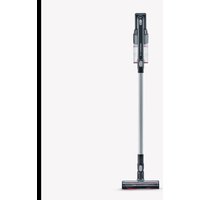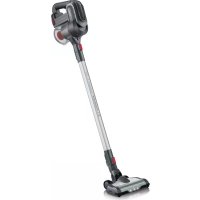
HV 7165 - Vacuum Cleaner SEVERIN - Free user manual and instructions
Find the device manual for free HV 7165 SEVERIN in PDF.



User questions about HV 7165 SEVERIN
0 question about this device. Answer the ones you know or ask your own.
Ask a new question about this device
Download the instructions for your Vacuum Cleaner in PDF format for free! Find your manual HV 7165 - SEVERIN and take your electronic device back in hand. On this page are published all the documents necessary for the use of your device. HV 7165 by SEVERIN.
USER MANUAL HV 7165 SEVERIN
natural_image
3D rendering of a vacuum cleaner with attached cylindrical body and handle (no text or symbols visible)Typ 7159
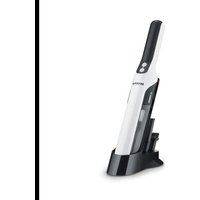
GB 2in1 Hand-held/Upright Vacuum Cleaner • Instruction manual ... 13
Only use with adapter: YLS0241A-E270080
natural_image
Diagram of a switch or connector with screw and pin connections, showing internal components (no text or symbols)natural_image
Symbol of a trash bin crossed with a diagonal line and a horizontal bar below (no text or labels)About this instruction manual
This instruction manual includes important hints for your safety and the use of the appliance. Failure to observe the instruction manual can result in personal injuries or damage to the appliance. Keep the instruction manual safe. If you give or sell the appliance to somebody else, give this person the instruction manual.
Read the instruction manual completely before using the appliance for the first time.
Table of contents
Safety guidelines 14
Installing the appliance and charging the rechargeable battery ..... 18
Operating the appliance 19
Maintaining the appliance 20
Troubleshooting 21
Disposal and warranty 21
Illustrated Quick Start Guide included
This instruction manual comes with an illustrated Quick Start Guide, which provides you with additional tips for the use and care of the appliance.
Safety of particular groups of people
- This appliance may only be used by children over the age of 8 and by persons with reduced physical, sensory or mental capacities or a lack of experience and/or knowledge when they are supervised or if they have been instructed about the safe use of the appliance and have understood the risks resulting from the use of the appliance.
- Children must not be allowed to play with the appliance or stand or sit on it. Cleaning and user maintenance must not be performed by children without supervision.
- Keep the appliance, the charger, the mains adapter and connection cable out of reach of children under 8 years of age.
- Keep packaging material out of the reach of children and dispose of it properly. Otherwise, there is a risk of suffocation.
Connect the appliance safely
The appliance is operated with electrical current. Therefore there is a risk of electric shock. Therefore, pay special attention to the following:
- Check the appliance and mains adapter for possible damage before use. Never operate a defective appliance or an appliance with a defective mains adapter.
- Only connect the mains adapter to outlets which match the specifications on the mains adapter type plate.
- Never attempt to repair the appliance or its mains adapter yourself. To avoid risks, repairs to the appliance, charger and the mains adapter must only be effected by our customer service department. Give a defective appliance to an authorised dealer or contact SEV-ERIN customer service department.
Safety guidelines
- Do not immerse the appliance or mains adapter in water or other liquids, or treat with liquids. Keep appliance and mains adapter away from rain and wet conditions. Do not operate the appliance and mains adapter outdoors or in rooms with high humidity.
- Do not handle the appliance and mains adapter with wet hands. When unplugging the mains adapter from the outlet, always pull directly on the plug.
- Make sure that the mains adapter is not kinked, crushed or run over and that it does not come into contact with sources of heat, humidity and sharp edges. Make sure that the mains adapter does not become a stumbling hazard.
- Before cleaning or maintaining the appliance, as well as before changing accessories, switch off the appliance and unplug the mains adapter from the outlet.
Safety when handling rechargeable batteries
With improper handling of rechargeable batteries, there is a danger of injury and explosion.
- Never replace with other rechargeable batteries or other batteries.
- Never short-circuit rechargeable batteries, i.e. never touch both poles at the same time, especially not with objects that conduct electricity. Store rechargeable batteries so that they cannot be short-circuited by other rechargeable batteries or metal objects during storage.
- To charge the rechargeable battery, only use the mains adapter provided. Never charge the rechargeable battery with another mains adapter. Only use the mains adapter provided to charge the rechargeable battery of this appliance.
- At the end of its life span, remove the rechargeable battery as described. Then take the rechargeable battery to an appropriate collection point nearby, thus ensuring safe and environmentally-appropriate disposal. Never throw rechargeable batteries away in household garbage!
Safety guidelines
- Before removing the rechargeable battery, make sure that the mains adapter is unplugged from the outlet.
- Never take rechargeable batteries apart, expose them to high temperatures or throw them onto fires.
- In case of improper handling, liquid can escape from the rechargeable battery. Do not use the rechargeable battery if it is damaged or if it is leaking liquid.
- If liquid has escaped, avoid contact with the liquid.
- In case of contact with the liquid, rinse it off immediately with copious amounts of water. In case of after effects (irrespective of type), consult a doctor.
Rotating brush roller
The appliance contains a driven brush roller. This can cause injuries. Therefore, heed the following:
- Before cleaning or maintaining the appliance, make sure that the appliance is switched off and is not on charge.
- Ensure that parts of your body can never get under the brush roller.
- Do not vacuum clean near cables, wires and long fringes. On the one hand, there is a danger that the cable's insulation will be damaged. On the other hand, these objects can get tangled in the brush roller and damage the appliance.
Intended use
The appliance must only be used domestically.
The appliance must only be used for cleaning on level, normally-soiled, hard floors, short-pile carpets or suites that can withstand exposure to the rotating brush roller without sustaining damage.
Any other use is deemed improper and is forbidden.
In order to prevent injuries, fires and damage, the appliance must not be used to clean:
- people, animals and plants. Always keep the appliance away from body parts, hair and clothing.
- glowing or burning particles (such as ash, coals, charcoal, cigarettes, matches).
– explosive or flammable materials or toner.
– water and other liquids, e.g. wet carpet cleaning agents. - pointed objects such as glass splinters, nails.
– quantities of dirt that exceed normal quantities of dirt in their quantity or particle size, e.g. building waste.
The following is also forbidden:
– independent alteration or repair of the appliance or its mains adapter.
- insert objects into openings in the appliance. The specially provided accessories are the exception to this rule.
– use, storage or charging outdoors.
Installing the appliance and charging the rechargeable battery
Assembly of the appliance
▷ illustrated Quick Start Guide
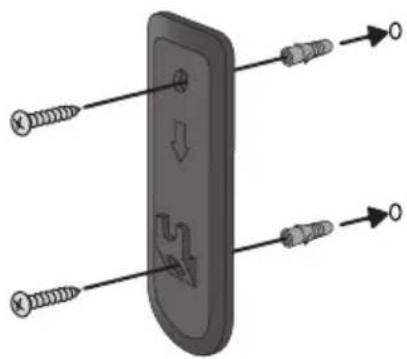
Installing the wall mount
natural_image
Diagram of a device with screw leads and directional arrows indicating movement (no text or symbols)- Hold the wall mount to the wall, aligned in a vertical position.
- Mark the holes with a pencil.
- Drill the holes (approximately 8 mm ∅).
- Insert the supplied dowels into the holes.
- Fasten the wall mount using the screws supplied.
Charging the rechargeable battery
It is best to charge the rechargeable battery before each use, especially after the appliance has not been used for a while.
This increases the service life of the rechargeable battery and ensures the longest possible cleaning cycles.
- Plug the included mains adapter into the connection socket of the appliance.
-
Connect the included mains adapter to an outlet.
-
The LEDs on the handle start to flash. The more the LEDs flash, the more advanced the charging process is.
-
The LEDs go out once the rechargeable battery is fully charged. The charging process takes around 3 hours when the rechargeable battery is empty.
-
Disconnect the mains adapter from the socket.
- Disconnect the mains adapter's connector from the connection socket on the appliance.
TIP: The operation time with a fully charged rechargeable battery is approximately 20 minutes (in Power mode) or 30 minutes (in Eco mode).
For further information, see also ▷ illustrated Quick Start Guide.
Vacuum-cleaning with the floor nozzle
TIP: The floor nozzle can also be used without the suction tube in order to vacuum-clean furniture, for instance. When doing so, make sure that the surface can withstand the contact with the brush roller without sustaining damage.
Vacuum-cleaning in Power mode
In Power mode the hand-held vacuum cleaner operates with higher power and the brush roller rotates.
- Attach the floor nozzle to the suction tube.
- Press and hold ⏻ for more than 1 second to switch on the appliance. – Power mode is activated.
- Vacuum-clean the floor.
- Press . Eco mode is activated.
- Press to switch off the appliance.
- Empty and clean the dust container (see ▷ chapter "Maintaining the appliance").
Vacuum-cleaning in Eco mode
In Eco mode the brush roller does not rotate, the hand-held vacuum cleaner consumes less energy and the operating time of the rechargeable battery is extended.
- Attach the floor nozzle to the suction tube.
- Press and hold ⏻ for more than 1 second to switch on the appliance. – Power mode is activated.
- Press . Eco mode is activated.
- Vacuum-clean the floor.
- Press to switch off the appliance.
- Empty and clean the dust container (see ▷ chapter "Maintaining the appliance").
For further information, see also ▷ illustrated Quick Start Guide.
Vacuum-cleaning with the 3-in-1 tool
TIP: The 3-in-1 tool can also be used without the suction tube in order to vacuum-clean furniture, for instance.
- Connect the 3-in-1 tool to the adapter and attach it to the suction tube.
- Press and hold (1) for more than 1 second to switch on the appliance. – Power mode is activated. Press (2) again as necessary. – Eco mode is activated.
- Clean the floor.
- Press (press twice in Power mode) to switch off the appliance.
- Empty and clean the dust bin (see ▷ chapter "Maintaining the appliance").
Emptying the dust bin
The dust bin can only store a limited quantity of dirt.
Therefore, it is best to empty the dust bin after every cleaning procedure.
- Make sure that the appliance is switched off and is not on charge.
- Open the flap on the underside of the dust bin.
- Empty the dust bin.
For further information, see also ▷ illustrated Quick Start Guide.
Cleaning the dust bin
- Make sure that the appliance is switched off and is not on charge.
- Unlatch, remove and empty the dust bin.
- Remove any dust and dirt from the cyclone unit.
- Open the flap for the motor protection filter at the top of the appliance.
- Remove the motor protection filter.
- Remove the foam ring from inside the motor protection filter.
- Clean the motor protection filter with a soft brush.
- Clean the foam ring under running water and then leave it to dry.
For further information, see also ▷illustrated Quick Start Guide.
Cleaning the brush roller
Soiling may prevent the brush roller from rotating freely. Clean the brush roller regularly.
- Make sure that the appliance is switched off and is not on charge.
- Disconnect the floor nozzle from the suction tube.
- Unfasten the stop catch for the brush.
- Remove the stop catch.
- Remove the brush.
- Remove any hairs and dirt from the brush, carefully using tweezers or scissors as necessary.
For further information, see also ▷ illustrated Quick Start Guide.
Troubleshooting by yourself
So that as few problems as possible arise, it is important to empty the dust bin regularly and to take this opportunity to check/clean the motor protection filter.
| Problem Possible cause / solution | |
| Appliance can not be switched on. | Make sure that has been pressed and held for longer than 1second in order to switch on the appliance. |
| Rechargeable battery is completely discharged. Switch off the appliance and charge rechargeable battery, ▷chapter “Charging the rechargeable battery”. | |
| The appliance cannot be charged (LEDs don’t blink). | Mains adapter is not plugged in correctly. Check whether the mains adapter or adapter plug is seated properly in the outlet, ▷chapter “Charging the rechargeable battery”. |
| The rechargeable battery has not been inserted correctly. Disconnect the mains adapter. Reinsert the rechargeable battery into the appliance. Connect the mains adapter again. | |
| The appliance hardly picks up any dust. | The dust bin needs to be emptied or the motor protection filter and the cyclone unit need to be cleaned, ▷chapter “Maintaining the appliance”. |
| Operating duration is becoming progressively shorter. | The brush roller is soiled and needs to be cleaned, ▷chapter “Cleaning the brush roller”. |
| The brush roller rotates slowly or irregularly. | The brush roller is soiled and needs to be cleaned, ▷chapter “Cleaning the brush roller”. |
Service hotline
If you can not solve the problem using the table above, call our Service hotline (see contact information in the appendix to this instruction manual).
Ordering spare parts
Spare parts and accessories can be ordered via https://shop.severin.com/shop/search or via our customer service.
| Item number Description |
| 106-048 motor protection filter |
| 3567-048 brush roller |
| 5424-048 rechargeable battery 22.2 V |
Removing the rechargeable battery
- Push the rechargeable battery stop catches together.
- Remove the rechargeable battery from the rechargeable battery compartment.
Disposing of the appliance and rechargeable battery
natural_image
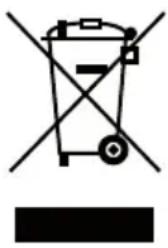
Symbol of a trash bin crossed with no text or labels, accompanied by a black rectangular block below (no readable text or symbols)Appliances and rechargeable batteries which are marked with this symbol must be disposed of separately from domestic waste. Appliances and rechargeable batteries contain valuable raw materials that can be recycled. Proper disposal protects the environment and the health of your fellow men. Dispose of the appliance and the removed rechargeable battery separately at the appropriate collection points.
Warranty
The legal warranty rights with respect to the seller and any seller warranties are unaffected by the following warranty conditions.
If repairs are required, contact our customer service department by telephone or e-mail. The contact information can be found in the appendix to this instruction manual. In case of warranty claim, you can also contact the dealer directly. In addition, SEVERIN grants a manufacturer's warranty of two years from the date of purchase. During this period, we will eliminate all defects caused by material or production faults that compromise the function. Other claims are excluded.
Excepted from the warranty are: Damage that is due to non-observance of the instruction manual, improper handling or normal wear; also easily-breakable parts such as glass, plastic or LEDs. Batteries and rechargeable batteries which are faulty or whose service life has been shortened as a result of normal wear or improper handling, are not covered by the warranty either.
If the appliance is tampered with by persons not authorised by SEVERIN, this will render the warranty null and void.
natural_image
Diagram of screw fasteners inserted into a panel, showing internal components and alignment (no text or symbols)natural_image
Symbol of a trash bin crossed with no text or labels, representing waste sorting or disposal (no text present)natural_image
Diagram of a switch or connector with screw pins and directional arrows indicating movement (no text or symbols)natural_image
Symbol of a trash bin crossed with no text or labels, accompanied by a black rectangular block below (no readable text or symbols)natural_image
Diagram of screw fasteners inserted into a panel with arrows indicating direction (no text or symbols)natural_image
Symbol of a trash bin with crossed lines indicating no waste or restriction (no text or labels)natural_image
Diagram of a mechanical component with screw holes and directional arrows indicating movement (no text or symbols)natural_image
Symbol of a trash bin crossed with no text or labels, accompanied by a black rectangular block below (no readable text or symbols)natural_image
Diagram of a mechanical component with screw holes and directional arrows indicating movement (no text or symbols)natural_image
Symbol of a trash bin crossed with a diagonal line and a horizontal bar below (no text or labels)natural_image
Diagram of a switch or connector with screw pins and directional arrows indicating movement (no text or symbols)natural_image
Symbol of a trash bin crossed with no text or labels, accompanied by a black rectangular block below (no readable text or symbols)F-67210 OBERNAI CEDEX
Tel.: +33 3 88 47 62 08
Fax: +33 3 88 47 62 09
eMail: severin.france@severin.fr
Web: http://www.severin.fr
Greece
BERSON
C. Sarafidis Bros. S.A.
Agamemnonos 47
176 75 Kallithea, Athens
Tel.: 0030-210 9478700
Greece
Philippos Business Center
Service Post of Thermi
570 01 Thessaloniki, Greece
Tel.: 0030-2310954020
Italia
via Dino Col 52r-54r-56r,
I - 16149 Genova
Green Number: 800240279
Tel.: 010/6 45 11 02 - 01041 86 09
Fax: 010/6 42 50 09
e-mail: videoelettronica@panet.it
Latvia
SERVO Ltd.
Mr. Janis Pivovarenoks
Tel: +371 7279892
Luxembourg
Ser-Tec