USER MANUAL Bravia KD49XE8099 SONY
Parts and Controls 7
Controls and Indicators 7
Using Remote Control 8
Remote Control Parts Description. .8
Connection Diagram 10
Installing the TV to the Wall 12
Troubleshooting. 13
Troubles and Solutions 13
Specifications 14
Internet Connection and Data Privacy
This product connects to the internet during initial setup as soon as a network is connected in order to confirm internet connection, and later to configure the Home screen. Your IP address is used in these and all other internet connections. If you do not want your IP address be used at all, do not set-up the wireless internet function and do not connect an internet cable. Please refer to the privacy information presented in the set-up screens for further details of internet connections.
Introduction
Thank you for choosing this Sony product. Before operating the TV, please read this manual thoroughly and retain it for future reference.
Note
Before operating the TV, please read the "Safety information" (page 3).
Images and illustrations used in the Setup Guide and this manual are for reference only and may differ from the actual product.
The "xx" that appears in the model name corresponds to a numeric digit, related to design, colour or TV system.
Location of the Setup Guide
Setup Guide is placed on top of the cushion inside the TV carton.
Help/Help Guide
Help feature offers a lot of information about your TV. To use the Help feature, press HELP on the remote control. You can find how to and troubleshooting from the list or keyword search. Select [Help Guide] on Help menu to view the manual. If you connect your TV to the internet, the Help feature and information will be updated.
Location of the identification label
Labels for the TV Model No., Production Date (year/month) and Power Supply rating are located on the rear of the TV or package. For models with supplied mains adaptor: Labels for the mains adaptor Model No. and Serial No. are located on the bottom of the mains adaptor.
WARNING
TO PREVENT THE SPREAD OF FIRE, KEEP

CANDLES OR OTHER OPEN FLAMES AWAY FROM THIS PRODUCT AT ALL TIMES.
NOTICE FOR CUSTOMERS IN THE UNITED KINGDOM
A moulded plug complying with BS1363 is fitted to this equipment for your safety and convenience.
Should the fuse in the plug supplied need to be replaced with the same rating of fuse approved by ASTA or BSI to BS 1362 (i.e., marked with or) must be used.
If the plug supplied with this equipment has a detachable fuse cover, be sure to attach the fuse cover after you change the fuse. Never use the plug without the fuse cover. If you should lose the fuse cover, please contact your nearest Sony service station.
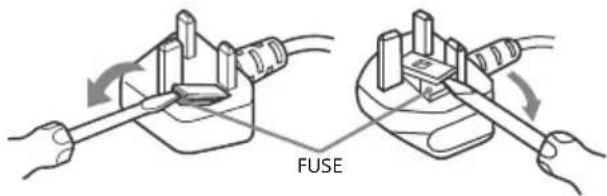
How to replace the fuse
Open the fuse compartment with a blade screwdriver, and replace the fuse.
Please refer to the illustration that actually equipped with the product.
IMPORTANT NOTICE
This product has been manufactured by or on behalf of Sony Corporation, 1-7-1 Konan Minato-ku Tokyo, 108-0075 Japan. Inquiries related to product compliance based on European Union legislation shall be addressed to the authorized representative, Sony Belgium, bijkantoor van Sony Europe Limited, Da Vincilaan 7-D1, 1935 Zaventem, Belgium. For any service or guarantee matters, please refer to the addresses provided in the separate service or guarantee documents.
Notice for Wireless Signal
Hereby, Sony Corporation declares that this unit is in compliance with the essential requirements and other relevant provisions of Directive 1999/5/EC.
For details, please access the following URL: http://www.compliance.sony.de/

Notice for customers: the following information is only applicable to equipment sold in countries applying EU directives.
TV wireless system may be operated in following countries: AT, BE, HR, CY, CZ, DK, EE, FI, FR, DE, EL, HU, IE, IT, LV, LT, LU, MT, NL, PL, PT, SK, SI, ES, SE, UK, IS, LI, NO, CH, BG, RO, TR, AL, BA, MK, MD, RS, ME, Kosovo
This equipment can be operated in other non-European countries.
This radio equipment can be operated in the EU without infringing applicable requirements on the use of radio spectrum.
WARNING
Batteries must not be exposed to excessive heat such as sunshine, fire or the like.
Never place a television set in an unstable location. A television set may fall, causing serious personal injury or death. Many injuries, particularly to children, can be avoided by taking simple precautions such as:
- Using cabinets or stands recommended by the manufacturer of the television set.
- Only using furniture that can safely support the television set.
- Ensuring the television set is not overhanging the edge of the supporting furniture.
Not placing the television set on tall furniture (for example, cupboards or bookcases) without anchoring both the furniture and the television set to a suitable support.
Not placing the television set on cloth or other materials that may be located between the television set and supporting furniture.
Educating children about the dangers of climbing on furniture to reach the television set or its controls.
If your existing television set is being retained and relocated, the same considerations as above should be applied.
Installation/Set-up
Install and use the TV set in accordance with the instructions below in order to avoid any risk of fire, electric shock or damage and/or injuries.
Installation
- The TV set should be installed near an easily accessible mains socket.
- Place the TV on a stable, level surface to prevent it from falling over and causing personal injury or property damage.
Install the TV where it cannot be pulled, pushed, or knocked over.
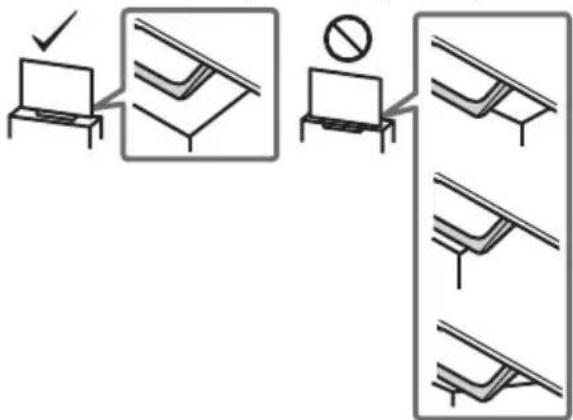
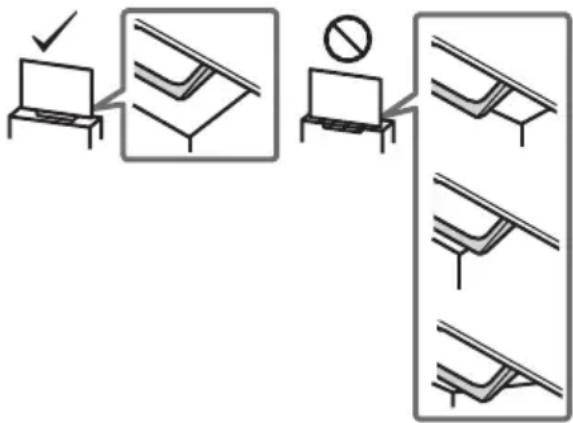
- Install the TV so that the TV's Table-Top Stand does not protrude out from the TV stand (not supplied). If the Table-Top Stand protrudes out from the TV stand, it may cause TV set to topple over, fall down, and cause personal injury or damage to the TV.
- Only qualified service personnel should carry out wall-mount installations.
For safety reasons, it is strongly recommended that you use Sony accessories, including: Wall-Mount Bracket SU-WL450
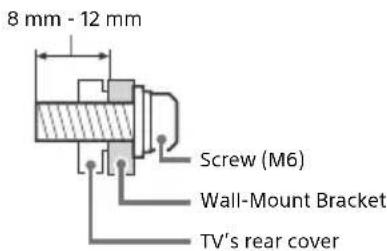
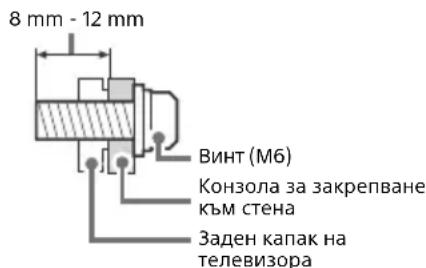
- Be sure to use the screws supplied with the Wall-Mount Bracket when attaching the Wall-Mount Bracket to the TV set. The supplied screws are designed as indicated by illustration when measured from the attaching surface of the Wall-Mount Bracket. The diameter and length of the screws differ depending on the Wall-Mount Bracket model. Use of screws other than those supplied may result in internal damage to the TV set or cause it to fall, etc.
Transporting
- Before transporting the TV set, disconnect all cables.
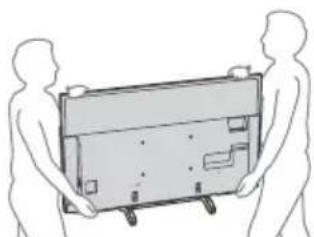
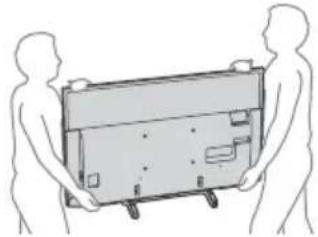
- Two or three people are needed to transport a large TV set.
- When transporting the TV set by hand, hold it as shown below. Do not put stress on the LCD panel and the frame around the screen.
- When lifting or moving the TV set, hold it firmly from the bottom.
-
When transporting the TV set, do not subject it to jolts or excessive vibration.
-
When transporting the TV set for repairs or when moving, pack it using the original carton and packing material.
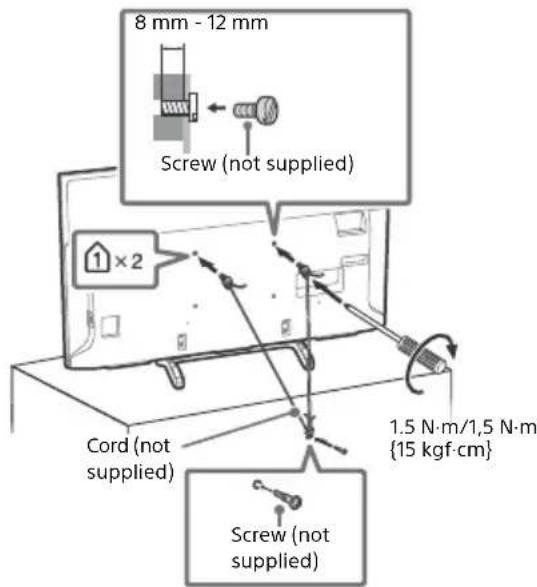
Topple prevention
Ventilation
- Never cover the ventilation holes or insert anything in the cabinet.
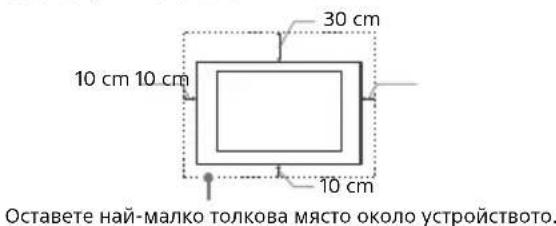
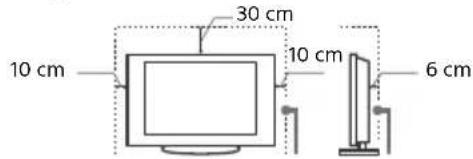
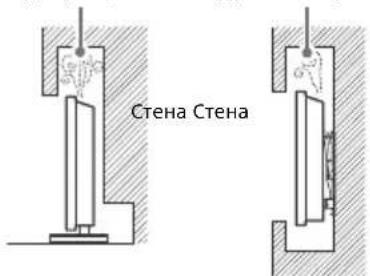
- Leave space around the TV set as shown below.
- It is strongly recommended that you use a Sony Wall-Mount Bracket in order to provide adequate air circulation.
Installed on the wall
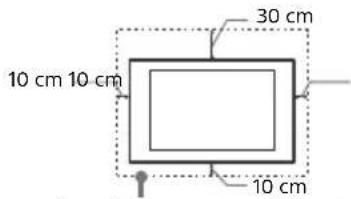
Leave at least this space around the set.
Installed with stand
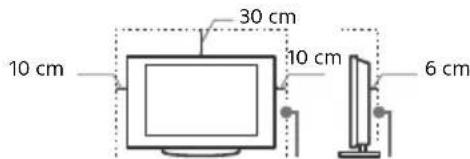
Leave at least this space around the set.
To ensure proper ventilation and prevent the collection of dirt or dust:
- Do not lay the TV set flat, install upside down, backwards, or sideways.
- Do not place the TV set on a shelf, rug, bed or in a closet.
- Do not cover the TV set with a cloth, such as curtains, or items such as newspapers, etc.
- Do not install the TV set as shown below.
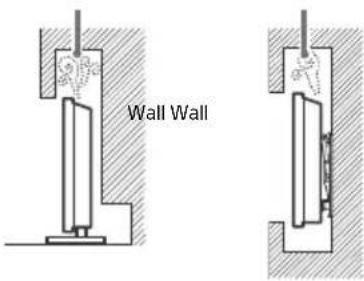
Air circulation is blocked.
Mains lead
Handle the mains lead and socket as follows in order to avoid any risk of fire, electric shock or damage and/or injuries:
- Use only mains leads supplied by Sony, not other suppliers.
- Insert the plug fully into the mains socket.
- Operate the TV set on a 220 V - 240 V AC supply only.
- When wiring cables, be sure to unplug the mains lead for your safety and take care not to catch your feet on the cables.
- Disconnect the mains lead from the mains socket before working on or moving the TV set.
- Keep the mains lead away from heat sources.
Unplug the mains plug and clean it regularly. If the plug is covered with dust and it picks up moisture, its insulation may deteriorate, which could result in a fire.
Note
- Do not use the supplied mains lead on any other equipment.
- Do not pinch, bend, or twist the mains lead excessively. The core conductors may be exposed or broken.
- Do not modify the mains lead.
- Do not put anything heavy on the mains lead.
- Do not pull on the mains lead itself when disconnecting the mains lead.
- Do not connect too many appliances to the same mains socket.
- Do not use a poor fitting mains socket.
NOTE ON MAINS ADAPTOR (models with supplied mains adaptor only)
Warning
To reduce the risk of fire or electric shock, do not expose this apparatus to rain or moisture.
To prevent fire or shock hazard, do not place objects filled with liquids, such as vases, on the apparatus. Do not install this equipment in a confined space, such as a bookshelf or similar unit.
- Please ensure that the mains socket is installed near the equipment and shall be easily accessible.
- Be sure to use the supplied mains adaptor and mains lead.
- Do not use any other mains adaptor. It may cause a malfunction.
- Connect the mains adaptor to an easily accessible mains socket.
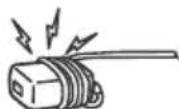
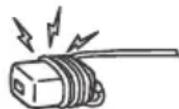
- Do not coil the mains lead around the mains adaptor. The core wire may be cut and/or it may cause a malfunction of the media receiver.
- Do not touch the mains adaptor with wet hands.
- If you notice an abnormality in the mains adaptor, disconnect it from the mains socket immediately.
- The set is not disconnected from the mains source as long as it is connected to the mains socket, even if the set itself has been turned off.
- As the mains adaptor will become warm when it is used for a long time, you may feel hot when touching it by hand.
Prohibited Usage
Do not install/use the TV set in locations, environments or situations such as those listed below, or the TV set may malfunction and cause a fire, electric shock, damage and/or injuries.
Locations:
- Outdoors (in direct sunlight), at the seashore, on a ship or other vessel, inside a vehicle, in medical institutions, unstable locations, near water, rain, moisture or smoke.
Environments:
- Places that are hot, humid, or excessively dusty; where insects may enter; where it might be exposed to mechanical vibration, near flammable objects (candles, etc.). The TV set shall not be exposed to dripping or splashing and no objects filled with liquids, such as vases, shall be placed on the TV.
Situations:
-
Use when your hands are wet, with the cabinet removed, or with attachments not recommended by the manufacturer. Disconnect the TV set from mains socket and aerial during lightning storms.
-
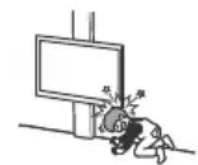
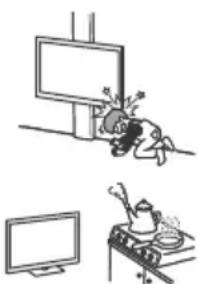
Install the TV so that it sticks out into an open space. Injury or damage from a person or object bumping into the TV may result.
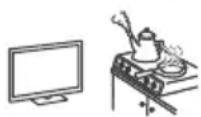
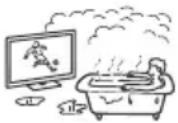
- Place the TV in a humid or dusty space, or in a room with oily smoke or steam (near cooking tables or humidifiers). Fire, electric shock, or warping may result.
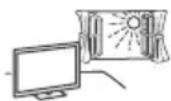
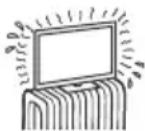
- Install the TV in places subject to extreme temperature such as in direct sunlight, near a radiator or a heating vent. The TV may overheat in such condition which can cause deformation of the enclosure and/or TV malfunction.
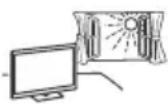
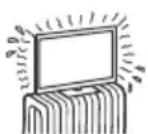
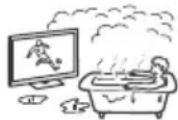
- If the TV is placed in the changing room of a public bath or hot spring, the TV may be damaged by airborne sulfur, etc.
- For best picture quality, do not expose the screen to direct illumination or sunlight.
- Avoid moving the TV from a cold area to a warm area. Sudden room temperature changes may cause moisture condensation. This may cause the TV to show poor picture and/or poor colour. Should this occur, allow moisture to evaporate completely before powering the TV on.
Broken pieces:
- Do not throw anything at the TV set. The screen glass may break by the impact and cause serious injury.
- If the surface of the TV set cracks, do not touch it until you have unplugged the mains lead. Otherwise this may cause an electric shock.
When not in use
- If you will not be using the TV set for several days, the TV set should be disconnected from the mains for environmental and safety reasons.
- As the TV set is not disconnected from the mains when the TV set is just turned off, pull the plug from the mains to disconnect the TV set completely.
- Some TV sets may have features that require the TV set to be left in standby to work correctly.
For children
- Do not allow children to climb on the TV set.
- Keep small accessories out of the reach of children, so that they are not mistakenly swallowed.
If the following problems occur...
Turn off the TV set and unplug the mains lead immediately if any of the following problems occur. Ask your dealer or Sony service centre to have it checked by qualified service personnel.
When:
- Mains lead is damaged.
- Poor fitting of mains socket.
TV set is damaged by being dropped, hit or having something thrown at it.
Any liquid or solid object falls through openings in the cabinet.
About LCD TV Temperature
When the LCD TV is used for an extended period, the panel surrounds become warm. You may feel hot when touching there by the hand.
Precautions
Viewing the TV
View the TV in moderate light, as viewing the TV in poor light or during long period of time, strains your eyes.
- When using headphones, adjust the volume so as to avoid excessive levels, as hearing damage may result.
LCD Screen
- Although the LCD screen is made with high-precision technology and 99.99% or more of the pixels are effective, black dots may appear or bright points of light (red, blue, or green) may appear constantly on the LCD screen. This is a structural property of the LCD screen and is not a malfunction
- Do not push or scratch the front filter, or place objects on top of this TV set. The image may be uneven or the LCD screen may be damaged.
- If this TV set is used in a cold place, a smear may occur in the picture or the picture may become dark. This does not indicate a failure. These phenomena disappear as the temperature rises.
- Ghosting may occur when still pictures are displayed continuously. It may disappear after a few moments.
- The screen and cabinet get warm when this TV set is in use. This is not a malfunction.
- The LCD screen contains a small amount of liquid crystal. Follow your local ordinances and regulations for disposal.
Handling and cleaning the screen surface/ cabinet of the TV set
Be sure to unplug the mains lead connected to the TV set from mains socket before cleaning.
To avoid material degradation or screen coating degradation, observe the following precautions.
- To remove dust from the screen surface/cabinet, wipe gently with a soft cloth. If dust is persistent, wipe with a soft cloth slightly moistened with a diluted mild detergent solution.
- Never spray water or detergent directly on the TV set. It may drip to the bottom of the screen or exterior parts and enter the TV set, and may cause damage to the TV set.
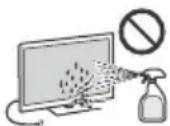
- Never use any type of abrasive pad, alkaline/acid cleaner, scouring powder, or volatile solvent, such as alcohol, benzene, thinner or insecticide. Using such materials or maintaining prolonged contact with rubber or vinyl materials may result in damage to the screen surface and cabinet material.
- Do not touch the TV if your hand is covered in any chemical substance such as hand cream or sunblock.
Periodic vacuuming of the ventilation openings is recommended to ensure proper ventilation.
- When adjusting the angle of the TV set, move it slowly so as to prevent the TV set from moving or slipping off from its table stand.
Optional Equipment
- Keep optional components or any equipment emitting electromagnetic radiation away from the TV set. Otherwise picture distortion and/or noisy sound may occur.
- This equipment has been tested and found to comply with the limits set out in the EMC Directive using a connection signal cable shorter than 3 meters.
- This equipment has been tested and found to comply with the limits set out in the EMC Directive using a RF cable shorter than 30 meters for terrestrial/satellite/CATV terminal.
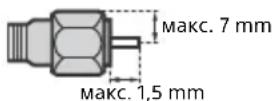
Recommendation of F-type plug
Projection of the inner wire from the connection part must be less than 1.5mm
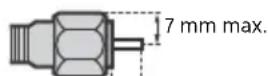
1.5 mm max.
(Reference drawing of the F-type plug)
Wireless Function of the unit
- Do not operate this unit near medical equipment (pacemaker, etc.), as this may result in the malfunction of the medical equipment.
- Although this unit transmits/receives scrambled signals, be careful of unauthorised interception. We cannot be responsible for any trouble as a result.
- This equipment should be installed and operated keeping a separation distance of 20cm or more between the antenna of this device and a person's body.
Caution about handling the remote control
- Observe the correct polarity when inserting batteries.
- Do not use different types of batteries together or mix old and new batteries.
- Dispose of batteries in an environmentally friendly way. Certain regions may regulate the disposal of batteries. Please consult your local authority.
- Handle the remote control with care. Do not drop or step on it, or spill liquid of any kind onto it.
- Do not place the remote control in a location near a heat source, a place subject to direct sunlight, or a damp room.
Disposal of the TV set
13/14
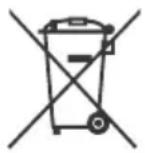
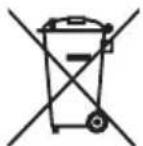
Disposal of Old Electrical & Electronic Equipment (Applicable in the European Union and other European countries with separate collection systems)
This symbol on the product or on its packaging indicates that this product shall not be treated as household waste. Instead it shall be handed over to the applicable collection point for the
recycling of electrical and electronic equipment. By ensuring this product is disposed of correctly, you will help prevent potential negative consequences for the environment and human health, which could otherwise be caused by inappropriate waste handling of this product. The recycling of materials will help to conserve natural resources. For more detailed information about recycling of this product, please contact your local Civic Office, your household waste disposal service or the shop where you purchased the product.
Disposal of waste batteries (applicable in the European Union and other European countries with separate collection systems)
This symbol on the battery or on the packaging indicates that the battery provided with this
product shall not be treated as household waste. On certain batteries this symbol might be used in combination with a chemical symbol. The chemical symbols for mercury (Hg) or lead (Pb) are added if the battery contains more than 0.0005% mercury or 0.004% lead. By ensuring these batteries are disposed of correctly, you will help prevent potentially negative consequences for the environment and human health which could otherwise be caused by inappropriate waste handling of the battery. The recycling of the materials will help to conserve natural resources. In case of products that for safety, performance or data integrity reasons require a permanent connection with an incorporated battery, this battery should be replaced by qualified service staff only. To ensure that the battery will be treated properly, hand over the product at end-of-life to the applicable collection point for the recycling of electrical and electronic equipment. For all other batteries, please view the section on how to remove the battery from the product safely. Hand the battery over to the applicable collection point for the recycling of waste batteries. For more detailed information about recycling of this product or battery, please contact your local Civic Office, your household waste disposal service or the shop where you purchased the product.
Parts and Controls
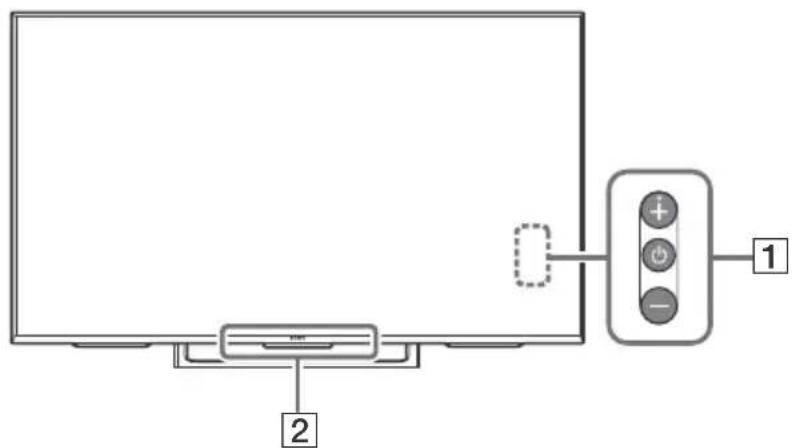
Controls and Indicators
GB
1 (Power) /+/-
When the TV is off,
Press to power on.
When the TV is on,
Press and hold to power off.
Press repeatedly to change the function, then press + or - button to:
- Adjust the volume.
- Select the channel.
- Select the input source of TV.
Remote Control sensor*/
Light sensor*/Illumination LED
The illumination LED lights up or blinks according to the status of the TV. For more information, refer to the Help Guide.
- Do not place anything near the sensor.
Using Remote Control
Remote Control Parts Description
The remote control shape, location, availability and function of remote control button may vary depending on your region/country/TV model.
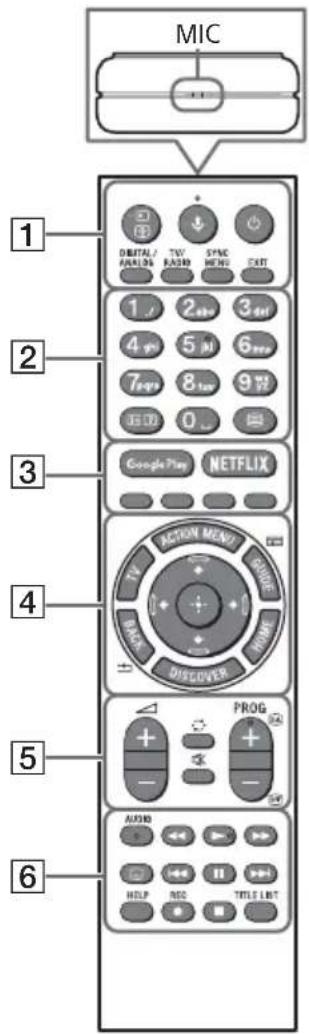
Input select/Text hold)
In TV mode: Display and select the input source.
In Text mode: Hold the current page.
(Microphone)
Use Voice Function. (e.g., Search various content by voice.)
(1) (TV standby)
Turn on or turn off the TV (standby mode).
DIGITAL/ANALOG
Switch between digital and analogue mode.
TV/RADIO
Switch between TV or RADIO broadcasts.
Display the BRAVIA Sync Menu.
EXIT
Return to the previous screen or exit from the menu. When an Interactive Application service is available, press to exit from the service.
Info/Text reveal)
Display information.
(Text)
Display text information.
3 Google Play
Access the "Google Play" online service.
NETFLIX (Only on limited region/ country/TV model)
Access the "NETFLIX" online service.
Execute corresponding function at that time.
4 ACTION MENU
Display a list of contextual functions.
TV
- Switch to a TV channel or input from other applications.
- Turn on the TV to display TV channel or input.
GUIDE/
Display the digital programme guide.
BACK/
Return to previous screen.
HOME
Display the TV Home Menu.
DISCOVER
Bring up the Content Bar to search for content.
/ / / (Item select/Enter)
5 +/-(Volume)
Adjust the volume.
一 (Jump)
Jump back and forth between two channels or inputs. The TV alternates between the current channel or input and the last channel or input that was selected.
(Muting)
Mute the sound. Press again to restore the sound.
PROG+/-/E/A/EY
In TV mode: Select the channel.
In Text mode: Select the next (A) on previous (B) page.
6 AUDIO
Change the language for the programme currently being viewed.

Operate media contents on TV and connected BRAVIA Sync-compatible device.
(Subtitle setting)
Turn subtitles on or off (when the feature is available).
HELP
Display Help menu. Help Guide can be accessed from here.
REC
Record the current programme with the USB HDD recording function.
TITLE LIST
Display the Title list.
Connection Diagram
For more information on connections, refer to the Help Guide by pressing HELP on the remote control.
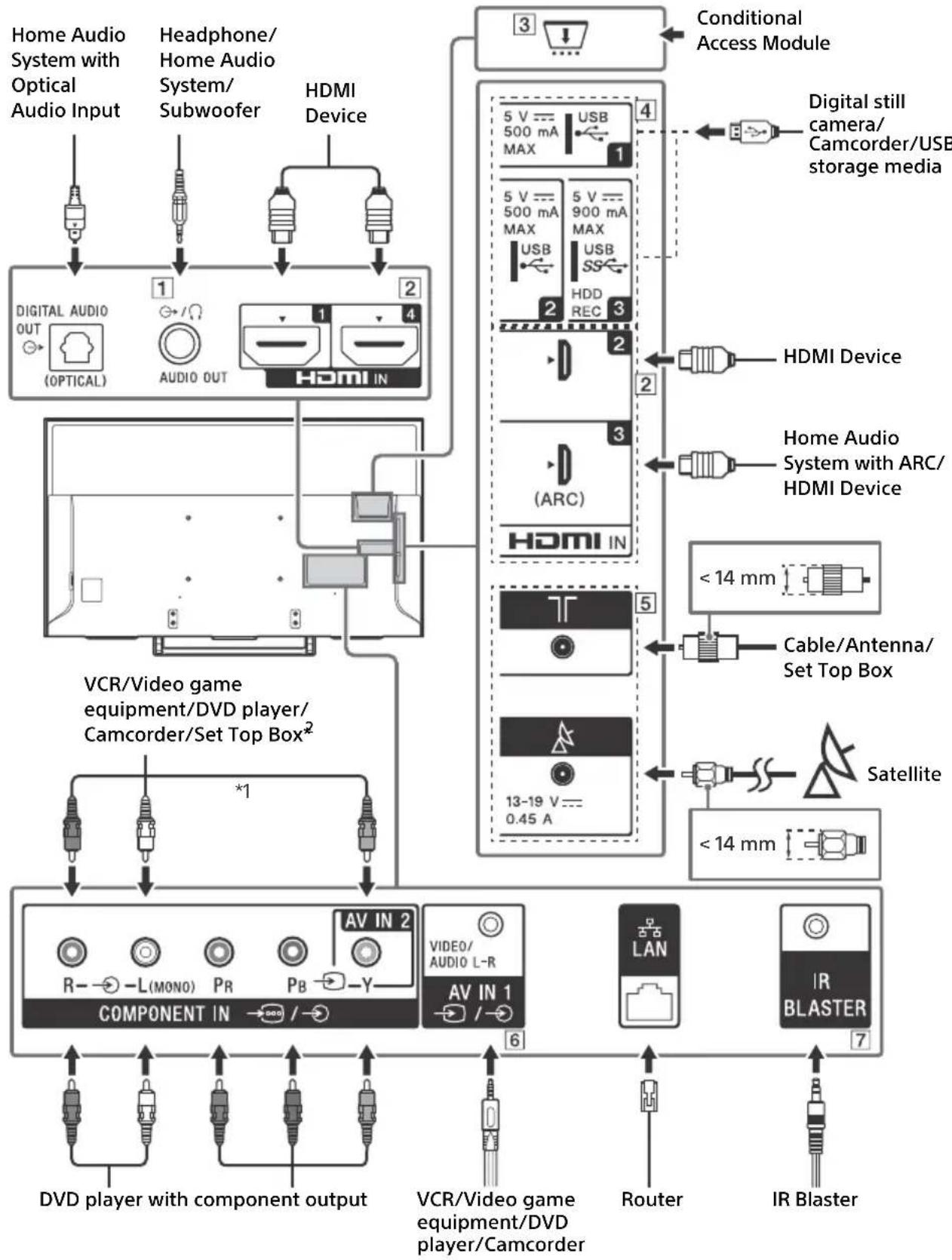
1 AUDIO OUT
Supports 3-pole stereo mini jack only.
- To listen to the TV's sound through the connected equipment, press HOME. Select [Settings] [Sound] [Headphone/Audio out] and then select the desired item.
HDMI IN 1/2/3/4
- If connecting a digital audio system that is compatible with Audio Return Channel (ARC) technology, use HDMI IN 3. If not, an additional connection with DIGITAL AUDIO OUT (OPTICAL) is necessary.
3 CAM (Conditional Access Module)
- Provides access to pay TV services. For details, refer to the instruction manual supplied with your CAM.
- Do not insert the smart card directly into the TV CAM slot. It must be fitted into the Conditional Access Module provided by your authorised dealer.
- CAM is not supported in some countries/ areas. Check with your authorised dealer.
- A CAM message may appear when you switch to a digital programme after using the Internet video.
4 USB 1/2, USB3 (HDD REC)*
3
- Connecting a large USB device may interfere with other connected devices beside it.
- When connecting a large USB device, connect to the USB 1 port.
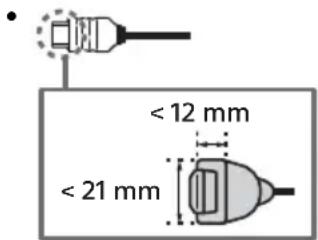
- Connections for terrestrial/cable and satellite.
6AVIN-
- For a composite connection, use an Analogue Extension Cable (not supplied).
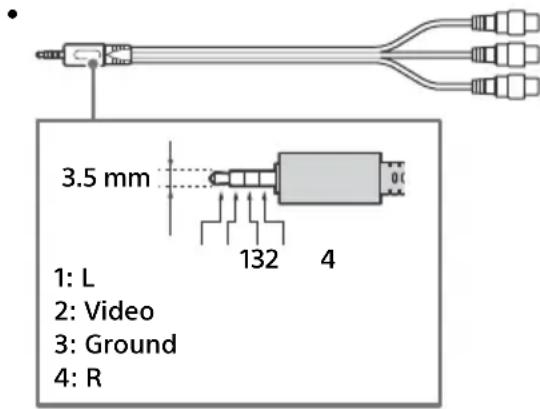
7 IR BLASTER
1 When connecting mono equipment, connect to the L (MONO) audio jack (socket).
2 For an external device which has only SCART AV OUT, use a SCART-RCA adapter.
*3 Only on limited region/country/TV model.
Installing the TV to the Wall
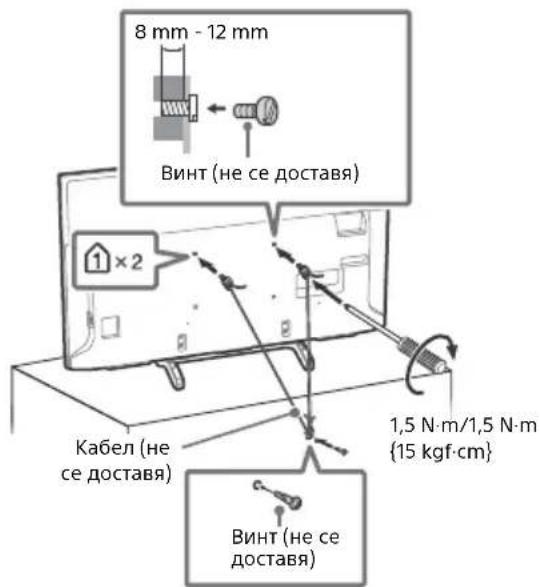
This TV's instruction manual only shows the steps on preparing the installation of the TV before installing to the wall.
To Customers:
For product protection and safety reasons, Sony strongly recommends that installation of your TV be performed by Sony dealers or licensed contractors. Do not attempt to install it yourself.
To Sony Dealers and Contractors:
Provide full attention to safety during the installation, periodic maintenance and examination of this product.
Sufficient expertise is required for installing this product, especially to determine the strength of the wall for withstanding the TV's weight. Be sure to entrust the attachment of this product to the wall to Sony dealers or licensed contractors and pay adequate attention to safety during the installation. Sony is not liable for any damage or injury caused by mishandling or improper installation.
Use the Wall-Mount Bracket SU-WL450 (not supplied) to install the TV to the wall.
When installing the Wall-Mount Bracket, also refer to the Operating Instructions and Installation Guide supplied with the Wall-Mount Bracket.
Note
- Be sure to store the removed screws in a safe place, keeping them away from children.

For instructions on Wall-Mount Bracket installation of your TV model, refer to the following website: www.sony.eu/tv/wall-mount-bracket-manual
To detach the Table-Top Stand from the TV
KD-55XE83xx/55XE80xx, FW-55XE80xx only
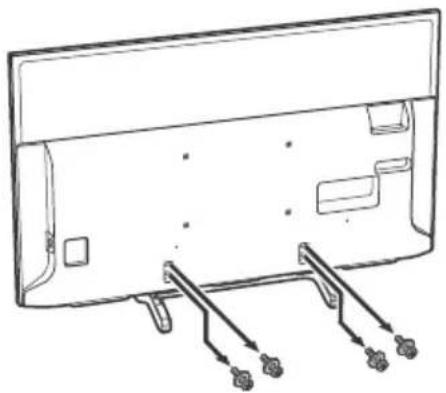
KD-49/43XE83xx, KD-49/43XE80xx, FW-49/43XE80xx only
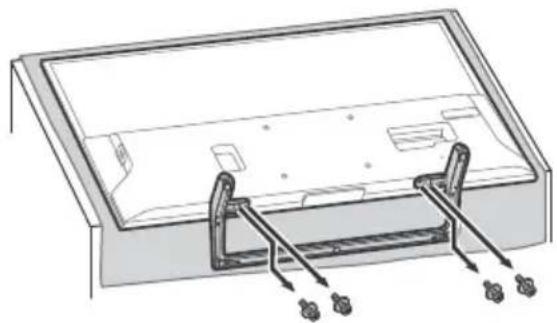
Troubleshooting
General troubleshooting for issues like: black screen, no sound, frozen picture, TV does not respond, or network is lost, do the following steps.
1 Restart your TV by pressing the power button on the remote control until a message appears. The TV will restart. If the TV does not recover, try unplugging the TV from the mains lead for two minutes and then plug it in again.
2 Refer to the Help menu by pressing HELP on the remote control.
3 Connect your TV to the Internet and perform a software update.
4 Visit Sony support website (information provided on the back cover).
When [A new TV system software update is available...] message is displayed.
Sony strongly recommends you to update the TV software by selecting [Update Now]. These software updates improve your TV performance or add new features.
The following screen with [Updating...] will appear and the illumination LED flashes white while software is updating.
![SONY Bravia KD49XE8099 - When [A new TV system software update is available...] message is displayed. - 1](/content/2026/03/465217/images/7b3de275dbf624ddbae67aa034929976fd432c6b39de4eb066ab34e3e2dea854.jpg)
Do not unplug the mains lead during the software update. If you do, the software update may not finish completely, and it may cause a software malfunction. Software updates can take up to 15 minutes.
When you plug in TV, the TV may not be able to turn on for a while even if you press the power button on the remote control or the TV. It takes time to initialize the system. Wait for about one minute, then operate it again.
Troubles and Solutions
When the illumination LED is flashing in red.
- Count how many times it flashes (interval time is three seconds). Reboot the TV by disconnecting the mains lead for two minutes, then turn on the TV. If the problem persists, disconnect the mains lead, and contact your dealer or Sony service centre with the number of times the illumination LED flashes.
Terrestrial/cable service cannot be received.
- Check the antenna (aerial)/cable connection and booster settings.
- Select terrestrial/cable service by pressing DIGITAL/ANALOG on the remote control. If the broadcasting service is not displayed, press TV and then press DIGITAL/ANALOG.
- Terrestrial signal might be suppressed if there is a strong signal supplied nearby. Set [LNA (CH ---)] to [Off] in digital tuning settings.
- After moving to a new house or trying to receive new services, attempt a service search by selecting [Digital Tuning].
Satellite service cannot be received.
- Check the satellite cable connection.
- When [No signal. LNB overload detected...] message is displayed, unplug the mains lead. Then, ensure the satellite cable is not damaged and the satellite signal line is not short-circuited in the satellite connector.
The remote control does not function.
The parental lock for broadcast password has been forgotten.
- Enter 9999 for the PIN code and select [Change PIN Code].
The TV surrounds become warm.
- When the TV is used for an extended period, the TV surrounds become warm. You may feel hot when touching there by the hand.
Specifications
System
Panel system
LCD (Liquid Crystal Display) Panel, LED Backlight
TV system
Depending on your country/area selection/TV model
Analogue: B/G, D/K, I
Digital: DVB-T/DVB-C
DVB-T2*
Satellite*: DVB-S/DVB-S2
Colour system
PAL, SECAM, NTSC3.58 (Video only), NTSC4.43
(Video only)
Channel coverage
Depending on your country/area selection/TV model
Analogue: UHF/VHF/Cable
Digital: UHF/VHF/Cable
Satellite*: IF Frequency 950-2,150 MHz
Sound output
10W+10W
Frequency band(s)
| Wireless LAN (IEEE 802.11ac/a/b/g/n) |
| Frequency range Output Power |
| 2400 - 2483.5 MHz < 20.0 dBm |
| 5150 - 5250 MHz < 23.0 dBm |
| 5250 - 5350 MHz < 20.0 dBm |
| 5470 - 5725 MHz < 20.0 dBm |
| 5725 - 5850 MHz < 13.9 dBm |
| Bluetooth |
| Frequency range Output Power |
| 2400 - 2483.5 MHz < 10.0 dBm |
RMF-TX301E/TX300E/TX201ES
| Bluetooth |
| Frequency range Output Power |
| 2400 - 2483.5 MHz < 10.0 dBm |
TV software version:
PKG. EUA
Press HELP on the Remote Control to know the software version.
- Not all the TV sets have DVB-T2 or DVB-S/S2 technology or satellite antenna terminal.
Antenna (aerial)/cable
75 ohm external terminal for VHF/UHF
Satellite antenna
Female F-Type Connector, 75 ohm.
DiSEqC 1.0, LNB 13 V/18 V & 22 kHz tone, Single
Cable Distribution EN50494.
AVIN1
Video/Audio input (mini jack)
COMPONENT IN
YPBPR (Component Video): 1080p (50, 60 Hz),
1080i (50, 60 Hz), 720p (50, 60 Hz), 576p, 576i, 480p, 480i
Audio input (phono pin jack)
AVIN2
Video input (common phono pin with Y input)
HDMI IN 1, 2, 3, 4 (support 4K resolution,
*2 HDMI IN 2/3 only.
Audio: 5.1 channel linear PCM: 32, 44.1, 48, 88.2
96, 176.4 and 192kHz 16, 20 and 24 bits, Dolby
Digital, Dolby Digital Plus and DTS
ARC (Audio Return Channel) (HDMI IN 3 only)
(Two channel linear PCM: 48 kHz, 16 bits, Dolby
Digital, Dolby Digital Plus, DTS)
DIGITAL AUDIO OUT (OPTICAL)
Digital optical jack (Two channel linear PCM:
48 kHz, 16 bits, Dolby Digital, DTS)
AUDIO OUT (Stereo mini jack)
Headphone, Audio output, Subwoofer
1,2,3(HDBREC)*
USB device port (USB HDD device for REC feature)
USB port 1 and 2 support High Speed USB
(USB2.0).
USB port 3 supports Super Speed USB (USB3.0).
1
CAM (Conditional Access Module) slot
LAN
10BASE-T/100BASE-TX connector (Depending on the operating environment of the network, connection speed may differ. 10BASE-T/
100BASE-TX communication rate and communication quality are not guaranteed for this TV.)
DC IN 19.5 V (models with supplied mains
adaptor only)
Mains adaptor input
IR BLASTER*1
IR Blaster Cable input (mini jack)
Others
Optional accessories
Wall-Mount Bracket: SU-WL450
Operating temperature
0^ - 40^
Operating humidity
10% - 80% RH (non-condensing)
Power, Product Fiche and others
Power requirements
except models with supplied mains adaptor
220V-240VAC,50Hz
models with supplied mains adaptor only
19.5 V DC with mains adaptor
Rating: Input 220 V - 240 V AC, 50 Hz
Energy Efficiency Class
KD-55XE83xx / 55XE80xx / FW-55XE80xx: A
KD-49XE83xx / 49XE80xx / FW-49XE80xx: A
KD-43XE83xx / 43XE80xx / FW-43XE80xx: A
Screen size (measured diagonally) (Approx.)
KD-55XE83xx / 55XE80xx / FW-55XE80xx:
138.8 cm / 55 inches
KD-49XE83xx / 49XE80xx / FW-49XE80xx:
123.2 cm / 49 inches
KD-43XE83xx / 43XE80xx / FW-43XE80xx:
108.0 cm / 43 inches
Power consumption
in [Standard] mode
KD-55XE83xx / 55XE80xx / FW-55XE80xx: 106 W
KD-49XE83xx / 49XE80xx / FW-49XE80xx: 85 W
KD-43XE83xx / 43XE80xx / FW-43XE80xx: 70 W
in [Vivid] mode
KD-55XE8396:166W
KD-55XE8096:166W
FW-55XE8001: 166 W
KD-49XE8396:143W
KD-49XE8099:143W
KD-49XE8096:143W
KD-49XE8088:143W
KD-49XE8077:143W
KD-49XE8005:143W
KD-49XE8004:143W
FW-49XE8001: 143 W
KD-43XE8396:133W
KD-43XE8099:133W
KD-43XE8096:133W
KD-43XE8077:133W
KD-43XE8005:133W
KD-43XE8004:133W
FW-43XE8001: 133 W
Average annual energy consumption*2
KD-55XE83xx / 55XE80xx / FW-55XE80xx:
147 kWh
KD-49XE83xx / 49XE80xx / FW-49XE80xx:
118 kWh
KD-43XE83xx / 43XE80xx / FW-43XE80xx: 97 kWh
Standby power consumption*3*4
0.50 W (13 W in software/EPG update mode)
Display resolution
3,840 dots (horizontal) × 2,160 lines (vertical)
Output Rating
USB1/2:5V, = 500mA MAX
USB3:5V,900mA MAX
Dimensions (Approx.) (w × h × d)
with Table-Top Stand
KD-55XE83xx / 55XE80xx: 123.2× 77.2× 25.2cm
KD-49XE83xx / 49XE80xx: 109.6 × 69.1 × 25.2 cm
KD-43XE83xx / 43XE80xx: 96.4 × 61.7 × 24.2 cm
without Table-Top Stand
KD-55XE83xx / 55XE80xx: 123.2 × 71.6 × 5.7 cm
KD-49XE83xx / 49XE80xx: 109.6 × 64.0 × 5.7 cm
KD-43XE83xx / 43XE80xx: 96.4 × 56.7 × 5.7 cm
Mass(Approx.)
with Table-Top Stand
KD-55XE83xx / 55XE80xx: 18.6 kg
KD-49XE83xx / 49XE80xx: 12.9 kg
KD-43XE83xx / 43XE80xx: 10.8kg
without Table-Top Stand
KD-55XE83xx / 55XE80xx: 17.6 kg
KD-49XE83xx / 49XE80xx: 12.2kg
KD-43XE83xx / 43XE80xx: 10.1kg
*1 Only on limited region/country/TV model.
*2 Energy consumption per year, based on the power consumption of the television operating 4 hours per day for 365 days. The actual energy consumption will depend on how the television is used.
3 Specified standby power is reached after the TV finishes necessary internal processes.
4 Standby power consumption will increase when your TV is connected to the network.
Note
- Do not remove the cover from TV CAM (Conditional Access Module) slot other than to insert a smart card fitted in CAM.
- Optional accessories availability depends on countries/region/TV model/stock.
- Design and specifications are subject to change without notice.
Notes on Digital TV function
- Digital TV (DVB terrestrial, satellite and cable), interactive services and network functions may not be available in all countries or areas. Some functions might not be enabled or might not operate correctly with some providers and network environments. Some TV service providers may charge a fee for their services.
- This TV supports digital broadcasting using MPEG-2, H.264/MPEG-4 AVC and H.265/HEVC CODECs, but compatibility with all operator/service signals, which may change over time, cannot be guaranteed.
- The terms HDMI and HDMI High-Definition Multimedia Interface, and the HDMI Logo are trademarks or registered trademarks of HDMI Licensing LLC in the United States and other countries.
- Manufactured under license from Dolby Laboratories. Dolby, Dolby Audio, and the double-D symbol are trademarks of Dolby Laboratories.
- "B R A V I A B R A V I O A are trademarks of Sony Corporation.
- Gracenote, Gracenote eyeQ, Gracenote VideoID, Gracenote Video Explore, the Gracenote logo and logotype, and the "Powered by Gracenote" logo are either registered trademarks or trademarks of Gracenote in the United States and/or other countries.
- Opera® Devices SDK. Copyright 1995-2016
Opera TV AS. All rights reserved.
- Wi-Fi, Wi-Fi Direct, Miracast, Wi-Fi Protected Setup and Wi-Fi CERTIFIED Logo are trademarks or registered trademarks of Wi-Fi Alliance.
-
For DTS patents, see http://patents.dts.com. Manufactured under license from DTS, Inc. DTS, the Symbol, & DTS and the Symbol together are registered trademarks, and DTS Digital Surround is a trademark of DTS, Inc. © DTS, Inc. All Rights Reserved.
-
The Bluetooth® word mark and logos are registered trademarks owned by the Bluetooth SIG, Inc. and any use of such marks by Sony Corporation is under license. Other trademarks and trade names are those of their respective owners.
- DiSEqCTM is a trademark of EUTELSAT. This TV supports DiSEqC 1.0. This TV is not intended for controlling motorized antennas.
- TUXERA is a registered trademark of Tuxera Inc. in the US and other countries.
- USB-IF SuperSpeed USB Trident logo is a registered trademark of USB Implementers Forum, Inc.
Table des matieres
AVIS IMPORTANT. 2
AT, BE, HR, CY, CZ, DK, EE, FI, FR, DE, EL, HU, IE, IT, LV, LT, LU, MT, NL, PL, PT, SK, SI, ES, SE, UK, IS, LI, NO, CH, BG, RO, TR, AL, BA, MK, MD, RS, ME, Kosovo
PAL, SECAM, NTSC3.58 (Vidente uniquely),
NTSC4.43 (Vidente uniquely)
Canaux couverts
Analogue: UHF/VHF/Cable
ARC (Audio Return Channel) (HDMI IN 3.1, unquipment)
(PCM linéaire deux canaux: 48 kHz, 16 bits, Dolby Digital, Dolby Digital Plus, DTS)

DIGITAL AUDIO OUT (OPTICAL)
10% - 80% HR (sans condensation)
AT, BE, HR, CY, CZ, DK, EE, FI, FR, DE, EL, HU, IE, IT, LV, LT, LU, MT, NL, PL, PT, SK, SI, ES, SE, UK, IS, LI, NO, CH, BG, RO, TR, AL, BA, MK, MD, RS, ME, Kosovo
Sistema de television
PAL, SECAM, NTSC3.58 (Solo video), NTSC4.43
(Solo video)
Digital: UHF/VHF/Cable
DIGITAL AUDIO OUT (OPTICAL)
Toma digital optica (PCM lineal de dos canales: 48 kHz, 16 bits, Dolby Digital, DTS)
AUDIO OUT / (minitoma estereo)
Auriculares, salute de audio, subwoofer



1
Puerto para dispositivo USB (dispositivo HDD)

10% - 80% RH (sin condensation)
AT, BE, HR, CY, CZ, DK, EE, FI, FR, DE, EL, HU, IE, IT, LV, LT, LU, MT, NL, PL, PT, SK, SI, ES, SE, UK, IS, LI, NO, CH, BG, RO, TR, AL, BA, MK, MD, RS, ME, Kosovo
PAL, SECAM, NTSC3.58 (alleen video), NTSC4.43
(alleen video)
Beschikbare kanalen
(Tweekanaals lineaire PCM: 48 kHz, 16 bits, Dolby
Digital, Dolby Digital Plus, DTS)

DIGITAL AUDIO OUT (OPTICAL)
AT, BE, HR, CY, CZ, DK, EE, FI, FR, DE, EL, HU, IE, IT, LV, LT, LU, MT, NL, PL, PT, SK, SI, ES, SE, UK, IS, LI, NO, CH, BG, RO, TR, AL, BA, MK, MD, RS, ME, Kosovo
Satellite*: IF Freqenz 950-2.150 MHz
Tonausgänge
10W+10W
Frequenzbänder
| WLAN (IEEE 802.11ac/a/b/g/n) |
| Frequenzbereich Ausgangsleistung |
| 2.400 - 2.483,5 MHz < 20,0 dBm |
| 5.150 - 5.250 MHz < 23,0 dBm |
| 5.250 - 5.350 MHz < 20,0 dBm |
| 5.470 - 5.725 MHz < 20,0 dBm |
| 5.725 - 5.850 MHz < 13,9 dBm |
2160p (24, 25, 30 Hz), 1080p (30, 50, 60 Hz),
1080/24p, 1080i (50, 60 Hz), 720p (30, 50,
60 Hz), 720/24p, 576p, 576i, 480p, 480i,
Computerformate
AT, BE, HR, CY, CZ, DK, EE, FI, FR, DE, EL, HU, IE, IT, LV, LT, LU, MT, NL, PL, PT, SK, SI, ES, SE, UK, IS, LI, NO, CH, BG, RO, TR, AL, BA, MK, MD, RS, ME, Kosovo
Estequipment podeserutilizado noutrospaisesnaneuropeus.
(PCM linear deinous canais: 48 kHz, 16 bits, Dolby
Digital, Dolby Digital Plus, DTS)

DIGITAL AUDIO OUT (OPTICAL)
Tomada digital otica (PCM linear deinous canais:
48 kHz, 16 bits, Dolby Digital, DTS)
AUDIO OUT / (Mini-tomada estéreo)
AT, BE, HR, CY, CZ, DK, EE, FI, FR, DE, EL, HU, IE, IT, LV, LT, LU, MT, NL, PL, PT, SK, SI, ES, UK, IS, LI, NO, CH, BG, RO, TR, AL, BA, MK, MD, RS, ME, Kosovo
PAL, SECAM, NTSC3.58 (Solo video), NTSC4.43
(Solo video)
Gamma di sintonia
ARC (Audio Return Channel) (solo HDMI IN 3)
(PCM lineare due canali: 48 kHz, 16 bit, Dolby Digital, Dolby Digital Plus, DTS)

DIGITAL AUDIO OUT (OPTICAL)
108,0 cm / 43 pollici
Potenza assorbita
AT, BE, HR, CY, CZ, DK, EE, FI, FR, DE, EL, HU, IE, IT, LV, LT, LU, MT, NL, PL, PT, SK, SI, ES, SE, UK, IS, LI, NO, CH, BG, RO, TR, AL, BA, MK, MD, RS, ME, Kosovo
Se Hjalpguiden for mer information.
- Placera ingenting nara sensorn.
Anvanda fjarrkontrollen
PAL, SECAM, NTSC3.58 (Endast video), NTSC4.43
(Endast video)
Kanaltackning
DIGITAL AUDIO OUT (OPTICAL)
AT, BE, HR, CY, CZ, DK, EE, FI, FR, DE, EL, HU, IE, IT, LV, LT, LU, MT, NL, PL, PT, SK, SI, ES, SE, UK, IS, LI, NO, CH, BG, RO, TR, AL, BA, MK, MD, RS, ME, Kosovo
Hent indholdsbjaelken for at soge after indhold.
/ / / / (Valg af element/Enter)
5 +/-(Lydstyrke)
Juster lydstyrken.
(Spring)
Satellite-service kan/DD
(to-)kanals lineer PCM: 48 kHz, 16 bit, Dolby
Digital, Dolby Digital Plus, DTS)
DIGITAL AUDIO OUT (OPTICAL)
Digitalt optisk stik (to-kanals lineer PCM: 48 kHz, 16 bit, Dolby Digital, DTS)
AUDIO OUT G / (Mini-stereostik)
Hovedtelefon, lydudgang, subwoofer
1,2-3(HDBREC)* 1
AT, BE, HR, CY, CZ, DK, EE, FI, FR, DE, EL, HU, IE, IT, LV, LT, LU, MT, NL, PL, PT, SK, SI, ES, UK, IS, LI, NO, CH, BG, RO, TR, AL, BA, MK, MD, RS, ME, Kosovo
108,0 cm / 43 tuumaa
Virrankulutus
[Vakio] -tilassa
KD-55XE83xx / 55XE80xx / FW-55XE80xx: 106 W
KD-49XE83xx / 49XE80xx / FW-49XE80xx: 85 W
KD-43XE83xx / 43XE80xx / FW-43XE80xx: 70 W
[Kirkas] -tilassa
KD-55XE8396:166W
KD-55XE8096:166W
FW-55XE8001: 166 W
KD-49XE8396:143W
KD-49XE8099:143W
KD-49XE8096:143W
KD-49XE8088:143W
KD-49XE8077:143W
KD-49XE8005:143W
KD-49XE8004:143W
FW-49XE8001: 143 W
KD-43XE8396:133W
KD-43XE8099:133W
KD-43XE8096:133W
KD-43XE8077:133W
KD-43XE8005:133W
KD-43XE8004:133W
FW-43XE8001: 133 W
AT, BE, HR, CY, CZ, DK, EE, FI, FR, DE, EL, HU, IE, IT, LV, LT, LU, MT, NL, PL, PT, SK, SI, ES, SE, UK, IS, LI, NO, CH, BG, RO, TR, AL, BA, MK, MD, RS, ME, Kosovo
Vis TV-ens home-meny.
DISCOVER
Lydinngang (phonoplugger)
AVIN2
Videoi nngang (felles phonopinne med
Y-inngang)
HDMI IN 1, 2, 3, 4 (stotter 4K-oppløsning,
HDCP 2.2-kompatibel)
Video:
4096× 2160p (50, 60 Hz)*1*2, 4096 × 2160p
(24Hz)^1 3840× 2160p (50, 60 Hz) ^2 ,
3840 × 2160p (24, 25, 30 Hz), 1080p (30, 50,
60 Hz), 1080/24p, 1080i (50, 60 Hz), 720p
(30, 50, 60 Hz), 720/24p, 576p, 576i, 480p, 480i,
PC-formater
*1 3840 × 2160p vises nár 4096 × 2160p mates inn.
(tokanals linear PCM: 48 kHz, 16 biter, Dolby
Digital, Dolby Digital Plus, DTS)
DIGITAL AUDIO OUT (OPTICAL)
Digital optisk kontakt (tokenans lineer PCM:
48 kHz, 16 biter, Dolby Digital, DTS)
AUDIO OUT / (stereomini-kontakt)
Hodetelefon, lydutgang, subwoo
1,2-3(HDBREC)*
USB-enhetsport (SSB HDD-enhet for
REC-funksjon)
The Heights, Brooklands
Weybridge, Surrey, KT 13 OXW
United Kingdom.
AT, BE, HR, CY, CZ, DK, EE, FI, FR, DE, EL, HU, IE, IT, LV, LT, LU, MT, NL, PL, PT, SK, SI, ES, SE, UK, IS, LI, NO, CH, BG, RO, TR, AL, BA, MK, MD, RS, ME, Kosovo
DIGITAL AUDIO OUT (OPTICAL)
AT, BE, HR, CY, CZ, DK, EE, FI, FR, DE, EL, HU, IE, IT, LV, LT, LU, MT, NL, PL, PT, SK, SI, ES, SE, UK, IS, LI, NO, CH, BG, RO, TR, AL, BA, MK, MD, RS, ME, Kosovo
Toto vybaveni muze byt pouzito vostatnich neevropskych zemich.
PAL, SECAM, NTSC3.58 (Pouze video), NTSC4.43
(Pouze video)
Vyber kanalu
DIGITAL AUDIO OUT (OPTICAL)
DC IN 19.5 V (pouze modely s dodanym
sitiovym adapterem)
DC IN 19.5 V (iba modely s dodanym
sietovym adaptérom)
DIGITAL AUDIO OUT (OPTICAL)
108,0 cm / 43 húvelyk
Teljesitmemyfeltel
[Normál] Üzemmódban
KD-55XE83xx / 55XE80xx / FW-55XE80xx: 106 W
KD-49XE83xx / 49XE80xx / FW-49XE80xx: 85 W
KD-43XE83xx / 43XE80xx / FW-43XE80xx: 70 W
[Elenk] üzemmodban
KD-55XE8396:166W
KD-55XE8096:166W
FW-55XE8001: 166 W
KD-49XE8396:143W
KD-49XE8099:143W
KD-49XE8096:143W
KD-49XE8088:143W
KD-49XE8077:143W
KD-49XE8005:143W
KD-49XE8004:143W
FW-49XE8001: 143 W
KD-43XE8396:133W
KD-43XE8099:133W
KD-43XE8096:133W
KD-43XE8077:133W
KD-43XE8005:133W
KD-43XE8004:133W
FW-43XE8001: 133 W
Sistemul TV fara fir poate fi realizat in urmatoarele tari:
AT, BE, HR, CY, CZ, DK, EE, FI, FR, DE, EL, HU, IE, IT, LV, LT, LU, MT, NL, PL, PT, SK, SI, ES, SE, UK, IS, LI, NO, CH, BG, RO, TR, AL, BA, MK, MD, RS, ME, Kosovo
Analogic: B/G, D/K, I
Digital: DVB-T/DVB-C
DVB-T2*
Satelit*: DVB-S/DVB-S2
Sistemculoare
PAL, SECAM, NTSC3.58 (Numai video), NTSC4.43 (Numai video)
Acoperire canale
Analogic: UHF/VHF/Cablu
Digital: UHF/VHF/Cablu
Satelit*: Frecventa IF 950 - 2.150 MHz
lesire audio
10W+10W
Banda (benzi) de freventa
| LAN wireless (IEEE 802.11ac/a/b/g/n) |
| Gama de freventa Putere de ièsire |
| 2.400 - 2.483,5 MHz < 20,0 dBm |
| 5.150 - 5.250 MHz < 23,0 dBm |
| 5.250 - 5.350 MHz < 20,0 dBm |
| 5.470 - 5.725 MHz < 20,0 dBm |
| 5.725 - 5.850 MHz < 13,9 dBm |
| Bluetooth |
| Gama de freventa ða ùtere de ièsire |
| 2.400 - 2.483,5 MHz < 10,0 dBm |
RMF-TX301E/TX300E/TX201ES
| Bluetooth |
| Gama de freventa ða Putere de ièsire |
| 2.400 - 2.483,5 MHz < 10,0 dBm |
in modul [Stralucitor]
KD-55XE8396:166W
KD-55XE8096:166W
FW-55XE8001: 166 W
KD-49XE8396:143W
KD-49XE8099:143W
KD-49XE8096:143W
KD-49XE8088:143W
KD-49XE8077:143W
KD-49XE8005:143W
KD-49XE8004:143W
FW-49XE8001: 143 W
KD-43XE8396:133W
KD-43XE8099:133W
KD-43XE8096:133W
KD-43XE8077:133W
KD-43XE8005:133W
KD-43XE8004:133W
FW-43XE8001: 133 W
Consum mediu anual de energia*2
KD-55XE83xx / 55XE80xx / FW-55XE80xx:
147 kWh
KD-49XE83xx / 49XE80xx / FW-49XE80xx:
118 kWh
KD-43XE83xx / 43XE80xx / FW-43XE80xx: 97 kWh
Consum de energia in modul standby*3*4
0,50 W (13 W in modul software/actualizare program)
Rezolute ecran
3.840 puncte (horizontal) × 2.160 linii (vertical)
Márimi de ijësire nominale
USB 1 / 2:5V, - 500mA max.
USB 3:5 V, -900 mA max.
Dimensiuni (Cca.) (l × × a)
cu suport de masă
KD-55XE83xx / 55XE80xx: 123,2 × 77,2 × 25,2 cm
KD-49XE83xx / 49XE80xx: 109,6 × 69,1 × 25,2 cm
KD-43XE83xx / 43XE80xx: 96,4 × 61,7 × 24,2 cm
fara suport de masa
KD-55XE83xx / 55XE80xx: 123,2 × 71,6 × 5,7 cm
KD-49XE83xx / 49XE80xx: 109,6 × 64,0 × 5,7 cm
KD-43XE83xx / 43XE80xx: 96,4 × 56,7 × 5,7 cm
Masa (Cca.)
cu suport de masa
KD-55XE83xx / 55XE80xx: 18,6 kg
KD-49XE83xx / 49XE80xx: 12,9 kg
KD-43XE83xx / 43XE80xx: 10,8 kg
fara suport de masa
KD-55XE83xx / 55XE80xx: 17,6 kg
KD-49XE83xx / 49XE80xx: 12,2 kg
KD-43XE83xx / 43XE80xx: 10,1 kg
N3NoJ3BaHe Ha NICTaHcNOHHO
ynpaBneHne 9
Дистанционно управлесни onиcaнne HaЧастп.9
DnarpamaHa Cbbp3BaHe 11
MOHTaX Ha TeIeBn3opa Ha CTeHa . . . . 13
OctpaHraBaHe Ha Hen3npaBHOCTn. 14
PpObeMn npEweHna 14
Cneunfoikaun 15
HHTepHeBp3Ka 3aunTa Ha JINHnTe daHHN
To3 npOyKT Ce CbBp3Ba C nHTepHET NO BpeMe Ha
IpbBOHaaHnata NaCTPOKa, BeDHa rCnei KATO Ce CbBpKe C
MpeKa C eIe Da Ce NOTBpDi NoCTbNa Do nHTepHET, KaKTO i
No-KbCHO, 3a Da Ce KOHfUpyPna HcEpaHa. BaWnT IP
aDpe Ce I3NO3Ba 3a Te3N BCNUCK dpyr nCBp3BaHN C
nHTepHET. Ako He NcKaTe BaWnT IP aDpe Da ce n3No3Ba
n3o6Io, He HAcTPOBaIte FyHKuYra 3a 6e3xNueH nHTepHET
He CbBp3BaIte yPeDa C nHTepHET no Ka6en. 3a nobEe
NoDpoBHOCTn 3a nHTepHET Bp3KNTE, MOJI, BNXTe
nHOpMaunra 3a NobepNTeHIOCT, ppeCTabeHa B ekpaHNTe
3a NaCTPOKa.
BbBeHne
BnaOapm Bn 3a Nokynkata Ha To3n Sony npOyKT.
Ppei Da 3anOpHete pa6oTa c TeleBn3opa, npOeTeTe
pbKOBOCTBOTo H3raJIO n Ro 3ana3e Ta 6bDeu nCpaBKn.
3a6eJekka
-Ппсддраразнгс стелевзора,mоля,nрочетe" "Инфомразиязбз�с"(ctpaHnua3).
- ɪЗобрахеэнэгетаи Иліocтрацинту,ɪзползBAниВ
РьководстбOTO 3a Habстpoиka и В TOБа рьководсТBO,ca caMo
3a спраькИ M може да ce pa3лпчыВТО DeиctBNTeHIN
прòdкYT.
3HaKbT"xx”,KOHTO CE NOBBA B IMETO Ha MoDena, CbOTBeTCTBa HA HOMep,Cbbp3aH C Dn3aH,UBeTa NIN CNTeMaTa Ha TEJIeBUN3opa.
MectonoIoxeHne Ha PbKOBoCTBOTO 3a NaCTpOJa
PbKOBOdCTBTO3aHactpoKaceHAMnpaBbpxyCTIponopa B KaWOHa HTeNEBu3Opa.
POMOu/PMoHOpbKOBOCTBO
Функцята 3a nOMOu npeДлara noIpO6Ha nHΦOpMaUNA 3a BaWUN TeLEBUN3OP.3a Da nI3NoI3BaTe ΦHKnUraT a NOMOu, HATNCHETE HELP OT nCTaHnOHNTO ynpabNeHne. MoKTe da HAmePHT cBBeTN nOTcPaHbAHe Ha HeN3nPaBHocTN B CnCbKa nIi C TbpceH e NO KIIOUOBa Dyma. N36peTe [NOMOuHO pKOBODTBO]OT MeHToC NOMOu, 3a Da nIperLeJaTe pKOBODTBoTo.AKO CBpXeTe CBO TReEbn3Op C nHTepHET, ΦHKNUrTA 3a nOMOu, INHΦOpMaUNA TJe Ce aKTyAnIN3nPaT CBOEbpemEHo.
MaToHaIeHTnΦnKaUHOHHaETNKET
ETKekTe 3a HOMep Ha MoJeNa, DaTa Ha PpOn3BOcTBo (roHHa/ Meceu) IN KnaC Ha 3axpaHbAHe, Ca pa3nOJKeHN Ha Tbp6a Ha TeNeBUNOPa INN ONAKOBKaTa.
3a MoDenN, KOnTO ce DoCTaBcT Cbc 3axpaHbAa aanTop: EtKeTnTe 3a HOMep Ha MoDenI cepneH HOMep Ha 3axpaHbAa aanTop ca pa3noJoxeH OTdony Ha 3axpaHbAa aanTop.
PPEyPExKDEHNE 3AДA

IPEJOTBPATNTE
N36YXBAHE HA IOXAP,
BINHAN DpBXKTE CBEUIN
NJN Dpyn N3TOHNU HA
OfBN DAJEYOT TO3N
IPOyKT.
BAJKHA 3A6EJIEXKA
To3 npOdyKT e npOn3BeDen OT nIn OT mEto Ha Sony Corporation, 1-7-1 Konan Minato-ku Tokyo, 108-0075 rnoHn. 3aHTBAnHna 3a cbOTBeTCTBne Ha npOdyKTnTe cflaCHO 3akoHOdaTeNCTBOTo Ha EBpOeKnR h2o3, CneBa Da ce OTnpaBRT kMb YbIhOMoUeHn IpeCTaBtEn Sony Belgium, bijkantoor van Sony Europe Limited, Da Vincilaan 7-D1, 1935 Zaventem, BeJnR. 3a BbPocn, CbP3aHn CbC cepBn3 n rapAunu, MoJ N3NoJ3BaTe aDpeCnTe, NocOeHn n npDpyjXabaUnTe cepBn3Hn INI rapaHcIOHNH DOKyMeHTN.
3a6eIeKka 3a 6e3xuueH
CNHAN

C Hactoeta To CoHn Kopnpaun
deKnapa,YeTo3n npOyKT OTROBapHa OCHOBHTe
n3NCKBaHn INpyrTe CbOTBETCTBaUN Klay3n Ha NIpKeTnBa
1999/5/EC.
Iopno6hocn MoKeJa HamepuTe Ha INHTepHcT cTaHnUaTa: http://www.compliance.sony.de/
3a6eKka 3a notpe6nten: cneHata nHOpMaunCe OTHacr
cAmo 3a o6bpyDaHe, npdaBaHO BCTpaHn, KbTeO ce npnlarat
dIupeKtNBte Ha EC.
Be3KnUHaTa TeIeBUN3NOHcCtEma MoKe Da Ce I3N0J3Ba CJIeHNITe DbpxkABN:
AT, BE, HR, CY, CZ, DK, EE, FI, FR, DE, EL, HU, IE, IT, LV, LT, LU, MT, NL, PL, PT, SK, SI, ES, SE, UK, IS, LI, NO, CH, BG, RO, TR, AL, BA, MK, MD, RS, ME, Kocobo
ToBaOBOpyDbaHe MoXe Da Ce N3NON3Ba B DpyrH HeEBPoneckn CTpaHn.
ToBa paAno 6obopyDbaHe MoKe Da ce n3non3Ba B EC, 6e3 da ce HApUaBaT npInIOXMMte n3NCKBaHnro OTHOCHO n3no13BaHeTo Ha paAnOueCTOTnna CnEKTbp.
HΦopMaun3a6e30nacnoct
PPEyPEXKDEHNE
BaTePnIe He Tp8Ba Da Ce I3JaraT Ha npeKaJIeHa ToIJIHnA, HAnpIMep CbNHcEBA CBeTIINHa, OrBn NII INoIO6Hn. HnKora He cIaraiTe TeNeu3Op Ha HeCTa6NIHn IOBbpxHOCTn. TeNeu3OpBT Moke Da NaHE i Da npUHHn cepno3Ho HapaHbaHe Nm Cmbpt. MHorO HapaHbAHn, Oco6eNo npN deca, Morat Da ce I36eHnat, KaTo ce B3MaT IpocTn PpeJa3HN Mepkn KaTo:
- N3non3BaHe Ha WkafoBe n CToKn, npenopbuaHn O Tnpou3BODNTeJHaTeJeBu3Opa.
- N3noJ3BaHe cMo Ha Me6eN, KOInTo MOraT 6e3oNaCHO Da N3dbpxKaT TeXeCTTa Ha TeLeBn3opa.
- Da ce BHNMaBa TeIeBn3OpbT Da He N3JIN3a N3BbH Pb6a Ha Me6eJIte,Ha KOUTo e NOCTaBEH.
TeIeBn3OpbT Da He Ce NoCTaB Bbpxy BucOKn Me6JI (HanPIMep UkKaΦoBe IJN 6b6nOteKn), 6e3 Da 6bJaT fIKCnpaT KbM NOxOJaA onopa N TeIeBn3OpbT n cbOTBetHaTa Me6JI.
-Да He ce noCTaBЯ TeLEbIb3Opa Bbpyx nIaT nIIM dpyrMaTepeNaI, KOUTo MORaT Da ce HAMpaT MeJy TeLEbIb3Opa NMebeJIte, Ha KOUTe NoCTaBeH.
- Da ce o6aHHT Ha deuata onaCHOCTte OT KATEpeHe NO Me6eJINe, 3a Ce doCIOrHE TeLEBn3OpbT IIN HERoBnTe opraHHN 3a ynpaBnHne.
Ako npn npmeCTBaHe 3ana3iTe HACTOua n Cn TeNeBn3Op, cneDbBA B3eMeTe PnpDnDcbuNTe CbOpaKeHnKaTTo rope3IOxKeHnTe.
HCTaJauzHaCtpoKa
HCTaIIpaIte H3NOJI3BaIte TeteBUNOpa BcOTBeTCTBNE C HHTpyKUIMTe, ONICAH NO-DJLY, 3a Da N36BerHeTe PnCK OT NOKAP, TOKOB YdAp INN NOBPeA N/INN HapaHbAHNA.
HCTaIau
TeBn3OpbTpr6BaJa 6bIe HCTaIIpaH 6m3o Do necho DOctbneH KOHTaKT.
IocTabeTe TeneBn30pa Ha CTa6mHna, paBaHn NObBpXHOCT, 3a da H3eBHeTe NaHTo My, KOeTo MoKeJa pNUnHn HapAnBaHe Ha HOBeK NnIOBpeDa Ha IMUyueCTBO.
- MoHTnpaIte TeJIeBn3Opa Ha MaTcTo, KbTeTo He MoXe Da 6bJe DpbHAt, 6yTHaT uIN ppeo6bpHaT.
- NocTabeTe TeneBn3Opa TaKa, Ye nocTabkTa 3a Maca Ha TB Da He e CTbpyr OT MacaTa, Ha KOrTo e NoCTabEn TeneBn3Opa (He ce OTOCTaB). Ako NoCTabKaTa 3a Maca e N3daJeHa HABh CNpRMO MacaTa, Ha KOrTo e NoCTaBeH TeneBn3Opa, TOBa MoKe Ja DOBeEdo npeo6bUaHe nnnaJaHe Ha TeneBn3Opa n da DOBeEdo HapaHraBaHe Ha YOBek nn nobPeDa Ha TeneBn3Opa.
- MoHTaXbT Ha YcTpOcIcTBoTO KbM CTeHaTa TpA6Ba Da Ce N3BbPm CaMO OT KbALINHcUpaH nepcoHnL.
3a no-roJMa 6e30nachoct BN npenopbBame Da n3no3BaTe opuHnHaHnHTe akcecoapn Ha Sony, BkInouHntenHo: -KoH3OJa 3a 3akpenBaHe KbM cTeHa SU-WL450
- Ha BcKa ZaHa N3NoJ3BaIe npInIoXeHIne BuHTOBe KbM KOH3oJaTa 3a 3aKpeNbaHe KbM CTeHa, KOrATo 3aKaauaTe KOH3oJaTa 3a 3aKpeNbaHe KbM CTeHa KbM TeneBn3opa. PnIOxGeHIne BnHTOBe Ca npOeKtnpaHn KaKTO e NOKa3aHo HnIOCTpaunra, IN3MpBaHTo e HAnpaBeHo CnprMo 3aKaUBaJAta NObBpXHOCT Ha KOH3oJaTa 3a 3aKpeNbaHe KbM CTeHa.
ДиamTeBpTиДьлЖИHaTaHa BnHToBeTe ce pa3ЛИчaВТВ 3aBNCIMOCT OT MOdJaHa KOH3OJaTa 3a 3aKpeINBaHe KbM CTeHa. ɪЗползБаHTo Ha BnHTObe, pa3ЛИчИН OТ Te3и B KOMПлКТа Ha KOH3OJaTA, MÖke ДдОБеDEdo BbTpEшИ NOВpeДи Ha TeJIeBn3Opa ИИДа CTaHe ПпчИнha 3a NaDAHETO My I.T.H.
Ppehahe
- Ppei Da MeCTNTe TeneBn3Opa, n3KJIIOHTe BCNUK KabeIIN OT Hero.
- IpeHacraHTo Ha rOJIaM TeIeBn3Op n3NcKBa Dbama nn NOBuey dyu.
KoraTo MeCTHe TeneBn3opa Ha pIe, npbXTe ro, KaTTo e noka3aHo No-dony. He HATnCKaTe LCD naHena paMkata okono ekpaHa.
Korato noBnirate nnn MeCTNTe TeneBn3opa, ro npbXTe 3npaBOOTdoNy.
- Pn npnehahe He n3naarTe TeneBn3opa Ha cbtpceHnnn npekaneHn B6paun.
Korato npehacate TeeneBn3opa nppeMOHT nIn npu cMaHa Ha KINIeTo, NaKeTnpaTe ro, KaTo n3No13BaTe opnHnHaHaTa onakOBka mATEpnaN 3a NaKeTnpaHe.
PpeoTbpaTaBaHeHa napaHe
Bentlaia
HnKora He NOKPBAe Te BEHTNlaUHOHHTe OTBOpn HBeKapBaTe PpEmTe B KOpnyCa.
Octabete Cbo6oJHO MRCTO OKOIO TeNeBUN3opa KaKTo e noka3aHO NO- DONY.
IpenOpbHHTeHNOE da n3NONBATE opmHnHaHnTA KOH3OJa 3a MoHTnPaHe KbM CTeHa Na Sory, 3a da Ocnrypnte DocTaTbHu NcPKyauia Ha B3Dyxa.
HCTanaaHa Ha CTeHa
HCTaIpaHe c nOMoUta Ha NoctBaKa
OctabeTe Ha-MaIKoToIkoBa MrcTO OKOYo yCTpOHTBOTo.
3a da noctnHHe npabuHa BeHTnlaunna 3a da npedOTbpaTne cbbpapheTo Ha npaxnnMpcnra:
He cnaarTe TeneBnOpaIerHaI, He ro MoHTnpaIte OsbpHaT C rOpHnKpa HADOny, Haonakn Nnn CTpaHnHo.
He cnaraTe TeneBn3opa Bbpxy paTOBe,KnIM,nerNo nIN B DpeuHnK.
He nokpmbaTe TeneBnOpa Cnapeta NnT, Kato nepdeta nnC npdmtn, Kato BcTHnU np.
He nHctaIpaTte TeneBn3opa, KaKTo e noka3aHo no-dony.
LpKyaTHa Hb3dyx e 6nokupaHa.
3axpaHbau Ka6eI
3a da npedotbpatnte puck OT noxap, TOKOB ynap, NOBpeHaN/nnn HapaHraBaHe, paOTe cbc 3axpaHbaun Ka6en KaKTo CneDbA:
- N3noJ3BaIte caMo opuRHaJIeH 3axpaHbAa Ka6eH Ha Sony. He n3noJ3BaIte DpyrN MapKn.
BkapaTe 1eNceJa NbTHo I OkpaB B KOHTaKaTa.
BkIIOUBAIte TeneBn3Opa cAmo KbM IpPOMeHnIBOTOKOB 3axpaHbHe oT 220 V - 240 V.
Korato npokapbATE kaBEN,3a Baa 6e0nacnoCT ce yBepTe, Ye CTe nKIOUHN 3axpaHBAuIN KaBEN; BNIMaBte da He ce CnBHeTe B KAEBNTNE.
-ИЗклочete 3axpaHbauuяKa6eJOTМpeKaTaOT220V,Ipei Da pa6OTNeIIMecTITe TeneBn3opa.
- Na3eTe 3axpaHbauu Ka6en DaJeu OT N3TOUHNu Ha ToTnHa.
- N3KIOUoyTe 3axpaHbuaaKa6eI rO nouNCBaIte peoBHO. Ako 3axpaHbuaaT Ka6eI e 3ambpceHnn npaueH nNo Hero ce o6pa3yBa Bnara, n30launTa My MoKe Da Ce HapuyuN TOBa MOKe Da DoBeE do Noxap.
3a6eJexkka
He n3no3BaTe npinloKeHn 3axpaHbau Ka6en C pyro 606pydBaHe.
Heynche, He orbbaTe n He ycykBaTe npkeomepHo 3axpaHbauNkaBn. BbtpeunHTe npoBOHNuMoraT da ce orOJrNTnnpKcbchat
-He npenpaBnTe 3axpaHbauuKa6eJ.
- He nocTaBnTe TeXkN npeDmEt N Bbpxy 3axpaHBaunr Ka6eJ.
He IbpaTe Camn 3axpaHbau Ka6en, KOraTo rN3KlnOuBaTe OT KOHTAKTa.
He Cbbp3BaTe TBbpDe MHORO yCTPOINCTBa KbM eINH N CbUKNKOHtAKT.
He n3no3BaIe KOHTaKT, KOITo He 3axBaIa Cta6uJH0 uencena.
БЕЛEXКА OTHOCHO 3AXPAHBAUNAДАПТОР (само модени с дocтaven 3axpaHbaa aanTOp)
PpeynpckdeHne
3a da HamaIte onaHocCTTa OT noXap nn eNektpnueckn ydap, He n3naIte anapaTa Ha bXk nn Bnra.
3a da npedotbpaTne nokap nIy TOKOB yap, He noctabTe npdMeTN, nbHn C BOA, Hapnpimep Ba3N, Bbpx npapaTa. He MOHTnapeTo ToBa ObopyBaBHe 3aTBopeHo npoctpaHCTBO, Hapnpimep 6nbnoTEKa nn Noo6Ha Me6eJ.
MOny, yBepTe ce, ye eJekTpuecknT KOHTaKT e MOHTupAH 6IIN3O do o6OpUdBaHTo n eJeNcHO DocbneH.
- YBepTeCe, Ye IN3NoJ3BaTe DoCTaBeHnTe 3axpaHbAù, aàanTop n Ka6en.
He n3no3BaBte HnKaKbB Dpyr 3axpaHbaa aanTop. Toba MoKe da npuHHn HeN3npaBHOCT.
Cbpxte 3axpaHbaunna aanTOp KbM JecHO DocTbne H eektpnueckn KOHTaKT.
He HABINBaIte 3axpaHbAunna Ka6eI OKOLO 3axpaHbAunna aIaIaTOp.BbTpueHHnT pIOBOHNK MoKe Da IpeKbcHe N TOBa da npuHHN Heu3npaBHOCT Ha pInpemHnka.
He doKocBaIte 3axpaHbauia aanTOp cBnaJn pue.
- Ak0 3a6eJnKtne NmMeHeneB 3axpaHbUma aadTOp, n3KnIOuTe Ro OT eJIeKTpUcckN KOHTaKT He3a6BaHO.
TeBnOpbHe n3KIOueHOT 3axpaHbaHeTo,doKaTo e Cbbp3AH KbM eJekTpuecKnKoHTaKT, DOpn aKO CaMnT TeBnOp e N3KIOueH.
-Понже зхранвашигладаNTOP ce 3aTOnIЯ,akоceи3nON3Ba npOdbLJNKeIeHNO,MOxGeJaNoUyBCTBaTe TOnJIHa,KoRaTo rdoKoCHete Cpbka.
3a6paHa ynoTppe6a
He nHCTaIpaIte/u3noJI3BaIte TeLeBn3Opa Ha CneIeHITe MeCTa IIN B CNTyAunTe, OONCAHN NO-DOJY. B nPoTINBEH CnyaIe TLeBn3OpBT MOKe Da Ce NOBpeDN Da PnUHHN IOXap, TOKOB YdAp, NOBpeDa U/UN HapaHbAbe.
MecToHaxOxKeHne:
Ha otKpIto (npraKa CbHueBa CBeTlnHa), Ha MOpckn 6pIg, Ha Kopa6 NIN Dpyr PIIaBAteHeN CbD, BvB BbTpueHOCCTTa Ha npEBO3HO CpeCTBO, BMeUNHCKN 3aBeDeHn, Ha HecTa6NIHN NOBbpxHOctN, 6IN3O DO BOda, INIOXKeH Ha DbXd, Bnara INI nywek.
OkoJHa cpea:
- MecTa, KOnTo ca ropeuN, BnaxKn Hn nIpeKaaneHo npaunH; Tam, KbTeTo MoKe Da Bn3at HaceKOMn; KbTeTo MoKe Da 6bJe n3Noxeh Ha MexaHnHn Bn6paun, B 6bn3ocT Do 3anaJIMn npEdMeTN (CbeuN np..). TeLeBn3OpBT Tp8Ba Da 6bJe npednaeH OT NOnBaHe C TeHuOCTn; He NoctabYnTe B 6bn3ocT Do yCTpoiCTBOTo npEdMeTN, PbHn C TeHuOCTn, KaTO HanPnPmep Ba3N.
Cunyaun:
He n3no3BaIte, aKO CTc MOKpn pBuCe, KORAto KaNAkBT Ha yCTPOINCTBOTo e CBANEHN C AKCecOapn, KOHTo He ca npenOpbaHAn OT PON3BOnTeJIa. No Bpeme Ha rPbMOTeBnuHn 6ypn N3KIOUHOaTE TeLEBm3Opa OKTaKaTa NcbIo 13BaxJaTe aHTENHH KaBeI.
He MoHTnpaIte TelenBn3Opa Taka, Ye da CTbpU. Moxe Da Bb3HnKHe HapAraBaHe nIu nobpea ot C6nbcbk Ha YOBek nIu npEdmet B TelenBn3Opa.
He nocTabaIte TeIeBn3Opa Ha BnaXHo UIN IpaUHIO MCTO, INN B CTaR C Ma3EH dIM NIN Napa (6JIn3O Do KxHEnCKN IIOToBE INN ObLnXHnTeEN).MoKe Da Bb3HNKHe NOxkap, eNeKTpueckn YdpA INN DeOpMaUa.
He nocTabraTe TelenBn3opa Ha Mecta, nIIOXeHn Ha BnCOKn Temnepatyni, HnPnMep DnpekTHa CbHueBa CBeTnHa, 6IIN3O da pAnatop nn OTonntelno TaNo. B TakBa YcNoBna TelenBn3OpBT MoKe Da npErpee, KoETo Da npNHN DeOpmaunHa Kopnyca n/nn NOBpeDa Ha TeleBn3opa.
Ako TeLeBn3OpbT 6bDe NoctaBeH B CbIeKJIHa Ha 06UeCTBeHa 6aH NIN MNHepaHa bBa, TeLeBn3OpbT MoKe Da ce NOpeDn OT cPATA BbB Bb3DyXa N Dp.
3a Ha-Do6p KaueCTBO Ha KapTnHaTa, He n3laarTe ekpaHa Ha DInpeKTHO OCBETBaHe Nn CbHcBeBA CBETnHa.
- ɪn36gBaɪTe npEmcTbAHeTo Ha TeNebɪzOpa O TcYdɛHo Ha Toŋllo MærCTo. BHe3aHnHte npOMeHb TEMpePAtypaHa CTaTaMOraTá npiuHnT KOndHs HbIra. Toba Moke da e npuHnHa 3a NOKa3BaHe Na IOWa KapTnHa N/INn IooN iBETObE. B TakB Cnyaɪ n3Ukaɪte Bjarata Da ce n3napi HanbIHO, npeɪ Da BKNIOHTe TeneBɪzOpa.
CuyneHn napeta:
He XbplnIte Hnso KbM TeleBn3opa.CbKnoto Ha ekpaHa MoKe Da ce Chynu N da ecPNOIPA npN yDapa N da pnpHn cepno3n HapAHBaHn.
Ako NOBbpxHOCTa Ha DCnIe Ce nponyka, He JdoKocBaIte, DOkATO He N3KnOuIte 3axpaHbaIyra KabeJ. BnpTuBeN cnyaT ToBa MoKe Da npuMNTH TOKOB yUpd.
Korato He n3noJ3BaTe yCTpoNCTBOTo
- IopapnnpuHn, CbBp3aHn C 6e3oNaChocTt Na OKoHaTa cpeDa, Bn npenopbUBaMe Da m3KnIOvBaTe TeneBu3Opa OT MpeKaTa, KoTaTo He PAnHpaTe Da rO n3NoI3BaTe HKoJIko dHn.
TeIeBn3OpbT He n3KIOUeyOH MPekaTA, KOraTo e n3KIOUeyOH OT KOUYeTO. 3a Da n3KIOUHTe HaNbJHO YCTPOIcTBOTo, N3KIOUeTe Ka6ena Ha 3axpaHbAHeTo OT eJIeKTpueckata MPexa.
HЯко TeJIeBn3Op npITexKaBAtФYHKUIN, KOnTo nI3NCKBaT yCTpoIcTBOTO da 6bIe ocTaBeHO B pEXKIM TOTOBHOCT.
OTHOCHOeauata
- He no3BolraBaiTe Ha da ce KaayBaT Bbpxy TeNeBu3opa.
- Na3eTe MaKnTe akcecoapn daJeu OT Deua, 3a Da He 6bDaT NOrbHaTHo TReX No HEBHMaHHe.
Ako Bb3HnKHaT CneHnTe npo6IeMn...
Hea6abHn N3KIOUeTe TeNEBUNOpa IN3BaDeTe 3axpaHbAunna Ka6en B cnuya,Ye B3HNKHe HAKON OT CneDHnTe Pno6JEMn. KOncYItnpApTaTe ce c Ba7Nsry OocTaNkN mC yNbHOMoUeH cepBN3e ChyKInTe Ha SONY daJIe hAnOxITENHO TaeBUN3OpBT Da 6bJe npOBepEn OT KbANINuPapAH cepBn3.
Korato:
3axpaHbauT Ka6e nOBopeDeH.
He3IOTo Ha KOHTaHa He 3aXBaUa cTa6nHNo UeNceJa.
TeneBn3OpbTe nOBpeH, noHeXe e n3nyChaT, ydaen nn HeIoo e Xbplno Hero.
TeuHn nn TBbpDn PpeMeTu ca nonaHaN B OTBOpnte Ha Kopnyca.
OTHOCHO TEMNEPATypata Ha LCD TeJeBn3opa
Korato LCD TeIeBn3OpbTe cn3NoJI3Ba npOdbJIkUteHIO BpeMe, pAMKaTa OKoI NaHeLa ce 3aTOnJa. MoKe Da ycETNe TOnNHa, aKO JOKOCHEt.
Ppepa3nMepkn
TpeaHe Ha TeLeBnna
Tne Ta TneBn3B CpeDHO OCBTeHa CTa, Tb KaTO TnAHeTo Ha TeBn3N B Cna6o OCBTeHa CTa HATOBapBa DOnbHHTeHNO OHTe BN.
Korato n3nonBate cnyuJnKn, HAcTpoTe cnlaTa Ha 3Byka Taka, ye da npdeOTbpaTne YBpeXJaHe Ha cnYxa.
LCD ekpaH
BbnpeknueLCDekpaanbte n3paboTeH NO Bucoko-npeu3Ha texHOJrnnnoBceeOT 99,99% OT NIKCEINTE My ca eFeKTbHN, Bbpyx LCD ekpaaMoKe TpaHNO da ce noaBt YepHN nnCBTIN TOckn (cepBeHn, CnHn nnZeneHn).ToBa e CTpykTyPhaOCo6eHocHT Ha LCD naHeHa n He npedctablaBa HEn3npaBHOCT.
HeHaNTCKaIeN He IpaKaNte npEHNHn HnNoCTaBnTe npEMeTu Bbpxy UcTPOCTBOTo. N3o6paKeHneTO MoKe Da e HepaBHomepHo nLI LCD naHebT MoKe da ce Nobpei.
Ako n3No3BaTe yCTpoiCTBOTo Ha CTyEHO MRCTO, KapTuHaTa MOKe Da Ce 3AmBfN Nn Da CTAHe No- TbMHa. ToBa He e Hen3npaBHOCT. To3n FehOMEH n3Ye3Ba, KOrato TemnepaTpaTa ce NobuNn.
Korato Ha ekpaHa npOdbJxTeHb BpeMe ca nokaahn HenoDbXHH N3obpaKeHn, Bb3MOxHO e da ce NOBRT ocTaTbHn ObpaN. Te Morat da N3ye3HaT cneH HAKoJIko CEkyHn.
- EkpaHbT N KopnycBt Ce 3aToTnIaT, KOrato N3non3BaTe YCTpoJCTBOTo. TOBa He e HEn3npaBHocT.
LCDekpaHbTcBdpkaMaIKO KONueCTBO TeuHN KpIeTAnCneBaTe MeCTHnTe npaBnla N3aKOHN 3a N3XBpJIrHe HaNoo6Hn OTnabu.
IopdpbKKa nNouchTbaHe Ha nobbpxHocTTa Ha ekpaHa/Kopnyca Ha TeleBn3opa
YBepeTe Ce, Ye CTe N3KJIIOUINI CBbP3aHnI KbM TeJIeBUNOpa 3axpaHbAa Ka6en, npEi Da 3aONuOHHe NOcNCTBaHe.
3a da npedotbpatnte noBpeHa Na NOKpntMeTo Ha ekpaHa, cneDbaiTe HNCTpyKUInTe, IN6poEHn No-DOy.
3a da npemaxheTre npaxa OT nobbpxhoctTa Ha ekpaha/Kopnyca, NoocTbaIe Tc MeKo cyxo naphe nnat. Ako noenHannrT npax He MoKe Da Ce NoocTn, NoocTbaIe ekpHa c MeKo napYe INaT, JeKO HbNAxHEHO CbC NaO NoocTBAu pa3TbOp.
Hnkora He npbckaIte Boda nIpa3TbOp dIpeKTHO Bbpxy TeLEBn3opa. No ekpana IIN BbHnHTe YaCTN,MOKe Da ce o6pa3yBat KaIKN, KOITo Da NOTEkAT, da HABNe3HaB DOJHaTa YaCT Ha TeLEBn3opa n Da ro NOBpeyra
He n3noJ3BaIe rpaanabn napyeTa nnat, nouchTbaaunpenapaHa aJkaJHa/KncelHHa oCHOBA, nouCTBaUH npaxOBe Hn pa3bOpN, Kato HanpImep aJkoXo1, beH3o, pa3peDHTe Nn HnCeKTHUd. 3noL3BaHeTo Ha TaKINBa BeUcE7Ba INn PNOBJIKNTeHnRt KOHTaK T C rMa INn BInHm MoKe Da NOBpeDN NobPbXHOCTTa Ha ekPaHa INn NOBbPxHOCTTa HA KopnyCa Ha yCTpoiCTBOTO.
He nnaTe TeneBn3opa, ako pbkata Bne nokpnta c xmmuHObEeCTBO KaTO Kpem 3a pbue NnCbHcE3auNTeKpem.
-Пренильва се петюдунно поочьане с прахocмукака на OTвориte 3a поветраве с цел осигуреве на павинна BeHTINаця.
Korato perynnapate bTbna Ha TeIeBn3opa, MeCTe 6abHO yCTPOIcTBOTo, 3a Da npedOTbpaITte NImecTbaHe Ha TEeBn3opa nn NaDaHe OT Macata nn CTOnKaTata.
DonblnHTeJHo 06OpyDaHe
He pBkTe 6n3o Do TeleBn30pa DOnbHnHTeHNHTe KOMnoHETN NIN KaKBOTo N da e 6nIO o6OpyBaHe, N3bYBaOeEKeTPOMaHnTHN BbHn. B npOTuBEH cnyaH e Bb3MOXHO KapTHATA N/NN 3ByKbT da 6bDaT Cc CMUeHN
ToBa O6OpyDbaHe e TectBAHO n CbOTBetCTBa HA IN3NCKBAHnraTHa NnpeKtNbA EMC, KaTO I3NoI3Ba CbBp3BaU, CNrHaJeH KabeNo-Kbc OT 3 Mepa.
ToBaO6OpUdBaHe e TectBaHO n CbOTBeTCTBa Ha N3NCKBaHnAHa DnpeKtNbE MEC, KaTO N3NoJ3Ba RF Ka6eI NO-KbC oT 30 MeTpTa 3a Ha3EmeH/caTeNTeH/CATV TePMnHn.
Ipenopbkn 3a KOHeKTop TnF
BbtpewHnT npoBDnK Tp8Ba Da e n3daen CnpraMo Cbbp3BaAata YacT Hau-MaIKO 1,5 mm.
(PpenopbUHTeHa cxema Ha KOHeKTop TnF)
БeЗкчна Функци Ha npodykta
He pa6oTe cTo3n ypeB 6Jln3OCT Do MeuHcko obOpyBaHe (neMcmKbp np.),TbKaTO TOBa MoKe Da DOBeDe DO HEn3npaBHOCT Ha MeuHcKOTO ObOpyDaHe
MaKap, Ye To3n YpeJnped NpEdaBa/NpneMa KOnpuHaN CuHaN, BHIMaBaIte 3a HeOToPn3nPaHO npNXBaUaHe. Sony He Hocn OTROBOPHOCT 3a Bb3HNKHAN B pe3yIIT pno6JIeMn.
TOBAOBOPUYBaHe Tp6Ba Da ce HCTaInpa N3NON3BaTaka, Ye da Ima pa3ToaHHe O tNohe 20 cm nn Nobeue Mekdy aHTehata Ha TOBa YCTpoiCTBO IN TAnOTo Ha YoBek.
BHMaHne np pa6ota c nctaHcnoHhoto ynpabLeHne
Cb6nOdaBaiTe npaBnHaTa nIpaHocT npn noCTabAHe Ha 6aTepuNte.
He n3no3BaIe CbBmecTHo 6aTeepnO Tpa3JIuHcTIN, KaKTo n CTApN HOBN 6aTeepn.
- I3XbPnIe N3pa3XoDBAHnTe 6aTePN No 7aJaIy oKoJHaTa CpeDa HaYN. B HAKOHNaceJeH MeCTa e B3MOxHO I3XbPnHeTo Ha 6aTePNe Da e perYnnpaHO HopMaTbHOb. KOHCytnpaTne Ce C MeCTHnTe BNactN.
PaBoTeBnMaTeJIHo C nIcTaHnIOHHoTo ynpaBJeHne. He ro n3NyckaIte, He cTbIbaiTe Bbpxy Hero n He n3JIbaiTe HnKaKBr TeuHOCTN Bbpxy Hero.
He NocTaBnTe nTCTaHcNIOHHOTo UnpabIeHMe B 6mIOCT Do n3TOuHnCn Ha TOnnHa, Hn PpKa CbHcEba CBETnHa nn B CTa R CNOUWeHa BJaXHOCT.
N3XbBpIaHeHaTeJIeBn3Opa

TpetaeHa cTapn eJektpnueckn n eJektpoHHu ypeDn (npnloKIMOB Ebponeckn cb03 n dpyrN EbponeCKn cTpaHn cBc cnCTemN 3a pa3deIHO cb6upaHe Ha otnaDbun)
To3N CUMBOIN Bbpyx yCTPOINCTBOI INN Bbpxy Herobata ONAKOBA NOKA3Ba, He To3N pOdoYKT He Tp8Ba Da ce TeTpina KaTO DomAKHcKn OTnAdbK. BMeCt TOBa ToI Tp8Ba Da b6Be
IpeaenB CbOTBeTHnB CbipapTeH nyHKT 3a peuKNpHaHe Ha eektpueeckn n eekTpOHNH ypei. KaTo IpeaTe To3n IpOyKt Ha npabunHOT MCTo, Bne 1e NOMorHe 3a IpeoTbPArBaHe Ha HeRaTmBHnTe NocJeCTBn3 a OkOnHaTa cpea H OBEwKOTO 3dpabe, KOITo 6nxA B3NKnHaJn Pnp NxHBpIraHTo My Ha HeNoDxOJaIO MCTo. PeuKNpHaTe Ho MaTePnaJIte 1e cnOMOHre Da Ce cxpaHrt npOdoHte pecypcn. 3a NoDpo6Ha INHOFMaJn OTHO ChoPeuKNpHaTe Ho HA To3n IpoyKT MoKeTe Da ce Obphete KbM MeCThata rpaCkaynpaba, FnpMaTa 3a Cb6upaHe Ha 6ntobN otNaDbuN nn MaRa3nHa, OTKbDeTO CTe 3aKynnnPiOdyKta.
TpetaHa Ha 3nOlaBauH 6aTePnn (npnoKmo B Ebponeckn CbIO3 n dpyr n ebponeckn DbpxkABn Cbc cnCTEm 3a pa3dJIHo cb6paHe Ha otnaDbuHTe)
To3n CmB0n Bbpy BaTepya NIN Bbpy OnakOBKaTa NOKa3Ba, ye Batepya, OocTabeHa c To3n npOyKt, He Tp8Ba Da ce TpeTnpa KATO DomakHcNk ONaBk. Pn IN HKO6 Batepyn TO3n CmB0n Ce n3No1Ba B KomBnaUcaC O3NaueHHe HA XIMuueckn eJeMeHT. O3NaueHHeTo Ha XIMuueckn eneMeHn XNBaK (Hg) NIN OLOBO (Pb) Ce 06abAra kO6 Batepya CbDbpXa NoBeYe ot 0,0005 % XnbA KIN 0,004 % OIOBO. Kato npedeAte Ta3n Batepya Ha npabInHTo MAcTo, Bne Ie NoMOrHete 3a npedOTbpaTBAHe Ha HeratBnHTe NocJedCTBna 3a OKoJIHaTa CpeDa YOBEKKOTO 3dPaBe, KonTO 6xxa B3NHKnAHn Pn IN 3XbBpLnHeTo Hm HnEOxOAno MAcTo. PezuknPaeHo Ha MaTePmaIte Ye CNOMHe Da CE CbXpaHrnpoDnHte pecypcn. 3a npOyKtn, KOtO OT rIeNHa ToQHa Ha 6eONaCHOCT, npabIne Ha NaeCTBne NIN CBxpaHeHne Ha daHHn 3NCKBat Batepya Da 6bDe NOctOHHo CBp3Ha (BpradeHa), Ta3n Batepya Tp8Ba Da 6bDe NOmEHa CaMo OT KBaIINΦuipan CepBn3eH nepcoHa. 3a Da CTe CNYPhn, Ye BrpAeHata Batepya 6bSe BpEeTpeTpinaHa npabIno, PpeJaTe CTapRnpoDyKt B cb6papTeH nyHKT 3a peuiknPaipa He eJeKTPnueeKn eJeKTPoHNypeDN. 3a BCNUOCTaHnn 6atePNMOI npOyTe B yNbTBaHTo Ka Da n IN3BaJnte No 6eONACen Ha uHIn OT npOyKta. PpeJaTe Batepynte B Cb6pApEnHnnyKHt 3a peuiknPaHne Ha n3No3BaHN 6atePnn. 3a NoDpO6ha HnΦopMaunr OTHcHO peuiknPaHeto HA To3n npOyKt NIN Batepyn MoKTe Da ce ObphTe KbM MeCHTa rpaDCka YnpBa, FIPMAta 3c cb6pAne Ha bOtBuOn OTNaDbUu NIN MaRa3Ha, OTKbDETo CTE 3aKynlNi npOyKta.
BG
IOMOUHOTOpbKOBODCTBO.
- He noctabray Te Hnio B 6n30CT Do ceH3opa.
I3noJ3BaHe Ha dNCTaHcNoHHO ynpabJeHne
- PpeIOCTaBAI DOCTbI Do INaTeHn TB YcIyI. 3a NpOp6HOCTN BIXTe pbKOBOCTBOTO C HCTpyKUn, IOCTaBeHo C Baunr CAM.
He nocTabrIe cMapKapTaTaNapeKTHOB CAM cnota Ha TeJeBn3opa.Tra Tp8Ba da ce nocTabn B MoDyla 3a ycNoBEN DOCTbn, npedocTaben OT Baun onepaTop.
- CAM He ce noДьрЖа B HЯКои ДьрЖавИ/ 30H. Поверете пи Ваши onepaTOp.
Korato npebkIIOUHTe KbM uΦpOBA npoPama cIe KaTo rIeIaTe nHTepHET BnEo, Moxe da ce noBn CAM Cbo6uHne.
4 USB1/2,US83(HDDREC)* 3
- CBbp3BaHeTo Ha roJMyo USB yCTpoiCTBO MOKe Da NOBnRe Ha pa6OtaTa Ha dpyrN CBbp3aHn yCTPOiCTBa B 6JIIN30CT Do Hero.
Korato CBp3BATE roJmo USB yCTPOICTBO, CBp3BaTe FO KbM KynIyHra USB 1.
5 (RF BXoD), (CateInTeH BXoD)
Bpb3kn 3a Ha3eMHO/ka6eHNO n3JIbYBaHe n caTeJNT.
6 -AVIN1
3a KOMno3nTHa Bpb3Ka, n3NoJ3BaIte aHaIOrOB yDbJxKabAu Ka6eI (He ce DoCTaB).
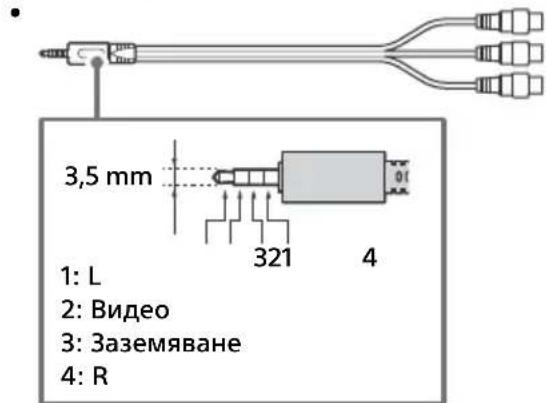
7 IR BLASTER
^*1 KOrato CBbp3BaTe MOHO o6OpyDbaHe, CBbpXKeTe KbM L (MONO) ayDno xak.
*2 3a BbHnHO yCtpoIcTBo, KoETo nMa cAmo SCART AV OUT, n3noJ3BaIte SCART-RCA aIanTeP.
^*3 Camo 3a onpepelehen pernoHn/ctpaHn/MoJeN TeJeBn3OpN.
MONTAX Ha TeJeBn3opa Ha CTeHa
B TOBA cnpaBOUHO pkoBOOCTBO e NOKa3aHa cAmo NODROTBKaTa 3a MOHTaX npeDN TeLeBn3OpbT da 6bJe MOHTnpaH Ha CTeHaT.
Do notpe6nte nte:
OT cbo6paxeHn 3a 6e3oNaCHOCT n 3a 3aunTa Ha npOdyKta, Sony npenopbUba MOHTaXbT Ha Baunr TeIeBn3Op da 6bJe n3BbPweH OT dNcTpBpyTop Ha Sony nn OT LnueH3npaH NoDn3NbLnHnTeJ. He ce onntBaIte da rO MOHTnPate camn.
He ce npneMaT caTeJInTHn ycnyr.
PpOBepeTe caTeJIINTHaTa Ka6eJIHa Bpb3Ka.
Korato ce no8Bn cbo6eHne [Hma cunHaJ. OTuTeHo e npetOBapBaHe Ha LNB...], n3BaJeTe 3axpaHbAaJra Ka6eI. CLeT ToBa ce yBepTe, ye caTeNtHnT Ka6eJI He e NobpeDeH, a JInHnTa Ha caTeNtTHnCunHaJI He e daJa Ha KbCo B caTeNtTHn KOHeKTOp.
PAL, SECAM, NTSC3.58 (camo Bnjeo), NTSC4.43 (camo Bnjeo)
Pokntne Ha KaHaJIte
B 3aBnCmOcT OT BaUaTa IbPkaBa/u36Op Ha 30Ha/MoJeI Ha TeJeBn30pa
Ahaoroba: UHF/VHF/ka6eI
UHVF/ka6eI
CateJnt*: IF yectota 950-2 150 MHz
3ByKOB n3XoD
10W+10W
YecToTHa(n)JeHTa(n)
| Бezемechen LAN (IEEE 802.11ac/a/b/g/n) |
| Чеб耗费оват Историяа мошноct |
| 2400 - 2483,5 MHz < 20,0 dBm |
| 5150 - 5250 MHz < 23,0 dBm |
| 5250 - 5350 MHz < 20,0 dBm |
| 5470 - 5725 MHz < 20,0 dBm |
| 5725 - 5850 MHz < 13,9 dBm |
| Bluetooth |
| Чебтейн обхвац范围内严禁向右插 | Дура мошноct |
| 2400 - 2483,5 MHz < 10,0 dBm | |
RMF-TX301E/TX300E/TX201ES
| Bluetooth |
| Чебтейн обхвац范围内严禁丢掷 loquiohoct |
| 2400 - 2483,5 MHz < 10,0 dBm |
YPBPR(KomnoentHO Bndeo):1080p(50,60Hz), 1080i(50,60Hz),720p(50,60Hz),576p,576i, 480p,480i
Ayno BxoD (OHO kakobe)
AVIN2
Bndeo BxoJ (O6u,foHO nHH c Y BxoJa)
HDMI IN 1,2,3,4 (noДьрka 4K pe3OJIIOUЯ, CbBmecTUM c HDCP 2.2)
Bnpeo:
4096 × 2160p (50, 60 Hz)*1*2, 4096 × 2160p
(24Hz)^ 1 3840× 2160p (50, 60 Hz)*2
3840 × 2160p (24, 25, 30 Hz), 1080p (30, 50,
60 Hz), 1080/24p, 1080i (50, 60 Hz), 720p (30,
50, 60 Hz), 720/24p, 576p, 576i, 480p, 480i, PC
ΦopMaTu
*1 Показа ce 3840 × 2160p, korato ВьBEДeHO 4096 × 2160p.
*2 Camo HDMI IN 2/3.
Aydno: 5,1 kaHaJIeH IInHeeH PCM: 32,44,1,48
88,2,96,176,4 n 192 kHz, 16, 20 n 24 mbuTa, Dolby
Digital, Dolby Digital Plus v DTS
ARC (Audio Return Channel) (camo HDMI IN 3)
(Дыкаганен Линецн PM: 48 kHz, 16 mbuTa,
Dolby Digital, Dolby Digital Plus, DTS)
DIGITAL AUDIO OUT (OPTICAL)
UΦOB ONTnueH JAK (Дуканен Лпец PCM:
U3XoDNH HOMHaJIHN DaHHN
USB 1/2:5V,500mA(maKc.)
USB 3:5V,900mA (maKc.)
a6a p u T n (npu6n.) (× × )
C NOCTABKa 3a Maca
KD-55XE83xx / 55XE80xx: 123,2 × 77,2 × 25,2 cm
KD-49XE83xx / 49XE80xx: 109,6 × 69,1 × 25,2 cm
KD-43XE83xx / 43XE80xx: 96,4× 61,7× 24,2cm
6e3 nocTaBka 3a Maca
KD-55XE83xx / 55XE80xx: 123,2 × 71,6 × 5,7 cm
KD-49XE83xx / 49XE80xx: 109,6 × 64,0 × 5,7 cm
KD-43XE83xx / 43XE80xx: 96,4 × 56,7 × 5,7 cm
Tero (npn6).
C NOCTaBka 3a Maca
KD-55XE83xx / 55XE80xx: 18,6 kg
KD-55XE83xx / 49XE80xx: 12,9 kg
KD-43XE83xx / 43XE80xx: 10,8 kg
6e3 nocTabka 3a Maca
KD-55XE83xx / 55XE80xx: 17,6 kg
KD-49XE83xx / 49XE80xx: 12,2 kg
KD-43XE83xx / 43XE80xx: 10,1 kg
*1 Camo 3a onpepeeneHn pernoHn/ctpaHn/MoJeN TeJeBn3Opn.
^*2 KoHcyMaunHa eHepnHa rOuHa, 6a3npaHo Ha KOHCmaunTa Ha TeLeBn3Op, KOnTo pa60Tu 4 Yaca Ha DeH, 365 dH. JeNCTBnTeJHaTa KOHCmaunHa eHepn 3aBnCn OT TOBa KaK ce N3NoJ3Ba TeLeBn3Opa.
^*3 Yka3aHaTAt KOHCyMaζnHa eHeprna BpeKIM TOTOBHOCT CeIOCTnra CJIe KaTO TeJeBnOtpBT npNKNoyn Heo6xoDmnte BbTpewn IpOueci.
^*4 KoHcyMaunraHa eHepnBpeXm rTOBHOCT ue Ce yBeNnH, KOraTo BaunrTeJeBu3Op e Cbbp3aH KbM MPexa.
3a6eJekka
- He n3BaXkaJaTe Kanaka Ha cNoTa Ha TV CAM (Conditional Access Module) ocBeH 3a da nbxHeTe cMapr KapTa B CAM.
HaHnueTo Ha onuHOHaHn akcecoapn 3aBncn OT DbpxKaBaTa/perNoHa/MoJena Ha TeJeBu3Opa n HauHocTt.
Ди3aHbTи cneuФkaunTe noIeXaT Ha npomHa 6e3 npedynpeKdHne.
3a6eIeKka 3a uΦpObaTa ΦyHKnJaHa TeIeBn3opa
LcHpOBA TeJeBn3nA (DVB Ha3eMHO, cateJIHTHO n Ka6eJIHO), INHTepaKTbHN YcIyrN mpeKOBn FyHKuN MoKe Da He Ca DoCTbHN BvB BCNUCKn CTpaHn NII paJOnn. HrkON FyHKuN MoKe Da He ca aKTHBnPaHn NII MoKe Da He pa6OTr npabNJHo C HrkON DoCTaBuN Cu MpeKOBn CpeDN. HrkON DoCTaBuN Cu Na TeJEBn3IOHn YcIyrN MoKe Da NaHCJIraBt TaKCa 3a YcIyrNte CN.
To3n TeJebn3Op noIdbpka zuΦpoBO npedabaHe, n3noI3BaIKN MPEG-2, H.264 / MPEG-4AVC nH.265/HEVC KoJeu, Ho He MoKe Ja 6bJe rapaHTnpaHa CbBMeCTIMOCTTa C BCNUKn CnHaN Ha onepaTopu/YcJIyRn, KOITo MoKe Ja ce npomehrT c TeueHne Ha BpeMeTO.
HΦopMaζηaTbProBcKm MapKn
- TepmunHte HDMI n HDMl High-Definition Multimedia Interface, kaKTo u IoroTo HDMI ca TbprOBckn MapKn nn 3ana3eHn TbprOBckn MapKn Ha HDMl Licensing LLC B CAU n npyRn DbpxkabN.
- ПюиЗБеДeно ЛицЕн3 Ha Dolby Laboratories. Dolby, Dolby Audio И симвовьт ДBOйHO "D" ca PerИстрпаMuN TbproВСКИ МарКИ Ha Dolby Laboratories.
- "B R A V I B A"AMIACA TbproBcN MapKn Ha Sony Corporation.
- Gracenote, Gracenote eyeQ, Gracenote VideolD, Gracenote Video Explore, loroTo n Iorotnblr Gracenote, KaKTo n IoroTo "Powered by Gracenote" ca pernctpupaHn TbpROBcN MapKn nn TbpROBcN MapKn Ha Gracenote B CAU, n/nn dpyrn DbpxAbn.
-
Opera Devices SDK. Copyright 1995-2016
Opera TV AS. All rights reserved.
-
Wi-Fi, Wi-Fi Direct, Miracast, Wi-Fi Protected Setup и лорото Wi-Fi CERTIFIED ca Тьровский Марки Или ретерпаши Тьровский Марки на Wi-Fi Alliance.
- 3a DTS nateHTn, BnKTe http://patents.dts.com. Ipon3BeJeHo no IuIeH3 Ha DTS, Inc. DTS, cIMBOJbT, & DTS u CmBOnbT 3aeHoc a pernctpupaHn Tbprobckn MapKn, a DTS Digital Surround e Tbprobcka MapKa Ha DTS, Inc. © DTS, Inc. BcNk npaba 3ana3eHn.
3HaKbT Bluetooth® n φιρMeHnte 3Haζn ca perɪncTpɪpaHŋ TbɒrɒBÇn MapKn co6CTbeHocT Ha Bluetooth SIG, Inc. n ηπολβaHηTo Ha Te3N 3Haζn OT Sony Corporation e no liuεH3.
- DiSEqCTM e TbproBcKa Mapka Ha EUTELSAT. To3n TeIeBn3Op noIdbpXa DiSEqC 1.0. To3n TeIeBn3Op He e npedHa3NaueH 3a ynpabJIeHHe Ha aHTEH C MOTop.
TUXERA epernctpupaHa TbproBcKa MapKa Ha Tuxera Inc. B CAU n npu r cpaHn.
- IloroTo USB-IF SuperSpeed USB Trident e pereNCTpnpaHa TbproBcKa Mapka Ha USB Implementers Forum, Inc. SS
περιεχόμενα
\SHMANTIKH HMEIΩS. 4
Pnpoopiec oxetikα μεtnv
4
PpOΦuλαειc 7
Eeapntnmaata kal xeiipotnpia. 9
Xeipotnpia kai evdeltaic 9
XpnoTou TnExeiopntnpiou. 10
περιγραφή μερών του
tnλexεiρIoTnpiou. 10
△aypaμaσuvδεσεωv 12
Evkaotaaon TnC TnAeopaonc stov tox0 14
AvtueTwn npoBnmuaw 15
AT, BE, HR, CY, CZ, DK, EE, FI, FR, DE, EL, HU, IE, IT, LV, LT, LU, MT, NL, PL, PT, SK, SI, ES, SE, UK, IS, LI, NO, CH, BG, RO, TR, AL, BA, MK, MD, RS, ME, Kóσoβo
O eonlaouoc mtopei va xpoiouoounoei o aalec xwpec ektoc TnEupwnC.
Autoc o paioeEonlaouc mnpoe va aeitoupynoe otny EE xwpi v npapaiacei tic loxuooec anaitnoeic via tn xpon Tou paofoaogatoc.
PiEe npaetaeva to yia anevpyooin.
PiEOTe EAnvaiNmuEvaTO yia va aAaXETe Tn AetoupVkaI, Eeita TiEOTe TO Koupi+ n-yia VKaVETe ta Eξnc:
- PAnKtpoAoynoteTov aIpO 9999 Wc Kwdko PIN kai eIaEe [Aaayn Kwdkou PIN].
To nepiaalov tmuα tnC tnλeopaonc Θepaivetai.
DIGITAL AUDIO OUT (OPTICAL)
AT, BE, HR, CY, CZ, DK, EE, FI, FR, DE, EL, HU, IE, IT, LV, LT, LU, MT, NL, PL, PT, SK, SI, ES, SE, UK, IS, LI, NO, CH, BG, RO, TR, AL, BA, MK, MD, RS, ME, Kosovo
Dijital: DVB-T/DVB-C
DVB-T2*
Uydu*: DVB-S/DVB-S2
Renk Sistemi
PAL, SECAM, NTSC3.58 (Sadece video), NTSC4.43
(Sadece video)
Kanal kapsami
Dijital: UHF/VHF/Kablolu
Uydu*: IF Frekansi 950-2.150 MHz
Ses ciksi
10W+10W
Frekans bandi/bantlari
| Kablosuz LAN (IEEE 802.11ac/a/b/g/n) |
| Frekans araligi Çkış | Güçü |
| 2.400 - 2.483,5 MHz < 20,0 dBm |
| 5.150 - 5.250 MHz < 23 | 0 dBm |
| 5.250 - 5.350 MHz < 20,0 dBm |
| 5.470 - 5.725 MHz < 20 | 0 dBm |
| 5.725 - 5.850 MHz < 13 | 9 dBm |
| Bluetooth |
| Frekans aralıriage Çkı摆在 | Güçü |
| 2.400 - 2.483,5 MHz < | 0,0 dBm |
RMF-TX301E/TX300E/TX201ES
| Bluetooth |
| Frekans aralıriage Çkış | Güçü |
| 2.400 - 2.483,5 MHz < 1 | 0,0 dBm |
YPBPR (Component Video): 1080p (50, 60 Hz),
1080i (50, 60 Hz), 720p (50, 60 Hz), 576p, 576i, 480p, 480i
For useful information about Sony products