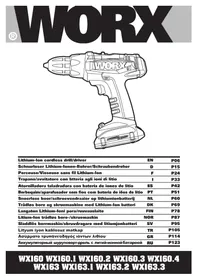
WX160.3 - Drill WORX - Free user manual and instructions
Find the device manual for free WX160.3 WORX in PDF.



| Brand | Worx |
| Model | WX160.3 |
| Product type | Cordless drill/driver |
| Power source | 18V 1.3Ah Lithium-Ion battery |
| Included charger | WA3839 (compatible with Li-Ion battery) |
| No-load speed | 0-350 / 0-1200 rpm (2 mechanical speeds) |
| Number of clutch positions | 23+1 (drilling) |
| Max torque | 35 Nm |
| Chuck capacity | 10 mm (keyless) |
| Steel drilling capacity | 10 mm |
| Wood drilling capacity | 30 mm |
| Weight | 1.7 kg |
| Sound pressure level | 77 dB(A) (uncertainty 3 dB(A)) |
| Sound power level | 88 dB(A) (uncertainty 3 dB(A)) |
| Vibration (metal drilling) | 1.91 m/s² (uncertainty 1.5 m/s²) |
| Vibration (screwdriving) | 1.16 m/s² (uncertainty 1.5 m/s²) |
| Main functions | Drilling, screwdriving, hammer drilling (selected models); variable speed, on/off with brake, forward/reverse switch, LED light, level indicator, spindle lock, overload protection |
| Maintenance and cleaning | Clean with a dry cloth; do not use water or chemical cleaners; keep ventilation slots clean |
| Safety | Remove battery before any adjustment; wear hearing and eye protection and a dust mask; use auxiliary handles; do not expose to water or fire |
| Spare parts and repairability | No user-serviceable parts; accessories available (bits, drill bits, batteries, chargers); refer to the manual for part numbers |
| General information | Complies with EC directives 2006/42/EC, 2004/108/EC, 2011/65/EU; standards EN 55014-1, EN 55014-2, EN 60745-1, EN 60745-2-1, EN 60745-2-2 |
Frequently Asked Questions - WX160.3 WORX
User questions about WX160.3 WORX
0 question about this device. Answer the ones you know or ask your own.
Ask a new question about this device
Download the instructions for your Drill in PDF format for free! Find your manual WX160.3 - WORX and take your electronic device back in hand. On this page are published all the documents necessary for the use of your device. WX160.3 by WORX.
USER MANUAL WX160.3 WORX
*Not all the accessories illustrated or described are included in standard delivery.
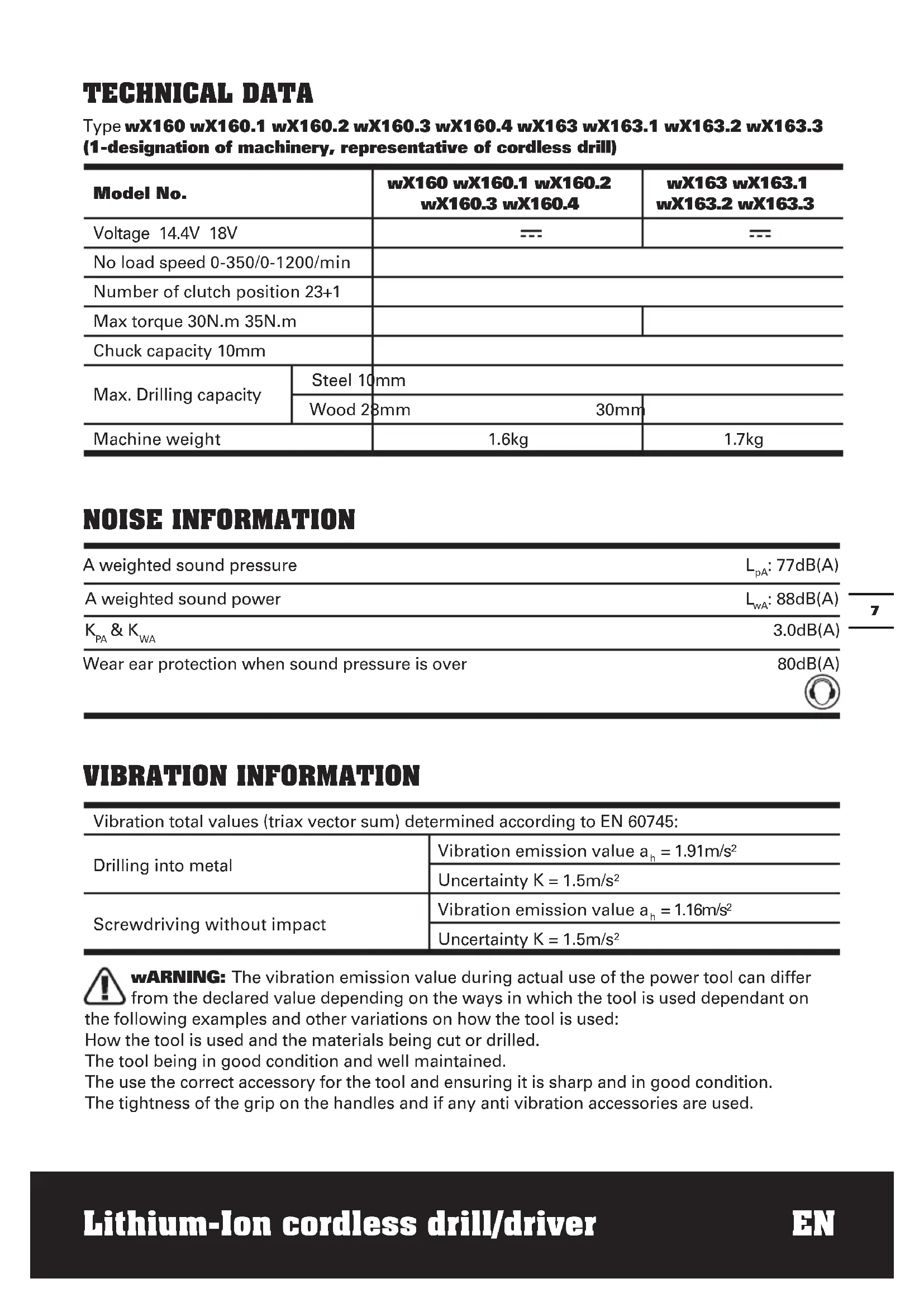
TECHNICAL DATA
Type wX160 wX160.1 wX160.2 wX160.3 wX160.4 wX163 wX163.1 wX163.2 wX163.3 (1-designation of machinery, representative of cordless drill)
| Model No. | wX160 wX160.1 wX160.2 wX160.3 wX160.4 | wX163 wX163.1 wX163.2 wX163.3 | |
| Voltage 14.4V 18V | --- | --- | |
| No load speed 0-350/0-1200/min | |||
| Number of clutch position 23+1 | |||
| Max torque 30N.m 35N.m | |||
| Chuck capacity 10mm | |||
| Max. Drilling capacity | Steel 10mm | ||
| Wood 28mm | 30mm | ||
| Machine weight | 1.6kg | 1.7kg | |
NOISE INFORMATION
| A weighted sound pressure | LpA: 77dB(A) |
| A weighted sound power | LwA: 88dB(A) |
| KpA & KWA | 3.0dB(A) |
Wear ear protection when sound pressure is over 80dB(A)

VIBRATION INFORMATION
| Vibration total values (triax vector sum) determined according to EN 60745: | |
| Drilling into metal | Vibration emission value ah = 1.91m/s2 |
| Uncertainty K = 1.5m/s2 | |
| Screwdriving without impact | Vibration emission value ah = 1.16m/s2 |
| Uncertainty K = 1.5m/s2 | |

WARNING: The vibration emission value during actual use of the power tool can differ from the declared value depending on the ways in which the tool is used dependant on
the following examples and other variations on how the tool is used:
How the tool is used and the materials being cut or drilled.
The tool being in good condition and well maintained.
The use the correct accessory for the tool and ensuring it is sharp and in good condition.
The tightness of the grip on the handles and if any anti vibration accessories are used.
And the tool is being used as intended by its design and these instructions.
This tool may cause hand-arm vibration syndrome if its use is not adequately managed.

WARNING: To be accurate, an estimation of exposure level in the actual conditions of use should also take account of all parts of the operating cycle such as the times when
the tool is switched off and when it is running idle but not actually doing the job. This may significantly reduce the exposure level over the total working period.
Helping to minimise your vibration exposure risk.
ALWAYS use sharp chisels, drills and blades.
Maintain this tool in accordance with these instructions and keep well lubricated (where appropriate)
If the tool is to be used regularly then invest in anti vibration accessories.
Avoid using tools in temperatures of 10^ or less.
Plan your work schedule to spread any high vibration tool use across a number of days.
ACCESSIONS
| Model No. | wX160 w | X160.1 wX1 | 60.2 wX160 | 0.3 wX160.4 | |
| 1.3Ah Li-lon battery pack | 1 (WA3515) 2 | (WA3515) 1 (WA3515) 2 (WA3515) 2 (WA3515) 2 (WA3515) | |||
| Charger 1 (WA3730) 1 (WA3730) 1 (WA3839) 1 (WA3839) 1 (WA3730) | |||||
| Double ended bits 1 1 1 1 | |||||
| 158pc Accessories | / | / | / | / | 1 |
| Model No. | wX163 | wX163.1 | wX163.2 | wX163.3 |
| 1.3Ah Li-Ion battery pack | 1 (WA3512) | 2 (WA3512) | 1 (WA3512) | 2 (WA3512) |
| Charger | 1 (WA3731) | 1 (WA3731) | 1 (WA3839) | 1 (WA3839) |
| Double ended bits | 1 | 1 | 1 | 1 |
| 158pc Accessories | / | / | / | / |
We recommend that you purchase your accessories from the same store that sold you the tool. Use good quality accessories marked with a well-known brand name. Choose the type according to the work you intend to undertake. Refer to the accessory packaging for further details. Store personnel can assist you and offer advice.
ADDITIONAL SAFETY RULES FOR YOUR CORDLESS DRILL
- Remove the battery pack from the drill before carrying out adjustments.
- Do not expose to rain or water.
- Do not store the battery pack in temperatures over 40^ .
- Always charge the battery pack between temperatures 0^ to 30^ . Ideal charging temperature is 18^ to 24^ .
- Only use the charger and the battery pack provided no others.
- Avoid short circuit of the battery pack connections (screws & nails).
- Do not incinerate or burn the battery pack, it may explode.
- Do not charge a damaged battery pack.
- Replace any damaged supply cords on your charger.
- Always disconnect the charger power supply before making or breaking the connections to the battery pack.
- Battery pack and charger will be warm during charging this is normal.
- When not in use, remove a charged battery pack from the charger.
- Always remove the battery pack from the charger immediately after re-charging is completed.
- Your drill and battery pack will be warm when working, this is normal.
- Do not dispose of batteries in fire, or with household waste. Return exhausted batteries to your local collection or recycling point.
- Always check walls, floors and ceilings for hidden power cables and pipes.
- Use auxiliary handle(s), if supplied with the tool. Loss of control can cause personal injury.
- Accessories and metal parts can become very hot.
- Hold power tool by insulated gripping surfaces, when performing an operation where the cutting accessory may contact hidden wiring. Cutting accessory contacting a "live" wire may make exposed metal parts of the power tool
live" and could give the operator an electric shock.
WARNING: If a small amount of electrolyte should leak from the battery pack under extremes of temperature or after heavy use, then wash off immediately from your skin and hands using clean water. For eye contact, rinse thoroughly with clean water and seek medical treatment immediately.
SAFETY INSTRUCTIONS FOR BATTERY PACK
- Do not dismantle, open or shred secondary cells or battery pack.
- Do not expose cells or battery pack to heat or fire. Avoid storage in direct sunlight.
- Do not short-circuit a cell or a battery pack. Do not store cells or battery pack haphazardly in a box or drawer where they may short-circuit each other or be short-circuited by other metal objects.
- Do not remove a cell or battery from its original battery pack enclosure required for use.
- Do not subject cells or battery pack to mechanical shock.
- In the event of a cell leaking, do not allow the liquid to come in contact with the skin or eyes. If contact has been made, wash the affected area with copious amounts of water and seek medical advice.
- Do not use any charger other than that specifically provided for use with the equipment.
- Observe the plus (+) and minus (-) marks on the cell, battery and equipment and ensure correct use.
- Do not use any cell or battery pack which is not designed for use with the equipment.
- Do not mix cells of different manufacture, capacity, size or type within a device.
- Keep cells and battery pack out of the reach of children.
- Seek medical advice immediately if a cell or a battery pack has been swallowed.
-
Always purchase the correct cell or battery for the equipment.
-
Keep cells and battery pack clean and dry.
- Wipe the cell or battery pack terminals with a clean dry cloth if they become dirty.
- Secondary cells and battery pack need to be charged before use. Always use the correct charger and refer to the manufacturer's instructions or equipment manual for proper charging instructions.
- Do not leave a battery pack on prolonged charge when not in use.
- After extended periods of storage, it may be necessary to charge and discharge the cells or battery pack several times to obtain maximum performance.
- Secondary cells and battery pack give their best performance when they are operated at normal room temperature (20^ ± 5^) .
- Retain the original product literature for future reference.
- Use only the cell or battery pack in the application for which it was intended.
- When possible, remove the battery pack from the equipment when not in use.
- Dispose of properly.
SYMBOLS

To reduce the risk of injury, user must read instruction manual

Warning

Wear ear protection

Wear eye protection

Wear dust mask

Indoor use only

Do not expose to rain or water

Do not burn
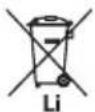
Do not dispose of batteries, Return exhausted batteries to your local collection or recycling point
OPERATING INSTRUCTIONS

NOTE: Before using the tool, read the instruction book carefully.
INTENDED USE
The machine is intended for driving in and loosening screws as well as for drilling in wood, metal and plastic.
The battery charger supplied is matched to the Li-1on battery installed in the machine.
Do not use another battery charger.
The Li-ion battery is protected against deep discharging. When the battery is empty, the machine is switched off by means of a protective circuit: The tool holder no longer rotates.
In a warm environment or after heavy use, the battery pack may become too hot to permit charging. Allow time for the battery to cool down before recharging.
When the battery pack is charged for the first time and after prolonged storage, the battery pack will accept a 100% charge after several charge and discharge cycles.
B) TO REMOVE OR INSTALL BATTERY PACK (See Fig. A)
Depress the battery pack release button to release and slide the battery pack out from your tool. After recharge, slide it back into your tool. A simple push and slight pressure will be sufficient.
OPERATION
1. ON / OFF SWITCH (See Fig. B)
Depress the On/Off switch to start and release it to stop your drill. The on/off switch is fitted with a brake function which stops your chuck immediately when you quickly release the switch.
It is also a variable speed switch that delivers higher speed and torque with increased trigger pressure. Speed is controlled by the amount of switch trigger depression.
WARNING: Do not operate for long periods at low speed because excess heat will be produced internally.
2. SWITCH LOCK
The switch trigger can be locked in the OFF position. This helps to reduce the possibility of accidental starting when not in use. To lock the switch trigger, place the rotation control in the center position.
3. REVERSIBLE (See Fig. C1, C2)
For drilling and screw driving use forward rotation marked "A" (lever is moved to the left). Only use reverse rotation marked "D" (lever is moved to the right) to remove screws or release a jammed drill bit.
WARNING: Never change the direction of rotation when the chuck is rotating, wait until it has stopped!
4. TWO-SPEED GEAR CONTROL (See Fig. D)
The drill has a two-speed gear control designed for drilling or driving at LO (mark is 1) or HI (mark is 2) speeds. A slide switch is located on top of the drill to select either LO or HI speed. When using the drill in the LO speed range, the speed will decrease and the drill will have greater power and torque. When using the drill in the HI speed range, the speed will increase and the drill will have less power and torque.
Gear I
Low speed range: for screwdriving or working with large drilling diameter Gear II
High speed range: for working with small drilling diameter
WARNING: To prevent gear damage, always allow the chuck to come to a complete stop before changing the direction of rotation or the two-speed gear control.
5. CHUCK ADJUSTMENT (See Fig. E)
To open the chuck jaws rotate the front section of the chuck. Insert the drill bit between the chuck jaws and rotate the front section in the opposite direction. Ensure the drill bit is in the center of the chuck jaws. Finally, firmly rotate the front chuck section in the opposite directions. Your drill bit is
now clamped in the chuck.
6. TORQUE ADJUSTMENT (See Fig. F)
(Screw driving force of your drill driver) The torque is adjusted by rotating the torque adjustment ring. The torque is greater when the torque adjustment ring is set on a higher setting. The torque is less when the torque adjustment ring is set on a lower setting. Make the setting as follows:
| 1 - 4 for driving small screws |
| 5 - 9 for driving screws into soft mate-rial |
| 10 - 14 for driving screws into soft and hard material |
| 15 - 19 for driving screws into hard wood |
| 20 - 23 for driving larger screws |
| for heavy drilling |
7. AUTOMATIC SPINDLE LOCK (See Fig. G)
The automatic spindle lock allows you to use it as a regular screwdriver. You can give an extra twist to firmly tighten a screw, loosen a very tight screw or continue working when the battery energy has expired. For manual screwdriver purposes, the chuck is automatically locked when the tool is off.
8. USING THE SIGHT LIGHT
The sight light allows you to keep a clear view under less illuminated circumstances. To turn on the light simply press the on/off switch. When you release the on/off switch, the light will go out.
9. LEVEL DRILLING (See Fig. H)
The bubble level is recessed in the motor housing on the top of the drill. It can be used to keep the drill level during horizontal drilling operation.
The bubble level is recessed in the motor housing on the back of the drill. It can be used to keep the drill level during vertical drilling operation.
10. DRILLING
When drilling into a hard smooth surface, use a center punch to mark the desired hole location. This will prevent the drill bit from slipping off center as the hole is started. Hold the tool firmly and place the tip of the bit at the point to be drilled. Depress the switch trigger to start the tool. Move the drill bit into the workpiece, applying only enough pressure to keep the bit cutting. Do not force or apply side pressure to elongate a hole.
Tungsten carbide drill bits should always be used for concrete and masonry. When drilling in metal, only use HSS drill bits in good condition. Always use a magnetic bit holder (not included) when using short screwdriver bits. When screw-driving, apply a small quantity of liquid soap or similar to the screw threads to ease insertion.
11. DISPOSAL OF AN EXHAUSTED BATTERY PACK
To preserve natural resources, please recycle or dispose of the battery pack properly. This battery pack contains Lithium batteries. Consult your local waste authority for information regarding available recycling and/or disposal options. Discharge your battery pack by operating your drill, then remove the battery pack from the drill housing and cover the battery pack connections with heavy-duty adhesive tape to prevent short circuit and energy discharge. Do not attempt to open or remove any of the components.
12. OVERLOAD PROTECTION
When overloaded, the motor comes to a stop. Relieve the load on the machine immediately and allow cooling for approx. 30 seconds at the highest no-load speed.
13. TEMPERATURE DEPENDENT OVERLOAD PROTECTION
When using as intended for the power tool cannot be subject to overload. When the load is too high or the allowable battery temperature of 75^ is exceeded, the electronic control switches off the power
tool until the temperature is in the optimum temperature range again.
14. PROTEcTION AGAINST DEEP DISchARGING
The Li-lon battery is protected against deep discharging by the "Discharging Protection System". When the battery is empty, the machine is switched off by means of a protective circuit: The inserted tool no longer rotates.
PROBLEM SOLUTION
1. why DOES The DRILL NOT TURN ON when you PRESS The SwITch?
The forward/reverse rotation control, which is on top of the trigger, is positioned in the lock function. Unlock the forward/reverse rotation control by putting it into the required rotation position. Push the trigger and the drill will start to rotate.
2. The DRILL STOPS BEFORE The ScREw IS cCOMPLETELY TIGHTENED. why?
Verify the torque position of the torque adjusting ring, you can find the torque-adjusting ring between the chuck and the drill body. Position 1 is the lowest torque (screw driving force) and position 23 is the highest torque (screw driving force). Position 24 is for drill operation. Regulate the torque adjusting ring to a higher position to reach the best result.
3. REASONS FOR DIFFERENT BATTERYPAcK WORKING TIMES
Charging time problems, as above, and having not used a battery pack for a prolonged time will reduce the battery pack working time. This can be corrected after several charge and discharge operations by charging & working with your drill. Heavy working conditions such as large screws into hard wood will use up the battery pack energy faster than lighter working conditions. Do not re-charge your battery pack below 0^ and above 45^ as this will affect performance.
MAINTENANCE
Your tool requires no additional lubrication or maintenance.
There are no user serviceable parts in your power tool. Never use water or chemical cleaners to clean your power tool. Wipe clean with a dry cloth. Always store your power tool in a dry place. Keep the motor ventilation slots clean. Keep all working controls free of dust. Occasionally you may see sparks through the ventilation slots. This is normal and will not damage your power tool.
ENVIRONMENTAL PROTECTION
Waste electrical products must not be disposed of with household waste. Please recycle where facilities exist.
Check with your local authorities or retailer for recycling advice.
DECLARATION OF CONFORMITY
Declare that the product, Description WORX Lithium-1on cordless drill/driver Type WX160 WX160.1 WX160.2 WX160.3 WX160.4 WX163 WX163.1 WX163.2 WX163.3 (1-designation of machinery, representative of cordless drill) Function Drilling
Complies with the following directives:
Machinery directive 2006/42/EC
Electromagnetic compatibility directive 2004/108/EC
RoHS directive 2011/65/EU
Standards conform to: EN 55014-1 EN 55014-2 EN 60745-1 EN 60745-2-1 EN 60745-2-2
The person authorized to compile the technical file,
Name Russell Nicholson
Address Positec Power Tools (Europe)
Ltd, PO Box 152, Leeds, LS10 9DS, UK

2012/12/11
Leo Yue
POSITEC Quality Manager
INFORMATIONS RELATIVES AU BRUIT
INFORMATIONS RELATIVES AUX VIBRATIONS
Modelo WX160 WX160.1 WX160.2 WX160.3 WX160.4 WX163 WX163.1 WX163.2 WX163.3 (1-denominaciones de maquinaria, representantes de Taladro a bateria)
| Modelo N. | WX160 WX160.1 WX160.2 WX160.3 WX160.4 | WX163 WX163.1 WX163.2 WX163.3 | |
| Tensión nominal 14.4V 18V | --- | --- | |
| Velocidad sin cargo nominal 0-350/0 | -1200/min | ||
| Posiciones de embrace 23+1 | |||
| Torque máximo 30N.m 35N.m | |||
| Capacidad del mandril 10mm | |||
| Capacidad de perforación | Metal 10mm | ||
| Madera 23mm 30mm | |||
| Peso | 1.6kg | 1.7kg | |
Tipo WX160 WX160.1 WX160.2
WX160.3 WX160.4 WX163 WX163.1
Ltd, PO Box 152, Leeds, LS10 9DS, UK

2012/12/11
LeoYue
Gestor de Qualidade POSITEC
- SNELSPAN BOORKOP
- KOPPEINSTELLINGEN
- KNOP VOOR INSTellen MECHANISCHE SNELHEID
- WATERPAS
- RECHTS- EN LINKSDRAAIEND
- ZACHTE HANDGREEP
- PAL ACCUPACK
- ACCUPACK *
- DUBBELEINDIGE BEITELS
10.AAN/UIT-SCHAKELAAR
11.WERKLAMPJE
VOORDAT U HET APPARAAT IN BEDRIJ NEEMT
Type WX160 WX160.1 WX160.2
WX160.3 WX160.4 WX163 WX163.1
WX163.2 WX163.3 (1-aanduiding
PO Box 152, Leeds, LS10 9DS, UK

2012/12/11
LeoYue
Typpi WX160 WX160.1 WX160.2
WX160.3 WX160.4 WX163 WX163.1
WX163.2 WX163.3 (1-koneen
Ltd, PO Box 152, Leeds, LS10 9DS, UK

2012/12/11
Leo Yue
Tipi WX160 WX160.1 WX160.2 WX160.3 WX160.4 WX163 WX163.1 WX163.2 WX163.3 (1-makine aciklamasi, kablosuz matkap gosterimi)
| Model No. | WX160 WX160.1 WX160.2 WX160.3 WX160.4 | WX163 WX163.1 WX163.2 WX163.3 | |
| Voltaj 14.4V | --- 18V | --- | |
| Yüksüz洵 0-350/0-1200/min | |||
| Kavrama konumu sayişi 23+1 | |||
| Azami tork 30N.m 35N.m | |||
| Mandren kapasitesi 10mm | |||
| Azami delme kapasitesi | Çelik 10mm | ||
| Tahta 28mm 30mm | |||
| Makine ağırkıngı | 1.6kg | 1.7kg | |
GÜRÜLTÜ BILGISİ
| Ağırkı lles basinci | LpA: 77dB(A) |
| Ağırkı lles güüü | LwA: 88dB(A) |
| KPA & KWA | 3.0dB(A) |
Ses basinci 80dB(A) aşarsa kulaklik kullaniniz

TITREŞIM BILGISİ
IIAHPOΦOPIEΣ KPAΔAΣMΩN
Túrços WX160 WX160.1 WX160.2
WX160.3 WX160.4 WX163 WX163.1
(Europe) Ltd, PO Box 152, Leeds, LS10 9DS, UK

2012/12/11
Leo Yue
POSITEC AIEUovtnoIotntac
1.БbvICTPO3AЖUMHONПATPOH
2. KOJIbIcO PEGyJIHPOBKN KPYTЯUcERO MOMHTA
3. NEPEKJIIOYATEIb CKOPOCTeI
4. Ny3bIPbKOBbI yPOBEHb
5. BPAUHEHNE B IPRMOM N OBPATHOM HANPABJIEHNI
6. MЯГКА HAKJIADKA HA PYKÖRTKE
7.ФИКCATOPAKKUMYJIATOPHOIBATAPEN
8. AKKUMYJYTOPHA BATAPER
9.ДБУХTOPOHHNE OTBEPTOCHBIE HACADKN
10. BbIKJIIOUATEJIb C ΦYHKUneH TOPMO3A
11. NOДCBETKA
*He BCE npHnHaJIeXHoCTN, nJIIOCTpnpOBAHHbIe NJI ONICaHHbIe BKJIIOUeHbI B CTAHdApTHyIO NOCTaBky.
TEXHNUECKNE XAPAKTEPNUCTUKN
Mоделew Wx160 Wx160.1 Wx160.2 Wx160.3 Wx160.4 Wx163.WX163.1 Wx163.2 Wx163.3 (1-обознayени Иструмени, Дрел akкymлгога)
| Homep modèle | WX160 WX160.1 WX160.2 WX160.3 WX160.4 | WX163 WX163.1 WX163.2 WX163.3 | |
| Hominahelhoe無法開啟 14.4B | --- 18B | --- | |
| Скорость бeз нарушихи 0-350/0-1200/MIN | |||
| Колучесто рergyларовok МOMЕТа | 23+1 | ||
| Мakсималыний MOMENT 30Hм 35Hm | |||
| Патрон 10mm | |||
| Мakс. диаметр Сверлией | Сталь 10mm | ||
| Дерево 28mm 30mm | |||
| Вec 1.6кг 1.7кг | |||
XAPAKTEPNCN KI WYMA
CnocobncnojIb3OBAHnI INCTpyMeHTa n CBOyCTBa 06pa6aTbIbAemoro MaTePnIa.
CocToHHe IHCTpyMeHTa N ypoBeHb TexO6cnyKuBaHn.
TnncnoJIb3yeMbIX npHaIeXHOCTe n IX TexHnueCKoe COCTOHNHe.
CnJa ydepkaHn pyKoTOK n HaJIuHne npOTNBOBn6paUOnHHbIX cpeCTB.
IcnoJb3yemble pa6oue HNCTpyMeHTbl, COOTBeTCTBne npimeHeHn IHNCTpyMeHTOB INX Ha3HaueHnIO.
He noDBepratb BO3dEiCTBnIO DoXJa IIN BODbl

He noJxiratb
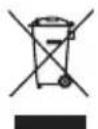
He Bb6paCbBAaTe aKkymyIaTopbl. Bo3BpaTne nCNoNb3ObaHHbIe aKkymyIaTopbl Ha MeCTHbI NyHKT c6opa nn yTuJn3aun
3KcPJIyATAU

BHIMAHNE: Ipeed nCnoJb3ObaHneM INHCTpyMeHTA, BHIMaTeJIbHO IpOHTaITe
pykoBOdTOBnO 3KcNJIyaTaun.
ПРИМЕHEHNE NO HA3HAUYEHNIO
Hactoui 3eKtpOnHcTpymENT
IpeHa3NaueH dIy BBnHbAHn I
BbINHbAHn U npynoB n TaKx DJI
CBepHeN OTBepCTn B dpBeBCnHe, MeTAnne,
In CHTeTnuecknx MaTePnaJax.
IPEД 3KcPnyATAUneM A) 3APrIKA AKKymyJIrTOPHO BATAPEN
3apdHoe yCTPOIcTBO, BXODaUeB KOMnNEKT NOCTaBKN, COOTBeTCTByET JNTHeBO-NOHHoAkkymyIaTOPHO 6aTaapee, yCTaHOBJIeHHoB INpIbope. He nCnoJIb3yIte dpyrne 3apdHbIe yCTPOIcTBa.
IHTneBO-NOHna aKKymyTOpHa 6aTape8 3aUuHeHa ot rnyboko pa3pRKn. Ppi noHoi pa3pRKe 6bapen np6op BbIKJNoYaETcnocepECTBOM 3aUnTHoN cEN. NaTPOH INHCTpyMeHTa nepeCTaHET BpaAsTbcra.
B ycnoBnX NOBbIeHHO TempepaTypbI n
nocne dNITeBHorO HCNoB3OBaHn8 6nok
6aTapeM oKeT nepePepbCn He 3apKaTbcra.
DaTe aKKymyIaTOPHo6aTapee ocTbITb nepeD
3apAkoi.
Ipn nepBoN 3apRkne akKymyIaTOPHO6batape nnn noCne dInTeBHorO xpaHeHn, Ondako nocne HeCKoJIbKnx cIKNoB 3apRdKn np3pRdKn akKymyIaTOPHa8 6bTape rnoHocTbIO 3apRdNTc.
B) CHYTNE N UCTAHOBKA AKKUMYJIATOPHOI BATAPEN (Pnc. A)
HaKMTe Ha qKcTOp aKKymIaTOpHO 6aTapeu n n3BneKeITe ee n3 dpen. BCTabTe 3apJKeHHyIO aKKymIaTOpHyIO 6aTapeo B dpeIb. DnA qKcaun 6aTapeu DoCTaTOH0 JeKOrO HaKaTna.
3KcIJIyATAUIN
1. BbIKJIIOUATEIb C ΦYHKLNeH TopMO3A (Pnc.B)
Ipycka nHctpymeHTa haxmnte, a Inra octahOBKn OTnyCTnte BbIKIOuataTeB. BbIKIOUaTeIb Ochauen cyHKneT TOPMO3a,
KOTOPA HEMeDJIeHHO OCTaHaBJIbNAET NaTPOH, KOrda Bbl 6bICTPO OTnycKaeTe BbIKIIOuHaTeJIb. TaKke cyueCTByet nepeKIIouaTeJIb peYInpyemO CKOpOCTN, KOTOpBI oBeCneUHBAET 6oJIbSyIO CKOpOCTb I cKpyINBaIOUI MOMENT C NOBbIWeHHbIM ycINHeM CNycka. CkOpocTb peYInpyETcR KOJIInCeTBOM CNyCKOB Kypka NepeKIIIOuTaJIa.
BHIMAHNE: He pa6oTaTeДПИТьHoe BpEma Ha MaNoI CKOpOCTn, 3TO MOXeT pNBeCTn K NepeRpeBy HhCTpyMeHTa.
2.БЛOKИРОВКABbIKJIQUATEЯ
BbIKIIOUaTeMb MoXHO 3a6NOKIpOBaTb B
BbIKIIOUeHHOM NIOJKeHn. 3To N03BOJAreT
NCKIIOUHTb BepoATHOCTb CnyaAHORO
BKIOUeHnRA, KOrDa INHCTpyMeHT He
NCIOJIb3yETc. IЯ 6NOKIpOBKn BbIKIIOUaTeJIa
YCTaHOBInTe NepeKJIIOuAteJIb HAnpaBNeHnra
BpaUeHnBA cpeDHee NIOJKeHne.
3. IPEKJIIOUATEJIb HANPABJIeHnB BPAUeHnR (Pnc.C1,C2)
Дя CBepHЯИ BBepTbIBAHHe BnHTOB
NcnoJIb3yIe BpaUeHne BpePeI,
O6O3NaueHHoe "4pbIur NOBepHyT BnEBO).
IcNoJIb3yIe ToIbKO O6paTHoe BpaUeHne,
O6O3NaueHHoe "D(pbIur NOBepHyT BnpaBO)
ДЯ ydaJIeHЯ BnHTOB IIN OCBO6QJDeHn
3aCtprBWeI rOIOBKn CBepJa.
BHIMAHNE: HnKorda He n3MeHnTe HnpaBJeHne BpaueHn npn BpauaIoUeMcnaTpoHe,doXdntEc b ero noJHoN octaHObKn!
BO3MOXHbIE IPOBJEMbl
1. NOYEMY DPEJIb HE 3ANYCKAETCnPn HAXATn HA BblIOyATEJb?
IpeekuoyateIb HnpaBJeHn BpaueHn yctahOBnE H CpeDHee NIOJKeHne n 6NOKpyet BbIKUoyateIb .Pa3bNOKpynte BbIKUoyateIb, YcTaHOBnB Heo6XODmOero HnpaBLeHne BpaSeHn. HaxMnte Ha BKUoyateIb, I dpelh NaHcHt BpaaTbcra.
2. WUPYNOBEPT OCTAHABJINBAETCJ INPEXDE YEM WUPYN NOJHOCTbIO 3ABHHUEN. NOYEM?
PpOBepbTe pIoJoxHne KOJIbuapeRyIINPOBKn KpyTaeero MOMeHa. PIoJoxHne 1 COOTBeTCTByet CAMOMy Hn3KOMy KpyTaeemy MOMeHTy, a PIoJoxHne 23-camOMy BbICOKOMy KpyTaeemy MOMeHTy. PIoJoxHne 24 IpeHa3NaueHo dJa CBepJeHHa. YcTaHOBnte KOJIbUo peRyIINPOBKn KpyTaeero MOMeHTa Ha BbICUee pIoJoxHne dJa DoCTNXeHHa HAnLyuXx pe3YJbTaTOB.
3. ПИЧИНБI, YMEHBSHAIOUJIBE BPEMЯ PAБOTbI AKKUMYJATOPOB
Ipo6IeMb3ap4Kn,OnHcAHHbIe BblSe,aTaKKe
dIInTeBHOe HeINcNOJb3OBAHne AKyMylrTopa
CHXkaIOB Bpem eropabotbl. Pn dIInTeBHom
XpaHeHN peKOMeHdyetc npoBeDeHne
HECKOJIbKnx ZIKNOB 3ap4Kn n pa3PraKn
IpyEm 3ap4Kn AKyMylrTopa n pa60tbl C
dpelbIO.Pn TjXeJIbIX ycNoBHX pa60tbl,
HaNPmep, pni 3ABHHuBaHN 6OJIbXh
WUPYNOB TBpeDyIO DpeBecHy, 3HeprnA
AKyMylrTopa pacxOdyETc8 bICTpee, cem npi
JIerKnx yCNoBHX pa60tbl.He Ioo3ap4KaaiTe
AKyMylrTop pni TempePaTypaX Hnke 0^ IIIN Bblse 45^ ,Tak KaK 3To yXuDaaTe erO
EKCNlPyTaunOHHbIe KaueCTBa.
TEXHNUECKOE OBCJNYKINBAHNE
Даньзлкронсрмг He Tpe6yET ДОПЛHNTeNBcM3KN INIINTEXHueCKOFO OBcnyKbAHn. ВИнсрмente OTCYCTBvOT DeTaN, ПОДLEЖaUHe O6cLyXbAHNIO NOJIb3OBaTeJEM. HkoRda He NcNoJIb3yInTe BODy INIIN XIMNUeCKNe YNCTaUe CpeDCTBa DJIa YNCTKIN Злкронсрм enta. ПpoTNpaIte erO cyxOIN TKaHbI. BcerDa XpaHIne 3LKeKpOHnCtPymeHT В cYxOM MeCTe. Coepknte B YNCTOTE BeHTNJRAUOnHbIe OTBepCTnA DBrTaTeJIA. OuHsaIte OT nbIIN BCE pa6Oue opraHbI YnpabLeHn. He3NaHTeNBHOe NckpeHne, 3aMeTHOE CKBO3b BeHTNJRAUOnHbIe OTBepCTNIA, ЯВЯЯТСЕ HOPMaJIbHBIM I He HaHOCIT BpeI Злкронсрm enty.