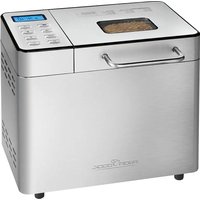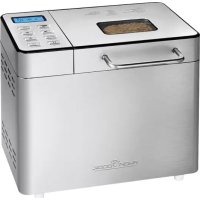
PCBBA 1077 - Bread maker PROFICOOK - Free user manual and instructions
Find the device manual for free PCBBA 1077 PROFICOOK in PDF.


| Product type | Bread machine |
| Brand | ProfiCook |
| Model | PCBBA 1077 |
| Power supply | 220-240 V~, 50/60 Hz |
| Power consumption | 550 W |
| Maximum bread capacity | 1000 g (2 litres) |
| Net weight | Approximately 6.45 kg |
| Number of programs | 13 automatic programs |
| Main functions | Kneading, rising, baking, keep warm, delayed start (up to 13 h), automatic ingredient function, custom program |
| Additional settings | Dough weight selection (700 g or 1000 g), browning degree (light, medium, dark), pause |
| Included accessories | Measuring cup, measuring spoon, hook for removing kneading hook |
| Pan material | Non-stick coating |
| Care and cleaning | Clean with a damp cloth; do not immerse in water; do not use abrasive cleaners |
| Safety | Overheat protection (display EE1), shutdown if temperature too low (EE2), power interruption less than 10 min with resume |
| Spare parts and repairability | Removable kneading hook; for any repairs, contact customer service or a qualified specialist |
| General information | User manual available for free download; CE conformity; disposal according to local regulations |
Frequently Asked Questions - PCBBA 1077 PROFICOOK
User questions about PCBBA 1077 PROFICOOK
0 question about this device. Answer the ones you know or ask your own.
Ask a new question about this device
Download the instructions for your Bread maker in PDF format for free! Find your manual PCBBA 1077 - PROFICOOK and take your electronic device back in hand. On this page are published all the documents necessary for the use of your device. PCBBA 1077 by PROFICOOK.
USER MANUAL PCBBA 1077 PROFICOOK
KEEP WARM Warmhalten
Butter/Margarine 112 EL
Salz 1 TL
Zucker 212 EL
Mehl Type 1150 240g
Vollkommen 240 g
7-Korn-Flocken 60 g
Trockenhefe 1 Pckg.
Programm „VOLLKORN"
WAARSCHUWING: Brandgevaar!
Water of milk 300 ml
Margarine/boter 1 12 el
Zout 1 tl
Suiker 1 el
Bloem type 550 540 g
Droge gist 1 zakje
Programma "BASIC"
Water of milk 350 ml
Margarine/boter 112 el
Zout 1 tI
Suiker 2 el
Bloem type 405 540 g
Droge gist 1 zakje
Rozijnen 85g
Gemalen walnoten 3 el
Programma "BASIC"
Volkorenbrood
Ingredients
Water 300 ml
Margarine/boter 112 el
Ei 1
Zout 1 t
Suiker 2 t
Bloem type 1050 360g
Volkorenbloem
Droge gist 1 zakje
Programma "VOLLKORN"
Preparations de pate 32
Confitures 32
KEEP WARM Maintainir chaud
Lever 2:5-40 minutes
Lever 3:0-60 minutes
Cuir: 0 - 90 minutes
Maintenir chaud: 0 - 60 minutes
Subir 2: 5-40 minutes
Subir 3: 0-60 minutes
Cocer: 0-90 minutes
Mantener 0-60 minutes caliente:
5. Starting a program
Congratulations for purchasing your new bread maker. We hope you will enjoy your new product.
Symbols in this user manual
Important notes for your safety are marked distinctively. Pay absolute attention to them to avoid accidents and damage to the device:

WARNING:
Warns of dangers for your health and indicates potential risks of injury.

CAUTION:
Indicates potential dangers for the device or other objects.

NOTE:
Highlights tips and information for you.
Table of contents
Instruction Manual. 53
General Notes 53
Safety Precautions 53
Unpacking 54
Start-up 54
Overview of the Components 54
Which Information do I get from the Display? 54
The Buttons and their Functions 54
Program Table 55
How do I Set a Delayed Start? 55
Ingredients Function 55
Bread Maker Functions 56
Program Sequence Bread Maker. 56
Cleaning 56
Storage 57
Baking Q & A. 57
Troubleshooting 58
Mistakes with the Recipes. 58
Tips for Recipes 59
Classic Bread Recipes 60
Dough Recipes 61
Jam 61
Technical Data 61
Disposal. 61
General Notes
Before using this device, carefully read this user manual and keep it together with the Warranty Certificate, cashier receipt and if possible, the original package inclusive its interior packing. If you hand on the device to any third person, include the user manual as well.
- Use the device for private and its intended purpose only. The device is not intended for commercial use.
- Do not use the device outdoors. Protect it from heat, direct sunlight, humidity (do not immerse into liquids under any circumstances) and sharp edges. Do not use the device with wet hands. If the device gets wet, unplug it immediately.
- Always switch off and unplug the device (pull the plug, not the cable) when you do not use the device, or when you attach accessories, during cleaning or malfunctioning.
- Do not leave the device unattended during operation. Always switch off the device when leaving the room. Unplug the device.
- Regularly check the device and cable for signs of damage. Do not continue to operate the device in case of damage.
- Do only use original parts.
- For the safety of your children, keep any packing parts (plastic bags, cartilage, Styrofoam etc.) out of their reach.
WARNING!
Don't let small children play with foils for danger of suffocation!
Safety Precautions

WARNING: Risk of fire!
- Do not leave the appliance without supervision. For delayed program start set the start time so that you are present during operation.
- Keep at least 10cm distance to other objects during operation.
- Do not cover the appliance with a towel or other materials during operation! Heat and steam must be able to escape. Risk of fire, if the appliance is covered or comes in contact with flammable materials such as curtains.
- Do not place metal foil or other materials in the appliance; risk of short-circuit and fire.
- Risk of fire, if the dough overflows from the baking tin into the casing or onto the heating element.
- Do not fill in more ingredients than indicated in the recipe.
-
Ensure that the weight of the ingredients does not exceed 700g in level 1 or 1000g in level 2.
-
This appliance can be used by children aged from 8 years and above and persons with reduced physical, sensory or mental capabilities or lack of experience and knowledge if they have been given supervision or instruction concerning use of the appliance in a safe way and understand the hazards involved.
Children shall not play with the appliance. - Cleaning and user maintenance shall not be made by children unless they are older 8 years and supervised.
- Keep the appliance and its cord out of reach of children less than 8 years.
- Do not operate the appliance with an external timer or similar remote system.
-
Do not repair the device by yourself. Please contact authorized personnel. In order to avoid hazards, a damaged mains cable must be replaced with an equivalent cable by the manufacturer, our customer service or any other qualified specialist.
-
Place the appliance on a level work surface. Ensure that mains cord and appliance are not placed on or in close proximity of hot surfaces or heat sources. Run the mains cord away from sharp objects.
- Set up the appliance steady and slip-proof. The appliance can move when kneading heavy dough. Place the appliance on a rubber mat if the work surface is slippery.
- Do not move or lift the appliance during operation; first turn it off and disconnect from mains power supply. Always carry the appliance in both hands!
- Do not remove the baking tin during operation!
- The operation of electric heating appliances creates high temperatures, which can cause burns (e.g. baking tin, heating element).
WARNING: Risk of burning!
Only touch or remove hot components with oven gloves!
- Let the appliance cool down completely before cleaning ore storing.
- Use this appliance only to prepare foodstuffs, do not use for other purposes. We are not liable for damages due to improper use or operation!
CAUTION:
This appliance is not designed to be immersed in water during cleaning. Follow the instructions provided in the chapter "Cleaning".
Unpacking
- Remove the appliance from the gift box.
- Remove all packaging materials, such as plastic foil, filling materials, cable clips and cardboard.
- Check that all accessories are contained in the box.
- Check the appliance for possible transport damage to prevent hazards.
- In case of incomplete delivery or damage, do not operate the device. Return it to your dealer immediately.
- Clean the appliance as described in chapter "Cleaning".
Start-up
Electric Connection
- Confirm that your mains voltage matches the specifications on the type label before connecting to mains power supply.
- Connect the appliance to a properly installed wall outlet.
You will hear a beep, and for the program and for the time will appear on the display.
Overview of the Components
A Mains cable
B Lid handle
C Lid with viewing window
D Ingredients dispenser
E Control panel with display
F Side ventilation slots
G Baking tin
H Kneading hook
Casing
Accessories:
a Measuring cup
b Measuring spoon
c Hook for removing the kneading hook
Which Information do I get from the Display?
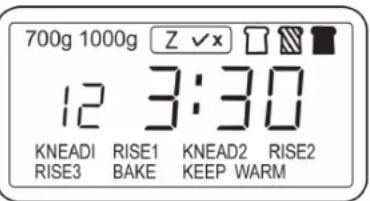
- The symbol is only displayed if the function can be selected. (see program table)
| 700g 1000g * Shows which dough weight has been selected. | |
| Z √x * Additional option selected? Yes √No X | |
| Color: How well should the bread be baked? Brown- ing setting: light, medium, dark. | |
| 12 | Indicates the program. The example shows program 12. |
| 3:30 | Shows the remaining running time. The example shows 3 hours : 30 minutes. |
| colon | Light up continuously = Standby Flashing = Program in operation |
| The program steps are displayed to you as follows: | |
| KNEAD | Knead 1 to 2 |
| RISE | Rise 1 to 3 |
| BAKE | Bake |
| KEEP WARM | Keep warm |
The Buttons and their Functions

Press this button and select one of the 13 programs. More details on the programs can be found in the program table.

Use this button to select a dough weight between 700 g and 1000 g.

Different programs offer the option to automatically mix in ingredients (see program table). Select the function with this button.

Pause
Pause the program briefly by pressing this button.
Press the button again and the program continues at the same point.

Use this button to set the times if the start is delayed and if EIGENPROGRAM is selected.

How well does the bread need to be baked? Choose between light, medium and dark. Refer to the indicator on the display.

Start/Stop
Use this button to start your selected program.
Press this button for approx. 2 seconds, if you want to cancel the program.

Funktion
Use this button to program EIGENPROGRAM. Use this button to toggle through the menu and confirm the set times.
Program Table
| Program Description | Duration | Dough weight to maximum g | Ingredients function | Delayed start | |
| 1 BASIC | 3:30 | Standard for white bread and brown bread | 1000 | Yes | Yes |
| 2 SCHNELL BACKFUNKTION | 2:50 | Shorter program than BASIC. Bread normally comes out smaller. | 700 | Yes | Yes |
| 3 FRANZÖZISCH | 4:20 | For French type bread (with crispy crust and soft dough) | 1000 | Yes | Yes |
| 4 ULTRA SCHNELL BACKFUNKTION | 2:20 | Suitable for ready baking mixes. Follow the manufacturer's instructions for baking mixes! | 700 No Yes | ||
| 5 VOLLKORN | 4:10 | For wholemeal bread. | 1000 | Yes | No |
| 6 KUCHEN | 3:00 | Baking program for dough with baking powder. | 700 | No | Yes |
| 7 KNETEN | 1:30 | For producing dough with one rise phase. | 1000 | No | Yes |
| 8 BACKEN | 1:10 | Baking only, without kneading and rising. | 1000 | No | Yes |
| 9 SANDWICH | 3:30 | Baking program for fluffy sandwich bread. | 700 | Yes | Yes |
| 10 MARMELADE | 1:20 | For simmering of marmalade and jams | 750 | No | No |
| 11 MIXEN | 0:20 | Kneading only. | 1000 | No | Yes |
| 12 GLUTENFREI | 3:05 | Special program for gluten-free dough | 1000 | No | Yes |
| 13 EIGEN PROGRAMM | -/- | Your favorite bread did not come out perfectly in one of the standard programs? Create your own baking program here. | 1000 Yes Yes |
How can I create my own program? (13 EIGENPROGRAMM)
You can set the program steps "Knead", "Rise", "Bake", "Keep warm" as follows:
Knead 1: 6-14 minutes
Knead 2: 5-20 minutes
Rise 1: 20-60 minutes
Rise 2: 5-40 minutes
Rise 3: 0 - 60 minutes
Bake: 0-90 minutes
Keep warm: 0 - 60 minutes
- Select program 13.
- Press the FUNKTION button. KNEAD1 flashes on the display.
- Press the ZEIT button and set a time.
- Press the FUNKTION button again to save the time. RISE1 flashes on the display.
NOTE:
-
Continue as described to set the other program steps.
To set the minutes quicker, keep the ZEIT button pressed
If you have set the time for the keep warm function and pressed the FUNKTION button, the running time of your program is displayed. -
Press the START/STOP button to start your program.
How do I set a Delayed Start?
Almost all programs can be started with a delay. Please note:
The maximum time setting is 13 hours.
- Do not set too long a period if you are using perishable foods e.g. eggs.
- Remain close by even if you have programmed a delayed start. Interruptions to the program may make it necessary to cancel the program.
Example for setting the time
It is 10.00 am. You are expecting a visit and want to have a freshly baked cake at 2.00 pm. The cake program lasts 3 hours.
- Select the "3 KUCHEN" program. The display shows 3:00.
- Press the ZEIT button. In 10 minute steps, set the time to 4 hours.
- Start your baking program and it will end at exactly 2.00 pm.
You can cancel the program at any time by pressing the START/STOP button.
Ingredients Function
Depending on the recipe, various ingredients should only be added during the second kneading.
Thus, sensitive fruit, nuts, or pieces of chocolate are protected against the kneading hook.
Your bread-making machine comes with a special function just for this purpose.
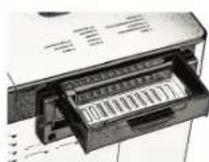
An ingredient dispenser is located on the back of the machine.
This can be easily filled before the machine is started.
Simply select the ingredients function. The ingredient dispenser flap will open automatically at the correct time to add the ingredients to the dough.
NOTE:
Not all programs support this function. (See program table)
- The ingredient dispenser has a lock on the handle which you must press.
-
Pull the ingredient dispenser out and fill it with your ingredients.
-
Slide the ingredient dispenser back in so that it is secured again by the lock.
- Select the function using the ZUTATEN button and you can start the baking program.
Bread Maker Functions
Buzzer sounds
The appliance emits different buzzer sounds:
1 long buzzer sound - when connecting the appliance to the mains
- when manually terminating a program
- at the end of the keeping warm function
1 short buzzer sound When releasing a button.
5 buzzer sounds in sequence The temperature of the appliance is too high and prevents the start of a new program. The display will show "EE1".
10 buzzer sounds in sequence at the end of a program
The program stopped. "0:00" appears in the display next to the program number. For all programs, a keeping warm phase of 1 hour will start after that.
Program Memory
The program continues after a power failure of less than 10 minutes. After a longer power failure the bread maker must be restarted. This is only practical if the dough was at this time still in the kneading phase. You have to start from the beginning if baking already started!
Safety function
After a program finished, the appliance must cool down before you can start a new baking or kneading program (except for the programs "10 MARMEL-ADE" and "8 BACKEN").
The appliance will emit 5 buzzer sounds and the display will show "EE1", indicating that the temperature in the baking chamber is too high.
- Unplug the mains cable.
- Use oven mitts to remove the baking tin.
- Leave the lid open and wait until the appliance has cooled down completely. The cool-down period depends on the previous program settings.
Program Sequence Bread Maker
CAUTION: Risk of fire!
When adding the ingredients at the beginning of your baking, never do so while the baking tin is still inside the appliance.
1. Removing the baking tin
Open the lid. Slightly turn the baking tin counterclockwise until it is unlocked. Pull the baking tin up by its handle and place it on a flat surface.
2. Insert Kneading Hook
Place the semi-circular opening of the kneading hook over the drive shaft inside the baking tin. The flange of the opening must face down. Observe the flute on the shaft. The kneading hook sits level on the bottom of the baking tin.
3. Insert Ingredients
Ensure that the ingredients are filled into the baking tin according to the sequence determined by the recipe.
4. Inserting the baking tin
Place the baking tin on the shaft in the baking chamber while holding the baking tin diagonally. Slightly turn the baking tin clockwise until it locks. Close the lid.
5. Starting a program
- Press the AUSWAHL button to select the desired program.
- Press the TEGMENGE button to select the total weight for your ingredients.
- Press the FARBE button to select a light, medium, or dark browning.
- You can use the ZEIT button to delay the start of the program.
- Have you put your ingredients into the drawer on the back? Then select this function.
- Press the START/STOP button. The flashing colon indicates the program has started.
6. Leave Dough to Rise
After the last kneading the bread maker sets the optimum temperature for the dough to rise. It heats up to 25^ - 30^ if the room temperature is lower.
7. Baking
The bread maker adjusts the baking temperature automatically. Select the BACKEN program to extend the baking process in case the bread is still too pale after baking.
8. Keeping Warm (not in the programs 7 KNETEN, 10 MARMELADE, 11 MIXEN)
The buzzer sounds repeatedly after the baking program is finished and bread or foodstuffs can be removed. At the same time the 1-hour warning phase starts. "0:00" appears next to the program number in the display. The colon ". ." is flashing. After 1 hour the buzzer sounds and the warning phase ends. The display will show the start image. Disconnect from mains power supply.
9. Program "8 BACKEN" (extended baking)
- When the "keeping warm" phase is still running, press the START/STOP button until you hear a buzzer sound.
- Start the program "8 BACKEN".
- When the desired browning has been achieved, stop the program by pressing the START/STOP button.
- Disconnect from mains power supply.
10. Program End
Have a grid ready and disconnect from mains power supply.
Remove the baking tin with oven gloves after the program has ended, turn it upside down and slightly shake it; turn the kneading hook drive at the bottom if the bread does not come out immediately. Use the supplied hook in case the kneading hook gets stuck inside the bread. Insert it through the semi-circular opening of the kneading hook at the bottom of the warm bread and hook into the lower edge (at the wing of the kneading hook). Carefully pull the kneading hook upward with the hook. You can see in which part of the bread the wing of the kneading hook is stuck. Cut the bread in that position and easily remove the kneading hook.
Cleaning
WARNING:
- Always disconnect from mains power supply and let the appliance cool down before cleaning.
- Do not submerge the appliance and the baking tin in water. To avoid the risk of electric shock and fire do not fill water into the baking chamber.

CAUTION:
- Do not use a wire brush or other abrasive objects for cleaning.
- Do not use aggressive or abrasive cleaning agents.
NOTE:
The baking tin is anti-stick coated. It is normal if the color of the coating changes over time, this does not affect the function.
- Remove all ingredients and crumbs with a damp cloth from lid, casing and baking chamber.
- Wipe the baking tin on the outside with a damp cloth. The inside can be cleaned with water and a mild cleaning agent.
- Clean the kneading hooks and drive shafts immediately after use. The kneading hooks may be difficult to remove later if left in the baking tin. In this case fill warm water for approx. 30 minutes into the tin. The kneading hooks can then be removed easily.
Storage
- Ensure that the appliance is clean and dry and has cooled down complete before storing. Store the appliance with the lid closed.
- We recommend to store the appliance in its orginal packaging when not using the appliance for a longer period of time.
- Store the appliance out of reach of children and at a well ventilated dry place.
Baking Q & A
- The bread sticks to the container after baking
Leave the bread to cool for about 10 minutes after baking - turn the container upside down. Move the kneading hook shaft back and forth, if necessary. Grease the kneading hooks before baking.
- How do you avoid the forming of holes in the bread owing to the presence of the kneading hooks
You can remove the kneading hooks with your fingers covered with flour before leaving the dough to rise for the last time (see "Program Sequence Bread Maker"). The display must show a remaining processing time of approx. 1:30 hours, depending on the program. If you not wish to do so, use the hook after baking. If you proceed with caution, you can avoid the forming of a large hole.
- The dough spills over when it is left to rise
This happens in particular when wheat flour is used owing to its greater content of gluten.
Remedy:
a) Reduce the amount of flour and adjust the amounts of the other ingredients. When the bread is ready, it will still have a large volume.
b) Spread a tablespoon of heated liquefied margarine on the flour.
- The bread rises and spills over anyway
a) If a V-shaped ditch forms in the middle of the bread, the flour does not have enough gluten. This means that the wheat contains too little protein (it happens during especially rainy summers) or that the flour is too moist.
Remedy: Add one tablespoon of wheat gluten per 500g of wheat flour.
b) If the bread has a funnel shape in the middle, the possible cause can be one of the following
- the water temperature was too high,
- too much water was used,
- the flour was poor in gluten,
- draft when opening the lid during baking.
- When can the lid of the bread maker be opened during the baking?
Generally speaking, it is always possible while the kneading is underway. During this phase small quantities of flour or liquid can still be added.
If the bread must have a particular aspect after baking, proceed as follows: before the last rising phase (the display must show a remaining processing time of approx. 1:30 hours, depending on the program) open the lid with caution and shortly and carve the bread crust while it is forming with a sharp pre-heated knife, scatter cereals on it or spread a mixture of potato flour and water on the crust to give it a glossy finish. This is the last time that the lid can be opened; otherwise the bread will go down in the middle.
- What do the type numbers for flour mean?
The lower the type number, the less roughage the flour contains and the lighter it will be.
What is wholewheat flour?
Wholewheat flour is made of all types of cereals including wheat. The term "wholewheat" means that the flour was ground from whole grain and hence it has a greater contents of roughage thus making the wholewheat flour darker. However, the use of wholewheat flour does not make the bread darker as is widely believed.
What must be done when using rye flour?
Rye flour does not contain any gluten and the bread hardly rises. In order to make it easily digestible a rye wholewheat bread with leaven is to be made.
The dough will rise only if one part of type 550 flour is added to every four parts of rye flour without gluten.
What is gluten in flour?
The higher the type number, the lower the gluten contents of the flour are and the less the dough will rise. The highest quantity of gluten is contained in type 550 flour.
- How many different flour types are there and how are they used?
a) Corn, rice and potato flour are suitable for people allergic to gluten or for those who suffer from sprue or celiac disease. See the relevant recipes in the operating instructions.
b) Spelt flour is very expensive, but it is free from chemical additives because spelt grows on very poor soil and requires no fertilizers. Spelt flour is especially suitable for allergic people. It can be used in all those recipes described in the operating instructions requiring flour types 405, 550 or 1050.
c) Millet flour is especially suitable for people suffering from many allergies. It can be used in all recipes requiring flour types 405, 550 or 1050 as described in the operating instructions.
d) Durum wheat flour is suitable for baguettes thanks to its consistency and it can be replaced with durum wheat semolina.
- How can fresh bread be made easier to digest?
If a mashed boiled potato is added to the flour and kneaded in the dough the fresh bread is easier to digest.
- What doses of rising agent should be used?
For yeast and leaven, which must be bought in different quantities follow the producer's instruction on the package and adjust the quantity to the amount of flour used.
What can be done if the bread tastes of yeast?
a) Often sugar is added to eliminate this taste. The adding of sugar makes the bread lighter in color.
b) Add 112 tablespoons of vinegar for a small bread loaf and 2 tablespoons for a large loaf to the water.
c) Use buttermilk or kefir instead of water. This is possible for all the recipes and it is recommended for the freshness of the bread.
- Why does the bread made in an oven taste different from the bread made with the bread maker?
It depends on the different degree of humidity. The bread is baked drier in the oven owing to the larger baking space, while the bread made in the bread maker is moister.
Troubleshooting
| Problem Cause Remedy | ||
| Smoke comes out of the baking compartment or the vents. | The ingredients stick to the baking compartment or on the outside of the baking tin. | Disconnect from mains power supply, let the appliance cool down and clean the outside of the baking tin or the baking compartment. |
| The bread goes down in the middle and is moist at the bottom. | The bread is left too long in the tin after baking and warning. | Take the bread out of the baking tin before the warming function is over. |
| It is difficult to take the bread out of the baking tin. | The bottom of the loaf sticks to the kneading hooks. | Clean the kneading hooks and shafts after baking. If necessary, fill the baking tin with warm water for 30 minutes. Then the kneading hooks can be easily removed and cleaned. |
| The ingredients are not mixed or the bread is not baked correctly. | Incorrect program setting Check the selected menu and the other settings. | |
| The START/STOP button was touched while the machine was working (The program was terminated early.) | Do not use the ingredients and start over again. | |
| The lid was opened several times while the bread maker was working. | Do not open the lid after the last rising (if at least "1:30" is shown on the display. Ensure that the lid is properly closed after opening. | |
| Long power failure while the machine was working. Do not use the ingredients and start over again. | ||
| The rotation of the kneading hooks is blocked. Check if the kneading hooks are blocked by grains, etc. Pull out the baking tin and check whether the drive shafts turn. If this is not the case contact the customer service. | ||
| The appliance does not start. 5 beeps sound. The display shows "EE1". | The appliance is still hot after the last baking cycle. Stop the program and remove the baking pan. Leave the lid open until the temperature has dropped. Then restart the program. | |
| The appliance does not start. 5 beeps sound. The display shows "EE2". | The appliance is still too cold. Wait approx. 20 - 30 minutes until the appliance has reached room temperature. | |
| The display shows "Err". There is an electronic fault. Please contact our service centre. | ||
Mistakes with the Recipes
| Problem Cause Remedy | ||
| The bread rises too fast | Too much yeast, too much flour, not enough salt, or several of these causes | a/b |
| The bread does not rise at all or not enough | No yeast at all or too little yeast a/b | |
| Old or stale yeast | d | |
| Liquid too hot | c | |
| The yeast has come into contact with the liquid | c | |
| Wrong flour type or stale flour | d/l | |
| Too much or not enough liquid | a/b/g | |
| Not enough sugar | a/b | |
| The dough rises too much and spills over the baking tin | If the water is too soft the yeast ferments more | f/k |
| Too much milk affects the fermentation of the yeast | c | |
| The bread goes down in the middle | The dough volume is larger than the tin and the bread goes down. | a/f |
| The fermentation is too short or too fast owing to the excessive temperature of the water or the baking chamber or to the excessive moistness. | c/h/l | |
| No salt at all or too little salt | a/b | |
| Too much liquid f/g | ||
| Heavy, lumpy struc-ture. | Too much flour or not enough liquid | a/b/g |
| Not enough yeast or sugar | a/b | |
| Too much fruit, wholewheat or one of the other ingredients | b | |
| Old or stale flour | d | |
| Problem Cause Remedy | ||
| The bread is not baked in the center | Too much or nor enough liquid | a/b/g |
| Too much humidity | g | |
| Recipe with moist ingredients such as yogurt | f | |
| Open or coarse structure or too many holes | Too much water | f/g |
| No salt | b | |
| High humidity, water too hot | f/h | |
| Too much liquid | c | |
| Mushroom-like, unbaked surface | Bread volume to big for the tin | a/e/j |
| Too much flour, especially for white bread | e | |
| Too much yeast or not enough salt | a/b/j | |
| Too much sugar | a/b | |
| Sweet ingredients besides the sugar | b | |
| The bread slices are unequal or lumpy | Bread not cooled enough (the vapor has not escaped) | i |
| Flour deposits on the bread crust | The flour was not worked well on the sides during the kneading | k |
Remedy Problems
a) Measure the ingredients correctly.
b) Adjust the ingredient doses and check that all ingredients have been added.
c) Use another liquid or leave it to cool at room temperature. Add the ingredients specified in the recipe in the right order. Make a small ditch in the middle of the flour and put in the crumbled yeast or the dry yeast. Avoid letting the yeast and the liquid come into direct contact.
d) Use only fresh and correctly stored ingredients.
e) Reduce the total amount of the ingredients, do not use more than the specified amount of flour. Reduce all the ingredients by 1/3.
f) Correct the amount of liquid. If ingredients containing water are used, the dose of the liquid to be added must be duly reduced.
g) In case of very humid weather remove 1-2 tablespoons of water.
h) In case of warm weather do not use the timer function. Use cold liquids.
i) Take the bread out of the tin immediately after baking and leave it on the grid to cool for at least 15 minutes before cutting it.
j) Reduce the amount of yeast or of all the ingredient doses by 1 / 4
k) Do not grease the baking tin!
I) Add a tablespoon of wheat gluten to the dough.
Tips for Recipes
1. Ingredients
Since each ingredient plays a specific role for the successful baking of the bread, the measuring is just as important as the order in which the ingredients are added.
- The most important ingredients like the liquid, flour, salt, sugar and yeast (either dry or fresh yeast can be used) affect the successful outcome of the preparation of the dough and the bread. Always use the right quantities in the right proportion.
- Use lukewarm ingredients if the dough needs to be prepared immediately. If you wish to set the program phase timing function, it is advisable to use cold ingredients to avoid that the yeast starts to rise too early.
- Margarine, butter and milk affect the flavor of the bread.
- Sugar can be reduced by 20% to make the crust lighter and thinner without affecting the successful outcome of the baking. If you prefer a softer and lighter crust replace the sugar with honey.
- Gluten, which is produced in the flour during the kneading provides for the structure of the bread. The ideal flour mixture is composed of 40% wholewheat flour and 60% white flour.
- If you wish to add whole grains, leave them to soak overnight. Reduce the quantity of flour and the liquid (up to 1/5 less).
- Leaven is indispensable with rye flour. It contains milk and acetobacteria that make the bread lighter and ferment thoroughly. You can make your own leaven but it takes time. For this reason concentrated leaven powder is used in the recipes below. The powder is sold in 15 g packets (for 1 kg of flour). Follow the instructions given in the recipes (12, 34 or 1 packet). If less leaven than requested is used the bread will crumble.
- If leaven powders with a different concentration (100 g packet for 1 kg of flour) are used, the quantity of flour must be reduced by 80 g for 1 kg of flour.
- Liquid leaven sold in bags is also available and it is suitable for use. Follow the doses specified on the package. Fill the measuring cup with the liquid leaven and top it up with the other liquid ingredients in the right dosage as specified in the recipe.
- Wheat leaven, which often comes dry, improves the workability of the dough, the freshness and the taste. It is milder than rye leaven.
- Use either the BASIC or VOLLKORN program when baking leavened bread.
- Wheat bran is added to the dough if you want particularly light bread rich in roughage. Use one tablespoon for 500g of flour and increase the quantity of liquid by 12 tablespoons.
- Wheat gluten is a natural additive obtained from wheat proteins. It makes the bread lighter and more voluminous. The bread falls in more rarely and it is more easily digestible. The effect can be easily appreciated when baking wholewheat and other bakery products made of home-milled flour.
- The black malt used in some recipes is dark-roasted barley malt. It is used to obtain a darker bread crust and soft part (e.g. brown bread). Rye malt is also suitable but it is not as dark. You can find this malt in whole food shops.
-
Bread seasoning can generally be added to all our brown breads. The amount depends on your personal taste and the manufacturer's specifications.
-
Pure lecithin powder is a natural emulsifier that improves the volume of the bread, makes the soft part softer and lighter and keeps it fresh for longer.
2. Adjust Doses
If the doses need to be increased or reduced, make sure that the proportions of the original recipe are maintained. To obtain a perfect result, the basic rules below for the adjustment of the ingredient doses must be following:
- Liquids/flour: The dough ought to be soft (not too soft) and easy to knead without becoming stringy. A ball can be obtained by kneading it lightly. This is not the case with heavy dough like rye wholewheat or cereal bread. Check the dough five minutes after the first kneading. If it is too moist, add some flour until the dough has reached the right consistency. If the dough is too dry add a spoonful of water at a time during the kneading.
- Replacing liquids: When using ingredients containing liquids in a recipe (e.g. curd cheese, yogurt, etc.) the required amount of liquid must be reduced. When using eggs beat them in the measuring beaker and fill it up with the other required liquids to the envisaged amount.
If you are living in a place located at a high altitude (more than 750m above sea level) the dough rises faster. The yeast can be reduced in these cases by 1 / 4 to 1 / 2 teaspoon to proportionally reduce its rising. The same is true of places with particularly soft water.
3. Add and Measure Ingredients and Quantities
- Always put in first the liquid and the yeast at the end.
To avoid that the yeast acts too fast (in particular when using the timing function), contact between the yeast and the liquid must be avoided. - When measuring use the same measuring units, that is to say use either the measuring spoon supplied with the bread maker, or a spoon used in your home when the recipes require doses measured in tablespoons and teaspoons.
- The measures in grams must be weighed precisely.
- For the milliliter indications you can use the supplied measuring cup, which has a graduated scale of 50ml - 250ml .
The abbreviations in the recipes mean:
tbs = level tablespoonful (or large measuring spoon)
tsp = level teaspoonful (or small measuring spoon)
g = grams
ml = milliliter
Packet = 7 g dry yeast for 500 g of flour - corresponds to 20 g of fresh yeast
4. Recipes for the Bread Maker
The following recipes are for various bread sizes. In some programs a difference is made in weight.
CAUTION:
- Adjust the recipes to the appropriate weight.
- Ensure that the weight of the ingredients does not exceed 700g in level 1 or 1000g in level 2.
5. Bread Weights and Volumes
- In the following recipes you will find exact indications regarding the bread weight. You will see that the weight of pure white bread is less than that of wholewheat bread. This depends on the fact that white flour rises more and hence limits need to be posed.
- Despite the precise weight indications there may be slight differences. The actual bread weight depends much on the humidity of the room at the time of preparation.
- All breads with a substantial portion of wheat reach a large volume and exceed the baking tin edge after the last rising in case of the higher weight level. But the bread does not spill over. The part of the bread outside the tin is more easily browned compared to the bread in the tin.
6. Baking Results
- The baking result depends on the on-site conditions (soft water - high humidity - high altitude - consistency of the ingredients, etc.). Therefore, the recipe indications are reference points, which can be adjusted. If one recipe or another dose not work out straight the first time, do not be discouraged. Try to find the cause and try it again by varying the proportions.
- If the bread is too pale after baking, you can leave it to brown with the baking program.
Classic Bread Recipes
Classic White Bread
Ingredients
Water or milk 300ml
Margarine/butter 112 tbs
Salt 1 tsp
Sugar 1 tbs
Flour type 550 540 g
Dry yeast 1 packet
Program "BASIC"
Nut & Raisin Bread
Ingredients
Water or milk 350 ml
Margarine/butter 112 tbs
Salt 1 tsp
Sugar 2 tbs
Flour type 405 540 g
Dry yeast 1 packet
Raisins 85g
Crushed walnuts 3 tbs
Program "BASIC"
Wholewheat Bread
Ingredients
Water 300 ml
Margarine/butter 112 tbs
Egg 1
Salt 1 tsp
Sugar 2 tsp
Flour type 1050 360 g
Wholewheat flour 180 g
Dry yeast 1 packet
Program "VOLLKORN"
When using the timer function to delay the program start, add some more water instead of using eggs.
Buttermilk Bread
Ingredients
Buttermilk 300 ml
Margarine/butter 112 tbs
Salt 1 tsp
Sugar 2 tbs
Flour type 1050 540 g
Dry yeast 1 packet
Program "BASIC"
Onion Bread
Ingredients
Water 250 ml
Margarine/butter 1 lbs
Salt 1 tsp
Sugar 2 tbs
Large chopped onion 1
Flour type 1050 540 g
Dry yeast 1 packet
Program "BASIC" or "SCHNELLBACKFUNTION"
Seven Seeds Bread
Ingredients
Water 300 ml
Butter/margarine 1 12 tbs
Salt 1 tsp
Sugar 212 tbs
Flour type 1150
Wholewheat flour 240 g
7-seed flakes
Dry yeast 1 packet
Program "VOLLKORN"
Soak, if using whole seeds.
Sunflower Seed Bread
Ingredients
Water 350 ml
Butter 1 tbs
Flour type 550 540g
Sunflower seeds 5 tbs
Salt 1 tsp
Sugar 1 tbs
Dry yeast 1 packet
Program "BASIC"
Tip: You can substitute sunflower seeds with pumpkin seeds. Roast the seeds once in a frying pan for more intensive taste.
Farmer's White Bread
Ingredients
Milk 300 ml
Margarine/butter 2 tbs
Salt 112 tsp
Sugar 112 tsp
Flour type 1050 540 g
Dry yeast 1 packet
Program "BASIC", "SCHNELLBACKFUNKTION" or "ULTRA SCHNELL
BACKFUNTION
Leaven Bread
Ingredients
Dry leaven 50g
Water 350 ml
Margarine/butter 1 12 tbs
Salt 3 tsp
Sugar 2 tbs
Flour type 1150 180 g
Flour type 1050 360 g
Yeast 12 packet
Program "BASIC"

CAUTION:
- Adjust the recipes to the appropriate weight.
- Ensure that the weight of the ingredients does not exceed 700g in level 1 or 1000g in level 2.
Dough Recipes
French Baguette
Ingredients
Water 300 ml
Honey 1 tbs
Salt 1 tsp
Sugar 1 tsp
Flour type 550 540 g
Dry yeast 1 packet
Program "7 KNETEN"
Split the dough in 2-4 parts and shape long loafs. Leave to rise for 30-40 minutes. Incise the top diagonally and bake in the oven.
Pizza
Ingredients
Water 300 ml
Salt 3 / 4 tsp
Olive oil 1 tbs
Flour type 405 450 g
Sugar 2 tsp
Dry yeast 1 packet
Program "7 KNETEN"
- Roll the dough, place it in a round tin and leave to rise for 10 minutes. Pierce several times with a fork.
- Spread pizza sauce on the dough and add the desired toppings.
- Bake for 20 minutes.
Jam
Jam
Ingredients
Fruit 500 g
Canning sugar "2:1" 250 g
Lemon juice 1 tbs
Program "10 MARMELADE"
- Cut and pit the fruit before processing.
- The following fruit is especially well suited for these recipes: strawberries, blackberries, blueberries or a mixture thereof.
- Fill the jam in clean bottles, close the lid and place the bottles for approx. 10 minutes upside down (to ensure that the lid is properly closed)!
Orange Marmalade
Ingredients
Oranges 400g
Lemons 100 g
Canning sugar "2:1" 250 g
Program "10 MARMELADE"
Peel and cut in cubes or strips.
Technical Data
Model: PC-BBA 1077
Power supply: 220-240 V~, 50/60 Hz
Power consumption: 550 W
Protection class:
Capacity: 2 liters
(corresponds to approx. 1000 g bread weight)
Net weight: approx. 6.45 kg
The right to make technical and design modifications in the course of continuous product development remains reserved.
This device complies with all current CE directives, such as electromagnetic compatibility and low voltage directive and is manufactured according to the latest safety regulations.
Disposal
Meaning of the "Wheelie Bin" Symbol
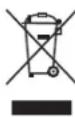
Take care of our environment, do not dispose of electrical appliances via the household.
Dispose of obsolete or defective electrical appliances via municipal collection points.
Please help to avoid potential environmental and health impacts through improper waste disposal.
You contribute to recycling and other forms of utilization of old electric and electronic appliances.
Your municipality provides you with information about collecting points.
Hasznalati utmutató
KEEP WARM Melegen tartas
Tippek a receptekhez
1. Osszetevok
"10 MARMELADE" program
"10 MARMELADE" program