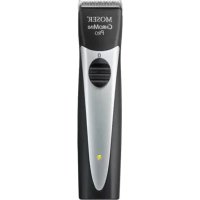
Chromini Pro - Beard trimmer MOSER - Free user manual and instructions
Find the device manual for free Chromini Pro MOSER in PDF.



User questions about Chromini Pro MOSER
0 question about this device. Answer the ones you know or ask your own.
Ask a new question about this device
Download the instructions for your Beard trimmer in PDF format for free! Find your manual Chromini Pro - MOSER and take your electronic device back in hand. On this page are published all the documents necessary for the use of your device. Chromini Pro by MOSER.
USER MANUAL Chromini Pro MOSER
Type 1591Q Quick Charge
Operating manual Cord/Cordless Hair Clipper
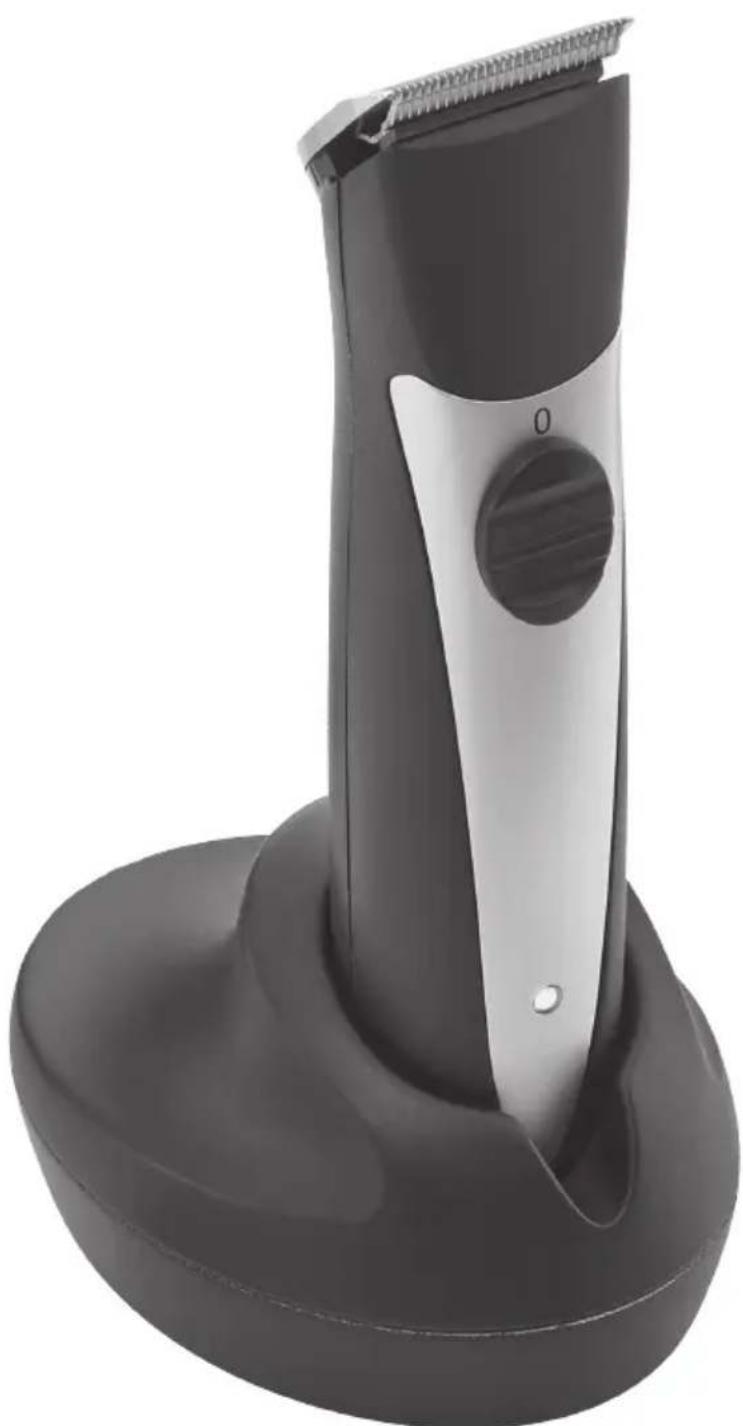
natural_image
Black and silver hairbrush tool with a circular cutter, mounted on a curved base (no text or symbols visible)1
natural_image
Technical illustration of a handheld device with labeled parts (a and b), no readable text or symbols present.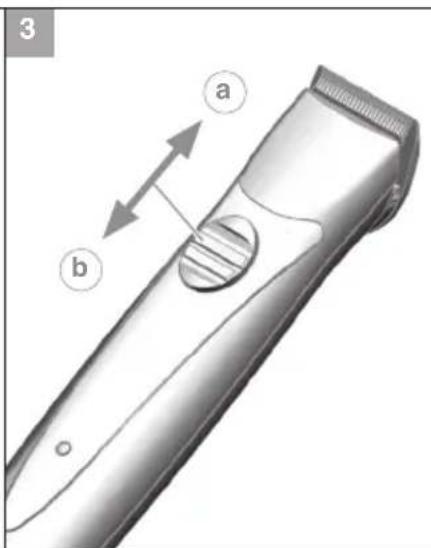
text_image
3 a b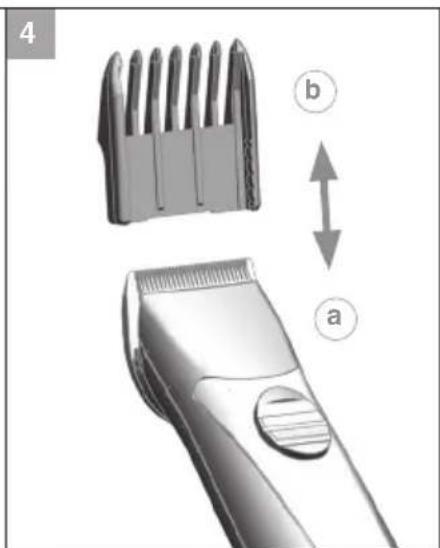
text_image
4 b a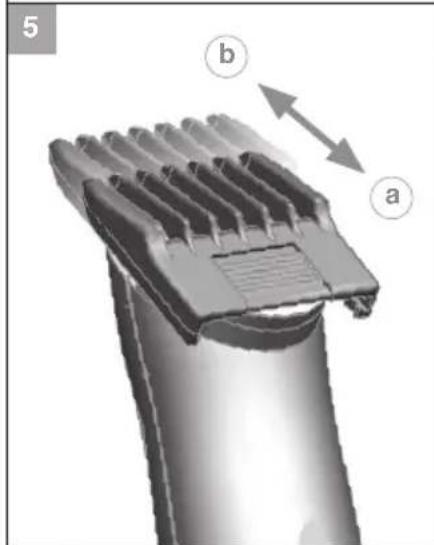
natural_image
3D diagram of a hairbrush with labeled parts (a and b), showing internal structure and directional arrows (no text or symbols beyond labels)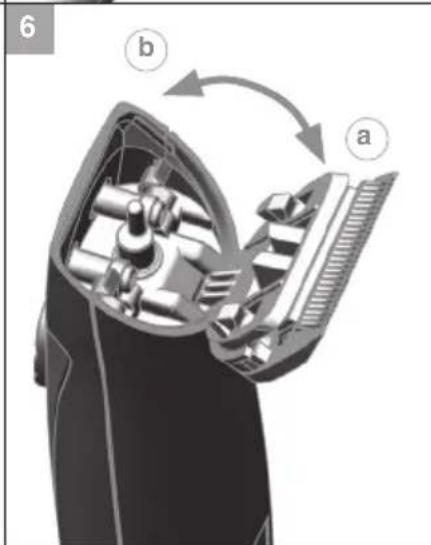
text_image
6 b a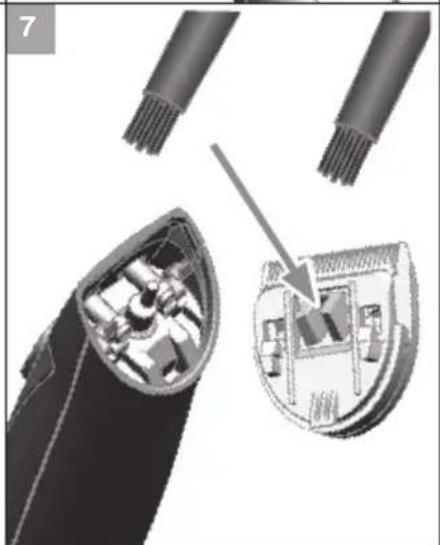
natural_image
Diagram showing a hairbrush head with internal components and a close-up of the interior (no text or symbols)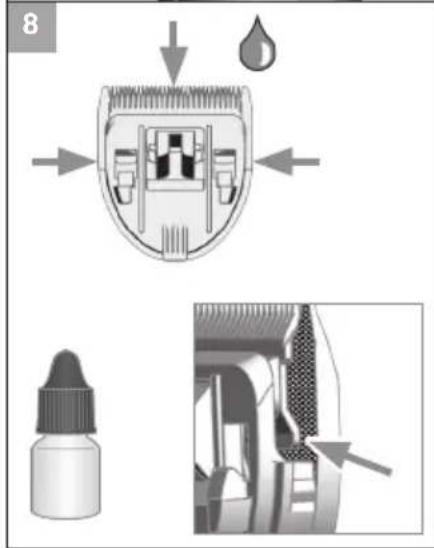
text_image
8Translation of the original operating manual – Cord/cordless hair clipper Type 1591Q .... 10
Translation of the original operating manual – Cord/cordless hair clipper Type 1591Q
General safety instructions

Read and observe all safety instructions and store in a safe place!
Intended use
- Only use hair clippers to cut human hair, beard hair and eyebrows.
- Only use animal clippers to cut animal hair and animal fur.
- This appliance is designed for commercial use.
Requirements on the user
- Read the operating manual in full and familiarise yourself with it before the first use.
- This appliance can be used by children aged from 14 years and above and persons with reduced physical, sensory or mental capabilities, or lack of experience and/or knowledge, if they have been given supervision or instruction concerning the use of the appliance in a safe way and understand the hazards involved. Children must not play with the appliance. Cleaning and user maintenance must never be carried out by children, unless they are supervised by an adult.
- Keep the appliance out of reach of animals and protected against the effects of the weather.
Hazards

Danger! Electric shock due to damage to appliance/plug-in transformer.
▶ Do not use the appliance if it is not working correctly, if it is damaged or if it has fallen into water. Repairs may only be performed at an authorised service centre using original spare parts in order to avoid hazards.
▶ Never use the appliance if the mains cable or plug-in transformer is damaged. A damaged mains cable or plug-in transformer may only be replaced with an original spare part, by an authorised service centre or another similarly qualified person, in order to avoid hazards.
▶ Only specialists properly trained in the handling of electrotechnical appliances may repair electrical equipment.

Danger! Electric shock due to penetration of liquid.
▶ Always position or store electrical equipment where it cannot fall into water (e.g. washbasin). Keep the appliance away from water and other liquids.
▶ Never touch electrical equipment that has fallen into water or reach into water to retrieve it. Disconnect from the mains immediately.
▶ Have the appliance inspected at a service centre before using it again.
▶ Only use and store the appliance in dry rooms.

Danger of explosion!
▶ Do not attempt to replace the battery.
▶ Batteries may only be exchanged for types approved by the manufacturer and may only be replaced at service centres.
▶ Do not expose the appliance to temperatures below 0^ C and above +40^ C for any length of time. Avoid direct exposure to sunlight.

Warning! Injuries caused by overheating of blade sets.
The blade set can heat up if the appliance is used over a prolonged period. Take regular breaks when using the appliance so that the blade set can cool down.

Warning! Injuries due to incorrect handling.
▶ Never use the appliance if the blade set is damaged.
▶ Always switch the appliance off before storage, as the appliance can fall down due to the vibrations.

Handle with care! Injuries due to incorrect handling.
▶ Only operate the appliance with the voltage stated on the nameplate.
▶ Only use accessories recommended by the manufacturer.
▶ Only use the plug-in transformer that is included in the scope of supply for charging the appliance. Only replace defective plug-in transformers with original spare parts which you can order via our service centres.
▶ Never insert or allow objects to fall into the openings of the appliance.
▶ Do not carry the appliance by the mains cable and, when disconnecting the appliance from the mains, always pull the plug rather than the cable or the appliance.
- Keep the mains cable and appliance away from hot surfaces.
▶ Make sure that the mains cable is not twisted or kinked when charging or storing.
General user information
Information about using the operating manual
▶ Before using the appliance for the first time, you must read and understand the operating manual completely.
▶ Consider the operating manual as part of the product and store it in a safe and accessible place.
This operating manual is also available in PDF format from our service centre. The EC declaration of conformity can also be requested in other official EU languages from our service centre.
▶ Include this operating manual if passing the appliance on to a third party.
In the event of conflicts with national safety specifications or instructions, the national requirements must be followed.
Explanation of symbols and notes

DANGER
Danger of electric shock which may result in serious physical injury or death.

DANGER
Danger of explosion which may result in serious physical injury or death.

WARNING
Warning of possible physical injury or a health risk.

CAUTION
Information about danger of material damage.

Note with useful information and tips.
▶
1.
2.
3.
Product description
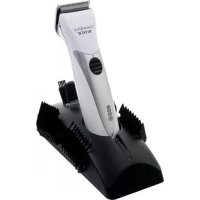
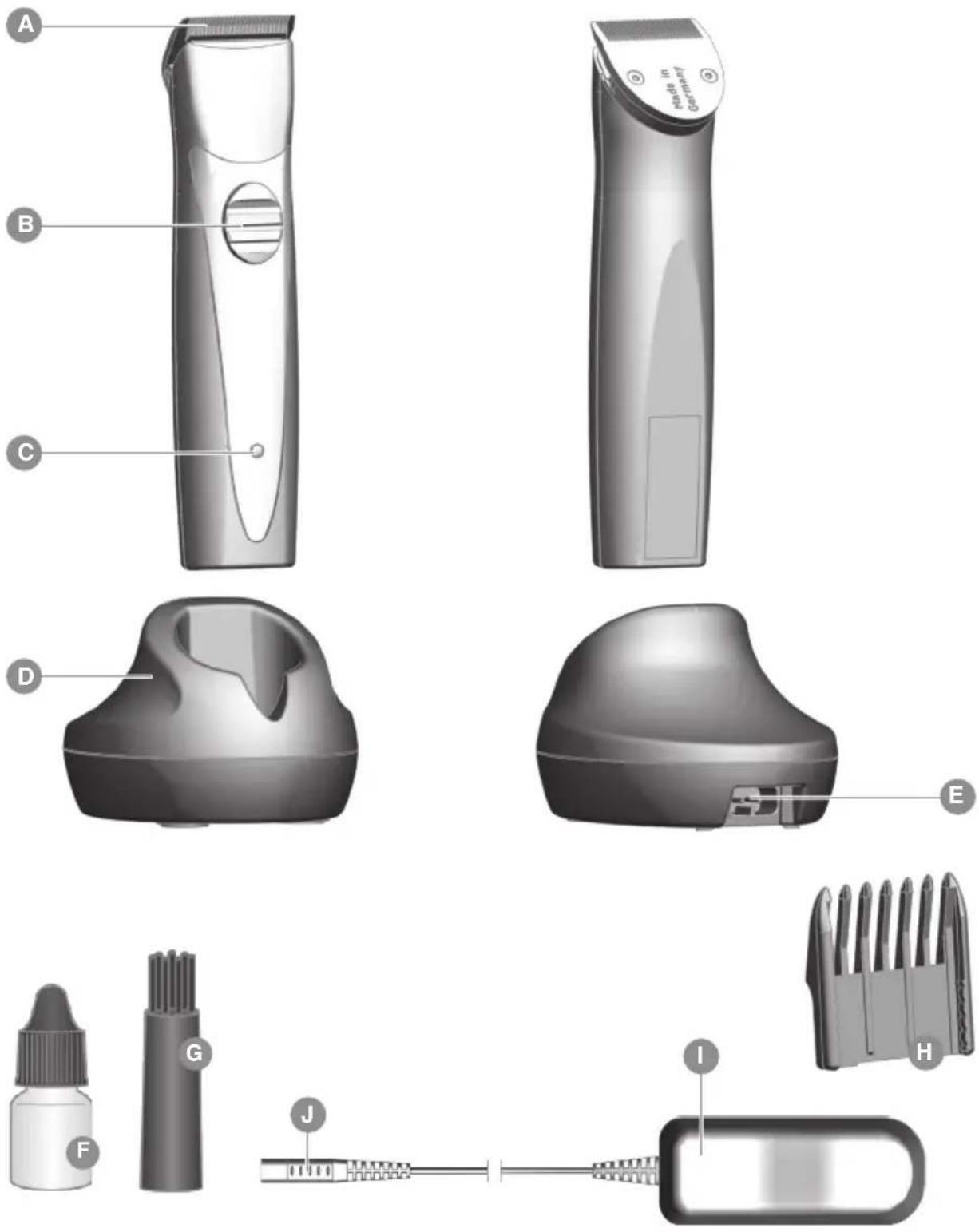
Description of parts (Fig. 1)
A Blade set
B On/off switch
C Charging indicator
D Charging stand
E Charging stand socket
F Oil for blade set
G Cleaning brush
H Attachment comb
I Plug-in transformer
J Appliance plug
Technical data
Hand-held appliance
Drive: DC motor
Battery: NiMH battery
Battery operating time: up to 100 min.
Dimensions (LxWxH): 141 x 32 x 29 mm
Weight: approx. 132 g
Emission sound pressure level: max. 60 dB(A) @ 25 cm
Vibration: < 2.5 m/s
Charging stand
Dimensions
with accessories (LxWxH): 72 x 96 x 58 mm
Weight: approx. 61 g
Plug-in transformer
Type Adapter 6000
Power consumption: max. 12 W
Operating voltage: 100 - 240 V / 50/60 Hz
The appliance is safety insulated and radio screened. It meets the requirements of EU Electromagnetic Compatibility Directive 2004/108/EC and Machinery Directive 2006/42/EC.
Operation
Preparation

Keep the packaging material for safe storage or transport later.
▶ Check that the contents are complete.
▶ Check all the parts for possible transport damage.
Safety

Caution! Damage due to incorrect power supply.
▶ Only operate the appliance with the voltage stated on the nameplate.
Charging the battery

Before the appliance is used for the first time, it should be charged for approx. 2 hours!
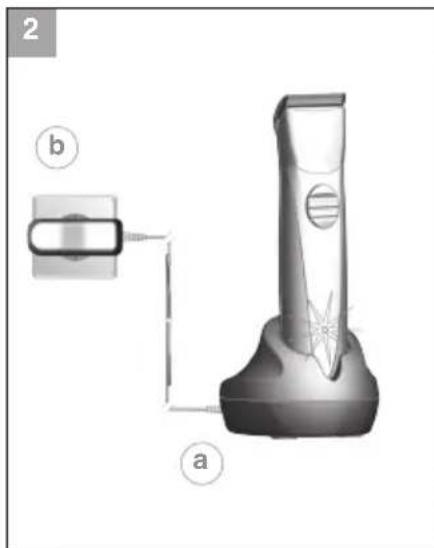
- Connect the appliance plug (J) on the plug-in transformer to the charging stand socket (E) (Fig. 2⑧).

Battery overcharging is prevented thanks to intelligent charge management.
-
Connect the plug-in transformer to the mains socket (Fig. 2⑥).
-
Switch off the appliance using the on/off switch (Fig. 3⑥).
-
Place the appliance on the charging station (Fig. 2)

- During charging, the charging indicator (C) flashes at evenly spaced intervals. When the battery is fully charged, the charging indicator flashes at a different rate (10 on / 1 off).
- After the appliance has been removed from the charging stand, the display goes out (power saving mode).
It will take no more than 120 minutes for the appliance to charge to full capacity.
Battery operation
- Switch on the appliance using the on/off switch and switch off after use (Fig. 3a/6).

- With the battery fully charged, the appliance can be operated for up to 100 minutes. This capacity is attained after approx. 5 - 10 charging cycles.
- In case of insufficient maintenance of the blade set, the operating time can be reduced considerably.
Operation
Cutting with the attachment comb
The appliance can also be operated with an attachment comb.
▶ The attachment comb has 5 detent positions for adjusting the cutting length.
▶ The further the attachment comb is pushed in (retracted), the shorter the cutting length.

The cutting length can be adjusted from 3 mm (Fig. 5 ^a ) to 6 mm (Fig. 5 ^b ).
Attaching/removing the attachment comb
-
Slide the attachment comb on to the blade set in the direction of the arrow until it reaches the limit stop (Fig. 4⑧).
-
The attachment comb can be removed by pushing it in the direction of the arrow (Fig. 4⑥).
Maintenance

Warning! Injuries and material damage due to incorrect handling.
▶ Switch off the appliance before cleaning it or performing any maintenance and disconnect it from the mains.
Cleaning and care

Danger! Electric shock due to penetration of liquid.
▶ Do not immerse the appliance in water!
▶ Do not allow any liquid to get inside the appliance.
▶ Only reconnect the appliance to the power supply if it is completely dry.

Caution! Danger from aggressive chemicals.
Aggressive chemicals could damage the appliance and accessories.
▶ Never use solvents or scouring agents.
▶ Only use cleaning agents and blade set oil recommended by the manufacturer.

Accessories and spare parts are available from your dealer or our service centre.
Remove the attachment comb (Fig.4) after every use and lift the blade set out of the housing (Fig. 6a). Use the cleaning brush to remove any cut hairs from the housing opening and from the blade set (Fig. 7). The cleaning lever can also be pressed. This allows the cut hairs that accumulate between the bottom blade and the top blade to be easily removed using the cleaning brush (EASY CLEANING).
▶ The charging contacts on the appliance and on the charging stand should always be kept clean.
▶ Only wipe the appliance with a soft, slightly damp cloth.
▶ The blade set using the hygienic spray.
▶ Oil the blade set with the blade set oil (Fig. 8).

For a good and long-lasting cutting performance, it is important to oil the blade set frequently.
▶ If the cutting performance deteriorates after long use despite regular cleaning and oiling, the blade set should be replaced.
Changing the blade set

Warning! Injuries and material damage due to incorrect handling.
▶ Switch off the appliance before changing the blade set.
- Switch off the appliance using the on/off switch (Fig. 3⑥).
- Slide the blade set off the housing in the direction of the arrow (Fig. 6®). Remove the blade set.
- Replace the blade set by hooking it into the housing and pressing it down until it clicks into position (Fig. 6b).
Problem elimination
Blade set is cutting badly.
Blade set is pulling hair out.
Battery operating time is too short.
Cause: Blade set is dirty.
▶ Clean and oil the blade set (Fig. 7/8).
Cause: Blade set is worn out.
▶ Replace the blade set (Fig. 6).
Skin injury
Cause: Too much pressure on the skin.
▶ Less pressure on the skin.
Cause: Cutting angle is too steep.
▶ Hold appliance flatter to the skin.
Charging indicator light does not light up.
Cause: The appliance must be switched off for charging.
▶ Check whether the appliance is switched off. (Fig⑥).
Cause: Charging contacts are dirty.
▶ Clean the charging contacts on the appliance and on the charging stand.
Cause: Defective power supply.
▶ Ensure that the plug-in transformer is plugged into the mains socket.
▶ Check the mains cable for possible damage.
Disposal

Handle with care! Environmental damage in the event of incorrect disposal.
▶ Discharge batteries prior to disposal!
- Correct disposal will ensure environmental protection and prevent any potentially harmful impact on people and the environment.
Adhere to the relevant legal requirements when disposing of the appliance.
Information on the disposal of electrical and electronic appliances in the European Community:

Within the European Community, national regulations are specified for the disposal of electrical appliances, based on EU Waste Electrical and Electronic Equipment Directive 2012/19/EC (WEEE). In accordance with this, the appliance can no longer be disposed of with the local or domestic waste.
The appliance will be accepted free of charge by local collection points or recycling centres.
The packaging for this product is made from recyclable materials. Dispose of this in an environmentally friendly manner by recycling it.
Batarya: NiMH batarya
Akumulator: Akumulator NiMH
Czas pracy na z
Akumulator: NiMH-akumulator
Kapaciteta akumulatorja: do 100 min
Mere (DxŠxV): 141 x 32 x 29 mm
Teža: pribl. 132 g
Raven oddanega
Greutate: circa 132 g
Nivelul de
Akumulators: NiMH akumulators
Akumulatora