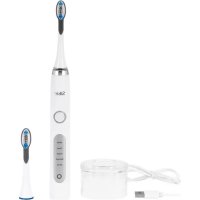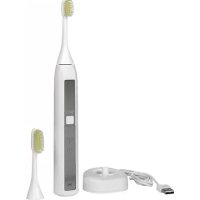
ToothWave H700I - Toothbrush SILKN - Free user manual and instructions
Find the device manual for free ToothWave H700I SILKN in PDF.



| Product type | Electric toothbrush |
| Brand | SILKN |
| Model | ToothWave H700I |
| Package dimensions | 165 x 227 x 80 mm |
| System weight | 115 g |
| Power supply | Rechargeable lithium-ion battery, USB wall adapter (input 100-240 V, 50/60 Hz, 0.2 A; output 5 V, 0.6 A) |
| Technology | DentalRF™ (3.3 MHz radiofrequency, 3 W ±20%) and vibrations (275 to 400 Hz) |
| Brushing modes | 4 modes: low vibration (274 Hz), medium (300 Hz), high (400 Hz), and no vibration |
| Timer | 2-minute cycle with reminder every 30 seconds |
| Water resistance | IP67 (protection against immersion up to 1 meter for 30 minutes) |
| Intended use | Removal of discoloration, stains, plaque and tartar; prevention of cavities and gum disease |
| Head replacement frequency | Every 3 months or when worn |
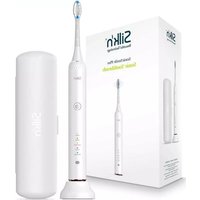
| Included batteries and accessories | Handle, 2 soft bristle brush heads, charging stand with USB cable, USB wall adapter, warranty booklet, instruction manual |
| Maintenance and cleaning | Clean the head and handle with warm water after each use; clean the groove of the handle once a month with a cotton swab |
| Safety | Do not use if you have a pacemaker, oral cancer, immunosuppression; consult a doctor if you have heart conditions, diabetes, pregnancy |
| Spare parts | Brush heads available separately; battery not user-replaceable (removable for disposal) |
| Repairability | Do not open or repair yourself; contact customer service |
| Warranty | Refer to the included warranty booklet |
| Manufacturer | Home Skinovations Ltd, Tavor Building, Shaar Yokneam, P.O.Box 533, Yokneam 2069206, Israel |
| Customer service (France) | Tel.: 0891-655557; email: serviceconsommateurfr@silkn.eu |
Frequently Asked Questions - ToothWave H700I SILKN
User questions about ToothWave H700I SILKN
0 question about this device. Answer the ones you know or ask your own.
Ask a new question about this device
Download the instructions for your Toothbrush in PDF format for free! Find your manual ToothWave H700I - SILKN and take your electronic device back in hand. On this page are published all the documents necessary for the use of your device. ToothWave H700I by SILKN.
USER MANUAL ToothWave H700I SILKN
1.Warnings & contraindications.. 2
2. Signs & symbols 6
- Get to know Silk'n ToothWave 6
3.1 Intended use 6
3.2 Package contents.. 7
3.3 Device controls & settings 7
3.4 Silkn ToothWave's brush head 8
3.5 Device charging 9
3.6 Reading & storing the user manual 9
- Treatment plan 9
- What to expect with Silk'n ToothWave 10
- Get started! 10
- Cleaning & maintenance 11
7.1 Cleaning the toothbrush 11
7.2 Cleaning the charging cradle 12
7.3 Replacing the brush head 12 - Parts & consumables 12
- Troubleshooting 13
- Customer service 13
- Warranty 14
- Battery removal 14
- Disposal 15
- Specifications 16
- Legal notice 17
1.Warnings & contraindications

A statement or event that indicates a possible or impending danger, problem, or other unpleasant situation when using the device.

Electricity & safety warnings
Always ensure that your hands are dry before connecting the charging cradle to the electricity supply.
Do not place or store the charging cradle and the USB wall adapter where it can fall, or be pulled into any liquid. The charging cradle and the USB wall adapter are not waterproof.
For the purpose of recharging the battery, only use the USB wall adapter provided with this device.
Do not use the charging cradle or the USB wall adapter if either has fallen into liquid.
of the charging cradle malfunctions, unplug immediately.
Never use the charging cradle or the USB wall adapter if they are damaged or aren't working properly.
- Keep the device, all parts and accessories away from heated surfaces.
Do not attempt to modify, open or repair the device. You may expose yourself to dangerous electrical components and may cause serious harm to yourself. It will also void your warranty.
Do not use if the parts or accessories are not supplied by the manufacturer as defined in this manual, or if they are damaged in any way, do not appear to be working properly, or if you see or smell smoke. In such cases, stop using the device, and contact customer service.
The manufacturer accepts no liability for damage or injuries caused by improper or incorrect use.
Do not clean any of the parts in the dishwasher.
Children shall not play with the device. Cleaning and user maintenance shall not be made by children.
Children must not play with the packaging. They may injure themselves with the packaging material, or swallow small parts and choke.
This device contains batteries that are non-replaceable.
Do not dispose of the device or the battery with household waste! The law requires that you dispose of this electrical device (including all accessories and parts) at a designated recycling collection point for electrical devices.
Dispose of the battery safely.
of the product reaches its end of life, the battery must be removed before disposal (see section 12. Battery removal).

Contraindications
This device including all its parts must not be used by the following people: children below the age of 18, adults with limited physical, sensory or psychological capacities, those lacking experience or knowledge in how to use the device in a safe way, or those who do not understand the hazards involved.
Do not use if you:
- have a pacemaker, internal defibrillator, another active implanted device, or if you have any medical concerns about using this device.
have a current or past history of oral cancer or oropharyngeal cancer, or if you have any other type of cancer, or pre-malignant lesions.
Have an impaired immune to immuno-suppressive diseases such as HIV, or you use immuno-suppressive medication.
Consult your physician before use if you:
Have concurrent conditions, such as cardiac disorders, epilepsy, uncontrolled hypertension, and liver or kidney diseases.
Have poorly controlled endocrine disorders, such as diabetes or thyroid abnormality.
are pregnant or nursing.
Consult your dentist before use if you:
have had oral or gum surgery in the last two months.
have severely injured gums.
Additional warnings:
Do not bite the brush head.
2. Signs & symbols
EN
| i | Important information about using or maintaining the device. |
| CE | Products marked with this symbol fulfill the requirements of the EU directives. |
| IP67 | Protected from immersion in water with a depth of up to 1 meter (or 3.3 feet) for up to 30 mins. |
| - | Do not dispose with household waste. Dispose in accordance with your country's laws and help protect the environment. In accordance with the WEEE Directive. |
| Li-Ion | Lithium inside. |
| The built-in rechargeable ToothWave battery contains substances that may pollute the environment. Always remove the battery before you discard at an official collection point for batteries. |
3. Get to know Silk'n ToothWave
1.1 Intended use
Silk'n ToothWave is intended for the removal of teeth discolouration, stains, plaque and tartar (calculus). Over time and repeated use, the reduction of tartar causes the remission of gum disease (gingivitis) and bleeding, and the prevention of tooth decay. See our websites and videos for more information about our patented DentalRF™ technology.
Silk'n ToothWave is for personal home-use only, and is not intended for use on multiple patients in a dental practice or institution. Do not use for any purpose other than as described in this manual.
1.2 Package contents
Refer to the diagram on page (i) at the front of the manual.
-
2x Brush heads with soft bristles - 1x USB wall adapter (#8) (small, large) (#1)
-
1x Handle (#2)
- 1x Charging cradle with USB cable + transparent base (#7)
- 1x Warranty booklet (#9)
- 1x User manual (#10)
1.3 Device controls & settings
Refer to the diagram on page (i) at the front of the manual.
| Control Function / Mode | |
| Control button (#3) | Long press: turns the device on or off Short press: each press moves to the next mode |
| DentalRF mode indicator light (#4) | DentalRF is active for all modes ((○)) |
| Vibration mode indicator light (#5) | Mode 1: Low vibration - 274Hz |
| Mode 2: Medium vibration - 300Hz | |
| Mode 3: High vibration - 400Hz Recommended mode | |
| Mode 4: No vibration | |
| Battery indicator light (#6) | Green blinks - battery is charging No light - battery is charged Orange blinks - battery is low Orange constant - battery is empty |
i When the battery is fully charged, the light will be constant green for 30 seconds, then it will go out.
i When you switch on the device, all the LED lights will show for 1 second, and then go out. This lets you know that all the LED lights are working.
1.4 Silk'n ToothWave's brush head
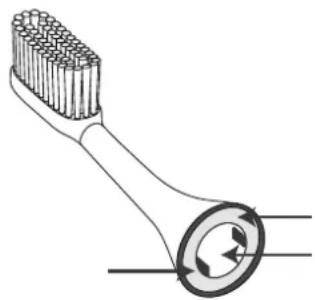
The brush head (#1) is an innovative and special feature of Silk'n ToothWave*. It contains bristles, 2 DentalRF electrodes and a silicone strip that lies between the electrodes. The silicone strip enables the DentalRF current to flow across the teeth. It also ensures that the toothpaste and the DentalRF energy interact effectively. For this reason, we recommend that the bristles are always in good contact with the teeth.
- Patent pending
Electrode
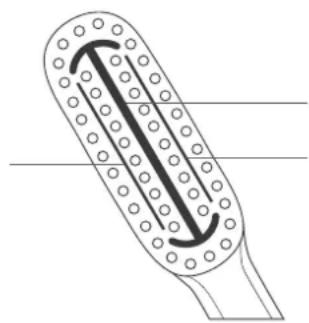
Silicone strip Electrode
Do not use the brush head (#1) if the bristles, silicone strip, or electrodes become loose, bent, damaged, or crushed. Damaged electrodes, bristles or a damaged silicone strip may break off while brushing.
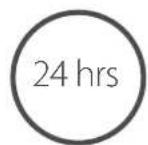
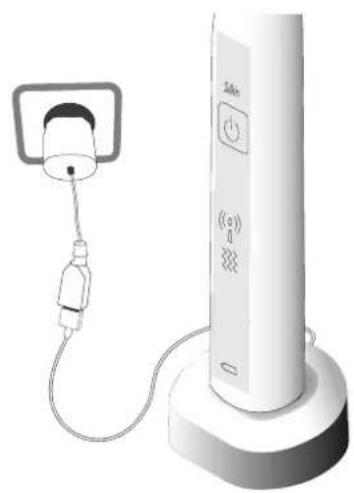
1.5 Device charging

Check that the battery is not low before each use.
First charge
EN
1.6 Reading & storing the user manual
This user manual is based on the standards and rules in force in the European Union. When abroad, you must also observe country-specific guidelines and laws. Read the manual in full before use, and refer to it if you are in any doubt about how to use the device safely.
4. Treatment plan
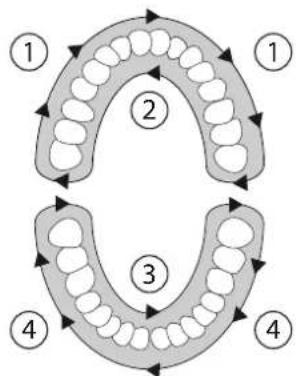
Use for 2 minutes, morning and evening.
Clean between the teeth and gently massage gums.
Brush each section (1,2,3,4) for 30 seconds.
i The device is suitable for use with dental implants.
EN
5. What to expect with Silk'n ToothWave
During or after using Silk'n ToothWave you may:
Cee I a slight sensation of warmth. Don't worry, this is normal.
feel pain, if you have cavities or any teeth condition that requires dental treatment. If you do feel pain, consult your dentist.
i Stop using the device if you experience excessive bleeding after use, or if bleeding continues after one week of regular use.
6. Get started!
- Rinse the bristles under lukewarm water.
- For best results, apply a generous amount of toothpaste. You can use any commercial toothpaste.
- Turn on the device. Short press the control button (#3) as many times as needed to select your treatment mode.
- Move the brush in circular movements, slowly and systematically from tooth to tooth, and gently massage the gums. Make sure the bristles are always in good contact with your teeth. Silk'n ToothWave comes with soft bristles to protect your teeth and gums. Brush gently, and apply only light pressure when brushing. Do not scrub.
- Brush for 2 minutes. You will feel a slight vibration every 30 seconds (1 vibration at 30 seconds, 2 vibrations at 60 seconds and so on). After the vibration(s), you can move to another section of the mouth (refer to section 4. Treatment plan). After 2 minutes, the device will shut down automatically.
- Clean the device and store in open air whilst it is wet.
6.1 Cleaning the toothbrush
It is important to clean the device after each use. Use lukewarm water.
EN
Clean the brush head (#1) and handle (#2), especially if your toothpaste contains bicarbonates. This is to prevent the plastic from cracking.
Once a month, remove the brush head (#1) from the handle (#2). Clean the groove in the handle (# 2) to remove toothpaste or debris that may have accumulated. Use a cotton bud, rinse and dry with a clean dry cloth.
Clean the base of the brush head (#1) in the same way.
6.2 Cleaning the charging cradle
- First disconnect the charging cradle (#7) from the electricity supply and remove the toothbrush from the charging cradle (#7).
- Next, remove the transparent base. To do this, turn the charging cradle (#7) upside down. Remove the transparent base by pressing the clips outwards.
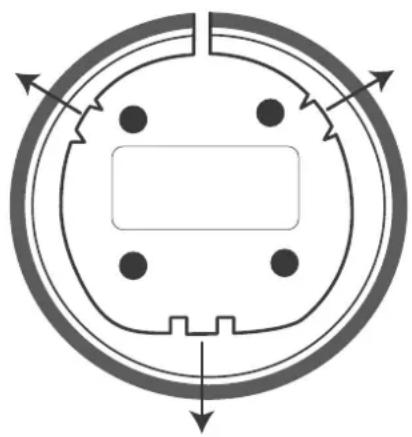
- Clean both parts with a damp cloth and dry them. Place the charging cradle (#7) back, and press down firmly. You will hear it click into place.
3.1 Replacing the brush head
Replace the brush head (#1) every 3 months, or whenever you see that the bristles are damaged or worn. To change the brush head (#1), simply remove the old one and replace with a new one.
8. Parts & consumables
You can purchase replacements from where you purchased the device, or online at www.silkn.eu.
9. Troubleshooting
Do not attempt to open or repair your device. You may expose yourself to dangerous electrical components and cause serious harm to yourself. It will also void your warranty.
| Problem Checks | |
| My device does not start. | Make sure the battery is not low. Refer to section 3.5 Device charging. |
| The device is charged but it does not work. | Press the control button (#3) to restart the device. If the problem persists, contact customer service. |
| All indicator lights (#3, #4, #5) blink. | There is a system error. Press the control button (#3) to restart the device. If the problem persists, contact customer service. |
i For problems or queries, please contact Silk'n customer service.
10. Customer service
For more information see our website: www.silkn.eu. This manual is also available as a PDF download from the website. Contact Silk'n customer service to report unexpected operations or events, or any other problem with your device. Our contact details are:
| Country Service number Email | ||
| Belgium 0900-25006 serviceconsommateurbe@silkn.eu | ||
| France 0891-655557 serviceconsommateurfr@silkn.eu | ||
| Germany | 089 51 23 44 23 | kundenservicede@silkn.eu |
| Italy | servizioclientiit@silkn.eu | |
| Netherlands | 0900-2502217 | klantenservicenl@silkn.eu |
| Spain | 900 823 302 | servicioalcliente@silkn.eu |
| UK | 0906-2130009 | customercareuk@silkn.eu |
| Other countries | +31 (0)180-330 550 | info@silkn.eu |
11. Warranty
EN
Please refer to the separate product warranty booklet for complete information.
12. Battery removal
At the product's end of life, you are required to remove the battery before disposal. To do this, the device must be opened up. The device will no longer function after this procedure, nor can it be repaired. Any warranty will be void when the device casing is opened and the battery is removed. Home Skinovations Ltd is not liable for any physical or material damages as a result of performing this procedure.
- Remove the device from the charging cradle (#7) and make sure the battery is empty.
- Remove the brush head (#1) from the handle (#2).
- Open the casing: Use a small tool (e.g., screwdriver or utility knife), to detach the bottom cover from the rest of the device.
- Remove the inner section:
Place the handle (#2) upside down on a sturdy table. Use the tool to move the clips inwards. As the clips release, you will be able to remove the inner section and lay it on the table.
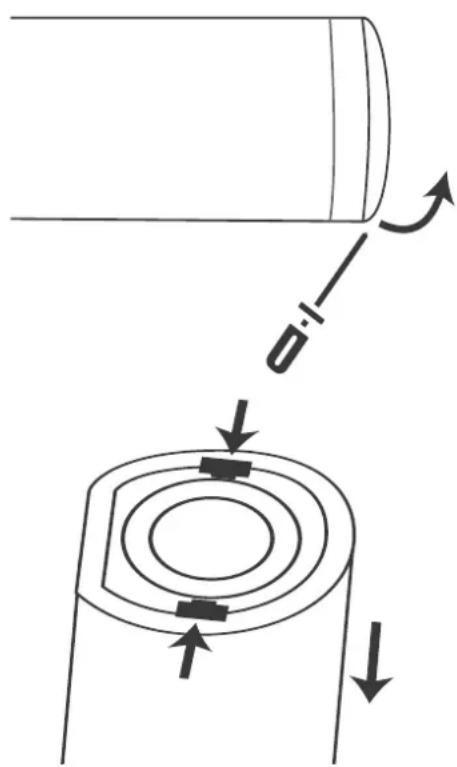
- Remove the battery: Use cutters or small scissors, to cut each of the 3 wires separately (red, black, yellow). Make sure the red (positive) and black (negative) wires do not touch each other. Then remove the battery carefully. Do not damage the battery.


13. Disposal
Packaging: Dispose of the packaging separated into single type materials. Dispose of cardboard and carton as waste paper and film via the recyclable material collection service.
Device: Do not dispose with household waste! The WEEE directive requires that you dispose of this electrical device (including all accessories and parts) at a designated recycling collection point for electrical devices. This ensures that the device is recycled professionally, and prevents the release of harmful substances* into the environment. Remove the battery and dispose of it safely before disposing of the device.
- Products labelled with Cd = cadmium, Hg = mercury, Pb = lead.
14. Specifications
EN
| Model no. H7001 | |
| Technology DentalRF™ and vibration | |
| Vibration 275Hz to 400Hz | |
| Radio frequency 3.3 MHz; 3W ±20% | |
| Package size (W)165 (H)227 (D)80 [mm] | |
| System weight 115g | |
| Transport & storage between uses and storage condition | Temperature: -40 to +70°C Relative humidity: 10 to 90%rH Atmospheric pressure: 500 to 1060hPa |
| Operating conditions Temperature: 5 to 40°C Relative humidity: 15 to 90%rH Atmospheric pressure: 700 to 1060hPa | |
| Mode of operation Non-continuous | |
| Adapter HX-S4V0500600 (Europe) HX-S4B0500600 (UK) | |
| Input: Output: | 100 – 240V; 50/60Hz; 0.2A 5.0Vdc; 0.6A |
| Industrial, Scientific and Medical (ISM) equipment: | Class B group 2 |
Copyright 2019 © Home Skinovations Ltd. All rights reserved.
Home Skinovations Ltd reserves the right to make changes to its products or specifications to improve performance, reliability, or manufacturability. Information furnished by Home Skinovations Ltd is believed to be accurate and reliable at the time of publication. However, Home Skinovations Ltd assumes no responsibility for its use. No license is granted by its implication or otherwise under any patent or patent rights of Home Skinovations Ltd. No part of this document may be reproduced or transmitted in any form or by any means, electronic or mechanical, for any purpose, without the express written permission of Home Skinovations Ltd. Data is subject to change without notification. Home Skinovations Ltd has patents and pending patent applications, trademarks, copyrights, or other intellectual property rights covering subject matter in this document. The furnishing of this document does not give you any license to these patents, trademarks, copyrights, or other intellectual property rights except as expressly provided in any written agreement from Home Skinovations Ltd. Specifications are subject to change without notice. Silk'n and the Silk'n logo are registered trademarks of Home Skinovations Ltd, Tavor Building, Shaar Yokneam P.O.Box 533, Yokneam 2069206, ISRAEL.