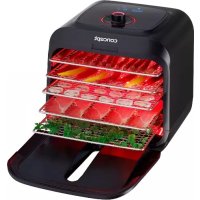
SO4000 - Food Dehydrator Concept - Free user manual and instructions
Find the device manual for free SO4000 Concept in PDF.



| Product Type | Food Dehydrator |
| Brand | Concept |
| Model | SO4000 |
| Power | 500 W |
| Voltage | 220-240 V ~ 50 Hz |
| Noise Level | 55 dB |
| Number of Trays | 5 |
| Automatic Programs | Meat, Fruits, Vegetables, Yogurt, Sterilization |
| Manual Adjustment | Temperature from 35 to 75 °C, time from 1 to 99 hours |
| Infrared Light | Yes (meat program and manual option) |
| Keep Warm | Yes, up to 24 hours after the program |
| Display | Yes, with red/green backlight |
| Magnetic Closure | Yes |
| Automatic Shut-off | Yes, if door open more than 5 min or after 24 h in keep warm |
| Tray Cleaning | Warm soapy water, soft brush |
| Body Cleaning | Slightly damp cloth |
| Maximum Recommended Dehydration Time | 40 hours |
Frequently Asked Questions - SO4000 Concept
User questions about SO4000 Concept
0 question about this device. Answer the ones you know or ask your own.
Ask a new question about this device
Download the instructions for your Food Dehydrator in PDF format for free! Find your manual SO4000 - Concept and take your electronic device back in hand. On this page are published all the documents necessary for the use of your device. SO4000 by Concept.
USER MANUAL SO4000 Concept
natural_image
Black concept air fryer with extended food storage tray (no visible text or symbols)SO4000
concept
concept
CZ
PODĚKOVÁNÍ
Thank you for purchasing a Concept product. We hope you will be satisfied with our product throughout its service life.
Please read the whole instruction manual carefully before you use the appliance for the first time; after reading, store and keep the instruction manual in a safe and handy place. Make sure that all other people using the appliance are familiar with the instruction manual.
| Technical parameters | |
| Voltage 220–240 V ~ 50 Hz | |
| Input 500 W | |
| Noise level 55 dB | |
IMPORTANT SAFETY PRECAUTIONS
- Do not use the appliance in any other way than as described in this manual.
- Remove all the packaging and marketing materials before first use.
- Make sure the mains voltage corresponds to the values on the rating plate of the appliance.
- Do not leave the appliance unattended during operation.
- Place the appliance on a stable, flat surface away from any heat sources only. The surface must be of sufficient capacity to carry a loaded appliance. Leave at least 15 cm of free space around the appliance.
- Do not leave flammable materials near the appliance, do not place anything on top of the appliance.
- Do not put paper materials inside of the appliance.
- Do not cover openings of the appliance, there is a risk of overheating.
- Do not store anything inside the appliance.
- Keep the appliance clean. Prevent foreign objects from getting into the grid openings. It could cause short circuit, damage to the appliance or cause fire.
- When disconnecting the unit from the wall outlet, never pull the power cord, grasp the plug end and disconnect it by removing it from the receptacle.
- Do not allow children or unauthorized people to handle the appliance, use it out of their reach.
- Persons with reduced mobility, reduced sensory perception, mental disadvantage or persons not familiar with the operation must use the appliance only under the supervision of responsible person, who is familiar with the instructions.
- Pay extra attention if the appliance is used near children.
- Do not allow the appliance to be used as a toy.
- Do not allow the power cord to hang freely over the edge of the worktop where children might reach it.
- Do not use the appliance on a wet surface, there is a risk of electric shock.
- Do not clean the body of the appliance with water. Use a damp cloth to clean the appliance.
- Do not use any accessories other than those recommended by the manufacturer.
- Do not use the appliance with a damaged cord or plug and have it repaired immediately by an authorized service centre.
- Do not use the power cord to move or handle the appliance.
- Keep the appliance away from heat sources such as radiators, ovens, etc. Protect it from direct sunlight and humidity.
- Do not touch the appliance with wet hands.
- If a malfunction occurs, turn off the appliance and unplug it from the wall outlet.
• The appliance is only suitable for home use and is not intended for commercial use.
EN
concept
concept
EN
- Do not immerse the power cord or the charger in water or any other liquid.
- Check the appliance and the power cord for damage regularly. Do not switch on the appliance if it has been damaged.
- Switch off the appliance after use and prior to cleaning.
- If smoke occurs, switch off the appliance and unplug the power cord. Leave the cover lid on the appliance to prevent possible spread of fire.
- Do not repair the appliance yourself. Contact an authorized service centre.
• The maximum recommended operating time must not exceed 40 hours.
• We recommend using the dryer with 5 trays even though some of them remain empty. - This appliance can be used by children aged from 8 years and above if they have been given supervision or instruction concerning the use of the appliance in a safe way and understand the hazards involved. Cleaning and user maintenance shall not be made by children unless they are older than 8 years and supervised. Children under the age of 8 must be kept away from the appliance and its power cord. Children shall not play with the appliance.
If you fail to follow these instructions, any possible repair cannot be recognized as a warranty repair.
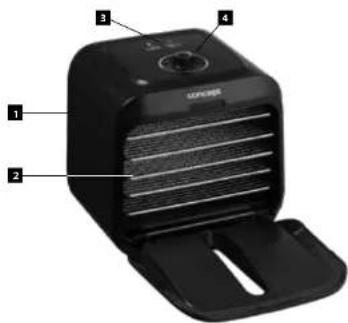
POPIS VÝROBKU
-
Appliance body
-
Drying screens
-
Display
-
Controller
USER MANUAL
Connect the power cord. The dryer turns on: a beep sound will occur and all the lights will be on, then they will go out and the display will stay unfit. Press the middle button. A short beep sound will occur and the red back lightning will be on. At this point, the appliance is in a standby mode.
AUTOMATIC PROGRAMS - pre-sets of these programs cannot be edited.
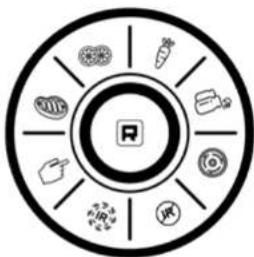
PROGRAM SELECTION
flowchart
graph TD
    A["Central Node"] --> B["Vegetables"]
    A --> C["Meat"]
    A --> D["Grains"]
    A --> E["Protein"]
    A --> F["Baby Products"]
    A --> G["Other"]
    A --> H["Other"]
    A --> I["Other"]
    A --> J["Other"]

DRYING MEAT (the appliance uses an infrared light).
Turn the button to the meat icon. The Icon will light up. Press the button and the dryer will start operating automatically. The pre-set temperature of 75 °C and time of 8 hours will be displayed on the screen. At the same time, the infrared light and the dedicated IR indicator will light up. (if the red back lightning is on, it means the infrared radiation is in operation.) The program is now operating.
If you want to select another program, turn the button to the desired position. The dedicated icon will light up. Press the control button inward to confirm your selection. The dryer will now start operating in the newly selected program. If you just turn the button and do not confirm the newly selected program within 10 seconds, the previous selected program will continue. When the program has finished and the time has elapsed, the appliance automatically switches to KEEP WARM mode for 24 hours unless it is not turned off. This temperature is lower than the temperature of the program. The screen will light up green. After 24 hours the dryer switches off automatically.

DRYING FRUIT (program without infrared light)
Turn the button to the fruit icon The dedicated icon will light up. Press the button and the dryer will start operating automatically. The pre-set temperature of 65 °C and time of 16 hours will be displayed on the screen. A green HEATER indicator will light up. (green back lightning means drying without use of the infrared light).
If you want to select another program, turn the button to the desired position. The dedicated icon will light up. Press the control button inward to confirm your selection. The dryer will now start operating in the newly selected program. If you just turn the button and do not confirm the newly selected program within 10 seconds, the previous selected program will continue. When the program has finished and the time has elapsed, the appliance automatically switches to KEEP WARM mode for 24 hours unless it is not turned off. This temperature is lower than the temperature of the program. The screen will light up green. After 24 hours the dryer switches off automatically.

SO401
EN
concept
concept
EN

DRYING VEGETABLE (program without infrared light)
Turn the button to the vegetable icon ☑. The dedicated icon will light up. Press the button and the dryer will start operating automatically. The pre-set temperature of 60 °C and time of 6 hours will be displayed on the screen. A green HEATER indicator will light up, (green back lightning means drying without use of the infrared light).
If you want to select another program, turn the button to the desired position. The dedicated icon will light up. Press the control button inward to confirm your selection. The dryer will now start operating in the newly selected program. If you just turn the button and do not confirm the newly selected program within 10 seconds, the previous selected program will continue. When the program has finished and the time has elapsed, the appliance automatically switches to KEEP WARM mode for 24 hours unless it is not turned off. This temperature is lower than the temperature of the program. The screen will light up green. After 24 hours the dryer switches off automatically.

MAKING YOGHURT (program without infrared light)
Turn the button to the yoghurt icon 📁 The dedicated icon will light up. Press the button and the dryer will start operating automatically. The pre-set temperature of 42 °C and time of 8 hours will be displayed on the screen. A green HEATER indicator will light up. (green back lightning means the program does not use of the infrared light).
For making yoghurt you can use both plastic and glass containers with a lid.
RECIPE FOR HOME-MADE YOGHURT
What you will need:
Pasteurized whole milk (the less fat in milk, the more watery the yoghurt will be) - 1 l
(if you have milk from the farm, it is necessary to pasteurize it: bring milk to heat up to 72 °C for 30 seconds, then cool it to 40 °C)
Yoghurt - 3 to 4 tablespoons of high-quality yoghurt of a room temperature containing live cultures (e.g. Choceňský or Hollandia) or powder of yoghurt culture.
Steps:
Mix milk with yoghurt, put the mixture into sterilized glasses, close them with lids with holes and put them in the dryer. Close the glasses with lids in a way the air can comes in.
Select the yoghurt making program. Do not mix during the fermentation process!
After the program is done, let yoghurt cool down in a fridge.
When using a powder of yoghurt culture, first bring milk to heat of 42-45 °C, add the powder and stir until it dissolves completely. Then pour the mixture into the glasses, cover with lids and put in the dryer.
Always use clean containers, dishes and properties only, to avoid contamination of the mixture with "bad" bacteria, that could stop yoghurt from being produced.
If you want to select another program, turn the button to the desired position. The dedicated icon will light up. Press the control button inward to confirm your selection. The dryer will now start operating in the newly selected program. If you just turn the button and do not confirm the newly selected program within 10 seconds, the previous selected program will continue. When the program has finished and the time has elapsed, the appliance automatically switches to KEEP WARM mode for 24 hours unless it is not turned off. This temperature is lower than the temperature of the program. The screen will light up green. After 24 hours the dryer switches off automatically.

STERILIZATION (cleaning)
After frequent or long-term use, the dryer may emit a mild odour and it should be cleaned. Turn the button to the sterilization icon . The appliance will start operating. The pre-set temperature of 85 °C and time of 1 hours will be displayed on the screen. After the program is done, the dryer switches off automatically.
OPTIONAL PROGRAMS - These programs can be set as needed.

MANUAL SETTING
Turn the button to the sterilization icon. The dedicated icon will light up. Press the control button to enter the temperature setting. Turn the control button to select a temperature from 35 to 75 °C. After the temperature is selected, push the control button inwards to confirm it. You can now set the operating time from 1 to 99 hours. Turn the control button to the desired value and press it to confirm.
You can also decide whether to dry with the infrared light or not: to conform the set time, turn the control button to the infrared icon and press. The unit will start operating at the selected temperature and for the set time, the infrared light will be on. If you want to dry without the infrared light, turn the button to the Heater icon and press to confirm. The unit will start operating at the selected temperature and for the set time, the infrared light will be off. During the operation, the program can be adjusted at any time.
Magnetic closing:
When you open the dryer door, the back lightning goes off. The temperature indicator will show the F1 symbol. Time is lit up. If the door is closed within 5 minutes, the unit will continue the selected program.
If the door is left open for more than 5 minutes, the appliance switches off.
Switching off the appliance:
Press and hold the control button to switch the appliance off. All the indicators will go out slowly.
Error Messages:
F1: The door is open
F2: The temperature exceeded the allowed limit, as soon as the appliance cools down, it will continue operating.

SO400
EN
concept
concept
EN
DRYING TIME CHART
Recommended temperature: 48 °C
| Vegetable | |||
| Asparagus 5-6 hours | Onion 4-8 hours | ||
| Beans 8-12 hours | Parsnip 7-11 hours | ||
| Beet 8-12 hours | Pees 4-8 hours | ||
| Broccoli 10-14 hours | Bell pepper 4-8 hours | ||
| Cabbage 7-11 hours | Zucchini | 7-11 hours | |
| Carrot | 6-10 hours Potatoes | 6-14 hours | |
| Celery | 3-10 hours Pumpkin | 7-11 hours | |
| Corn | 6-10 hours Turnip | 8-12 hours | |
| Cucumber 4-8 hours | Tomatoes | 5-9 hours | |
| Eggplant | 4-8 hours Mushroom | 3-7 hours | |
| Fruit | |||
| Apples | 7-15 hours Nectarines 8-16 hours | ||
| Apricots | 20-28 hours Peaches | 8-16 hours | |
| Bananas | 6-10 hours Pears | 8-16 hours | |
| Blackberries/Raspberries | 10-15 hours Water melon | 8-10 hours | |
| Cherries | 13-21 hours Pineapple | 10-18 hours | |
| Cranberries | 10-12 hours Plums | 22-30 hours | |
| Kiwi 7-15 hours Rhubarb | 6-10 Hours | ||
| Grapefruit | 22-30 hours Strawberries | 7-15 hours | |
| Others | |
| Dried meat | 4-6 hours |
| Dried fish meat | 12-14 hours |
| Herbs and spices | 2-4 hours |
| Nuts | 10-14 hours |
CAUTION! The food must be sufficiently dry to prevent spoiling. Correctly dried vegetables will be dry and brittle. Correctly dried fruit will be leathery and pliable. Correctly dried mushrooms will be leathery or even brittle.
CLEANING AND MAINTENANCE
CAUTION! Always disconnect the power supply cable from the mains outlet before cleaning the appliance. Prior to handling, make sure the appliance is cool!
The surface of the unit may only be cleaned using a moist cloth. Do not use any detergents or hard objects as they may damage the unit surface!
Wash the drying screens in warm water with a bit of detergent. If the screens are very dirty, leave them in the water and then use a soft brush.
Never clean the base with the fan under running water, do not rinse it, and do not submerge it in water!
SERVICING
Any extensive maintenance or repair requiring access to the internal parts of the product shall be performed by an authorized service center.
ENVIRONMENTAL PROTECTION
• Packaging materials and obsolete appliances should be recycled.
• The transport box may be disposed of as sorted waste.
• Polyethylene bags shall be handed over for recycling.
Appliance recycling at the end of its service life:


A symbol on the product or its packaging indicates that this product should not go into household waste. It must be taken to the collection point of an electric and electronic equipment recycling facility. By making sure this product is disposed of properly, you will help prevent the negative effects on the environment and human health that would otherwise result from inappropriate disposal of this product. You can learn more about recycling this product from your local authorities, a household waste disposal service or in the shop where you bought this product.

This product meets all the basic EU regulation requirements that relate to it.
Changes to the text, design and technical specifications may occur without prior notice and we reserve the right to make these changes.

SO401
concept
concept
WIR DANKEN IHNEN FÜR IHR VERTRAUEN
MANUALE D'USO
www. www.my-concept.com
Importer:
CONCEPT POLSKA sp. z o. o.
The manufacturer (or importer) is responsible for ensuring the product complies with the requirements of applicable legal regulations as well as those of the relevant technical standards. Moreover, they are responsible for ensuring the product has the properties the manufacturer described in documents related to the goods or those reasonably expected by the customer with regard to the nature of the goods or based on advertising produced by the manufacturer, and further they are responsible for ensuring the product is fit for the purpose proposed by the manufacturer or that a product of the same type is normally used for.
The quality warranty term is 24 months from product takeover by the customer.
The warranty does not apply to wear and tear caused by regular use. The customer shall not be entitled to any warranty claims if, prior to taking the product over, they knew the product contained a defect or if the defect is attributable to the customer.
The warranty specifically does not apply:
- if the product installation, operation and service conditions stipulated in the product operating manual have not been adhered to,
- to malfunctions caused due to mechanical, heat or chemical damage, short circuit, over voltage or incorrect installation,
• to malfunctions caused by an inexpert third-party intervention,
• to malfunctions caused by natural disaster, - to malfunctions caused by insufficient or inappropriate maintenance in violation of the operating manual, including malfunctions caused by water and other sediments.
- to changes in colour of the heating surface or to scratching of the surface caused as a result of using the products in an unusual manner,
• to appearance and functional changes caused by exposure to sunlight, thermal radiation of water and other sediments, - if the service life of certain product parts expires, e.g. for accumulators, bulbs, etc.
The warranty does not apply to any products and services provided along with the product (gifts, promotional articles, etc.).
Filing a complaint
A complaint against a product defect must be filed as soon as identified, yet no later than before the end of the warranty term.
The customer must file a product complaint with the dealer from which they have purchased the product, or with any authorised service centre, a list of which is included in the product package, or available at www.my-concept.com.
While filing a product complaint, the product must be duly cleaned and securely packed so as to prevent any damage during its transport to an authorised service centre, where relevant, unless the product is delivered in person.
The customer must submit proof of having concluded a purchase contract for the product by producing the receipt.
While filing their complaint, the customer must indicate the noted defect and identify the preferred complaint application method.
Complaints processing
As long as the noted defect may be removed, the user has the right to have the defect duly removed free of charge on a timely basis.
Where such a procedure is not reasonable with regard to the nature of the defect, the user may require to be supplied a new defect-free product (replacement), or, where the defect applies to a part of the product only, replacement of the part concerned. However, if replacement of the product or any part thereof is not proportionate with regard to the nature of the defect, especially if the defect can be removed without undue delay, the customer has the right to have the defect removed free of charge.
If the noted defect is not removable, or if the customer becomes entitled to replacement of the product or a part thereof, yet the replacement is not possible, for example due to the product having been sold out, the customer has the right to return the product (withdrawal from the contract).
The customer shall have the right to a new product (replacement) or to replacement of a part of the product even if the defect can be removed, provided they cannot properly use the product due to repeated occurrence of the defect or due to a high number of such defects. In such a case, the customer also has the right to return the product (by withdrawing from the contract).
If the product is not returned (the customer does not withdraw from the contract), or if the customer does not apply the right to a new defect-free product (replacement), to replacement of a part thereof or to repair of the product, they may request a reasonable discount. The customer also has a right to a reasonable discount if a new defect-free product cannot be supplied to them, or if a product part cannot be replaced or the product repaired unless the situation is remedied within a reasonable time limit, or if remedying the situation would create major discomfort on the part of the customer.
The seller, authorised service centre or a staff member authorised by them must decide about each complaint immediately or within three business days in complicated cases. This term does not include a reasonable period of time, depending on the type of product concerned,
required for the defect to be assessed by an expert. A complaint, including defect removal, must be dealt with without any undue delay, yet no later than within 30 calendar days of the complaint filing date, unless the seller and the customer agree on a later deadline.
On returning the product (withdrawing from the contract) the customer must return any accessories and documents supplied along with the product.
The customer does not have the right to keep the defective parts and components of the product replaced as part of a repair of the product.
This shall be without prejudice to any other rights the customer may have in relation to the purchase of the product.
Remark: Complaints against products damaged in transport are governed by the carrier's complaints procedure.
Manufacturer
Jindřich Valenta - Concept
Vysokomytská 1800, 565 01 Chocen
Czech Republic
tel.: +420 465 471 400
fax +420 465 473 304
Company ID No. 13216660
email: servis@my-concept.cz
www. www.my-concept.com
Product data
| Model: | |
| Production number: | |
| Date of purchase: | Seal and signature of vendor: |

SO401
concept concept
DE GARANTIEBEDINGUNGEN
Garantie
www. www.my-concept.com
Produktdetails:
FR CONDITIONS DE GARANTIE
Garantie
Jindřich Valenta – Concept Czech Republic
Vysokomýtská 1800, 565 01 Choceň
Tel. +420 465 322 895, Fax: +420 465 473 304
www.my-concept.cz
SK
ELKO Valenta – Slovakia, s.r.o.
Hurbanova 1563/23, 911 01 Trenčín
Tel.: +421 326 583 465, Fax: +421 326 583 466
www.my-concept.sk
PL
CONCEPT POLSKA Sp. z o.o.



- concept
- PODĚKOVÁNÍ
- IMPORTANT SAFETY PRECAUTIONS
- EN
- POPIS VÝROBKU
- USER MANUAL
- PROGRAM SELECTION
- DRYING VEGETABLE (program without infrared light)
- MAKING YOGHURT (program without infrared light)
- RECIPE FOR HOME-MADE YOGHURT
- What you will need:
- Steps:
- STERILIZATION (cleaning)
- OPTIONAL PROGRAMS - These programs can be set as needed.
- MANUAL SETTING
- Magnetic closing:
- Switching off the appliance:
- Error Messages:
- DRYING TIME CHART
- CLEANING AND MAINTENANCE
- SERVICING
- ENVIRONMENTAL PROTECTION
- Appliance recycling at the end of its service life:
- WIR DANKEN IHNEN FÜR IHR VERTRAUEN
- MANUALE D'USO
- Importer:
- Filing a complaint
- Complaints processing
- Manufacturer
- concept concept
- DE GARANTIEBEDINGUNGEN
- Garantie
- FR CONDITIONS DE GARANTIE
- Jindřich Valenta – Concept Czech Republic
- ELKO Valenta – Slovakia, s.r.o.
- CONCEPT POLSKA Sp. z o.o.
Brand : Concept
Model : SO4000
Category : Food Dehydrator