CZANC3 - Air-conditioner PANASONIC - Free user manual and instructions
Find the device manual for free CZANC3 PANASONIC in PDF.



| Product Type | On/Off controller for air conditioner |
| Brand | Panasonic |
| Model | CZANC3 |
| Dimensions (H × W × D) | 120.5 × 121.5 × 65.1 mm |
| Weight | 500 g |
| Power supply | 100-240 V ~ 50-60 Hz single phase |
| Maximum power consumption | 4.0 W |
| Number of connectable indoor units | 16 groups maximum (64 units) |
| Main functions | Individual or all units On/Off (ALL ON / ALL OFF), start-up control with 1 to 2 second intervals |
| Operation indicators | Green indicator when operating |
| Label plate | Removable label to identify zones |
| Ambient temperature range | 0 °C to 40 °C |
| Operating humidity | 20% to 80% (non-condensing) |
| Usage | Indoor only |
| Cleaning and maintenance | Soft damp cloth with mild detergent, avoid solvents and benzene |
| Safety | Do not install in explosive environments; if problem occurs, unplug and contact customer service |
| Repair | Do not repair yourself, contact dealer or support service |
| General information | 48-page manual, available in several languages |
Frequently Asked Questions - CZANC3 PANASONIC
User questions about CZANC3 PANASONIC
0 question about this device. Answer the ones you know or ask your own.
Ask a new question about this device
Download the instructions for your Air-conditioner in PDF format for free! Find your manual CZANC3 - PANASONIC and take your electronic device back in hand. On this page are published all the documents necessary for the use of your device. CZANC3 by PANASONIC.
USER MANUAL CZANC3 PANASONIC
Operating Instructions
ON/OFF Controller
Mode d'emploi
Installation Instructions
Separately Attached.
ENGLISH
-
Read the Operating Instructions carefully for safe use. This manual describes the Operating Instructions of the ON/OFF controller. Read this manual as well as operating instructions supplied with indoor units and outdoor units.
-
Be sure to read the "Safety precautions" (below) before using.
- Keep this manual with operating instructions supplied with indoor units and outdoor units in a safe place.
- Be sure to keep this manual in a place easily accessible by users. In the case of user change, be sure to give this manual to the new user.
NOTICE
The English text is the original instructions. Other languages are translation of the original instructions.
Safety precautions

WARNING CAUTION
This symbol refers to a hazard or unsafe practice which can result in severe personal injury or death.

This symbol refers to a hazard or unsafe practice which can result in personal injury or product or property damage.

Matters to be observed Prohibited matters

WARNING

Do not use this appliance in a potentially explosive atmosphere.

In case of malfunction of this appliance, do not repair by yourself. Contact the sales or service dealer for repair.

In case of emergency, remove the power plug from the socket or switch off the circuit breaker or the means by which the system is isolated from the mains power.

CAUTION

This appliance is not intended for use by persons (including children) with reduced physical, sensory or mental capabilities, or lack of experience and knowledge, unless they have been given supervision or instruction concerning use of the appliance by a person responsible for their safety.
Children should be supervised to ensure that they do not play with the appliance.
This appliance can be used by children aged from 8 years and above and persons with reduced physical, sensory or mental capabilities or lack of experience and knowledge if they have been given supervision or instruction concerning use of the appliance in a safe way and understand the hazards involved. Children shall not play with the appliance.
Cleaning and user maintenance shall not be made by children without supervision.

- Do not operate with wet hands.
- Do not wash with water.
Disposal of Old Equipment
Only for European Union and countries with recycling systems
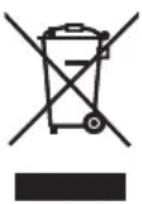
This symbol on the products, packaging, and/or accompanying documents means that used electrical and electronic products must not be mixed with general household waste.
For proper treatment, recovery and recycling of old products, please take them to applicable collection points in accordance with your national legislation.
By disposing of them correctly, you will help to save valuable resources and prevent any potential negative effects on human health and the environment.
For more information about collection and recycling, please contact your local municipality.
Penalties may be applicable for incorrect disposal of this waste, in accordance with national legislation.
Note
- This device complies with Part 15 of the FCC Rules. Operation is subject to the following two conditions: (1) This device may not cause harmful interference, and (2) this device must accept any interference received, including interference that may cause undesired operation.
- This equipment has been tested and found to comply with the limits for a Class B digital device, pursuant to Part 15 of the FCC Rules. These limits are designed to provide reasonable protection against harmful interference in a residential installation. This equipment generates, uses and can radiate radio frequency energy and, if not installed and used in accordance with the instructions, may cause harmful interference to radio communications. However, there is no guarantee that interference will not occur in a particular installation. If this equipment does cause harmful interference to radio or television reception, which can be determined by turning the equipment off and on, the user is encouraged to try to correct the interference by one or more of the following measures:
- Reorient or relocate the receiving antenna.
- Increase the separation between the equipment and receiver.
- Connect the equipment into an outlet on a circuit different from that to which the receiver is connected.
- Consult the dealer or an experienced radio/TV technician for help.
- FCC Caution: To assure continued compliance, follow the attached installation instructions. Any changes or modifications not expressly approved by the party responsible for compliance could void the user's authority to operate this equipment.
Operating precautions
- Do not locate in the following types of places.
- Where there is moisture, oil, or vibration/ In direct sunlight/Near heat sources/Where condensation forms (These can cause malfunctions.)
- Where noise occurs (This can cause incorrect operation.)
- Do not clean with benzene or thinners or wipe with chemical cloths. (This can cause discolouration or malfunction.)
- When the unit is very dirty, dampen a cloth in a weak neutral detergent solution, wring thoroughly, and wipe. Wipe with a dry cloth afterwards.
Features
Number of connectable units
A maximum of 16 groups and 64 indoor units can be connected to one ON/OFF controller.
Control function
ON/OFF (individual or all at once)
Start up control
Operation of each group starts at intervals of 1 to 2 seconds when operation is started all at once.
- By connecting a commercially available schedule timer, you can operate weekly programmes.
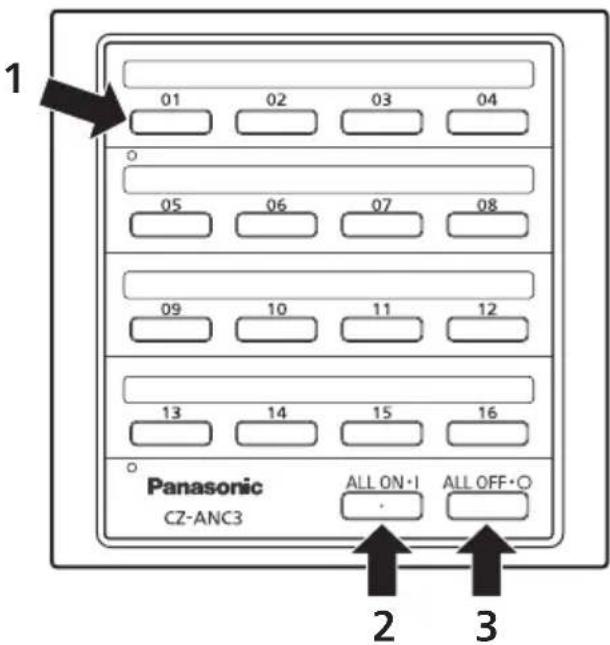
Parts and their functions
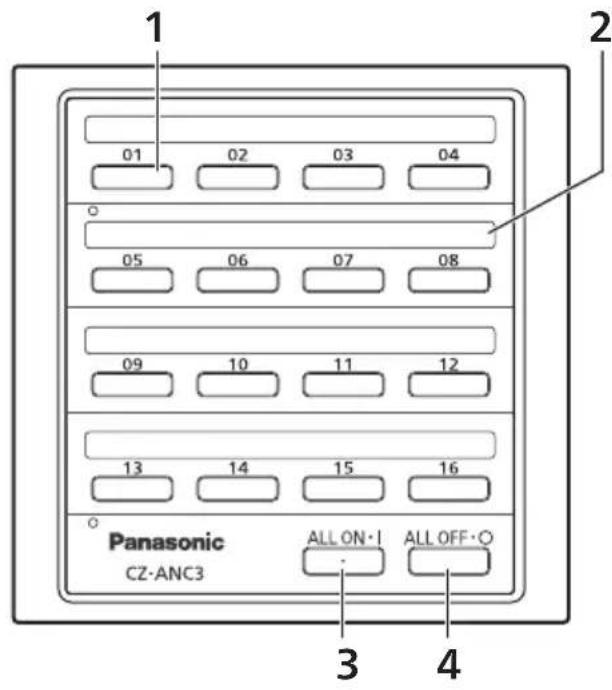
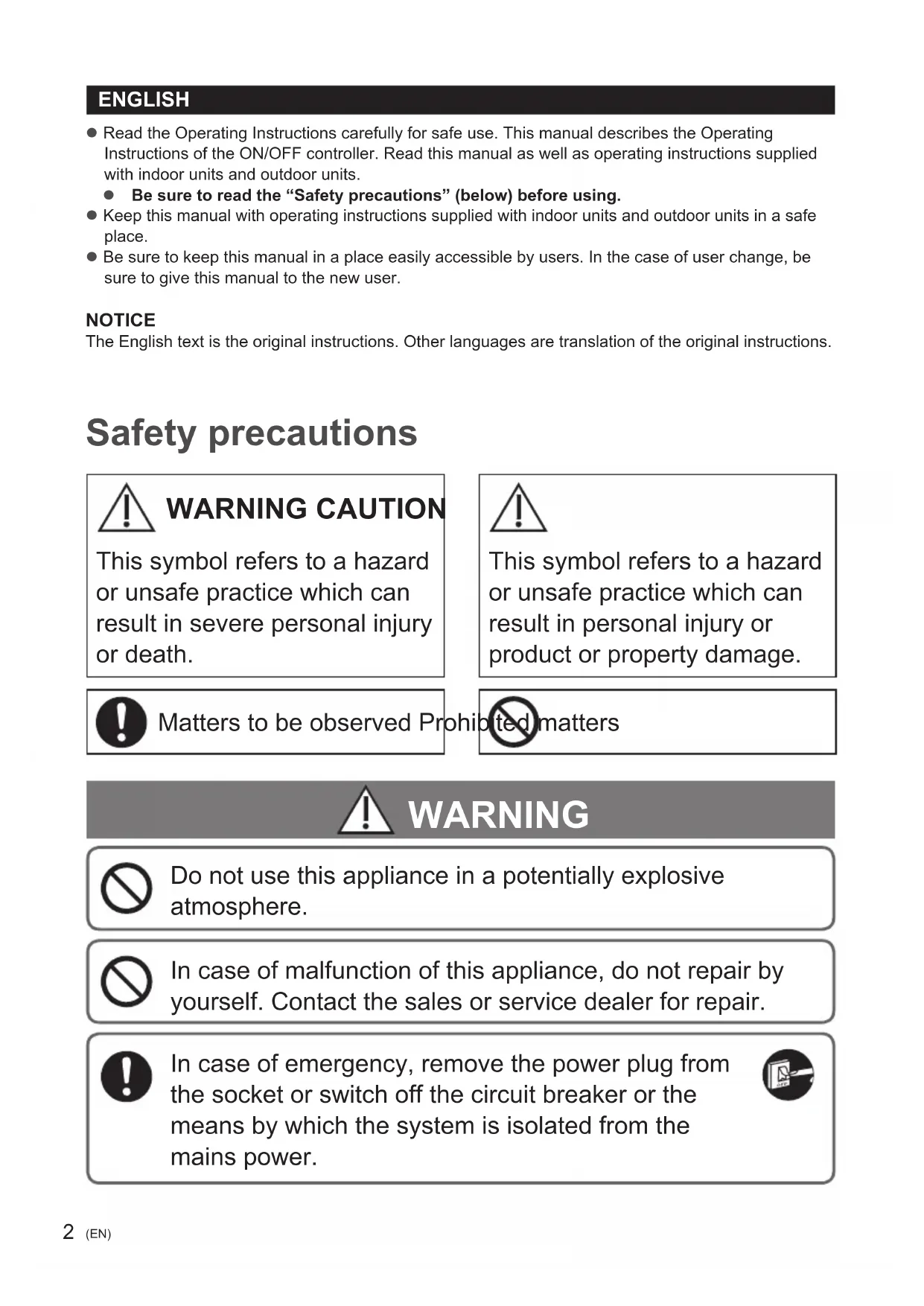
1 ON/OFF button
Press to start or stop individual groups of indoor units.
The lamp lights during operation (green).
2 Name plate
Stick a label here to indicate the room or the area.
3 ALL ON button
Press to start all air conditioners.
4 ALL OFF button
Press to stop all air conditioners.
Using the unit
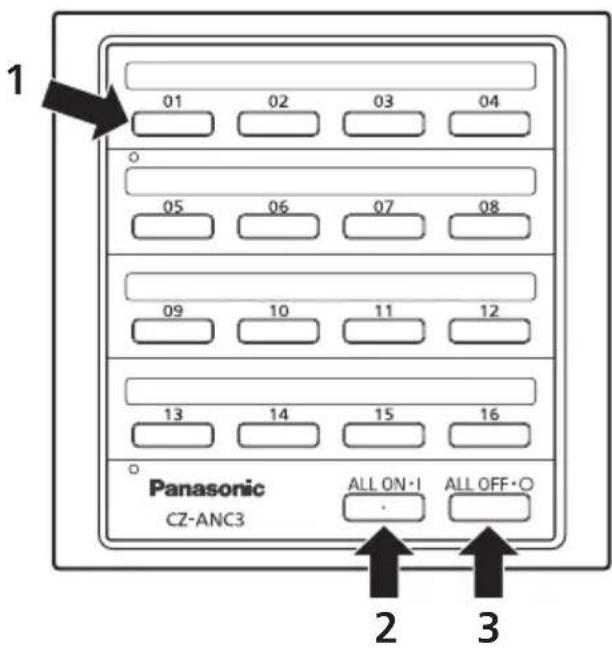
1 To start or stop individual groups of indoor units Press ON/OFF button corresponding to the group of indoor units.
2 To start indoor units in groups numbered between 1 and 16 at the same time Press the ALL ON button. The units start operating at intervals of 1 to 2 seconds, starting with group number 1.
3 To stop indoor units in groups numbered between 1 and 16 at the same time Press the ALL OFF button.
- You cannot set the operating mode or temperatures on this unit. Perform those operations from the wired remote controller, system controller, etc.
Using the name plate
These let you know which rooms or areas the air conditioners you can control are in, and you can see the operational status with the operation indicator lamps.
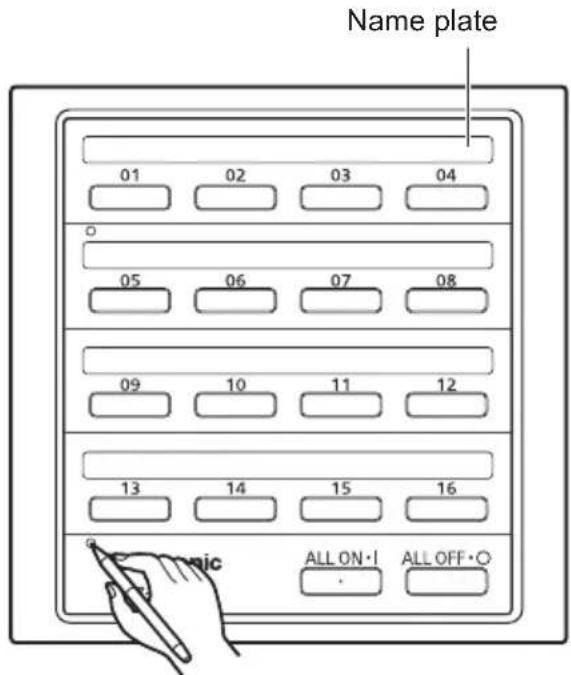
1 Push a pointy object into the hole on the left of the transparent cover to remove the cover.
2 Enter the name of the room or the area on the included switch display label with a pen, then stick on the name plate.
Things to be aware of
If the buttons of this unit are blinking, check the following.
1 If all the buttons from 1 to 16 are blinking fast (at 0.2-second intervals)
This unit is not recognising indoor units.
2 If the buttons blink fast (at 0.2-second intervals) for 15 seconds after this unit is operated
The indoor units of blinking groups do not respond to the operation of this unit.
3 If each button is blinking slowly (at 1-second intervals)
The indoor units of blinking groups are in alarming status.
If the above symptoms persist, contact the dealer.
Specifications
| Model No. CZ-A | NC3 |
| Dimensions (H) | 120.5 mm x (W) 121.5 mm x (D) 14 + 51.1 mm |
| Weight 500 g | |
| Temperature/Humidity range | 0 °C to 40 °C / 20% to 80% (no condensation) *Indoor use only. |
| Rated voltage/Rated frequency | Single phase 100 – 240 V ~ 50–60 Hz |
| Power consumption | Max. 4.0 W |
| Number of connected indoor units | Up to 16 groups (64 units) |
FRANÇAIS
Ecnu yka3aHHbIe BblIe npn3HaKn HeNCnpaBHOCTn He Ncye3aOT, O6paTNTecb K dInlepy.
Texhnueckne xapaktepnctnkn
1 Khonka YBIMKHEHHRA/BIMKHEHHRA
HaTnCHiB, 063aNyCTHTn a6o 3ynHHTN OKpemI rpyn BHyTpuihix 6JokIB.
KIO 3OHa npaHoe, INdkatop CbitntbCRA (3eJeHM).
2 Pone Jnna H3Bn 3OHn
PpNKneIe Tyt HakNeiKy, 0o6 N03HaHTN KIMHaTy a6o 30Hy.
3 Khonka ALL ON
HaTnchItb, 306 3anyctntu Bci KOHdNucioHepn.
4 Khonka ALL OFF
HaTnCHiTb, 306 3yHnHTN Bci KOHdNciOHePn.
Викорпстаньnpстpoю
1 3anyck a6o 3ynnHka okpeMnx rpyn BHyTpihx 6IOKIB
HaTnCHiB KhoNky YBIMKHEHH/ BIMKHEHH BInnoBIOHOI rpynn BHytpiunix 6nokiv.
2 Ondnoachn 3anyck rpyn BHytpiHix 6nokib 1-16
HaTnChiTb KhONky ALL ON.
Pnucptpoi noHytb BMkKatncs 3 iInTePBanom 1-2 cekyHdn, noounauOnrpynn 1.
3 Ondohacna 3ynnHa rpyn BHytpiHix 6JokB 1-16
HaTnCHITb KhoNky ALL OFF.
Ha umbomy npncptoi He moxha BCTaHOBNTn pekim po60tn Ta 3naueHHra Tempepatypn. Lc moxha 3p6bntn 3a DOnOMoTOKabelhoro nybta DK, cnCTemHOrO KOHTpoIepa Tso.
1006 KaDoma, KaDoma CHTN, Ocaka, JnoHn
UmmopTeP
OOO《PnHaacOnHKyc》,PΦ,115191,r.MockBa,yn.BonbwaTynbcKa,11,3TaK.
TeJ.8-800-200-21-00
IhOpMaiaIgKopnctyBaivB YkpaHa
YIOBHOBaXKeHNIpeDCTABHINK
TOB «ПАHAСОHIK YKPAIHA JТД»
IPOBvIOK OXTnpcbKm, 6yDnHOK 7, MiCTo KnIB, 03066, YkpaIIHa

in Kazakh language
Erep6acka kondaama Kxkattapda KepcetinmeH KaFdaIa, TeMeHderi waPTapdbOpbHdaHb3.
- Teric, 6epik 6eTke opHaJaCTbIpbHbI3, TEK anbHaTbIH 6eJIWeKTep Hemece Ko3FaImaTbIH 6eJIWeKTepdH 6acaKa.
- Ka6bik KHe Kpyfak Kepe daay Kepek.
- TaBImaaybkyaTcyb3, aca BnbaPauycb3 kHe 6aca 3aTTapra CORYcb3 kacay KepeK.
- Keinde kapaTbIy nTTbIK KHe JKeprinikTI 3aHapra cKec Kacay KepeK.
Caty 1apTbpEhDipyimEn opHaTbIMMaFaH XHe MemKeTTIH TayapBn NaIaIaHydbH yTTbIK Hemece XeprinKt 3aHapBaHa ca bOnykepeK.
Ka3akctan Pecny6nikacbs TeppinTopraCbHdafbE him canacbs 60bIHwa Hapa3bJIbIKTapdb Ka6bIaNaiTBiYekineTt YbIM:
NahacOHK MapKeTnHr TMd AK ekinDi, Ka3akCTaH, 050010, AImatbI K., DoctbIK daHbJIb 192, 3-wi Ka6aT
Panasonic aknapat optaibfbl:
+7 (727) 330-88-07 - AnMaTbI K. MeH KbipfbIcTaHHaH KOHbIPay wany ywiH.
8-800-0-809-809 - Ka3akctah ayMaftbHda JkepriniKti YjIb6aNanbC neh KaanbIK onepaTopnapbIHan TerIH KOHbpay wany.
HfopmaiaIg noIb3oBaTeJeB Pecny6nke Kaaxctah
OprHn3aun, yonHOMoehna Ha npHrTne npTeH3n no KaueCTBy npOdyKuHn Ha TeppuTOpHn Pecny6bIku Ka3axCTah: PpeCTaBnTeBcTBO AO "PahacoHmK MapKeTHnCH" Ka3axCTaH, 050010 r. AnMaTbI, IpocNeKT DoctBk 192, 3-3TaXk.
HΦopMaζnoHHbI ζeHTp Panasonic:
+7 (727) 330-88-07 -ДязBOHкOB n3 r. AnMaTbI n KInpRn3ctHa.
8-800-0-809-809-6ecnnatbH 3BOHOK cTopoDcknx MObnBbIX TelefoHOB MeCTbIX COTObIX OpeaTOPOB B npeDenax Ka3axctHa.
Contact in the UK
Panasonic UK, a branch of Panasonic
Marketing Europe GmbH, Maxis 2,
Western Road, Bracknell, Berkshire, RG12 1RT
Panasonic Corporation
http://www.panasonic.com
Authorized representative in EU
Panasonic Testing Centre
Panasonic Marketing Europe GmbH
Winsberging 15, 22525 Hamburg, Germany

- Operating Instructions
- ON/OFF Controller
- ENGLISH
- NOTICE
- Safety precautions
- WARNING CAUTION
- WARNING
- CAUTION
- Disposal of Old Equipment
- Only for European Union and countries with recycling systems
- Note
- Operating precautions
- Features
- Number of connectable units
- Control function
- Start up control
- Parts and their functions
- Using the unit
- Using the name plate
- Things to be aware of
- Specifications
- FRANÇAIS
- Texhnueckne xapaktepnctnkn
- Викорпстаньnpстpoю
- IhOpMaiaIgKopnctyBaivB YkpaHa
- in Kazakh language
- HfopmaiaIg noIb3oBaTeJeB Pecny6nke Kaaxctah
- Panasonic Corporation
Brand : PANASONIC
Model : CZANC3
Category : Air-conditioner