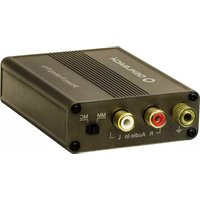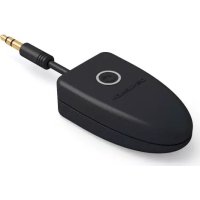
BTX 1000 - Bluetooth Receiver Oehlbach - Free user manual and instructions
Find the device manual for free BTX 1000 Oehlbach in PDF.



User questions about BTX 1000 Oehlbach
0 question about this device. Answer the ones you know or ask your own.
Ask a new question about this device
Download the instructions for your Bluetooth Receiver in PDF format for free! Find your manual BTX 1000 - Oehlbach and take your electronic device back in hand. On this page are published all the documents necessary for the use of your device. BTX 1000 by Oehlbach.
USER MANUAL BTX 1000 Oehlbach
The Bluetooth® word mark and logos are registered trademarks owned by Bluetooth SIG, Inc.
© 2013 CSR plc and its group companies.
The aptx® mark and the aptx logo are trade marks of CSR plc or one of its group companies and may be registered in one or more jurisdictions.
Thank you for choosing an Oehlbach® quality product. Please read these instructions carefully; this will ensure the full and error-free functioning of the product.
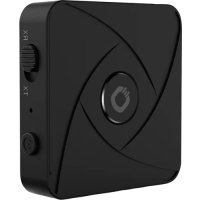
This compact Bluetooth® receiver allows you to listen to music and audio signals from any Bluetooth-enabled device (such as an iPhone, iPad, Android smartphone, etc.) via your home hifi, car stereo or even a set of headphones (via a 3.5 mm jack).
Thanks to the use of the latest aptX® technology, excellent clarity and performance are guaranteed at a range of up to 10m . The receiver can be connected to any stereo or speaker system with a 3.5mm line-in port, stereo RCA port or the Aux input in your car.
Functions
- Audio streaming from any Bluetooth® device
· High quality Bluetooth audio with aptX® support
· 44.1kHz and 16bit (CD quality) audio formats supported - Bluetooth 4.0 compatible
- Up to 10 hours of listening pleasure
Specification
Range: up to 10m
Data rate: up to 352kbps
Battery charge: up to 10 hours
Frequency response: 10 ~Hz to 22 kHz
Temperature range: -15 to +50 °C
Permissible rel. humidity: 5 to 90%
Dimensions (w x h x d): 28 x 16 x 78 mm
Packaging contents
Oehlbach Bluetooth audio receiver BTX 1000
- USB-A to USB micro cable
· 3.5 mm to stereo RCA adapter
- Operating instructions
Operation
Pairing with Bluetooth devices:
- The BTX 1000 must be switched off before pairing it with a device for the first time.
- Now press and hold the function button on the BTX 1000 for 6 seconds until the LED starts to flash red and blue. The pairing mode is now active.
- Activate the Bluetooth function on your output device and search for the BTX 1000. The name of the adapter is "OEHLBACH BT". Select "OEHLBACH BT".
- When pairing has been completed successfully the BTX 1000 will flash blue briefly three times every 3 seconds. You can now start to play any of your audio files via the BTX 1000.
- To do this, connect the BTX 1000 to the 3.5mm jack or stereo RCA input on your device (e.g. amplifier, AV receiver, active speaker, car radio, etc.).
- To switch off the BTX 1000 press and hold the function button for 4 seconds. After 5 minutes of inactivity (in standby mode) the BTX 1000 will switch off automatically.
Additional operating instructions:
-
If you only press and hold the function button briefly and the LED flashes red twice every 3 seconds, it means the BTX 1000 is switched on but it is not in the pairing mode. To activate this mode you will need to press and hold the function button for 6 seconds when the adapter is switched off.
-
If you want to pair a different/new device, switch off the BTX 1000 and disconnect the connected device from the Bluetooth adapter.
- If the playback device is switched off or the Bluetooth connection is lost, the BTX 1000 will remain in its standby mode.
- If the BTX 1000 is switched off and then on again, it will automatically establish a connection with the last connected device, provided that its Bluetooth mode is still active. Generally speaking, the BTX 1000 will be stored in your smartphone, meaning that you don't need to search for it again; you simply just need to select it from your list.
- If you want to connect a new device, you will need to start the pairing process again (see „Pairing with Bluetooth devices”).
- You can use the BTX 1000 while it is being charged.
- If the BTX 1000 is in its standby mode, it will switch off automatically after 5 minutes.
- To charge the BTX 1000 connect it to a compatible charger/USB port by using the supplied USB cable. You can use a standard USB charger or a USB charging port on your home cinema/hifi equipment here.
| LED display Status of the BTX 1000 | |
| LED continuously flashes red and blue | Pairing mode |
| LED flashes red twice (every 3 seconds) | Standby mode |
| LED flashes blue briefly three times (every 3 seconds) | Bluetooth connection successful - device is paired |
| LED flashes blue twice (every 2 seconds) | Device is paired and receiving an audio signal |
| LED illuminates red continuously | BTX 1000 is being charged |
| LED illuminates red continuously and flashes blue briefly twice every 2 seconds | BTX 1000 is paired and being charged at the same time |
| LED illuminates blue continuously | BTX 1000 is fully charged and still connected to the charging cable |
| LED illuminates purple BTX | 1000 is switched on or off |
Troubleshooting
| Error Solution | |
| The BTX 1000 will not switch on | Please make sure that the BTX 1000 is sufficiently charged. Try to charge the BTX 1000. |
| The BTX 1000 cannot be paired with another device | a. Make sure that the Bluetooth device is no further than 1m away during the pairing process. b. Make sure that the Bluetooth function is enabled on the device being connected and that its search/pairing mode is active. |
| The BTX 1000 is connected to a device, but it is not possible to play any music | a. Make sure that both devices are paired. Please note that the maximum operating range is 10m. Any walls or obstacles located between the devices will reduce this range. b. Make sure that the volume on the playback device is set between 50 and 100%. |

Remarks
Please observe the following instructions in order to prevent any risk of fire, short-circuits or damage to the product:
- Do not expose the product to rain or moisture. Do not place any containers filled with water on the product.
- Do not install the product in a bookcase, fitted cupboard or similarly enclosed spaces. Please ensure that there is sufficient ventilation for the product.
- You should not cover the product or place items on the product in order to prevent short-circuits or fire due to overheating.
- Do not place the product in proximity to sources of heat, e.g. heaters, stoves, etc.
- Do not use the product in proximity to naked flames or candles.
- Only use a dry cloth to clean the product.
- Functionality may be restricted depending on the configuration of the device.
- Please only use qualified service personnel to carry out repairs or servicing work.
Compliance with EU Directives
This product is eligible to bear the CE mark. It complies with the EU Low Voltage Directive 2006/95/EC; EU Directive 2004/108/EC; EU RoHS Directive 2011/65/EC; EU Directive on Waste Electrical and Electronic Equipment (WEEE) 2012/19/EC; EU Directive 1999/5/EC (radio systems and telecommunication end devices).
You can obtain a free copy of the Declaration of Conformity by contacting your retailer, distributor or the headquarters of Oehlbach Kabel GmbH. Contact information can be found at: http://www.oehlbach.com.
ENIG
This product contains batteries which are subject to EU Directive 2006/66/EC and should therefore not be disposed of with household waste. Please observe local regulations.
Warranty
Congratulations! Thanks to your intelligent choice you are now the proud owner of an OEHLBACH® product. OEHLBACH® products enjoy an excellent reputation around the world due to their high quality. This high quality standard allows us to provide a 2 year warranty for this OEHLBACH® product. OEHLBACH® products are continuously inspected and checked throughout the entire manufacturing process. If service is necessary, however, please observe the following
- The warranty period starts with the purchase of the product and only applies to the original owner.
- During the warranty period we will rectify any defects that are due to faulty material or workmanship by replacing or repairing the defective part at our discretion. Further claims, and in particular those for price reduction, cancellation of sale, compensation for damage or subsequent damage, are excluded. The warranty period is not affected by any work we provide under the warranty.
-
The product should not be tampered with.
-
In the event of a warranty claim please contact your authorised dealer first. Should it prove necessary to return the product to us, please ensure that
-
the product is sent in its original factory packaging in good condition,
-
your proof of purchase is enclosed.
-
The following are excluded from the warranty:
-
Illuminants
- Wear parts
- Shipping damages, either readily apparent or concealed (claims for such damages must be lodged immediately with the shipping agent, the railway express office or the post office).
- Scratches in metal components, front panels, etc. (You must notify your authorised dealer directly of such defects within 5 days of purchase).
- Defects caused as a result of incorrect installation, faulty connection, improper operation (see user manual), overloading or external force.
- Improperly repaired or modified devices that have been opened by a party other than us.
- Subsequent damage to other devices
- Reimbursement of costs for repairing damage that has been caused by a third party without our prior consent.
NJI KOCBEHHbIM y6bITkAm, NCKJIIOUeHbI. OKa3aHne HAMn rapaHTnHBIX ycLyr He BInraT Ha cPOK rapaHTmN.