DUR366LZ - Lawn mower MAKITA - Free user manual and instructions
Find the device manual for free DUR366LZ MAKITA in PDF.


User questions about DUR366LZ MAKITA
0 question about this device. Answer the ones you know or ask your own.
Ask a new question about this device
Download the instructions for your Lawn mower in PDF format for free! Find your manual DUR366LZ - MAKITA and take your electronic device back in hand. On this page are published all the documents necessary for the use of your device. DUR366LZ by MAKITA.
USER MANUAL DUR366LZ MAKITA
GB Cordless Grass Trimmer Instruction manual
natural_image
Line drawing of a handheld metal detector with lever and handle (no text or symbols)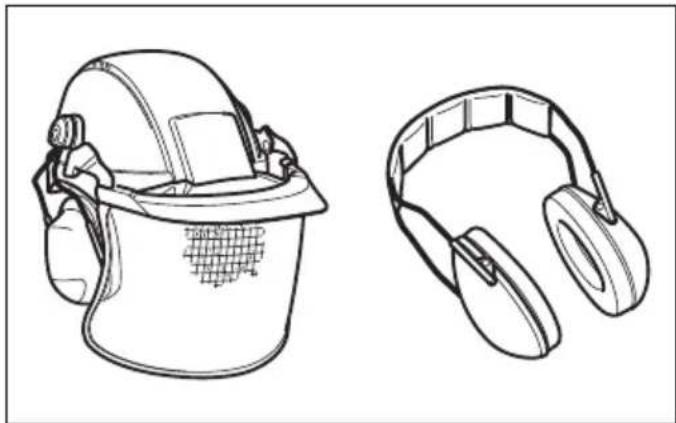
natural_image
Line drawings of two types of safety helmets: a full helmet and a pair of hard headresses (no text or symbols)1 010820 2 010821
natural_image
Illustration of three different types of hand tools: a worker in safety gear, a glove with gloves, and a boot (no text or symbols)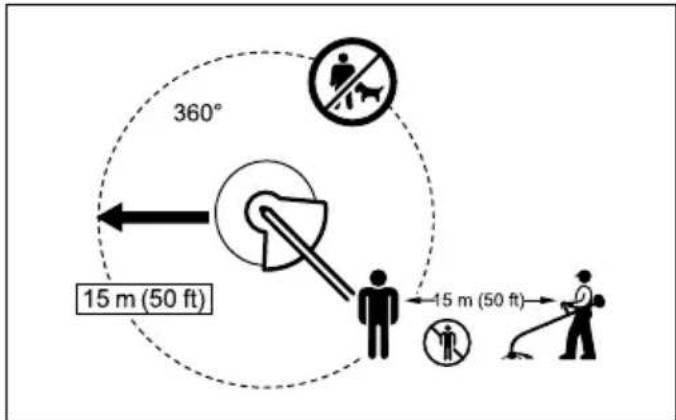
text_image
360° 15 m (50 ft) 15 m (50 ft)3 012858
text_image
Technical diagram of a handheld device with numbered components and an inset showing labeled buttons for reading.4 015789
text_image
10 1 115 015386 6 015659
text_image
12 13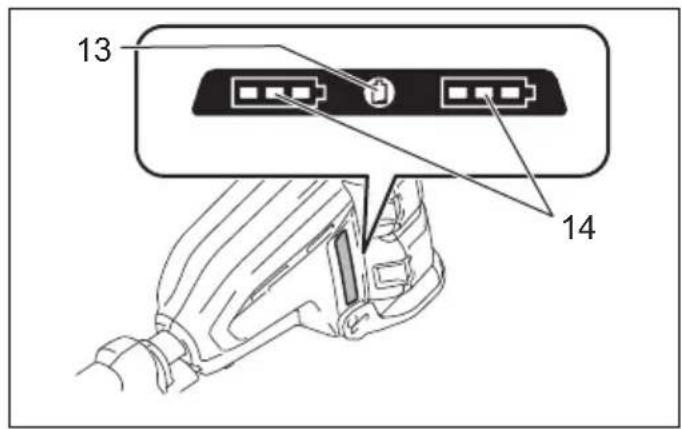
text_image
13 147 015387 8 015790
text_image
5 0 / 1 I R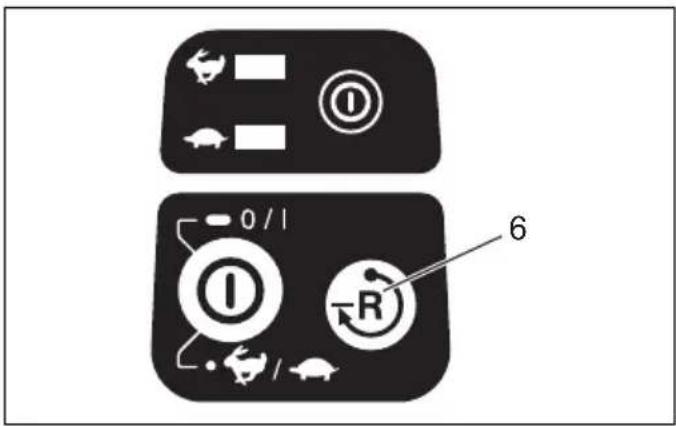
text_image
Diagram showing two labeled buttons with icons and a numbered label '6', likely illustrating a control or navigation system.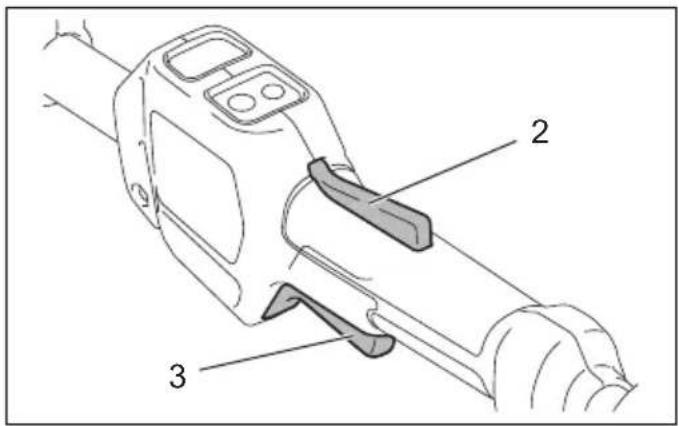
text_image
Technical diagram of a handheld device with labeled parts 2, 3, and an unlabeled component9 015388 10 015791
text_image
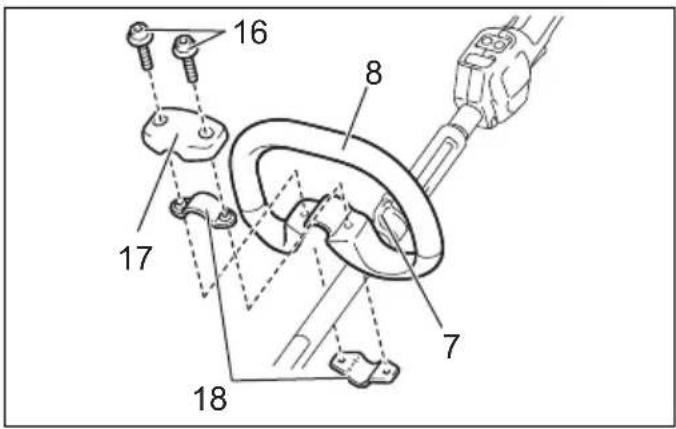
16 8 17 7 18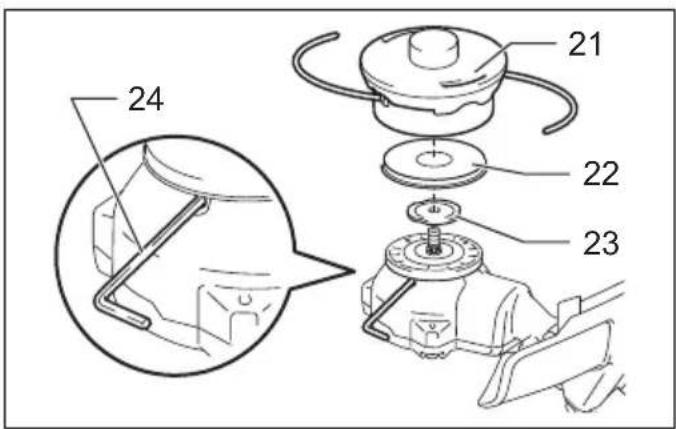
text_image
21 22 23 24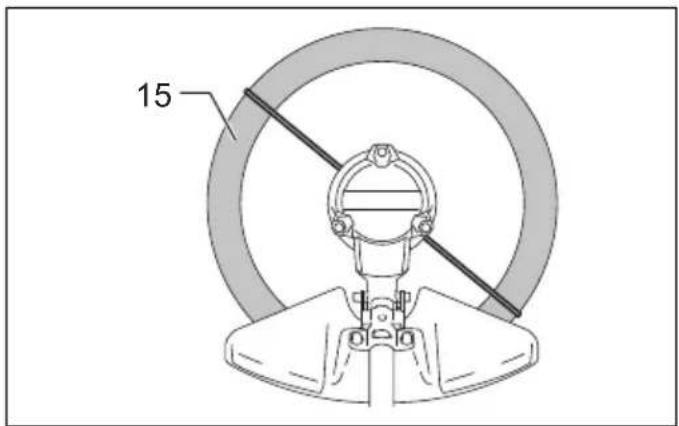
text_image
1511 015788 12 015390
text_image
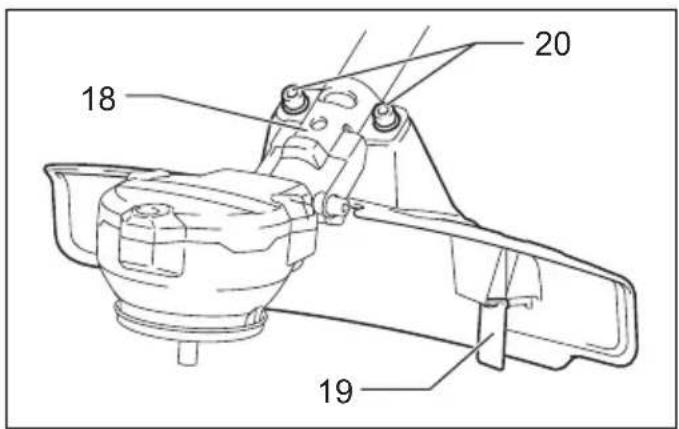
18 20 1913 015792 14 015392
text_image
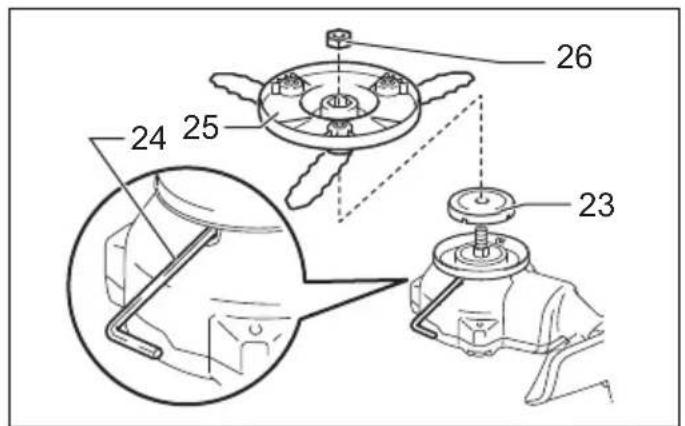
26 25 24 2315 015621 16 015399
text_image
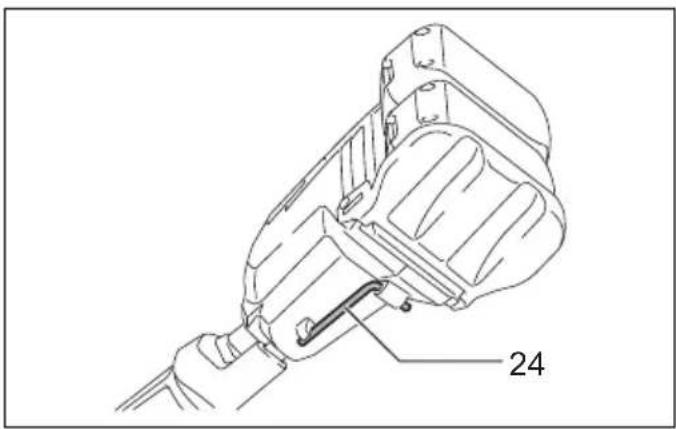
24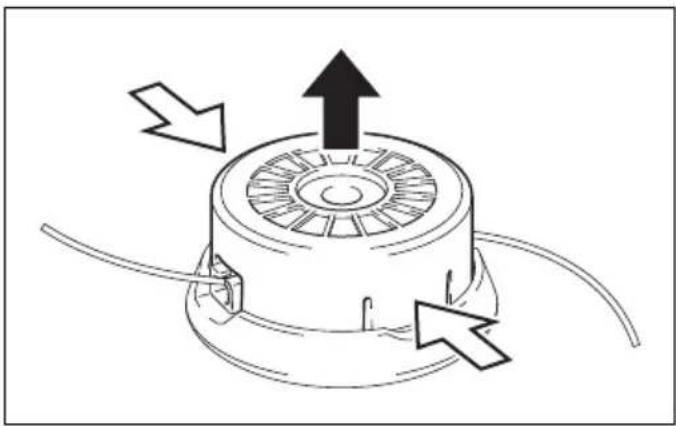
natural_image
Diagram of a mechanical component with directional arrows indicating motion or flow (no text or symbols)
natural_image
Line drawing of a worker using a tool to clean or manage equipment on grass (no text or symbols)17 015394 18 013822
text_image
2719 013823 20 013824
text_image
LH WIND CORD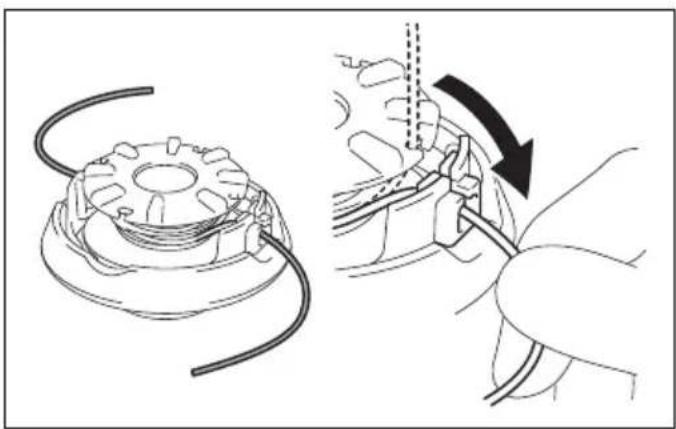
natural_image
Technical illustration showing a gear assembly and a hand holding a tool, with no visible text or symbols.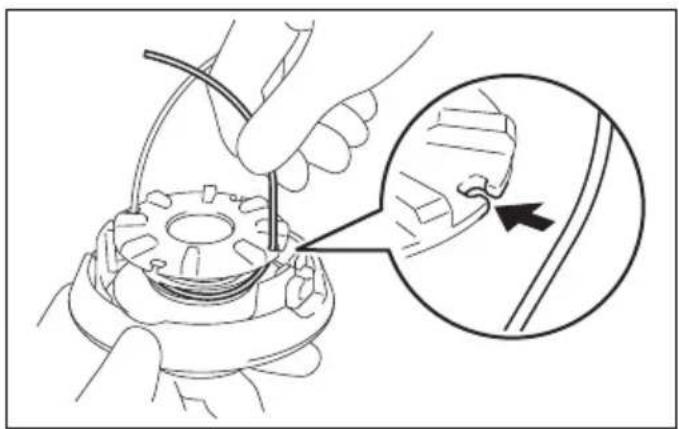
natural_image
Technical illustration of a mechanical assembly with a magnified inset showing a tool interacting with a component (no text or symbols present)21 013825 22 013826
natural_image
Technical diagram of a mechanical assembly showing a motor and gear assembly (no text or labels)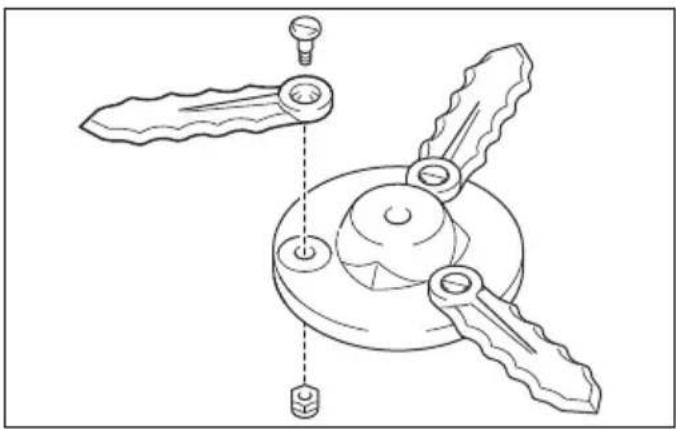
natural_image
Technical line drawing of a mechanical component with three blades and a central hub (no text or symbols)23 015398 24 015450
ENGLISH (Original instructions)
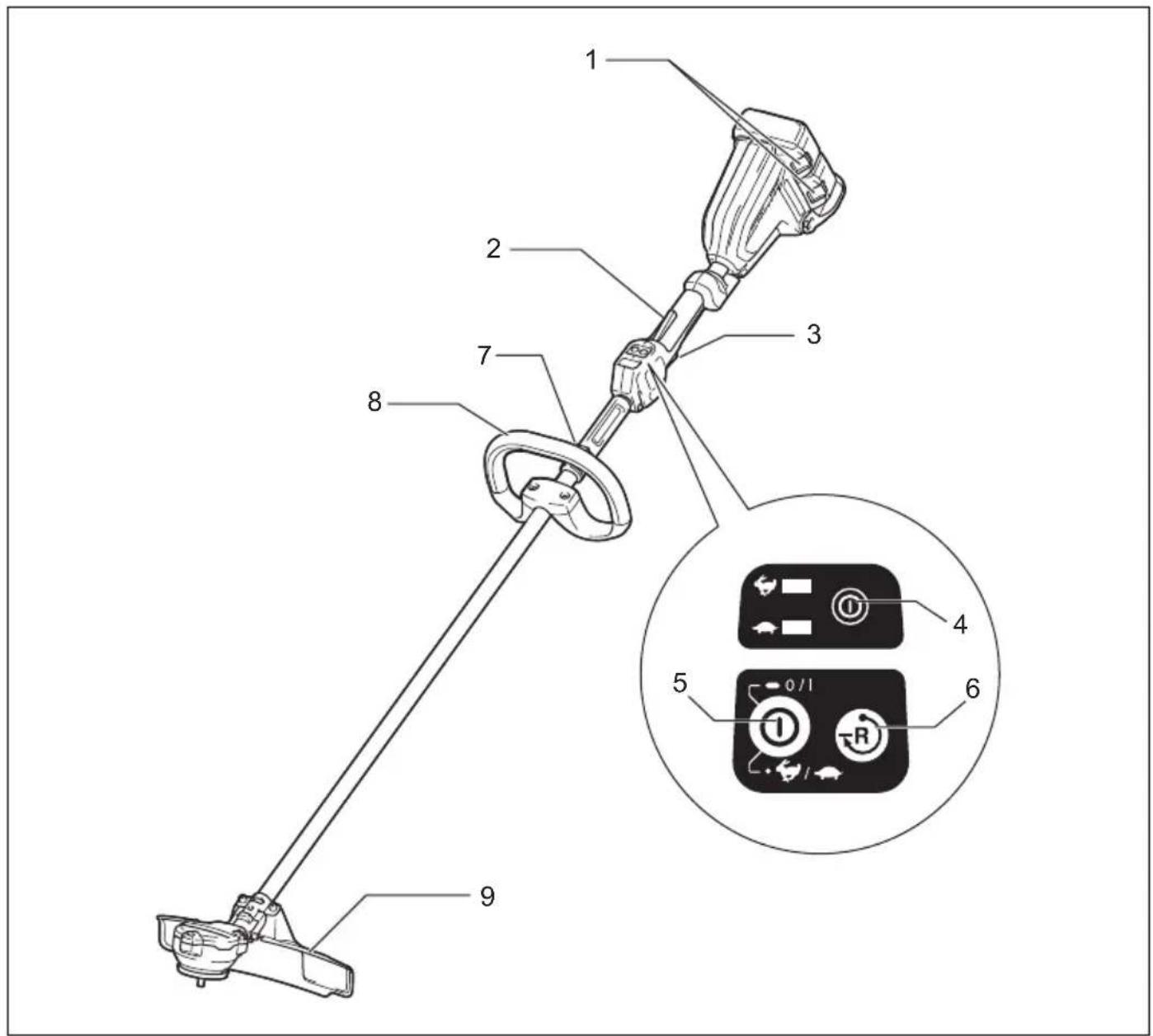
Explanation of general view
| 1. Battery cartridge | 10. Red indicator | 19. Cutter |
| 2. Lock-off lever | 11. Button | 20. Bolt |
| 3. Switch trigger | 12. Indicator lamps | 21. Nylon cutting head |
| 4. Power lamp | 13. Check button | 22. Metal guard |
| 5. Main power button | 14. Battery indicator | 23. Receive washer |
| 6. Reverse button | 15. Most effective cutting area | 24. Hex wrench |
| 7. Hanger | 16. Hex bolt | 25. Plastic blade |
| 8. Grip | 17. Cover | 26. Nut |
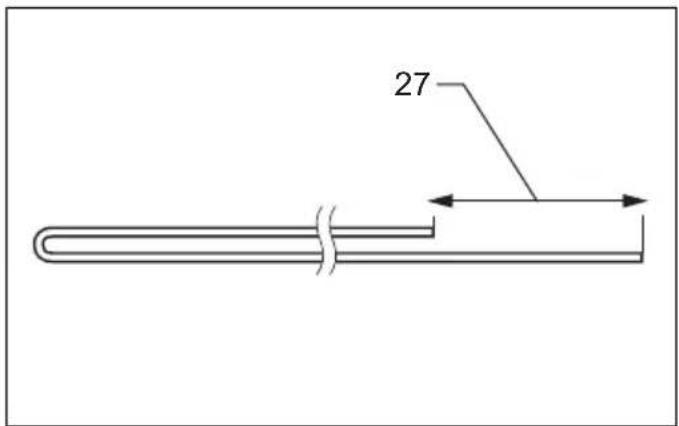
| 9. Protector (cutting tool guard) | 18. Clamp | 27. 80-100 mm |
SPECIFICATIONS
| Model DUR366L | ||||
| Type of handle Loop handle | ||||
| No load speed 5,000/6 | 500 min | -1 | ||
| Overall length 1,754 mm | ||||
| Nylon cord diameter 2.0 – 2.4 mm | ||||
| Applicable cutting tool | Nylon cutting head (P/N 197296-3) | Plastic blade (P/N 197188-6) | Nylon cutting head (P/N 197296-3) | Plastic blade (P/N 197188-6) |
| Cutting blade diameter | 350 mm | 255 mm | 350 mm | 255 mm |
| Rated voltage | D.C. 36 V | |||
| Net weight | 4.0 kg | 3.9 kg | 4.5 kg | 4.4 kg |
| Standard battery cartridge | BL1815N/BL1820/BL1820B | BL1830/BL1830B/BL1840/BL1840B/ BL1850/BL1850B/BL1860B | ||
- Due to our continuing program of research and development, the specifications herein are subject to change without notice.
- Specifications and battery cartridge may differ from country to country.
- Weight, with battery cartridge, according to EPTA-Procedure 01/2003
| Noise | Sound pressure level average | Sound power level average | Applicable standard | |
| L_PA (dB(A)) | L_WA (dB(A)) | Uncertainty K (dB(A)) | ||
| Nylon cutting head | 81 | 89 | 0.3 | 2000/14/EC |
| Plastic blade | 83 | 92 | 0.3 | |
| Vibration | Left hand | Right hand | Applicable standard | ||
| a_h,W (m/s2) | Uncertainty K (m/s2) | a_h,W (m/s2) | Uncertainty K (m/s2) | ||
| Nylon cutting head | ≤ 2.5 | 1.5 | ≤ 2.5 | 1.5 | EN50636-2-91 |
| Plastic blade | ≤ 2.5 | 1.5 | ≤ 2.5 | 1.5 | |
ENG901-1
- The declared vibration emission value has been measured in accordance with the standard test method and may be used for comparing one tool with another.
- The declared vibration emission value may also be used in a preliminary assessment of exposure.
WARNING:
- The vibration emission during actual use of the power tool can differ from the declared emission value depending on the ways in which the tool is used.
- Be sure to identify safety measures to protect the operator that are based on an estimation of exposure in
the actual conditions of use (taking account of all parts of the operating cycle such as the times when the tool is switched off and when it is running idle in addition to the trigger time).
Symbols
END229-1
The following show the symbols used for the equipment. Be sure that you understand their meaning before use.


..... Read instruction manual.
Danger; be aware of thrown objects.
The distance between the tool and bystanders must be at least 15 m.
...... Keep bystanders away.
15m(30m).... Keep distance at least 15 m.
Wear a helmet, goggles and ear protection.
Wear protective gloves.
Wear sturdy boots with nonslip soles. Steeltoed safety boots are recommended.
Do not expose to moisture.
Top permissible tool speed.
...... Never use metal blade.
Cd Ni-MH Li-ion
Only for EU countries
Do not dispose of electric equipment or battery pack together with household waste material! In observance of the European Directives, on Waste Electric and Electronic Equipment and Batteries and Accumulators and Waste Batteries and Accumulators and their implementation in accordance with national laws, electric equipment and batteries and battery pack(s) that have reached the end of their life must be collected separately and returned to an environmentally compatible recycling facility.
For European countries only
ENH040-4
EC Declaration of Conformity
Makita declares that the following Machine(s):
Designation of Machine:
Cordless Grass Trimmer
Model No./Type: DUR366L
Specifications: see "SPECIFICATIONS" table.
Conforms to the following European Directives:
2000/14/EC, 2006/42/EC
They are manufactured in accordance with the following standard or standardized documents:
EN60335, EN/ISO11806, EN50636
The technical file in accordance with 2006/42/EC is available from:
Makita, Jan-Baptist Vinkstraat 2, 3070, Belgium
The conformity assessment procedure required by
Directive 2000/14/EC was in Accordance with annex V.
With plastic blade
Measured sound power level 92 dB (A)
Guaranteed sound power level 92 dB (A)
The conformity assessment procedure required by Directive 2000/14/EC was in Accordance with annex VI. Notified Body:
90431 Nürnberg, Germany
Identification number 0197
With nylon cutting head
Measured sound power level 89 dB (A)
Guaranteed sound power level 90 dB (A)
-
- 2015
Yasushi Fukaya
Director
Makita, Jan-Baptist Vinkstraat 2, 3070, Belgium
IMPORTANT SAFETY INSTRUCTIONS GEB109-5
⚠ WARNING! Read all safety warnings and all instructions. Failure to follow the warnings and instructions may result in electric shock, fire and/or serious injury.
Save all warnings and instructions for future reference.
-
Be familiar with the controls and proper use of the equipment.
-
Cutting elements continue to rotate after the motor is switched off.
-
Never allow children or people unfamiliar with the instructions to use the machine.
-
Stop using the machine while people, especially children, or pets are nearby.
-
Only use the machine in daylight or good artificial light.
-
Before using the machine and after any impact, check for signs of wear or damage and repair as necessary.
-
Take care against injury from any device fitted for trimming the filament line length. After extending new cutter line always return the machine to its normal operating position before switching on.
-
Never fit metal cutting elements.
-
This appliance is not intended for use by persons (including children) with reduced physical, sensory or mental capabilities, or lack of experience and knowledge, unless they have been given supervision or instruction concerning use of the appliance by a person responsible for their safety. Children should be supervised to ensure that they do not play with the appliance.
-
Use the tool with the utmost care and attention.
-
Operate the tool only if you are in good physical condition. Perform all work calmly and carefully. Use common sense and keep in mind that the operator or user is responsible for accidents or hazards occurring to other people or their property.
-
Never operate the tool when tired, feeling ill or under the influence of alcohol or drugs.
-
The tool should be switched off immediately if it shows any signs of unusual operation.
Intended use of the tool
- Use right tool. The cordless grass trimmer is only intended for cutting grass, light weeds. It should not be used for any other purpose such as hedge cutting as this may cause injury.
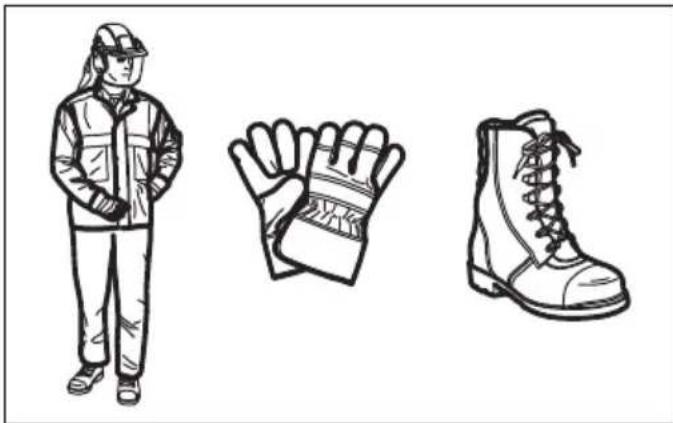
Personal protective equipment (Fig. 1 & 2)
-
Dress properly. The clothing worn should be functional and appropriate, i.e. it should be tight-fitting but not cause hindrance. Do not wear either jewelry or clothing which could become entangled with high grass. Wear protective hair covering to contain long hair.
-
When using the tool, always wear sturdy shoes with a non-slip sole. This protects against injuries and ensures a good footing.
-
Wear protective glasses or goggles.
Electrical and battery safety
-
Avoid dangerous environment. Don't use the tool in damp or wet locations or expose it to rain. Water entering the tool will increase the risk of electric shock.
-
Recharge only with the charger specified by the manufacturer. A charger that is suitable for one type of battery pack may create a risk of fire when used with another battery pack.
-
Use power tools only with specifically designated battery packs. Use of any other battery packs may create a risk of injury and fire.
-
When battery pack is not in use, keep it away from other metal objects, like paper clips, coins, keys, nails, screws or other small metal objects, that can make a connection from one terminal to another. Shorting the battery terminals together may cause burns or a fire.
-
Under abusive conditions, liquid may be ejected from the battery; avoid contact. If contact accidentally occurs, flush with water. If liquid contacts eyes, seek medical help. Liquid ejected from the battery may cause irritation or burns.
-
Do not dispose of the battery(ies) in a fire. The cell may explode. Check with local codes for possible special disposal instructions.
-
Do not open or mutilate the battery(ies). Released electrolyte is corrosive and may cause damage to the eyes or skin. It may be toxic if swallowed.
Starting up the tool (Fig. 3)
-
Make sure that there are no children or other people within a working range of 15 meters (50 ft), also pay attention to any animals in the working vicinity. Otherwise stop using the tool.
-
Before use always check that the tool is safe for operation. Check the security of the cutting tool and the guard and the switch trigger/lever for easy and proper action. Check for clean and dry handles and test the on/off function of the switch.
-
Check damaged parts before further use of the tool. A guard or other part that is damaged should be carefully checked to determine that it will
operate properly and perform its intended function. Check for alignment of moving parts, binding of moving parts, breakage of parts, mounting, and any other condition that may affect its operation. A guard or other part that is damaged should be properly repaired or replaced by our authorized service center unless indicated elsewhere in this manual.
-
Switch on the motor only when hands and feet are away from the cutting tool.
-
Before starting make sure that the cutting tool has no contact with hard objects such as branches, stones etc. as the cutting tool will revolve when starting.
Method of operation
-
Never operate the machine with damaged guards or without the guards in place.
-
Only use the tool in good light and visibility. During the winter season beware of slippery or wet areas, ice and snow (risk of slipping). Always ensure a safe footing.
-
Take care against injury to feet and hands from the cutting tool.
-
Keep hands and feet away from the cutting means at all times and especially when switching on the motor.
-
Never cut above waist height.
-
Never stand on a ladder and run the tool.
-
Never work on unstable surfaces.
-
Don't overreach. Keep proper footing and balance at all times.
-
Always be sure of your footing on slopes.
-
Walk, never run.
-
Remove sand, stones, nails etc. found within the working range. Foreign particles may damage the cutting tool and can cause to be thrown away, resulting in a serious injury.
-
Never touch moving hazardous parts before the machine is disconnected from the mains and the moving hazardous parts have come to a complete stop.
-
Should the cutting tool hit stones or other hard objects, immediately switch off the motor and inspect the cutting tool.
-
Before commencing cutting, the cutting tool must have reached full working speed.
-
During operation always hold the tool with both hands. Never hold the tool with one hand during use. Always ensure a safe footing.
-
All protective equipment such as guards supplied with the tool must be used during operation.
-
Except in case of emergency, never drop or cast the tool to the ground or this may severely damage the tool.
-
Never drag the tool on the ground when moving from place to place, the tool may become damaged if moved in this manner.
-
Always remove the battery cartridge from the tool:
- whenever leaving the tool unattended;
- before clearing a blockage;
- before checking, cleaning or working on the tool;
- before making any adjustments, changing accessories or storing;
- whenever the tool starts vibrating unusually; - whenever transporting the tool.
- Don't force the tool. It will do the job better and with less likelihood of a risk of injury at the rate for which it was designed.
- Do not operate power tools in explosive atmospheres, such as in the presence of flammable liquids, gases or dust. Power tools create sparks which may ignite the dust or fumes.
- Take a rest to prevent loss of control caused by fatigue. We recommend to take a 10 to 20-minute rest every hour.
Maintenance instructions
- The condition of the cutting tool, protective devices and shoulder strap must be checked before commencing work.
- Turn off the motor and remove the battery cartridge before carrying out maintenance, replacing the cutting tool and cleaning the tool.
- After use, disconnect the battery cartridge from the tool and check for damage.
- Check for loose fasteners and damaged parts such as nearly halfway cut-off state in the cutting tool.
- When not in use store the equipment in a dry location that is locked up or out of children's reach.
- Use only the manufacturer's recommended replacement parts and accessories.
- Always ensure that ventilation openings are kept clear of debris.
- Inspect and maintain the tool regularly, especially before/after use. Have the tool repaired only by our authorized service center.
- Keep handles dry, clean and free from oil and grease.
SAVE THESE INSTRUCTIONS.
WARNING:
DO NOT let comfort or familiarity with product (gained from repeated use) replace strict adherence to safety rules for the subject product. MISUSE or failure to follow the safety rules stated in this instruction manual may cause serious personal injury.
IMPORTANT SAFETY INSTRUCTIONS ENC007-11
FOR BATTERY CARTRIDGE
- Before using battery cartridge, read all instructions and cautionary markings on (1) battery charger, (2) battery, and (3) product using battery.
- Do not disassemble battery cartridge.
- If operating time has become excessively shorter, stop operating immediately. It may result in a risk of overheating, possible burns and even an explosion.
-
If electrolyte gets into your eyes, rinse them out with clear water and seek medical attention right away. It may result in loss of your eyesight.
-
Do not short the battery cartridge:
(1) Do not touch the terminals with any conductive material.
(2) Avoid storing battery cartridge in a container with other metal objects such as nails, coins, etc.
(3) Do not expose battery cartridge to water or rain.
A battery short can cause a large current flow, overheating, possible burns and even a breakdown.
- Do not store the tool and battery cartridge in locations where the temperature may reach or exceed 50^ C ( 122^ F).
- Do not incinerate the battery cartridge even if it is severely damaged or is completely worn out. The battery cartridge can explode in a fire.
- Be careful not to drop or strike battery.
- Do not use a damaged battery.
- The contained lithium-ion-batteries are subject to the Dangerous Goods Legislation requirements.
For commercial transports e.g. by third parties, forwarding agents, special requirement on packaging and labeling must be observed.
For preparation of the item being shipped, consulting an expert for hazardous material is required. Please also observe possibly more detailed national regulations.
Tape or mask off open contacts and pack up the battery in such a manner that it cannot move around in the packaging.
- Follow your local regulations relating to disposal of battery.
SAVE THESE INSTRUCTIONS.
CAUTION: Only use genuine Makita batteries.
Use of non-genuine Makita batteries, or batteries that have been altered, may result in the battery bursting causing fires, personal injury and damage. It will also void the Makita warranty for the Makita tool and charger.
Tips for maintaining maximum battery life
- Charge the battery cartridge before completely discharged.
Always stop tool operation and charge the battery cartridge when you notice less tool power. - Never recharge a fully charged battery cartridge. Overcharging shortens the battery service life.
- Charge the battery cartridge with room temperature at 10^ C - 40^ C ( 50^ F - 104^ F). Let a hot battery cartridge cool down before charging it.
- Charge the battery cartridge if you do not use it for a long period (more than six months).
PARTS DESCRIPTION (Fig. 4)
FUNCTIONAL DESCRIPTION
WARNING:
- Always be sure that the tool is switched off and the battery cartridge is removed before adjusting or checking function on the tool. Failure to switch off
and remove the battery cartridge may result in serious personal injury from accidental start-up.
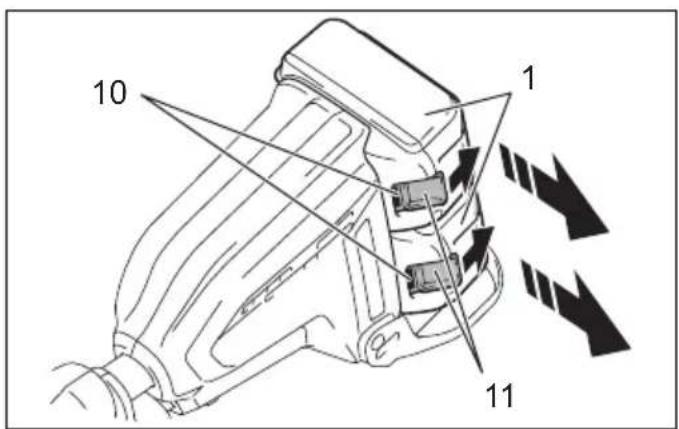
Installing or removing battery cartridge (Fig. 5)

CAUTION:
• Always switch off the tool before installing or removing of the battery cartridge.
- Hold the tool and the battery cartridge firmly when installing or removing battery cartridge. Failure to hold the tool and the battery cartridge firmly may cause them to slip off your hands and result in damage to the tool and battery cartridge and a personal injury.
To remove the battery cartridge, slide it from the tool while sliding the button on the front of the cartridge.
To install the battery cartridge, align the tongue on the battery cartridge with the groove in the housing and slip it into place. Insert it all the way until it locks in place with a little click. If you can see the red indicator on the upper side of the button, it is not locked completely.

CAUTION:
• Always install the battery cartridge fully until the red indicator cannot be seen. If not, it may accidentally fall out of the tool, causing injury to you or someone around you.
- Do not install the battery cartridge forcibly. If the cartridge does not slide in easily, it is not being inserted correctly.
NOTE:
• The tool does not work with only one battery cartridge.
Tool/battery protection system
The tool is equipped with a tool/battery protection system. This system automatically cuts off power to the motor to extend tool and battery life.
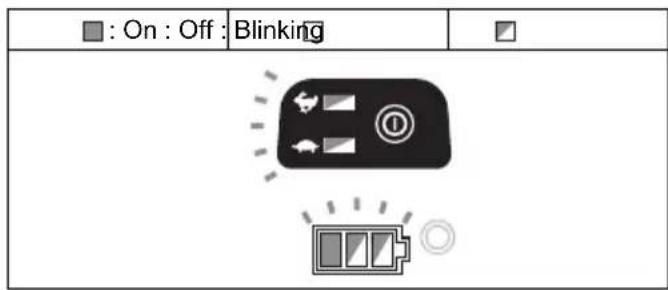
The tool will automatically stop during operation if the tool or battery is placed under one of the following conditions. In some conditions, the indicators light up.
Overload protection
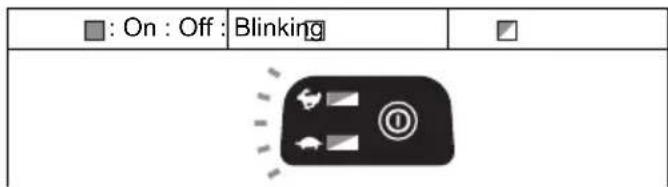
If the tool is overloaded by entangled weeds or other debris, the tool stops automatically, and indicators blink. In this situation, turn the tool off and stop the application that caused the tool to become overloaded. Then turn the tool on to restart.
Overheat protection for tool
text_image
: On : Off : Blinking ■015401
When the tool is overheated, the tool stops automatically, and , and the battery indicator blink about
60 seconds. In this situation, let the tool cool down before turning the tool on again.
Overdischarge protection
When the battery capacity becomes low, the tool stops automatically. If the product does not operate even when the switches are operated, remove the batteries from the tool and charge the batteries.
Indicating the remaining battery capacity
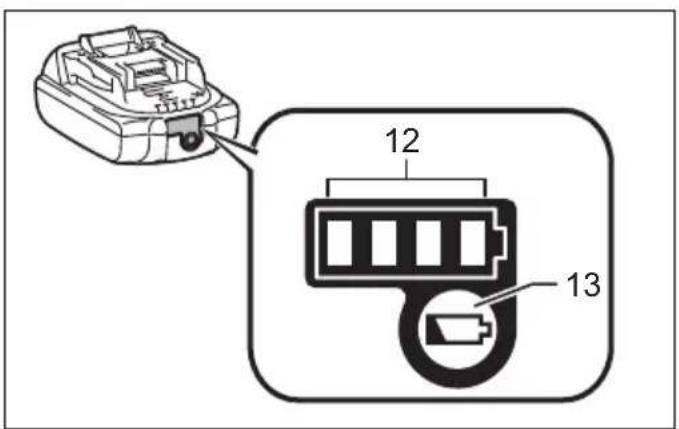
(Only for battery cartridges with "B" at the end of the model number.) (Fig. 6)
Press the check button on the battery cartridge to indicate the remaining battery capacity. The indicator lamps light up for few seconds.
| Indicator lamps | Remaining capacity | ||
| Lighted Off Blinking | |||
| 75% to 100% | |||
| 50% to 75% | |||
| 25% to 50% | |||
| 0% to 25% | |||
| Charge the battery. | |||
| The battery may have malfunctioned. | |||
015658
NOTE:
- Depending on the conditions of use and the ambient temperature, the indication may differ slightly from the actual capacity.
Remaining battery capacity indication
(Country specific) (Fig. 7)
Press the check button to make the battery indicators show the remaining battery capacities. The battery indicators correspond to each battery.
Remaining battery capacity indication
| Battery indicator status Remaining | battery capacity | ||
| : On : Off : Blinking | |||
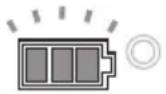 | 50% - 100% | ||
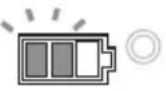 | 20% - 50% | ||
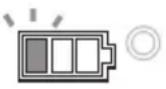 | 0% - 20% | ||
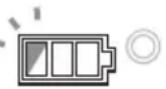 | Charge the battery | ||
015452
Power switch action
WARNING:
- Before inserting the battery cartridge into the tool, always check to see that the switch trigger actuates properly and returns to the “OFF” position when released. Operating a tool with a switch that does not actuate properly can lead to loss of control and serious personal injury.
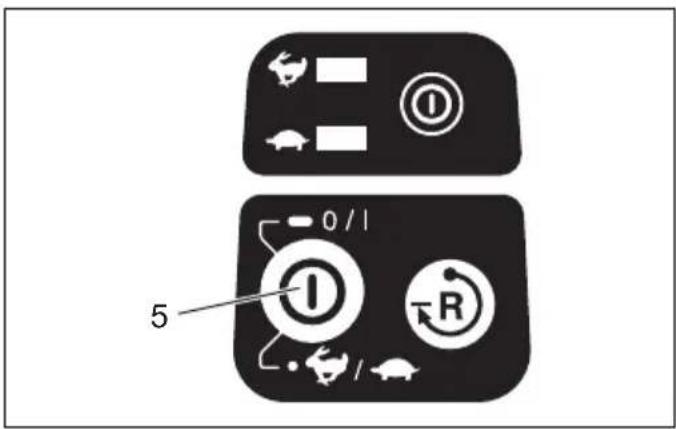
Press and hold the main power button for some seconds to turn on the tool.
To turn off the tool, press and hold the main power button again. (Fig. 8)
To prevent the switch trigger from being accidentally pulled, a lock-off lever is provided.
To start the tool, grasp the rear handle (the lock-off lever is released by the grasp) and then pull the switch trigger. To stop the tool, release the switch trigger. (Fig. 9)
NOTE:
- The tool is automatically turned off after the tool is left one minute without any operations.
Speed adjusting (Fig. 8)
You can adjust the tool speed by tapping the main power button.
Each time you tap the main power button, indicator or indicator lights up. is for high speed and for low speed.
Reverse button for debris removal
WARNING:
- Switch off the tool and remove the battery cartridge before you remove entangled weeds or debris which the reverse rotation function can not remove. Failure to switch off and remove the battery cartridge may result in serious personal injury from accidental start-up.
This tool has a reverse button to change the direction of rotation. It is only for removing weeds and debris entangled in the tool. (Fig. 10)
To reverse the rotation, tap the reverse button and pull the trigger when the tool's head is stopped. The power lamp
starts blinking, and the tool's head rotates in reverse direction when you pull the switch trigger.
To return to regular rotation, release the trigger and wait until the tool's head stops.
NOTE:
- During the reverse rotation, the tool operates only for a short period of time and then automatically stops.
- Once the tool is stopped, the rotation returns to regular direction when you start the tool again.
- If you tap the reverse button while the tool's head is still rotating, the tool comes to stop and to be ready for reverse rotation.
Nylon cutting head (optional accessory)
NOTICE:
- The bump feed will not operate properly if the head is not rotating. (Fig. 11)
The nylon cutting head is a dual string trimmer head provided with a bump & feed mechanism.
To cause the nylon cord to feed out, the cutting head should be bumped against the ground while rotating.
NOTE:
If the nylon cord does not feed out while bumping the head, rewind/replace the nylon cord by following the procedures described under "Maintenance".
ASSEMBLY
WARNING:
- Always be sure that the tool is switched off and battery cartridge is removed before carrying out any work on the tool. Failure to switch off and remove the battery cartridge may result in serious personal injury from accidental start-up.
- Never start the tool unless it is completely assembled. Operation of the tool in a partially assembled state may result in serious personal injury from accidental start-up.
Installing the grip (Fig. 12)
Fit the grip onto the pipe and tighten it with two hex bolts. Make sure that the grip is located further than the hanger.
Installing the guard
WARNING:
- Never use the tool without the guard illustrated in place. Failure to do so can cause serious personal injury.
CAUTION:
• Take care not to injure yourself on the cutter for cutting the nylon cord. (Fig. 13)
Align the clamp on the pipe with the protector. And tighten them with bolts.
Installing nylon cutting head or plastic blade (optional accessory)
CAUTION:
- If the nylon cutting head/plastic blade accidentally impacts a rock or hard object during operation, stop the tool and inspect for any damage. If the
nylon cutting head/plastic blade is damaged, replace it immediately. Use of a damaged cutting tool could result in serious personal injury.
NOTICE:
- Be sure to use genuine Makita nylon cutting head/plastic blade.
Turn the tool upside down so that you can replace the nylon cutting head easily.
Insert the hex wrench through the hole on the motor housing and rotate the receive washer until it is locked with the hex wrench. Place the nylon cutting head/plastic blade onto the threaded spindle directly and tighten it by turning it counterclockwise. Remove the hex wrench.
(Fig. 14 & 15)
To remove the nylon cutting head/plastic blade, turn it clockwise while holding the receive washer with the hex wrench.
Hex wrench storage (Fig. 16)
When not in use, store the hex wrench as shown in the figure to keep it from being lost.
OPERATION
Correct handling of tool
Correct posture (Fig. 17)
WARNING:
- Always position the tool on your right-hand side. Correct positioning of the tool allows for maximum control and will reduce the risk of serious personal injury caused by kickback.
- Be extremely careful to maintain control of the tool at all times. Do not allow the tool to be deflected toward you or anyone in the work vicinity. Failure to keep control of the tool could result in serious injury to the bystander and the operator.
MAINTENANCE
WARNING:
- Always be sure that the tool is switched off and battery cartridge is removed before attempting to perform inspection or maintenance on the tool.
Failure to switch off and remove the battery cartridge may result in serious personal injury from accidental start-up.
NOTICE:
Never use gasoline, benzine, thinner, alcohol or the like. Discoloration, deformation or cracks may result.
Replacing the nylon cord
WARNING:
- Never use metal wire, rope or the like. Use recommended nylon cord only, otherwise it may cause damage to the tool and result in serious personal injury.
- Make sure that the cover of the nylon cutting head is secured to the housing properly as described below. Failure to properly secure the cover may cause the nylon cutting head to fly apart resulting in serious personal injury.
Take off cover from housing, pressing two latches which are slotted section oppositely on side of housing. (Fig. 18) Cut a nylon line in 3 m. Fold the cutting line in two halves, leave one of half longer 80-100 mm than another.
(Fig. 19)
Hook the middle of the new nylon cord to the notch located at the center of the spool between the 2 channels provided for the nylon cord.
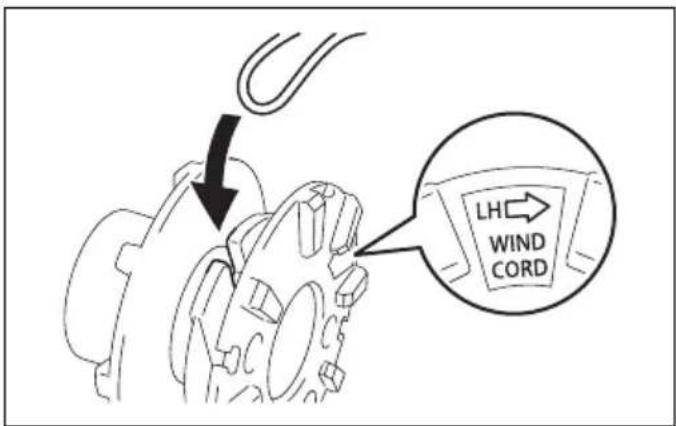
Wind both ends firmly around the spool in the direction marked on the head for left hand direction indicated by LH. (Fig. 20)
Wind all but about 100 mm of the cords, leaving the ends temporarily hooked through a notch on the side of the spool. (Fig. 21)
Mount the spool on the cover so that the grooves and protrusions on the spool match up with those on the cover. Now, unhook the ends of the cord from their temporary position and feed the cords through the eyelets to come out of the cover. (Fig. 22)
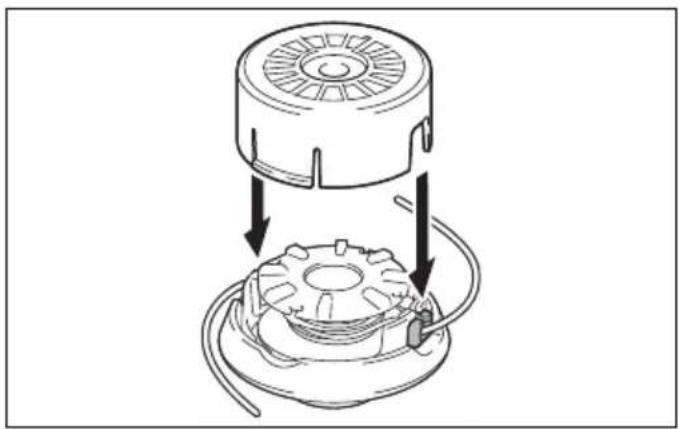
Align the protrusion on the underside of the cover with the slots of the eyelets. Then push the cover firmly onto the housing to secure it. Make sure the latches fully spread in the cover. (Fig. 23)
Replacing the blade for plastic blade (Fig. 24)
Replace the blade when it is worn out or broken.
To maintain product SAFETY and RELIABILITY, repairs, any other maintenance or adjustment should be performed by Makita Authorized Service Centers, always using Makita replacement parts.
TROUBLE SHOOTING
Before asking for repairs, conduct your own inspection first. If you find a problem that is not explained in the manual, do not attempt to dismantle the tool. Instead, ask Makita Authorized Service Centers, always using Makita replacement parts for repairs.
| Malfunction status Cause Action | ||
| Motor does not run. | Battery cartridge is not installed. Install | the battery cartridge. |
| Battery problem (under voltage) | Recharge the battery. If recharging is not effective, replace battery. | |
| The drive system does not work correctly. | Ask your local authorized service center for repair. | |
| Motor stops running after a little use. | Rotation is in reverse. | Change the direction of ratation with the reversing switch. |
| Battery's charge level is low. | Recharge the battery. If recharging is not effective, replace battery. | |
| Overheating. Stop using of tool to allow | it to cool down. | |
| It does not reach maximum RPM. | Battery is installed improperly. | Install the battery cartridge as described in this manual. |
| Battery power is dropping. | Recharge the battery. If recharging is not effective, replace battery. | |
| The drive system does not work correctly. | Ask your local authorized service center for repair. | |
| Cutting tool does not rotate: Stop the machine immediately! | Foreign object such as a branch is jammed between the guard and the nylon cutting head. | Remove the foreign object. |
| The drive system does not work correctly. | Ask your local authorized service center for repair. | |
| Abnormal vibration: Stop the machine immediately! | One end of the nylon cord has been broken. | Bump the nylon cutting head against the ground while it is rotating to cause the cord to feed. |
| The drive system does not work correctly. | Ask your local authorized service center for repair. | |
| Cutting tool and motor cannot stop: Remove the battery immediately! | Electric or electronic malfunction. | Remove the battery and ask your local authorized service center for repair. |
010856
OPTIONAL ACCESSORIES
WARNING:
- Do not mount a blade on this tool and only use the recommended accessories or attachments indicated in this manual. The use of a blade or any other accessory or attachment may result in serious personal injury.
CAUTION:
• These accessories or attachments are recommended for use with your Makita tool specified in this manual. The use of any other accessories or attachments might present a risk of injury to persons. Only use accessory or attachment for its stated purpose.
If you need any assistance for more details regarding these accessories, ask your local Makita Service Center.
- Nylon cutting head
- Nylon cord (cutting line)
- Plastic blade
- Makita genuine battery and charger
NOTE:
- Some items in the list may be included in the tool package as standard accessories. They may differ from country to country.
2000/14/EC, 2006/42/EC
⚠ WAARSCHUWING! Lees alle
2000/14/EC, 2006/42/EC
2000/14/EF, 2006/42/EF
2000/14/EK, 2006/42/EK
2000/14/EC, 2006/42/EC