
DLM466 - Lawn mower MAKITA - Free user manual and instructions
Find the device manual for free DLM466 MAKITA in PDF.


| Brand | Makita |
| Model | DLM466 |
| Product type | Cordless lawn mower |
| Cutting width | 460 mm |
| Adjustable cutting height | 20 mm to 75 mm (10 positions) |
| No-load speed (normal mode) | 3,300 min⁻¹ |
| No-load speed (energy-saving mode) | 2,500 min⁻¹ |
| Dimensions (in use) | L 1,270-1,440 mm, W 535 mm, H 915-1,110 mm |
| Dimensions (storage without grass bag) | L 1,050-1,160 mm, W 535 mm, H 610-760 mm |
| Net weight | 22.4 - 24.8 kg (depending on battery) |
| Power supply | Li-Ion battery 36 V DC (compatible BL1815N to BL1860B) |
| Compatible charger | DC18RC, DC18RD, DC18RE, DC18SD, DC18SE, DC18SF, DC18SH, DC18WC |
| Protection degree | IPX4 |
| Guaranteed sound power level | 95 dB(A) |
| Sound pressure level | 84 dB(A) |
| Vibration | ≤ 2.5 m/s² (uncertainty K = 1.5 m/s²) |
| Main functions | Constant speed control, electric brake, normal mode and noise reduction mode, grass level indicator |
| Grass bag capacity | Not specified in the manual, but bag included |
| Mulching | Possible with included accessory |
| Replacement blades | Straight blade 191W86-4, Mulching blade 191Y63-8 |
| Maintenance | Regular cleaning under the deck, checking and tightening of fasteners, replacing the blade if worn |
| Safety | Automatic stop in case of overload, overheating or low battery; electric brake; safety button; IPX4 protection |
| Warranty | Makita manufacturer's warranty (see manual) |
Frequently Asked Questions - DLM466 MAKITA
User questions about DLM466 MAKITA
0 question about this device. Answer the ones you know or ask your own.
Ask a new question about this device
Download the instructions for your Lawn mower in PDF format for free! Find your manual DLM466 - MAKITA and take your electronic device back in hand. On this page are published all the documents necessary for the use of your device. DLM466 by MAKITA.
USER MANUAL DLM466 MAKITA
natural_image
Line drawing of a lawn mower with three wheels and handlebars (no text or symbols)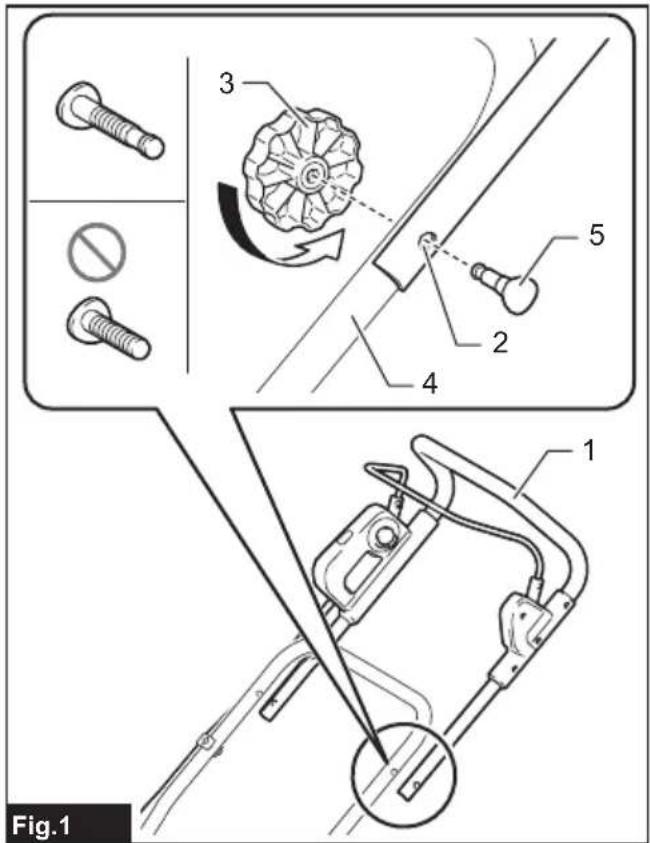
natural_image
Line drawing of a lawn mower with labeled parts and an arrow indicating motion (no text or symbols)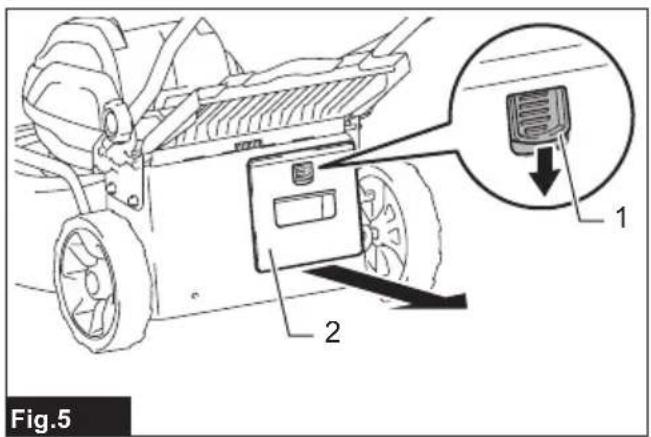
natural_image
Line drawing of a fabric box with a hand adjusting its side panel, labeled '1', shown in Fig.6 (no text or symbols on the diagram itself)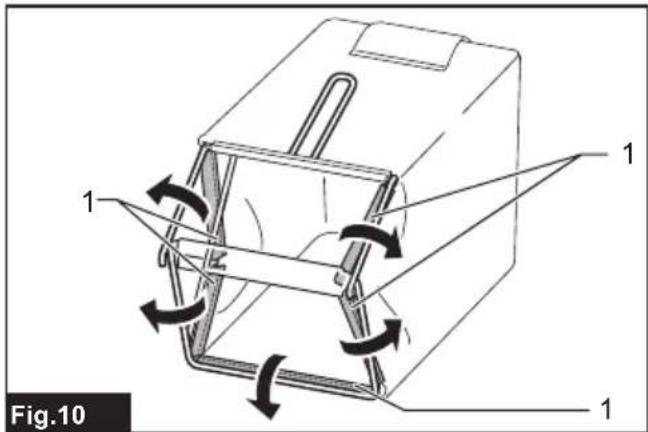
natural_image
Illustration of a hand using a tool to lift a carton, with no visible text or symbols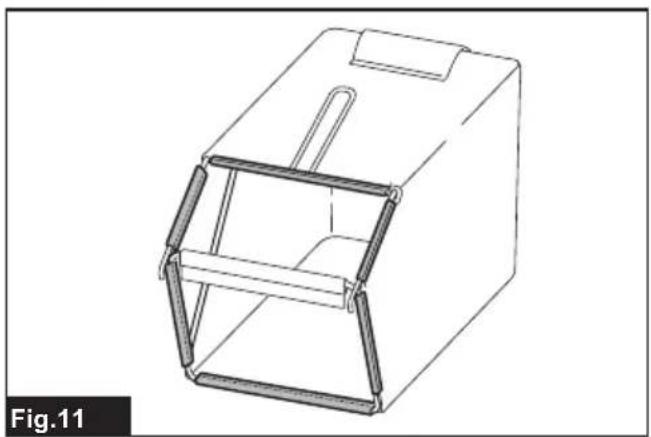
natural_image
Technical line drawing of a mechanical housing or enclosure with internal frame structure (no text or symbols)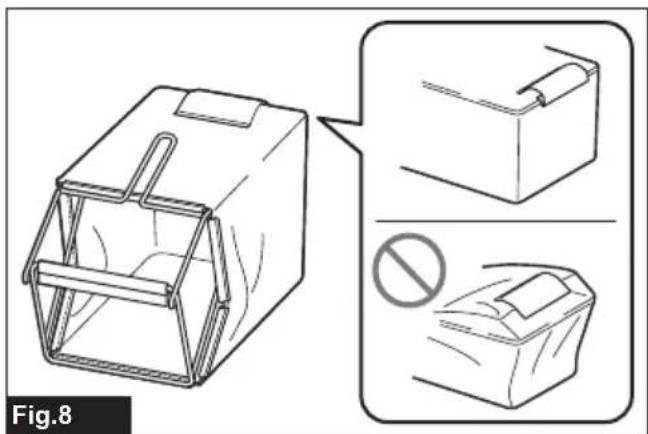
natural_image
Line drawing of a box with internal structure and two views showing different shapes (no text or symbols)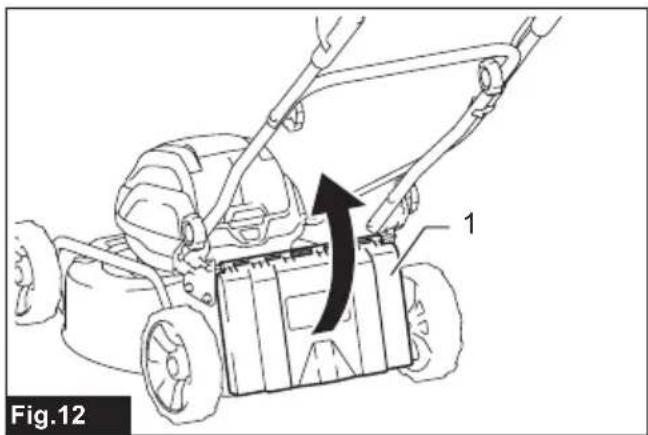
natural_image
Line drawing of a lawn mower with a directional arrow indicating motion (no text or symbols)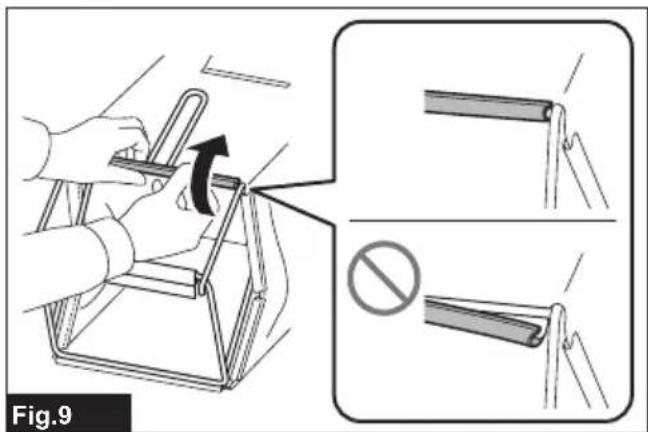

natural_image
Technical line drawing of a mechanical component with labeled part '1' (no text or symbols beyond label)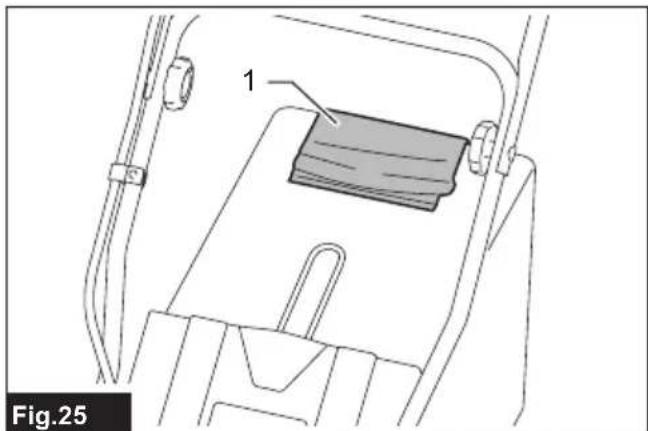
natural_image
Technical line drawing of a mechanical component with labeled part '1' (no text or symbols beyond label)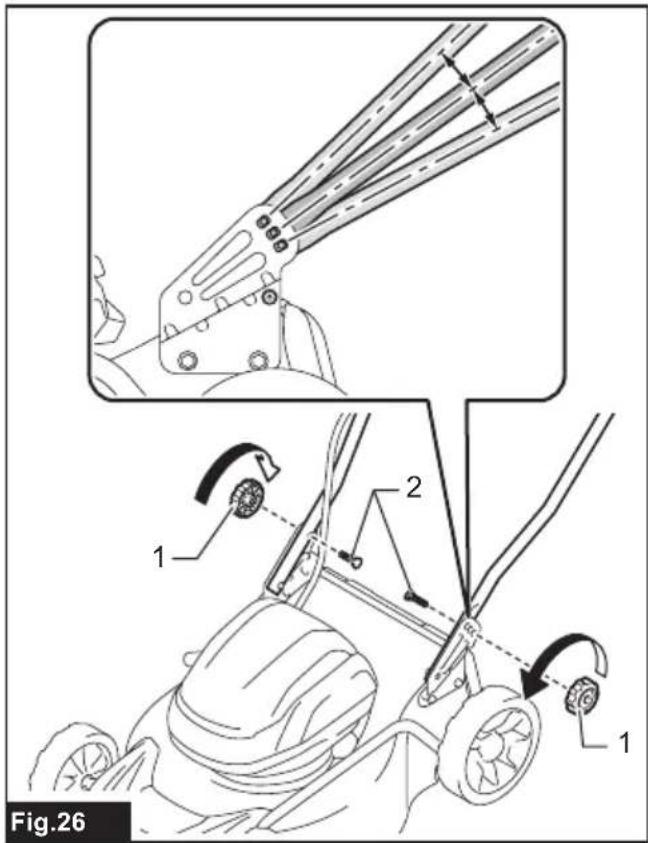
natural_image
Illustration of a crossed-out circle enclosing crops and plants, with no text or symbols present.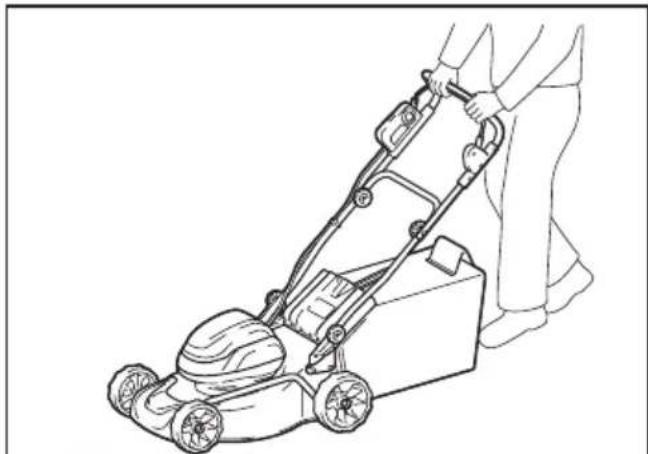
natural_image
Line drawing of a person using a lawn mower on a flatbed lawn (no text or symbols)Fig.29
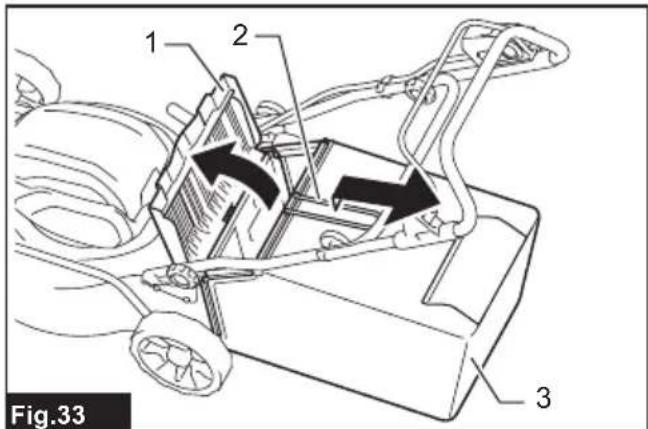
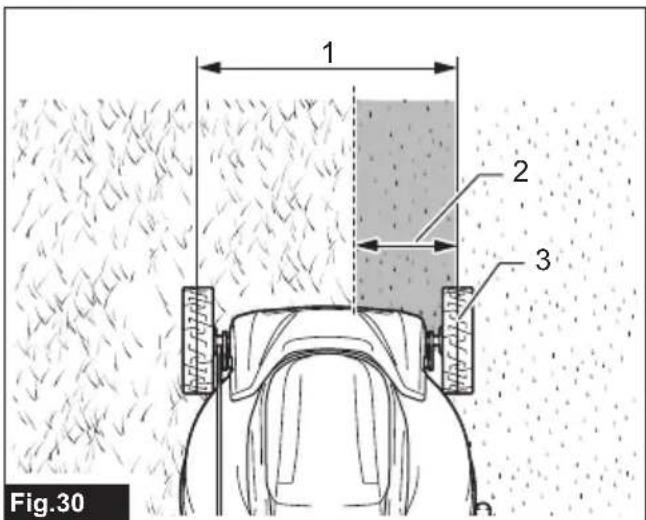

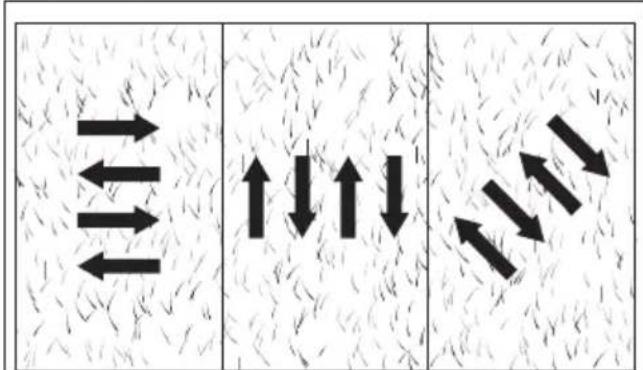
Fig.31
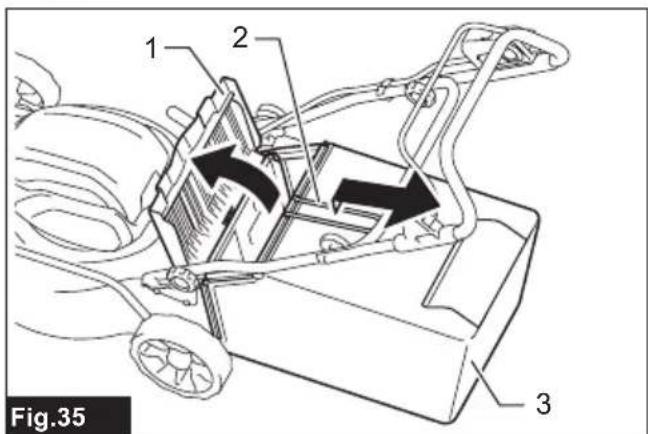
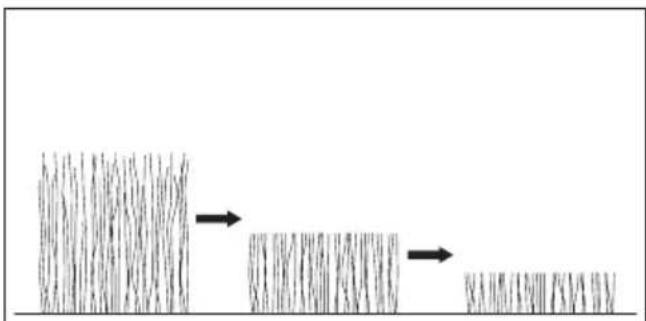
Fig.32
SPECIFICATIONS
| Model: DLM466 | ||
| Mowing width (blade diameter) 460 mm | ||
| No load speed Normal mode 3,300 min | -1 | |
| Part number of replacement mower blade | Straight mower blade 191W86-4 | |
| Mulching blade 191Y63-8 | ||
| Dimensions(L x W x H) | during operation L: 1,270 mm to 1,440 mm | W: 535 mmH: 915 mm to 1,110 mm |
| when stored(without grass basket) | L: 1,050 mm to 1,160 mmW: 535 mmH: 610 mm to 760 mm | |
| Rated voltage D.C. 36 V | ||
| Net weight 22.4 - 24.8 kg | ||
| Protection degree IPX4 | ||
- Due to our continuing program of research and development, the specifications herein are subject to change without notice.
• Specifications may differ from country to country.
- The weight may differ depending on the attachment(s), including the battery cartridge. The lightest and heaviest combination are shown in the table.
Applicable battery cartridge and charger
| Battery cartridge BL1815N / BL1820B / BL1830B / BL1840B / BL1850B / BL1860B | |
| Charger | DC18RC / DC18RD / DC18RE / DC18SD / DC18SE / DC18SF / DC18SH / DC18WC |
- Some of the battery cartridges and chargers listed above may not be available depending on your region of residence.

WARNING: Only use the battery cartridges and chargers listed above. Use of any other battery cartridges and chargers may cause injury and/or fire.
Symbols
The followings show the symbols which may be used for the equipment. Be sure that you understand their meaning before use.


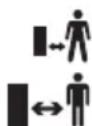


Warning; Disconnect battery before maintenance.
Guaranteed sound power level according to EU Outdoor Noise Directive.
Sound power level according to Australia NSW Noise Control Regulation.
Only for EU countries
Due to the presence of hazardous components in the equipment, waste electrical and electronic equipment, accumulators and batteries may have a negative impact on the environment and human health. Do not dispose of electrical and electronic appliances or batteries with household waste!
In accordance with the European Directive on waste electrical and electronic equipment and on accumulators and batteries and waste accumulators and batteries, as well as their adaptation to national law, waste electrical equipment, batteries and accumulators should be stored separately and delivered to a separate collection point for municipal waste, operating in accordance with the regulations on environmental protection.
This is indicated by the symbol of the crossed-out wheeled bin placed on the equipment.
Intended use
The machine is intended for lawn mowing.
Noise
The typical A-weighted noise level determined according to EN 62841-4-3:
Measured sound power level ( L_WA ): 92 dB (A)
Guaranteed sound power level (LWA): 95 dB (A)
Sound pressure level ( L_pA ): 84 dB (A)
Uncertainty for sound pressure level (K) : 3 dB (A)
NOTE: The declared noise emission value(s) has been measured in accordance with a standard test method and may be used for comparing one tool with another.
NOTE: The declared noise emission value(s) may also be used in a preliminary assessment of exposure.

WARNING: Wear ear protection.
⚠ WARNING: The noise emission during actual use of the power tool can differ from the declared value(s) depending on the ways in which the tool is used especially what kind of workpiece is processed.
⚠ WARNING: Be sure to identify safety measures to protect the operator that are based on an estimation of exposure in the actual conditions of use (taking account of all parts of the operating cycle such as the times when the tool is switched off and when it is running idle in addition to the trigger time).
Vibration
The vibration total value (tri-axial vector sum) determined according to EN 62841-4-3:
Vibration emission ( a_h ): 2.5 m/s ^2 or less
Uncertainty (K) : 1.5 m/s ^2
NOTE: The declared vibration total value(s) has been measured in accordance with a standard test method and may be used for comparing one tool with another.
NOTE: The declared vibration total value(s) may also be used in a preliminary assessment of exposure.

WARNING: The vibration emission during actual use of the power tool can differ from the declared value(s) depending on the ways in which the tool is used especially what kind of workpiece processed.

WARNING: Be sure to identify safety measures to protect the operator that are based on animation of exposure in the actual conditions of the (taking account of all parts of the operating cycle such as the times when the tool is switched and when it is running idle in addition to the bigger time).
Declarations of Conformity
For European countries only
The Declarations of conformity are included in Annex A to this instruction manual.
SAFETY WARNINGS
General power tool safety warnings

WARNING Read all safety warnings, instruc- ns, illustrations and specifications provided with s power tool. Failure to follow all instructions listed how may result in electric shock, fire and/or serious jury.
Save all warnings and instructions for future reference.
The term "power tool" in the warnings refers to your mains-operated (corded) power tool or battery-operated (cordless) power tool.
Cordless lawnmower safety warnings
- Do not use the lawnmower in bad weather conditions, especially when there is a risk of lightning. This decreases the risk of being struck by lightning.
- Thoroughly inspect the area for wildlife where the lawnmower is to be used. Wildlife may be injured by the lawnmower during operation.
- Thoroughly inspect the area where the lawn-mower is to be used and remove all stones, sticks, wires, bones, and other foreign objects. Thrown objects can cause personal injury.
- Before using the lawnmower, always visually inspect to see that the blade and the blade assembly are not worn or damaged. Worn or damaged parts increase the risk of injury.
- Check the grass catcher frequently for wear or deterioration. A worn or damaged grass catcher
may increase the risk of personal injury.
- Keep guards in place. Guards must be in working order and be properly mounted. A guard that is loose, damaged, or is not functioning correctly may result in personal injury.
- Keep all cooling air inlets clear of debris. Blocked air inlets and debris may result in overheating or risk of fire.
- While operating the lawnmower, always wear non-slip and protective footwear. Do not operate the lawnmower when barefoot or wearing open sandals. This reduces the chance of injury to the feet from contact with the moving blade.
- While operating the lawnmower, always wear long trousers. Exposed skin increases the likelihood of injury from thrown objects.
- Do not operate the lawnmower in wet grass. Walk, never run. This reduces the risk of slipping and falling which may result in personal injury.
- Do not operate the lawnmower on excessively steep slopes. This reduces the risk of loss of control, slipping and falling which may result in personal injury.
- When working on slopes, always be sure of your footing, always work across the face of slopes, never up or down and exercise extreme caution when changing direction. This reduces the risk of loss of control, slipping and falling which may result in personal injury.
- Use extreme caution when reversing or pulling the lawnmower towards you. Always be aware of your surroundings. This reduces the risk of tripping during operation.
- Do not touch blades and other hazardous moving parts while they are still in motion. This reduces the risk of injury from moving parts.
- When clearing jammed material or cleaning the lawnmower, make sure all power switches are off and the battery pack is disconnected. Unexpected operation of the lawnmower may result in serious personal injury.
Additional safety warnings
Training
- Read the instructions carefully. Be familiar with the controls and the proper use of the mower.
- Never allow children or people unfamiliar with these instructions to use the mower. Local regulations can restrict the age of the operator.
- Never operate the mower while people, especially children, or pets are nearby.
- Keep in mind that the operator or user is responsible for accidents or hazards occurring to other people or their property.
Preparation
- Be sure the area is clear of other people before mowing. Stop mower if anyone enters the area.
- Watch for holes, ruts, bumps, rocks, or other hidden objects. Uneven terrain could cause a slip and fall accident. Tall grass can hide obstacles.
Operation
- Stop the mower and turn off the machine, and make sure that all moving parts have come to a complete stop:
• whenever you leave the mower; - before clearing blockages or unclogging chute;
-
before checking, cleaning or working on the mower.
-
If the mower strikes a foreign object, follow these steps:
- Stop the mower, release the switch lever and wait until the blade comes to a complete stop.
- Remove the battery cartridge.
- Thoroughly inspect the mower for any damage.
- Replace the blade if it is damaged in any way. Repair any damage before restarting and continuing to operate the mower.
- If the mower starts to vibrate abnormally or you notice anything unusual, follow these steps immediately:
- Stop the mower, release the switch lever and wait until the blade comes to a complete stop.
- Remove the battery cartridge.
- Inspect for damage and replace or repair any damaged parts.
- Check for and tighten any loose parts.
-
Never operate the mower with defective guards or shields, or without safety devices, for example deflectors and/or grass basket, in place.
-
Operate the mower only in daylight or in good artificial light.
-
Switch on the mower carefully according to instructions and with feet well away from the blade(s).
-
Take care against injury to feet and hands from the mower blades.
-
Stop the blade(s) if the mower has to be tilted for transportation when crossing surfaces other than grass, and when transporting the mower to and from the area to be used.
-
Do not tilt the mower when switching on the motor, except if the mower has to be tilted for starting. In this case, do not tilt it more than absolutely necessary and lift only the part, which is away from the operator. Always ensure that both hands are in the operating position before returning the mower to the ground.
-
Do not put hands or feet near or under rotating parts. Keep clear of the discharge opening at all times.
-
Always keep a firm hold on the handle.
-
Do not grasp the exposed cutting blades or cutting edges when picking up or holding the mower.
-
Keep hands and feet away from rotating blades. Caution - Blades coast after the mower is switched off.
-
Never attempt to make cutting height adjustments while mower is running if the mower has cutting height adjustment feature.
- Release switch lever and wait for blade rotation to stop before crossing driveways, walks, roads, and any gravel-covered areas. Also turn off the machine if you leave the mower, reach to pick up or remove something out of your way, or for any other reason that may distract you from what you are doing.
- Do not start the mower when standing in front of the discharge opening.
- Never direct discharged material toward anyone. Avoid discharging material against a wall or obstruction. Material may ricochet back toward the operator. Stop the blade when crossing gravel surfaces.
- Do not pull the mower backwards unless absolutely necessary. When you are compelled to back the mower from a fence or other similar obstruction, look down and behind before and while moving backwards.
- Shut the motor off and wait until the blade comes to a complete stop before removing the grass catcher. Beware that the blades coast after the machine is turned off.
- When operating the machine, pay attention to piping and wiring.
Maintenance and storage
- Inspect and maintain the mower regularly.
- Keep all nuts, bolts, and screws tight to be sure the equipment is in safe working condition.
- Check the grass basket frequently for wear or deterioration. For storage, always make sure the grass basket is empty. Replace a worn grass basket with a new factory replacement for safety.
- Use only the manufacturer genuine blades specified in this manual.
- Be careful during adjustment of the mower to prevent entrapment of the fingers between moving blades and fixed parts of the mower.
- Check the blade mounting bolt at frequent intervals for proper tightness.
- Always allow the mower to cool down before storing.
- When servicing the blades be aware that, even though the power source is switched off, the blades can still be moved.
- Never remove or tamper with safety devices. Check their proper operation regularly. Never do anything to interfere with the intended function of a safety device or to reduce the protection provided by a safety device.
Electrical and battery safety
- Do not open or mutilate the battery(ies).
Released electrolyte is corrosive and may cause damage to the eyes or skin. It may be toxic if swallowed. - Do not charge battery in rain, or in wet locations.
-
Do not charge the battery outdoors.
-
Do not handle charger, including charger plug, and charger terminals with wet hands.
- Avoid dangerous environment. Don't use the machine in dump or wet locations or expose it to rain. Water entering the machine will increase the risk of electric shock.
SAVE THESE INSTRUCTIONS.
WARNING: DO NOT let comfort or familiarity with product (gained from repeated use) replace strict adherence to safety rules for the subject product. MISUSE or failure to follow the safety rules stated in this instruction manual may cause serious personal injury.
Important safety instructions for battery cartridge
- Before using battery cartridge, read all instructions and cautionary markings on (1) battery charger, (2) battery, and (3) product using battery.
- Do not disassemble or tamper with the battery cartridge. It may result in a fire, excessive heat, or explosion.
- If operating time has become excessively shorter, stop operating immediately. It may result in a risk of overheating, possible burns and even an explosion.
- If electrolyte gets into your eyes, rinse them out with clear water and seek medical attention right away. It may result in loss of your eyesight.
- Do not short the battery cartridge:
(1) Do not touch the terminals with any conductive material.
(2) Avoid storing battery cartridge in a container with other metal objects such as nails, coins, etc.
(3) Do not expose battery cartridge to water or rain.
A battery short can cause a large current flow, overheating, possible burns and even a breakdown. - Do not store and use the tool and battery cartridge in locations where the temperature may reach or exceed 50 °C (122 °F).
- Do not incinerate the battery cartridge even if it is severely damaged or is completely worn out. The battery cartridge can explode in a fire.
- Do not nail, cut, crush, throw, drop the battery cartridge, or hit against a hard object to the battery cartridge. Such conduct may result in a fire, excessive heat, or explosion.
- Do not use a damaged battery.
- The contained lithium-ion batteries are subject to the Dangerous Goods Legislation requirements.
For commercial transports e.g. by third parties, forwarding agents, special requirement on packaging and labeling must be observed. For preparation of the item being shipped, consulting an expert for hazardous material is required. Please also observe possibly more detailed
national regulations.
Tape or mask off open contacts and pack up the battery in such a manner that it cannot move around in the packaging.
- When disposing the battery cartridge, remove it from the tool and dispose of it in a safe place. Follow your local regulations relating to disposal of battery.
- Use the batteries only with the products specified by Makita. Installing the batteries to non-compliant products may result in a fire, excessive heat, explosion, or leak of electrolyte.
- If the tool is not used for a long period of time, the battery must be removed from the tool.
- During and after use, the battery cartridge may take on heat which can cause burns or low temperature burns. Pay attention to the handling of hot battery cartridges.
- Do not touch the terminal of the tool immediately after use as it may get hot enough to cause burns.
- Do not allow chips, dust, or soil stuck into the terminals, holes, and grooves of the battery cartridge. It may cause heating, catching fire, burst and malfunction of the tool or battery cartridge, resulting in burns or personal injury.
- Unless the tool supports the use near high-voltage electrical power lines, do not use the battery cartridge near high-voltage electrical power lines. It may result in a malfunction or breakdown of the tool or battery cartridge.
- Keep the battery away from children.
SAVE THESE INSTRUCTIONS.
⚠️CAUTION: Only use genuine Makita batteries. Use of non-genuine Makita batteries, or batteries that have been altered, may result in the battery bursting causing fires, personal injury and damage. It will also void the Makita warranty for the Makita tool and charger.
Tips for maintaining maximum battery life
- Charge the battery cartridge before completely discharged. Always stop tool operation and charge the battery cartridge when you notice less tool power.
- Never recharge a fully charged battery cartridge. Overcharging shortens the battery service life.
- Charge the battery cartridge with room temperature at 10 °C - 40 °C ( 50 °F - 104 °F ). Let a hot battery cartridge cool down before charging it.
- When not using the battery cartridge, remove it from the tool or the charger.
- Charge the battery cartridge if you do not use it for a long period (more than six months).
ASSEMBLY
WARNING: Always be sure that the battery cartridge is removed before carrying out any work on the machine. Failure to remove the battery cartridge may result in serious personal injury from accidental start-up.
WARNING: Never start the mower unless it is completely assembled. Operation of the machine in a partially assembled state may result in serious personal injury from accidental start-up.
Installing the handle
NOTICE: When installing handles, position the cord so that the code is not pinched between the handles. If the cord is damaged, the mower switch may not work.
- Align the holes in the lower handle with the holes in the upper handle, then insert the bolts from outside, and then tighten the thumb nuts.
▶ Fig.1: 1. Upper handle 2. Hole 3. Thumb nut 4. Lower handle 5. Bolt
CAUTION: Hold the upper handle firmly so that the upper handle does not drop off your hand. Otherwise, the upper handle may fall and cause an injury.
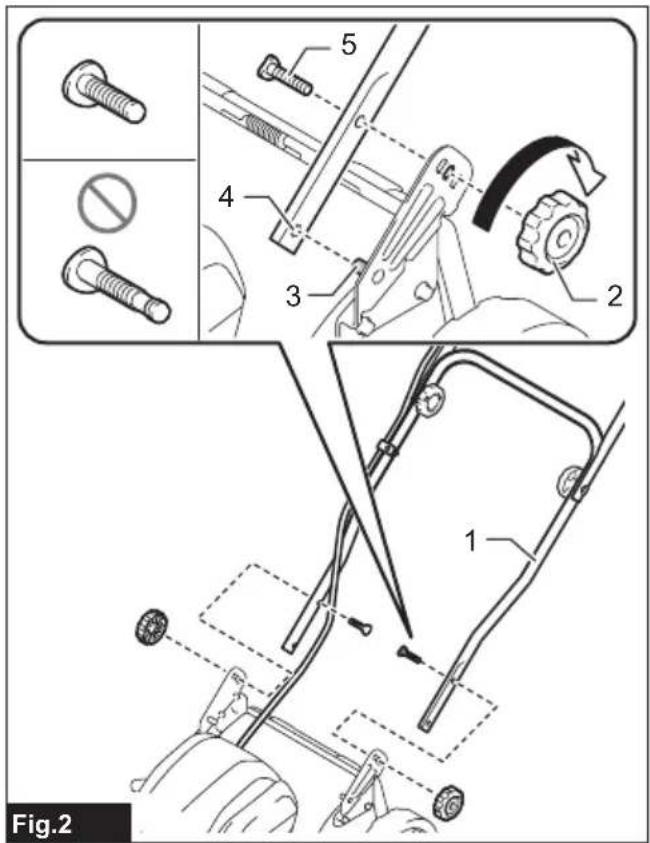
- Attach the lower handle so that the holes in the lower handle fit in the protrusions on the mower body. Insert the bolts from inside as shown in the figure, and then tighten the thumb nuts.
▶ Fig.2: 1. Lower handle 2. Thumb nut 3. Protrusion 4. Hole 5. Bolt
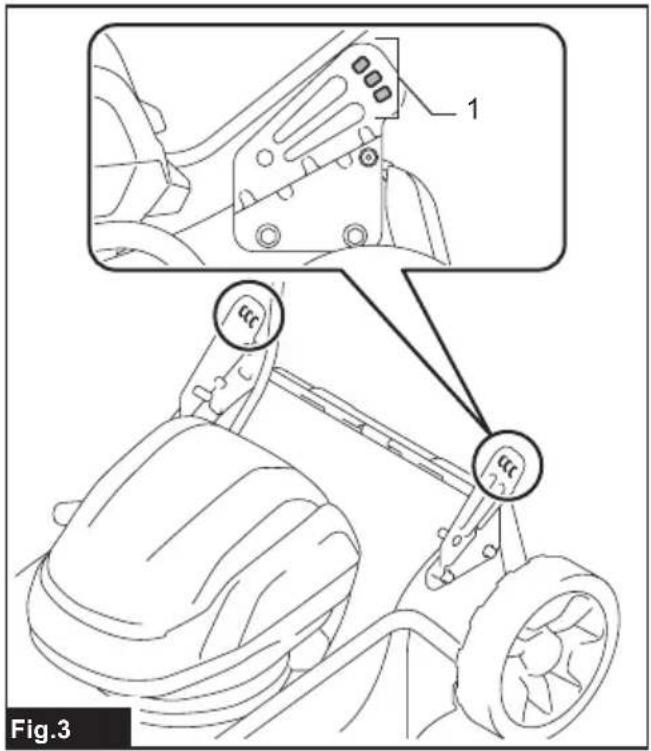
NOTE: The handle height can be adjusted to three levels by changing the position of the bolt. For details, refer to the section for adjusting the handle height.
▶ Fig.3: 1. Holes
Removing the mulching attachment
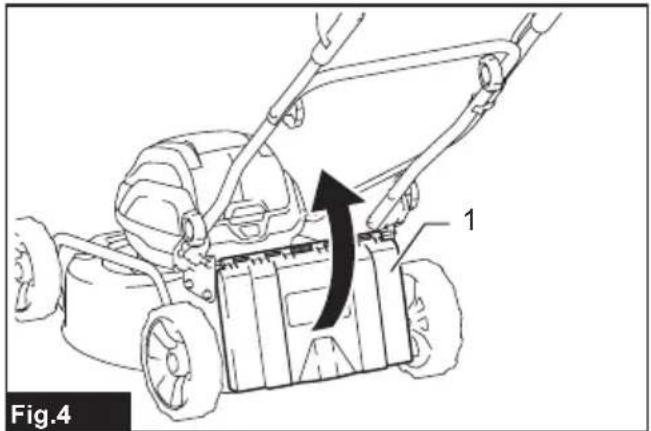
- Open the rear cover.
▶ Fig.4: 1. Rear cover - Remove the mulching attachment while holding down the lever.
▶ Fig.5: 1. Lever 2. Mulching attachment
Assembling the grass basket
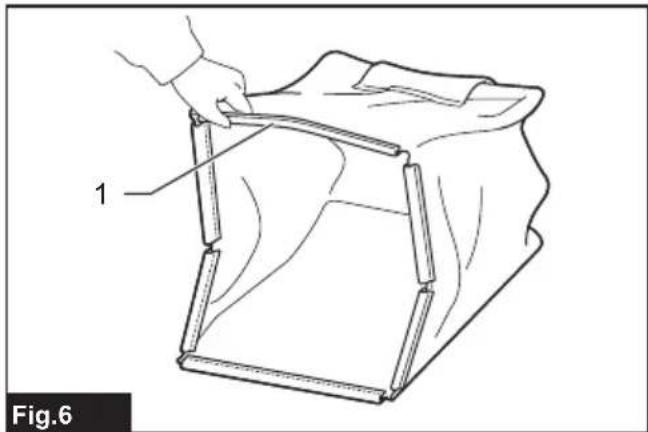
- Pick up the upper clip of the grass basket.
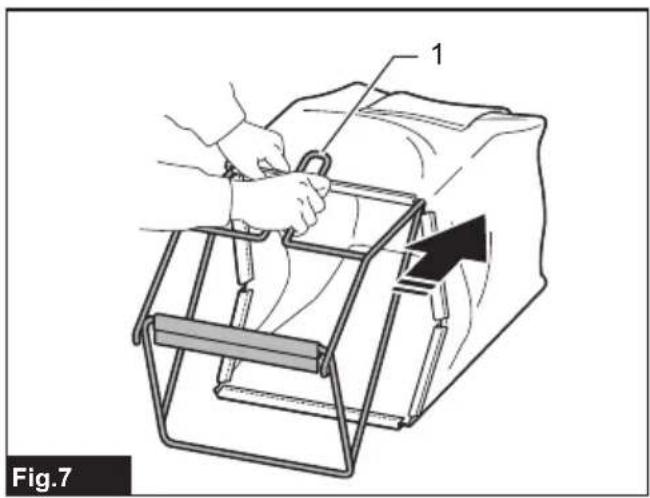
▶ Fig.6: 1. Upper clip - Insert the frame into the grass basket as far as it will go while holding the handle of the frame.
▶ Fig.7: 1. Handle
NOTICE: Do not insert the handle into the grass basket. Be sure to insert the frame along the stitch of the grass basket.
- Make sure that there is no sagging on the corners of the grass basket.
▶ Fig.8 - Open the upper clip, and attach it to the frame.
▶ Fig.9 - Attach all the other clips as shown in the figure. Make sure that all the clips are securely attached to the frame.
▶ Fig.10: 1. Clip
▶ Fig.11
Installing the grass basket
- Open the rear cover.
▶ Fig.12: 1. Rear cover - Hook the grass basket on the rod of the mower body as shown in the figure.
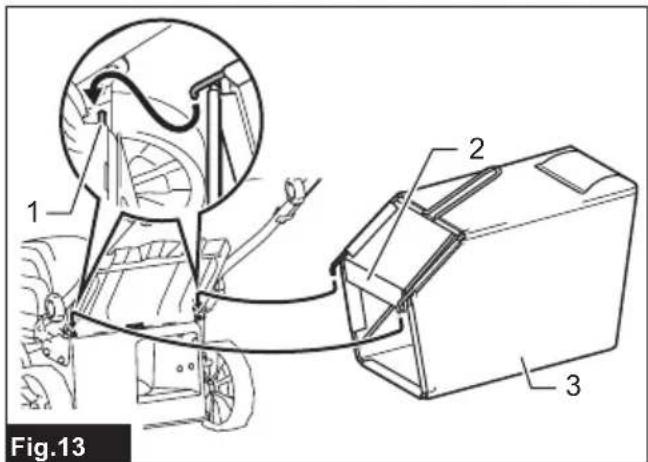
▶ Fig.13: 1. Rod 2. Guard 3. Grass basket
NOTICE: Make sure that the guard on the grass basket is facing downward. Otherwise, the grass basket may not catch all of cut-off grass.
Attaching the mulching attachment
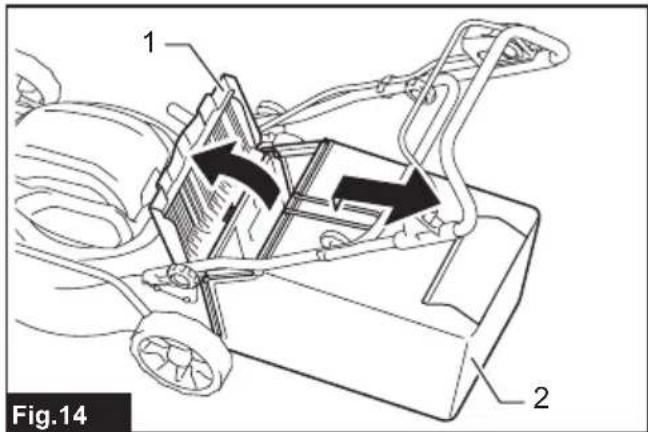
- Open the rear cover, and then remove the grass basket.
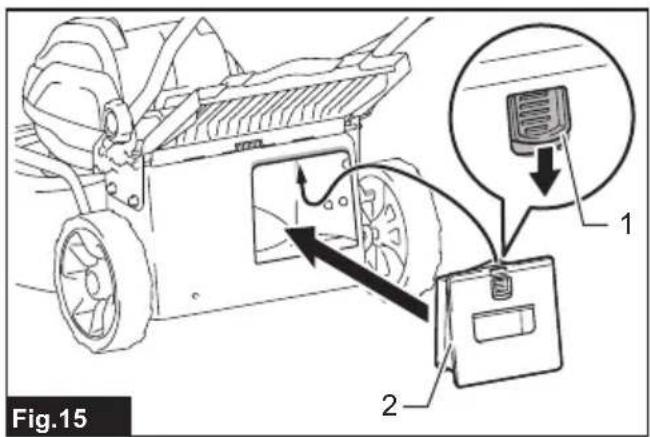
▶ Fig.14: 1. Rear cover 2. Grass basket - Attach the mulching attachment while holding down the lever, and then release the lever to lock the mulching attachment.
▶ Fig.15: 1. Lever 2. Mulching attachment
FUNCTIONAL DESCRIPTION
Installing or removing battery cartridge
⚠️ CAUTION: When replacing the battery, be sure to hold the battery cover firmly.
⚠️ CAUTION: Always switch off the tool before installing or removing of the battery cartridge.
⚠️ CAUTION: Hold the machine and the battery cartridge firmly when installing or removing battery cartridge. Failure to hold the tool and the battery cartridge firmly may cause them to slip off your hands and result in damage to the tool and battery cartridge and a personal injury.
CAUTION: Make sure that you lock the battery cover before use. Otherwise, mud, dirt, or water may cause damage to the product or the battery cartridge.
CAUTION: Always install the battery cartridge fully until the red indicator cannot be seen. If not, it may accidentally fall out of the tool, causing injury to you or someone around you.
⚠️ CAUTION: Do not install the battery cartridge forcibly. If the cartridge does not slide in easily, it is not being inserted correctly.
NOTE: The tool does not work with only one battery cartridge.
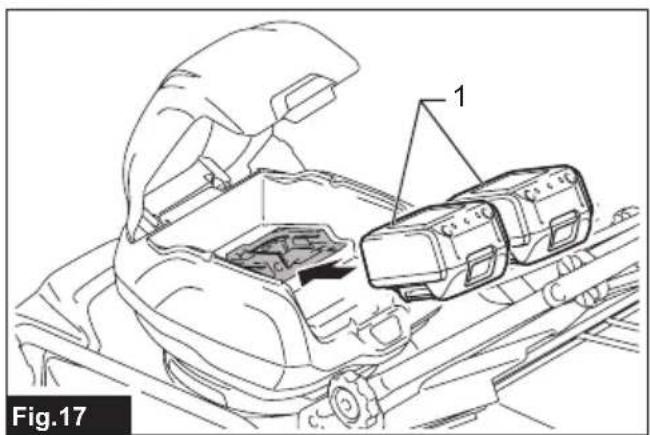
To install the battery cartridge;
- Pull up the cover tab to open the battery cover.
▶ Fig.16: 1. Battery cover 2. Cover tab - Align the tongue on the battery cartridge with the slot on the mower then slide the cartridge until it locks in place with a little click.
▶ Fig.17: 1. Battery cartridge - Close the battery cover and push the battery cover down until it locks in place with a little click.
To remove the battery cartridge from the mower;
- Pull up the cover tab to open the battery cover.
- Pull out the battery cartridge from the mower while sliding the button on the front of the battery cartridge.
- Close the battery cover and push the battery cover down until it locks in place with a little click.
Tool / battery protection system
The tool is equipped with a tool/battery protection system. This system automatically cuts off power to the motor to extend tool and battery life. The tool will automatically stop during operation if the tool or battery is placed under one of the following conditions:
Overload protection
When the battery is operated in a manner that causes it to draw an abnormally high current, the tool automatically stops and the mode switching lamp blinks in
green. In this situation, turn the tool off and stop the application that caused the tool to become overloaded. Then turn the tool on to restart.
Overheat protection
When the tool or battery is overheated, the tool stops automatically and the indicator lamp on the machine lights up in red. In this case, let the tool and battery cool before turning the tool on again.
Overdischarge protection
When the battery capacity is not enough, the tool stops automatically and the indicator lamp on the machine lights up in red. In this case, remove the battery from the tool and charge the battery cartridges or change the battery cartridges to fully charged ones.
Protections against other causes
Protection system is also designed for other causes that could damage the machine and allows the machine to stop automatically. Take all the following steps to clear the causes, when the machine has been brought to a temporary halt or stop in operation.
- Turn the machine off, and then turn it on again to restart.
- Charge the battery(ies) or replace it/them with recharged battery(ies).
- Let the machine and battery(ies) cool down.
If no improvement can be found by restoring protection system, then contact your local Makita Service Center.
NOTICE: If the machine stops due to a cause not described above, refer to the section for troubleshooting.
Indicating the remaining battery capacity
With the machine
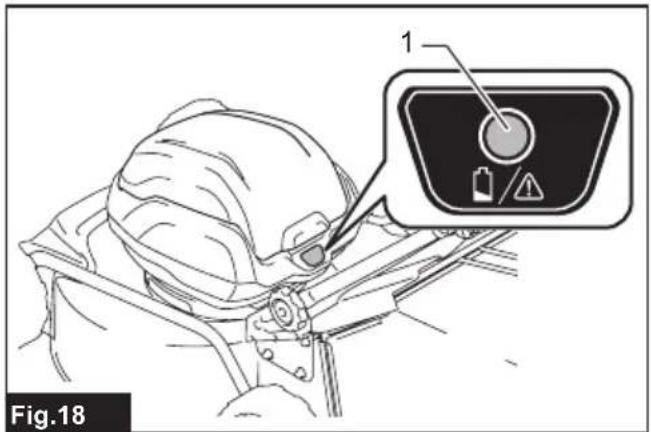
When the remaining battery capacity gets low, the indicator lamp blinks in red. By further use, the machine stops and the indicator lamp lights up in red. In this situation, charge the battery cartridge.
▶ Fig.18: 1. Indicator lamp
With the battery cartridge
Only for battery cartridges with the indicator
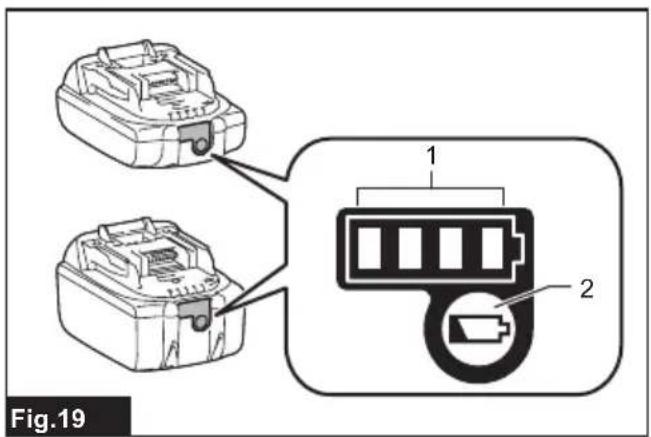
Press the check button on the battery cartridge to indicate the remaining battery capacity. The indicator lamps light up for a few seconds.
▶ Fig.19: 1. Indicator lamps 2. Check button
| Indicator lamps Remaining | capacity | ||
| Lighted Off | Blinking | ||
| 75% to 100% | |||
| 50% to 75% | |||
| Indicator lamps Remaining | capacity | ||
| Lighted Off | Blinking | ||
 | 25% to 50% | ||
 | 0% to 25% | ||
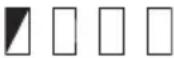 | Charge the battery. | ||
 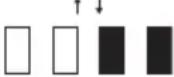 | The battery may have malfunctioned. | ||
| NOTE: Depending on the conditions of use and the ambient temperature, the indication may differ slightly from the actual capacity. |
| NOTE: The first (far left) indicator lamp will blink when the battery protection system works. |
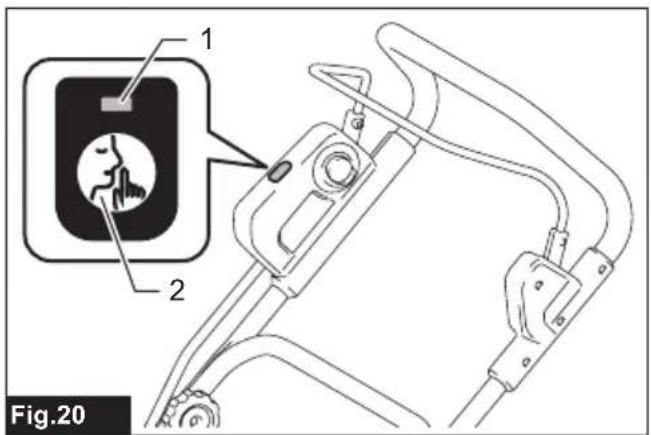
Mode switching button
You can switch the operating mode by pressing the mode switching button. The initial state, after installing the battery cartridge, is the normal mode. Refer to the table below for each mode.
| Mode Lamp Description | ||
| Normal mode The | mode switching lamp is off. | The machine works in the normal mode. |
| Noise reduction mode | The mode switching lamp lights up in green. | You can decrease the noise at mowing. |
▶ Fig.20: 1. Mode switching lamp 2. Mode switching button
Switch action
WARNING: Before installing the battery cartridge, always check to see that the switch lever actuates properly and returns to the original position when released. Operating a machine with a switch that does not actuate properly can lead to loss of control and serious personal injury.
NOTE: The mower does not start without pressing the lock-off button even the switch lever is pulled.
NOTE: Mower may not start due to the overload when you try to mow long or dense grass at a time. Increase the mowing height in this case.
This machine is equipped with the lock-off button. If you notice anything unusual with the lock-off button, stop the operation immediately and have the machine checked by your nearest Makita Authorized Service Center.
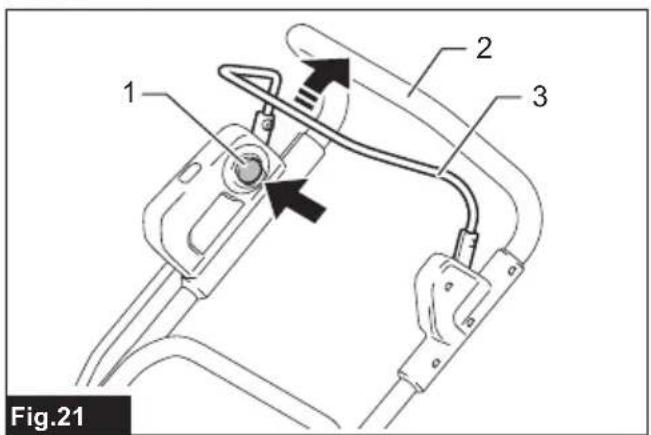
- Install the battery cartridge, and then close the battery cover firmly.
- Press the lock-off button and hold it.
-
Grab the upper handle and pull the switch lever.
▶ Fig.21: 1. Lock-off button 2. Upper handle 3. Switch lever -
Release the lock-off button as soon as the motor starts running. The mower will continue to run until you release the switch lever.
-
Release the switch lever to stop the motor.
Adjusting the mowing height
WARNING: Never put your hand or leg under the mower body when adjusting the mowing height.
WARNING: Always make sure that the lever fits in the groove properly before operation.
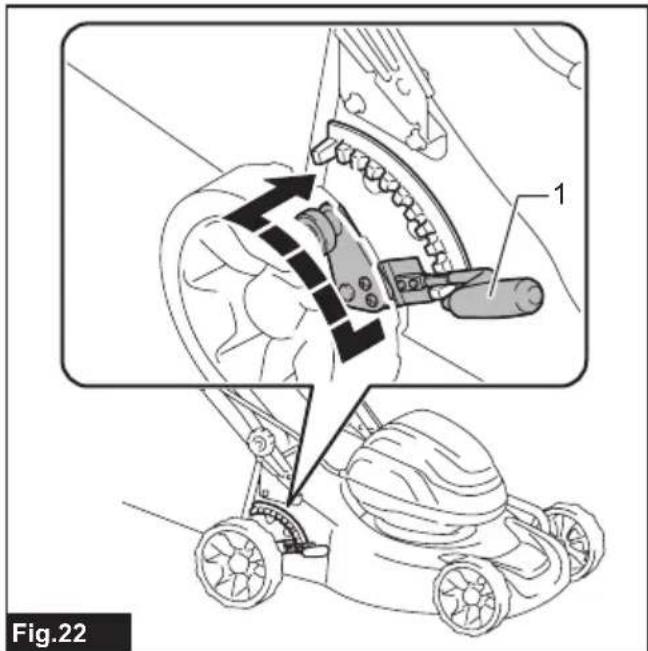
The mowing height can be adjusted in the range of between 20 mm and 75 mm.
Turn off the machine, and then pull the mowing height adjusting lever outward of the mower body and move it to your desired mowing height.
▶ Fig.22: 1. Mowing height adjusting lever
The table below shows the relationship between the number on the mower body and the approximate mowing height.
| Number Mowing height | |
| 1 20 mm | |
| 2 25 mm | |
| 3 30 mm | |
| 4 35 mm | |
| 5 41 mm | |
| 6 47 mm | |
| 7 54 mm | |
| 8 61 mm | |
| 9 68 mm | |
| 10 75 mm | |
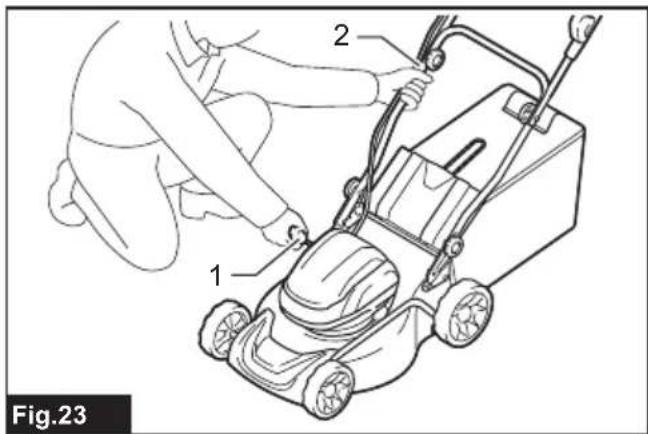
Hold the lower handle with one hand, and then move the mowing height adjusting lever with the other hand.
▶ Fig.23: 1. Mowing height adjusting lever 2. Lower handle
NOTE: The mowing height figures should be used just as a guideline. Depending on the conditions of the lawn or the ground, the actual lawn height may become slightly different from the set height.
NOTE: Try a test mowing of grass in a less conspicuous place to get your desired height.
Grass level indicator
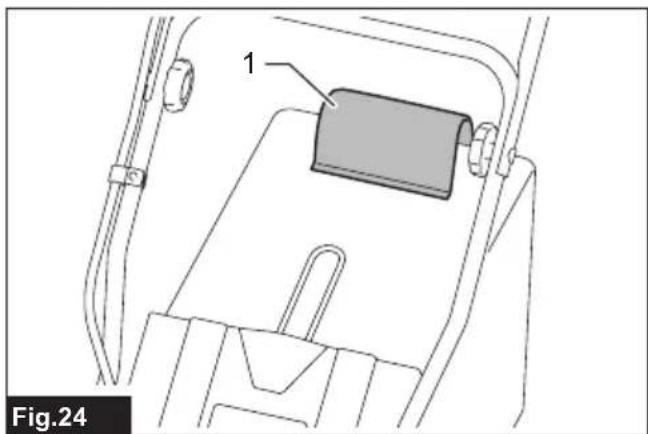
The grass level indicator shows the volume of mowed grass. When the grass basket is not full, the indicator floats while the mower blade is running.
▶ Fig.24: 1. Grass level indicator
When the grass basket is almost full, the indicator does not float while the mower blade is running. In this case, stop the operation immediately and empty the basket.
▶ Fig.25: 1. Grass level indicator
NOTE: This indicator is a rough guide. Depending on the conditions of inside of the basket, this indicator may not work properly.
Adjusting the handle height
CAUTION: Before removing the bolts, hold the upper handle firmly. Otherwise, the handle may fall and cause an injury.
The handle height can be adjusted to three levels.
- Loosen the thumb nuts of the lower handle, and then remove the bolts, and thumb nuts.
▶ Fig.26: 1. Thumb nut 2. Bolt - Adjust the handle height.
- Insert the bolts from inside, and then tighten the thumb nuts.
Using mulching attachment
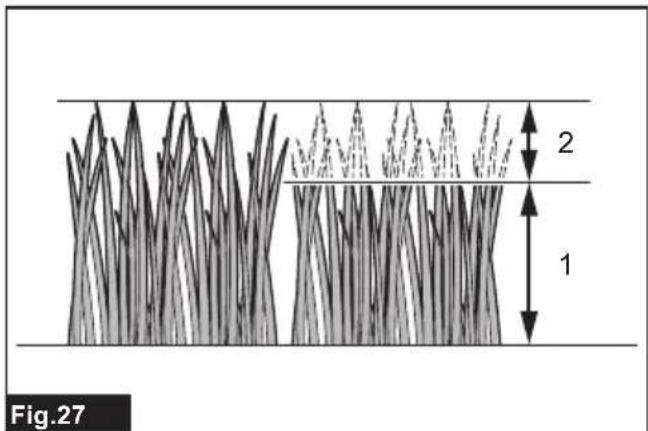
The mulching attachment allows you to return the cut grass to the ground without gathering the cut grass in the grass basket.
NOTICE: When using the machine with the mulching attachment, make sure that the total length of grass after cutting is 30 mm or more, and the cut length is 15 mm or less.
▶ Fig.27: (1) 30 mm or more (2) 15 mm or less
Electronic function
The machine is equipped with the electronic functions for easy operation.
- Constant speed control
Electronic speed control for obtaining constant speed. Possible to get fine finish, because the rotating speed is kept constant even under load condition.
- Electric brake
This machine is equipped with an electric brake. If the machine consistently fails to quickly stop the mower blade after releasing the switch lever, have the machine serviced at Makita Authorized Service Center.
OPERATION
Mowing
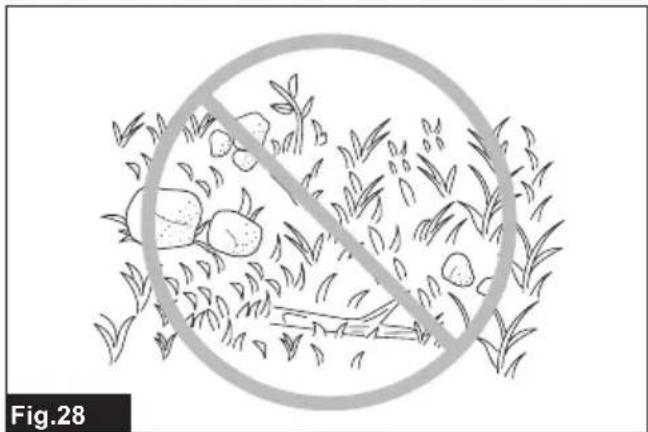
WARNING: Before mowing, clear away sticks and stones from mowing area. Furthermore, clear away any weeds from mowing area in advance.
WARNING: Always wear the safety goggles or safety glasses with side shields when operating the mower.
CAUTION: If the cut grass or foreign object blocks up inside of the mower body, be sure to remove the battery cartridges and wear gloves before removing the grass or foreign object.
NOTICE: Use this machine for mowing lawn only. Do not mow weeds with this machine.
▶ Fig.28
Firmly hold the handle with both hands when mowing.
The mowing speed guideline is approximately 1 meter per 1 seconds.
▶ Fig.29
The center lines of the front wheels are guidelines to mowing width. Using the center lines as guidelines, mow in strips. Overlap by one half to one third the previous strip to mow the lawn evenly.
▶ Fig.30: 1. Mowing width 2. Overlapping area
- Center line
Change the mowing direction each time to prevent the grass grain pattern from forming in just one direction.
▶ Fig.31
Periodically check the grass basket for mowed grass. Empty the grass before it becomes full. Before every periodical check, be sure to stop and turn off the machine.
NOTE: Using the mower with the grass basket full prevents smooth blade rotation and places an extra load on the motor, which may cause breakdown.
Mowing a long-grass lawn
Do not try to cut long grass all at once. Instead, mow the lawn in steps. Leave a day or two between mowings until the lawn becomes evenly short.
▶ Fig.32
NOTE: Mowing long grass to a short length all at once may cause the grass to die. The cut grass may also block up inside of the mower body.
Emptying the grass basket
⚠ WARNING: To reduce a risk of accident, regularly check the grass basket for any damage or weakened strength. Replace the grass basket if necessary.
- Release the switch lever.
- Open the rear cover and take out the grass basket by holding the handle.
▶ Fig.33: 1. Rear cover 2. Handle 3. Grass basket - Empty the grass basket.
MAINTENANCE
⚠ WARNING: Always be sure that the battery cartridge is removed from the machine before storing or carrying the machine or attempting to perform inspection or maintenance.
WARNING: Wear gloves when performing inspection or maintenance.
⚠ WARNING: Always wear the safety goggles or safety glasses with side shields when performing inspection or maintenance.
NOTICE: Never use gasoline, benzine, thinner, alcohol or the like. Discoloration, deformation or cracks may result.
To maintain product SAFETY and RELIABILITY, repairs, any other maintenance or adjustment should be performed by Makita Authorized or Factory Service Centers, always using Makita replacement parts.
Maintenance
- Remove the battery cartridge, and then close the battery cover.
- Put the mower on its side and clean grass clippings accumulated on the underside of mower deck.
- Pour water toward the bottom of the machine to which the mower blade is attached.
NOTICE: Do not wash the machine with high pressure water.
- Check all nuts, bolts, knobs, screws, fasteners etc. for tightness.
- Inspect moving parts for damage, breakage, and wear. Damaged or missing parts should be repaired or replaced.
- Store the mower in a safe place out of the reach of children.
Carrying the mower
When carrying the mower, hold the front grip and lower handle with two people as shown in the figure.
▶ Fig.34: 1. Lower handle 2. Front grip
Storing
Store the mower in a cool, dry, and locked indoor place.
- Open the rear cover and take out the grass basket by holding the handle.
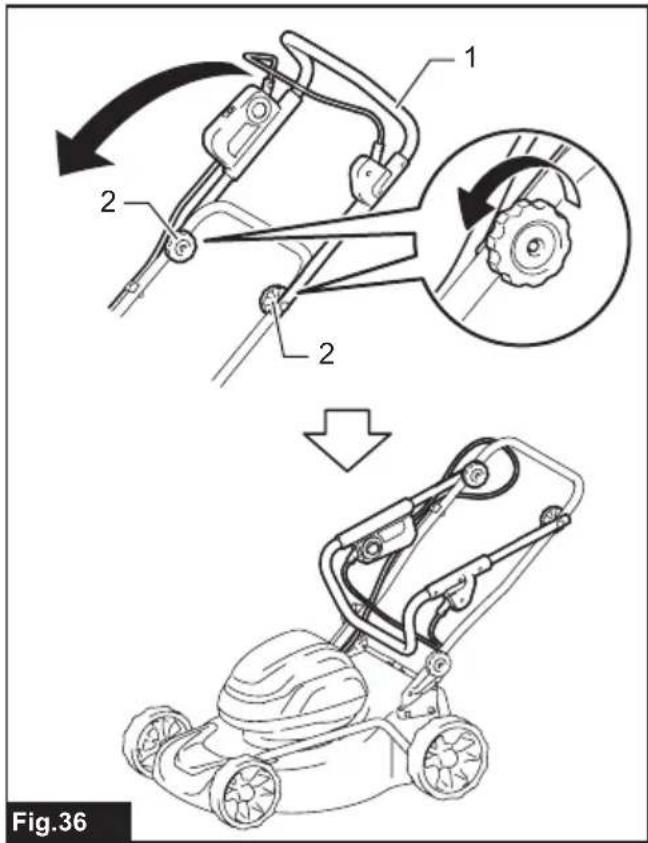
▶ Fig.35: 1. Rear cover 2. Handle 3. Grass basket - Loosen the thumb nuts, and then fold the upper handle.
▶ Fig.36: 1. Upper handle 2. Thumb nut
Removing or installing the mower blade
WARNING: Always remove the battery cartridge when removing or installing the mower blade. Failure to remove the battery cartridge may cause a serious injury.
WARNING: The mower blade coasts for a few seconds after releasing the switch. Do not start any operation until the mower blade comes to a complete stop.
WARNING: Always wear gloves when handling the mower blade.
NOTICE: When removing or installing the mower blade, use the box wrench included in the machine package.
Removing the mower blade
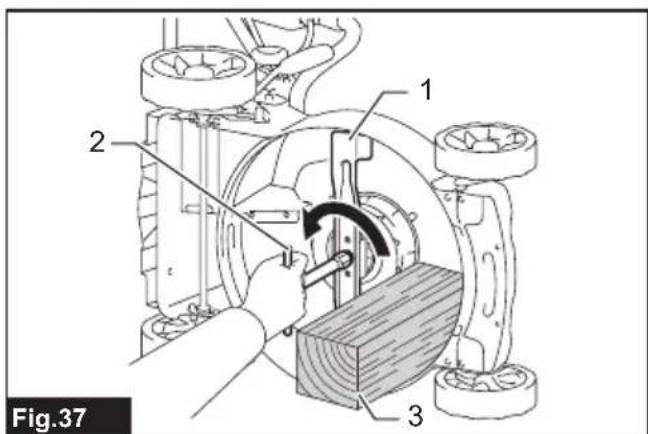
- Put the mower on its side so that the mowing height adjusting lever comes to the upper side.
- To lock the mower blade, insert a lumber or similar into the mower.
- Turn the bolt counterclockwise with the wrench.
▶ Fig.37: 1. Mower blade 2. Wrench 3. Lumber
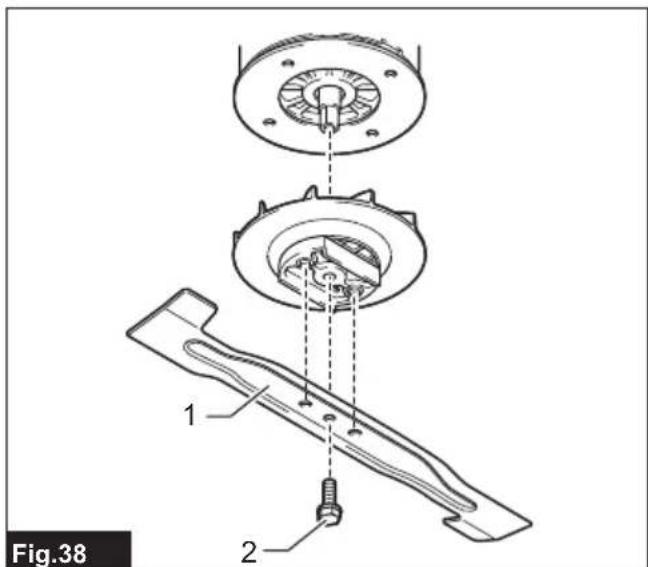
- Remove the bolt, mower blade in order.
▶ Fig.38: 1. Mower blade 2. Bolt
Installing the mower blade
To install the mower blade, take the removal procedure in reverse.
WARNING: Install the mower blade carefully. It has a top/bottom facing. Place the mower blade so that the rotational direction arrow faces outward.
WARNING: Tighten the bolt clockwise firmly to secure the mower blade.
WARNING: Make sure that the mower blade and all the fixing parts are installed correctly and tightened securely.
⚠ WARNING: When you replace the mower blade, always follow the instructions provided in this manual.
NOTICE: When tightening the bolt to install the mower blade, apply 19 - 29 N·m as tightening torque (the values are just for a reference).
TROUBLESHOOTING
Before asking for repairs, conduct your own inspection first. If you find a problem that is not explained in the manual, do not attempt to dismantle the tool. Instead, ask Makita Authorized Service Centers, always using Makita replacement parts for repairs.
| State of abnormality Probable cause | (malfunction) Remedy | |
| Mower does not start. Two battery cartridges | ridges are not installed. Install the charged battery cartridges. | |
| Battery problem (under voltage) Recharge the battery cartridge. If recharging is not effective, replace battery cartridge. | ||
| Motor stops running after a little use. | Battery's charge level is low. | Recharge the battery cartridge. If recharging is not effective, replace battery cartridge. |
| Cutting height is too low. Increase the cutting height. | ||
| Cut grass is clogged in the mower. Remove the clogged grass from the mower. | ||
| Motor does not reach maximum RPM. | Battery cartridge is installed improperly. Install the battery cartridge as described in this manual. | |
| Battery power is dropping. Recharge the battery cartridge. If recharging is not effective, replace battery cartridge. | ||
| The drive system does not work correctly. | Ask your local authorized service center for repair. | |
| Mower blade does not rotate: → stop the mower immediately! | Foreign object such as a branch is jammed near the mower blade. | Remove the foreign object. |
| The drive system does not work correctly. | Ask your local authorized service center for repair. | |
| Abnormal vibration: → stop the mower immediately! | Mower blade is imbalanced, excessively or unevenly worn. | Replace the mower blade. |
OPTIONAL ACCESSORIES
⚠️CAUTION: These accessories or attachments are recommended for use with your Makita tool specified in this manual. The use of any other accessories or attachments might present a risk of injury to persons. Only use accessory or attachment for its stated purpose.
If you need any assistance for more details regarding these accessories, ask your local Makita Service
Center.
- Mower blade
- Makita genuine battery and charger
NOTE: Some items in the list may be included in the tool package as standard accessories. They may differ from country to country.
SPÉCIFICATIONS
⚠ WAARSCHUWING: Draag gehoorbescherming.
VEILIGHEIDSWAAR- SCHUWINGEN
▶ Fig.27: (1) 30 mm of meer (2) 15 mm of minder