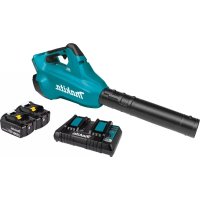
XBU02PT - Lawn mower MAKITA - Free user manual and instructions
Find the device manual for free XBU02PT MAKITA in PDF.

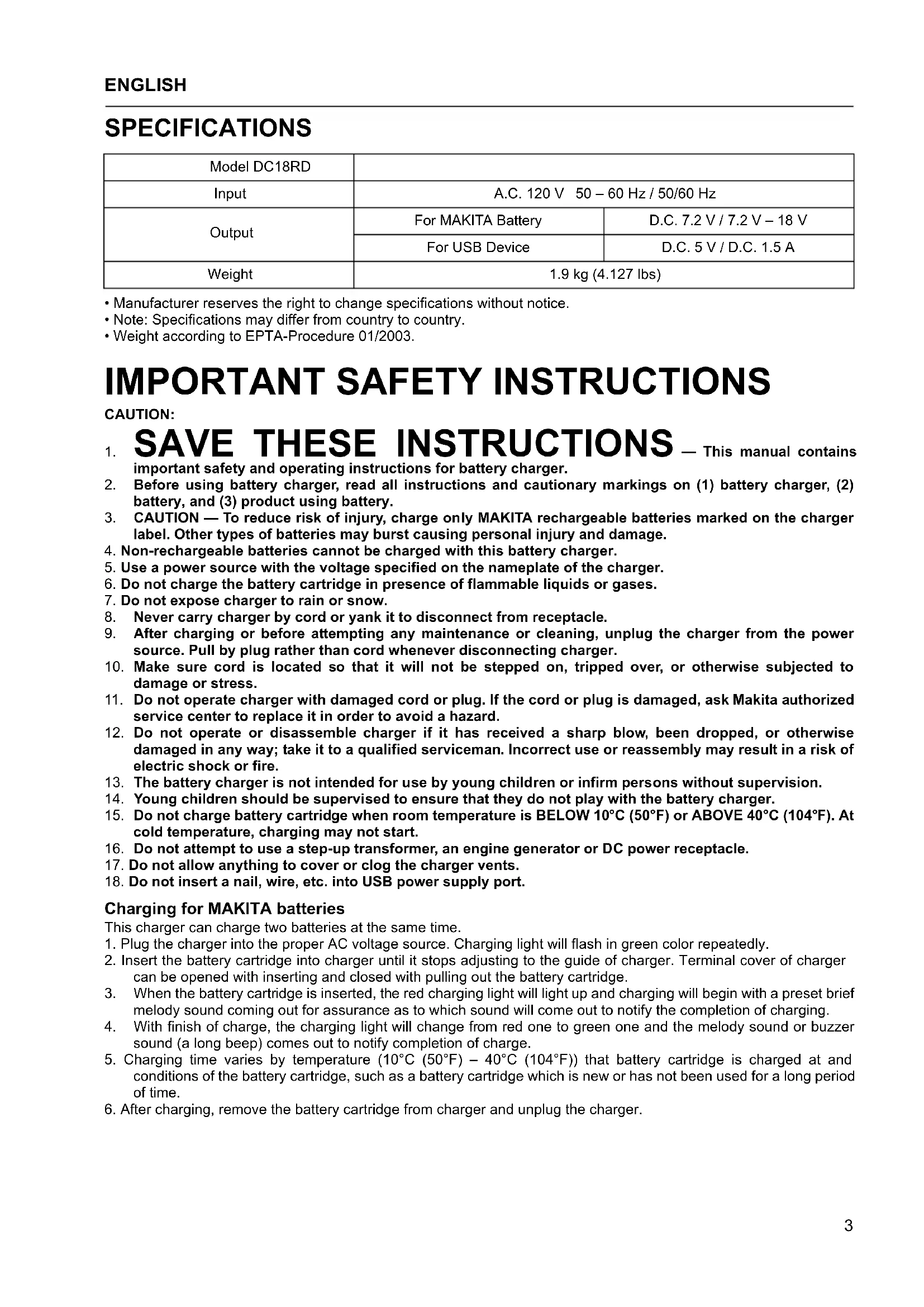


| Product Type | Cordless Lawn Mower |
| Brand | Makita |
| Model | XBU02PT |
| Power Source | 18 V lithium-ion battery (Makita compatible) |
| Included Charger | DC18RD: Input 120 V ~ 50-60 Hz, Output 7.2-18 V / 5 V USB |
| Compatible Battery Types | Li-ion: BL1415, BL1815, BL1430, BL1830, BL1820, BL1840, BL1850; Ni-MH: BH9020, BH1220, BH1420, BH9033, BH1233, BH1433 |
| Charger Weight | 1.9 kg |
| Charging Functions | Fast charging, active cooling, conditioning charging, customizable end melody |
| LED Indicators | Green (normal charge), red (charging), flashing red (abnormal temperature), yellow (cooling or conditioning warning) |
| USB Port | Output 5 V / 1.5 A, for charging USB devices |
| Safety | Protection against short circuits, overheating, and charging of non-rechargeable batteries prohibited |
| Recommended Charging Temperature | 10 °C to 40 °C |
| Charger Maintenance | Regularly clean the ventilation slots; avoid moisture |
| Repairability | Refer to a Makita authorized service center |
| Cutting Width (estimated) | 46 cm |
| Cutting Height (estimated) | Adjustable from 20 to 75 mm |
| Grass Catcher Capacity (estimated) | 50 L |
| Mower Weight (estimated) | 22 kg |
| Sound Level (estimated) | 85 dB(A) |
Frequently Asked Questions - XBU02PT MAKITA
User questions about XBU02PT MAKITA
0 question about this device. Answer the ones you know or ask your own.
Ask a new question about this device
Download the instructions for your Lawn mower in PDF format for free! Find your manual XBU02PT - MAKITA and take your electronic device back in hand. On this page are published all the documents necessary for the use of your device. XBU02PT by MAKITA.
USER MANUAL XBU02PT MAKITA
Two Port Multi Fast Charger
IMPORTANT: Read Before Using.
The followings show the symbols used for the charger and battery. Be sure that you understand their meaning before use.
Symboles
- Manufacturer reserves the right to change specifications without notice.
- Note: Specifications may differ from country to country.
- Weight according to EPTA-Procedure 01/2003.
IMPORTANT SAFETY INSTRUCTIONS
CAUTION:
SAVE THESE INSTRUCTIONS
— This manual contains
important safety and operating instructions for battery charger.
- Before using battery charger, read all instructions and cautionary markings on (1) battery charger, (2) battery, and (3) product using battery.
- CAUTION — To reduce risk of injury, charge only MAKITA rechargeable batteries marked on the charger label. Other types of batteries may burst causing personal injury and damage.
- Non-rechargeable batteries cannot be charged with this battery charger.
- Use a power source with the voltage specified on the nameplate of the charger.
- Do not charge the battery cartridge in presence of flammable liquids or gases.
- Do not expose charger to rain or snow.
- Never carry charger by cord or yank it to disconnect from receptacle.
- After charging or before attempting any maintenance or cleaning, unplug the charger from the power source. Pull by plug rather than cord whenever disconnecting charger.
- Make sure cord is located so that it will not be stepped on, tripped over, or otherwise subjected to damage or stress.
- Do not operate charger with damaged cord or plug. If the cord or plug is damaged, ask Makita authorized service center to replace it in order to avoid a hazard.
- Do not operate or disassemble charger if it has received a sharp blow, been dropped, or otherwise damaged in any way; take it to a qualified serviceman. Incorrect use or reassembly may result in a risk of electric shock or fire.
- The battery charger is not intended for use by young children or infirm persons without supervision.
- Young children should be supervised to ensure that they do not play with the battery charger.
- Do not charge battery cartridge when room temperature is BELOW 10^ C ( 50^ F) or ABOVE 40^ C ( 104^ F). At cold temperature, charging may not start.
- Do not attempt to use a step-up transformer, an engine generator or DC power receptacle.
- Do not allow anything to cover or clog the charger vents.
- Do not insert a nail, wire, etc. into USB power supply port.
Charging for MAKITA batteries
This charger can charge two batteries at the same time.
- Plug the charger into the proper AC voltage source. Charging light will flash in green color repeatedly.
- Insert the battery cartridge into charger until it stops adjusting to the guide of charger. Terminal cover of charger can be opened with inserting and closed with pulling out the battery cartridge.
- When the battery cartridge is inserted, the red charging light will light up and charging will begin with a preset brief melody sound coming out for assurance as to which sound will come out to notify the completion of charging.
- With finish of charge, the charging light will change from red one to green one and the melody sound or buzzer sound (a long beep) comes out to notify completion of charge.
- Charging time varies by temperature ( 10^ C ( 50^ F) – 40^ C ( 104^ F)) that battery cartridge is charged at and conditions of the battery cartridge, such as a battery cartridge which is new or has not been used for a long period of time.
- After charging, remove the battery cartridge from charger and unplug the charger.
Changing melody sound of completed charging
- Insert the battery cartridge into the charging port that you want to change the melody sound of completed charging. It brings out the last preset brief melody sound of completed charging.
- Removing and re-inserting it within five seconds after this action makes the melody sound change.
- Every time removing and re-inserting it within another five seconds after this, the melody sound changes in order.
- When the desired melody sound comes out, leave the battery cartridge being inserted and the charge will begin. When a "short beep" mode is selected, no completed charging signals comes out. (Silent Mode)
- With finish of charge, the green light remains lit with the red light going out and the melody sound preset at the insertion of battery cartridge or buzzer sound (a long beep) comes out to notify completion of charge. (In selected silent mode, no sounds come out.)
- Preset melody sound remains stored even when the charger is unplugged.
NOTE:
- The battery charger is for charging Makita-battery cartridge. Never use it for other purposes or for other manufacturer's batteries.
- When you charge a battery cartridge which is new or has not been used for a long period of time, it may not accept a full charge until after discharging it completely and recharging a couple of times. (Ni-MH battery only)
- If charging light may flash in red color, battery condition is as below and charging may not start.
- Battery cartridge from just-operated tool or battery cartridge that has been left in a location exposed to direct sunlight for a long time.
– Battery cartridge that has been left for a long time in a location exposed to cold air.
When the battery cartridge is too hot, charging will begin after the cooling fan installed in the charger cools the battery cartridge. Charging will begin after the battery cartridge temperature reaches the degree at which charging is possible. When the temperature on battery is more than approx. 70^ C, two charging lights may flash in red color, and when approx. 50^ C – 70^ C, one charging light in red color.
- If the charging light flashes alternately in green and red color, charging is not possible. The terminals on the charger or battery cartridge are clogged with dust or the battery cartridge is worn out or damaged.
Cooling system
- This charger is equipped with cooling fan for heated battery in order to enable the battery to prove its own performance. Sound of cooling air comes out during cooling, which means no trouble on the charger.
- Yellow light will flash for warning in the following cases.
– Trouble on cooling fan
– Incomplete cool down of battery, such as, being clogged with dust
The battery can be charged in spite of the yellow warning light. But the charging time will be longer than usual in this case.
Check the sound of cooling fan, vent on the charger, which can be sometime clogged with dust.
- The cooling system is in order although no sound of cooling fan comes out, if the yellow warning light will not flash.
- Always keep clean the vent on charger and battery for cooling.
- The products should be sent to repair or maintenance, if the yellow warning light will frequently flash.
Conditioning charge
Conditioning charge can extend the life of battery by automatically searching the optimum charging condition for the batteries in every situation.
The battery employed in the following conditions repeatedly requires “conditioning charge” to prevent fast wear out. In that case, yellow light lights up.
- Recharge of battery with its high temperature
- Recharge of battery with its low temperature
- Recharge of full charged battery
- Over-discharge of battery (continue to discharge battery in spite of down of power.)
The charging time of such battery is longer than usual.
Using with USB device
This charger works as an external power supply for USB device.
- Open the cover of the USB power supply port. Connect the USB cable to the USB power supply port and USB device.
- Plug the charger into a power source.
- After charging, unplug the charger.
Note:
- The charger may not supply power to some USB devices.
- Before connecting USB device to the charger, always backup your data of USB device. Otherwise your data may lose by any possibility.
- When not using or after charging, remove the USB cable and close the cover.
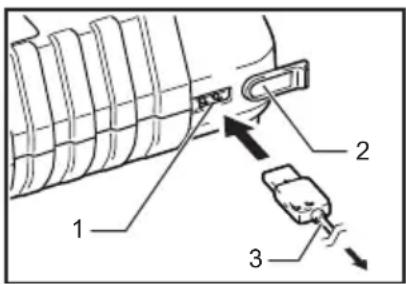
text_image
Diagram of a mechanical component with labeled parts 1, 2, and 3, showing directional arrows indicating movement or assembly.- USB power supply port
- Cover
- USB cable
| Voltage 9.6 V | 12 V 14.4 V | Capacity (Ah) | Charging time (Minutes) | ||
| Number of cells 8 | 10 12 | ||||
| Ni-MH Battery cartridge | BH9020A — — 2.0 20 | ||||
| — BH1220/C BH1420 2.0 15 | |||||
| BH9033A — — 3.3 30 | |||||
| — BH1233/C BH1433 3.3 22 | |||||
| Voltage | 14.4 V 18 V | 14.4 V 18 V | Charging time (Minutes) | ||
| Number of cells 4 | 5 | 8 | 10 | ||
| Li-ion Battery cartridge | BL1415/ BL1415N | BL1815/ BL1815N | — | — | 15 |
| — — BL14 | 30 | BL18 | 30 | 22 | |
| — BL1820 | — | — | — | 24 | |
| — — BL14 | 40 | BL18 | 40 | 36 | |
| — — — BL | 1850 | 45 |
Note:
- It may take twice the above charging time to the maximum because of the optimal charging selected according to the temperature (10°C (50°F) – 40°C (104°F)), conditions of battery cartridge and maintenance charge.
SPÉCIFICATIONS
