Sonicare ProtectiveClean 4500 - Electric toothbrush PHILIPS - Free user manual and instructions
Find the device manual for free Sonicare ProtectiveClean 4500 PHILIPS in PDF.
 FR
FR
 AZ
AZ
 BG
BG
 CS
CS
 DA
DA
 DE
DE
 EL
EL
 EN
EN
 ES
ES
 ET
ET
 FI
FI
 HE
HE
 HU
HU
 HY
HY
 IT
IT
 KA
KA
 KK
KK
 KY
KY
 LT
LT
 LV
LV
 MK
MK
 NL
NL
 NO
NO
 PL
PL
 PT
PT
 RO
RO
 RU
RU
 SK
SK
 SL
SL
 SQ
SQ
 SV
SV
 TG
TG
 TK
TK
 UK
UK
 UZ
UZ
User questions about Sonicare ProtectiveClean 4500 PHILIPS
0 question about this device. Answer the ones you know or ask your own.
Ask a new question about this device
Download the instructions for your Electric toothbrush in PDF format for free! Find your manual Sonicare ProtectiveClean 4500 - PHILIPS and take your electronic device back in hand. On this page are published all the documents necessary for the use of your device. Sonicare ProtectiveClean 4500 by PHILIPS.
USER MANUAL Sonicare ProtectiveClean 4500 PHILIPS
natural_image
Simple line drawing of an open book with a grid pattern on the left and a closed page on the right (no text or symbols)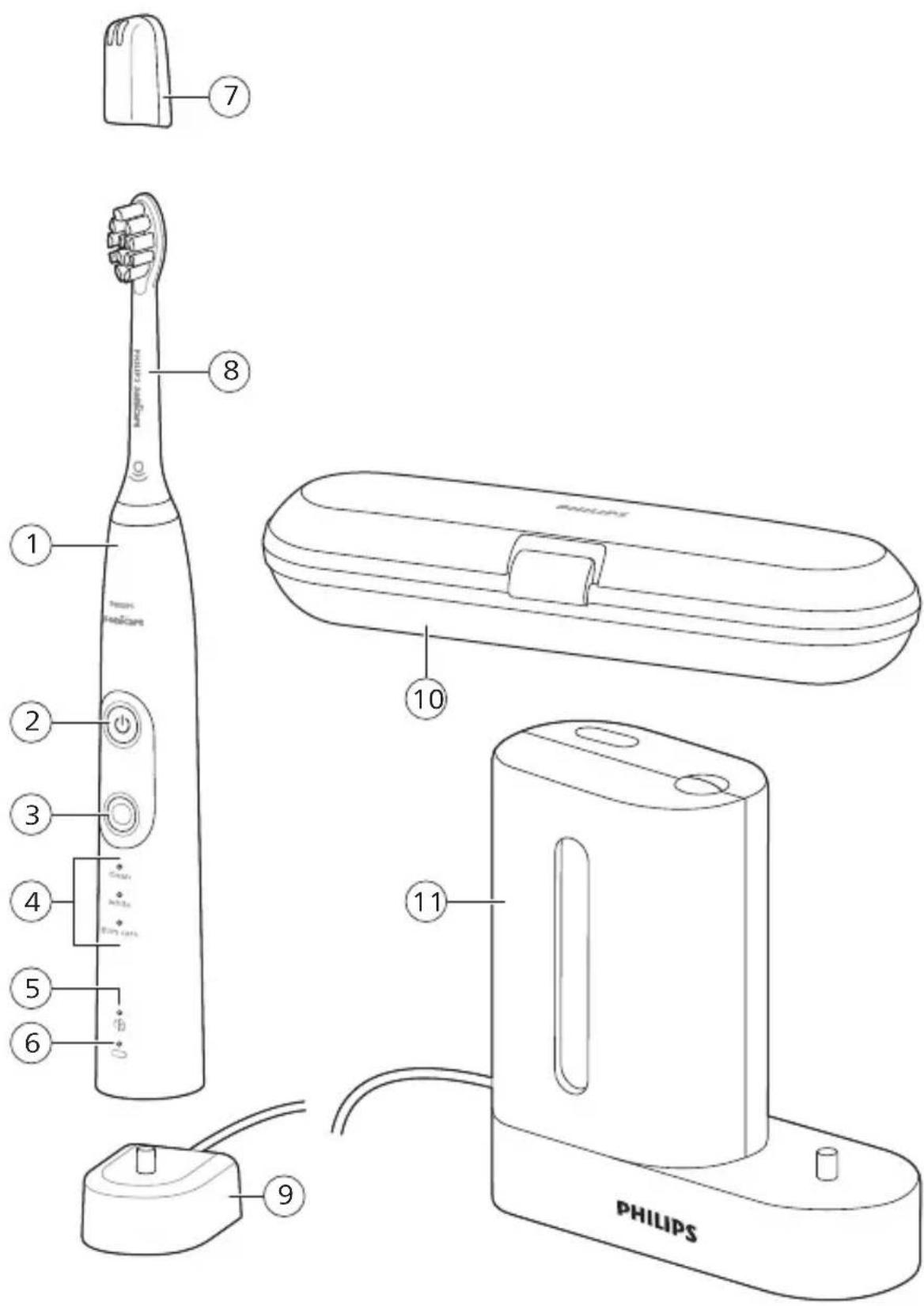
English 6
Azərbaycanca 26
Čeština 47
Dansk 67
Deutsch 87
Eesti 112
Español 132
Français 154
Hrvatski 176
Italiano 197
Latviešu 219
Lietuviškai 239
Magyar 261
Nederlands 283
Norsk 305
O'zbek 325
Polski 346
Português 369
Română 391
Shqip 412
Slovenščina 433
Slovensky 453
Srpski 474
Suomi 494
Svenska 515
Türkmençe 536
Ελληνικά 557
Български 580
Кыргызча 604
Македонски 627
Русский 649
Точикй 673
Українська 696
Қазақша 718
Ruijtntu 740
phosphorus 764
788
Introduction
Welcome to the Philips Sonicare family!
This toothbrush enables you to obtain superior plaque removal, whiter teeth and healthier gums. Using
Sonicare's combination of gentle sonic technology and clinically developed and proven features, you can be confident that you're getting the very best clean, every time.
Further support and product registration are available to you at: www.philips.com/support
Important safety information
Only use the product for its intended purpose. Read this important information carefully before you use the product and its batteries and accessories, and save it for future reference. Misuse can lead to hazards or serious injuries.
Warnings
- Keep the charger, travel case, and UV sanitizer away from water.
- After cleaning, make sure the charger, travel case, and UV sanitizer are completely dry before you connect these to the wall socket.
- This appliance can be used by children and persons with reduced physical, sensory or mental capabilities or lack of experience and knowledge if they have been given supervision or instruction concerning use of the appliance in a safe way and understand the hazards involved. Cleaning and user maintenance shall not be made by children without supervision.
- Children shall not play with the appliance.
- Only use original Philips accessories or consumables. If supplied, only use the original USB cable and USB power supply unit.
- This appliance contains no user-serviceable parts. If the appliance is damaged, stop using it and contact the Consumer Care Center in your country (see 'Warranty and support').
- If the USB cable or USB power supply unit is damaged, stop using it.
English
- Do not use the charger, travel case, and/or UV sanitizer outdoors or near heated surfaces.
- Do not clean any part of the product in the dishwasher.
- This appliance has only been designed for cleaning teeth, gums and tongue.
- Keep the UV sanitizer out of the reach of children at all times.
- Stop using the UV sanitizer if the UV LED/Bulb remains on when the UV sanitizer is open. UV light can be harmful to the human eye and skin.
- Only operate the sanitizer with the protective screen in place.
- Do not touch the UV sanitizer's UV light bulb when it is hot.
- Stop using a brush head with crushed or bent bristles. Replace the brush head every 3 months or sooner if signs of wear appear.
- Avoid direct contact with products that contain essential oils or coconut oil. Contact may result in bristles dislodging.
- The maximum altitude of use is 4500 meters.
MEDICAL WARNINGS
- Stop using the appliance and consult your dentist/doctor if excessive bleeding occurs after use, if bleeding continues to occur after 1 week of use or if you experience discomfort or pain.
- If you have had oral or gum surgery in the previous 2 months, consult your dentist before you use this appliance.
- If you have a pacemaker or other implanted device, contact your doctor or the manufacturer of the implanted device prior to use.
- If you have medical concerns, consult your doctor before you use this appliance.
- This appliance is a personal care device and is not intended for use on multiple patients in a dental practice or institution.
Battery safety instructions
- This appliance contains batteries that are only to be removed by skilled persons.
- Only use the product for its intended purpose. Read this information carefully before you use the product and its batteries and accessories, and save it for future reference. Misuse can lead to hazards or serious injuries. Accessories supplied may vary for different products.
- Only use original Philips accessories and consumables. Only use detachable supply unit TCBxxxx (input ratings: 100 - 240V\~; 50/60Hz; 1.5W),HX6100 (input ratings: 100 - 240V\~; 50/60Hz; 1.4W),HX6110 (input ratings: 100 - 240V\~; 50/60Hz; 1.5W),HX6160 (input ratings: 100 - 240V\~; 50/60Hz; 6W),WAAxxxx (input ratings: 100 - 240V\~; 50/60Hz; 3.5W).
- Keep product and batteries away from fire and do not expose them to direct sunlight or high temperatures.
- If the product becomes abnormally hot or smelly, changes color or if charging takes longer than usual, stop using and charging the product and contact Philips.
- Do not place products and their batteries in microwave ovens or on induction cookers.
- Do not open, modify, pierce, damage or dismantle the product or battery to prevent batteries from heating up or releasing toxic or hazardous substances. Do not short-circuit, overcharge or reverse charge batteries.
- This appliance contains batteries that are non-replaceable. When the battery is at end of life, the appliance shall be properly disposed of, see section on recycling.
- If batteries are damaged or leaking, avoid contact with the skin or eyes. If this occurs, immediately rinse well with water and seek medical care.
- When you handle batteries, make sure that your hands, the product and the batteries are dry.
- Charge and use the product at a temperature between 0 °C and 40 °C (32°F and 104 °F).
- To avoid accidental short-circuiting of batteries after removal, do not let battery terminals come into contact with metal object (e.g. coins, hairpins, rings). Do not wrap batteries in aluminium foil. Tape battery terminals or put batteries in a plastic bag before you discard them.
- This appliance contains a Lithium-ion rechargeable cell. MUST BE RECYCLED OR DISPOSED OF PROPERLY.
Storage and transportation conditions
Temperature -10°C to 60°C (14 °F to 140 °F).
Electromagnetic fields (EMF)
This Philips appliance complies with all applicable standards and regulations regarding exposure to electromagnetic fields.
Radio Equipment Directive
Hereby, Philips declares that electric toothbrushes with radio equipment type (Bluetooth, NFC) are in compliance with Directive 2014/53/EU.
- The Bluetooth radio frequency interface in applicable products operates at 2.4 GHz.
- The maximum output power by the Bluetooth appliance is 3 dBm.
- The NFC radio frequency interface in applicable products operates at 13.56 MHz.
- The maximum RF power transmitted by the appliance is 30.16 dBm.
The full text of the EU declaration of conformity is available at the following internet address:
www.philips.com/support
Note: The Features of different models may vary. Some models may not be equipped with Bluetooth or NFC.
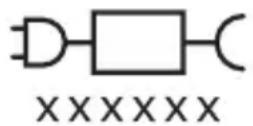
Detachable Power Supply Part: The "xxxxxx" indicates the model number of the approved chargers to be used. (TCBxxxx, HX6100, HX6110, HX6160 or WAAxxxx)
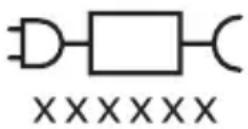

This symbol means read the instructions for use, before using the appliance.
Intended use
ProtectiveClean power toothbrushes are intended to remove adherent plaque and food debris from the teeth to reduce tooth decay and improve and maintain oral health. ProtectiveClean power toothbrushes are intended for personal use. Use by children should be with adult supervision.
Your Philips Sonicare (Fig 1.)
1 Handle
2 Power on/off button
3 Mode button
4 Mode indicator
5 Brush Head Replacement Reminder
6 Battery indicator
Accessories:
7 Brush head cap
8 Smart brush head(s)
9 Charging base
10 Travel case
11 UV sanitizer and charger
Note: Accessories included may vary based on the model purchased.
Getting started
natural_image
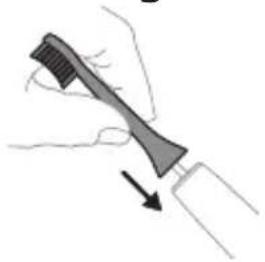
Illustration of a hand holding a tool with a downward arrow indicating motion (no text or symbols)1 Align the brush head so the bristles point in the same direction as the front of the handle.
natural_image
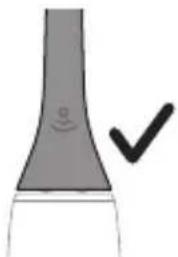
Simple line drawing of a curved object with a checkmark indicating a detail (no text or symbols)2 Firmly press the brush head down onto the metal shaft until it will not go any further.
Note: It is normal to see a slight gap between the brush head and the handle.
Using your Philips Sonicare toothbrush
If you are using your Sonicare toothbrush for the first time, it is normal to feel more vibration than when using a non-electric toothbrush. It is common for first-time users to apply too much pressure. Only apply gentle pressure and let the toothbrush do the brushing for you. Please follow the brushing instructions below for the best experience. To help you transition to your new Sonicare power toothbrush, it comes with the EasyStart feature activated. This feature gently increases the power over the first 14 brushings to help you adapt to brushing with a Philips Sonicare toothbrush.
Brushing instructions
natural_image
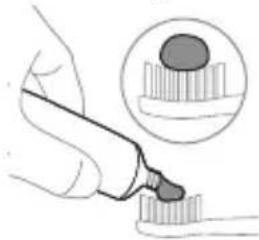
Illustration of a hand using a pipette to apply liquid onto a tooth, with an inset showing a magnified view of the tooth (no text or symbols present)1 Wet the bristles and apply a small amount of toothpaste.
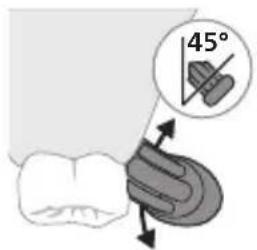
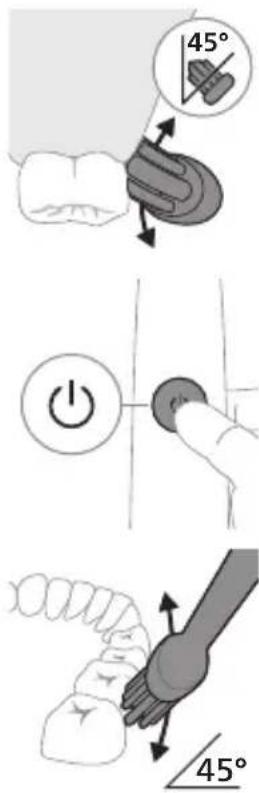
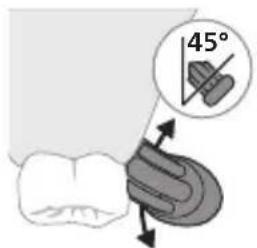
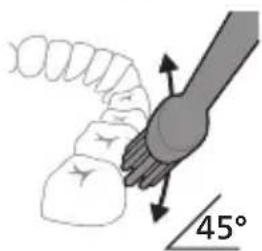
2 Place the toothbrush bristles against the teeth at a slight angle (45 degrees), pressing firmly to make the bristles reach the gumline or slightly beneath the gumline.
Note: Keep the center of the brush in contact with the teeth at all times.
English
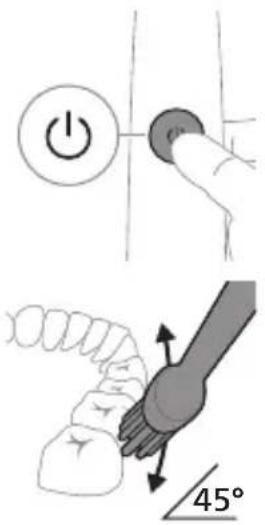
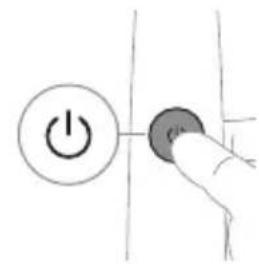
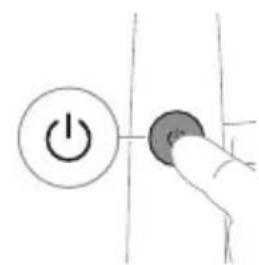
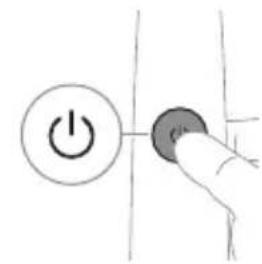
3 Press the power on/off button to switch on the Philips Sonicare.
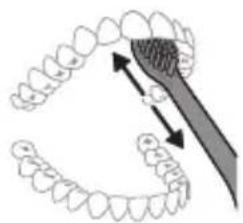
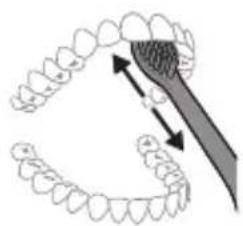
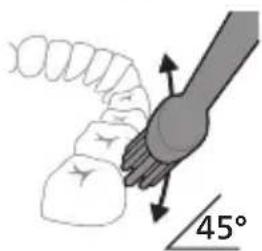
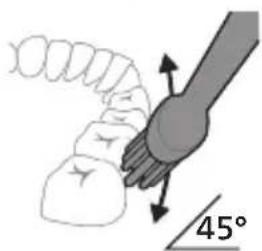
4 Gently keep the bristles placed on the teeth and in the gumline. Brush your teeth with small back and forth motion so the bristles reach between the teeth. Continue this motion throughout your brushing cycle.
Note: The bristles should slightly flare. It is not recommended to scrub as you would with a manual toothbrush.
natural_image
Diagram showing dental alignment with a tool interacting with teeth (no text or labels)Note: If you apply too much pressure, you will be alerted by a change in vibration of the handle and the brush head replacement reminder flashing amber.
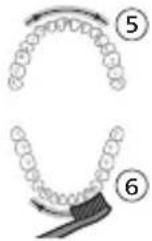
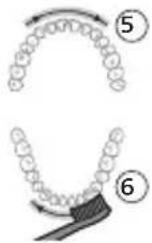
5 To clean the inside surfaces of the front teeth, tilt the brush handle semi-upright and make several vertical overlapping brushing strokes on each tooth.
6 After you have completed the brushing cycle, you can spend additional time brushing the chewing surfaces of your teeth and areas where staining occurs. You can also brush your tongue, with the toothbrush switched on or off, as you prefer.
Note: Your Philips Sonicare toothbrush is safe to use on braces (brush heads wear out sooner when used on braces) and dental restorations (fillings, crowns, veneers) if they are properly adhered and not compromised.
QuadPacer
flowchart
graph TD
    A["Step 1"] --> B["Step 2"]
    B --> C["Step 3"]
    C --> D["Step 4"]
    D --> E["Brush"]
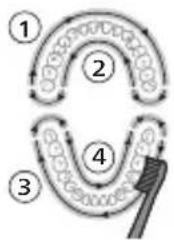
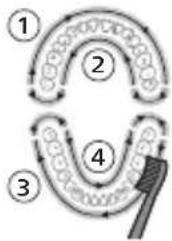
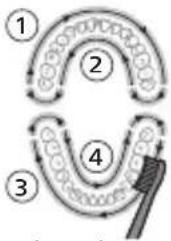
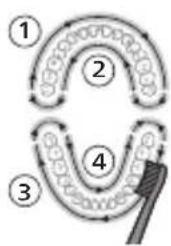
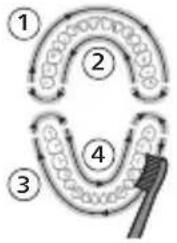
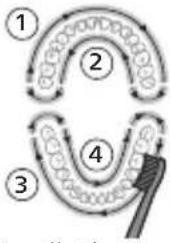
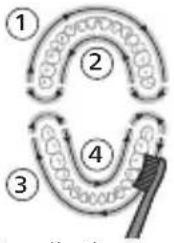
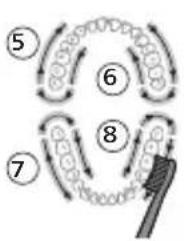
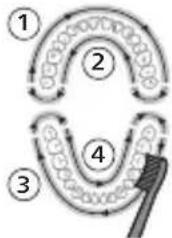
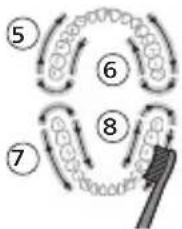
To make sure you brush evenly throughout the mouth, divide your mouth into 4 sections using the QuadPacer feature. The QuadPacer divides the brushing time into 4 equal segments and indicates when you should move to the next area. The segments are indicated with a brief pause in vibration. The toothbrush automatically stops at the end of the brushing session.
Note: Additional time may be added when you use the White or Gum Care Modes.
Modes
Your power toothbrush is equipped with up to 3 modes: Clean, White and Gum Care (specific models only). To change modes, press the mode button while the toothbrush is powered off.
Clean White Gum Care
| Benefit For exceptional everyday clean | Removes surface stains | Gently massages gums | |
| Total brushing time | 2 minutes 2 minutes and 30 seconds | 3 minutes | |
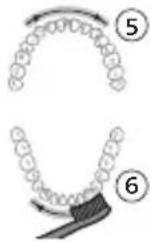
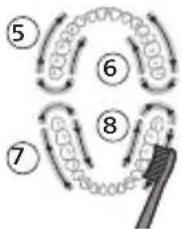
| How to brush Brush each segment for 30 seconds. | Brush each segment for 30 seconds | Brush each segment for 30 seconds | |
 |  | 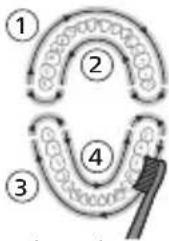 | |
| then brush segments 5 and 6 for 15 seconds each to brighten and polish front teeth. | then brush segments 5, 6, 7 and 8 for 15 seconds each to gently stimulate and massage your gums. | ||
 |  | ||
BrushSync technology
natural_image
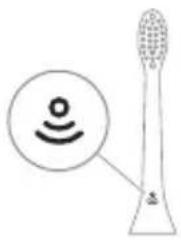
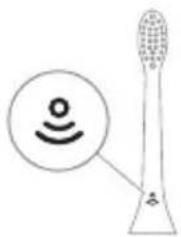
Illustration of a toothbrush with a sensor icon and a speech bubble (no text or symbols)BrushSync technology enables your brush head to communicate with your handle using a microchip. The symbol at the bottom of the brush head indicates that the brush head is equipped with this technology.
BrushSync technology enables:
- Brush Head Replacement Reminder Philips Sonicare offers a wide range of smart brush heads, equipped with BrushSync technology. To explore our full range of toothbrush brush heads, and find the brush head that is best for you, go to
www.philips.com/toothbrush-heads for more information.
Features
- Pressure Sensor Feedback
- Quadpacer
- Brush head Replacement Reminder
- EasyStart
- SmarTimer
Pressure Sensor Feedback
natural_image
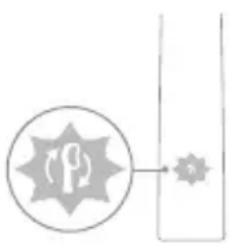
Simple diagram with a circular symbol containing a stylized 'P' and an arrow pointing to a star-like shape, connected by a vertical line (no text or labels)Your Sonicare toothbrush measures the pressure you apply while brushing, to protect your gums and teeth from damage.
If you apply excess pressure, the handle changes its vibration and the brush head replacement reminder icon flashes amber until you reduce the pressure.
Note: Your product comes with the Pressure Sensor activated. To deactivate this feature (see 'Activating or deactivating features').
Quadpacer
The QuadPacer is an interval timer that helps you to brush evenly through the mouth by dividing your mouth into 4 sections. (see 'Brushing instructions')
Brush Head Replacement Reminder
Your Philips Sonicare is equipped with BrushSync technology that tracks the wear of your brush head.
Note: This feature only works with Philips Sonicare smart brush heads with BrushSync technology.
1 When you attach a new smart brush head for the first time, the handle recognizes that you have a Philips brush head with BrushSync technology and begins tracking brush head wear.
2 Over time, based on the pressure you apply and the total time the brush head has been used, the handle tracks brush head wear in order to determine the optimal time to replace your brush head. This feature guarantees the best cleaning and care of your teeth.
natural_image
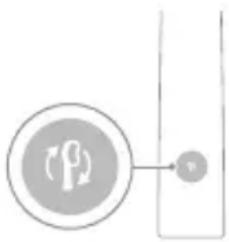
Simple diagram showing a circular icon with a 'P' symbol and a small circle connected by a line, no text or labels present.3 When the brush head replacement reminder indicator lights up amber, you should replace your brush head.
All smart brush heads come with the brush head replacement reminder feature activated. To deactivate the brush head replacement reminder see 'Activating or deactivating features'.
EasyStart
This Philips Sonicare model comes with the EasyStart feature activated. The EasyStart feature gently increases the power over the first 14 brushings to help you get used to brushing with the Philips Sonicare.
Disclaimer
When the Philips Sonicare toothbrush is used in clinical studies, it must be used in clean mode at high intensity with the handle fully charged and the EasyStart feature deactivated.
To deactivate EasyStart (see 'Activating or deactivating features').
SmarTimer
The SmarTimer indicates that your brushing cycle is complete by automatically switching off the toothbrush at the end of the brushing cycle.
Dental professionals recommend brushing no less than 2 minutes twice a day.
Note: If you press the power on/off button after you started the brushing cycle, the toothbrush pauses. After a pause of 30 seconds, the SmarTimer resets.
Activating or deactivating features
You can activate or deactivate the following features of your toothbrush:
- EasyStart
- Brush Head Replacement Reminder
- Pressure Sensor Feedback
Note: You can only activate or deactivate the brush head replacement reminder when a smart brush head is on the handle.
Step 1: Place the handle on the plugged in charging stand.
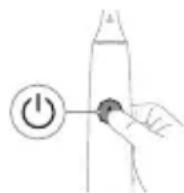
Step 2: Press and hold power on/off button for:
EasyStart Brush head replacement reminder Pressure Sensor Feedback
Up to 3 seconds Up to 5 seconds Up to 7 seconds
Step 3: Let go of the power on/off button when you hear:
1 beep 1 beep and then 2 beeps 1 beep, 2 beeps and then 3 beeps
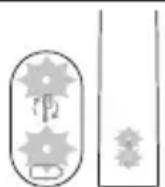
If you see the battery indicator and the brush head replacement reminder light flash green 2 times and hear 3 tones from low to high, then the feature has been activated.
OR
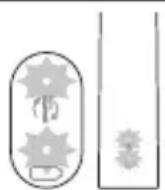
If you see the battery indicator and brush head replacement reminder light flash amber 1 time and hear 3 tones high to low, then the feature has been deactivated.
UV sanitizer
natural_image
Three-step diagram illustrating a mechanical assembly process: tool application, close-up of component, and final assembled view (no text or symbols)Note: Accessories included may vary based on the model purchased.
With the UV sanitizer you can clean your brush head after every use.
Unplug the sanitizer, discontinue use and call Consumer Care if:
- The UV light bulb remains on when the door is open.
- The window is broken or missing from the sanitizer.
- The sanitizer gives off smoke or a burning smell while it is operating.
Note: UV light can be harmful to the human eye and skin. This device should be kept out of reach of children at all times.
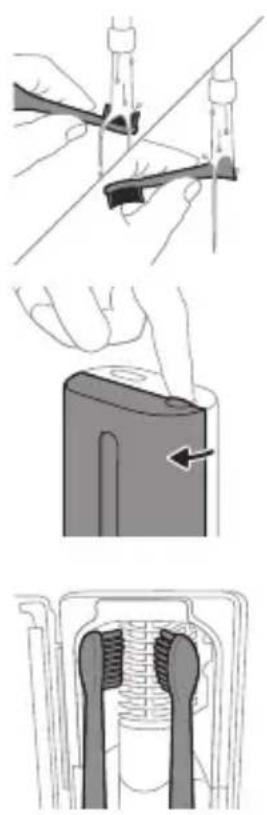
1 After brushing, rinse the brush head and shake off excess water.
Warning: Make sure that the brush head cap is not on the brush head when the brush head is being cleaned in the sanitizer.
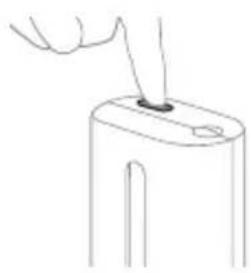
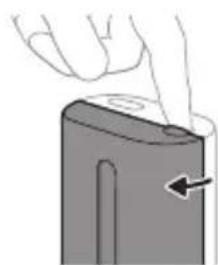
2 Place your finger in the door recess on top of the sanitizer and pull open the door.
3 Place the brush head on one of the 2 pegs in the sanitizer with the bristles facing the light bulb.
Note: Only clean Philips Sonicare snap-on brush heads in the sanitizer.
Note: Do not clean Philips Sonicare for Kids brush heads in the sanitizer.
4 Make sure the sanitizer is plugged into a live outlet of appropriate voltage.
natural_image
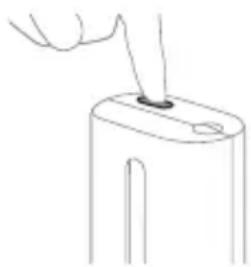
Line drawing of a hand inserting a plug into a device (no text or symbols)5 Close the door and press the green power on/off button once to select the UV clean cycle.
Note: You can only switch on the sanitizer if the door is properly closed.
Note: The sanitizer stops operating if you open the door during the sanitizer cycle.
Note: The sanitizer cycle takes approximately 10 minutes and then switches off automatically.
The sanitizer is in operation when the light glows through the window.
Charging and battery status
This Philips Sonicare toothbrush is designed to provide at least 28 brushing sessions, each session lasting 2 minutes (14 days if used twice per day) on a fully charged battery. The battery indicator shows the battery status when you complete the 2-minute brushing session, when you pause the toothbrush, or while it is charging.
Note: It can take up to 24 hours to fully charge the battery before first use, but you can use the Philips Sonicare toothbrush before it is fully charged.
Charging
natural_image
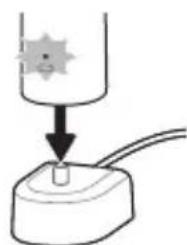
Simple line drawing of a device with a starburst symbol above it, showing a downward arrow and a small component at the base (no text or symbols)Charging on charger or UV Sanitizer
1 Plug the charger or sanitizer into an electrical outlet.
2 Place the handle on the charger or sanitizer.
- The handle emits 2 short beeps to confirm that the handle is placed properly.
- The flashing light of the battery indicator shows that the toothbrush is charging.
- When the handle is fully charged on the charger, the battery indicator lights up green for 30 seconds and then switches off.
Battery status
Battery status (handle on plugged-in charger)
When the handle is placed on the charger, the battery indicator shows the battery level.
Battery status Battery indicator
| Charging Flashes green |
| Full Solid green for 30 seconds and then switches off |
Battery status (when handle is not placed on charger)
When the toothbrush is awake, the battery indicator at the bottom of the handle shows the battery level.
Battery status Battery indicator Sound
| Full Solid green - | |
| Partially full Flashes green - | |
| Low Flashes amber The handle emits 3 | beeps after brushing |
| Empty Flashes amber The handle emits 2 sets | of 5 beeps after brushing |
Note: To save energy, the battery indicator will switch off when not in use.
Note: When the battery is completely empty, the toothbrush switches off. Place the toothbrush on the charger to charge it.
Note: To keep the battery fully charged at all times, you may keep your toothbrush on the charger when not in use.
Cleaning
Toothbrush handle
natural_image
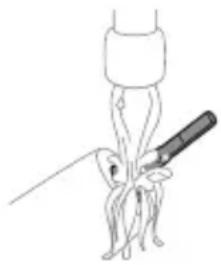
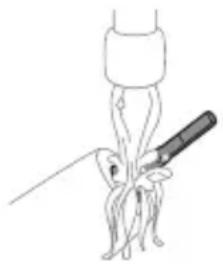
Line drawing of a medical procedure involving a needle inserted into a bulbous structure (no text or symbols)1 Remove the brush head and rinse the metal shaft area with warm water. Make sure you remove any residual toothpaste.
Caution: Do not push on the rubber seal on the metal shaft with sharp objects, as this may cause damage.
2 Wipe the entire surface of the handle with a damp cloth.
Note: Do not tap the handle on the sink to remove excess water.
Brush head
natural_image
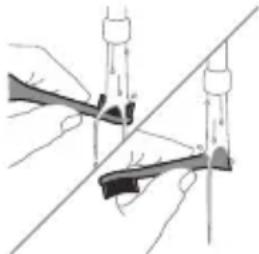
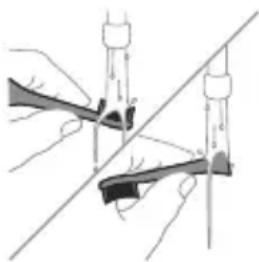
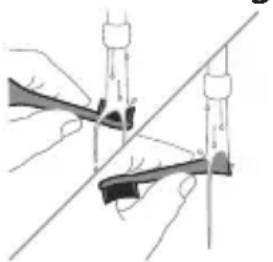
Illustration of two hands using a tool to lift or stand, with no visible text or symbols1 Rinse the brush head and bristles after each use.
2 Remove the brush head from the handle and rinse the brush head connection with warm water at least once a week. Rinse the travel cap as often as needed.
Charger
1 Unplug the charger before you clean it.
2 Wipe the surface of the charger with a damp cloth.
Travel case
Rinse with warm water and use a damp cloth to clean inside of travel case.
Cleaning the Sanitizer
Warning: Do not immerse the sanitizer in water or rinse it under the faucet.
Warning: Do not clean the sanitizer when the UV light bulb is hot.
For optimal effectiveness, it is recommended to clean your sanitizer weekly.
1 Unplug the sanitizer.
English
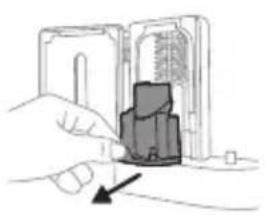
natural_image
Illustration of a hand inserting a device into a device housing (no text or symbols visible)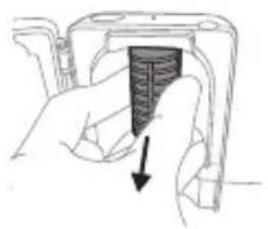
natural_image
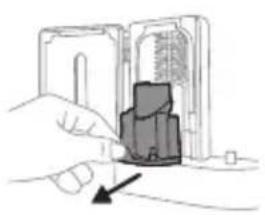
Hand holding a mechanical component with a black arrow pointing to a section (no text or symbols visible)2 Pull the drip tray straight out. Rinse the drip tray and wipe it clean with a damp cloth.
3 Clean all interior surfaces with a damp cloth.
4 Remove the protective screen in front of the UV light bulb.
To remove the screen, grasp the edges next to the snaps, gently squeeze and pull out the protective screen.
5 Remove the UV light bulb.
To remove the light bulb, grasp it and pull it out of the metal clasp.
6 Clean the protective screen and the UV light bulb with a damp cloth.
7 Reinsert the UV light bulb.
To reinsert the light bulb, align the bottom of the light bulb with the metal clasp and push the bulb into the clasp.
8 Reinsert the protective screen.
To reinsert the screen, align the pegs on the screen with the slots on the reflective surface near the UV light bulb. Push the screen straight into the slots on the sanitizer.
9 Place the drip tray back in the UV sanitizer.
10 After cleaning, make sure the sanitizer is completely dry before you connect it to the mains.
Storage
If you are not going to use the product for an extended period of time, unplug it from the electrical outlet, clean it and store it in a cool and dry place away from direct sunlight.
Replacement
Replace Philips Sonicare brush heads every 3 months to achieve optimal results. Use only Philips Sonicare replacement brush heads.
Locating the model number
Look on the bottom of the Philips Sonicare toothbrush handle for the model number (HX64XX, HX68XX).
Warranty and support
If you need information or support, please visit www.philips.com/support or read the international warranty leaflet.
Warranty exclusions
What is not covered under warranty:
- In mouth attachments including brush heads and nozzles.
- Damage caused by use of unauthorized replacement parts or unauthorized brush heads.
- Damage caused by misuse, abuse, neglect, alterations or unauthorized repair.
- Normal wear and tear, including chips, scratches, abrasions, discoloration or fading.
- UV light bulb.
Recycling
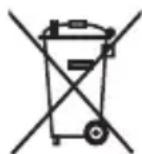
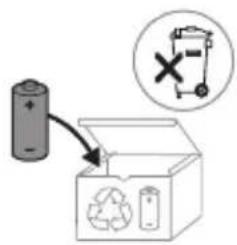
- This symbol means that electrical products and batteries shall not be disposed of with normal household waste.
- Follow your country's rules for the separate collection of electrical products and batteries.
- The UV light bulb of the sanitizer contains mercury. Do not throw the UV light bulb away with the normal household waste at the end of its life. Hand it in at an official collection point for recycling.
- Information on REACH substances, contained in Philips products, can be found on www.philips.com/REACH
Removing the rechargeable battery
The built-in rechargeable battery must be removed by a qualified professional when the product is discarded.
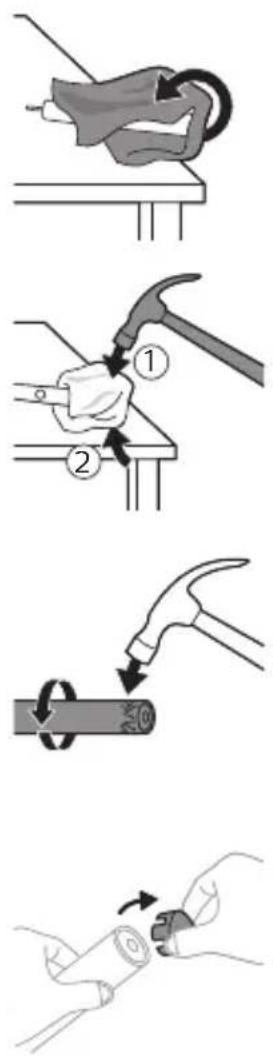
Instructions for removal of built-in rechargeable batteries can be found on www.philips.com/support.
To remove the rechargeable battery, you need a towel or cloth, a hammer and a flat-head (standard) screwdriver. Observe basic safety precautions when you follow the procedure outlined below.
1 To deplete the rechargeable battery of any charge, remove the handle from the charger, turn on the toothbrush and let it run until it stops. Repeat this step until you can no longer turn on the toothbrush.
2 Remove and discard the brush head. Cover the entire handle with a towel or cloth.
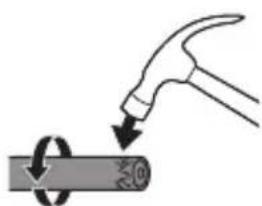
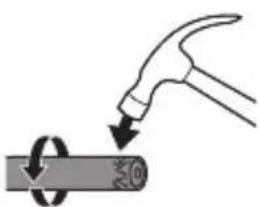
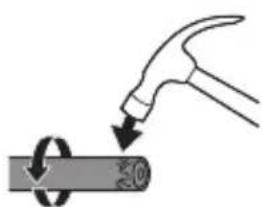
3 Hold the top of the handle with one hand and strike the handle housing 0.5 inch above the bottom end. Strike firmly with a hammer on all 4 sides to eject the end cap.
Note: You may have to hit on the end several times to break the internal snap connections.
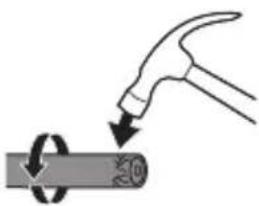
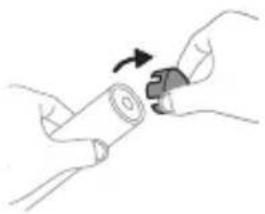
4 Remove the end cap from the toothbrush handle. If the end cap does not release easily from the housing, repeat step 3 until the end cap is released.
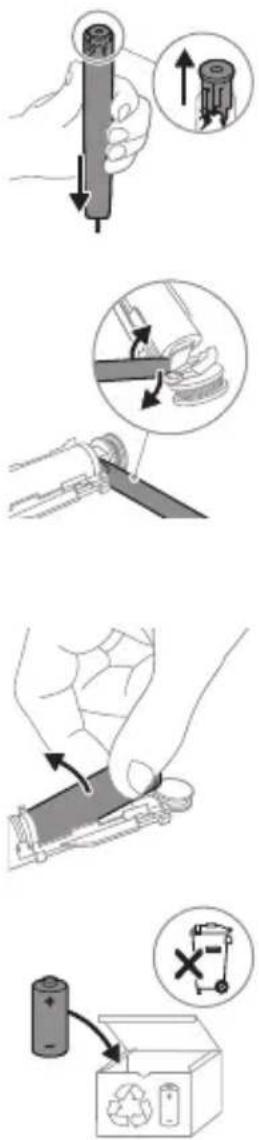
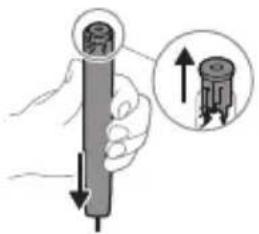
5 Holding the handle upside down, press the shaft down on a hard surface. If the internal components do not easily release from the housing, repeat step 3 until the internal components are released.
6 Wedge the screwdriver between the battery and the black frame at the bottom of the internal components. Then pry the screwdriver away from the battery to break the bottom of the black frame.
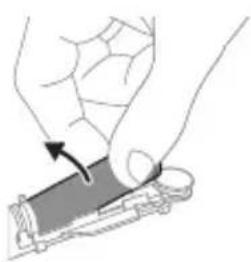
7 Insert the screwdriver between the bottom of the battery and the black frame to break the metal tab connecting the battery to the green printed circuit board. This will release the bottom end of the battery from the frame.
8 Grab the battery and pull it away from the internal components to break the second metal battery tab.
Caution: Be aware of the sharp edges of the battery tabs so as to avoid injury to your fingers.
9 Cover the battery contacts with tape to prevent any electrical short from residual battery charge.
The rechargeable battery can now be recycled and the rest of the product discarded appropriately.
Note: Do not throw away the appliance with the normal household waste at the end of its life, but hand it in at an official collection point for recycling. By doing this, you help to preserve the environment.
Giriş
www.philips.com/support
natural_image
Illustration showing a hand brushing a tooth with a brush and a close-up of the tooth being protracted (no text or symbols present)natural_image
Illustration of a hand holding a pipette with a magnified inset showing a droplet on a surface (no text or symbols)natural_image
Illustration of dental arching technique showing tooth arrangement and tooth penetration (no text or symbols)natural_image
Illustration of a stylized toothbrush with a circular icon showing signal waves (no text or symbols)natural_image
Simple line drawing of a starburst symbol with a small circle and arrow, connected to a vertical line (no text or labels)natural_image
Simple diagram with a circular icon containing a stylized 'P' and a vertical line, connected by a small circle (no text or symbols)natural_image
Illustration of two hands using a tool to lift or stand (no text or symbols present)natural_image
Illustration of a hand holding a device with a circular arrow pointing to the side panel (no text or symbols)natural_image
Cross-sectional diagram of a mechanical or electrical component with no visible text or symbolsnatural_image
Line drawing of a hand holding a small object on a rectangular base (no text or symbols)natural_image
Simple line drawing of a laboratory setup with a container and a test tube, no text or symbols present.natural_image
Line drawing of a medical procedure with a needle inserted into a tube (no text or symbols)natural_image
Illustration of two hands using a tool to lift or stand, with no visible text or symbolsnatural_image
Illustration of a hand inserting a device into a device housing (no text or symbols visible)natural_image
Hand inserting a dark rectangular object into a device component (no text or symbols visible)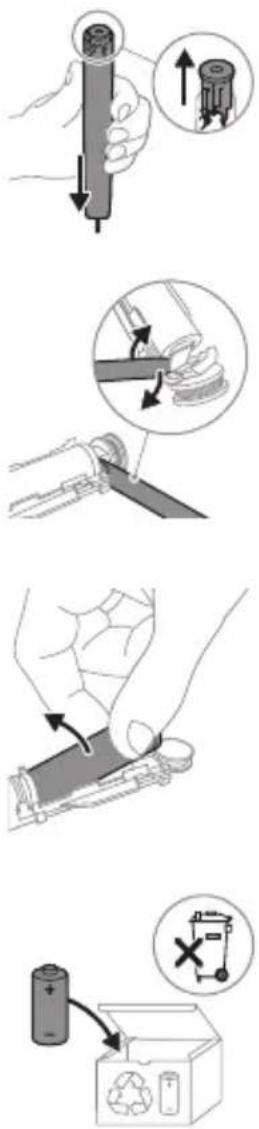
www.philips.com/support
XXXXXX
natural_image
Illustration showing a hand brushing a tooth with a brush, and a close-up of the tooth being smoothed (no text or symbols)natural_image
Illustration of a hand using a pipette to apply liquid onto a surface, with an inset showing a droplet on a surface (no text or symbols present)natural_image
Diagram showing tooth alignment with a brush and arrow indicating direction (no text or symbols)Clean White Gum Care
natural_image
Diagram of a microphone with a circular icon showing signal waves (no text or symbols)natural_image
Simple diagram with a starburst symbol and a small arrow pointing to a vertical line (no text or labels)natural_image
Three-step diagram illustrating a mechanical assembly process: tool insertion, close-up of component, and final assembled view (no text or symbols)natural_image
Line drawing of a hand inserting a small object into a device (no text or symbols)natural_image
Simple line drawing of a device with a star-shaped component inserted into a container (no text or symbols)natural_image
Line drawing of a medical procedure involving a needle inserted into a patient's leg (no text or labels)natural_image
Illustration of two hands using a tool to adjust or install a mechanical component, with no visible text or symbols.natural_image
Illustration of a hand inserting a device into a device housing (no text or symbols visible)natural_image
Hand holding a device with a black arrow pointing to a textured interior (no text or symbols visible)natural_image
Illustration of a mechanical component with a curved arm and rod (no text or symbols)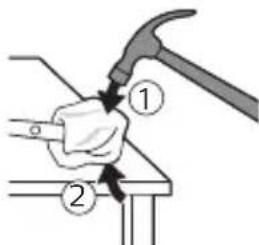
natural_image
Illustration of a hammer striking a cylindrical object with a circular motion arrow (no text or symbols)natural_image
Illustration of hands holding a cylindrical object with a curved arrow indicating rotation (no text or symbols)www.philips.com/support
natural_image
Illustration showing a hand brushing a tooth with a brush and a close-up of the tooth being smoothed (no text or symbols)natural_image
Illustration of a hand using a pipette to apply a substance, with an inset showing a magnified view of the same object (no text or symbols present)natural_image
Diagram showing dental arching technique with tooth arrangement and shaded area (no text or symbols)Clean White Gum Care
natural_image
Diagram of a toothbrush with sensor icon and magnified view (no text or symbols)natural_image
Simple line diagram showing a starburst symbol with a circular arrow pointing to a rectangular box (no text or labels)flowchart
graph TD
    A["P"] --> B["T"]
natural_image
Three-step diagram illustrating a mechanical assembly process: tool insertion, close-up of component, and final assembled view (no text or symbols)natural_image
Line drawing of a hand inserting a small object into a device (no text or symbols)natural_image
Simple line drawing of a device with a starburst symbol above it, showing a downward arrow and a small component at the base (no text or symbols)Opladning på oplader eller UV-renser
natural_image
Line drawing of a medical procedure showing a needle inserted into a bulbous structure (no text or symbols)natural_image
Illustration of two hands using a tool to lift or stand, with no visible text or symbolsnatural_image
Illustration of a hand inserting a component into a device (no text or symbols visible)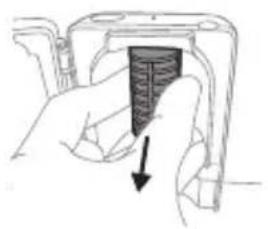
natural_image
Hand holding a mechanical component with a black arrow pointing to a section (no text or symbols visible)www.philips.com/support
natural_image
Illustration showing a hand brushing a tooth with a brush and a close-up of the tooth being smoothed (no text or symbols)natural_image
Illustration of a hand applying a small object to a surface, with an inset showing a magnified circular detail (no text or symbols)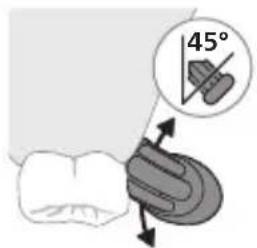
natural_image
Diagram showing dental tool application on upper teeth with magnified detail (no text or symbols)Clean White Gum Care
natural_image
Illustration of a toothbrush with a sensor icon and a magnified circular detail (no text or symbols)www.philips.com/toothbrush-heads.
Produktmerkmale
natural_image
Simple diagram with a starburst symbol and a small arrow pointing to a vertical line (no text or labels)flowchart
graph TD
    A["P"] --> B["6"]
natural_image
Illustration of two hands holding a tool with arrows indicating motion or force direction (no text or symbols)natural_image
Illustration of a hand pressing down on a device component with an arrow indicating the process (no text or symbols present)natural_image
Cross-sectional diagram of a mechanical or electrical component with two vertical connectors and internal structure (no text or symbols)natural_image
Line drawing of a hand holding a small object on a device (no text or symbols)natural_image
Simple line drawing of a mechanical setup with a cylindrical component and a base, no text or symbols present.natural_image
Line drawing of a medical procedure involving an incision or needle inserted into an anatomical structure (no text or labels)natural_image
Illustration of two hands using a tool to lift or stand, with no visible text or symbolsnatural_image
Illustration of a hand inserting a device into a device housing (no text or symbols visible)natural_image
Hand inserting a dark rectangular object into a device housing (no text or symbols visible)natural_image
Illustration of a hammer striking a cylindrical object with a circular arrow indicating rotation (no text or symbols)natural_image
Illustration of hands holding a cylindrical object with an arrow indicating rotation (no text or symbols)natural_image
Diagram showing a mechanical assembly with a magnified inset highlighting a component (no text or symbols present)natural_image
Illustration of a hand holding a device with an arrow indicating motion (no text or symbols)MEDITSIINILISED HOIATUSED
natural_image
Illustration showing a hand brushing a tooth with a brush, and a close-up of the tooth being smoothed (no text or symbols)natural_image
Illustration of a hand using a pipette to apply liquid onto a surface, with an inset showing a droplet on a surface (no text or symbols present)natural_image
Diagram showing dental tool interacting with teeth (no text or labels)QuadPacer
flowchart
graph TD
    A["①"] --> B["②"]
    B --> C["③"]
    C --> D["④"]
    D --> E["④"]
    style A fill:#f9f,stroke:#333
    style B fill:#f9f,stroke:#333
    style C fill:#f9f,stroke:#333
    style D fill:#f9f,stroke:#333
    style E fill:#ccf,stroke:#333
Clean White Gum Care
natural_image
Illustration of a toothbrush with a sensor icon and a magnified circular detail (no text or symbols)www.philips.com/toothbrush-heads.
Omadused
natural_image
Simple diagram with a starburst icon and a small star symbol connected by lines (no text or labels)natural_image
Simple diagram with a circular icon containing a stylized 'P' and a small circle connected to a vertical line (no text or symbols)natural_image
Three-step diagram illustrating a mechanical assembly process: tool application, close-up of component, and final assembled view (no text or symbols)natural_image
Line drawing of a hand holding a small object on a device (no text or symbols)natural_image
Simple line drawing of a mechanical setup with a component and cable (no text or symbols)natural_image
Line drawing of a medical procedure involving a needle inserted into a tube (no text or symbols)natural_image
Illustration of two hands using a tool to lift or stand (no text or symbols present)natural_image
Illustration of a hand inserting a component into a device (no text or symbols visible)natural_image
Hand holding a mechanical component with a black arrow pointing to a textured section (no text or symbols visible)natural_image
Illustration of a hand holding a cylindrical object with an arrow pointing upward, no text or symbols presentnatural_image
Diagram showing a mechanical assembly with a magnified inset of a tool interacting with a spring-like component (no text or symbols present)natural_image
Illustration of a hand pressing down on a mechanical component with an arrow indicating motion (no text or symbols)natural_image
Illustration showing a hand brushing a tooth with a brush and a close-up of the tooth being smoothed (no text or symbols)natural_image
Illustration of a hand applying a toothbrush to a nail, with an inset showing a magnified view of the tooth (no text or symbols present)natural_image
Diagram showing dental tool application on upper teeth with magnified detail (no text or symbols)natural_image
Illustration of a toothbrush with a sensor icon and signal symbol (no text or labels)natural_image
Simple diagram with a starburst symbol and a vertical line, no text or labels presentflowchart
graph TD
    A["P"] --> B["Terminal Node"]
natural_image
Illustration of two hands using a tool to cut or adjust a mechanical component (no text or symbols visible)natural_image
Illustration of a hand holding a battery with a pointing arrow (no text or symbols)natural_image
Cross-sectional diagram of a mechanical or electrical component with two symmetrical components (no text or symbols)natural_image
Line drawing of a hand inserting a small object into a device (no text or symbols)natural_image
Simple diagram showing a device with a star-shaped sensor above it, connected to a base with wires (no text or symbols)natural_image
Line drawing of a medical procedure with a needle inserted into a tube (no text or symbols)natural_image
Illustration of two hands holding a tool with arrows indicating motion or force direction (no text or symbols)natural_image
Illustration of a hand inserting a device into a device housing (no text or symbols visible)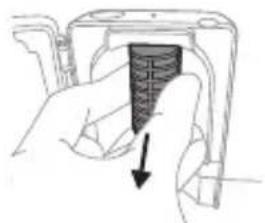
natural_image
Hand holding a device with a black arrow pointing to a textured section (no text or symbols visible)natural_image
Illustration of a hammer striking a cylindrical object with a circular arrow indicating rotation (no text or symbols)natural_image
Illustration of hands holding a cylindrical object with a knob, no text or symbols presentnatural_image
Diagram showing a mechanical assembly with a magnified inset highlighting a component (no text or symbols present)natural_image
Illustration of a hand holding a rectangular object with an arrow indicating motion (no text or symbols)natural_image
Simple line drawing of an open book with no text or symbols visiblenatural_image
Illustration showing a hand brushing a tooth with a brush and a close-up of the tooth being smoothed (no text or symbols)natural_image
Illustration of a hand holding a pipette with a magnified inset showing a droplet on a surface (no text or symbols)natural_image
Diagram showing dental tool interacting with teeth and jawbone structure (no text or labels)Clean White Gum Care
natural_image
Illustration of a toothbrush with a sensor icon and a magnified circular detail (no text or symbols)natural_image
Simple line drawing of a gear with a star and gear symbol, connected to a vertical line (no text or labels)flowchart
graph TD
    A["P"] --> B["6"]
natural_image
Illustration of two hands holding a tool with arrows indicating motion or force direction (no text or symbols)natural_image
Illustration of a hand pressing down on a device component with an arrow indicating the process (no text or symbols present)natural_image
Cross-sectional diagram of a mechanical or electrical component with two vertical connectors and internal structure (no text or symbols)natural_image
Line drawing of a hand inserting a small object into a cylindrical device (no text or symbols)natural_image
Simple line drawing of a container with a star-shaped mark and a small object inserted into a base (no text or symbols)natural_image
Line drawing of a medical procedure showing a tool interacting with an anatomical structure (no text or symbols)natural_image
Illustration of two hands using a tool to adjust or install a mechanical component (no text or symbols visible)natural_image
Illustration of a hand inserting a component into a device (no text or symbols visible)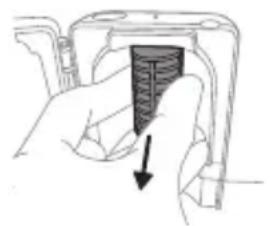
natural_image
Hand inserting a dark rectangular object into a device (no text or symbols visible)natural_image
Simple line drawing of a mechanical component or tool on a base, no text or symbols present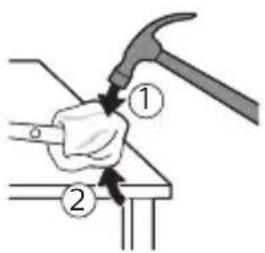
natural_image
Illustration of a hammer striking a cylindrical object with a circular arrow indicating rotation (no text or symbols)natural_image
Illustration of hands holding a cylindrical object with a mechanical clip, no text or symbols presentnatural_image
Diagram showing a mechanical assembly with a magnified inset highlighting a component being inserted (no text or symbols present)natural_image
Illustration of a hand holding a rectangular object with an arrow indicating motion (no text or symbols)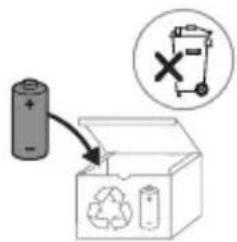
natural_image
Illustration showing a hand brushing a tooth with a brush, and a close-up of the tooth being smoothed (no text or symbols)natural_image
Illustration of a hand applying a small object to a toothbrush, with an inset showing a magnified view of the tooth (no text or symbols present)1 Smočite vlakna četkice i nanesite malu količinu paste za zube.
natural_image
Diagram showing dental tool interacting with teeth (no text or symbols)5 Kako biste očistili unutarnje površine prednjih zubi, nagnite dršku četkice poluuspravno i izvršite nekoliko vertikalnih preklapajućih pokreta na svakom zubu.
Clean White Gum Care
| Prednost Za odličnosvakodnevnočišćenje | Uklanjanjepovršinskih mrlja | Nježno masiradesni | |
| Ukupno vrijemečetkanja | 2 minute 2 minute i30 sekundi | 3 minute | |
| Kako četkatiČetkajte svakisegment30 sekundi. | četkajte svakisegment30 sekundi | četkajte svakisegment30 sekundi | |
 |  |  | |
| zatim četkajtesegmente 5 i 6,svakog po 15sekundi, zaposvjetljivanje ipoliranje prednjihzuba. | zatim četkajtesegmente 5, 6, 7 i8, svakog po 15sekundi, zanježnustimulaciju imasažu desni. | ||
 |  | ||
Tehnologija BrushSync
natural_image
Diagram of a toothbrush with sensor icon and magnified view (no text or symbols)natural_image
Pure electrical circuit lines without any symbolsnatural_image
Simple diagram with a circular icon containing a stylized 'P' and a small circle connected to a vertical line (no text or symbols)EasyStart
natural_image
Line drawing of a hand inserting a small object into a device (no text or symbols)natural_image
Simple diagram showing a container with a star-shaped label and a downward arrow pointing to a small object on a base (no text or symbols)Punjenje na punjaču ili u uređaju za UV dezinfekciju
1 Priključite punjač ili uređaj za dezinfekciju u električnu utičnicu.
2 Postavite dršku na punjač ili uređaj za dezinfekciju.
- Drška će emitirati dva kratka zvučna signala kao potvrdu da je drška pravilno postavljena.
- Treperenje indikatora baterije pokazuje da se četkica puni.
- Kad je drška na punjaču potpuno napunjena,
indikator baterije svijetli 30 sekundi u zelenoj boji prije
nego što se isključi.
Stanje baterije
Stanje baterije (drška na priključenom punjaču)
Kad je drška postavljena na punjač, indikator baterije prikazuje razinu napunjenosti baterije.
Stanje baterije Indikator baterije
| punjenje Treperi zeleno |
| puna Neprestano svijetli u zelenoj boji 30sekundi, a zatim se isključuje |
natural_image
Line drawing of a medical procedure involving a needle inserted into a tube (no text or symbols)1 Odvojite glavu četkice i isperite metalnu osovinu toplom vodom. Pobrinite se da uklonite svu preostalu zubnu pastu.
Oprez: Nemojte koristiti oštre predmete za guranje gumene brtve na metalnu osovinu jer to može prouzročiti oštećenja.
2 Cijelu površinu drške obrišite vlažnom tkaninom.
Napomena: Nemojte lupkati drškom po umivaoniku kako biste uklonili višak vode.
Glava četkice
natural_image
Illustration of two hands using a tool to lift or stand, with no visible text or symbolsnatural_image
Illustration of a hand inserting a device into a device housing (no text or symbols visible)natural_image
Hand inserting a dark rectangular object into a device component (no text or symbols visible)Da biste uklonili štitnik, uhvatite rubove štitnika pokraj nosača, nježno pritisnite i zatim izvucite štitnik.
natural_image
Simple line drawing of a mechanical component or tool interacting with a base (no text or symbols)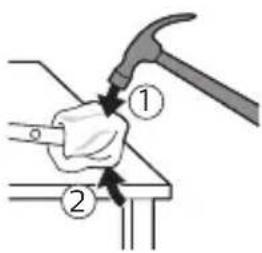
natural_image
Illustration of a hammer striking a cylindrical object with a circular arrow indicating rotation (no text or symbols)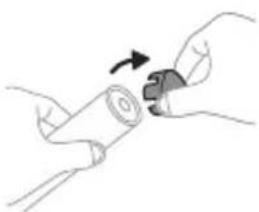
natural_image
Illustration of hands holding a cylindrical object with an arrow indicating rotation (no text or symbols)www.philips.com/support
natural_image
Illustration showing a hand brushing a tooth with a brush and a close-up of the tooth being cut (no text or symbols)natural_image
Illustration of a hand holding a pipette with a magnified inset showing a droplet on a surface (no text or symbols)natural_image
Diagram of dental tool application on upper teeth with magnified view (no text or symbols)Clean White Gum Care
natural_image
Simple line drawing of a gear with a starburst symbol and a small gear icon, no text or labels present.natural_image
Simple diagram showing a circular icon with a 'P' symbol and a small circle connected by an arrow, next to a vertical line (no text or labels)EasyStart
natural_image
Three-step diagram illustrating a mechanical assembly process: tool insertion, close-up of component, and final assembled view (no text or symbols)natural_image
Line drawing of a hand inserting a small object into a device (no text or symbols)natural_image
Simple line drawing of a laboratory setup with a container and a test tube (no text or symbols)212 Italiano
natural_image
Line drawing of a medical procedure with a needle inserted into a tube (no text or symbols)natural_image
Illustration of two hands using a tool to lift or stand (no text or symbols present)natural_image
Illustration of a hand inserting a device into a device housing (no text or symbols visible)natural_image
Hand holding a device with a black textured object and arrow indicating direction (no text or symbols)natural_image
Illustration of a hand holding a cylindrical object with an arrow pointing to it, showing internal components (no text or symbols)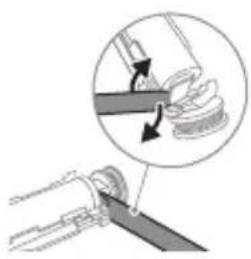
natural_image
Illustration of a mechanical tool interacting with a spring, showing a close-up of the lever mechanism (no text or symbols present)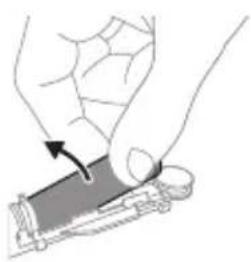
natural_image
Illustration of a hand holding a rectangular object with an arrow indicating motion (no text or symbols)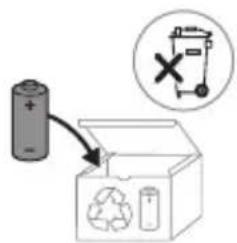
www.philips.com/support
natural_image
Illustration of a hand holding a toothbrush with a downward arrow indicating force or pressure (no text or symbols)natural_image
Simple line drawing of a curved object with a checkmark indicating a detail (no text or symbols)natural_image
Illustration of a hand using a pipette to apply liquid onto a tooth, with an inset showing a magnified view of the tooth (no text or symbols present)1 Samitriniet sarus un uzklājiet mazliet zobu pastas.
natural_image
Diagram of dental tool interacting with teeth (no text or labels)Clean White Gum Care
natural_image
Diagram of a microphone with signal icon and speech bubble, no text or symbols presentnatural_image
Simple diagram with a starburst symbol and a small gear-like shape connected by an arrow (no text or labels)natural_image
Simple diagram with a circular icon containing a stylized 'P' and a small circle connected to a vertical line (no text or symbols)natural_image
Illustration of two hands holding a tool with arrows indicating movement or force (no text or symbols)natural_image
Illustration of a hand pressing down on a device component with an arrow indicating the process (no text or symbols present)natural_image
Cross-sectional diagram of a mechanical component with internal channels and no visible text or symbolsnatural_image
Line drawing of a hand inserting a small object into a device (no text or symbols)natural_image
Simple line drawing of a laboratory setup with a container and a test tube (no text or symbols)natural_image
Line drawing of a medical procedure involving an incision or needle inserted into a patient's abdomen (no text or symbols present)natural_image
Illustration of two hands holding a tool with arrows indicating motion or force direction (no text or symbols)natural_image
Illustration of a hand inserting a device into a device housing (no text or symbols visible)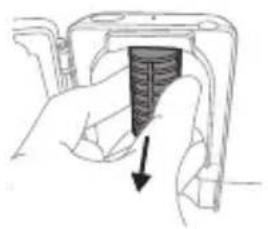
natural_image
Hand holding a mechanical component with a black arrow pointing to a section (no text or symbols visible)natural_image
Illustration showing a hand brushing a tooth with a brush and a close-up of the tooth being smoothed (no text or symbols)natural_image
Illustration of a hand using a pipette to apply liquid onto a surface, with an inset showing a droplet on a surface (no text or symbols present)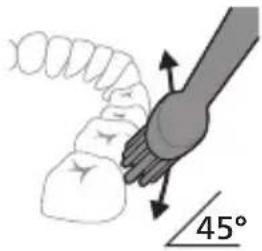
natural_image
Illustration of a tooth being brushed with a toothbrush (no text or symbols)natural_image
Illustration of a toothbrush with a sensor icon and signal symbol (no text or labels)natural_image
Simple diagram with a starburst symbol and a small arrow pointing to a vertical line (no text or labels)natural_image
Simple diagram with a circular icon containing a person silhouette and a small circle connected by a line (no text or symbols)EasyStart
natural_image
Illustration of two hands holding a tool with arrows indicating motion or force direction (no text or symbols)natural_image
Illustration of a hand pressing down on a device component with an arrow indicating the process (no text or symbols present)natural_image
Cross-sectional diagram of a mechanical or electrical component with two vertical supports and internal structure (no text or symbols)natural_image
Line drawing of a hand holding a small object with a pointed tip, next to a rectangular device (no text or symbols)natural_image
Simple line drawing of a mechanical setup with a cylindrical component and a base, no text or symbols present.natural_image
Line drawing of a medical procedure with a needle inserted into a tube (no text or symbols)natural_image
Illustration of two hands using a tool to lift or lift a curved object, with no visible text or symbols.natural_image
Illustration of a hand inserting a component into an electronic device (no text or symbols visible)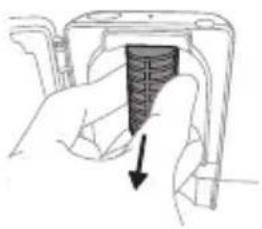
natural_image
Hand holding a device with a textured internal component and an arrow indicating direction (no text or symbols)natural_image
Simple line drawing of a mechanical component or tool on a base, no text or symbols present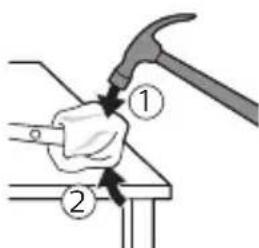
natural_image
Illustration of a hammer striking a cylindrical object with a circular arrow indicating rotation (no text or symbols)natural_image
Illustration of hands holding a cylindrical object with a mechanical component, no text or symbols presentnatural_image
Diagram showing a mechanical assembly with a magnified inset highlighting a component (no text or symbols present)natural_image
Illustration of a hand holding a rectangular object with an arrow indicating rotation (no text or symbols)www.philips.com/support
www.philips.com/support
natural_image
Illustration showing a hand holding a toothbrush and a close-up of a tooth with a circular mark, both without any text or symbols.natural_image
Illustration of a hand using a pipette to apply liquid onto a surface, with an inset showing a droplet on a surface (no text or symbols present)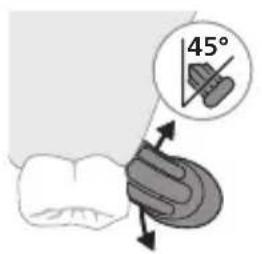
natural_image
Diagram showing dental tool application on upper teeth with magnified detail (no text or symbols)Clean White Gum Care
natural_image
Illustration of a toothbrush with a circular icon showing signal waves (no text or symbols)natural_image
Simple line drawing of a gear and gear icon with no text or symbolsflowchart
graph TD
    A["P"] --> B["T"]
natural_image
Three-step diagram illustrating a mechanical assembly process: tool insertion, close-up of component, and final assembled view (no text or symbols)natural_image
Line drawing of a hand inserting a small object into a device (no text or symbols)natural_image
Simple line drawing of a device with a star-shaped sensor above it, no text or symbols present.natural_image
Line drawing of a medical procedure showing a tool interacting with an anatomical structure (no text or symbols)natural_image
Illustration of two hands using a tool to adjust or install a mechanical component, with no visible text or symbols.natural_image
Illustration of a hand inserting a component into a device (no text or symbols visible)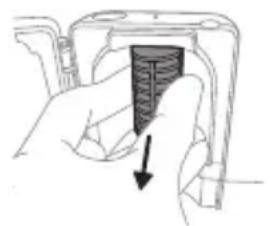
natural_image
Hand inserting a dark rectangular object into a device (no text or symbols visible)natural_image
Illustration of a hammer striking a cylindrical object with a circular arrow indicating rotation (no text or symbols)natural_image
Illustration of hands holding a cylindrical object with an arrow indicating rotation (no text or symbols)natural_image
Diagram showing a mechanical assembly with a magnified inset highlighting a component (no text or symbols present)natural_image
Illustration of a hand holding a small electronic device with a curved arrow indicating motion (no text or symbols)www.philips.com/support
natural_image
Illustration showing a hand holding a toothbrush and a close-up of a tooth with a sensor symbol (no text or labels)natural_image
Illustration of a hand using a pen to apply a sample onto a surface, with an inset showing a magnified view of the sample (no text or symbols present)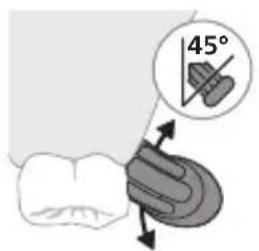
natural_image
Diagram showing dental tool application on upper teeth with magnified view (no text or labels)Clean White Gum Care
natural_image
Illustration of a toothbrush with a sensor icon and a magnified view of its base (no text or symbols)natural_image
Simple diagram with a circular symbol containing a stylized 'P' and a starburst shape connected to a vertical line (no text or labels)flowchart
graph TD
    A["P"] --> B["6"]
natural_image
Three-step diagram illustrating a mechanical assembly process: tool application, close-up of component, and final assembled view (no text or symbols)natural_image
Line drawing of a hand inserting a small object into a device (no text or symbols)natural_image
Simple line drawing of a device with a star-shaped symbol above it, no text or symbols present.Opladen op oplader of UV-reiniger
natural_image
Line drawing of a medical procedure with a needle inserted into a tube (no text or symbols)natural_image
Illustration of two hands using a tool to lift or stand (no text or symbols present)natural_image
Illustration of a hand inserting a device into a device housing (no text or symbols visible)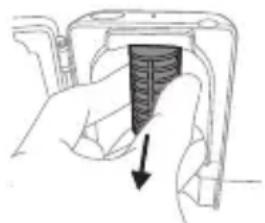
natural_image
Hand holding a device with a black rectangular component and an arrow pointing to it (no text or symbols visible)natural_image
Illustration of a hand holding a tool with a circular object, no text or symbols present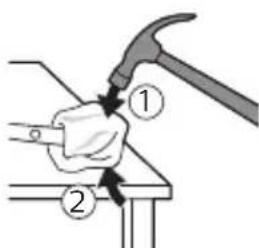
natural_image
Illustration of a hammer striking a cylindrical object with a circular arrow indicating rotation (no text or symbols)natural_image
Illustration of hands holding a cylindrical object with an arrow indicating rotation (no text or symbols)natural_image
Diagram showing a mechanical assembly with a magnified inset of a tool interacting with a spring-like component (no text or symbols present)natural_image
Illustration of a hand holding a rectangular object with an arrow indicating motion (no text or symbols)natural_image
Illustration showing a hand brushing a tooth with a brush, and a close-up of the tooth being smoothed (no text or symbols)natural_image
Illustration of a hand applying a dropper to a toothbrush, with an inset showing a magnified view of the tooth (no text or symbols present)natural_image
Diagram showing dental tool application on upper teeth with magnified detail (no text or symbols)Clean White Gum Care
natural_image
Simple line drawing of a gear and gear icon with no text or symbolsnatural_image
Simple diagram showing a circular icon with a 'P' and a small circle connected to a vertical line (no text or symbols)natural_image
Three-step diagram illustrating a mechanical assembly process: tool application, close-up of component, and final assembled view (no text or symbols)natural_image
Line drawing of a hand inserting a small object into a device (no text or symbols)natural_image
Simple line drawing of a device with a starburst symbol above it, showing a downward arrow and a small component below (no text or symbols)Lading i lader eller UV-renser
natural_image
Illustration of a medical procedure with a needle inserted into a tube (no text or symbols)1 Ta av børstehodet, og skyll metallstangen i varmt vann. Pass på at du har fjernet alle tannkremrester.
natural_image
Illustration of two hands using a tool to adjust or install a mechanical component, with no visible text or symbols.natural_image
Illustration of a hand inserting a device into a device housing (no text or symbols visible)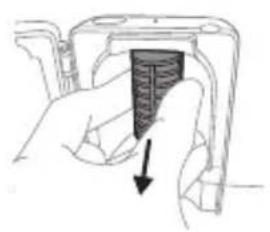
natural_image
Hand inserting a dark rectangular object into a device component (no text or symbols visible)natural_image
Illustration showing a hand brushing a tooth with a brush and a close-up of the tooth being smoothed (no text or symbols)1 Cho'tka tuklari dastaning old qismi bilan bir xil yo'nalishda bo'lishi uchun cho'tka kallagini tekislang.
2 Cho'tka kallagini u boshqa kirmagunigacha metall valga qattiq bosing.
Izoh: Cho'tka kallagi va dasta orasida kichik tirqish ko'rinishi – normal holat.
Philips Sonicare tish pastangizdan foydalanish
Agar Sonicare tish pastasidan birinchi marta foydalanayotgan bo'lsangiz, elektr bo'Imagan tish cho'tkasidan foydalanishga qaraganda ko'proq tebranish sezish normal holat. Odatda birinchi marta foydalanayotgan foydalanuvchilar ortiqcha bosim beradi. Faqat yumshoq bosib bering va tish cho'tkasi siz uchun tozalashiga imkon bering. Eng yaxshi taassurot uchun tish tozalash ko'rsatmalariga amal qiling. Yangi Sonicare motorli tish cho'tkasiga o'tishingizga yordam berish uchun EasyStart funksiyasi faollashtirilgan holatda
natural_image
Illustration of a hand using a pipette to apply liquid onto a surface, with an inset showing a droplet on a surface (no text or symbols present)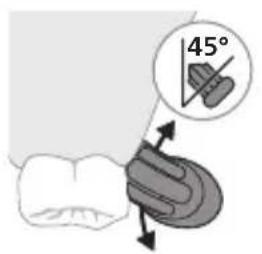
1 Cho'tkani namlang va unga kam miqdorda tish pastasi surting.
2 Tish cho'tkasini tishlar qarshisida kichik (45 daraja) burchak ostida tuting va cho'tkalar milk chizig'iga yoki milk chizig'ining tagiga yetishi uchun uni qattiq bosing.
Izoh: Cho'tka markazini tishlarga doimi to'liq tekkizib turing.
3 Philips Sonicare qurilmasini yoqish uchun yoqish/o'chirish tugmasini bosing.
4 Cho'tkani tishlar va milk chizig'iga yengil tutib turing. Cho'tkalar tishlar orasiga kirishi uchun cho'tka kallagini oldinga-orqaqa kichik harakatlar bilan tishlaringizni tozalang. Bu harakatlarni tish tozalash siklingiz yakunlangunga qadar bajaring.
natural_image
Diagram showing dental tool interacting with teeth (no text or labels)Clean White Gum Care
| Foydasi Maxsus kundalik tozalah uchun | Yuzadagi dog'larni ketkazadi | Milklarni ohista massaj qiladi | |
| Jami tish tozalah vaqti | 2 daqiga 2 daqiga va 30 soniya | 3 daqiga | |
| Tozalah usuli Har bir segmentni 30 soniyadan tozalang. | Har bir segmentni 30 soniyadan tozalang | Har bir segmentni 30 soniyadan tozalang | |
 |  |  | |
| keyin old tishlarni oqartirish va jilolash uchun 5-va 6-segmentlarning har birini 15 soniyadan tozalang. | keyin milklaringizni ohista stimullash va massaj qilish uchun 5, 6, 7 va 8-segmentlarning har birini 15 soniyadan tozalang. | ||
 |  | ||
BrushSync texnologiyasi

natural_image
Illustration of a toothbrush with a circular icon showing wireless signal waves (no text or symbols)BrushSync texnologiyasi cho'tka kallagining dasta bilan mikrochip orqali muloqot qilishiga yordam beradi.
Cho'tka kallagi ostidagi belgisi cho'tka kallagi ushbu texnologiya bilan jihozlanganini anglatadi.
BrushSync texnologiyasi quyidagilarni faollashtiradi:
- Cho'tka kallagini almashtirishni eslatish funksiyasi
Philips Sonicare BrushSync texnologiyasiga ega keng turdagi smart cho'tka kallaklarini taklif qiladi. Tish cho'tkasining cho'tka kallaklari to'liq ko'lami bilan tanishish va sizga eng mos keladigan cho'tka kallagini topish uchun www.philips.com/toothbrush-heads veb-saytiga kiring.
Funksiyalar
- Bosim sensori bildirgisi
- QuadPacer
- Cho'tka kallagini almashtirishni eslatish funksiyasi
- EasyStart
- SmarTimer
natural_image
Simple diagram with a starburst symbol and a small gear-like shape connected by an arrow (no text or labels)flowchart
graph TD
    A["Person Icon"] --> B["T Terminal"]
natural_image
Illustration of two hands using a tool to lift or stand (no text or symbols present)1 Tish tozalagandan keyin cho'tka kallagini chaying va ortiqcha suvni silkiting.
natural_image
Illustration of a hand holding a rectangular object with a circular arrow pointing to it (no text or symbols)Ogohlantirish: Cho'tka kallagi sanitayzerda tozalanayotganida cho'tka kallagi qopqog'i cho'tka kallagida emasligini tekshiring.
natural_image
Cross-sectional diagram of a mechanical or electrical component with no visible text or symbols3 Cho'tka kallagini sanitayzerdagi 2 ta ilgakdan biriga cho'tkalarini chiroqqa qaratgan holda joylang.
Izoh: Sanitayzerda faqat Philips Sonicare biriktiriladigan cho'tka kallaklarini tozalang.
Izoh: Philips Sonicare for Kids cho'tka kallaklarini sanitayzerda tozalamang.
4 Sanitayzer mos keladigan kuchlanishdagi rozetkaga ulanganini tekshiring.
natural_image
Line drawing of a hand inserting a plug into a device (no text or symbols)5 Eshikni yoping va ultrabinafsha nur tozalash siklini tanlash uchun yashil quvvatni yoqish/o'chirish tugmasini bir marta bosing.
natural_image
Simple line drawing of a device with a star-shaped component and cable, no text or symbols present.Quvvatlagich yoki ultrabinafsha sanitayzerda quvvatlash
1 Quvvatlagich yoki sanitayzerni elektr manbaiga ulang.
2 Dastani quvvatlagich yoki sanitayzerga joylang.
- Dasta quvvatlash moslamasiga to'g'ri o'rnatilganini tasdiqlash uchun 2 marta qisqa signal chaladi.
- Batareyaning miltillovchi indikatori tish cho'tkasi quvvatlanayotganini bildiradi.
- Quvvatlagichdagi dasta to'liq quvvatlansa, batareya indikatori 30 soniya yashil rangda yonadi va keyin o'chadi.
Batareya holati
Batareya holati (ulangan quvvatlagichdagi dasta)
Dasta quvvatlagichga joylanganda batareya indikatori batareya darajasini aks ettiradi.
Batareya holati Batareya indikatori
| Quvvatlash Yashil rangda miltillaydi |
| To’lgan 30 soniya yaxlit yashil rangda yonibturadi va keyin o’chadi |
Batareya holati (dasta quvvatlagichga qo'yilmaganida)
Tish cho'tkasi faolligida dasta ostidagi batareya indikatori batareya darajasini aks ettiradi.
Batareya holati Batareya indikatori Tovush
| To’lgan Yaxlit yashil - | |
| Qisman to’lgan Yashil rangda miltillaydi - | |
| Kam Sariq rangda miltillaydi Tish tozalanganidan | keyin dastadan 3 ta qisqa signal jaranglaydi |
| Bo’sh Sariq rangda miltillaydi Tish tozalanganidan | keyin dastadan 5 tadan 2 ta qisqa signal jamlanmasi jaranglaydi |
| Izoh: Energiya tejash uchun batareya indikatori ishlatilmayotganida o’chadi. | |
| Izoh: Batareya to’liq bo’shlig’ida tish cho’tkasi o’chadi. Tish cho’tkasini quvvatlash uchun uni quvvatlagichga joylang. | |
| Izoh: Batareyani har doim to’liq quvvatlagan holda saqlash uchun tish cho’tkasidan foydalanmayotgan paytda uni quvvatlagichda saqlashingiz mumkin. | |
Tozalash
Tish cho'tkasi dastasi
natural_image
Line drawing of a medical procedure involving a needle inserted into a patient's leg (no text or labels)1 Cho'tka kallagini chiqarib oling va metall val atrofini iliq suv bilan yuving. Har qanday tish pastasi qoldig'ini tozalaganingizni tekshiring.
Ogohlantirish: Metall valdagi rezina zichlagichni o'tkir narsalar bilan bosmang, bu shikastlanishga olib kelishi mumkin.
2 Dastaning butun yuzasini nam mato bilan artib oling.
Izoh: Ortiqcha suvni yo'qotish uchun dastani rakovinaga urmang.
Cho'tka kallagi
natural_image
Illustration of two hands using a tool to adjust or install a mechanical component, with no visible text or symbols.1 Cho'tka kallagi va cho'tkani har foydalanishdan keyin yuving.
2 Cho'tka kallagini dastadan chiqarib oling va cho'tka kallagi ulanish qismini kamida haftada bir marta iliq suv bilan yuving. Sayohat qopqog'ini zarur bo'lgancha tez-tez yuvib tashlang.
Quvvatlash moslamasi
1 Tozalashdan avval, quvvatlagichni tarmoqdan uzing.
2 Quvvatlash moslamasining butun yuzasini nam mato bilan artib oling.
Sayohat g'ilofi
Iliq suv bilan yuving va sayohat g'ilofi ichini tozalash uchun nam matodan foydalaning.
Sanitayzerni tozalash
Ogohlantirish: Sanitayzerni suvga botirmang yoki jo'mrak ostida chaymang.
Ogohlantirish: Sanitayzerning ultrabinafsha chirog'i issiqligida sanitayzerni tozalamang.
Optimal samaradorlik uchun sanitayzeringizni har hafta tozalash tavsiya etiladi.
1 Sanitayzerni tarmoqdan uzing.
natural_image
Illustration of a hand inserting a component into a device (no text or symbols visible)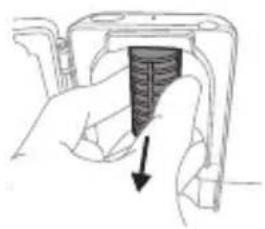
natural_image
Hand holding a device with a black arrow pointing to a textured section (no text or symbols visible)2 Tomchi tomini to'g'riga tortib chiqaring. Tomchi novini chaying va uni nam mato bilan tozalab arting.
3 Barcha ichki yuzalarini nam mato bilan tozalang.
4 Ultrabinafsha chiroqdan himoya plyonkasini chiqarib oling.
Plyonkani chiqarib olish uchun qisqichlar yonidagi chetlaridan ushlab, himoya plyonkasini tortib oling.
5 Ultrabinafsha chiroqni chiqarib oling. Chiroqni chiqarib olish uchun uni ushlang va metall qisqichdan tortib chiqaring.
6 Himoya plyonkasi va ultrabinafsha chiroqni nam mato bilan tozalang.
natural_image
Illustration of a mechanical device with a lever and handle (no text or symbols)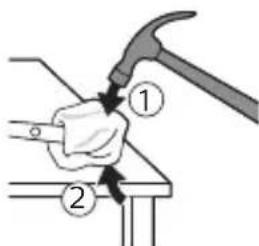
natural_image
Illustration of a hammer striking a cylindrical object with a circular arrow indicating motion (no text or symbols)3 Dastaning tepa qismini bir qo'l bilan ushlang va korpusning ostki qismidan 0,5 dyuym (1,3 sm) tepaga uring. Uchidagi qopqoqni chiqarish uchun bolg'a bilan 4 tomonni qattiq uring.
Izoh: Ichki fiksatorli konnektorlarni uzish uchun jihozning uchiga bir necha marta urishingiz kerak bo'lishi mumkin.
natural_image
Illustration of hands holding a battery with a rotating knob (no text or symbols)4 Tish cho'tkasi dastasi uchining qopqog'ini olib tashlang. Agar jihoz uchidagi qopqoq korpusdan oson chiqmasa, qopqoq chiqquncha 3-bosqichni takrorlang.
natural_image
Diagram showing a mechanical assembly with a magnified inset of a tool interacting with a component (no text or symbols visible)6 Otvertkani batareya va ichki qismlarning ostidagi qora korpus orasiga kiriting. Keyin qora korpus ostidagi qismni sindirish uchun buragichni batareyadan uzoqlashtiring.
natural_image
Illustration of a hand holding a device with an arrow indicating motion (no text or symbols)7 Batareyani yashil bosma plata bilan ulab turadigan metall tilchani sindirish uchun otvertkani batareya osti va qora korpus orasiga kiriting. Bu batareyaning ostki uchini korpusdan chiqarib oladi.
8 Ikkinchi metall tilchani sindirish uchun batareyani oling va uni ichki qismlarga teskari tarafga torting.
Ogohlantirish: Barmog'ingizni tilib olmaslik uchun batareya tilchasining o'tkir qirralaridan ehtiyot bo'ling.
www.philips.com/support
natural_image
Illustration showing a hand brushing a tooth with a brush and arrow indicating direction (no text or symbols)natural_image
Illustration of a hand applying a toothbrush to a nail, with an inset showing a magnified view of the tooth (no text or symbols present)Clean White Gum Care
natural_image
Simple line drawing of a gear and gear icon with no text or symbolsnatural_image
Simple diagram with a circular icon containing a person and a vertical line, no text or symbols present.natural_image
Three-step diagram illustrating a mechanical assembly process: tool insertion, close-up of component, and final assembled view (no text or symbols)natural_image
Line drawing of a hand inserting a small object into a cylindrical device (no text or symbols)natural_image
Simple line drawing of a container with a star-shaped object and a plug inserted into a base (no text or symbols)natural_image
Simple line drawing of a medical procedure with a needle inserted into tissue (no text or symbols)natural_image
Illustration of two hands using a tool to lift or stand, with no visible text or symbolsnatural_image
Illustration of a hand inserting a device into a device housing (no text or symbols visible)natural_image
Hand holding a device with a black arrow pointing to a textured section (no text or symbols visible)natural_image
Simple line drawing of a mechanical component or tool on a base, no text or symbols present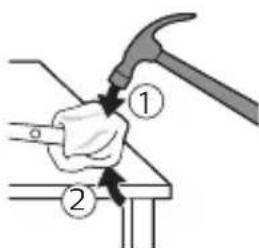
natural_image
Illustration of a hammer striking a cylindrical object with a circular arrow indicating rotation (no text or symbols)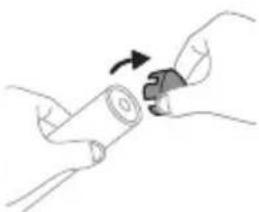
natural_image
Illustration of hands holding a cylindrical object with a curved arrow indicating rotation (no text or symbols)www.philips.com/support
natural_image
Illustration showing a hand brushing a tooth with a brush and a close-up of the tooth being protracted (no text or symbols present)natural_image
Illustration of a hand holding a pipette with a magnified inset showing a droplet on a surface (no text or symbols)natural_image
Diagram showing dental tool application on upper teeth with magnified detail (no text or symbols)Clean White Gum Care
natural_image
Illustration of a toothbrush with a sensor icon and signal symbol (no text or labels)natural_image
Simple diagram with a starburst symbol and a small arrow pointing to a vertical line (no text or labels)natural_image
Simple diagram with a circular icon containing a person silhouette and a small circle connected by a line (no text or symbols)natural_image
Three-step diagram illustrating a mechanical assembly process: tool application, close-up of component, and final assembled view (no text or symbols)natural_image
Line drawing of a hand inserting a small object into a device (no text or symbols)natural_image
Simple line drawing of a device with a star-shaped label and an arrow pointing to a small component (no text or symbols)natural_image
Line drawing of a medical procedure involving an incision or catheter insertion into a tubular structure (no text or symbols)natural_image
Illustration of two hands holding a tool with arrows indicating motion or force direction (no text or symbols)natural_image
Illustration of a hand inserting a component into a device (no text or symbols visible)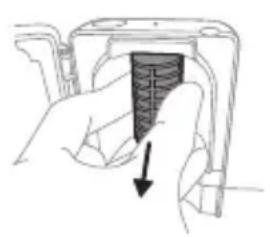
natural_image
Hand holding a device with a black arrow pointing to a textured section (no text or symbols visible)natural_image
Illustration of a hammer striking a cylindrical object with a circular arrow indicating rotation (no text or symbols)natural_image
Illustration of hands holding a cylindrical object with an arrow indicating rotation (no text or symbols)natural_image
Diagram showing a mechanical assembly with a magnified inset highlighting a component (no text or symbols present)natural_image
Illustration of a hand holding a rectangular object with an arrow indicating rotation (no text or symbols)www.philips.com/support
www.philips.com/support
natural_image
Illustration showing a hand brushing a tooth with a brush and a close-up of the tooth being protracted (no text or symbols present)natural_image
Illustration of a hand holding a pipette with a magnified inset showing a droplet on a surface (no text or symbols)natural_image
Diagram of dental tool application on upper teeth with magnified view (no text or labels)Clean White Gum Care
natural_image
Diagram of a toothbrush with sensor icon and magnified view (no text or symbols)natural_image
Pure electrical circuit lines without any symbolsnatural_image
Simple diagram with a circular icon containing a stylized 'P' and a vertical line with a small circle labeled 'T', no text or symbols present.natural_image
Three-step diagram illustrating a mechanical assembly process: tool application, close-up of component, and final assembled view (no text or symbols)natural_image
Line drawing of a hand inserting a small object into a device (no text or symbols)natural_image
Simple line drawing of a container with a star-shaped label and a small object on a base, no text or symbols present.natural_image
Line drawing of a medical procedure with a needle inserted into tissue (no text or symbols)natural_image
Illustration of two hands holding a tool with arrows indicating movement or force (no text or symbols)natural_image
Illustration of a hand inserting a device into a device housing (no text or symbols visible)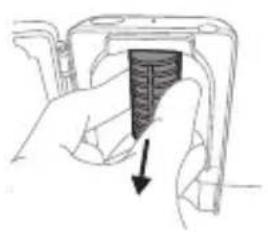
natural_image
Hand holding a device with a black arrow pointing to a textured interior (no text or symbols visible)natural_image
Diagram of a mechanical component with a curved arrow indicating rotation (no text or symbols)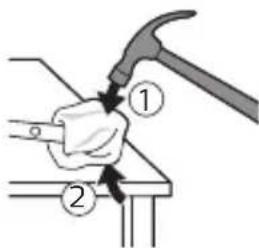
natural_image
Illustration of a hammer striking a cylindrical object with motion arrows (no text or symbols)natural_image
Illustration of hands holding a battery with a switch, no text or symbols presentnatural_image
Diagram showing a mechanical assembly with a magnified inset of a tool interacting with a component (no text or symbols present)natural_image
Illustration of a hand holding a rectangular object with an arrow indicating motion (no text or symbols)www.philips.com/support
natural_image
Simple line drawing of an open book with no text or symbols visiblenatural_image
Illustration showing a hand holding a toothbrush and a close-up of a tooth with a circular sensor (no text or symbols)natural_image
Illustration of a hand holding a pipette with a magnified inset showing a droplet on a surface (no text or symbols)natural_image
Diagram showing dental tool application on upper teeth with magnified view (no text or labels)Clean White Gum Care
natural_image
Illustration of a toothbrush with a circular icon showing wireless signal waves (no text or symbols)natural_image
Pure electrical circuit lines without any symbolsnatural_image
Illustration of two hands using a tool to lift or stand (no text or symbols present)natural_image
Illustration of a hand pressing a button on a device (no text or symbols visible)natural_image
Cross-sectional diagram of a mechanical or electrical component with no visible text or symbolsnatural_image
Line drawing of a hand inserting a small object into a device (no text or symbols)natural_image
Simple line drawing of a laboratory setup with a container and a test tube, no text or symbols present.natural_image
Line drawing of a medical procedure with a needle inserted into a tube (no text or symbols)natural_image
Illustration of two hands using a tool to lift or stand (no text or symbols present)natural_image
Illustration of a hand inserting a device into a device housing (no text or symbols visible)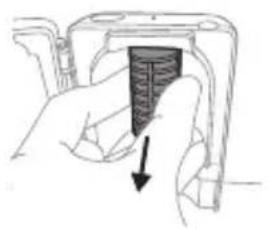
natural_image
Hand holding a mechanical component with a black arrow pointing to a section (no text or symbols visible)natural_image
Illustration of a mechanical device with a handle and lever (no text or symbols)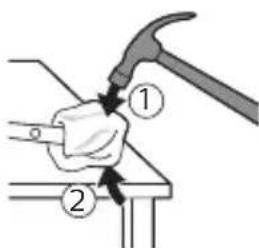
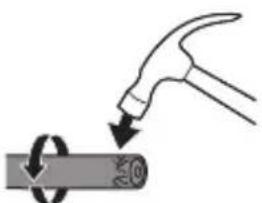
natural_image
Illustration of a hammer striking a cylindrical object with a ring, no text or symbols present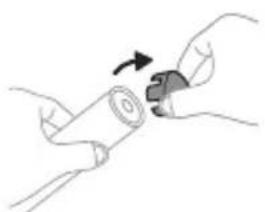
natural_image
Illustration of hands holding a cylindrical object with an arrow indicating rotation (no text or symbols)natural_image
Illustration showing a hand brushing a tooth with a brush and arrow indicating direction (no text or symbols)natural_image
Illustration of a hand using a pipette to apply liquid onto a surface, with an inset showing a droplet on a surface (no text or symbols present)3 Zobno ščetko Philips Sonicare vklopite tako, da pritisnete gumb za vklop/izklop.
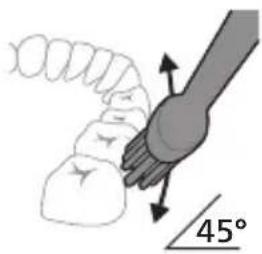
natural_image
Diagram showing tooth alignment with a brush and arrow indicating direction (no text or symbols)Clean White Gum Care
natural_image
Diagram of a stylized microphone with a circular icon showing signal waves (no text or symbols)natural_image
Simple diagram with a circular symbol containing a gear and a starburst, connected by an arrow to a vertical line (no text or labels)natural_image
Simple diagram showing a circular icon with a traffic symbol and a vertical line with a small circle (no text or labels)natural_image
Three-step diagram illustrating a mechanical assembly process: tool application, close-up of component, and final assembled view (no text or symbols)natural_image
Line drawing of a hand inserting a small object into a device (no text or symbols)natural_image
Simple line drawing of a device with a star-shaped component inserted into a base, connected to a cable (no text or symbols)natural_image
Line drawing of a medical procedure with a needle inserted into a tube (no text or symbols)natural_image
Illustration of two hands using a tool to lift or stand (no text or symbols present)natural_image
Illustration of a hand inserting a device into a device housing (no text or symbols visible)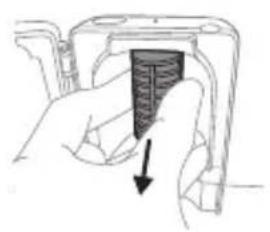
natural_image
Hand inserting a dark rectangular object into a device component (no text or symbols visible)natural_image
Simple line drawing of a mechanical component or tool on a base, no text or symbols present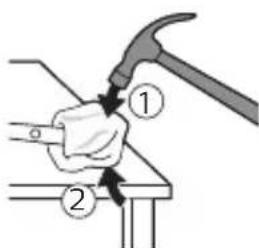
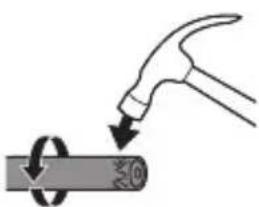
natural_image
Illustration of a hammer striking a cylindrical object with a circular arrow indicating rotation (no text or symbols)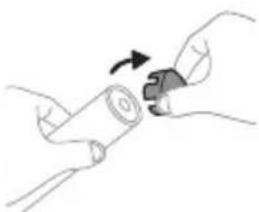
natural_image
Illustration of hands holding a cylindrical object with a curved arrow indicating rotation (no text or symbols)natural_image
Illustration showing a hand brushing a tooth with a brush and a close-up of the tooth being smoothed (no text or symbols)natural_image
Illustration of a hand holding a pipette with a magnified inset showing a droplet on a surface (no text or symbols)natural_image
Diagram showing dental tool interacting with teeth (no text or labels)natural_image
Diagram of a toothbrush with sensor icon and magnified view (no text or symbols)natural_image
Simple line diagram showing a circular symbol with a starburst design and a small star-like shape connected by an arrow (no text or labels)natural_image
Simple diagram with a circular icon containing a stylized 'P' and a small circle connected to a vertical line (no text or symbols)natural_image
Illustration of two hands using a tool to lift or stand (no text or symbols present)natural_image
Illustration of a hand holding a device with a pointing arrow (no text or symbols)natural_image
Cross-sectional diagram of a mechanical or electrical component with two symmetrical components (no text or symbols)natural_image
Line drawing of a hand inserting a plug into a device (no text or symbols)5 Zatvorte dvierka a raz stlačte zelené tlačidlo zap./vyp., čím vyberiete čistiaci UV cyklus.
natural_image
Simple line drawing of a device with a star-shaped sensor above it, no text or symbols present.natural_image
Line drawing of a medical procedure with a needle inserted into a tube (no text or symbols)natural_image
Illustration of two hands using a tool to adjust or install a mechanical component (no text or symbols visible)natural_image
Illustration of a hand inserting a component into a device (no text or symbols visible)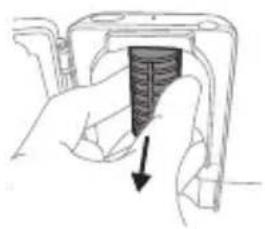
natural_image
Hand holding a device with a black arrow pointing to a textured section (no text or symbols visible)2 Vytiahnite podnos na odkvapkávanie. Opláchnite ho a utrite dočista navlhčenou handričkou.
3 Všetky vnútorné povrchy očistite navlhčenou handričkou.
4 Odstráňte ochranný štít pred UV žiarovkou.
natural_image
Illustration of hands holding a cylindrical object with a curved arrow indicating rotation (no text or symbols)natural_image
Illustration of a hand holding a cylindrical object with an arrow pointing upward, no text or symbols present5 Rukováť držte hore dnom a hriadel'om zatlačte na tvrdý povrch. Ak sa vnútorné komponenty z krytu l'ahko neuvol'nia, opakujte krok 3, až kým sa tak nestane.
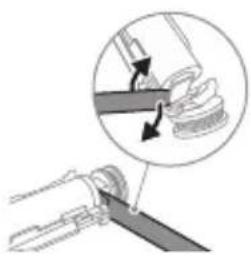
natural_image
Diagram showing a mechanical assembly with a magnified inset of a tool interacting with a component (no text or symbols visible)natural_image
Illustration of a hand holding a device with an arrow indicating motion (no text or symbols)www.philips.com/support
natural_image
Illustration showing a hand brushing a tooth with a brush and a close-up of the tooth being smoothed (no text or symbols)1 Poravnajte glavu četkice tako da su vlakna okrenuta u istom smeru kao i prednja strana drške.
2 Čvrsto pritisnite glavu četkice na metalnu osovinu do kraja.
natural_image
Illustration of a hand using a pipette to apply liquid onto a surface, with an inset showing a droplet on a surface (no text or symbols present)1 Pokvasite vlakna i nanesite malu količinu paste za zube.
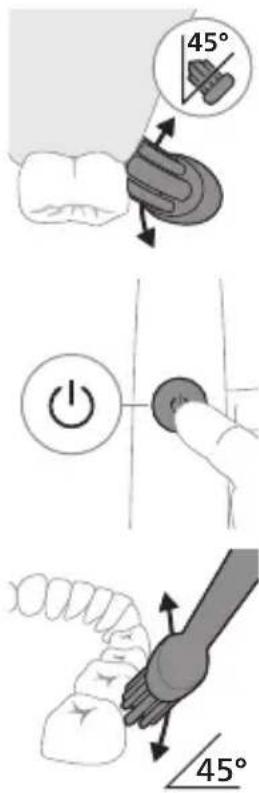
2 Postavite vlakna četkice za zube na zube pod blagim uglom (45 stepeni) i čvrsto pritisnite kako bi vlakna dosegla liniju desni ili malo ispod te linije.
natural_image
Diagram showing dental tool application on upper teeth with magnified view (no text or symbols)5 Da biste očistili unutrašnju površinu prednjih zuba, nagnite dršku četkice u poluuspravan položaj i pređite vertikalno četkicom preko svakog zuba tako da se potezi preklapaju.
Clean White Gum Care
| Pogodnost Za izvanredno svakodnevno pranje | Uklanja mrlje sa površina | Nežno masira desni | |
| Ukupno vreme pranja zuba | 2 minuta 2 minuta i 30 sekundi | 3 minuta | |
| Kako se pere Perite svaki segment 30 sekundi. | perite svaki segment 30 sekundi | perite svaki segment 30 sekundi | |
| 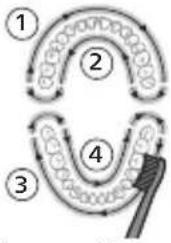 | 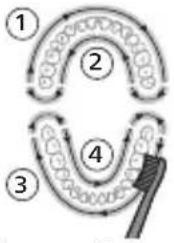 | |
| zatim perite segmente 5 i 6, svaki u trajanju od 15 sekundi, da biste izbeleli i ispolirali prednje zube. | zatim perite segmente 5, 6, 7 i 8, svaki u trajanju od 15 sekundi, za nežno stimulisanje i masiranje desni. | ||
| | ||
Tehnologija BrushSync
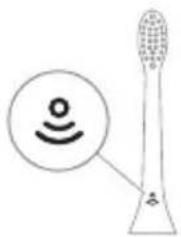
natural_image
Diagram of a toothbrush with sensor icon and magnified view (no text or symbols)Tehnologija BrushSync omogućava komunikaciju između glave četkice i drške koristeći mikročip. Simbol na donjoj strani glave četkice označava da glava četkice sadrži ovu tehnologiju.
Tehnologija BrushSync omogućava: - Podsetnik za zamenu glave sa četkicom Philips Sonicare ima široku paletu pametnih glava četkica sa tehnologijom BrushSync. Za više informacija o našoj cjelokupnoj paleti glava četkica za zube posjetite
www.philips.com/toothbrush-heads i pronadite glavu četkice koja vam najviše odgovara.
Funkcije
natural_image
Simple diagram with a circular symbol containing a stylized 'P' and an arrow pointing to a star-like shape (no text or labels)Četkica za zube Sonicare mjeri pritisak koji koristite prilikom pranja zuba da bi zaštitila vaše desni i zube od oštećivanja.
natural_image
Simple diagram showing a circular icon with a 'P' symbol and a vertical line with a circle containing a letter 'v', no text or labels present.3 Kada indikator podsetnika za zamenu glave sa četkicom zasvetli žutonarandžastom bojom, treba da zamenite glavu sa četkicom.
Sve pametne glave četkice imaju aktiviranu funkciju podsetnika za zamenu glave četkice. Da biste deaktivirali podsetnik za zamenu glave četkice, pogledajte odeljak „Aktiviranje ili deaktiviranje funkcija“.
EasyStart
Ovaj model četkice za zube Philips Sonicare se isporučuje sa aktiviranom funkcijom EasyStart. Funkcija EasyStart nežno povećava snagu tokom prvih 14 pranja zuba da bi vam pomogla da se naviknete na pranje zuba pomoću četkice za zube Philips Sonicare.
Odricanje odgovornosti
Kada se četkica za zube Philips Sonicare koristi u kliničkim studijama, potrebno ju je koristiti u režimu Clean pri visokom intenzitetu dok je drška potpuno napunjena, a funkcija EasyStart mora da bude deaktivirana.
Da biste deaktivirali EasyStart (pogledajte 'Aktiviranje ili deaktiviranje funkcija').
SmarTimer
natural_image
Illustration of two hands using a tool to cut or apply a mechanical component (no text or symbols visible)1 Nakon pranja zuba isperite glavu četkice i otresite višak vode.
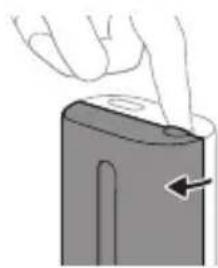
natural_image
Illustration of a hand holding a battery with a pointing arrow (no text or symbols)natural_image
Cross-sectional diagram of a mechanical or electrical component with two symmetrical components (no text or symbols)2 Stavite prst u prorez na poklopcu sa gornje strane aparata za dezinfekciju i otvorite poklopac.
3 Postavite glavu četkice na jedan od 2 klina u aparatu za dezinfekciju tako da vlakna budu okrenuta ka lampi.
Napomena: U uređaju za sanitizaciju čistite isključivo Phillips Sonicare glave četkice za lako postavljanje.
Napomena: nemojte da čistite glave četkice Philips Sonicare for Kids u aparatu za dezinfekciju.
4 Uređaj za sanitizaciju mora biti uključen u funkcionalnu utičnicu ili na odgovarajući napon.
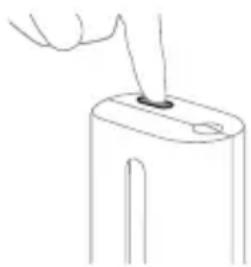
natural_image
Line drawing of a hand inserting a small object into a device (no text or symbols)5 Zatvorite poklopac i jedanput pritisnite zeleno dugme za uključivanje/isključivanje da biste izabrali ciklus UV čišćenja.
natural_image
Simple line drawing of a mechanical setup with a cylindrical component and a base, no text or symbols present.Punjenje na punjaču ili na UV aparatu za dezinfekciju
natural_image
Line drawing of a medical procedure with a needle inserted into a tube (no text or symbols)1 Uklonite glavu četkice i isperite oblast oko metalne osovine toplom vodom. Obavezno uklonite sve ostatke paste za zube.
Oprez: Nemojte da gurate gumenu zaptivku na metalnoj osovini oštrim predmetima pošto to može da dovede do oštećenja.
2 Čitavu površinu drške obrišite vlažnom krpom.
Napomena: Nemojte da udarate ručkom o sudoperu da biste uklonili višak vode.
Glava četkice
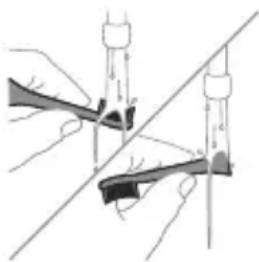
natural_image
Illustration of two hands using a tool to lift or stand (no text or symbols present)natural_image
Illustration of a hand inserting a component into a device (no text or symbols visible)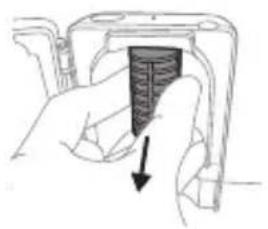
natural_image
Hand holding a mechanical component with a black arrow pointing to a section (no text or symbols visible)2 Izvucite posudu za sakupljanje tečnosti. Isperite posudu za sakupljanje tečnosti i obrišite je vlažnom krpom.
3 Očistite sve unutrašnje površine vlažnom krpom.
4 Uklonite zaštitnu foliju koja se nalazi ispred UV lampe.
www.philips.com/support
www.philips.com/support
natural_image
Illustration of a hand holding a tool with an arrow indicating motion (no text or symbols)natural_image
Simple line drawing of a curved object with a checkmark indicating a detail (no text or symbols)natural_image
Illustration of a hand using a pipette to apply a sample onto a surface, with an inset showing a magnified view of the sample (no text or symbols present)natural_image
Diagram showing dental alignment with a toothbrush and tooth arrangement (no text or symbols)Clean White Gum Care
natural_image
Diagram of a stylized tower with a sensor icon and signal symbol, no text or labels presentnatural_image
Simple diagram with a starburst symbol and a small arrow pointing to a vertical line (no text or labels)flowchart
graph TD
    A["Person Icon"] --> B["T"]
EasyStart
natural_image
Illustration of two hands using a tool to adjust or install a mechanical component, with no visible text or symbols.natural_image
Illustration of a hand holding a rectangular object with an arrow pointing to it (no text or symbols present)natural_image
Diagram of a mechanical or electrical component with two vertical supports and a central threaded shaft (no text or symbols)natural_image
Line drawing of a hand inserting a small object into a device (no text or symbols)natural_image
Simple line drawing of a device with a star-shaped sensor above a base, connected to a cable (no text or symbols)natural_image
Line drawing of a medical procedure involving a needle inserted into a tube (no text or symbols)natural_image
Illustration of two hands using a tool to lift or lift an object, with no visible text or symbolsnatural_image
Illustration of a hand inserting a device into a device housing (no text or symbols visible)natural_image
Hand holding a device with a black arrow pointing to a component (no text or symbols visible)natural_image
Illustration of a mechanical component with a curved arrow indicating motion (no text or symbols)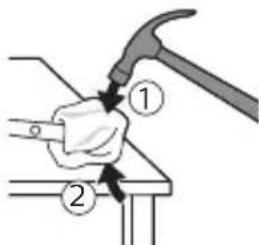
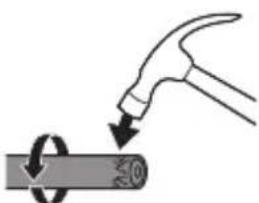
natural_image
Illustration of a hammer striking a cylindrical object with a circular arrow indicating rotation (no text or symbols)natural_image
Illustration showing a hand holding a toothbrush and a close-up of a tooth with a circular mark, no text or symbols present.natural_image
Illustration of a hand applying a small object to a toothbrush, with an inset showing a magnified view of the tooth (no text or symbols present)natural_image
Diagram showing dental tool interacting with teeth (no text or symbols)Clean White Gum Care
natural_image
Diagram of a microphone with signal icon and speech bubble, no text or symbols presentnatural_image
Simple diagram with a starburst icon and a small star symbol connected by lines (no text or labels)flowchart
graph TD
    A["P"] --> B["v"]
EasyStart
natural_image
Line drawing of a hand holding a small object on a device (no text or symbols)natural_image
Simple line drawing of a device with a star-shaped component inserted into a base, no text or symbols present.natural_image
Simple line drawing of a medical procedure with a needle inserted into tissue (no text or symbols)natural_image
Diagram of two hands using a tool to lift or stand, with no visible text or symbolsnatural_image
Illustration of a hand inserting a component into a device (no text or symbols visible)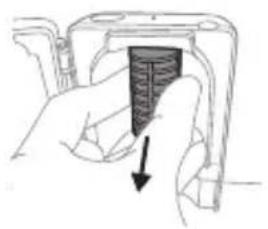
natural_image
Hand holding a mechanical component with a black arrow pointing to a section (no text or symbols visible)natural_image
Illustration of a mechanical device with a curved arm and lever (no text or symbols)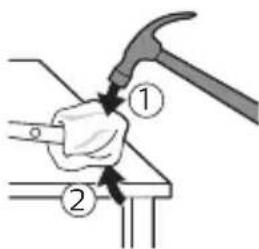
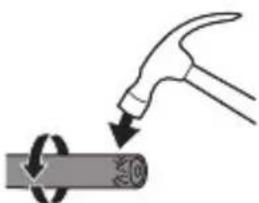
natural_image
Illustration of a hammer striking a cylindrical object with a circular arrow indicating rotation (no text or symbols)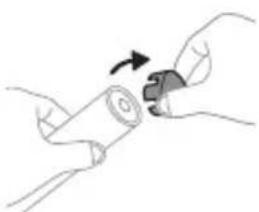
natural_image
Illustration of hands holding a cylindrical object with an arrow indicating rotation (no text or symbols)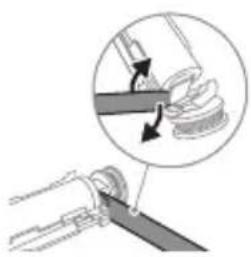
natural_image
Diagram showing a mechanical assembly with a magnified inset of a tool interacting with a spring-like component (no text or symbols present)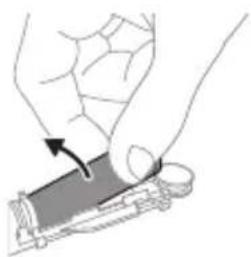
natural_image
Illustration of a hand pressing down on a mechanical component with an arrow indicating force (no text or symbols present)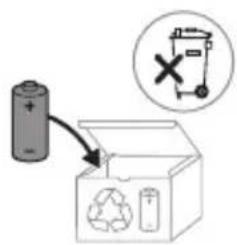
www.philips.com/support
Bellik: Dürli modellerin ayratynlyklary dürlüçe bolup bilýär. Käbir modeller Bluetooth ya-da NFC bilen enjamlaşdyrylmadyk bolup biler.
Dakylyan tok beriş blogy: "xxxxxx" ulanylmak üçin tassyklanylan zarýadnikleriň model belgisini görkezýär. (TCBxxxx, HX6100, HX6110, HX6160 yá-da WAAxxxx)
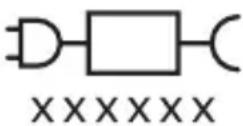

Bu nysan enjamy ulanmazdan ozal ulanyş gözükdirijilerini okaň diýmegi aňladýar.
Niyetlenilýän ulanys
natural_image
Illustration showing a hand brushing a tooth with a brush and a close-up of the tooth being protracted (no text or symbols present)1 Gyllar tutawajyň öň tarapy bilen bir ugra seredip durar ýaly edip, nasadkany deňläň.
2 Nasadkany metal walyň üstüne ol aňryk baryp direyänçä dzümli basyň.
natural_image
Illustration of a hand holding a pipette with a magnified inset showing a droplet on a surface (no text or symbols)1 Gyllary öllän we üstüne azajyk diş pastasyny çalyň.
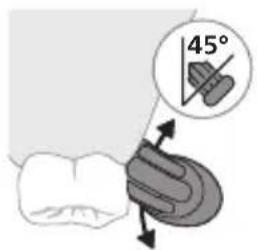
2 Diş çotgasynyň gyllaryny dişlere çalaja burç (45 gradus) bilen goýuň we gyllar diş eti çzygyna yá-da diş eti çzygynyň çalaja aşagyna yeter yaly edip, dözümli basyň.
natural_image
Diagram showing dental tool application on upper teeth with magnified detail (no text or symbols)Clean White Gum Care
| Yeñillik Her gün | çendenasa arassalamak üçin | Üst tegmiller aýyrýar | Diş etlerini emaý bilen massaž edýär |
| Jemi çotgalama wagty | 2 minut 2 minut we 30 sekunt | 3 minut | |
| Çotgalaýys usuly | Her segmenti 30 sekunt çotgalaň. | Her segmenti 30 sekunt çotgalaň | Her segmenti 30 sekunt çotgalaň |
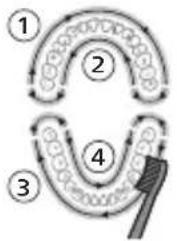 | 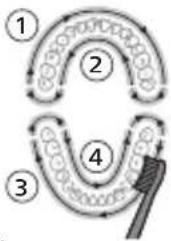 | 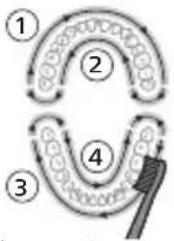 | |
| soňra 5-nji we 6-nji bölekleriň her birini 15 sekunt çotgalap, öndäki dişleri ýagtyldyň we lowurdadyň. | soňra 5, 6, 7 we 8-nji bölekleriň her birini 15 sekunt çotgalap, diş etleriňizi emaý bilen stimulirlaň we massaž ediň. | ||
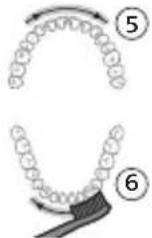 | 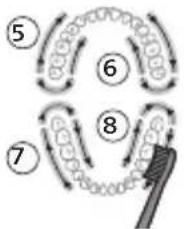 | ||
natural_image
Illustration of a toothbrush with a sensor icon and a speech bubble (no text or symbols)natural_image
Simple diagram with a circular symbol containing a stylized 'P' and an arrow pointing to a star-like shape, connected by a line (no text or labels)natural_image
Simple diagram with a circular icon containing a traffic symbol and a vertical line with a small circle labeled 'v' (no text or numbers present)2 Wagtyň geçmegi bilen, ulanýan basyşyňyz we nasadkany ulanan jemi wagtyňyz esasynda, tutawaç nasadkany çalşyrmagyn amatly wagtyny kesgitlemek üçin, onuň könelmegini yzarlayar. Bu aýratynlyk dişleriñize iň gowy arassalamagy we idegi üpjün etmekligi kepillendirýär.
3 Nasadkany çalışyrmagy yatladyş cyrasy sary reňkde yananda, nasadkany çalışyrmagyňyz gerek.
natural_image
Illustration of two hands holding a tool with arrows indicating movement or force (no text or symbols)natural_image
Illustration of a hand pressing down on a device component with an arrow indicating the process (no text or symbols present)Duýduryş: Nasadka dezinfektorda arassalanylyp durka, nasadkanyň gapagyny nasadka dakylgy bolmaly däldir.
2 Barmagyňyzy arasalayjydaky gapak oýugyna yerleşdiriň we gapagy itip açyň.
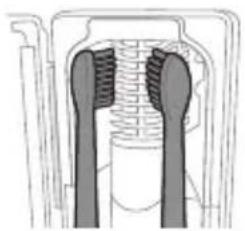
natural_image
Cross-sectional diagram of a mechanical or electrical component with two vertical supports and internal channels (no text or symbols)natural_image
Line drawing of a hand inserting a small object into a device (no text or symbols)natural_image
Simple line drawing of a device with a star-shaped sensor above a base, no text or symbols present.Zarýadnikde ya-da ultramelewse dezinfektorda zarýad bermek
natural_image
Line drawing of a medical procedure involving a needle inserted into a tube (no text or symbols)natural_image
Illustration of two hands using a tool to lift or lift an object, with no visible text or symbols1 Her ulanyşdan soň nasadkany we gyllary yuwup durlaň.
2 Azyndan hepdede bir gezek nasadkany tutawaçdan aýryp, nasadkanyň birikmesini ýyly suw bilen ýuwup durlaň. Syýahat gapagyny näçe ýygylykda zerur bolsa ýuwup durlaň.
Zarýadnik
natural_image
Illustration of a hand inserting a component into a device (no text or symbols visible)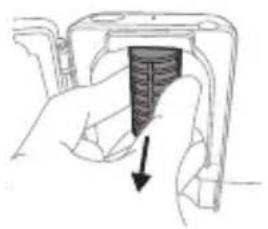
natural_image
Hand holding a mechanical component with a black arrow pointing to a section (no text or symbols visible)2 Damja mejimesini gönümel daşary çekiň. Damja mejimesini yuwuň we çygly mata bilen arassa edip süpüriň.
natural_image
Illustration of a mechanical component with a curved arm and rod, no text or symbols present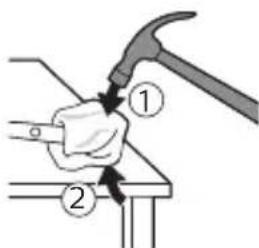
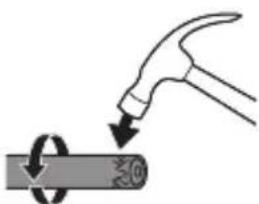
natural_image
Illustration of a hammer striking a cylindrical object with a circular arrow indicating rotation (no text or symbols)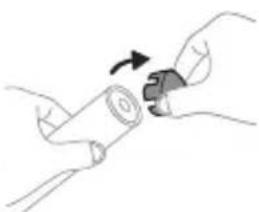
natural_image
Illustration of hands holding a cylindrical object with a curved arrow indicating rotation (no text or symbols)3 Tutawajyň yokarky bölegini bir elde saklap, tutawajyň korpusynyň aşaky ujundan 1,27 sm yokarsyny uruň. Uçky gapajygy çykarmak üçin, çekiç bilen 4 tarapyndan düzümli uruň.
Bellik: İçerki ilgiçleri döwmek üçin, tutawajyň ujuný birnäge gezek urmaly bolmagyňyz mümkün.
4 Uçky gapajygy diş çotgasynyň tutawajyndan aýryň. Eger uçky gapajyk koprusdan ÿeňillik bilen sypmasa, tä uçky gapajyk sypýança ädim 3-i gaýtalaň.
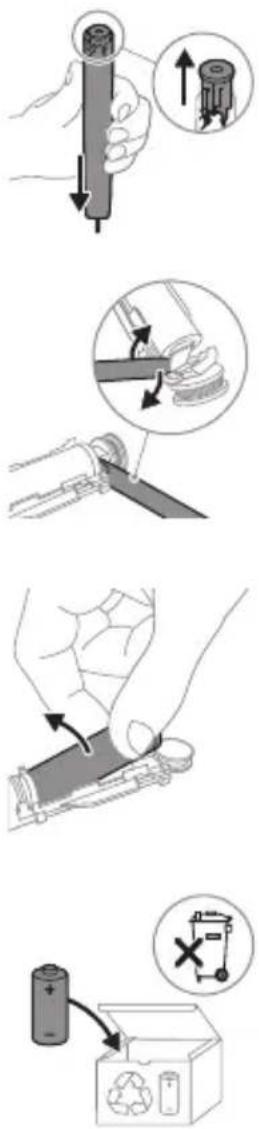
5 Tutawajy başaşak saklap, waly gaty üste basyň. Eger içerki komponentler koprusdan YEňillik bilen sypmasa, tâ içerki komponentler sypýança ädim 3-i gaytalaň.
6 Batareya bilen içerki komponentleriň aşagyndaky gara çarçuwanyň arasyna towlaýjyny sokuň. Soňra batareýany towlaýjy arkaly galdyryp, gara çarçuwanyň aşagyny döwüň.
www.philips.com/support
natural_image
Illustration showing a hand brushing a tooth with a brush and a close-up of the tooth being smoothed (no text or symbols)natural_image
Illustration of a hand using a pen to apply a substance to a tooth, with an inset showing a magnified view of the tooth (no text or symbols present)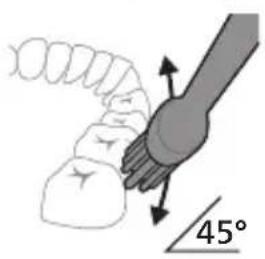
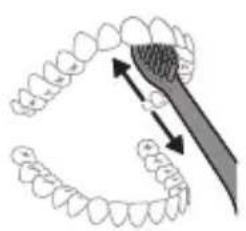
natural_image
Diagram showing dental alignment with a toothbrush and tooth arrangement (no text or symbols)natural_image
Illustration of a toothbrush with a sensor icon and signal symbol (no text or labels)natural_image
Simple diagram with a starburst symbol and a small gear-like shape connected by an arrow (no text or labels)natural_image
Simple diagram showing a circular icon with a traffic symbol and a vertical line with a small circle (no text or labels)EasyStart
natural_image
Illustration of two hands using a tool to adjust or install a mechanical component, with no visible text or symbols.natural_image
Illustration of a hand pressing down on a device component with an arrow indicating left motion (no text or symbols)natural_image
Cross-sectional diagram of a mechanical or electrical component with two vertical channels (no text or symbols)natural_image
Line drawing of a hand holding a small object with a pointed tip, no text or symbols presentnatural_image
Simple line drawing of a mechanical setup with a cylindrical component and a base, no text or symbols present.natural_image
Simple line drawing of a fork being inserted into a tube (no text or symbols)natural_image
Illustration of two hands using a tool to lift or stand, with no visible text or symbolsnatural_image
Illustration of a hand inserting a device into a device housing (no text or symbols visible)natural_image
Hand holding a device with a textured screen and arrow indicating downward motion (no text or symbols)natural_image
Illustration of a hand holding a cylindrical object with an arrow pointing to it, showing internal components (no text or symbols)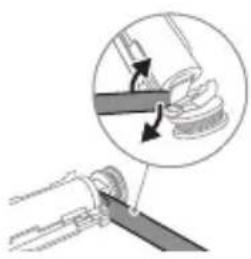
natural_image
Diagram showing a mechanical assembly with a tool interacting with a spring-like component, no text or symbols present.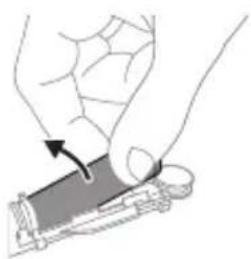
natural_image
Illustration of a hand holding a rectangular object with an arrow indicating motion (no text or symbols)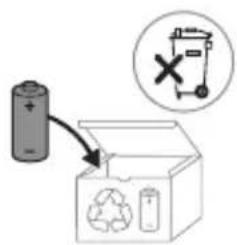
www.philips.com/support
natural_image
Illustration of a hand holding a tool with an arrow indicating direction (no text or symbols)natural_image
Simple line drawing of a curved object with a checkmark indicating a detail (no text or symbols)natural_image
Illustration of a hand using a pipette to apply liquid onto a tooth (no text or symbols present)natural_image
Diagram showing dental tool interacting with teeth (no text or labels)Your power toothbrush is equipped with up to 3 modes: Clean, White and Gum Care (specific models only). To change modes, press the mode button while the toothbrush is powered off.
Clean White Gum Care
natural_image
Illustration of a toothbrush with a sensor icon and signal symbol (no text or labels)natural_image
Simple diagram with a starburst symbol and a small arrow pointing to a rectangular shape (no text or labels)EasyStart
Step 1: Place the handle on the plugged in charging stand.
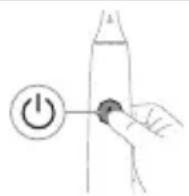
Step 2: Press and hold power on/off button for:
EasyStart Brush head replacement reminder Pressure Sensor Feedback
Up to 3 seconds Up to 5 seconds Up to 7 seconds
Step 3: Let go of the power on/off button when you hear:
1 beep 1 beep and then 2 beeps
1 beep, 2 beeps and then 3 beeps
If you see the battery indicator and the brush head replacement reminder light flash green 2 times and hear 3 tones from low to high, then the feature has been activated.
OR
If you see the battery indicator and brush head replacement reminder light flash amber 1 time and hear 3 tones high to low, then the feature has been deactivated.
natural_image
Illustration of two hands using a tool to cut or mark a surface, with no visible text or symbolsnatural_image
Illustration of a hand holding a device with a circular arrow pointing to the side (no text or symbols)natural_image
Cross-sectional diagram of a mechanical component with two symmetrical parts (no text or symbols)natural_image
Line drawing of a hand inserting a small object into a device (no text or symbols)Charging on charger or UV Sanitizer
natural_image
Simple line drawing of a mechanical setup with a component and cable (no text or symbols)natural_image
Line drawing of a medical procedure with a needle inserted into a tube (no text or symbols)natural_image
Illustration of two hands using a tool to adjust or install a mechanical component, with no visible text or symbols.natural_image
Illustration of a hand inserting a device into a device (no text or symbols visible)natural_image
Hand inserting a component into a housing (no text or symbols visible)natural_image
Diagram of a hand holding a tool with a circular motion arrow, no text or symbols present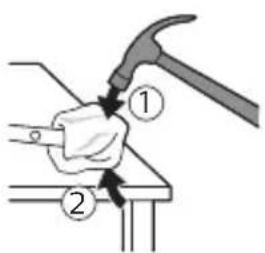
natural_image
Illustration of a hammer striking a cylindrical object with a circular arrow indicating rotation (no text or symbols)natural_image
Illustration of hands holding a cylindrical object with an arrow indicating rotation (no text or symbols)natural_image
Illustration of a hand holding a cylindrical object with an arrow pointing to it, showing internal components (no text or symbols)natural_image
Diagram showing a mechanical assembly with a magnified inset of a tool interacting with a component (no text or symbols present)natural_image
Illustration of a hand holding a rectangular object with an arrow indicating motion (no text or symbols)www.philips.com/support
natural_image
Illustration showing a hand brushing a tooth with a brush and a close-up of the tooth being smoothed (no text or symbols)natural_image
Illustration of a hand holding a pen with a magnified inset showing a droplet on a surface (no text or symbols)Clean White Gum Care
natural_image
Illustration of a toothbrush with a sensor icon and signal symbol (no text or labels)natural_image
Simple diagram with a starburst symbol and a small diamond shape connected by lines (no text or labels)flowchart
graph TD
    A["Process"] --> B["Output"]
natural_image
Illustration of two hands using a tool to adjust or install a mechanical component, with no visible text or symbols.natural_image
Illustration of a hand holding a cylindrical object with a pointed tip, showing a curved surface and an arrow indicating direction (no text or symbols)natural_image
Cross-sectional diagram of a mechanical or electrical component with no visible text or symbolsnatural_image
Line drawing of a hand inserting a small object into a device (no text or symbols)natural_image
Simple diagram showing a container with a star-shaped label and a downward arrow pointing to a small object on a base (no text or symbols)natural_image
Line drawing of a medical procedure involving an incision or catheter insertion into a patient's abdomen (no text or labels)natural_image
Illustration of two hands using a tool to adjust or install a mechanical component, with no visible text or symbols.natural_image
Illustration of a hand inserting a component into a device (no text or symbols visible)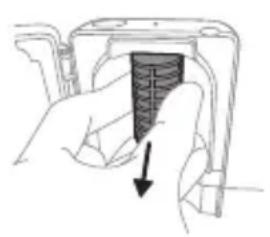
natural_image
Hand holding a device with a black arrow pointing to a textured section (no text or symbols visible)natural_image
Illustration of a hammer striking a cylindrical object with a circular arrow indicating rotation (no text or symbols)natural_image
Illustration of hands holding a cylindrical object with an arrow indicating rotation (no text or symbols)natural_image
Mechanical assembly diagram showing a lever mechanism with arrows indicating motion (no text or symbols)natural_image
Illustration of a hand holding a device with an arrow indicating motion (no text or symbols)www.philips.com/support
www.philips.com/support
natural_image
Illustration showing a hand holding a toothbrush and a close-up of a tooth with a circular mark, no text or symbols present.natural_image
Illustration of a hand using a pen to apply a sample onto a surface, with an inset showing a magnified view of the sample (no text or symbols present)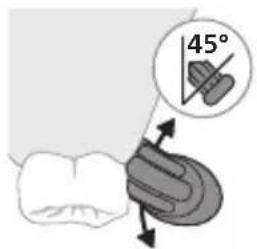
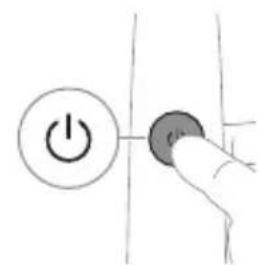
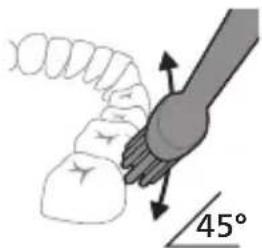
natural_image
Diagram showing dental tool application on upper teeth with magnified view (no text or labels)Clean White Gum Care
natural_image
Diagram of a microphone with signal icon and speech bubble, no text or symbols presentnatural_image
Simple diagram with a starburst symbol and a small gear-like shape connected by an arrow (no text or labels)natural_image
Simple diagram showing a circular icon with a gear symbol and a vertical line with a small circle containing a letter 'v' (no text or labels)natural_image
Illustration of two hands using a tool to lift or stand (no text or symbols present)natural_image
Illustration of a hand pressing down on a device component with an arrow indicating the process (no text or symbols present)natural_image
Cross-sectional diagram of a mechanical or electrical component with internal channels and no visible text or symbolsnatural_image
Line drawing of a hand inserting a small object into a device (no text or symbols)natural_image
Simple line drawing of a device with a star-shaped component and a small object on top, no text or symbols present.natural_image
Line drawing of a medical procedure with a needle inserted into tissue (no text or symbols)natural_image
Illustration of two hands holding a tool with arrows indicating motion (no text or symbols)natural_image
Illustration of a hand inserting a device into a device housing (no text or symbols visible)natural_image
Hand holding a device with a black arrow pointing to a textured section (no text or symbols visible)natural_image
Illustration of a mechanical device with a curved arm and lever (no text or symbols)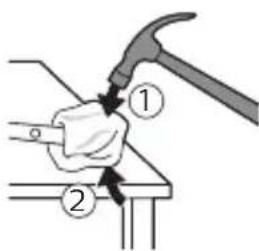
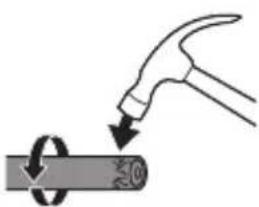
natural_image
Illustration of a hammer striking a cylindrical object with a circular motion arrow (no text or symbols)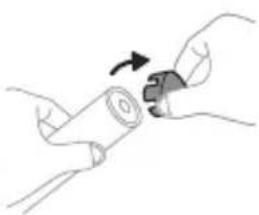
natural_image
Illustration of hands holding a cylindrical object with an arrow indicating rotation (no text or symbols)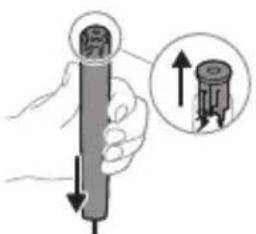
natural_image
Illustration of a hand holding a cylindrical object with an arrow pointing to it, showing a magnified inset of the component (no text or symbols present)natural_image
Diagram showing a hand holding a tool with an arrow indicating rotation, no text or symbols present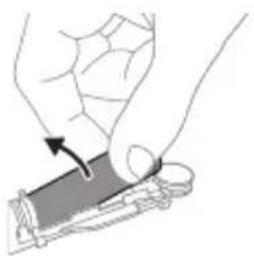
natural_image
Illustration of a hand holding a device with an arrow indicating motion (no text or symbols)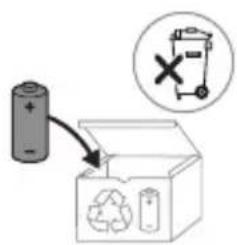
www.philips.com/support
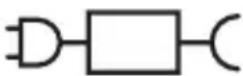
XXXXXX
natural_image
Illustration showing a hand holding a toothbrush and a close-up of a tooth with a circular mark, both without any text or symbols.natural_image
Illustration of a hand holding a pipette with a magnified inset showing a droplet on a surface (no text or symbols)natural_image
Diagram showing dental tool application on upper teeth with magnified detail (no text or symbols)natural_image
Illustration of a toothbrush with a sensor icon and a magnified circular detail (no text or symbols)natural_image
Simple line drawing of a gear with a star-like head and a small gear symbol, no text or labels present.flowchart
graph TD
    A["P"] --> B["5"]
natural_image
Illustration of two hands using a tool to lift or stand, forming a V-grip (no text or symbols present)natural_image
Illustration of a hand holding a battery with a pointing arrow (no text or symbols)natural_image
Cross-sectional diagram of a mechanical component with internal channels and housing (no text or labels)natural_image
Line drawing of a hand holding a small object on a device (no text or symbols)natural_image
Simple line drawing of a device with a star-shaped component and a small object on top, connected by a cable (no text or symbols)natural_image
Simple line drawing of a medical procedure with a needle inserted into tissue (no text or symbols)natural_image
Illustration of two hands holding a tool with arrows indicating motion or force direction (no text or symbols)natural_image
Illustration of a hand inserting a device into a device housing (no text or symbols visible)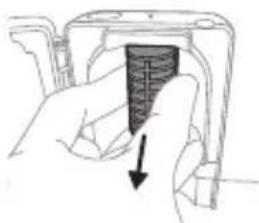
natural_image
Hand holding a device with a black textured object and arrow indicating direction (no text or symbols)natural_image
Illustration of hands holding a battery with a rotating knob (no text or symbols)natural_image
Illustration of a hand holding a cylindrical object with an arrow pointing to it, showing a magnified inset of the top view (no text or symbols present)natural_image
Illustration of a mechanical assembly with a magnified inset showing a tool interacting with a component (no text or symbols present)natural_image
Illustration of a hand holding a device with a circular component, no text or symbols presentwww.philips.com/support
www.philips.com/support
natural_image
Illustration showing a hand holding a toothbrush and a close-up of a tooth with a sensor symbol (no text or labels)natural_image
Illustration of a hand applying a toothbrush to a tooth, with an inset showing a magnified view of the tooth (no text or symbols present)3 Барои фаьол кардани «Philips Sonicare» тугмаи фаьол/хомўшро пахш кунед.
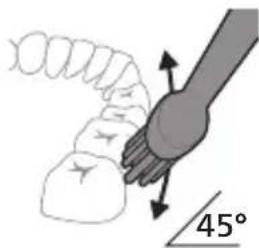
natural_image
Diagram showing dental tool application on upper teeth with magnified view (no text or labels)Clean White Gum Care
natural_image
Illustration of a toothbrush with a sensor icon and signal symbol (no text or labels)natural_image
Simple diagram with a starburst symbol and a small arrow pointing to a vertical line (no text or labels)Чуткаи дандоншўии «Sonicare»-и шумо фишореро, ки шумо хангоми дандоншўй татбик, мекунед, чен мекунад, то милкхо ва дандонхои шуморо аз зааррасонй пешгирй кунад. Агар шумо аз хад зиёд фишор дихед, дастак ларзишашро иваз мекунад ва чароги ёдраси ивазкунии сараки чутка то ваçте ки шумо камтар фишор надихед, бо ранги лочувард дурахш мекунад.
Шарх: Махсули шумо бо эхсостари шиддати фаьолшуда таьмин карда мешавад. Барои гайрифаьол кардани ин хусусят («Фаьол ё гайрифаьол кардани хусусятхо»-нигаред).
QuadPacer
flowchart
graph TD
    A["P"] --> B["Terminal Node"]
natural_image
Illustration of two hands holding test tubes with a diagonal line crossing through (no text or symbols)natural_image
Illustration of a hand holding a device with a circular arrow pointing to the side (no text or symbols)natural_image
Cross-sectional diagram of a mechanical or electrical component with two vertical connectors and internal structure (no text or symbols)natural_image
Line drawing of a hand holding a small object on a device (no text or symbols)Тавзех: Саракхои чуткаи дандоншўии «Philips Sonicare for Kids»-ро дар тамизкунанда тоза накунед.
natural_image
Simple line drawing of a device with a starburst symbol above it, showing a plug inserted into a base (no text or symbols)natural_image
Line drawing of a fish being held by a pen, no text or symbols presentnatural_image
Illustration of two hands using a tool to lift or stand (no text or symbols present)natural_image
Illustration of a hand inserting a component into a device (no text or symbols visible)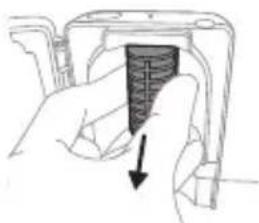
natural_image
Hand holding a device with a black textured object and arrow indicating direction (no text or symbols)natural_image
Illustration of a mechanical device with a curved handle and lever (no text or symbols)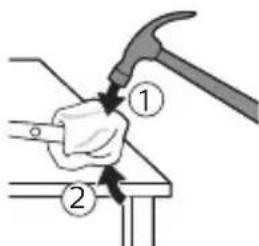
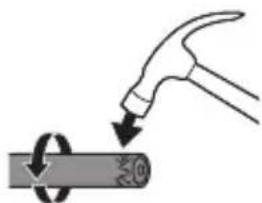
natural_image
Illustration of a hand hammering a cylindrical object with a circular arrow indicating rotation (no text or symbols)natural_image
Illustration of hands holding a battery with a rotating knob (no text or symbols)natural_image
Illustration of a hand holding a cylindrical object with an arrow pointing to it, showing a magnified inset of the top view (no text or symbols present)natural_image
Diagram showing a mechanical assembly with an arrow indicating direction, no text or symbols present6 Мурваттобакро байни батарея ва чахорчубаи сиёх дар поёни чузъхои дохили пайваст кунед. Сипас, мурваттобро аз батарея боло бардошта, поёни чахорчубаи сиёхро кушоед.
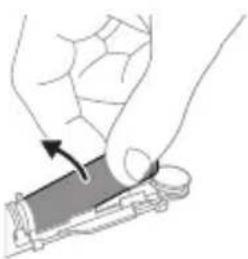
natural_image
Illustration of a hand holding a device with an arrow indicating motion (no text or symbols)www.philips.com/support
natural_image
Illustration showing a hand holding a toothbrush and a close-up of a tooth with a sensor or signal detection (no text or symbols present)natural_image
Illustration of a hand holding a pen with a magnified inset showing a droplet on a surface (no text or symbols)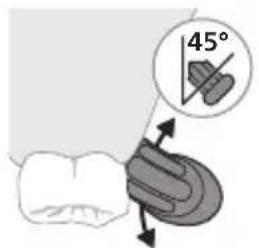
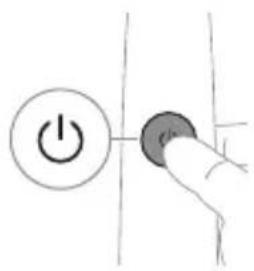
natural_image
Diagram showing dental tool application on upper teeth with magnified detail (no text or symbols)natural_image
Illustration of a toothbrush with a sensor icon and a magnified view of its tip (no text or symbols)natural_image
Simple line drawing of a gear with a star-like head and gear symbol, connected to a vertical line (no text or labels)natural_image
Simple diagram showing a circular icon with a parking sign and a small circle connected by an arrow (no text or symbols)natural_image
Illustration of two hands using a tool to adjust or install a mechanical component, with no visible text or symbols.natural_image
Illustration of a hand holding a device with a circular arrow pointing to the handle (no text or symbols)natural_image
Cross-sectional diagram of a mechanical or electrical component with no visible text or symbolsnatural_image
Line drawing of a hand holding a small object with a pointed tip, next to a cylindrical device (no text or symbols)natural_image
Simple line drawing of a container with a star-shaped mark and a small object on a base, no text or symbols present.natural_image
Line drawing of a medical procedure involving an incision or needle inserted into a bulbous structure (no text or symbols)natural_image
Illustration of two hands using a tool to lift or stand, forming a V-grip (no text or symbols present)natural_image
Illustration of a hand holding a device with a black arrow pointing to it (no text or symbols present)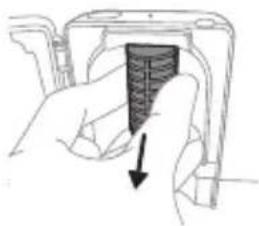
natural_image
Hand holding a device with a black arrow pointing to a textured section (no text or symbols visible)natural_image
Illustration of a hammer striking a cylindrical object with a circular arrow indicating rotation (no text or symbols)natural_image
Illustration of hands holding a cylindrical object with an arrow indicating rotation (no text or symbols)natural_image
Mechanical assembly diagram showing a lever mechanism with a magnified inset highlighting the motion direction (no text or symbols present)natural_image
Illustration of a hand holding a device with an arrow indicating motion (no text or symbols)www.philips.com/support
natural_image
Illustration showing a hand brushing a tooth with a brush and arrow indicating direction (no text or symbols)natural_image
Illustration of a hand using a pipette to apply liquid onto a surface, with an inset showing a droplet on a surface (no text or symbols present)natural_image
Diagram showing dental tool interacting with teeth (no text or labels)Clean White Gum Care
natural_image
Illustration of a toothbrush with a sensor icon and a magnified circular detail (no text or symbols)natural_image
Simple diagram with a starburst symbol and a small arrow pointing to a vertical line (no text or labels)flowchart
graph TD
    A["P"] --> B["6"]
natural_image
Illustration of two hands holding a tool with a pointed tip and a pointed tip, connected by a diagonal line (no text or symbols)natural_image
Illustration of a hand holding a rectangular object with a circular hole, showing a right-hand rule (no text or symbols)natural_image
Cross-sectional diagram of a mechanical or electrical component with no visible text or symbolsnatural_image
Line drawing of a hand holding a small object on a rectangular base (no text or symbols)natural_image
Simple line drawing of a device with a star-shaped component inserted into a base, no text or symbols present.natural_image
Line drawing of a medical procedure with a needle inserted into tissue (no text or symbols)natural_image
Illustration of two hands using a tool to adjust or install a mechanical component, with no visible text or symbols.natural_image
Illustration of a hand inserting a component into a device (no text or symbols visible)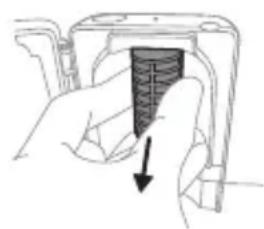
natural_image
Hand holding a mechanical component with a downward arrow indicating force or direction (no text or symbols)natural_image
Illustration of a hammer striking a cylindrical object with a circular arrow indicating rotation (no text or symbols)natural_image
Illustration of hands holding a cylindrical object with a knob, no text or symbols presentnatural_image
Diagram showing mechanical assembly with a magnified inset of a spring mechanism (no text or symbols)natural_image
Illustration of a hand holding a device with an arrow indicating motion (no text or symbols)natural_image
Illustration showing a hand brushing a tooth with a brush and a close-up of the tooth being smoothed (no text or symbols)1 fūnqùwǔh qǐjuìh yhuìwùwntīgntīp wǔwǔtu, nè uìwāqhùtǔnǚ nǐnnuìwǒ jǔtǔ ǔnǚyì nǐnnnújǎwúp, hùz pénùwǔh nǚwǔgh lùnnún:
2 Uünin utnútp hunqwùwlyh qihuhyn útnplu
útnwnwnwlwu jhutlnh útg, úhùzu wju lhwùq wnùh:
L2niú funqwùwlyh qihuhlyh u pnùwlyh úhqu yhnpn
wǔgph wnlywjnupjniùn ünnúwll ʒ:
2tn Philips Sonicare wunwutph hunqwuwgh oqunwqndnniyn
tpti wnwghù wùqwiú tīp oqunwqnδnui ðtn Sonicare wnwúh hunqwùwlyŋ, wultih 2wn jenpanng qawlln ünnuúwl l' hwiútuwinwó nε ξιλγηρωμywi ñnqwùwlyh htún: Unnuúwl l, tnp wnwghù wùqwiú oqunwqnδnnûttn zwiuhg 2wn ti ûtŋúniú qnnδwnpnniú: Uhwiù yhnwnbtp üninp utnúniú ß pniyl nuútp, nnwbuqh wnwúh hunqwùwlyŋ ðtn ynhwntü úwpnh: hünnniú tūp htunutl uunnu ùtnlywjwgulwó hunqwùwlyhg oqunutjni gniigniûtphù' lwulwqnju wnynniúputn unwuówni hwiúwn: Sonicare ξιλγηρωμywi ñnqwùwlyhù wugniú ÿ wultih ht2n ηwnàutjni hwiúwn, wjù wnwpulniú l ωlunhylwgulwó EasyStart qnnδwnznyanú: Uju qnnδwnznyjan ηwiùwnnnntü wultiwgùniú l hnuwùpù wnwghù 14 úwpnniûtph dwiúwùwly' oqutjni ðtq unulnntl Philips Sonicare
winwuh hunqwuwlyhg oqunultiniu:
Uwpnúwù hnwhuúqutn
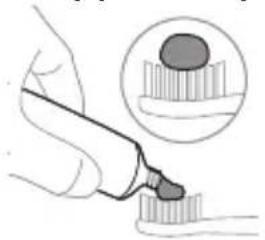
natural_image
Illustration of a hand holding a pen with a magnified inset showing a textured surface (no text or symbols)1 əngtɪp hunqwiʊwlyh ʊwqhlyʊtnŋ u ʊtɪngntɪp wunwʊh ʊwɒnliʊh phz pwiʊwʊlnɪŋəniːu:
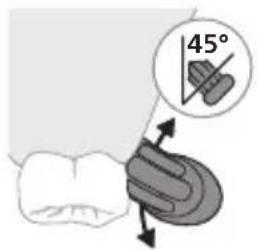
2 Stnwnntp wunwuh hunqwuwlyh uwqhyluttn winwufutnh ynw uh qhn pwn wuljwu unwl (45 wuunhǎwù)` l nidtn utnútp, nnwtuqh uwqhyluttn hwuutü lúntnh tanwqðhù ywú lúntnh tanwqðhg uh qhn p n'utnpu:
L2niú Úúpnnq dwiúwùwly hunqwùwlyh ytúunnnún wyuhtp wunwùutnh htún 2zhúwú útg:
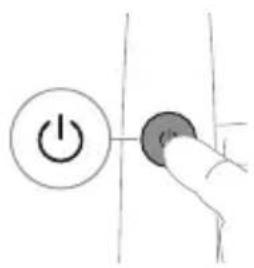
3 Utnútp hnuwùph úhwugúwù/wùgwùnúwù lynǎwùn Philips Sonicare-n úhwugǔtǐnì hwuówn:
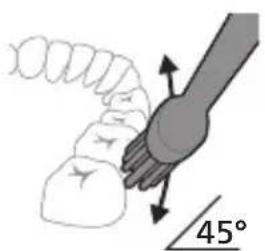
4 Unpntu wuhtp hunquuwlyh uwqtnu wunwutph ynw untwnwnyuwo l juntph tanwqdnui: Uwpntp wunwutph petruwlyh htun ni wnug 2wndnutpnu, nnwtuqh hunquuwlyh uwqhutph hwutu wunwutphu: Cwnniuwytip wju 2wndniun atn uwpnuwu hnlyh wupnno npawgpni:
^12 niù hūnquìwǔh uìwqhúutān wītūn p l úh zhnp n lǚjùwǔwǔ: hūnphnnn zh unŋuǐniú wùnwǔutān úwþnti wjùwbu, hùzwbu ŋnip lúwþnthp unl̥nnwǔwǔ wùnwǔh hūnquìwǔnyu:
^12 niú 2wiuhwquug útð áu2niú qnnðwnntíni ntiwpniú yunwùwp qqnizwgniú yhhnhuh pnüwuh panpning, u hunqwùwuh qihuhyh yhnhuúwù hh2tgúwù lniuwjhù gnighén yuhuh pawnpāl ntnhù qniýunú:
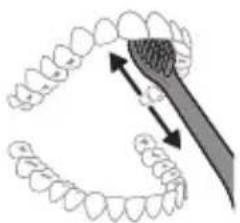
natural_image
Diagram showing dental tool interacting with teeth and jawbone (no text or labels)5 Ungluh wunwutph utnuh uwwytnunyputnp
uwpntini hwuwipetptp hunqwuwlyh pnuwyn
yhuwninhn nhnpnyu u ih pwuh ninnwhwjug
uwpnnn 2wndniutp ywinwntp jninwpwuynin
winwuh ynw:
6 Uwpntihi yhniù wùwnntiŋg htunn lqwnn tpr
lnwgnighs dwúwǔwly hwnlywgǔtì wunwùtph
δwúnn úwyltnlunijæutpn úwpnti niù u wju
hwunluwòutphù, nnuntn wnzgwùniú 5 pòwùnniú:
Uwpnn tpr üwu úwpnti ltaqiù hunqwùwyn
wwhtinj úhwgulwǒ ywú wùgwùnwò, hùswu
üwhuŋuunnniú tpr:
L2niú 2tn Philips Sonicare winwúh hunqwùwǔn wùyúnwùq t winwùutnh pntytunutnh (hunqwùwǔh qihuhyn 2niun t úw2úniú pntytunutnh ynw) u winwùutnp ytpnwlywùqūnn hwnúwnwùpútph (ignùnuiutn, 2wwhlyutn, ytúhnutn) oqnwnqnòúwù ntiwpniú, tiāi nnwùp wwwn2wǎ tǔ oqnwnqnòuniú u stǔ huwhunuǐniú:
QuadPacer
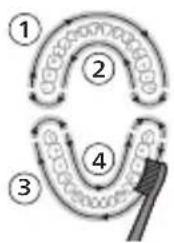
flowchart
graph TD
    A["①"] --> B["②"]
    B --> C["③"]
    C --> D["④"]
    D --> E["④"]
    style A fill:#f9f,stroke:#333
    style B fill:#f9f,stroke:#333
    style C fill:#f9f,stroke:#333
    style D fill:#f9f,stroke:#333
    style E fill:#f9f,stroke:#333
Зwinqultini hwúwn, np hwúwwwnwzwiḥ tṛ úwpnniś wúpnng ptnwùn, ptnwùn 4 úwuh puḍwùtṛp oqunwqnòtīnu QuadPacer qnpòwnnijān: QuadPacer unthuúnqhwù hunqwùwlyíwù dwúwùwyn puḍwùniś 5 4 hwúwwwn úwuh l u waŋwùzwiùniś 5, jāti tṇp 5 hwnlwwyn wǔgùtī hwqnnh hwnlwwòhù: Zwinlwwòtīnh wqnwu2wùniún untnh 5 niútūniś panpangh ywnǎwnu nwnwnh úhongnu: Uunwúh hunqwùwlyì wulnnúwn lytwnyì wǔgwunylniś 5 hunqwùwyltīni utuhwjh wylwnnhù:
L2niu' White yuw Gum Care nduhutn u oqunwannotjhu ywnn h wultwgutl inwgnighs dwuwuu:
Ntchutn
Eğluynwlywù hunqwùwlyù niùh úhùzì 3 nădhúutn. Clean, White u Gum Care (úhwjù npn2wlyh ünntʃiutpniú): Nădhúutpù hnhutjni hwuíwn hunqwùwlyù wùgwunułwò yhǎwlynú utnútip nădhúh ynǎwlyn:
Clean White Gum Care
| Unwultinjəjnìu | Fwgwnhlywúbùonjuwwpnúwúhwúwn | 3tnwgùniú ʒúwlytnunijahpòtnp | huwijnnpwnútnuniú ʒiúntn |
| lunqwùwyltǐnìnǔnhwùníndwiúwùwlp | 2 nnwú 2 nnwú, 30 | 4wynljuwù | 3 nnwú |
| rùzwtuhunqwùwyltǐ | 3nīnwpwùyŋìnhwunljuwònhunqwùwyltp 304wjnlyjwù: | 3nīnwpwùyŋìnhwunljuwònhunqwùwyltp 304wjnlyjwù | 3nīnwpwùyŋìnhwunljuwònhunqwùwyltp 304wjnlyjwù |
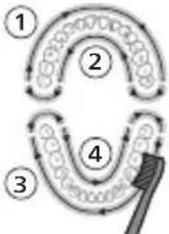 | 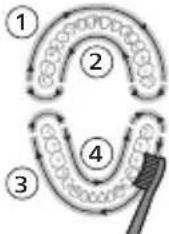 | 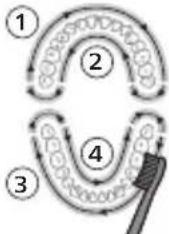 | |
| - | wwwhunqwùwyltp 5 16 hwnljuwòutnp‘jnīnwpwùyŋìn15 4wjnlyjwùhn’upawgpniú'wnzghwnnwùutnp‘hwujtgùtini luwultih wwwjðwnnwnàutínlhwúwn: | wwwhunqwùwyltp 5,6,7 1 8hwnljuwòutnp‘jnīnwpwùyŋìn15 4wjnlyjwùhn’upawgpniú ătnp‘untnpħu‘wijnnpwnħpuwùtini luútnutínl hwúwn: | |
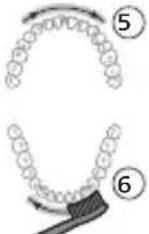 | 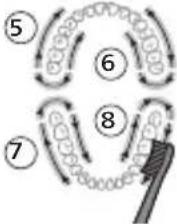 |
BrushSync unthuunnqhw
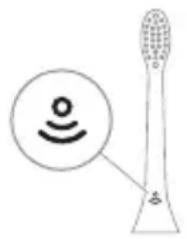
natural_image
Diagram of a toothbrush with a sensor icon and a magnified view of its base (no text or symbols)BrushSync unthuünqhwù àtn hunqwùwlyh qjhuhyhu panyl t unwlhu hwnnnnwulgutl pnùwlyh htun uhlynnzhwh oqūnipāwúp: lunqwùwlyh qjhuhyh uunnphù hwnulwǒniú qunùlnn 82wùn gnjg t unwlhu, nn hunqwùwlyh qjhuhyù wwwhnuluwò t wju unthuünqhwynú: BrushSync unthuünqhwù wwwhnulniú t. - lunqwùwlyh qjhuhyh yhnhuwnhàuwù hh2tigniú Philips Sonicare-ù wwngwynlniú t BrushSync ( lunqwùwlyhUhùpnnüwgniú) unthuünqhwynú hutlwgh hunqwùwlyh qjhuhytph lwjù untuwlywùh: lunqwùwylutph qjhuhytph útn wúpnng untuwlywùniú δwiùnpawuwini u àtiq wútiuwhwúwwwnuwuhwiú qjhuhyn qunútini u jnwgnighz untntylnipajniúutph hwúwn wjgtittp www.philips.com/toothbrush-heads:
9nρδωνηγρεύτη
- ǒu2úwù utùunnh wnàwqwùp
- Quadpacer
- lunqwùwlyh qlhuhlyh yhnhuwnhùuìwù hh2tigniù
- EasyStart
- SmarTimer
natural_image
Simple line drawing of a starburst symbol with a small star and arrowhead, no text or labels present.2tn Sonicare wunwuh hunqwuwyn zwihniś t úwpntānī núpawgpniś àtn lnnúhg qnnðwnŋluwð ǎu2niún` àtn lùntān l u wunwútqn yìwuuìwópùtphg wu2nuwùwūnī huwúwn: bṛtā zwiuhg wulti ǎu2niś qnnðwnητρ, wuyw pnùwuh pananng n yhhnhulh, huy hunqwuwuh qlhuhyh yhnhuwnhùwùwù hh2tgúwù wwnytnwyn hywnuh ntnhù inyunjù' úhùzu sùwlqtgutp ǎu2niún:
U_2niù'Uwnpnìù lyuùhuwnnŋluwǒ lvtnwní lwlunhúwgǔwǒ tǎu2úwù utùunnη:Uju qnnòwnnyjəù wwwwwlnhúwgǔtīnì hwuówn (Stu qlnìhu «Ulynhúwgǔtǐ lyuś wwwwwlnhúwgǔtǐ qnnòwnnyjəutīŋ»):
Quadpacer
QuadPacer-n hùntŋuŋwɪtʃnh dawuwzwiŋ ʒ, nnù oqunw ʒ àtq hwulwwwnwzwiŋ úwɔnbl ptnwùn` pwudwutŋu wjù 4 hwunylwɔh:
funqwùwuh qlhuhuh ynhuwnhùwù hh2tgniú
2tn Philips Sonicare-ü niüh BrushSync (UwpnúwùUhúpnnùwgniu) unthuúnlnqhwu, nnp htunwqðniú 5 2tn hunqwùwlyh qihuhlyh úw2lʊðnɪŋəjniūn:
^12 nu ^1 Uju qnnδωηνηρει ω2ħωυπινιλ ξ úħωμμ Philips Sonicare ḥutlμgh ḥnquùwlyh qħuhlyutan BrushSync (ħnquùwlyhUhùpnnúwgnιμ) unħuīunŋnqħwμημ:
1 tnp wnwghu wùqwiú ùnn hutlugh hunqwùwlyh qlhuhy ttp wúnwgūnui, pnùwluŋ ǎwùwsniú ʒ, nn ηηρ niútp Philips hunqwùwly BrushSync (hunqwùwlyhUhùpnnùwgniu) unthùnlnqhwnjlu ulyuniú ʒ htünwaðti hunqwùwlyh qlhuhy úw2quðniəjnniún:
2 dwu w u w l y h n u w g p n i s, y w h u l w o d a t n y n n u h g
y h n w u z u w o d a t u 2 n u h g u q h u h y h o q u n w q n n o u w u
n u n h w u n i n d w u w u w l y h g, p n u w l y n h t u n w q o n i s t s
h u n q w u w l y h q h u h y h u w 2 u w o n i j n i u n` n nn 2 t i n i
h w u i w n a t n h u n q w u w l y h q h u h y n y n h u t i n i h w u i w n
l w u w q n i y u d w u w u w l y n: U j u q n o w m n i j a n
t n w 2 h w u l n p n i s t s a t n w i n w u f t a n h l w u w q n i y
u w p p n i s t u ni h u w i u p n:
3 tnp hunqwùwlyh qihuhyh ühnhwnphùsùwù hh2tgúwù gnighpn ülwnylniú 5 ntnhù qnyǔnú, níntuǐ u wītunp 5 ühnhutip hunqwùwlyh qihuhyn:
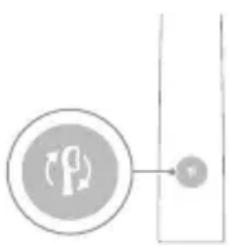
flowchart
graph TD
    A["P"] --> B["Terminal Node"]
futlugh hunquùwlyh pninn qihuhyttnh yhnhuwnhúuwù hh2tgúwù qnpòwnnyjəù wlnhluwgulwǒ t: lunquùwh qihuhyh yhnhuwnhúuwù hh2tgnuìu wwwwwyunhluwgútīnì hwiúwn untóu "Ulnhluwgutī lywú wwwwwyunhluwgutī qnpòwnnyjəutīpn":
EasyStart
Uju Philips Sonicare ünntülu wunwupniú l úhwgulwð EasyStart qnnðwnnyjənu: EasyStart qnnðwnnyjən lyuúwg-lyuúwg wultuugüniú l hqnnnujənniú u wnwghù 14 úwpnnušutph dwiúwùwly` oqūtīni àtiq unyñnti Philips Sonicare wunwúh hunqwùwlyhg oqunultīniù:
Rnwdwnwqh
tnp Philips Sonicare wunwúh hunquùwlyu oqunwqnòuǐniú l yìhùhluwlywù
htunwqnnnijajniùtānniú, wjù wṭuṇp 5 oqunwqnndōh clean nīdshúniú pwnàn hùntūuhlnjajwù ynw` pnǔwln wúpnngnijajwúp lhgpwulnnluwò, huly EasyStart qnnðwnnyjən` wùgwunluwò:
EasyStart qnnδwn2njuəu wwwwwlunhluwgutlni hwúwn (Stu qlnihu «Ulnhluwgutl ywu wwwwwlunhluwgutl qnnδwn2njuəuttnp»):
SmarTimer
SmarTimer-n gnjg 5 unwihu, nn úwpnúwù yhnìu wluwnnulwò 5' úwpnúwù yhnìh ʊtŋgniú wluinnúwin ʊtnwnú wúgwuntǐnú winwùh hunqwùwlyn: Unnwùuwpníjd-úwuuwqtainùtn n̥unhhnn̥ tiú unwihu úwpntī winnwúut̥nn̥ onwlywù 2 wúqwúhg n̥z wwwlywu: L̥2niú' b̥rət utnútp hnuwùph úhwgu̥wù/wúgwunúwù lynǎwlyn úwpnúwù yhnìn ulyut̥nig htunn, winwùh hunqwùwlyn yhuà q̥wnǔh: 30 ʊwjnlyjwiū ηwnwnhg htunn SmarTimer-n ʊt̥tnwylwju̥niú 5:
Ulnhluwgutl ywi wwwwnlnhluwgutl qnpdwnnyputn
2tn winwuh hunqwuwlyh ynw 7nip lwwnn tn wlnhylwgutl ywu wwwwwlnhylwgutl htunluw qnndwnnyjuttn
natural_image
Three-step diagram illustrating a mechanical assembly process: tool insertion, close-up of component, and final assembled view (no text or symbols)L2nu' 3tunn unwuwunnuhn wputuniwnutqn lwwnn tui unwnptnuli qiuwud unhthg lwhuulwod:
natural_image
Line drawing of a hand holding a small object with a pointed tip, next to a rectangular device (no text or symbols)natural_image
Simple line drawing of a mechanical setup with a star-shaped component and a base, no text or symbols present.2 Enuwyn untwnnntp ihgpwwlnnhsh ywu whunwhwuhsh ynw:
- Frùwǔn 2 lwwǎ wqnwù2wù t jannùniú, hùzǐ huuunwūnniú t, nì frùwǔn wjuw2wǎ ytānwùn untānwùnjuwò t:
- Uwnunyngh gnighsh pawnpnn lnjuun gnug 5 unwju, nn wunwuh hunqwuwyn ihgpwwlnnu1n5:
- Επρ ἡhgpwʊlnnhʒhʊ ὑhwgʊwɔ̥ pɛn̥u̥wʊ̥ wúpnnŋniŋəjωμ̥r ἡhgpwʊlnnuħ, ὑwnunlɪŋgh gnɪghʒn 30 ὑwɪŋlyjωμ̥ħ nǚpəwgpnι̥ l̥qʊn̥zʊħ l̥qʊ̥u̥wɛ̥ ľnju̥n̥, wwμw l̥qʊ̥u̥gwʊn̥uħ:
Uwnunlngh lwnqnwlhǎwly
Uwnunlngh lhph lwnqwulhǎwln (pnùwlnnán uhwgulwδ lhgpwulnnhzh ynw)
tnp pruwnyn untwnwnnuwδ t hgpwnlnnhzh ynw, uwnunlngh gnighen gnjg t unwlhu uwnunlngh lhgph uwlwnwnwn:
Uwnunlngh lwnqwhhǎwly Uwnunlngh gnighs
| Lhgpwwlnnniú ðwwnpaniú 5 ywùwz lnjunú | |
| Lhpù 5 30 ywjnlyjwù ywnzlniú 5 | hwwnwnnniú ywùwz lnjunú, wwwwùgwwnzlniú 5 |
Uwnunyng hwnqwuhǎwyn (tnp fnùwyn lhgpwulnnph ynw 5) tnp wnuwúh hunqwùwly wlynhu yhǎwyniú 5, pnùwyn uunnphù hwnuluòniú qnǔyln n úwnunyng gnighén gnyg 5 unwihu úwnunyng lhgph úwylwnnwyn:
Uwnunlngh lwnqwuhǎwú
Uwnunlngh gnighs 2wjün
Lhpù 5 Uniq ywùwz -
Uwuiuwlyh lhpù 5 dewnjenu 5 ywuiwz lnjuŋ
Uwnlnyngh
ywnqwuhǎwú
Uwnunlngh gnighz 2wjùn
| Ph_2 5 Ownpaniú 5 ntnhù qnìjùnǔ | hunqwùwlyúwù wùwnunhg htùnn pnùwùln 3 wùqwú ðwjùwjhù wqŋwùzwiù 5 wnàwūlniú |
| Twnwny 5 Ownpaniú 5 ntnhù qnìjùnǔ | hunqwùwlyúwù wùwnunhg htùnn pnùwùln 5 ðwjùwjhù wqŋwùzwiùtph 2 lnwùwquí 5 wnàwūlniú |
| L2niú Eùtnqhw hùwjtānì hwiúwn ùwnunlyngh gnighṣn lwwùgwunuh, tnp wju sh oqunwqnndʒu niú: | |
| L2niú tnp ùwnunlyngh lhgp n lhnúhù nwnwny 5, winnwúh hunqwùwylǜ wùgwunlu niú 5: Lhgpwulnntānì hwiúwn winnwúh hunqwùwyn ntānwntāp lhgpwulnnhsh lpnu: | |
| L2niú Uwnunlyngn wúpnngnuḥù lhgpwulnnu lwaδ wjuhtīnì hwiúwn lwwnn tpr winnwúh hunqwùwyn lhgpwulnnhsh lpnu wjuhtī, tnp wju sh oqunwqnndʒu niú: |
Uwprnni
Unwuh hunqwuwlyh pnuwyn
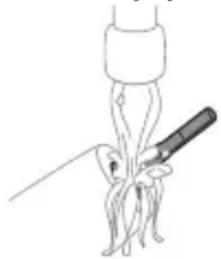
natural_image
Simple line drawing of a medical procedure with a needle inserted into tissue (no text or symbols)1 3tnwqntp hunquüwlyh qihuhyn u luwgtp útunwnwlywù jhutzh hwnuŋwɔŋ unwp gnnu: 3wúnqultp, np httnwqntl tp wunwúh úwðnliyh útwggnnnútnp:
2qnizwgniu' Uh hntp ntunhut luhpn unin wnwnlywutpnu' ntuwh jhutnh utg, pwuh nn wju luwnnn 5 hwuqtguti yuuuulwoph:
2 Fnùwlyh wúpnnq úwyltntun úwpntip hùnùwù qnnòu wǒpnù:
^1 2niú' Uh hwnlquotp pnùwlnyl lqugwwnwùhù' wultinnn. gninn htrzugutni hwúwn:
hunquwuh qihuh
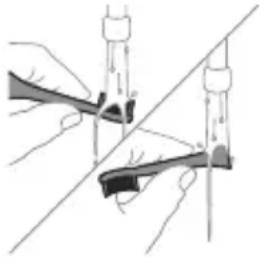
natural_image
Illustration of two hands using a tool to adjust or install a mechanical component, with no visible text or symbols.1 3nɪnwpwɪʒynɪn oqunwɑnnðniʊhg htɪnn ljuwgtip hunqwɪwʊlyh qɪhʊln u úwəqhʊtɪŋn:
2 3tinwgntp hunqwùwwlyh qlnihun pràuwlyhg u wnùluwqù 2wpwren útyi lüwgtp hunqwùwwlyh qlhuhyn inwp qnnu: Lüwgtp āwúhhnnnnwlywù lwwhwnhşù wjùpwù hwǎwhu, nnpwù wùhnwdtzun t:
Lhgpwqnnhz
1 Uugwuntp lhgpwulnnhyn` uwhupwù wjù úwpntán:
2 Lhgpwylnnhzh úwlytntun úwpntp hunúwwu qnnóluwópnú:
natural_image
Illustration of a hand inserting a component into an open device (no text or symbols visible)Ownhúw l wnnjniùwutunnijawu hwúwn hunphnnn 5 nnulniú úwpntl ótn whunwhwuhzn 2wprwawlywù:
1 Uugwntp whuunwhwuhn:
2 Ninhn pw2tp ywjehlwjhù nwnwnyn nninu: Luwgtp ywjehlwjhù nwnwnyn u dwpntp wju hunuwul 2nnnu:
3 Uwpntp pninn utnphu uwylnttuutnn hunuwul 2nnnu:
4 3tnwqntp w2unwuhz lynwn, nnn qnuiniu t niunnwuni2wuwqnju injuh lwuwh nhuwg:
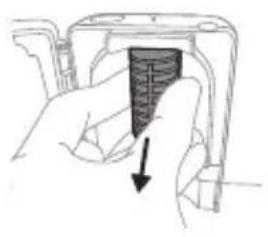
natural_image
Hand holding a device with a textured internal component and an arrow indicating direction (no text or symbols)Eynwùn hǎn wǔ gǔ nǐ huòuàn pù bù p lùnph dōw jntn, ǔnpn bù uǎn bù bù lù nǐ nu huà bù p wù zùn wù wù hì Eynwùn:
5 3tnwgntp niunnwuwuni2wlywqnju lnjuh lwuwyn: Lwuwyn hwutini hwuwyn pnutp wju u nninu pw2tp utunwnjw onwuhg:
6 Uwpntip yww2nwwwuhz tynwun u niynnwuwunizwlywnjü lnjuh lwwiwn hunüwwu 2nnnu:
7 Unphg untwnntp niunnwuwuni2wlywqnju iniuh luwyn: Luwyn Unphg untwnntini hwuwn luwuh utnplh suwn hwulwuwuntgntp utinwnwlywu onwuh utg u luwyn untp onwuh utg:
8 Unhg untwnntp w2nwwuhz Unw: Unhg untwnntni hwuwn Unwuh gnnutnp hwluwwntgntp nuunwuwuni2wlywnjy Injuh Iwuw h un qunwn wnwngnnn uwlntpuh wugptnh htun: 3ntp Unhn whunwhuhsh wugptnh utg:
9 4wphwjhù uyniuttnp unhg nntp niunnwúwúnizwlywqnyù whuunwhuúhsh útg:
10 Uwpntinig htunn, hwúnqutp, nn whunwhuhyn lhnuhu znn t, uwhupwù wju hnuwùph lwptnhù uhwutin:
اللهمني
tpat stp wwnnwnwnlnw tnlywn dwuwuw oqunwqnndt uwnpn, wugwntp wju htlywnnwutniguwu qwnnwlyhg, uwpntp wju u wuhtp qnul u znn untnniw' wnluh ninhh dwnwqwprutnhg htrni:
Φnħuħphħuni
Φnhuwnhùtp Philips Sonicare hunquùwlyh qjhuhyuttnù wútu 3 wúhun útyì` owunhúwìl wnnjniúpūtn wwwwnhultní hwiúwn: Oqunwqqnnòtp úhwju Philips Sonicare-h uhnhuwnhùuunn qjhuhyuttnn:
- Philips-h wnwnwnwnwnwnwnwnwnwnwnwnwnwnwnwnwnwnwnwnwnwnwnwnwnwnwnwnwnwnwnwnwnwnwnwnwnwnwnwnwnwnwnwnwnwnwnwnwnwnwnwnwnwnwnwnwnwnwnwnwnwnwnwnwnwnwnwnwnwnwnwnwnwnwnwnwnwnwnwnwnwnwnwnwnwnwnwnwnwnwnwnwnwnwnwnwnwnwnwnwnww.philips.com/REACH lwwjpnni:
4tnwihgpwnlnnn uwnnyng htnwgutin
Utnywnnigylwδ utnwihgpwynpunn uwnnyngn wtinp t htnwguh uhwiù uwwuawqhnwgylwδ wùàh lynúhg, tnp uwnpn powhnüwgulniú t: Utnywnnigylwδ utnwihgpwynpunn uwnnyngutph htnwgüwu utnwptnjwi gniqnüutnn ywnnn tiq qunuti
www.philips.com/support §2niú:
utnwihgpwulnnlnn uwnunlngn htnwugutni hwuwn dtq hwnlywulnn 5 unphs ywu lynn, uninp u hwnp qhunu (uinwutwnpn) wunniunwylwhwù: Thwhuwutp wùluunuqnipjwiù hhuìuwlywù uwhuwqqni2wlywù úhngutpn, tnp htunluni tpr uunnpl u2yuò núwgwwlwnqhù:
natural_image
Diagram of a mechanical component with a curved arrow indicating motion (no text or symbols)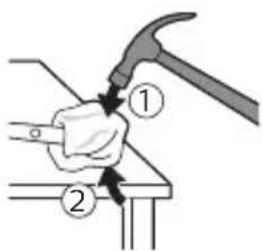
3 Fzüwuh ültnun üh åtnpnul wuhtp u hwnylwödp przüwuh wwnjwuhü ütnpuh tqnhg 0,5 nynyú pwnànnipajwù ulnw: Nidtn hwnylwödp üninǎnu pnnn 4 ynnútphg' tqngh ywwhwnhzn nninu hwùtjni hwúwn:
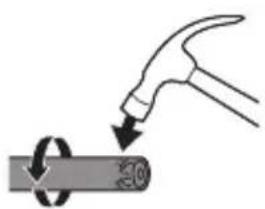
natural_image
Illustration of a hammer striking a cylindrical object with a circular arrow indicating rotation (no text or symbols)^12 niú 3ùwnwùlnn l ̃ uinhwùwǒ jhùp úh puùh wùqwú hwnjwǒtǐ dōwjnhù ̃utnphù pèuwwìwìh úhwgnìwùtnp huqīnì huuáiàn:
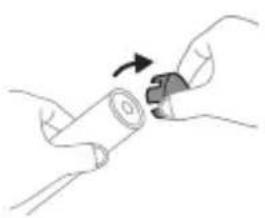
natural_image
Illustration of hands holding a cylindrical object with an arrow indicating rotation (no text or symbols)4 3tnwqntp tqn h ywhwnhzn winwuh hunqwùwuh pnùwuhg: tpt tqn h ywhwnhzn ht2nnuqjwup sh wqwnyniú wwnjwuhg, ynhutp pwjl 3-n uhūzu tqn h ywhwnhzn nninu qw:
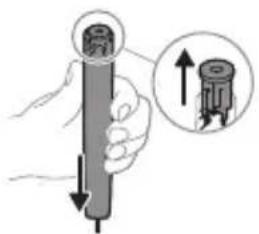
5 Anuwyn qihuhuwyn wwhtiny jhutyn utnplu utnutip yn2un uwyltnunyah ynw: trat utnphu pwnwnphsutpn ht2unnipwup stu wqwnynw uwwunjwuhg, lynutip pwjl 3-n uhuslu utnphu pwnwnphsutpn nninu qwù:
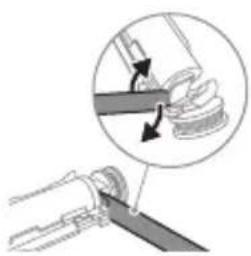
natural_image
Diagram showing mechanical assembly with a magnified inset of a component (no text or symbols)6 Stnwnptp wunnunwlywhwùn úwnunlyngh l u 2n2wùwlyh úhglu útnphù pwnwnnhzutph útnpluniú: Ujùnhtunl qqniznptǔ hánwqntp wunnunwlywhwùn úwnunlynghg' ul 2n2wùwlyh útnpluh hwnulwón lynuntjni hwiúwn:
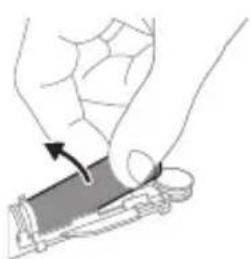
natural_image
Illustration of a hand holding a rectangular object with an arrow indicating motion (no text or symbols)7 Stwnntp wnnnwnwwhwun uwnlngh utnplh lu ul 2ngwuwuh uhul lynntini utwnwnwuwu utnnhn, nnp ihwguni5 uwnlngng ywuwz unwwuwh: Uw ywugwin hwnlngh utnplh tqn 2ngwuwhg:
8 Fnutp uwnunlngn u htnwqntp wju utnphu pwnwnnhsutphg, npwtuqh ynuntp uwnunlngh tlnynnnt utunwnjw utnnhnp:
2qn12wgniu' 2qn12wgtp uwnunlngh utnnhnutph unip tqntphg, npwtuqh huniuwhtp uwnutph uluwuuwdputphg:
www.philips.com/support
natural_image
Illustration showing a hand brushing a tooth with a brush, and a close-up of a tooth being examined with a circular sensor (no text or symbols present)natural_image
Illustration of a hand holding a pipette with a magnified inset showing a droplet on a surface (no text or symbols)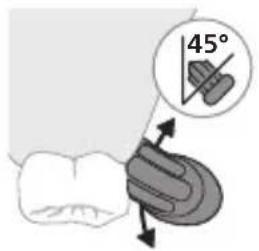
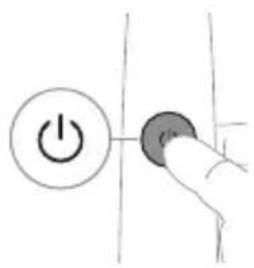
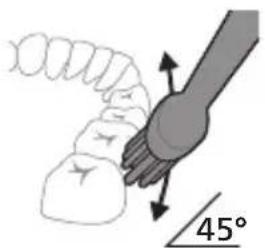
natural_image
Diagram showing dental tool interacting with teeth and jawbone structure (no text or labels)Clean White Gum Care
natural_image
Illustration of a toothbrush with a sensor icon and a magnified circular detail (no text or symbols)BrushSync-nb φgg6mmmgns lsādyuqngdōs udqngz l zānqn l sāgnnl n ouzsz, mmd qay3sādnmpg l bsbgmyfni dizhmbn3nl gādmygbdon. tsagnnl n osuz8g smgdymn fndammm daynonnqdi, mmd tsagnnl n osuzn smgthznmn sā φgg6mmmgnon. BrushSync φgg6mmmgns lsādyuqngdōs ndqngz: - tsagnnl n osznl gādmuzmn l djuubg d ybujbdos Philips Sonicare gonsz8mdom BrushSync φgg6mmmgnon djm6p Philips Sonicare-nb tsagnnl n f3zn5 b usgddnl gsmm ls3gfdml. tsagnnl n oszgddnl daŋgmn h3gbn lsadmqgmm bs8nl galsq6mdoq qo ond3g0znl lsy3gmjlm tsagnnl n osznl ls3m36gmso gavapnom odynm8p www.philips.com/toothbrush-heads qsdshgddonn obqmhdzgnbnznl.
ඉහාජිංය
natural_image
Simple diagram with a starburst symbol and a small arrow pointing to a vertical line (no text or labels)mg3g6n Sonicare-nb zdnqnl bsgmnl n8mdzbl 8g6mmsl, hmddgmlsy b6g6qnlsu nygbdom ndnbzmnl, mg3g6 zdnqngdnl s o mndnqngdnl qssnsbgdnlgsb qslus3s3o. ny 8g4dgt 8g6mmsl gsdmnqgbdom, lsbgnynfm dgn33mnl zndmsznsl o s osznl dgn3mnl bsphms snbngdss jsmzlnqfsom lsbgnynfmnl j3gos bsbnmdn dsbd, lvsbd 8g6mmsl sm dgsdynmgdom. dgt6nd36s: b6g3nl lgblmmn 3hmcqnjfu gssgfnynfgdym dqwmdsmgmdosdn dm3y3gds. sd g7g6jtnl gssgfnynfgdnl dgaqga (nbnqgm „g7g6jtndnl sdfnzsuns sb qgsfynzuns“).
Quadpacer-n
flowchart
graph TD
    A["Process"] --> B["Output"]
natural_image
Illustration of two hands holding a tool with arrows indicating motion or force (no text or symbols)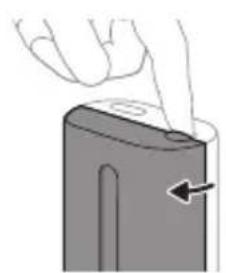
natural_image
Illustration of a hand holding a device with a pointing arrow (no text or symbols)∂g6n∂36s: ουδρομησημη σχυγυμήση δχυδμης, ωυδυβευσησηση δχυδμηση δησησην δηθεσηση.
པརྒྱོད་པརྒྱོད་པརྒྱོད་པརྒྱོད་པརྒྱོད་པརྒྱོད་པརྒྱོད་པརྒྱོད་པརྒྱོད་པརསྭན་པརྒྱོད་པརྒྱོད་པརྒྱོད་པརྒྱོད་པརྒྱོད་པརྒྱོད་པརྒྱོད་པརྒྱོད་པར།
zsdmsgfmmg on bsbnfun8gmn, daqbyznofgm zsdmygbdos
qo qsyngfggon dmabdsmgdgmns dbsmqosfgmnl ggbqsl,
my:
- UV ১ন্ব০৭৩৭০৮ ব০৭৯৫০, হুমূয়৯০ মহ্যঃ দুঃন্ড, মংগ্যাপ্ত জুনু মূস.
- 0567575 854967575 56 57 5755 054967575
15675757575.
- სანიტაიბერი მუმაობისას უმვებს კვამლის ან ნვის სუნს.
∂g6n∂36s: γηφήσυνυργίπι υκδομηγ ∂gndμγδύς υδθνδμ ημλύ σφωδυσβιν ταζμγδόνις ρυς μδηνωζης. ∂mδυγπόνμπός ∂gnbευβοι δυσ∂zθόνιωζης ∂ηγδερμαθμη σφαγμπις.
natural_image
Diagram of a mechanical or electrical component with two vertical posts and a central threaded shaft (no text or symbols)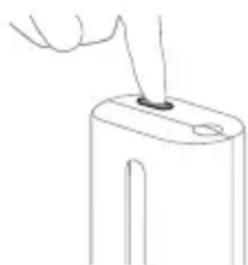
natural_image
Line drawing of a hand inserting a small object into a rectangular device (no text or symbols)natural_image
Simple line drawing of a device with a star-shaped sensor above it, no text or symbols present.odds funds mgln bnd fund bn nd fund mgn nd h3gbdgwrnn
odds funds funds funds funds funds funds funds funds funds funds funds funds funds funds funds funds funds funds funds funds funds funds funds funds funds funds funds funds funds funds funds funds funds funds funds funds funds funds funds funds funds funds funds funds funds funds funds funds funds funds funds funds funds funds funds funds funds funds funds funds funds funds funds funds funds funds funds funds funds funds funds funds funds funds funds funds funds funds funds funds funds funds funds funds funds funds funds funds funds funds funds funds funds funds funds funds funds funds funds funds Funds
natural_image
Simple line drawing of a hook being lifted with a pen, no text or symbols presentnatural_image
Illustration of two hands using a tool to adjust or install a mechanical component, with no visible text or symbols.natural_image
Illustration of a hand inserting a device into a device housing (no text or symbols visible)natural_image
Hand inserting a dark textured object into a container (no text or symbols visible)modification of the first 100% of the first 100% of the first 100% of the first 100% of the first 100% of the first 100% of the first 100% of the first 100% of the first 100% of the first 100% of the first 100% of the first 100% of the first 100% of the first
modification of the following text:
natural_image
Simple line drawing of a mechanical component or tool interacting with a base (no text or symbols)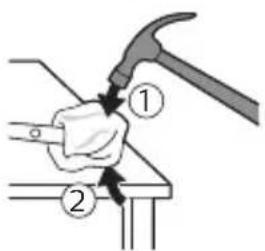
natural_image
Illustration of a hammer striking a cylindrical object with a circular arrow indicating rotation (no text or symbols)natural_image
Illustration of hands holding a cylindrical object with an arrow indicating rotation (no text or symbols)natural_image
Diagram showing a mechanical assembly with a magnified inset highlighting a component (no text or symbols present)natural_image
Illustration of a hand holding a device with a gray component and an arrow indicating rotation (no text or symbols)www.philips.com/support
הכלה is not a pro-protective clean.
natural_image
Illustration showing a hand brushing a tooth with a brush and a close-up of the tooth being smoothed (no text or symbols)natural_image
Illustration of a hand holding a pen with a magnified inset showing a droplet on a surface (no text or symbols)1
.□□□□
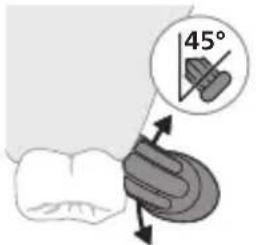
הכלה 2
natural_image
Diagram showing dental tool interacting with teeth (no text or labels)natural_image
Illustration of a toothbrush with a circular icon showing a sensor symbol (no text or labels)BrushSync כר
. website www.philips.com/toothbrush-heads
תְבָרִי
natural_image
Simple diagram with a starburst symbol and a small arrow pointing to a vertical line (no text or labels)בִרְשָׁה בַרְשָׁה
natural_image
Illustration of a hand using a tool to cut a cylindrical object with a directional arrow (no text or symbols)natural_image
Cross-sectional diagram of a mechanical or electrical component with two symmetrical components (no text or symbols)3
natural_image
Line drawing of a hand holding a small object with a pointed tip, next to an open cylindrical device (no text or symbols)natural_image
Illustration of a medical procedure showing an incision being inserted into tentacles (no text or labels)1
natural_image
Illustration of two hands holding rifles with a diagonal line above, no text or symbols presentתַעְרָה בְּרָה
.הכלההוּרָהוּרָהוּרָהוּרָהוּרָהוּרָהוּרָהוּרָהוּרָהוּרָהוּרָהוּרָהוּרָהוּרָהוּרָה
un
.הכלה 1
natural_image
Illustration of a hand inserting a device into a device (no text or symbols visible)natural_image
Hand holding a device with a black textured object and arrow indicating downward motion (no text or symbols)natural_image
Illustration of a hammer striking a cylindrical object with a circular arrow indicating rotation (no text or symbols)natural_image
Illustration of hands holding a cylindrical object with an arrow indicating rotation (no text or symbols)4
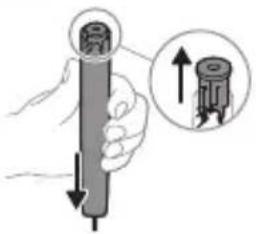
natural_image
Illustration of a hand holding a cylindrical object with an arrow pointing to it, accompanied by a magnified inset showing the upward arrow (no text or symbols present)natural_image
Diagram showing a mechanical assembly with a magnified inset of a tool interacting with a curved component (no text or symbols present)natural_image
Illustration of a hand holding a device with an arrow indicating motion (no text or symbols)www.philips.com/Sonicare
©2024 Koninklijke Philips N.V. (KPNV). All rights reserved. Philips and the Philips shield are trademarks of KPNV. Sonicare and the Sonicare logo are trademarks of Philips Oral Healthcare, LLC and/or KPNV.
300008527982 (20/08/2024)