EasyManual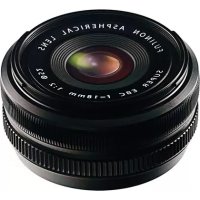
XF 18mm f2.0 R - Lens FUJIFILM - Free user manual and instructions
Find the device manual for free XF 18mm f2.0 R FUJIFILM in PDF.



User questions about XF 18mm f2.0 R FUJIFILM
0 question about this device. Answer the ones you know or ask your own.
Ask a new question about this device
Download the instructions for your Lens in PDF format for free! Find your manual XF 18mm f2.0 R - FUJIFILM and take your electronic device back in hand. On this page are published all the documents necessary for the use of your device. XF 18mm f2.0 R by FUJIFILM.
USER MANUAL XF 18mm f2.0 R FUJIFILM
LENSZKJFFJFJFJFJFJFJFJFJFJFJFJFJFJFJFJFJFJFJFJFJFJ
レンズフードの取り付出方
Be sure to read these notes before use
Safety Notes
Thank you for your purchase of this product. For repair, inspection, and internal testing, contact your FUJIFILM dealer.
Make sure that you use the lens correctly. Read these safety notes and the camera Owner's Manual carefully before use.
After reading these safety notes, store them in a safe place.
About the icons
The icons shown below are used in this document to indicate the severity of the injury or damage that can result if the formation indicated by the icon is ignored and the product is used incorrectly as a result.

WARNING
This icon indicates that death or serious injury can result if the information is ignored.

CAUTION
This icon indicates that personal injury or material damage can result if the information is ignored.
The icons shown below are used to indicate the nature of the instructions which are to be observed.

Triangular icons tell you that this information requires attention ("Important").

Circular icons with a diagonal bar tell you that the action indicated is prohibited ("Prohibited").

Filled circles with an exclamation mark indicate an action to be performed ("Required").

WARNING

Do not use in the bathroom or shower
Do not immerse in or expose to water. Failure to observe this precaution can cause a fire or electric shock.

Do not disassemble
Do not disassemble (do not open the case). Failure to observe this precaution can cause fire, electric shock, or injury due to product malfunction.

Do not touch internal parts
must
Should the case break open as the result of a fall or other accident, do not touch the exposed parts. Failure to observe this precaution could result in electric shock or in injury from touching the damaged parts. Remove the camera battery immediately, taking care to avoid injury or electric shock, and take the product to the point of purchase for consultation.
| WARNING | |
| Do not place on unstable surfaces. The product may fall, causing injury. | |
| Do not view the sun through the lens or camera view fi nd Failure to observe this precau-tion can cause permanent visual impairment. | |
| CAUTIONS | |
| Do not use or store in locations that are exposed to steam, or smoke or are very humid or extremely dusty. Failure to observe this precaution can cause fire or electric shock. | |
| Do not leave in direct sunlight or in locations subject to very high temperatures, such as in a closed vehicle on a sunny day. Failure to observe this precau-tion can cause fire. |
| CAUTIONS | |
| Keep out of the reach of small children. This product could cause injury in the hands of a child. | |
| Do not handle with wet hands. Failure to observe this precaution can cause electric shock. | |
| Keep the sun out of the frame when shooting backlit subjects. Sunlight focused into the camera when the sun is in or close to the frame can cause fire or burns. | |
| When the product is not in use, replace the lens caps and store out of direct sunlight. Sunlight focused by the lens can cause fire or burns. | |
| Do not carry the camera or lens while they are attached to a tripod. The product can fall or strike other objects, causing injury. |
For Customers in the U.S.A.
Tested To Comply With FCC Standards FOR HOME OR OFFICE USE
FCC Statement: This device complies with Part 15 of the FCC Rules. Operation is subject to the following two conditions: (1) This device may not cause harmful interference, and (2) this device must accept any interference received, including interference that may cause undesired operation.
CAUTION: This equipment has been tested and found to comply with the limits for a Class B digital device, pursuant to Part 15 of the FCC Rules. These limits are designed to provide reasonable protection against harmful interference in a residential installation. This equipment generates, uses, and can radiate radio frequency energy and, if not installed and used in accordance with the instructions, may cause harmful interference to radio communications. However, there is no guarantee that interference will not occur in a particular installation. If this equipment does cause harmful interference to radio or television reception, which can be determined by turning the equipment off and on, the user is encouraged to try to correct the interference by one or more of the following measures:
Reorient or relocate the receiving antenna.
- Increase the separation between the equipment and receiver.

- Connect the equipment into an outlet on a circuit different from that to which the receiver is connected.
- Consult the dealer or an experienced radio/TV technician for help.
- You are cautioned that any changes or modifications not expressly approved in this manual could void the user's authority to operate the equipment.
Notes on the Grant: To comply with Part 15 of the FCC Rules, this product must be used with a Fujii Im-specific ed ferrite-core A/V cable, USB cable, and DC supply cord.
For Customers in Canada
CAUTION: This Class B digital apparatus complies with Canadian ICES-003.
IMPORTANT SAFETY INSTRUCTIONS
- Read these instructions.
- Keep these instructions.
Heed all warnings. - Follow all instructions.
- Do not use this apparatus near water (excluding waterproof products).
Clean only with a dry cloth. - Do not block any ventilation openings. Install in accordance with the manufacturer's instructions.
- Do not install near any heat sources such as radiators, heat registers, stoves, or other apparatus
(including amplifiers) that produce heat.
- Protect the power cord from being walked on or pinched particularly at plugs, convenience receptacles, and the point where they exit from the apparatus.
- Only use attachments/accessories specified by the manufacturer.
- Unplug this apparatus during lightning storms or when unused for long periods of time.
Refer all servicing to qualified service personal. Servicing is required when the apparatus has been damaged in any way, such as power supply cord or plug is damaged, liquid has been spilled or objects have fallen into the apparatus, the apparatus has been exposed to rain or moisture, does not operate normally, or has been dropped.
Disposal of Electrical and Electronic Equipment in Private Households
In the European Union, Norway, Iceland and Liechtenstein: This symbol on the product, or in the manual and in the warranty, and/or on its packaging indicates that this product shall not be treated as household waste. Instead it should be taken to an applicable collection point for the recycling of electrical and electronic equipment.
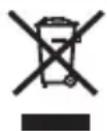
By ensuring this product is disposed of correctly, you will help prevent potential negative consequences to the environment and human health, which could otherwise be caused by inappropriate waste handling of this product.
The recycling of materials will help to conserve natural resources. For more detailed information about recycling this product, please contact your local city office, your household waste disposal service or the shop where you purchased the product.
In Countries Outside the European Union, Norway, Iceland and Liechtenstein: If you wish to discard this product, including the batteries or accumulators, please contact your local authorities and ask for the correct way of disposal.
Australian C-Tick

N705
Parts of the Lens
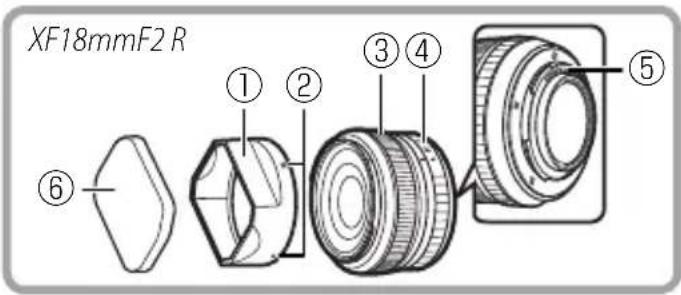
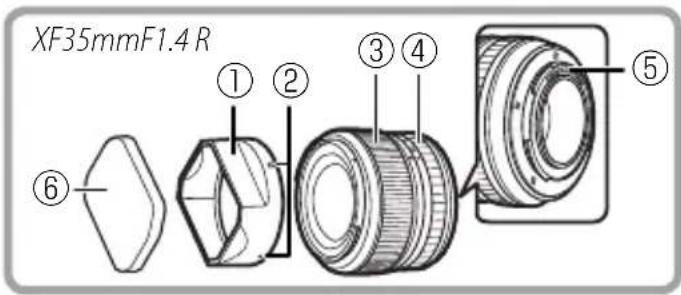
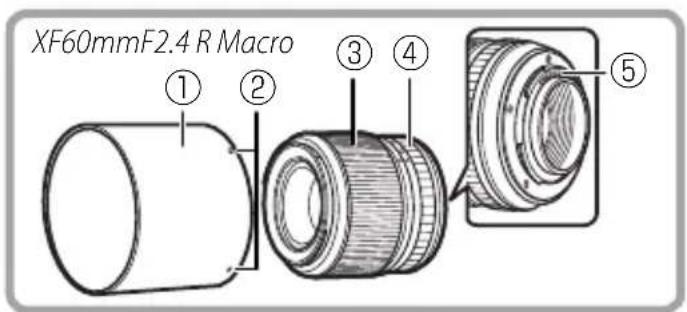
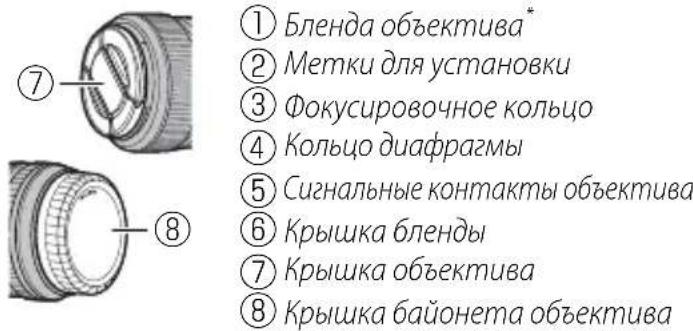
① Lens hood
② Mounting marks
(3) Focus ring
④ Aperture ring
⑤ Lens signal contacts
⑥ Hood cap
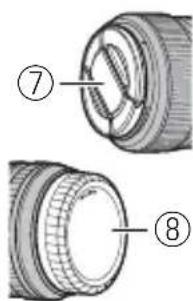
⑦ Front lens cap
⑧ Rear lens cap
- Lens hoods are for use only with the lenses of the type with which they are supplied, and may cause vignetting when matched with other lenses.
Attaching the Lens
See the camera manual for information on attaching and removing lenses. Note that this product is not compatible with X mount fi lm cameras.
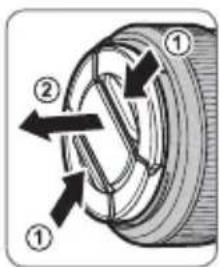
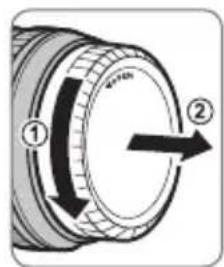
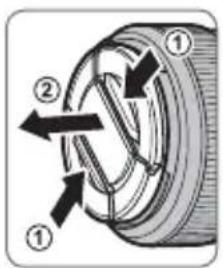
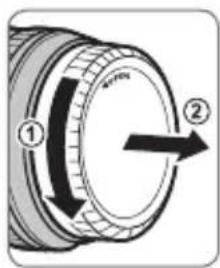
Removing the Caps
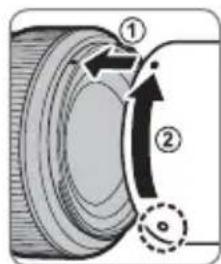
Remove the caps as shown.
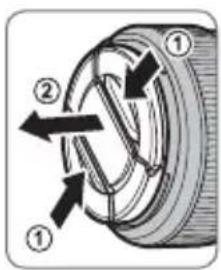
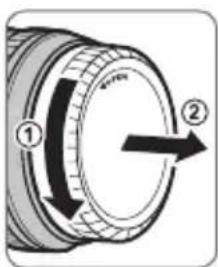
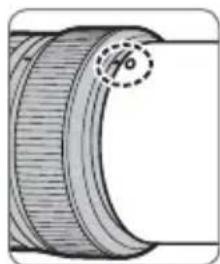
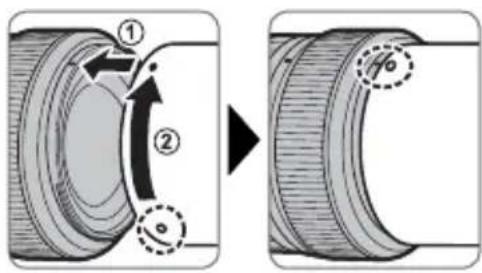
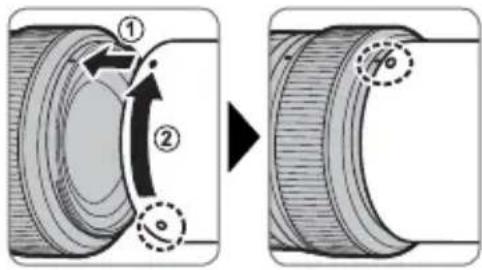
Attaching the Hood
Lens hoods reduce glare and protect the front lens element.
Supplied Accessories
- Front lens cap
Rear lens cap - Lens hood
- Cloth wrapping
- Hood cap (XF18mmF2 R and XF35mmF1.4 R only)
EN-5
ENGLISH
Product Care
- When using a lens hood, do not pick up or hold the camera using only the hood.
- Keep the lens signal contacts clean.
- Use a blower to remove dust and lint from the lens surfaces. To remove smudges and fingerprints, apply a small amount of ethanol or lens cleaner to a soft, clean cotton cloth or lens-cleaning tissue and clean from the center outwards using a circular motion, taking care not to leave smears or touch the glass with your fingers.
- Never use organic solvents such as paint thinner or benzene to clean the lens.
- Attach the front and rear caps when the lens is not in use.
- If the lens will not be used for an extended period, store it in a cool, dry location to prevent mold and rust. Do not store in direct sunlight or with naphtha or camphor moth balls.
- Keep the lens dry. Rusting of the internal mechanism can cause irreparable damage.
- Leaving the lens in extremely hot locations could cause damage or warping.
Specifications
| Type | XF18mmF2 R | XF35mmF1.4 R | XF60mmF2.4 R Macro |
| Lens construction | 8 elements in 7 groups (includes 2 aspherical elements) | 8 elements in 6 groups (includes 1 aspherical element) | 10 elements in 8 groups (includes 1 aspherical and 1 abnormal dispersion element) |
| Focal length (35 mm format equivalent) | F=18 mm (27 mm) | F=35 mm (53 mm) | F=60 mm (91 mm) |
| Angle of view 76.5° 44.2° 26.6° | |||
| Max. aperture f/2.0 f/1.4 f/2.4 | |||
| Min. aperture f/16 f/16 f/22 | |||
| Aperture control | |||
| Number of blades | 7 (rounded diaphragm opening) | 7 (rounded diaphragm opening) | 9 (rounded diaphragm opening) |
| Stop size | ½ EV (19 stops) | ½ EV (22 stops) | ½ EV (20 stops) |
| Focus range | 18 cm –∞ | 28 cm –∞ | 26.7 cm –∞ |
| Max. magnification | 0.14× | 0.17× | 0.5× |
| External dimensions: Diameter x Length* (approx.) | ø64.5 × 33.7 mm | ø65.0 × 50.4 mm | ø64.1 × 63.6 mm |
| *distance from camera lens mount flange | |||
| Weight* (approx.) | 116 g | 187 g | 215 g |
| *excluding caps and hoods | |||
| Filter size | ø52 mm | ø52 mm | ø39 mm |
① Improvements may result in unannounced changes to specifications and appearance.
Owing to how this lens is constructed, the "Distance indicator" displayed by the camera may in some cases differ from the actual focus distance. Use the "Distance indicator" as a guide only.
Pour vous sécurité
He octomethyl 8
ammonium nitrate 47
He nozpykaum 6 body u He nodepzauim 6o3deumuO 60dbI. HebblonJIHHeJaHHoro Tpe6oBaHmro MoXeT npBecTN K Bo3ropaHIO NIN NopaxeHIO 3JeKtpn-ueCKIM TOKOM.
| ПЕДУПЕЖDEHЯ | |
| He pa36upaime | He pa36upaime (He omkpbiaume koprnyc). Hecobniode- нe 3TOI Меры пеюoctopoxhoCTN мозет пивe- СТИ К BOЗТROРаиLO, порожени NOЕКТРУССКIM TO- КOM ИЛВОВНКHOВЕНОТРавМ 13-3a HENPAВЛБHоJ разы n3delenY. |
| He ap026upaime | Eclu kopnyc pa36bunc6 pe3ylnbmate naedenu unu dpy- ZOZOчрзычauHNoZ npoucueMSEu. He mpo2aume om- Крь IMble demaru. HecobniodeHne 3TOI Меры пею- STOPOKHOCTN мозет пивe委书记 N порожени NOЕK- ТРИЧЕСКIM TOKOM ИЛВОВНКHOВЕНОТРавМ, ecnI Вы DOTPOHETeBdo NOВРжdeHbIX DeTaNen. He- MeДLEHNO BByHbTe batapeIO FOtOKaMpeB, coBniOda# OCTOPOXHOCTb, YTObI N36ExaTb NOJUeyHЯ TpavM ИЛN ПОражЕнHAJIeKTPUeCKeM TOKOM, И OTHeCNTe N3delenB V MeTo pInO6peTeHЯ ДЯ KOHCyNBtAUH. |
| He knadume Na HeycmoUHbBle nobepxHocMu. ИЗdelene MOJKeT UNaCTb, ВьЗБАТРавМ. | |
| He smompeme Na conHue Que3 obekmua ckamenu φomokampebl. HecobniodeHne данно Меры прEOCTOPOKHOCTN мозет пивe委书记 K Heo6paTImO- My hapyuHnIO 3peHЯ. | |
| ПЕДОCTEPEXEHЯ | |
| He усаньуке u He xpaHume 6 Meccax, noDBePExHHbIX 603deUcMbUO napa unu dbima, a mamke 8 Mecmax, 2de npucymcByem noBbIeHHa BλaJHocmb unu bObnbwoe KoIueCmBx nbIIu. He bblnoJIeHne daHnOrO Tpe6Oba- HЯ может ппвeCTи K Bo3rOpAHIO UNI NOPaJHEnIO эЛeКТРИчeCKM TOKOM. | |
| He ocmaIaJIeMa He npRIMOM coNHeHOM caemy unu B Me- cMax, noDBePexHHbIX 603deUcMbUO bblcOKux memnepa- myp, makux kak 3akpbIbM u ABmObUNB b coNHeHbI demb. HecobIIOJIeHne 3TNx MEP ПпeoCTOPoxHOCTH MOXET PnIBeCTN K Bo3rOpAHIO. | |
| XpaHume 8 Mecmax, He docmynbIX dRЯ ManeHbKx de- mei. B rykax pe6eHka LaHoe i3dJeHne MOXET cTAtb prunHOB TeLEChbIX NOBpeKJdeHni. | |
| He dompaZuaIaMeCb Mokpblu pykamu. He bblnoJIeHne daHnHO Tpe6OBaHЯ MOKet pIuBeCTN K NopaJHEnIO ЗлeKТРИчeCKM TOKOM. | |
| Буduu- ! | Во БерЯ CBemku obBeKmoB, OceuEHNbIX c3adU, He do- nyckaIe nonadHЯ coNHa C KaDp. CoIHeuHb I CBET, cФokycuropBaHbI B φOTOKaMepy, KOrDa coHnce Ha- XODITCR B KaIpe UNI PRaDM C HIM, MOXET Bbl3BaTb BO3rOpAHne UNI OXORI. |

IPDEIOCTEPEXEHNA

Ko2da u3denue He Ucnonb3yemcr, 3akpoim KpbuWku
Ob6ekmua, u xpaHume u3denue mam, 2de Ha Hezo He na- daem npmaou coNHehbu cem. CoIHehBcET, C00
KycnPOBaHHbO6BeKTHBOM, MoKeT Bbl3BaTb BO3ro- paHne nn OXkOrn.

He nepenocme fomokamepy unu obekmue, kozda onu ymanobnehbl Ha umamuse. H3dene MoKeT ynaCTb nIy dapntbCn O npytne IpeMeTb, BblBab TpaBMy.
Ymuaa 3nekmpueeckozo u 3nekmpoHno oobopyoohu B domauhux ycnobux
B CtpaHax EbponeKoro co03a, HopberHm, NcnaHm n InxTeHwTeHne: DnHHb CMBOH Ha mEHN, B pyKOBOCTBe, H rapaHTHOM TaHOHe N/INHa yNAKOBKe YKa3bMaET Ha TO, 4TO DAHHoe mDJIeNe Hb3BaY TINNIOPOBt B MECTe C 6bTOBIM OTXODAM. BMCTe OToIero HyxHO OTHECn B pInemHb IyHKI IO cOpy, nepepaBoKe I BIOPHHOMY NcIOJIbSOBAHNO AIEKTpueckOro n AEIEKIpOHOTO 0OOpOyDOBHnA.
PraabnBnHnTnnnnaaonnoomKet npedotbpantntb noteHmuahhe HerattnbHe NoocnctbnI aIg Okpyaoue Cpebln 3doobbae KOTOpbe Moryr B0HNKHTyB pe3yntale HecooTBeTcByuoye Tynnau nn daHoro n3dEnn.
NoTbOPHOE NcNtB3OBAHKe MaTePnAIOB NmOeKet CoXPaHtB npnpoAHepepcpcb.
Dnno nOnyehnDonOnnHteBhoHn HOpMaun OyTnAnuau DaHnHO rAenrnn
ObaPaaTaeB C MeCTb BMeTce OpaRbIb BnActn, B Cny6y No cO6py, nepeApotke N
BTOPnHOMy McNOnB3OBAHIn OToXONOB IN M MaarAn, RcBb PnpObpEnn MdENnc.
BCTPANAX3a npdenamn Ebponeckoro co03a,Hopbernn,ncanHm n JuxTeHuTHe:ECnn Hc6xOIMNO yTMNIMPO8b TaHHOC NDCNC, BKNIOAB 8aTApEN mNn AKKMyTAOpB, CBKNTecb C MeCTHBIM BNACTAMN yTOCHNE IIPABNAy TINJIAI.

HaHoe n3dne neanyu no ceptnphkat cootberctbno FOCT P.
RU-3
PYCCKM
Yactn o6bekTnBa
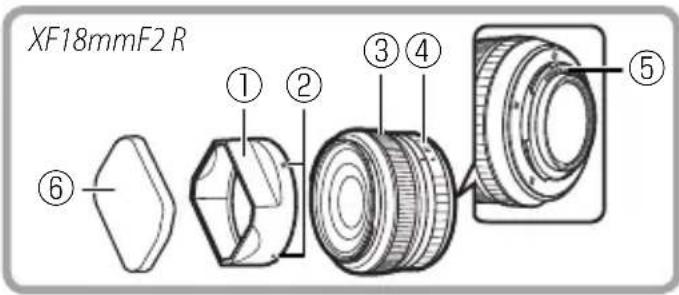
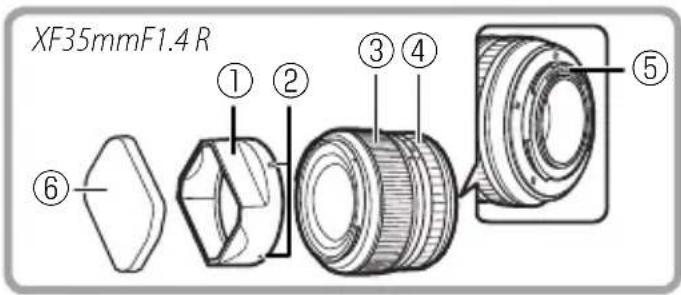
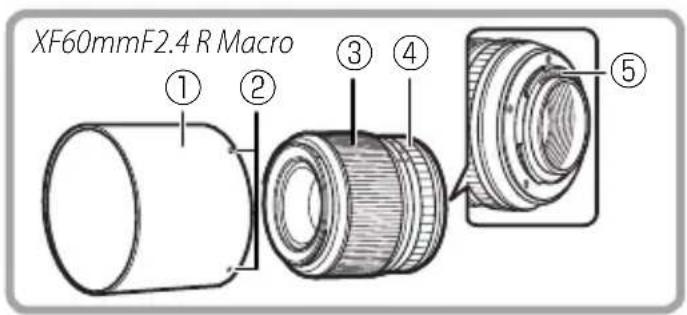
* BJIeHbI OObEeTINBOB IpeHa3HaueHbI IJRA NcNoJIb3OBaHnra TOnbKO C ObEeKTHBaMn TORO TUNa, C KOTOpbIM OHN NOCTaBIAIOCTc, IN MOrY Bbl3bIBaTb BInHbeTIPOBaHnne Iprn NcNoJIb3OBaHnC dpyrHMn OBeKTHBaMn.
YcTaHOBka 06bekTnBa
Cm.pykoBOCTBO NOIb3OBaTeJIa FOToKa-MepoI dIe IOnyuEHHOpMaUIN O6yCTaHOBKe n ChrTnOsbekTtBa.IMeIteB BNDy, YTO DaHHoe N3dJIne HecOBMeCTHMO C FOToKAMepamN c 6aNoHETOM X.
ChyTne KpbIweK
CHNMMTe KpbIshKn, KaK NOKa3aHo Ha puCyHKe.
yctahOBka6IeHdbI
Бленьды объektиBa yMeньшait 6лики n 3aшишait nepedHIOJINH3y.
PpHaraemble npHaJdxHoCTN
KpbIuKa o6BeKTnBa
Kpbiuka 6aHHeTa o6bekTnBa
-Бленьда оььектува
TkaHeBa ynaKOBKa
KpbuKa 6neHdbi (ToIbkoXF18mmF2RnXF35mmF1.4R)
RU-5
PYCCKN
YxOa n3dennem
- Пи IncnoIb3OBAHn 6IeHdbl obBeKtIbA He 6epntecb 3a foToKaMepy n He depxnte ee TOnbKO 3a 6IeHdy.
He donyckaTe 3aqr3HeHnCnHaJIbHbIX KOHTaKToB OBeKtNaBa.
-Пользупесь грушей дя удаленя nbлл и пуха с nobерхноcteй объektва. Дя удаленя патен nln OTпчатков пальцев наhecnte He6oьшоe колиuctво отahona nllсрдва дя чstkn obbektвов на мгkyю,ЧИСТУ XLOПЧАТОБУМAXКИУ TKAнь nll calфETKY dя чstkn объektвов n BbyITPNTe КруговыIM DBINЖЕнЯМN OT ueHTpa K Кразм, СLEДЯ 3a Tem, YTOБbl HE OCTaBnTB Ma3KOB N He DOTPOHYTbCSdo CTeKla naIbUamN. - HnKoIa He nCpOJIb3yIe IJy quCTKn OObekTINBa oPraHnueckne paCTBOpITeN, TaKne KaK pa36aBInTeNb IJRA KpaCKn IJN 6eH3IN.
- 3akpoiTe KpbiUKy o6beKtNbA i KpbiUKy 6aioHeTa o6beKtNbA, KOIa o6beKtNB He IcNoJIb3yEtca.
- Ecnn O6bekTnB He 6ydtncnObl30BaTcB TteueHne dInTeIbHoro BpeMeHn, xpaHnte ero B cyXOM, npoxlaHOM MeCTe, YTO6bl npeDnTbPaTtB o6pa3OBaHne pIceHn I Koppo3nn. He xpaHnte B meCTax, rDe Ha Hero nonaAet npramo cOnHeuHbI CBET, INN PAnOM C HafTaIIINHOBBIM NIN KaMΦOpHbIM M shapNKAMN OT MOJI.
-Дерхи te obteBv B uCTote. Koppo3n BHyTpeHHeRo MexaHn3Ma MoKeT HaHeCTn HeNoPpaBmOe NOBpeKdEHe. - Ecnn ObteKTHB OCTaBnTb B MeCTax, NOBepraUxxCRA BO3dEINCTBNU BBICOKNX Tempeatyp, TO 3TO MOKeT NOBPeDHTb IIN DeΦOpMnPoBaTb erO.
TexHHueckNeXapaKTepeNCTNUK
| ▲ ▲ ▲ | ◎ ◎ ◎ | ◎ ◎ ◎ | ◎ ◎ ◎ | ◎ ◎ ◎ | ◎ ◎ ◎ | ◎ ◎ ◎ | ◎ ◎ ◎ |
| ◎ ◎ ◎ | ◎ ◎ ◎ | ◎ ◎ ◎ | ◎ ◎ ◎ | ◎ ◎ ◎ | ◎ ◎ ◎ | ◎ ◎ ◎ | ◎ ◎ ◎ |
此,该声明的声明。
Rienz Hunde is the Lang to Regehoadn.