
FSG 85 D1 - Grinder AQUAPUR - Free user manual and instructions
Find the device manual for free FSG 85 D1 AQUAPUR in PDF.



| Product type | Chainsaw chain sharpener |
| Brand | AquaPur |
| Model | FSG 85 D1 |
| Rated voltage | 220-240 V ~ 50 Hz |
| No-load speed | 5000 min⁻¹ |
| Adjustable grinding angle | +35° to -35° |
| Compatible chain pitch | 1/4", 0.325", 3/8" (6.35 / 8.255 / 9.52 mm) |
| Grinding disc dimensions | Diameter 104 mm, bore 22 mm, thickness 3.2 mm |
| Weight | Approx. 2.3 kg |
| Protection class | II (double insulation) |
| Measured pause duration | Approx. 5 minutes |
| Maximum brief use | 15 consecutive minutes |
| Sound pressure level | LpA 78.5 dB(A), uncertainty K=3 dB |
| Delivery contents | Sharpener with mounted grinding disc, handle, chain tensioning device, adjusting screw + washer, 2 screws with nuts and washers, instruction manual |
| Main functions | Sharpening of saw chains, grinding angle adjustment, depth stop, LED lighting |
| Safety | Integrated eye protection, emergency stop, restart protection, grounding not required (double insulation) |
| Maintenance and cleaning | Clean after use with brush or cloth; do not use solvents; replace grinding disc if worn |
| Warranty | 3 years from date of purchase |
| After-sales service France | Tel. 0800 919270 (toll-free), email owim@lidl.fr |
Frequently Asked Questions - FSG 85 D1 AQUAPUR
User questions about FSG 85 D1 AQUAPUR
0 question about this device. Answer the ones you know or ask your own.
Ask a new question about this device
Download the instructions for your Grinder in PDF format for free! Find your manual FSG 85 D1 - AQUAPUR and take your electronic device back in hand. On this page are published all the documents necessary for the use of your device. FSG 85 D1 by AQUAPUR.
USER MANUAL FSG 85 D1 AQUAPUR
KETTENSCHÄRFGERÄT / CHAIN SHARPENER/ AFFUTEUSE DE CHÂINE DE TRONÇONNEUSE FSG 85 D1
DE AT CH
KETTENSCHÄRFGERÄT
Translation of the original instructions
NL BE
KETTINGSLIJPAPPPARAAT
GB/IE Translation of the original instructions Page 17
List of pictograms used
Introduction
Intended Use Page 18
Parts Description.. Page 19
Scope of Delivery.. Page 19
Technical Data Page 19
General safety instructions.. Page 20
Safe operation Page 20
Additional safety notes.. Page 21
Before use
Installation
Product setup.. Page 22
Assembling the product. Page 22
Attaching the adjusting screw . Page 22
Initial use
Switching on and off.. Page 23
Sharpening a saw chain.. Page 23
Maintenance and Cleaning
Cleaning. Page 25
Replacing the grinding disc.. Page 25
Storage
Disposal
Service
Warranty claim procedure.. Page 26
Service Page 26
Warranty
Translation of original conformity declaration.. Page 27
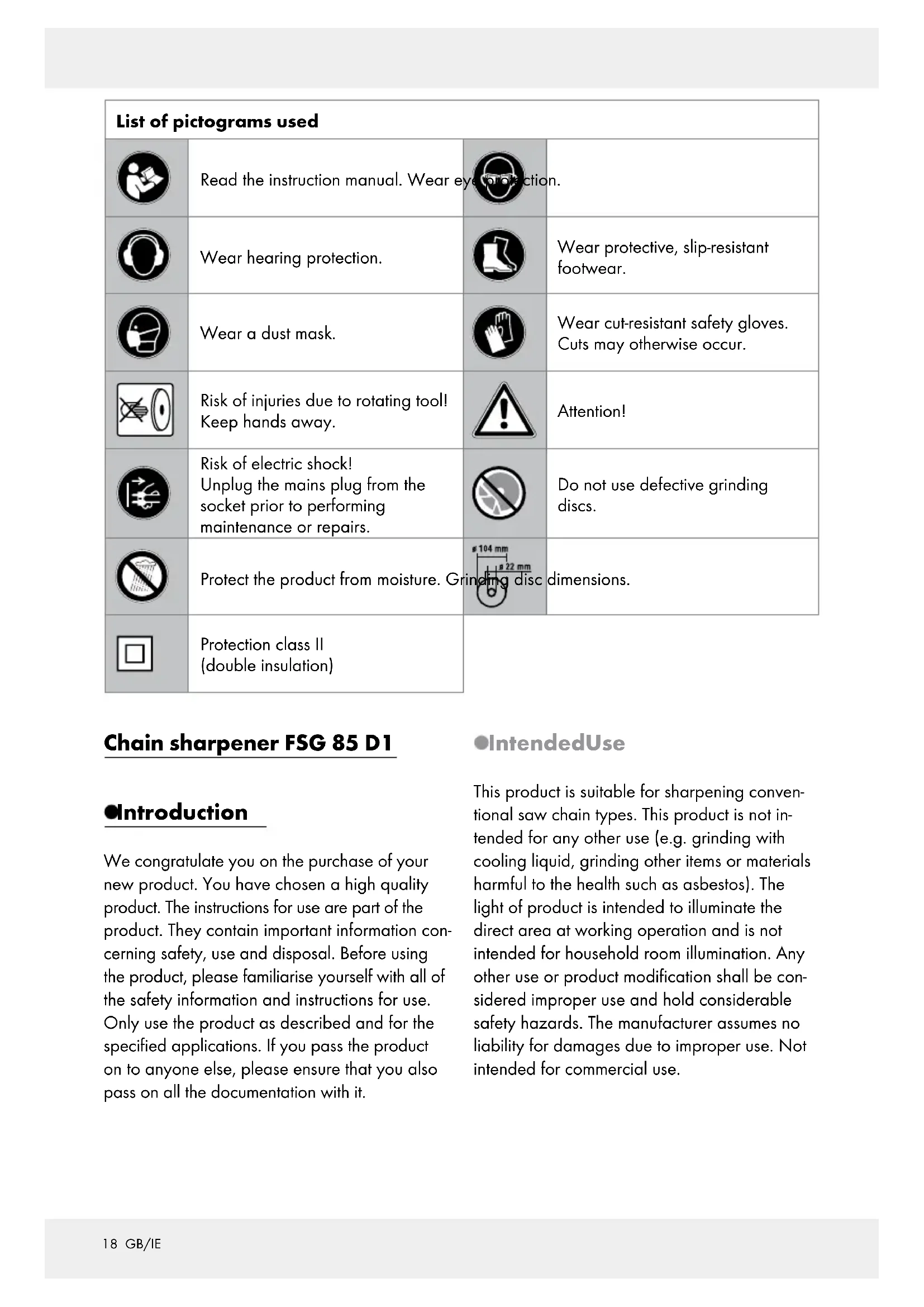
| List of pictograms used | |||
| Read the instruction manual. Wear eye protection. | |||
| Wear hearing protection. | Wear protective, slip-resistant footwear. | ||
| Wear a dust mask. | Wear cut-resistant safety gloves. Cuts may otherwise occur. | ||
| Risk of injuries due to rotating tool! Keep hands away. | Attention! | ||
| Risk of electric shock! Unplug the mains plug from the socket prior to performing maintenance or repairs. | Do not use defective grinding discs. | ||
| Protect the product from moisture. Grinding disc dimensions. | |||
| Protection class II (double insulation) | |||
Chain sharpener FSG 85 D1
Introduction
We congratulate you on the purchase of your new product. You have chosen a high quality product. The instructions for use are part of the product. They contain important information concerning safety, use and disposal. Before using the product, please familiarise yourself with all of the safety information and instructions for use. Only use the product as described and for the specified applications. If you pass the product on to anyone else, please ensure that you also pass on all the documentation with it.
- IntendedUse
This product is suitable for sharpening conventional saw chain types. This product is not intended for any other use (e.g. grinding with cooling liquid, grinding other items or materials harmful to the health such as asbestos). The light of product is intended to illuminate the direct area at working operation and is not intended for household room illumination. Any other use or product modification shall be considered improper use and hold considerable safety hazards. The manufacturer assumes no liability for damages due to improper use. Not intended for commercial use.
-PartsDescription
1 On/off switch
1a On switch
1b Off switch
Grinding head
Grinding disc cover
4 Handle
5 Grinding disc cover fastening screws
6 Depth limiter adjusting screw and adjusting nut
7 Chain guide
Grinding base
9 Stop notches
10 Chain tensioner locking screw
11 Grinding angle scale (+35^ to -35^)
12 Chain tensioner with rotary table
13 Chain clamping lever
14 Chain feed adjusting screw and adjusting nut
14a Chain feed adjusting screw
14b Chain feed adjusting nut
15 Stop
16 Cable holder
17 Mains lead
18aGrindingdisc
18b Grinding disc nut
19 LED lamp (not shown)
20 Visual cover
[21] Vents (not shown)
22 Work surface
23 Screw (for table mounting)
24d Washer (for table mounting)
24b Nut (for table mounting)
25 Washer (for adjusting screw)
26 Locknut (for adjusting screw)
27 Tooth (saw chain)
28 Depth limiter nose (saw chain)
- ScopeofDelivery
1 Chain sharpener with grinding disc installed
1 Handle
1 Chain tensioner with locking screw
1 Adjusting screw + washer
2 Screws with nuts and washer for table mounting
1 Instructions for use
-TechnicalData
Rated input
voltage:220-240
V~ (alter
nating current), 50 Hz
Power input: max. 85 W
(S2: 15 min)
Rated rest period: approx. 5 min
Protection class: II/

Rated idle speed n_0 :
5000 min-1
Setting angle:
35^ left/right
For saw chains with
link size:
6.35/8.255/
9.52 mm
( 14 )^ / 0.325^ / ( 13 )^
Grinding disc dimensions:
Outside diameter: 0 104 mm (4 1/16in)
Hole diameter: 022 mm
Thickness: 3.2 mm
Weight
(incl.accessories): approx. 2.3kg
Noise emission value:
The A-rated noise level of the power is typically:
Noise level L_PA 65.5 dB(A)
Uncertainty KpA: 3 dB
Sound power level LWA: 78.5 dB(A)
Uncertainty KWA: 3 dB
- Short-time operation: Do not operate the unit continuously for more than 15 minutes
** Maximum rotational speed of the grinding wheel 40~m / s . The grinding disc must withstand a minimum rotational speed of 27.8~m / s . If the max. rotational speed of the disc is too low for the tool, it could break!

General safety instructions
WARNING! When using electric tools basic safety precautions should always be followed to reduce the risk of fire, electric shock and personal injury including the following. Read all these instructions before attempting to operate this product and save these instructions
Safe operation
1. Keep work area clear
Cluttered areas and benches invite injuries.
2. Consider work area environment
Do not expose tools to rain.
Do not use tools in damp or wet locations.
- Keep work area well lit.
Do not use tools in the presence of flammable liquids or gases.
3. Guard against electric shock
- Avoid body contact with earthed or grounded surfaces (e.g. pipes, radiators, ranges, refrigerators).
4. Keep other persons away
Do not let persons, especially children, not involved in the work touch the tool or the extension cord and keep them away from the work area.
5. Store idle tools
- When not in use, tools should be stored in a dry locked-up place, out of reach of children.
6. Do not force the tool
It will do the job better and safer at the rate for which it was intended.
7. Use the right tool
Do not force small tools to do the job of a heavy duty tool.
Do not use tools for purposes not intended; for example do not use circular saws to cut tree limbs or logs.
8. Dress properly
Do not wear loose clothing or jewellery, they can be caught in moving parts.
Non-skid footwear is recommended when working outdoors.
Wear protective hair covering to contain long hair.
WARNING! Always wear eye and ear protection when disconnecting.
Wear other personal protective equipment such as gloves.
9. Use protective equipment
Use safety glasses.
Use face or dust mask if working operations create dust.
10. Connect dust extraction equipment
If the tool is provided for the connection of dust extraction and collecting equipment, ensure these are connected and properly used.
11. Do not abuse the cord
- Never yank the cord to disconnect it from the socket. Keep the cord away from heat, oil and sharp edges.
12. Secure work
Where possible use clamps or a vice to hold the work. It is safer than using your hand.
13. Do not overreach
- Keep proper footing and balance at all times.
14. Maintain tools with care
- Keep cutting tools sharp and clean for better and safer performance.
Follow instruction for lubricating and changing accessories.
Inspect tool cords periodically and if damaged have them repaired by an authorized service facility.
Inspect extension cords periodically and replace if damaged. - Keep handles dry, clean and free from oil and grease.
15.Disconnect tools
- When not in use, before servicing and when changing accessories such as blades, bits and cutters, disconnect tools from the power supply.
16. Remove adjusting keys and wrenches
Form the habit of checking to see that keys and adjusting wrenches are removed from the tool before turning it on.
17. Avoid unintentional starting
Ensure switch is in "off" position when plugging in.
18. Use outdoor extension leads
When the tool is used outdoors, use only extension cords intended for outdoor use and so marked.
19. Stay alert
Watch what you are doing, use common sense and do not operate the tool when you are tired.
20. Check damaged parts
Before further use of tool, it should be carefully checked to determine that it will operate properly and perform its intended function.
Check for alignment of moving parts, binding of moving parts, breakage of parts, mounting and any other conditions that may affect its operation.
A guard or other part that is damaged should be properly repaired or replaced by an authorized service centre unless otherwise indicated in this instruction manual.
Have defective switches replaced by an authorized service centre.
Do not use the tool if the switch does not turn it on and off.
21. Warning
The use of any accessory or attachment other than one recommended in this instruction manual may present a risk of personal injury.
22. Have your tool repaired by a qualified person
This electric tool complies with the relevant safety rules. Repairs should only be carried out by qualified persons using original spare parts, otherwise this may result in considerable danger to the user.
The following residual risks remain in spite of the measures to integrate safety in the design, safety precautions and the complementary protective measures: The grinding disc will continue running after switching off the tool. Risk of injury.
Additional safety notes
Only plug the product into a socket with a residual-current-operated protective device (FI switch) with a maximum rated leakage current of 30mA .
- Keep the mains and extension cable away from the grinding disc and the saw chain. Immediately unplug from the socket if damaged or cut. Do not touch the lead until disconnected from the mains. Risk of electric shock!
Visually inspect the grinding disc prior to use.
- Do not use grinding discs with chips, tears or any other damage. Replace the grinding disc if worn.
Never operate the product without visual cover.
Do not use the product when fatigued or under the influence of alcohol or medications. Always take a break in due time.
Do not use the product in explosive atmospheres or where sparks, fire, explosion, etc. may occur. Failure to observe these instructions poses a risk of fire or explosion.
- Be sure to keep the vents clear when working in dusty environments.
- Keep your hands away from the grinding disc and cutting teeth during use. Do not move the saw chain by hand. Risk of injury.
- Never place your fingers between the grinding disc and rotary table or between the grinding disc and the visual cover. Crushing hazard.
The saw chain will become hot during use. Never touch the processed area - risk of burns.
Only use grinding discs recommended by the manufacturer. Do not use saw blades.
Switch off the product and unplug from the mains
- to remove a jammed insertion tool,
- if the mains cable is damaged or entangled,
- if you notice unusual noise.
Before use
Note: Remove all packaging material from the product.
The operator should stand in front and stay close to the power tool to prevent overreach.
- Installation
Note: Always use the included screws (M10 x 60) to secure the product.
Ensure you will have adequate space to work in and will not put others at risk.
Always secure the product to the worktop with screws of an adequate length and thickness to always maintain control over the product.
- Product setup (see Fig. B)
- Required thickness of the edge of the table: 15 - 30mm
- Drill diameter: 10.5mm
-
Size of screw: M10
Use the stop notches to position the product on the worktop. The grinding base must extend beyond the edge of the table.
Mark the bores with a pencil and remove the product.
Now drill two holes in the worktop 22.
Fasten the grinding base to the worktop using the included screws [23], washers [24a] and nuts [24b]. -
Assembling the product (see Fig. C)
Screw the handle 4 to the grinding head 2.
Loosen the locking screw 10 on the chain tensioner 12.
- Attach the chain tensioner 12 to the grinding base 8 and tighten with the locking screw 10.
If applicable, attach the mains cable inside the cable holder 16.
- Attaching the adjusting screw (see Fig. C)
Place the included washer 25 over the adjusting screw 6
Screw the adjusting screw 6 to the locknut 26 fixed inside the grinding head.
- Initial use
CAUTION! RISK OF INJURY!
Only use grinding discs and accessories recommended by the manufacturer. Using tools or accessories other than those recommended in the instructions for use could result in injury.
Never operate the product without visual cover.
Do not use saw blades.
Always unplug from the mains before working on the product.
Inspect the grinding disc prior to use: Check the clearance between the visual cover and grinding disc.
- Do not use damaged or deformed grinding discs.
Do not switch on the product until it has been firmly secured to the worktop.
A SITION! RISK OF INJURY!
Wear eye and hearing protection.


ear cut-resistant safety gloves and, if necessary, an apron when working on the saw chain
to prevent cuts.
Keep your hands away from the

grinding disc and cutting teeth during use. Do not move the saw
chain by hand. Risk of injury.
- Switching on and off
Note: Verify the voltage specified on the nameplate corresponds with the voltage of the power source.
Note: Perform a test run of at least 30 seconds without load before using this product for the first time and after changing the grinding disc. Switch off the product immediately if the grinding disc is out of round, considerable vibration occurs or you notice abnormal noise.


Plug the mains cable into a
socket (note the mains voltage).
Press the "l" on switch (green) 1a to switch the product on.
Press the 0'' off switch (red) to switch the product off.
The grinding disc will continue running after switching off the tool. Risk of injury.
Note: This product is equipped with an LED lamp. The LED lamp 19 is switched on automatically when the on switch 1a is being pressed. The LED lamp is switched off automatically when the off switch 1b is being pressed.
Note: This product has start-up protection: The product will not automatically restart after automatically being switched off by voltage interruption or overload protection. To switch the product on again, press the "l" on switch (green) 1a and the product will start.
Sharpening a saw chain (see Fig. D)
Note: Be sure to keep the vents clear when working in dusty environments (see „Maintenance and Cleaning").

jammed, switch off the product and unplug from the mains. Then clear the jam.
An incorrectly sharpened saw chain may damage the product and increase the risk of saw kickback!
- Be sure to accurately adjust the saw chain. Observe the correct sharpening angle and minimum chain size. Remove as little material as possible.
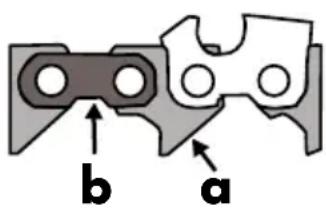
Do not sharpen drive links (a) or tie straps (b) or the saw chain may break. Failure to do so poses a risk of accidents when using the chain saw.
Note: Clean the saw chain before sharpening. Clean any greasy wood residue or oil residue with a brush or rag.
Note: All cutting links must be the same length and width after sharpening.
Note: The saw chain is worn and must be replaced if the cutter tooth is only approx. 4 mm.
Inserting the saw chain:
Turn the clamping lever 13 counter-clockwise to open the chain guide. You will need to return the clamping lever to the original position several times to do so. To unlock the clamping lever, pull the clamping lever outward, then return to the original position and allow to lock into position.
Insert the saw chain in the chain guide 7. The cutting edges must face the grinding disc 18a.
- Flip down the stop 15 and pull the saw chain toward the back until the cutting tooth 27 to be sharpened makes contact with the stop (see Fig. D1).
Adjusting the grinding angle:
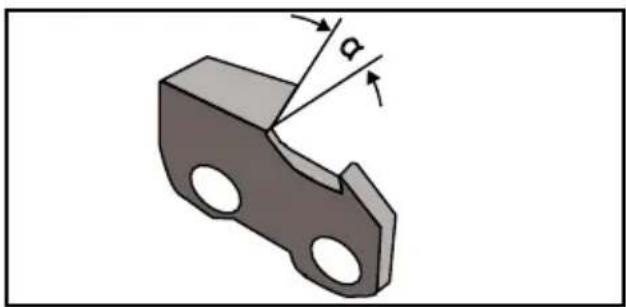
Loosen the locking screw 10 and set the necessary grinding angle a on the rotary table for the chain tensioner 12 using the scale 11. Then tighten the locking screw 10.
Note: Use the grinding angle specified by the manufacturer.
Adjusting the stop:
Move the grinding head 2 down on the handle 4 with the motor switched off.
Use the chain feed adjusting screw 14 to move the cutting tooth 27 toward the grinding disc 18a until the cutting tooth makes contact with the grinding disc (see Fig. D2). Secure the adjusting screw 14 with the adjusting nut 14b.
- Secure the links in the chain guide 7 by turning the clamping lever 13 clockwise.
Use the adjusting screw to set the depth limiter so the grinding disc 18a makes contact with the gullet (see Fig. D2). Fix the grinding depth with the adjusting nut 6
Sharpening:
Switch on the product (see chapter „Switching on and off").
Sharpen the cutting tooth 27 by moving the grinding head 2 down, applying light pressure to the handle 4. Never brake the grinding disc 18a to a
stop. To prevent this, reduce the pressure being applied in due time.
- Switch the product off to move the saw chain along. Loosen the clamping lever 13 and use the set stop 15 and the clamping lever to secure the next link to be sharpened in the chain guide 7.
Note:First sharpen the teeth on one side of the chain. Then adjust the sharpening angle and sharpen the teeth on the other side.
Checking the depth limiter distance (see Fig. D3):
The cutting parts of the saw chain are the cutting links, consisting of a cutting tooth 27 and a depth limiter nose 28. The height distance between these two determines the depth limiter distance A.
Check the depth limiter distance A according to saw chain manufacturer specifications after every third sharpening.
Rasp the height of the depth limiter nose 28 with a flat file and slightly round after removing the depth limiter nose. The original shape must be maintained.
- Maintenance and Cleaning
Always unplug from the mains before any adjustment, service or repairs.
Have any work not described in these instructions for use performed by a specialist workshop. Always use original parts. Allow the product to cool down before performing any maintenance or cleaning. Risk of burns.
Check the product for any damage such as loose, worn or damaged parts, correctly fastened screws or other parts, before every use. Particularly inspect the grinding disc 18a. Replace any damaged parts.
- Cleaning
- Do not use cleaners or solvents. Chemicals may damage plastic parts on this product. Never clean the product under running water.
Clean the product after every use.
Clean the vents 21 and the surface of the product with a soft brush or a cloth.
Clean the chain guide 7 with a brush.
If very dirty, loosen the chain tensioner locking screw 10 and remove the chain tensioner with rotary table 12 for better access. We recommend removing the side panels for cleaning.
- Replacing the grinding disc (see Fig. E)
Information about replacing the grinding disc:

Never operate the product without the visual cover 20.
Verify the speed specified on the grinding disc 18a is equal to or greater than the rated idle speed of the product. Verify the dimensions of the grinding disc fit the product. If the max. rotational speed of the disc is too low for the product, it could break!
Always use grinding discs in good condition (ringing test).
Do not widen the uptake bore in the grinding disc if it is too small.
Do not use separate reducing bushings or adapters to fit grinding discs if the bore is too large.
Do not use saw blades.
Always completely reassemble the product after replacing the grinding disc.
ch off the product and unplug from the mains. Allow the product to cool down.
Loosen the 3 fastening screws 5 and remove the grinding disc cover 3.
Unscrew the grinding disc nuts 18b by hand.
Remove the grinding disc 18a from the holder.
Place the new grinding disc on the uptake and tighten the grinding disc nuts by hand.
Reinstall the grinding disc cover 3.
Note: Do not over-tighten the grinding disc nuts to prevent the grinding disc and nut from breaking
Perform a test run of at least 30 seconds without load before using this product for the first time and after changing the grinding disc. Switch off the product immediately if the grinding disc is out of round, considerable vibration occurs or you notice abnormal noise.
Storage
Store the product in a dry location protected from dust, out of the reach of children.
Note: Grinding discs must be stored dry and upright, never stack.
Disposal

The packaging is made entirely of recyclable materials, which you may dispose of at local recycling facilities. The Green Dot is not valid for Germany.

Observe the marking of the packaging materials for waste separation, which are marked with abbreviations (a) and numbers (b) with following meaning: 1-7: plastics / 20-22: paper and fibreboard/80-98: composite materials.

The product and packaging materials are recyclable, dispose of it separately for better waste treatment. The Triman logo is valid in France only.

Contact your local refuse disposal authority for more details of how to dispose of your worn-out product.
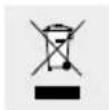
To help protect the environment, please dispose of the product properly when it has reached the end of its useful life and not in the household waste. Information on collection points and their opening hours can be obtained from your local authority.
Service
WARNING!
Have your product repaired at the service centre or an electrician, using only original manufacturer parts. This will maintain the safety of this product.
Always have a plug or power cord replaced by the product manufacturer or its service centre. This will maintain the safety of this product.
Warranty claim procedure
To ensure quick processing of your case, please observe the following instructions:
Please have the till receipt and the item number (e.g. IAN 123456) available as proof of purchase.
You will find the item number on the type plate, an engraving on the front page of the instructions (bottom left), or as a sticker on the rear or bottom of the appliance.
If functional or other defects occur, please contact the service department listed either by telephone or by e-mail.
You can return a defective product to us free of charge to the service address that will be provided to you. Ensure that you enclose the proof of purchase (till receipt) and information about what the defect is and when it occurred.
Service
GB Service Great Britain
Tel.: 0871 5000 720
(0.07 £/min - 0.68 £/min + 0.13 £/call (set up fee) (fees depend on operator))
E-Mail: owim@lidl.co.uk
IE Service Ireland
Tel.: 1890 930 034
(0.052 €/min + 0.20 €/min (set up fee), mobile 0.15 €/min - 0.30 €/min (fee depends on operator))
E-Mail: owim@lidl.ie
IAN 285177
Warranty
The product has been manufactured to strict quality guidelines and meticulously examined before delivery. In the event of product defects you have legal rights against the retailer of this product. Your legal rights are not limited in any way by our warranty detailed below.
The warranty for this product is 3 years from the date of purchase. Should this product show any fault in materials or manufacture within 3 years from the date of purchase, we will repair or replace it - at our choice - free of charge to you.
The warranty period begins on the date of purchase. Please keep the original sales receipt in a safe location. This document is required as your proof of purchase. This warranty becomes void if the product has been damaged, or used or maintained improperly.
The warranty applies to defects in material or manufacture. This warranty does not cover product parts subject to normal wear, thus possibly considered consumables (e.g. batteries) or for damage to fragile parts, e.g. switches, rechargeable batteries or glass parts.
Translation of original conformity declaration
We, OWIM GmbH & Co. KG, Stiftsbergstraße 1, DE-74167 Neckarsulm, GERMANY, hereby declare under our sole responsibility that the product: Chain sharpener FSG 85 D1, Model No.: HG02366, Version: 04 / 2017, to which this declaration refers, complies with the standards/normative documents of 2006/42/EC, 2014/30/EU, 2011/65/EU.
Applied harmonised standards:
EN 61029-1/A11:2010
EN ISO 12100:2010
EN 55014-1/A2:2011
EN 55014-2: 2015
EN 61000-3-2:2014
EN 61000-3-3:2013
Serial number: IAN 285177

Tobias Konig
Division Manager/ Responsible for documentation
The declaration of conformity can also be viewed at: www.owim.com.

The object of the declaration described above satisfies the provisions of Directive 2011/65/EU of the European Parliament and the Council of 8 June 2011 on limiting the use of certain
harmful substances in electrical and electronic appliances.
Puisance absorbee: max. 85 W
(S2: 15 min)*