USER MANUAL AquaTouch S7320 PHILIPS
Always here to help you
Register your product and get support at www.philips.com/welcome
S7000 series

natural_image
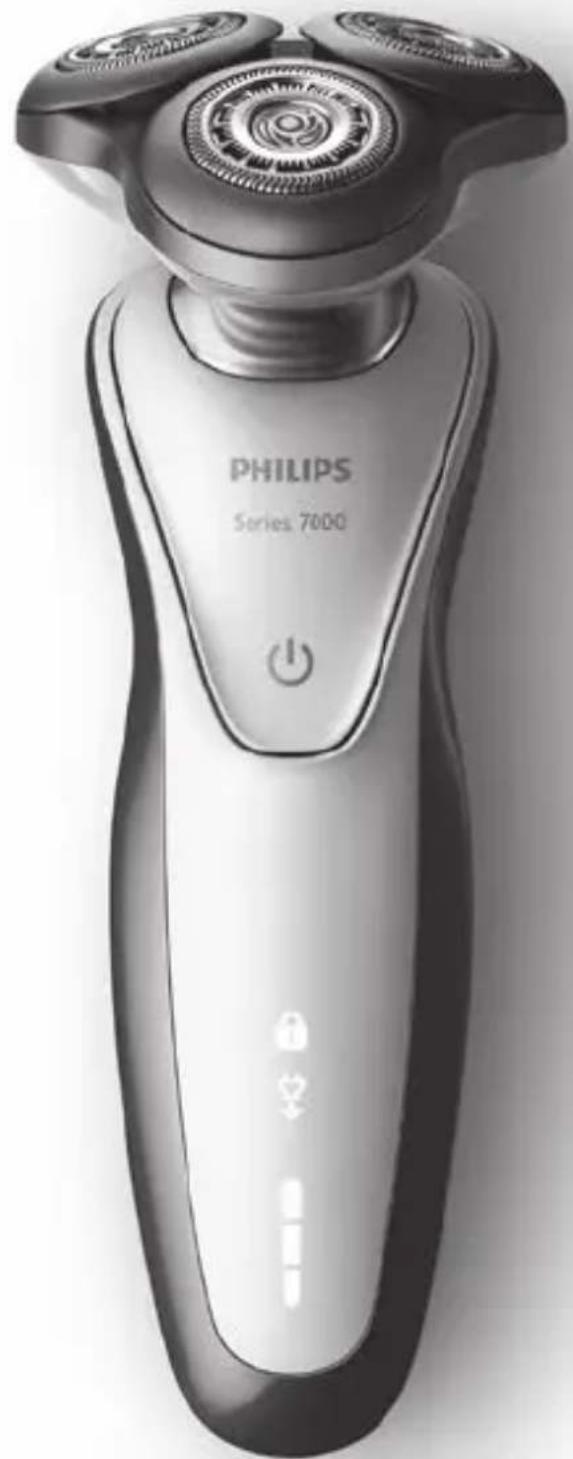
Black-and-white photo of a Philips Series 7000 electric shaver with three rotary buttons and power button (no text or symbols on the device body)
PHILIPS
ENGLISH 4
DANSK 36
DEUTSCH 67
ΕΛΛΗΝΙΚΑ 101
ESPAÑOL 139
SUOMI 173
FRANÇAIS 205
ITALIANO 238
NEDERLANDS 272
NORSK 306
PORTUGUÊS 338
SVENSKA 372
TÜRKÇE 404
Introduction
Congratulations on your purchase and welcome to Philips! To fully benefit from the support that Philips offers, register your product at
www.philips.com/welcome.
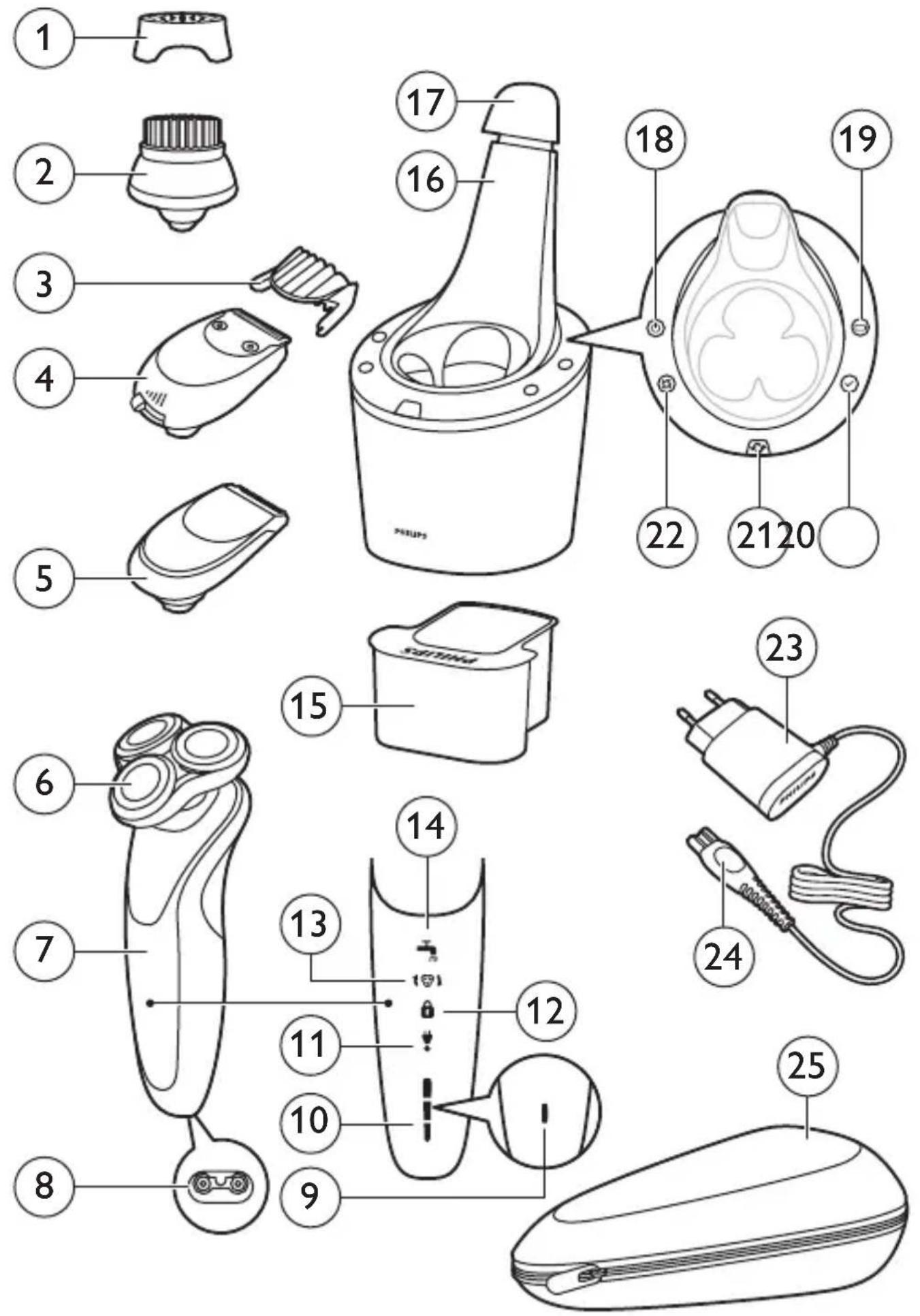
General description (Fig. 1)
1 Protection cap for cleansing brush attachment (specific types only)
2 Click-on cleansing brush attachment (specific types only)
3 Comb for beard styler attachment (specific types only)
4 Click-on beard styler attachment (specific types only)
5 Click-on trimmer attachment (specific types only)
6 Click-on shaving unit
7 Handle
8 Socket for small plug
9 Battery charge indicator 1 light
10 Battery charge indicator 3 lights
11 'Unplug for use' symbol
12 Travel lock symbol
13 Replacement reminder
14 Cleaning reminder
15 Cleaning cartridge for SmartClean system
16 SmartClean system (specific types only)
17 Cap of SmartClean system
18 On/off button
19 Battery symbol
20 Ready symbol
21 Replacement symbol
22 Cleaning symbol
23 Adapter
24 Small plug
25 Pouch
Note: The accessories supplied may vary for different products. The box shows the accessories that have been supplied with your appliance.
Read this important information carefully before you use the appliance and its accessories and save it for future reference. The accessories supplied may vary for different products.
Danger
- Keep the adapter dry.
Warning
- The adapter contains a transformer. Do not cut off the adapter to replace it with another plug, as this causes a hazardous situation.
- This appliance can be used by children aged from 8 years and above and persons with reduced physical, sensory or mental capabilities or lack of experience and knowledge if they have been given supervision or instruction concerning use of the appliance in a safe way and understand the hazards involved. Children shall not play with the appliance. Cleaning and user maintenance shall not be made by children without supervision.
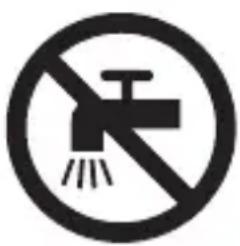
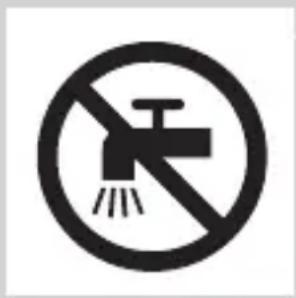
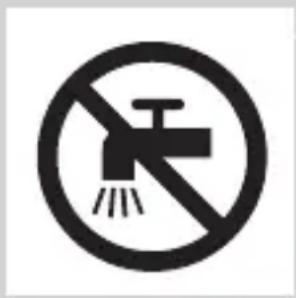
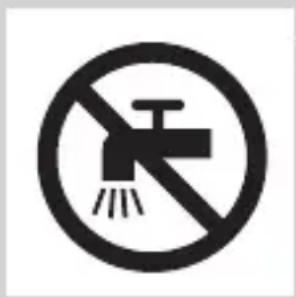
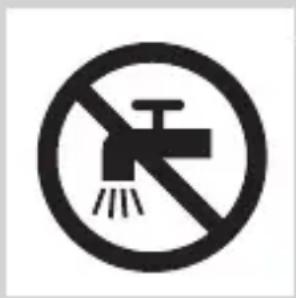
- Always unplug the shaver before you clean it under the tap.
- Always check the appliance before you use it. Do not use the appliance if it is damaged, as this may cause injury. Always replace a damaged part with one of the original type.
natural_image
No smoking sign with faucet symbol (no text)
natural_image
Prohibition sign of a faucet with no text or symbols
Caution
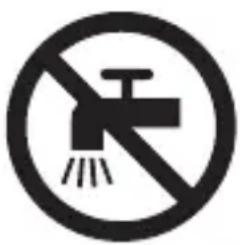
- Never immerse the cleaning system or the charging stand in water and do not rinse it under the tap.
- Never use water hotter than 80^ C to rinse the shaver.
- Only use this appliance for its intended purpose as shown in the user manual.
- For hygienic reasons, the appliance should only be used by one person.
- Never use compressed air, scouring pads, abrasive cleaning agents or aggressive liquids such as petrol or acetone to clean the appliance.
- If your shaver comes with a cleaning system, always use the original Philips cleaning fluid (cartridge or bottle, depending on the type of cleaning system).
- Always place the cleaning system on a stable, level and horizontal surface to prevent leakage.
- If your cleaning system uses a cleaning cartridge, always make sure that the cartridge compartment is closed before you use the cleaning system to clean or charge the shaver.
- When the cleaning system is ready for use, do not move it to prevent leakage of cleaning fluid.
- Do not use the adapter in or near wall sockets that contain or have contained an electric air freshener to prevent irreparable damage to the adapter.
- Water may drip from the socket at the bottom of the shaver when you rinse it. This is normal and not dangerous because all electronics are enclosed in a sealed power unit inside the shaver.
natural_image
Simple line drawing of a showerhead spraying over a water-filled container (no text or symbols)
Electromagnetic fields (EMF)
- This Philips appliance complies with all applicable standards and regulations regarding exposure to electromagnetic fields.
General
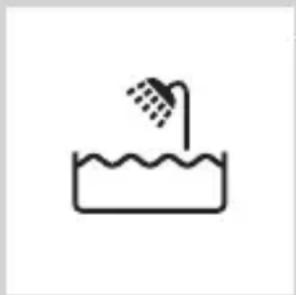
- This shaver is waterproof. It is suitable for use in the bath or shower and for cleaning under the tap. For safety reasons, the shaver can therefore only be used without cord.
- The appliance is suitable for mains voltages ranging from 100 to 240 volts.
- The adapter transforms 100-240 volts to a safe low voltage of less than 24 volts.
- Maximum noise level: Lc = 69dB(A)
The display
Charging
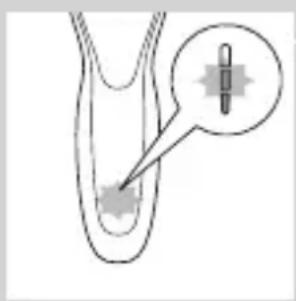
Battery charge indicator with 3 lights
- Charging takes approx. 1 hour.
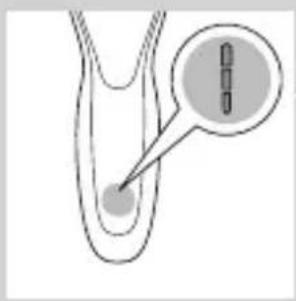
- Quick charge: When the appliance is connected to the mains, the lights of the battery charge indicator light up one after the other continuously. When the appliance contains enough energy for one shave, the bottom light of the battery charge indicator starts flashing slowly.
- If you leave the appliance connected to the mains, the charging process continues. To indicate that the appliance is charging, first the bottom light flashes and then lights up continuously. Then the second light flashes and then lights up continuously, and so on until the appliance is fully charged.
natural_image
Diagram of a medical or laboratory procedure showing a pointed tool interacting with a star-shaped object (no text or symbols present)
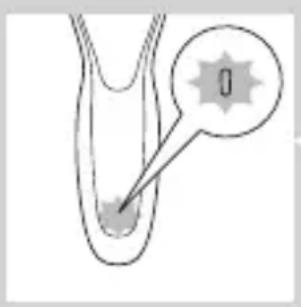
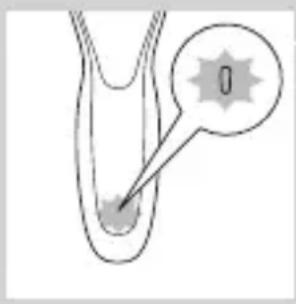
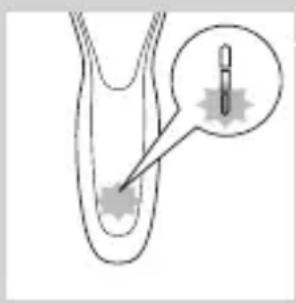
Battery charge indicator with 1 light
- Charging takes approx. 1 hour.
- Quick charge: When the appliance does not contain enough energy for one shave, the battery charge indicator flashes fast. When the battery charge indicator starts to flash slowly, the appliance contains enough energy for one shave.
- If you leave the appliance connected to the mains, the charging process continues. To indicate that the appliance is charging, the battery charge indicator flashes slowly.
Battery fully charged
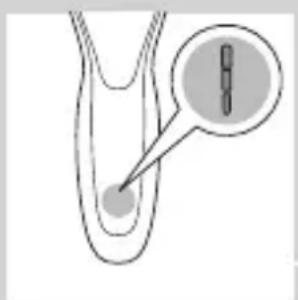
natural_image
Diagram of a biological structure with a highlighted region and arrow, no text or symbols present
Note: This appliance can only be used without a cord.
Note: When the battery is full, the display switches off automatically after 30 minutes. If you press the on/off button during charging, the ‘unplug for use’ symbol flashes white to remind you that you have to disconnect the appliance from the mains.
When the battery is fully charged, all lights of the battery charge indicator light up continuously.
- Battery charge indicator with 3 lights
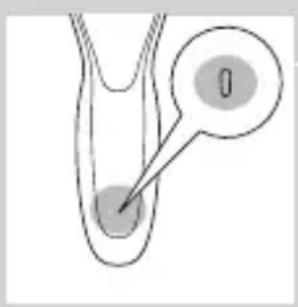
- Battery charge indicator with 1 light
Battery low
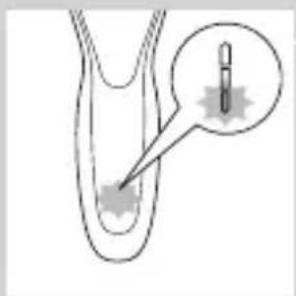
natural_image
Diagram of a biological or medical procedure showing a pointed tool interacting with a star-shaped object, with an inset magnified view (no text or symbols)
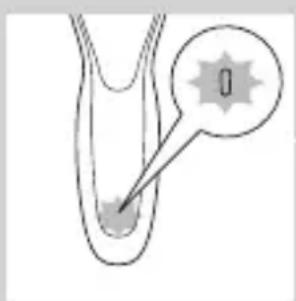
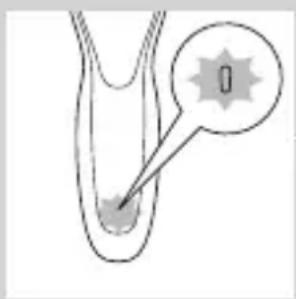
When the battery is almost empty, the bottom light flashes orange.
- Battery charge indicator with 3 lights
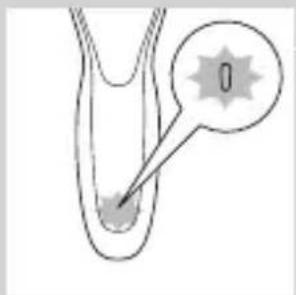
- Battery charge indicator with 1 light
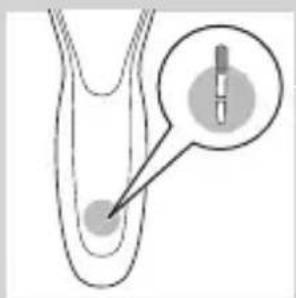
Remaining battery capacity
natural_image
Diagram of a biological structure with a magnified inset showing internal components (no text or labels)
Battery charge indicator with 3 lights
- The remaining battery capacity is indicated by the lights of the battery charge indicator that light up continuously.
'Unplug for use' reminder
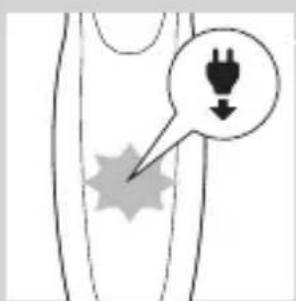
- The appliance is equipped with an ‘unplug for use’ reminder. The ‘unplug for use’ starts to flash to remind you that you have to disconnect the appliance from the adapter before you can switch it on.
Cleaning reminder
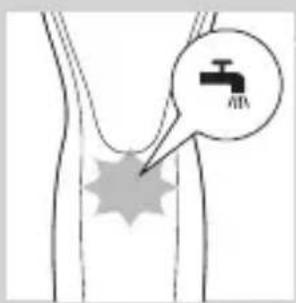
For optimal shaving performance, we advise you to clean the shaver after every use.
- When you switch off the shaver, the cleaning reminder flashes to remind you to clean the shaver.
Travel lock
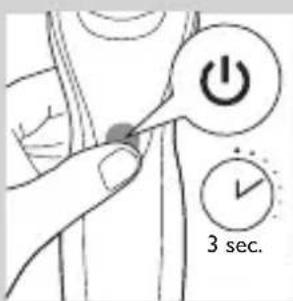
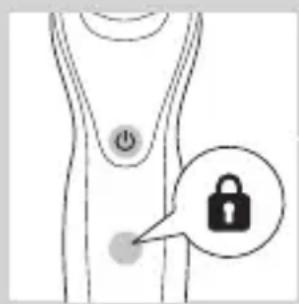
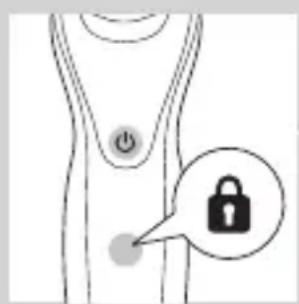
You can lock the shaver when you are going to travel. The travel lock prevents the shaver from being switched on by accident.
Activating the travel lock
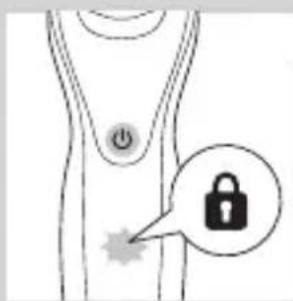
1 Press the on/off button for 3 seconds to enter the travel lock mode.
- While you activate the travel lock, the travel lock symbol lights up continuously. When the travel lock is activated, the travel lock symbol flashes.
Deactivating the travel lock
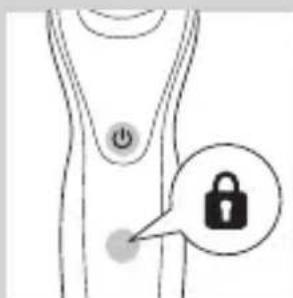
1 Press the on/off button for 3 seconds.
- The travel lock symbol flashes and then lights up continuously.
The shaver is now ready for use again.
Replacing shaving heads
natural_image
Diagram of a human body with a speech bubble containing three circular icons (no text or symbols)
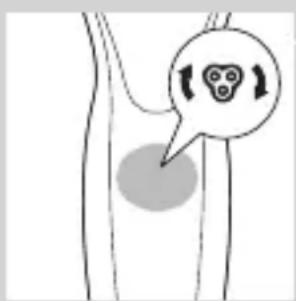
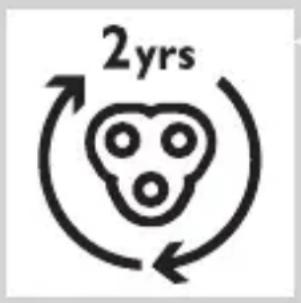
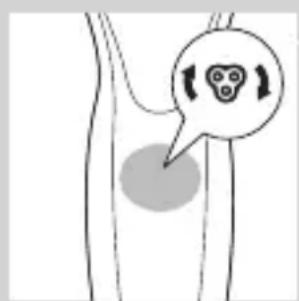
For maximum shaving performance, we advise you to replace the shaving heads every two years.
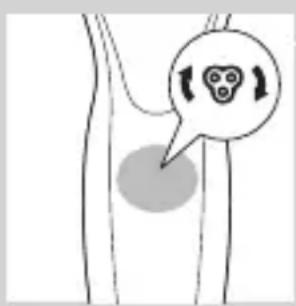
- The appliance is equipped with a replacement reminder which reminds you to replace the shaving heads. The replacement reminder lights up continuously.
Note: After replacing the shaving heads, you need to reset the replacement reminder by pressing the on/off button for 7 seconds.
Charging
Charging takes approx. 1 hour.
Note: This appliance can only be used without cord. Charge the shaver before you use it for the first time and when the display indicates that the battery is almost empty.
Charging with the adapter
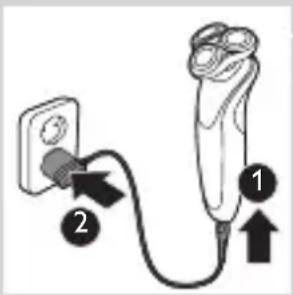
1 Insert the small plug into the appliance and put the adapter in the wall socket.
Charging in the SmartClean system (specific types only)
1 Put the small plug in the SmartClean system.
2 Put the adapter in the wall socket.
ENGLISH12
natural_image
Illustration of a hand pouring liquid into a container with an inset showing a cross-section of a container (no text or symbols)
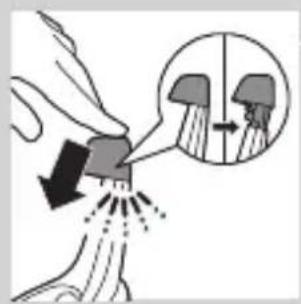
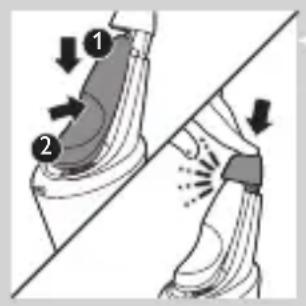
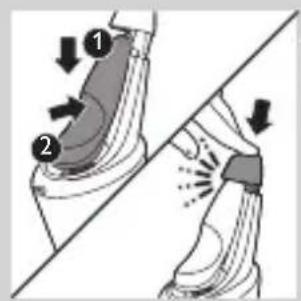
3 Press down the top cap to be able to place the shaver in the holder ('click').

natural_image
Close-up of a mechanical component with a downward arrow indicating force or direction (no text or symbols)
4 Hold the shaver upside down above the holder. Make sure the front of the shaver points towards the SmartClean system.
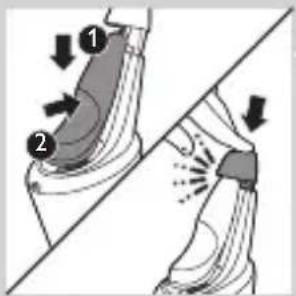
5 Place the shaver in the holder, tilt the shaver backwards and press down the top cap to connect the shaver ('click').
- The battery symbol flashes slowly to indicate the shaver is charging.
Using the shaver
Switching the appliance on and off
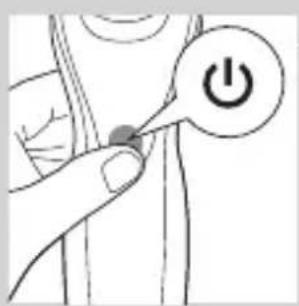
1 To switch on the appliance, press the on/off button once.
2 To switch off the appliance, press the on/off button once.
- Battery charge indicator with 3 lights: The display lights up for a few seconds to show the remaining battery status.
Shaving
Skin adaptation period
Your first shaves may not bring you the result you expect and your skin may even become slightly irritated. This is normal. Your skin and beard need time to adapt to any new shaving system.
We advise you to shave regularly (at least 3 times a week) with this shaver for a period of 3 weeks to allow your skin to adapt to the new shaver.
Note: This appliance can only be used without cord.
natural_image
Illustration of a person applying facial hair to their ear with a cotton swab (no text or symbols)
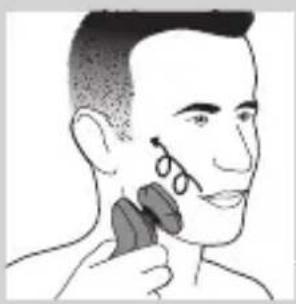
1 Switch on the appliance.
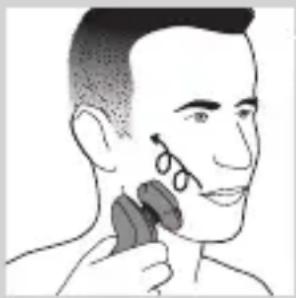
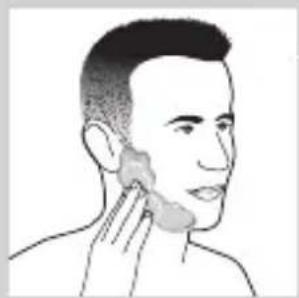
2 Move the shaving heads over your skin in circular movements.
Note: Do not make straight movements.
3 Clean the shaver after use (see chapter 'Cleaning and maintenance').
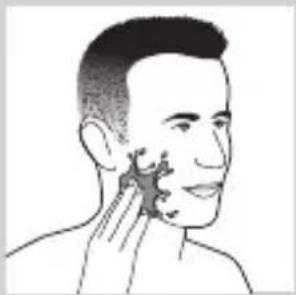
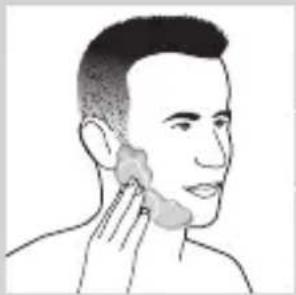
Wet shaving
You can also use this shaver in the shower or on a wet face with shaving foam or shaving gel.
To shave with shaving foam or shaving gel, follow the steps below:
natural_image
Line drawing of a person's face with hand near ear area (no text or symbols)
1 Apply some water to your skin.
2 Apply shaving foam or shaving gel to your skin.
natural_image
Illustration of a person applying a cotton or cotton product to their ear (no text or symbols)
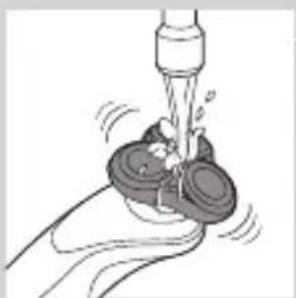
3 Rinse the shaving unit under the tap to ensure that the shaving unit glides smoothly over your skin.
natural_image
Illustration of a hand using a tool to lift a cup (no text or symbols)
4 Switch on the appliance.
natural_image
Illustration of a person applying makeup to their face with a circular tool (no text or symbols)
5 Move the shaving heads over your skin in circular movements.
Note: Rinse the shaver under the tap regularly to ensure that it continues to glide smoothly over your skin.
6 Dry your face and thoroughly clean the shaver after use (see chapter ‘Cleaning and maintenance’).
Note: Make sure you rinse all foam or shaving gel off the shaver.
Using the click-on attachments
Note: The accessories supplied may vary for different products. The box shows the accessories that have been supplied with your appliance.
Removing or attaching the click-on attachments
natural_image
Diagram showing a device with a bulb and a cross symbol, no text or labels present
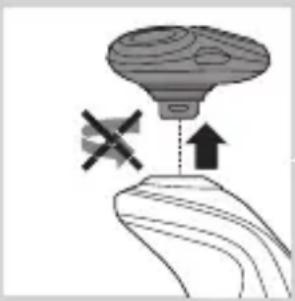
1 Make sure that the appliance is switched off.
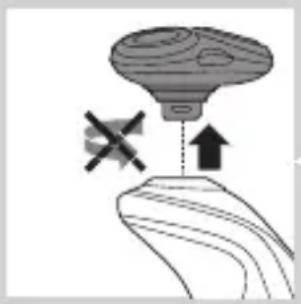
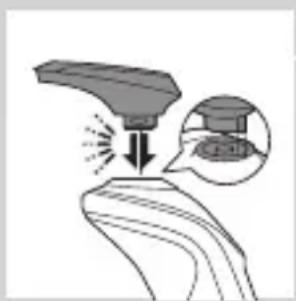
2 Pull the attachment straight off the appliance.
Note: Do not twist the attachment while you pull it off the appliance.
natural_image
Illustration of a funnel pouring liquid into a curved pipe, with an inset showing a magnified view of the pipe (no text or symbols)
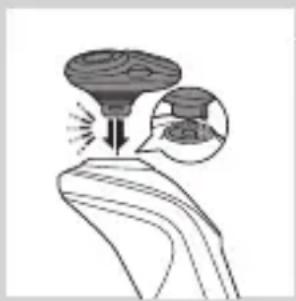
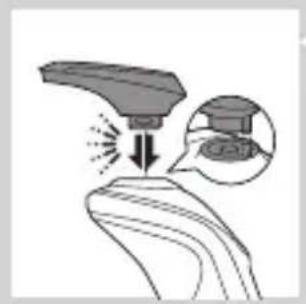
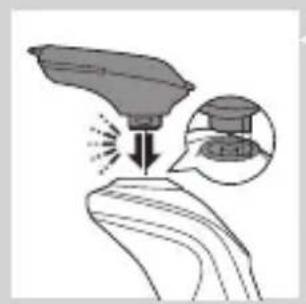
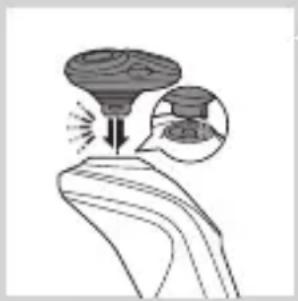
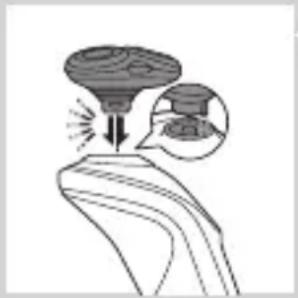
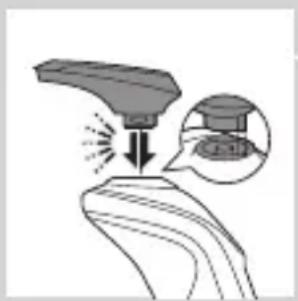
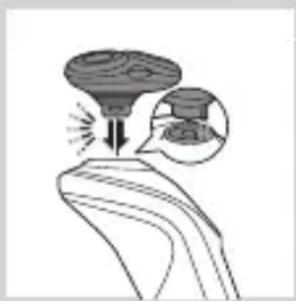
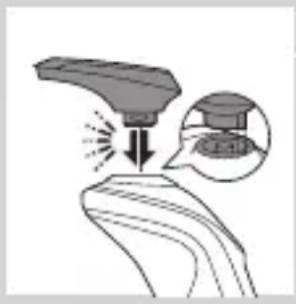
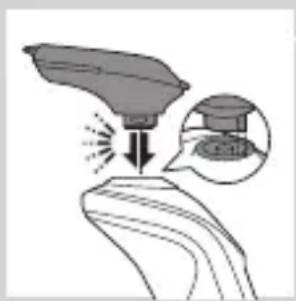
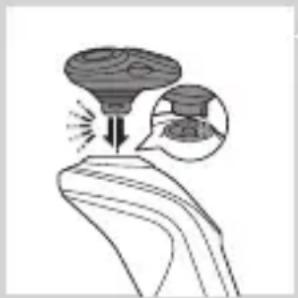
3 Insert the lug of the attachment into the slot in the top of the appliance. Then press down the attachment to attach it to the appliance ('click').
natural_image
Illustration of a robotic arm with motion arrows and a magnified inset showing a hand holding a small object (no text or symbols)
natural_image
Line drawing of a person applying makeup to their ear (no text or symbols)
natural_image
Illustration of a hand holding a device with an arrow pointing to it, and a magnified inset showing a device on a surface (no text or symbols)
natural_image
Line drawing of a hairbrush cutting into a button with an arrow indicating motion (no text or symbols)
Using the trimmer attachment
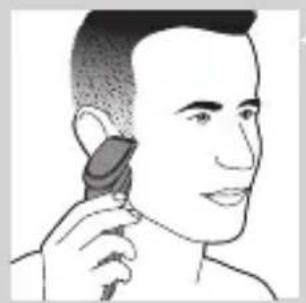
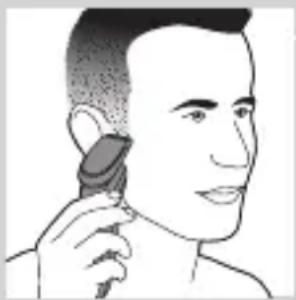
You can use the trimmer attachment to groom your sideburns and moustache.
1 Make sure the appliance is switched off.
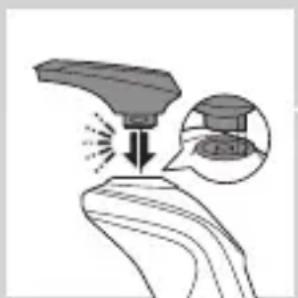
2 Insert the lug of the trimmer attachment into the slot in the top of the appliance. Then press down the trimmer attachment to attach it to the appliance ('click').
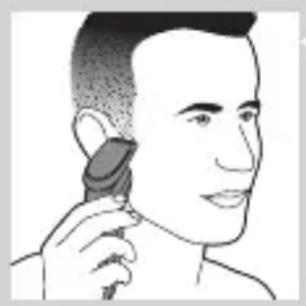
3 Switch on the appliance.
4 You can now start trimming.
5 Clean the attachment after use (see chapter 'Cleaning and maintenance').
Using the beard styler attachment
1 Make sure the appliance is switched off.
2 Insert the lug of the attachment into the slot in the top of the appliance. Then press down the attachment to attach it to the appliance ('click').
Using the beard styler attachment with comb
You can use the beard styler attachment with the comb attached to style your beard at one fixed setting, but also at different length settings. You can use it also to pre-trim any long hairs before shaving to have a more comfortable shave.
The hair length settings on the beard styler attachment correspond to the remaining hair length after cutting and range from 1 to 5mm.
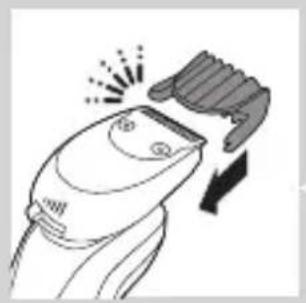
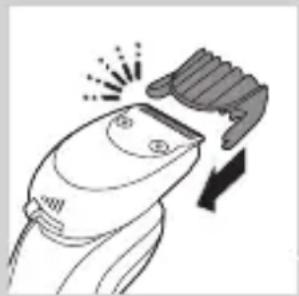
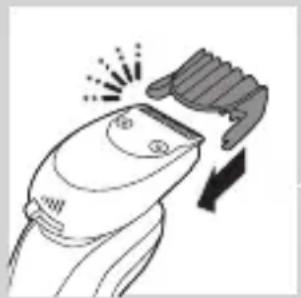
1 Slide the comb straight into the guiding grooves on both sides of the attachment ('click').
natural_image
Illustration of a man with a beard and a pipe, showing a hand holding a small object (no text or symbols present)
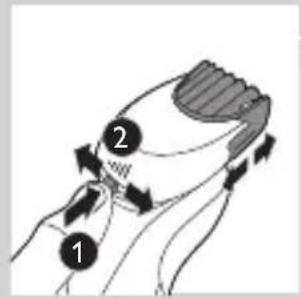
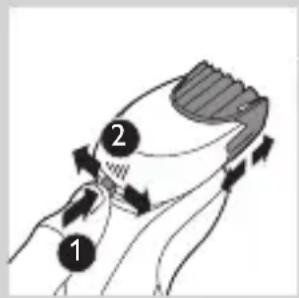
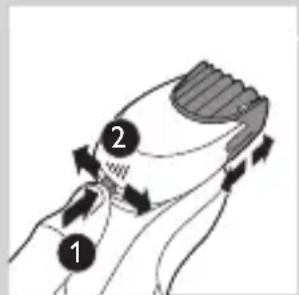
2 Press the length selector and then push it to the left or right to select the desired hair length setting.
3 Switch on the appliance.
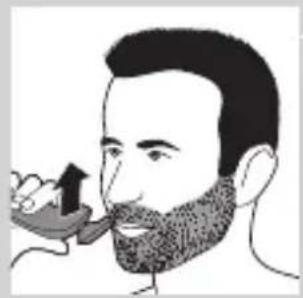
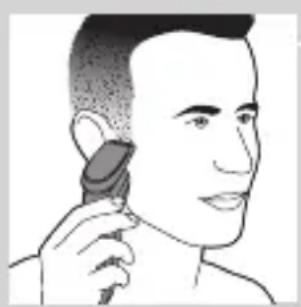
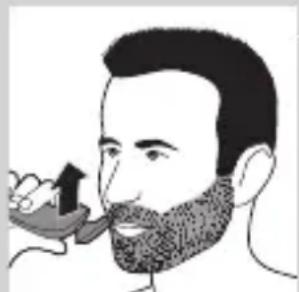
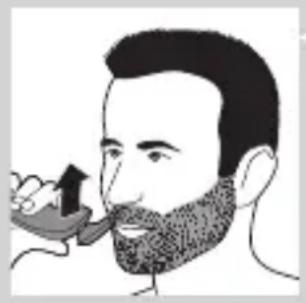
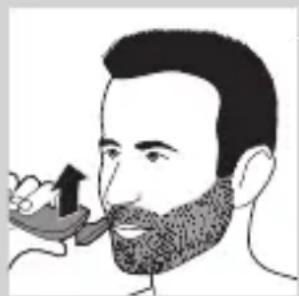
4 You can now start styling your beard by moving the attachment upwards with gentle pressure making sure the front of the comb is in full contact with the skin.
5 Clean the attachment after use (see chapter ‘Cleaning and maintenance’).
Using the beard styler attachment without comb
You can use the beard styler attachment without the comb to contour your beard, moustache, sideburns or neckline to a length of 0.5mm.
natural_image
Illustration of two hands holding a device with directional arrows indicating movement (no text or symbols)
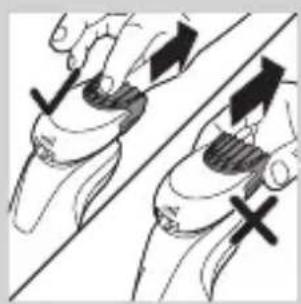
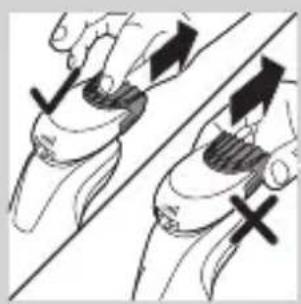
1 Pull the comb off the attachment.
Note: Grab the comb in the centre to pull it off the attachment. Do not pull at the sides of the comb.
2 Switch on the appliance.
3 You can now start contouring your beard, moustache, sideburns or neckline by moving the styler downwards with gentle pressure while holding it perpendicular to the skin.
4 Clean the attachment after use (see chapter ‘Cleaning and maintenance’).
natural_image
Illustration of a dropper dispensing liquid into a container with an inset showing a small object (no text or symbols)
natural_image
Illustration of a mechanical component with fluid flow, no text or symbols present
natural_image
Illustration of a person applying facial care to their face, with no text or symbols present.
Using the cleansing brush attachment
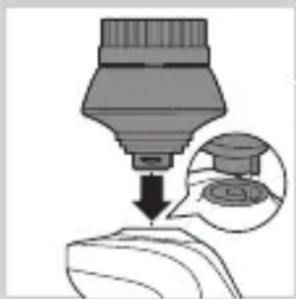
Use the rotating cleansing brush attachment with your daily cleansing cream. The cleansing brush attachment removes oil and dirt, contributing to a healthy and oil-free skin.
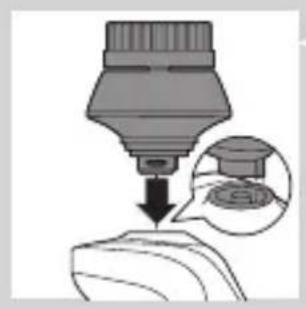
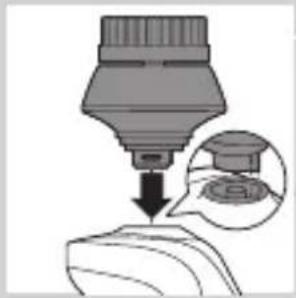
1 Insert the lug of the attachment into the slot in the top of the appliance. Then press down the attachment to attach it to the appliance ('click').
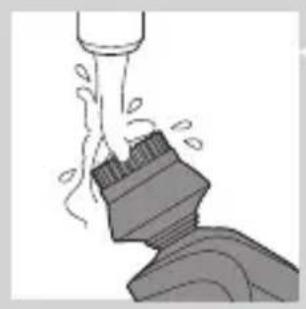
2 Moisten the attachment with water. Do not use the appliance with a dry brush head, as this can irritate the skin.
Tip: Use the attachment before shaving for easier shaving and a more hygienic shaving result.
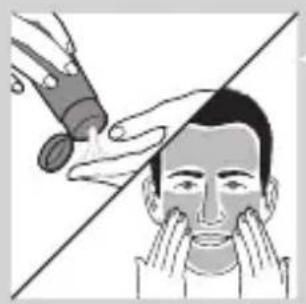
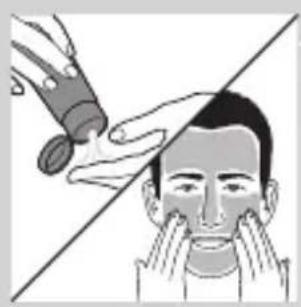
3 Moisten your face with water and apply a cleanser to your face.
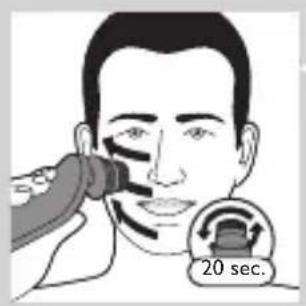
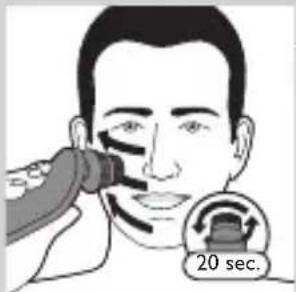
4 Place the attachment on your right cheek.
5 Switch on the appliance.
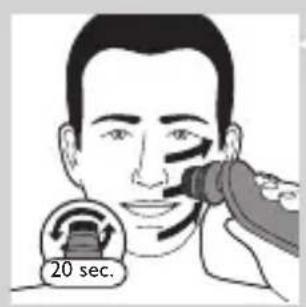
6 Gently move the attachment across your skin from the nose towards the ear. Do not push the attachment too hard onto the skin to make sure the treatment remains comfortable.
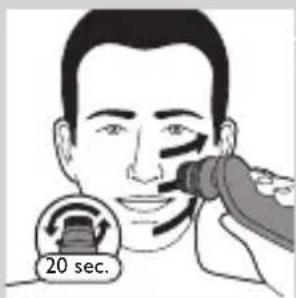
7 After approx. 20 seconds you can move the appliance to your left cheek and start cleansing this part of your face.
Caution: Do not clean the sensitive area around your eyes.
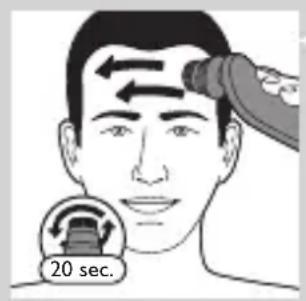
8 After approx. 20 seconds you can move the attachment to your forehead and start cleansing this part of your face. Gently move the brush head from left to right.
Note: We advise you to not overdo the cleansing and to not cleanse any zone longer than 20 seconds.
natural_image
Illustration showing facial massage technique with a magnified inset of the eye area (no text or symbols)
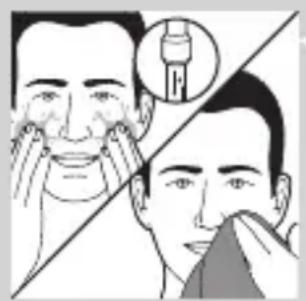
9 After the treatment, rinse and dry your face. Your face is now ready for the next step of your daily skincare routine.
10 Clean the attachment after use (see chapter ‘Cleaning and maintenance’).
Cleaning and maintenance
Note: The accessories supplied may vary for different products. The box shows the accessories that have been supplied with your appliance.
Cleaning the shaver in the SmartClean system (specific types only)
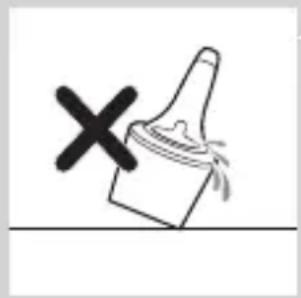
natural_image
Simple line drawing of a paintbrush with a cross mark, no text or symbols present
Do not tilt the SmartClean system to prevent leakage.
Note: Hold the SmartClean system while you prepare it for use.
Note: If you clean the shaver in the SmartClean system once a week, the SmartClean cartridge will last approximately three months.

Preparing the SmartClean system for use
1 Put the small plug in the back of the SmartClean system.
2 Put the adapter in the wall socket.
3 Press the button on the side of the SmartClean system and lift the top part of the SmartClean system.
4 Pull the seal off the cleaning cartridge.
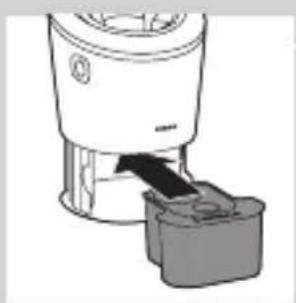
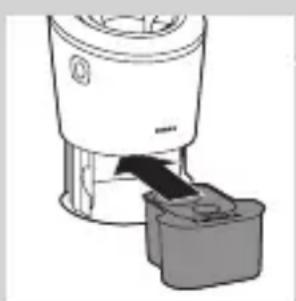
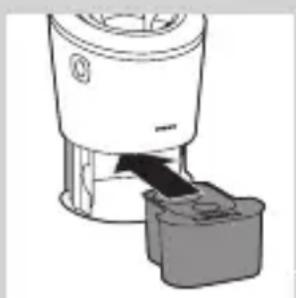
5 Place the cleaning cartridge in the SmartClean system.
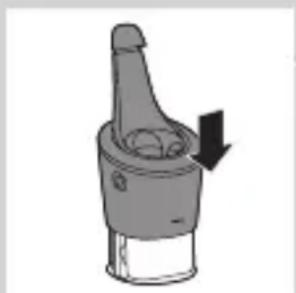
6 Push the top part of the SmartClean system back down ('click').
Using the SmartClean system
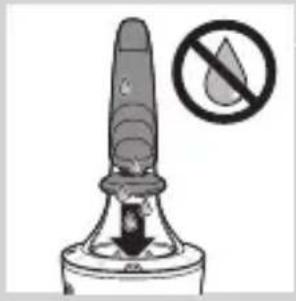
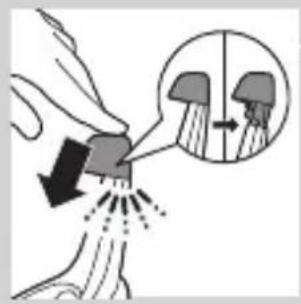
Always make sure to shake excess water off the shaver before you place it in the SmartClean system.
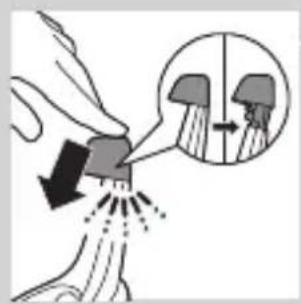
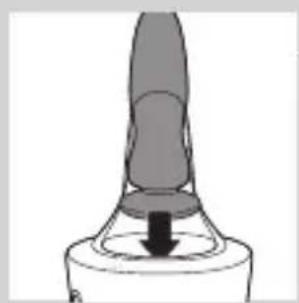
1 Press down the top cap to be able to place the shaver in the holder ('click').
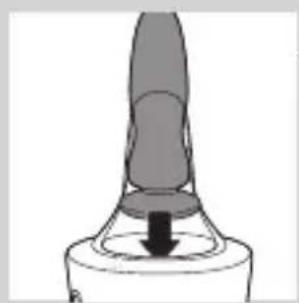
natural_image
Close-up of a mechanical component with a downward arrow indicating force or direction (no text or symbols)
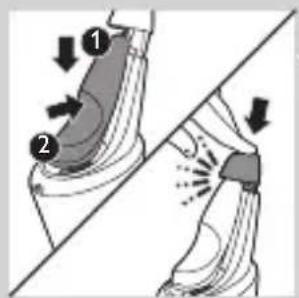
2 Hold the shaver upside down above the holder. Make sure the front of the shaver points towards the SmartClean system.
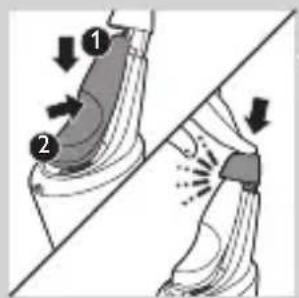
3 Place the shaver in the holder, tilt the shaver backwards and press down the top cap to connect the shaver ('click').
- The battery symbol flashes slowly to indicate that the shaver is charging.
natural_image
Hand holding a device with two circular buttons labeled 'Power' and 'Spiral', no visible text or symbols
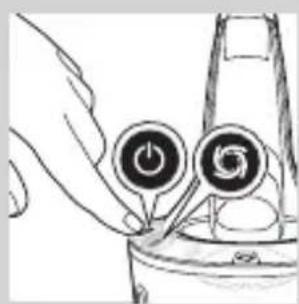
4 Press the on/off button on the SmartClean system to start the cleaning program.
- During the cleaning program (which takes approx. 10 minutes), the cleaning symbol flashes.
natural_image
Diagram of a mechanical component with two circular indicators (one checked, one checked) and no visible text or symbols.
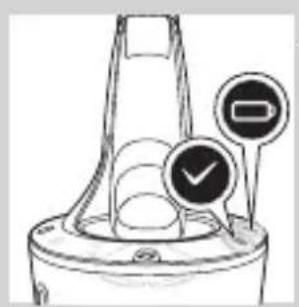
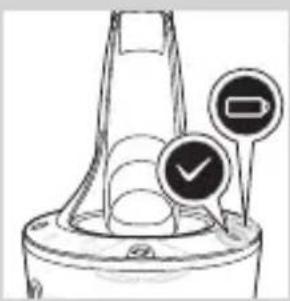
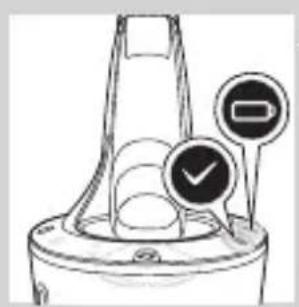
- When the cleaning program has been completed, the ready symbol lights up continuously.
- The battery symbol lights up continuously to indicate that the shaver is fully charged. This takes approx. 1 hour.
Note: If you press the on/off button of the SmartClean system during the cleaning program, the program aborts. In this case, the cleaning symbol stops flashing.
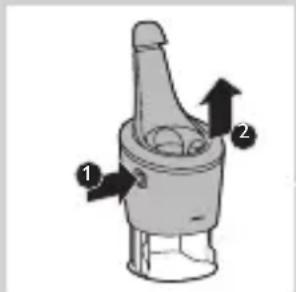
Note: If you remove the adapter from the wall socket during the cleaning program, the program aborts.
Note: 30 minutes after the cleaning program and charging have been completed, the SmartClean switches off automatically.
5 To let the shaver dry, you can leave it in the SmartClean system until your next shave. You can also remove the shaver from the SmartClean system, shake off excess water, open the shaving unit and let the shaver air dry.
Replacing the cartridge of the SmartClean System
Replace the cleaning cartridge when the replacement symbol flashes orange or when you are no longer satisfied with the cleaning result. If you clean the shaver in the SmartClean system once a week, the SmartClean cartridge will last approximately three months.
1 Press the button on the side of the SmartClean system and lift the top part of the SmartClean system.
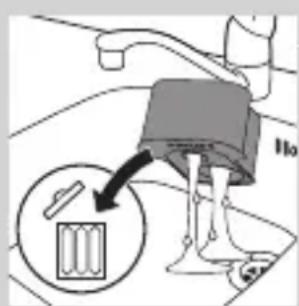
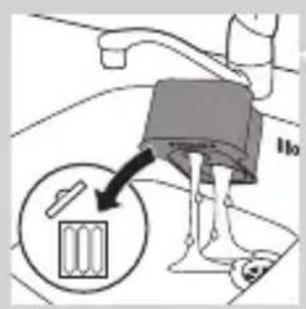
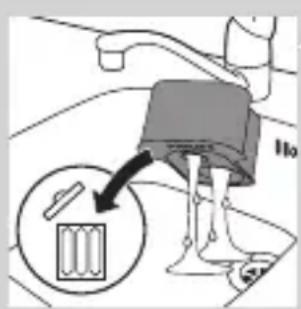
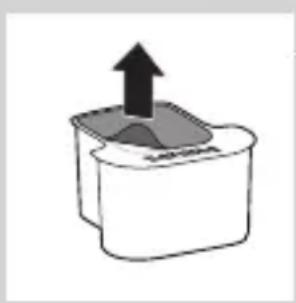
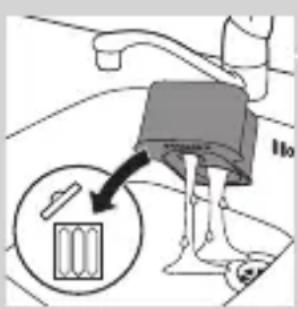
2 Take the empty cleaning cartridge from the SmartClean system and pour any remaining cleaning fluid out of the cleaning cartridge.
You can simply pour the cleaning fluid down the sink.
3 Throw away the empty cleaning cartridge.
4 Unpack the new cleaning cartridge and pull the seal off the cartridge.
ENGLISH22
natural_image
Diagram of a blender with a black arrow pointing to its internal component (no text or symbols present)
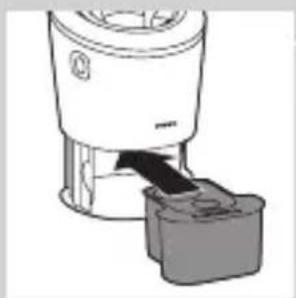
5 Place the new cleaning cartridge in the SmartClean system.
natural_image
Diagram of a mechanical component with a downward arrow indicating rotation (no text or symbols)
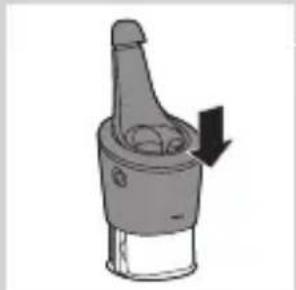
6 Push the top part of the SmartClean system back down ('click').
Cleaning the shaver under the tap
Clean the shaver after every shave for optimal shaving performance.
Be careful with hot water. Always check if the water is not too hot, to prevent your hands from getting burnt.
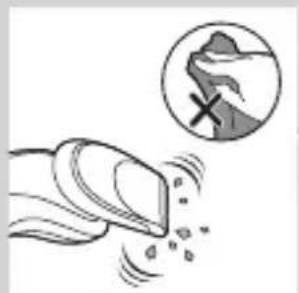
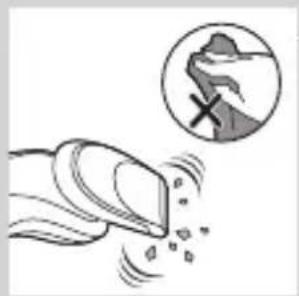
Never dry the shaving unit with a towel or tissue, as this may damage the shaving heads.
natural_image
Illustration of a hand using a tool to lift a cup (no text or symbols visible)
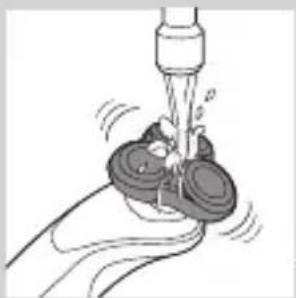
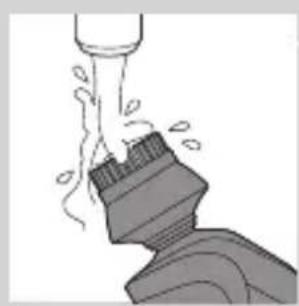
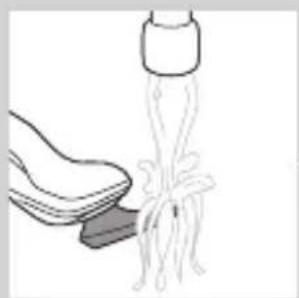
1 Rinse the shaving unit under a warm tap for some time.
natural_image
Illustration of a hand holding a circular object with an arrow pointing to a three-pin knob (no text or symbols)
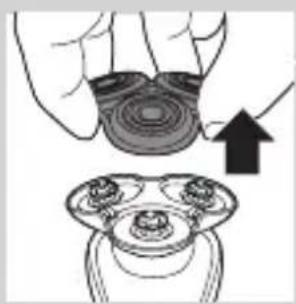
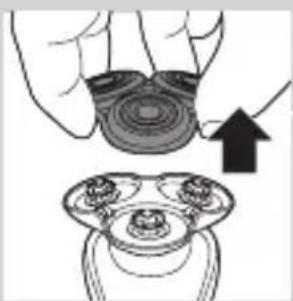
2 Pull the shaving head holder off the bottom part of the shaving unit.
natural_image
Illustration of a hand pouring liquid into a container with a dropper (no text or symbols)
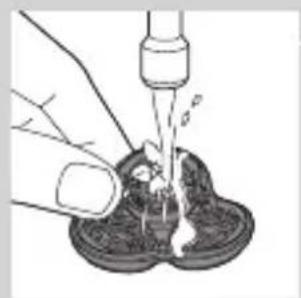
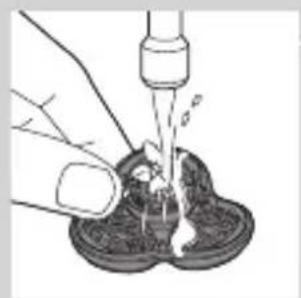
3 Rinse the shaving head holder under a warm tap for 30 seconds.
4 Carefully shake off excess water and let the shaving head holder dry.
natural_image
Illustration of a hand holding a circular object with a downward arrow pointing to a three-cylinder-shaped object (no text or symbols)
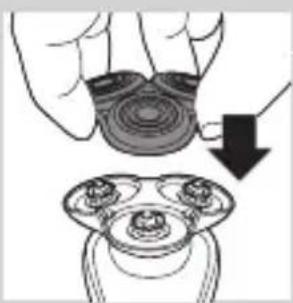
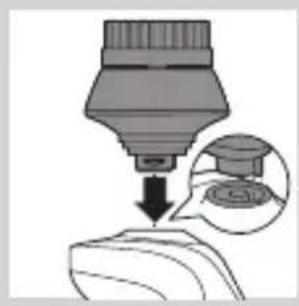
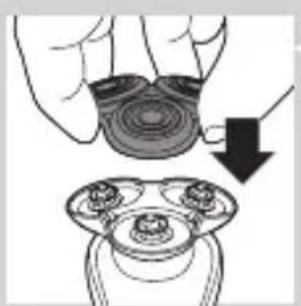
5 Reattach the shaving head holder to the bottom part of the shaving unit ('click').
Thorough cleaning method
natural_image
Illustration of a hand holding a circular object with an arrow pointing to a three-pin knob (no text or symbols)
Make sure the appliance is switched off.
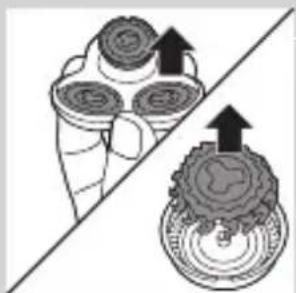
1 Pull the shaving head holder off the bottom part of the shaving unit.
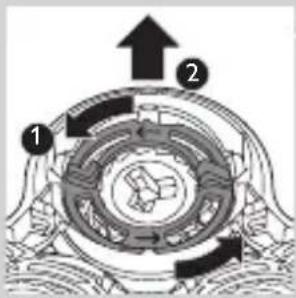
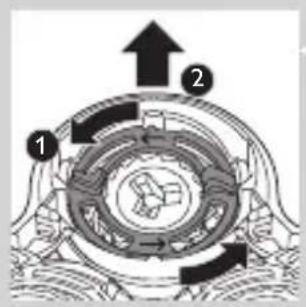
2 Turn the retaining rings anticlockwise and remove them.
natural_image
Diagram showing a device with three circular components and an arrow indicating direction, intersected by a diagonal line (no text or symbols)
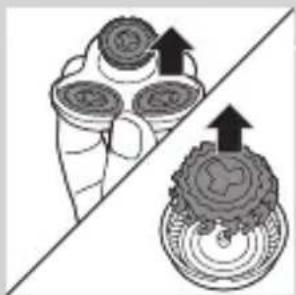
3 Remove the shaving heads from the shaving head holder. Each shaving head consists of a cutter and guard.
Note: Do not clean more than one cutter and guard at a time, since they are all matching sets. If you accidentally put a cutter in the wrong shaving guard, it may take several weeks before optimal shaving performance is restored.
ENGLISH24
natural_image
Diagram showing fluid flow between two vessels with bubbles and a central pipe (no text or symbols)
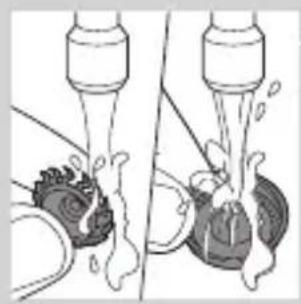
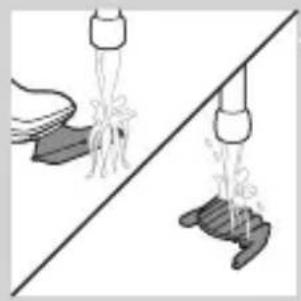
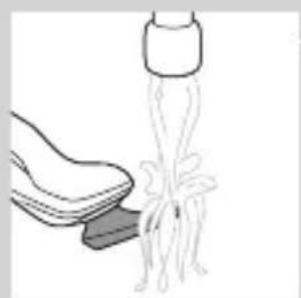
4 Clean the cutter and guard under the tap.
natural_image
Mechanical gear assembly diagram showing a rotating shaft and gear teeth (no text or labels)
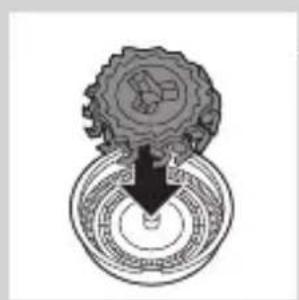
5 After cleaning, place the cutter back into the guard.
flowchart
graph TD
    A[" "] --> B[" "]
    B --> C[" "]
    C --> D[" "]
    D --> A
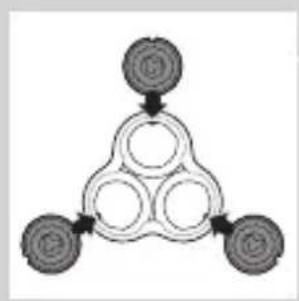
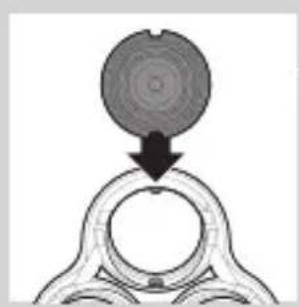
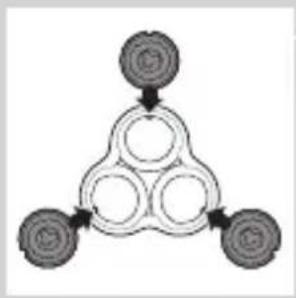
6 Put the shaving heads back into the shaving head holder.
natural_image
Diagram showing a circular object being lifted by a black arrow into a ring structure (no text or symbols)
Note: Make sure the notches on both sides of the shaving heads fit exactly onto the projections in the shaving-head holder.
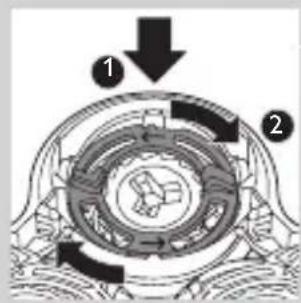
7 Place the retaining rings back onto the shaving head holder and turn them clockwise.
natural_image
Diagram showing two circular components with arrows indicating direction, one crossed over the other by a diagonal line (no text or symbols)
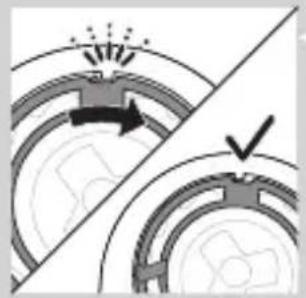
- Each retaining ring has two recesses that fit exactly in the projections of the shaving head holder. Turn the ring clockwise until your hear ‘click’ and the ring is fixed.
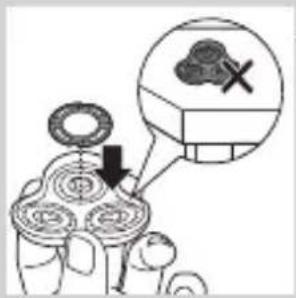
Note: Hold the shaving head holder in your hand when you reinsert the shaving heads and reattach the retaining rings. Do not place the shaving head holder on a surface when you do this, as this may cause damage.
8 Reattach the shaving head holder to the bottom part of the shaving unit.
Cleaning the click-on attachments
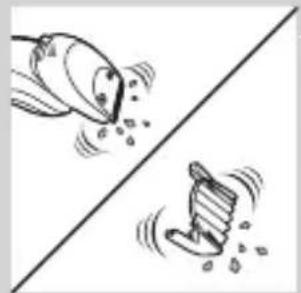
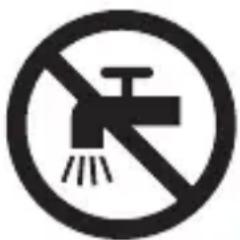
Never dry the trimmer or beard styler attachments with a towel or tissue, as this may damage the trimming teeth.
Cleaning the beard styler attachment
Clean the beard styler attachment every time you have used it.
natural_image
Illustration of two hands holding a curved object with directional arrows indicating movement or force (no text or symbols)
1 Pull the comb off the beard stylisty attachment.
Note: Grab the comb in the centre to pull it off the attachment. Do not pull at the sides of the comb.
2 Switch on the appliance.
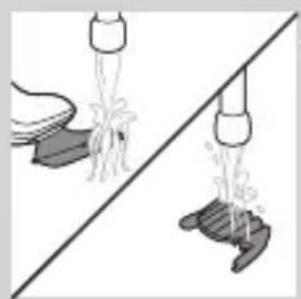
3 Rinse the beard styler attachment and the comb separately under a hot tap for some time.
4 After cleaning, switch off the appliance.
natural_image
Illustration of two hands pouring liquid from a bottle onto a shoe and a shoe with steam rising (no text or symbols)
natural_image
Two cartoon fish jumping over a diagonal line, one falling and the other wading (no text or symbols)
natural_image
Illustration of a hand cleaning a shoe with a tool above it (no text or symbols)
natural_image
Illustration of a hand crushing debris with a magnified circular inset showing a broken rock (no text or symbols)
natural_image
Diagram of a mechanical component with a top component and an arrow indicating upward motion (no text or symbols)
natural_image
Two identical diagrams showing a hand pouring liquid into a container, separated by a diagonal line (no text or symbols)
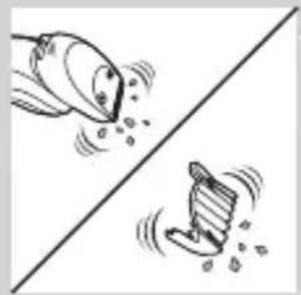
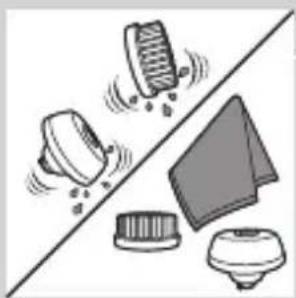
5 Carefully shake off excess water and let the beard styler attachment and comb dry.
Tip: For optimal trimmer performance, lubricate the trimmer teeth with a drop of sewing machine oil every six months.
Cleaning the trimmer attachment
Clean the trimmer attachment every time you have used it.
1 Switch on the appliance with the trimmer attachment attached.
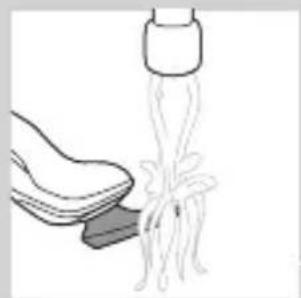
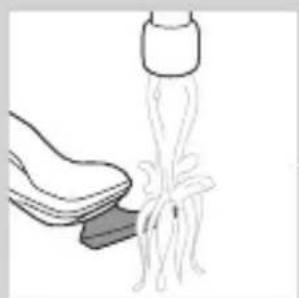
2 Rinse the trimmer attachment under a hot tap for some time.
3 After cleaning, switch off the appliance.
4 Carefully shake off excess water and let the trimmer attachment dry.
Tip: For optimal trimmer performance, lubricate the trimmer teeth with a drop of sewing machine oil every six months.
Cleaning the cleansing brush attachment
Clean the cleansing brush attachment every time you have used it.
1 Make sure the appliance is switched off.
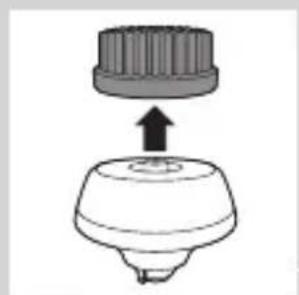
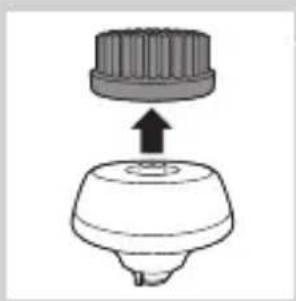
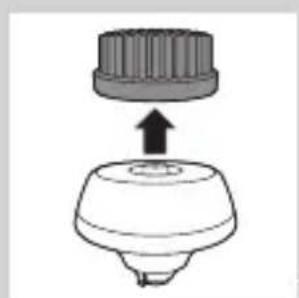
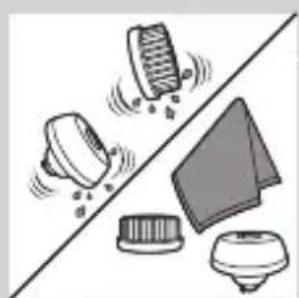
2 Detach the brush head from the brush base.
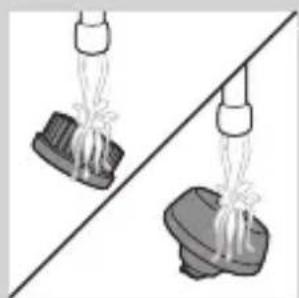
3 Clean both parts thoroughly with warm water and mild soap.
natural_image
Illustration of mechanical components including a drum, bell, and base (no text or symbols)
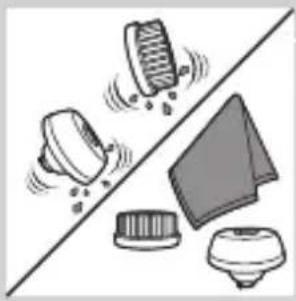
4 Dry the cleansing brush attachment with a towel.
Storage
natural_image
Illustration of a stylized object with a downward arrow, no text or symbols present
Note: The accessories supplied may vary for different products. The box shows the accessories that have been supplied with your appliance.
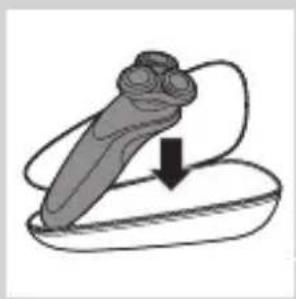
Note: We advise you to let the appliance and its attachments dry before you put the protection caps on the attachments and store the shaver in the pouch.
- Store the shaver in the pouch supplied.
natural_image
Diagram of a mechanical component with a downward arrow indicating force or direction (no text or symbols)
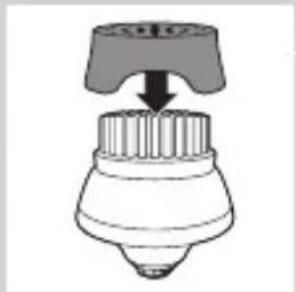
- Put the protection cap on the cleansing brush attachment to protect it from dirt accumulation.
Replacement
Replacing the cleansing brush head
natural_image
Simple line drawing of a mechanical component with an upward arrow, no text or symbols present.
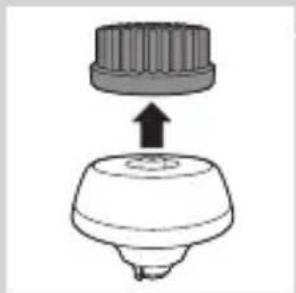
- The cleansing brush head attachment should be replaced every 3 months or earlier if the filaments are deformed or damaged.
Replacing the shaving heads
For maximum shaving performance, we advise you to replace the shaving heads every two years.
Replacement reminder
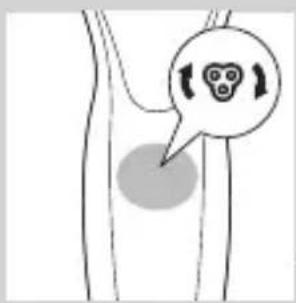
The shaving unit symbol will light up to indicate that the shaving heads need to be replaced. Replace damaged shaving heads immediately. Only replace the shaving heads with original Philips shaving heads as specified in chapter 'Ordering accessories'.
natural_image
Simple line drawing of a human body with a speech bubble containing a skull icon (no text or symbols)
natural_image
Illustration of a hand holding a circular object with an upward arrow, alongside a magnified view of three circular objects (no text or symbols)
1 The shaving unit symbol lights up continuously when you switch off the shaver to indicate that the shaving heads need to be replaced.
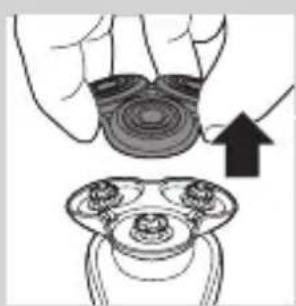
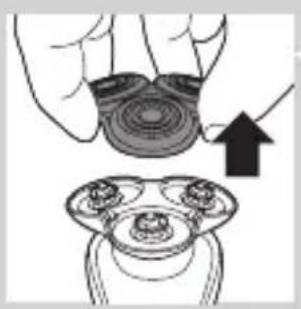
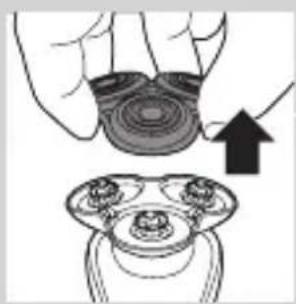
2 Pull the shaving head holder off the bottom part of the shaving unit.
natural_image
Diagram showing a device with a magnified view of its internal components (no text or symbols present)
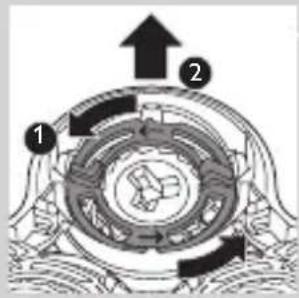
3 Turn the retaining rings anticlockwise and remove them.
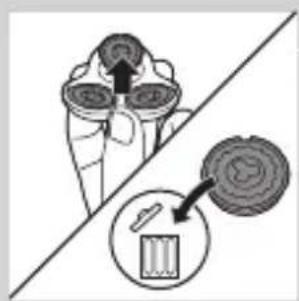
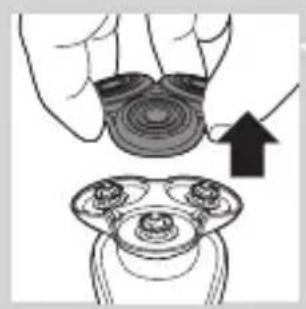
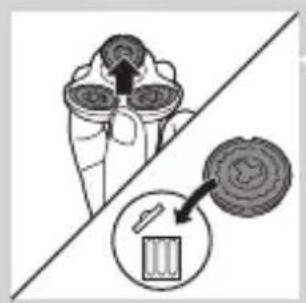
4 Remove the shaving heads from the shaving head holder and throw them away.
flowchart
graph TD
    A["Top Node"] --> B["Three Circles"]
    B --> C["Bottom Left Node"]
    B --> D["Bottom Right Node"]
    B --> E["Bottom Center Node"]
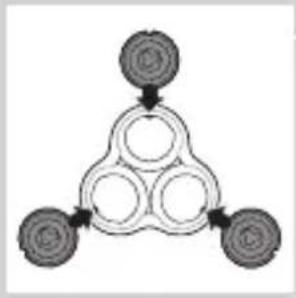
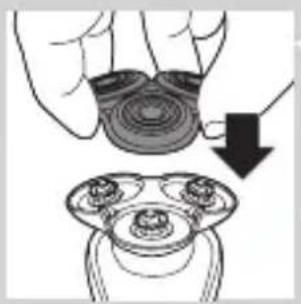
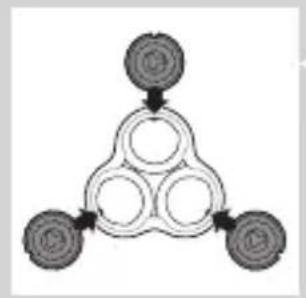
5 Place new shaving heads in the holder.
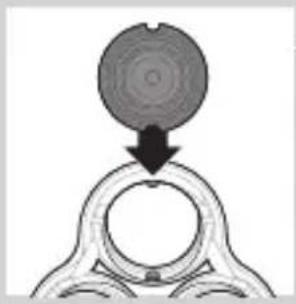
natural_image
Diagram showing a circular object being lifted by a downward arrow into a ring-like structure (no text or symbols)
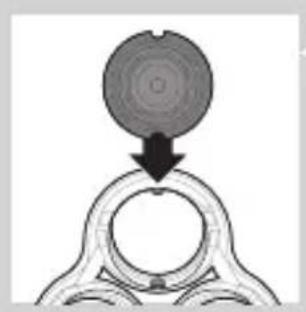
Note: Make sure the notches on both sides of the shaving heads fit exactly onto the projections in the shaving-head holder.
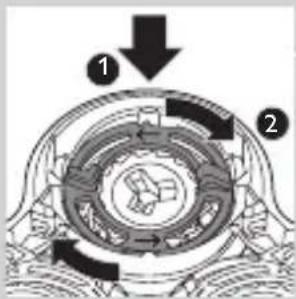
6 Place the retaining rings back onto the shaving heads and turn them clockwise.
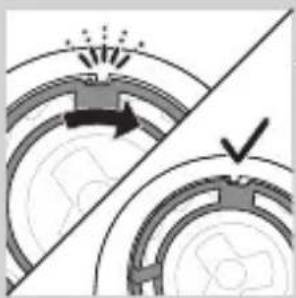
natural_image
Diagram showing two mechanical components with arrows indicating motion, separated by a diagonal line (no text or symbols)
- The retaining ring has two recesses that fit exactly in the projections of the shaving head holder. Turn the ring clockwise until you hear ‘click’ and the ring is fixed.
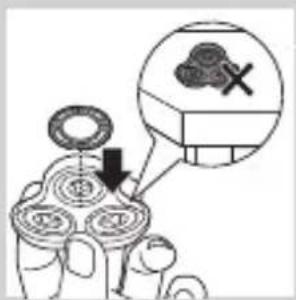
Note: Hold the shaving head holder in your hand when you reinsert the shaving heads and reattach the retaining rings. Do not place the shaving head holder on a surface when you do this, as this may cause damage.
natural_image
Illustration of a hand holding a circular object with a downward arrow, next to a multi-ring device (no text or symbols)
7 Reattach the shaving head holder to the bottom part of the shaving unit.
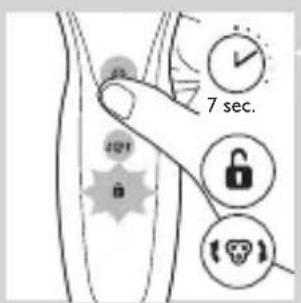
8 To reset the replacement reminder, press and hold the on/off button for approx. 7 seconds.
Ordering accessories
To buy accessories or spare parts, visit www.shop.philips.com/service or go to your Philips dealer. You can also contact the Philips Consumer Care Centre in your country (see the worldwide guarantee leaflet for contact details).
The following parts are available:
- HQ8505 adapter
- SH70 Philips shaving heads
- HQ110 Philips Shaving Head Cleaning Spray
- RQ111 Philips beard styler attachment
- SH575 Philips cleansing brush attachment
- SH560 Philips cleansing brush replacement head
- JC301, JC302, JC303, JC304, JC305 cleaning cartridge
Note: Availability of the accessories may differ per country.
Shaving heads
- We advise you to replace your shaving heads every two year. Always replace the shaving heads with original SH70 Philips shaving heads.
Recycling
natural_image
Symbol of a trash bin crossed with no text or numbers, representing waste sorting or disposal (no text present)
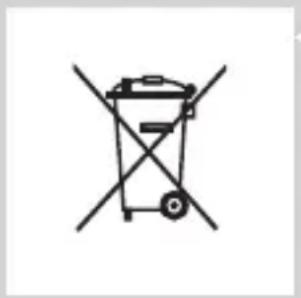
- This symbol means that this product shall not be disposed of with normal household waste (2012/19/EU).
natural_image
Simple line drawing of a trash bin with two crossed arms (no text or symbols)
- This symbol means that this product contains a built-in rechargeable battery which shall not be disposed of with normal household waste (2006/66/EC). We strongly advise you to take your product to an official collection point or a Philips service centre to have a professional remove the rechargeable battery.
- Follow your country's rules for the separate collection of electrical and electronic products and rechargeable batteries. Correct disposal helps prevent negative consequences for the environment and human health.
Removing the rechargeable shaver battery
Only remove the rechargeable battery when you discard the shaver. Make sure the battery is completely empty when you remove it.
Be careful, the battery strips are sharp.
ENGLISH32
natural_image
Illustration showing a hand using a screwdriver to cut a cylindrical object, with another hand holding a small boat (no text or symbols present)
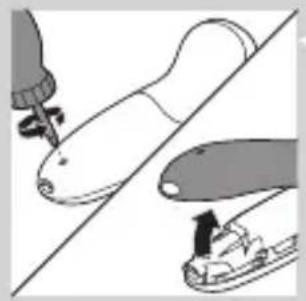
1 Remove the screw in the back panel with a screwdriver. Then remove the back panel.
natural_image
Illustration of two skis with directional arrows indicating motion (no text or symbols)
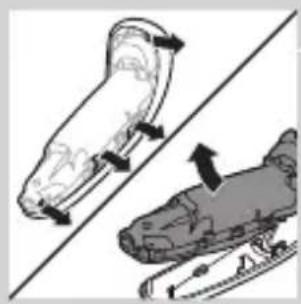
2 Bend the hooks aside and remove the power unit.
natural_image
Two mechanical components with a diagonal line and an upward arrow, no visible text or symbols
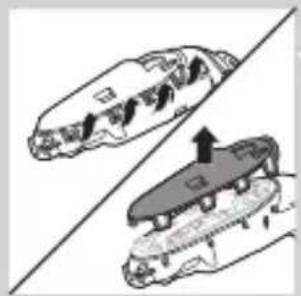
3 Break the snap hooks and remove the front panel of the power unit.
natural_image
Illustration of two robotic arms with a tool, one holding a tool and the other in use, against a diagonal line (no text or symbols)
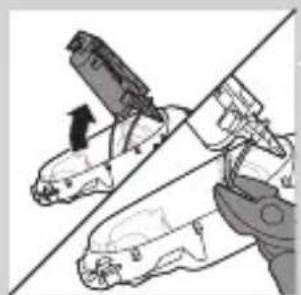
4 Take out the battery holder and cut the battery tags with a pair of cutting pliers.
Guarantee and support
If you need information or support, please visit www.philips.com/support or read the separate worldwide guarantee leaflet.
Guarantee restrictions
The shaving heads (cutters and guards) are not covered by the terms of the international guarantee because they are subject to wear.
Troubleshooting
This chapter summarises the most common problems you could encounter with the appliance. If you are unable to solve the problem with the information below, visit www.philips.com/support for a list of frequently asked questions or contact the Consumer Care Centre in your country.
Problem Possible cause Solution
| The shaver does not shave as well as it used to. | The shaving heads are damaged or worn. | Replace the shaving heads (see chapter ‘Replacement’). |
| Hairs or dirt obstruct the shaving heads. | Clean the shaving heads by following the steps of the thorough cleaning method (see chapter ‘Cleaning and maintenance’). |
| The shaver does not work when I press the on/off button. | The shaver is still attached to the mains. For safety reasons, the shaver can only be used without cord. | Disconnect the shaver from the mains and press the on/off button to switch on the shaver (see section ‘Unplug for use reminder’). |
| The rechargeable battery is empty. | Recharge the battery (see chapter ‘Charging’). |
| The travel lock is activated. | Press the on/off button for 3 seconds to deactivate the travel lock. |
| The shaving unit is soiled or damaged to such an extent that the motor cannot run. | Clean the shaving heads or replace them (see chapters ‘Cleaning and maintenance’ and ‘Replacement’). |
Problem Possible cause Solution
| The shaver is not entirely clean after I clean it in the SmartClean system. | You have not placed the shaver in the SmartClean system properly, so there is no electrical connection between the SmartClean system and the shaver. | Press down the top cap ('click') to ensure a proper connection between the shaver and the SmartClean system. |
| The cleaning cartridge is empty. The replacement symbol flashes to indicate you have to replace the cleaning cartridge. | Place a new cleaning cartridge in the SmartClean system (see chapter 'Cleaning and maintenance'). |
| You have used another cleaning fluid than the original Philips cleaning cartridge. | Only use the original Philips cleaning cartridges. |
| Water is leaking from the bottom of the shaver. | During cleaning, water may collect between the inner body and the outer shell of the shaver. | This is normal and not dangerous because all electronics are enclosed in a sealed power unit inside the shaver. |
| The SmartClean system does not work when I press the on/off button. | The SmartClean system is not connected to the mains. | Put the small plug in SmartClean system and put the adapter in the wall socket. |
Problem Possible cause Solution
| The shaver is not fully charged after I charge it in the SmartClean system. | You have not placed the shaver in the SmartClean system properly. | Make sure you press the shaver in the SmartClean system until it locks into place. |
| I replaced the shaving heads, but the replacement reminder symbol is still showing. | You have not reset the shaver. | Reset the shaver by pressing the on/off button for approx. 7 seconds (see chapter ‘Replacement’). |
| A shaving head symbol has suddenly appeared on the display. | This symbol is a replacement reminder. | Replace the shaving heads (see chapter ‘Replacement’). |
Introduktion
natural_image
No smoking sign with faucet symbol (no text)
natural_image
Prohibition sign of a faucet with no text or symbols
Forsigtig
natural_image
Simple line drawing of a showerhead spraying over a water-filled container (no text or symbols)
Elektromagnetiske felter (EMF)
natural_image
Diagram of a medical or laboratory procedure showing a pointed tool interacting with a star-shaped object, with an inset magnified view (no text or symbols)
natural_image
Diagram of a biological structure with a highlighted region and a label (no readable text or symbols)
natural_image
Diagram of a biological structure with a highlighted region and arrow, no text or symbols present
natural_image
Diagram of a biological or anatomical structure with a labeled point '0' and an arrow pointing to a circular feature (no text or symbols beyond the label)
natural_image
Diagram of a biological or medical procedure showing a pointed tool interacting with a star-shaped object, with an inset magnified view (no text or symbols)
natural_image
Diagram of a biological structure with a magnified inset showing internal components (no text or labels)
natural_image
Diagram of a human body with a speech bubble containing a skull icon and directional arrows, no text or symbols present.
natural_image
Illustration of a hand holding a small object with arrows indicating motion or force, and an inset showing a cross-section of a mechanical component (no text or symbols)
natural_image
Close-up of a mechanical component with a downward arrow indicating force or direction (no text or symbols)
5 Sæt shaveren i holderen, vip shaveren bagud, og tryk ned på den øverste hætte for at tilslutte shaveren ("klik").
- Batterisymbolet blinker langsomt for at indikere, at shaveren oplades.
Brug af shaveren
1 Apparatet tændes ved at trykke én gang på on/off-knappen.
2 Apparatet slukkes ved at trykke én gang på on/off-knappen.
natural_image
Illustration of a person applying makeup to their ear with a brush (no text or symbols)
natural_image
Line drawing of a person's head with hand near ear area, showing facial contour or skin texture (no text or symbols)
natural_image
Illustration of a person applying a product to their ear (no text or symbols)
natural_image
Illustration of a person applying a hair product to their face (no text or symbols)
natural_image
Diagram showing a hand holding a device with a warning symbol (no text or labels)
natural_image
Illustration of a funnel pouring liquid into a curved pipe, with an inset showing a graduation cap (no text or symbols)
natural_image
Diagram showing a device emitting light onto a surface, with an inset close-up of the device's tip (no text or symbols present)
natural_image
Line drawing of a person using a hairdryer (no text or symbols)
natural_image
Illustration of a hand holding a device with an arrow indicating motion, and a magnified inset showing a close-up of the device (no text or symbols present)
natural_image
Illustration of a hairbrush cutting into a toothbrush with a downward arrow (no text or symbols)
natural_image
Illustration of a man with a beard eating a pipe (no text or symbols)
natural_image
Illustration of a hand holding a device with directional arrows indicating movement (no text or symbols)

natural_image
Line drawing of a person applying a hair accessory to their neck (no text or symbols)
natural_image
Diagram showing a dropper dispensing liquid into a container with an inset magnified view of the lid (no text or symbols present)
natural_image
Illustration of a mechanical component with motion lines indicating movement (no text or symbols)
natural_image
Illustration of a person applying facial care to their face, with no text or symbols present.
natural_image
Illustration showing two facial expressions with a magnified inset of the first face (no text or symbols)
natural_image
Simple line drawing of a paintbrush with a cross mark and spray effect (no text or symbols)
natural_image
Simple line drawing of a container with an upward arrow and label 'PAPAYA' (no text or symbols on the diagram itself)
5 Placer rengøringspatronen i SmartClean-systemet.
natural_image
Diagram of a blender with a handle and base, showing mechanical components without any text or symbols.
natural_image
Diagram of a mechanical component with a downward arrow indicating force or direction (no text or symbols present)
natural_image
Close-up of a mechanical component with a downward arrow indicating force or direction (no text or symbols)
3 Sæt shaveren i holderen, vip shaveren bagud, og tryk ned på den øverste hætte for at tilslutte shaveren ("klik").
- Batterisymbolet blinker langsomt for at indikere, at shaveren oplades.
natural_image
Hand holding a device with two circular buttons labeled 'Power' and 'Spiral', no visible text or symbols

natural_image
Diagram of a blender with a plug inserted into a container (no text or symbols)

natural_image
Illustration of a mechanical component with a downward arrow indicating rotation (no text or symbols)
natural_image
Illustration of a hand using a tool to lift a cup (no text or symbols present)
natural_image
Illustration of a hand holding a circular object with an arrow pointing to a three-part mechanical component (no text or symbols)
natural_image
Illustration of a hand pouring liquid into a container with a dropper (no text or symbols)
natural_image
Illustration of a hand holding a circular object with a downward arrow, next to a magnified view of a three-petal object (no text or symbols)
natural_image
Illustration of a hand holding a circular object with an upward arrow, alongside a close-up of a mechanical component (no text or symbols)
natural_image
Diagram showing a hand holding three circular objects with arrows indicating rotation or movement (no text or symbols present)
natural_image
Illustration of a mechanical device with fluid flow and components, no text or symbols present
natural_image
Diagram of a mechanical component with a downward arrow indicating force or direction (no text or symbols)
flowchart
graph TD
    A["Top Circle"] --> B["Three Circles"]
    B --> C["Bottom Circle"]
    C --> D["Three Circles"]
    D --> A
natural_image
Diagram showing a circular object being lifted by a black arrow into a ring structure (no text or symbols)
natural_image
Diagram showing mechanical components with arrows indicating motion or force direction (no text or symbols)
natural_image
Illustration of two hands holding a curved object with directional arrows indicating movement or force (no text or symbols)
natural_image
Illustration of two hands pouring liquid from a bottle onto a surface, separated by a diagonal line (no text or symbols)
natural_image
Two cartoon fish jumping over a diagonal line, one falling and the other wading (no text or symbols)
natural_image
Line drawing of a shoe being lifted by a string, showing the foot and ankle (no text or symbols)
natural_image
Illustration of a hand crushing debris with a magnified circular inset showing a landslide (no text or symbols)
natural_image
Diagram of a mechanical component with a top cylindrical part and a base, showing an upward arrow (no text or symbols)
natural_image
Two hanging objects with ropes tied on a diagonal line, no text or symbols visible
natural_image
Illustration of mechanical components including a drum, roller, and base mount (no text or symbols)
natural_image
Illustration of a mechanical component with a downward arrow indicating motion (no text or symbols)
natural_image
Simple line drawing of a spray gun with a handle and spray nozzle (no text or symbols)
natural_image
Simple line drawing of a mechanical component with an upward arrow, no text or symbols present.
natural_image
Simple line drawing of a human body with a speech bubble containing a skull icon (no text or symbols)
natural_image
Illustration of a hand holding a circular object with an arrow pointing to a three-pin connector (no text or symbols)
natural_image
Diagram showing a device with circular components and a magnified view of a battery (no text or symbols)
flowchart
graph TD
    A[" "] --> B[" "]
    B --> C[" "]
    C --> D[" "]
natural_image
Diagram showing a circular object with a downward arrow emerging from a ring structure (no text or symbols)
natural_image
Diagram showing two mechanical components with arrows indicating motion or force, separated by a diagonal line (no text or symbols)
natural_image
Illustration of a hand holding a circular object with a downward arrow, alongside a magnified view of three circular objects (no text or symbols)
natural_image
Symbol of a trash bin crossed out by two crossed lines (no text or labels)
natural_image
Illustration of a hand turning a small object into a slide, with no visible text or symbols
natural_image
Two illustrations of a scooter climbing stairs, one with arrows indicating motion (no text or symbols)
natural_image
Diagram showing two mechanical components with arrows indicating motion or assembly (no text or symbols)
natural_image
Illustration of two hands using a tool to adjust or install a mechanical component, with no visible text or symbols.
natural_image
No sign depicting a faucet without a shower, enclosed in a circle (no text or symbols)
natural_image
No smoking sign with faucet symbol (no text)
natural_image
Simple line drawing of a showerhead spraying over a water-filled container (no text or symbols)
natural_image
Diagram of a medical or laboratory procedure showing a cross-sectional view with an inset magnified view (no text or symbols)
natural_image
Diagram of a biological structure with a labeled point '0' and an arrow pointing to a feature (no text or symbols beyond the label)
DEUTSCH72
natural_image
Diagram of a biological structure with a magnified inset showing a chromosome (no text or labels)
natural_image
Diagram of a biological or medical structure with a magnified inset showing a star-shaped feature (no text or symbols)
natural_image
Diagram of a biological or anatomical structure with a labeled point '0' and an arrow pointing to a feature (no text or symbols beyond the label)
natural_image
Diagram of a medical or laboratory procedure showing a pointed tool interacting with a circular component (no text or labels)
natural_image
Illustration of a human torso with a faucet symbol and a starburst pattern (no text or labels)
natural_image
Simple line drawing of a human torso with a speech bubble containing a skull icon (no text or symbols)
natural_image
Illustration of a hand holding a small object with arrows indicating motion or force, and a magnified inset showing two figures interacting (no text or symbols)
natural_image
Close-up of a mechanical component with a downward arrow indicating force or direction (no text or symbols)
natural_image
Illustration of a person applying facial contour or mask to their face (no text or symbols)
natural_image
Line drawing of a person's face with hand near ear area (no text or symbols)
natural_image
Line drawing of a person applying a product to their ear (no text or symbols)
natural_image
Illustration of a hand washing a cup with water spray (no text or symbols)
natural_image
Illustration of a person applying a hair product to their face (no text or symbols)
natural_image
Diagram showing a hand holding a device with a circular component and an arrow indicating upward motion (no text or symbols)
natural_image
Illustration of a funnel pouring liquid into a curved pipe, with an inset showing a graduation cap (no text or symbols)
natural_image
Diagram showing a device emitting light onto a surface, with an inset magnified view of a device (no text or symbols present)
natural_image
Line drawing of a person applying makeup to their ear (no text or symbols)
natural_image
Diagram showing a device emitting light rays from a curved surface, with an inset close-up of a device (no text or symbols present)
natural_image
Line drawing of a hairbrush cutting down a surface with a downward arrow indicating compression (no text or symbols)
natural_image
Illustration of a man with a beard eating a spoon (no text or symbols)
natural_image
Illustration of two hands holding a curved object with directional arrows indicating movement or force (no text or symbols)
natural_image
Illustration of a dropper being inserted into a container with a magnified inset showing the tip (no text or symbols)
natural_image
Illustration of a mechanical component with motion lines indicating movement (no text or symbols)
natural_image
Illustration of a person applying facial care to their face, with no text or symbols present.
natural_image
Simple line drawing of a paintbrush with a cross mark, no text or symbols present
natural_image
Illustration of a hand pouring liquid into a container with an inset showing a cross-section of a container (no text or symbols)
natural_image
Close-up of a mechanical component with a downward arrow indicating force or direction (no text or symbols)

natural_image
Hand holding a device with two circular buttons labeled 'Power' and 'Spiral', no visible text or symbols
natural_image
Diagram of a mechanical component with two circular indicators (one checked, one not checked) and no visible text or symbols.
natural_image
Diagram of a blender with a black arrow pointing to its internal component (no text or symbols present)
natural_image
Diagram of a mechanical component with a downward arrow indicating rotation (no text or symbols)
natural_image
Illustration of a hand washing a small object with water spray (no text or symbols)
natural_image
Illustration of a hand holding a circular object with an arrow pointing to it, above a separate view of a mechanical component (no text or symbols)
natural_image
Illustration of a hand pouring liquid into a container with a dropper (no text or symbols)
natural_image
Illustration of a hand holding a circular object with a downward arrow, partially overlaid on a mechanical component (no text or symbols)
natural_image
Illustration of a hand holding a circular object with an arrow pointing to a three-pin connector (no text or symbols)
natural_image
Diagram showing a gear assembly with three blades and a separate gear component, no text or symbols present.
natural_image
Diagram showing fluid flow between two vessels with bubbles and a central pipe (no text or symbols)
natural_image
Mechanical gear assembly diagram showing a rotating shaft and gear teeth (no text or labels)
flowchart
graph TD
    A[" "] --> B[" "]
    B --> C[" "]
    C --> D[" "]
    D --> A
natural_image
Diagram showing a circular object being lifted by a black arrow into a ring structure (no text or symbols)
natural_image
Diagram showing two circular components with arrows indicating motion or flow, separated by a diagonal line (no text or symbols)
natural_image
Illustration of two hands holding a device with directional arrows indicating movement or force (no text or symbols present)
natural_image
Illustration of two hands pouring liquid from a bottle onto a surface, separated by a diagonal line (no text or symbols)
natural_image
Two cartoon fish jumping over a diagonal line, one falling and the other wading (no text or symbols)
natural_image
Illustration of a shoe being lifted by a bag (no text or symbols)
natural_image
Illustration of a hand crushing debris with a magnified circular inset showing a broken rock (no text or symbols)
natural_image
Diagram of a mechanical component with a top cylindrical part and a base, showing an upward arrow (no text or symbols)
natural_image
Two mechanical components hanging from a diagonal line, one with a spring-like extension and the other with a base mount (no text or symbols)
natural_image
Illustration of mechanical components and a gear mechanism (no text or symbols)
natural_image
Illustration of a medical or anatomical device with a downward arrow indicating motion (no text or symbols)
natural_image
Simple line drawing of a mechanical component with a handle and base, no text or symbols present.
natural_image
Diagram of a mechanical component with a top cylindrical part and an upward arrow, no text or symbols present.
natural_image
Simple line drawing of a human body with a speech bubble containing a skull icon (no text or symbols)
natural_image
Illustration of a hand holding a circular object with an arrow pointing to a three-pin connector (no text or symbols)
natural_image
Diagram showing a hand holding three objects above a divided surface and a close-up of a circular object with arrows, no text or symbols present.
flowchart
graph TD
    A["Top Node"] --> B["Bottom Left Node"]
    B --> C["Bottom Right Node"]
    C --> D["Bottom Center Node"]
    D --> A
natural_image
Diagram showing a circular object being lifted by a black arrow, with no visible text or symbols.
natural_image
Diagram showing two mechanical components with arrows indicating motion, separated by a diagonal line (no text or symbols)
natural_image
Illustration of a hand holding a circular object with a downward arrow, partially overlaid on a diagram of a mechanical component (no text or symbols)
natural_image
Symbol of a waste bin with crossed lines indicating no waste, and a solid black rectangle below (no text or labels)
natural_image
Symbol of a trash bin crossed with no text or labels, representing waste sorting or disposal (no text present)
natural_image
Illustration of a hand holding a screwdriver and a small boat, both on a diagonal line (no text or symbols)
natural_image
Two illustrations of a mechanical device with directional arrows indicating motion or force (no text or symbols)
natural_image
Two types of shoe covers shown side by side, one with a black arrow indicating upward motion (no text or symbols)
natural_image
Diagram showing two hands operating a mechanical device with a tool, no text or symbols present
natural_image
No sign depicting a faucet with a showerhead, enclosed in a circle (no text or symbols)
natural_image
No smoking sign with faucet symbol (no text or numbers)
natural_image
Simple line drawing of a showerhead spraying over a water-filled basin (no text or symbols)
natural_image
Diagram of a medical or anatomical structure with a magnified inset showing a cross-shaped feature (no text or symbols)
natural_image
Diagram of a biological structure with a labeled point '0' and an arrow pointing to a feature (no text or symbols beyond the label)
natural_image
Diagram of a biological structure with a highlighted region and arrow, no text or symbols present

natural_image
Diagram of a biological structure with a labeled point '0' and an arrow pointing to a circular feature (no text or symbols beyond the label)
Χαμηλή μπατ.
natural_image
Diagram of a medical or laboratory procedure showing a pointed tool interacting with a curved structure, with an inset magnified view (no text or symbols)
natural_image
Diagram of a biological structure with a labeled point '0' and an arrow pointing to a feature (no text or symbols beyond the label)
natural_image
Diagram of a medical or laboratory procedure showing a pointed tool interacting with a circular component (no text or symbols present)
natural_image
Simple line drawing of a human body with a speech bubble containing three circular icons (no text or symbols)
natural_image
Close-up of a mechanical component with a downward arrow indicating force or direction (no text or symbols)
natural_image
Illustration of a person applying facial contour or mask to the ear (no text or symbols)
natural_image
Line drawing of a person's face with hand near ear area (no text or symbols)
natural_image
Line drawing of a person applying a product to their ear (no text or symbols)
natural_image
Illustration of a hand washing a small object with water spray (no text or symbols)
natural_image
Illustration of a person applying makeup to their face with a brush (no text or symbols)
natural_image
Diagram showing a device with a bulb and a cross symbol, no text or labels present
natural_image
Illustration of a funnel pouring liquid into a curved pipe, with an inset showing a droplet (no text or symbols)
natural_image
Illustration of a robotic arm with motion lines and a magnified inset showing a mechanical component (no text or symbols)
natural_image
Illustration of a person using a hairdryer (no text or symbols present)
natural_image
Illustration of a spray gun on a curved surface with an inset showing the tip and spray (no text or symbols)
Χρήση του τρίμερ
natural_image
Line drawing of a hairbrush cutting into a button (no text or symbols)
natural_image
Illustration of a man with a beard eating a pipe (no text or symbols)
natural_image
Illustration of two hands holding a tool, with arrows indicating movement or force direction (no text or symbols)

natural_image
Line drawing of a person's head and neck with a hairpin (no text or symbols)
natural_image
Illustration of a dropper dispensing liquid into a container with an inset showing a hand holding a small object (no text or symbols present)
natural_image
Illustration of a mechanical component with fluid flow, no text or symbols present

natural_image
Illustration of a person applying facial care to their face, with no visible text or symbols
natural_image
Illustration showing a person applying facial care to another person's face, with no visible text or symbols.
natural_image
Simple line drawing of a paintbrush with a cross mark and motion lines (no text or symbols)
natural_image
Simple line drawing of a container with an upward arrow, no text or symbols present
natural_image
Illustration of a blender with a black arrow pointing to its interior portion (no text or symbols)

natural_image
Diagram of a mechanical component with a downward arrow indicating motion (no text or symbols)
natural_image
Close-up of a mechanical component with a downward arrow indicating force or direction (no text or symbols)
natural_image
Hand inserting a power button into a device (no text or symbols visible)
natural_image
Diagram of a blender with a black arrow pointing to its interior component (no text or symbols present)
natural_image
Diagram of a mechanical component with a downward arrow indicating motion (no text or symbols)
natural_image
Illustration of a hand washing a cup with a water dispenser (no text or symbols)
natural_image
Illustration of a hand holding a circular object with an arrow pointing to a three-pin connector (no text or symbols)
natural_image
Illustration of a hand pouring liquid into a container with a dropper (no text or symbols)
natural_image
Illustration of a hand holding a circular object with a downward arrow pointing to a three-cylinder-shaped object (no text or symbols)
natural_image
Illustration of a hand holding a circular object with an upward arrow, alongside a close-up of a mechanical component (no text or symbols)
natural_image
Diagram showing a device with three circular components and directional arrows, separated by a diagonal line (no text or symbols)
natural_image
Diagram showing two mechanical components with fluid or material flow, no text or symbols present
natural_image
Mechanical component diagram showing a gear-like top with a downward arrow pointing to a circular base (no text or symbols)
flowchart
graph TD
    A["Top Node"] --> B["Left Node"]
    B --> C["Center Node"]
    C --> D["Right Node"]
    D --> A
natural_image
Diagram showing a circular object being lifted by a black arrow, with no visible text or symbols.
natural_image
Diagram showing two circular components with arrows indicating motion or flow, separated by a diagonal line (no text or symbols)
natural_image
Illustration of two hands holding a curved object with directional arrows indicating movement or force (no text or symbols)
natural_image
Illustration of two hands pouring liquid from a bottle onto a shoe and a pair of boots, separated by a diagonal line (no text or symbols)
natural_image
Two cartoon fish jumping over a diagonal line, one falling and the other wading (no text or symbols)
natural_image
Illustration of a shoe being lifted by a fork (no text or symbols)

natural_image
Illustration of a hand crushing debris with a magnified circular inset showing a pile of waste (no text or symbols)
natural_image
Diagram of a mechanical component with a top component and an arrow indicating upward motion (no text or symbols)

natural_image
Two identical objects hanging from a diagonal line, each with a cloth or tape and a small object inside (no text or symbols visible)
natural_image
Illustration of mechanical components and a gear mechanism on a diagonal line (no text or symbols)
natural_image
Simple line drawing of a mechanical component with an arrow indicating motion (no text or symbols)
natural_image
Simple line drawing of a spray bottle with a handle and spout (no text or symbols)
Αντικατάσταση
natural_image
Diagram of a mechanical component with a top cylindrical part and an upward arrow, no text or symbols present.
natural_image
Simple line drawing of a human body with a speech bubble containing a skull icon (no text or symbols)
natural_image
Illustration of a hand holding a circular object with an arrow pointing to a three-pin connector (no text or symbols)
natural_image
Diagram showing a container with internal compartments and a close-up of a circular object with arrows, no text or symbols present.
natural_image
Diagram showing a circular object being lifted by a black arrow, with no visible text or symbols.
natural_image
Diagram showing two circular components with arrows and a checkmark, no readable text or symbols present
natural_image
Illustration of a hand holding a circular object with a downward arrow, alongside a magnified view of a mechanical component (no text or symbols)
natural_image
Symbol of a trash bin crossed with a diagonal line and a horizontal bar below (no text or numbers present)
natural_image
Simple line drawing of a trash bin with crossed x-axes (no text or symbols)
natural_image
Illustration of a hand operating a screwdriver on a flat surface, with another hand holding a small object below (no text or symbols)
natural_image
Two mechanical components with directional arrows indicating motion, no visible text or symbols
natural_image
Two views of a mechanical component with arrows indicating motion or assembly (no text or symbols)
natural_image
Diagram of a robotic arm with tool, showing mechanical components and motion direction (no text or symbols)
natural_image
No sign depicting a faucet without any text or symbols
natural_image
No sign depicting a faucet with a showerhead, enclosed in a circle (no text or symbols)
Precaución
natural_image
Simple line drawing of a showerhead spraying over water in a container (no text or symbols)
natural_image
Diagram of a medical or laboratory procedure showing a cross-sectional view with an inset magnified view (no text or symbols)
natural_image
Diagram of a biological or mechanical structure with a pointed tip and a star-shaped annotation (no readable text or symbols)
natural_image
Diagram of a biological structure with a magnified inset showing a chromosome (no text or labels)
natural_image
Diagram of a biological or medical structure with an arrow pointing to a star-shaped feature, no text or symbols present.
natural_image
Diagram of a biological structure with a labeled point '0' and a starburst symbol (no text or symbols present)
natural_image
Diagram of a medical or laboratory procedure showing a pointed tool interacting with a central circular component (no text or labels)
natural_image
Simple line drawing of a human body with a speech bubble containing a skull icon (no text or symbols)
Carga
natural_image
Illustration of a hand holding a small object with arrows indicating motion or force, and a magnified inset showing a close-up of a mechanical component (no text or symbols)
natural_image
Simple line drawing of a mechanical component with a downward arrow indicating force or direction (no text or symbols)
natural_image
Illustration of a person applying facial contour to the lower face (no text or symbols present)
natural_image
Line drawing of a person's face with hand near ear area (no text or symbols)
1 Humedézcase la piel.
natural_image
Line drawing of a person applying a product to their ear (no text or symbols)
natural_image
Illustration of a hand washing a small object with a water dispenser (no text or symbols)
natural_image
Illustration of a person applying a hair product to their face (no text or symbols)
natural_image
Diagram showing a device with a bulb and a cross symbol, no text or labels present
natural_image
Illustration of a funnel pouring liquid into a curved pipe, with an inset showing a graduation cap (no text or symbols)
natural_image
Illustration of a robotic arm with motion arrows and a magnified inset showing a mechanical component (no text or symbols)
natural_image
Line drawing of a person applying makeup to their ear (no text or symbols)
natural_image
Illustration of a hand holding a device with an arrow indicating action, and a magnified inset showing the device's internal structure (no text or symbols present)
natural_image
Illustration of a hairbrush cutting down a button with a downward arrow (no text or symbols)
natural_image
Illustration of a man with a beard and a pipe, showing a hand holding a small object (no text or symbols present)
natural_image
Illustration of two hands holding a tool, with arrows indicating movement or force direction (no text or symbols)
natural_image
Line drawing of a person applying a hair product to their neck (no text or symbols)
natural_image
Illustration of a dropper dispensing liquid into a container with an inset showing a small object (no text or symbols)
natural_image
Illustration of a mechanical component with fluid flow, no text or symbols present
natural_image
Illustration of a person applying facial care to their face with a tool, no text or symbols present
natural_image
Illustration showing two facial expressions with a magnified inset of the first face (no text or symbols)
natural_image
Simple line drawing of a paintbrush with a cross mark and spray effect (no text or symbols)
natural_image
Simple line drawing of a container with an upward arrow and a small shaded area, no text or symbols present.
natural_image
Diagram of a blender with a black arrow pointing to its interior component (no text or symbols present)
natural_image
Diagram of a mechanical component with a downward arrow indicating force or direction (no text or symbols)
natural_image
Close-up of a mechanical component with a downward arrow indicating force or direction (no text or symbols)
natural_image
Hand holding a device with two circular buttons labeled 'Power' and 'Spiral', no text or symbols present
natural_image
Technical line drawing of a mechanical component with two circular indicators (no text or symbols)
natural_image
Diagram of a blender with a black arrow pointing to its lid (no text or symbols present)
natural_image
Diagram of a mechanical component with a downward arrow indicating direction (no text or symbols)
natural_image
Illustration of a hand washing a small object with a water dispenser (no text or symbols)
natural_image
Illustration of a hand holding a circular object with an arrow pointing to a separate view of a mechanical component (no text or symbols)
natural_image
Illustration of a hand using a pipette to lift a small object into a dark container (no text or symbols)
natural_image
Illustration of a hand holding a circular object with a downward arrow, partially overlaid on a mechanical component (no text or symbols)
natural_image
Illustration of a hand holding a circular object with an arrow pointing to a three-pin connector (no text or symbols)
natural_image
Diagram showing a divided mechanical component with three circular parts and upward arrows indicating motion or assembly (no text or symbols)
natural_image
Diagram showing fluid flow between two vessels with a central pipe and a circular component (no text or symbols)
natural_image
Mechanical gear assembly diagram showing a rotating shaft and gear teeth (no text or labels)
flowchart
graph TD
    A[" "] --> B[" "]
    B --> C[" "]
    C --> D[" "]
    D --> A
natural_image
Diagram showing a circular object being lifted by a black arrow into a ring structure (no text or symbols)
natural_image
Diagram showing mechanical components with arrows indicating motion or force direction (no text or symbols)
natural_image
Illustration of two hands holding a device with directional arrows indicating movement (no text or symbols)
natural_image
Illustration of two hands pouring liquid from a bottle onto a surface, separated by a diagonal line (no text or symbols)
natural_image
Two cartoon fish jumping over a diagonal line, one falling and the other wading (no text or symbols)
natural_image
Illustration of a shoe being lifted by a string, showing the blade and handle (no text or symbols)
natural_image
Illustration of a hand crushing debris with a magnified circular inset showing a pile of material (no text or symbols)
natural_image
Diagram of a mechanical component with a top cylindrical part and an upward arrow, no text or symbols present.
natural_image
Two identical mechanical components hanging from a diagonal line, no text or symbols visible
natural_image
Illustration of a mechanical component with motion indicators, no text or symbols present
natural_image
Illustration of a mechanical component with a downward arrow indicating motion (no text or symbols)
natural_image
Simple line drawing of a spray bottle with a handle and spout (no text or symbols)
natural_image
Diagram of a mechanical component with a top cylindrical part and an upward arrow indicating motion (no text or symbols)
natural_image
Simple line drawing of a human torso with a speech bubble containing a skull icon (no text or symbols)
natural_image
Illustration of a hand holding a circular object with an arrow pointing to it, above a mechanical component (no text or symbols)
natural_image
Diagram showing a hand holding three circular objects above a divided line, with an inset illustrating the process of adding a battery (no text or symbols present)
flowchart
graph TD
    A[" "] --> B[" "]
    B --> C[" "]
    C --> D[" "]
    D --> A
natural_image
Diagram showing a circular object being lifted by a black arrow, with no visible text or symbols.
natural_image
Diagram showing two circular components with arrows indicating motion or flow, separated by a diagonal line (no text or symbols)
natural_image
Illustration of a hand holding a circular object with a downward arrow pointing to a three-pin connector (no text or symbols)
natural_image
Simple line drawing of a trash bin with crossed x-axes (no text or symbols)
natural_image
Illustration of a tool tip and a small boat with an arrow indicating motion (no text or symbols)
natural_image
Illustration of two skis with directional arrows indicating motion (no text or symbols)
natural_image
Two types of shoe covers shown side by side, one with a black arrow indicating upward motion (no text or symbols)
natural_image
Diagram showing two mechanical components with a diagonal line and an arrow indicating movement (no text or symbols)
natural_image
No sign depicting a faucet with a showerhead, enclosed in a circle (no text or symbols)
natural_image
No sign depicting a faucet with a diagonal line and a diagonal line, crossed out by a diagonal line (no text or symbols)
Varoitus
natural_image
Simple line drawing of a showerhead spraying over a water-filled container (no text or symbols)
natural_image
Diagram of a medical or laboratory procedure showing a pointed tool interacting with a small object (no text or symbols present)
natural_image
Diagram of a biological structure with a highlighted region and arrow, no text or symbols present
natural_image
Diagram of a biological structure with a labeled point '0' and a directional arrow, no readable text or symbols present.
natural_image
Diagram of a biological or medical structure with an arrow pointing to a star-shaped feature, no text or symbols present.
natural_image
Diagram of a biological structure with a labeled point '0' and an arrow pointing to a feature (no text or symbols beyond the label)
natural_image
Diagram of a medical or laboratory procedure showing a pointed tool interacting with a circular component, with an inset magnified view (no text or symbols)
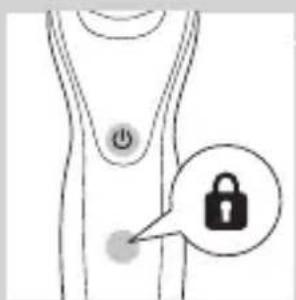
natural_image
Simple line drawing of a human body with a speech bubble containing a skull icon (no text or symbols)
natural_image
Diagram showing a hand pressing down on a surface with arrows indicating force direction, and an inset magnified view of two figures (no text or symbols present)
natural_image
Close-up of a mechanical component with a downward arrow indicating a force or direction (no text or symbols visible)
natural_image
Illustration of a person applying makeup to their face with a brush (no text or symbols)
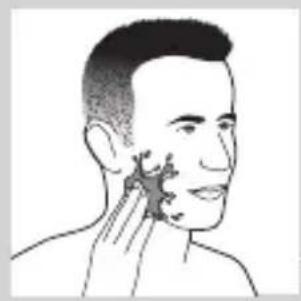
natural_image
Line drawing of a person's face with hand near ear area (no text or symbols)
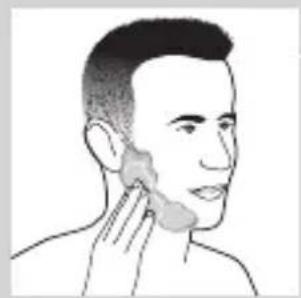
natural_image
Line drawing of a person's head and neck area with a cotton patch, no text or symbols present
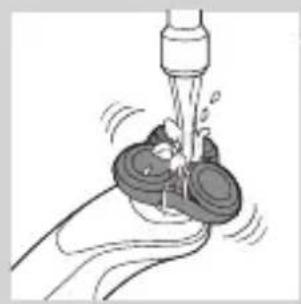
natural_image
Illustration of a hand washing a cup with water spray (no text or symbols)
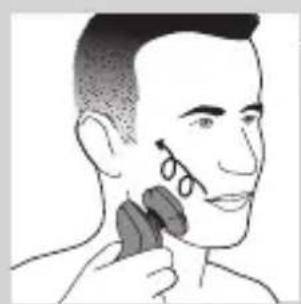
natural_image
Illustration of a person applying makeup to their ear with a brush (no text or symbols)
natural_image
Diagram showing a hand holding a device with a funnel and a cross symbol, no text or labels present
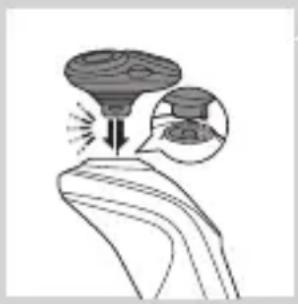
natural_image
Illustration of a funnel pouring liquid into a curved pipe, with an inset showing a graduation cap (no text or symbols)
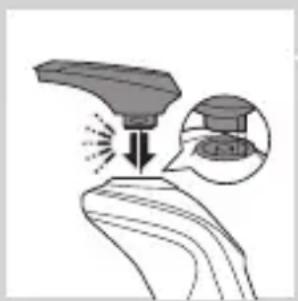
natural_image
Diagram showing a device emitting light onto a surface, with an inset close-up of its component (no text or symbols)
natural_image
Illustration of a person applying hair to their ear (no text or symbols present)
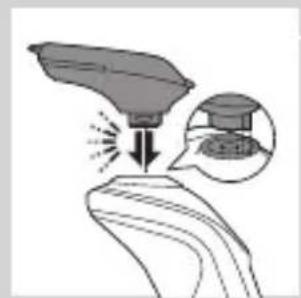
natural_image
Illustration of a hand holding a leaf with a magnified inset showing a small object (no text or symbols)
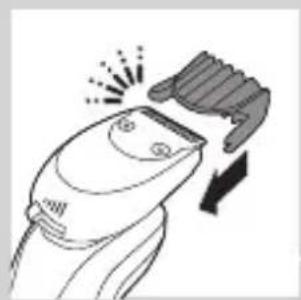
natural_image
Line drawing of a hairbrush cutting into a circular cutter (no text or symbols)
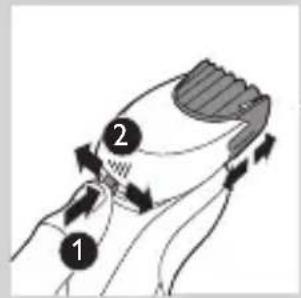
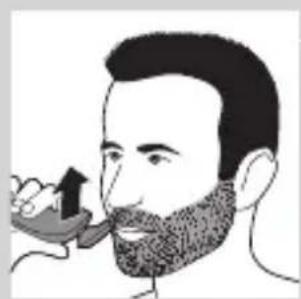
natural_image
Illustration of a man with a beard eating a spoon (no text or symbols)
natural_image
Illustration of two hands holding a tool with directional arrows indicating movement or force (no text or symbols present)
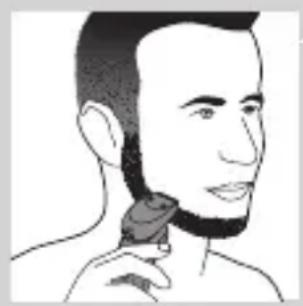
natural_image
Line drawing of a man's face with short hair and beard, holding a small object (no text or symbols)
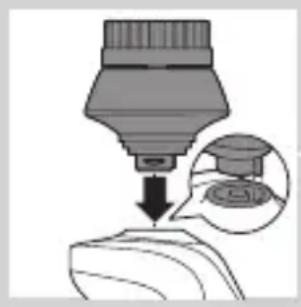
natural_image
Diagram showing a dropper tip dispensing liquid into a container, with an inset magnified view of the dropper (no text or symbols present)
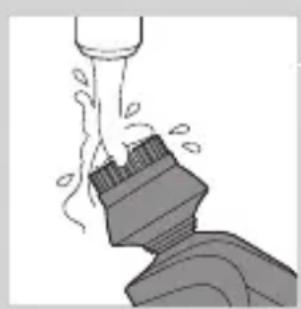
natural_image
Illustration of a mechanical component with motion lines indicating movement (no text or symbols)
natural_image
Illustration of a person applying facial care to their face with a tool, no text or symbols present
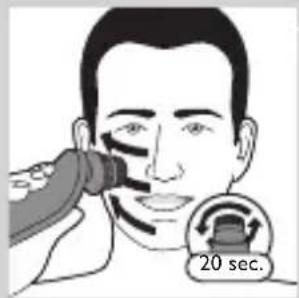
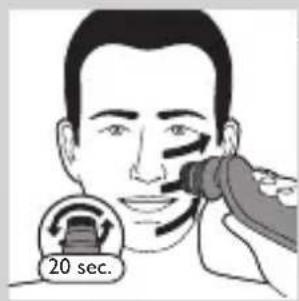
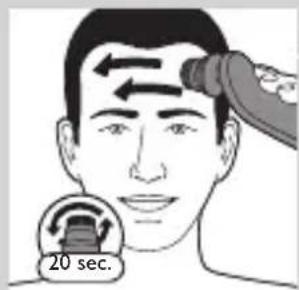
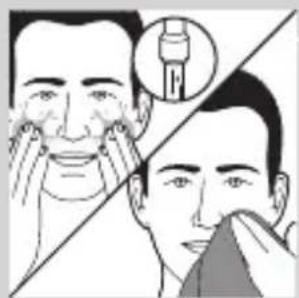
natural_image
Simple line drawing of a paintbrush with a cross mark, no text or symbols present
natural_image
Simple line drawing of a container with an upward arrow and label 'POTATO' (no text or symbols on the diagram itself)
natural_image
Diagram of a blender with a black arrow indicating a process or operation, no text or symbols present
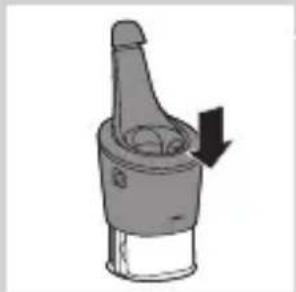
natural_image
Diagram of a mechanical component with a downward arrow indicating motion (no text or symbols)
natural_image
Close-up of a mechanical component with a downward arrow and a prohibition symbol (no text or labels)
natural_image
Diagram of a mechanical component with a downward arrow indicating force or direction (no text or symbols)
natural_image
Hand holding two circular buttons with power and spiral symbols, connected to a device (no text or labels visible)
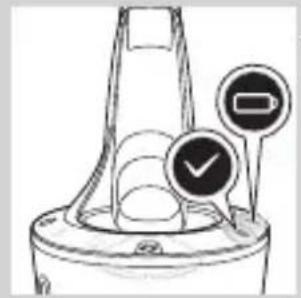
natural_image
Diagram of a funnel-shaped container with two circular indicators showing check and stop symbols (no text or labels)
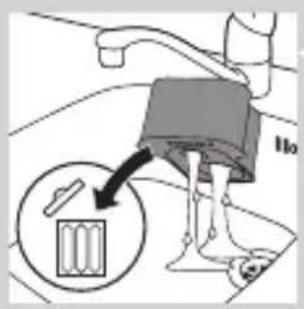

natural_image
Line drawing of a blender with a plug inserted into a container (no text or symbols)

natural_image
Diagram of a mechanical component with a downward arrow indicating motion (no text or symbols)
natural_image
Illustration of a hand washing a small object with motion lines indicating movement (no text or symbols)

natural_image
Illustration of a hand holding a circular object with an arrow pointing to a three-pin connector (no text or symbols)
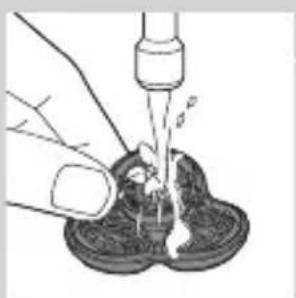
natural_image
Illustration of a hand using a pipette to lift a small object into a container (no text or symbols visible)

natural_image
Illustration of a hand holding a circular object with a downward arrow, alongside a magnified view of a mechanical component (no text or symbols)
natural_image
Illustration of a hand holding a circular object with an upward arrow, next to a stylized object (no text or symbols)
natural_image
Diagram showing a divided mechanical component with arrows indicating rotation or assembly (no text or symbols)
natural_image
Diagram showing two mechanical components with fluid flow, no text or symbols present
natural_image
Mechanical gear assembly diagram showing a rotating shaft and flange (no text or symbols)
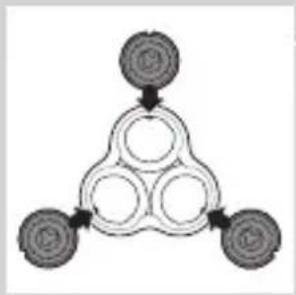
flowchart
graph TD
    A["Top Node"] --> B["Left Node"]
    B --> C["Center Node"]
    C --> D["Right Node"]
    D --> E["Bottom Node"]
natural_image
Diagram of a mechanical component with a circular top and downward arrow, no visible text or symbols
natural_image
Diagram showing two circular components with arrows and a checkmark, no readable text or symbols present
natural_image
Illustration of two hands holding a tool with directional arrows indicating movement or force (no text or symbols present)
natural_image
Illustration of two hands pouring liquid from a bottle onto a shoe and a shoe, separated by a diagonal line (no text or symbols)
natural_image
Two cartoon fish jumping over a diagonal line, one falling and the other wading (no text or symbols)
natural_image
Line drawing of a shoe being squeezed from a bottle into a container (no text or symbols)
natural_image
Illustration of a hand blowing bubbles with motion lines, accompanied by a circular icon showing a broken rock or geological feature (no text or symbols)
natural_image
Diagram of a mechanical component with a top cylindrical part and an upward arrow, no text or symbols present.
natural_image
Two identical diagrams showing a container being lifted by a tool, connected by a diagonal line (no text or symbols)
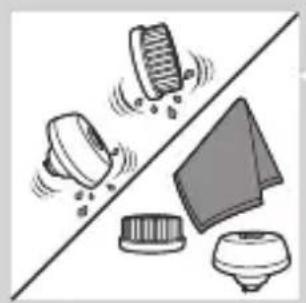
natural_image
Illustration of various household appliances and fixtures on a diagonal line (no text or symbols)
Säilytys
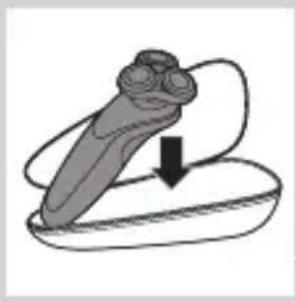
natural_image
Illustration of a mechanical component with an arrow indicating downward motion (no text or symbols)
natural_image
Simple line drawing of a dropper with a cap and nozzle (no text or symbols)
natural_image
Diagram of a mechanical component with a top cylindrical part and an upward arrow, no text or symbols present.
natural_image
Illustration of a hand holding a circular object with an arrow pointing to a three-pin device (no text or symbols)
natural_image
Illustration of a hand holding three circular objects with arrows indicating direction, alongside an inset showing a battery and a magnified view (no text or symbols)
flowchart
graph TD
    A[" "] --> B[" "]
    B --> C[" "]
    C --> D[" "]
    D --> A
natural_image
Diagram showing a circular object with a downward arrow emerging from a ring structure (no text or symbols)
natural_image
Diagram showing two mechanical components with arrows indicating motion or force, no text or symbols present
natural_image
Illustration of a hand holding a circular object with a downward arrow, above a magnified view of a three-petal object (no text or symbols)
natural_image
Symbol of a trash bin crossed out by two crossed lines (no text or labels)
natural_image
Illustration showing a tool interacting with a device and a foot, both on a diagonal line (no text or symbols)
1 Irrota takapaneelin ruuvi ruuvitaltalla. Irrota sitten takapaneeli.
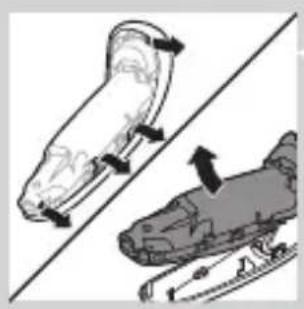
natural_image
Illustration of two skis with directional arrows indicating motion (no text or symbols)
natural_image
Diagram showing two car body parts with a directional arrow indicating movement or change (no text or symbols present)
natural_image
Diagram showing two mechanical components with a tool, one being inserted and the other holding a tool (no text or symbols present)
natural_image
No sign depicting a faucet without a shower, enclosed in a circle (no text or symbols)
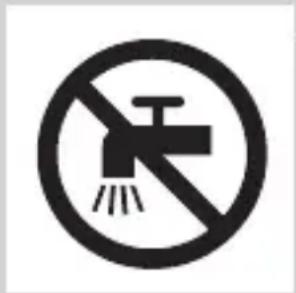
natural_image
Simple line drawing of a showerhead spraying over a water-filled container (no text or symbols)
natural_image
Diagram of a medical or laboratory procedure showing a pointed tool interacting with a star-shaped object (no text or symbols present)
natural_image
Diagram of a biological or mechanical structure with a labeled point '0' and an arrow pointing to a small feature (no text or symbols beyond the label)
natural_image
Diagram of a biological structure with a highlighted region and arrow, no text or symbols present
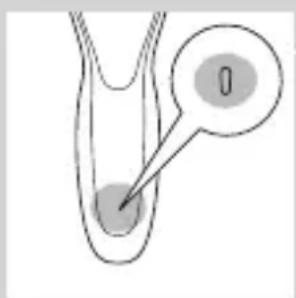
natural_image
Diagram of a biological structure with a labeled point '0' and a pointer arrow pointing to a circular feature (no text or symbols beyond the label)
natural_image
Diagram of a medical or laboratory procedure showing a pointed tool interacting with a star-shaped object (no text or symbols present)
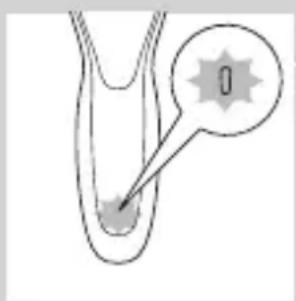
natural_image
Diagram of a biological or chemical structure with a labeled point '0' and an arrow pointing to a central feature (no text or symbols beyond the label)
natural_image
Diagram of a droplet inside a tube with an arrow pointing to a droplet (no text or labels)
natural_image
Simple line drawing of a human torso with a thought bubble showing a plug symbol (no text or labels)
natural_image
Simple line drawing of a human body with a speech bubble containing a skull icon (no text or symbols)
natural_image
Close-up of a mechanical component with a downward arrow indicating force or direction (no text or symbols)
natural_image
Illustration of a person applying a hair accessory to their face (no text or symbols present)
natural_image
Line drawing of a person's face with hand near ear area, showing skin texture (no text or symbols)
natural_image
Line drawing of a person applying a product to their ear (no text or symbols)
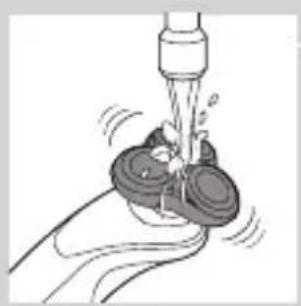
natural_image
Illustration of a hand using a tool to lift a small object, no text or symbols present
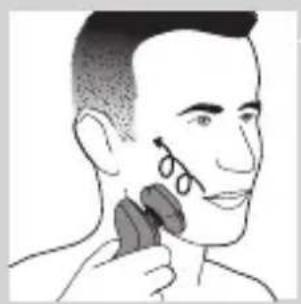
natural_image
Illustration of a person applying facial contour or mask to their ear (no text or symbols present)
natural_image
Diagram showing a hand holding a device with a bulb and a cross symbol, no text or labels present
natural_image
Diagram of a funnel pouring liquid into a curved pipe, with an inset showing a graduation cap (no text or symbols present)
natural_image
Diagram showing a spray gun on a surface with an inset close-up of the spray (no text or symbols)
natural_image
Line drawing of a person using a hairdryer (no text or symbols)
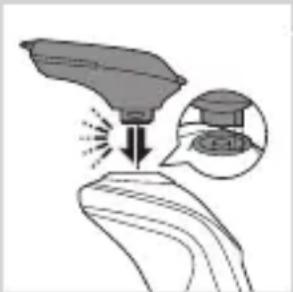
natural_image
Illustration of a hand holding a device with an arrow pointing to it, and a magnified inset showing a device inside (no text or symbols)
natural_image
Line drawing of a hairbrush cutting down a button with a downward arrow (no text or symbols)
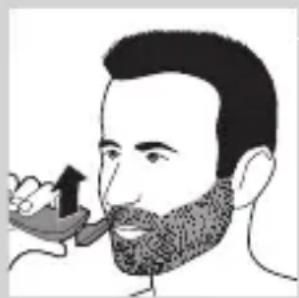
natural_image
Illustration of a man with a beard eating a spoon (no text or symbols)
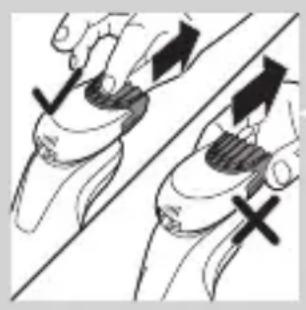
natural_image
Illustration of two hands holding a curved object with directional arrows indicating movement or force (no text or symbols)

natural_image
Line drawing of a person applying a hair accessory to their neck (no text or symbols)
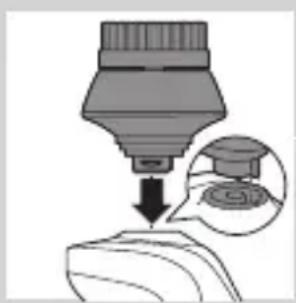
natural_image
Diagram showing a dropper dispensing liquid into a container with an inset magnified view of the lid (no text or symbols)
natural_image
Illustration of a mechanical component with motion lines indicating movement (no text or symbols)
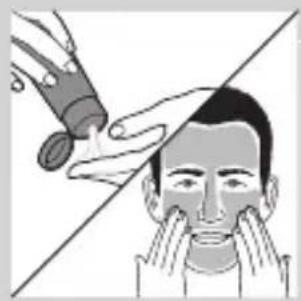
natural_image
Illustration of a person applying facial care to their face, with no visible text or symbols
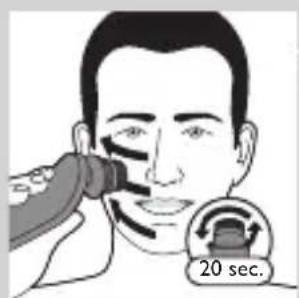

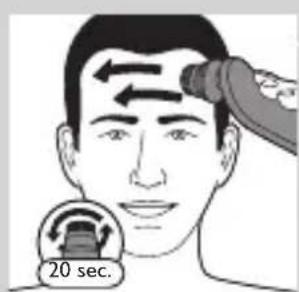
natural_image
Simple line drawing of a paintbrush with a cross mark and spray bottle, no text or symbols present
natural_image
Simple line drawing of a container with an upward arrow, no text or symbols present
natural_image
Diagram of a blender with a black arrow indicating the process (no text or symbols present)
natural_image
Diagram of a mechanical component with a downward arrow indicating rotation (no text or symbols)
natural_image
Illustration of a spray bottle with a stopper and a prohibition symbol (no text or labels)
natural_image
Close-up of a mechanical component with a downward arrow indicating force or direction (no text or symbols)
natural_image
Hand holding two circular buttons with a power symbol, next to a device (no text or labels visible)
natural_image
Diagram of a mechanical component with two circular indicators (one checked, one not checked) and a checkmark symbol, no readable text or labels present.
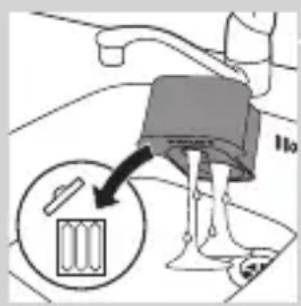
natural_image
Diagram of a blender with a black arrow pointing to its internal component (no text or symbols present)
natural_image
Diagram of a mechanical component with a downward arrow indicating motion (no text or symbols)
natural_image
Illustration of a hand washing a small object with a water dispenser (no text or symbols)
natural_image
Illustration of a hand holding a circular object with an arrow pointing to a three-pin knob (no text or symbols)
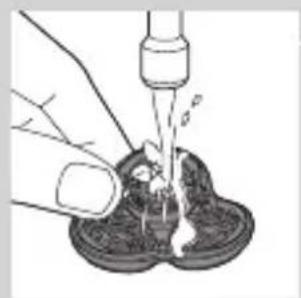
natural_image
Illustration of a hand pouring liquid into a container with a dropper (no text or symbols)
natural_image
Illustration of a hand holding a circular object with a downward arrow, partially overlaid on a mechanical component (no text or symbols)
natural_image
Illustration of a hand holding a circular object with an arrow pointing to a three-pin connector (no text or symbols)
natural_image
Diagram showing a gear assembly with three heads and a gear mechanism, no text or symbols present
natural_image
Diagram showing fluid flow between two vessels with bubbles and a central pipe (no text or symbols)
natural_image
Mechanical gear assembly diagram showing a rotating shaft and gear teeth (no text or labels)
flowchart
graph TD
    A[" "] --> B[" "]
    B --> C[" "]
    C --> D[" "]
    D --> A
natural_image
Diagram showing a circular object being lifted by a black arrow into a ring structure (no text or symbols)
natural_image
Diagram showing two circular components with arrows indicating motion or flow, separated by a diagonal line (no text or symbols)
natural_image
Illustration of two hands holding a grip with directional arrows indicating movement or force (no text or symbols)
natural_image
Illustration of two hands pouring liquid from a bottle onto a surface, separated by a diagonal line (no text or symbols)
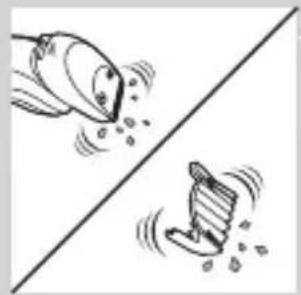
natural_image
Two cartoon fish jumping over a diagonal line, one falling and the other wading (no text or symbols)
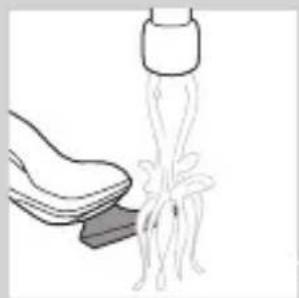
natural_image
Illustration of a hand holding a shoe next to a medical device with tubing (no text or symbols)
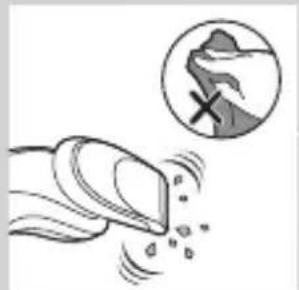
natural_image
Illustration of a hand holding a tool with motion lines and a magnified circular inset showing a broken surface (no text or symbols)
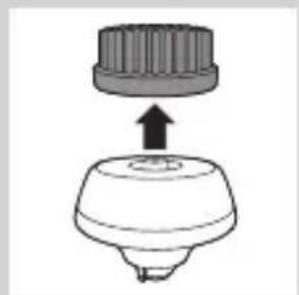
natural_image
Diagram of a mechanical component with a top cylindrical part and an upward arrow indicating motion (no text or symbols)
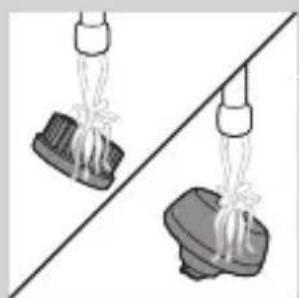
natural_image
Two hanging objects with ropes tied against a diagonal line, no text or symbols visible
natural_image
Illustration of mechanical components and a gear mechanism (no text or symbols)
natural_image
Illustration of a mechanical component with an arrow indicating downward motion (no text or symbols)
natural_image
Diagram of a hairbrush with a handle and spout, showing no text or symbols
natural_image
Diagram of a mechanical component with a top cylindrical part and an upward arrow, no text or symbols present.
natural_image
Simple line drawing of a human body with a speech bubble containing a skull icon (no text or symbols)
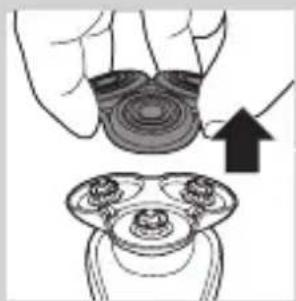
natural_image
Illustration of a hand holding a circular object with an arrow pointing to a three-pin connector (no text or symbols)
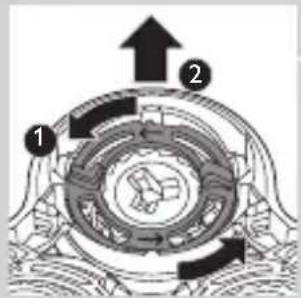
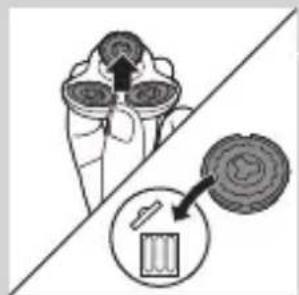
natural_image
Diagram showing a device with three circular components and a magnified view of a battery (no text or symbols)
natural_image
Diagram of a mechanical or electrical component with a circular top and downward arrow, no visible text or symbols
natural_image
Diagram showing two mechanical components with arrows indicating motion, separated by a diagonal line (no text or symbols)
natural_image
Illustration of a hand holding a circular object with a downward arrow, partially overlaid on a mechanical component (no text or symbols)
natural_image
Symbol of a waste bin with no text or labels, including a crossed-out box and a solid rectangle below (no readable text or symbols)
natural_image
Simple line drawing of a trash bin with crossed lines indicating no waste or discharge (no text or symbols)
natural_image
Illustration of a sewing machine tool and a sewing machine base, showing mechanical components without any text or symbols.
natural_image
Two illustrations of a scooter with directional arrows indicating motion, no text or symbols present
natural_image
Diagram showing two car body parts with arrows indicating movement or force, no text or symbols present
natural_image
Illustration of a robotic hand holding a tool, with an arrow indicating the process (no text or symbols present)
natural_image
No sign depicting a faucet without any text or symbols
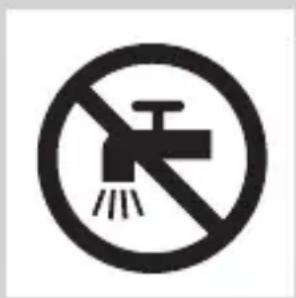
natural_image
No smoking sign with faucet symbol (no text or numbers)
natural_image
Simple line drawing of a showerhead spraying over water in a basin (no text or symbols)
natural_image
Diagram of a medical or laboratory procedure showing a pointed tool interacting with a central object, with an inset magnified view (no text or symbols)
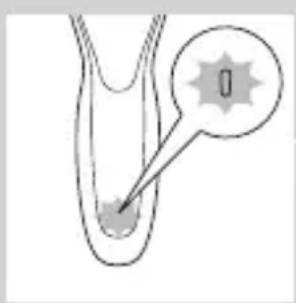
natural_image
Diagram of a biological or mechanical structure with a highlighted region and a starburst symbol (no text or labels)
natural_image
Diagram of a biological structure with a highlighted region and arrow, no text or symbols present
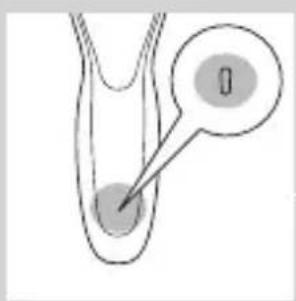
natural_image
Diagram of a biological structure with a labeled region (no text or symbols present)
natural_image
Diagram of a biological or medical structure with an arrow pointing to a star-shaped feature, no text or symbols present.
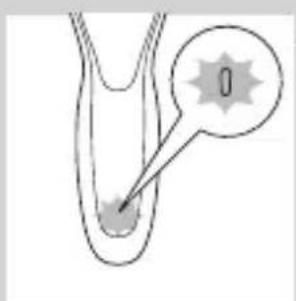
natural_image
Diagram of a biological or anatomical structure with a labeled point '0' and an arrow pointing to a feature (no text or symbols beyond the label)
natural_image
Diagram of a medical or laboratory procedure showing a pointed tube inserted into a container with an arrow pointing to it, and a magnified inset showing a droplet (no text or symbols present)
natural_image
Simple line drawing of a human body with a speech bubble containing a skull icon (no text or symbols)
natural_image
Illustration of a hand holding a small object with arrows indicating motion or force, and a magnified inset showing a close-up of a mechanical component (no text or symbols)
natural_image
Diagram of a mechanical component with a downward arrow indicating force or direction (no text or symbols)
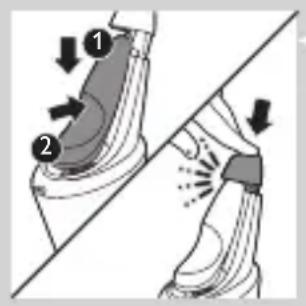
natural_image
Illustration of a person applying makeup to their face with a brush (no text or symbols)
natural_image
Line drawing of a person's face with hand near ear area, showing facial contour or skin texture (no text or symbols)
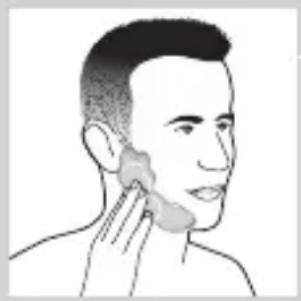
natural_image
Line drawing of a person applying a product to their ear (no text or symbols)
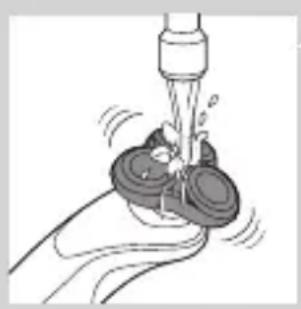
natural_image
Illustration of a hand using a tool to lift a small object, no text or symbols present
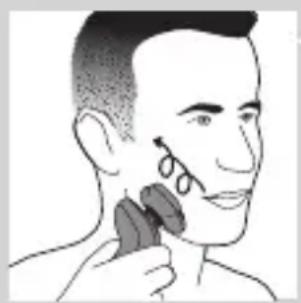
natural_image
Illustration of a person applying a hair accessory to their ear (no text or symbols present)
natural_image
Diagram showing a hand holding a device with a bulb and a cross symbol, no text or labels present
natural_image
Diagram of a funnel pouring liquid into a curved pipe, with an inset showing a graduation cap (no text or symbols)
natural_image
Diagram showing a spray gun on a surface with an inset close-up of its tip (no text or symbols)
natural_image
Line drawing of a person applying makeup to their ear (no text or symbols)
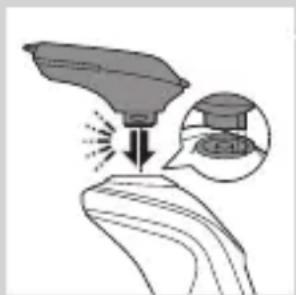
natural_image
Illustration of a spray gun on a surface with an inset showing the spray gun (no text or symbols present)
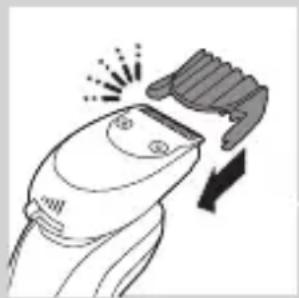
natural_image
Line drawing of a hairbrush cutting down a button with a downward arrow (no text or symbols)
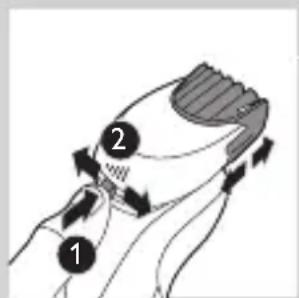
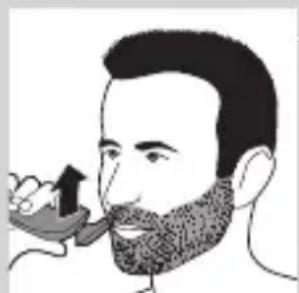
natural_image
Illustration of a man with beard and mustache eating a spoon (no text or symbols)
natural_image
Illustration of two hands holding a tool with directional arrows indicating movement or force (no text or symbols present)
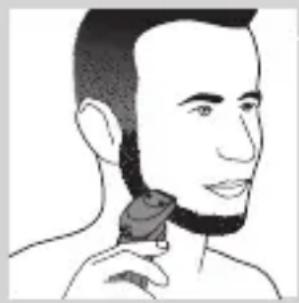
natural_image
Line drawing of a person applying a hair accessory to their neck (no text or symbols)
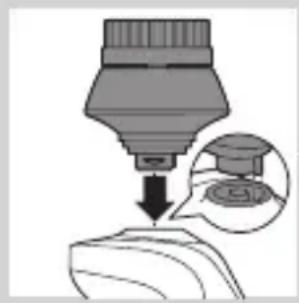
natural_image
Diagram showing a dropper dispensing liquid into a container with an inset magnified view of the dropper's tip (no text or symbols present)
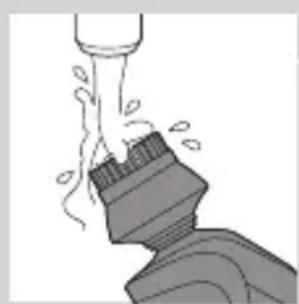
natural_image
Illustration of a mechanical component with motion lines indicating movement (no text or symbols)
natural_image
Illustration of a person applying facial care to their face, with no visible text or symbols
natural_image
Illustration showing two men applying facial care to their face, with a magnified inset of the first male figure (no text or symbols present)
natural_image
Simple line drawing of a paintbrush with a cross mark and spray effect (no text or symbols)
natural_image
Simple line drawing of a container with an upward arrow and label 'SWEET' (no text or symbols on the diagram itself)
ITALIANO254
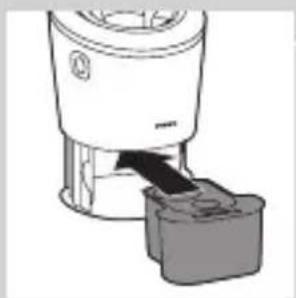
natural_image
Diagram of a blender with a black arrow pointing to its base, showing no text or symbols.
natural_image
Diagram of a mechanical component with a downward arrow indicating direction (no text or symbols)
natural_image
Illustration of a spray bottle with a stopper and a no-smoking symbol (no text or labels)
natural_image
Illustration of a hand holding a small object with arrows indicating motion or force, and an inset showing a magnified view of a mechanical component (no text or symbols)
natural_image
Diagram of a mechanical component with a downward arrow indicating force or direction (no text or symbols)
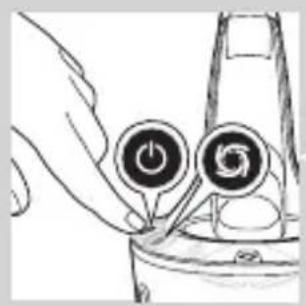
natural_image
Hand inserting a power button into a device (no text or symbols visible)

natural_image
Diagram of a mechanical component with two circular indicators (one checked, one not checked) and no visible text or symbols.
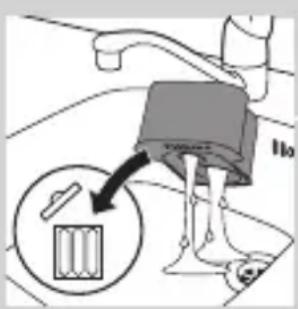
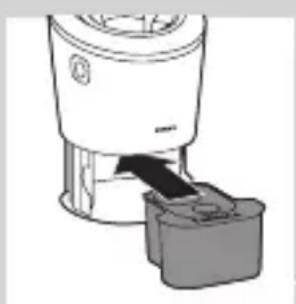
natural_image
Diagram of a blender with an arrow pointing to its internal component (no text or symbols present)
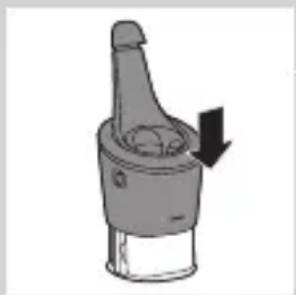
natural_image
Diagram of a mechanical component with a downward arrow indicating force or direction (no text or symbols)
natural_image
Illustration of a hand washing a small object with a water dispenser (no text or symbols)
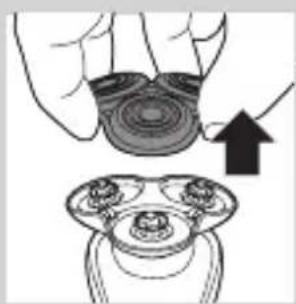
natural_image
Illustration of a hand holding a circular object with an upward arrow, next to a mechanical component (no text or symbols)
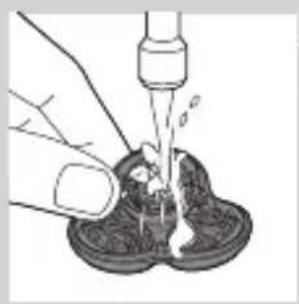
natural_image
Illustration of a hand using a pipette to lift a dark liquid into a container (no text or symbols)
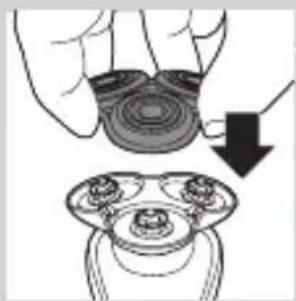
natural_image
Illustration of a hand holding a circular object with a downward arrow, alongside a close-up of a mechanical component (no text or symbols)
natural_image
Illustration of a hand holding a circular object with an arrow pointing to a three-petal mechanical component (no text or symbols)
natural_image
Diagram showing a divided container with three circular containers and an upward arrow indicating rotation (no text or symbols)
natural_image
Diagram showing two mechanical components with fluid flow, no text or symbols present
natural_image
Mechanical gear assembly diagram showing a rotating shaft with a downward arrow indicating motion (no text or symbols)
flowchart
graph TD
    A[" "] --> B[" "]
    B --> C[" "]
    C --> D[" "]
    D --> A
natural_image
Diagram showing a circular object being lifted by a downward arrow into a ring-like structure (no text or symbols)
natural_image
Diagram showing two circular components with arrows and a checkmark, no readable text or symbols present
natural_image
Illustration of two hands holding a curved object with directional arrows indicating movement or force (no text or symbols)
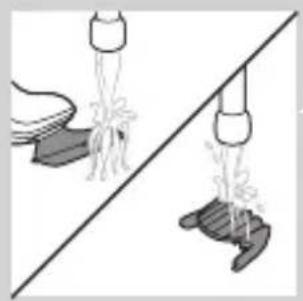
natural_image
Illustration of two hands pouring liquid from a bottle onto a shoe and a shoe, separated by a diagonal line (no text or symbols)
natural_image
Illustration of a shoe being lifted by a bag, showing the ball being lifted (no text or symbols)
natural_image
Illustration of a hand holding a small object with motion lines, emitting particles, and a circular inset showing a pile of food (no text or symbols)
natural_image
Simple line drawing of a mechanical component with a top and base, no text or symbols present.
natural_image
Two identical diagrams showing a hand holding a small object above and a larger object below, separated by a diagonal line (no text or symbols)
natural_image
Illustration of mechanical components including a drum, cloth, and baseplate arranged on a diagonal line (no text or symbols)
Conservazione
natural_image
Illustration of a mechanical component with an arrow indicating downward motion (no text or symbols)
natural_image
Diagram of a spray bottle with a handle and spout, showing internal structure (no text or symbols)
natural_image
Diagram of a mechanical component with a top cylindrical part and an upward arrow, no text or symbols present.
natural_image
Simple line drawing of a human body with a speech bubble containing a skull icon (no text or symbols)
natural_image
Illustration of a hand holding a circular object with an arrow pointing to a three-tiered mechanical component (no text or symbols)
natural_image
Diagram showing a hand holding three cups with arrows indicating direction, and a magnified inset showing a battery drop (no text or symbols)
flowchart
graph TD
    A[" "] --> B[" "]
    B --> C[" "]
    C --> D[" "]
    D --> A
natural_image
Diagram showing a circular object being lifted by a black arrow, forming a ring structure (no text or symbols)
natural_image
Diagram showing two mechanical components with arrows indicating motion, separated by a diagonal line (no text or symbols)
natural_image
Illustration of a hand holding a circular object with a downward arrow pointing to a three-cylinder-shaped object (no text or symbols)
natural_image
Symbol of a trash bin crossed with no visible text or labels
natural_image
Simple line drawing of a trash bin with no text or symbols
natural_image
Illustration of a medical procedure showing step-by-step insertion of a device into a patient's foot (no text or symbols present)
natural_image
Illustration of two mechanical components with directional arrows indicating motion (no text or symbols)
natural_image
Two mechanical components with arrows indicating motion or assembly, no visible text or symbols
natural_image
Illustration of two hands using a tool to lift a mechanical component, showing a black arrow indicating motion (no text or symbols present)
natural_image
No sign depicting a faucet without a shower, enclosed in a circle (no text or symbols)
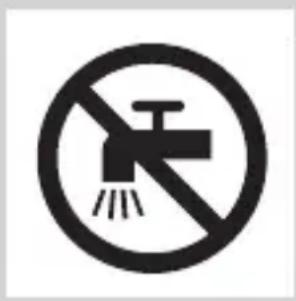
natural_image
No smoking sign with faucet symbol (no text or numbers)
natural_image
Simple line drawing of a showerhead spraying over a water-filled basin (no text or symbols)
natural_image
Diagram of a medical or laboratory procedure showing a pointed tool interacting with a central object, with an inset magnified view (no text or symbols)
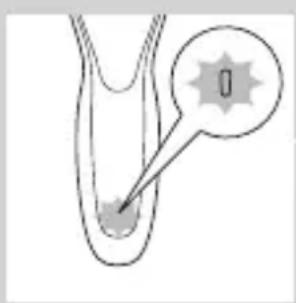
natural_image
Diagram of a biological or mechanical structure with a labeled point '0' and an arrow pointing to a small feature (no text or symbols beyond the label)
Accu vol
natural_image
Diagram of a biological structure with a magnified inset showing internal components (no text or labels)
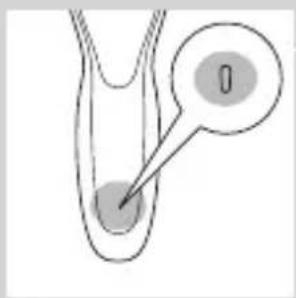
natural_image
Diagram of a biological structure with two circular regions and a pointer, no text or symbols present
natural_image
Diagram of a medical or laboratory procedure showing a pointed tool interacting with a star-shaped object (no text or symbols present)
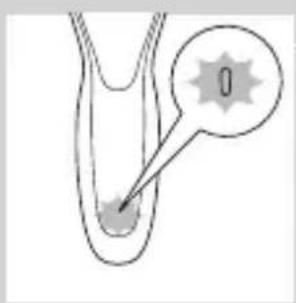
natural_image
Diagram of a biological or anatomical structure with a labeled point '0' and an arrow pointing to a feature (no text or symbols beyond the label)
natural_image
Diagram of a medical or laboratory procedure showing a pointed tube inserted into a container with an inset magnified view (no text or labels)
natural_image
Diagram showing a plug symbol pointing to a star-shaped object, with no readable text or labels
De reisvergrendeling deactiveren
natural_image
Simple line drawing of a human body with a speech bubble containing a skull icon (no text or symbols)
natural_image
Illustration of a hand holding a small object with arrows indicating motion or force, and a magnified inset showing a close-up of a mechanical component (no text or symbols)
natural_image
Diagram of a mechanical component with a downward arrow indicating force or direction (no text or symbols)
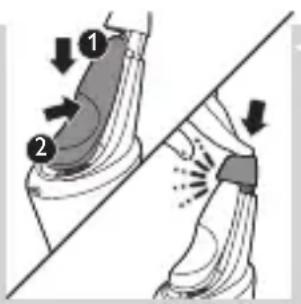
natural_image
Illustration of a person applying a hair product to their ear (no text or symbols)
natural_image
Illustration of a person's face with a hand touching the ear area (no text or symbols)
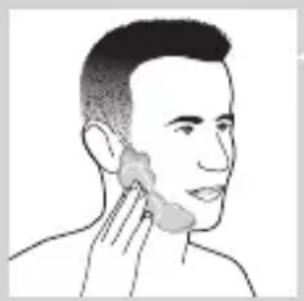
natural_image
Line drawing of a person applying a product to their ear (no text or symbols)
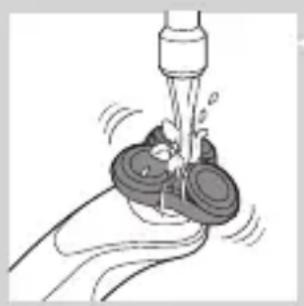
natural_image
Illustration of a hand using a tool to lift a cup (no text or symbols visible)
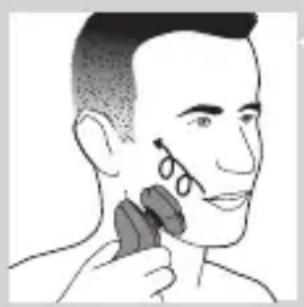
natural_image
Illustration of a person applying makeup to their face with a brush (no text or symbols)
natural_image
Diagram showing a hand holding a device with a bulb and a cross symbol, no text or labels present
natural_image
Illustration of a funnel pouring liquid into a curved pipe, with an inset showing a graduation cap (no text or symbols)
natural_image
Illustration of a spray gun on a curved surface with an inset showing the tip and spray (no text or symbols)
natural_image
Line drawing of a person applying a hair accessory to their ear (no text or symbols)
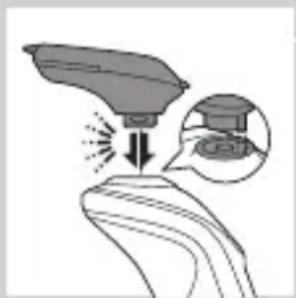
natural_image
Illustration of a hand holding a device with an arrow indicating motion or force, and an inset showing a close-up of the device (no text or symbols present)
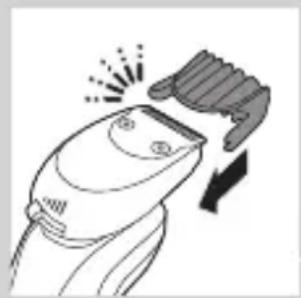
natural_image
Line drawing of a hairbrush cutting into a pair of scissors (no text or symbols)
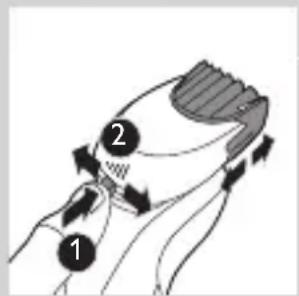
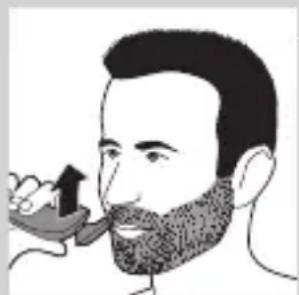
natural_image
Illustration of a man with a beard eating a spoon (no text or symbols)
natural_image
Illustration of two hands holding a tool with directional arrows indicating movement or force (no text or symbols)

natural_image
Line drawing of a person applying a hair product to their neck (no text or symbols)
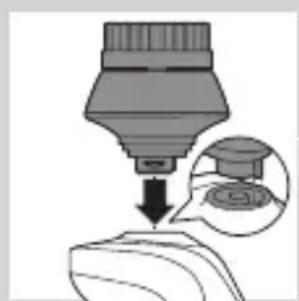
natural_image
Illustration of a dropper dispensing liquid into a container with an inset showing a graduation cap (no text or symbols present)
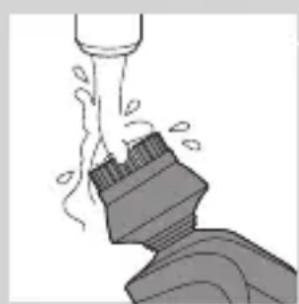
natural_image
Illustration of a mechanical component with motion lines indicating movement (no text or symbols)
natural_image
Illustration of a person applying facial care to their face, with no visible text or symbols
natural_image
Illustration showing two facial expressions with a magnified inset of the first face (no text or symbols)
natural_image
Simple line drawing of a paintbrush with a cross mark and spray effect (no text or symbols)
natural_image
Simple line drawing of a container with an upward arrow, no text or symbols present
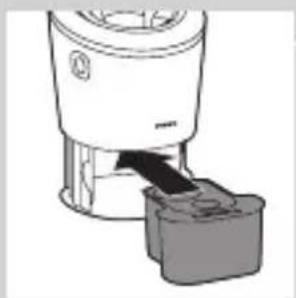
natural_image
Diagram of a blender with a black arrow pointing to its base, showing mechanical components (no text or symbols)
natural_image
Diagram of a mechanical component with a downward arrow indicating direction (no text or symbols)
natural_image
Close-up of a dropper tip with a stopper and a prohibition symbol (no text or labels)
natural_image
Illustration of a hand holding a small object with arrows indicating motion or force, and an inset showing a magnified view of a mechanical component (no text or symbols)
natural_image
Simple line drawing of a mechanical component with a downward arrow indicating force or direction (no text or symbols)
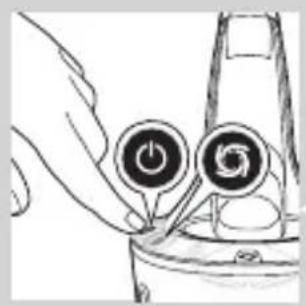
natural_image
Hand holding a device with two circular buttons and a power button, no visible text or symbols
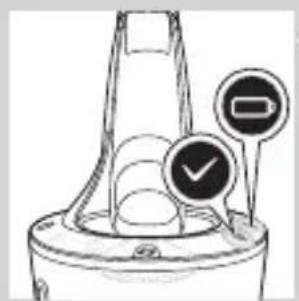
natural_image
Diagram of a mechanical component with two circular indicators (one checked, one not checked) and no visible text or symbols.
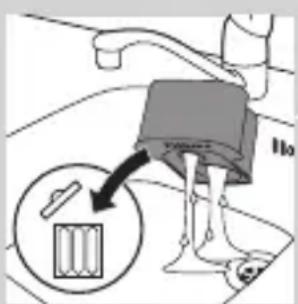
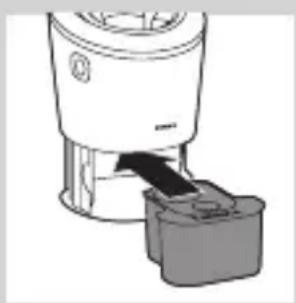
natural_image
Diagram of a blender with an arrow pointing to its internal component (no text or symbols present)
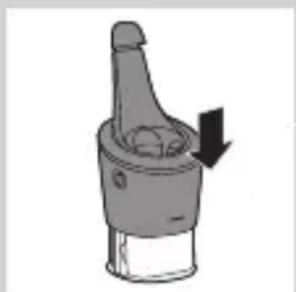
natural_image
Illustration of a mechanical component with a downward arrow indicating force or motion (no text or symbols)
natural_image
Illustration of a hand washing a cup with a water dispenser (no text or symbols)
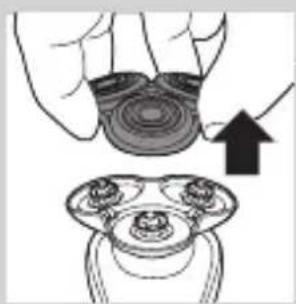
natural_image
Illustration of a hand holding a circular object with an arrow pointing to a three-pin connector (no text or symbols)
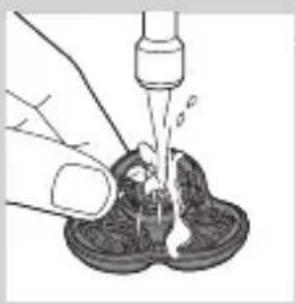
natural_image
Illustration of a hand using a pipette to lift a small object into a dark container (no text or symbols)
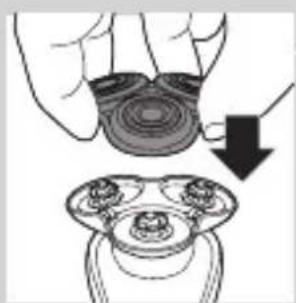
natural_image
Illustration of a hand holding a circular object with a downward arrow pointing to a three-pin connector (no text or symbols)
natural_image
Illustration of a hand holding a circular object with an upward arrow, alongside a close-up of a mechanical component (no text or symbols)
natural_image
Diagram showing a hand holding three circular objects with arrows indicating rotation or movement, separated by a diagonal line (no text or symbols)
natural_image
Illustration of a showerhead spraying water onto a surface, showing mechanical components and spray (no text or symbols)
natural_image
Mechanical gear assembly diagram showing a rotating shaft and housing (no text or symbols)
natural_image
Diagram of a mechanical or electrical component with a circular top and downward arrow, no visible text or symbols
natural_image
Diagram showing two mechanical components with arrows indicating motion, no text or symbols present
natural_image
Illustration of two hands holding a tool, with arrows indicating movement or force direction (no text or symbols)
natural_image
Illustration of two hands pouring liquid from a bottle onto a surface, separated by a diagonal line (no text or symbols)
natural_image
Illustration of two fish separated by a diagonal line, one falling and the other wading (no text or symbols)
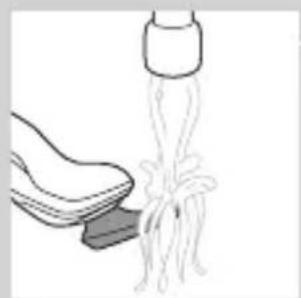
natural_image
Illustration of a shoe being lifted by a bag (no text or symbols)
natural_image
Illustration of a hand holding a small object with motion lines, accompanied by a circular icon showing a mountain (no text or symbols)
natural_image
Diagram of a mechanical component with a top cylindrical part and an upward arrow indicating motion (no text or symbols)
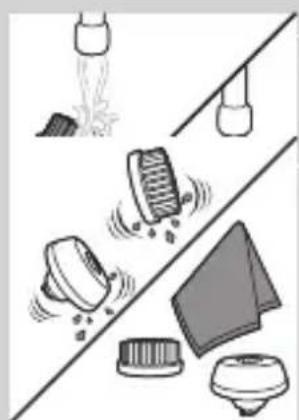
natural_image
Illustration of cleaning tools including spray, filter, and cloth (no text or symbols)
Opbergen
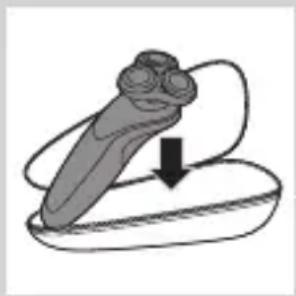
natural_image
Illustration of a medical device with a downward arrow indicating compression or disassembly (no text or symbols)
natural_image
Simple line drawing of a spray bottle with a handle and spout (no text or symbols)
natural_image
Diagram of a mechanical component with a top cylindrical part and an arrow indicating upward motion (no text or symbols)
natural_image
Simple line drawing of a human body with a speech bubble containing a skull icon (no text or symbols)
natural_image
Illustration of a hand holding a circular object with an arrow pointing to a three-petal knob (no text or symbols)
natural_image
Diagram showing a device with three circular components and a magnified view of a battery (no text or symbols)
flowchart
graph TD
    A[" "] --> B[" "]
    B --> C[" "]
    C --> D[" "]
    D --> A
natural_image
Diagram of a mechanical or electrical component with a circular top and downward arrow, no visible text or symbols
natural_image
Diagram showing two circular components with arrows and a checkmark, no readable text or symbols present
natural_image
Illustration of a hand holding a circular object with a downward arrow, next to a magnified view of a mechanical component (no text or symbols)
natural_image
Symbol of a waste bin with no text or labels, including a crossed-out box and a solid rectangle below (no readable text or symbols)
natural_image
Symbol of a trash bin crossed out by two crossed lines, representing waste or discharge (no text or labels)
natural_image
Illustration of a hand turning a small boat with a tool, alongside a separate view of the same vessel (no text or symbols present)
natural_image
Illustration of two mechanical components with directional arrows indicating motion (no text or symbols)
natural_image
Two mechanical components with arrows indicating motion or assembly, no visible text or symbols
natural_image
Illustration of two hands using a tool to adjust or install a component, with no visible text or symbols.
natural_image
No smoking sign with faucet symbol (no text)
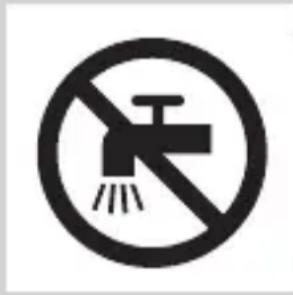
natural_image
No smoking sign with faucet symbol (no text)
Forsiktig
natural_image
Simple line drawing of a showerhead spraying over water in a container (no text or symbols)
- Det kan dryppe vann fra kontakten i bunnen av barbermaskinen når du skyller den.
Dette er normalt og ikke farlig fordi all elektronikk er plassert i et forseglet drivverk inne i barbermaskinen.
natural_image
Diagram of a medical or laboratory procedure showing a pointed tool interacting with a central object (no text or symbols present)
natural_image
Diagram of a biological structure with a highlighted region and arrow, no text or symbols present
natural_image
Diagram of a biological or medical structure with an arrow pointing to a star-shaped feature, no text or symbols present.
Når batteriet er nesten tomt, blinker den nederste lampen oransje.
natural_image
Diagram of a biological structure with a labeled point '0' and a starburst symbol (no text or symbols present)
natural_image
Diagram of a medical or laboratory procedure showing a pointed tool interacting with a circular component (no text or symbols present)
natural_image
Simple line drawing of a human body with a speech bubble containing a skull icon (no text or symbols)
Ladingen tar ca. én time.
natural_image
Illustration of a hand holding a small object with arrows indicating motion or force, and an inset showing a cross-section of two figures (no text or symbols present)
natural_image
Simple line drawing of a mechanical component with a downward arrow indicating force or direction (no text or symbols)
4 Hold barbermaskinen opp ned over holderen. Kontroller at forsiden av barbermaskinen vender mot SmartClean-systemet.
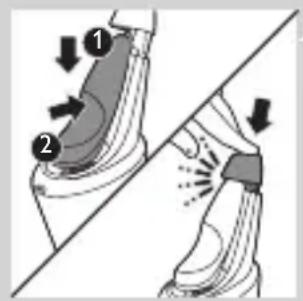
natural_image
Illustration of a person applying makeup to their face with a brush (no text or symbols)
natural_image
Line drawing of a person's face with hand near ear area (no text or symbols)
2 Smør huden med barberskum eller barbergel.
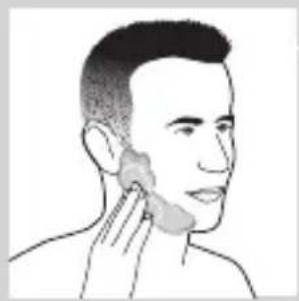
natural_image
Line drawing of a person applying a product to their ear (no text or symbols)
natural_image
Illustration of a hand using a water tap to lift a small object (no text or symbols visible)
4 Slå på apparatet.
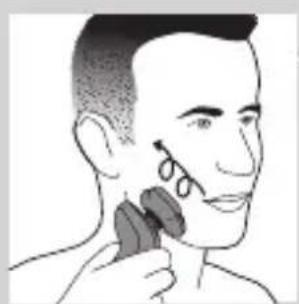
natural_image
Illustration of a person applying a hair product to their face (no text or symbols)
natural_image
Diagram showing a funnel with a cross symbol and an upward arrow, no text or labels present
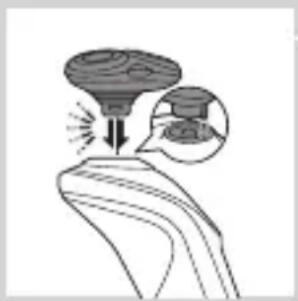
natural_image
Illustration of a funnel pouring liquid into a curved pipe, with an inset showing a graduation cap (no text or symbols)
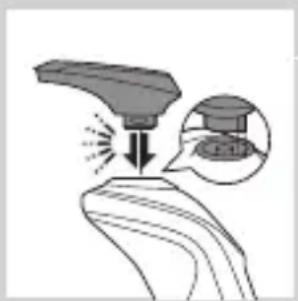
natural_image
Illustration of a spray gun on a surface with an inset showing the tip and spray (no text or symbols)
natural_image
Line drawing of a person applying makeup to their ear (no text or symbols)
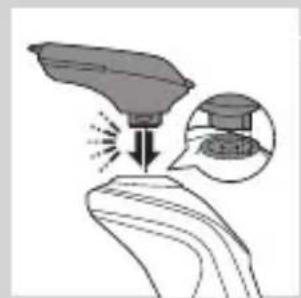
natural_image
Illustration of a hand holding a leaf with a magnified inset showing a small object (no text or symbols)
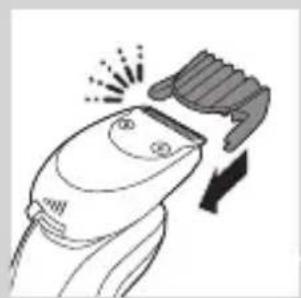
natural_image
Illustration of a hairbrush cutting down with a downward arrow indicating compression (no text or symbols)
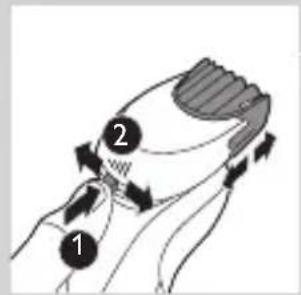
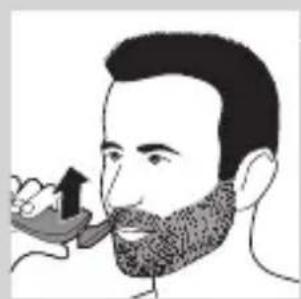
natural_image
Illustration of a man with a beard eating a pipe (no text or symbols)
natural_image
Illustration of two hands holding a tool, with arrows indicating movement or force direction (no text or symbols)

natural_image
Line drawing of a person applying a hair accessory to their neck (no text or symbols)
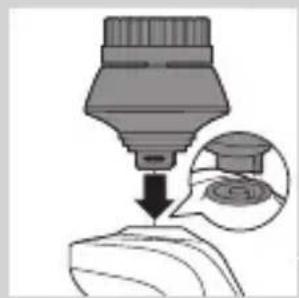
natural_image
Illustration of a dropper tip dispensing liquid into a container, with an inset showing a magnified view of the dropper (no text or symbols present)

natural_image
Illustration of a pipe jet dropping liquid into a container with steam (no text or symbols)
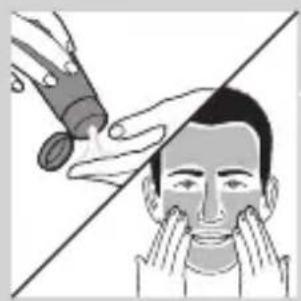
natural_image
Illustration of a hand applying product to a person's face, showing facial features (no text or symbols)
natural_image
Simple line drawing of a paintbrush with a cross mark and spray, no text or symbols present
Ikke vipp SmartClean-systemet. På den måten unngår du lekkasje.
natural_image
Simple line drawing of a container with an upward arrow and label 'BASIL' (no text or symbols on the diagram itself)
natural_image
Illustration of a blender with a black arrow pointing to its interior (no text or symbols)
natural_image
Mechanical component diagram showing a lever mechanism with a downward arrow indicating motion (no text or symbols)
6 Skyv den øvre delen av SmartClean-systemet tilbake ned (du skal høre et klikk).
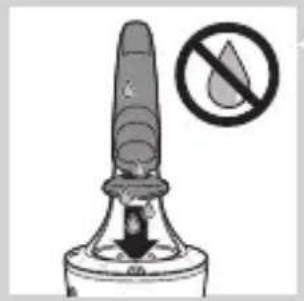
natural_image
Illustration of a fire extinguisher with a prohibition symbol (no text or labels)
Bruke SmartClean-systemet
natural_image
Illustration of a hand holding a small object with arrows indicating motion or force, and an inset showing a close-up of a mechanical component (no text or symbols)
natural_image
Simple line drawing of a mechanical component with a downward arrow, no text or symbols present.
2 Hold barbermaskinen opp ned over holderen. Kontroller at forsiden av barbermaskinen vender mot SmartClean-systemet.
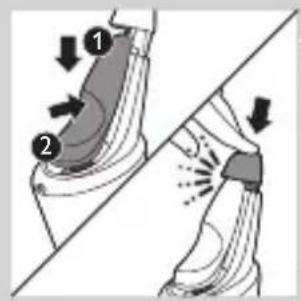
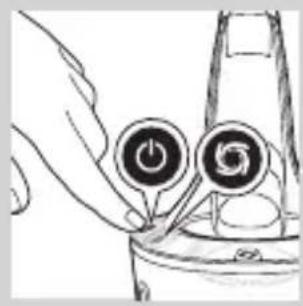
natural_image
Hand holding two circular buttons with 'Power' and 'Spiral' symbols, next to a container (no text or labels visible)
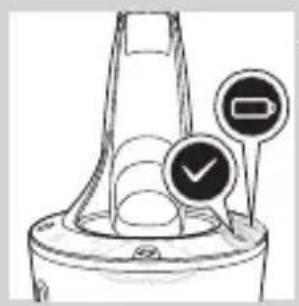
natural_image
Technical line drawing of a mechanical component with two circular indicators (no text or symbols)
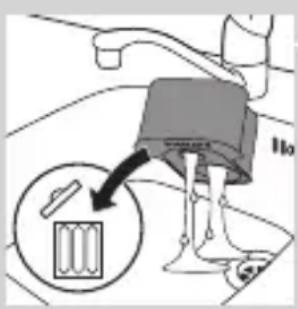
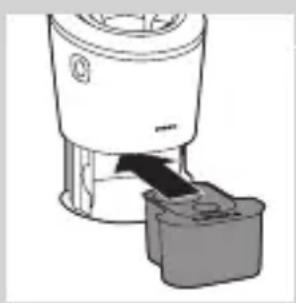
natural_image
Diagram of a blender with a black arrow pointing to its base (no text or symbols present)
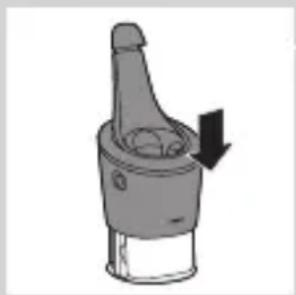
natural_image
Illustration of a mechanical component with a downward arrow indicating force or direction (no text or symbols)
Skifte ut patronen i SmartClean-systemet
natural_image
Illustration of a hand washing a cup with water spray (no text or symbols)
natural_image
Illustration of a hand holding a circular object with an arrow pointing to a device component (no text or symbols present)
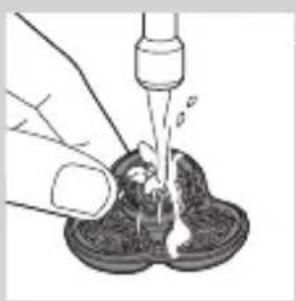
natural_image
Illustration of a hand pouring liquid into a container with a dropper (no text or symbols)
3 Skyll skjærehodeholderen under varmt rennende vann i 30 sekunder.
natural_image
Illustration of a hand holding a circular object with a downward arrow, next to a magnified view of three circular objects (no text or symbols)
natural_image
Illustration of a hand holding a circular object with an arrow pointing to a mechanical component (no text or symbols present)
natural_image
Diagram showing a divided mechanical component with three circular parts and upward arrows indicating motion or assembly (no text or symbols)
natural_image
Diagram showing two mechanical components with fluid flow, no text or symbols present
natural_image
Mechanical gear assembly diagram showing a central shaft and surrounding gears (no text or labels)
natural_image
Diagram showing a circular object being lifted by a black arrow, forming a ring structure (no text or symbols)
natural_image
Diagram showing two circular components with arrows indicating motion, separated by a diagonal line (no text or symbols)
natural_image
Illustration of two hands holding a tool with directional arrows indicating movement or force (no text or symbols present)
natural_image
Illustration of two hands pouring liquid from a bottle onto a surface, separated by a diagonal line (no text or symbols)
2 Slå på apparatet.
natural_image
Illustration of two fish jumping over a diagonal line, one falling and the other rising (no text or symbols)
natural_image
Illustration of a shoe being lifted by a string, showing the blade and handle (no text or symbols)
natural_image
Illustration of a hand holding a tool with motion lines, accompanied by a circular icon showing a mountain (no text or symbols)
natural_image
Diagram of a mechanical component with a top cylindrical part and an upward arrow, no text or symbols present.
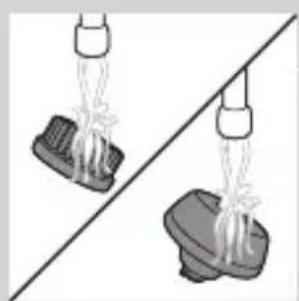
natural_image
Two hanging objects with ropes tied against a diagonal line, no text or symbols present

natural_image
Illustration of mechanical components and a gear (no text or symbols)
natural_image
Two-step illustration showing a hairpin being inserted into a plastic cup, with no text or symbols present.
natural_image
Diagram of a mechanical component with a cylindrical top and a base, showing an upward arrow (no text or symbols)
natural_image
Simple line drawing of a human body with a speech bubble containing a skull icon (no text or symbols)
natural_image
Illustration of a hand holding a circular object with an arrow pointing to it, alongside a separate view of a three-cylinder object (no text or symbols)
natural_image
Diagram showing a hand holding three circular objects above a divided line, with an inset illustrating the process of adding a cylindrical object (no text or symbols present)
natural_image
Diagram showing a circular object being lifted by a black arrow, with no visible text or symbols.
natural_image
Diagram showing a mechanical assembly with arrows indicating motion or force direction (no text or symbols)
natural_image
Illustration of a hand holding a circular object with a downward arrow, next to a magnified view of a mechanical component (no text or symbols)
natural_image
Symbol of a trash bin crossed with no visible text or labels
natural_image
Simple line drawing of a trash bin with crossed x-bracing (no text or symbols)
natural_image
Illustration of a medical procedure with surgical tools and a separate view of a patient's abdomen (no text or symbols present)
Ta bare ut det oppladbare batteriet når du avhender barbermaskinen. Kontroller at batteriet er helt tomt når du tar det ut.
natural_image
Illustration of two mechanical components with directional arrows indicating motion (no text or symbols)
natural_image
Two views of a mechanical component with a diagonal line and an arrow indicating motion (no text or symbols)
natural_image
Illustration of two robotic arms with a tool, one open and the other closed, against a diagonal line (no text or symbols)
4 Ta ut batteriholderen, og klipp over batterifikene med en avbitertang.
Garanti og støtte
Hvis du trenger kundestøtte eller informasjon, kan du gå til www.philips.com/support eller lese i garantiheftet.
Begrensninger i garantien
natural_image
No sign depicting a faucet without a shower, enclosed in a circle (no text or symbols)
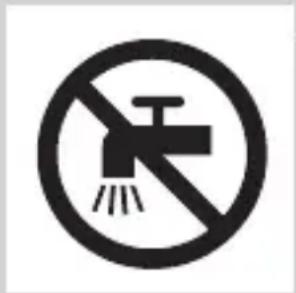
natural_image
Simple line drawing of a showerhead spraying over water in a container (no text or symbols)
natural_image
Diagram of a medical or laboratory procedure showing a cross-sectional view with an inset magnified view (no text or symbols)
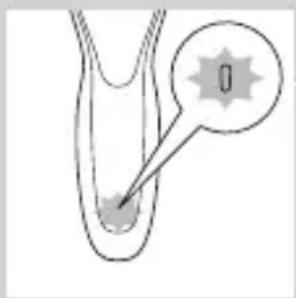
natural_image
Diagram of a biological or anatomical structure with a labeled point '0' and a pointer arrow, no readable text or symbols present.
- Indicador de carga da bateria com 1 luz
Bateria fraca
- Indicador de carga da bateria com 1 luz
natural_image
Diagram of a medical or laboratory procedure showing a pointed tool inserted into a tube with a magnified inset (no text or labels)
natural_image
Simple line drawing of a human torso with a padlock icon and a star on the chest (no text or symbols)
natural_image
Simple line drawing of a human body with a speech bubble containing a skull icon (no text or symbols)
1 Introduza a ficha pequena no aparelho e coloque o adaptador na tomada eléctrica.
Carregamento no sistema SmartClean (apenas modelos específicos)
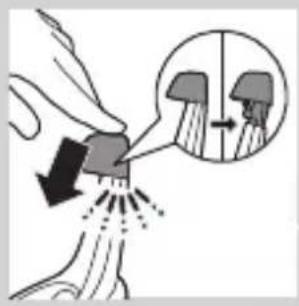
1 Introduza a ficha pequena no sistema SmartClean.
2 Ligue o adaptador à tomada eléctrica.
natural_image
Diagram of a mechanical component with a downward arrow indicating force or direction (no text or symbols)
natural_image
Illustration of a person applying a hairpin to their face (no text or symbols present)
natural_image
Line drawing of a person's face with hand near ear area, showing facial contour or skin texture (no text or symbols)
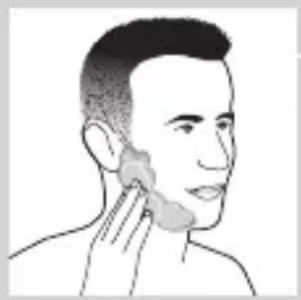
natural_image
Line drawing of a person applying a product to their ear (no text or symbols)
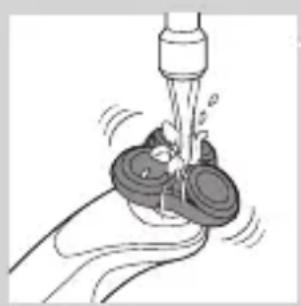
natural_image
Illustration of a hand using a tool to lift a small object, no text or symbols present
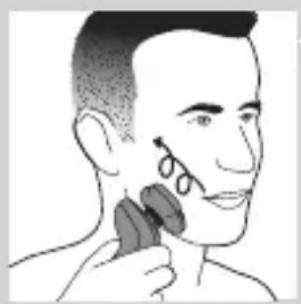
natural_image
Illustration of a person applying a hair accessory to their face (no text or symbols present)
Barbear a pele húmida
natural_image
Diagram showing a hand holding a device with a circular component and a cross symbol, no text or labels present.
natural_image
Diagram of a funnel pouring liquid into a curved pipe, with an inset showing a graduation cap (no text or symbols)
natural_image
Diagram showing a spray gun on a surface with an inset close-up of its tip (no text or symbols)
natural_image
Line drawing of a person using a hairdryer (no text or symbols present)
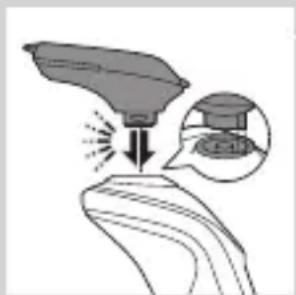
natural_image
Illustration of a spray gun on a surface with an inset showing the spray gun (no text or symbols present)
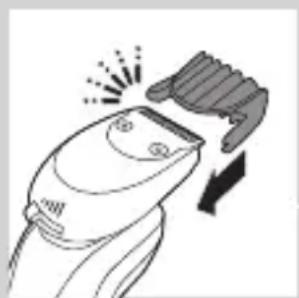
natural_image
Line drawing of a hairbrush cutting into a toothbrush with a downward arrow (no text or symbols)
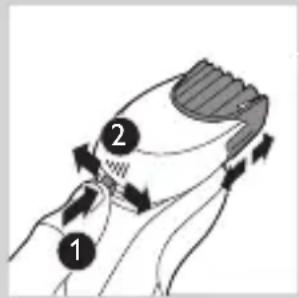
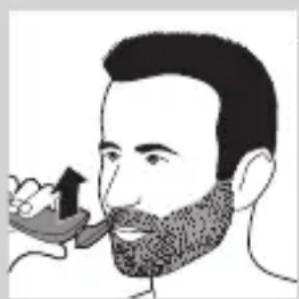
natural_image
Illustration of a man smoking a pipe with a beanie (no text or symbols)
natural_image
Illustration of two hands holding a tool with directional arrows indicating movement or force (no text or symbols present)
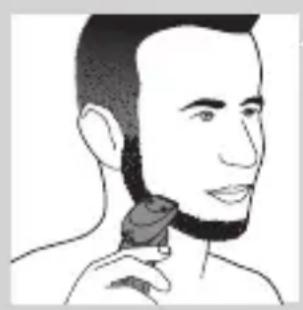
natural_image
Line drawing of a person applying a hair product to their neck (no text or symbols)
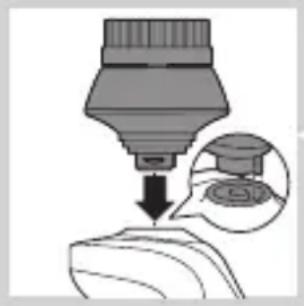
natural_image
Illustration of a dropper dispensing liquid into a container with an inset showing the same dropper (no text or symbols present)
natural_image
Illustration of a mechanical component with fluid flow, no text or symbols present
natural_image
Illustration of a person applying facial care to their face, with no visible text or symbols
natural_image
Simple line drawing of a paintbrush with a cross mark and spray, no text or symbols present
natural_image
Simple line drawing of a container with an upward arrow, no text or symbols present
4 Retire o selo da recarga de limpeza.
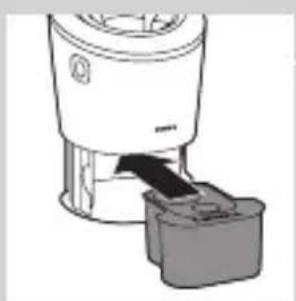
natural_image
Illustration of a blender with a black arrow pointing to its lid (no text or symbols)
natural_image
Diagram of a mechanical component with a downward arrow indicating direction (no text or symbols)
natural_image
Illustration of a spray bottle with a stopper and a prohibition symbol (no text or labels)
Utilizar o sistema SmartClean
natural_image
Illustration of a hand pouring liquid into a container with an inset showing a cross-section of a container (no text or symbols)
natural_image
Close-up of a mechanical component with a downward arrow indicating force or direction (no text or symbols)
natural_image
Hand holding two circular buttons with a power symbol, connected to a device (no text or labels visible)
4 Prima o botão ligar/desligar no sistema SmartClean para iniciar o programa de limpeza.
- Durante o programa de limpeza (que demora aprox. 10 minutos), o símbolo de limpeza fica intermitente.
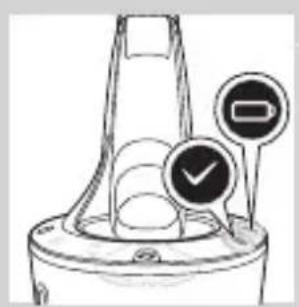
natural_image
Illustration of a funnel-shaped container with two circular indicators (one checked, one not checked) and no visible text or symbols.
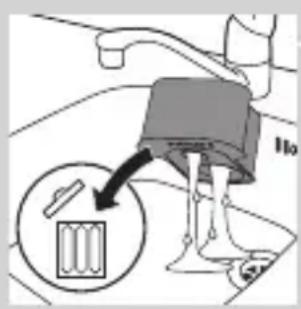
natural_image
Diagram of a blender with a black arrow pointing to its internal component (no text or symbols present)
natural_image
Diagram of a mechanical component with a downward arrow indicating rotation (no text or symbols)
Limpeza da máquina de barbear à torneira
natural_image
Illustration of a hand washing a small object with a water dispenser (no text or symbols)
natural_image
Illustration of a hand holding a circular object with an arrow pointing to it, alongside a close-up of a mechanical component (no text or symbols)
PORTUGUÊS358
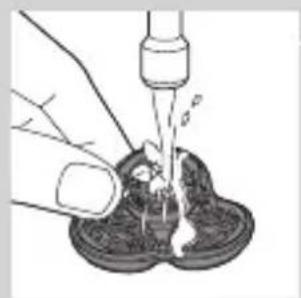
natural_image
Illustration of a hand pouring liquid into a container with a dropper (no text or symbols)
natural_image
Illustration of a hand holding a circular object with a downward arrow pointing to a three-cylinder-shaped object (no text or symbols)
natural_image
Illustration of a hand holding a circular object with an arrow pointing to a three-pin knob (no text or symbols)
natural_image
Diagram showing a device with three circular components and an arrow indicating direction, intersected by a diagonal line (no text or symbols)
natural_image
Diagram showing two mechanical components with fluid flow, no text or symbols present
natural_image
Mechanical gear assembly diagram showing a rotating shaft and gear teeth (no text or labels)
flowchart
graph TD
    A["Top Circle"] --> B["Three Circles"]
    B --> C["Bottom Circle"]
    C --> D["Three Circles"]
    D --> A
natural_image
Diagram showing a circular object being lifted by a black arrow, forming a ring structure (no text or symbols)
natural_image
Diagram showing two circular components with arrows indicating direction, one crossed over the other by a diagonal line (no text or symbols)
natural_image
Illustration of two hands holding a grip with directional arrows indicating movement (no text or symbols)
natural_image
Illustration of two hands pouring liquid from a container onto a surface, separated by a diagonal line (no text or symbols)
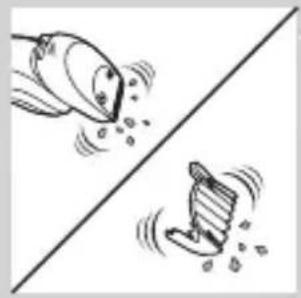
natural_image
Two cartoon fish on a diagonal line, one blowing water and the other falling (no text or symbols)
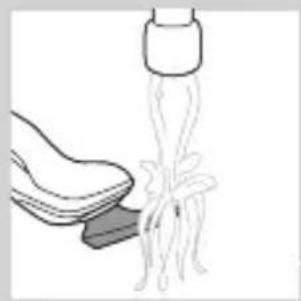
natural_image
Illustration of a hand holding a small object with a bundle of wires or fibers emerging from it, connected to a cylindrical device (no text or symbols visible)
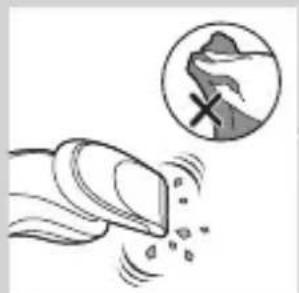
natural_image
Illustration of a hand crushing debris with a magnified circular inset showing a pile of material (no text or symbols)
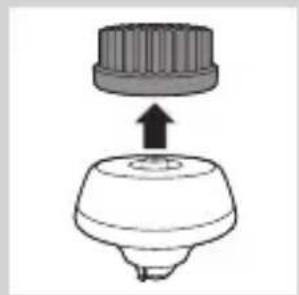
natural_image
Simple line drawing of a mechanical component with an upward arrow, no text or symbols present.
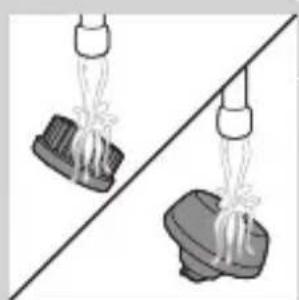
natural_image
Two hanging objects with ropes tied on a diagonal line, no text or symbols visible
natural_image
Illustration of mechanical components and a gear mechanism (no text or symbols)
natural_image
Illustration of a stylized object with a downward arrow, possibly indicating a motion or change (no text or symbols present)
natural_image
Diagram of a hairbrush with a cap and handle, showing a downward arrow (no text or symbols)
natural_image
Diagram of a mechanical component with a top cylindrical part and an upward arrow, no text or symbols present.
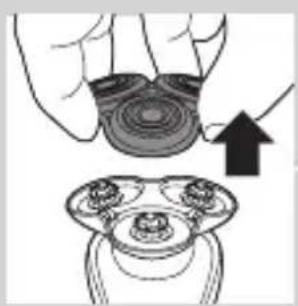
natural_image
Illustration of a hand holding a circular object with an arrow pointing to a three-tiered mechanical component (no text or symbols)
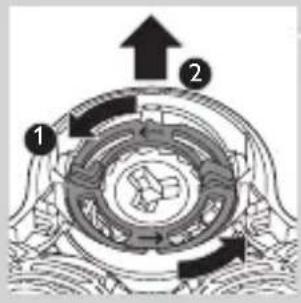
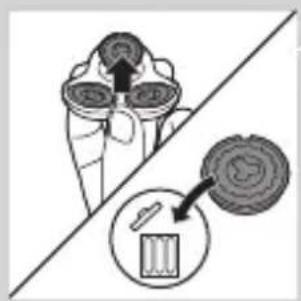
natural_image
Diagram showing a device with a magnified view of its internal components (no text or symbols present)
natural_image
Diagram showing a circular object being lifted by a black arrow, forming a ring structure (no text or symbols)
natural_image
Diagram showing two circular components with arrows and a checkmark, no readable text or symbols present
natural_image
Illustration of a hand holding a circular object with a downward arrow, next to a multi-ring device (no text or symbols)
Encomendar acessórios
natural_image
Symbol of a waste bin with crossed lines indicating no waste, and a solid black rectangle below (no text or labels)
natural_image
Simple line drawing of a trash bin with crossed lines indicating no waste or discharge (no text or symbols)
natural_image
Illustration of a hand tool applying material to a small object, with no visible text or symbols
natural_image
Illustration of two skis with directional arrows indicating movement or force (no text or symbols)
natural_image
Two mechanical components with arrows indicating motion or assembly, no visible text or symbols
natural_image
Diagram showing two mechanical components with a tool, one being inserted and the other holding a tool (no text or symbols present)
natural_image
No sign depicting a faucet with a diagonal line and a diagonal line, crossed out by a diagonal line (no text or symbols)
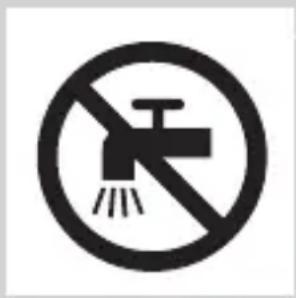
natural_image
Prohibition sign of a faucet with no text or symbols
Försiktighet
natural_image
Simple line drawing of a showerhead spraying over a water-filled container (no text or symbols)
natural_image
Diagram of a medical or laboratory procedure showing a pointed tool interacting with a star-shaped object (no text or symbols present)
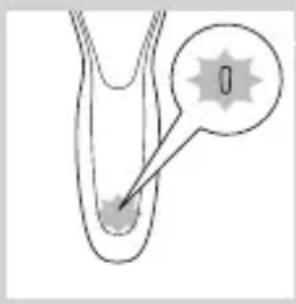
natural_image
Diagram of a biological or anatomical structure with a labeled point '0' and an arrow pointing to a feature (no text or symbols beyond the label)
natural_image
Diagram of a biological structure with a magnified inset showing a chromosome (no text or labels)
natural_image
Diagram of a biological structure with a labeled point '0' and an arrow pointing to a circular feature (no text or symbols beyond the label)
natural_image
Diagram of a biological or medical structure with an arrow pointing to a star-shaped feature, no text or symbols present.
natural_image
Diagram of a biological structure with a labeled point '0' and an arrow pointing to a small feature (no text or symbols beyond the label)
natural_image
Diagram of a biological structure with a magnified inset showing internal components (no text or labels)
natural_image
Simple line drawing of a human body with a speech bubble containing a skull icon (no text or symbols)
natural_image
Close-up of a mechanical component with a downward arrow indicating force or direction (no text or symbols)
natural_image
Illustration of a person applying a hairpin to their ear (no text or symbols present)
natural_image
Illustration of a person's face with a hand near the ear, showing a medical or anatomical sketch (no text or symbols)
natural_image
Line drawing of a person applying a product to their ear (no text or symbols)
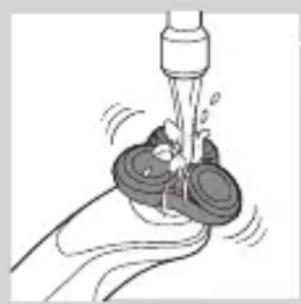
natural_image
Illustration of a hand washing a cup with a water dispenser (no text or symbols)
natural_image
Illustration of a person applying a hairpin to their ear (no text or symbols present)
natural_image
Diagram showing a device with a bulb and a cross symbol, no text or labels present
natural_image
Diagram of a funnel pouring liquid into a curved pipe, with an inset showing a droplet (no text or symbols)
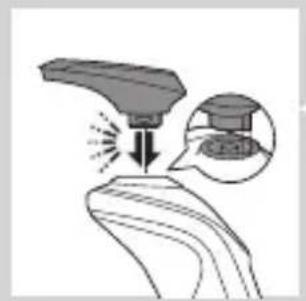
natural_image
Diagram showing a tool interacting with a surface, with an inset magnified view of the tool's tip (no text or symbols present)

natural_image
Line drawing of a person using a hairdryer (no text or symbols)

natural_image
Illustration of a hand holding a device with an arrow indicating light emission (no text or symbols present)
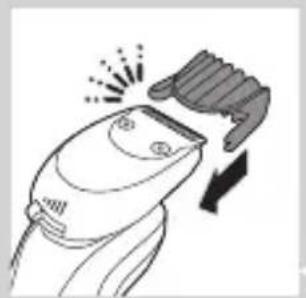
natural_image
Line drawing of a hairbrush cutting into a pair of fingers (no text or symbols)
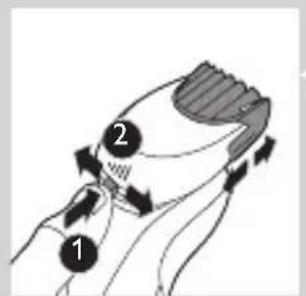
natural_image
Illustration of a man with a beard eating a small bowl (no text or symbols)
natural_image
Illustration of two hands holding a device with directional arrows indicating movement (no text or symbols)
natural_image
Line drawing of a person applying a hair product to their neck (no text or symbols)
natural_image
Illustration of a dropper dispensing liquid into a container with an inset showing a small object (no text or symbols)
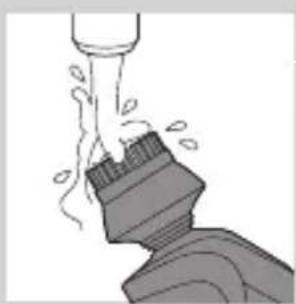
natural_image
Illustration of a mechanical component with fluid flow, no text or symbols present

natural_image
Illustration of a person applying facial care to their face with a tool, no text or symbols present
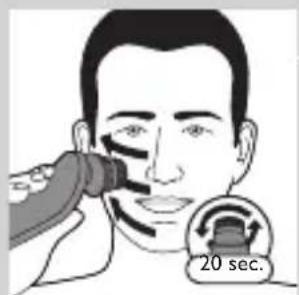
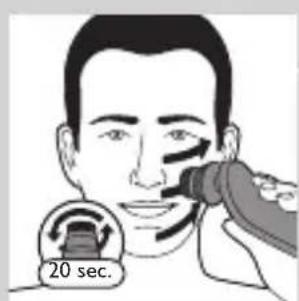
natural_image
Illustration showing two people applying facial care to their face, with a magnified inset of the first person's eye (no text or symbols present)
natural_image
Simple line drawing of a paintbrush with a cross mark and spray effect (no text or symbols)
natural_image
Simple line drawing of a container with an upward arrow inside, no text or symbols present.
5 Placera rengöringspatronen i SmartClean-systemet.
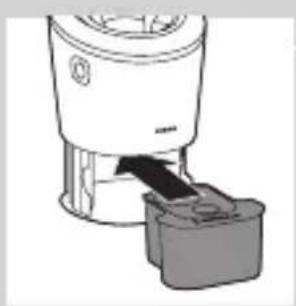
natural_image
Diagram of a blender with a black arrow pointing to its internal component (no text or symbols present)
natural_image
Diagram of a mechanical component with a downward arrow indicating direction (no text or symbols)
natural_image
Close-up of a lit alcohol lamp with a stopper and no visible text or symbols
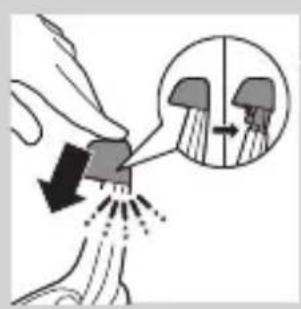
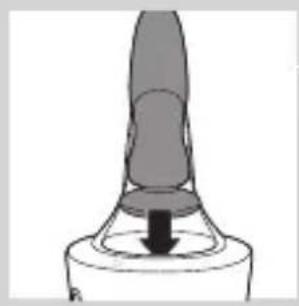
natural_image
Simple line drawing of a mechanical component with a downward arrow indicating force or direction (no text or symbols)
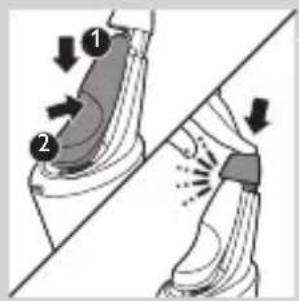
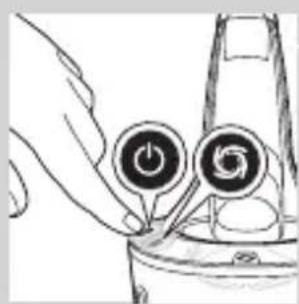
natural_image
Hand holding a device with two circular buttons labeled 'Power' and 'Spiral', no visible text or symbols

natural_image
Diagram of a mechanical component with two circular indicators (one checked, one not checked) and no visible text or symbols.
natural_image
Diagram of a blender with a black arrow pointing to its base, showing no text or symbols.
natural_image
Diagram of a mechanical component with a downward arrow indicating motion (no text or symbols)
natural_image
Illustration of a faucet spraying water onto a surface with a circular object underneath (no text or symbols)
natural_image
Illustration of a hand holding a circular object with an arrow pointing to a three-pin ring (no text or symbols)
natural_image
Illustration of a hand pouring liquid into a container with a dropper (no text or symbols)
natural_image
Illustration of a hand holding a circular object with a downward arrow, next to a mechanical component (no text or symbols)
natural_image
Illustration of a hand holding a circular object with an arrow pointing to a three-pin connector (no text or symbols)
natural_image
Diagram showing a hand holding three circular objects with arrows indicating rotation or movement, separated by a diagonal line (no text or symbols)
natural_image
Diagram showing fluid flow between two vessels with bubbles and a central pipe (no text or symbols)
natural_image
Mechanical gear assembly diagram showing a rotating shaft and gear teeth (no text or labels)
natural_image
Diagram showing a circular object being lifted by a black arrow into a ring structure (no text or symbols)
natural_image
Diagram showing two circular components with arrows indicating direction, one crossed over the other by a diagonal line (no text or symbols)
natural_image
Illustration of two hands holding a curved object with directional arrows indicating movement or force (no text or symbols)
natural_image
Illustration of two hands using a tool to lift or spread material, no text or symbols present
natural_image
Two cartoon fish jumping over a diagonal line, one falling and the other wading (no text or symbols)
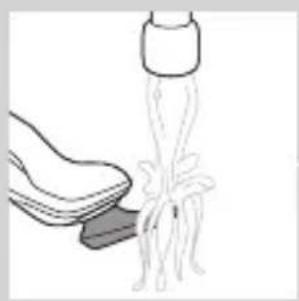
natural_image
Illustration of a hand cleaning a shoe with a tool (no text or symbols)
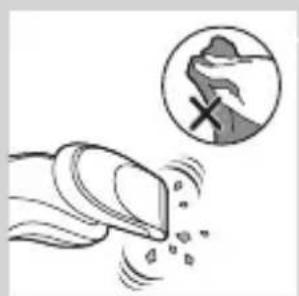
natural_image
Illustration of a hand crushing rocks with a magnified inset showing a rock defect (no text or symbols)
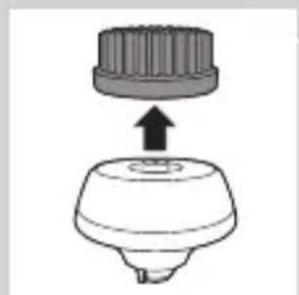
natural_image
Diagram of a mechanical component with a top cylindrical part and an upward arrow, no text or symbols present.
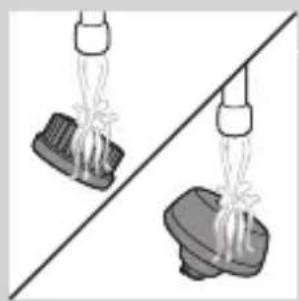
natural_image
Two identical objects hanging from a diagonal line, each with a spring or string between them (no text or symbols visible)
natural_image
Illustration of mechanical components including a drum, gear, and base (no text or symbols)
natural_image
Illustration of a mechanical component with an arrow indicating downward motion (no text or symbols)
natural_image
Simple line drawing of a showerhead with a handle and base, no text or symbols present
natural_image
Diagram of a mechanical component with a top cylindrical part and an upward arrow, no text or symbols present.
natural_image
Illustration of a hand holding a circular object with an upward arrow, alongside a magnified view of three circular objects (no text or symbols)
natural_image
Diagram showing a container with three cups and a close-up of a circular object inside, separated by a diagonal line (no text or symbols)
flowchart
graph TD
    A["Top Circle"] --> B["Three Circles"]
    B --> C["Bottom Circle"]
    C --> A
natural_image
Diagram showing a circular object being lifted by a black arrow, with no visible text or symbols.
natural_image
Diagram showing two circular components with arrows indicating motion or flow, separated by a diagonal line (no text or symbols)
natural_image
Illustration of a hand holding a circular object with a downward arrow, partially overlaid on a mechanical component (no text or symbols)
natural_image
Illustration of a sewing machine needle and foot press mechanism (no text or symbols)
natural_image
Illustration of two skis-like objects with directional arrows indicating motion (no text or symbols)
natural_image
Two mechanical components with arrows indicating motion or assembly (no text or symbols)
natural_image
Diagram showing two hands operating a tool with an arrow indicating direction (no text or symbols present)
natural_image
No sign depicting a faucet with a diagonal line and a diagonal line, crossed out by a diagonal line (no text or symbols)
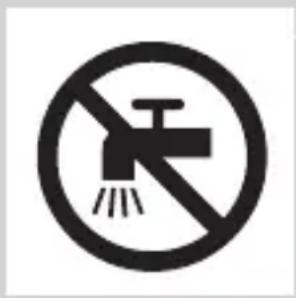
natural_image
Prohibition sign showing a faucet without a shower, enclosed in a circle (no text or symbols)
Dikkat
natural_image
Simple line drawing of a showerhead spraying over a water-filled container (no text or symbols)
Elektromanyetik alanlar (EMF)
natural_image
Diagram of a medical or laboratory procedure showing a pointed tool interacting with a star-shaped object (no text or symbols present)
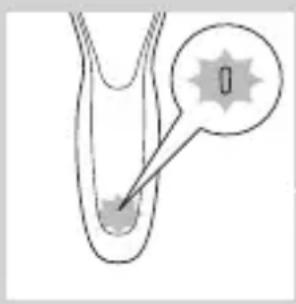
natural_image
Diagram of a biological or anatomical structure with a highlighted region and an arrow pointing to a small feature (no text or symbols present)
natural_image
Diagram of a biological structure with a highlighted region and arrow, no text or symbols present
natural_image
Diagram of a biological or anatomical structure with a labeled point '0' and an arrow pointing to a circular feature (no text or symbols beyond the label)
natural_image
Diagram of a biological or medical structure with an arrow pointing to a star-shaped feature, no text or symbols present.
natural_image
Diagram of a biological structure with a labeled point '0' and a starburst symbol (no text or symbols present)
natural_image
Diagram of a medical or laboratory procedure showing a pointed tool interacting with a circular component (no text or symbols present)
natural_image
Simple line drawing of a human body with a speech bubble containing a skull icon (no text or symbols)
natural_image
Illustration of a hand holding a small object with arrows indicating motion or force, and a magnified inset showing two figures (no text or symbols)
natural_image
Close-up of a mechanical component with a downward arrow indicating force or direction (no text or symbols)
natural_image
Illustration of a person applying a hair accessory to their face (no text or symbols present)
natural_image
Illustration of a person's face with hand near ear area, showing facial contour or pressure point (no text or symbols)
natural_image
Line drawing of a person applying face-to-face care to the ear (no text or symbols)
natural_image
Illustration of a hand washing a cup with water spray (no text or symbols)
4 Cihazı açın.
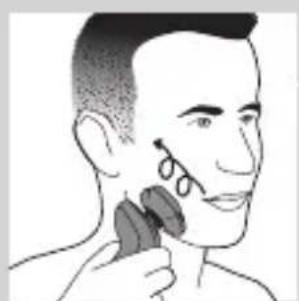
natural_image
Illustration of a person applying a hair accessory to their face (no text or symbols present)
natural_image
Diagram showing a funnel with an arrow and a cross symbol, no text or labels present
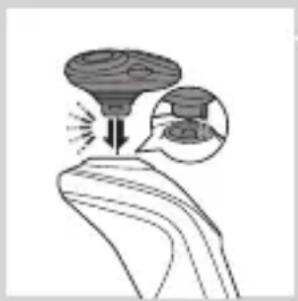
natural_image
Illustration of a funnel pouring liquid into a curved pipe, with an inset showing a graduation cap (no text or symbols)
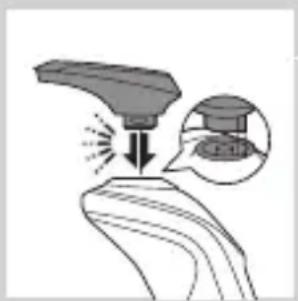
natural_image
Illustration of a spray gun on a surface with an inset showing the tip and spray (no text or symbols)
natural_image
Line drawing of a person applying hair to their ear (no text or symbols)
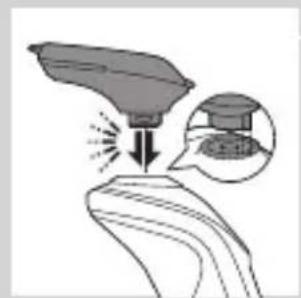
natural_image
Illustration of a hand holding a tool with an arrow indicating compression or action, and an inset showing a magnified view of the tool (no text or symbols present)
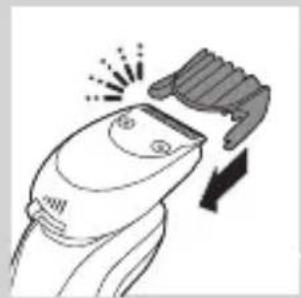
natural_image
Line drawing of a hairbrush cutting into a button with a downward arrow (no text or symbols)
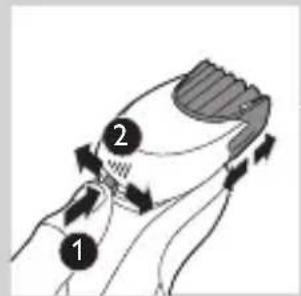
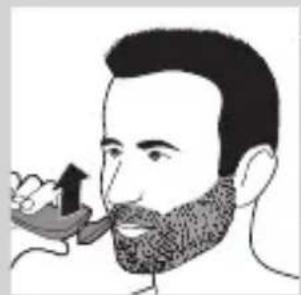
natural_image
Illustration of a man with a beard eating a spoon (no text or symbols)
natural_image
Illustration of two hands holding a tool, with arrows indicating movement or force direction (no text or symbols)

natural_image
Line drawing of a person applying a hair product to their ear (no text or symbols)
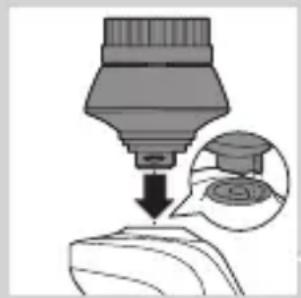
natural_image
Diagram showing a dropper dispensing liquid into a container with an inset image of a graduation cap (no text or symbols present)
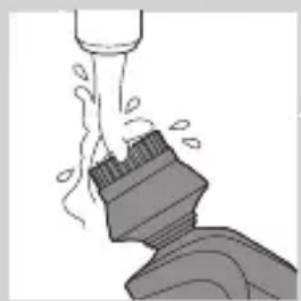
natural_image
Illustration of a mechanical component with fluid flow, no text or symbols present
natural_image
Illustration of a person applying facial care to their face, with no visible text or symbols
natural_image
Illustration showing a person applying facial care to another person's face, with no visible text or symbols.
natural_image
Simple line drawing of a paintbrush with a cross mark and spray effect (no text or symbols)
natural_image
Simple line drawing of a container with an upward arrow and label 'MILK' (no text or symbols on the diagram itself)
natural_image
Diagram of a blender with a black arrow pointing to its base (no text or symbols present)
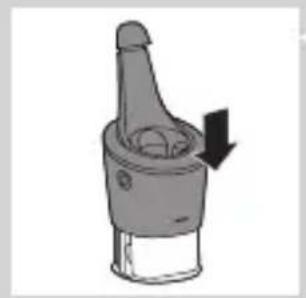
natural_image
Mechanical component diagram showing a lever mechanism with a downward arrow indicating motion (no text or symbols)
natural_image
Close-up of a mechanical component with a downward arrow and a prohibition symbol (no text or labels)
SmartClean sistemini kullanma
natural_image
Diagram showing a hand holding a small object with arrows indicating motion or force, and an inset magnified view of a mechanical component (no text or symbols)
natural_image
Close-up of a mechanical component with a downward arrow indicating force or direction (no text or symbols)
natural_image
Hand holding two circular buttons with 'Power' and 'Spiral' symbols, next to a device (no text or labels visible)
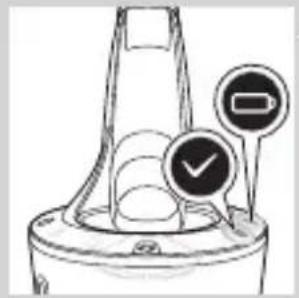
natural_image
Diagram of a funnel-shaped container with two circular indicators (one checked, one not checked) and no visible text or symbols.
natural_image
Illustration of a hand washing a cup with a water dispenser (no text or symbols)
natural_image
Illustration of a hand holding a circular object with an arrow pointing to it, next to a three-tiered mechanical component (no text or symbols)
natural_image
Illustration of a hand using a pipette to lift a small object into a dark container (no text or symbols visible)
natural_image
Illustration of a hand holding a circular object with a downward arrow, partially overlaid on a mechanical component (no text or symbols)
natural_image
Illustration of a hand holding a circular object with an upward arrow, next to a mechanical component (no text or symbols)
natural_image
Diagram showing a hand holding three circular objects with upward arrows, separated by a diagonal line (no text or symbols)
natural_image
Illustration of a hand washing a tooth with water splashing out (no text or symbols)
natural_image
Mechanical gear assembly diagram showing a rotating shaft and gear teeth (no text or labels)
flowchart
graph TD
    A["Top Circle"] --> B["Three Circles"]
    B --> C["Bottom Circle"]
    C --> D["Right Triangle"]
    D --> A
natural_image
Diagram showing a circular object with a downward arrow pointing to a ring structure (no text or symbols)
natural_image
Diagram showing two circular components with arrows and a checkmark, no readable text or symbols present
natural_image
Illustration of two hands holding a device with directional arrows indicating movement (no text or symbols)
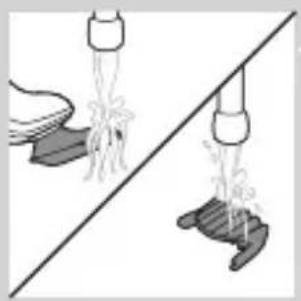
natural_image
Illustration of two hands spraying water onto a shoe and a shoe, separated by a diagonal line (no text or symbols)
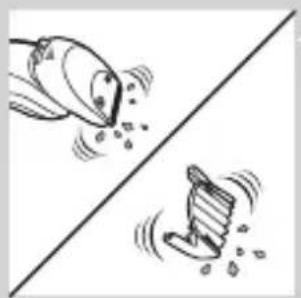
natural_image
Two cartoon fish jumping over a diagonal line, one falling and the other wading (no text or symbols)
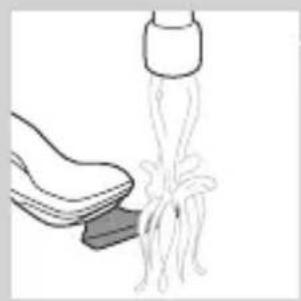
natural_image
Illustration of a shoe being lifted by a bag (no text or symbols)
natural_image
Illustration of a hand crushing a rock with a magnified circular inset showing a broken rock (no text or symbols)
natural_image
Diagram of a mechanical component with a top and base, showing an upward arrow (no text or symbols)
natural_image
Two identical mechanical components hanging from a diagonal line, no text or symbols visible
natural_image
Illustration of mechanical components and a gear mechanism (no text or symbols)
Saklama
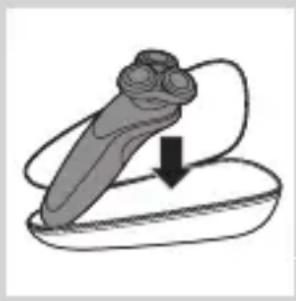
natural_image
Simple line drawing of a mechanical component with an arrow indicating downward motion (no text or symbols)
natural_image
Simple line drawing of a dropper with a cap and nozzle (no text or symbols)
natural_image
Diagram of a mechanical component with a top cylindrical part and an upward arrow, no text or symbols present.
natural_image
Simple line drawing of a human body with a speech bubble containing a skull icon (no text or symbols)
natural_image
Illustration of a hand holding a circular object with an arrow pointing to a three-pin device (no text or symbols present)
natural_image
Diagram showing a hand holding a cylindrical object with arrows pointing to a circular component, alongside a magnified view of a battery (no text or symbols present)
flowchart
graph TD
    A[" "] --> B[" "]
    B --> C[" "]
    C --> D[" "]
    D --> A
natural_image
Diagram showing a circular object being lifted by a black arrow into a ring (no text or symbols)
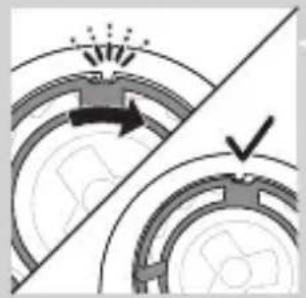
natural_image
Diagram showing two circular components with arrows indicating motion or force, separated by a diagonal line (no text or symbols)
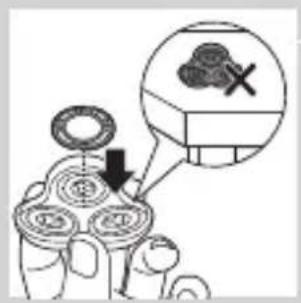
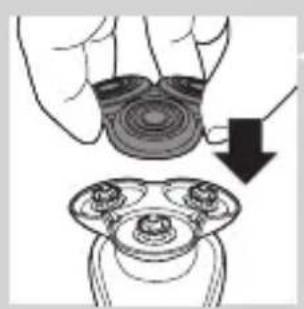
natural_image
Illustration of a hand holding a circular object with a downward arrow pointing to a three-tiered mechanical component (no text or symbols)
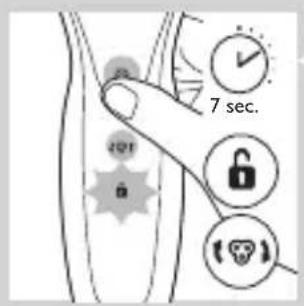
natural_image
Symbol of a trash bin crossed with no text or labels, accompanied by a solid black rectangle below (no text or symbols present)
natural_image
Illustration showing a hand using a screwdriver to cut a cylindrical object, with another hand holding a small boat (no text or symbols present)
natural_image
Illustration of two skis with directional arrows indicating motion (no text or symbols)
natural_image
Diagram of two mechanical components with arrows indicating motion or assembly (no text or symbols)
natural_image
Illustration of a hand using a tool to lift a car, showing mechanical components and motion (no text or symbols)