EasyManual
 306234 - Water meter Brandson - Free user manual and instructions
Find the device manual for free 306234 Brandson in PDF.


| Technical Features | Details not available |
|---|---|
| Usage | Details not available |
| Maintenance and Repair | Details not available |
| Safety | Details not available |
| General Information | Details not available |
Frequently Asked Questions - 306234 Brandson
User questions about 306234 Brandson
0 question about this device. Answer the ones you know or ask your own.
Ask a new question about this device
Download the instructions for your Water meter in PDF format for free! Find your manual 306234 - Brandson and take your electronic device back in hand. On this page are published all the documents necessary for the use of your device. 306234 by Brandson.
USER MANUAL 306234 Brandson
text_image
QR code image containing encoded data, no visible human-readable textENG: Current drivers, user manuals and other relevant documents for this product can be found on our homepage.
Thank you for choosing a Brandon product. Please read the following user manual carefully so as to get the most from the product you have purchased.
1. Scope of delivery
- Water meter
- User manual
-
Roll with sealing tape
-
Technical data
| Water protection class | IPX6 |
| Water flow rate 1-45.5 L/min | (12.0 GAL/min) |
| Max. Water consumption 999 | 99 L/99999 GAL |
| Operating pressure 0.5-10.0 bar | |
| Max. flow 45.5 L/min or 12.0 | GAL/min |
| Measurement tolerance ± 5 % | |
| Battery type | One CR2032, 3V |
| Suitable for | Lawn sprinkler, 3/4" Standard tap connections |
3. Product details
text_image
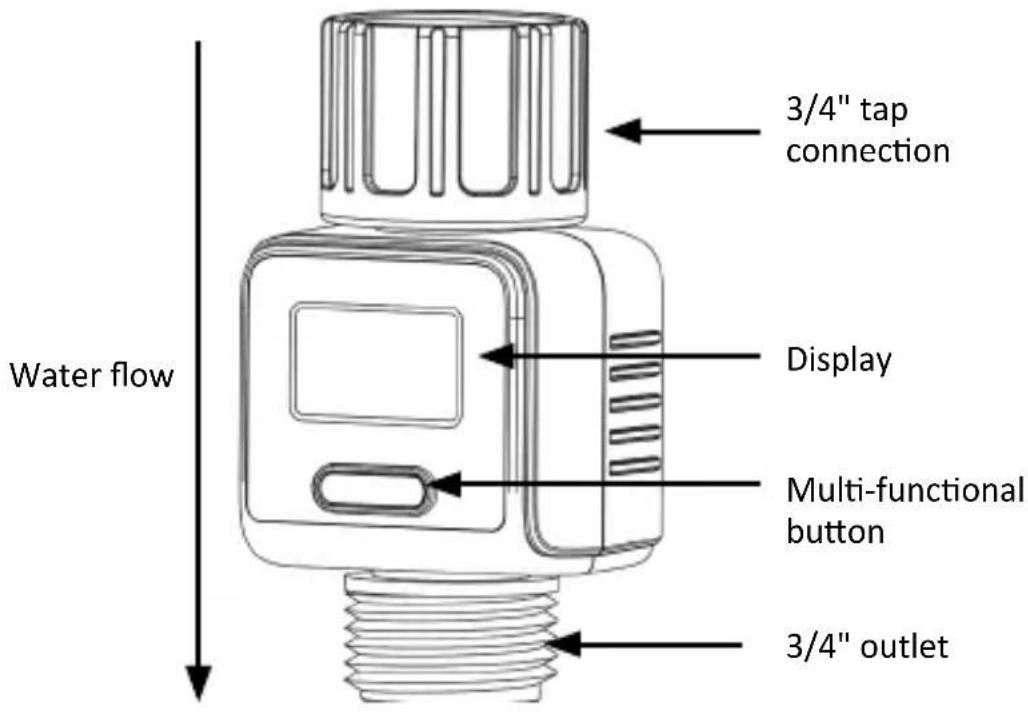
Water flow 3/4" tap connection Display Multi-functional button 3/4" outlet4. Initial use
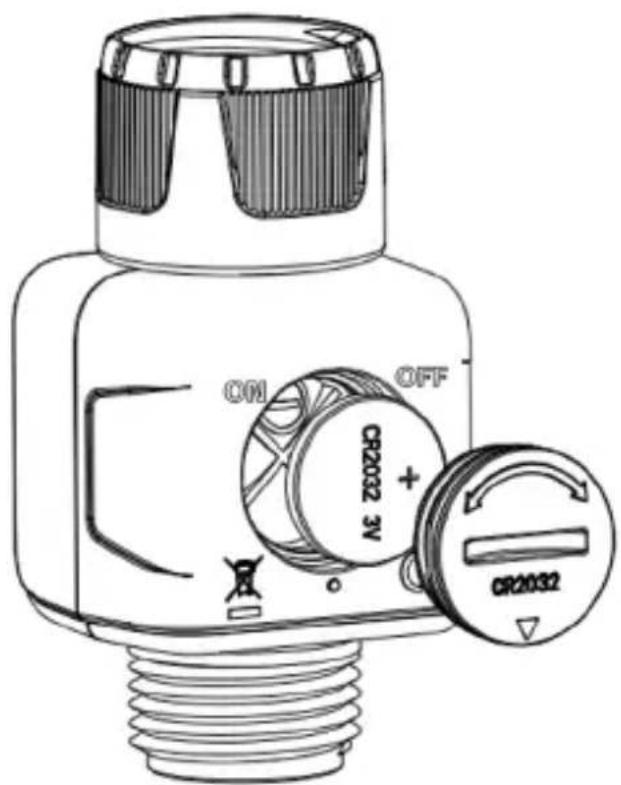
Take the product out of the package and remove all the packaging material. Use a coin or screwdriver to unlock the battery compartment cover. Insert a CR2032 battery into the battery compartment. Make sure that the positive pole of the battery is pointing towards the battery compartment cover.
Close the battery compartment cover again. Take the roll of sealing tape and wrap the tape around the thread 2-7 times as required. Then connect the water meter to the desired connection. Note the water flow direction (see product details). The unit is now ready for operation.
text_image
CM OFF CR2032 3V + CR20325. Operation
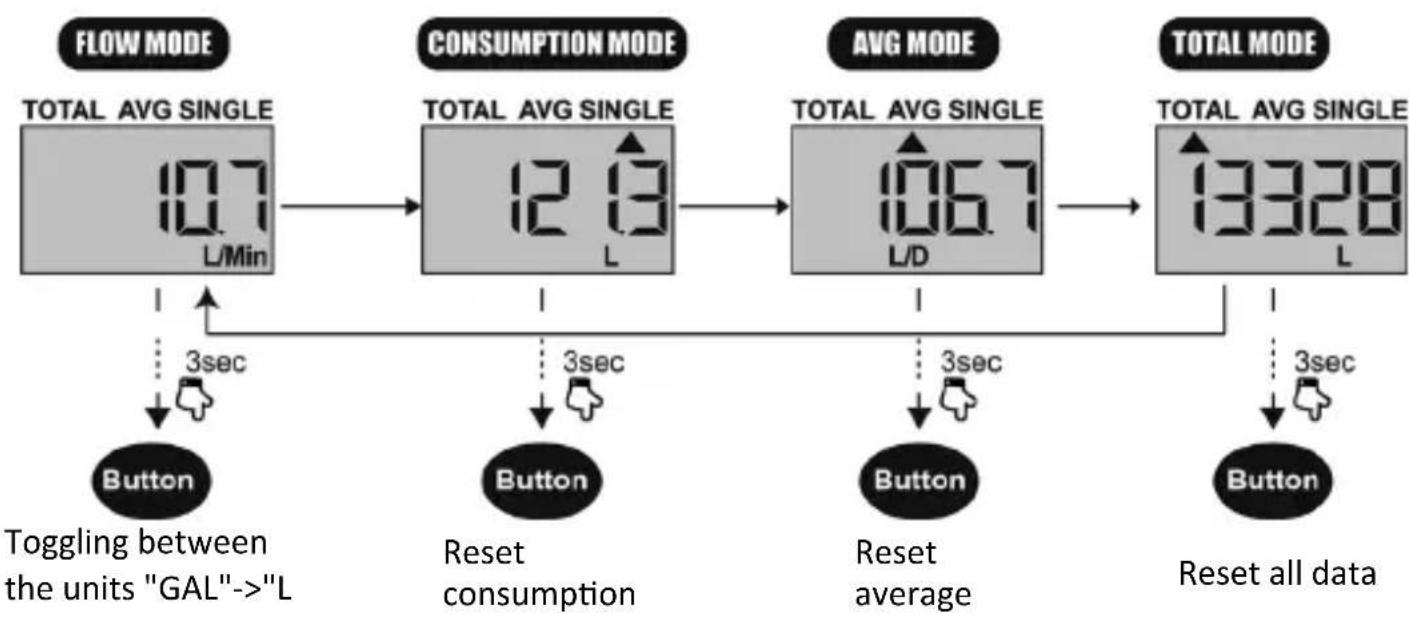
You can switch to different modes in the display by pressing the "multifunction button".
flowchart
graph TD
    A["FLOW MODE"] --> B["10.7 L/Min"]
    B --> C["TOTAL AVG SINGLE"]
    C --> D["12.13 L"]
    D --> E["3sec"]
    E --> F["Button"]
    F --> G["Toggling between the units "GAL"->"L"]
    D --> H["3sec"]
    H --> I["Button"]
    I --> J["Reset consumption"]
    J --> K["3sec"]
    K --> L["Button"]
    L --> M["Reset average"]
    M --> N["3sec"]
    N --> O["Button"]
    O --> P["3sec"]
    P --> Q["SET all data"]
    C --> R["CONSUMPTION MODE"]
    R --> S["TOTAL AVG SINGLE"]
    S --> T["106.7 L/D"]
    T --> U["3sec"]
    U --> V["Button"]
    V --> W["3sec"]
    W --> X["Button"]
    X --> Y["3sec"]
    Y --> Z["SET all data"]
    T --> AA["TOTAL MODE"]
    AA --> AB["13328 L"]
FLOW MODE - Real-time water flow measurement When the water flows through the flow meter, the display is activated and shows the current flow in GAL/min or L/min.
CONSUMPTION MODE - Measures the individual water consumption. Press the "multifunction button" to display the last water consumption. Press and hold the button for 3 seconds to reset the consumption. The display starts again at 0 when you measure next.
AVERAGE MODE - Displays the daily average water consumption for the last 7 days. Press the "multifunction button" and the average water consumption of the last 7 days is displayed. Press and hold the "multifunction button" for 3 seconds to reset the average.
TOTAL MODE - The total amount of water is measured until the counter is reset. Press the multifunction button to display the total water consumption, maximum 99999 L / 99999 GAL. Press and hold the button for 3 seconds to reset the total.
Toggling the L & GAL unit - In FLOW MODE, press and hold the multifunction button for 3 seconds to toggle between L/Min and GAL/Min.
Standby - No display (no operation or no water flow for more than 1 minute).
Low battery indicator - Please change the battery when this symbol appears. When replacing batteries, always ensure that the polarity of the contacts is correct.

Note: If the flow rate exceeds 45.5 L/min or 12.0 GAL/min, the LCD display will show HHHH.
6. Troubleshooting
| Error | Cause |
| Inlet nozzle of the flow meter is leaking. | 1. The filter is not installed correctly.2. There is a gap in the joint between the connection and the filter disc.Make sure that the filter sits properly in the inlet opening.Use the PTFE thread sealing tape to wrap the tap hose or add a washer when connecting the flow meter. |
| The flow meter is not working properly. | Please check if the battery is inserted with the correct polarity. If not, remove and reinsert the battery. Make sure that the positive pole of the battery is facing outwards and that the battery terminals are clean and free of rust. |
| The water flow is gradually reducing. | The filter may be clogged with dust, limescale or small particles. Please change and replace the flow meter filter. |

7. Safety instructions and disclaimer
Never attempt to open the appliance to carry out repairs or modifications. Avoid contact with the mains voltage. Do not short-circuit the product. The appliance is not frost-proof. Always store the appliance away from water and frost in winter. Keep the appliance away from high temperatures.
Do not expose the product to sudden changes in temperature or strong vibrations, as this could damage the electronic components.
Check the device for damage before using it. The product should not be used if it was subject to impact or has been damaged in some other manner.
Please comply with the local regulations and restrictions. Do not use the product for purposes other than those described in the user manual. This product is not a toy. Keep it out of the reach of children or mentally disabled persons. Any repair or modification to the device, which is not carried out by the original supplier, will void the warranty or warranty claims. The device should only be used by those who have read and understood this manual. The specifications of the product may be changed without any special prior notification.

8. Disposal instructions
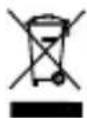
In line with the European WEEE directive, electrical and electronic products should not be disposed of along with domestic waste. Their components have to be sent separately for recycling or disposal, as improper disposal of toxic and dangerous components may permanently damage the environment. According to the electrical and electronic equipment act (ElektroG), you are obliged (as a consumer) to return (free of charge) electrical and electronic units to the manufacturer, the point of sale or the public collection points set up for this purpose at the end of their service life. The relevant local laws regulate the details in this regard. The symbol displayed on the product, in the user manual or/and on the packaging refers to these regulations. With this manner of sorting, recycling and disposal of used products, you make an important contribution towards protecting our environment. For information on authorised safe assembly points in your area, please contact your local city or municipal office.

9. Instructions for battery disposal
In conjunction with the sale of batteries along with the supply of devices that include batteries, the supplier is obliged to point out the following to the customer:
The customer is legally obliged to return used batteries. He can return used batteries which the supplier offers or has offered as new batteries in his assortment free of charge to the supplier's dispatch warehouse (shipping address). The symbols shown on the batteries indicate the following: Pb = battery contains more than 0.004 percent lead by weight, Cd = battery contains more than 0.002 percent cadmium by weight, Hg = battery contains more than 0.0005 percent mercury by weight.

The symbol of the crossed-out dustbin means that the battery should not be disposed of in household waste.


WEEE directive: 2012/19/EU
WEEE Register no.: DE 67896761
The company WD Plus GmbH hereby certifies that the product 306234 complies with the fundamental requirements and all other relevant stipulations. A complete conformity statement can be obtained from: WD Plus GmbH, Wohlenbergstraße 16, 30179 Hannover
MO-FR 9:30am - 18pm CET

text_image
QR code image containing encoded data, no visible human-readable textbrandson-equipment.de
WD Plus GmbH