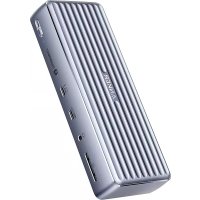
PowerExpand Elite 12in1 Thunderbolt 4 Dock - Docking station Anker - Free user manual and instructions
Find the device manual for free PowerExpand Elite 12in1 Thunderbolt 4 Dock Anker in PDF.



| Product Type | Thunderbolt 4 Docking Station |
| Brand | Anker |
| Model | PowerExpand Elite 12in1 Thunderbolt 4 Dock (A8397) |
| Dimensions | 186.4 x 73.3 x 33.3 mm |
| Weight | 500 g |
| Power Supply | External AC adapter (230 V AC), on/off button, green LED indicator |
| Charging Power | Up to 90 W (5 V/3 A, 9 V/3 A, 15 V/3 A, 20 V/4.5 A) via upstream Thunderbolt 4 |
| Number of Ports | 12 ports total |
| Thunderbolt 4 Ports | 1 upstream (for computer) and 1 downstream (up to 40 Gbit/s, 8K@30 Hz or 5K@60 Hz) |
| USB-C 3.1 Gen 2 Port | 10 Gbit/s, compatible with Power Delivery 3.0 |
| USB-A 3.1 Gen 2 Ports | 2 ports, 10 Gbit/s each |
| USB-A 2.0 Ports | 2 ports, 480 Mbit/s each |
| HDMI Port | 2 HDMI ports, maximum resolution 4K@60 Hz |
| Ethernet Port | Gigabit (10/100/1000 Mbit/s) |
| Audio Port | 3.5 mm combo jack (headphone/microphone) |
| SD Card Reader | SD 4.0 card slot (UHS-II), backward compatible with SD/SDHC/SDXC |
| Maximum Video Output | Up to 8K@30 Hz (Thunderbolt 4 downstream) or 4K@60 Hz (HDMI) |
| Multi-Screen | Up to 3 simultaneous displays (2× HDMI + 1× Thunderbolt downstream) |
| Compatible Operating Systems | Windows 10 (and later), macOS 11 (Big Sur) and later |
| Compatible Devices | Thunderbolt 4 PC (Intel Evo), MacBook Air/Pro (2016-2020), MacBook M1 (single display) |
| Package Contents | Docking station, Thunderbolt 4 cable (0.7 m), AC adapter, power cord, manual, quick start guide |
| Care and Cleaning | Clean with a soft brush or dry cloth; do not use liquids |
| Safety | Do not drop, disassemble, expose to liquids; use certified cables; ambient temperature < 40°C; avoid flames |
| Warranty | 18-month limited, lifetime technical support |
Frequently Asked Questions - PowerExpand Elite 12in1 Thunderbolt 4 Dock Anker
User questions about PowerExpand Elite 12in1 Thunderbolt 4 Dock Anker
0 question about this device. Answer the ones you know or ask your own.
Ask a new question about this device
Download the instructions for your Docking station in PDF format for free! Find your manual PowerExpand Elite 12in1 Thunderbolt 4 Dock - Anker and take your electronic device back in hand. On this page are published all the documents necessary for the use of your device. PowerExpand Elite 12in1 Thunderbolt 4 Dock by Anker.
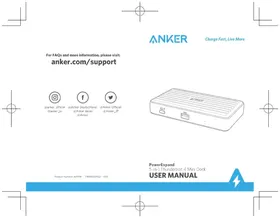
USER MANUAL PowerExpand Elite 12in1 Thunderbolt 4 Dock Anker
For FAQs and more information, please visit:
anker.com/support

@anker_official @anker_jp

Charge Fast, Live More
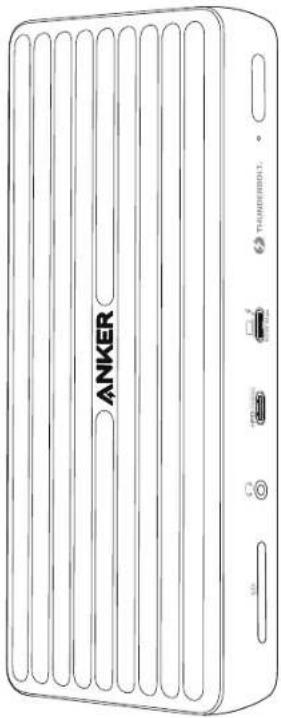
PowerExpand
Elite 12-in-1 Thunderbolt 4 Dock
USER MANUAL

Important Safety Instructions
1) Avoid dropping.
2) Do not disassemble.
3) Do not expose to liquids.
4) For the salest and fastest charge, use original or certified cables.
5) This product is suitable for moderate climates only.
6) The maximum ambient temperature when using this product must not exceed 104^ / 40^ .
7) Open flame sources, such as candles, must not be placed near this product.
8) Only use a dry cloth or brush to clean this product.
Introduction
The PowerExpand Elite 12-in-1 Thunderbell 4 Dock provides an advanced, efficient, and versatile I/O solution that supports data and video transfer at speeds of up to 40 Gbps. Its multiple ports enable you to easily connect your devices, such as Thunderbolt compatible devices and USB devices. It also provides charging for your USB-C laptops at a maximum output of 90W.
System Requirements
Compatible Devices
Thunderball 4 Laptops (Intel Evo Platform): Lenovo YOGA 7/9i, Acer Book RS, ASUSZenBook Flip 5, Acer Swift 3/5, HP Spectre x360 13/14, Dell XPS 13;MacBook Laptops: MacBook Air 2020/2019/2018, MacBook Pro 2020/2019/2018/2017/2016
* For MacBook with an Mi chip, this dock only supports single display output;
System Requirements:
Compatible with Windows 10 laptops equipped with Thunderbolt 4 ports, and MacBooks running macOS 11 (Big Sur) or later.
Compatible Operating Systems
macOS 11 or later, Windows 10
What's in the Box
Thunderbolt 4 Dock
Thunderbolt 4 cable 0.7m x1
Power adapter x1
Power cord x1
Manual x 1
QSGx1
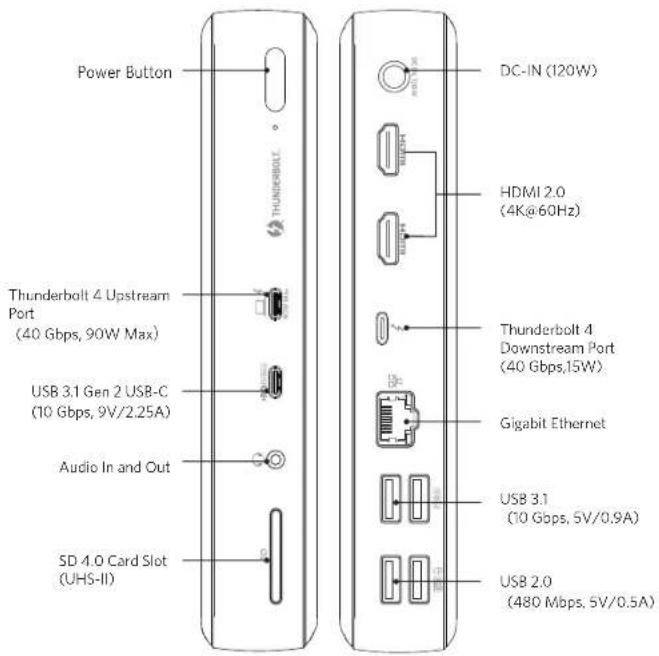
At a Glance
Using Your Thunderbolt 4 Dock
Power on Your Dock
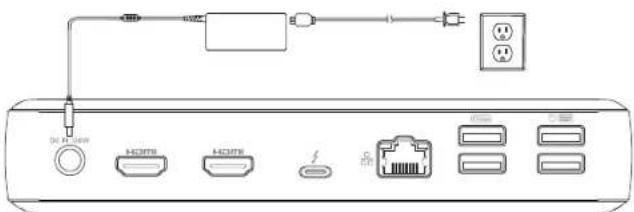
- Plug one end of the included power adapter into the DC-IN port and the other into a power outlet.
- Press the power button. The LED will turn green.
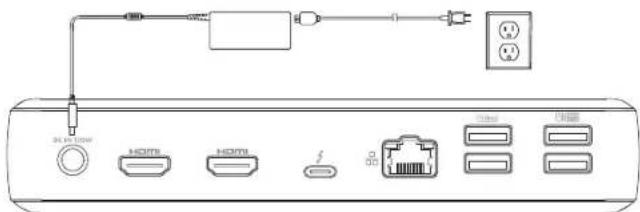
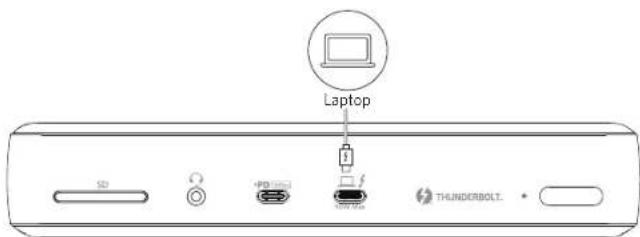
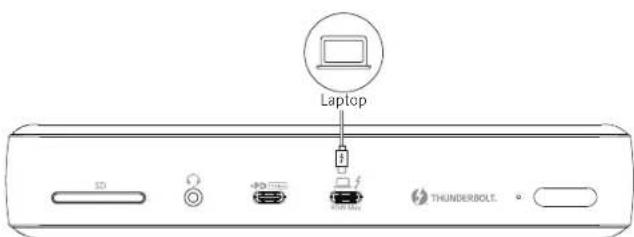
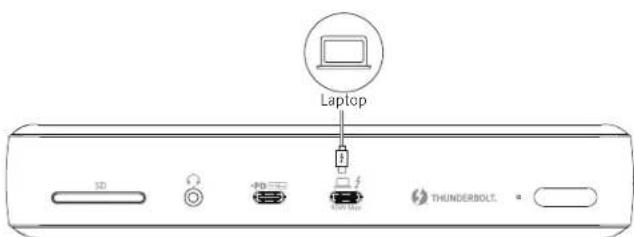
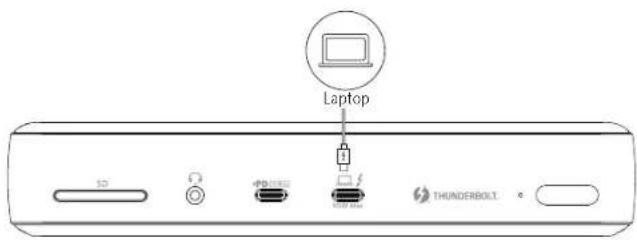
Connect the Dock to Your Laptop
Connect your laptop to the dock's Thunderbolt 4 upstream port using the provided Thunderbolt 4 cable to access charging for laptops at a maximum output of 90W (5V/3A, 9V/3A, 15V/3A, 20V/4.5A).
LED Indicator Guide
| LED indicator Description | |
| Solid green Powered on | |
| Solid blue Thunderbolt laptop is connected | |
| Off Powered off |
Port Overview
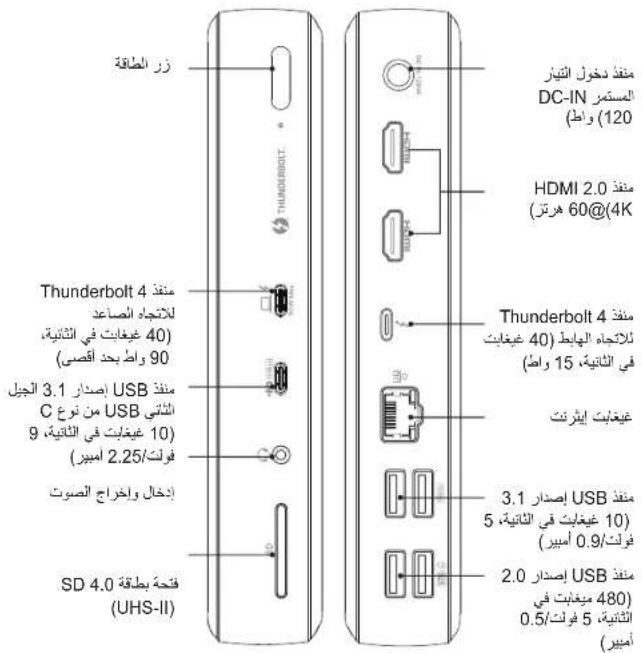
The Thunderbolt 4 Dock features two Thunderbolt 4 ports (Upstream and Downstream).
Thunderbolt 4 Upstream Port
The Thunderbolt 4 upstream port is used to connect to a Thunderbolt4 compatible laptop.
Thunderbolt 4 Downstream Port
A Thunderbolt 4 downstream port supports daisy chaining. This port can transfer data at speeds of up to 40 Gbps or connect to an external monitor up to 8K@30Hz or 5K@60Hz.
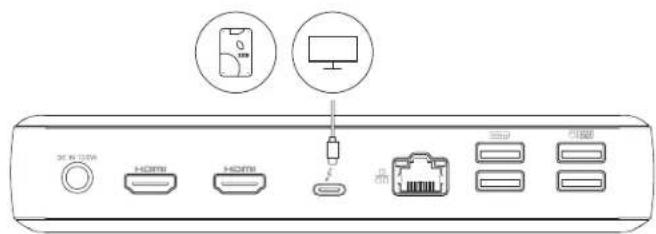
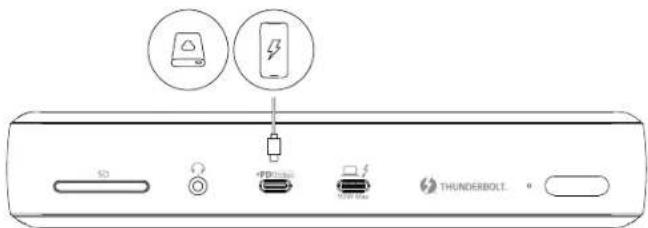
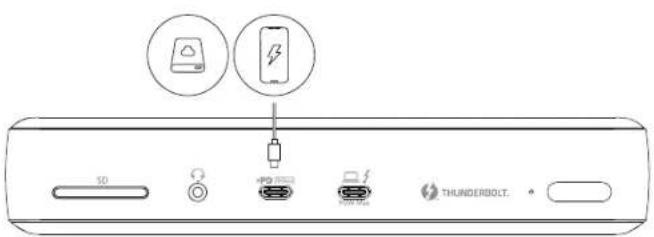
USB-C 3.1 Gen 2 Port
Can be connected to USB-C compatible devices, such as an SSD (solid-state drive) or other USB storage devices to provide data transfer speeds of up to 10 Gbps. Also compatible with Power Delivery 3.0 to charge your phone or tablet.
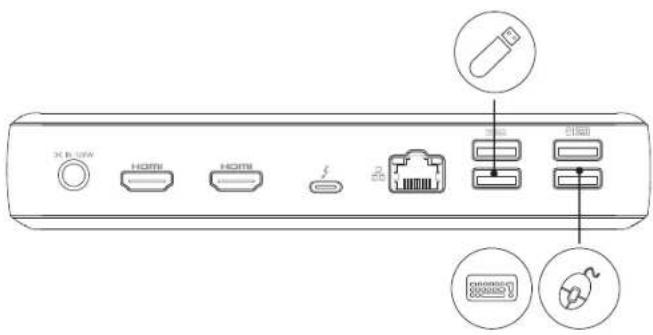
USB-A 3.1 Gen2 & USB-A 2.0 Ports
The Thunderbolt A dock features two USB 3.1 Gen 2 ports (2 x 10 Gbps) and two USB 2.0 ports (2 x 480 Mbps). They can be used to connect to USB devices, including USB keyboard, USB mouse or USB storage device.
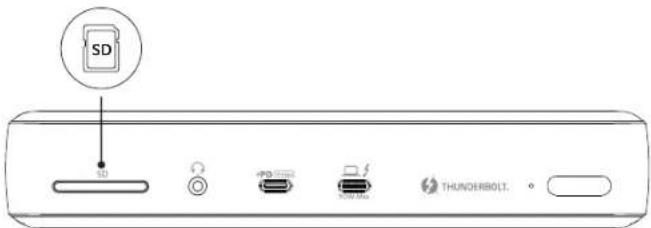
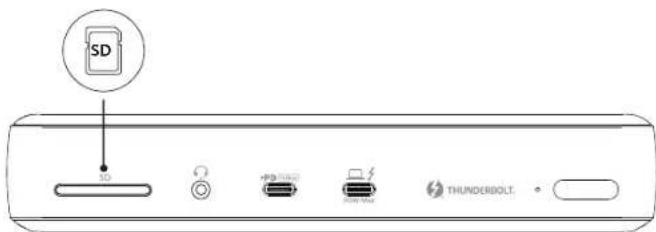
SD 4.0 Card Slot (UHS-II)
The SD 4.0 Card Slot enables you to insert an SD 4.0 card to copy files to and from your device.
It is also backward compatible with SDXC, SDHC, and standard SD cards.
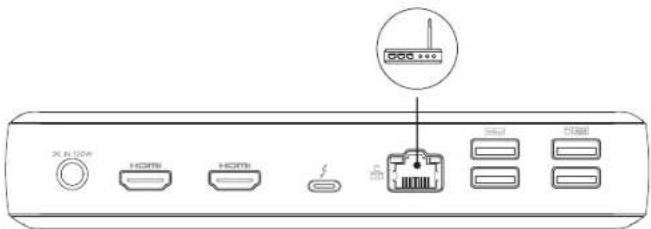
Ethernet Port
Connect the dock to a router or modem at 10/100/1000 Mbps using an Ethernet cable.
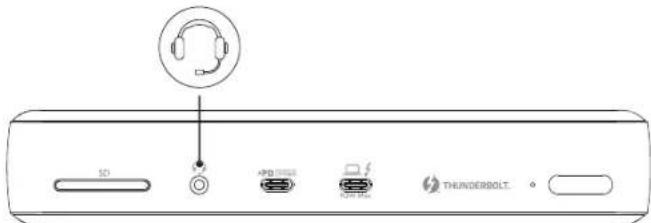
Audio Jack
Connect earphones or other devices with a 3.5 mm AUX connector.
Connect the Dock to One, Two or Three Monitor(s)
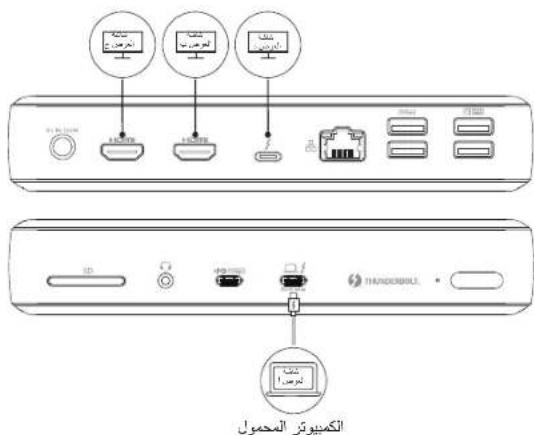
The Thunderbolt 4 Dock features two HDMI ports (HDMI1 & HDMI2) and one Thunderbolt 4 Downstream port. You can connect up to three monitors via two HDMI ports and one Thunderbolt 4 Downstream port.
With an HDMI port, you can connect to a monitor to stream video at resolutions up to 4K@60Hz. While if you connect your monitor via the Thunderbolt 4 Downstream port, the maximum resolution is as high as 8K.
The following table lists the supported resolutions. The resolution may vary depending on your monitor.
| Item | Thunderbolt 4 Downstream Port | HDMI 1 | HDMI 2 |
| Single Display | Windows OS: 7680 x 4320@30Hz Mac OS: 5120 x 2880@60 Hz | / | / |
| / 3840x2160 @ 60Hz | / | / | |
| / | / | 3840x2160@60Hz | |
| Dual Display | 3840x2160@60Hz 3840x2160 @ 60Hz | / | 3840x2160@60Hz |
| / | 3840x2160@60Hz 3840x2160 @ 60Hz | 3840x2160@60Hz | |
| Triple Display | 3840x2160@60Hz | Windows OS: 3840x2160@30Hz Mac OS: 3840x2160@60 Hz | Windows OS: 3840x2160@30Hz Mac OS: 3840x2160@60 Hz |
If your laptop is running a Windows Operating System (Intel Evo), the displays are supported as follows:
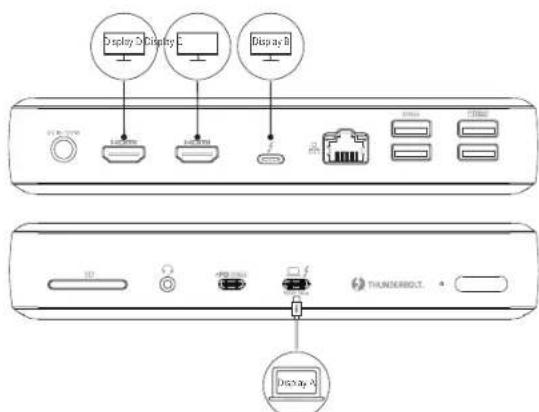
Laptop
If your laptop is running a Mac Operating System, the displays are supported as follows:
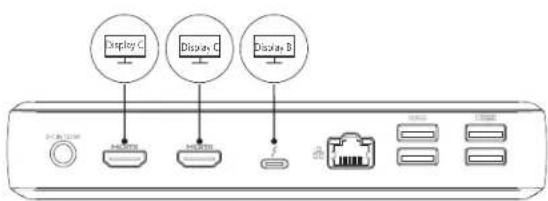
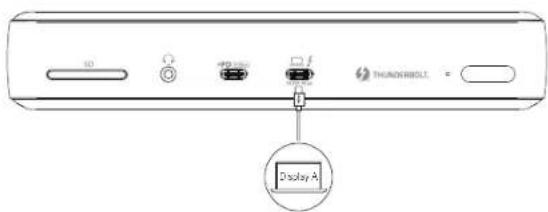
Laptop
- For MacBook with an M1 chip, this dock only supports single display output.
8
Specifications
| Size | 186.4 x 73.3 x 33.3 mm/ 7.34 x 2.89 x 1.31 in |
| Weight: 467g/16.47oz |
Trademark

HIGH-DEFINITION MULTIMEDIA INTERFACE
The Adopted Trademarks HDMI, HDMI High-Definition Multimedia Interface, and the HDMI Logo are trademarks or registered trademarks of HDMI Licensing Administrator, Inc. in the United States and other countries.
Thunderbolt and the Thunderbolt logo are trademarks of Intel Corporation or its subsidiaries.
GB Declaration of Conformity
Hereby, Anker Innovations Limited declares that the product type A8397 is in compliance with the following Directives:
The Restriction of the Use of Certain Hazardous Substances in Electrical and Electronic Equipment Regulations 2012
Electromagnetic Compatibility Regulations 2016
Electrical Equipment (Safety) Regulations 2016
The full text of the GB declaration of conformity is available at the following internal address:
https://www.anker.com
Anker Technology (UK) Ltd
Suite B, Fairgate House, 205 Kings Road, Tyseley, Birmingham, B11 2AA, United Kingdom
NOTICE
FCC Statement
This device complies with Part 15 of the FCC Rules. Operation is subject to the following two conditions:
(1) This device may not cause harmful interference, and
(2) This device must accept any interference received, including interference that may cause undesired operation.
Warning: Changes or modifications not expressly approved by the party responsible for compliance could void the user's authority to operate the equipment.
NOTE: This equipment has been Lesed and found to comply with the limits for a Class B digital device, pursuant to Part 15 of the FCC Rules. These limits are designed to provide reasonable protection against harmful interference in a residential installation. This equipment generates, uses, and can radiate radio frequency energy and, if not installed and used in accordance with the instructions, may cause harmful interference to radio communications. I however, there is no guarantee that interference will not occur in a particular installation. If this equipment does cause harmful interference to radio or television reception, which can be determined by turning the equipment off and on, the user is encouraged to try to correct the interference by one or more of the following measures:
Reorient or relocate the receiving antenna.
-
Increase the separation between the equipment and receiver.
-
Connect the equipment into an outlet on a circuit different from that to which the receiver is connected.
-
Consult the dealer or an experienced radio/TV Technician for help.
The following importer is the responsible party:
Company Name:Fantasia Trading LLC
Address: 5350 Ontario Mills Pkwy, Suite 100, Ontario, CA 91764
Telephone:1-800-988-7973
Declaration of Conformity
Hereby, Anker Technology Co., Limited declares that the product type A8397 is in compliance with Directives 2006/1907/EC & 2014/30/EU & 2011/65/EU.
The full text of the EU declaration of conformity is available at the following internet address:
https://www.anker.com
Anker Innovations Limited
Room 1318-19, Hollywood Plaza, 610 Nathan Road, Mongkok, Kowloon, Hong Kong
IC Statements
This device complies with Industry Canada license: ICES-003. Operation is subject to the following two conditions: (1) This device may not cause interference, and (2) This device must accept any interference, including interference that may cause undesired operation of the device.
| 18-Month Limited Warranty | |
| Lifetime Technical Support | |
| support@anker.com | |
| (US) +1 (800) 988 7973 Mon-Fri 9:00am - 5:00pm (PT) (UK) +44 (0) 1604 936200 Mon-Fri 6:00 - 11:00 (GMT) |
https://www.anker.com
Anker Innovations Limited
Room 1318-19, Hollywood Plaza, 610 Nathan Road, Mongkok, Kowloon, Hongkong
Kundendienst
(5V/3A,9V/3A,15V/3A,20V/4.5A).
GuiadelindicatorLED
https://www.anker.com
Anker Innovations Limited
Room 1318-19, Hollywood Plaza, 610 Nalhan Road, Mongkok, Kowloon, Hong Kong
https://www.anker.com
Anker Innovations Limited
Room 1318-19, Hollywood Plaza, 610 Nathan Road, Mongkok, Kowloon, Hong Kong
Service clientèle
(5V/3A,9V/3A,15V/3A,20V/4.5A).
Slot per scheduled SD 4.0 (UHS-II)
https://www.anker.com
Anker Innovations Limited
Room T318-19, Hollywood Plaza, 610 Nathan Road, Mongkok, Kowloon, Hong Kong
Assistenza clienti
Cnot Kaptbi SD 4.0 (UHS-II)
Cnot Kapts SD 4.0 no3BnAeT BCTaBHTb KapTy SD 4.0 nIy KOnHPOBaHr
paJIOB C BaUero yCTpoCTBa HHa Hero.
OH TAKKKe 6paTHo COBMeCTnC SDXC,SDHC n CTAHApTThbIMN SD-kapTaMn.
Iotp Ethernet
https://www.anker.com
Anker Innovations Limited
Room 1318-19, Hollywood Plaza, 610 Nathan Road, Mongkok, Kowloon, TOHKOHR
06cnykmbaHne kIneHTOB
| 图 | Орrationnelle rapанова на 18 месаев |
| Текиеска подержka на BEСь сбOK заразим | |
| support@anker.com | |
| (Cоеденныштаты) +1 (800) 988 7973 ПН-ПТ 9:00-17:00 (TIMоокаянскoe врем) (Bел�ковские) +44 (0) 1604 936200 ПН-ПТ 6:00-11:00 (GMT) |
重要安全说明
https://www.anker.com
Anker Innovations Limited
Room 1318-19, Hollywood Plaza, 610 Nathan Road, Mongkok, Kowloon, Hong Kong
客户服务
https://www.anker.com
Anker Innovations Limited
Room 1318-19, Hollywood Plaza, 610 Nathan Road, Mongkok, Kowloon, Hong Kong
客户服务
ZenBook Flip S, Acer Swift 3/5, HP Spectre x360 13/14, Dell XPS 13;
MacBook与三号:MacBook Air 2020/2019/2018, MacBook Pro
2020/2019/2018/2017/2016;
Anker Innovations Limited
Room 1318-19, Hollywood Plaza, 610 Nathan Road, Mongkok, Kowloon, Hong Kong
国
| 18개일제ftarumor | |
| ********** | ********** |
| support@anker.com | |
| +82-2-6464-7088{이름}일~목 9:00 - 17:30 | |
aagall ayalil ciayali
1
x = 2
(3)
(4)
5
1 6
40/1
gaii 7
gill 1i j 1
A
PowerExpand Elite 12-in-1 Thunderbolt 4 Dock y
kssssssssssssssssssssssssssssssssssssssssssssssssssssssssssssssssssssssssssssssssssssssssssssssssssssssssssssssssssssssssssssssssssssss
1
a111111
Acer Book, Intel Evo): Lenovo YOGA 7i/9i (a) Thunderbolt 4 RS Dell XPS 13, HP Spectre x360 13/14, Acer Swift 3/5, ASUS ZenBook Flip S, RS MacBook Pro, MacBook Air 2020/2019/2018 MacBook 2020/2019/2018/2017/2016
Jaae aee e ae yI 10M1 ayy s yh MacBoa k
m = 311
Thunderbolt 4 Windows 10 jn Jn Jn Jn Jn Jn Jn Jn Jn Jn Jn Jn Jn Jn Jn Jn Jn Jn Jn Jn Jn Jn Jn Jn Jn Jn Jn Jn Jn Jn Jn Jn Jn Jn Jn Jn Jn Jn Jn Jn Jn Jn Jn Jn Jn Jn Jn Jn Jn Jn Jn
aai jai jai ai Bai
Windows 10, jmacOS 11
1
Thunderbolt 4 Dock
Thunderbolt 40.7x1
| x^ | = 1| x| · | r1^2 + r2^2 + r_3^2| ≤ 34| x| ^2
m = 32 ;
1,2,3,4,5,6 × 7
aaiy jayj
Thunderbolt 4 Dock
sui
AaBaaBaaBDGIN aannn annnnnnae aae
jLLED 2
y jaii jiaaui y
gdd Thunderbolt 4 15s sall dThunder bolt 4 15u
g j 1j 1j 1j
190
4.5/120 3/15 3/15 3/15 3/15 5
LED
J (a) a a a a a a a a a a a a a a a a a a a a a a a a a a a a a a a a a a a a a a a a a a a a a a a a a a a a
Delivery 3.0
2.0 A E g i n USB 3.1 A g i n USB
cuii jgi iagai gai gaiy
Thunderbolt 4 (HDMI 2, HDMI (HDMI 1 Thunderbolt 4 Dock
HDM1
Thunder bolt 4 60@4k
aaii iie 1
| الإستعمال | Thunderbolt 4 ملاويالإستعمال | HDMI 1 | HDMI 2 |
| الإستعمال | :Windows .الإستعمال 7680 x 4320@30Hz Mac OS: 5120 x 2880@60Hz | / | / |
| / | 3840x2160@60Hz | / | |
| / | / | 3840x2160@60Hz | |
| الإستعمال | 3840x2160@60Hz | 3840x2160@60Hz | / |
| 3840x2160@60Hz | / | 3840x2160@60Hz | |
| / | 3840x2160@60Hz | 3840x2160@60Hz | |
| الإستعمال | 3840x2160@60Hz | :Windows .ال,environments 3840x2160@30Hz :Mac .ال,environments 3840x2160@60Hz | :Windows .ال,environments 3840x2160@30Hz :Mac .ال,environments 3840x2160@60Hz |
Ie e 1
https://www.anker.com
Anker Innovations Limited
1318-19
eLaai
- Important Safety Instructions
- Introduction
- System Requirements
- Compatible Devices
- System Requirements:
- Compatible Operating Systems
- What's in the Box
- At a Glance
- Using Your Thunderbolt 4 Dock
- Power on Your Dock
- Connect the Dock to Your Laptop
- Port Overview
- USB-C 3.1 Gen 2 Port
- USB-A 3.1 Gen2 & USB-A 2.0 Ports
- SD 4.0 Card Slot (UHS-II)
- Ethernet Port
- Audio Jack
- Connect the Dock to One, Two or Three Monitor(s)
- Trademark
- NOTICE
- FCC Statement
- Declaration of Conformity
- IC Statements
- Slot per scheduled SD 4.0 (UHS-II)
- 重要安全说明
- aagall ayalil ciayali
- A
- 1
- aaiy jayj
- Thunderbolt 4 Dock
Brand : Anker
Model : PowerExpand Elite 12in1 Thunderbolt 4 Dock
Category : Docking station