PowerExpand 5in1 Thunderbolt 4 Mini Dock - Docking station Anker - Free user manual and instructions
Find the device manual for free PowerExpand 5in1 Thunderbolt 4 Mini Dock Anker in PDF.



| Product Type | Thunderbolt 4 Dock |
| Brand | Anker |
| Model | PowerExpand 5in1 Thunderbolt 4 Mini Dock |
| Dimensions (L x W x H) | 124 x 72 x 24 mm |
| Weight | 250 g |
| Power Supply | 100 W power adapter, DC-IN 20 V/5 A input |
| Ports | 1 upstream Thunderbolt 4 port (40 Gbit/s, 85 W), 3 downstream Thunderbolt 4 ports (40 Gbit/s, 15 W), 1 USB-A 3.1 Gen 2 port (10 Gbit/s, 5 V/1.5 A) |
| Supported Display | 1 monitor 8K @ 30 Hz or 2 monitors 4K @ 60 Hz |
| Max Data Transfer Rate | 40 Gbit/s |
| Max Charging Power | 85 W for USB-C compatible laptop |
| Compatibility | Windows 10, macOS 11 or later; Thunderbolt 4/3 computers, MacBook Air/Pro |
| Box Contents | Dock, 100 W power adapter, 1.2 m power cable, 0.7 m Thunderbolt 4 cable, manual |
| Care and Cleaning | Clean with a brush or dry cloth |
| Safety | Do not drop, disassemble, expose to liquids, max temperature 40 °C, avoid flames |
| Warranty | Limited warranty; legal rights unaffected |
| Compliance | Industry Canada CNR (license-exempt radio device) |
Frequently Asked Questions - PowerExpand 5in1 Thunderbolt 4 Mini Dock Anker
User questions about PowerExpand 5in1 Thunderbolt 4 Mini Dock Anker
0 question about this device. Answer the ones you know or ask your own.
Ask a new question about this device
Download the instructions for your Docking station in PDF format for free! Find your manual PowerExpand 5in1 Thunderbolt 4 Mini Dock - Anker and take your electronic device back in hand. On this page are published all the documents necessary for the use of your device. PowerExpand 5in1 Thunderbolt 4 Mini Dock by Anker.
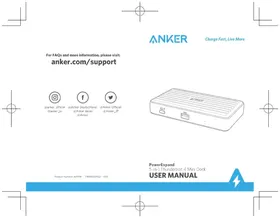
USER MANUAL PowerExpand 5in1 Thunderbolt 4 Mini Dock Anker
Charge Fast, Live More
For FAQs and more information, please visit:
anker.com/support

@anker_official @anker_jp

natural_image
Line drawing of a portable electronic device with ventilation slots and ports (no text or symbols)Product Number: A8398 51005002562 V02
PowerExpand
5-in-1 Thunderbolt 4 Mini Dock
USER MANUAL



| English | 01 |
| Deutsch | 11 |
| Español | 18 |
| Français | 25 |
| Italiano | 32 |
| Русский | 39 |
| 日本語 | 46 |
| 한국어 | 53 |
| 简体中文 | 60 |
| 繁体中文 | 67 |
| ل expBBB | 74 |



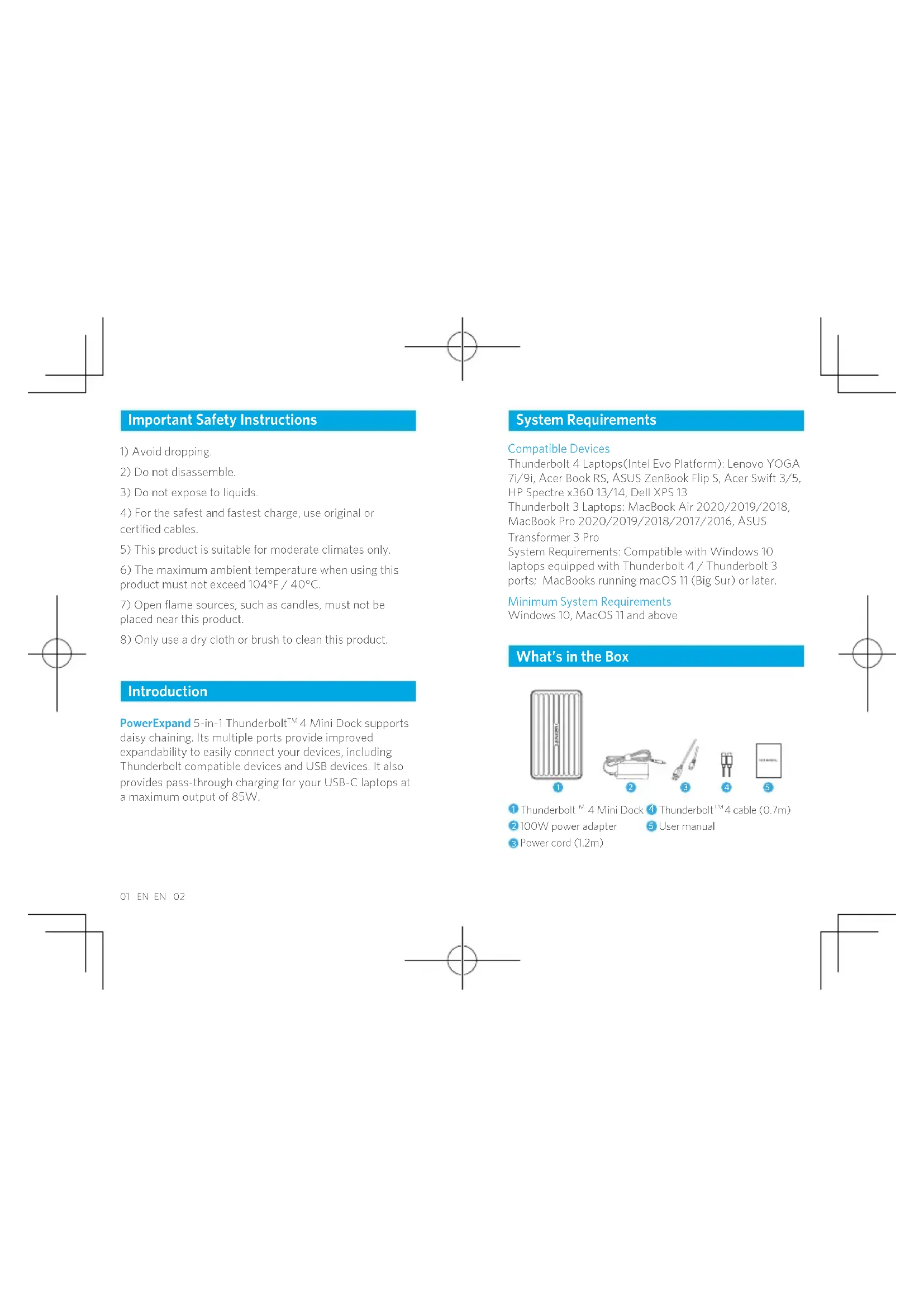
Important Safety Instructions
1) Avoid dropping.
2) Do not disassemble.
3) Do not expose to liquids.
4) For the safest and fastest charge, use original or certified cables.
5) This product is suitable for moderate climates only.
6) The maximum ambient temperature when using this product must not exceed 104^ F / 40^ C.
7) Open flame sources, such as candles, must not be placed near this product.
8) Only use a dry cloth or brush to clean this product.
Introduction
PowerExpand 5-in-1 Thunderbolt ^™ 4 Mini Dock supports daisy chaining. Its multiple ports provide improved expandability to easily connect your devices, including Thunderbolt compatible devices and USB devices. It also provides pass-through charging for your USB-C laptops at a maximum output of 85W.
System Requirements
Compatible Devices
Thunderbolt 4 Laptops(Intel Evo Platform): Lenovo YOGA 7i/9i, Acer Book RS, ASUS ZenBook Flip S, Acer Swift 3/5, HP Spectre x360 13/14, Dell XPS 13
Thunderbolt 3 Laptops: MacBook Air 2020/2019/2018, MacBook Pro 2020/2019/2018/2017/2016, ASUS
Transformer 3 Pro
System Requirements: Compatible with Windows 10 laptops equipped with Thunderbolt 4 / Thunderbolt 3 ports; MacBooks running macOS 11 (Big Sur) or later.
Minimum System Requirements
Windows 10, MacOS 11 and above
What's in the Box
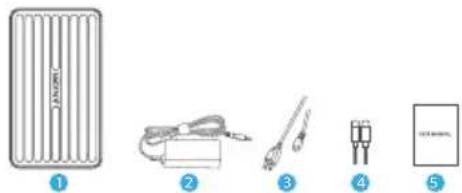
1 Thunderbolt ^™ 4 Mini Dock 4 Thunderbolt 4 cable (0.7m)
2 100W power adapter 5 User manual
3 Power cord (1.2m)
At a Glance
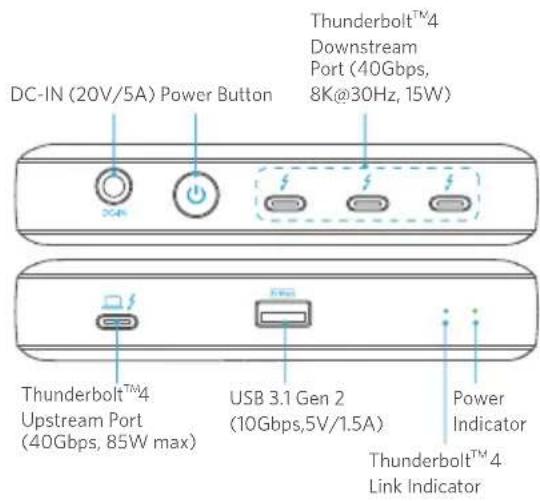
Using Your Thunderbolt™ 4 Mini Dock
Power on Your Dock
- Plug one end of the included power adapter into the DC-IN port and the other into the power outlet.
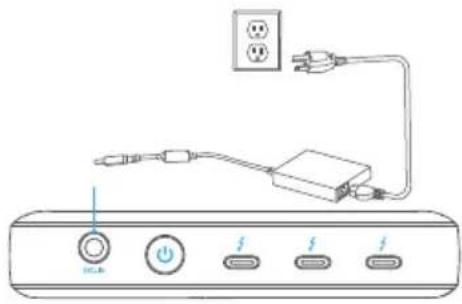
- Press the power button. The Power Indicator will turn green.
03 EN EN 04
Connect the Dock to Your Laptop
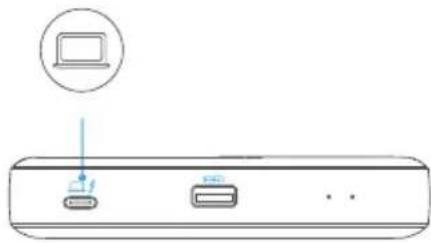
Connect the dock to your laptop using a Thunderbolt ^™ 4 cable. With the Thunderbolt ^™ 4 upstream port, the dock can provide pass-through charging for laptops at a maximum output of 85W (5V/3A, 9V/3A, 15V/3A, 20V/4.25A).
natural_image
Diagram of a device rear panel with two ports and a laptop icon (no text or symbols)
Make sure your laptop is Thunderbolt™ 4 compatible or has a USB-C port that supports PowerDelivery and DisplayPort Alt mode.
LED Indicator Guide
| LED indicator Description | ||
| Power Indicator | Solid green Powered on | |
| Off Powered off | ||
| ThunderboltTM 4 Link Indicator | Solid blue | Thunderbolt cable is connected |
Port Overview
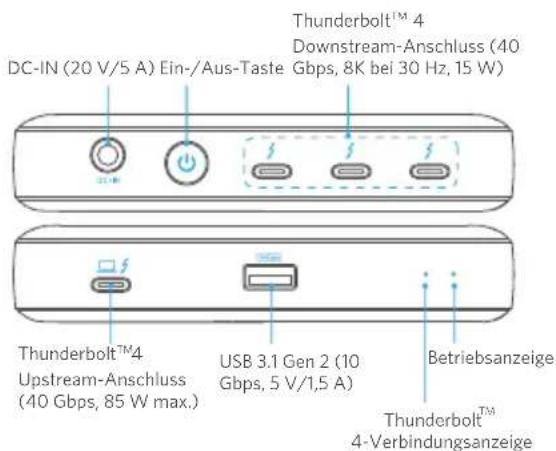
The Thunderbolt™ 4 Mini Dock features one Thunderbolt™ 4 Upstream port and three Thunderbolt™ 4 Downstream ports.
Thunderbolt™ 4 Upstream Port
The Thunderbolt ^TM 4 upstream port is used to connect to a Thunderbolt ^TM 4 compatible laptop.
Thunderbolt™4 Downstream Port
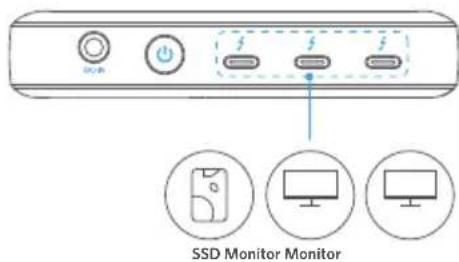
A Thunderbolt downstream port supports daisy chaining. This port can transfer data at speeds of 40 Gbps or connect to external monitors.
- Display
• Single Display: 8K@30Hz
Dual Display: 2 x 4K@60Hz
05 EN EN 06
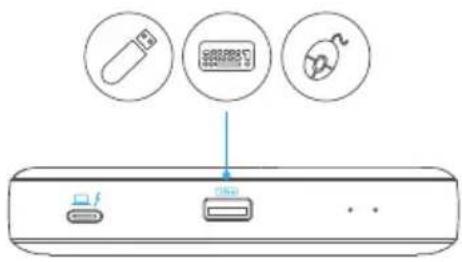
USB 3.1 Gen 2 Port
The USB 3.1 Gen 2 port can be used to connect to USB devices, including USB keyboards, USB mice, or USB storage devices.
Specifications
Product Dimension and Weight
Size: 124 x 72 x 24 mm / 4.9 x 2.8 x 0.9 in Weight: 250 g / 8.8 oz
Ports
- USB-A Port (10 Gbps, 5V/1.5A)
- Thunderbolt™ 4 Downstream Port (40 Gbps, 15W)
- Thunderbolt™ 4 Upstream Port (40 Gbps, 85W)
- DC-IN Port (20V/5A)
07 EN EN 08
NOTICE
FCC Statement
This device complies with Part 15 of the FCC Rules. Operation is subject to the following two conditions:
(1) This device may not cause harmful interference, and (2) This device must accept any interference received, including interference that may cause undesired operation. Warning: Changes or modifications not expressly approved by the party responsible for compliance could void the user's authority to operate the equipment.
NOTE: This equipment has been tested and found to comply with the limits for a Class B digital device, pursuant to Part 15 of the FCC Rules. These limits are designed to provide reasonable protection against harmful interference in a residential installation.
This equipment generates, uses, and can radiate radio frequency energy and, if not installed and used in accordance with the instructions, may cause harmful interference to radio communications. However, there is no guarantee that interference will not occur in a particular installation. If this equipment does cause harmful interference to radio or television reception, which can be determined by turning the equipment off and on, the user is encouraged to try to correct the interference by one or more of the following measures:
- Reorient or relocate the receiving antenna.
- Increase the separation between the equipment and receiver.
- Connect the equipment into an outlet on a circuit different from that to which the receiver is connected.
- Consult the dealer or an experienced radio/TV technician for help.
The following importer is the responsible party:
Company Name: Fantasia Trading LLC
Address: 5350 Ontario Mills Pkwy, Suite 100, Ontario, CA 91764
Telephone: 1-800-988-7973
Declaration of Conformity
Hereby, Anker Innovations Limited declares that the product type A8398 is in compliance with Directives
2006/1907/EC & 2014/30/EU & 2011/65/EU
The full text of the EU declaration of conformity is available at the following internet address:
https://www.anker.com
Anker Innovations Limited
Room 1398-19, Hollywood Plaza, 610 Nathan Road,
Mongkok, Kowloon, Hong Kong
Anker Technology (UK) Ltd | Suite B, Fairgate House,
205 Kings Road, Tyseley, Birmingham, B11 2AA, United Kingdom
This device complies with Industry Canada license - ICES-
- Operation is subject to the following two conditions:
(1) This device may not cause interference, and (2) This device must accept any interference, including interference that may cause undesired operation of the device.
Thunderbolt and the Thunderbolt logo are trademarks of Intel
Corporation or its subsidiaries.
natural_image
Five labeled illustrations of household appliances and devices, including a heater, medical device, and electrical connectors (no text or symbols present)1 Thunderbolt™ 4 Mini Dock 4 Thunderbolt™ 4 Kabel (0,7 m) x 1
2 Netzadapter (100 W) x 1 5 1 Handbuch
3 Netzkabel (1,2 m) x 1
Auf einen Blick
Technische Daten
natural_image
Line drawing of an electronic device with power and switch ports, connected via cables to a power outlet (no text or symbols)SSD Monitor Monitor
Puerto USB 3.1 Gen 2
Especificaciones
Spécifications
natural_image
Line drawing of an electronic device with power connections and a power outlet (no text or symbols)SSD Monitor Monitor
Porta USB 3.1 Gen 2
Specifiche
natural_image
Line drawing of a power adapter connected to a device via cable, with no visible text or symbolsПорт USB 3.1 Gen 2
natural_image
Five labeled diagrams of medical or laboratory equipment, including a thermometer, bulb, pen, and test tube (no text or symbols present)natural_image
Diagram of a power strip connection with a switch, power plug, and power outlet (no text or labels)製品の仕様
製品のサイズ
サイズ: 約124×72×24mm
重さ:約250g
ポート
natural_image
Five electronic components and a circuit board, including a heater, coiled cable, thermocouple, and connector (no text or symbols visible)natural_image
Line drawing of a power strip connection with two outlets and a switch (no text or symbols)SSD 모니터 모니터
USB 3.1 Gen 2 Port
사양
제품 치수 및 무게
크기:124×72×24mm
무게:250g/8.8oz
포트
natural_image
Line drawing of a network device with power, switch, and power outlet connections (no text or labels)- 按下电源键。电源指示灯将变为绿色。
将拓展坞连接至笔记本电脑
SSD 显示器 显示器
USB 3.1 Gen 2 端口
产品参数
设备尺寸和重量
尺寸: 124×72×24 mm
重量:250 g/8.8 oz
端口
natural_image
Line drawing of a device with power connections and an electrical outlet (no text or symbols)- 按下電源按鈕。電源指示燈將會亮起緣燈。
TC 7069 TC
將擴充基座連接您的筆記型電腦
SSD 顯示器 顯示器
TC 7271 TC
USB 3.1 Gen 2 連接埠
規格
產品尺寸和重量
尺寸: 124×72×24 mm
重量:250 g/8.8 oz
連接埠
- USB-A 連接埠 (10 Gbps, 5V/1.5A)
- Thunderbolt ^™ 4 Downstream 連接埠 (40 Gbps, 15W)
- Thunderbolt™4 Upstream 連接埠 (40 Gbps, 85W)
- DC-IN 連接埠 (20V/5A)
Swift 3/5, HP Spectre x360 13/14, Dell XPS 13
Thunderbolt 3 Laptops: MacBook Air 2020/2019/2018,
MacBook Pro 2020/2019/2018/2017/2016, ASUS
Transformer 3 Pro
The image is too blurry to recognize any text content.
Thunderbolt™ 4 Mini Dock استخدام
natural_image
Line drawing of a device with power connections and an electrical outlet (no text or symbols)المواصفات
(US) +1 (800) 988 7973 Mon-Fri 9:00am - 5:00pm (PT)
(UK) +44 (0) 1604 936200 Mon-Fri 6:00 - 11:00 (GMT)
(DE) +49 (0) 69 9579 7960 Mo-Fr 6:00 -11:00
* EN: Please note that your rights under applicable law governing the sale of consumer goods remain unaffected by the warranties given in this Limited Warranty.