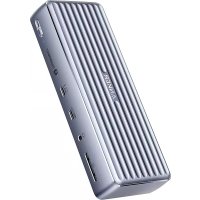
675 USB-C Docking Station - Docking station Anker - Free user manual and instructions
Find the device manual for free 675 USB-C Docking Station Anker in PDF.


| Product Type | USB-C Docking Station |
| Brand | Anker |
| Model | 675 USB-C Docking Station |
| Model Number | A8377 |
| Connectivity | USB-C, USB-A, HDMI, Ethernet, 3.5mm audio, SD/microSD reader, Qi wireless charging |
| USB-A Ports | 3 USB-A 3.2 Gen 2 ports (2 x 4.5W + 1 x 7.5W with BC 1.2) |
| USB-C Ports | 1 upstream port (Power Delivery 100W), 2 downstream ports (Power Delivery 45W total, 10 Gbit/s) |
| HDMI Port | 1 HDMI port, output up to 4K@60Hz |
| Ethernet Port | Gigabit (1 Gbit/s) |
| Audio Jack | 3.5mm input/output jack |
| Wireless Charging | Qi, maximum power 10W (Samsung 10W, iPhone 7.5W, others 5W) |
| Card Reader | SD/microSD, UHS-1, speed 104 MB/s |
| Data Transfer Speed | 10 Gbit/s (USB 3.2 Gen 2) |
| Power Supply | Included power adapter (DC-IN jack) |
| Upstream Charging Power | Up to 100W for laptop |
| Supported Operating Systems | Windows 10/11, macOS 10.14 and later, Chrome OS |
| LED Indicators | White for power on; solid blue for wireless charging, blinking blue for anomaly |
| Care and Cleaning | Clean with a dry cloth or brush. Do not use liquids. |
| Maximum Ambient Temperature | 35 °C / 95 °F |
| Safety | Do not drop, disassemble, expose to liquids, or place near open flames |
| Wireless Charging Conditions | Remove magnetic or metal cases, do not place metal objects between phone and charger |
| Compliance | CE, UKCA, Directive 2014/53/EU and 2011/65/EU |
Frequently Asked Questions - 675 USB-C Docking Station Anker
User questions about 675 USB-C Docking Station Anker
0 question about this device. Answer the ones you know or ask your own.
Ask a new question about this device
Download the instructions for your Docking station in PDF format for free! Find your manual 675 USB-C Docking Station - Anker and take your electronic device back in hand. On this page are published all the documents necessary for the use of your device. 675 USB-C Docking Station by Anker.
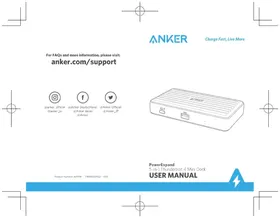
USER MANUAL 675 USB-C Docking Station Anker
For FAQs and more information, please visit:
anker.com/support

@anker_official @anker_jp

natural_image
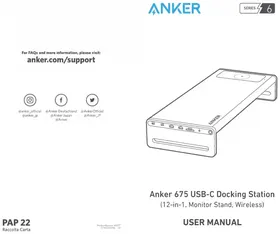
Line drawing of a device labeled 'ANKER' with ports and connectors (no additional text or symbols)Anker 675 USB-C Docking Station
(12-in-1, Monitor Stand, Wireless)
PAP 22
Raccolta Carta
ProductNumber A8377 51005003686 V01
USER MANUAL
At a Glance
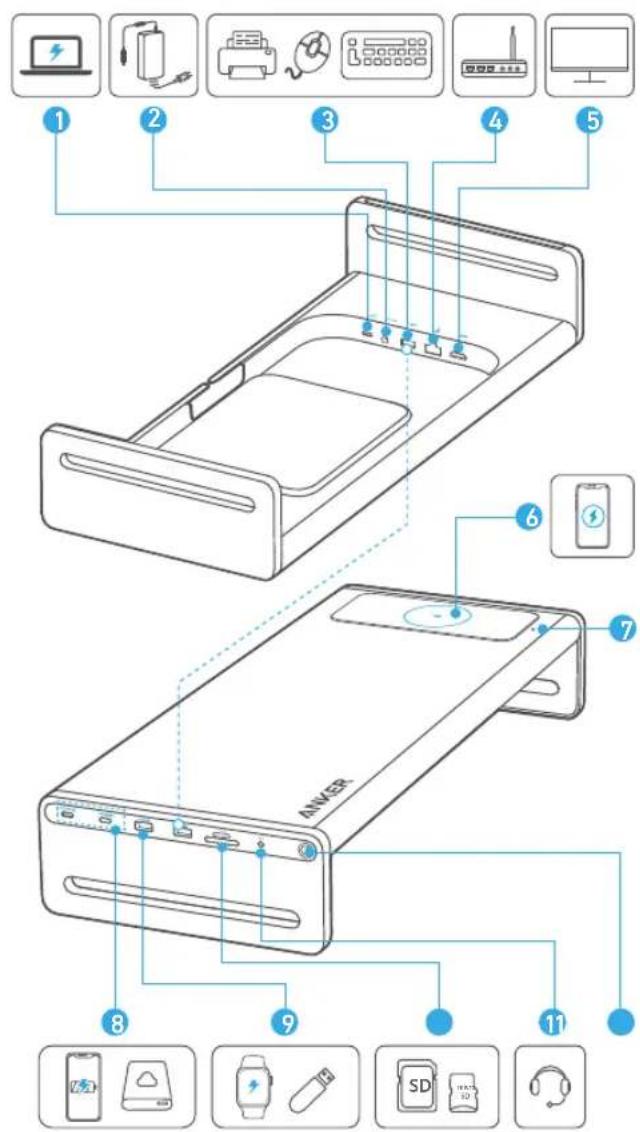
EN 01*
| Item Description | |
| 1. USB-C Upstream Port | Connect to your laptop using the included cable.Provide charging for your laptop at up to 100W. |
| 2. DC-IN Port | Plug one end of the included power adapter into the DC-IN port and the other into a power outlet. |
| 3. 2× USB-A 3.2 Gen 2 Port | 10 Gbps data transfer and 4.5W charging.Connect to USB devices, including USB keyboards, mice, or printers. |
| 4. Ethernet Port Connect to a router or modem at 1 Gbps. | |
| 5. HDMI Port | Supports up to 4K@60Hz output to a single display. |
| 6. Wireless Charging Pad | Qi-CertifiedProvides 10W charging for Samsung Galaxy, 7.5W for iPhone, and 5W for other phones or wireless earbuds (including AirPods). |
| 7. Wireless Charging Indicator | Solid blue: Charging a phone wirelessly.Flashing blue: Mental or abnormal objects detected. |
| 8. 2× USB-C 3.2 Gen 2 Port | 10 Gbps data transfer.Support a total of 45W with Power Delivery 3.0 to charge your phone or tablet. |
| 9. USB-A 3.2 Gen 2 Port | 10 Gbps data transfer.Supports 7.5W with BC 1.2 to charge smaller devices like smartwatches and headphones. |
| 10. SD / microSD Card Slot | UHS-I, 104 MB/sThe SD 3.0 card slot lets you insert an SD 3.0 card to copy files to and from your device. |
| 11. Audio In / Out | Connect to earphones or other devices with a 3.5 mm AUX connector. |
| 12. LED Indicator and Power Button | Turns white when powered on. |
Specifications
| Data Transfer Speed 10 Gbps | |
| Supported Systems Windows | 10/11, macOS 10.14 and above, Chrome OS |
| Wireless Charging Pad | |
| The Maximum Output Power | 10W |
| Radiated H-Field -14.93dBuy/A@10M | |
| Frequency Range 111-205kHz | |
| Data Communication 137.9kHz |
Important Safety Instructions
1) Avoid dropping.
2) Do not disassemble.
3) Do not expose to liquids.
4) For the safest and fastest charge, use original or certified cables.
5) This product is suitable for temperate climates only.
6) The maximum ambient temperature when using this product must not exceed 95^ F / 35^ C.
7) Open flame sources, such as candles, must not be placed near this product.
8) Only use a dry cloth or brush to clean this product.

- You cannot charge your device wirelessly in these scenarios:
• using a case with a magnetic/iron plate;
• using a case with a grip or stand;
• using an ultra-thick (> 5 mm) protective phone case.
- Do not place any foreign objects between your device and the wireless charger's surface, including metal pads, magnetic cards, door keys, coins, NFC cards, or other metal objects, as they could potentially demagnetize
the wireless charger, affect the charging speed, or cause overheating. - Wireless charging products make charging more convenient than wired chargers, but confined by current wireless technology, their charging speed is slower than that of wired chargers.
- High temperatures will reduce charging speed and restrict power. It is recommended that you charge your device in environments with temperatures below 35^ / 95^ .
FCC Statement
This device complies with Part 15 of the FCC Rules. Operation is subject to the following two conditions: (1) This device may not cause harmful interference, and (2) This device must accept any interference received, including interference that may cause undesired operation.
Warning: Changes or modifications not expressly approved by the party responsible for compliance could void the user's authority to operate the equipment.
Note: This equipment has been tested and found to comply with the limits for a Class B digital device, pursuant to Part 15 of the FCC Rules. These limits are designed to provide reasonable protection against harmful interference in a residential installation. This equipment generates, uses, and can radiate radio frequency energy and, if not installed and used in accordance with the instructions, may cause harmful interference to radio communications. However, there is no guarantee that interference will not occur in a particular installation. If this equipment does cause harmful interference to radio or television reception, which can be determined by turning the equipment off and on, the user is encouraged to try to correct the interference by one or more of the following measures:
-
Reorient or relocate the receiving antenna.
-
Increase the separation between the equipment and receiver.
-
Connect the equipment into an outlet on a circuit different from that to which the receiver is connected.
-
Consult the dealer or an experienced radio/TV technician for help.
Radiation Exposure Statement
This equipment complies with FCC radiation exposure limits set forth for an uncontrolled environment. This equipment should be installed and operated with a minimum distance of 20 cm between the radiator & your body. The following importer is the responsible party:
Company Name: Fantasia Trading LLC
Address: 5350 Ontario Mills Pkwy. Suite 100, Ontario, CA 91764
Telephone: 1-800-988-7973
Radiation Exposure Statement
This equipment complies with FCC radiation exposure limits set forth for an uncontrolled environment. This equipment should be installed and operated with minimum distance of 20 cm between the radiator & your body.
Declaration of Conformity

Hereby, Anker Innovations Limited declares that the product type A8377 is in compliance with Directives 2014/53/EU & 2011/65/EU. The full text of the EU declaration of conformity is available at the following internet address: https://www.anker.com This device is in compliance with the essential requirements and other relevant provisions of Directive 2014/53/EU. All essential radio test suites have been carried out. The device complies with RF specifications when the device is used at 20 cm from your body.
GB Declaration of Conformity

Hereby, Anker Innovations Limited declares that the product type A8377 is in compliance with the following Directives: The Restriction of the Use of Certain Hazardous Substances in Electrical and Electronic Equipment Regulations 2012 & Radio Equipment Regulations 2017. The full text of the GB declaration of conformity is available at the following internet address: https://www.anker.com This device in compliance with the essential requirements and other relevant provisions of UKCA. All essential radio test suites have been carried out. The device complies with RF specifications when the device is used at 20 cm from your body.
Anker Innovations Limited
Room 1318-19, Hollywood Plaza, 610 Nathan Road, Mongkok, Kowloon, Hong Kong The following importer is the responsible party (for UK matters only):
Anker Technology (UK) Limited.
GNR8, 49 Clarendon Road, Watford, Hertfordshire, WD17 1HP, United Kingdom. The following importer is the responsible party (for EU matters only):
This symbol indicates that this product shall not be treated as household waste. Instead it shall be handed over to the applicable collection point for the recycling of electrical and electronic equipment.
Trademarks
HDMI™
HIGHDEFETITION MULTIMEDIA INTERFACE
The Adopted Trademarks HDMI, HDMI High-Definition Multimedia Interface, and the HDMI Logo are trademarks or registered trademarks of HDMI Licensing Administrator, Inc. in the United States and other countries.
IC statement
This device contains licence-exempt transmitter(s)/receiver(s) that comply with Innovation, Science and Economic Development Canada's licenceexempt RSS(s). Operation is subject to the following two conditions:
-
This device may not cause interference.
-
This device must accept any interference, including interference that may cause undesired operation of the device.
This equipment complies with IC Radiation exposure limits set forth for an uncontrolled environment. This equipment should be installed and operated with a minimum distance of 10 cm between the product and your body. RF declaration d'exposition:
https://www.anker.com
Anker Innovations Limited
Room 1318-19, Hollywood Plaza, 610 Nathan Road, Mongkok, Kowloon, Hongkong
Anker Technology (UK) Limited, | GNR8, 49 Clarendon Road, Watford, Hertfordshire,
WD17 1HP, United Kingdom
https://www.anker.com
Anker Innovations Limited
Anker Technology (UK) Limited, GNR8, 49 Clarendon Road, Watford, Hertfordshire, WD17 1HP, United Kingdom
https://www.anker.com
Anker Innovations Limited
Room 1318-19, Hollywood Plaza, 610 Nathan Road, Mongkok, Kowloon, Hong Kong
Anker Technology (UK) Limited, | GNR8, 49 Clarendon Road, Watford, Hertfordshire, WD17 1HP, United Kingdom
https://www.anker.com
Anker Innovations Limited
Anker Technology (UK) Limited, GNR8, 49 Clarendon Road, Watford, Hertfordshire, WD17.1HP, United Kingdom
https://www.anker.com
Anker Innovations Limited
Room 1318-19, Hollywood Plaza, 610 Nathan Road, Mongkok, Kowloon, Hong Kong
Anker Technology (UK) Limited, | GNR8, 49 Clarendon Road, Watford, Hertfordshire, WD17 1HP, United Kingdom
https://www.anker.com
Anker Innovations Limited
Room 1318-19, Hollywood Plaza, 610 Nathan Road, Mongkok, Kowloon, Hong Kong
Anker Technology (UK) Limited, | GNR8, 49 Clarendon Road, Watford, Hertfordshire, WD17
THP, United Kingdom
https://www.anker.com
Anker Innovations Limited
Room 1318-19, Hollywood Plaza, 610 Nathan Road, Mongkok, Kowloon, Hong Kong
Anker Technology (UK) Limited, | GNR8, 49 Clarendon Road, Watford, Hertfordshire,
WD17 1HP, United Kingdom
Anker Innovations Limited
Room 1318-19, Hollywood Plaza, 610 Nathan Road, Mongkok, Kowloon,
Hong Kong
Anker Technology (UK) Limited, | GNR8, 49 Clarendon Road, Watford,
Hertfordshire, WD17 1HP, United Kingdom
Anker Innovations Limited
Room 1318-19, Hollywood Plaza, 610 Nathan Road, Mongkok, Kowloon, Hong Kong
以下进口商为责任方(仅负责英国事务):
Anker Technology (UK) Limited, | GNR8, 49 Clarendon Road, Watford,
Hertfordshire, WD17 1HP, United Kingdom
以下进口商为责任方(仅负责欧盟事务):
Anker Innovations Limited
Room 1318-19, Hollywood Plaza, 610 Nathan Road, Mongkok, Kowloon, Hong
Kong
Anker Technology (UK) Limited, | GNR8, 49 Clarendon Road, Watford,
Hertfordshire, WD17 1HP, United Kingdom
下列進口商為責任方(僅限歐盟相關事宜):
Anker Innovations Limited
Room 1318-19, Hollywood Plaza, 610 Nathan Road, Mongkok, Kowloon, Hong
Kong
Anker Technology (UK) Limited | GNR8, 49 Clarendon Road, Watford,
Hertfordshire, WD17 1HP, United Kingdom
.הכלההוּרָהוּרָהוּרָהוּרָהוּרָהוּרָהוּרָהוּרָהוּרָהוּרָהוּרָהוּרָהוּרָהוּרָהוּרָה
.הכלה (2
Anker Innovations Limited
Room 1318-19, Hollywood Plaza, 610 Nathan Road, Mongkok, Kowloon, Hong
Kong
Anker Technology (UK) Limited, | GNR8, 49 Clarendon Road, Watford,
Hertfordshire, WD17 1HP, United Kingdom