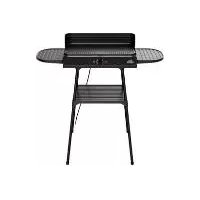
SEGS 2200 B2 - Electric barbecue Grillmeister - Free user manual and instructions
Find the device manual for free SEGS 2200 B2 Grillmeister in PDF.


| Brand | Grillmeister |
| Model | SEGS 2200 B2 |
| Product type | Electric table and standing barbecue |
| Mains voltage | 220-240 V ~ 50-60 Hz |
| Power | 2000-2400 W |
| Protection class | I |
| Protection rating | IPX4 (water splashes) |
| Number of people | 4 to 6 (estimate) |
| Opening angle | N/A |
| Cooking plate material | Non-stick coated steel |
| Cooking surface | Approx. 40 x 25 cm (estimate) |
| Temperature control | Continuous variable from MIN to MAX |
| Keep warm zone | Yes |
| Grease collection container | Yes, removable |
| Overheat protection | Yes, automatic shut-off |
| Outdoor use | Yes (under cover, not in rain) |
| Indoor use | Yes |
| Dishwasher safe parts | Cooking plate, grease collection container, side panels |
| Cable length | Approx. 1.2 m (estimate) |
| Weight | Approx. 5 kg (estimate) |
| Dimensions (mounted on legs) | Approx. 50 x 45 x 75 cm (estimate) |
| Warranty | 3 years |
| Item number (IAN) | 385772_2107 |
Frequently Asked Questions - SEGS 2200 B2 Grillmeister
User questions about SEGS 2200 B2 Grillmeister
0 question about this device. Answer the ones you know or ask your own.
Ask a new question about this device
Download the instructions for your Electric barbecue in PDF format for free! Find your manual SEGS 2200 B2 - Grillmeister and take your electronic device back in hand. On this page are published all the documents necessary for the use of your device. SEGS 2200 B2 by Grillmeister.
USER MANUAL SEGS 2200 B2 Grillmeister
natural_image
Black outdoor picnic table with open lid and side grout (no text or symbols visible)ELEKTRISCHER TISCH- UND STANDGRILL / ELECTRIC TABLETOP & FREE-STANDING BARBECUE / GRIL SUR PIED ET GRIL DE TABLE ÉLECTRIQUE SEGS 2200 B2 GOOD
GB Operating instructions
ELECTRIC TABLETOP & FREE-STANDING BARBECUE
For EU market: Imported for GB market by:
HOYER Handel GmbH Lidl Great Britain Ltd
Tasköprüstraße 3 Lidl House · 14 Kingston Road
22761 Hamburg Surbiton - KTS 9NU
GERMANY
Stand der Informationen · Status of information · Version des informations · Stand van de informatie Stan informacji · Stay informaci · Stay informacii · Estado de las informaciones · Informationernes stand:
11/2021 ID: SEGS 2200 B2 GOOD 21 V1.2
IAN 385772_2107 IAN 385772_2107
Deutsch....2
English.... 20
Français 38
Nederlands...... 60
Polski 78
Česky 96
Slovenčina 112
Español.... 128
Dansk 146
Übersicht / Overview / Aperçu de l'appareil / Overzicht / Przegląd / Přehled / Prehlad / Vista general / Oversigt
Inhalt
natural_image
3D mechanical device diagram showing a lever mechanism with two plates and a base (no text or symbols)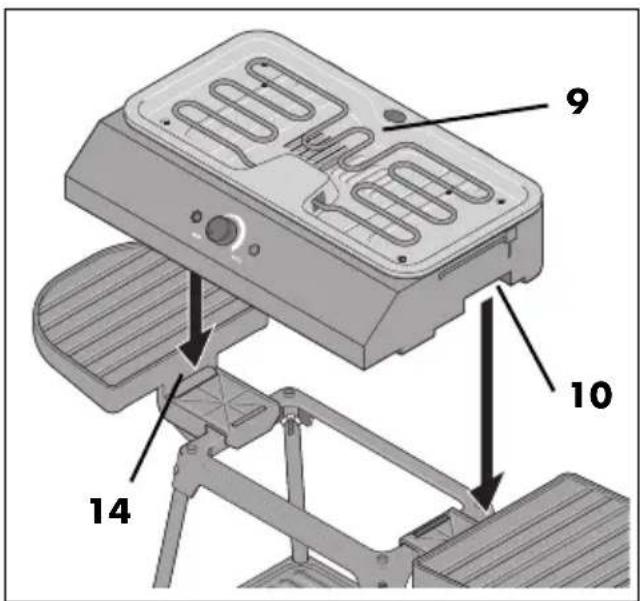
natural_image
Diagram of a computer monitor with ventilation slots and heat exchanger, showing internal components and airflow direction (no text or symbols)natural_image
3D diagram of a mechanical component with a labeled part '6' and an arrow indicating direction (no text or symbols beyond the number)- Overview 21
- Intended purpose 22
- Safety information 23
- Items supplied 26
- Unpacking 26
- Assembly as a freestanding device 27
- Using as a tabletop device 29
- Before initial use 29
- Operation 30
9.1 Connecting the device, switching it on and off.... 30
9.2 Controlling the temperature 30
9.3 Barbecuing 31
9.4 Emptying the grease drip tray.... 31
9.5 Overheating protection.... 31
- Cleaning and storing 32
10.1 Removing grease and food residues.... 32
10.2 Dishwasher 32
10.3 Cleaning the windscreen.... 32
10.4 Cleaning the base unit and frame 32
10.5 Storing the device 32
- Disposal 33
- Trouble-shooting 33
- Technical specifications 34
- Warranty of the HOYER Handel GmbH 34
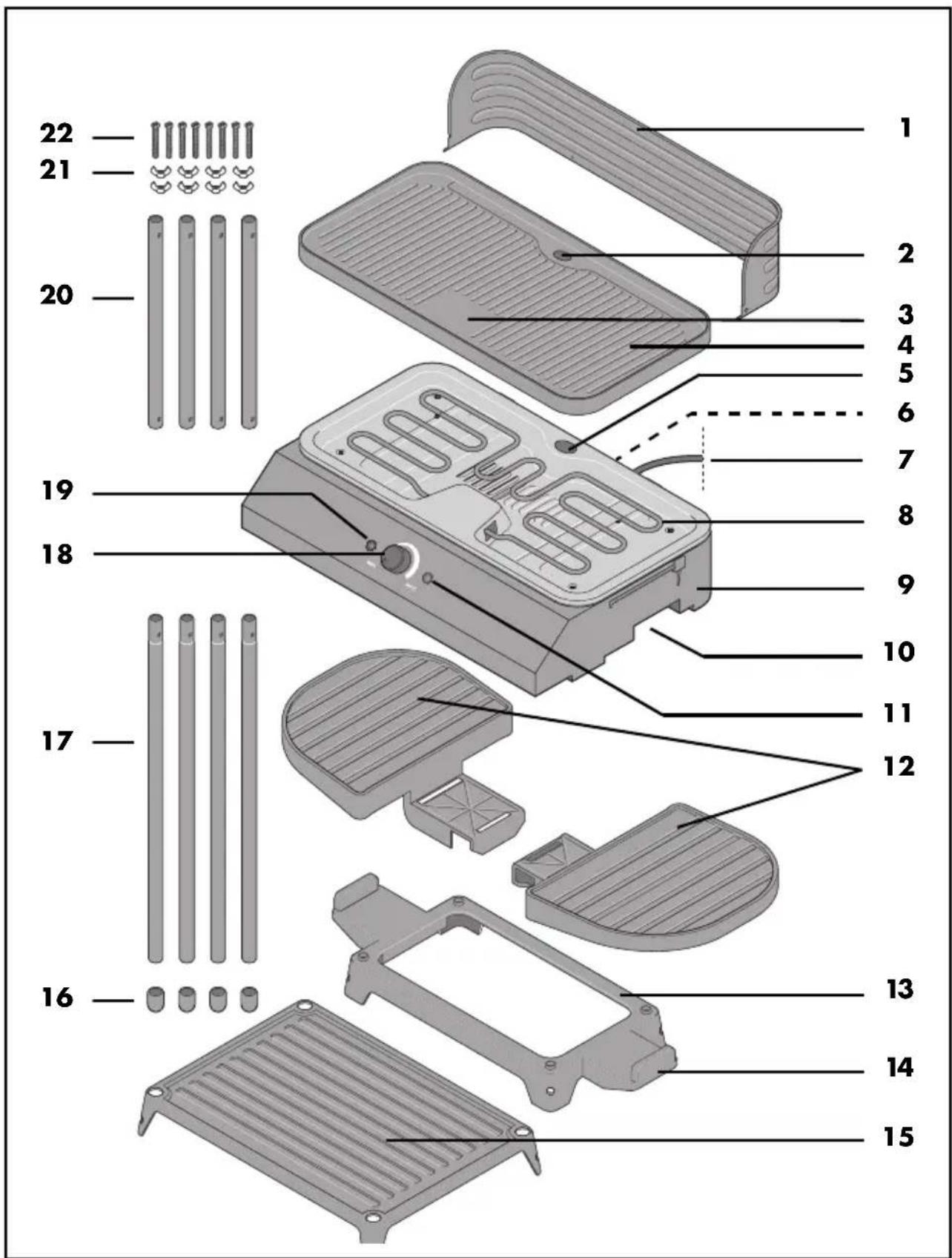
1. Overview
1 Windscreen
2 Grease drain hole (in the grill plate)
3 Warming zone
4 Grill plate
5 Grease drain hole (on the device)
6 Grease drip tray (on the back)
7 Power cable with mains plug
8 Heating element
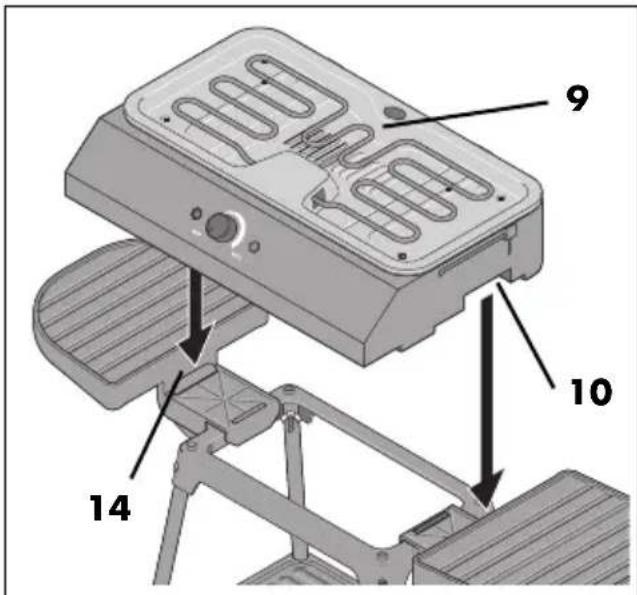
9 Base unit
10 Recessed grip
11 LED is lit during the heating process
12 Side shelves (2 pcs.)
13 Frame
14 Ridge
15 Lower shelf
16 Base caps (4 pcs.)
17 Long rods (4 pcs.)
18 MIN MAX Temperature control / On/Off switch
19 Control light: lights up as soon as the device is supplied with electricity
20 Short rods (4 pcs.)
21 Wing nuts (8 pcs.)
22 Screws (8 pcs.)
Thank you for your trust!
Congratulations on your new electric tabletop and free-standing barbecue.
For safe handling of the device and in order to get to know the entire range of features:
- Read these user instructions thoroughly prior to initial use.
- Above all, observe the safety information!
- The device should only be used as described in this copy of the user instructions.
- Keep this copy of the user instructions for reference.
- If you pass the device on to someone else, please include this copy of the user instructions. The user instructions are a part of the product.
We hope you enjoy your new electric table-top and free-standing barbecue!
2. Intended purpose
The electric tabletop and free-standing barbecue is suitable for barbecuing food. You can choose to use the device as a tabletop barbecue or as a free-standing barbecue.
The device is suitable for use indoors and outdoors.
The device is designed for private, domestic use. This device must not be used for commercial purposes.
Foreseeable misuse
WARNING! Risk of material damage!
- The device is not designed for outdoor operation during rain.
- Do not cover the grill plate with aluminium foil, aluminium trays or other heat-resistant materials. Gaps must be left clear to prevent the device from overheating.
- The device must not be used as a heater, for thawing food, or for heating or drying objects.
Symbols on your device

This symbol warns you against touching the hot surface.

The food-safe material of devices with this symbol will not change the taste or smell of food.
3. Safety information
Warnings
If necessary, the following warnings are used in this copy of the user instructions:

DANGER! High risk: failure to observe this warning may result in injury to life and limb.
WARNING! Moderate risk: failure to observe this warning may result in injury or serious material damage.
CAUTION: low risk: failure to observe this warning may result in minor injury or material damage.
NOTE: circumstances and specifics that must be observed when handling the device.
Instructions for safe operation
- This device can be used by children from the age of 8 and people with restricted physical, sensory or intellectual abilities or people without adequate experience and/or understanding, if they are supervised or instructed on how to use this device safely and if they are aware of the resulting dangers.
- Children must not play with the device.
- Cleaning and user maintenance must not be performed by unsupervised children unless they are older than 8 years and supervised.
- Children under the age of 8 must be kept away from the device and the power cable.

- During operation, the metal surfaces of the device may become hot. Do not touch the hot parts of the device such as the windscreen or grill plate.
- The device is suitable for use outdoors. During operation outdoors...
... the device must be connected to a wall socket with a protective earth conductor.
... the device must be powered via a wall socket with a residual current device (RCD) set to trip in response to a leakage current no greater than 30 mA in the electrical circuit. Ask your electrician for advice. The installation should only be carried out by a qualified electrician.
... the power cable must regularly be inspected for signs of damage. If the power cable is damaged, the device must no longer be used.
- The device, the power cable and the mains plug must not be immersed in water or any other liquids.
- This device is not intended to be operated using an external timer or a separate remote control system.
- If the power cable of this device should become damaged, it must be replaced by the manufacturer, the manufacturer's customer service department or a similarly qualified specialist in order to avoid any hazards.
- Charcoal and similar fuels must not be used in this device.
- Never leave the device unattended during operation in order to be able to intervene in good time if malfunctions occur.
- Unplug the mains plug immediately after each use to prevent accidental switching on.
- Clean the device prior to its first use (see "Cleaning and storing" on page 32).

DANGER for children!
- Packing materials are not children's toys. Children should not be allowed to play with the plastic bags. There is a risk of suffocation.
- When using it as a free-standing barbecue: never allow children to run and play in the immediate vicinity, in order to prevent them from accidentally knocking over the device or burning themselves.
- When using it as a tabletop barbecue: ensure that children are not able to pull the device down from the work surface by the power cable.
- Keep the device out of the reach of children.

DANGER to and from pets and livestock!
Electrical devices can represent a danger to pets and livestock. In addition, animals can also cause damage to the device. For this reason you should keep animals away from electrical devices at all times.

DANGER! Risk of electric shock due to moisture!
- Protect the device from moisture, water drops and water splashes.
- If liquid gets into the device, disconnect the mains plug immediately. Have the device checked before reusing.
- Never touch the device with wet hands.
- If the device falls into water, disconnect the mains plug immediately. Only then is it safe to remove the device.

DANGER! Risk of electric shock!
- Only plug the mains plug into the wall socket after the device has been completely assembled.
- Only connect the mains plug to a properly installed and easily accessible wall socket with earthing contact whose voltage corresponds to the specifications on the rating plate. The wall socket must still be easily accessible after the device is plugged in.
- When using an extension cable or a multiple socket, they must comply with the applicable safety regulations and be designed for the technical data of this device.
- Ensure that the power cable cannot be damaged by sharp edges or hot spots. Do not wrap the power cable around the device.
- The device is not fully disconnected from the power supply, even after it is switched off. In order to fully disconnect it, pull out the mains plug.
- When using the device, ensure that the power cable cannot be trapped or crushed.
- When removing the mains plug from the wall socket, always pull on the plug and never the cable.
- Disconnect the mains plug from the wall socket ...
... if there is a fault, ... when you leave the device unattended, ... immediately after each use, ... before assembling/disassembling the device, ... before you clean the device and ... during thunderstorms.
- In order to avoid any hazards, do not make modifications to the device.
- Do not use the device if there is visible damage to the device or the power cable.

DANGER! Risk of fire!
- The device must only be set up on a solid, level, dry and non-flammable sur-
face. This is intended to prevent it from tipping, slipping or setting fire to the underlying material and thus causing damage.
- The device must not be operated close to flammable liquids or materials, or in a potentially explosive environment.
Keep at a distance of at least 50 cm from walls and other objects.
- In order to prevent overheating of the device or a potential fire, the device must not be covered. The grill plates
must not under any circumstances be covered with aluminium foil, aluminium containers or heat-resistant materials.
- The power cable must not touch the hot surfaces during operation.

DANGER! Risk of injury through burning!
- The windscreen and the grill plate become very hot during operation. Only touch the control elements, the stand frame and the plastic surfaces during operation.
- When using it as a free-standing barbecue:
- Set the device up in such a way that no one will accidentally knock over the device or touch the hot surfaces.
- Do not place heavy objects (more than 1.8 kg) on the side shelves.
There is a risk of tipping!
- The device remains very hot after it is switched off, and must not be touched.
- Only transport the device when it has cooled down, and when doing so only use the recessed grips intended for this purpose.
- Use oven gloves when you are cooking food at hot temperatures. Spitting fat could otherwise cause burns.
- Never use the device without the grill plate. Otherwise the red-hot heating elements would be exposed which could result in severe burns if touched.
- If fat catches fire on the device, never try to extinguish it with water!
There is a danger of explosive deflagration or electric shock. Instead, cover the device with a fire blanket.
- Wait for the device to cool down before cleaning.

DANGER for birds!
Birds breathe faster, distribute the air differently in their bodies and are significantly smaller than humans. For this reason, it may be dangerous for birds to inhale even the smallest smoke quantities, which develop while this device is in operation. When using this device, birds should be relocated into a different room.
WARNING! Risk of material damage!
- Ensure that the temperature control is fully switched to MIN (switched off) before you plug it into a wall socket.
- Only use the original accessories.
- Do not use any astringent or abrasive cleaning agents.
- The device is fitted with non-slip plastic feet. As furniture is coated with a wide array of varnishes and synthetics, and is also treated with different care products, it cannot be fully ruled out that some of these materials contain components that could attack and soften the non-slip plastic feet. If necessary, place a non-slip mat under the device.
- Only use barbecue utensils made from wood or heat-resistant plastic. Metal utensils could damage the coated surface of the grill plate.
- Do not place any objects on the device.
- Protect the device against the effects of weather such as rain, frost etc.
4. Items supplied
1 base unit 9 incl. grease drip tray 6
1 grill plate 4
1 windscreen 1
2 side shelves 12
1 frame 13
1 lower shelf 15
4 long rods 17
4 short rods 20
4 base caps 16
8 screws 22
8 wing nuts 21
1 copy of the user instructions
5. Unpacking
- Remove all packing material.
- Check to ensure that all parts are present and undamaged.
- Remove any stickers present, but not the rating plate on the underside.
6. Assembly as a freestanding device
If you want to use the device as a free-standing barbecue, first assemble the frame.
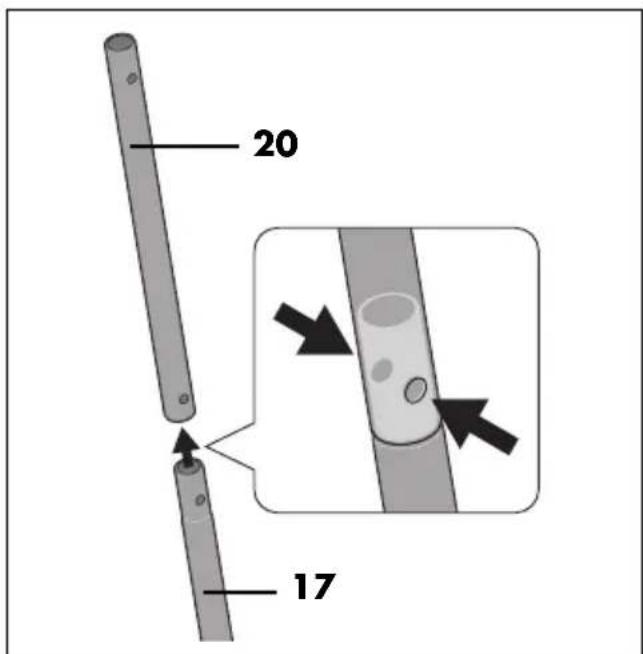
NOTE: the holes in the short rods 20 are at different distances from the edge.
The shorter distance is at the bottom. A long rod 17 is inserted into this end in each case.
- Insert a long rod 17 into a short rod 20 in each case. Make sure that the holes are exactly on top of each other.
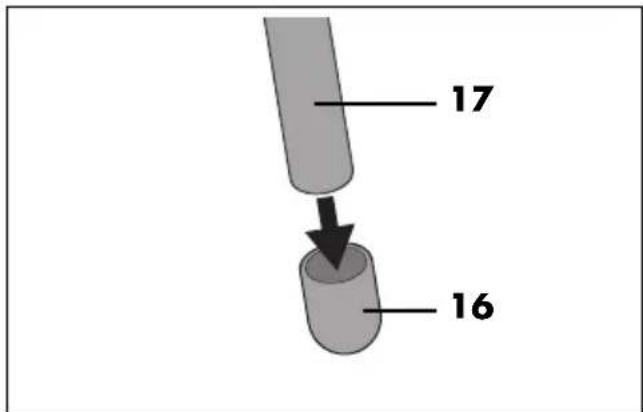
- Place one base cap 16 on the bottom of each long rod 17.
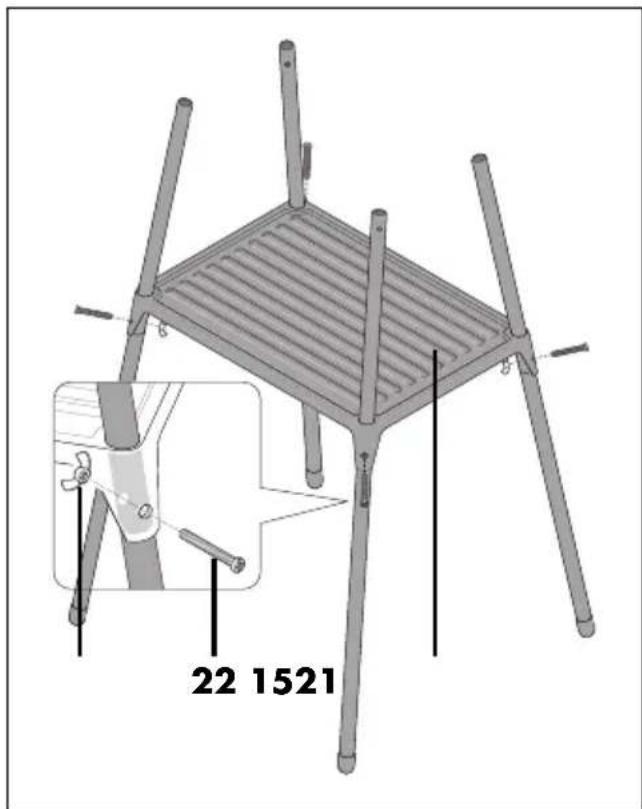
- Slide the assembled legs through the holes in the lower shelf 15.
- Position each leg so that the bores in the leg are exactly behind the hole in the lower shelf 15.
- Push a screw 22 through the hole and bores from the outside.
- Screw a wing nut 21 onto each of the screws 22 from the inside and tighten them slightly.
-
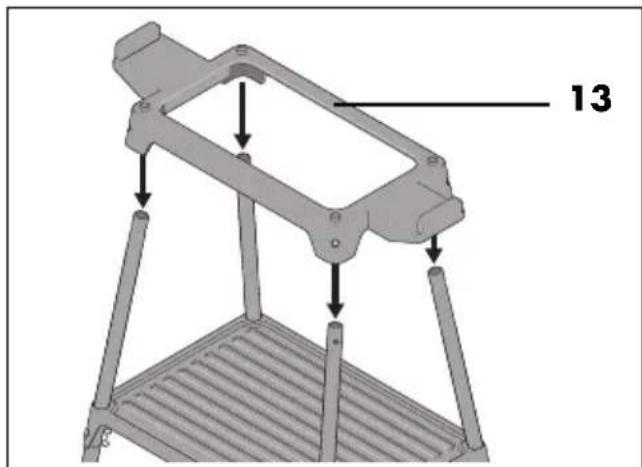
Place the frame 13 on the four upper ends of the legs.
-
Fix each corner with a screw 22 and a wing nut 21.
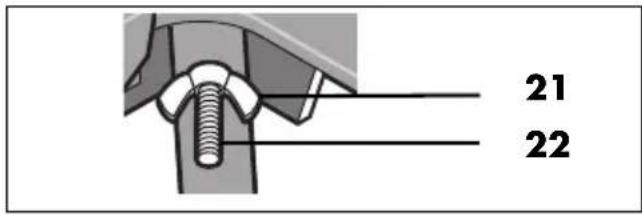
- Now tighten all 8 wing nuts firmly.
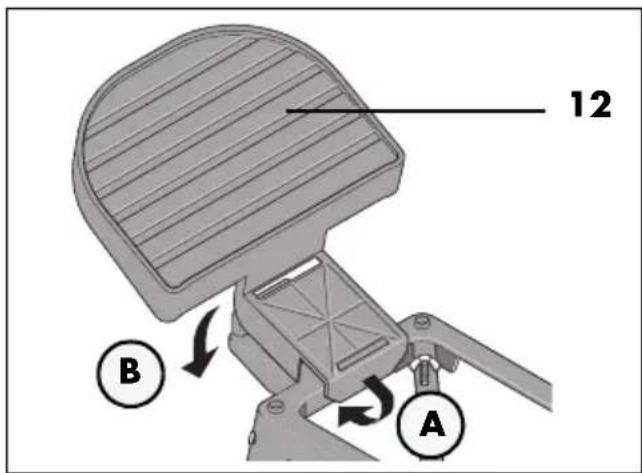
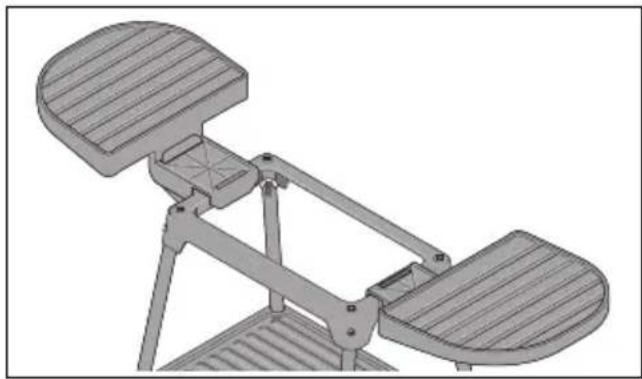
- Hook the side shelves 12 onto the narrow sides of the frame 13.
natural_image
3D mechanical diagram of a folding stand with two slatted plates and a central handle (no text or symbols)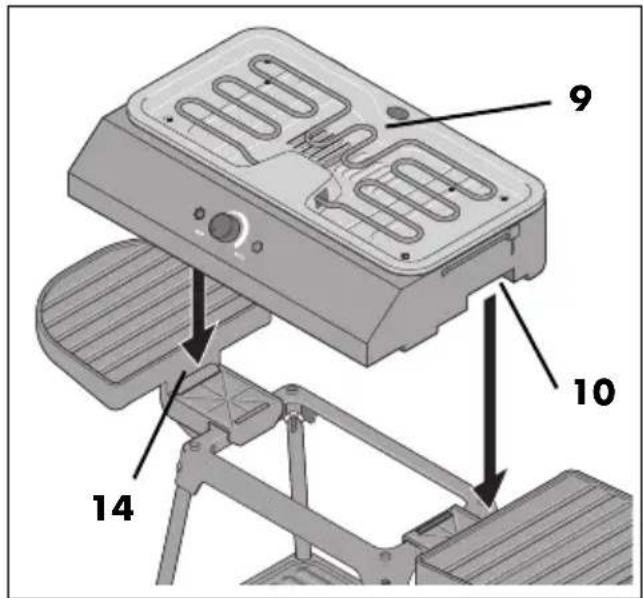
- Place the base unit 9 onto the frame. The recessed grips 10 are placed exactly on the ridges 14.
Optional: install the windscreen
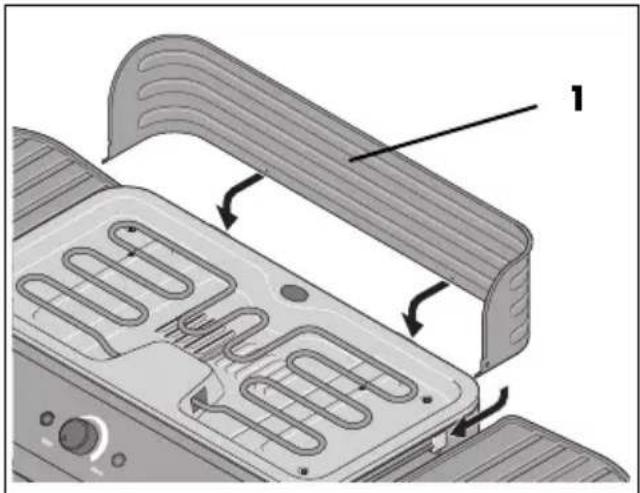
NOTE: you can use the device without the windscreen 1. You can skip this step if you wish.
- Attach the windscreen 1 to the back of the base unit 9. There are 2 holders on the back and 1 holder on each side (see arrows in the figure).
- First insert the long ends of the wind-screen 1 into the side holders of the base unit 9.
- Then press the windscreen down so that it clicks into place in the rear holder of the base unit.
Preparing to barbecue
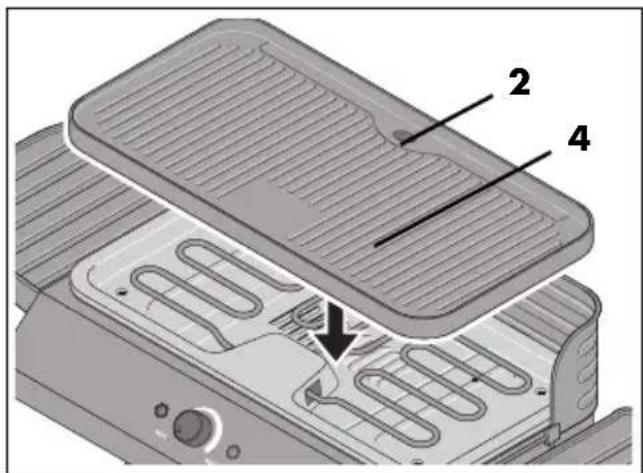
- Finally place the grill plate 4 onto the base unit 9. The two grease drain holes 2 and 5 must be located one above the other.
- Make sure that the grease drip tray 6 is inserted and clicked into place.
- Place the fully assembled device on a level, non-slip surface. Keep a distance of approx. 50 cm from other objects.
Now your electric barbecue is ready for outdoor use.
7. Using as a tabletop device
If you want to use the electric barbecue as a tabletop unit, you only need the following parts:
- Base unit 9
- Grease drip tray 6
- Grill plate 4
-
Windscreen 1 (optional)
-
Place the base unit 9 on a stable, level table that is resistant to grease and heat. Keep a distance of approx. 50 cm from other objects.
-
Finally place the grill plate 4 onto the base unit 9. The two grease drain
holes 2 and 5 must be located one above the other.
- Make sure that the grease drip tray 6 is inserted and clicked into place.
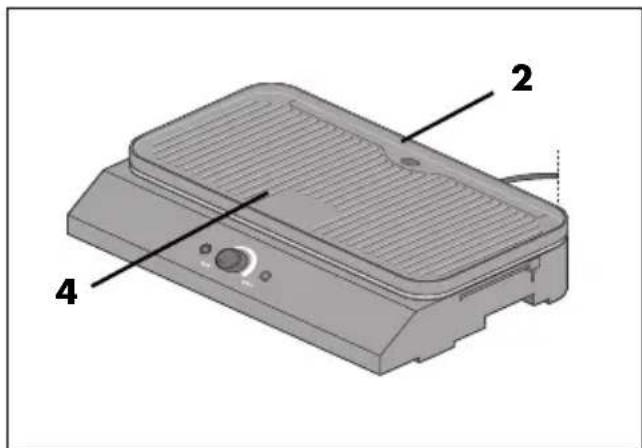
- Optionally, you can mount the windscreen 1 as described (see "Optional: install the windscreen" on page 28).
8. Before initial use

FIRE HAZARD!
- Place the device on a dry, level, non-slip and heat-resistant surface.
- The device must not be operated close to flammable liquids or materials, or in a potentially explosive environment. Keep at a distance of at least 50 cm from walls and other objects.
NOTE: when in operation for the first time, some smoke and odour may be generated by the device. This is related to materials used on the heating elements during assembly, and is not a defect with the device. Ensure adequate ventilation.
- Clean the device prior to its first use (see "Cleaning and storing" on page 32)!
-
Turn the temperature control 18 completely to MIN. This switches off the heating element 8.
-
Insert the mains plug 7 into an easily accessible earthed wall socket whose voltage matches the voltage stated on the rating plate. The control light 19 is lit.
- Turn the temperature control 18 to MAX. When the heating element 8 is switched on or off by the thermostat, you will hear a click.
- Leave the device switched on for around 10 - 15 minutes.
- Turn the temperature control 18 completely to MIN to switch the heating element 8 off again.
- Pull out the mains plug 7 and allow the device to cool.
- Clean the device again.
9. Operation

DANGER! Risk of injury through burning!
- The windscreen 1 and the grill plate 4 become very hot during operation. Only touch the control elements, the stand frame and the plastic surfaces during operation.
- Do not place heavy objects (more than 1.8 kg) on the side shelves 12. There is a risk of tipping!
- Ensure that children do no play in the vicinity of the device, or knock over or pull down the device.
9.1 Connecting the device, switching it on and off
- Lightly oil the upper side of the grill plate 4.
NOTE: use a kitchen towel with a little cooking oil drizzled onto it.
- Turn the temperature control 18 completely to MIN. This switches off the heating element 8.
- Insert the mains plug 7 into an easily accessible earthed wall socket whose voltage matches the voltage stated on the rating plate. The control light 19 is lit.
- Turn the temperature control 18 towards MAX until it is in the desired temperature range. The LED 11 is lit during heating. When the heating element 8 is switched on or off by the thermostat, you will hear a click. The LED 11 switches on and off accordingly.
- Let the device preheat for about 10 minutes. The device is now ready for operation.
- To switch the heating element 8 off again, turn the temperature control 18 completely to MIN.
- Unplug the mains plug 7 immediately after use to prevent accidental switching on.
- Allow the device to cool down before you clean it.
9.2 Controlling the temperature
The optimum temperature depends above all on the food used. With the temperature control 18 you can infinitely variably regulate the temperature of the grill plate 4:
- To increase the temperature, turn the temperature control 18 towards MAX.
- To decrease the temperature, turn the temperature control 18 towards MIN.
- To switch off the heating element 8, turn the temperature control 18 all the way to MIN.
A clicking sound is heard when the thermostat is switched on and off. The LED 11 switches on and off accordingly.
9.3 Barbecuing
The grill plate 4 is non-stick coated and normally needs to be lightly oiled only before grilling begins.
- Use utensils made of wood or heat-resistant plastic in order not to damage the grill plate 4.
- If the device is set up horizontally, grease and cooking juices can run off to the rear to the grease drain hole 2. Grease and cooking juices are collected in the grease drip tray 6 on the back.
- Food and utensils, for example, can be placed on the side shelves 12.
- Heavier objects, such as oil bottles, larger quantities of food, etc. can be placed on the lower shelf 15.
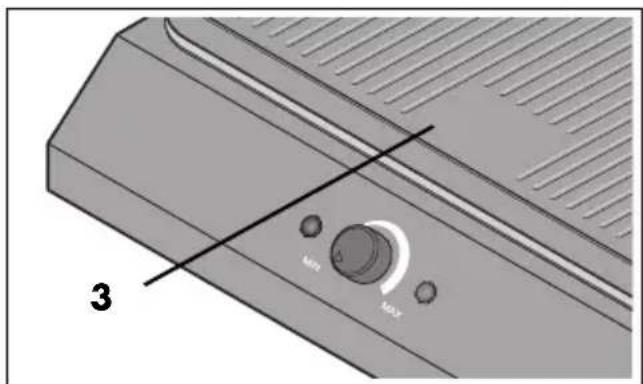
- Food that is actually ready but is waiting to be served can be kept in the warming zone 3 for a while. There is no heating element under this area, the heat comes from the heat radiation of the grill plate 4.
9.4 Emptying the grease drip tray
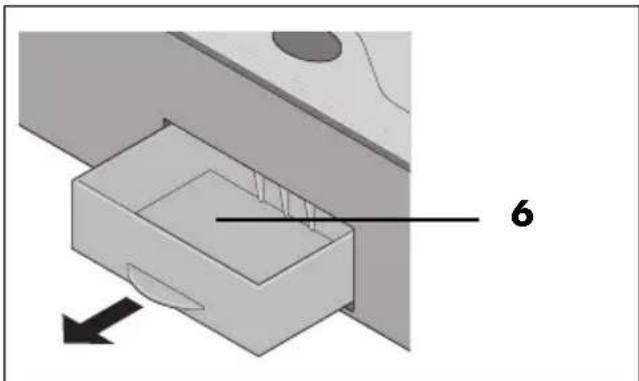
If larger quantities of grease and cooking juices are produced during grilling, the grease drip tray 6 on the back of the device must be emptied. To do this, take a break from grilling so that no liquid drains out while the grease drip tray 6 is removed.
natural_image
Diagram of a mechanical component with a numbered part and directional arrow (no text or symbols)- Carefully pull out the grease drip tray 6 on the back and empty it.
- Wipe the outside of the grease drip tray 6 with kitchen paper.
- Slide the empty grease drip tray 6 back into the base unit 9.
NOTE: you can fill some water into the grease drip tray 6 before grilling. This binds odours and facilitates cleaning.
9.5 Overheating protection
The device is fitted with overheating protection. This will automatically switch the device off if a certain temperature is exceeded. If the overheating protection is triggered, turn the temperature control 18 completely to MIN. When the device has cooled down, it can be switched on again.
Note that the grill plate 4 must not be covered with aluminium foil, aluminium trays or other heat-resistant materials. Gaps must be left clear.
10. Cleaning and storing

DANGER! Risk of electric shock!
- Disconnect the mains plug 7 from the mains socket before any cleaning.
- Never immerse the device in water, and protect it from drips and splashes.

DANGER! Risk of injury through burning!
- Prior to cleaning, let the device cool down until there is no longer a risk of burning.
WARNING! Risk of material damage!
- Never use any abrasive, corrosive or scouring cleaning agents. This could damage the device and the non-stick coating of the grill plate 4.
NOTE: do not wait too long after cooling before cleaning, otherwise food residues will dry hard and become difficult to remove.
10.1 Removing grease and food residues
- First remove grease and food residues using paper towels.
- If there is stubborn encrusted food on the grill plate 4, soften it for approx. 20 - 30 minutes in warm water with a little mild detergent.
10.2 Dishwasher
The following accessories can be cleaned in the dishwasher:
- the grill plate 4
- the grease drip tray 6
- the side shelves 12
10.3 Cleaning the windscreen
- Light dirt can be removed with a damp cloth with a little detergent.
- Remove the windscreen 1 from the device if it is very dirty. You can then clean it by hand in warm dishwater.
- Carefully dry the windscreen 1 after cleaning.
10.4 Cleaning the base unit and frame
- Clean the base unit 9 and frame with a damp cloth. You can also use a little detergent.
- Wipe with clear water.
- Do not use the device until it is completely dry again.
10.5 Storing the device

DANGER for children!
- Store the device out of the reach of children.
- Allow the base unit 9 and all accessories to dry completely after cleaning.
- Store the device in a frost-free, dry place.
11. Disposal
This product is subject to the provisions of European Directive 2012/19/EC. The symbol showing a wheelie bin crossed through indicates that the product requires separate refuse collection in the European Union. This applies to the product and all accessories marked with this symbol. Products identified with this symbol may not be discarded with normal household waste, but must be taken to a collection point for recycling electric and electronic appliances.
This recycling symbol marks e.g. an object or parts of the material as valuable for recycling. Recycling helps to reduce the consumption of raw materials and protect the envi

Packaging
When disposing of the packaging, make sure you comply with the environmental regulations applicable in your country.
12. Trouble-shooting
If your device fails to function as required, please try this checklist first. Perhaps there is only a minor problem, and you can solve it yourself.

DANGER! Risk of electric shock!
- Do not attempt to repair the device yourself under any circumstances.
| Fault | Possible causes / Action |
| No function | Has the device been connected to the power supply?Check the connection.Is the temperature control 18 completely set to MIN? Switch on the device by turning the temperature control past the clicking noise.Has the overheating protection switched off the device? Allow the device to cool down. Then it can be switched on again. |
13. Technical specifications
| Model: SEGS 2200 B2 GOOD | |
| Mains voltage: | 220 - 240 V ~ 50 - 60 Hz |
| Protection class: I | |
| Protection type: IPX4 (protection against water splashes) | |
| Power rating: 2000 - 2400 W | |
Symbols used
 | Geprüfte Sicherheit (certified safety): devices must comply with the generally acknowledged rules of technology and the German Product Safety Act (Produkt-sicherheitsgesetz - ProdSG). (Not for UK) |
 | With the CE marking, HOYER Handel GmbH declares the conformity with EU guidelines. |
 | This symbol reminds you to dispose of the packaging in an environmentally friendly manner. |
 | Recyclable materials are marked with the recycling symbol (3 arrows). The material can be specified by the recycling number in the centre (here: 21) and/or an abbreviation (here: PAP). |
| ~ | AC voltage |
 | The symbol identifies parts that can be cleaned in the dishwasher. |
 | It is a recyclable product which is subject to an extended producer responsibility and for which the rules of waste separation apply. |
Subject to technical modifications.
14. Warranty of the HOYER Handel GmbH
Dear Customer, your device is provided with a 3 year warranty starting with the purchase date. In the event of product defects, you are entitled to statutory rights against the vendor. These statutory rights are not restricted by our warranty presented in the following.
Warranty conditions
The warranty period starts with the purchase date. Please keep the original purchase receipt in a safe place. This document is required to verify the purchase.
If within three years from the purchase date of this product a material or factory defect occurs, the product will be repaired or replaced by us – at our discretion – free of charge to you, or the purchase price will be refunded. This warranty implies that within the period of three years the defective device and the purchase receipt are presented, including a brief written description of the defect and the time it occurred.
If the defect is covered by our warranty, the repaired or a new product will be returned to you. No new warranty period starts with a repair or replacement of the product.
Warranty period and statutory claims for defects
The warranty period is not extended when the warranty has been claimed. This also applies to replaced and repaired parts. Any damages and defects already existing at the time of purchase must be reported immediately upon unpacking. Repairs arising after the expiration of the warranty period are subject to a charge.
Warranty coverage
The device was produced carefully according to strict quality guidelines and tested diligently prior to delivery.
The warranty applies to material or factory defects.
Excluded from the warranty are wear parts subject to normal wear and damages to fragile parts, e.g. switches, lamps or other parts manufactured from glass.
This warranty expires if the product is damaged, not used as intended or not serviced. For the proper operation of the product, all instructions listed in the operating instructions must be observed carefully. Any form of use and handling that is advised against in the operating instructions or warned against must always be avoided.
The product is only intended for private and not for commercial use. In the case of incorrect and improper treatment, use of force and interventions not performed by our authorised Service Centre, the warranty shall cease.
Handling in case of a warranty claim
In order to ensure prompt processing of your matter, please observe the following notes:
- Please keep the article number
IAN: 385772_2107 and the purchase receipt as a purchase verification for all inquiries. - The article number can be found on the rating plate, an engraving, the title page of your instructions (in the bottom left), or as a label on the rear or underside of the device.
- If faulty operation or other defects occur, first contact the Service Centre listed in the following by telephone or email.
- Then, you are able to send a product reported as defective free of charge to the service address specified to you, including the purchase receipt and the information on the defect and when it occurred.
At www.lidl-service.com you can download this and many other manuals, product videos and installation software.
This QR code takes you directly to the Lidl Service website (www.lidl-service.com), where you can enter the article number (IAN)
385772_2107 to open your user instructions.

Service Centre
GB Service Great Britain
Tel.: 0800 404 7657
E-Mail: hoyer@lidl.co.uk
IE Service Ireland
Tel.: 1890 930 034
(0,08 EUR/Min., (peak))
(0,06 EUR/Min., (off peak))
E-Mail: hoyer@lidl.ie
MT Service Malta
Tel.: 80062230
E-Mail: hoyer@lidl.com.mt
CY Service Cyprus
Tel.: 8009 4409
E-Mail: hoyer@lidl.com.cy
IAN: 385772_2107
Supplier
Please note that the following address is no service address. First contact the aforementioned Service Centre.
natural_image
3D technical illustration of a mechanical device with two curved plates and a central support bracket (no text or symbols)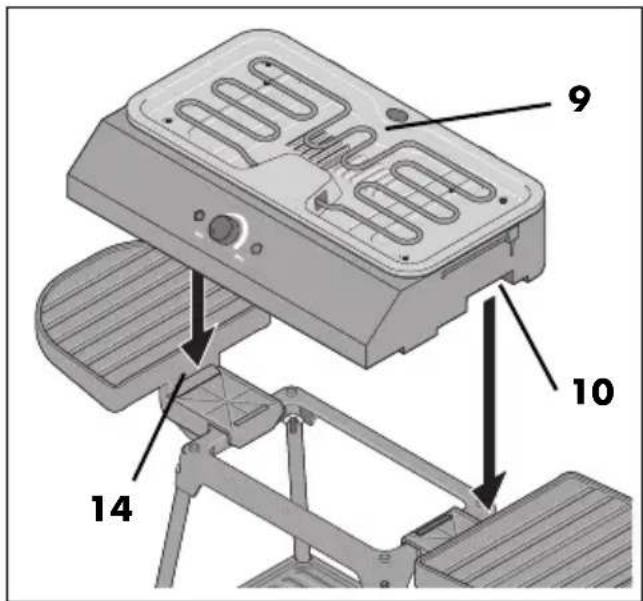
natural_image
Diagram of a device interior showing heat exchanger and cooling fins (no text or symbols)natural_image
3D diagram of a mechanical component with labeled part '6' and directional arrow (no text or symbols beyond label)natural_image
3D mechanical device diagram showing a lever mechanism with two curved plates and a central handle (no text or symbols)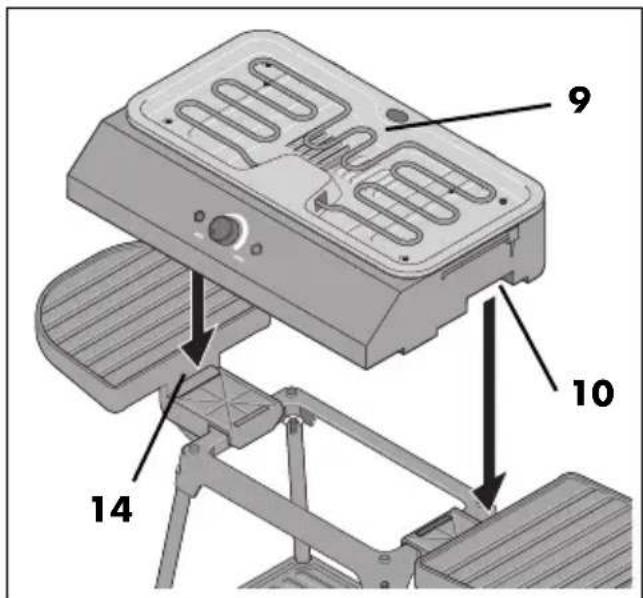
9.4 Vetopvangreservoir leegmaken
natural_image
3D mechanical assembly diagram showing a lever mechanism with two flanges and a base (no text or symbols)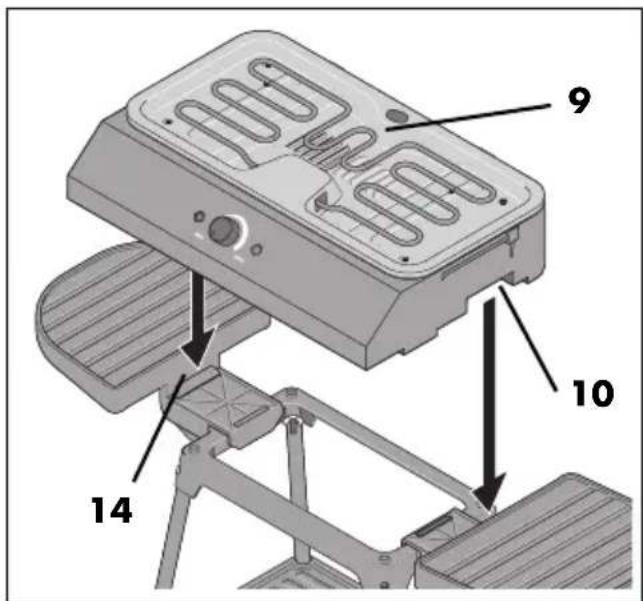
natural_image
3D mechanical assembly diagram showing two vertical plates mounted on a platform (no text or symbols)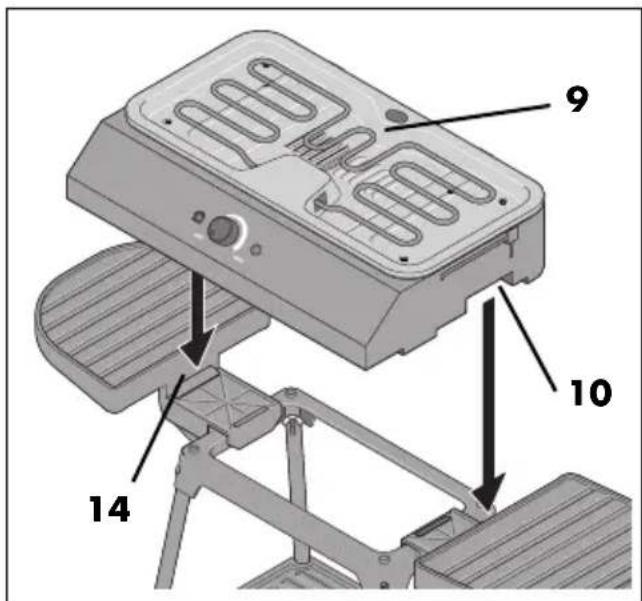
natural_image
Diagram of a mechanical or architectural component with a numbered label '6' and an arrow indicating direction (no text or symbols beyond the number)natural_image
3D mechanical assembly diagram showing two platforms with slatted sides and a central support bracket (no text or symbols)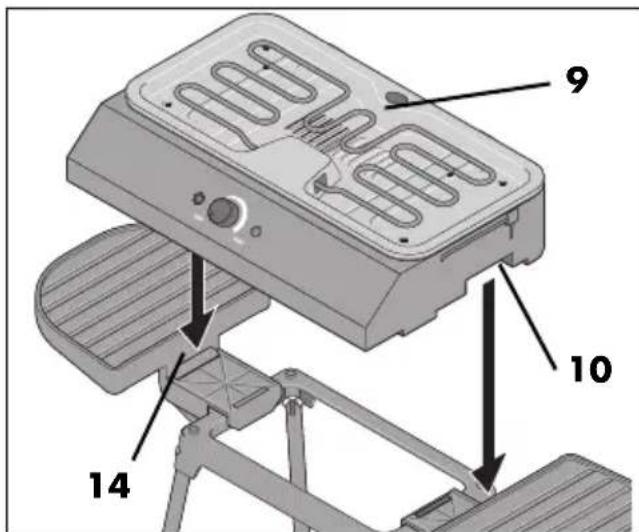
natural_image
Diagram of a computer monitor with ventilation slots and heat exchanger (no text or symbols)natural_image
Diagram of a device panel with two buttons labeled 'MAX' and a diagonal line intersecting it, no text or symbols present.natural_image
3D diagram of a mechanical component with a labeled part '6' and an arrow indicating direction (no text or symbols beyond the number)natural_image
3D mechanical assembly diagram showing two platforms with slats and a central support bracket (no text or symbols)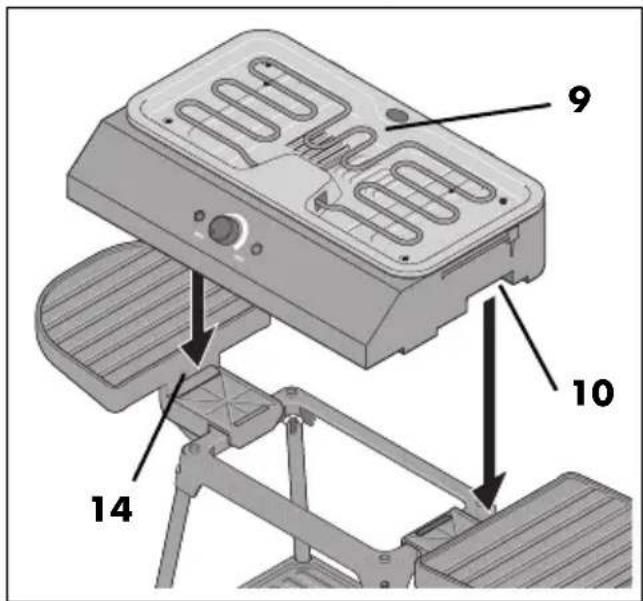
natural_image
3D diagram of a mechanical component with labeled part '6' and directional arrow (no text or symbols beyond label)natural_image
3D mechanical assembly diagram showing two vertical plates mounted on a support frame (no text or symbols)