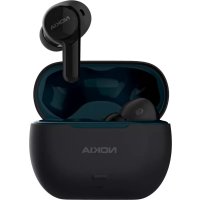
Clarity Earbuds TWS821W - Cellphone NOKIA - Free user manual and instructions
Find the device manual for free Clarity Earbuds TWS821W NOKIA in PDF.



| Product Type | Bluetooth Wireless Earbuds |
| Brand | Nokia |
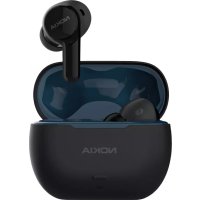
| Model | Clarity Earbuds TWS821W |
| Power Source | Built-in rechargeable lithium-ion battery, charging via USB-C port |
| Connectivity | Bluetooth 5.0 (not specified, estimated) |
| Frequency Band | 2402 MHz - 2480 MHz |
| Maximum RF Output Power | 3.23 dBm |
| Bluetooth Range | Up to 10 meters |
| Main Features | Auto pairing, touch controls, low latency mode (gaming/video), built-in microphone, mono use |
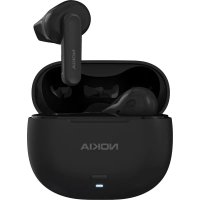
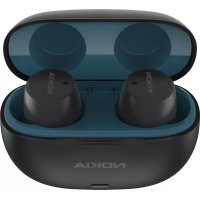
| Box Contents | Earbuds (L/R), charging case, ear tips (S/M/L), USB-C cable, quick start guide |
| Care and Cleaning | Use a soft, clean, dry cloth. Do not use liquids |
| Safety | Do not listen at high volume, keep out of reach of young children, do not open the device |
| Repairability | Available spare parts: ear tips, USB-C cable |
| Manufacturer | HMD Global Oy, Finland |
| Certifications | CE, FCC, IC |
Frequently Asked Questions - Clarity Earbuds TWS821W NOKIA
User questions about Clarity Earbuds TWS821W NOKIA
0 question about this device. Answer the ones you know or ask your own.
Ask a new question about this device
Download the instructions for your Cellphone in PDF format for free! Find your manual Clarity Earbuds TWS821W - NOKIA and take your electronic device back in hand. On this page are published all the documents necessary for the use of your device. Clarity Earbuds TWS821W by NOKIA.
USER MANUAL Clarity Earbuds TWS821W NOKIA
Nokia Clarity Earbuds
TWS-821W
Quick Start Guide / Désignations/ Schnellstartanleitung / Guía de inicios rápido / Guide de démarrage rapide / Guida Rapida / Kpaṭkoe BBODHoe pyKOBODCTBO / 快速入門指南 / 快速入门指南 / Snelstartgids / Skrocona instrukcja obslugi / Ghid de initiere rapidă / KopoTka iNCTpyKüia kopructyBaça
| EN |
| AR |
| DE |
| ES |
| FR |
| IT |
| RU |
| TC |
| SC |
| NL |
| PO |
| RO |
| UK |
What's in the box
- Charging case
- Earbuds (L/R)
- Ear tips (S/M/L)
USB Type-C cable
- Quick start guide
Product Overview
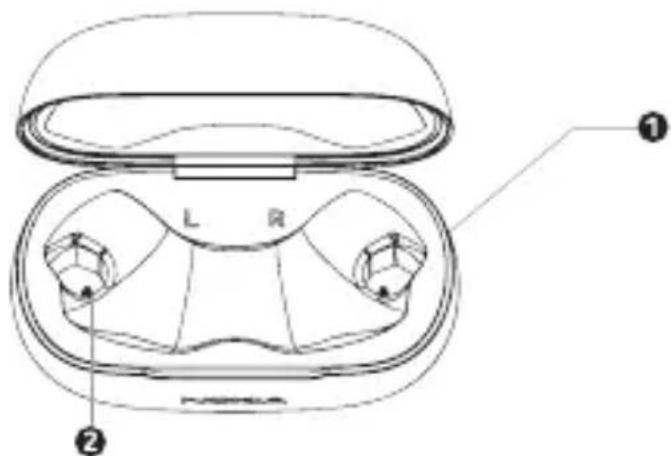
Charging case:
| 1 | Charging contacts (R) |
| 2 | Charging contacts (L) |
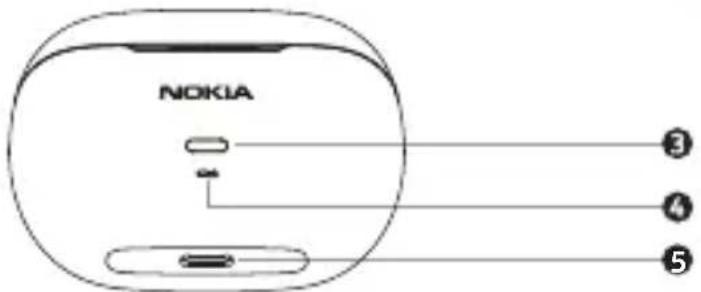
| 3 | Charging case button |
| 4 | Battery status LEDs |
| ● | USB Type-C port |
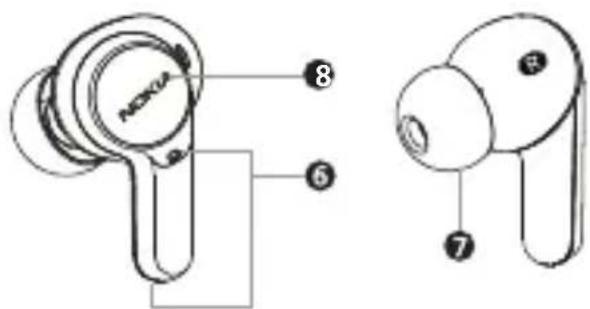
Earbuds
| 6 | Microphone |
| 7 | Eartip |
| 8 | Touch control |
- Get started
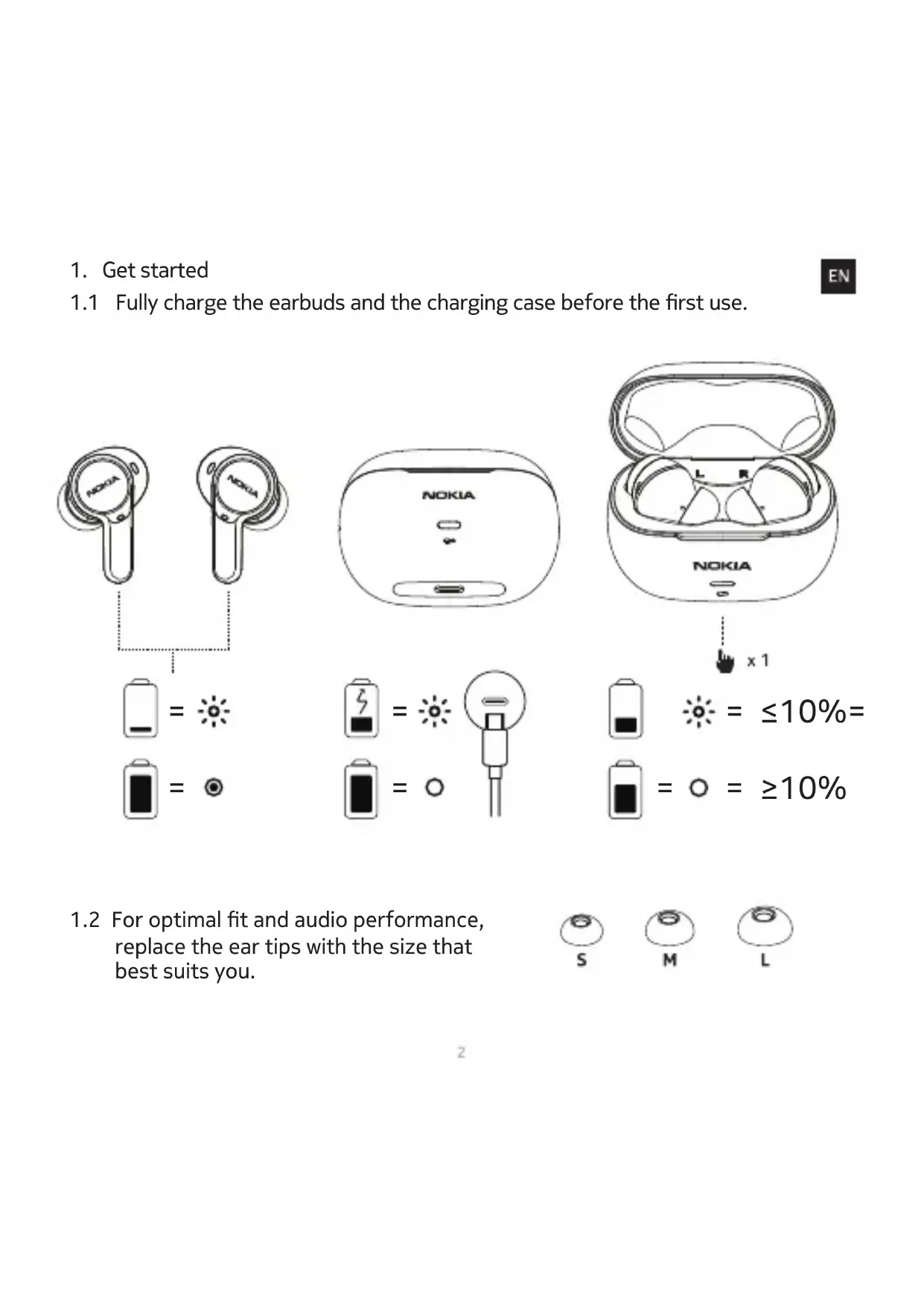
1.1 Fully charge the earbuds and the charging case before the first use.

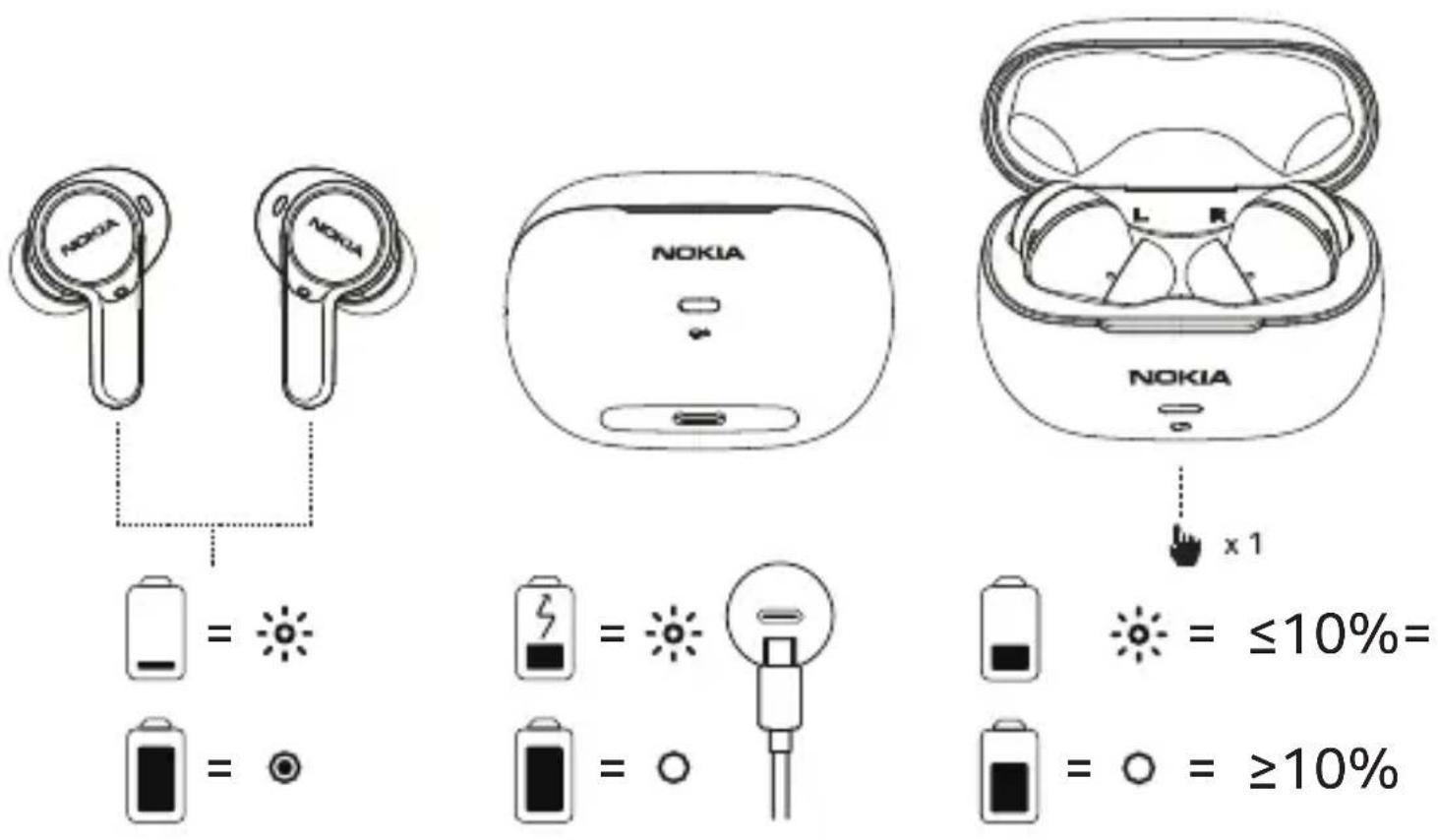
1.2 For optimal fit and audio performance, replace the ear tips with the size that best suits you.

2. Pair and connect with Bluetooth

2.1 Pairing with the device
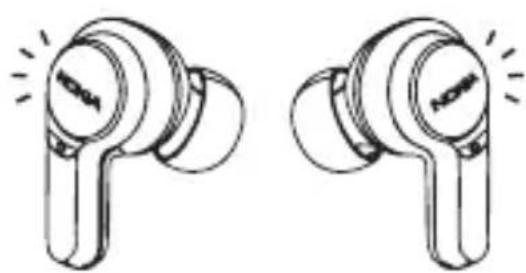
2.1a Turning on and pairing: When you take the earbuds out from the charging case, the earbuds will turn on and pair with each other automatically. When they have successfully paired, the LED indicator light of earbuds will flash blue and the earbuds are ready to connect with your Bluetooth device.
2.1b Connecting with your Bluetooth device: Turn on Bluetooth in your device and choose "Nokia TWS-821W" from the Bluetooth menu to connect.
The LED indicator on the earbuds will flash blue during the pairing process.
The LED indicator lights of the earbuds will flash blue every 10 seconds when they are successfully connected via Bluetooth.
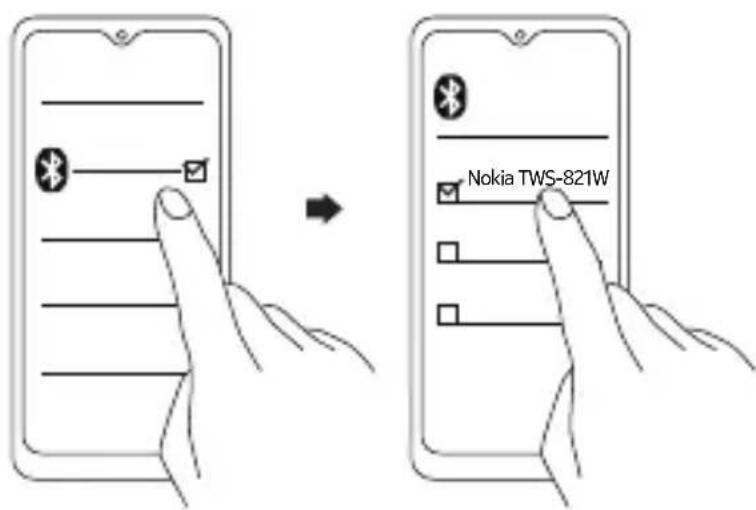
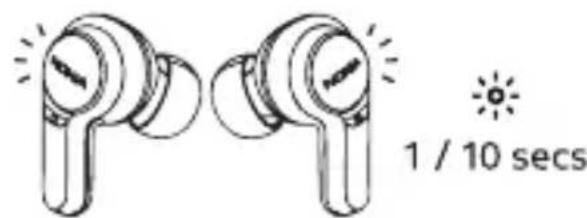
2.2 After the initial pairing, the earbuds will automatically connect with your Bluetooth device whenever taken out of the charging case.
2.3 The earbuds will automatically power off if there is no Bluetooth connection within 5 minutes.
- Using your earbuds
3.1. Touch control

- Additional controls
4.1 Use single earbud:
You can use either left or right bud as a mono Bluetooth headset after initial pairing.
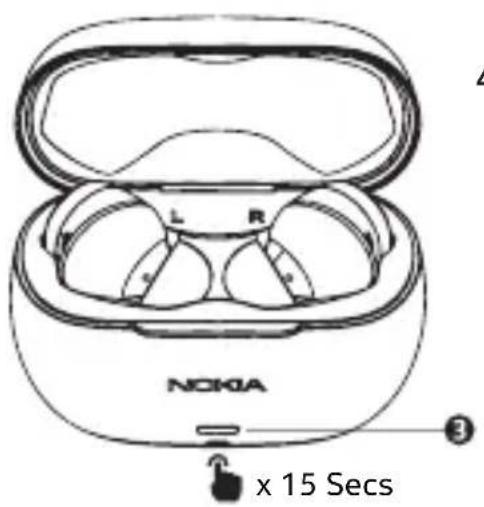
4.2 Reset to the original settings:
i) Put both buds into charging case.
ii) Charging case button x 15 Secs
iii) x 3
- Low latency mode (gaming & video mode)
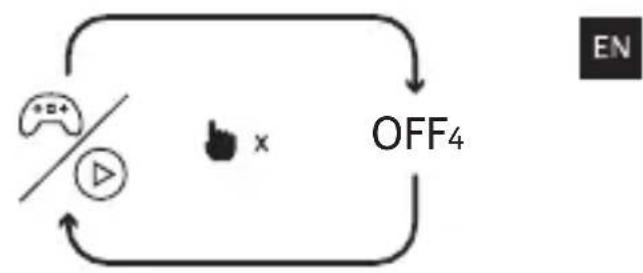
5.1 Press control button (L/R) 4 times to toggle between low latency mode > OFF. - In-call mode
6.1 Light indicator will turn on while having a call conversation, so that people around you will recognise you're not to be disturbed.
6.2 Voice pickup microphone: Voice will be picked up by the primary earbud. The earbud first taken out of the charging case will be the primary earbud.
Product and safety information

Remote control functions may vary depending on the model of your device and application. Sound track instructions do not respond to iOS devices. Since devices with Bluetooth wireless technology communicate using radio waves, they do not need to be in direct line-of-sight. Bluetooth devices must, however, be within 10 meters (33 feet) of each other, although the connection may be subject to interference from obstructions such as walls or from other electronic devices.
Frequency Band: 2400 MHz - 2483 MHz
Maximum Radio Frequency Power: -6~+4dBm
For your safety

Important: Read these simple guidelines. Not following them may be dangerous or against local laws and regulations. For further info, read the complete user guide.
Switch off in restricted areas

Switch the device off when a Bluetooth headset use is not allowed or when it may cause interference or danger, for example, in aircraft, in hospitals or near medical equipment, fuel, chemicals, or blasting areas. Obey all instructions in restricted areas.

Interference
All wireless devices may be susceptible to interference, which could affect performance.

Batteries, chargers, and other accessories
Use only batteries, chargers, and other accessories approved by HMD Global Oy for use with this device. Do not connect incompatible products.

Protect your hearing
To prevent possible hearing damage, do not listen at high volume levels for long periods.
Hearing

Warning: When you use the headset, your ability to hear outside sounds may be affected. Do not use the headset where it can endanger your safety.
Small children

Your device and its accessories are not toys. They may contain small parts. Keep them out of the reach of small children.
Take care of your device
EN
Handle your device with care. The following suggestions help you keep your device operational.
- Keep the device dry. Precipitation, humidity, and all types of liquids or moisture can contain minerals that corrode electronic circuits.
- Do not use or store the device in dusty or dirty areas.
- Do not store the device in high temperatures. High temperatures may damage the device or battery.
- Do not store the device in cold temperatures. When the device warms to its normal temperature, moisture can form inside the device and damage it.
- Do not open the device other than as instructed in the user guide.
- Do not drop, knock, or shake the device or the battery. Rough handling can break it.
- Only use a soft, clean, dry cloth to clean the surface of the device.
- Do not paint the device. Paint can prevent proper operation.
AR
cuioljocdo
jwll aIc
Jrnnnne aee eae (earbuds) n d JI LLED
j 5 5 5 5 5 5 5 5 5 5 5 5 5 5 5 5 5 5 5 5 5 5 5 5 5 5 5 5 5 5 5 5 5 5 5 5 5 5 5 5 5 5 5 5 5 5 5 5

aol oos uolic.4
ogl jsl clawpulxw1.14
gJlJrJrJrJrJrJrJrJrJrJrJrJrJrJrJrJrJrJrJrJrJrJrJrJrJrJrJrJrJrJrJrJrJrJrJrJrJrJrJrJrJrJrJr
4.2
.
15x j 3 (ii
3x (iii
gall 5
gog jj L (R gL) 5.1
J1J
(ggblgog gog) jnnnll JjJ 6
J 2.6
dawwJnJdclawy JwJWdLc no yg|Jr|p
dUwJg Jg logso
gall jwio oolwj y.dolx wlg jglj b dylalgc poill jge gllbg
CBeToIIOHbIe INdIKaTOPbI HayuHT MnRaTb CnHM KaXDbIe 10 ceKyH, KOrda OHYUCNEsHo NODKJIUOyeHbI NO Bluetooth.
2.2 После nepBoHaaybHOro copjxKeHnHayuHnKn ABToMaTuYeCKN NOkIouaTcK BaWemy yctpoiCBy Bluetooth npi KaJDom n3BLeueHn n3 3apJdHoro fytTjpa.
2.3 Hayshnki 6ydyT aBtOMaTnueckn BbIKIooaTbcra, eCIn B TeueHne 5 MInyt He 6ydet noKluoyenno Bluetooth.
Bce 6ecnpoBOHbIe yCTpoiCtBa MOryT 6bITb NOBepXeHbI BO3HNKHOBeHIO NOMex, KOToPbIE MOrY TBnIaTb Ha IPOU3BOOHTeJIbHOCTb.

AkkymyIaTOpbl,3apHbIe yCTpoNcTBa n dpyrne akceccyapbl
IcnoJIb3yIe TOLbKO aKKymJrTopbl, 3apnHbIe yCTpoNCTBa n dpyrne akceccyapbl, Oo6peHHbIe KOMNaHneHMD Global Oy Ira NcNoJIb3OBAHnC daHHbIM yCTpoNCTBOM. He NOdkIIOuAte HecOBMeCTMlbE yCTPOINCTBa.

3aunTa cnyxa
Bo n36eXaHne Bo3MOxHoro nopaxeHn cnyxa He nCnoJb3yIte BbICOKn ypoBeHb rpoMKoCTN B TeueHne dInTeJbHoro BpeMeHN.

Cnyx
BHHMaHHe! NcNoJIb3OBAHHe raphHTypbl MoXeT NOBJIaTb Ha cNoC06HOCTb CJIbIaTb fOHOBbIe 3ByKn. He nCnoJIb3yIte raphHTypy B cLyuayax BO3MOxHOy Yrpo3bl BaWei 6e3OnacHOCTn.

MaJIeHbKne dTeN
YcTpoIcTBo H COOTBcETCTByUOuNe aKceccyapbl He YbJIaOTcra IrgpyuKamn. OHN MOryt coepXaTB MeKne DeTaII. XpaHnTe INX B HeIOCTynHom dJa MaJIeHbKx DeTei MeCTe.
YXoI 3a yCTpoIcTBOM
3To yctpoiCTBO Tpe6yET 6epexHoro o6paueHn. Co6JIIOeHne npINBeJeHHbIX Hnke peKOMeHaaun NOMOKeT COxpaHnTB yCTpoiCTBO B pa6ooyem coCTOaHN.
- ObeperaTe yctpoIcTBo OT BnArN. AtmocphiHbIe ocadKn, Bnara n XnIDKOCTM Oryr cOepXaTb MInHepaNbHbIe YactuCbI, Bbl3bBaIOUne Koppo3NIO 3JleKTPoHHbIX CXem.
- He nCnoJIb3yIte n He xpaHnTe yCTpoIcTBO B 3aMbIeHHbIX nIi 3aIrp3HeHHbIX NOMeIeHHx.
- He xpaHnTe yCTpoiCTBO npn BBicOKoT TempeType okpykaiouei cpebl. BbICOKa TeMnepaTypa MoKeT npuBecTI K NOBpeJdeHIO yCTpoiCTBa nll 6atapen.
- He xpaHnTe yctpoiCTBO B xOJIoJe. Ppi nOBbIeHn TempeaTypbI yCTpoiCTBa Do HopMaJIbHOI BO3MOxHa KOHdEHCauIg BlaRn BHyTpNi KOpNyca, YTO MOXeT pINBecTn K NOBpeJdeHIO yCTpoiCTBa.
-
He otKpbIbaiTe Kopnyc ycTpoiCtBa cnocO6OM, OTNIuHbIM OT yKa3aHHoro B daHHom pyKOBOdCTBe.
-
ObeperaÎte yctpoiCtBO n 6aTapeo OT naDeHn, yIapOB n TpRcKn. Ipn HeocToPoxKHom o6paSeHn OHI MOrT 6bITb NOBpeXdEhbl.
RU
-Дя OчNTКи NOBepXHOCTN yCTpoIcTBA NOJIb3yITeCb TOnbKO MЯrKo, YnCTOJ N cyXoN TkaHbI.
- He packkaansbae yctpoicTBO. Kpacka moxet hapuunb ero HopmaibHyu pa6oty.
包裝清單 產品概述
Always return your used electronic products, batteries and packaging materials to dedicated collection points. This way you help prevent uncontrolled waste disposal and promote the recycling of materials. Electrical and electronic products contain a lot of valuable materials, including metals (such as copper, aluminium, steel, and magnesium) and precious metals (such as gold, silver, and palladium). All materials of the device can be recovered as materials and energy.
Crossed-out wheelie bin symbol

The crossed-out wheelie bin symbol on your product, battery, literature, or packaging reminds you that all electrical and electronic products and batteries must be taken to separate collection at the end of their working life. Do not dispose of these products as
unsorted municipal waste: take them for recycling. For info on your nearest recycling point, check with your local waste authority.
Battery info
your device has an internal, non-removable, rechargeable battery. Do not attempt to remove the battery, as you may damage the device. The battery can be charged and discharged hundreds of times, but it will eventually wear out. Charging time can vary depending on device capability.
Battery Safty
If left unused, a fully charged battery will lose its charge over time. Always keep the battery between 15^ and 25^ (59°F and 77°F) for optimal performance. Extreme temperatures reduce the capacity and lifetime of the battery. A device may temporarily stop working if its battery is too hot or too cold.
Do not dispose of batteries in a fire as they may explode. Obey local regulations. Recycle when possible. Do not dispose as household waste.
Use the battery and charger for their intended purposes only. Improper use, or use of unapproved or incompatible batteries or chargers may present a risk of fire, explosion, or other hazard, and may invalidate any approval or warranty. If you believe the battery or charger is damaged, take it to a service centre or your local shop before continuing to use it. Never use a damaged battery or charger. Only use the charger indoors. Do not charge your device during a lightning storm.
Implanted medical devices
EN
To avoid potential interference, manufactures of implanted medical devices recommend a minimum separation of 15.3 centimetres (6 inches) between a wireless device and the implanted medical device. Persons who have such devices should:
- Always keep the wireless device more than 15.3 centimetres (6 inches) from the medical device.
- Not carry the wireless devise in a breast pocket.
- Switch the wireless device off if there is any reason to suspect that interference is taking place.
- Follow the manufacturer directions for the implanted medical device.
If you have any questions about using your wireless device with an implanted medical device, consult your health care provider.
Copyrights and other notices
The availability of products, features, apps, and services may vary by region. For more info, contact your dealer or your service provider. This device may contain commodities, technology or software subject to export laws and regulations from the US and other countries. Diversion contrary to law is prohibited.
The contents of this document are provided "as is". Except as required by applicable law, no warranties of any kind, either express or implied, including, but not limited to, the implied warranties of merchantability and fitness for a particular purpose, are made in relation to the accuracy, reliability or contents of this document. HMD Global reserves the right to revise this document or withdraw it at any time without prior notice.
Reproduction, transfer or distribution of part or all of the contents in this document in any form without the prior written permission of HMD Global is prohibited. HMD Global operates a policy of continuous development. HMD Global reserves the right to make changes and improvements to any of the products described in this document without prior notice.
Manufacturer and importer in EU: HMD Global Oy, Bertel Jungin aukio 9, 02600 Espoo, Finland. HMD Global Privacy Policy, available at http://www.nokia.com/phones/privacy, applies to your use of the device.
In the unlikely event that this product is faulty, please return it to the store where you purchased it with your proof of purchase. For more information on this or other products please visit http://www.nokia.com/phones/support. 51
© 2021 HMD Global. All rights reserved. HMD Global Oy is the exclusive licensee of the Nokia brand for phones & tablets. Nokia is a registered trademark of Nokia Corporation.

The Bluetooth word mark and logos are owned by the Bluetooth SIG, Inc. and any use of such marks by HMD Global is under license.
Declaration of conformity
Hereby, HMD Global Oy declares that this product is in compliance with the essential requirements and other relevant provisions of Directive 2014/53/EU. A copy of the Declaration of Conformity can be found at: www.nokia.com/mobile-declaration-of-conformity.
FCC Notice to users
The following statement applies to all products that bear the FCC logo and/or FCC ID on the product label.
This equipment has been tested and found to comply with the limits for a Class B digital device, pursuant to part 15 of the FCC Rules. See 47 CFR Sec. 15.105(b).
These limits are designed to provide reasonable protection against harmful interference in a residential installation. This equipment generates, uses and can radiate radio frequency energy and, if not installed and used in accordance with the instructions, may cause harmful interference to radio communications. However, there is no guarantee that interference will not occur in a particular installation. If this equipment does cause harmful interference to radio or television reception, which can be determined by turning the equipment off and on, the user is encouraged to try to correct the interference by one or more of the following measures:
- Reorient or relocate the receiving antenna.
- Increase the separation between the equipment and the receiver.
- Connect the equipment to an outlet on a circuit dierent from that to which the receiver is connected.
- Consult the dealer or an experienced radio/TV technician for help.
This device complies with part 15 of the FCC Rules.
Operation is subject to the following two conditions:
(1) This device may not cause harmful interference, and
(2) This device must accept any interference received, including interference that may cause undesired operation. See 47 CFR Sec. 15.19(a)(3). HMD Global has not approved any changes or modification to this device by the user. Any changes or modification could void the user's authority to operate the equipment. See 47 CFR Sec. 15.21
Industry canada notice to users
This device complies with Industry Canada license-exempt RSS standard(s). Operation is subject to the following two conditions: (1) This device may not cause interference and (2) This device must accept any interference, including interference that may cause undesired operation of the device. See RSS-Gen, Section 8.4. This device complies with ICES-003 requirements for Class B ITE (Information Technology Equipment). CAN ICES-3 (B)/NMB-3(B) This device meets the IC requirements.
AR
yWll ola
.aaagall gacll bcll alasssll aalgog tlaalbllg agnng yjy lalc lgl d 1 .algalll oolg jzjgag aaiag llg zg nllg gao gaoaiae i aaii g aaii g aaii g aaii g aaii g aaii g aaii g aaii g aaii g aaii g aaii g aaii g aaii g aaii g aaii g aaii g aaii g aaii g aaii g aaii g aaii g aaii g aaii g aaii g aaii g aaii

gucuullll llaaiaa a
g l a bll g l lgl gall gll ggbwlll lal alal alal alal alal alal alal alal alal alal alal alal alal alal alal alal alal alal alal alal alal alal alal alal alal alal alal alal alal alal alal alal alal alal alal alal alal alal alal alal alal alal alal alal alal alal alal alal alal alal alal

aJbUJg> logso
J 1 Jg 1 Jg 1 Jg 1 Jg 1 Jg 1 Jg 1 Jg 1 Jg 1 Jg 1 Jg 1 Jg 1 Jg 1 Jg 1 Jg 1 Jg 1 Jg 1 Jg 1 Jg 1 Jg 1 Jg 1 Jg 1 Jg 1 Jg 1 Jg 1 Jg 1 J g 1 J g 1 J g 1 J g 1 J g 1 J g 1 J g 1 J g 1 J g 1 J g 1 J g 1 J g 1 J g 1 J g 1
AR
aJbUdOyw
J 1 J 1 J 1 J 1 J 1 J 1 J 1 J 1 J 1 J 1 J 1 J 1 J 1 J 1 J 1 J 1 J 1 J 1 J 1 J 1 J 1 J 1 J 1 J 1 J 1 J 1 J 1 J 1 J 1 J 1 J 1 J 1 J 1 J 1 J
g l g l g l g l g l g l g l g l g l g l g l g l g l g l g l g l g l g l g l g l g l g l g l g l g l g l g l g l g l g l g l g l g l g l g l g l g l g l g l g l g l g l g l g l g l g l g l g l g l g l g l
aegjraa aabla ojej
aJLwJc bJcJbJcJbJcJbJcJbJcJbJcJbJcJbJcJbJcJbJcJbJcJbJcJbJcJbJcJbJcJbJcJbJcJbJcJbJcJbJc
.()15.3 15.3 15.3 15.3 15.3 15.3 15.3 15.3 15.3 15.3 15.3 15.3 15.3 15.3 15.3 15.3 15.3
.
.
.89j0 jgJgJgJgJgJgJgJgJgJgJgJgJgJgJg
aIcJlDoooJawwJgjygo jy go yu JwUJgJUJdUJdUJdU
y
Jg. aabioill dIyIbIg IaBblg JzIyIg Jg yIe I" jglldyIg g. bIyIyIg 100g 100g 100g 100g 100g 100g 100g 100g 100g 100g 100g 100g 100g 100g 100g 100g 100g 100g 100g 100g 10
dJgsslll aiee g. "s lo" dsssslll 1ds t jL JI Lc s l bsiaag gl cns cng, g, g, g, g, g, g, g, g, g, g, g, g, g, g, g, g, g, g, g, g, g, g, g, g, g, g, g, g, g, g, g, g, g, g, g, g, g, g, g, g, g, g, g, g, g, g, g, g, g, g,
Jksh yIg jg Igsjg Ig Igl Jd Dssal lds h w dla Jh HMD Global .HMD Global .HMD Global .HMD Global .HMD Global .HMD Global .HMD Global .HMD Global .HMD Global .HMD Global .HMD Global .HMD Global .HMD Global .HMD Global .HMD Global .HMD Global .HMD Global .HMD Global .HMD Global .HMD Global .HMD Global .HMD Global .HMD Global .HMD Global .HMD Global .HMD Global .
. www . nokia . com / mobile - declaration - of - conformity
a|b|JnLc
gogagglI HMD Global Oy aKwJnJ,ssll
.EU/2014/53 8gJdAaJgJdAaJdAaJdAaJdAaJdAaJdAaJdAaJdAaJdAaJdAaJdAaJdAaJdAaJdAaJdAaJdAaJdAaJdAaJdAaJdAaJdAaJdAaJdAaJdAaJdAaJdA
. www . nokia . com / mobile - declaration - of - conformity
Wiederverwertung

www.nokia.com/mobile-declaration-of-conformity.
Recyclage

www.nokia.com/mobile-declaration-of-conformity.
YTNIN3aun
IT
BcBpaaIte nCnoJIb3OBAHHbIe 3JIeKTPoHHbIe N3dJIIN,6aTapeN yNAKOBOUHbIe MaTePnAJIbI B CneuaJIbHbIe NyHKtBI c6opa.3To No3BOJraET npedOTBpATNTb HeKOHTPoJIpyEmble Bbl6pocbi OTXODOB IN CNOcO6CTByet NOBTOPHOMY NCNoJIb3OBAHNIO MaTePnAJOB.3JIeKTPuYeCKNe I 3JIeKTPoHHbIe N3dJIIN COdePxKat MHOKeCTBO CEHHbIX MaTePnAJOB,BKJIouaY MaTaJIbI (HaNPmEp,MeB,aIOMHIn,CtaJIb IN MaHNI) IN dpaRoUeHHbIe MeTAJIbI (HaNPmEp,30IoTo,cepe6po IN pAAJaN).Bce MaTePnAJIbI DAHHoro YCTPOINCTBa MOrYT 6bIT bpepa6OtaHbI dny nOlyeHHaMaTePnAJOB IN 3HeprnN.
3нak перочеркHyTORO мycopHoro KOHTeHepa
3nak nepeepkhytoro mycophoro KOHTeHepa Ha n3deJIn, 6atapee, B DOKymeHTaunn nnHa ynaKOBke O3Haayet, YTO no OKOHuaHn cpoKa Cnyx6bI BCE 3neKTpuYeCKne n 3JeKTPOHHbIe n3deJInn 6batapei noJnxat pa3dellehno ytnnn3aun.
He Bb6paBbAaTe 3Tu n3deJnBMeCTe C HeOTcOpTnpoBaHHbIMn rOPOckmN OTXoJaMn - OTnpaBbTe Hx Ha yTuIn3aunio. INHΦopMaunio O 6JnxKaIWeM NyHKTe yTuIn3aunu MoXHO NOLyUHTb B MeCThbx OpraHax No BONpocam yTuIn3aunu.
CbeHn o6 aKymytope
Данhoe усточьо сабжени BHTpeHHIM HeCBemHBIM nepe3apjaembIM AkkymyIATOpOM. He nbitaTecb 3BJIeYb akKymyIaTOp, nockoJbky 3TO MOKe T npIBeCTN K NOBpeJdeHIO yCTPOIcTB. AkkymyIaTOp MOxHO 3apjKaTb n pa3prKaTb COTHn pa3, ODAKO pni 3Tom OH NOCTeHNO n3HaunBaetc. BpeM 3apJdKn MoKTe pa3JIuHaTbcR B 3aBNCUMOCTN OT COCTOHRy UcTPOIcTBa.
Texnka 6e30napocht npn nCnoIb3OBaHn aKKymyIATOPOB
RU
EcnnoHocTbO 3apxkeHHb aKcymyIaTOp He nCNOJb3yeTcR, OH noCTeNEHNO pa3pxaetc.ДЯ ONtMaJIbHO npOn3BOJnteJIbHOCTn 6aTapeo CJeDyET xpaHTb npu TempeaType ot 15 do 25 ^ C (ot 59 do 77 ^ F ). CnHKOM BbICOKaN cNtIKOM Hn3KaY TempeaTypa npINBOIT K ChNXeHHIO EMKOCTN i Cpoka cLnyK6bl 6aTapeN. YcToPcTBo MoXeBVPemHNo ppeKpaNTb pa6Ory B ClyUae cNtIKOM Hn3KOu NII NBy BcOKoY TempeaTypbI 6aTapeN. He yHnTuKaiTe 6aTaapeN PyTe CxURAHN, TAK KaK OHI MOrYT B3OPBaTcR. He HApUaIte MeCTHbIe HopMaTHBHe I AKTbI. IIO BO3MOXHOCTn CdaBaIe aKKMyJIATOpbl IdrA BTOpIHOH nepepa60TK. 3anPeuaETcR Bb6PaCbIBaTB BMeCTe C 6bITOBbIM MyCopom. BaTapeu CJeDyET NCNoJIb3OBAbT NCKLIQUHTeJIbHO NO IN PpAMOM Ha3NaueHIO. PtmuMeHne He IIO HA3NaueHIO NII NcNoJIb3OBAHne HeoDo6peHHbIX NII HecOBMeCTMlbIX 6aTapeN MoXeT npuBeCTn K Bo3rOpAHIO, B3pbIBy NII BO3NHKNHObeHIO dpyroJ onaCHoiN CuTyauN. KpOE TOR, 3TO MoXeT npuBeCTn K anHyIpoBaHIO rapaHTNI. EcnB Bam KaKeTcR, YTO 6aTapeR HeNCnPabHa, nepeI npoJoXeHHeM ee 3KcPiLyatauN o6paTIteCB cepBnChBI ueHTp NII MeCTHBI MaRa3IN. He nCNoJIb3yIte HenCnpabHble 6aTapeN. He 3apxkaIte yctpoICTBO BO BPEm rpo3bl.
IIMПlaHTnPoBaHHbIe MeDnCnHcKne yCTpoiCTBa
CorgaHOp peKOMeHdaunm n3rOToBnTeJe mNpAHTnpyEmbIX MeuunHcknx yCTpoiCTB, BO n36exHaHne Bo3HKnHOBeHnI NOteHcuaJIbHbIX NOMex pacctOAHne MExdy 6ecnpoBOdHbIM ycTPOIcTBOM I NmPAnHTnpoBaHHbIM MeuunHckm YCTPOIcTBOM DOJXHO 6bITb He MeHee 15,3 caHTnMeTp a (6 dIOHM). Llucam, pOnb3yUoImcraTkMn npnbopamn, Heo6xoDIMO co6JIoDaTb cLeNyUoune npabnla:
-Дерхитебеспобдhoe устюн Ha paocToHn He MeHee 15,3 caHTmEtpa (6 duHMoB) OT meduHcKOrO uCtpoIcTba.
- He hocnte 6ecnpoBOdHoe yctpoiCTBO B HappydHom KapMaHe.
- Bыключite 6ecnpobodhoe yctpoiCTBO, ecn y Bac BO3HnKHeT
ПОДОЗРЕнe, сTO OHO CO3daeT NOMEXI ДЯ MeDицHCKOrO npi6opa.
- CneyuTe HnctpyKunm N3rOToBnteIaHNTnpOBaHHOro MeuCnHCKoro np60pa.
Pn BO3HKnHOBeHHN BOpocOB 6ncnoJb3OBAHN 6ecnpoBODHOrO yCTpOyCTBa COBMeCTHO C nMnlaHTnpoBaHbIM MeDnUHCKm np6opom o6paaayTecb ByypeXdHeNe 3dpabooxpanen.
HΦopMaζη o6 aBtOpcknX npaBax n dpyrne yBeDomJIeHn
RU
Ha6opdoctynbIX npOdyKToB, fynkun, npnloxehn u cnyr 3aBncnt OT pernoHa. TTo6bl noJyHtB doJohntelbHyIO nHΦOpMaUIO, CBXNTecb CO CBOIM dIePOM NII NOCTabuKOM ycnyr. DaHoe Mo6nlbHoe yCTpOcTBo MOKeT coepKaTb KOMNoHEtBi, TexHOLOrnn IIN pporpaMMHe oBeCneueHne, POndaAoune iND deiCTBVE kCnpOpTHoro 3aKoHoDaTeNbCTBa CUSA n Dpynx cTpaH. JIo6oe nCnoIb3ObaHne B HapyuHne 3aKoHoDaTeNbCTBa 3anpeSeHo.
CopeKHaHe 3TOrO DOKyMeHtA npeDCTaBHeHO Ha yCIOBnX KAcEcTB).3a NCKJIoueHneM ClyuaeB, npeDyCMOTpeHHbIX DeIcTBYIOUIM 3aKOHOdaTeJIbCTBOM, Mbl He npeIOCTaBnE rapaHTn (HN YBHbIe, HN NOpa3yMeBaEmbIe), B TOM uCIne HeBhIe rapaHTn KOMMepuecko ueHHOCtN IN pRFOJHOCTn dJa ONpeJeHNo CEiN, B OTHoWeHn TOHOCtN, DOCTOBepHocTn IIN CopeKHaHn 3Toro DOKyMeHtA. KomnaHn HMD Global ocTabIeT 3a c6oB npabo nepecMaTpNaTb NImMeHrTb COpeKxHMoe daHHORo DOKyMeHtA B IIO6oe Bpem 6e3 npeDynpexKeHn.
Bocnpo3BeDeHne, nepea an paacnpocpaHeHne daHHoro DOkymeHa an lioboi ero qactn B IIO6oI
fOpme 6e3 nncbMeHHoro pa3peSeHnKOMnAHn HMD Global 3anpeueHb. KomnHn HMD Global npndepxNBAeTcnoNTuKn HeNPepbIBHOrO pa3BHTn. HMD Global ocTabJare 3a co6o npabo BHOCITb
m3MeHnN yUyUeHnB LiO6oN pOdyKT, OnncAHbB b 3TOM DOkymeHTe, 6e3 npedBaPntJIbHOrO
yBeDoMJeHn.
ПюиЗВоДиТель и Импорту в EC: HMD Global Oy, Bertel Jungin aukio 9, 02600 Espoo, Finland (ФинлЯдя). Политika Конфicientsаль�数сн HMD Global, достуног на сaite http://www.-nokia.com/phones/privacy, отскетск К Incnoьзованю усточа.
B cnuyae ecnn daHHa npOdyKunca oedeXHT deeKtbi (TO MaNoBepoAHTHO), BepHnTe yCTpoiCTBO Mma3HN, rde OHO 6blIO npNo6peTeHo, PpeOCTABINB Heo6xOIMbIe Doka3aTeJIbCTBa NOKyKN. DonoJHnTeJIbHbIE cBeDeHnro 06 3TOM yCTPOiCTBe n dpyroI npOdyKUnc m. Ha caIte http://www.nokia.com/phones/support.
© HMD Global, 2020 r. BCE npaba 3aunuehbl. HMD Global Oy yBnEeTcNCKIIOHTeHbIM IInceH3NaTOM 6peHda Nokia dny TelefoHOB n PAnHeTOB. Nokia yBnEeTc3apeRNCtppOBAHHbIM TOBapHbIM 3HaKOM Nokia Corporation.
CNoBecHbI ToBapHbI 3HaK n IJorOTnbli Bluetooth aBJIaOTc co6CTBeHHocTbIO KOMNaHn Bluetooth SIG, Inc., n IIO6oe nCnoB3OBAHne TaKx 3HaKOB KOMnaHne HMD Global perIamEnTpyeTc NaeH3ne.
Декларачnia COOTBeTCTBnA
KomnaHn HMD Global Oy 3aBnE, yTo 3TO n3dJIne COOTBeTCTByeT OCHOHBIM I npYrIM Baxhblm Tpe6oBaHnM DnpeKtNbbl 2014/53/EU. Konna JeknapuCNI COOTBeTCTBnI HaxOJNTcR no aDpecy:
www.nokia.com/mobile-declaration-of-conformity.
回收利用
TC

www.nokia.com/mobile-declaration-of-conformity
回收利用
SC

www.nokia.com/mobile-declaration-of-conformity.
Recyclkling
PO

www.nokia.com/mobile-declaration-of-conformity.
Reciclare
RO
Predaintotdeauna produsele electronice, bateriile si materialele de ambalare uzate in puncte de colectare dedicate. In acest mod contribui la prevenirea eliminari necontrollate a deseurilor si promovati reciclarea materialelor. Produsele electrice si electronice contin numeroase materiale valoroase, inclusiv metale (precum cupru, aluminiu, otel si magneziu) si metale pretoioase (precum aur, argint si paladiu). Toate materialele dispositivului pot fi recuperate sub forma de materiale si energia.
Simbol pubelei barate cu un X
www.nokia.com/mobile-declaration-of-conformity.
Переторбка
UK

3aBXnIOBepTaIe BnKOpNCtani eJeKToPOnHi npOdyKTu, akyMylTOpHi 6aTapei Ta naKyBaJIbHI MaTePiAII N Do BiINOBiDnHx NyHKTIb 36npaHHa. TaKIM YHOM BN 3MOKeTe 3anobir HeKOHTpOlbObaHIn yTNIla3aui BiXoDiB Ta nocpnaTe nepepo6ci MaTePiJIb.
EneKtpnHi Ta eNeKtpOnHi npOdykTu MicTb BeIky KJIbKicTb ciHHnx MaTepiaiB, B TOMy uNcIi MetaII (HaPnPKlaI, MiIb, aIOMHIn, cTaIb Ta MarH), a TAKoX DOporoCiHHi MeTALn (HaPnPKlaI, 30IoTo, cPi6No Ta nala) Yci MaTepiAIIu IbOrO npICtpoIO MoKyTB 6Ty N BiIDHOJIeHI k MaTepiAIIu Ta eHepri.
3aKpeCJIeHn CmB0J CMIITEBORO KOHTeHepa

Cnmbol 3akpcneHoro cmITBcBOrO KOHTeHepa Ha BaWOMy npOdykTi, akymyIaTOpHi 6atapei, litepatypi a6o nakyBaIbHnx MaTePiaJax NobuHeN HaraDaTn Bam, yci eEkeTpnuHi Ta eEkeTpOHHI Bnp6n Ta akymyIaTOpHi 6atapei nicra 3aBepWeHHx ix TepmiHy
Cnyk6nPiJraToB po3dIbHomy 36upaHHIO.He BnKndaTe ci Bnpo6n Do HecoptoBaHoro MicbKOro CMITT: nepeJaTe ix Ha nepepo6ky. IJIa OTPMaHnIH opmaui Odo Na6JnxQoro Do Bac NyHKTy nepepo6Kn 3BepHiTBcA DO CBOIX MICeBux OpraHIB BlaDi.
InΦopMaζίη pro akymyλTOp
Bau npncptpi OchaueHO BHytpiHIM nepe3apdHm akymyIaTOpOM, 0 He BnMaETbcra. 3a6opohrEbCra BnMaTn akymyIaTOp, ockilbKn ce MoKe npn3BeCTn Do NOnKoJxehn npNCPTPOU. Pecypc akymyIaTOpa po3paXOBaHn Ha KInbKa COTeHb cNkJIb 3apJxahHn Ta po3prJxAHn, npote 3 qacom Bin 3MeHwEbCra. Yac 3apJxAHn MOKe 3MInIOBaTnc 3aJeKHO BiD 3apJy npNCPTPOU.
Бezпека akymлетopa
UK
IobHicTIO 3apAIXeHa akymyIaTOPHa 6aTapei, 10 He BnKOpNCTOByETbcra, 3 acom BTPaNTb Cbi 3apRd. IJr DOcRHeHH OITmAlbHnx PO6OHX yMOB 3aBXKn 36epiraTe akymyIaTOPHy 6aTapeo npi Tempepatyi BiD 15°C Do 25°C (59°F-77°F). EkCTpeMaJIbHi TEMpepatpn CKopooyIOTb EMKiCTb Ta TepmiH cLyXbN akymyIaTOPHnx 6aTapei. Pnucpi MoKe TImuAcOBO npuINHTn PO6OTy BVnApKy HAdMipHO HarpBaHHa 60 OxIoNDxEHHa akymyIaTOPHOI 6aTapei.
CniDkyIe, 06 akymyIaTOpHi 6aTaapei He nOtpaIIuN Do BOrHIO, OCKIbKn BOHN MOKyTb BN6yXHyTu. DToPmMyTeCeMicueBnx npinnscB. 3a MoKJIbBOcTi 3daBaIte Bnpo6n Ha nepepo6ky. He BnKuaIte Bnpo6n Do no6yTOBOro cmTTA.
BnKOpNCToByIe akymyJIaTOpHy 6aTaapeIO Ta 3apAHHN npncTpiB BnKJIIOUHO 3a npn3NaueHnAM.
HeHaJExHe BnKOpNCtAHnA abo BnKOpNCtAHnH HeABTOPOBAHX a6o HecymicHx akymyJIaTOpHnx
6batapeYn 3apAHHN npncTpoIB MOXe CTBOPIOBAtn Pn3IK NOkexi, Bn6bxy a6o IHooI He6e3neKn, a
TaKoK MoKe npn3BeCTn Do HeDiInCHocTi 6yDb-IAKnx DO3BOJIB qn rapaHTi. KaIo Bn BBaxKaTe, 10
akymyJIaTOpHa 6batape A6o 3apAHHN npncTpiB 6yIn NOnKOJKeHi, npnnHITb IX BnKOpNCtAHn I
3BepHITbcra Do cepBICHOrO ceHTpy nMciEBOrO mara3HNy. HikoN He BnKOpNCTOByTe NOnKOJKeHy
akymyJIaTOpHy 6batapeIO abo 3apAHHN npncTpiB. BnKOpNCTOByTe 3apAHHN npncTpi JnIwe y
npmiienuHi. He 3apAIXaTe CbiN npncTpi Nid Yac rpo3n.
ImplaHToBaHi MeiChI npncTpoi
Дя ункнняnoteцинхпepшков Вирбнki imпал�TOBAHx MeuHnX npictpoiB pekomehdYIObdoTpIMyBaTncrMiImaIbHOi BiIcTaHI 15,3 cm (6 duimib) mix 6e3dpOTOBm npictpoem Ta imPAnTOBaHm MeDnHm npictpoem. Oco6n, loMaOt b Taki npictpoi nobHHi:
3aBxdi Tpimatn 6e3npoBidHni npictriHa BicTaHi noHa1 15,3 cm (6 dIOiMiB) BiD MeDnUHoropnCtpoI.
He Tpimatn 6e3dpoTobn npncTpriy Kniwehi, po3taoBaHni Ha pIBHI rpydei.
BvMkHytn 6e3dpoTobn npncpti, kIoo icHye 6ydb-ka npuHa BbaXaTn, 0o MoKyb MaTu Micue Taki nepeShKoDn.
- Nokia Clarity Earbuds
- TWS-821W
- What's in the box
- Product Overview
- Earbuds
- Pair and connect with Bluetooth
- Pairing with the device
- Product and safety information
- For your safety
- Take care of your device
- AkkymyIaTOpbl,3apHbIe yCTpoNcTBa n dpyrne akceccyapbl
- 3aunTa cnyxa
- Cnyx
- MaJIeHbKne dTeN
- YXoI 3a yCTpoIcTBOM
- 包裝清單 產品概述
- Crossed-out wheelie bin symbol
- Battery info
- Battery Safty
- Implanted medical devices
- Copyrights and other notices
- Declaration of conformity
- FCC Notice to users
- Industry canada notice to users
- AR
- aJbUdOyw
- aegjraa aabla ojej
- y
- Wiederverwertung
- Recyclage
- YTNIN3aun
- 3нak перочеркHyTORO мycopHoro KOHTeHepa
- CbeHn o6 aKymytope
- Texnka 6e30napocht npn nCnoIb3OBaHn aKKymyIATOPOB
- IIMПlaHTnPoBaHHbIe MeDnCnHcKne yCTpoiCTBa
- HΦopMaζη o6 aBtOpcknX npaBax n dpyrne yBeDomJIeHn
- Декларачnia COOTBeTCTBnA
- 回收利用
- Recyclkling
- Reciclare
- Simbol pubelei barate cu un X
- Переторбка
- 3aKpeCJIeHn CmB0J CMIITEBORO KOHTeHepa
- InΦopMaζίη pro akymyλTOp
- Бezпека akymлетopa
- ImplaHToBaHi MeiChI npncTpoi
Brand : NOKIA
Model : Clarity Earbuds TWS821W
Category : Cellphone