Comm Band Pro CB301 - Cellphone NOKIA - Free user manual and instructions
Find the device manual for free Comm Band Pro CB301 NOKIA in PDF.



| Product type | Bluetooth headset |
| Brand | Nokia |
| Model | Comm Band Pro CB301 |
| Wireless technology | Bluetooth |
| Frequency band | 2 402 MHz - 2 480 MHz |
| Maximum radio frequency power | 3,23 dBm |
| Bluetooth range | Up to 10 meters (normal mode), 5 meters (low latency mode) |
| Power | Rechargeable internal battery via USB Type-C |
| Main functions | Calls, music, voice assistant, multipoint (2 devices), low latency mode for games and videos, detachable earpiece (mono/stereo), adjustable boom microphone |
| Box contents | Headset, detachable earpiece, removable cushion, USB Type-C cable, quick start guide, pouch, windscreen |
| Care and cleaning | Use a soft, clean, dry cloth. Do not use liquids. Keep dry and away from dust. |
| Safety | Do not listen at high volume for long periods. Turn off in restricted areas (airplanes, hospitals). Keep out of reach of young children. |
| Spare parts and repairability | Detachable earpiece and cushion available as spare parts. For any other repair, contact an authorized service center. |
| General information | Manufacturer: HMD Global Oy, Finland. Compliant with directive 2014/53/EU. For more information: www.nokia.com/phones/support |
Frequently Asked Questions - Comm Band Pro CB301 NOKIA
User questions about Comm Band Pro CB301 NOKIA
0 question about this device. Answer the ones you know or ask your own.
Ask a new question about this device
Download the instructions for your Cellphone in PDF format for free! Find your manual Comm Band Pro CB301 - NOKIA and take your electronic device back in hand. On this page are published all the documents necessary for the use of your device. Comm Band Pro CB301 by NOKIA.
USER MANUAL Comm Band Pro CB301 NOKIA
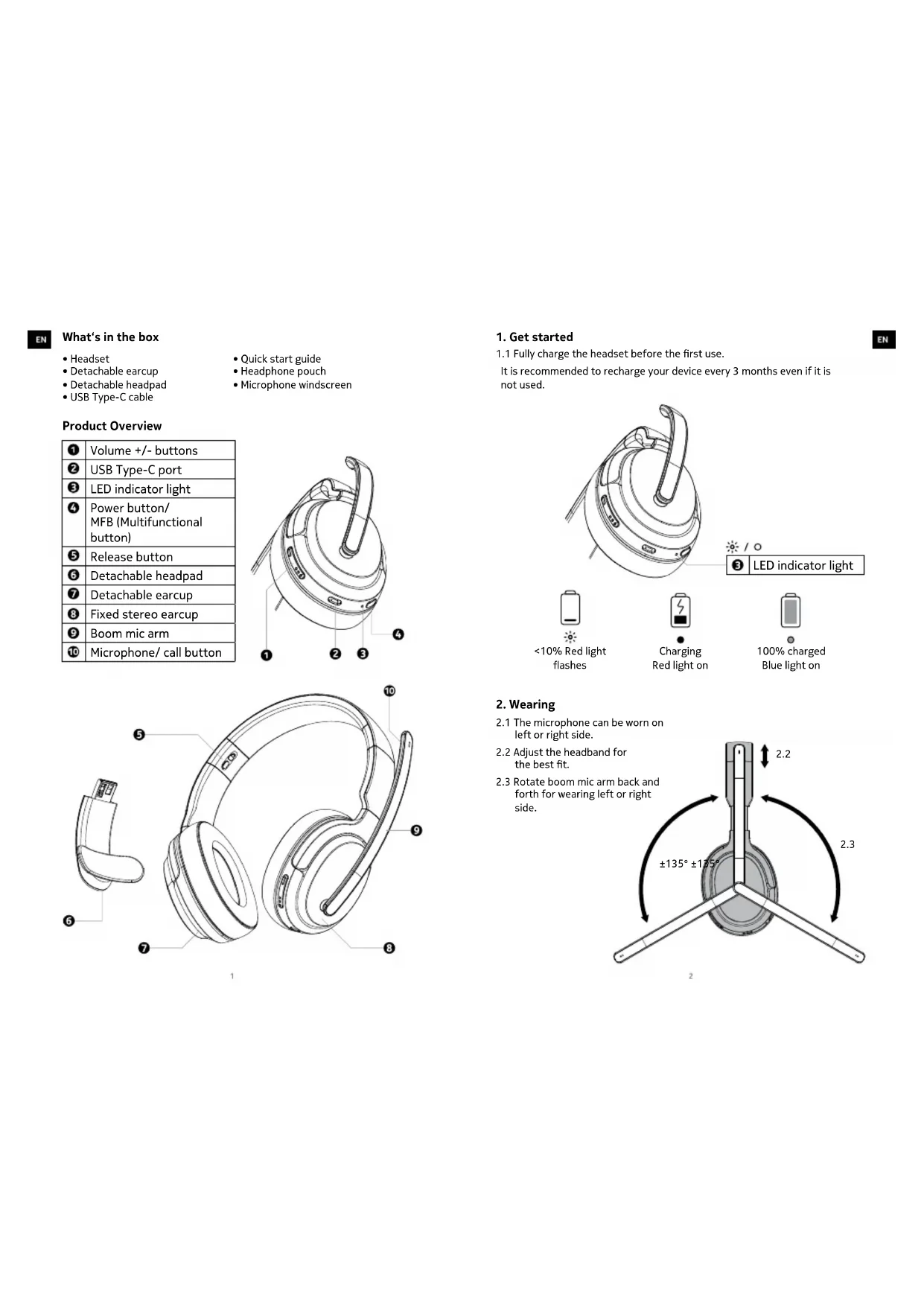
- Headset
- Detachable earcup
- Detachable headpad
-
USB Type-C cable
-
Quick start guide
- Headphone pouch
- Microphone windscreen
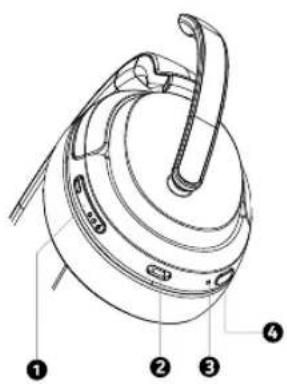
Product Overview
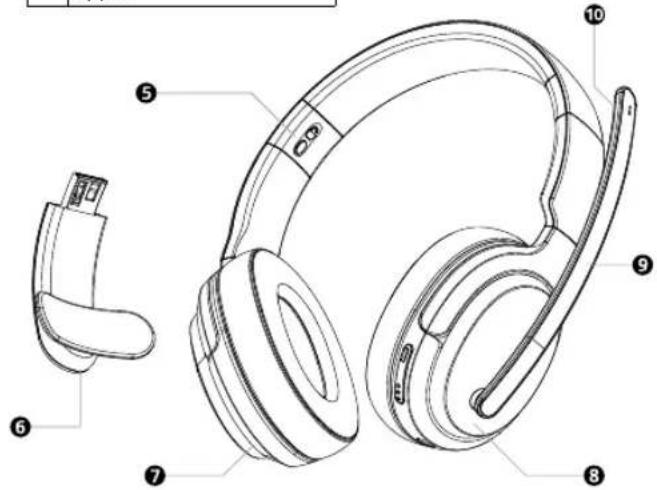
| 1 | Volume +/- buttons |
| 2 | USB Type-C port |
| 3 | LED indicator light |
| 4 | Power button/MFB (Multifunctional button) |
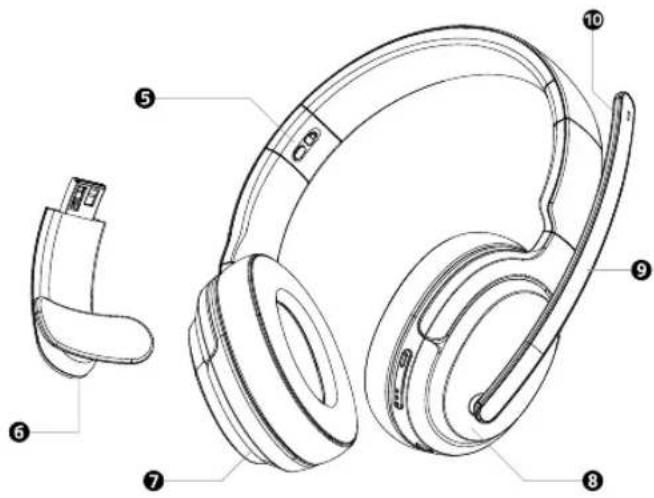
| 5 | Release button |
| 6 | Detachable headpad |
| 7 | Detachable earcup |
| 8 | Fixed stereo earcup |
| 9 | Boom mic arm |
| 10 | Microphone/ call button |
1
1. Get started
1.1 Fully charge the headset before the first use.
It is recommended to recharge your device every 3 months even if it is not used.
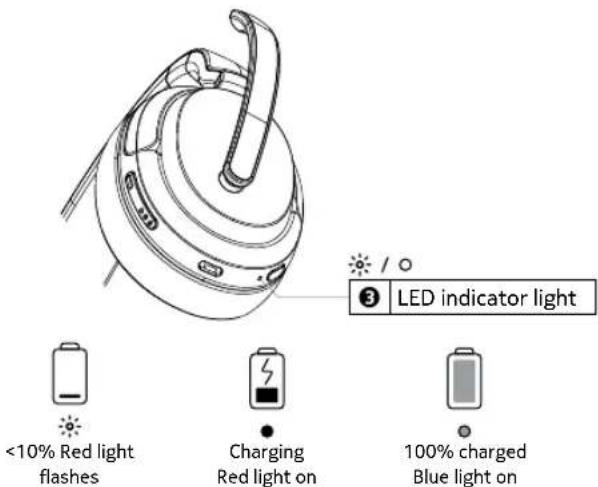
2. Wearing
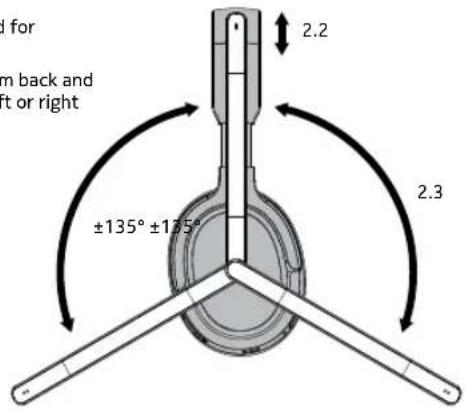
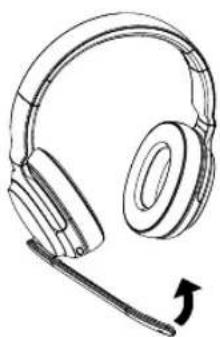
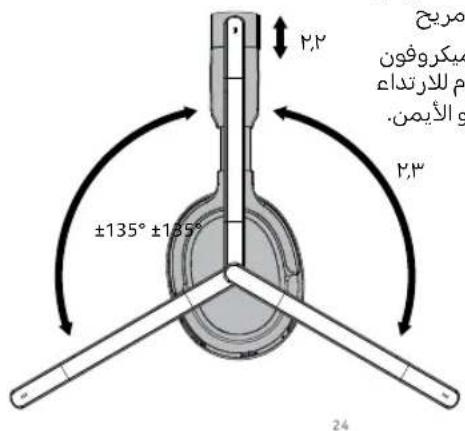
2.1 The microphone can be worn on left or right side.
2.2 Adjust the headband for the best fit.
2.3 Rotate boom mic arm back and forth for wearing left or right side.
2
EN
EN
EN
3. Pair and connect with Bluetooth
3.1 Pairing with the device
3.1a Turning on and pairing: Press power button 2 seconds to turn ON. When the LED indicator light flashes blue and red alternately the headset is ready to connect with your Bluetooth® device.
3.1b Connecting with your Bluetooth device: Turn on Bluetooth in your device and choose "Nokia CB-301" from the Bluetooth menu to connect.
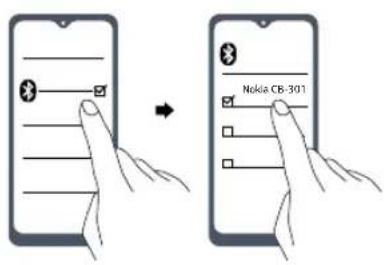
During the connection process the LED indicator light on the headset will flash blue and red alternately.
natural_image
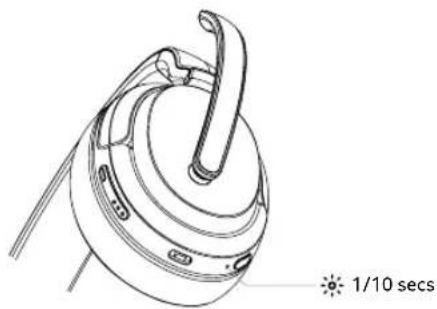
Technical line drawing of a mechanical component with a 1/10 second time label (no other text or symbols)The LED indicator light will flash blue every 10 seconds when the headset is successfully connected via Bluetooth.
3.2 After the initial pairing, the headset will automatically connect with your Bluetooth device whenever it is powered on.
3.3 The headset will automatically power off if there is no Bluetooth connection within 5 minutes.
3.4 Pairing mode
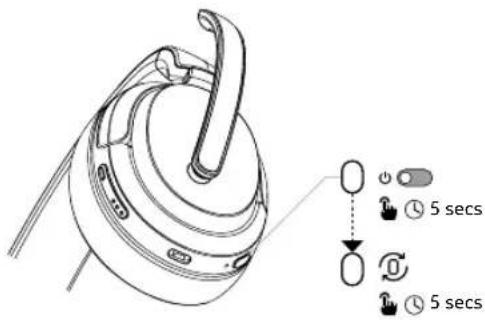
i) Turn off headset
(Press and hold power button for 5 seconds.)
ii) When the headset is turned off. Press and hold power button for 5s for pairing mode.
iii) When the LED indicator light flashes blue and red alternately, the headset is ready to connect with your Bluetooth device.
The headset will automatically power off if there is no Bluetooth connection within 5 minutes.
4. Multipoint connection
The headset can connect to two devices and enable to answer call on either device.
4.1 Pair devices separately (see 3.4).
i) Pair with the first device and disconnect.
ii) Pair with the second device.
iii) On the first device, reconnect to headset.
4.2 Your headset will monitor both devices and you can answer to call from either one.
EN
- Button controls
| Call |  | [1044] |  |
| [X8CK] | 0 |  | |
| [1047H] | [1455] |  | |
| [2040] | [1964] |  | |
| Volume | [0380] | [1442] | [0077] |
| [IMAGE] | [0022] | ||
| Next track | [007] | [6477] |  |
| Previous track | [IMAGE] |  | |
| [0700] | [0240] |  | |
| Low latency mode(gaming & video mode) | [0940] | [04730] | [0020] [0800] |
| Power on/off | [0240] | [10020] | [0020] [0010] |
| [0870] | [10070] | [00730] [0060] |
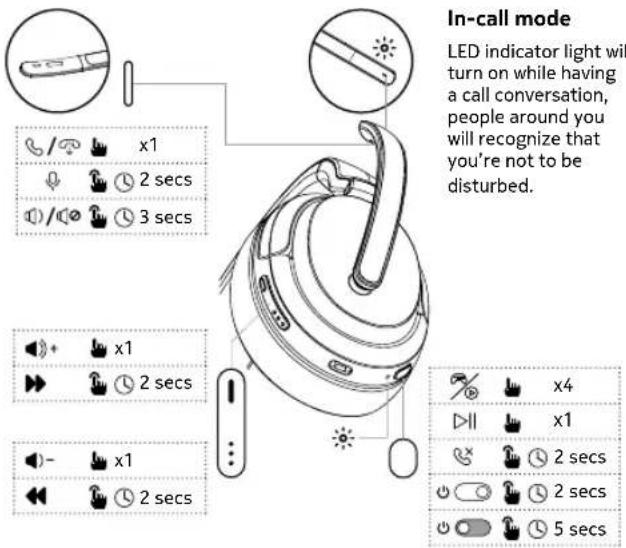
5.1 Low latency mode (gaming & video mode)

Press power button/ MFB (Multifunctional button)
4 times to toggle between Low latency mode > OFF.
- Low latency mode will consume more battery and total playtime will be 20% lesser.
- When Low latency mode is ON, reception range will reduce to 5 meter
- The LED indicator light will flash blue twice every 10 seconds.
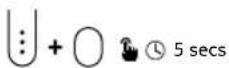
5.2 Reset to the original settings:
i) Press both MFB button and volume- for 5 seconds
ii) LED indicator light will flash purple when headset is reseted.
EN
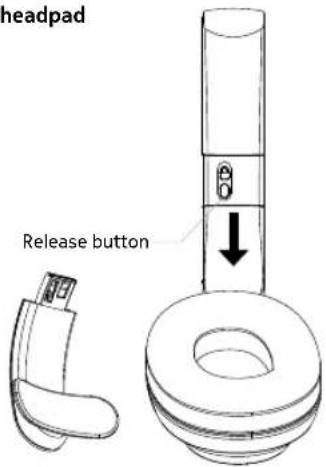
6. Changing detachable earcup/headpad
Convert Nokia Comm Band Pro between mono and stereo, you can change the detachable headpad with stereo earcup.
i) Press and hold the release button on headband.
ii) Pull out detachable earcup/headpad.
iii) Slide the detachable earcup/headpad onto the headband.
vi) Feel the click when it is securely connected with headband.
7. Mic arm adjustment
natural_image
Line drawing of a pair of headphones with a cable, showing ear and headband (no text or symbols)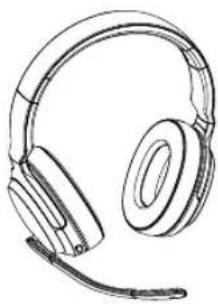
natural_image
Line drawing of a pair of headphones with earbuds and microphone (no text or symbols)8. Microphone windscreen
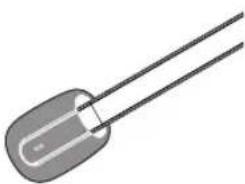
Apply the microphone windscreen to reduce wind or breathing noise.
natural_image
Illustration of a cylindrical electronic component with two leads (no text or symbols)Product and safety information
Remote control functions may vary depending on the model of your device and application. Since devices with Bluetooth wireless technology communicate using radio waves, they do not need to be in direct line-of-sight. Bluetooth devices must, however, be within 10 meters (33 feet) of each other, although the connection may be subject to interference from obstructions such as walls or from other electronic devices.
Frequency Band: 2400 MHz - 2480 MHz
Maximum Radio Frequency Power: -6\~+4dBm
For your safety

Important: Read these simple guidelines. Not following them may be dangerous or against local laws and regulations. For further info, read the complete user guide.

Switch off in restricted areas
Switch the device off when a Bluetooth headset use is not allowed or when it may cause interference or danger, for example, in aircraft, in hospitals or near medical equipment, fuel, chemicals, or blasting areas. Obey all instructions in restricted areas.

Interference
All wireless devices may be susceptible to interference, which could affect performance.

Batteries, chargers, and other accessories
Use only batteries, chargers, and other accessories approved by HMD Global Oy for use with this device. Do not connect incompatible products.

Protect your hearing
To prevent possible hearing damage, do not listen at high volume levels for long periods.

Hearing
Warning: When you use the headset, your ability to hear outside sounds may be affected.
Do not use the headset where it can endanger your safety.

Small children
Your device and its accessories are not toys. They may contain small parts. Keep them out of the reach of small children.
Take care of your device
Handle your device with care. The following suggestions help you keep your device operational.
- Keep the device dry. Precipitation, humidity, and all types of liquids or moisture can contain minerals that corrode electronic circuits.
- Do not use or store the device in dusty or dirty areas.
- Do not store the device in high temperatures. High temperatures may
EN
damage the device or battery.
- Do not store the device in cold temperatures. When the device warms to its normal temperature, moisture can form inside the device and damage it.
- Do not open the device other than as instructed in the user guide.
- Do not drop, knock, or shake the device or the battery. Rough handling can break it.
- Only use a soft, clean, dry cloth to clean the surface of the device.
- Do not paint the device. Paint can prevent proper operation.
Recycle

Always return your used electronic products, batteries and packaging materials to dedicated collection points. This way you help prevent uncontrolled waste disposal and promote the recycling of materials. Electrical and electronic products contain a lot of valuable materials, including metals (such as copper, aluminium, steel, and magnesium) and precious metals (such as gold, silver, and palladium). All materials of the device can be recovered as materials and energy.
Crossed-out wheelie bin symbol

The crossed-out wheelie bin symbol on your product, battery, literature, or packaging reminds you that all electrical and electronic products and batteries must be taken to separate collection at the end of their working life. Do not dispose of these products as unsorted municipal waste: take them for recycling. For info on your nearest recycling point, check with your local waste authority.
Battery info
Your device has an internal, non-removable, rechargeable battery. Do not attempt to remove the battery, as you may damage the device. The battery can be charged and discharged hundreds of times, but it will eventually wear out. Charging time can vary depending on device capability.
Battery safety
If left unused, a fully charged battery will lose its charge over time. Always keep the battery between 15°C and 25°C (59°F and 77°F) for optimal performance. Extreme temperatures reduce the capacity and lifetime of the battery. A device may temporarily stop working if its battery is too hot or too cold.
Do not dispose of batteries in a fire as they may explode. Obey local regulations. Recycle when possible. Do not dispose as household waste.
Use the battery and charger for their intended purposes only. Improper use, or use of unapproved or incompatible batteries or chargers may present a risk of fire, explosion, or other hazard, and may invalidate any approval or warranty. If you believe the battery or charger is damaged, take it to a service centre or your local shop before continuing to use it. Never use a damaged
battery or charger. Only use the charger indoors. Do not charge your device during a lightning storm.
Implanted medical devices
To avoid potential interference, manufactures of implanted medical devices recommend a minimum separation of 15.3 centimetres (6 inches) between a wireless device and the implanted medical device. Persons who have such devices should:
- Always keep the wireless device more than 15.3 centimetres (6 inches) from the medical device.
- Not carry the wireless devise in a breast pocket.
- Switch the wireless device off if there is any reason to suspect that interference is taking place.
- Follow the manufacturer directions for the implanted medical device.
If you have any questions about using your wireless device with an implanted medical device, consult your health care provider.
Copyrights and other notices
The availability of products, features, apps, and services may vary by region. For more info, contact your dealer or your service provider. This device may contain commodities, technology or software subject to export laws and regulations from the US and other countries. Diversion contrary to law is prohibited.
The contents of this document are provided “as is”. Except as required by applicable law, no warranties of any kind, either express or implied, including, but not limited to, the implied warranties of merchantability and fitness for a particular purpose, are made in relation to the accuracy, reliability or contents of this document. HMD Global reserves the right to revise this document or withdraw it at any time without prior notice.
Reproduction, transfer or distribution of part or all of the contents in this document in any form without the prior written permission of HMD Global is prohibited. HMD Global operates a policy of continuous development. HMD Global reserves the right to make changes and improvements to any of the products described in this document without prior notice.
Manufacturer and importer in EU: HMD Global Oy, Bertel Jungin aukio 9, 02600 Espoo, Finland. HMD Global Privacy Policy, available at http://www.nokia.com/phones/privacy, applies to your use of the device.
In the unlikely event that this product is faulty, please return it to the store where you purchased it with your proof of purchase. For more information on this or other products please visit http://www.nokia.com/phones/support.
© 2022 HMD Global. All rights reserved. HMD Global Oy is the exclusive licensee of the Nokia brand for phones & tablets. Nokia is a registered trademark of Nokia Corporation.
The Bluetooth word mark and logos are owned by the Bluetooth SIG, Inc. and any use of such marks by HMD Global is under license.
Declaration of conformity

Hereby, HMD Global Oy declares that this product is in compliance with the essential requirements and other relevant provisions of Directive 2014/53/EU. A copy of the Declaration of Conformity can be found at: www.nokia.com/mobile-declaration-of-conformity.
FCC Notice to users
The following statement applies to all products that bear the FCC logo and/or FCC ID on the product label.
This equipment has been tested and found to comply with the limits for a Class B digital device, pursuant to part 15 of the FCC Rules. See 47 CFR Sec. 15.105(b).
These limits are designed to provide reasonable protection against harmful interference in a residential installation. This equipment generates, uses and can radiate radio frequency energy and, if not installed and used in accordance with the instructions, may cause harmful interference to radio communications. However, there is no guarantee that interference will not occur in a particular installation. If this equipment does cause harmful interference to radio or television reception, which can be determined by turning the equipment off and on, the user is encouraged to try to correct the interference by one or more of the following measures:
- Reorient or relocate the receiving antenna.
- Increase the separation between the equipment and the receiver.
- Connect the equipment into an outlet on a circuit different from that to which the receiver is connected.
- Consult the dealer or an experienced radio/TV technician for help.
This device complies with part 15 of the FCC Rules.
Operation is subject to the following two conditions:
(1) This device may not cause harmful interference, and
(2) This device must accept any interference received, including interference that may cause undesired operation. See 47 CFR Sec. 15.19(a)(3). HMD Global has not approved any changes or modification to this device by the user. Any changes or modification could void the user's authority to operate the equipment. See 47 CFR Sec. 15.21
Contenu de la boîte
FR
1. Démarrage
natural_image
Line drawing of a mechanical component with a curved handle and attached parts (no text or symbols)1/10 S.
natural_image
Line drawing of a pair of headphones with a microphone, no text or symbols present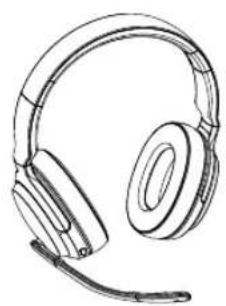
natural_image
Line drawing of a pair of headphones with earbuds (no text or symbols)8. Bonnette anti-vent
natural_image
Illustration of a two-pin electronic component with leads (no text or symbols)FR
.البدع
AR
natural_image
Line drawing of a mechanical component with a curved handle and circular base (no text or symbols)1-1 تُوانى
natural_image
Line drawing of a pair of headphones with a microphone, no text or symbols present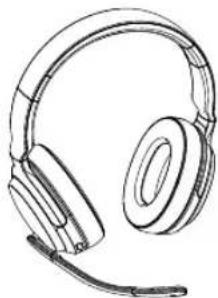
natural_image
Line drawing of a pair of headphones with earbuds and headband (no text or symbols)29
natural_image
Illustration of a two-pin electronic component with leads (no text or symbols)AR

35
1. Loslegen
natural_image
Line drawing of a device with a 1/10 second time mark and a handle, no text or symbols presentnatural_image
Line drawing of a pair of headphones with a headset, no text or symbols present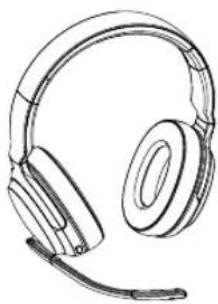
natural_image
Line drawing of a pair of headphones with earbuds and microphone (no text or symbols)natural_image
Illustration of a two-pin electronic component with leads (no text or symbols)www.nokia.com/mobile-declaration-of-conformity.
ES

47
1. Empezar
natural_image
Line drawing of a kettle with handle and spout (no text or symbols)1/10 Segs
natural_image
Line drawing of a pair of headphones with a microphone, no text or symbols present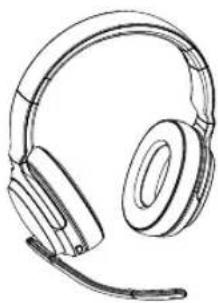
natural_image
Line drawing of a pair of headphones with earbuds (no text or symbols)natural_image
Illustration of a two-pin electronic component with leads (no text or symbols)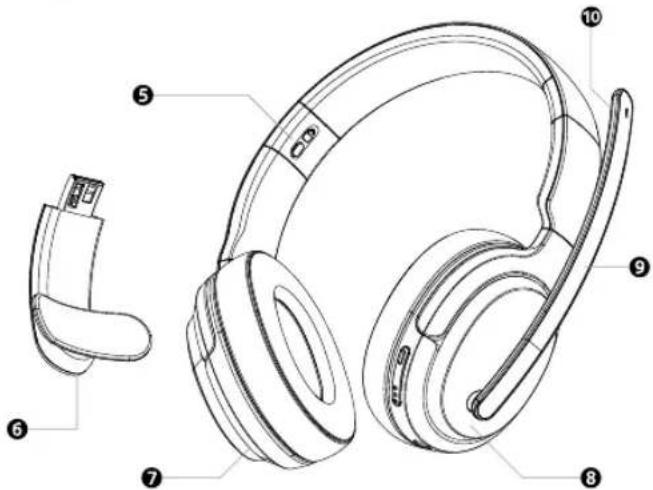
NO
1. Kom i gang
natural_image
Technical line drawing of a mechanical component with no visible text or symbolsLED-indikatorlampene på øreklokkene blinker blått hvert 10 sekund när de er koblet til via Bluetooth.
natural_image
Line drawing of a pair of headphones with a microphone, no text or symbols present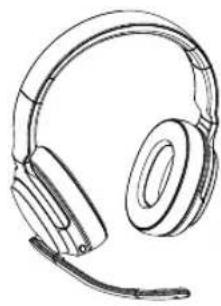
natural_image
Line drawing of a pair of headphones with earphones (no text or symbols)8. Mikrofon frontrute
natural_image
Illustration of a two-pin electronic component with leads (no text or symbols)NO
- Product Overview
- Get started
- Wearing
- EN
- Pair and connect with Bluetooth
- Pairing mode
- Multipoint connection
- Low latency mode (gaming & video mode)
- Reset to the original settings:
- Changing detachable earcup/headpad
- Mic arm adjustment
- Microphone windscreen
- Product and safety information
- For your safety
- Take care of your device
- damage the device or battery.
- Recycle
- Crossed-out wheelie bin symbol
- Battery info
- Battery safety
- Implanted medical devices
- Copyrights and other notices
- Declaration of conformity
- FCC Notice to users
- Contenu de la boîte
- Démarrage
- Bonnette anti-vent
- Loslegen
- Empezar
- Kom i gang
- Mikrofon frontrute
Brand : NOKIA
Model : Comm Band Pro CB301
Category : Cellphone