EasyManual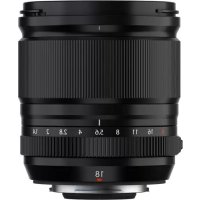
XF 18mm f1.4 LM WR - Lens FUJIFILM - Free user manual and instructions
Find the device manual for free XF 18mm f1.4 LM WR FUJIFILM in PDF.



| Feature | Details |
|---|---|
| Lens type | Fixed wide angle |
| Focal length | 18 mm |
| Maximum aperture | f/1.4 |
| Optical construction | 15 elements in 9 groups |
| Angle of view | 76.5b0 |
| Minimum focusing distance | 20 cm |
| Filter diameter | 62 mm |
| Dimensions | To be determined |
| Weight | To be determined |
| Focus type | Autofocus with linear motor |
| Weather resistance | Yes, WR (Weather Resistant) |
| Recommended use | Landscape, architecture, and portrait photography |
| Maintenance | Clean with a soft cloth, avoid abrasive products |
| Safety | Avoid prolonged exposure to moisture and dust |
| Compatibility | Fujifilm X mount |
Frequently Asked Questions - XF 18mm f1.4 LM WR FUJIFILM
User questions about XF 18mm f1.4 LM WR FUJIFILM
0 question about this device. Answer the ones you know or ask your own.
Ask a new question about this device
Download the instructions for your Lens in PDF format for free! Find your manual XF 18mm f1.4 LM WR - FUJIFILM and take your electronic device back in hand. On this page are published all the documents necessary for the use of your device. XF 18mm f1.4 LM WR by FUJIFILM.
USER MANUAL XF 18mm f1.4 LM WR FUJIFILM
LENSZKJFFJFJFJFJFJFJFJFJFJFJFJFJFJFJFJFJFJFJFJFJFJFJFJFJ
レンズフードの取り付出方
Be sure to read these notes before use
Safety Notes
Thank you for your purchase of this product. For repair, inspection, and internal testing, contact your Fujifi Im dealer.
Make sure that you use the lens correctly. Read these safety notes and the camera Owner's Manual carefully before use.
After reading these safety notes, store them in a safe place.
About the icons
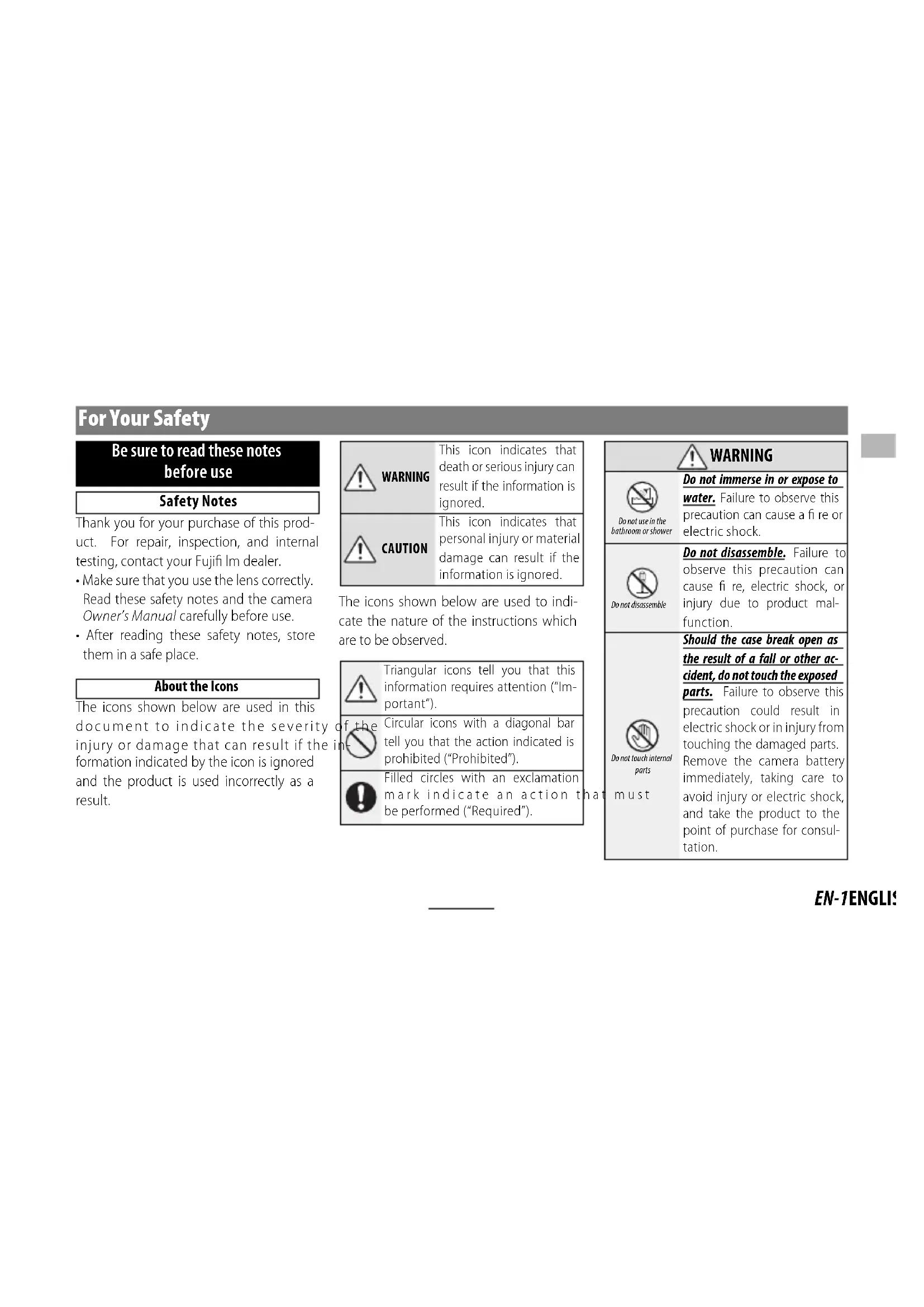
The icons shown below are used in this document to indicate the severity injury or damage that can result if the formation indicated by the icon is ignored and the product is used incorrectly as a result.

WARNING
This icon indicates that death or serious injury can result if the information is ignored.

CAUTION
This icon indicates that personal injury or material damage can result if the information is ignored.
The icons shown below are used to indicate the nature of the instructions which are to be observed.

Triangular icons tell you that this information requires attention ("Important").

Circular icons with a diagonal bar tell you that the action indicated is prohibited ("Prohibited").

Filled circles with an exclamation mark indicate an action that be performed ("Required").
时
| WARNING | |
| Do not use in the bathroom or shower | Do not immerse in or expose to water. Failure to observe this precaution can cause a fire or electric shock. |
| Do not disassemble | Do not disassemble. Failure to observe this precaution can cause fire, electric shock, or injury due to product mal-function. |
| Do not touch internal parts must | Should the case break open as the result of a fall or other accident, do not touch the exposed parts. Failure to observe this precaution could result in electric shock or in injury from touching the damaged parts. Remove the camera battery immediately, taking care to avoid injury or electric shock, and take the product to the point of purchase for consultation. |
| WARNING |
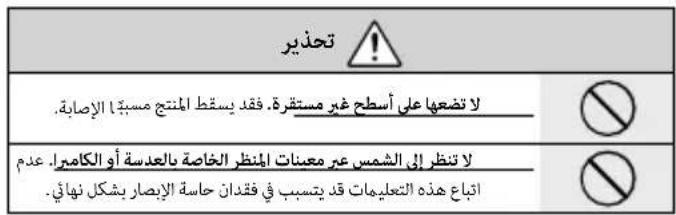
| Do not place on unstable surfaces. The product may fall, causing injury. |
| Do not view the sun through the lens or camera view fi nd Failure to observe this precau-tion can cause permanent visual impairment. |
| CAUTION |
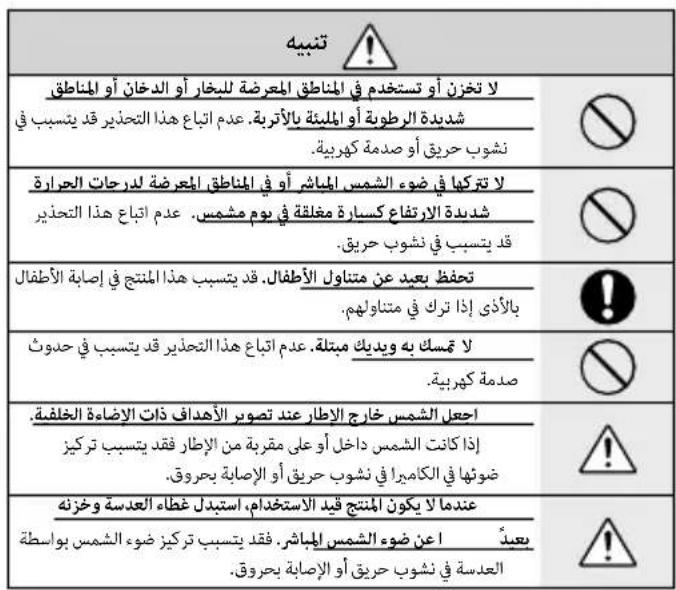
| Do not use or store in locations that are exposed to steam, or smoke or are very humid or extremely dusty. Failure to observe this precaution can cause fire or electric shock. |
| Do not leave in direct sunlight or in locations subject to very high temperatures, such as in a closed vehicle on a sunny day. Failure to observe this precau-tion can cause fire. |
| CAUTION | |
| Keep out of the reach of small children. This product could cause injury in the hands of a child. | |
| Do not handle with wet hands. Failure to observe this precaution can cause electric shock. | |
| Keep the sun out of the frame when shooting backlit subjects. Sunlight focused into the camera when the sun is in or close to the frame can cause fire or burns. | |
| When the product is not in use, replace the lens caps and store out of direct sunlight. Sunlight focused by the lens can cause fire or burns. | |
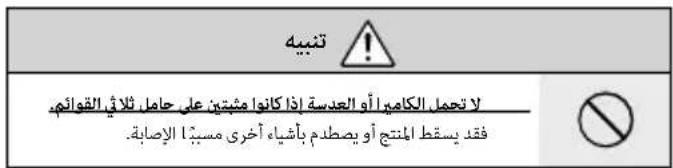
| Do not carry the camera or lens while they are attached to a tripod. The product can fall or strike other objects, causing injury. |
For Customers in the U.S.A.
Tested To Comply With FCC Standards FOR HOME OR OFFICE USE
FCC Statement: This device complies with Part 15 of the FCC Rules. Operation is subject to the following two conditions: (1) This device may not cause harmful interference, and (2) this device must accept any interference received, including interference that may cause undesired operation.
CAUTION: This equipment has been tested and found to comply with the limits for a Class B digital device, pursuant to Part 15 of the FCC Rules. These limits are designed to provide reasonable protection against harmful interference in a residential installation. This equipment generates, uses, and can radiate radio frequency energy and, if not installed and used in accordance with the instructions, may cause harmful interference to radio communications. However, there is no guarantee that interference will not occur in a particular installation. If this equipment does cause harmful interference to radio or television reception, which can be determined by turning the equipment off and on, the user is encouraged to try to correct the interference by one or more of the following measures:
Reorient or relocate the receiving antenna.
- Increase the separation between the equipment and receiver.

- Connect the equipment into an outlet on a circuit different from that to which the receiver is connected.
- Consult the dealer or an experienced radio/TV technician for help.
- You are cautioned that any changes or modifications not expressly approved in this manual could void the user's authority to operate the equipment.
Notes on the Grant: To comply with Part 15 of the FCC Rules, this product must be used with a Fujii Im-specific ed ferrite-core A/V cable, USB cable, and DC supply cord.
For Customers in Canada
CANICES-3 (B)/NMB-3(B)
CAUTION: This Class B digital apparatus complies with Canadian ICES-003.
IMPORTANT SAFETY INSTRUCTIONS
- Read these instructions.
- Keep these instructions.
Heed all warnings. - Follow all instructions.
- Do not use this apparatus near water (excluding waterproof products).
Clean only with a dry cloth. - Do not block any ventilation openings. Install in accordance with the manufacturer's instructions.
- Do not install near any heat sources such as ra
diators, heat registers, stoves, or other apparatus (including amplifiers) that produce heat.
- Protect the power cord from being walked on or pinched particularly at plugs, convenience receptacles, and the point where they exit from the apparatus.
- Only use attachments/accessories specified by the manufacturer.
- Unplug this apparatus during lightning storms or when unused for long periods of time.
Refer all servicing to qualified service personal. Servicing is required when the apparatus has been damaged in any way, such as power supply cord or plug is damaged, liquid has been spilled or objects have fallen into the apparatus, the apparatus has been exposed to rain or moisture, does not operate normally, or has been dropped.
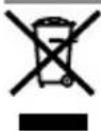
Disposal of Electrical and Electronic Equipment in Private Households
In the European Union, Norway, Iceland and Liechtenstein: This symbol on the product, or in the manual and in the warranty, and/or on its packaging indicates that this product shall not be treated as household waste. Instead it should be taken to an applicable collection point for the recycling of electrical and electronic equipment.
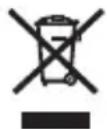
By ensuring this product is disposed of correctly, you will help prevent potential negative consequences to the environment and human health, which could otherwise be caused by inappropriate waste handling of this product.
The recycling of materials will help to conserve natural resources. For more detailed information about recycling this product, please contact your local city office, your household waste disposal service or the shop where you purchased the product.
In Countries Outside the European Union, Norway, Iceland and Liechtenstein: If you wish to discard this product, including the batteries or accumulators, please contact your local authorities and ask for the correct way of disposal.
Australian RCM

Before Using This Product
The lens may not perform as expected and some features may not be available with outdated lens or camera firmware. Be sure to update the lens and camera firmware to the latest versions. Instructions on viewing firmware version information and updating firmware are available from the following website:
https://fujifilm-x.com/support/download/firmware/
If you do not have access to a computer, support is available from the local distributor listed in the "FUJIFILM Worldwide Network" material provided with your camera.
Product Care
- When using a lens hood, do not pick up or hold the camera using only the hood.
-
Keep the lens signal contacts clean.
-
Use a blower to remove dust and lint from the glass surfaces of the lens or fi Iter. To remove smudges and fi ngerprints, apply a small amount of lens cleaner to a soft, clean cotton cloth or lens-cleaning tissue and clean from the center outwards using a circular motion, taking care not to leave smears or touch the glass with your fi ngers.
- Never use organic solvents such as paint thinner or benzene to clean the lens.
- Attach the front and rear caps when the lens is not in use.
- Store the lens and filter in cool, dry locations to prevent mold and rust. Do not store in direct sunlight or with naphtha or camphor moth balls.
- Keep the lens dry. Rusting can cause irreparable damage. Wipe off rain and water droplets.
- Leaving the lens in extremely hot locations could cause damage or warping.
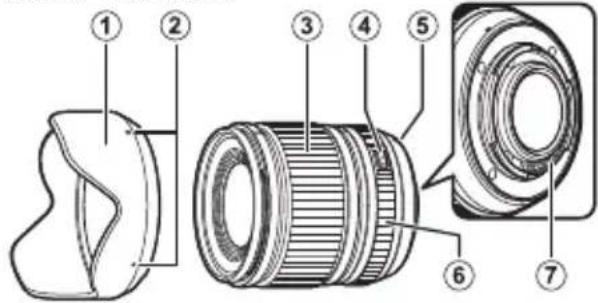
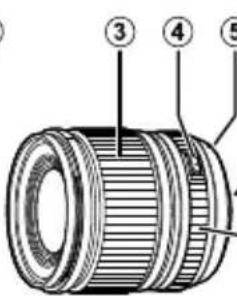
Parts of the Lens
XF18mmF1.4 R LM WR
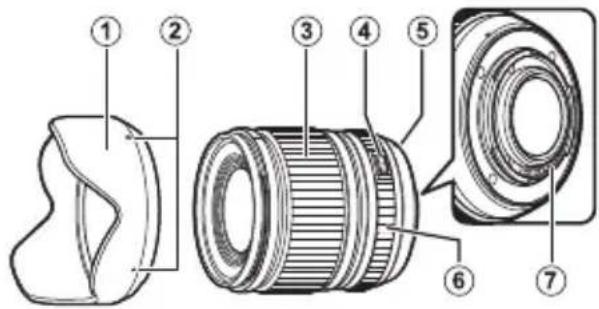
① Lens hood
② Mounting marks
(3) Focus ring
④ Aperture ring lock release
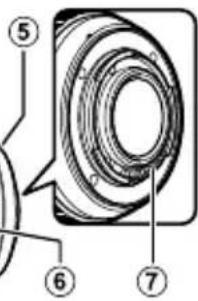
⑤ Mounting marks (focal length)
⑥ Aperture ring
Lens signal contacts
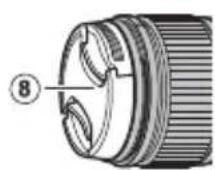
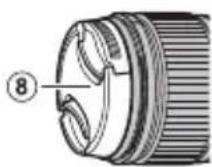
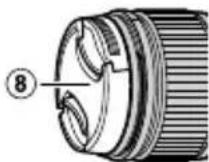
⑧Front lens cap
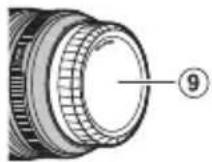
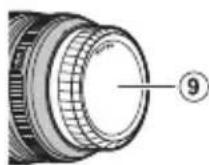
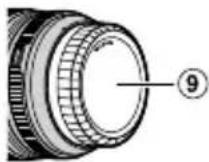
⑨ Rear lens cap
The lens mount includes a rubber ring to ensure that the lens remains dust- and splash-proof. The ring can be replaced for a fee at any Fujii lm service center.
Supplied Accessories
-
Front lens cap
Rear lens cap -
Lens hood
- Lens wrapping cloth
Attaching the Lens
See the camera manual for information on attaching and removing lenses.
This product is for use exclusively with the FUJIFILM X mount. It is not compatible with the G mount or with X mount fi lm cameras.
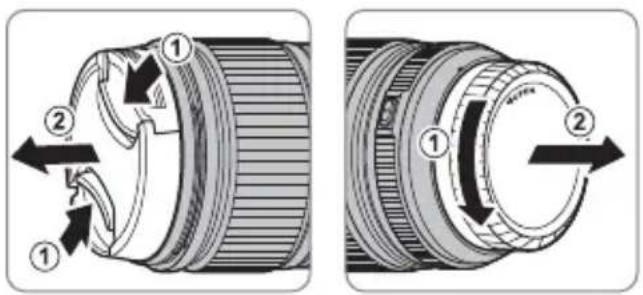
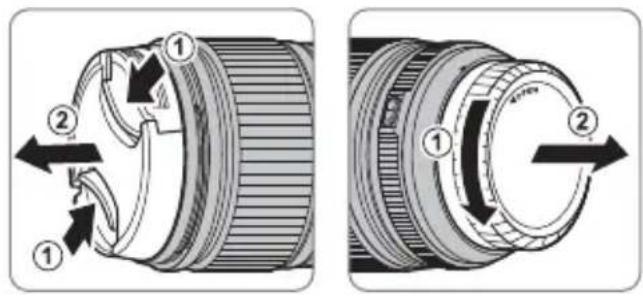
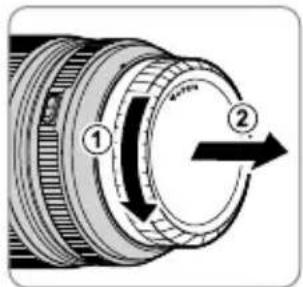
Removing the Caps
Remove the caps as shown.
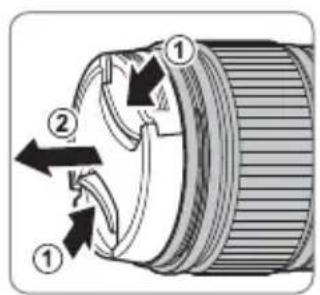
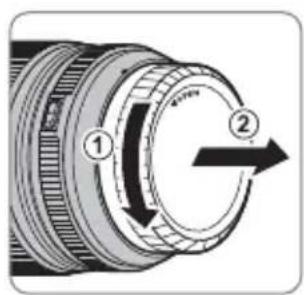
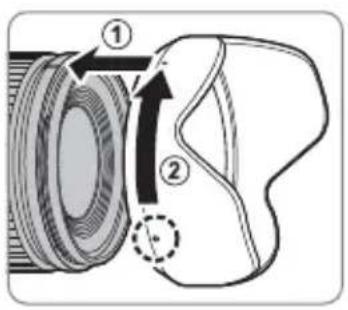
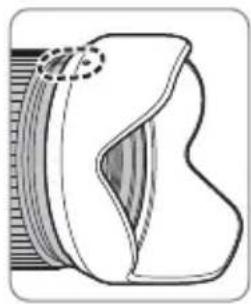
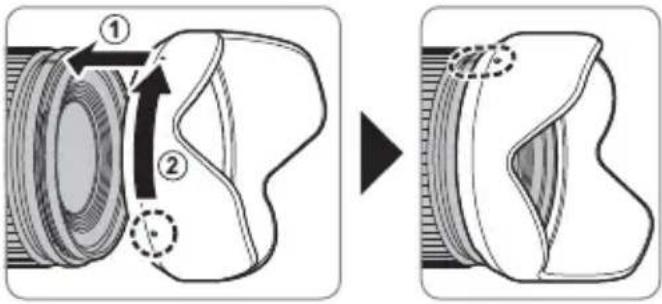
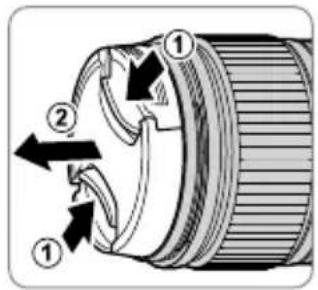
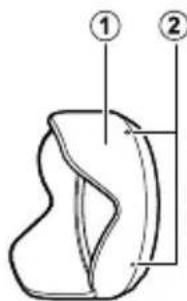
Attaching the Hood
When attached, lens hoods reduce glare and protect the front lens element.

The Aperture Ring
Rotate the lens aperture ring to choose the aperture (f-number).
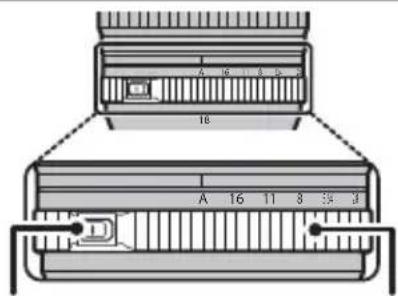
① A: Set aperture to the value chosen automatically by the camera.
(2) Other values: Set aperture to the selected value.
To select A, or to select another value after selecting A, press the aperture ring lock release while rotating the aperture ring.
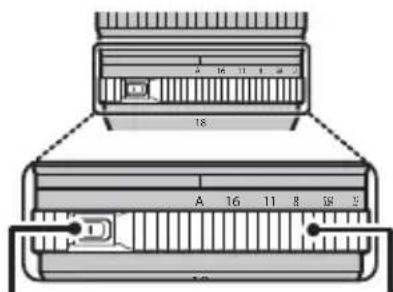
Aperture ring lock release
Aperture ring
EN-7ENGLI
Specifications
| Type | XF18mmF1.4 R LM WR |
| Lens construction | 15 elements in 9 groups (3 aspherical elements, 1 ED element) |
| Focal length (35 mm format equivalent) | f=18 mm (27 mm) |
| Angle of view 76.5° | |
| Max. aperture f/1.4 | |
| Min. aperture f/16 | |
| Aperture control Number of blades Stop size | 9 (rounded diaphragm opening) 1/3 EV (22 stops) |
| Minimum focus distance (measured from focal plane) 20 cm | |
| Max. magnification 0.15× | |
| External dimensions: Diameter × Length* (approx.) * distance from front of lens to lens mount flange | ø68.8 × 75.6 mm |
| Weight* (approx.) * excluding caps and hoods | 370 g |
| Filter size | ø62 mm |
① Improvements may result in unannounced changes to specifications and appearance.
Owing to how this lens is constructed, the "Distance indicator" displayed by the camera may in some cases differ from the actual focus distance. Use the "Distance indicator" as a guide only.
Turn the camera off before removing the lens. Turning the camera off locks the internal parts of the lens.
Pour vous sécurité
https://fujifilm-x.com/support/download/firmware/
https://fujifilm-x.com/support/download/firmware/
https://fujifilm-x.com/support/download/firmware/
https://fujifilm-x.com/support/download/firmware/
Om duinte har tillgang till en dator, kan du hjalp hos den lokala aterforsaljare som listedi FUJIFILM Worldwide Network-materialalet, vilket medfoljer kameran.
Produktvård
https://fujifilm-x.com/support/download/firmware/
https://fujifilm-x.com/support/download/firmware/
B cnyuae, ecn y Bac HeT DoCTyna K KOMnbIOTepy, 6bpatntecb 3a NODePxxKo K MeCTHOMy DnCTpN6bIOTOppy n3 cncska "FUJIFILM Worldwide Network", noctabLeHHoro C Baewe fotoKaMepo.
yxo3a n3dennem
-ПиИСПОЛБ3OBAHIN 6JIeHДbl OБьЕКТИВa He 6ePITecb 3a φOTOKaMepy n He IepXnTe eE 6JIeHdY.
He donyckaTe 3arpa3HeHnCnHaJIbHbIX KOHTaKTOB o6beKTuBa.
- POnb3yInTecb rpyWei dIy ydaHnI n nyXa co cTeKJIaHHbIX NOBepxHOCTe O6BeKTnBa IIN nbTpA. Iy ydaHnI PAteH n OTneuATKOB naNb
ueBaHHeCnTe He6oJbWoe KOInuYeCTBO XnIDKOCTn DnA uNCTKn OBeKtNBOB Ha MmRkyU, UcTsyU XIOIyHaTObymaxHyU TkAnB Nnn CanfoeTKy DnA uNCTKn OBeKtNBOB n IpOtpnte OBeKtNB OT ueHTpa K Kpaam KpyrOBbIMn DBNXeHNMaMn, CObIIOaOCToP0XHOCTb, He OCTaBnJa pa3BOoB N He KaCaarCb CTekla NaIbUaMn.
- Hukorda He nCnoJb3yIte dIy quCTkn o6beKTHBa opraHnueckne paCTBOpHTeIN, TaKne KaK pa36aBnTeNb dIg KpaCKn IIN 6EH3HN.
3aKpoIe KpbIuKy 06bekTuBa N KpbIuKy 6aHHeTa 06bekTuBa, KOrDa 06bekTuB He nCnOJIb3yETcR.
XpaHnTe 06bektuB n fNtbp B npoxnaHbIX, cyxix MeCTax, yTO6bl npedotbpaTntb 6pa3oBaHne nnecen H Koppo3nn. He xpaHnTe B MeCTax, rDe Ha Hero nonaAet npamO conHeHbI CBET, nnn PpAmC H aTaNINHObIMn Nn KaMΦOpHbIMn WaPnKAMN OT MOIN.
To Beppepe6bektnB OT Bnarn. Koppo3na MoKet HaneCTn Henonpabmbl yuep6. Pn nonadaHn DoXdeBbIX Kaenb nn 6pb13r BoDbl nx CneIyET BbITEpetb.
- Ecnn OBeKtNB OCTaBnTb B MeCTax, NOBepraUxxCr BO3DeIcTBnIO BBICOKNX Tempeatyp, TO 3TO MoJxET NOBpeINrH INI DeOpMnPoBaTb erO.
YactnObekTmBa
XF18mmF1.4 R LM WR
① bIeHda oIbEkmuba
② Memku dny ycmahOBku
③ Φokycupo8oHoe KOJIbUO
④Pa36nokupo8kaKolbua duaΦpa2Mbl
⑤ Memku dny ycmahOBku (fokychoe paccmohue)
⑥KoIbUOduaΦpa2Mb1
⑦Cu2HaBbHbIe KOHmakmbIobEekmuBa
⑧ Kpbliwka oobekmuBa
⑨ Kpbuuka 6aohema oboekmuBa
KpeHHe 06bekTnBa mMeet pe3HHOBoe KOJIbUO, KOTOpoe 06ecneHBAe 3aunTy 06bekTnBa OT bIIN I 6pbI3r. KOJIbUO MOxHO 3aMeHHTb B NIObOM cepBnCHOM ueHTpe Fujif Im 3a ot- DeIbHyIO nIATy.
Ppnilaraemblpe npHaadJeXHocTn
Kpbiuka o6beKeTnBa
Kpbiuka 6aioHeTa o6beKtNa
-CBeTo3aUHTHa 6IeHda o6bekTnBa
- YexoIДЯOBbeKtNbA
yctahOBka 06beKTnBa
Cm.pykoBOdCTBO nOJIb3OBaTeIg FOToKa-Mepo InI NaIyueHn INHOpMaun O6 UcTaHOBKe N ChrTnN ObekTnBa.
1DaHHoe n3dJIne npedHa3HaueHo NCKHOnuHTeBHO 6aNoHeTa X ot FUJIFILM. OHO HeCOBMeCTUMO c 6aNoHcTOM Gnnn 6aNoHcTeom X PJIeHOuHbIX fOToKamep.
Chartne KpbliweK
CHNMMTe KpbIuKn, KaK NOKa3aHo Ha puCyHKe.
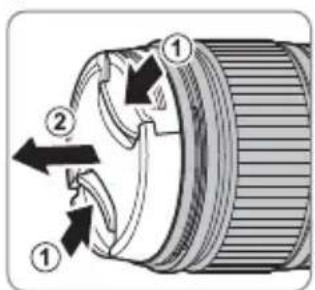
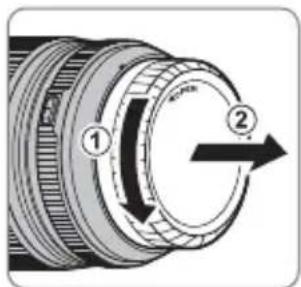
yctahOBka 6IeHdbI
Pn noDCoeHHeHn 6JeHdbI oBeKtNa yMeHbHaOT 6nKn n 3aunuaT nepeHIO JINH3y.
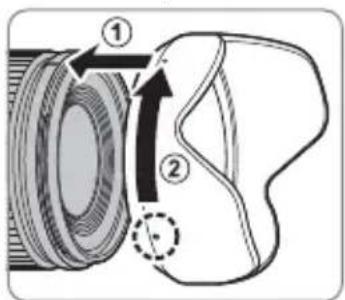
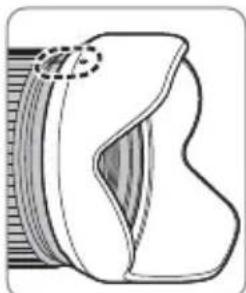
RU-6 PYCCKM
KoIbUO dHaΦparMbI
IobepHnte Kobluo dnaΦparMbI ObbeKtNBa Iy Bbl6opa BeiunHbI dnaΦparMbI (uNcNo f).
①A(A):YcTaHOBnTe DnaΦpaRMy Ha 3HaueHHe, Bbl6paHHoeΦOTOKaMepoI aBTOMaTnueckn.
② pyrme 3haeHnY (16): YcTaHOBNTe DnaΦparMy Ha Bbl6paHHoe 3HaueHne.
Bb6epnteAnnn,tyo6bl Bb6paTb npyoe 3naehne nocne Bb6opaA,Haxmnte pa36loKpOBky KOnbua DnaΦpaarmbl, NOBOPaunBaonkNoaΦpaarmbl.
Pa36nokupo8ka KOnbua duapazMbI
KoIbUO duappaMbI
RU-7PYCCKI
TexHHueckneXapaKTepeNtNK
https://fujifilm-x.com/support/download/firmware/
https://fujifilm-x.com/support/download/firmware/
https://fujifilm-x.com/support/download/firmware/
https://fujifilm-x.com/support/download/firmware/
U,自,,,,,,,,,,,,,,,,,,,,,,,,,,,,,,,,,,,,,,,,,,,,,,,,,,,,,,,,,,,,,,,,,,, J J J J J J J J J J J J J J J J J J J J J J J J J J J J J J J J J J J J J J J J J J J J J J J J J J J
i 1
Kenzhaepaepaepaaepaaepaaepaaepaaepaaepaaepaaepaaepaaepaaepaaepaaepaaepaaepaaepaaepaaepaaepaaepaaepaaepaaepaaepaaepaaepaaepaaepaaepaaepaaepaaepaaepaaepaaepaaepaaepaaepaaepaaepaaepaaepaaepaaepaaepaaepaaepaaepaaepaaepaaaepaaaepaaaepaaaepaaaepaaaepaaaepaaaepaaaepaaaepaaaepaaaepaaaepaaaepaaaepaaaepaaaepaaaepaaa
https://fujifilm-x.com/support/download/firmware/
CouTToRtLs#HJFJIFLMWorldwideNetwork"
新晋
Lenz to be a good in the way of
① ① ① ① ① ① ① ① ① ① ① ① ① ① ① ① ① ① ① ① ① ① ① ① ① ① ① ① ① ① ① ① ① ① 0.0.0.0.0.0.0.0.0.0.0.0.0.0.0.0.0.0.0.0.0.0.0.0.0.0.0.0.0.0.0.0.0.0.0.0.0.0.0.0.0.0.0.0.0.0.0.0.0.0.0.
- -
- -
- -
- -
- -
- -
- -
- -
- -
- -
- -
- -
- -
- -
- -
- -
- -
- -
- -
- -
- -
- -
- -
- -
- -
- -
- -
- -
- -
- -
- -
- -
- -
- -
- -
- -
- -
- -
- -
- -
- -
- -
- -
- -
- -
- -
- -
- -
- -
-
-
- -
- -
- -
- -
- -
- -
- -
- -
- -
- -
- -
- -
- -
- -
- -
- -
- -
- -
- -
- -
- -
- -
- -
- -
- -
- -
- -
- -
- -
- -
- \n . . . . . . . . . . . . . . . . . . . . . . . . . . . . . . . . . . . . . . . . . . . . . . . . . . . . . . . . . . . \n \n \n \n \n \n \n \n \n \n \n \n \n \n \n \n \n \n \n \n \n
装
其值则可写成如下形式:
华三
卑詠倒,策王奉之,皆爲。
主L
Lenstouloglto
20 25
aowololol
XF18mmF1.4 R LM WR
a#all a#g ①
2
3
aaiia J 4
(sjUgbl)SjUoLx 5
a#al a#
a#joljloogjbj
8
aalwaae 9
Aaagaa aagaa aaaal Jjlaa aabba aaa aa
Fujifilm aouo jao gjg Jiaaoaal Juaaui
a# 1
= ( x1,y1) , = ( x2,y2)
·a

AR-5
glll lal g aal 1. jll gl aedell
a hlaa aabg ll aedell abio n o 11 1
aall abig aaee cag bti yiaag acl
jolololgl go aayr jg jy jy jn
. dlae yaae y
15 150
- 1
goljgl jy gogggb5 aowll ydd
cduo1.1nollda oolll gl aedall woll
cloglo gog .lwl 110kgl gl aed
:1111 1
https://fujifilm-x.com/support/download/firmware/
FUJIFILMWorldwide Network"
·jessie 1
a
| x - 2x| = | x - 3|
.
0g 1111111111111111111111111111111111111111111
aegabla aalglglll gde laeauu uagaaal alalall no stally
yuaiae ykaygubn no galeall dnnnns yngnnaa yannnyd yalal
Jog clogbta no yj. aaeabll oglblg bgaan ae plalol glg yds delas
clalabnl no jalabll aod gdl yolall glblg kdy lgs ygd
gubla ao ayjaiy gial jayi gial
J 15 J 15 J 15 J 15 J 15 J 15 J 15 J 15 J 15 J 15 J 15 J 15 J 15 J 15 J 15 J 15 J 15 J 15 J 15 J 15 J 15 J 15 J 15 J 15 J 15 J 15
eolwJ0j
I 1