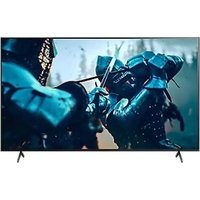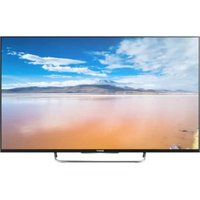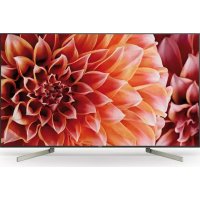
KD65XF9005 - TV SONY - Free user manual and instructions
Find the device manual for free KD65XF9005 SONY in PDF.


| Technical Specifications | LCD LED screen, 65 inches, 4K resolution (3840 x 2160) |
|---|---|
| Display Technology | HDR (High Dynamic Range), TRILUMINOS™ |
| Connectivity | 4 x HDMI, 3 x USB, Wi-Fi, Bluetooth |
| Audio | 2 x 10 W, Dolby Digital, DTS |
| Dimensions (with stand) | 144.0 x 89.3 x 36.6 cm |
| Weight | 30.5 kg |
| Usage | Ideal for watching movies, video games, and streaming content |
| Maintenance | Clean the screen with a soft cloth, update software via Internet |
| Safety | Do not expose to moisture, use on a stable surface |
| General Information | Compatible with voice assistants, supports popular streaming apps |
Frequently Asked Questions - KD65XF9005 SONY
User questions about KD65XF9005 SONY
0 question about this device. Answer the ones you know or ask your own.
Ask a new question about this device
Download the instructions for your TV in PDF format for free! Find your manual KD65XF9005 - SONY and take your electronic device back in hand. On this page are published all the documents necessary for the use of your device. KD65XF9005 by SONY.
USER MANUAL KD65XF9005 SONY
Parts and Controls. 7
Controls and Indicators 7
Using Remote Control 8
Remote Control Parts Description. 8
Connection Diagram 10
Installing the TV to the Wall 12
Using the optional Wall-Mount Bracket . . . 12
KD-75XF90xx only 13
Troubleshooting. 15
Troubles and Solutions. 15
Specifications 16
Internet Connection and Data Privacy
This product connects to the internet during initial setup as soon as a network is connected in order to confirm internet connection, and later to configure the Home screen. Your IP address is used in these and all other internet connections. If you do not want your IP address be used at all, do not set-up the wireless internet function and do not connect an internet cable. Please refer to the privacy information presented in the set-up screens for further details of internet connections.
Introduction
Thank you for choosing this Sony product.
Before operating the TV, please read this manual thoroughly and retain it for future reference.
Note
Before operating the TV, please read the "Safety Information" (page 3).
- Images and illustrations used in the Setup Guide and this manual are for reference only and may differ from the actual product.
- The "xx" that appears in the model name corresponds to a numeric digit, related to design, colour or TV system.
Attaching the Table-Top Stand to the TV
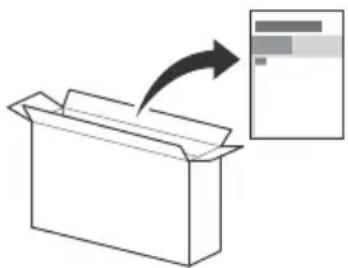
Refer to the Setup Guide on top of the cushion.
Help
Find more troubleshooting and other useful information directly from your TV. Press HELP on the remote control to display a list of topics, or to search by keyword.
Help Guide (Manual)
For more detailed information, select [Help Guide] from the Help menu on your TV. You can also check the Help Guide from your PC or smartphone (information provided on the back cover).
Location of the identification label
Labels for the TV Model No., Production Date (year/month) and Power Supply rating are located on the rear of the TV or package.
WARNING
TO PREVENT THE
SPREAD OF FIRE, KEEP
CANDLES OR OTHER OPEN FLAMES AWAY FROM THIS PRODUCT AT ALL TIMES.

NOTICE FOR CUSTOMERS IN THE UNITED KINGDOM
A moulded plug complying with BS1363 is fitted to this equipment for your safety and convenience.
Should the fuse in the plug supplied need to be replaced with the same rating of fuse approved by ASTA or BSI to BS 1362 (i.e., marked with or) must be used.
If the plug supplied with this equipment has a detachable fuse cover, be sure to attach the fuse cover after you change the fuse. Never use the plug without the fuse cover. If you should lose the fuse cover, please contact your nearest Sony service station.
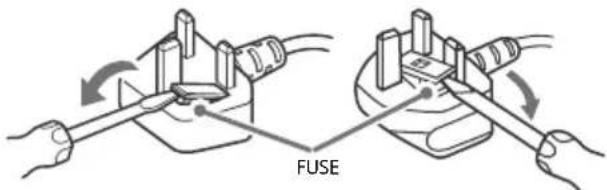
How to replace the fuse
Open the fuse compartment with a blade screwdriver, and replace the fuse.
Please refer to the illustration that actually equipped with the product.
IMPORTANT NOTICE
This product has been manufactured by or on behalf of Sony Visual Products Inc.
EU Importer: Sony Europe Limited.
Inquiries to the EU Importer or related to product compliance in Europe should be sent to the manufacturer's authorized representative, Sony Belgium, bijkantoor van Sony Europe Limited, Da Vincilaan 7-D1, 1935 Zaventem, Belgium.
Notice for Radio Equipment
Hereby, Sony Visual Products Inc. declares that the radio equipment types
KD-75XF9005, KD-65XF9005
KD-55XF9005, KD-49XF9005 are in compliance with Directive 2014/53/EU. The full text of the EU declaration of conformity is available at the following internet address: http:// www.compliance.sony.de/
This radio equipment can be operated in the EU without infringing applicable requirements on the use of radio spectrum.
Notice for customers: the following information is only applicable to equipment sold in countries applying EU directives.
TV wireless system may be operated in following countries: AT, BE, HR, CY, CZ, DK, EE, FI, FR, DE, EL, HU, IE, IT, LV, LT, LU, MT, NL, PL, PT, SK, SI, ES, SE, UK, IS, LI, NO, CH, BG, RO, TR, AL, BA, MK, MD, RS, ME, Kosovo
This equipment can be operated in other non-European countries.
Safety Information
WARNING
Caution
Risk of explosion if the battery is replaced by an incorrect type. Batteries must not be exposed to excessive heat such as sunshine, fire or the like or extremely low air pressure that can result in an explosion or leakage of flammable liquid or gas.
Stability Hazard
The television set may fall, causing serious personal injury or death.
Never place a television set in an unstable location. A television set may fall, causing serious personal injury or death. Many injuries, particularly to children, can be avoided by taking simple precautions such as:
- Using cabinets or stands recommended by the manufacturer of the television set.
- Only using furniture that can safely support the television set.
-
Ensuring the television set is not overhanging the edge of the supporting furniture.
-
Not placing the television set on tall furniture (for example, cupboards or bookcases) without anchoring both the furniture and the television set to a suitable support.
- Not placing the television set on cloth or other materials that may be located between the television set and supporting furniture.
- Educating children about the dangers of climbing on furniture to reach the television set or its controls.
If your existing television set is being retained and relocated, the same considerations as above should be applied.
Installation/Set-up
Install and use the TV set in accordance with the instructions below in order to avoid any risk of fire, electric shock or damage and/or injuries.
Apparatus connected to the protective earthing of the building installation through the mains connection or through other apparatus with a connection to protective earthing - and to a television distribution system using coaxial cable, may in some circumstances create a fire hazard. Connection to a television distribution system therefore has to be provided through a device providing electrical isolation below a certain frequency range (galvanic isolator, see EN 60728-11).
Installation
- The TV set should be installed near an easily accessible mains socket.
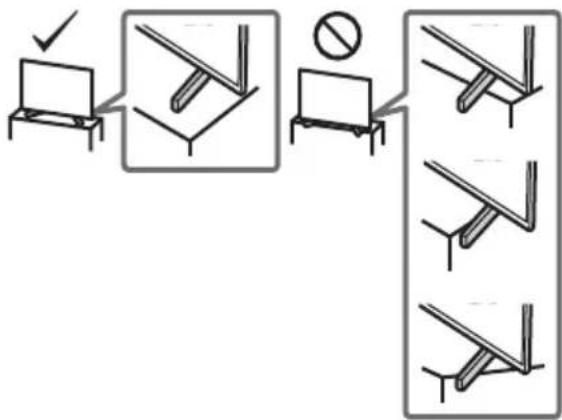
- Place the TV on a stable, level surface to prevent it from falling over and causing personal injury or property damage.
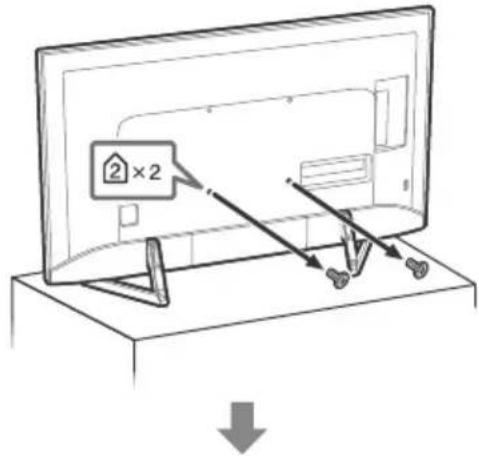
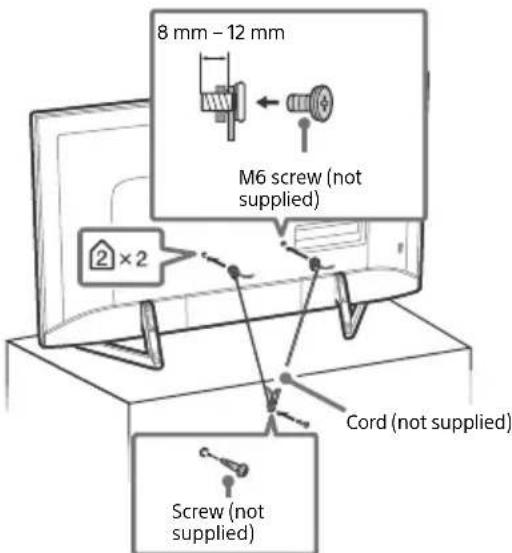
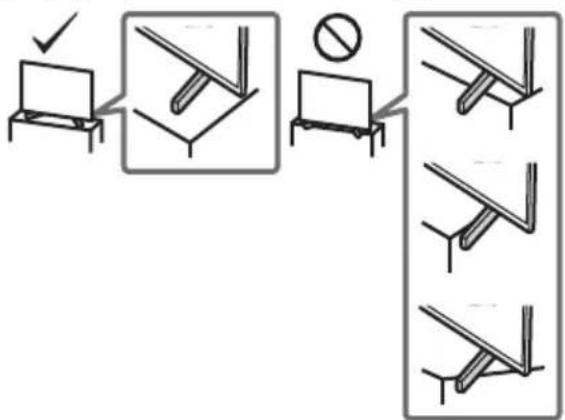
Install the TV where it cannot be pulled, pushed, or knocked over. - Install the TV so that the TV's Table-Top Stand does not protrude out from the TV stand (not supplied). If the Table-Top Stand protrudes out from the TV stand, it may cause TV set to topple over, fall down, and cause personal injury or damage to the TV.
- Only qualified service personnel should carry out wall-mount installations.
- For safety reasons, it is strongly recommended that you use Sony accessories, including:
- Wall-Mount Bracket SU-WL450 (Except KD-75XF90xx)
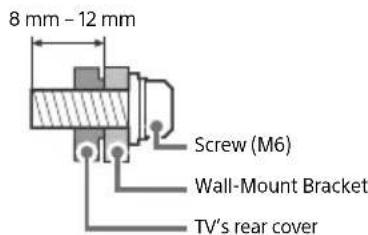
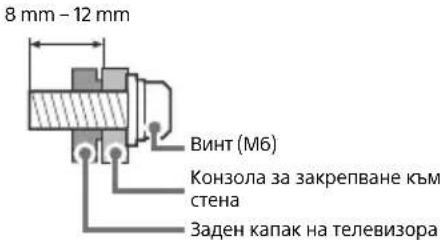
- Be sure to use the screws supplied with the Wall-Mount Bracket when attaching the Wall-Mount Bracket to the TV set. The supplied screws are designed as indicated by illustration when measured from the attaching surface of the Wall-Mount Bracket. The diameter and length of the screws differ depending on the Wall-Mount Bracket model.
Use of screws other than those supplied may result in internal damage to the TV set or cause it to fall, etc.
Transporting
- Before transporting the TV set, disconnect all cables.
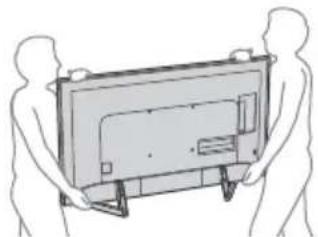
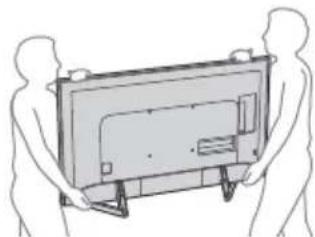
- Two or three people are needed to transport a large TV set.
- When transporting the TV set by hand, hold it as shown below. Do not put stress on the LCD panel and the frame around the screen.
- When transporting the TV set, do not subject it to jolts or excessive vibration.
- When transporting the TV set for repairs or when moving, pack it using the original carton and packing material.
Topple prevention
Ventilation
- Never cover the ventilation holes or insert anything in the cabinet.
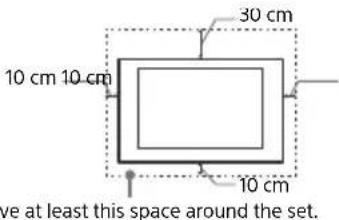
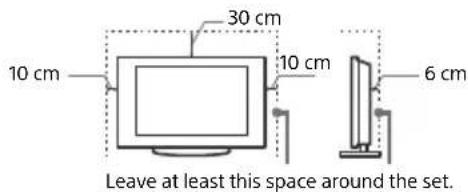
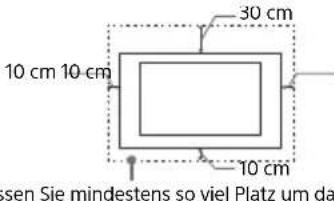
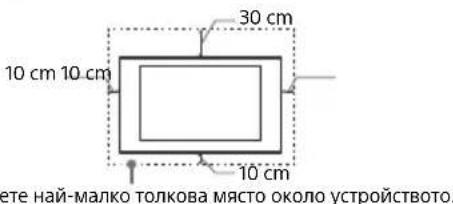
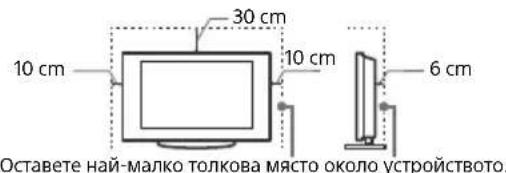
- Leave space around the TV set as shown below.
- It is strongly recommended that you use a Sony Wall-Mount Bracket in order to provide adequate air circulation.
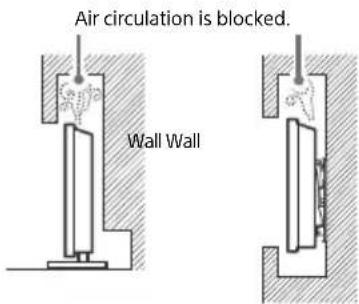
Installed on the wall
Installed with stand
To ensure proper ventilation and prevent the collection of dirt or dust:
- Do not lay the TV set flat, install upside down, backwards, or sideways.
- Do not place the TV set on a shelf, rug, bed or in a closet.
- Do not cover the TV set with a cloth, such as curtains, or items such as newspapers, etc.
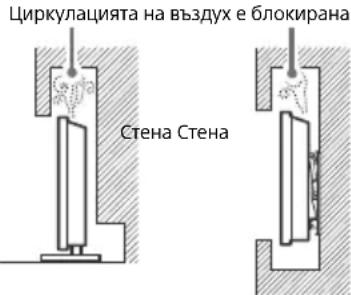
- Do not install the TV set as shown below.
Mains lead
Handle the mains lead and socket as follows in order to avoid any risk of fire, electric shock or damage and/or injuries:
- Use only mains leads supplied by Sony, not other suppliers.
- Insert the plug fully into the mains socket.
- Operate the TV set on a 220 V - 240 V AC supply only.
- When wiring cables, be sure to unplug the mains lead for your safety and take care not to catch your feet on the cables.
- Disconnect the mains lead from the mains socket before working on or moving the TV set.
- Keep the mains lead away from heat sources.
- Unplug the mains plug and clean it regularly. If the plug is covered with dust and it picks up moisture, its insulation may deteriorate, which could result in a fire.
Note
- Do not use the supplied mains lead on any other equipment.
- Do not pinch, bend, or twist the mains lead excessively. The core conductors may be exposed or broken.
- Do not modify the mains lead.
- Do not put anything heavy on the mains lead.
- Do not pull on the mains lead itself when disconnecting the mains lead.
- Do not connect too many appliances to the same mains socket.
- Do not use a poor fitting mains socket.
Prohibited Usage
Do not install/use the TV set in locations, environments or situations such as those listed below, or the TV set may malfunction and cause a fire, electric shock, damage and/or injuries.
Locations:
- Outdoors (in direct sunlight), at the seashore, on a ship or other vessel, inside a vehicle, in medical institutions, unstable locations, near water, rain, moisture or smoke.
Environments:
- Places that are hot, humid, or excessively dusty; where insects may enter; where it might be exposed to mechanical vibration, near flammable objects (candles, etc.). The TV set shall not be exposed to dripping or splashing and no objects filled with liquids, such as vases, shall be placed on the TV.
Situations:
- Use when your hands are wet, with the cabinet removed, or with attachments not recommended by the manufacturer. Disconnect the TV set from mains socket and aerial during lightning storms.
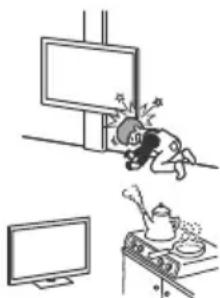
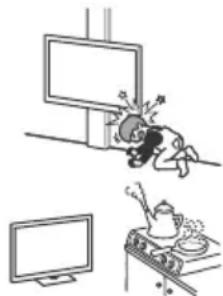
- Install the TV so that it sticks out into an open space. Injury or damage from a person or object bumping into the TV may result.
- Place the TV in a humid or dusty space, or in a room with oily smoke or steam (near cooking tables or humidifiers). Fire, electric shock, or warping may result.
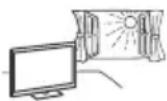
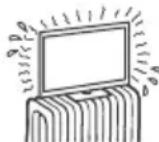
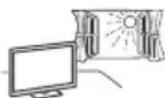
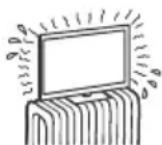
- Install the TV in places subject to extreme temperature such as in direct sunlight, near a radiator or a heating vent. The TV may overheat in such condition which can cause deformation of the enclosure and/or TV malfunction.
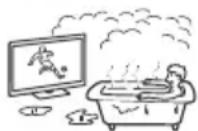
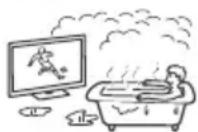
If the TV is placed in the changing room of a public bath or hot spring, the TV may be damaged by airborne sulfur, etc.
- For best picture quality, do not expose the screen to direct illumination or sunlight.
- Avoid moving the TV from a cold area to a warm area. Sudden room temperature changes may cause moisture condensation. This may cause the TV to show poor picture and/or poor colour. Should this occur, allow moisture to evaporate completely before powering the TV on.
Broken pieces:
- Do not throw anything at the TV set. The screen glass may break by the impact and cause serious injury.
- If the surface of the TV set cracks, do not touch it until you have unplugged the mains lead. Otherwise this may cause an electric shock.
When not in use
- If you will not be using the TV set for several days, the TV set should be disconnected from the mains for environmental and safety reasons.
- As the TV set is not disconnected from the mains when the TV set is just turned off, pull the plug from the mains socket to disconnect the TV set completely.
- Some TV sets may have features that require the TV set to be left in standby to work correctly.
For children
- Do not allow children to climb on the TV set.
- Keep small accessories out of the reach of children, so that they are not mistakenly swallowed.
If the following problems occur...
Turn off the TV set and unplug the mains lead immediately if any of the following problems occur.
Ask your dealer or Sony service centre to have it checked by qualified service personnel.
When:
- Mains lead is damaged.
Poor fitting of mains socket. -
TV set is damaged by being dropped, hit or having something thrown at it.
-
Any liquid or solid object falls through openings in the cabinet.
About LCD TV Temperature
When the LCD TV is used for an extended period, the panel surrounds become warm. You may feel hot when touching there by the hand.
Precautions
Viewing the TV
View the TV in moderate light, as viewing the TV in poor light or during long period of time, strains your eyes.
- When using headphones, adjust the volume so as to avoid excessive levels, as hearing damage may result.
LCD Screen
- Although the LCD screen is made with high-precision technology and 99.99% or more of the pixels are effective, black dots may appear or bright points of light (red, blue, or green) may appear constantly on the LCD screen. This is a structural property of the LCD screen and is not a malfunction.
- Do not push or scratch the front filter, or place objects on top of this TV set. The image may be uneven or the LCD screen may be damaged.
- If this TV set is used in a cold place, a smear may occur in the picture or the picture may become dark. This does not indicate a failure. These phenomena disappear as the temperature rises.
- Ghosting may occur when still pictures are displayed continuously. It may disappear after a few moments.
- The screen and cabinet get warm when this TV set is in use. This is not a malfunction.
- The LCD screen contains a small amount of liquid crystal. Follow your local ordinances and regulations for disposal.
Handling and cleaning the screen surface/ cabinet of the TV set
Be sure to unplug the mains lead connected to the TV set from mains socket before cleaning.
To avoid material degradation or screen coating degradation, observe the following precautions.
-
To remove dust from the screen surface/cabinet, wipe gently with a soft cloth. If dust is persistent, wipe with a soft cloth slightly moistened with a diluted mild detergent solution.
-
Never spray water or detergent directly on the TV set. It may drip to the bottom of the screen or exterior parts and enter the TV set, and may cause damage to the TV set.
-
Never use any type of abrasive pad, alkaline/acid cleaner, scouring powder, or volatile solvent, such as alcohol, benzene, thinner or insecticide. Using such materials or maintaining prolonged contact with rubber or vinyl materials may result in damage to the screen surface and cabinet material.
-
Do not touch the TV if your hand is covered in any chemical substance such as hand cream or sunblock.
Periodic vacuuming of the ventilation openings is recommended to ensure proper ventilation. - When adjusting the angle of the TV set, move it slowly so as to prevent the TV set from moving or slipping off from its table stand.
Optional Equipment
- Keep optional components or any equipment emitting electromagnetic radiation away from the TV set. Otherwise, picture distortion and/or noisy sound may occur.
- This equipment has been tested and found to comply with the limits set out in the EMC Directive using a connection signal cable shorter than 3 meters.
- This equipment has been tested and found to comply with the limits set out in the EMC Directive using a RF cable shorter than 30 meters for terrestrial/satellite/CATV terminal.
Recommendation of F type plug
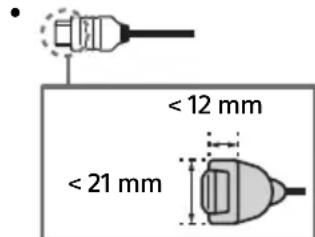
Projection of the inner wire from the connection part must be less than 1.5mm
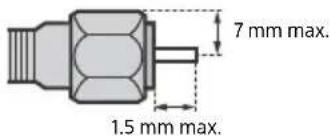
(Reference drawing of the F type plug)
Wireless Function of the unit
- Do not operate this unit near medical equipment (pacemaker, etc.), as this may result in the malfunction of the medical equipment.
- Although this unit transmits/receives scrambled signals, be careful of unauthorised interception. We cannot be responsible for any trouble as a result.
- This equipment should be installed and operated keeping a separation distance of 20cm or more between the antenna of this device and a person's body.
Caution about handling the remote control
- Observe the correct polarity when inserting batteries.
- Do not use different types of batteries together or mix old and new batteries.
- Disposet of batteries in an environmentally friendly way. Certain regions may regulate the disposal of batteries. Please consult your local authority.
- Handle the remote control with care. Do not drop or step on it, or spill liquid of any kind onto it.
- Do not place the remote control in a location near a heat source, a place subject to direct sunlight, or a damp room.
Disposal of the TV set
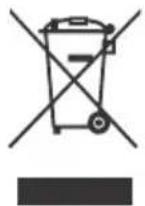
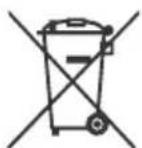
Disposal of old electrical & electronic equipment (applicable in the European Union and other countries with separate collection systems)
This symbol on the product or on its packaging indicates that this product shall not be treated as household waste. Instead it shall be handed over to the appropriate collection point for the recycling of electrical and electronic equipment.
By ensuring that this product is disposed of correctly, you will help to prevent potential negative consequences for the environment and human health, which could be caused by inappropriate waste handling of this product. The recycling of materials will help to conserve natural resources. For more detailed information about recycling of this product, please contact your local Civic Office, your household waste disposal service or the shop where you purchased the product.
Disposal of waste batteries (applicable in the European Union and other countries with separate collection systems)
This symbol on the battery or on the packaging indicates that the battery provided with this product shall not be treated as household waste.
On certain batteries this symbol might be used in combination with a chemical symbol. The chemical symbol for lead (Pb) is added if the battery contains more than 0.004% lead. By ensuring that these batteries are disposed of correctly, you will help to prevent potentially negative consequences for the environment and human health which could be caused by inappropriate waste handling of the battery. The recycling of the materials will help to conserve natural resources. In case of products that for safety, performance or data integrity reasons require a permanent connection with an incorporated battery, this battery should be replaced by qualified service staff only. To ensure that the battery will be treated properly, hand over the product at end-of-life to the appropriate collection point for the recycling of electrical and electronic equipment. For all other batteries, please view the section on how to remove the battery from the product safely. Hand the battery over to the appropriate collection point for the recycling of waste batteries. For more detailed information about recycling of this battery, please contact your local Civic Office, your household waste disposal service or the shop where you purchased the product or battery.
Parts and Controls
Controls and Indicators
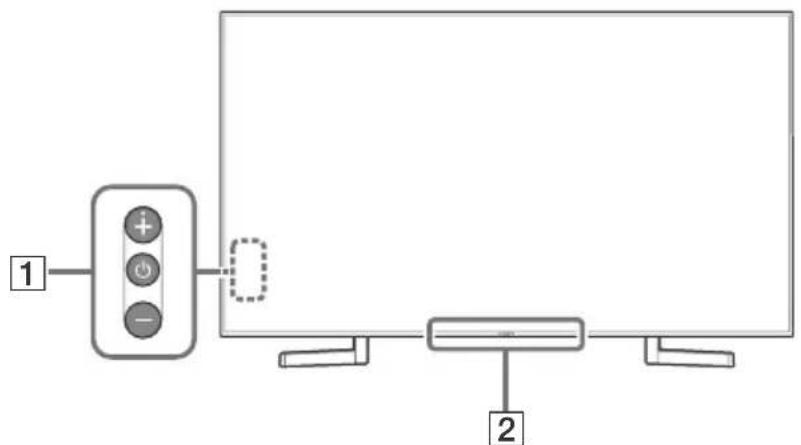
1 (Power) /+/-
When the TV is off,
Press to power on.
When the TV is on,
Press and hold to power off.
Press repeatedly to change the function,
then press + or - button to:
- Adjust the volume.
- Select the channel.
- Select the input source of TV.
Remote Control sensor*/Light sensor*/Illumination LED
The illumination LED lights up or blinks according to the status of the TV.
For more information, refer to the Help Guide.
- Do not place anything near the sensor.
Using Remote Control
Remote Control Parts Description
The remote control shape, location, availability and function of remote control buttons may vary depending on your region/country/TV model.
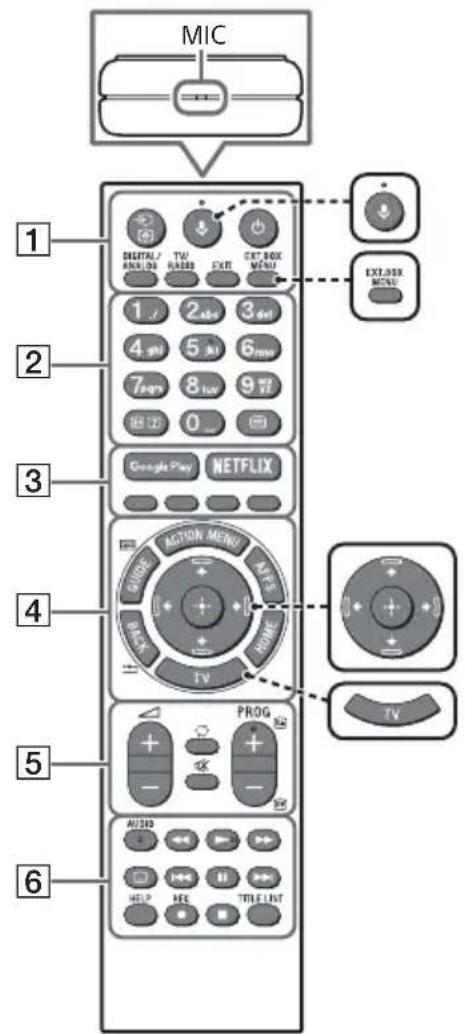

(Microphone)
Use Voice Search. (e.g., Search various content by voice.)

EXT.BOX MENU
Display the connected External Box (cable/satellite box) menu.
- For models with supplied IR Blaster, connect and set up the IR Blaster (page 11).
- The External Box menu may be displayed for some HDMI CEC compatible devices when the IR Blaster is not supplied/connected.
艹/艹/艝/艸/艱 (Navigation D-Pad)
On screen menu navigation and selection.
TV
Switch to a TV channel or input and display the TV Menu Bar.
1 (Input select/Text hold)
In TV mode: Display and select the input source.
In Text mode: Hold the current page.
(TV standby)
Turn on or turn off the TV (standby mode).
DIGITAL/ANALOG
Switch between digital and analogue mode.
TV/RADIO
Switch between TV or RADIO broadcasts.
EXIT
Return to the previous screen or exit from the menu. When an Interactive Application service is available, press to exit from the service.
Number buttons

( Info / Text re v
Display information.
(Text)
Display text information.
3 Google Play
Access the "Google Play" online service.
NETFLIX (Only on limited region/ country/TV model)
Access the "NETFLIX" online service.
Colour buttons
Execute corresponding function at that time.
4 ACTION MENU
Display a list of contextual functions.
GUIDE/国
Display the digital programme guide.
APPS
Access various services and applications.
BACK/
Return to the previous screen.
HOME
Display the TV Home Menu.
5 +/-(Volume)
Adjust the volume.
(Jump)
Jump back and forth between two channels or inputs. The TV alternates between the current channel or input and the last channel or input that was selected.
(Muting)
Mute the sound. Press again to restore the sound.
PROG+/-/E/A/E
In TV mode: Select the channel.
In Text mode: Select the next (3) or previous (5) page.
6 AUDIO
Change the language for the programme currently being viewed.
<>/>>/1<>/
Operate media contents on the TV and connected BRAVIA Sync-compatible device.
(Subtitle setting)
Turn subtitles on or off (when the feature is available).
HELP
Display the Help menu. Help Guide can be accessed from here.
REC
Record the current programme with the USB HDD recording function.
TITLE LIST
Display the Title list.
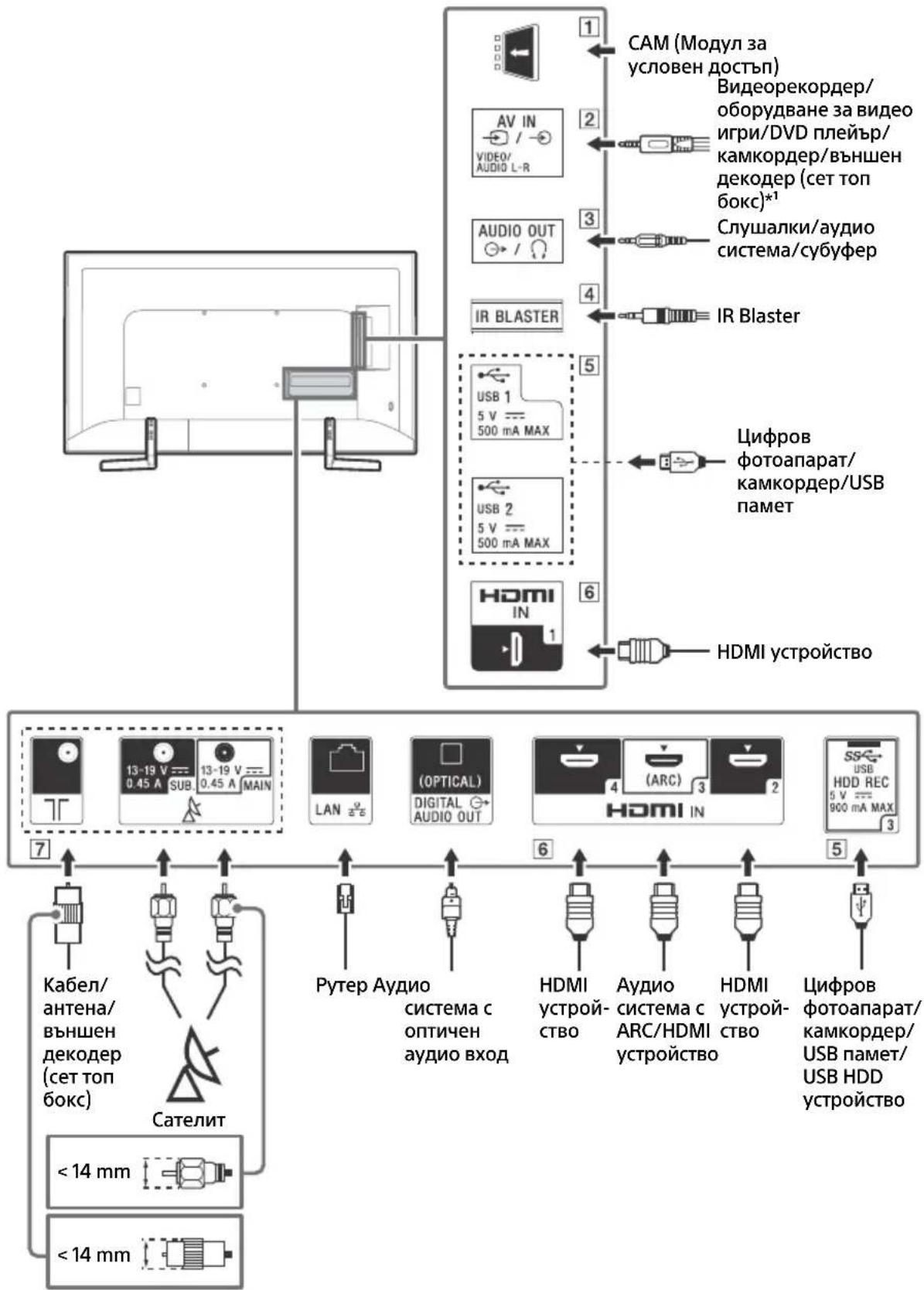
Connection Diagram
For more information on connections, refer to the Help Guide by pressing HELP on the remote control.
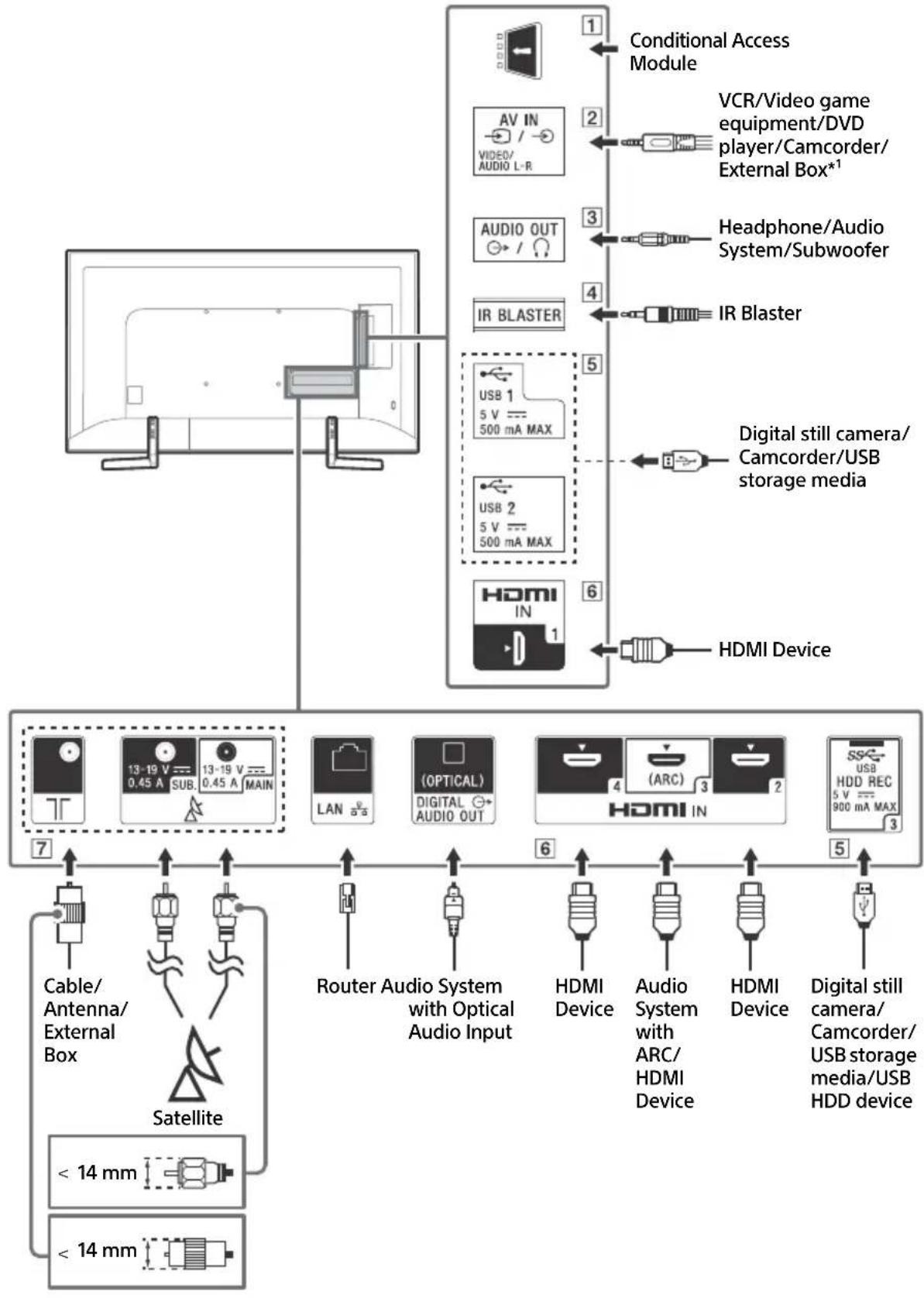
1 CAM (Conditional Access Module)
- Provides access to pay TV services. For details, refer to the instruction manual supplied with your CAM.
- Do not insert the smart card directly into the TV CAM slot. It must be fitted into the Conditional Access Module provided by your authorised dealer.
- CAM is not supported in some countries/ areas. Check with your authorised dealer.
- A CAM message may appear when you switch to a digital programme after using the Internet video.
2 / AVIN
- For a composite connection, use an Analogue Extension Cable (not supplied).
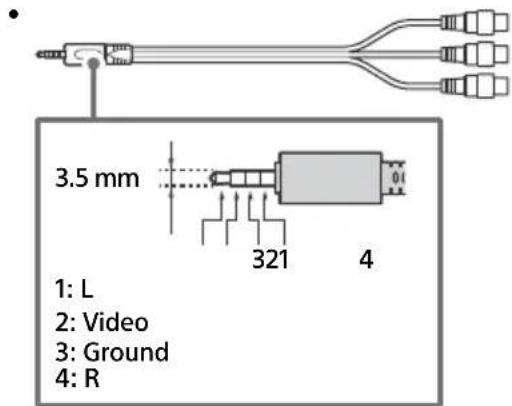
3 AUDIO OUT
Supports 3-pole stereo mini jack only.
- To listen to the TV's sound through the connected equipment, press HOME. Select [Settings] [Sound] [Headphone/Audio out] and then select the desired item.
4 IR BLASTER
- Use your Sony remote control to control your External Box (cable/satellite box). Connect the IR Blaster Cable*2 to the IR Blaster port on your TV. Place one or both of the other two ends as shown below.
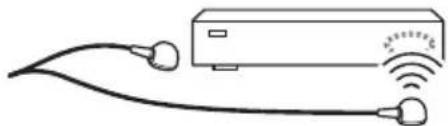
To perform IR Blaster setup, press HOME and select [Settings] [External inputs] [IR Blaster setup].
5 USB1/2,USB3(HDDREC)*
2
- Connecting a large USB device may interfere with other connected devices beside it.
- When connecting a large USB device, connect to the USB 1 port.
- Connect a USB HDD device to the USB 3 port (blue).
HDMI IN 1/2/3/4
- HDMI interface can transfer the digital video and audio on a single cable.
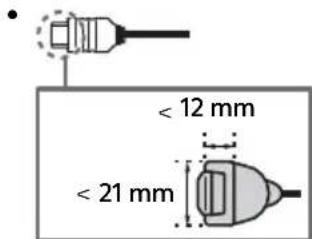
HDMI IN 3 ARC (Audio Return Channel)
Connect your audio system to the HDMI IN 3 to route TV audio to your audio system. An audio system that supports HDMI ARC can send video to the TV, and receive audio from the TV via the same HDMI cable. If your audio system does not support HDMI ARC, an additional connection with DIGITAL AUDIO OUT (OPTICAL) is necessary.
7 (RF input), (Satellite input)
- Connections for terrestrial/cable and satellite. Connection steps: SUB. MAIN Antenna
- For SUB. jack, connect only when you are using twin tuner mode except for Single Cable Distribution EN50494.
1 For an external device which has only SCART AV OUT, use a SCART-RCA adaptor and Analogue Extension Cable.
2 Only on limited region/country/TV model.
Installing the TV to the Wall
Using the optional Wall-Mount Bracket
This TV's instruction manual only provides the steps to prepare the TV for Wall-Mount installation before it is installed on the wall.
To Customers:
For product protection and safety reasons, Sony strongly recommends that installation of your TV be performed by Sony dealers or licensed contractors. Do not attempt to install it yourself.
To Sony Dealers and Contractors:
Provide full attention to safety during the installation, periodic maintenance and examination of this product.
Sufficient expertise is required for installing this product, especially to determine the strength of the wall for withstanding the TV's weight. Be sure to entrust the attachment of this product to the wall to Sony dealers or licensed contractors and pay adequate attention to safety during the installation. Sony is not liable for any damage or injury caused by mishandling or improper installation.
Use the Wall-Mount Bracket SU-WL450 (not supplied) (Except KD-75XF90xx) to install the TV to the wall.
When installing the Wall-Mount Bracket, also refer to the Operating Instructions and Installation Guide supplied with the Wall-Mount Bracket.
Note
- Be sure to store the removed screws in a safe place, keeping them away from children.
- Place the TV with its screen facing down on a level and stable surface covered with a thick and soft cloth when removing the Table-Top Stand from the TV to prevent damaging the surface of the LCD display.

For instructions on Wall-Mount Bracket installation, see the Installation Information (Wall-Mount Bracket) on the product page for your TV model. www.sony.eu/support/
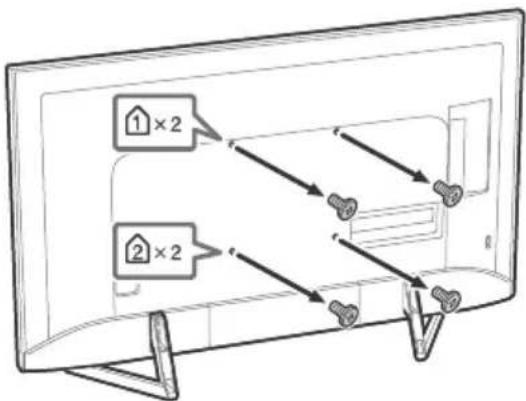
KD-65/55/49XF90xx only
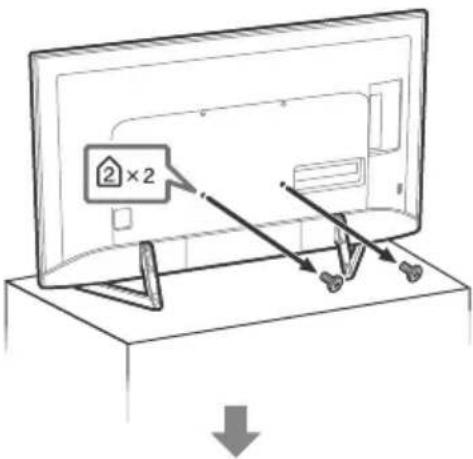
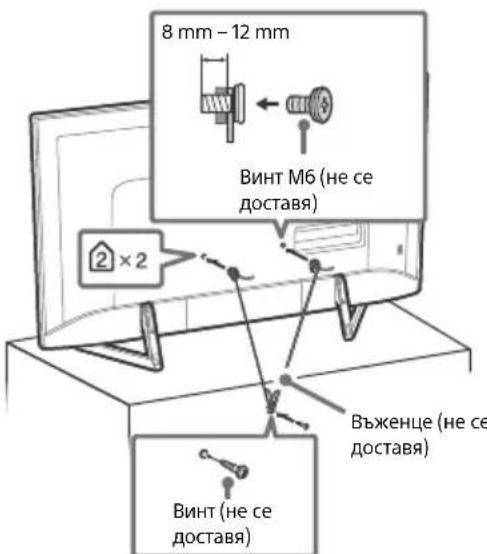
Remove the screws from the rear of the TV.
KD-75XF90xx only
Your TV can be mounted on a wall using a Wall-Mount Bracket (not supplied) out of the box as packaged.
Prepare the TV for the Wall-Mount Bracket before making cable connections.
For product protection and safety reasons, Sony strongly recommends that installation of your TV on the wall be performed by qualified professionals. Do not attempt to install it yourself.
- Follow the instruction guide provided with the Wall-Mount Bracket for your model. Sufficient expertise is required in installing this TV, especially to determine the strength of the wall for withstanding the TV's weight.
- Be sure to store the unused screws and Table-Top Stand in a safe place until you are ready to attach the Table-Top Stand. Keep the screws away from small children.
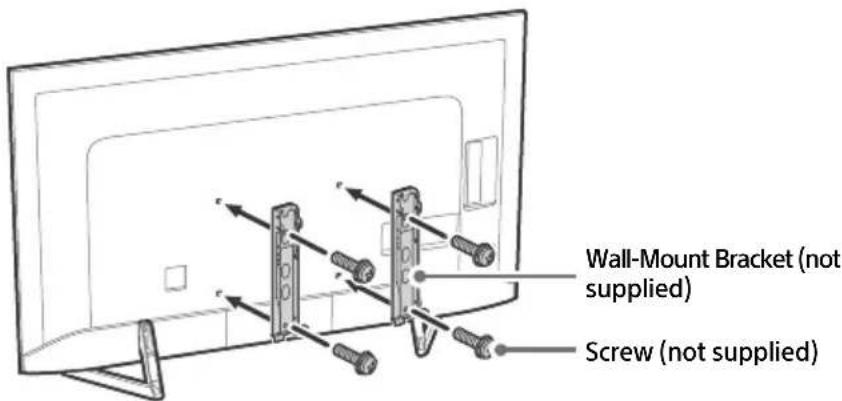
1 Remove the screws from the rear of the TV.

2 Attach the Wall-Mount Bracket (not supplied) using the screws (not supplied).
Note
- If using an electric screwdriver, set the torque at approximately 1.5N· m {15 kgf·cm}.
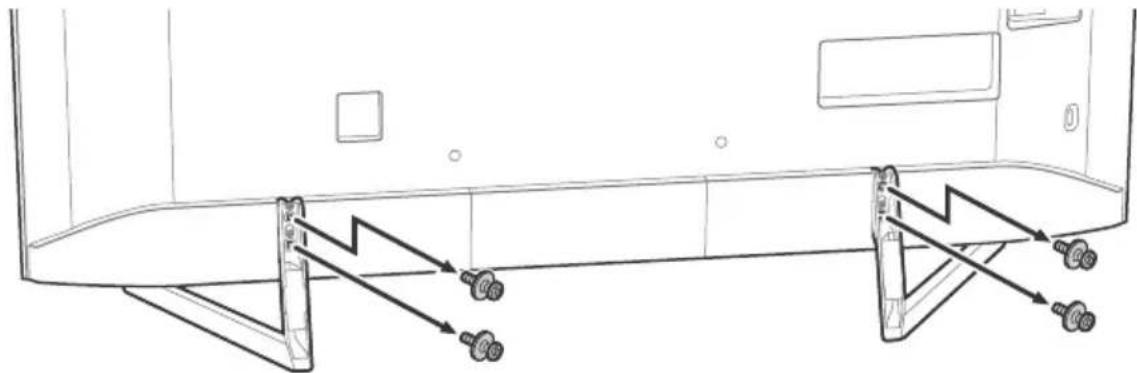
3 Detach the Table-Top Stand from the TV.
Troubleshooting
General troubleshooting for issues like: black screen, no sound, frozen picture, TV does not respond, or network is lost, do the following steps.
1 Restart your TV by pressing the power button on the remote control until a message appears. The TV will restart. If the TV does not recover, try unplugging the TV from the mains lead for two minutes and then plug it in again.
2 Refer to the Help menu by pressing HELP on the remote control.
3 Connect your TV to the Internet and perform a software update.
4 Visit Sony support website (information provided on the back cover).
When [A new TV system software update is available...] message is displayed.
Sony strongly recommends you to update the TV software by selecting [Update Now]. These software updates improve your TV performance or add new features.
The following screen with [Updating...] will appear and the illumination LED flashes white while software is updating.
![SONY KD65XF9005 - When [A new TV system software update is available...] message is displayed. - 1](/content/2026/03/438063/images/8dc2511345ba9a8d19ccea08e72388667c12d131bf929d82edc75c1957104fdc.jpg)
Do not unplug the mains lead during the software update. If you do, the software update may not finish completely, and it may cause a software malfunction. Software updates can take up to 15 minutes.
When you plug in the TV, the TV may not be able to turn on for a while even if you press the power button on the remote control or the TV.
It takes time to initialize the system. Wait for about one minute, then operate it again.
Troubles and Solutions
When the illumination LED is flashing in red.
- Count how many times it flashes (interval time is three seconds).
Reboot the TV by disconnecting the mains lead for two minutes, then turn on the TV. If the problem persists, disconnect the mains lead, and contact your dealer or Sony service centre with the number of times the illumination LED flashes.
Terrestrial/cable service cannot be received.
- Check the antenna (aerial)/cable connection and booster settings.
- Select terrestrial/cable service by pressing DIGITAL/ANALOG on the remote control. If the broadcasting service is not displayed, press TV and then press DIGITAL/ANALOG.
- Terrestrial signal might be suppressed if there is a strong signal supplied nearby. Set [LNA (CH---)] to [Off] in digital tuning settings.
After moving to a new house or trying to receive new services, attempt a service search by selecting [Digital Tuning].
Satellite service cannot be received.
- Check the satellite cable connection.
- When [No signal. LNB overload detected...] message is displayed, unplug the mains lead. Then, ensure the satellite cable is not damaged and the satellite signal line is not short-circuited in the satellite connector.
The remote control does not function.
- Replace the batteries.
The EXT.BOX MENU button on the remote control does not work.
- Connect and set up the IR Blaster (models with supplied IR Blaster only) (page 11).
- Connect HDMI CEC compatible device (except models with supplied IR Blaster) and change to that input.
The parental lock for broadcast password has been forgotten.
- Enter 9999 for the PIN code and select [Change PIN Code].
The TV surrounds become warm.
- When the TV is used for an extended period, the TV surrounds become warm. You may feel hot when touching there by the hand.
Specifications
System
Panel system
LCD (Liquid Crystal Display) Panel, LED Backlight
TV system
Depending on your country/area selection/TV model
Analogue: B/G, D/K, I
Digital: DVB-T/DVB-C
DVB-T2*
Satellite*: DVB-S/DVB-S2
Colour system
PAL/SECAM/NTSC3.58 (Video only)/NTSC4.43 (Video only)
Channel coverage
Depending on your country/area selection/TV model
Analogue: UHF/VHF/Cable
Digital: UHF/VHF/Cable
Satellite*: IF Frequency 950-2,150 MHz
Sound output
10W+10W
Wireless technology
Protocol IEEE802.11ac/a/b/g/n
(IEEE802.11ac may not be available depending on countries/regions.)
Bluetooth Version 4.1
Frequency band(s)
| Wireless LAN (IEEE802.11ac/a/b/g/n) | |
| Frequency range Output Power | |
| 2400-2483.5 MHz < 20.0 dBm | |
| 5150-5250 MHz < 23.0 dBm | |
| 5250-5350 MHz < 20.0 dBm | |
| 5470-5725 MHz < 20.0 dBm | |
| 5725-5850 MHz < 13.9 dBm |
| Bluetooth | |
| Frequency range Output Power | |
| 2400-2483.5 MHz < 10.0 dBm |
RMF-TX310E
| Bluetooth | |
| Frequency range Output Power | |
| 2400-2483.5 MHz < 10.0 dBm |
Software version
TV: PKG. EUA
Press HELP on the remote control to know the software version.
Remote control:
Press HOME, then select [Settings] [Voice]
Remote Control] [Software version].
Any updates of software/firmware for this equipment/accessories/components will never affect its conformity to Directive 2014/53/EU in future.
- Not all the TV sets have DVB-T2 or DVB-S/S2 technology or satellite antenna terminal.
Input/Output jacks
Antenna (aerial)/cable
75 ohm external terminal for VHF/UHF
Satellite antenna
Female F Type Connector, 75 ohm.
DiSEqC 1.0, LNB 13 V/18 V & 22 kHz tone, Single Cable Distribution EN50494.
一 / 一 AVIN
Video/Audio input (mini jack)
HDMI IN 1/2/3/4 (support 4K resolution, HDCP
2.2-compatible)
Video:
4096× 2160p (50, 60 Hz)*2, 4096 × 2160p
(24Hz)^*1 3840× 2160p (50, 60 Hz)*2, 3840 ×
2160p (24, 25, 30 Hz), 1080p (30, 50, 60 Hz),
1080/24p, 1080i (50, 60 Hz), 720p (30, 50,
60 Hz), 720/24p, 576p, 576i, 480p, 480i, PC Formats*3
*1 When 4096 × 2160p is input and [Wide mode] is set to [Normal], the resolution is displayed as 3840 × 2160p . To display 4096 × 2160p , set [Wide mode] setting to [Full 1] or [Full 2].
*2 HDMI IN 2/3 only. To support 18 Gbps, set [HDMI signal format] to [Enhanced format].
*3 Refer to the Help Guide for details.
Audio:
5.1 channel linear PCM: 32/44.1/48/88.2/96/
176.4/192 kHz 16/20/24 bits, Dolby Digital, Dolby Digital Plus and DTS
ARC (Audio Return Channel) (HDMI IN 3 only)
(Two channel linear PCM: 48 kHz 16 bits, Dolby Digital, Dolby Digital Plus, DTS)
DIGITAL AUDIO OUT (OPTICAL)
Digital optical jack (Two channel linear PCM:
48 kHz 16 bits, Dolby Digital, DTS)
Headphone, Audio output, Subwoofer
1,2-3(HOBREC)*
1
USB device port. (USB HDD device for REC feature)
USB port 1 and 2 support High Speed USB (USB 2.0)
USB port 3 supports Super Speed USB (USB 3.1)
Gen1)
日
CAM (Conditional Access Module) slot
LAN
10BASE-T/100BASE-TX connector (Depending on the operating environment of the network, connection speed may differ. 10BASE-T/
100BASE-TX communication rate and communication quality are not guaranteed for this TV.)
IR BLASTER*1
IR Blaster Cable input (mini jack)
Others
Optional accessories
Wall-Mount Bracket: SU-WL450 (Except
KD-75XF90xx)
Operating temperature
0^ - 40^
Operating humidity
10% - 80% RH (non-condensing)
Power, Product Fiche and others
Power requirements
220V-240VAC,50Hz
Energy Efficiency Class
KD-75XF90xx: A
KD-65XF90xx: A
KD-55XF90xx:B
KD-49XF90xx:B
Screen size (measured diagonally) (Approx.)
KD-75XF90xx: 189.3 cm / 75 inches
KD-65XF90xx: 163.9 cm / 65 inches
KD-55XF90xx: 138.8 cm / 55 inches
KD-49XF90xx: 123.2 cm / 49 inches
Power consumption
In [Standard] mode
KD-75XF90xx:203W
KD-65XF90xx: 162 W
KD-55XF90xx:145W
KD-49XF90xx: 114 W
In [Vivid] mode
KD-75XF9005:330W
KD-65XF9005:292W
KD-55XF9005:246W
KD-49XF9005:199W
Average annual energy consumption*2
KD-75XF90xx: 282 kWh
KD-65XF90xx: 225 kWh
KD-55XF90xx: 201 kWh
KD-49XF90xx: 158 kWh
Standby power consumption*34
0.50 W (27 W in software/EPG update mode)
Display resolution
3,840 dots (horizontal) × 2,160 lines (vertical)
Output Rating
USB 1/2
5V=500mA MAX
USB3
5V=900mA MAX
Dimensions (Approx.) (w× h× d)
with Table-Top Stand
KD-75XF90xx: 167.4 × 103.2 × 35.5 cm
KD-65XF90xx: 144.7 × 89.8 × 29.7 cm
KD-55XF90xx: 122.8 × 77.1 × 26.8 cm
KD-49XF90xx: 109.3 × 69.4 × 26.8 cm
without Table-Top Stand
KD-75XF90xx: 167.4 × 95.8 × 7.3 ~cm
KD-65XF90xx: 144.7 × 82.9 × 6.9 cm
KD-55XF90xx: 122.8 × 70.6 × 6.9 cm
KD-49XF90xx: 109.3 × 62.9 × 6.9 cm
Mass(Approx.)
with Table-Top Stand
KD-75XF90xx: 36.7 kg
KD-65XF90xx: 25.5 kg
KD-55XF90xx: 19.1 kg
KD-49XF90xx: 14.5 kg
without Table-Top Stand
KD-75XF90xx: 35 kg
KD-65XF90xx: 24.5 kg
KD-55XF90xx: 18.2 kg
KD-49XF90xx: 13.6 kg
*1 Only on limited region/country/TV model.
*2 Energy consumption per year, based on the power consumption of the television operating 4 hours per day for 365 days. The actual energy consumption will depend on how the television is used.
*3 Specified standby power is reached after the TV finishes necessary internal processes.
*4 Standby power consumption will increase when your TV is connected to the network.
Note
- Optional accessories availability depends on countries/region/TV model/stock.
- Design and specifications are subject to change without notice.
Notes on Digital TV function
- Digital TV (DVB terrestrial, satellite and cable), interactive services and network functions may not be available in all countries or areas. Some functions might not be enabled or might not operate correctly with some providers and network environments. Some TV service providers may charge a fee for their services.
- This TV supports digital broadcasting using MPEG-2, H.264/MPEG-4 AVC and H.265/HEVC CODECs, but compatibility with all operator/service signals, which may change over time, cannot be guaranteed.
Trademark information
- The terms HDMI and HDMI High-Definition Multimedia Interface, and the HDMI Logo are trademarks or registered trademarks of HDMI Licensing Administrator, Inc. in the United States and other countries.
Manufactured under license from Dolby Laboratories. Dolby, Dolby Audio, and the double-D symbol are trademarks of Dolby Laboratories. - "BRAVIA", Band BRAVIA Sync are trademarks or registered marks of Sony Corporation.
- Gracenote, the Gracenote logo and logotype, "Powered by Gracenote" logo are either registered trademarks or trademarks of Gracenote, Inc. in the United States and/or other countries.
- Vewd® Core. Copyright 1995-2017 Vewd Software AS. All rights reserved.
- Google, Android TV, Google Play, Chromecast built-in, YouTube and other related marks and logos are trademarks of Google LLC.
- Wi-Fi®, Wi-Fi Alliance®, Wi-Fi Direct® and Miracast® are registered trademarks of Wi-Fi Alliance.
- Wi-Fi Protected Setup™ is a trademark of Wi-Fi Alliance.
-
The Wi-Fi CERTIFIED™ Logo is a certification mark of Wi-Fi Alliance.
-
For DTS patents, see http:// patents.dts.com. Manufactured under license from DTS, Inc. DTS, the Symbol, & DTS and the Symbol together are registered trademarks, and DTS Digital Surround is a trademark of DTS, Inc. © DTS, Inc. All Rights Reserved.
- The Bluetooth® word mark and logos are registered trademarks owned by the Bluetooth SIG, Inc. and any use of such marks by Sony Corporation is under license. Other trademarks and trade names are those of their respective owners.
- Netflix is a registered trademark of Netflix, Inc.
- DiSEqCTM is a trademark of EUTELSAT. This TV supports DiSEqC 1.0. This TV is not intended for controlling motorized antennas.
- TUXERA is a registered trademark of Tuxera Inc. in the US and other countries.
- USB-IF SuperSpeed USB Trident logo is a registered trademark of USB Implementers Forum, Inc.
- All other trademarks are the property of their respective owners.
Table des matieres
AVIS IMPORTANT. 3
AT, BE, HR, CY, CZ, DK, EE, FI, FR, DE, EL, HU, IE, IT, LV, LT, LU, MT, NL, PL, PT, SK, SI, ES, SE, UK, IS, LI, NO, CH, BG, RO, TR, AL, BA, MK, MD, RS, ME, Kosovo
2160p (24, 25, 30 Hz), 1080p (30, 50, 60 Hz),
1080/24p, 1080i (50, 60 Hz), 720p (30, 50,
60 Hz), 720/24p, 576p, 576i, 480p, 480i, Formats PC*3
ARC (Audio Return Channel) (HDMI IN 3 uniquely)
10% - 80% HR (sans condensation)
AT, BE, HR, CY, CZ, DK, EE, FI, FR, DE, EL, HU, IE, IT, LV, LT, LU, MT, NL, PL, PT, SK, SI, ES, SE, UK, IS, LI, NO, CH, BG, RO, TR, AL, BA, MK, MD, RS, ME, Kosovo
2160p (24, 25, 30 Hz), 1080p (30, 50, 60 Hz),
1080/24p, 1080i (50, 60 Hz), 720p (30, 50, 60 Hz), 720/24p, 576p, 576i, 480p, 480i,
Formatos de PC*
*1 Si se introduce 4096 × 2160p y [Modo horizontal] se cambia a [Normal], laResolution做不到 será 3840 × 2160p . Para ver 4096 × 2160p , cambie el ajuste de [Modo horizontal] a [Completo 1] o [Completo 2].
DIGITAL AUDIO OUT (OPTICAL)
Toma digital optica (PCM lineal de dos canales: 48 kHz 16 bits, Dolby Digital, DTS)
AUDIO OUT ^ / (minitoma estereo)
Auricular, salute de audio, Altavoz de graves

1.2-3(HBDREC)
1
10% - 80% RH (sin condensation)
AT, BE, HR, CY, CZ, DK, EE, FI, FR, DE, EL, HU, IE, IT, LV, LT, LU, MT, NL, PL, PT, SK, SI, ES, SE, UK, IS, LI, NO, CH, BG, RO, TR, AL, BA, MK, MD, RS, ME, Kosovo
2160p (24, 25, 30 Hz), 1080p (30, 50, 60 Hz),
1080/24p, 1080i (50, 60 Hz), 720p (30, 50,
60 Hz), 720/24p, 576p, 576i, 480p, 480i,
Pc-formaten
(Tweekanaals lineaire PCM: 48 kHz 16 bits, Dolby
Digital, Dolby Digital Plus, DTS)
DIGITAL AUDIO OUT (OPTICAL)
AT, BE, HR, CY, CZ, DK, EE, FI, FR, DE, EL, HU, IE, IT, LV, LT, LU, MT, NL, PL, PT, SK, SI, ES, SE, UK, IS, LI, NO, CH, BG, RO, TR, AL, BA, MK, MD, RS, ME, Kosovo
Installation and Wand
Satellite*: IF Freqenz 950-2.150 MHz
Tonausgänge
10W+10W
Wireless-Technologie
Protokoll IEEE802.11ac/a/b/g/n
2160p (24, 25, 30 Hz), 1080p (30, 50, 60 Hz),
1080/24p, 1080i (50, 60 Hz), 720p (30, 50,
60 Hz), 720/24p, 576p, 576i, 480p, 480i,
Computerformate*3
DIGITAL AUDIO OUT (OPTICAL)
AT, BE, HR, CY, CZ, DK, EE, FI, FR, DE, EL, HU, IE, IT, LV, LT, LU, MT, NL, PL, PT, SK, SI, ES, SE, UK, IS, LI, NO, CH, BG, RO, TR, AL, BA, MK, MD, RS, ME, Kosovo
Estequipmentponede serutilidonoutrospaisesnaneuropeus.
2160p (24, 25, 30 Hz), 1080p (30, 50, 60 Hz),
1080/24p, 1080i (50, 60 Hz), 720p (30, 50,
60 Hz), 720/24p, 576p, 576i, 480p, 480i, PC
Formatos*
DIGITAL AUDIO OUT (OPTICAL)
Tomada digital otica (PCM linear deinous canais:
48 kHz 16 bits, Dolby Digital, DTS)
AUDIO OUT 念 / 念 (Mini-tomada estereo)
Auscultador, saía de audio, subwoofer
1,2-3(HOBREC)* 1
Porto do disposicao USB. (Sdspositivo USB HDD para a funcionalidade REC)
As portas USB 1 e 2 suportam High Speed USB (USB 2.0).
A porta USB 3 suporta Super Speed USB (USB 3.1
Gen 1).
Ranhura CAM (Modulo de Accesso Condiional)
品 LAN
AT, BE, HR, CY, CZ, DK, EE, FI, FR, DE, EL, HU, IE, IT, LV, LT, LU, MT, NL, PL, PT, SK, SI, ES, SE, UK, IS, LI, NO, CH, BG, RO, TR, AL, BA, MK, MD, RS, ME, Kosovo
2160p (24, 25, 30 Hz), 1080p (30, 50, 60 Hz), 1080/24p, 1080i (50, 60 Hz), 720p (30, 50,
60 Hz), 720/24p, 576p, 576i, 480p, 480i, Formati PC*3
DIGITAL AUDIO OUT (OPTICAL)
EU-importor: Sony Europe Limited.
Se Hjalpguiden for mer information.
- Placera ingenting nara sensorn.
Anvanda fjarrkontrollen
2160p (24, 25, 30 Hz), 1080p (30, 50, 60 Hz),
1080/24p, 1080i (50, 60 Hz), 720p (30, 50,
60 Hz), 720/24p, 576p, 576i, 480p, 480i,
PC-format*3
EU Importor: Sony Europe Limited.
Forespørgsler til EU Importøren eller vedrørende overholdelse afproduktparanti i Europa skal sendes til fabrikanten reprezentant, Sony Belgium, bijkantoor van Sony Europe Limited, Da Vincilaan 7-D1, 1935 Zaventem, Belgien.
艹/艹/艹/艹/艹 (Navigering D-Pad)
Skaermmenunavigering og valg.
TV
(to-kanals lineaer PCM: 48 kHz 16 bit, Dolby
Digital, Dolby Digital Plus, DTS)
DIGITAL AUDIO OUT (OPTICAL)
Digitalt optisk stik (to-kanals linear PCM: 48 kHz 16 bit, Dolby Digital, DTS)
AUDIO OUT (Mini-stereostik)
Hovedtelefon, lydudgang, subwoofer
1,2-3 (HDDREC)* 1 USB-enhedsport. (3 USB HDD-enhed for REC-funktion) USB-port 1 og 2 understotter High Speed USB (USB 2.0). USB-port 3 understotter Super Speed USB (USB 3.1 Gen 1).
CAM (Conditional Access Module)-holder
I [Standard] tilstand
KD-75XF90xx: 203 W
KD-65XF90xx: 162 W
KD-55XF90xx: 145 W
KD-49XF90xx: 114 W
I [Kraftig] tilstand
KD-75XF9005: 330 W
KD-65XF9005: 292 W
KD-55XF9005: 246 W
KD-49XF9005: 199 W
DIGITAL AUDIO OUT (OPTICAL)
EU-importor: Sony Europe Limited.
Spørsmål til EU-importøren eller spørsmål vedrørende** produktets overensbestemmelse i Europa skal sendes til produsentens autoriserte representant, Sony Belgium, bijkantoor van Sony Europe Limited, Da Vincilaan 7-D1, 1935 Zaventem, Belgia.
Merknad for radioutstyr
Herved erklærer Sony Visual Products Inc. at radioutstyristypene KD-75XF9005, KD-65XF9005, KD-55XF9005,

KD-49XF9005 er i samsvar med direktiv 2014/53/EU. EU-erklæring fultekst finner du pa Internett under:
http://www.compliance.sony.de/
AT, BE, HR, CY, CZ, DK, EE, FI, FR, DE, EL, HU, IE, IT, LV, LT, LU, MT, NL, PL, PT, SK, SI, ES, SE, UK, IS, LI, NO, CH, BG, RO, TR, AL, BA, MK, MD, RS, ME, Kosovo
(Teksting-innstilling)
Slár teksting på eller av (nár davon funksjonden er tilgengelig).
HELP
Vis Hjelp-menyen. Hjelpeveiledning kan nas herfra.
REC
2160p (24, 25, 30 Hz), 1080p (30, 50, 60 Hz),
1080/24p, 1080i (50, 60 Hz), 720p (30, 50,
60 Hz), 720/24p, 576p, 576i, 480p, 480i, PC-formater*3
DIGITAL AUDIO OUT (OPTICAL)
Digital optisk kontakt (tokenals lineær PCM:
48 kHz 16 biter, Dolby Digital, DTS)
AUDIO OUT (stereomini-kontakt)
Hodetelefon, Iydutgang, subwoofer
1,2-3(HDBREC)*
1
The Heights, Brooklands
Weybridge, Surrey, KT 13 0XW
United Kingdom.
Importer w UE: Sony Europe Limited.
AT, BE, HR, CY, CZ, DK, EE, FI, FR, DE, EL, HU, IE, IT, LV, LT, LU, MT, NL, PL, PT, SK, SI, ES, SE, UK, IS, LI, NO, CH, BG, RO, TR, AL, BA, MK, MD, RS, ME, Kosovo
2160p (24, 25, 30 Hz), 1080p (30, 50, 60 Hz),
1080/24p, 1080i (50, 60 Hz), 720p (30, 50,
60 Hz), 720/24p, 576p, 576i, 480p, 480i, Formaty computerowe*3
DIGITAL AUDIO OUT (OPTICAL)
AT, BE, HR, CY, CZ, DK, EE, FI, FR, DE, EL, HU, IE, IT, LV, LT, LU, MT, NL, PL, PT, SK, SI, ES, SE, UK, IS, LI, NO, CH, BG, RO, TR, AL, BA, MK, MD, RS, ME, Kosovo
Toto vybaveni muze byt pouzito vostatnich neevropskych zemich.
2160p (24, 25, 30 Hz), 1080p (30, 50, 60 Hz),
1080/24p, 1080i (50, 60 Hz), 720p (30, 50,
60 Hz), 720/24p, 576p, 576i, 480p, 480i, PC formaty3
DIGITAL AUDIO OUT (OPTICAL)
2160p (24, 25, 30 Hz), 1080p (30, 50, 60 Hz),
1080/24p, 1080i (50, 60 Hz), 720p (30, 50,
60 Hz), 720/24p, 576p, 576i, 480p, 480i, Formáty PC*3
*1 Ked je vstup 4096 × 2160p a [Siroký režim] je nastavené na [Standardný], rozlísenie sa zobrazí ako 3840 × 2160p. Na zobrazenie 4096 × 2160p vyberte nastavené [Siroký režim] na [Plny 1] alebo [Plny 2].
*2 Len HDMI IN 2/3. Ak si ze laté podporu 18 Gb/s, nastavte [Formát signalu HDMI] na [Vylepşen'y=format].
*3 Podrobnosti najdete v Priručke.
Audio:
5,1 lineárny kanál PCM: 32/44,1/48/88,2/96/
176,4/192 kHz 16/20/24 bitov, Dolby Digital,
Dolby Digital Plus a DTS
ARC (Audio Return Channel) (Len HDMI IN 3)
(dvojkanálovy lineárny PCM: 48 kHz 16 bitov,
Dolby Digital, Dolby Digital Plus, DTS)
DIGITAL AUDIO OUT (OPTICAL)
Digitalny opticky konektor (dvojkanalyx linearny PCM: 48 kHz 16 bitov, Dolby Digital, DTS)
AUDIO OUT (stereo mini konektor)
EU importor: Sony Europe Limited.
AT, BE, HR, CY, CZ, DK, EE, FI, FR, DE, EL, HU, IE, IT, LV, LT, LU, MT, NL, PL, PT, SK, SI, ES, SE, UK, IS, LI, NO, CH, BG, RO, TR, AL, BA, MK, MD, RS, ME, Kosovo
Teletext uzemmodan: A kovetkez (A)
DIGITAL AUDIO OUT (OPTICAL)
Importer UE: Sony Europe Limited.
Intrebari catre importatorul UE sau referitoare la conformitatea produsului in Europa se trimit catre representantul autorizat al producatorului, Sony Belgium, bijkantoor van Sony Europe Limited, Da Vincilaan 7-D1, 1935 Zaventem, Belgia.
Observatie cu privire la echipamentul radio

Prin preventa, Sony Visual Products Inc.
declara cã tipurile de echipament radio KD-75XF9005,
KD-65XF9005, KD-55XF9005, KD-49XF9005 sunt in conformitate
cu Directa 2014/53/UE. Textul integral al declarataiei UE de
conformitate este disponibla urmatoarea adresä internet:
http://www.compliance.sony.de/
lesire audio 10 W + 10 W
Tecnologie wireless Protocol IEEE802.11ac/a/b/g/n (Este posibil ca, in functie de tari/regiuni, protocolul IEEE802.11ac sa nu fie disponibil.) Bluetooth versiunea 4.1
Bandä (benzi) de frecventa
| LAN wireless (IEEE802.11ac/a/b/g/n) | |
| Gama de freCNTă Putere de iesire | |
| 2.400 - 2.483,5 MHz < 20,0 dBm | |
| 5.150 - 5.250 MHz < 23,0 dBm | |
| 5.250 - 5.350 MHz < 20,0 dBm | |
| 5.470 - 5.725 MHz < 20,0 dBm | |
| 5.725 - 5.850 MHz < 13,9 dBm |
| Bluetooth | |
| Gama de freCNTă Putere de iesire | |
| 2.400 - 2.483,5 MHz < 10,0 dBm |
RMF-TX310E
| Bluetooth | |
| Gama de freCNTă Putere de ieșire | |
| 2.400 - 2.483,5 MHz < 10,0 dBm |
Versiune software
TV: PKG. EUA
2160p (24, 25, 30 Hz), 1080p (30, 50, 60 Hz),
1080/24p, 1080i (50, 60 Hz), 720p (30, 50,
60 Hz), 720/24p, 576p, 576i, 480p, 480i, Formate PC*3
*1 Atunci cánd se utilizesa 4096 × 2160p Şi [Mod panoramic] este setat la [Normal], rezolutia este afisata ca 3840 × 2160p. Pentru a afisa 4096 × 2160p, setati optiunea [Mod panoramic] la [Complet 1] sau la [Complet 2].
DIGITAL AUDIO OUT (OPTICAL)
Mufa optica digitala (PCM liniar pe doua canale: 48 kHz 16 biti, Dolby Digital, DTS)
AUDIO OUT (mini mufa stereo)
Castei, iesire audio, subwoofer
1.2.3(HB)REC)*
Port dispositiv USB. (Dispositive HDD USB pentru caractesistica REC)
MOHTaX Ha TeIeBn3opa Ha cTeHa .14
To3n npOyKTe npOn3BeH eT nnn ot NMeTo Ha Sony Visual Products Inc.
Bbocnten B EC: Sony Europe Limited.
3aNTBaHn DO BHOCTeN IIN 3aNTBaHn CBp3AH CbC
CBOTBETCTBnTo HA npOyKTNe CTbIacHO 3aKOHOaTeNCTBOTO
Ha EBPOneCKn CB03, CNEBa Da ce OTnpABT KbM
YbHOMoUeHn PpeCTabuTeH Ha npOnBDoHTeN Sony
Belgium, bijkantoor van Sony Europe Limited, Da Vincilaan
7-D1, 1935 Zaventem, Benrna.
3a6eIeKka 3a paIIO o6OpyDbaHe

C hactoToTo Sony Visual Products Inc.
dKnapura, Ye TnOBeTe padnoobopyDbaHe KD-75XF9005,
KD-65XF9005, KD-55XF9005, KD-49XF9005 cbOTBeTCTBaT ha
DnpeKtNaB 2014/53/EC. LAnIOCTHnT TeKT Ha EC dKnapaunTa
3a cBoTBeTCTBne MoKeJa Ce Ce HamepHa CneHnHa INHTepHET
aDpec: http://www.compliance.sony.de/
ToBa paIIO o6OpUyBaHe MoKe Ja ce I3IIOJI3Ba B EC, 6e3 Ja ce HApUJbAaT npIIOJXIMITE N3MCKBaHnOTHOCHO I3N0JI3BaHeTo Ha paIIOueCTOTHnCNEKtbp.
3a6eKka 3a notpe6nten: cneHata HhOpmaunCe OTHacr caMo 3a obopydBaHe, npoDaBaHO B CtpaHn, KbTeTo ce npnlarat DupeKtNBte Ha EC.
Be3xuHaTa TeBnHOnHa CnCTeMa MoKe Da Ce I3No13Ba B CneIHNTe DbpxAbN: AT, BE, HR, CY, CZ, DK, EE, FI, FR, DE, EL, HU, IE, IT, LV, LT, LU, MT, NL, PL, PT, SK, SI, ES, SE, UK, IS, LI, NO, CH, BG, RO, TR, AL, BA, MK, MD, RS, ME, Kocobo
ToBaOBopyuBaHeMoKeJaCeN3NoJ3BaBpyrHHeeBpOeckn CTpaHn.
HΦopMaun3a6e3oNaCHOCT
PNEyPPEKDEHNE
BhimaHne
OnachocOT ekcnno3n, ako 6aTepyTa 6bJe noMeHeHa c HnepaBwJeh TIN 6atepy.
BaTePnIe He Tp8Ba Da ce n3laRaT Ha npeKaHa ToNNHa, HAnpIMep CbHueBa CBETNHa, OfBn NIOIO6Hn NIN Ha N3KIOUHTenHO HNCo aTMocΦepHo HAraHe, KoTo MOKe Da DOBeJe Do eKcIINo3n NIN N3TuHa He 3aNaIIma TeHOCr IIN ra3.
OnachocT, Cbbp3aHa Cbc Cta6nHOCCTTa
TeneBn3OpbT MoKeJa nAnHe N da npuHn cepNo3Ho HapaHraBaHe nn Cmbpt.
HnKora He cnaarTe TeneBn3Op Ha HecTa6uHn HOBbpxHOCTN. TeNeBn3OpBT MOKe Da naHne N da npuHn Cepno3HO
HapaHbAHe Nm Cmbpt. Mhoro HapaHbAHn, OcObeHo npn Deu, Moat Da ce n36eHaT, KaTo Ce B3eMaT IpocTu PpeNa3Hm MEpku KaTo:
-Ⅲnol3BaHe Ha uKafoBe n CTOnKn, npenOpbHaHn OT npon3BODntela Ha TeJeBn3Opa.
-ИЗПОЛЗВАЕ самоHa Мeбели,КоТTO мOrAT БeЗОпаCHOДУнДБРЖAT TeXeCTTа HTeNEBN3Opa.
- Da ce BHMABA TeJIeBn3OpbT Da He N3JIN3a N3BbH Pb6a Ha Me6eJIte,Ha KOnTO e NOCTABEH.
TeBnOpbTaHeCeNoCTABBbpxyBcOKMe6eHn (Haepmep ukafoBe nn6bnoTeKn), 6e3 TeBnOpbT
- n CbOTBETHaTMe6eIa 6bDaTΦKcnpaHn KbM NOxOJaA onopa.
-Да He ce NoctaB TeBn3Opa BbpxI nIaT IIN dpyrn MaTePnAInI, KOINTo MOrA Ta ce HAMnPaT MeKdy TeBn3Opa IN MeBeNtE, Ha KOTOn e NoCTaBEn.
Ja ce o6rchT Ha decaTa onaHcOCTnTe OT KaTepeHe no Me6eNITE, 3a Da ce DoCTnRhe TeneBu3OpbT UIN HeROBtE opraHHn 3a ynpabLeHne.
Ako npn CmHa Ha XnIuIeTo 3ana3nte HactounCn TeNeBn3Op, CneBa Da B3eMeTe PpeBnD cbuNTe Cbo6paKeHna, KaKTO rOpEn3IOKeHnTe.
HCTaJaua/HacrpoKa
HCTaInpaTe n3nO13BaTte TeneBn3oPa BcOTBeTCTBne C HNCTpyKUInTE, ONCaHN NO-Dony, 3a Da N36BerHeTe PnCK OT NoXapK, TOKOB YdAp NNIOBpeDa N/NNHapAHBaHnA. YpeD, CbPb3An KbM 3aUnTHOTo 3a3EmBAHe Ha CgrpAdHaT HNCTaIauyue3 Pby3Ka C MPEXOBTO eNEKPTo3aXpaHBAHe Nnn Ype3 dpyro yCtpoiCTBO C Bp3Ka KbM 3aunTHOTo 3a3EmBAHe, N KbM TeLeBn3NoHnA pa3npeJenTIeHnCACTMe, N3NO3BaUa KoakcnaneH Ka6e, MoKe npn OnPpeJenHn OBcToTETBa da Cb3daJe onaCHocT OT NoXap. 3aTOBa CbPb3BaHeTO KbM TeneBn3NoHnA pa3npeJenTIeHn CaCTMe Tp8Ba Da ce OCbIeCTBn Ype3 yCtpoiCTBO, ppeOCTABnIO eNEKTPnuecka I3Onaui NoI od OnPpeJenH neCTOteH nnana3OH (ranbaHHeH n3Onatop, Bx. EN 60728-11).
HCTaJau
TeBn3OpbTpr6Ba Da 6bIe HCTaIIpaH 6NtO Do Jecho DOctbneH KOHTaKT.
- Noctabete TeneBn30pa Ha Cta6nHa, paBaHa NOBbpxHOCT, 3a Da n36erHete NaHeTo My, KOeTo MoKe Da npuHn HapaHbAHe Ha YOBek NIN NOBpeHa HA MUYecCTBO.
- MoHTnpaIte TELEBUN3Opa HAMCTO, KbTeTO He MOKe da 6bJe DpbHnT, ByTHaT Wn Npeo6bpHaT.
- NocTabeTe TeneBn3Opa Taka, Ye nocTabkTa 3a Maca Ha TB Da He e CTbpyu OT MacaTa, HA KOrTo e NOCTABeH TeneBn3Opa (He ce DocTabra). Ako NOCTabKaTa 3a Maca e n3daJeHa HbH CNpRMo Macata, Ha KOrTo e NOCTaBeH TeneBn3Opa, TOBa MoKe Ja DOBeDe Io Npeo6bUaHe nn NaJaHe Ha TeneBn3Opa I da DOBeDe Io HapaHbAbe Ha YOBek nn NobPeDa Ha TeneBn3Opa.
MOnTaXbT Ha YcTpOJCTBOTO KbM CTeHaTa TpA6Ba Da ce 13BbPm CaMO OT KBaJIHnIuNpuH nepcoHaI.
- 3a no-roJlma6e30nacHocBn npenopbYBaMe Da n3noJ3BaTe opnHHnHTe akcecoapn Ha Sony, BkNIOHTenHo: -KoH3OJa 3a 3akpenBaHe KbM cTeHa SU-WL450 (C n3KIOUeyHne Ha KD-75XF90xx)
Ha BcKa ZaHa N3NoJ3BaIe BuHTOBeTe npInOKeHbKM OH3oNATA 3a 3aKpeNaBe HbM CTeHa, KOraTO 3aKaUaTe KOH3oNATA 3a 3aKpenBaHe KbM CTeHa KbM TeneBu3Opa. PnIOJoxeHtE BNTOBe Ca IpoeKtnpaHn KaTc e NOKa3Ho Ha NIOCTpaAurTa, N3MepBaHeTo e HAnpabeHo CNpAmo 3aKaHbAuaTa IOBbPxHOCT Ha KOH3oNATA 3a 3aKpenBaHe KbM CTeHa. DnAmEtbpbT nDblXKnHaTa Ha BnHTOBeTe ce pa3NJuBaT B 3aBNCIMOCT OT MOJeHa KOH3oNATA 3a 3aKpenBaHe KbM CTeHa. IV3NoJ3BaHETo Ha BnHTObe, pa3NJuHn OT Te3N B KOMNKeTa Ha KOH3oNATA, MOxe Da IOBede DO BbTpEun NH NOBpeHn Ha TeJeBn3Opa INI Da CTaHe IpnuHn 3a NaDaHETo MY IN T.H.
Ppehae
-ПпддмecTNTe TeneBn3opa,ИЗКИЧЕТБСИКИΚавелOT HeRo.
-ПпeнсангTo Ha rOJIaM TeIeBn3Op nIcKBa IbAm a NIOBeue DyUH.
Korato MeCTIte TENEBn3Opa Ha PbUe, DpbXTe Ro, KaKTo e noNo-dony. He HATNCKaTcLED nHaHeNa pAMKaTa OKOko ekpHa.
Pn npnehahe He n3laarate Te TeneBn3opa Ha cbtpceHn nnnpekaneHn B6paun.
Korato npehacate TeleBn3opa npnpemOH nI npn cMaHa Ha KINuIeTo, naKeTnpaIte Ro, kATO n3NOJ3BaTe opwnHajHata onakOBka mATEpnaI 3a naKeTnpaHe.
PpeoTbpaTaBaHeHa naDaHe
Bentla
HnKora He NOKPBAe BeHTnlaHnHTe OTBOpn H BkapBaTe PpeMetn B KOpnyca.
OCTaBeTe CBOBoIHO MRCTO OKOIO TeJIeBUN3Opa KaKTo e NOKa3aHO NO- DONY.
IpenopbHuTHe e da n3nonBaTe opnHaHATA KOH3oJa 3a 3akpenBaHe KbMa CteHa Na Sony, 3a Da ocUpytne DocTaBHu HaNPKvuaunna Ha B3dyxa.
HCTanaaHa HcTeHa
HCTaIpaHe c nOMoTa Ha NoCTaBka
3a da noctnHte npabNHa BeHTnlaucn 3a da npedOTbpaNTe C6bnpaHeTo Ha npax nIn Mpbcotna:
He cnaarate Te neBn3opa nnerHan, He ro MoHTnpaTe o6bphat C rOpHnKpa HAnOJy, HaONakn Nn CTpaHnHo.
He cnaarTe TeneBn3opa Bbpxy pafoBe,KnIm,nerIoo nIN B DpeHnK.
He noKpmbaTe TeneBn3opa c napeta nata, kato nepdeTa nnC npymn npdmetn, kato BcTHnU n np.
He nHCTaInpaTte TeneBn3opa, KaKTo e noka3aHo No-DoNy.
3axpaHbau Ka6eI
3a da npedotbpatnte pnc OT noxap, TokOB ynap, nobpea n/ nn HapaHraBaHe, pa6oTe cbc 3axpaHbaunKa6eJ KaKTo CneDBA:
- ⅢnOJI3BaIe cAmo opuRHaJIeH 3axpaHbAa, Ka6eHa Sony. He n3nOJI3BaIe DpyrMaPkn.
BkapaTe 电eCena NbTHO IN DOKpaB KONTAKTa.
BkIIOuBaIte TeIeBu3Opa CaMO KbM IpOMeHINIBOTOKOB 3axpaHbAHe ot 220 V - 240 V.
Korato npokapate Ka6eI, 3a Ba7a 6e0nacHocT ce yBepete, Ce tE u3KnUoyu 3axpaHbaunu Ka6e; BHMaBaTe da He ce CbHete B Ka6eNITE.
-ИЗКИПОЕТЯхpaHbAцияKa6eIOTМpeXaTаOT220V,npeNдЯMeCTITEININ3BbPwBaTeonepaUHnAdTeNeBn3Opa. - Na3eTe 3axpaHbauNja Ka6eJ DaJIeU OITOnTHNuHa ToPnHa.
-ИЗкlioуete 3axpaHbauякбел n ro nouchBaTe peDobHO. Ako 3axpaHbauяnt Ka6eI e 3aMbpeH nIN npaWeH nNo Hero ce obpa3yBa Bnara, n3OlaucraTa My MoKe da ce HapuyuN TOBa MoKe da DoBede do noKap.
3a6eJekka
He 3n0n3BaTe npnoKeHnaXpaHbau Ka6e n c npyro 6opdyBaHe.
He dnyche, He orbbaTne H ne ycYkBaTe npeKoMePHO 3axpaHbAaNcaKaBeJ. BtpeHnHTe npOBoHNCu MoRat da ce oroJrT nn ppeKbCHaT.
He npenpaBnTe 3axpaHbauNka6eJ.
He noctabraIte TeXkN IpeDmTe N Bbpyx 3axpaHbaun Ka6eJ.
He IbpaTe cAmra 3axpaHbaU, Ka6eI, KOraTo rN3KIOuBaTe OT KOHTaTa.
He Cbbp3BaNTBbpDe MHORO yCTPOINCTBa KbM eINH IN CbUKNKOHtAKT.
- He m3noJ3BaJTe KOHTaKT, KoITo He 3axBaUa cTa6nJHo JIeNCena.
3a6paheHa ynoIpe6a
He HnctaInpaIte/N3noJI3BaIte TeneBn3opa Ha CneIeHnTe MeTa nIN B CNTyaCnIte, ONncAHN NO-DOy. B npOTuBEH CnyaIe TeneBn3OpBT MOKe Da Ce NOBpeN dA pInuHn NoXap, TOKOB ydAp, UeTa N/nn HapaHraBe.
MecToHaxOxJdeHne:
Ha oTKpIto (npraKa CbHueBa CBeTnHa), Ha MOpCKnBpIg, KaKoA6 WnDpyr PJIaBAteHeN CbI, BbB BbTpEwHOCCTHa NapeBO3HO CpeCDtBO, BMeUNHcK N3aBeDeHn, Ha HeCTaBnHn NOBbpxHocTn, 6bn30 Do BOda, n3NoXeH Ha DbXd, Bnara nnnyuwek.
OkoJHa cpea:
- MecTa, KOnTo ca ropeuN, BnaxHn WnnpkeaIeHo npaun; TaM, KbTeTo MoKe Da Bn3aT HaceKOMn; KbTeTo MoKe Da 6bDe n3IOxeh Ha MexaHnUHn Bn6paun, B 6bnOcT Do 3anaIIMn npEdMeTN (Cbeun np..) TeLeBn3OpBT TpAba Da 6bDe npednaeH ot pONBaHe CteHuOCT; He NoctabYnE B 6bn3OCT Do YcTpoCTBOTo npEdMeTN, PbHn CteHuOCTn, KaTO HanPnPmep Ba3N.
Cnryaun:
He n3no3BaHte, aKO CTc C MOKpn Pbue, KOrato KaNAkBt Ha yCTpoI CTBO T O cBAeH HIN C akcecoapn, KOtO He ca npenopbauHn OT pOn1B0aNTeJI. IIO Bpeme Ha rPbMoteBnuHn 6ypn N3KnOuBaTte TeLEBn3Opa OT KONTAKTa NcbIo m3BaXdaIte aHTEHnna KabEn.
He MoNTnpaIte TelenBn30pa Taka, Ye da Ctbpyu. MoKe Da Bb3HnKHe HapAHBaHaNe IIN NOBpeDa Oc6bCk Ha YoBeK INN PpeDMet B TelenBn30pa.
He nocTaBnTe TeBeBn30paHa BnaJxHO nnI npaUHO MCTO, INN B CTaC Ma3eH dm IINI npa (6bn3o DO KxHHeCKn IIOTOBE nn OBnaxHnTeJI).Mone da Bb3HnKHe NoXkap, enektpueckn ydp ann DeΦopMaua.
He nocTabraTe TelenBn3opa Ha MeCTa, n3IOKeHN Ha BVCOKN Temnepatpyn, Hannpmep DnpeKTHa CbHueBa CBeTINHa, 6bn30 do paadnato npnnToOnpnteHto TaNo. B TakBa yCNOBna TelenBn3oTp MoKeJa pnerpee, Koeto Da npuHInn DeopmaunHa Kopnyca n/nu NOBpeDa Ha TelenBn3opa.
AkoTeNeBn3OpbT6bDeNoCTaBeH B cb6lekaJHa Ha 06ceTBeHa 6aHa Nm MNHepaJHa 6aHa, TeNeBn3OpbT MoKe da ce NOpeNiOT cpaTa BB B3dYxa N dp.
3a Hau-Dobpo KaueCTBO Ha KaptnHaTa He N3naraTe eKpaHa Ha NpkeKTHO OCBETRABE MUN CbHyeBa CBETNIHa.
- 3684BaeI ne pemeCTBaHeto Ha TeleBn3Opa O t cydeHo Ha ToTIO MRCTO. BHe3aHNHTe POMeHn B Tempepatypata Ha CTaTa MoRat Da npuHnHT KOnDEHn Ha Blara. Toba MoKe da e npuHnHa 3a Noka3BaHe Na Iooa KaPTNa H/nn Iooi UBeTeBa. B TakB CnyaH nUyakAte BnAra Ta da ce n3napn HanbInHO, npedn Da BKNIOHTe TeLEBn3Opa.
CuyneHn napeta:
He XbprnIe HnO KbM TeJeBn3opa.CbKJIoTO Ha ekpHaMoKe Da ce Chyni N da EKnIOIpa Pnp Ydapa N da PnpHnCepno3Hn HapAHBaHn.
Ako nobbpxhocTHa Ha DCnIe Ce nponyka, He JdoKocBaIte, DOKaTo He n3KnIOuHTe 3axpaHbauIg Ka6eI. B npOTuBEH cnyaTOBa MoKe Da npUHN ToKOB yIap.
Korato He n3noJ3BaTe yCtpoiCTBOTO
IopapnnpuHn, CbBp3aHn C 6e3oNaChocTt Na OKoJHaTa cpeDa, BN ppeOpB4BaMe Da n3KnIOyBaTe TeNEBu3Opa OT mpeXata, KOrato He INaHnPape Da rO n3NoJ3BaTe HKoJko DnH.
TeJIeBn3OpbT He e N3KIIIOueH OT MpexKaTa, KOraTo e N3KIOUeH OT KOnyTe. 3a Da N3KIOUHTe HaNbIHO UcTPOJCTBOTO, N3KIOUeTe Ka6ena Ha 3axpaHbaHeTo OT eNEKtpueckaTa Mpeka.
HЯко TeJIeBn3Op npTeKbAaTФyHKUu, KOnTo n3uCKBaYcTpOJCTBOTo DA 6bJe OCTaBeHO B pexm FOTOBHOCT.
OTHOCHOeata
- He no3B0JIaBaiTe Ha da ca KaYBaT Bbpxy TeJeBu3Opa.
- Na3eTe MaKNTe aKcecoapn daJeu OT Deue, 3a Da He bDaT NOrbHaTH O T TRe NO HEBHMaHHe.
Ako Bb3HnKHaT CneHnTe npo6IeMn...
He3a6abHn n3KIOUeTe TeneBnOpa n 3BaIeTe 3axpaHbaun Ka6en B cnuya, Ye B3HNKHe HAKON OT CneDHnTe Pno6Jemn. KOncynTpnaTe Ce C bauny SONY doctaBnN m cynbHOMoueh cepBnE h CnyxteHa Sony daann e HANOIXTEHo TeneBn3OpBT Da sbnde npOBepeh ON KBaINHmUnpaH cepBn3.
Korato:
- 3axpaHbauT ka6eI e noBpeH.
-「He3D0To Ha KOHTaKTA He 3axBa7a Cta6nHIO uenceJa.
TeBnOpbTe nOBpeDen, noHeKe e n3nyChaT, yDapeH nn Heo e Xbplno hero.
TeHH NIN TBbpN INpeMEn Ca nonaHaBn B OTBOpnte Ha Kopnyca.
OTHOCHO TEMNEPAtypaHa LCD TeJeBu3opa
Korato LCD TeIeBn3OpbTe ce n3NoJI3Ba npOdbJxHKeIHO BpeMe, paMKaTa OKoI NaHeNa ce 3aToNJa. MoKe Da yCeTNe TOnNHa, aKO JOKoCHeTe.
Ppepa3HmepKn
TneJaHe Ha TeLeBn3nA
- IJedaiTe TeneBn3N B CpeDHO OCBeteHa CTa, Tb KaTo IeJaHDoHa Te NBeBn3N B Cna6o OCBeteHa CTa HaTOBaPaDaONbHInHeOChte BN.
Korato n3non3BaTe cnUyAnKn, HAcTpoTe cnJaTa Ha 3ByKa TaKa, Ye da npedotbpatnte yBpeXdane Ha cnYxa.
LCD ekpaH
BbnpeknueLCDekpaanbte n3pa6oTeH no Bucoko-npeu3Ha texHOJrnnnoBceOT 99,99% OT NIKcENITE My ca eFeKTINBHN, Bbpxy LCD ekpaaMoKe TpaHNO da ce NOBRT cepHNnCBeTNI TOckn (cepBeHn,CnHnNIn 3eJeH).ToBa e CtpyKtypHa oObeHocHT Ha LCD naHena HnepeDCTaBna HeN3npaBHOCT.
He HatackaiTe He npackaTe npedHnA qntbpu He NoctabTne pepMeTN BbpxU yCTpoiCTBOTo. N3o6paKeHneTo MoKe Da e HepaBHomepHo nn LCD naheIbT MoKe da ce NobpeN.
Ako n3NoI3BaTe ycTpoiCTBoTo Ha cTyeHo MrcTo, KapTuHaTa MOKe Da ce 3aMbIu Nn Da cTHe no- TbMHa. ToBa He e Hen3PpAbHoc. To3n DeHomeH n3Ye3Ba, KoraTo TemNepaTypaTa ce NobuN.
Korato Ha ekpaHa npOdbIaXteHb BpeMe ca noka3aHHeNoDBNXHn 13o6paXeHn, Bb3MOxHO e Da ce NOBRTocTaBHyn Oba3n. Te MoRaT da N3e3HaT CneJ HRAKOJIKeCeKYHd.
EkpaHbT N KopnycBt Ce 3aToTnI, KOrato n3non3BaTe yCTpoNCTBOTO. TOBa He e HEn3npaBHOCT.
LCDekpaHbTcBdbpXaMaIKOKONUeCTBOTeuHNKpIcTAnCneBaIteMeCTHNTe npabnlaN3aKOHN3aN3xBbpJrHeHaNoo6HNOtNaDbu.
IopdpbKKa n nouchTbaHe Ha nobbpxHocTTa Ha ekpaHa/Kopnyca Ha TeleBn3opa
YBepeTe ce, ye cTe N3KJIIOUHIN CBBp3AHN KBM TeJIeBn3Opa 3axpaHbAa Ka6eI, npEi Da 3aONuHeTe NOuCTBaHe.
3a da npedotbpatnte noBpeHa nokpntneTo Ha ekpaHa, cneDbaiTe HnCTpyKunTe, N36poEHn No-DoNy.
3a da npemaxheTe npaxa OT nobbpxhoCTTa Ha ekpaha/Kopnyca, nouCTBaIe Tc MeKo cyxo napye nIaT. Ako noJeHHaHnIT npax He MoKe Da ce NoUcHTN, NoUcCTBaIe ekpHa c MeKo napYe IaT, neKo HABNaXHeHO CbC cnaO noUcCTBaIu pazTbOp.
Hnkora He npckaTe B0da nn pa3TbOp dpekTHo Bbpxy TeneBnOpa. No ekpHaN Nn BbHnHTe qactn, MoKe Da ce 6pbayat KaKN, KOITo Da noteKAT, da HabJe3Ht BdoHaTaCT Ha TeneBnOpa DaTo NOBpeJr.
- He Изнольва对接а варыnapуета плат, поисдаши прених на щкална/kисяпинна осноа, поисдаши прахове плота Тори, кato Hanример рankохл, Бенztл, paspeдntел плпскгтци.Изнольва教职工 на takINA BeWeeCTBA плпpoДьЖКТЕнгERT KOТАСТС ГУМЯ пл ВИИЛ може д поведи NOБьХOCТТа Н ekpaHA пл NOBbpxHOCCTTЯ KOPNYCA Ha YCTpoIcTBOTO.
He nnaTe TeneBn3opa, aKo pbkata Bn e nokpnta C xmmuHo BeueCTBO KaTo KpeM 3a pLue NIN CNbHcE3aunTeH KpeM.
- PnpopnbBa ce nepnoiDnHNO nouCTBaHe c npaxocMykaHa OTBOpnte 3a npoBeTpaBaHe c cIeN oCnIpyraBaHe Ha npaBnHa BEHTnAua.
Korato perynipate bIbna Ha TeeneBn3opa, Mectete 6abHOyCTpOINCTBOTo, 3a Da IpeDoTbpaTne N3MeCTBaHe HaTeeneBn3opa nn NaDahe OT Macata nn CToiKaTa.
DonbHnTeJHo 06OpyDahe
He npbXte 6n3o Do TeJeBn3opa DOnbHInTeHNHTe KOMnoHEHTN nKAKBOTo n Da e 6nlo o6OpyDbaHe, n3bYBaIO eNEkTporMaHnTHn BbHN. B npTuBEN CnyaI e Bb3MOxHO KapTHHaTn N/nn 3BykbT Da 6bDaT Cbc CMUeHn
ToBaObOpUdBaHe e TectBaHO N CBoTBeTCTBa Ha N3NCKBaHnTA Ha NapeKtUBA EMC, KaTO IINoI3Ba CbP3BaUc INHaJIeH KAben No-KbC OTe 3 Metpa.
ToBaOBopyuBaHe e TecTbaHO n CbOTBeTCTBa Ha N3NCKBaHnraTa Ha DnpeKTHBa EMC, KaTO N3NoI3Ba RF Ka6eN No-Kbc O T30 Metpa 3a HazeMeH/cateIInTeH/CATV TePMnHaI.
Ipenopbkn 3a KOHeKTop TnF
BbtpewHnT npoBDnK Tp6Ba da e n3daen Cnpma CBbp3BaAata Yact He NoBce ot 1,5 mm.
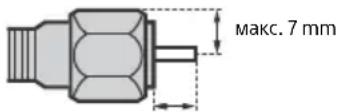
MAKC.1,5mm
(PpenopbunTeHa cxema Ha KOHeKTop TIN F)
БeЗкчна Функшина npodyкта
He pa6oTe cTo3n ypeB 6JIn3OCT Do MeuHcKo 60bOpYBaHe (NeCmEeKbp np.).TbKaTO TOBa MoKe Da DOBeDe Do HEn3npaBHOCT Ha MeuHcKTo O6OpyDbaHe.
MaKap, YeTo3n ypei npedab/npneMa KoIpaHn CnHaHn, BHIMaBaTe 3a HeoTOpN3npAHO npNXBaUaHe. Sony He Hocn OTROBOPHOCT 3a Bb3HNKHAN B pe3yJITpno6JIeMn.
ToBaOBopyDbaHe TpR6Ba Da ce HnCTaInpa Nn3non3Ba TaKa, Yda Ima pa3cTOnHne Otnohe 20 cm nIn noboe MeKdy aHTeHaTa Ha ToBa yCTpoiCTBO n TAnOTo Ha YoBeK.
BHHMaHHe np pa6Ota c dNCTaHcUHOHTo ynpabLeHne
Cb6IIOJaBaIe npabHHaTa nOJrPHoCT npn noCTaBHe Ha 6aTePnnte.
He n3no3BaIe CbBmecTHo 6aTePnn OT pa3nueH Tn, KaKTo n CTApN HOBn 6aTePnn.
- I3xBbplnIte N3pa3xOdbaHnTe 6aTePN No 7aJaIy oKoJHaTa CpeDa HaHH. B HAKOI HaceJeH MeCTa e Bb3MOXHO I3XBbPJIHeTo Ha 6aBbTpIne Da e peryIuPaHO HopMaTINBHO. KOHCytnpaIte Ce C MeCTHnTE BnactN.
Pa6oTeBHNMaTeJHcNCTaHcNOHHOTyypaBJeHHe ro n3NyckaIte, He cTbNaBTe BbpxH Hero H He n3nBaTe HnKaBn TeHQCTNbPxy Hero.
He NoCTaBnTe DnCTaHnOHHoTO YnpaBnEHe B 6n30CT Do N3TOUHnU Ha TOnnHa, Ha npKa CnBnHeBa CBeTnHa nnn B CTa C NOBnHeHa BlaXHoCT.
N3XbPnHe Ha TeJeBn3opa
I3XbpyHeHa CTapn eNektpnueckn n eNektpoHnnypeNi (npnIOxMo B EbPoneckn CbIO N dpyrN dbpKabN cC cnCTem 3a pa3dJeHNo cb6upaHe Ha OTnaDbu)
To3n CMB0B Bbpyx npOykTa Nnn Bbpxy HeroBaTb ONaKOBKa NOKa3Ba, Ye To3n npOykt He Tp8Ba Da ce TeTpina KaTO bTOB OTnAdbK.
BmecTO ToBA ToT pr6Ba Da 6bIe npedAeH B cBoTBHeTHn
cbipatehen PnyHK 3a peuKlnpaHa He eEKeTpmeckn I
eKeTPOHH ypei. KaTo npdaTe To3n npOyKT Ha
npabNHO TO mCTo, Bne ue NpOMHete 3a npedOTbPaTaBAHe Ha
HeratNBHTe nocJeCTBn 3a OKONHATA cpeaN YoBEwKOto
3dPabe, KOtO 6bXa Bb3HNKHAnPi HENpABINHOTO
n3XBpJIHe Ha To3n npOdyKT. PeuKlnpaHeto Ha MaTePnaJIte
ue CnOMOrHe Da ce CbXpAHr TnpoDHNTE pEcypcN. 3a
noDp0bHa INOpMaun OTHOCHO peuKlnpaHeto Ha To3n
npOyKT MoKeTe Da Ce o6bPHeTe Kbm MeCThata rpaJcKa ynpaba,
Clyj6bata 3a cb6pHahe Ha bIoBn OTNaDbU nn Mara3nHa,
OTkbDeTo CTe 3akynnnn npOdykTA.
N3XbBpIaHe Ha N3NoI3BaHb
6aTePnn (npnIOxmo B
Ebponeckna CbO3 n dpyrn
DbpxkABn Cbc CNCTeMn 3a pa3JeHNO
cbOpapaHe Ha OTnAbuNTe)
To3n CmB0Bn Bbpxy BaTepya Hnn Bbpxy onaKOBkata NOKa3Ba, ye BaTepyra.
npedocTabeHa c To3n npOyKT, He Tp8Ba Da ce TpeTupat KaTo
6bTOB OTNAbk. PnHAKON 6aTePNu TO3n CmMBoJ MOKe Da ce
n3NON3BA B KOM6nHaunC O3NaHeHne Ha XmUneckn EJeMeHT.
O3HaenHeTo Ha XmUneckn EJeMeHT ONoBo (Pb) Ce DoBaB,
ako 6aTePnra Ta cbbpjxa NooeBeOT 0,004 % ONoB. KaTo
npedeTte Te3n 6aTePnna HApabUNHOTo MCTo, Bue Ue
nomorHeTe 3a npDoTbPaTBAHe Ha HerATNBHTe NocIeCTBnA
3a OkOnHATA CpeDa u NoOBewKOTO 3dPabe, KOtO 6bnx MaORn Da
Bb3HNKaH Prn HEnpaBUNHOTo 3XXBpJIRe Ha 6aTePnraTa.
PeuKNlpaHTo Ha MaTePnAnIte igeCNOMHe DA ce CBxpaHrt
npipnoDre pecypc. 3a npOyKn, KOtO OT rIeJaHa ToKHa
6be3oNAChOCT, PpaBUnEh NaHH Ha DeiCTBne MM UINOCCT Ha
daHHTE N3NCKBaT NOCTOHN BABy3ka C BRpaDeHa 6aTePnra, Ta3N
6aTePnra Tp8Ba Da 6bde NODmeHrHa CamO OT KBaIINFUnPAH
cepBnEh NepcoHAn. 3a Da CTe CNYPhN, Ye 6aTePnraTa 6bDe
tpeTnPapaHa npBauHIO, PpeDAIe TcAtnr NpOyKT B CbOTBeTHN
cbbPatehen NyKHT 3a peuKNlpaHa Ha eNEKTPueCKN
eJEKTKPOHH YpeDN. 3a BCINKn OCTAHAN BSePnR, MoJN, BIXKe
pa3DeLa OTHOCHO TOBa KaK Da IN3BaJIne NO 6e3OnaceH NaHH
6aTePnraTa OT npOyKTA. PpeDAIe TcBepnraTa B CbOTBeTHN
cbbPatehen NYKHT 3a peuKNlpaHa Ha IN3NOJ3BAHN 6aTePnR.
3a no-nIOp6Ba HINΦOpMaUH OTHOCHO peuKNpHaETo HA Ta3N
6aTePnce Ce 06bpHeTe KbM MeCtHaTa rpaDcKa ynpBa, cnYkbata
3a cbbPapHe Ha 6bTOBn OTNAdBuM INM Mara3Hn, OKkbTeO CTe
3akynnnnpOpykTa nn6bepnra.
- He noctabray Te Hnio B 6n30ct Do ceH3opa.
I3noJ3BaHe Ha dNCTaHcNoHHO ynpabJeHne
HabirataBekpaHHOTMeHIO n360p.
TV
IpeBKnIOUbaHe Ha TeJeBn3NOHe KaHaJI INN BXoD IN NOKa3BaHe Ha JeHTata C MeHIO To Ha TeJeBn3opa.
1 (H36op Ha BxOa/3aIbpxKaHe Ha TeKcT)
B TB peKIM: POKa3Ba u n36upa BXoHnA n3TOuHnK.
BpeKIM TeKCT: 3aIpbKa TeKyuaTa CTpaHnca.
( TB rotobhoct)
BknIOUba nnI IN3KnIOUba TeNEBu3Opa (peXIM FOToBHOCT).
DIGITAL/ANALOG
IpeBkJIIOUbMaMeKdyuNΦpOBn aHaIorOB peKm.
TV/RADIO
IpeBkIIOUyMaMeKdyTVnIN RADIOnpeDaBaHna.
EXIT
Bbpbua KbM npednweH ekpaH nnN3Jn3a ot MeHIO.To Korato pa60Tu HHTepaKTNBHO npuIooKeHHe,HaTNCHeTe,3a Da n3Je3eTe OT ycnyrata.
2 ByToHn c uΦpN
+/(MHΦo/NoKa3BaHeHaTEKCT)
Poka3Ba HΦopMaζη.
TeKCT
Ioka3Ba TeKCTOBA HΦOpMaζη.
3 Google Play
IpeckaHa Ha3aN nn HnpeD MeKdy Dba KaHana Nnn BxOda.TeneBn3OpbT CmEnr TeKyunKaHAn Nnn BxOd C nocJeHNn N36paH KaHAn Nnn BxOd.
(3arnyuwaBaHe)
N3KIOUOyBa 3Byka. HaTnCHeTe OTHOBO, 3a Da Bb3CTaHOBnTe 3Byka.
PROG+/-/E/A/EY
B TB pexm: N36op Ha KaHan. Bpexm TeKcT: N36npa cIeIbAaata (A) Inn npednHaTa (V) cTpaHnca.
6 AUDIO
Поменяеиka 3a nporpaMaTa, KOrTo rIeNaTe B MOMeHTa.
<
YnpabJIbRA MyTmMeiHNo CbIbpxKaHne OT TeJIeBn3Opa I CBp3aHn CbBMeCTMnC BRAVIA Sync ycToPcTBA.
(HactpoJaHa cy6TuTpnte)
BknHcyBa nnnn3KnIOyBa cy6Tntpnte (Korato yHKcIyra e HAnuHa).
HELP
Ioka3Ba NOMOuHOMeHIO.OT TYK MoKe Da ce n3NoJ3Ba NOMoUHOTOpbKOBOdCTBO.
REC
3aHnCBA TeKuTa nporpaMa c nOmoTuHa
fYHKUra 3a 3aHNC USB HDD.
TITLE LIST
Poka3Ba cncbKa cbc 3auncaHn 3arnaBna.
Диагама на CBbp3BaHe
3a noBee uHΦopMaζη 3a Bpθ3KιTe, BuxTe ΠOMOιHOTo pθKOBoIDCTBO qpe3 HaTnCKaHe Ha HELP Ha έnCTaHcUHOHHOTO.
BG
1 CAM (Moyn 3a ycnoBEN doctbn)
-Пре dioctabЯdoctbIdo nIpaTeHn TB yCnyr.3a noDpo6HocTn BuxKTe PkoBoOCTBO 3a yNoTpe6a,doCTaBeHo c Baushra CAM.
He nocTabaIte cMapT KapTaTa DnpeKTHO B CAM cNoTa Ha TeJeBn3Opa. Ta Tp8Ba Da ce NoCTaB N MOyJa 3a YCIOBeH DOCTbN, PpeIOCTaBEN OT Baunr OepaTOP.
- CAM He ce noДьрЖa B HЯКои nbpXaBn/ 30H. Поверете пи BaшURA onepaTOp.
Korato npeBkIouHTe KbM uΦpOBA npoRpaMa CJIeKaTo rJeIaTe nHTepHET BnEo, MoKe Da ce noRbN CAM Cbo6uHHe.
2 / AVIN
3a KOMnO3nTHa Bpb3Ka, n3noJ3BaIte aHaIorOB yDbIJaBaUc Ka6eJ (He ce doCTaB).
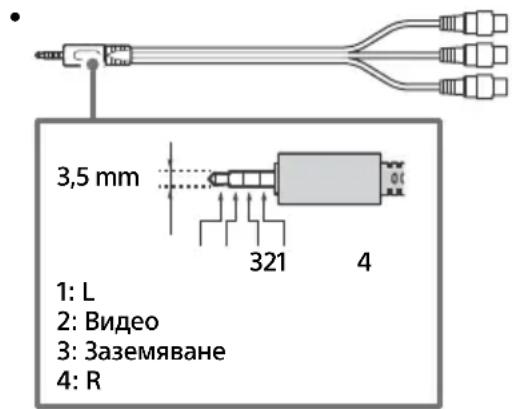
3 AUDIO OUT
- Пдьрka само стpeo MHH-жakс Трп поюca.
- 3aДаЧУВATE 3Byka OT TeJIeBn3Opa npe3 CBbp3aHOTO O6OpyIDBaHe,HaTnCHete HOME.ИЗбepete [HactpoIkn] [3Byk] [CnyuAnKn/aYdNo n3XoI], cIeJ KoETo n3Бepete JxelaHЯ eJeMeHT.
4 IR BLASTER
-Излгьдайу Достацноюуypавлени Ha Sony,3aДу управлбатьншни Deкорер (ka6eileh/caTeIntehcetTo 6okc).Сыржete ka6eI3a IR Blaster² KBM rHe3dOTo 3a IR Blaster haBaшя TeIeBn3Op.CLOxketE eDINHЯ ИДВаТа dpyrN KpaJ, KaKTO e NOKa3aHOnNo-ДОЛY.
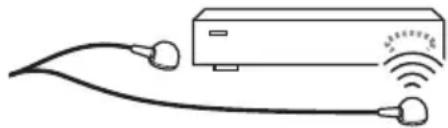
3a HactpoikKa Ha IR Blaster HaTnCHeTe HOME n 36epeTe [Hactpoikn] [BbHnBxOIOBe] [HactpoikKa Ha IR Blaster].
5 USB 1/2, USB3 (HDD REC)*
- CBbp3BaHeTo Ha roJMyo USB yctpoiCTBO MOXe Da NOBnIe Ha pa6OtaTa Ha npyrn CBbp3aHn yctpoiCTBa B 6JN30CT Do Hero.
Korato CBp3BaTe roJMyo USB yCTPOIcTBO, CBp3BaIe To KbM KynIyHra USB 1. - CBpbjkeTe USB HDD yCTpoiCTBO KbM USB 3 nopTa (cH).
HDMI IN 1/2/3/4
- INTeppeicbHDMIMoKeJaIpeHacr cnΦpOBO BnDeo n ayDnO no eDnKabEJI.
HDMI IN 3 ARC (Audio Return Channel)
Cbpxte aydno cnctemaTc KbM HDMIN3,3a da hacounte TeBnOHHna aydno cunHaJ KbM Baataaydno cnCTema.AyDIO CNCTema, KOrTO noDbpkaHDMIARC,MoKe da n3npaBaNDeo KbMa TeJeBn3opa n Da nOlyuabaaydno OT TeJeBn3opa qpe3 cbxnaHDMI ka6eJ.AKO Baataaydno cnCTema He noDbpkaHDMIARC,e Heo6xoIma doNbHnTeJHa Bpb3Ka C DIGITAL AUDIO OUT (OPTICAL).
He ce npneMaT caTeJIHTH nuCyIg.
- Поберете сателтута кабелна врьзka.
Korato ce noBn cbo6eHne [Hma cnHaI. OTuTeHo e npTeOBapBaHe Ha LNB...], n3BaJeTe 3axpaHbAunKa6eJ. CNeTToBa ce yBepTe, ye caTeInTHnT Ka6eJ He e nobpeDeH, a JInHnTa Ha caTeInTHnCnHaN He e daJa Ha KbCO B caTeInTHN KOHeKTOp.
ДиctанционнотуypabJeHne He pa6oTn.
- Cmehete 6aTeepnnte.
ByToHbT EXT. BOX MENU Ha duCTaHcNoHHOTO ynpabJIeHHe He pa6OtN.
CbpxTe n hactpoTte IR Blaster (cAmo moJeIn cdoctaBeH IR Blaster) (ctp. 12).
CbpxeTe yctpoiCTBO, CbBMeCTnMo cHDMI CEC (c n3KnOyeHne Ha MoJeNte C DocTaBeH IR Blaster), n npEbkIouyete Ha To3n BXoJ.
3a6paBeHa napoHa 3a poOnTeJcko
3aKJIIOUyBaHe Ha N3JIbYBaHe.
BbBeTe 9999 3a INH kOda n n36epeTe [CmHa Ha INH kOda].
Pamkata Ha TeJeBn3opa ce 3aToTnI.
Korato TeleBn3OpbT ce n3noJ3Ba npoIbJnxTeJHo BpeMe, paMKaTa My ce 3aToJn. MoKe da ycetnte TOnJInHa, KOrato JdoKocHeTe Cpka.
Cneunkaaun
CnCTema
CnCTemaHa naneJa LCD(TeuHokpncTaleH ducnne)naHeJ,LED noDCBETKa
TeJIeBn3IOHHa CnCTema B 3aBncmOcT OT BaWata DbpxaBa/136Op Ha 30Ha/MoJeI Ha TeJIeBn3Opa AHaIorOB:B/G,D/K,I LInΦpOB:DVB-T/DVB-C DVB-T2* CateJIin*:DVB-S/DVB-S2
LBeToBa CnCTema PAL/SECAM/NTSC3.58 (cAmo BnJeO)/NTSC4.43 (cAmo BnJeO)
Покате на Каналite
В заюмост OT Вашata Дьржава/нзбор на зонa/Mодел Ha Телевизopa
Аhalorob: UHF/VHF/Ka6eI
LфpoB: UHF/VHF/Ka6eI
Cateiit*: IF chectota 950-2 150 MHz
BxOAnHO/n3XoDnH JkaKOBe
AHTeHa/ka6eJ
75 OMa BbHsEh TepMnHaJI 3a VHF/UHF
CateJIHTHa aHTeHa
KoHeKTOp TnF,KeHcKn,75 Oma.
DiSEqC 1.0, LNB 13 V/18 V & 22 kHz TOH,
PaznepeJnHe no 1 ka6eN EN50494.
/ AVIN
Bndeo/aydno Bxod (MnHnxkaK)
HDMI IN 1/2/3/4 (noДьрka 4K pezoюя,
CbbMeCTm C HDCP 2.2)
Bnpeo:
4096 × 2160p (50, 60 Hz)12, 4096 × 2160p
(24Hz)^ 1 3840× 2160p(50,60Hz)^*2 3840×
2160p (24, 25, 30 Hz), 1080p (30, 50, 60 Hz),
1080/24p, 1080i (50, 60 Hz), 720p (30, 50,
60 Hz), 720/24p, 576p, 576i, 480p, 480i, PC
ΦopmaTu*3
^*1 Korato ce noДаBa 4096 × 2160p n [UnpokoekepaHepexum] e hactpoeh Ha [HopmaH], pe3oIouyTa ce noka3Ba KaTO 3840× 2160p .3a noka3BaHe ha 4096 × 2160p cNoxete HactpoiKaTa [UnpokoekepaHepexum]Ha[ПьJeH1]nI [ПьJeH2].
*2 Camo HDMI IN 2/3. 3a noДьрхан ha 18 Gbps. Hастpoite [Формат ha HDMI сигнaja.] ha [Poboljsani format].
*3 3a noBuee nHΦopMaζη BuxTe ΠOMOιHOTOpbKOBODCTBO.
Aydno:
5,1 kaHaleh JnHee PCM: 32/44,1/48/88,2/96/
176,4/192 kHz 16/20/24 6uTa, Dolby Digital,
Dolby Digital Plus n DTS
ARC (Audio Return Channel) (Camo HDMI IN 3)
(Дыкагален Линон PM: 48 kHz 16 mbu, Dolby
Digital, Dolby Digital Plus, DTS)
DIGITAL AUDIO OUT (OPTICAL)
UΦOB ONTueH JAK (ДуКанел ЛиHeeN PCM:
Móvo yia to movτéλo KD-75XF90xx .16
AvtueTwnon npoBAnmuatowv .18
PpOβλnματa KαI λuδεις 18
Texvlka xapaktnploktika 19
2160p (24, 25, 30 Hz), 1080p (30, 50, 60 Hz),
1080/24p, 1080i (50, 60 Hz), 720p (30, 50,
60 Hz), 720/24p, 576p, 576i, 480p, 480i, MopΦες Φιολογιστή*³
DIGITAL AUDIO OUT (OPTICAL)
Dijital: DVB-T/DVB-C
DVB-T2*
Uydu*: DVB-S/DVB-S2
Renk Sistemi
PAL/SECAM/NTSC3.58 (Sadece video)/NTSC4.43
(Sadece video)
Kanal kapsami
2160p (24, 25, 30 Hz), 1080p (30, 50, 60 Hz),
1080/24p, 1080i (50, 60 Hz), 720p (30, 50,
60 Hz), 720/24p, 576p, 576i, 480p, 480i, PC
Formatl*3
DIGITAL AUDIO OUT (OPTICAL)
Dijital optik jak (iki kanal dogrusal PCM: 48 kHz
16 bit, Dolby Digital, DTS)
AUDIO OUT (Stereo Mini Ak)
http://rd1.sony.net/help/tv/faep1/h_aep/
Help Guide/Guide d'aide/Gui de ayuda/
Helpgids/Hilfe/Gua de ajuda/Guida/Hjalpguide/
For useful information about Sony products