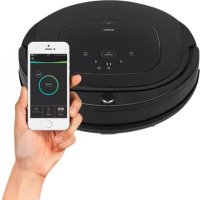
Deluxe 339000 - Robot vacuum PRINCESS - Free user manual and instructions
Find the device manual for free Deluxe 339000 PRINCESS in PDF.


| Product type | Robot vacuum cleaner |
| Brand | Princess |
| Model | Deluxe 339000 |
| Diameter | 350 mm |
| Weight | Approximately 3 kg |
| Power supply | Rechargeable lithium-ion battery 2150 mAh, adapter 24 V / 600 mA |
| Runtime | Up to 90 minutes |
| Charging time | Approximately 240 to 300 minutes |
| Dustbin capacity | 0.5 L |
| Filtration | HEPA filter |
| Cleaning modes | Normal, Max, Silent, Zone, Random, Deep, Edge |
| Connectivity | Wi-Fi 2.4 GHz via HomeWizard Cleaner app |
| Sensors | Anti-drop, infrared obstacle sensor, dust sensor |
| Brushes | Left and right side brushes, interchangeable roller brush |
| Safety | Auto shut-off, cliff detection, return to dock |
| Maintenance | Cleaning brushes, filters, sensors, dustbin |
| Spare parts | Side brushes, HEPA filters, roller brush, battery |
| Repairability | Contact after-sales service |
Frequently Asked Questions - Deluxe 339000 PRINCESS
User questions about Deluxe 339000 PRINCESS
0 question about this device. Answer the ones you know or ask your own.
Ask a new question about this device
Download the instructions for your Robot vacuum in PDF format for free! Find your manual Deluxe 339000 - PRINCESS and take your electronic device back in hand. On this page are published all the documents necessary for the use of your device. Deluxe 339000 by PRINCESS.
USER MANUAL Deluxe 339000 PRINCESS
- By ignoring the safety instructions the manufacturer can not be held responsible for any damages.
- If the supply cord is damaged, it must be replaced by the manufacturer, its service agent or similarly qualified persons in order to avoid a hazard.
- Only authorized technicians can disassemble the product. Users are not allowed to disassemble, repair or modify the product. Otherwise it may possibly cause electric shock, malfunction and lead to injuries.
- Never move the appliance by pulling the cord and make sure the cord can not become entangled.
- The appliance must be placed on a stable, level surface.
- The user must not leave the device unattended while it is connected to the power supply.
- This appliance is only to be used for household purposes and only for the purpose it is made for.
- Do not use this product in wet or moist environment (any environment with liquid), e.g. bathroom or laundry. Do not wash this product.
-
This appliance shall not be used by children younger than 8 years old. This appliance can be used by children aged 8 years or older and persons with reduced physical, sensory or mental capabilities or lack of experience and knowledge if they have been given supervision or instruction concerning use of the appliance in a safe way and understand the hazards involved. Keep the appliance and its cord out of reach of children younger than 8 years old. Cleaning and maintenance shall not be performed by children.
-
To protect yourself against an electric shock, do not immerse the cord, plug or appliance in water or any other liquid
- The plug must be removed from the socket-outlet before cleaning or maintaining the appliance.
Children shall not play with the appliance. - Only use the original battery and power adapter of the product for charging. Using an unmatched adapter may cause electric shock, fire or product damage.
- Do not touch power cord, plug, adapter or any other metal part of machine with wet hands.
- Do not have the product covered or wrapped while using.
Do not have curtain, any material that is easily twisted together, or part of user's body stuck in the wheels. - Make sure this product is not close to cigarette ends, lighters, matches or any flammables.
- Do not sit or put heavy or sharp objects on machine. Beware of children or pets while the product is in operation.
- Before use, clean floor environment (remove all fragile objects, and all objects that may get caught in the product, such as cords, clothing, papers, loose cables); Lift curtains and drapes off the floor to avoid any possible accidents.
- Never use the product to clean combustible or highly volatile liquids, such as gasoline.
- Do not place this product where it's easy to drop off (tables, chairs, etc.).
- Turn off the power switch during product transportation or when you don't need to use the product for a long time. Battery leakage may cause fire, injury or pollution to the
PRINCESS
Instruction manual
environment.
- Before charging, check whether adapter and outlet are properly connected.
- To avoid tripping, user should inform all the people in the house when this product is working.
- When dust bin is full, empty it before use.
- Use this product in temperature between 0^ to 40^ .
- Do not use this product in a high-temperature environment or under intense sunlight directly for a long time.
- The battery must be removed from the product before it's discarded.
- The battery should be disposed of properly for safety's sake.
- The adapter must be removed from the socket-outlet before cleaning, maintaining the appliance or removing the battery.
- Do not put screwdriver or other sharp objects into air outlet, this will damage the product.
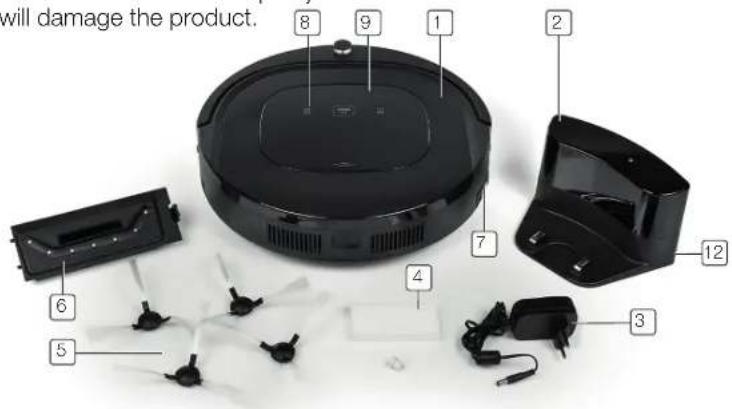
PARTS DESCRIPTION
- Main body
- Charging station
- Power adapter
- Hepa filter
- Set of left and right brushes
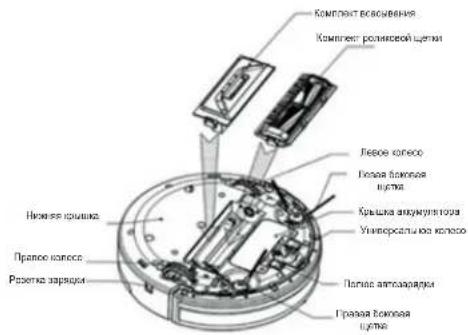
- Suction kit
- Power switch
- Touch buttons
- LED display
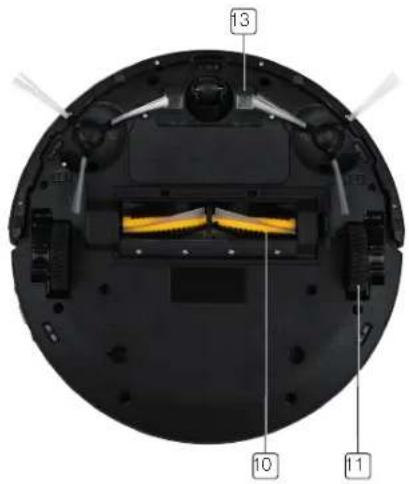
- Roller brush kit
11.Wheels - Charging socket
- Auto charging pad
EN
LED DISPLAY
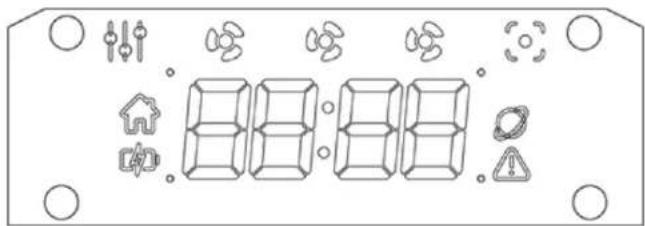
| Other cleaning modes except for spot, normal, quiet and max modes |
| Quiet mode |
| Normal mode |
| Max mode |
| Spot mode |
| Auto-charge indicator |
| Power indicator |
| Cloud connection indicator |
| Error indicator |
Touch buttons
| CLEAN STOP | • Tap this button to wake the Cleaner from sleep mode. Hold this button for more than 3 seconds to enter sleep mode. • Press this button to start cleaning. If the Cleaner is busy cleaning, tapping this button stops it. • Repeatedly tap this button to cycle through the cleaning modes: Normal, Max and Quiet. The Cleaner will start cleaning 3 seconds after selecting a cleaning program. |
| DOCK | • Press this button to start docking. The Cleaner will automatically start looking for its dock. • Press and hold this button until the display shows a “pulse” animation. When this animation is visible, the Cleaner can be connected to Wi-Fi with the App. |
| SPOT | • Tap this button to enter spot cleaning mode (Cleaner cleans an area of 2×2 meters, with higher suction power and lower speed) |
| PUSH | • Hard-press this button to open / close the top cover, and take out the dust bin. |
PRODUCT FEATURES
This is an automatic cleaning robot which is well equipped with not only cleaning programs, double side brushes and strong suction power, but also with interchangeable roller brush kits and vacuum suction kits. The machine can automatically identify if the kit installed is a roller brush or suction kit, then it will decide the working mode by itself, which makes the machine clean more efficiently. Suction power of this product is strong enough to ensure that even tiny dust on the floor will be cleaned thoroughly! This product is able to automatically adjust its suction power when different floor environments are detected. This ability not only makes cleaning more efficient, but also helps to save power (up to 30%).
PRINCESS
Instruction manual
BEFORE FIRST USE
- Take the appliance and accessories out the box. Remove the stickers, protective foil or plastic from the device.
Install the Application called "HomeWizard Cleaner" from the App Store. The App will show up as "Cleaner" when installed.
Battery Charging
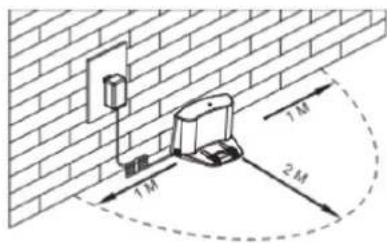
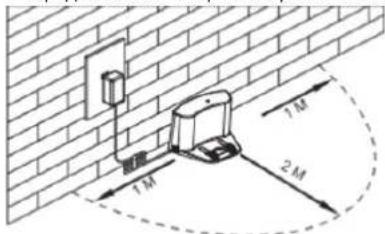
- Place charging station against the wall and remove obstacles within 1 meter at two sides and 2 meters ahead.
- If the Cleaner is shut down, turn on its power switch at the right side of Cleaner before charging.
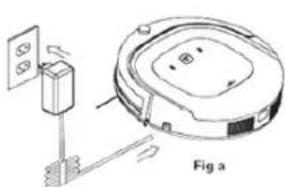
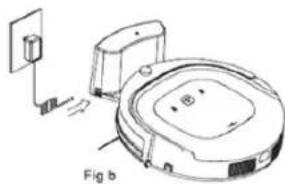
- Charge the Cleaner in either of the following ways:
a. Plug the adapter into the Cleaner and plug the other end into the power socket, as shown in Fig a.
b. Press on Cleaner to direct the Cleaner to charging station for recharging, as shown in Fig b.
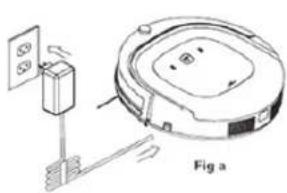
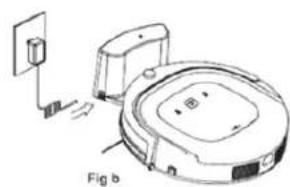
Make sure the power switch of Cleaner is turned on while charging. Otherwise, it will show an error on LED display and will not charge.
- When the Cleaner is charging, the power indicator will blink.
- Once charging is completed, the power indicator will be on and stop blinking.
- In standby status, the Cleaner will play a sound when battery power is low.
- During working, the Cleaner will return to charging station automatically when battery power is low.
Tips to extend battery life:
Before first use, charge the Cleaner for 12 hours.
- Charge the Cleaner as soon as battery power is low.
- During cleaning, Cleaner will return to charging station automatically when it is done cleaning or when the battery is low.
- If the Cleaner is not to be used for more than 3 months, charge the battery in the Cleaner for 12 hours, turn off the power of the Cleaner, remove the battery from the Cleaner and store it in a cool, dry place.
EN
USE
Starting up
- Power on the Cleaner by turning on the power switch on the right side of machine. Tap the button on the top to wake up the Cleaner.
- In standby mode, tap button on the top to start cleaning.
Note: If Cleaner is in sleep mode, long-press the button on the top to wake up the Cleaner from sleep mode, then tap button again, to start cleaning.
Standby:
- When Cleaner is cleaning, tap button on the top to stop the Cleaner and enter standby mode.
Sleep Mode:
- Long-press button on the top for 3 seconds, Cleaner will enter sleep mode.
- Cleaner will automatically enter sleep mode if no command is received for more than 60 seconds.
Power off:
- In standby mode, turn off the power switch at the right side of Cleaner.
- In sleep mode, the Cleaner will automatically power off if there is no operation for more than 5 minutes, it can only be woken up by long-pressing clean/stop button on the top for 3 seconds.
Note: if the Cleaner is not in use for a long time, please turn the power switch off.
VARIOUS CLEANING MODES
Normal cleaning mode
- The Cleaner can clean a room automatically.
- Turn on Cleaner's power switch, tap "CLEAN" button on the top or press the "CLEAN" button in the App.
- Cleaner will start navigating and cleaning automatically.
The Cleaner's display will show 2 fans.
Edge cleaning mode
- In this mode, the Cleaner will clean along the wall or obstacles.
Note: You can start "Edge" cleaning from the App.
Scheduling mode
- After being scheduled via the App, the Cleaner will leave its charging station and start cleaning at the scheduled time.
Max mode
- Tap the "CLEAN" button on the top two times.
- Within 3 seconds, the Cleaner will start cleaning with increased suction power and a lower speed, thoroughly cleaning your room.
The Cleaner's display will show 3 fans.
Quiet Mode
- Tap the "CLEAN" button on the top three times. Within 3 seconds, the Cleaner will start cleaning with no suction, only lightly sweeping dirt off the ground and do so quietly.
The Cleaner's display will show 1 fan.
Spot Cleaning
- Tap "SPOT" on the top or "SPOT" button in the App to start a spot cleaning. The Cleaner will clean an area of 2 × 2 meters, suction power will be increased and driving speed will slow down, Thoroughly cleaning the 2 × 2 area.
PRINCESS
Instruction manual
Deep cleaning
The Cleaner will cover your room twice to ensure that it reached every corner.
Note: You can start the "Deep cleaning" program from the App.
Random cleaning
- The Cleaner will clean in a random pattern, instead of a smart combination of zig-zag and edges.
Note: You can start the "Random" program from the App.
MAP NAVIGATION FUNCTION
Before use, place the Cleaner flat on the floor.
- Turn on power switch, next, tap button on the top. The display panel shows a rotating loading animation and a "startup" sound is played.
After turning on, the display is off (depending on the connection status, it may show the "Cloud connection" icon). Then tap button on the top one more time to start cleaning.
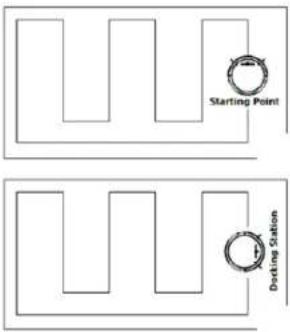
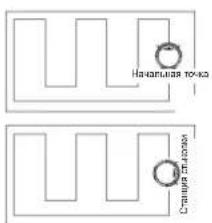
- The Cleaner will return to docking station automatically after cleaning if the docking station is powered on. If no docking station detected, the Cleaner will return near its starting point after cleaning.
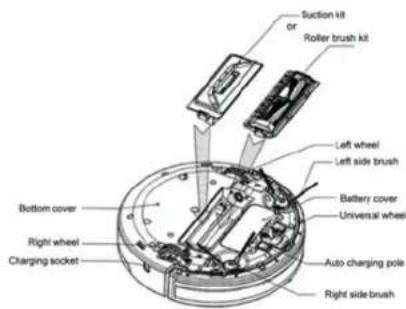
SUCTION KIT AND ROLLER BRUSH KIT
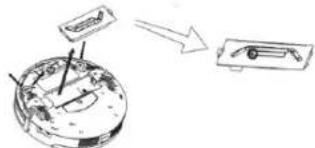
- Suction kit and roller brush kit can be switched out at the bottom of your Cleaner (as shown in below figure).
CLEANING AND MAINTENANCE
Cleaning Side Brushes
- Check the side brush when it gets dirty and replace it if it's damaged. The maximum lifespan for the side brushes is 12 months.
Note: Before replacing side brushes, please pay attention to the "left" and "right" mark ("L"/"R") on the side brushes, which match with the "L"/"R" mark on the bottom of the Cleaner.
EN
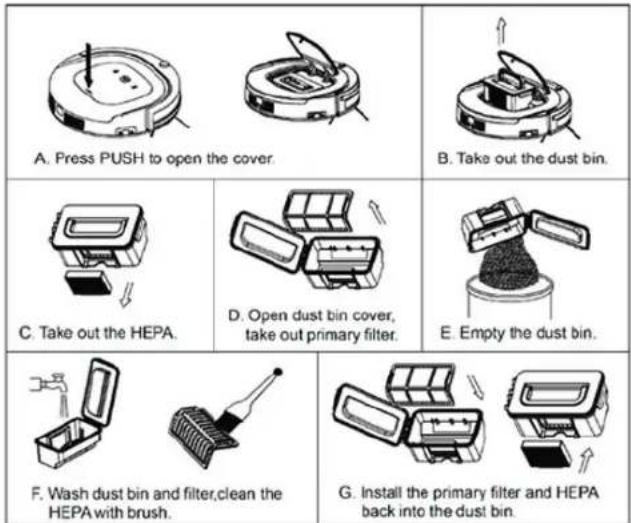
Cleaning Dust Bin and Filters
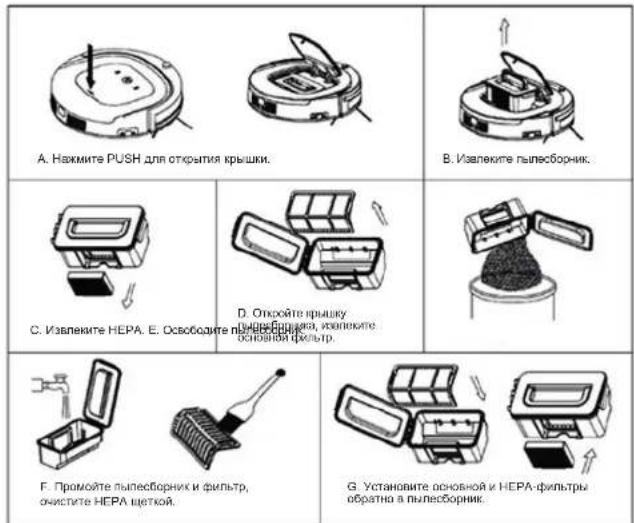
- Empty and clean dust bin after each use following the steps as shown in the below figures:
Note:
- Wash primary filter after 15-30 days of use. Maximum life span for filters is 24 months.
- Re-install the HEPA and primary filter after they're fully dry.
HEPA and primary filter could be replaced if needed. - Do not expose the filters to intense sunlight directly.
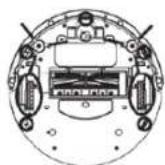
Cleaning Sensors and Wheels
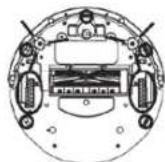
- Slightly wipe all the sensors and wheels, as marked in below figure, with soft cleaning cloth or tool.
Cleaning Charging Poles
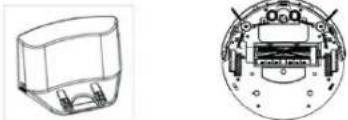
- Clean the charging poles, as marked in below figure, with soft cleaning cloth or tool.
Cleaning Suction Passage and Dust Sensor
- Take out the suction kit from Cleaner, then clean the suction passage and dust sensor, as marked in below figure, with soft cleaning cloth or tool.
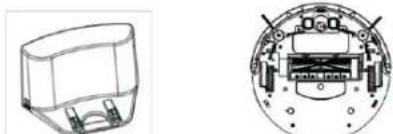
Note: Keep the Cleaner and sensors dry and avoid contact with liquids.
Cleaning Roller Brush Kit
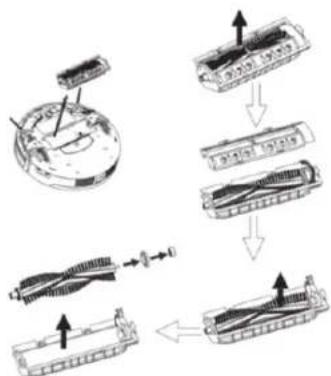
- Take out the roller brush kit from Cleaner, remove the roller brush, then clean it and its cover-plate & holder, as shown in the below figure, with soft cleaning cloth or tool. (the roller brush can be washed by water).
Instruction manual
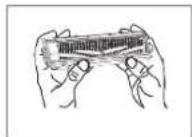
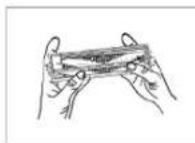
- With both thumbs holding the lid of the roller brush, push it up.
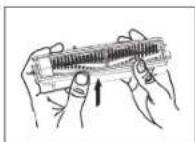
- The cover of roller brush is opened, like illustrated in the picture below.
Note: Please re-install the roller brush in the original order of disassembly after it's fully dry.
How to open the roller brush kit cover
- Rotate the lid of the roller brush so that it is facing you.
TROUBLESHOOTING
Error code for sensors
Error Code Cause Solution
E1 Dustbin box not installed Install dustbin box properly
E2 Power switch off while charging Turn on power switch
E3 Lower battery or auto charging failed
Charge the Cleaner manually
E11 Left stair detect sensor problem Clean left stair detect sensor or replace it
E12 Right stair detect sensor problem Clean right stair detect sensor or replace it
E13 Front stair detect sensor problem Clean front stair detect sensor or replace it
E21 Left wheel off ground Put the machine in a safe place
E22 Right wheel off ground Put the machine in a safe place
E23 Front Wheel off ground Put the machine in a safe place
E31 Front bumper left side micro
switch stuck or broke
EN
| Error Code | Cause Solution | |
| E32 Front bumper | right side micro switch stuck or broke | Check if it was stuck, or replace it |
| E33 Front bumper | straight ahead micro switch stuck or broke | Check if it was stuck, or replace it |
| E41 Left wheel overloaded Check if it was stuck, or replace it | ||
| E42 Right wheel overloaded Check if it was stuck, or replace it | ||
| E43 Left side brush overloaded Check if it was stuck, or replace it | ||
| E44 Right side brush overloaded Check if it was stuck, or replace it | ||
| E45 Fan motor overloaded Check if fan is pressed, and clean dust bin | ||
| E46 Rolling brush overloaded Check if it was stuck, clean it or replace it | ||
| EXX9 Left anti-drop sensor detects cliff, front bumper right infrared sensor detects obstacle | Clean front bumper sensor lens and bottom anti-drop sensor lens | |
| EXXA Front anti-drop sensor detects cliff, front bumper right infrared sensor detects obstacle | ||
| EXXB Left and front anti-drop sensors detect cliff, front bumper right infrared sensor detects obstacle | ||
| EXXC Right anti-drop sensor detects cliff, front bumper right infrared sensor detects obstacle | ||
| EXXD Left and right anti-drop sensors detect cliff, front bumper right infrared sensor detects obstacle | ||
| EXXE Right and front anti-drop sensors detect cliff, front bumper right infrared sensors detect obstacle | ||
| EXXF Front, left and right anti-drop sensors detect cliff, front bumper right infrared sensors detect obstacles | ||
| Error Code Cause Solution | |
| EX1X Front bumperper left infrared sensor detects obstacle | |
| EX2X Front bumperper middle infrared sensor detects obstacle | |
| EX3X Front bumperper left and middle infrared sensors detect obstacle | |
| EX4X Front bumperper right infrared sensor detects obstacle | |
| EX5X Front bumperper left and right infrared sensors detect obstacle | |
| EX6X Front bumperper middle and right infrared sensors detect obstacle | |
| EX7X Front bumperper left, middle and right infrared sensors detect obstacle | |
| EX8X Front bumperper wall detection infrared sensor detects obstacle | |
| EX9X Front bumperper wall detection sensor and left infrared sensor detect obstacle | |
| EXAX Front bumperper wall detection sensor and middle infrared sensor detect obstacle | |
| EXBX Front bumperper wall detection sensor, left and middle infrared sensor detect obstacle | |
| EXCX Front bumperper wall detection sensors, right infrared sensor detect obstacle | |
| EXDX Front bumperper wall detection sensors, left and right infrared sensor detect obstacle | |
| EXEX Front bumperper wall detection sensors, right and middle infrared sensors detect obstacle | |
| EXFX Front bumperper wall detection sensors, left, right and middle infrared sensors detect obstacle |
Error codes for motor
| Error code | Cause Solution | |
| L01X Fan overloaded Check if fan is pressed, and clear clust bin | ||
| L0X1 Left wheel overloaded | Check if it is stuck or wired by obstacles | |
| L0X2 Right wheel overloaded | ||
| L0X3 Left and right wheels overloaded | ||
| L0X4 Left side brush overloaded | ||
| L0X5 Left wheel and left side brush overloaded | ||
| L0X6 Right wheel and left side brush overloaded | ||
| L0X7 Left and right wheels, left side brush overloaded | ||
| L0X8 Right side brush overloaded | ||
| L0X9 Left wheel and right side brush overloaded | ||
| L0XA Right wheel and right side brush overloaded | ||
| L0XB Left and right wheels, right side brush overloaded | ||
| L0XC Left and right side brushes overloaded | ||
| L0XD Left wheel left and right side brushes overloaded | ||
| L0XE Right wheel, left and right side brushes overloaded | ||
| L0XF Left and right wheels, left and right side brushes overloaded | ||
| L02X Roller brush overloaded | ||
Panel display codes
| LO Low battery | |
| 11:11 Charging | |
| FULL Charging completed | |
| CONN WIFI connecting | |
| FAIL WIFI connection failed | |
| SUCC WIFI disconnect succeed |
Note:
The App will show detailed error information.
- There is no problem for the Cleaner when it displays L000.
- X marks the spot where number or letter might appear on the display for different faults.
- If Cleaner displays E001 or E004, please directly find the relative solution referred in troubleshooting.
- If Cleaner displays EC07, please find ECXX and EXXX for relative solution referred in troubleshooting.
- Likewise, if Cleaner displays EE91, please find EXX1, EEXX and EX9X for relative solution referred in troubleshooting.
If above solution does not work, please try below:
a) Reset the Cleaner by switching off the machine, then turn it on and check again.
b) If it still does not work after reset, contact the after sales.
EN
Warnings about battery

You must not remove (or attempt to remove) the battery incorporated in this product on your own. To replace the battery, you must contact your service provider or an independent qualified professional.
FOR YOUR OWN SAFETY DO NOT ATTEMPT TO REMOVE THE BATTERY ON YOUR OWN OR DISPOSE OF IT IN FIRE. DO NOT DISASSEMBLE, CRUSH OR PUNCTURE THE BATTERY!
PRODUCT SPECIFICATIONS
| Classification Item Detail | |
| Mechanical Specifications Diameter | 350mm |
| Height 88mm | |
| Weight 3.5kg | |
| Electrical Specifications Charger rating output 24V, 600mA | |
| Battery specifications 2150mAh rechargeable lithium | |
| Functional Specifications Dust bin capacity 0.5L | |
| Charging Type Auto Charging/ Manual Charging | |
| Cleaning Mode Auto, Deep clean, Edge, Max, Random, Spot, Quiet | |
| Charging Time About 240-300 minutes | |
| Cleaning Time 90 minutes at max | |
| Frequency Only 2.4GHz, it will not work on 5GHz | |
| Button type of main body Touch buttons + LED display |
VEILIGHEID
CHARACTERISTIQUES DU PRODUIT
BO3MOXKHOCTN IPNBOPA
3To ABTomatnueckn po6ot-NbIeoc, KOTOpBmIMeET He TOnbko fHyHKUIO OHCTKN, DByXCTOPOHHNe 5eTKn N MOuHoe BaKyyHMoe BCaCbBAHne, HO INpePcTaBnEMBle KOMPiNEkTB pOINKOBBX 5eTOK N KOMPiNEkTB BAKyyMHO BCaCbBAHn. PIn6Op MoKet ATOmatnueeckn ONpeJenMb yCTaHOJIeHHb KOMPiNEKT (pOINKOBa 5eTKn MIn BCaCbBAHne), a3aTeM CaMOCToRteBHO BB6paTb peKIM pa60tB dNr 6o0ee 3fFekTHBNO uCtKn. MoUHOCTb
RU
BCacbBAHn np6o4 octaTOHa nIy TuaTeBHO ONUCTKc NOna daKe TOHKOIN!Pnp6Op MOKeA BOMATueckn HAcTpaNBaTB MOUHOCTb BCacbBAHn pIn 06hApHyKeHHn pa3HbIX NOKpbITNI NOla.3To HE ToNbKO DeNaET MCTKy 3ΦΦeKtNBHeE, HO IN NOMoAeT 3KOHOMITb 3JIeKtponITAHne (do 30%).
NEPED NEPBbIM PNPMEHEHnEM
N3BNEKHTe H3 Kopo6Kn np6Op n erO akceccyapbl. CHMMTe c yctpOCTBA 3TNKETKN, 3aunTHyIO NnEHKY INnactNK.
- YctahOBtne npnIOxHHe "HomeWizard Cleaner" n3 mara3nHa App Stores. Pocne yCTAHOBKn npnIOxHHe 6yJeT Ha3bIbaTbcra "Cleaner (pbIeCOC)" Ha npnOpe.
3apnka akkymyIraTopa
IocTaBbTe 3apAHyO CTaHIO KCTHe N ydaNITe NOcTOpOHnne npedMetbHa 1 MeTp No cTOpOHm H Ha 2 MeTp a Bnpepe.
Ecnn bIineoc BbIKIOueH,To nepe3apKoBKnIOHTe eronepeknioatelem nITAHNAero npabO CTopoHE.
3apnnte nbinecoc odHmN 3cneDyOuNX CNOco6OB: a.BCTaBte aanTep B nbinecoc n noKnIOHTe DpyrHM KOHOM K po3eKHeNTAHn,cm.pnc.a. b.Haxmtte Ha nbinecoce dna HapabLeHn ero K 3apnHO CTAnHn HA no3apdky,cm.pnc.b.
- Pn3ap4ke y6eintecb, yTO nepekIouateIb nITAHnI bInecoca BKNIOueH. HNaHe 6yTeT nok3aHa OwN6Ka Ha DnCnIee.
Korda nblncoc 3apjkaetc, INHdkatop nntaHn6ydtMrgatb.
Iocne 3abepeHnna 3apAKn, INnKkATOp nITaHnB BKIOHTcN nepectaHET Mrratb.
B Dexyphom pexnme nIeoc 6ydt BOCpOu3BOUHTb 3ByK,ecNI MOHcTb AKyMnyTopa H3Ka.
BoBpMa60bIbIeNcO6yETABOMaTneCKnBO3BpaAaTbcHa 3apdHyOCTAHUo,ecmMOuHocbAkkymyTota H3Ka.
CoBeTbI no npoDJIeHHIO cpoka cnJxkbI aKKMyIaTopa:
IpeepnbpBIM npmmeHneM 3apAHTe nblte C B TeueHne 12 YacOB.
- 3apjkaite Pblncoc cpa3y npn naneHm MOUHOCTn AKKMyIaTopa.
BoBpMaYCTKnIbIeCoc6yTeA BtOMaTHeCKN Bo3BpaUaTbCa Ha 3aprHyIO CTAHIO, KOrDa YHCTKa 3aBepWeHa NIN MouHOCTb AKKMyJITOPa Hn3ka.
Ecn nIbIeocn He 6ydt npmehrbc8o0ee3 MeaeB, noHocTbIO 3apraIte aKMyIaTOB B IbIeOCOe 3a 12 cAcOB, BbIKIOHTe NITAHHe NblcOCA, INBLeKInTe H3 Hero aKKMyIaTOp IN XpaHInTe ERO BXONODCMxOMMeCTe.
NCHOJIb3OBAHNE
3anyck
- PódaIte nIITaHHe Ha nbIeNOC, BKIIouHb nepeKIIOuATEb IIITaHnHa ero npaBoI CTOpOHe. KocHItec bKHOKN (CueCTKn/OctaHOBKn) CBepxD IINpO6yXdEHHa NJIeNcoCa.
B Dexyphom pexnme, KOCHNTecb KhoNkn Cbepy nIaNycka YIcTKn. - PnimeaHHe: ecnn PbIeoc B cTnepeKHe, dnttebHoe HaxaTne KONIK NCTKn/OCTaHOBKn CBepxY Bb3OBET npOBykDeHne nblncocca H3 CnAero peKIma, a NOBTOpHoe KacAHne KONKN 3anyCTN YCtKy.
DexyphbpeKm:
Korda nblncoc qntt, KOCHNTc b KHONK CBepxDnOCTaHOBKn nbIeocca npexoda B DeKypHbI peKM.
Cπaπη npexnM:
- INITeIbHoe HaxaTne KHOIIKIN cBepxHa 3 cekyHbI Bbl3OBET nepexoN nbInecoCA B CnAun peXIM.
-Пьлесoc abTomuWeckn nepexOIMB CInIeIpeXIMe,ecIN He nolyaet KOMaHd 6oJee 60 cekyHd.
BbIKIOyeHHe nHTAHN:
B DeKypHom peKmme BbIKIOHTe NITaHne nepeKIOUaTeJIem Ha npabObl CTOpOHe nbIInecoca.
BcnaepeKnmeIbIneocabTOMaTneckBNBkIOHTNtAHHe,ecnHepa6oTaETbOonee5MnHT,piuHemnp6yDntberoCMoxetToNbKOdNTeNbHoe HaxKaTne KHOIN CbpExHa3ceHyDbl.
- PnmuMeaHne: ecnn nbIeococ dOnro He 6ydt npmHeTbca, nojaknytcta, BbIKIOHTe NITaHne.
PA3HbIE PEXKIMMbI YNCTKN
06bHbI pexm uCTKn
-ПынecocMOKETYHCTNTbKOMHaTy aBtOMaTneCKM.
BkHIOHTe BbIKIOaTeIbITAHnIbIneCocA, HAKMTe KHOKky CLEANB BepxHeJyactnEkapHaHnHAKMTe KHOKky CLEANB npInIOkeHHM
-Пьлесoc abTomatueckn HaHT HABURAIO N YUcTKy.
- DnCnnne nblncocac nokaeT 2 BeHTnnaTopa.
Pekn m nctkn kpa
B 3TOM peKIMe Nblncoc YnCTNT BDOJIb CTEN IINI INPENPAITCTBNI.
-ПиMuMeaHHe:MoXHo 3aIyCTnTb OChCTKy "Edge (Kpa)" n3 npInIOKeHn.
Плановый реким
Поссплалнровань в пилкенпьлпсoc PokHET CBOI 3apdHyTO CTAHnIO n HauHT YB 3aIIaHINpOBaHHO BpeM.
MaKc. pexmM
-Два раза кочитесь Кноки "CLEAN (чсстka)"сбepу.
3a 3ceKHyDblbIeCoc HauHET YcByeIuHeHHoMOLHOCTbIO BCacbHaHn HA Hm3KO CKOpOCTn, YTObI TuaTeJIbHO OCHNTb KOMHaTy.
- DnCnne nblncoc a nokket 3 BeHTnnaTopa
Tnxn pekum
Tpna paa Kaonitec bKnHn "CLEAN (uCTka)cbepx.3a 3ceyHbI nIbcoc hauHET uCTky 6e3 BCacbHaHn,TOJbKO c neKIM NOdMeTaHem nbnn C nona Hcenaet TO TNXO.
- DnCnnei nblncoc a nokkct 1 BeHTnIaTOp.
Ouictka nTnHa
Kochntecb kHONk "SPOT (nTTHO)" cbepxmy nN KONk N"SPOT B npIIOXeHN IIN 3aynycka uNTKn TnTHA. IIbnEcoC ONUCTM Obnactb 2× 2 MeTp a CByenueHem MOUHOCTB BCacbBaHn IN CHIXeHEm CKOPoCTN ONUCTKn. TuaTeNbHa ONUCTKa PNOuAdn 2 × 2 MeTpa.
RU
Tny6okarOuNCTka
-Пылесoc ДвбдьnpоДET KMHaTy,чToБу rapaHTnpoBaTb OuHCTKy B KaKdOM YIpy.
- PnmuueaHHe: MoXHO 3aYcTb nporpaMMy "Deep cleaning (rnyboKa oOHTKa)" n3 pnpnoKeHn.
Pon3BOJbHaOuNCTKa
Пьлесoc 6удET YИСТИВ B ПОИЗВОЛБHOM NOPЯДКBE BMECTO HHTENNEKTYAHLHOM KOM6HauHUN 3NUR3aOB INKpaEB.
- PnmuMeaHHe: MoXHO 3aNyCTHTb npoPamMy "Random (npOn3BOJbHO)" H3 npInOKeHH.
ФУHKLЯ HABNIGAUIN NO KAPTE
- Ppeid npimeHeHem nooKTe nbineCoc Ha noB rOpu3oHTaIbHOM nnoKeHH.
BKnIOHTe NpeKNIoHATeNB NTaHnIa, 3aTeM KcONITecb KHOKNCBepxY. NaHeJIb DcNpner NOKaKeT aHmMaJIo BpaauOuEeCnORpy3kN 6yDet BOCIPON3BODNTcb 3Byk "3anyCa". - Pocne BkIIOHEnH DNICINBbIKIOHTCnB (B 3aBNCIMOCTN OT COCTOHNHOKIOHEnH, OH MOKeT OTObpaKaTa 3NaOHK (Cloud connection)). 3aTeM eue pa3 KOCHNTecb KHOKN CBepx dna 3anycka nCTKn.
- PbIeoc ABOMATUeCKn BEpHcTc HcTaHUNo CTbIKOBK Nocne YCTKn,ecn 3a TcAHTNBA KINIOHe. Ecn cTAHUNa CTBIOBKN He ObHApYKeHa, nIeoc NoCne YNCTK BEpHcTc K CBOe HaayhBHO Toke.
KOMJIeKtBi BCACbIBAHnI POJIKOBOJ UETKN
KOMNNEKTBBCABBAHn npOLKOBOI eTKn MOKHO nepeKNOaTb BHN3y nbInecocca (kak noka3aHo Ha pncyHke).
OuHCTKAIOBcJIyXKBAHNE
OuHCTKa 6OKOBbIX uTeTOK
PpOBepbTe 60KoByu 7eTky Ha 3aqr3HeHne H 3aMeHnTe ee npn noBpeJxDeHm. MaKcImaJIbHbI CpOK cnyXbI 60KOBoI 7eTKN -12 MecAueB.
- PnmuueHHe: nepezamaHoB 60koBbX 8eTOK, noKajnyIcTa, 6papnte BHMaHHe Ha MapKnupoBky "JebO" n "npabo"(L/R) Ha 60koBbX 8eTkax, KOtopa DOnjKa HOBnadaTb C MetkAm L/R Bn3y nbInecoca.
OuHCTKa nblne6OpHnKa HnBtpoB
Ocbo6oDnte nOCHNTe NbIeNc6OpHnK NoCNE KaKdOro npImHeHn, cNeDyraYkA3aHHbIM Ha pucyHKax HnKe WaRam:
PRINCESS
PykoBODCTBO NO 3KcNlyatauun
PpmeaHne:
- PpOMOIe OCHOBHON pINbTp nOcne 15-30 dHeN 3KcPiNyatauM. MakcmaJIbHi cPOK cnyk6bl pInbTpOB -24 Meca.
- YctaHOBnTe 6paTHO OCHOBHOn HEPA-PhNbTp, KOrDa OHN NOHOCbIO BbCOxHyT.
- OCHOBHOH cHbTp n HEPA-cnBtp CneDyET MeHrTp npn Heo6xOdMocTn.
He noDBepraIte fBbtpbI BO3eIcTBIO CnBHorO npMORo COHHeHOrO CBeta.
OuNTKa DaTtKOB N KOJec
Cnerka npotpnte BCE daTnKn Konoeca, KaN oKa3aHo Ha pncyHKe HNKe, MraKoTKaHbO UIN YNCTAUNM PnCnOC6NeHEm.
OuNTKa noJIocOB 3apJKn
OuHCTnTe NoJIOca 3apAik, KAK NOKa3aHO Ha pncyHKe HNKe, MrgKoTKaHbIO INI INCTraIM nPcNcNo6neHHeM.
OuNTKa KaHaJa BCacBHaHn I DaTnKa Nblnn
V3BNEKNTe KOMNNEKT BCaCbBAHnI N3 NblNEcOCA,3aTeM OvNCTe KaHaJI BcAcbBAHnI NaTtNK NblIM,KAK NOKa3aHO Ha PNCyHKe HnIXe, MANK TKAHbIO INN YCTAUM NpNCNOC6JIHeHEM.
-ПиMuMeaHHe:ДерЖNTe nbIeCoc n DaTcNk CyxMn n He dOnyckaTe KOHTaKTA c KNDKOCTaMn.
OuNTKa KOMnJIeKTo pOJNkoBoI TeKN
I3BNEKNTe KOMNNEKT polNKOBOJ UETKn H3 NJIeCOCa, CHMNTe polNKOBYIO UETKY, 3ATEM ONUCTYE ee BMEcTe C KpILIKoN INepKaTeMe, KaK NOKa3aHO Ha pNCyHKe HIXKe, MANKO TKaHbIO ININ YICTAUM npNCNO6JIeHNEM (polNKOBYIO UETKY MOXHO IpOMbITb BOID).
- PnmuMeHHe: noXanyICTa, nOcne NoHOro BbCbxHn yCTaHOBNTe pONKOBYIO 0Ely O6pTaHO BocneDobATEbHOCTn pa36OpKn.
OTkpblTne KpbIuKoMnJIeKta pOInkoBoIeTkn
- NObepHnTe KOxyx pONIKOBO uETK, YTO6bl OHa CMOTpeJa Ha BaC.
- Ydepxkna Koxyx polnkoboi 6eTkn DBym60nbmmn naIbamnyk, BbITAHTE ee BBepx.
RU
KpbIiKa polnIOBOI UETKN OTKPOETCRA, KAK NOKa3aHO Ha CneDyHIOeM pncyHKe.
DAHIOCTNKA
KoD own6kn DaTynkoB
| Код ошнбки | Прочина Устра themselves | |
| E1 | He устеная Кособка пьесовская.Ystань | пгларынс коробь пьесовская |
| E2 | При заиме велега лесхлесовск пмогань | БкгочITE рьесхлесовскпогань |
| E3 | H�иму урочь akуатулatingа и небундематICALхь лесьda | ЗрочITE пьесхлесовскпогань |
| E11 | Проблема датчika обарухженистуейник салва | ОдочITE датчika обарухженистуейник салва и лесхлесовскпогань |
| E12 | Проблема датчika обарухженистуейник салва | ОдочITE датчika обарухженистуейник салва и лесхлесовскпогань |
| E13 | Проблема датчika обарухженистуейник салва | ОдочITE датчika обарухженистуейник салва и лесхлесовскпогань |
| E21 | Пробargo Лево калес Коставп лесьвп лесьвп лесьвп лесьвп лесьвп лесьвп лесьвп лесьвп лесьвп лесьвп лесьвп лесьвп лесьвп лесьвп лесьвп лесьвп лесьвп лесьвп лесьвп лесьвп лесьь Берathу мосто | |
| E22 | Пробargo Лево Калес Кostавп лесьвп лесьвп лесьвп лесьвп лесьвп лесьвп лесьвп лесьвп лесьвп лесьвп лесьь Берathу мосто | |
| E23 | Зakшийн Дд салима лесьвп лесьв Миронереклесьвпгель лесдд гампера | Пробergy на залини范围内,пьб заменite Вт. |
| E32 | Зakшийн Дд салима лесьв Миронереклесьвпгель лесдд гампера | Пробergy на залини范围内,пьб заменite Вт. |
| E33 | Зakшийн Дд салима лесь Миронереклесьвпгель лесдд гампера | Пробergy на залини范围内,пьб заменite Вт. |
| E41 | Пробergy по лесь салима лесь Миронереклесьвпгель лесдд гампера | Пробergy на залини范围内,пьб заменite Вт. |
| Код ошнбки | Прочина Устраhalене | |
| C42 | Передухно правою калесо Поставьг на зах. | Инн�аights, пою симпerte ето |
| C43 | Передухно саткота левысторонь | Поставьts ha takimнване, пою симпerte etо |
| E44 | Передухно саткота правоюсторонь | Поставьts ha takimнване, пою симпerte etо |
| E45 | Передухно мостор вентунларopa | Поставьts ha prinikmahalve вentunlalopа и симпerte поюсеборнik |
| E46 | Передухно ралховая саткота | Поставьts ha takimnva Halne, nofo симпerte |
| EXX9 | Павь датчmicпrelotрразецьсяпадени обарухимаот otoc, равь Иноррakрachь датчmicпrelotрразецьсяпадени обарухимаот otoc, равь Иноррakрachь датчmicпrelotрразецьсяпадени обарухимаот otoc, равь undapackachьдатчmicпrelotрразець обарухимаот otoc, равь undapackachьдатчmicпrelotрразець обарухимаот otoc, равь undapackachьдатчmicпrelotрразець обарухимаот otoc, равь undapackachьдатчmicпrelotрразець обарухимаот otoc | |
| EXXA | Передухно пrelotрразецьсяпадени обарухимаот otoc, равь undapackachьдатчmicпrelotрразець обарухимаот otoc, равь undapackachьдатчmicпrelotрразець обарухимаот otoc, равь undapackachьдатчmicпrelotрразец обарухимаот otoc, равь undapackachьдатчmicпrelotрразец обарухимаот otoc, равь undapackachьдатчmicпrelotрразец обарухимаот otoc, равь undapackachьдатчmicпrelotрразец обарухимаот otoc, равв undapackachьдатчmicпrelotрразец обарухимаот otoc, равь undapackachьдатчmicпrelotрразец обарухимаот otoc, равь undapackachьдатчmicпrelotрразец обарухимаот otoc, равь undapackachьдатчmicпrelatр obapryxmaattetototototototototototototototototototototototototototototototototototototototototototototototototototototototototototototototototototototototototototototototototototototototototototototototototototototok | |
| EXXB | Павь и ралчmicпrelotрразецьсяпадени обарухимаот otoc, равь undapackachьдатчmicпrelotрразець обарухимаот otoc, равь undapackachьдатчmicпrelotрразець обарухимаот otoc, равь undapackachьдатчmicпrelotp obapryxmaattetototototototototototototototototototototototototototototototototototototototototototototototototototototototototototototototototototototototototototototototototototototototototototot | |
| EXXC | Павь датчmicпrelotрразецьсяпадени обарухимаот otoc, равь undapackachьдатчmicпrelotрразець обарухимаот otoc, равь undapackachьдатчmicпrelotр obapryxmaattetototototototototototototototototototototototototototototototototototototototototototototototototototototototototototototototototototototototototototototototototototototototototototOTOTOTOTOTOTOTOTOTOTOTOTOTOTOTOTOTOTOTOTOTOTOTOTOTOTOTOTOTOTOTOTOTOTOTOTOTOTOTOTOTOTOTOTOTOTOTOTOTOTOTOTOTOTOTOTOTOTOTOTOTOTOTOTOTOTOTOTOTOTOTOTOTOTOTOTOTOTOTOTOTOTOTOTOTOTOTOTOTOTOTOTOTOTOTOTOTOTOTOTTOTOTOTOTOTOTOTOTOTOTOTOTOTOTOTOTOTOTOTOTOTOTOTOTOTOTOTOTOTOTOTOTOTOTOTOTOTOTOTOTOTOTOTOTOTOTOTOTOTOTOTOTOTOTOTOTOTOTOTOTOTOTOTOTOTOTOTOTOTOTOTOTOTOTOTOTOTOTOTOTOTOTOTOTOTOTOTOTOTOTOTOTOTOTOTOTOTOTOTOT OTOC, равь Иноррakрachьдатчmicпrelotр obapryxmaattetotototototototototototototototototototototototototototototototototototototototototototototototototototototototototototototototototototototototototototototototototOTOTOTOTOTOTOTOTOTOTOTOTOTOTOTOTOTOTTOTOTOTOTOTOTOTOTOTOTOTOTOTOTOTOTOTOTOTOTOTOTOTOTOTOTOTOTOTOTOTOTOTOTOTOTOTOTOTOTOTOTOTOTOTOTOTOTOTOTOTOTOTOTOTOTOTOTOTOTOTOTOTOTOTOTOTOTOTOTOTOTOTOTOTOTOTOTOTOTOTTOTOTOTOTTOTOTOTTOTOTTOTOTTOTOTTOTTOTTOTTOTTOTTOTTOTTOTTOTTOTTOTTOTTOTTOTTOTTOTTOTTOTTOTTOTTOTTOTTOTTOTTOTTOTTOTTOTTOTTOTTOTTOTTOTTOTTOTTOTTOTTOTTOTTOTTOTTOTTOTTOTTOTTOTTOTTOTTOTTOTTOTTOTTOTTOTTOTTOTTOTTOTTOTTOTTOTTOTTOTTOTTOTTOTTOTTOTTOTTOTTOTTOTTOTTOTTOTTOTTOTTOTTOTTOTTOTTOTTOTTOTTOTTOTTOTTOTTOTTOTTOTTOTTOTTOTTOTTOTTOTTOTTOTTOTOTTOTTOTTOTTOTTOTTOTTOTTOTTOTTOTTOTTOTTOTTOTTOTTOTTOTTOTTOTTOTTOTTOTTOTTOTTOTTOTTOTTOTTOTTOTTOTTOTTOTTOTTOTTOTTOTTOTTOTTOTTOTTOTTOTTOTTOTTOTTOTTOTTOTTOTTOTTOTTOTTOTTOTTOTTOTTOTTOTTOTTOTTOTTOTTOTTOTTOTTOTTOTTOTTOTTOTTOTTOTTOTTOTTOTTOTTOTTOTTOTTOTTOTTOTTOTTOTTOTTOTTOTTOTTOTTOTTOTTOTTOTTOTTOTTOTOTA | |
| EXXD | Павь и ралчmicпrelotрразецьсяпадени обарухимаот otoc, равь undapackachьдатчmicпrelotр разецьсяпадени обарухимаот otoc, равь undapackachьдатчmicпrel 扰; obapryxmaattetototototototototototototototototototototototototototototototototototototototototototototototototototototototototototototototototototototototototototototototototototototototototototototat obapryxmaattetotototototototototototototototototototototototototototototototototototototototototototototototototototototototototototototototototototototototototototototototototototototototototototOTOTOTOTOTOTOTOTOTAT OBAPRYXMAATTETOTOTOTOTOTOTOTOTOTOTOTOTOTOTOTOTOTOTOTOTOTOTOTOTOTOTOTOTOTOTOTOTOTOTOTOTOTOTOTOTOTOTOTOTOTOTOTOTOTOTOTOTOTOTOTOTOTOTOTOTOTOTOTOTOTOTOTOTOTOTOTOTOTOTOTOTOTOTOTOTOTOTOTOTOTOTOTOTOTOTOTOTOTOTOTOTOTOTOTUTOTOTOTOTOTOTOTOTOTOTOTOTOTOTOTOTOTOTOTOTOTOTOTOTOTOTOTOTOTOTOTOTOTOTOTOTOTOTOTOTOTOTOTOTOTOTOTOTOTOTOTOTOTOTOTOTOTOTOTOTOTOTOTOTOTOTOTOTOTOTOTOTOTOTOTOTOTOTOTOTOTOTOTOTOTOTOTOTOTOTOTOTOTOTOTOTOTOTOTOTPOTSOMTOK, равь Иноррakрachьдатчmicпrel 托; obapryxmaattetotototototototototototototototototototototototototototototototototototototototototototototototototototototototototototototototototototototototototototototototototototototototototototOT OBAPRYXMAATTETOTOTOTOTOTOTOTOTOTOTOTOTOTOTOTOTOTOTOTOTOTOTOTOTOTOTOTOTOTOTOTOTOTOTOTOTOTOTOTOTOTOTOTOTOTOTOTOTOTOTOTOTOTOTOTOTOTOTOTOTOTOTOTOTOTOTOTOTOTOTOTOTOTOTOTOTOTOTOTOTOTOTOTOTOTOTOTOTOTOTOTTOTTOTTOTTOTTOTTOTTOTTOTTOTTOTTOTTOTTOTTOTTOTTOTTOTTOTTOTTOTTOTTOTTOTTOTTOTTOTTOTTOTTOTTOTTOTTOTTOTTOTTOTTOTTOTTOTTOTTOTTOTTOTTOTTOTTOTTOTTOTTOTTOTTOTTOTTOTTOTTOTTOTTOTTOTTOTTOTTOTTOTTOTTOTTOTTOTTOTTOTTOTTOTTOTTOTTOTTOTTOTTOTTOTTOTTOTTOTTOTTOTTOTTOTTOTTOTTOTTOTTOTTOTTOTTOTTOTTOTTOTTOTTOTTOTTOTQT | |
| EXXF | Павь и ралчmicпrelotрразецьсяпадени обарухимаот otoc, равь undapackachьдатчmicпrel 扰; obapryxmaattetototototototototototototototototototototototototototototototototototototototototototototototototototototototototot obapryxmaattetototototototototototototototototototototototototototototototototototototototototototototototototototototototototototototototototototototototototototototototototototototototototototot obapryxmaattetototototototototototototototototototototototototototototototototototat OBAPRYXMAATTETOTOTOTOTOTOTOTOTOTOTOTOTOTOTOTOTOTOTOTOTOTOTOTOTOTOTOTOTOTOTOTOTOTOTOTOTOTOTOTOTOTOTOTOTOTOTOTOTOTOTOTOTOTOTOTOTOTOTOTOTOTOTOTOTOTOTOTOTOTOTOTOTOTOTOTOTOTOTOTOTOTOTOTOTOTOTOTOTOTOTOT OTOC, равь Инordрakрachьдатчmicпrel 托; obapryxmaattetotototototototototototototototototototototototototototototototototototototototototototototototototototototototototototototototototototototototototototototot OBAPRYXMAATTETOTOTOTOTOTOTOTOTOTOTOTOTOTOTOTOTOTOTOTOTOTOTOTOTOTOTOTOTOTOTOTOTOTOTOTOTOTOTOTOTOTOTOTOTOTOTOTOTOTOTOTOTOTOTOTOTOTOTOTOTOTOTOTOTOTOTOTOTOTOTOTOTOTOTOTOTOTOTOTOTOTOTOTOTOTOTOTOTOTOTOTGT |
Helen3a camocctoTeBHO H3BLeKaTb (NIN NtTaTcBc H3BLey) BCTpoEHbI B np60p akymyTOp. Ira ero 3aMeHbI HyxHo o6paTbC B cnyk6by cepBaCa nn K He3aBcIMOMY KBaJIuΦnUPOBaHHOMY CneuaJNUCTy.

BHIMAHNE
ДЛBAWEIБ3ОПАСHOTN:HE ПБITALETECBN3BLEYKAKMYJTOP CAMOCTORTIELNO HE NOIDBEPTAHTE EROBO3DEICTBNUO PIIAMEHN. HE PA3BIPAHTE,HE IOMAHTENHEIPOKAJIIBAHTE AKMYJTOP
XAPAKTEPNUCTIKN PIPUEOPA
| Кл accrсфankацья Пункт Onисане | |
| Меничеснихарakтөрөнөдөнөд | Диаметр 350 MM |
| Бысota 88 MM | |
| Вec 3,5 кг | |
| Зүнөрөнөдөнөдхарakтөрөнөд | HOMMналыний Быхдэдэрдогу устристага 24 B,600 MÁ |
| Харakтөрөнөдөнөдakумүлүлөра 2150 Ma"час,перетарRiskаевий,літей-ионний | |
| Равочнихарakтөрөнөдөнөд | Емковосты т lyпесборнда 0,5 п |
| Тил зарддд АВТOMATИССКАД рүүдэй | |
| Рек imm ChIstдд АВТOMATИССКД rnybokдд OЧИСТКa, кай, мадк., рүүдэлүйсд, рintно, тххая | |
| Вөрмäзэрддд Рлим. 240~30 | |
| Вөрмäзэрддд Мэх. 90 мінүт | |
| Частота Толък 2,4 Гл. He paбotingaet Na 5 Гл | |
| Тил кhalιн оснвногт корпуга Санхорнны Кногдд + дүлүд |

Service Website
Jules Verneweg 87 | 5015 BH Tilburg | The Netherlands | service.princess.info