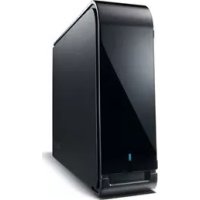
DriveStation Velocity - External hard drive BUFFALO - Free user manual and instructions
Find the device manual for free DriveStation Velocity BUFFALO in PDF.


| Product type | External hard drive |
| Interface | USB 3.0 (backward compatible with USB 2.0/1.1) |
| Maximum transfer speed | 5 Gbit/s (USB 3.0) |
| Dimensions (W x D x H, excluding protrusions) | 39 x 189 x 123 mm (single disk model) |
| Power consumption | 18 W max (single disk model) |
| Power supply | 100-240 V AC, 50/60 Hz |
| Compatible operating systems | Windows 8/7/Vista/XP (32/64-bit), Mac OS X 10.4 to 10.8 (Intel) |
| Main functions | Data backup, external storage, RAID (depending on model), hardware encryption (depending on model), automatic power on/off |
| Maintenance and cleaning | Clean with a dry cloth; avoid moisture; do not block ventilation openings |
| Security | Kensington security slot, AES encryption (depending on model), lock detection via LED |
| Spare parts and repairability | Not user-serviceable; contact technical support for any issues |
| General information | Brand: Buffalo; Model: DriveStation Velocity; Warranty: see manual; Normal operating noise |
Frequently Asked Questions - DriveStation Velocity BUFFALO
User questions about DriveStation Velocity BUFFALO
0 question about this device. Answer the ones you know or ask your own.
Ask a new question about this device
Download the instructions for your External hard drive in PDF format for free! Find your manual DriveStation Velocity - BUFFALO and take your electronic device back in hand. On this page are published all the documents necessary for the use of your device. DriveStation Velocity by BUFFALO.
USER MANUAL DriveStation Velocity BUFFALO
Hard Drive User Manual
www.buffalotech.com
Table of Contents
Hard Drive User Manual (EN) 14
HD-LBU3 14
LEDs and Connections 14
Specifications 15
HD-LBU2 16
LEDs and Connections 16
Specifications 16
HD-LXU3 17
LEDs and Connections 17
Specifications 17
HD-WLU3 19
LEDs and Connections 19
Specifications 20
HD-QLU3 21
LEDs and Connections 21
Specifications 22
Recommended Usage 23
Warning 23
Dismounting the Unit 24
Troubleshooting 25
PykoBoDCTBO NOIb3OBaTeJI NO IcNoIb3OBaHnIO XeCTKOrO dNcKa (RU) 111
HD-LBU3 111
HndnkaTopb npa3beMbI 111
Texnueckne xapaKtepncnkn 112
HD-LBU2 113
HndnKaTOpbl pa3beMbI 113
Texnueckne xapaKtepncTKKn 113
HD-LXU3 114
Hdikatopbl pa3beMbI 114
Texnueckne xapaKtepncTkn 114
HD-WLU3 116
HnDnKaToPbI npa3beMbI 116
Texnueckme xapaKTepeNTmKn 117
HD-QLU3 118
HndnkaTopb npa3beMbI 118
Texnueckme xapaKTepeNTuKN 119
PekomeHdoBaHHoe nCnoIb3ObaHne 121
Bhimahme! 121
OTKJIoueHne yCtpoiCTBa 122
YcTpaHHe HeIcnPpABHOCTeI 123
硬盘用户手册 (SC) 124
HD-LBU3 124
LED指示灯和连接 124
规格 125
HD-LBU2 126
LED指示灯和连接 126
规格 126
HD-LXU3 127
LED指示灯和连接 127
规格 127
HD-WLU3 129
LED指示灯和连接 129
规格 130
HD-QLU3 131
LED指示灯和连接 131
规格 132
建议使用 133
警告 133
卸除设备 134
故障排除 135
硬碟使用者手册 (TC) 136
HD-LBU3 136
LED指示燈和連接 136
規格 137
HD-LBU2 138
LED指示燈和連接 138
規格 138
HD-LXU3 139
LED指示燈和連接 139
規格 139
HD-WLU3 141
LED指示燈和連接 141
規格 142
HD-QLU3 143
LED指示燈和連接 143
規格 144
建議使用 145
警告 145
卸除装置 146
疑難排解 147
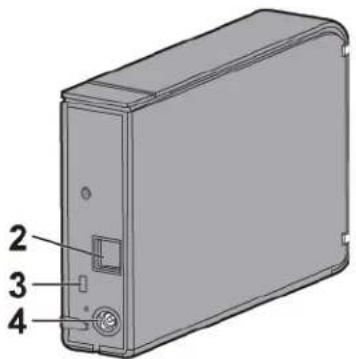
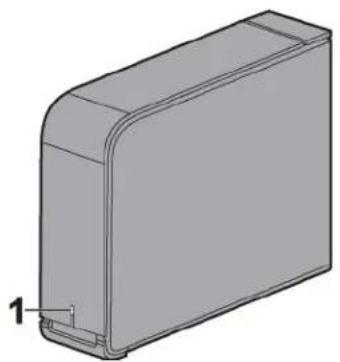
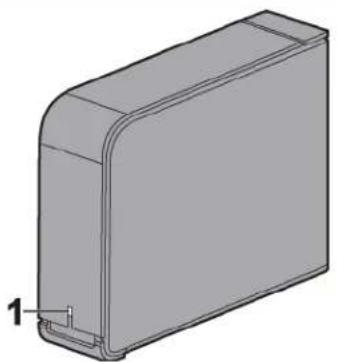
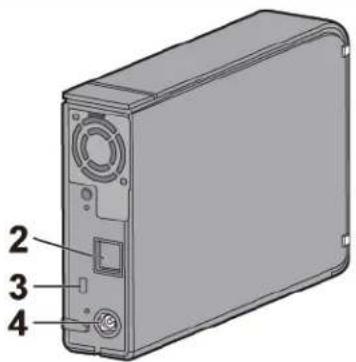
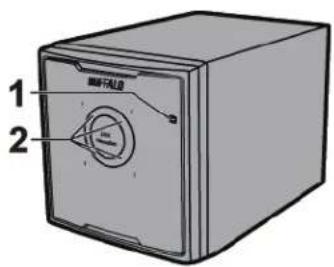
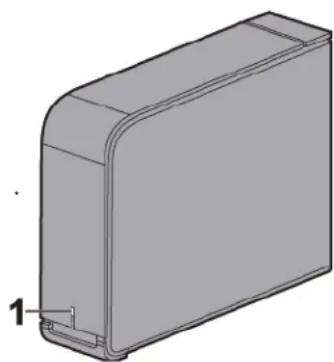
LEDs and Connections
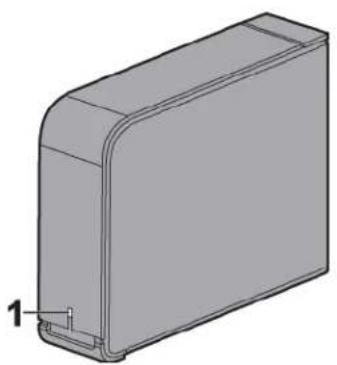
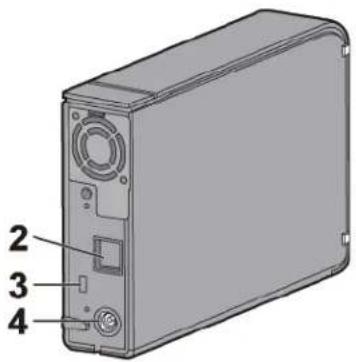
1 Power / Access LED
USB 3.0
Power On: blue
Accessing: blinking blue
USB 2.0
Power On: green
Accessing: blinking green
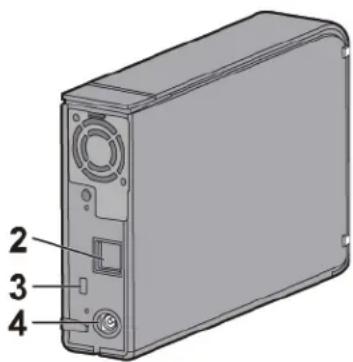
2 USB Connector
3 Security Slot
4 Power Connector
Specifications
Check Buffalo's website (www.buffalotech.com) for information about the latest products or compatible models.
| Interface USB 3.0 | |
| Connector USB 3.0 Standard-B | |
| Transfer speed 5 Gbps Maximum (USB 3.0) *1 | |
| External dimensions (excluding protruding parts) | 39 x 189 x 123 mm |
| Power consumption 18 W (Max) | |
| Power AC 100 - 240 V 50/60 Hz | |
| Compatible OS | Windows 8 (32-bit and 64-bit) Windows 7 (32-bit and 64-bit) Windows Vista (32-bit and 64-bit) Windows XP (32-bit) Mac OS X 10.4, 10.5, 10.6, 10.7, 10.8 (models with Intel Processor) |
*1 Connect the DriveStation to a USB 3.0 port for best transfer speeds. The DriveStation will function when connected to a USB 2.0 or USB 1.1 port, but data transfers will be slower.
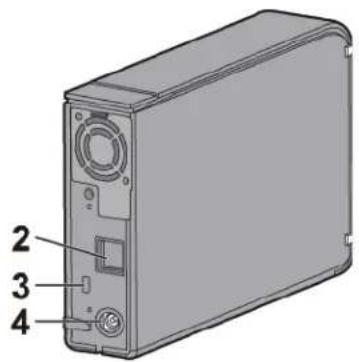
LEDs and Connections
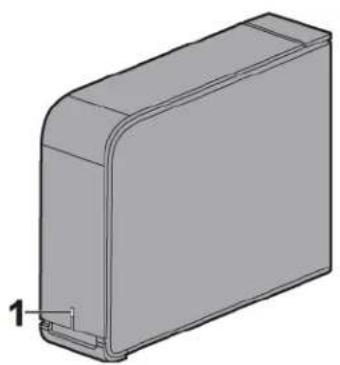
1 Power / Access LED
Power On: green
Accessing: blinking green
2 USB Connector
3 Security Slot
4 Power Connector
Specifications
Check Buff alo's website (www.buff alotech.com) for information about the latest products or compatible models.
| Interface USB 2.0 | |
| Transfer speed 480 Mbps Maximum (USB 2.0) *1 | |
| External dimensions (excluding protruding parts) | 39 x 189 x 123 mm |
| Power consumption 18 W (Max) | |
| Power AC 100 - 240 V 50/60 Hz | |
| Compatible OS | Windows 8 (32-bit and 64-bit) Windows 7 (32-bit and 64-bit) Windows Vista (32-bit and 64-bit) Windows XP (32-bit) Mac OS X 10.5, 10.6, 10.7, 10.8 (models with Intel Processor) |
*1 Connect the DriveStation to a USB 2.0 port for best transfer speeds. The DriveStation will function when connected to a USB 1.1 port, but data transfers will be slower.
LEDs and Connections
1 Power / Access / Lock LED
| Normal mode Encrypted mode | |||
| Power On | Normal Blue/Green - | ||
| Locked - Red | |||
| Authentication - Blue/Green | |||
| Accessing Blinking (Blue/Green) | |||
| Power Off | Off | ||
Blue for USB 3.0
Green for USB 2.0 or 1.1
2 USB Connector
3 Security Slot
4 Power Connector
Specifications
Check Buff alo's website (www.buff alotech.com) for information about the latest products or compatible models.
| Interface | USB 3.0 |
| Connector | USB 3.0 Standard-B |
| Transfer speed | 5 Gbps Maximum (USB 3.0) *1 |
| External dimensions (excluding protruding parts) | 39 x 189 x 123 mm |
| Power consumption | 18 W (Max) |
| Power | AC 100 - 240 V 50/60 Hz |
| Compatible OS | Windows 8 (32-bit and 64-bit) |
| Windows 7 (32-bit and 64-bit) | |
| Windows Vista (32-bit and 64-bit) | |
| Windows XP (32-bit) | |
| Mac OS X 10.5, 10.6, 10.7, 10.8 (models with Intel Processor) *2 |
1 Connect the DriveStation to a USB 3.0 port for best transfer speeds. The DriveStation will function when connected to a USB 2.0 or USB 1.1 port, but data transfers will be slower.
2 Encryption is not supported with OS X.
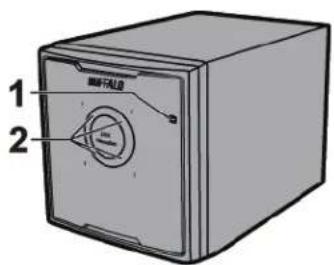
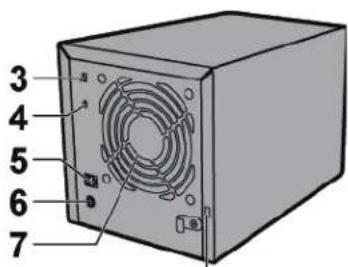
LEDs and Connections
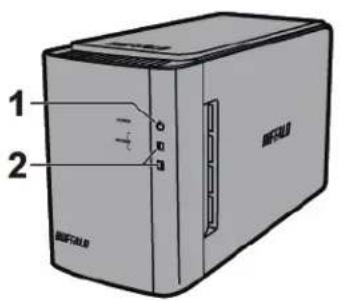
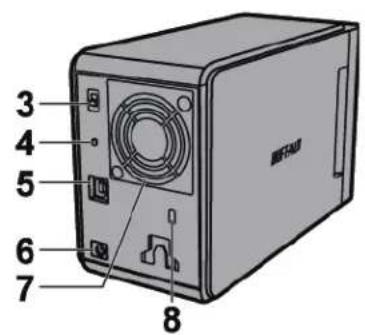
1 PowerLED
Power On: blue
RAID Maintenance: purple
2 Access LEDs
These indicate the status of the built-in hard drives. The top LED indicates the status for Disk 1 and the bottom LED indicates the status for Disk 2.
Accessing: blinking green
Rebuilding: blinking red
Error: red
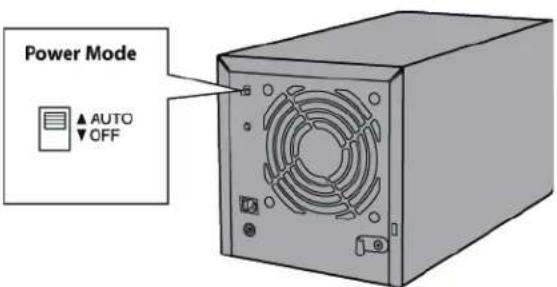
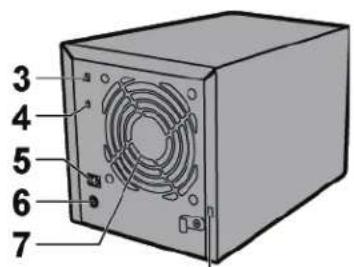
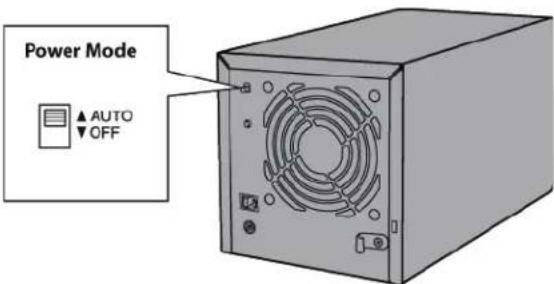
3 Power Mode
See "Power On/Off".
4 RAID Mode Button
Use this button to change RAID modes. A connected computer is not required.
Default: RAID 1
5 USB Connector
Connect to your computer with the included USB cable.
6 DC in
Connect the AC adapter here.
7 Fan
Don't block airflow from the fan.
8 Security Slot
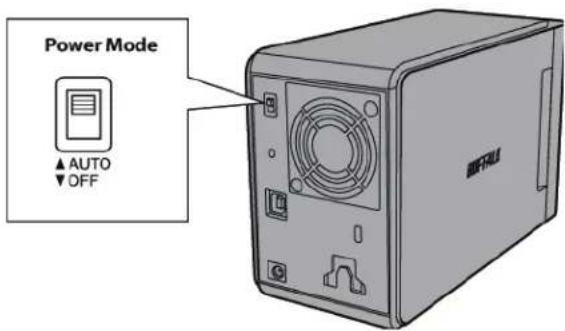
Power On/Off
Auto power mode will turn the DriveStation on and off automatically with your computer, or you may turn the DriveStation off manually.
Auto: The DriveStation turns on and off with your computer.
Off : This turns off the DriveStation's power.
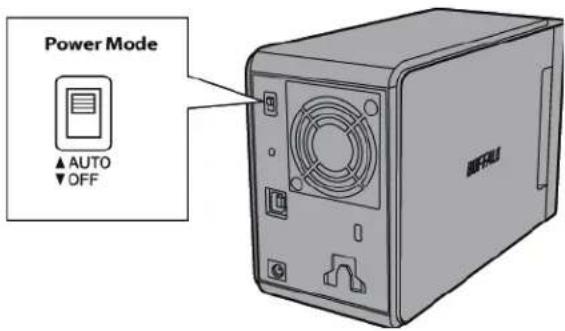
Notes:
- In Auto mode, after the computer is turned off, there may be a short delay before the DriveStation shuts down.
- If the DriveStation is connected to a USB hub with its own power supply, it may not shut down automatically when the computer is turned off. In this case, use the switch to turn it off manually.
Specifications
Check Buff alo's website (www.buff alotech.com) for information about the latest products or compatible models.
| Interface USB 3.0 | |
| Transfer speed 5 Gbps Maximum (USB 3.0) *1 | |
| External dimensions (excluding protruding parts) | 86 x 127 x 204 mm |
| Power consumption 36 W (Max) | |
| Power | AC 100 - 240 V 50/60 Hz |
| Compatible OS | Windows 8 (32-bit and 64-bit) Windows 7 (32-bit and 64-bit) Windows Vista (32-bit and 64-bit) Windows XP Windows Server 2008 R2 (64-bit) Windows Server 2008 (32-bit and 64-bit) Windows Server 2003 R2 (32-bit) Windows Server 2003 (32-bit) Mac OS X 10.4, 10.5, 10.6, 10.7, 10.8 (models with Intel Processor) |
*1 Connect the DriveStation to a USB 3.0 port for best transfer speeds. The DriveStation will function when connected to a USB 2.0 or USB 1.1 port, but data transfers will be slower.
HD-QLU3
LEDs and Connections
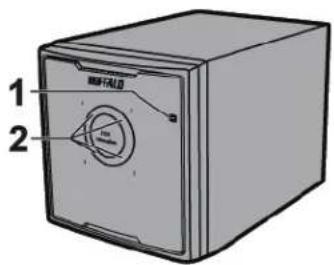
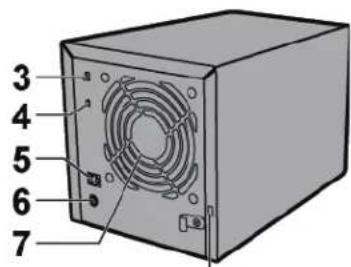
8
1 PowerLED
Power On: blue
RAID Maintenance: purple
2 Access LEDs
These indicate the status for each internal hard drive of the DriveStation. The number next to the LED corresponds to the hard drive number.
Accessing: blinking green
Rebuilding: blinking red
Error: red
3 Power Mode
See "Power On/Off".
4 RAID Mode Button
Use this button to change RAID modes. A connected computer is not required.
5 USB Connector
Connect to your computer with the included USB cable.
6 DC in
Connect the AC adapter here.
7 Fan
Don't block airflow from the fan.
8 Security Slot
Important:
Please remove the cardboard shipping insert from behind the front panel of the DriveStation before use!
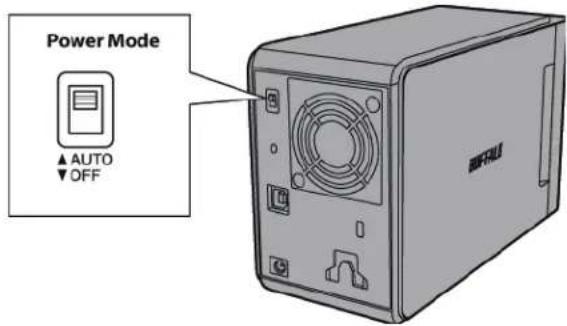
Power On/Off
Auto power mode will turn the DriveStation on and off automatically with your computer, or you may turn the DriveStation off manually.
Auto: The DriveStation turns on and off with your computer.
Off : This turns off the DriveStation's power.
Notes:
- In Auto mode, after the computer is turned off, there may be a short delay before the DriveStation shuts down.
- If the DriveStation is connected to a USB hub with its own power supply, it may not shut down automatically when the computer is turned off. In this case, use the switch to turn it off manually.
Specifications
Check Buff alo's website (www.buff alotech.com) for information about the latest products or compatible models.
| Interface USB 3.0 | |
| Transfer speed 5 Gbps Maximum (USB 3.0) *1 | |
| External dimensions (excluding protruding parts) | 149 x 154 x 233 mm |
| Power consumption 90 W (Max) | |
| Power | AC 100 - 240 V 50/60 Hz |
| Compatible OS | Windows 8 (32-bit and 64-bit) Windows 7 (32-bit and 64-bit) Windows Vista (32-bit and 64-bit) Windows XP Windows Server 2008 R2 (64-bit) Windows Server 2008 (32-bit and 64-bit) Windows Server 2003 R2 (32-bit) Windows Server 2003 (32-bit) Mac OS X 10.4, 10.5, 10.6, 10.7, 10.8 (models with Intel Processor) |
*1 Connect the DriveStation to a USB 3.0 port for best transfer speeds. The DriveStation will function when connected to a USB 2.0 or USB 1.1 port, but data transfers will be slower.
Warning
To avoid damage to data, never do any of the following while data is being accessed:
- unplug the cables
- turn off your computer
- put your computer into standby, hibernate, or sleep mode
-log off, log on, or switch users
Never configure this unit as a destination for virtual memory.
The maximum size of a file on a FAT32 hard drive is 4 GB. To work with larger files, reformat the drive with NTFS or Mac OS extended.
Mac OS may not recognize this device at boot. If this happens, unplug the cable, then plug it again after a few seconds.
This unit supports hot-plugging.
You can plug or unplug the USB cable while the unit and your PC are on. However, never unplug the cable while the data is being accessed. If you unplug the unit while the data is being accessed, your data may be damaged or lost.
Do not lean any object against this unit. It may cause the unit to malfunction.
If the unit is connected to a USB 2.0 or 1.1 plug, Windows will display a message that a high-speed USB device is connected to a non high-speed USB hub. Move the unit to a USB 3.0 port for best performance, or click [X] to
continue.
You may hear some noise while the unit is working, especially while it's booting or being accessed. This is normal.
Disconnect this drive before reinstalling Mac OS.
Do not boot your operating system from this unit.
The first time you connect this unit, it may take about 20 seconds before the power/access LED turns on.
If you use this unit with multiple partitions, format each partition before use.
If your Windows computer will not boot while this unit is connected, then connect the unit to your computer after rebooting Windows. Also, refer to your computer's manual to change the BIOS setting to boot from an internal hard drive if you want to turn your computer on or off while this unit is connected.
Some computers may display a delayed write when they return from an energy-saving state. If this happens, unplug the unit before putting your computer into the energy-saving mode.
This drive may become hot during use.
This unit is designed to release heat through its case. The surface of the case may become quite hot in normal use. Even when the unit is off, the case may still be warm from standby current.
If the power/access LED does not turn off when you turn off your computer, unplug the USB cable from the drive.
Some computers do not support power saving mode.
Before using this unit with a Mac, reformat it with Mac OS extended using the disk utility in Mac OS.
Dismounting the Unit
Unplugging the unit incorrectly can corrupt data. Please be careful! If your computer is turned off, then it is always safe to unplug the unit. If your computer is turned on, please follow the procedure below to unplug the unit.
For Windows
Note:
For Windows 8, switch to desktop mode.
1 Click the icon on in the system tray.
2 When the menu opens, click the device name.

3 A message that indicates you can safely remove the unit will appear. Click OK and unplug the unit. Note: You do not have to click OK if your OS is Windows 7 or XP. The message will automatically disappear.
For Mac
Drag this unit's icon to the trash to dismount the drive.
2 It's now safe to unplug the unit from your Mac.
Troubleshooting
I can see the DriveStation or MiniStation in My Computer but I cannot access it. (Windows)
The drive may require formatting. Try using DiskFormatter2. Consult the manual for DiskFormatter2 for more help.
I cannot see the DriveStation or MiniStation.
Verify that the power LED is on. If it is not, then ensure that the power switch is in the on position. Check your cables! The DriveStation or MiniStation should be connected to your computer by a USB cable. Check that both ends are correctly plugged in.
Verify that the hard drive inside the DriveStation or MiniStation is spinning. This can be verified by placing your hand on the side of the case and feeling for a slight vibration.
Also, after the DriveStation or MiniStation has been powered on for 15 minutes or more it will begin to get warm. If neither of the preceding tests verified that the hard drive is spinning, then please contact technical support for further assistance.
My backup program cannot save files to the DriveStation or MiniStation.
Reformat your DriveStation or MiniStation with NTFS or Mac OS Extended. FAT32 is limited to 4 GB file sizes.
PykoBoDCTBO NOIb3OBaTeIЯ NO IcNoJIb3OBaHnIO JecTKOrO dNcKa (RU)
HD-LBU3
Hdikatopbl pa3beMbI
1 INHdkaTop nHTaHn/IOCTyna USB3.0
Питане ВКлочев:СИн
Достун: магалший сИн
USB 2.0
IITAHHe BKNIOUeHO:3eNEHbI DocTy:MIRAOuOuN 3eNEHbI
2 Pa3beM USB
3 Pa3bem 3aMka
4 KOHHeKToP nHTaHn
TexHnueckne xapaKTepeNCTNU
YTo6bI NOnyUHT bOONHnTeBbHbIe CBeDeHnO CaMbIX HObIX pOdyKTax I COBMeCTmBIX MoJeIAX, CM. Be6-caNT KOMNaHn Buffalo (www.buffalotech.com).
2 HndkaTopbI doctyna
YKa3bIbAIOT Ha COCTOHHne BCTpoEHbIX JeCTKHX DNCKOB. BepxHn INHdNKaTOp yKa3bIbAeT Ha COCTOHHne DnCKa 1, a HnXhN - Ha COCTOHHne DnCKa 2.
Doctyn: Mmraounn 3eHbI
BocctaHOBnHeN: MuraOuI KpaChbI
OuN6ka:KpaChbI
3 Pekim nntaHn
Cm."IITaHne BkJ./BbIKJ.
4 Khonka pexkma RAID
C nomoBIO 3Toi KHOPI MOXHO nepeKIOUaTb peKIMBI RAID. Het Heo6xOIMOCTN B NOIKIOUeHHOM KOMIbIOTepe.
IyoMOnJIaHnIO:RAID1
5 Pa3beM USB
IopKJIouHTe K KomblOpTepy c nOmoosbUo USB-ka6eJ, BxOJaero B KomnneKT.
6 BxodnnoKIOUeHnBHeHero 6noka nHTaHn
IopKJIIOUHTe aanTep nepemehHoro ToKa 3decb.
7 BeHTnJIrTOp
He 6noknyte noTOK BO3nyxa OT BENTnIaTopa.
8
Pa3bEm 3aMka
Ntahne Bk./BbIK.
Pekim ABOMATNueckoro NtAHHABOTOMATNueckn BKIOUaET N BbIKIOUaET DriveStation Ha Baem KOMnbItepe. BbIKIOuHTb DriveStation MoXHO IN BpyHyIO.
AbTomatueckn pekIM: DriveStation BKIOUaeTcN BbIKIOUaeTcBMeCTe C KOMIbIOTepOM.
BbIKL: BbIKNIOaET NITAHne DriveStation.
PpmeaHn
B aTOMaTnueckom pexnme nocJe BbIKIOUeHnKOMnbIOTepa MoKeT npoTN HeKOToOpoe BpeM, npexde yem DriveStation bIKIOuHTcR.
- Ecnn DriveStation noKIOUeH K USB-KOHcHTpATopy c CO6CTBEHHbIM NTOUHKM NITaHn, OH MOKeT He BbIKIHOHTbcra ABtOMaTHueCKn PnBbIKIIOUeHN KOMNbIOTepa. B TAKOM CNYae dJa erO BbIKIOUeHN NcNOJIb3yIte NepeKIOUaTeNb.
TexHnueckne xapaKTepeNCTnKN
YTo6bI noJyUHb IOnONHnTeNbHbIe CBeJeHnO CaMbIX HOBbIX npOdyKTax IN COBMeCTnMbIX MoJeA, CM. Be6-caNT KOMNaHn Buff alo (www.buff alotech.com).
| Иntерфейс USB 3.0 | |
| Скорость пereдачи Марс.5 Гот/c (USB 3.0)*1 | |
| Габашиы(э поочец EM ВбС Т уп пошхочтей) | 86 x 127 x 204 MM |
| ПOT repeление зергий 36Вt (марс.) | |
| Питане Переменный ток: 100-240В, 50/60 Гц | |
| Сов畿омные OC | Windows 8 (32-и 64-pa3p.) Windows 7 (32-и 64-pa3p.) Windows Vista (32-и 64-pa3p.) Windows XP Windows Server 2008 R2 (64-pa3p.) Windows Server 2008 (32-и 64-pa3p.) Windows Server 2003 R2 (32-pa3p.) Windows Server 2003 (32-pa3p.) Mac OS X 10.4, 10.5, 10.6, 10.7, 10.8 (м oderen c proozessopamn Intel) |
1 Повлоче DriveStation К поту USB 3.0 Дд ообсоченя навьсш ecopoctи поедаши даньх.DriveStation 6удт работаюпри полочени К поту USB 2.0 И USB 1.1,но скорocь поедаши даньх 6удтниж. 2 В�дг STP 3 В�дг STP 4 В�дг STP 5 В�дг STP 6 В�дг STP 7 В�дг STP 8 В�дг STP 9 В�дг STP 10 В�дг STP 11 В�дг STP 12 В�дг STP 13 В�дг STP 14 В�дг STP 15 В�дг STP 16 В�дг STP 17 В�дг STP 18 В�дг STP 19 В�дг STP 20 В�дг STP 21 В�дг STP 22 В�дг STP 23 В�дг STP 24 В�дг STP 25 В�дг STP 26 В�дг STP 27 В�дг STP 28 В�дг STP 29 В�дг STP 30 В�дг STP 31 В�дг STP 32 В�дг STP 33 В�дг STP 34 В�дг STP 35 В�дг STP 36 В�дг STP 37 В�дг STP 38 В�дг STP 39 В�дг STP 40 В�дг STP 41 В�дг STP 42 В�дг STP 43 В�дг STP 44 В�дг STP *45 В�дг STP
HD-QLU3
Hdikatopbl pa3bembl
8
1 Hdikatop nHTaHn
Ecnn nHdkkaTOp nHTaHna He rachet noCne BbIKIOueHn Ka6enb USB ot dNcKa.
HekoTOpbIe KOMNbIOTePbI He noDdepKnBaIoTH eHeproc6eperaIo npI pexIM.
До Испосьовая устюква с OC Mac BBINONHITE NOBTOPHoe Форматонване сnomоцью Mac OS extended n ytunntbl ducka.
OTKJIIOUeHne yCTpoiCTBa
HenpaBnIbHoe OTKIOUeHne yCTpoiCTBa MoKeT pINBeCTN K NOBpeJdeHIO daHHbIX. BydbTe OCTopoXhbI. EcNI KOMnbIOTep BbIKIOUeH, OTKIOUeHne yCTpoiCTBa BCerda 6e3OanacHO. EcNI KOMnbIOTep BKIOUeH, dJIa OTKIOUeHnYyCTPOIcTBa BbINOHNTE pINBeJeHNOE HnKe.
Дя Windows
PnmueyaHne.
Dnra Windows 8 bblIOHTe peXIM pa60tbi pa6oeryo cTona.
1 电KnTe no 3NaKy nn Ha nHaHei 3aJa.
2 Ipn OTKpbTm MeHIO 7eIKHnTe n mEnu yctpoCTBa.

3 OTo6pa3ntcra coo6eHne o TOM, yTo yctpoiCTBO MOxHO 6e30nacHO OTKlHouHTb. IeJIKNITE [OK] n OTKlHouHTe yctpoiCTBO.
PpmeaHne.
PnncnoB3oBaHnn Windows 7 nnn XP haxmMaTb [OK] He hynkHo. Coo6ueHne 3akpoetcra ABtOMaTnueckn.
Дя Mac
1 Iepetaune 3Naouk yctpojCTBa B KOp3nHy, UTo6bl OTKIOUHTb INCK.
2 Tenepb moxho 6e3oNaCHO oTKnHHTb yCTpoiCTBO B OC Mac.
YcTpaHHe HeNCnPaBHOCTeI
These indicate the status for each internal hard drive of the DriveStation. The number next to the LED corresponds to the hard drive number.
久时:点减(绿)
Dr. Drujny's DriveStation
- Lulunuunununununununununununununununununununununununununununununununununununun
nnnne nne nne nne nne nne nne nne nne nne nne nne nne nne nne nne nne nne nne nne nne nne nne nne nne nne nne nne nne nne nne nne nne nne nne nne nne nne nne nne nne nne nne nne nne nne nne nne nne nne nne
20
Bullfaco (www.buffalotech.com)
| ### | USB 3.0 |
| ### | ### 5 Gbps (USB 3.0) *1 |
| ### | 86 x 127 x 204 MHz |
| ### | 36 W (###) |
| ### | AC 100 - 240 V 50/60 Hz |
aannnnnne nnnnnnne
Windows 8 (32 Hua64)
Windows7(32Win64Win)
Windows Vista (32 1u64)
WindowsXP
Windows Server 2008 R2 (64TB)
Windows Server 2008 (32 1964 19)
Windows Server 2003 R2 (32 TIN)
Windows Server 2003 (321)
Mac OS X 10.4, 10.5, 10.6, 10.7, 10.8 (Tulalw Intel Processor)
1 Drive Station USB 3.0 W e uauuuaaunueauuauuauuuuauuauuauuauuauuauuauuauuauuauuauuauuauuauu
HD-QLU3
W LED uaaanr aannn
8
1
m
malingaunnRAID:
2 LED
Tnannnnnnnnnnnnnnnnnnnnnnnnnnnnnnnnnnnnnnnnnnnnnnnnnnnnnnnnnnnnnnnnnnnnnnnnnnnnnnnnnnnnnnnnnnnnnnnnnnnnnnnnnnnnnnnnnnnn
muaa:wwzwuaqien
inaiiiaaii iinnnss
1
3
nnae
4 1JAWAIAI RAID
Tttaaiee taeauanraa raaid 1nuee
5
eunnnnne nnnnnnne ne aenne nne eae
6 pc
eepnneepneneFAO
7
nnnnnnnnnnnnnnn
8
1
Rnne nnnnne nnnnne nnnnne nnnnne nnnnne
muaa
Tnnnnnnnnnnnnnnnnnnnnnnnnnnnnnnnnnnnnnnnnnnnnnnnnnnnnnnnnnnnnnnnnnnnnnnnnnnnnnnnnnnnnnnnnnnnnnnnnnnnnnnnnnnnnnnnnnnnnn
Pnnt: DriveStation 1uuaaiae 1eaeaae buaaennnnnaaee aenrnnnne
Dr.Jounal DriveStation
W
- 1
nneae DveStation nus USB 200000000000000000000000000000000000000000000000000000
2
Bullfaco (www.buffaloech.com)
| Sumerians | USB 3.0 |
| Hellenic Numatrials | 5 Gbps (USB 3.0) *1 |
| Mediterranean (Libertarian) (Christianian) | 149 x 154 x 233 MB |
| Māñánas | 90 W (SUV) |
| LWV | AC 100 - 240 V 50/60 Hz |
| saurunluyunmawwahuluk | Windows 8 (32 104, 64 10) |
| Windows 7 (32 104, 64 10) | |
| Windows Vista (32 104, 64 10) | |
| Windows XP | |
| Windows Server 2008 R2 (64 10) | |
| Windows Server 2008 (32 104, 64 10) | |
| Windows Server 2003 R2 (32 10) | |
| Windows Server 2003 (32 10) | |
| Mac OS X 10.4, 10.5, 10.6, 10.7, 10.8 (Saurunluyunl Intel Processor) |
1 Drive Station USB 3.0 waltuunauagulmnuu DriveStation zwnuueus USB 2.0 wae USB 1.1
n
Wewuiae aennnneaeenee eaege nnnnne anennee nee ennnnne
-
-
nannnnnnnnnnnnnnnnnnnnnnnnnnnnnnnnnnnnnnnnnnnnnnnnnnnnnnnnnnnnnnnnnnnnnnnnnnnnnnnnnnnnnnnnnnnnnnnnnnnnnn
aill jll lal 1l 11 (www.buffalotech.com) Buffalo is
| USB 3.0 | الإستعمال |
| 1 * (USB 3.0) محيى بانيت ب直升pire 5 | سيرة الحرفية |
| \( \textit{ملا}233\times 154\times 149 \) | الإستعمال الحرفية(الإستعمال الحرفية) |
| \( (\textit{ب直升pire})\textit{;}90 \) | سيرة الحرفية |
| \( 60/50\textit{ب直升pire}\textit{240}-100\textit{ب直升pire}\textit{240} \) | الإستعمال |
| \( (\textit{ب直升pire}\textit{64},\textit{b}\textit{32})\textit{Windows}\textit{8} \)\( (\textit{b}\textit{64},\textit{b}\textit{32})\textit{Windows}\textit{7} \)\( (\textit{b}\textit{64},\textit{b}\textit{32})\textit{Windows}\textit{Vista} \)\( (\textit{b}\textit{64},\textit{b}\textit{32})\textit{Windows}\textit{XP} \)\( (\textit{b}\textit{64})\textit{Windows}\textit{Server}\textit{2008}\textit{R2} \)\( (\textit{b}\textit{64},\textit{b}\textit{32})\textit{Windows}\textit{Server}\textit{2008} \)\( (\textit{b}\textit{32})\textit{Windows}\textit{Server}\textit{2003}\textit{R2} \)\( (\textit{b}\textit{32})\textit{Windows}\textit{Server}\textit{2003} \)\( (\textit{b}\textit{32})\textit{Windows}\textit{Server}\textit{2003} \)\( (\textit{b}\textit{32})\textit{Windows}\textit{Server}\textit{2003} \)\( (\textit{b}\textit{32})\textit{Windows}\textit{Server}\textit{21} \) | \( (\textit{b}\textit{32})\textit{Windows}\textit{7} \)\( (\textit{b}\textit{64},\textit{b}\textit{32})\textit{Windows}\textit{Vista} \)\( (\textit{b}\textit{64},\textit{b}\textit{32})\textit{Windows}\textit{Vista} \)\( (\textit{b}\textit{64},\textit{b}\textit{32})\textit{Windows}\textit{XP} \)\( (\textit{b}\textit{64})\textit{Windows}\operatorname{Server}\textit{2008}\textit{R2} \)\( (\textit{b}\textit{64},\textit{b}\textit{32})\textit{Windows}\operatorname{Server}\textit{2008} \)\( (\textit{b}\textit{32})\textit{Windows}\operatorname{Server}\textit{2003}\textit{R2} \)\( (\textit{b}\textit{32})\textit{Windows}\operatorname{Server}\textit{2003} \)\( (\textit{b}\textit{32})\textit{Windows}\operatorname{Server}\textit{2003} \)\( (\textit{b}\textit{32})\textit{Windows}\operatorname{Server}\textit{2003} \)\( (\textit{b}\textit{32})\textit{Windows}\operatorname{Server}\textit{21} \)\( (\textit{b}\textit{32})\textit{Windows}\operatorname{Server}\textit{21} \)\( (\textit{b}\textit{32})\textit{Windows}\operatorname{Server}\textit{21} \)\( (\textit{b}\textit{32})\textit{Windows}\operatorname{Server}\textit{21} \)\$X |
1.1 USB 1.1 USB 2.0 DriveStation USB 3.0 DriveStation
1.
L 1
L
jssll jg 1
jssll j 1
Jusssssssssssssssssssssssssssssssssssssssssssssssssssssssssssssssssssssssssssss
Aaalal 0slll aegg sdoia
NTFS 4 FAT32 1
. Mac OS extended
a
Jgulil 1jua gill ayilal 52gol o
e 1
a
gai gai
Ig USB 1.1 USB 2.0
Aeill [X] gai jgai jai 1234567890123456789012345678901234567890123456789012345678901234567890123456789012345678901234567890123456789
a 1 2
Mac OS 1
5.2.3.10.12
aagallalalal aeg e g aagaaagaaagaaagaaagaaagaaagaaagaaagaaagaaagaaagaaagaaagaaagaaagaaagaaagaaagaaagaaagaaagaaagaaagaaagaaagaaagaaagaaagaaagaaagaaagaaagaaagaaagaaagaaagaa
pssss spsse 5s sgsy paae aee eae
Windows 5
BIOI 1
Aaagaaoggglgagag
a
a
a 1
a
J 1
aaii jgi gjgjjgai jgi jgi
Mac OS extended Mac OS extended
#
a 1
Windows
4ab = 2a
Www 8
1
jglalpal jgai aaiit
Safely remove USB Mass Storage Device - Drive(E:)

.5211 [(00)OK] g jai .juiy 111111111111111111
XP Windows 7 [(OK]
Mac
a
Mac jgso Jolai sssll
a) My Computer] MiniStation DriveStation (Windows
. DiskFormatter2 .DiskFormatter2
. MiniStation DriveStation
SsagmasiStation DriveStation 1
JSSS
J 1
j j
e 10 dMiniStation
aLall jao jao Uguall iaiu uuiu
. MiniStation DriveStation
FAT32 .Mac OS Extended NTFS MiniStation DriveStation
1
USB 3.0
:
jS:
USB 2.0
j:
jj Saa jjuu
USB
中
3^ + 2 . ( 2 + ,2 + 2 )
. (www.buffalotech.com) 1234567890123456789012345678901234567890123456789012345678901234567890123456789012345678901234567890123456789
J 1 J 1 J 1 J 1 J 1 J 1 J 1 J 1 J 1 J 1 J 1 J 1 J 1 J 1 J 1 J 1 J 1 J 1 J 1 J 1 J 1 J 1 J 1 J 1 J 1 J 1 J 1 J 1
201 201
USB USB USB Windows 1.1 USB 2.0
Cuiyjusu Cuiyjusu y juyu wuyu u yu uuyu uuyu uuyu uuyu uuyu uuyu uuyu uuyu uuyu uuyu uuyu uuyu uuyu uuyu uuyu uuyu uuyu uuyu uuyu uuyu uuyu uuyu uuyu uuyu uuyu uuyu uuyu uuyu uuyu uuyu uuyu uuyu uuyu uuy
Mac OS
15g 1234567890
1 1
1 1
i 1 1 1 1 1 1 1 1 1 1 1 1 1 1 1 1 1 1 1 1 1 1 1 1 1 1 1 1
a 1
1 1
a 2
45 123
j 124
USB 1s
aies gaiy jyj yj yj yj yj yj yj yj yj yj
Mac OS extended by Mac OS (disk utility)
05
a 1
a 1
Windows
:
AWindows
15
1.15 S 15olli 15 (S) 15 j1 jio 45
Safely remove USB Mass Storage Device - Drive(E:)

10
4
J [OK] 5 JXXP7
Mac
1

J 12 Mac j1 j0s d j0j s
My Computer My Computer
(Windows)
DiskFormatterd DiskFormatter
MiniStation DriveStation
MiniStation DriveStation!kS 1, 1, 1, 1, 1, 1, 1, 1, 1, 1, 1, 1, 1, 1, 1, 1, 1, 1, 1, 1, 1, 1, 1, 1, 1, 1, 1, 1, 1, 1, 1, 1, 1, 1,
J 1
J 1
1 1
y
. MiniStation y DriveStation 1
FATy Mac OS Extended by NTFS y d j MiniStation y DriveStation


- Hard Drive User Manual
- Table of Contents
- Hard Drive User Manual (EN) 14
- PykoBoDCTBO NOIb3OBaTeJI NO IcNoIb3OBaHnIO XeCTKOrO dNcKa (RU) 111
- 硬盘用户手册 (SC) 124
- 硬碟使用者手册 (TC) 136
- LEDs and Connections
- Specifications
- Power / Access / Lock LED
- Power On/Off
- Notes:
- HD-QLU3
- Warning
- Dismounting the Unit
- For Windows
- For Mac
- Troubleshooting
- I can see the DriveStation or MiniStation in My Computer but I cannot access it. (Windows)
- I cannot see the DriveStation or MiniStation.
- My backup program cannot save files to the DriveStation or MiniStation.
- PykoBoDCTBO NOIb3OBaTeIЯ NO IcNoJIb3OBaHnIO JecTKOrO dNcKa (RU)
- Hdikatopbl pa3beMbI
- TexHnueckne xapaKTepeNCTNU
- 8
- Ntahne Bk./BbIK.
- PpmeaHn
- TexHnueckne xapaKTepeNCTnKN
- Hdikatopbl pa3bembl
- OTKJIIOUeHne yCTpoiCTBa
- Дя Windows
- Дя Mac
- YcTpaHHe HeNCnPaBHOCTeI
- 20
- W LED uaaanr aannn
- muaa
- W
- 2
- n
- -
- #
- Windows
- Safely remove USB Mass Storage Device - Drive(E:)
- a) My Computer] MiniStation DriveStation (Windows
- MiniStation DriveStation
- 05
- Mac
- My Computer My Computer
- MiniStation DriveStation
- MiniStation y DriveStation 1
Brand : BUFFALO
Model : DriveStation Velocity
Category : External hard drive