TFPF03MC - Thermostat Seitron - Free user manual and instructions
Find the device manual for free TFPF03MC Seitron in PDF.
Frequently Asked Questions - TFPF03MC Seitron
User questions about TFPF03MC Seitron
0 question about this device. Answer the ones you know or ask your own.
Ask a new question about this device
Download the instructions for your Thermostat in PDF format for free! Find your manual TFPF03MC - Seitron and take your electronic device back in hand. On this page are published all the documents necessary for the use of your device. TFPF03MC by Seitron.
USER MANUAL TFPF03MC Seitron
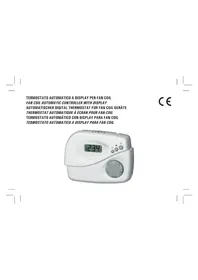
TERMOSTATO AUTOMATICO A DISPLAY PER FAN COIL FAN COIL AUTOMATIC CONTROLLER WITH DISPLAY AUTOMATISCHER DIGITAL THERMOSTAT FÜR FAN COIL-GERÄTE THERMOSTAT AUTOMATIQUE À ÉCRAN POUR FAN-COIL TERMOSTATO AUTOMÁTICO CON DISPLAY PARA FAN COIL TERMOSTATO AUTOMATICO A DISPLAY PARA FAN COIL

natural_image
White medical device with digital display showing 23.4 seconds (no visible text or symbols on device body)CE
INSTALLAZIONE | INSTALLATION | AUFSTELLUNG | INSTALLATION | INSTALLACIÓN | INSTALLAÇÃO

natural_image
Line drawing of a medical or laboratory device with internal components and a directional arrow (no text or symbols)A
Fig. 1
Abb. 1

natural_image
Line drawing of a mechanical device with an open lid and a directional arrow indicating movement (no text or symbols)B
Fig. 2
Abb. 2
2

text_image
JP1 JP2 JP3 SA C Fig. 3 Abb. 3
text_image
2 1 D Fig. Abb.Fig. 4 Abb. 4
text_image
VCA VCC VFA VFC 8 9 10 11 L
text_image
VCA VCC VFA VFC 8 9 10 11 A C Sc L
text_image
VCA VCC VFA VFC 8 9 10 11 L ○ cba d
text_image
VCA VCC VFA VFC 8 9 10 11 A C A C Sc Sc L
text_image
VCA VCC VFA VFC 8 9 10 11 L o • e f g
text_image
VCA VCC VFA VFC 8 9 10 11 A C Sc L
text_image
VCA VCC VFA VFC 8 9 10 11 EUR USACONFIGURAZIONE DI FABBRICA DEI PARAMETRI DEL DISPOSITIVO
DEVICE PARAMETERS FACTORY CONFIGURATION
- Pulsante ⏻ (On/Off)
This digital controller is intended for temperature regulation in environments equipped with fan-coil heat-cool exchangers.
The device automatically controls the fan speed (on 3 levels) as well as the possible valves in order to adjust the room temperature in the most suitable way. Temperature acquisition can be performed either with the internal sensor or with an external one (optional).
OPERATION
The commands available for the user are three pushbuttons and the set-point knob.
- Key ⏻ (On/Off)
This button is used to turn on and off the controller: when the controller is turned off the display does not show the temperature, yet some symbols could still be turned on to show the active outputs.
- Key ✝ (Fan Speed)
This button, when depressed once, makes the display show the current fan speed: this figure will be shown for a few seconds.
After that the current room temperature will be displayed again.
When this button is depressed several times the fan speed is changed according to the following cycle:

where FI1, FI2 and FI3 mean the three 'FI'xed fan speeds meanwhile AUT mean the 'AUT'omatic fan speed.
More precisely FI1 means the lowest speed, FI2 the medium speed and FI3 the fastest. Therefore when the controller is set on one of the three mentioned speeds, the fan will be activated when necessary at that (fi xed)
speed. Whenever the automatic speed is set instead, the controller will activate the fan at a speed as much high as the difference between the desired room temperature against the current one.
- Key (Menu)
This button is used to change the display readout mode: when depressed once it makes the display show the set-point temperature. In case the controller is configured to show the supply pipe water temperature, this value will be displayed with a further button \ depression. In case the controller is configured to perform the 'Economy' function, this will be activated with a further action on this button. If 'Economy' was already active instead, depressing the button will result in changing the mode into 'Normal'. When changing the readout, the controller informs the user about the parameter shown according to the following table:
tA Room (ambient) temperature
Set Set-point temperature
TP Supply pipe water temperature
ECO Economy function Active
When the button is depressed several times the display readout cycles across the above mentioned temperatures. After a few inactivity seconds the display readout returns to the room temperature. In case the 'Economy' mode is activated the controller always returns showing the 'ECO' message and the temperature is not visible.
- Knob
The regulation knob allows the user to adjust the desired room temperature (set-point). The knob has no range: whenever it is moved the display-readout jumps to the set-point temperature, thus showing the value currently setting.
Even in this case after a few inactivity seconds the display readout returns to the room temperature.
Display
The regulator features a 3-digits LCD display to show temperatures and settings. All temperatures shown must be intended in Celsius degrees (centigrade). On the display are located three 'fan' symbols which report about the current state of the outputs: fan, valves, or any other wired load.
The fan symbols are related to the fan motor state: when all fan symbols are turned off then the fan is actually off, meanwhile when some of them are turned on the state of the fan respects the following table:

Speed 1 (LO) Speed 3 (M) Speed 2 (ME)

Besides the 'fan' symbols, the display can show three further symbols, which can identify the state of the valve outputs (according to the Heating-Cooling system type):
Two pipes system
(turned-off any time)
heating mode, valve open
cooling mode, valve open
System w. integrating heater
electric heater activated
heating mode, valve open
cooling mode, valve open
Symbols can also be flashing, to explain that the relevant output should be turned on, yet it is temporarily disabled by another function.
Four pipes system
(turned-off any time)
heating valve open
cooling valve open
Heat pump system
compressor on
reversing valve in heating
reversing valve in cooling
ain that the relevant output should be ed by another function.
As an example, outputs are disabled in the following situations:
- The cut-off thermostat is inhibiting the fan;
- The window contact is inhibiting the regulation;
- TimerP31 is inhibiting the compressor;
- Regulation is inhibited due to re-synchronization of the floating valve;
- Valve is inhibited because it is waiting for complete closing of the other floating valve.
Heating/Cooling selection
Cooling (summer) or heating (winter) modes are selected by keeping the 'menu' button depressed for some seconds, until the display shows one of the following words (meaning the current mode):
hea ▲ Heating mode (winter)
Coo ≡ Cooling mode (summer)
Then, by pressing the 'speed' button, the user can actually choose the desired mode, cycling between heating and cooling. Depressing any of the other buttons results in quitting the menu and in the storage of the preferred configuration data. In case the controller is configured for centralized or automatic heating/cooling selection it is not allowed to enter in the heating/cooling selection menu.
INSTALLATION
To install the controller follow these directions:
- Remove the plastic cover pressing (with the help of a tool like a screwdriver) the plastic tooth located in the lower slot as indicated in Fig. 1 raising, at the same time, the front cover as indicated in Fig. 2.
- Unmount the plate fixed at the controller back by pressing the plastic tooth shown in Fig. 3 and, at the same time, pull the plate to the bottom until it becomes free from the plastic base.
- Fix the plate to the wall through the two holes using the correct
distance between holes (60 mm or 83 mm).
- Mount the controller base on the wall plate by fitting the base teeth in the relevant holes on the wall plate, then apply a slight pressure towards the bottom until the plate fixing tooth snaps (Fig. 4).
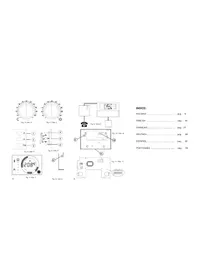
- Make electrical wirings passing the cables through the rectangular opening and according to the wiring diagram shown in Fig. 5.
- Close the controller coupling the two plastic teeth located in the upper back part of the plastic cover with the relevant holes of the base. Then, after ensuring that the knob is correctly coupling to its hole, apply a slight pressure on the front cover towards the wall until the closing plastic tooth snaps.
WIRINGS
This controller can be powered either with 230V \~ or with 24V \~. The controller is factory configured by default for a 230V \~ operation with the relevant jumper in position JP1.
For the 24V \~ operation it is necessary to move the jumper from position JP1 (Fig. 3) to position JP2 (Fig. 3).
As shown in Fig. 5 terminals 5 and 6 are provided for power supply. In case of 230V mains power it is mandatory to respect Live and Neutral indication.
At terminal 7 an input for remote heating/cooling selection is made available. In case this function is not used, the same terminal input can be used to activate the 'Economy' mode.
It is possible to plug a remote room temperature sensor to connector SA or alternatively wire it to terminals 13 and 14. The selection between internal or remote sensor is made through the configuration procedure.
Terminals 12 and 14 feature a further input to which several types of sensor can be wired in order to accomplish special functions: the user can wire a supply water temperature sensor for performing the 'changeover'
and/or 'cutoff thermostat'; as an alternative a bimetallic thermostat can be wired here, still for a 'cutoff thermostat' function; further a window contact can be wired.
Note: some limitations exist for the window contact: please read carefully the 'WARNING' section.
The preferred sensor type can be set in the configuration menu. As previously mentioned this is a regulator for three-speeds fan-coils. The speed selection is performed through three relays whose outputs are available at terminals 1, 2 and 3. Terminal n. 4 is the common for these three relays. In Fig. 5 is shown how to wire the fan. Outputs for the motor (terminals 1 to 4) are voltage free and insulated with respect to the remaining circuitry of the regulator.
For this reason the regulator can be powered with a low voltage (24V \~) and, at the same time, it can drive a higher voltage motor (230V \~).
This regulator can drive several types of valve or, alternatively, a heating resistor or a compressor. Terminals 8 and 9 are used for heating output, while 10 and 11 for cooling output. In Fig. 6 several different valve wirings are shown, depending on their type.
Through the configuration the type actually used is set. In case on-off or PWM on-off valves are used, wire them as shown in Fig. 6 a or c.
In case proportional floating valves are used, wire according to Fig. 6 b or d. It is possible to manage systems with different types of valves in the heating and in the cooling section.
When the system includes a resistor as an additional heating source or in place of a heating valve, then wire it as shown in Fig. 6 e or f.
The regulator can manage a heating pump system, thus controlling a compressor and the 4-way reversing valve. If this is the case use the diagram in Fig. 6g. The reversing valve must be wired on a different terminal according to its operation logic.
TECHNICAL FEATURES
Power supply: 230V \~ -15% +10% 50Hz or
24V \~ -15% + 10% 50Hz
Power absorption: 1,2VA
Room temperature:
Regulation range: 5°C .. 35°C (configurable)
Sensor type: NTC 4.7kΩ @ 25°C ±2%
Precision: ± 1°C
Resolution: 0.1°C
Display temp. range: 0°C .. 40°C
Differential: adjustable 0,2 .. 1,0 °C
Supply pipe temperature:
Sensor type: NTC 4,7kΩ @ 25°C ±2%
Precision: ± 2°C in the 20°C .. 50°C range
Resolution: 1°C
Display temp. range: 0°C .. 99°C
Differential: 2°C
Contact rating:
Fan motor: 3A @ 230V \~ cos φ = 1
Valves: 0,3A @ 230V \~ cos φ = 1
Valves (inductive load): 10VA Max load power
Remote sensor (optional): NTC 4.7kΩ @ 25°C ±2%
Protection grade: IP 20
Operating temperature: 0°C .. 40°C
Storage temperature: -10°C .. +50°C
Humidity limits: 20% .. 80% RH (non condensing)
Case: material: ABS VO self-extinguishing
color: cover: signal white
base: light grey
buttons: light grey
knob: light grey
Size: 129 x 96 x 37 mm (W x H x D)
Weight: \~ 265 gr.

WARNING
- The supply water sensor must be installed in a way that it can acquire the correct water temperature even in case the flow is stopped by the valve itself.
- Wiring the same remote temperature sensor to more than one controller is not allowed.
- All remote sensors, bimetallic contact and window contact must have a galvanic insulation against earth as well as against the mains power.
- In case precending two directions are not respected an irreversible product damage can follow.
- All remote sensors, bimetallic contact and window contact must be double insulation (or reinforced insulation) rated in case they are accessible to people.
- In case the reinforced insulation of the preceding point cannot be obtained, power the regulator with a 24V \~ low voltage (yet in full compliance with the safety standards).
- While checking with a multimeter valve outputs (terminals from 8 to 11), it will not be possible to see the commutation correctly due to filters mounted with TRIAC outputs. It is necessary to wire a load to the output (valve) to correctly show the commutation status.
-
The appliance must be wired to the electric mains through a switch capable of disconnecting all poles in compliance with the current safety standards and with a contact separation of at least 3 mm in all poles.
-
Installation and electrical wirings of this appliance must be made by qualified technicians and in compliance with the current standards.
- Before wiring the appliance be sure to turn the mains power off.
APPENDIX
Supply pipe sensor
This controller features an input for a sensor mounted on the water supply pipe: when this sensor is used the controller can automatically understand whether it should be working in 'cooling' mode or in 'heating' mode: this function is called 'changeover' and it is based on the water temperature. The water temperature is also used to perform the 'cut-off thermostat' function: this means that when the controller is in heating mode but the water in the pipe is too cold then the fan is automatically stopped until the water temperature goes above a set threshold. At this input can also be wired a bimetallic thermostat for the same 'cut-off' function. In case this function is not required, the same input can be used to wire a window contact, which will stop the temperature regulation whenever in the room the window will be open. When the regulation is inhibited by the window contact, symbols related to the active outputs will flash on the display.
Temperature acquisition
This controller acquires both the room temperature and the supply water temperature in the fan-coil exchanger with NTC type sensors.
The room temperature is acquired and displayed with the above mentioned resolution in the range 0°C .. 40°C. In case the room temperature falls outside the operating range, the display shows 'Or' (out of range). In case the sensor acts as an open or a short circuit the display shows 'EEE' (error): no regulation is performed in this situation and all outputs are set as inactive. The controller features an internal temperature sensor but an input for a remote sensor is also available. Through parameter P10 in the 'installer configuration' one of these two sensors is selected for the regulation purpose. The supply water temperature in the fan-coil is acquired through a remote sensor and can be displayed with 1°C resolution in the 0°C .. 99°C range. In case the acquired temperature falls outside the operating range mentioned, the display will show the letters "Or" (out of range). In case the sensor acts as an open circuit or a short circuit the display will show the letters "EEE" (error) and all functions related with this data are not performed. In case the system doesn't require the supply remote sensor the user is allowed not to install and wire it. For what is related to the supply sensor activation please refer to the explanations in paragraph 'Cut-off temperature function'.
Cutoff temperature function
The cutoff temperature function is used to inhibit the fan operation whenever, but only in heating mode, the supply water is not hot enough. In order to enable this function a supply pipe sensor (or even, alternatively, a bimetallic thermostat) must be wired to the proper terminals. In case the supply pipe sensor is used, the relevant threshold for this function (i.e. the value for the controller to decide when the supply water is hot enough) is defined by parameter P24. In case this function is not needed parameter P24 can be set to a very low value (as an example '0').
On the other hand when for this function a bimetallic thermostat is used, it is mandatory to set parameter P07 to value '2': in this case the fan will be operated only when the thermostatic contact is closed. When this type of thermostat is used the supply temperature cannot be displayed, nor the automatic changeover function can be performed. Please refer to the section 'Installer Configuration' to set the parameters related to the above described functions. When the fan is disabled by the cutoff temperature
function the 'fan' symbols on the display are flashing.
System with integrating heating resistor
This regulator can be configured (P01=2) to manage a special plant type featuring two heating systems: one with a hot water flow controlled by a valve, the other with an integrating electric heater. In this mode the regulator is only driving one valve wired at the cooling output and one integrating heating resistor wired at the heat output.
The relevant wiring diagram is in Fig. 6 e and f. The valve is driven as in a two pipes system: according to the heating or cooling setting of the controller the relevant flow of hot or cool water is managed.
The electric heater is turned on as an additional (integrating) heat source whenever, in heating mode, the room temperature falls at least 1.5^ C below the setpoint temperature. In cooling mode regulation is accomplished with a neutral zone logic: cooling is made through the valve operation meanwhile heating is made through the electric heater.
With such a system it is advisable a delay on the fan turn-off P21) so that when the electric heater is turned-off the fan will still blow air in order to dissipate the residual heat. In case with this type of system the cutoff temperature thermostat is also used, the fan is never disabled, even in case of cold water, as the electric heater operation will be anticipated.
Electric heating system
This regulator can be set for controlling a system with one electric resistor for heating and one valve that manages the cold water flow for cooling. Wire the system according to Fig. 6 e e f. Configure the regulator as for a 4-pipes system (P01 = 1) and with one heating on-off valve (P05 = 2); in such a way the heating output drives the electric heater and the cooling output drives the valve.
With such a system it is advisable to set a delay on the fan turn-off (P21) so that when the electric heater is turned-off the fan will still blow air in
order to dissipate the residual heat.
Moreover it is possible to get a neutral zone regulation by setting the automatic heating/cooling (P02-1).
Heat pump system
The regulator can be set to manage a heat pump system (P01-3) thus controlling one reversing valve wired at the heat output and one compressor at the cool output.
The wiring diagram is in Fig. 6 g. The reversing valve output is always turned on or off according to the heating or cooling setting of the regulator.
In case the 'EUROPEAN' type of driving is chosen, the reversing valve is powered in heating mode and left unpowered in cooling. Alternatively, with the valve wired at terminal 9, the driving logic is reversed: the valve is powered in cooling and left unpowered in heating ('USA' type).
The compressor output is active whenever it is necessary to 'pump' the heat, that is when the room needs to be cooled down or heated up. It is advisable to set a delay on the compressor output (parameter P31) in order to avoid too frequent turn-off and turn-on.
In the heat pump mode the supply water temperature sensor can still be wired and its purpose is for protection against freezing or overheating of the heat exchanger. Should the supply sensor, when in cooling mode, detect a temperature lower than 0^ C, the regulator stops the compressor (anti-freeze protection).
On the other hand, should the supply sensor, when in heating mode, detect a temperature higher than the value stored in parameterP24, the regulator stops again the compressor (anti-over-heat protection).
Economy function
The 'Economy' function allows to temporary set an energy saving mode through a reduction of the actual setpoint temperature by a step
(configurable) when in heating mode, or increasing it by the same step when in cooling mode.
The value for this reduction step is set with parameter P17: when this is set at 0.0 Economy function is actually disabled. Economy saving mode is started from the menu button, as explained in the 'Operation' section. In case the remote heating/cooling mode is not configured, terminal 7 can be used to start the 'Economy' function from remote even at the same time on several different regulators. When the wire connected at this terminal is linked with the Live voltage of power supply, the function is started; the same function is terminated when this terminal is left unconnected (open).
The regulator detects the state changes of the terminal, not the level itself, therefore it is always possible to override the Economy state set by terminal 7 with a manual action on the menu button.
When Economy mode is active the fan motor speed is always limited to the lowest one (first) in order to preserve the saving purpose of the mode.
Dirty filter warning function
Fan-coils and other devices including a fan are often equipped with a filter for the air in the suction path, which needs a periodical maintenance and cleaning or replacement. This regulator can warn the user when the maintenance has to be made, provided the 'Dirty filter warning' function has been enabled. The function is enabled by setting the time-to-maintenance value (each unit means 100 hours) in parameter P32: the regulator will count the operating time of the fan and when the value stored in P32 (x 100 hours) is reached it will warn the user through a message on the display. In this situation the regulator shows on the display, in place of the room temperature and alternatively, the two words FIL-TER.
If any key is depressed the warning disappears and the display returns to its normal mode. Whenever the regulator is turned off and then on again,
the warning will reappear. This is an extremely useful function for the maintenance service, which can easily check whether the filter needs to be cleaned.
In order to reset the warning and the relevant time-counter, once the cleaning has been made, just keep depressed the speed button for at least 10 seconds, until the regulator will confirm to have reset the warning by showing again the words FIL-TER.
Temperature regulation
This device can drive in a proportional way both valves and fan in order to control room temperature with the highest comfort and energy saving. Nonetheless each different environment needs a different set for some parameters in order to get an accurate regulation.
Parameters devoted to the regulation accuracy are:
- Proportional band: P27 and P28
- Integral time: P29 and P30
For each of the settings two parameters are available, because the user is allowed to set different values for heating and cooling mode. Proportional band, measured in ^ C, is intended as the difference between setpoint and room temperature which is needed to fully open the regulating valve.
The narrower the proportional band, the fastest is the regulator to counteract temperature variations in the room. Yet a value for this parameter too 'narrow' can result in room temperature oscillations or system instability.
A value too 'wide' could result in the impossibility to reach the setpoint temperature in the room. When the integral time is set to zero, no integral action is made and therefore the regulation is purely proportional (P type). When an integral time different from zero is set the resulting regulation is made of a Proportional plus an Integral action (P + I type).
The smaller the integral time, the greater the influence of the integral action
and vice-versa: with a greater integral time the resulting integral action is softer. A too soft or null integral action could result in the impossibility to reach the setpoint temperature, meanwhile a too strong integral action could possibly generate oscillations in the room temperature. It is always mandatory to adjust these parameters according to the actual environment in which the regulator is installed for the purpose of the best possible regulation accuracy.
When PWM valves or floating servo-actuators are used the quality of the final proportional regulation is directly associated to how accurately is performed the system tuning. When simple on-off valves are used no proportional action can be obtained: the relevant driving will always be either full-on or full-off, with a differential value set by parameter P18. In this situation both parameters 'proportional band' and 'integral time' are not used.
The fan is driven in a proportional way only in case the regulator has been set with automatic speed control. When the valve is proportional type, the P + I regulation will provide the correct fan speed, meanwhile in case the valve is not proportional type, the fan speed will be selected according to a purely proportional (P) rule, therefore only the 'proportional band' parameter will be used to decide how reactive will need to be the fan against variations in the room temperature.
The distance between the three speed stages is calculated dividing by three the proportional band and rounding down. For example if the proportional band is 2^ C, the distance between stages will be 0,6^ C.
Valve types
This regulator can drive the following type of valves:
ON-OFF: if Normally Closed (NC) it enables the water flow when power is applied; if Normally Open (NO) water is normally flowing when the valve is unpowered and is stopped when powered. Wiring diagram in Fig. 6 a,
c and e.
PWM: same as above; moreover the regulator controls the water flow in a proportional way by driving the valve with power pulses whose duration in time is a function of how much heat the room is requiring (PWM).
Floating servo-actuator: this is a kind of motor valve featuring one 'open' wire and one 'close' wire, plus a common wire. This type of valve is characterized by a nominal opening time (defined by the manufacturer) whose value must be set into parameters P25 and P26. The regulator will drive this valve through power pulses with one second resolution in a way that its stem will reach the position needed for the regulation, thus performing a proportional modulation.
The relevant wiring diagram is shown in Fig. 6 b, d and f. When the regulator is configured for an operation with a floating actuator, as soon as power is first applied, and before it starts the actual regulation, it will perform a stem position re-synchronization cycle, which is obtained by closing the valve for a time which is 150% of the value stored as nominal opening time.
This cycle will be periodically repeated in order to recover possible positioning errors which might be accumulated during time.
Installer configuration
The 'installer' configuration is used to setup the controller in order to get the best regulation in conjunction with the type of heating/cooling system installed. In order to enter the configuration menu, turn off the controller, then keep depressed both buttons "on/off" and "menu" together for some seconds, until the word 'COn' (configuration) appears on the display. From this state on, each time the "menu" button is depressed a different parameter is displayed, identified with a 'P' followed by a number, i.e. from P01 to P32.
The end of configuration is indicated by the word End": if now the 'menu'
button is depressed once again the configuration is saved in a non-volatile memory and the controller jumps into the normal operation mode. In case the 'on/off' button is depressed, at any time the controller exits from the configuration menu, without saving the changes.
When parameters are examined, if the 'speed' button is depressed once, the actual value of the parameter is displayed. When the value is shown press again the 'speed' button to change the value.
Parameters from P01 to P10 can be set by pressing several times in sequence the 'speed' button until the desired value is reached.
The following parameters, being variable in a wider range, can be modified by first pressing once the 'speed' button, so that the 'modify parameter' mode is entered, then turning the knob to modify the desired value.
Upper and lower limits for the knob regulation are redefined each time according to the actual parameter allowable range.
In order to disable the access to configuration menu to unauthorized users, an internal jumper, JP3, (shown in picture 3), can be removed; after this any attempt to enter in the configuration menu will result in an error message.
Configuration parameters explanation
All parameters used in the installer configuration are shown in Table 1 and explained in the following.
P01: System type selection.
2 pipes system: when configured for a two-pipes system the controller drives one valve only, wired at the 'heating' valve terminals, both when heating and when cooling, as the same valve is going to control either hot or cool water flow. See wiring diagram in Fig. 6 a and b. In case of a two-pipes system without valve, and therefore with no wirings at the valve output terminals, make sure to set parameters P03 and P04 to 'fan control' in order to get an effective regulation.
4 pipes system: when configured for a four-pipes system the controller drives both valves outputs in order to activate either the hot water or the cooling one according to the actual requirements from the controlled environment. See wiring diagram in Fig. 6 c and d.
Electric heater system: the regulator is configured to control a system equipped with an electric heater: see the section 'System with integrating heating resistor' for more details.
Heat pump system: the regulator is configured to control a system equippe qith a heat pump: see the section 'Heat pump system' for more details.
P02: This parameter sets the way how the controller switches from the cooling mode (summer) to the heating mode (winter) and vice versa.
The switching can be either manual or automatic:
Manual: The user manually sets the heating or the cooling mode.
Automatic: The controller automatically selects the switching from the heating to the cooling mode or vice-versa.
This automatic operation is different according to the system type as set with parameter P01.
If the system is a 4-pipes one or a heat-pump one then the control operates with neutral zone thus activating the heating or cooling according to the setpoint temperature.
In case of a 2-pipes system or electric heater system the controller operates a changeover according to the supply water temperature.
When the supply water temperature is low (that is below the threshold set with parameter P22) the controller switches to cooling mode. On the opposite side, when this temperature is high (that is above the threshold set with parameter P23) the controller switches to heating mode. In case the supply temperature is neither too low nor too high the operating mode is kept unchanged, but it still can be changed manually. When the supply water sensor is not installed or is not properly working then no automatic
selection is performed and the manual switching is only allowed. Remote selection: In a building with several regulators all inputs (terminal 7 of each regulator) can be wired together for a remote selection coming from the furnace room. In case the furnace leaves these wires 'floating', all regulators will be set into heating mode, meanwhile when these wires will be connected to the mains 'Live' all regulators will be set into cooling mode. In Fig. 5 is shown a wiring example for a remote heating/cooling selection.
Reversed remote selection: same as before but with reversed logic: terminal 7 floating sets cooling mode, while terminal 7 connected to mains 'Live' sets heating mode.
P03 and P04: these parameters set which outputs are controlled. When in heating mode parameter P03 is used, when in cooling mode P04 is used instead. Each parameter sets whether temperature is to be regulated through valves, fan, or both. When valves only is chosen, the fan will be turned on even after temperature has reached the setpoint; when fan only is chosen the valve will be powered even after temperature has reached the setpoint.
In systems with integrating resistor or heating pump these parameters cannot inhibit the valve outputs because these outputs are driven according to the specific system type configured in the regulator.
P05 and P06: these parameters set which type of valve is wired respectively at the heating and cooling outputs. See section 'Valve types' for more informations.
P07: This parameter sets the type of the sensor used for the acquisition of the supply water temperature. When set to value 0 or 1 we mean that a sensor is used for the acquisition of the water temperature, properly wired at terminals 12 and 14: when 1 is set, the temperature value is also shown over the display, according to the user choice. In case 0 is set,
the information coming from the temperature sensor is still used for the regulation purpose, even if its value is not shown.
Value '2' means that the device connected to terminals 12 and 14 is a bimetallic contact, which will act as cutoff thermostat only.
When the parameter is set to '3' a window contact can be wired at terminals 12 and 14: when this contact is closed the regulation is carried out as usual, meanwhile when it is left open regulation is stopped.
Note: some limitations exist for the window contact: please read carefully paragraph 'WARNING'.
If this parameter is set to '4' a 'reversed' logic is adopted for the window contact: open means usual regulation, closed means regulation stopped.
P08: This parameter enables the 'de-stratification' function in the environment. With this function the fan is turned on, at its lowest speed, for about 2.5 minutes every 15 minutes. The function is only active when the fan should be turned off according to the room temperature.
P09: In case of a black-out the controller can remember its latest state and, as soon as the power is applied again it restarts with the same settings (on/off, heating/cooling, etc.). Anyway, in some situations it is requested for the controller to restart from a fixed state (i.e. always from off or from on). This can be accomplished by setting parameter P09 to '2' (always restart from 'on') or '3' (always restart from 'off').
P10: Room temperature sensor selection.
This parameter sets whether the temperature sensor used for regulation has to be the one internal to the controller or the external one (optional).
P11: With this parameter a slight correction (offset) for the acquired room temperature can be set. Actually it could happen that in some installations, due to the sensor location (either internal or external) the temperature readout is not accurate.
By changing the value of this parameter the display readout can be corrected of the equivalent amount (in the -5.0^.. + 5.0^ range), being this a value which is actually added to the acquired temperature value.
P12 and P13: These two parameters set the temperature limits for the setpoint knob range when in heating mode. In details P12 is the lower limit, it can be configured in the range 5.0°C .. 35.0°C. while P13 is the upper limit, whose value can be configured starting from the actual P12 value until 35.0°C. The maximum range is then 5°C .. 35°C and it can be easily modified according to the installation needs.
P14 and P15: These two parameters set the temperature limits for the setpoint knob range when in cooling mode according to the same logic as those in the former step. In case the heating/cooling settings are modified, the temperature limits for the setpoint knob are automatically modified in turn. When the 'neutral zone' operation is selected, these two parameters will not be used and only the P12 and P13 values will be taken into account.
P16: This parameter defines an anti-freeze temperature (in °C), that is a minimum temperature which is maintained in the room even when the regulator is turned off (with the on-off button).
Regulation according to this temperature will only take place when the regulator is set in heating mode; the fan speed will be limited to the lowest one. Setting the value to 0.0 disables the anti-freeze function.
P17: This value defines the entity of a temperature reduction step (in °C) used to perform the 'Economy' function. The actual setpoint is therefore reduced (when in heating mode) or raised (when in cooling mode) by this step, once the 'Economy' function is made active. When this is set at 0.0 the 'Economy' function is actually disabled.
P18: This parameter sets the differential (in °C) used in the regulation
process when on-off loads are used.
P19: In case the controller is configured for a neutral zone operation this parameter determines the relevant amplitude in the range 1.0^ C .. 11.0^ C. This value has to be intended centered across the temperature set with the knob. In case the controller is configured for a different operation this parameter is not used.
P20: This parameter allows to set a delay time (in seconds) from the valve opening to the fan turn-on, in order to allow some time for the heat exchanger to heat-up or cool-down.
P21: This parameter allows to set a delay time (in seconds) from the valve closing to the fan turn-off, in order to allow some time for the heat exchanger or electric heater to dissipate the residual heat.
P22 and P23: These parameters set the thresholds for the automatic changeover operation: in case this function is not performed these two parameters are not used. Parameter P22 is the lower threshold and can be modified in the range 0^ .. 24^ , meanwhile P23 is the upper threshold in the range 26^ .. 48^ .
P24: This parameter sets the threshold for the cutoff temperature function: this function is active in heating mode when a supply water sensor is wired at the proper terminals. In case this function is not desired, the parameter should be set to '0'.
When instead a 'heat pump' system is selected, this threshold has the purpose of preventing over-heating (see 'Heat pump' section for more details). This threshold can be set in the range 0^ C .. 99^ C.
P25 and P26: These parameters must be set to the opening time (in seconds) of the heating output actuator and the cooling actuator, respectively, in case a floating actuator is chosen as regulating valve. In case instead a PWM valve is chosen, this parameters must be intended
as the cycle-time for the valve or, in other words, the modulation repetition time, i.e. the time occurring between two adjacent power pulses applied to the valve.
P27 and P28: These parameters set the proportional band amplitude (in °C) when in heating and in cooling mode respectively. These parameters can be set in the 0.8 .. 8.0°C range, yet the lower limit could be higher, being related to the differential value stored in P18.
P29 and P30: these parameters are used to set the integral time respectively for regulation in heating mode and in cooling mode. When set to zero no integral action is performed.
P31: This parameter sets a timing (in minutes) used to delay the cooling output activation when an on-off valve (or similar load) is applied. This function is only active in '4-pipes' and 'heat pump' systems: when the cooling output is turned-off, it acn be turned-on again only after this P31 time has elapsed. In such a way a compressor can be directly driven, being this device usually suffering from very fast turn-on and turn-off's.
P32: This parameter sets the time after which the 'Dirty Filter Warning' is shown; it can be set in the range 0..50 x 100h. As an example '10' means that the warning will be shown after 10 x 100 = 1000 hours of fan operation. When set to 0 the function is disabled.
Room temperature correct acquisition
For a correct temperature acquisition it is mandatory to remember and apply the following tips:
- In order to have an accurate room temperature acquisition the controller must be installed far from heat sources, airstreams or cold walls (thermal bridges). When the remote sensor is used in conjunction with the controller, then this note is to be applied to the remote sensor itself.
- When a remote sensor is used, do not use the same duct for signal wires and power (mains) wires, as the temperature reading accuracy could be impaired. Wirings can be usefully made with bipolar screened cable, whose screen is only wired at the regulator side (terminal 14) with 1.5mm^2 minimum cross section and 15m . maximum length.
- In the normal operation with internal sensor, the controller conditions the signal acquired according an exclusive algorithm designed to compensate the heat generated from its internal components. From this derives that the temperature value displayed at turn-on can be actually lower than the real one. This must be considered a normal behaviour: anyway in some minutes this difference should decrease down to zero.
- In case the controller should drive with its outputs large loads (whose current is close to the maximum rated value) it might happen that the internal components heat gets bigger. This temperature increase could in turn influence the room temperature acquisition when the internal sensor is used. This problem is not present when the remote temperature sensor is used.
- When, for any reason, the room temperature accuracy is considered unsatisfactory (due to the above mentioned reasons), it can be corrected with parameter P11.
- When the controller is powered with 230V \~ it is mandatory to respect the live and neutral (L and N) position during wiring.
Table 1: Installer configuration (Summary of the parameters involved in the 'installer' configuration).
| COn | ||||||||||
| P01 | System type | 0 | 1 2 pipes system | 4-pipes system | Integrating resistor | Heat pump | ||||
| P02 | Heating/cooling selection | 0 | 1 2 | RemoteAutomaticMn | Manualised remote | |||||
| P03 | Heating control mode | 1 | Valves only | 2 | 3 | Valves and fan | Fan only | |||
| P04 | 1 | Valves only | 2 | 3 | Valves and fan | Fan only | Cooling control mode | |||
| P05 | Heating output device | 1 | Floating servo-actuator | NC ON/OFF Valve | NO ON/OFF Valve | Prop. ON/OFF NC Valve | 52 Prop. ON/OFF NO Valve | |||
| P06 | Cooling output device | 1 | Floating servo-actuator | NC ON/OFF Valve | NO ON/OFF Valve | Prop. ON/OFF NC Valve | 52 Prop. ON/OFF NO Valve | |||
| P07 | Supply water sensor input | 0 | Do not show temperature | 1 | Show temperature | 2 | Bi-metallic contact | 3 | Window contact | 4 Rev. window contact |
| P08 | De-stratification | 0 | Always off | 1 | Cooling only | 2 | 3 | Always onHeating only | ||
| P09 | On/Off state at power up | 1 | Last | 2 | 3 | Always offAlways on | ||||
| P10 | Room temperature sensor | 0 | 1 | ExternalInternal | ||||||
| P11 | Room temperature correction (offset) (°C) |
| P12 | Heating setpoint knob lower limit (°C) |
| P13 | Heating setpoint knob upper limit (°C) |
| P14 | Cooling setpoint knob lower limit (°C) |
| P15 | Cooling setpoint knob upper limit (°C) |
| P16 | Anti-freeze threshold temperature (°C) |
| P17 | Economy reduction (°C) |
| P18 | Room temperature differential (°C) |
| P19 | Neutral zone width (°C) |
| P20 | Fan delay at turn-on (seconds) |
| P21 | Fan delay at turn-off (seconds) |
| P22 | Changeover lower threshold (°C) |
| -5.0 .. 5.0 |
| 5.0 .. 35.0 |
| 5.0 .. 35.0 |
| 5.0 .. 35.0 |
| 5.0 .. 35.0 |
| 0.0 .. 15.0 |
| 0.0 .. 10.0 |
| 0.2 .. 1.0 |
| 1.0 .. 11.0 |
| 0 .. 600 |
| 0 .. 600 |
| 0 .. 24 |
| P23 | Changeover upper threshold (°C) |
| P24 | Supply water threshold temperature (°C) |
| P25 | Heating floating actuator opening time (seconds) |
| P26 | Cooling floating actuator opening time (seconds) |
| P27 | Heating proportional band (°C) |
| P28 | Cooling proportional band (°C) |
| P29 | Heating integrating time (minutes) |
| P30 | Cooling integrating time (minutes) |
| Cooling compressor turn-on delay (minutes) | |
| P32 | Dirty filter warning timer (x 100 hours) |
| end |
| 26 .. 48 |
| 0 .. 99 |
| 30 .. 500 |
| 30 .. 500 |
| 0.8 .. 8.0 |
| 0.8 .. 8.0 |
| 0 .. 30 |
| 0 .. 30 |
| 0 .. 15P3 |
| 0 .. 50 |
Ventilator: 3A @ 230V \~ cosφ = 1
Ventile: 0,3A @ 230V \~ cos φ = 1
Fernfühler (Option): NTC 4.7kΩ @ 25°C ±2%
Schutzgrad: IP 20
In the view of a constant development of their products, the manufacturer reserves the right for changing technical data and features without prior notice. The consumer is guaranteed against any lack of conformity according to the European Directive 1999/44/EC as well as to the manufacturer's document about the warranty policy. The full text of warranty is available on request from the seller.
EasyManual