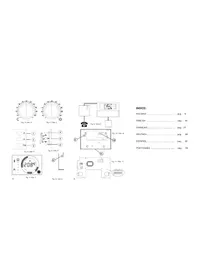
DCPA80BC - Thermostat Seitron - Free user manual and instructions
Find the device manual for free DCPA80BC Seitron in PDF.



| Product type | Thermostat (radio chronothermostat) |
| Brand | Seitron |
| Model | DCPA80BC |
| Power supply | 2 AA 1.5 V alkaline batteries |
| Battery life | Approximately 1 year |
| Comfort adjustment range | 10 °C to 30 °C |
| Economic adjustment range | 10 °C to 30 °C |
| Differential | 0.2 °C asymmetric |
| Temperature sensor | NTC 100 kΩ @ 25°C, accuracy ±1°C |
| Temperature detection frequency | Every 3 minutes |
| Radio output power | 10 dBm max (ERP) |
| Modulation | AM (ASK) |
| Antenna | Integrated |
| Maximum range | >300 m outdoors, 50 m indoors |
| Protection rating | IP30 |
| Operating temperature | 0 °C to 40 °C |
| Storage temperature | -10 °C to 50 °C |
| Permissible humidity | 20% to 80% RH (non-condensing) |
| Housing material | ABS V0 self-extinguishing |
| Color | Safety white (RAL 9003) |
| Mounting | On 60 mm or 83 mm centers (3-module flush-mount box) |
| Programming modes | Weekly or daily |
| Functions | Comfort, economy, summer/winter, antifreeze, vacation, optimization, proportional time, test mode |
| Display | Room temperature or time |
| External probe | Optional (NTC 100kΩ) |
| Telephone interface | Optional |
Frequently Asked Questions - DCPA80BC Seitron
User questions about DCPA80BC Seitron
0 question about this device. Answer the ones you know or ask your own.
Ask a new question about this device
Download the instructions for your Thermostat in PDF format for free! Find your manual DCPA80BC - Seitron and take your electronic device back in hand. On this page are published all the documents necessary for the use of your device. DCPA80BC by Seitron.
USER MANUAL DCPA80BC Seitron
- No wire connection needed
- Unique version: both Daily and Weekly
- Two batteries AA type power supply
- Two levels room temperature regulation: Comfort and Economy
Guided programming - Heating' or 'Cooling' mode with front panel selection
- Off position with adjustable antifreeze function
- Room temperature or current time readout
Fixing with distance between holes 60 mm or 83 mm (3 mod. junction boxes)
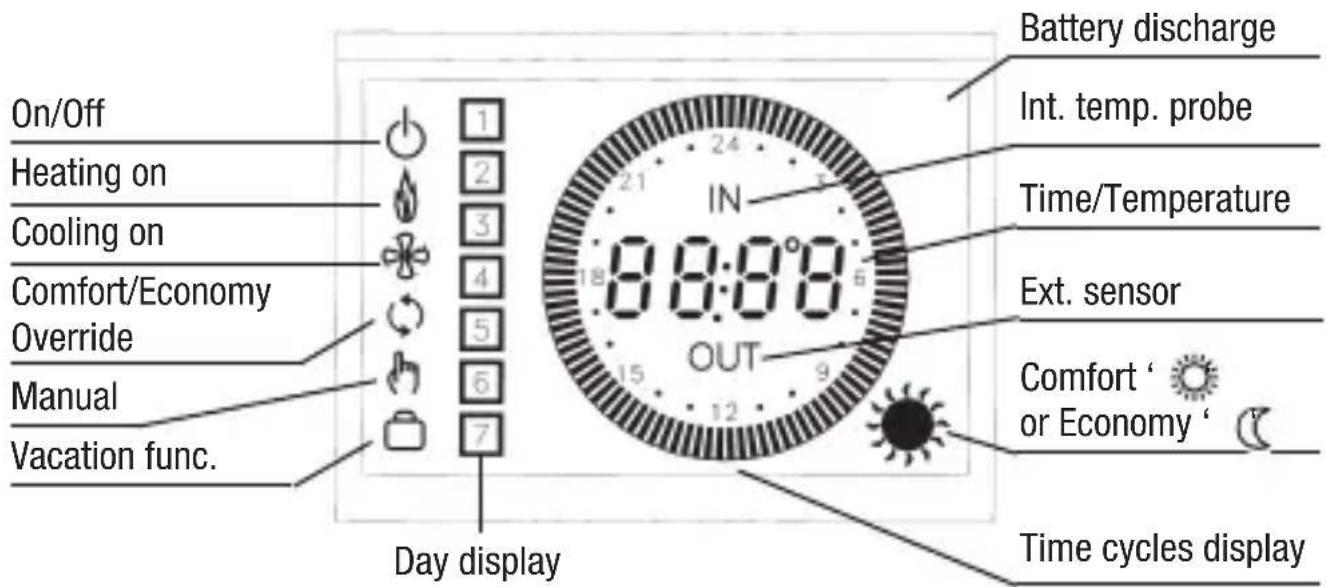
USE INSTRUCTIONS
First operation
At first operation insert the batteries respecting the polarity as Fig. 2 and perform a reset of the chronostat with a small tip through the hole (7).
Six buttons are present under the plastic door covering the batteries:
P → programming;
day, hour & minutes regulation;
OK' confirmation (5);
→ forward (4);
→ back (6);
'reset' → accessible through hole (7) for internal circuit and program reset.
Three buttons are on the front, close to the display (Fig. 5):
' (manual), ' (temperature-time), ' (On/Off).
Radio system set-up
The chronostat turns-on or turns-off a relay in the receiving unit (receiver) by a radio link. Before installing the chronostat in the desired position, it is necessary to test if the receiving unit correctly receives its radio signals. To do this the chronostat must be turned-on in the "Test" mode. The operation is described in the following.
Open the thermostat box removing the plastic back, use a small screwdriver, place it between the back panel and the chronostat's body as shown in (9) Fig. 10 then apply a slight pressure. In Fig. 11 is visible the appliance's internal layout. Set the appropriate address in the dip-switches (11), the address is split in two parts, "family" and "device".
The family address must match the family address set in the receiver unit, the device address must match one device address of one output channel of the receiver. Take into account that different thermostats used with the same receiving unit must operate with different device addresses to avoid data collision and malfunction. See receiver's documentation for further explanations.
If you are using a one-channel receiver, the address can be set randomly, but attention must be paid if more than one wireless thermostat are installed in the same building or in the close area, the address must be different.
Turn-on the receiving unit and position it close to the desired final place.
In the chronostat push down the microswitch N.1, it is located in the group of the additional functions microswitch in the back side (8) Fig. 10, this enables the "Test mode" operation. Make sure that the batteries are correctly inserted, do not use old or non-alkaline batteries. Now the chronostat is operating in 'Test' mode it continuously transmits On and Off signals to the receiver every about 3 seconds.
In the receiving unit the relevant relay output should continuously toggle between On and Off state, every 3 seconds. This output state in the receiver is also displayed by its led. If this happens the chronostat is correctly communicating with the receiver.
When positioning the chronostat in the desired room, ensure that they still communicate well, checking the relevant output which should be continuously toggled.
If the thermostat is placed too far from the receiver, the relevant relay output will not toggle and remain stuck in the On or Off state. In this case the chronostat should be positioned in another place, closer to the receiver or as far as possible from metal sheets or reinforced cement walls which could weaken the radio signals.
The signal power can be monitored in the receiver unit, please see the receiver instruction for more information.
Once the optimal position is found, push up the microswitch N.1, (8) Fig. 10 to stop the test and to enable the normal operation.
Note that in the normal operation the relay status in the receiver will be updated every about 3 minutes, so it is normal not to get an immediate response when changing the Comfort or Economy temperature setpoint, by moving the relevant knobs.
Close the chronostat by placing the plastic back and pushing it.
Proceed with the mechanical installation.
Installation
- Wall mount.
The adapting plate (Fig. 1), can be fixed using the screws and relevant shells included in the box or, alternatively, directly on the wall or on 3 modules junction boxes; on the plate will then be hooked the chronostat body, by placing it from the plastic back side and sliding it down.
In any case, in order to grant the electrical safety, it is mandatory to screw the chronostat body to the wall through the two screws supplied which must be mounted in the battery holder.
The chronostat must be located about 1,5m above the floor level, far from heat sources, doors and windows.
Electrical wirings
The chronostat does not need electric wirings, because it was developed to be a wireless chronostat.
However some terminals are available (10) Fig. 10 to connect in addition an external remote sensor input and a telephone interface.
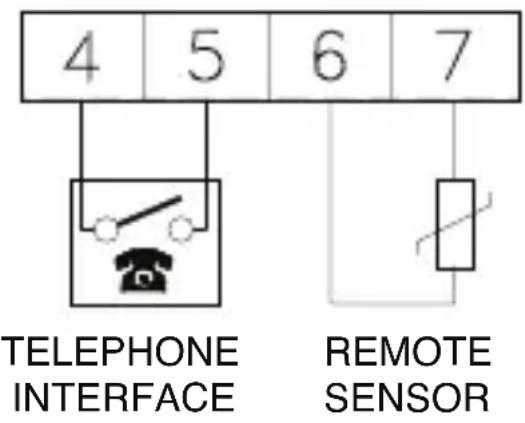
- 4 and 5: telephone interface (optional) for remote driving of the chronostat.
- 6 and 7: remote sensor (optional).
Clock adjustment
In order to set the clock of chronostat (Fig. 7), follow these steps:
- Open the plastic door covering batteries.
- Press the button 1 for at least 2 seconds.
- Set the day with buttons or .
- Confirm with button 'OK'.
- Adjust current hour with buttons '▲' or '▼'.
- Confirm with button 'OK'.
- Adjust current minutes with buttons or .
- Confirm with button 'OK'.
After 1 minute of inactivity on buttons, the chronostat will automatically exit the clock adjustment mode.
Heating / Cooling selection
Pressing for at least 3 seconds the button '▼' (back) the Heating mode is selected and the symbol ' appears.
Pressing for 3 seconds the button (forward), the Cooling mode is selected and the symbol 串
Programming mode
The selection of the programming mode is made through the buttons ‘▲’ (forward), ‘▼’ (back), ‘OK’ (confirmation) and ‘P’ (programming).
To enter the programming mode the button 'P' must be pressed for at least 2 seconds: the display will show one of the following day combination:
a) 1 2 3 4 5 Monday . Friday + 6 7 Saturday .. Sunday
b) 1 2 3 4 5 6 Monday ... Saturday + 7 Sunday
c) 1 2 3 4 5 6 7 Monday ... Sunday d) (vacation' function) luggage
e) 1 Monday Tuesday day by day program 2 3 Wednesday 4 Thursday 5 Friday 6 Saturday 7 Sunday
press Δ (forward) or (back) to change and OK to confirm.
Pressing the 'P' button, will exit the programming mode.
After the confirmation of the day combination (with 'OK' button), a time cycles combination will flash on the display.
Through the 4 buttons '▲' (forward), '▼' (back), 'OK' (confirmation) and 'P' (programming), combinations can be selected: (from 1 per day minimum, to 4 per day maximum):
a) 1 time cycle: 06:00 .... 23:00
b) 2 time cycles: 06:00 .... 08:00 17:00 .... 23:00
c) 3 time cycles: 06:00 ....... 08:00
11:00 ....... 13:00
17:00 ....... 23:00
d) 4 time cycles: 06:00 ....... 08:00
After confirming with 'OK' button the selected time cycle, it is possible to modify through buttons (forward), (back) and OK (confirmation), its start and end time with a minimum step of 15 minutes.
Figure 7 shows an example of how to set a range of time:
- Lit-up segments on display: Comfort temperature adjustment.
- Turned-off segments on display: Reduced temperature adjustment.
If you wish to set the central heating timer to operate within a certain time range according to comfort room temperature, it will be necessary to set up the device with all the segments lit-up within that range of time (the reference temperature is the one set on the comfort ‘ (sun). On the other hand, for the time ranges with turned-off segments, the central heating timer will operate according to the reduced room temperature (the reference temperature is the one set on the reduced ‘ (moon).
After setting up the first combinations of days and ranges of time, the set up will go on to the next possible combination.
Temperature setting
In order to set the comfort temperature, actuate on the hand grip marked with ‘ (sun), Fig. 4.; whereas actuate on the hand grip marked with ‘ (moon), Fig. 3, to set the reduced temperature.
Vacation program
If the 'Vacation' combination is selected, the symbol ' (luggage) will flash: pressing the 'OK' button (confirmation) it will be possible to set with buttons '▲' (forward) and '▼' (back) the number of hours (h. 00..95).Once reached the max hours number the display will automatically switch to days indication (d. 04..99). During this period the heating or cooling will be off (only the antifreeze function will remain active). When the antifreeze program is activated, the current hour or day will be included: in this case (but only in heating mode), the antifreeze temperature is displayed and can be modified with the buttons '▲' (forward) or '▼' (back).
Manual mode
Pressing the 'manual' button (1) the chronostat can be forced to operate in a different mode from the one set by the current program.
Pressing it once an 'override' function is activated: the temperature is regulated according to the opposite level (Comfort in place of Economy or vice versa) with respect to the one
currently selected by the program, until the next action of the program occurs. In this way the next action is 'anticipated' by this 'override' function.
The chronostat, will return in normal mode on the next action, the symbols ' (manual) and ' (override) will be on and the time cycles are visible.
In this mode the room temperature is still displayed.
Pressing twice the manual button, the chronostat will be forced in continuous 'Comfort' temperature mode, while pressing once again it will be forced in continuous 'Economy' temperature mode; symbols (manual), (sun) and (moon) will be on and the room temperature will be displayed.
If the manual button is pressed once again, the chronostat returns in normal mode.
Time / Temperature display
By pressing the '按钮 (3) you can display the current time; in case an external sensor is wired to the relevant terminals by repeatedly pressing the same button you can even display the internal (the label IN' appears on the display) or external temperature (the label OUT' appears).
In case no external sensor is wired to the terminals, the regulation is made with respect to the internal one.
On the other hand when an external sensor is wired, you can choose the reference sensor (internal or external) for the regulation by moving the relevant microswitch located on the thermostat back. See section "Additional functions".
Turn-on / Turn-off
The chronostat can be turned off by pressing the ' button (2) which (only for heating mode) will force the regulation at an adjustable temperature level between -5°C e 25°C through the '▲' (forward) and '▼' (back).
Additional functions
The presence of 4 microswitches located on the chronostat back (Fig. 10) gives access to some additional functions.
The chronostat is factory set with the microswitches in the following configuration:
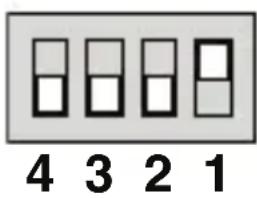
- ▲ Normal working.
Test mode working. - Optimization enabled.
Optimization disabled. - Time proportional regulation enabled.
Time proportional regulation disabled. - Regulation through external sensor.
Regulation with internal sensor.
1. Test mode
This microswitch in the lower position enables the 'Test' mode. In this mode the chronostat issues radio commands continuously for testing the communication with the receiver. The commands toggle the relevant relay in the receiver every 3 seconds. Once the set-up and tests are finished, set the microswitch in the upper position.
2. Optimization
The optimization function gives the chance to turn the heating on with a time advance with respect to the programmed time so that the user will actually have the desired temperature (that is the set one) at the programmed time. Actually the chronostat measures the time the environment needs to get to the desired temperature and, consequently, anticipates the programmed turn on by the time needed to get to this goal. The optimization can be activated by moving a microswitch located on the thermostat back: the time advance is calculated with respect to the average temperature gradient in the last 24 hours, with a maximum of 60 minutes time advance.
3. Time proportional operation
By moving this microswitch located on the rear of the chronostat the user can switch between the standard operation (on-off with an asymmetrical 0.2°C differential) and a time proportional operation with a band and intervention times that fit the most of civil environments.
4. Internal - External sensor selection
By moving this microswitch located on the rear of the chronostat the user can select as a reference sensor for the regulation either the internal sensor or the external (remote) one.
Batteries replacement
When on the display appears the 'symbol, batteries must be replaced.
In order to perform this operation proceed as:
- Open the plastic door covering the batteries.
- Remove old batteries with the help of a small tool.
- Place the new AA 1.5V batteries within 2 minutes after removing the flat batteries; after a two-minute period has elapsed check and/or reset the central heating timer.
- If the central heating timer seems to be malfunctioning, reset it by pushing the button (7); in this case all preset data are lost.
Available accessories
The following accessories are available as options (Fig. 8):
- Remote telephone interface);
- Remote sensor.
Through an interface wired to the telephone line the user can remotely drive a switching contact which, in turn, can force the chronostat to the Comfort mode, whichever the current state is. When the driving contact in the interface is released, the chronostat returns to the normal operation according to the current settings and temperature. When the telephone interface is activated the symbol ‘(manual) flashes on the display.
Technical features
Power supply: 2 × 1.5V = (AA type) alkaline
Battery lasting: ~ 1 year
Regulation range: Comfort: 10°C .. 30°C
Economy: 10° C .. 30° C
Temperature sampling: Every approx. 3 minutes
Differential: 0.2°C (asymm.: ex. 20.0°C off
19.8°C on - heating mode -
20.0°C off 20.2°C on - cooling mode - )
Sensor type: NTC 100k ohm @ 25°C
Accuracy: ± 1°C
Resolution: Readout: 0.1°C
Set-point: 0.2° C
Output power (ERP): 10dBm max.
Modulation: AM (ASK)
Antenna type: Internal
Max. distance from receiver: >300m in the open.
50mindoors
depending on the building and the room).
Protection grade: IP 30
Operating temperature: 0°C ... 40°C
Storage temperature: -10°C ... +50°C
Humidity limits: 20% .. 80% RH (non condensing)
Case:
Material: ABS V0 self-extinguishing
Cover color: Signal white (RAL 9003)
Base color: Anthracite grey (RAL 7016)
Size: 133 × 87 × 32 mm(W × H × D)
Weight: 227 gr.
Compliant with directives: EEC 89/336, 73/23, 93/68, 99/05
WARNING
1 To determine the right position ensure that the radio signals transmitted are correctly received by the receiving unit.
2 To adjust properly room temperature, install the thermostat far from heat sources, airstreams or particularly cold walls (thermal bridges).
When the remote sensor is used in conjunction with the thermostat, then this note is to be applied to the remote sensor itself.
3 For remote version all wirings must be made using wires with 1,5mm2 minimum section and no longer than 3m . Do not use same duct for signal wires and mains.
4 Installation and electrical wirings of this appliance must be made by qualified technicians and in compliance with the current standards.
5 Before wiring the appliance be sure to turn the mains power off.
In the view of a constant development of their products, the manufacturer reserves the right for changing technical data and features without prior notice. The consumer is guaranteed against any lack of conformity according to the European Directive 1999/44/EC as well as to the manufacturer's document about the warranty policy. The full text of warranty is available on request from the seller.
NOTE
NOTE
CHRONOTHERMOSTAT DIGITAL A PILES VIA RADIO FRANÇAIS
Résolution: Lecture: 0.1°C
Réglage: 0.2° C
Tip de sensor: NTC 100k ohm @ 25°C
Precisión: ±1°C
Resolution: Lectura: 0.1°C
Programacion: 0.2°C
Tipode sensor: NTC 100k ohm @ 25°C
Precisão: ±1°C
Conforme as diretivas: EEC 89/336, 73/23, 93/68, 99/05
ATENÇA O

- FIRST OPERATION
- RADIO SYSTEM SET-UP
- INSTALLATION
- WALL MOUNT
- ELECTRICAL WIRINGS
- CLOCK ADJUSTMENT
- HEATING / COOLING SELECTION
- PROGRAMMING MODE
- TEMPERATURE SETTING
- VACATION PROGRAM
- MANUAL MODE
- TIME / TEMPERATURE DISPLAY
- TURN-ON / TURN-OFF
- ADDITIONAL FUNCTIONS
- TEST MODE
- OPTIMIZATION
- TIME PROPORTIONAL OPERATION
- INTERNAL - EXTERNAL SENSOR SELECTION
- BATTERIES REPLACEMENT
- AVAILABLE ACCESSORIES
- TECHNICAL FEATURES
- WARNING
- NOTE
- CHRONOTHERMOSTAT DIGITAL A PILES VIA RADIO FRANÇAIS
- ATENÇA O
Brand : Seitron
Model : DCPA80BC
Category : Thermostat